
 Isotta Peira
Community ·
WordPress Credits is opening sponsorship tiers
WordPress Credits is a program of the WordPress FoundationWordPress Foundation The WordPress Foundation is a charitable organization founded by Matt Mullenweg to further the mission of the WordPress open source project: to democratize publishing through Open Source, GPL software. Find more on wordpressfoundation.org., a 501(c)(3) nonprofit, and it connects students at partner institutions with real contribution work on the WordPress project. We began with eight partner institutions, and in our first year we have worked across 17 countries and reached over 900 students. If you want to watch it happen, the WP Credits dashboard refreshes weekly from our program records and WordPress.orgWordPress.org The community site where WordPress code is created and shared by the users. This is where you can download the source code for WordPress core, plugins and themes as well as the central location for community conversations and organization. https://wordpress.org/ profiles.
That growth is the reason for this post. The program has reached the point where curriculum, translation, tooling, and the work of bringing new institutions on board all need steady funding behind them, and our current sponsorship setup was never designed for that. So we’re piloting new ways to support the program and the students, from in-kind mentorship through to funding an entire program. This is a test for 2027: we’ll run it, publish what we learn, and adjust or retire what doesn’t work.
Thank you to the sponsors who got us here
Weglot and Automattic have supported this program since it was an idea on a page, sponsoring the people who have designed, built, and worked to ensure the program improves and adapts to the needs of students and the community. Along with WPBakery, Hostinger, DreamHost, Hosting.com, Raiola Networks, Cloud86, Smarthost, Villa Sostaga, Elementor, miniOrange, and Novamira, they have also sponsored mentorsEvent Supporter Event Supporter (formerly Mentor) is someone who has already organised a WordCamp and has time to meet with their assigned mentee every 2 weeks, they talk over where they should be in their timeline, help them to identify their issues, and also identify solutions for their issues. who guide students, and contributed products that students use throughout the program. Mentors sponsored through Five for the Future have done the daily work of guiding students, cohort after cohort. None of the numbers above would exist without them, and the tiers below are built on what they made possible.
The tiers
Our community is vibrant and evolving, and we love stepping into new territory: trying, adjusting, and learning from what works and what doesn’t. That’s what has allowed a community more than 20 years old to evolve, overcome a global pandemic, and thrive. Starting in 2027, we’ll pilot the following tiers and refine them as we learn. These tiers cover WordPress Credits, and WordPress Campus Connect events stay separate from them.
| Friend | Supporter | Backer | Champion | Partner | |
| Annual | In-kind (5ftF) | $5,000 | $10,000 | $15,000 | $30,000+ |
| Name on the partner page | ✓ | ✓ | ✓ | ✓ | ✓ |
| Mention in the mentorEvent Supporter Event Supporter (formerly Mentor) is someone who has already organised a WordCamp and has time to meet with their assigned mentee every 2 weeks, they talk over where they should be in their timeline, help them to identify their issues, and also identify solutions for their issues. feature | ✓ | ✓ | ✓ | ✓ | ✓ |
| Acknowledged in the sponsor thank you post | ✓ | ✓ | ✓ | ✓ | ✓ |
| Logo and description on the partner page | ✓ | ✓ | ✓ | ✓ | |
| Badge for your own site | ✓ | ✓ | ✓ | ✓ | |
| Annual program report | ✓ | ✓ | ✓ | ✓ | |
| Named for what you fund in program communications | ✓ | ✓ | ✓ | ||
| Report covering that cost line | ✓ | ✓ | ✓ | ||
| A self-written educational post about the sponsored product* | ✓ | ✓ | ✓ | ||
| An additional self-written sponsor post with factual, value-neutral information about additional products* | ✓ | ✓ | |||
| Invitation to the annual education partners session | ✓ | ✓ | |||
| Co-hosted webinar or event | ✓ | ✓ | |||
| Named as program partner on the program you fund | ✓ | ||||
| Named in launch communications | ✓ | ||||
| Program-specific report | ✓ |
*Sponsor posts are drafted by the company and published on wordpresseducation.org once the education team has reviewed them, so that everything we publish stays useful to students first.
Expand this section to read the list of the tiers instead of a table
- Friend, in-kind through Five for the Future. For companies sponsoring mentors through Five for the Future. Company name on the partner page at wordpresseducation.org, a mention in the mentor feature, and acknowledgement in the sponsor thank you post.
- Supporter, $5,000 a year. Everything above, plus logo and description on the partner page, a badge for your own site, and the annual program report.
- Backer, $10,000 a year. Everything above, plus being named for the specific part of the program you fund, a report covering that cost line, and a self-written educational post about the sponsored product on wordpresseducation.org.
- Champion, $15,000 a year. Everything above, plus an additional self-written post with factual, value-neutral information about additional products, an invitation to our annual education partners session, and a webinar or event co-hosted with the education program.
- Partner, from $30,000 a year. Everything above, plus funding a named program end to end, with the exclusive program partner role, a mention in launch communications, and a report specific to that program.
Products donated for student use
Separately from the tiers, sponsors at any level may offer free access to their products for students to use in the program, and the Foundation decides how those are shared. Donated products are offered at no cost to students, require no card details to use, and come with a way for students to export or move their work so nobody is locked in.
Donations may be tax deductible to the extent allowed by law, less the value of any benefits received, and we will note that value in your acknowledgment letter. Donated products and services are not tax deductible. Please check with your own tax advisor.
What the Partner tier makes possible
This is the tier we most want people to look at. A Partner sponsorship funds a complete, named program, the kind we haven’t been able to build yet because we’ve always had to work within what we could afford, which means we can build programs around real needs rather than available budgets. That could be students translating WordPress into languages with thin coverage, students working on accessibilityAccessibility Accessibility (commonly shortened to a11y) refers to the design of products, devices, services, or environments for people with disabilities. The concept of accessible design ensures both “direct access” (i.e. unassisted) and “indirect access” meaning compatibility with a person’s assistive technology (for example, computer screen readers). (https://en.wikipedia.org/wiki/Accessibility), or students building sites for nonprofit organizations that could not otherwise commission them, and those are only the first ideas we came up with, so there is plenty of room for others. If you see a need in the ecosystem that students could help meet, we would rather shape the program with you than hand you a list to choose from.
A Partner sponsor is named as program partner on the program they fund, holds the exclusive role within that program, is named in launch communications, and receives a report specific to that program.
Choosing a tier
A program managerProgram Manager Program Managers (formerly Super Deputies) are Program Supporters who can perform extra tasks on WordCamp.org like creating new sites and publishing WordCamps to the schedule. is reaching out to every current sponsor over the coming days to talk through which tier fits, and to make sure nobody ends up in a tier that asks more of them than they intended. If you sponsor the program today, you will hear from us directly, so there is nothing you need to do.
If your company is not yet involved and you would like to be, the application form is here.
We are glad to talk it through first if that is easier. You can find us in the #wpcredits channel in the Make WordPress SlackSlack Slack is a Collaborative Group Chat Platform https://slack.com/. The WordPress community has its own Slack Channel at https://make.wordpress.org/chat/, or send us an email at education@wordpressfoundation.org, and we’re always happy to answer questions before you commit.
#wpcredits Krupa Nanda
Accessibility ·
Accessibility Team Meeting Agenda: October 22, 2026
This is the proposed agenda for the bi-weekly AccessibilityAccessibility Accessibility (commonly shortened to a11y) refers to the design of products, devices, services, or environments for people with disabilities. The concept of accessible design ensures both “direct access” (i.e. unassisted) and “indirect access” meaning compatibility with a person’s assistive technology (for example, computer screen readers). (https://en.wikipedia.org/wiki/Accessibility) Team meeting on Thursday, October 22, 2026 at 08:30 PM GMT+5:30
📣 Announcements
- WordPress 7.2 Beta 1 was released on October 20th, 2026
- Beta 2 scheduled for October 27th
- Roadmap to 7.2
- Help Test WordPress 7.2
- Introducing Ipsum, the new default theme
- WordPress 7.1 “Mary Lou” Retrospective
- RTC: A Guide to Sync Engines
Working groups
- WordPress CoreCore Core is the set of software required to run WordPress. The Core Development Team builds WordPress. and the BlockBlock Block is the abstract term used to describe units of markup that, composed together, form the content or layout of a webpage using the WordPress editor. The idea combines concepts of what in the past may have achieved with shortcodes, custom HTML, and embed discovery into a single consistent API and user experience. Editor
- Accessibility-ready Program
- Documentation about Web Accessibility
Open floor
If you want to have a topic added to the agenda, please mention it in the comments of this post.
The Accessibility Team bug scrub is every Tuesday at 16:00 UTC, held in the #accessibility channel on the Make WordPress SlackSlack Slack is a Collaborative Group Chat Platform https://slack.com/. The WordPress community has its own Slack Channel at https://make.wordpress.org/chat/ (registration required).
 Harmony Romo
Community ·
WPCC event payment arrangement in Indonesia
Most WordPress Campus Connect (WPCC) events in Indonesia are organized by universities and schools that are new to WordPress and to the Community Program. To keep payments simple for them, we’ve set up a local payment arrangement is being shared here for transparency.
Why a local approach
- Events in Indonesia can’t use CampTix, and international wire transfers are a poor fit for small local vendor payments.
- Until now, events have relied on the Lead Organizer’s bank account or local sponsorships
- New organizers shouldn’t have to front costs from their own pockets or take on that financial overhead for a first event.
The payment process
WordPress Community SupportWordPress Community Support WordPress Community Support PBC is a Public Benefit Corporation, created specifically to be the financial and legal support for WordCamps, WordPress Meetup groups, and any additional “official” events organized within the WordPress Community Events program. (WPCSWordPress Community Support WordPress Community Support PBC is a Public Benefit Corporation, created specifically to be the financial and legal support for WordCamps, WordPress Meetup groups, and any additional “official” events organized within the WordPress Community Events program.) funds are graciously being held locally by @devinmaeztri, a Indonesian WPCC event mentorEvent Supporter Event Supporter (formerly Mentor) is someone who has already organised a WordCamp and has time to meet with their assigned mentee every 2 weeks, they talk over where they should be in their timeline, help them to identify their issues, and also identify solutions for their issues., who pays vendors in IDR on behalf of each event.
- The organizer sends the mentor the vendor’s invoice and payment details.
- The mentor pays the vendor.
- The organizer submits a Vendor Payment request which is verified and marked as Payment Sent with a note that it was paid locally
- The mentor records each payment in spreadsheet with the date, event, item, payee, and status. WPCS has access to the ledger for tracking purposes.
What success looks like
Every event runs its sessions with no finance issues, and all items are reported in line with the WordCamp Organizer Handbook: Budget and Finances.
This setup is specific to WPCC events in Indonesia. Any questions or feedback is welcome in the comments.
 devbogdan
Polyglots ·
Hello Polyglots team!
## Update — October 21, 2026: Translation Review Request Withdrawn
Hello Polyglots teamPolyglots Team Polyglots Team is a group of multilingual translators who work on translating plugins, themes, documentation, and front-facing marketing copy. https://make.wordpress.org/polyglots/teams/!
Thank you for your feedback and for explaining the translation review process.
I understand the concerns raised about submitting large numbers of AI-generated translations without independent human proofreading. I apologize for the inappropriate workload this request could have placed on volunteer contributors.
**I am withdrawing my original multi-localeLocale Locale = language version, often a combination of a language code and a region code, for instance es_MX denotes Spanish as it’s used in Mexico. A list of all locales supported by WordPress in https://make.wordpress.org/polyglots/teams/ review request.**
Going forward, I will focus on languages where I can ensure proper quality control and arrange qualified human proofreading before requesting validation for other localesLocale Locale = language version, often a combination of a language code and a region code, for instance es_MX denotes Spanish as it’s used in Mexico. A list of all locales supported by WordPress in https://make.wordpress.org/polyglots/teams/.
I understand that machine-generated translations must be reviewed by a fluent speaker and follow the relevant locale’s glossary and style guidelines before submission.
**PluginPlugin A plugin is a piece of software containing a group of functions that can be added to a WordPress website. They can extend functionality or add new features to your WordPress websites. WordPress plugins are written in the PHP programming language and integrate seamlessly with WordPress. These can be free in the WordPress.org Plugin Directory https://wordpress.org/plugins/ or can be cost-based plugin from a third-party.:**
- https://wordpress.org/plugins/krok-llms-transit/
**Translation project:**
- https://translate.wordpress.org/projects/wp-plugins/krok-llms-transit/
Thank you for your guidance, patience, and continued contributions to the WordPress community!

Hi @devbogdan
You were correct when you commented “I understand that native-speaker proofreading may be needed before approval.”
It isn’t sustainable to throw machine translations at the unpaid volunteer contributors, expecting them to clear, review, and/or fix everything.
I’d suggest that you limit your request to target languages you personally know really well. For now, I’m removing the to-do status of this post.
You can find some ideas on how to proceed here: https://make.wordpress.org/polyglots/handbook/plugin-theme-authors-guide/

Hi Tobi,
Thank you for your feedback and for pointing me to the guidelines.
I understand your concerns, and I apologize for submitting such a large number of AI-assisted translations without proper human proofreading.
I did not intend to place that workload on volunteer contributors.
I’ll reconsider the localization approach, focus on languages where I can ensure proper quality control, and arrange qualified human review for other languages before requesting approval.
Thank you for your time and guidance!

Bonjour @devbogdan
The French translation team will do its best to process your request as soon as possible. You can find more info on how we handle PTE requests.
Can you also get in touch with us on the French Slack, in the #traductions channel, using our direct invitation link? We have a few recommendations to share before granting PTE access. Please also keep in mind the French Glossary and Guidelines in our Handbook.
A note on AI-generated translations
PTE is a quality-assurance role, not a publishing shortcut. We do not grant it for translations bulk-generated with an LLM or MT and not reviewed by a French speaker, and we don’t review them on your behalf: it takes far more effort than our volunteers can absorb.
If this is your case, please remove your request for the FR locale.
If you use AI as a starting point, the translations must be checked by a competent French speaker (you or a professional translator) before you request PTE, and the LLM should be given our glossary and style guide. If a professional reviewed them, please tell us who and let us contact them.
Merci
Bonjour,
Thank you for your detailed explanation and guidance.
I understand that PTE access requires demonstrated translation quality and that AI-generated translations must be reviewed by a competent French speaker.
At this stage, the French translations have not received independent human proofreading, so I will withdraw the French locale from my current review request.
I will revisit the French localization once I can arrange proper proofreading according to your glossary and guidelines.
Thank you for your time and understanding!
Merci beaucoup!

@devbogdan The Arabic team is small, and we do not provide review services because we must focus on the community projects.
In addition, we do not review AI-generated translations that have not been reviewed by an expert native human reviewer.
Hi Fakhri,
Thank you for clarifying the Arabic team’s policy.
I completely understand your position and respect the limited time available to volunteer contributors.
I will not request approval of the Arabic translations until they have been properly reviewed by a qualified Arabic-speaking translator.
Thank you for your response and for your work in the WordPress community!

checked, approved for #ru_RU
Thank you very much for reviewing and approving the Russian translations!
I really appreciate your time and contribution to the project.

tr_TR approved
 frankie73
Polyglots ·
PTE Request for Prismalytics
I am the pluginPlugin A plugin is a piece of software containing a group of functions that can be added to a WordPress website. They can extend functionality or add new features to your WordPress websites. WordPress plugins are written in the PHP programming language and integrate seamlessly with WordPress. These can be free in the WordPress.org Plugin Directory https://wordpress.org/plugins/ or can be cost-based plugin from a third-party. author for Prismalytics. The plugin’s admin UIUI UI is an acronym for User Interface – the layout of the page the user interacts with. Think ‘how are they doing that’ and less about what they are doing. stringsString A string is a translatable part of the software. A translation consists of a multitude of localized strings. are Russian, and I would like to maintain the Russian translation set on translate.wordpress.orgtranslate.wordpress.org The platform for contributing to the translation of WordPress core, themes and plugins. (importing and approving translations for the ru_RU localeLocale Locale = language version, often a combination of a language code and a region code, for instance es_MX denotes Spanish as it’s used in Mexico. A list of all locales supported by WordPress in https://make.wordpress.org/polyglots/teams/).
Please add the following WordPress.orgWordPress.org The community site where WordPress code is created and shared by the users. This is where you can download the source code for WordPress core, plugins and themes as well as the central location for community conversations and organization. https://wordpress.org/ user as translation editorTranslation Editor Translation editors can approve translations for projects. The GTE (General Translation Editor) and LM (Locale Manager) roles can add new users with the “Project Translation Editor” role that can approve translations for specific projects. There are two different Translation Editor roles: General Translation Editor and Project Translation Editor for the respective locale:
- https://wordpress.org/plugins/prismalytics/
I am a native Russian speaker and the plugin’s primary audience is Russian-speaking WordPress users. I will follow the ru_RU team’s glossary and style guides. If you have any questions, just comment here. Thank you!
No strings suggested while requesting PTE for first time.
https://translate.wordpress.org/locale/ru/default/wp-plugins/prismalytics/

Hi Yui, thanks for the pointer! I’m the plugin author (frankie73). I’ve prepared the full Russian translation as a ready .po file (all Development strings):
https://plugins.svn.wordpress.org/prismalytics/assets/prismalytics-ru_RU.po
Could you please import it into the project (translate.wordpress.org/locale/ru/default/wp-plugins/prismalytics/)? After the import I’d like to re-request PTE to maintain the translations myself in future releases.
Thank you!
 Topher
Photos ·
Presenting the PhotoFetch plugin
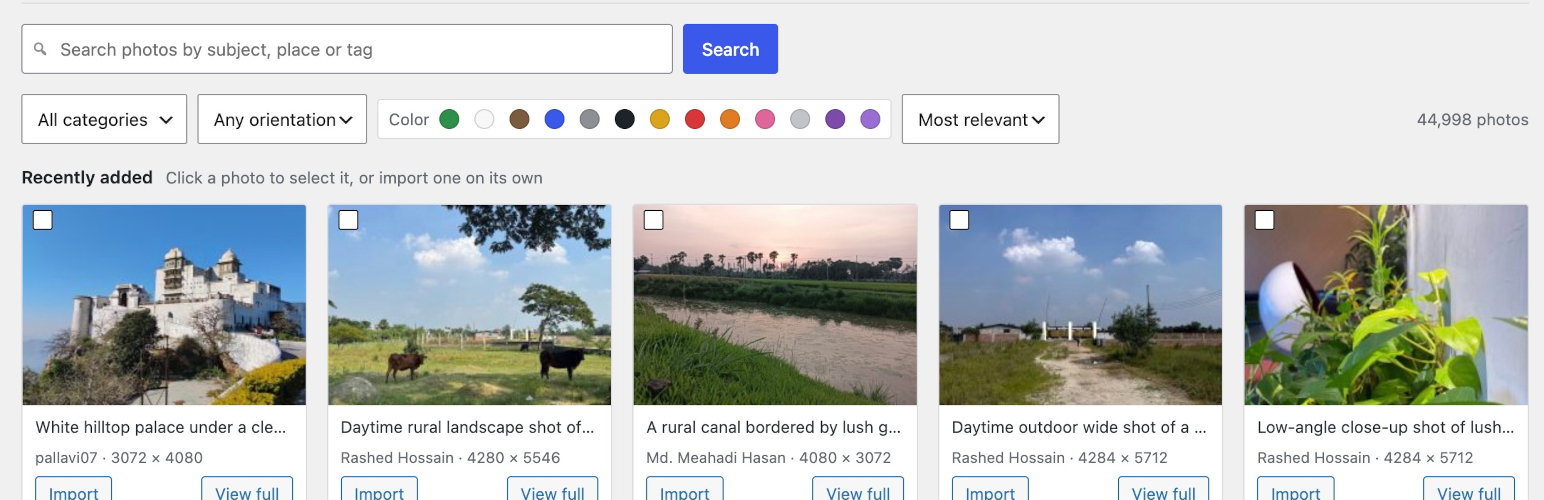
It has a UIUI UI is an acronym for User Interface – the layout of the page the user interacts with. Think ‘how are they doing that’ and less about what they are doing. under the Media Library menu for simply searching and importing, but it also integrates with the media chooser library in the editor, alongside the Media Library tab.
PhotoFetch is a new WordPress pluginPlugin A plugin is a piece of software containing a group of functions that can be added to a WordPress website. They can extend functionality or add new features to your WordPress websites. WordPress plugins are written in the PHP programming language and integrate seamlessly with WordPress. These can be free in the WordPress.org Plugin Directory https://wordpress.org/plugins/ or can be cost-based plugin from a third-party. recently released on the WordPress.orgWordPress.org The community site where WordPress code is created and shared by the users. This is where you can download the source code for WordPress core, plugins and themes as well as the central location for community conversations and organization. https://wordpress.org/ plugin repository. It’s integrates a user interface into WordPress to allow editors to search for photos on the WordPress Photo Directory site and import them into the Media Library.
Install PhotoFech from the WordPress Plugin Directory
This plugin was built by a team of people at WordCampUS 2026 as part of Contributor Day.
- Kamran Abdul Aziz
- veeeharris
- Matt Galdino
- Taylor Elizabeth Rose
- Topher
- Guste Cibulskyte
- Michelle Frechette
Michelle came up with the idea and proposed it, and Topher did some initial research to see if it was feasible. Then we spent the day working on features, writing docs, and testing vigorously.
If you use it, please let us know!
 Amy Kamala
Hosting ·
Hosting Team Meeting Agenda 2026-10-21
Next Meeting
The next meetings will be in the #hosting SlackSlack Slack is a Collaborative Group Chat Platform https://slack.com/. The WordPress community has its own Slack Channel at https://make.wordpress.org/chat/ channel on Wednesday, October 21, 2026 at 0900 UTC and Wednesday, October 21, 2026 at 1800 UTC. Hope to see you there!
Agenda
- WordPress 7.2 Beta 1 released October 20, 2026
- Beta 2 scheduled for October 27th
- tickets/PRs
Anything else? Please leave a comment with any additions or suggestions for the meeting.
Props to @kirasong for the pre-publish review!
Amy Kamala
Core ·
Dev Chat Agenda – October 21, 2026
The next WordPress Developers Chat will take place on Wednesday, October 21, 2026, at 15:00 UTC in the core channel on Make WordPress Slack.
The live meeting focuses on upcoming releases and CoreCore Core is the set of software required to run WordPress. The Core Development Team builds WordPress. development, with time for discussions and open floor.
If you have requests for help with a ticketticket Created for both bug reports and feature development on the bug tracker. or another discussion topic, please post details in the comments section at the end of this agenda, or bring it up in Dev Chat during open floor.
Announcements 📢
WordPress 7.2
- WordPress 7.2 Beta 1 released October 20th, 2026
- Beta 2 scheduled for October 27th
General
- Call for Code Review Help: Repairing Gutenberg GitHub Actions Workflows for wp/x.y Branches
- WordPress 7.1 “Mary Lou” Retrospective
- What’s new in Gutenberg 24.2? (14 October)
- RTC: A Guide to Sync Engines
Discussions 💬
The discussion section of the agenda is for discussing important topics affecting the upcoming release or larger initiatives that impact the Core Team. To nominate a topic for discussion, please leave a comment on this agenda with a summary of the topic, any relevant links that will help people get context for the discussion, and what kind of feedback you are looking for from others participating in the discussion.
Open floor 🎙️
Any topic can be raised for discussion in the comments, as well as requests for assistance on tickets. Tickets in the milestone for the next major or maintenance release will be prioritized.
Please include details of tickets / PRs and the links in the comments, and indicate whether you intend to be available during the meeting for discussion or will be async.
Props to @kirasong for review.
 Velda
Community ·
Community Inboxes are now on FreeScout
Thanks to @obenland and the team, the migration from Help Scout to FreeScout is complete for all Community team inboxes.
Please start using FreeScout for your community team work now: https://freescout.wordpress.net/
What to know
- Use filtered views instead of search: MetaMeta Meta is a term that refers to the inside workings of a group. For us, this is the team that works on internal WordPress sites like WordCamp Central and Make WordPress. is working to get the search fast and effective. Until then, use the filtered views we’ve created, or you can also try searching within a tag.
- Documentation is updated: We’ve updated text and screenshots that referred to Help Scout, but if you see anything we’ve missed, please update or flag it.
- You can use old Help Scout links to find conversations in FreeScout.
Finding & Using the Conversation ID:
- Grab the conversation ID from the old link. It’s at the end of the URLURL A specific web address of a website or web page on the Internet, such as a website’s URL www.wordpress.org, or just before
?viewIdif one exists. - Paste it at the end of this URL:
https://freescout.wordpress.net/search?q=%23
For example:
Old link: https://secure.helpscout.net/conversation/3483220102/1139127?viewId=abc
ID: 1139127
New link: https://freescout.wordpress.net/search?q=%231139127
That loads the conversation in FreeScout with its new URL, so you can update the old reference.
Questions?
If you have questions about using FreeScout for Community team work, ask in the #community-team channel on SlackSlack Slack is a Collaborative Group Chat Platform https://slack.com/. The WordPress community has its own Slack Channel at https://make.wordpress.org/chat/.

Congratulations on completing the migration, and best wishes for the continued improvement of the Community team’s workflow!
Does this migration cover all Help Scout inboxes or only the Community team inboxes? For example, I was previously using the Learn WordPress inbox in Help Scout. Should we now use FreeScout for Learn WordPress as well, or is that inbox still being migrated?

Hello,
The schedule is available in this post: https://make.wordpress.org/meta/2026/10/02/heads-up-helpscout-to-freescout-migration/
LearnWP seems to be planned.
 Aditya Dhade
Core ·
Performance Chat Summary: 20 October 2026
The full chat log is available beginning here on Slack.
WordPress Performance TracTrac An open source project by Edgewall Software that serves as a bug tracker and project management tool for WordPress. tickets
- @westonruter shared that, as of r64585, eliminating script/style concatenation has landed in WordPress and is included in the 7.2-beta1 release. This retires the use of
load-scripts.phpandload-styles.phpand closed more than 10 Trac tickets, several of which were over 10 years old.- Script/style concatenation was only used in the login/adminadmin (and super admin) for coreCore Core is the set of software required to run WordPress. The Core Development Team builds WordPress.’s own assets. It served its purpose, especially for HTTPHTTP HTTP is an acronym for Hyper Text Transfer Protocol. HTTP is the underlying protocol used by the World Wide Web and this protocol defines how messages are formatted and transmitted, and what actions Web servers and browsers should take in response to various commands./1.1, but WordPress 7.2 will use a more modern and performant approach where blocking scripts and styles known to be used on the next screen are prefetched. This approach landed recently in r64120.
Our next chat will be held on Tuesday, November 3, 2026 at 16:00 UTC in the #core-performance channel in Slack.
Teams
-
Core
The coreCore Core is the set of software required to run WordPress. The Core Development Team builds WordPress. team makes WordPress. Whether you’re a seasoned PHPPHP PHP (recursive acronym for PHP: Hypertext Preprocessor) is a widely-used open source general-purpose scripting language that is especially suited for web development and can be embedded into HTML. https://www.php.net/manual/en/index.php, HTMLHTML HTML is an acronym for Hyper Text Markup Language. It is a markup language that is used in the development of web pages and websites., JavaScriptJavaScript JavaScript or JS is an object-oriented computer programming language commonly used to create interactive effects within web browsers. WordPress makes extensive use of JS for a better user experience. While PHP is executed on the server, JS executes within a user’s browser. https://www.javascript.com or CSSCSS CSS is an acronym for cascading style sheets. This is what controls the design or look and feel of a site. developer or are just learning to code, we’d love to have you on board. You can write code, fix bugs, debate decisions, and help with development.
-
Design
The design group is focused on the designing and developing the user interface. It’s a home for designers and UXers alike. There are regular discussions about mockups, design, and user testing.
-
Mobile
The mobile team builds the iOSiOS The operating system used on iPhones and iPads. and Android apps. Lend them your Kotlin, Swift, or ReactReact React is a JavaScript library that makes it easy to reason about, construct, and maintain stateless and stateful user interfaces. https://reactjs.org Native skills. The team also needs designers, UXUX UX is an acronym for User Experience – the way the user uses the UI. Think ‘what they are doing’ and less about how they do it. experts, and testers to give users a smooth experience on every device.
-
Accessibility
The a11yAccessibility Accessibility (commonly shortened to a11y) refers to the design of products, devices, services, or environments for people with disabilities. The concept of accessible design ensures both “direct access” (i.e. unassisted) and “indirect access” meaning compatibility with a person’s assistive technology (for example, computer screen readers). (https://en.wikipedia.org/wiki/Accessibility) group provides accessibilityAccessibility Accessibility (commonly shortened to a11y) refers to the design of products, devices, services, or environments for people with disabilities. The concept of accessible design ensures both “direct access” (i.e. unassisted) and “indirect access” meaning compatibility with a person’s assistive technology (for example, computer screen readers). (https://en.wikipedia.org/wiki/Accessibility) expertise across the project. They make sure that WordPress coreCore Core is the set of software required to run WordPress. The Core Development Team builds WordPress. and all of WordPress’ resources are accessible.
-
Polyglots
WordPress is used all over the world in many different languages. If you’re a polyglot, you can help by translating WordPress into your own language or contributing to the GlotPress project, making translations easier and more effective for everyone.
-
Support
Answering questions in the support forums, IRC, or SlackSlack Slack is a Collaborative Group Chat Platform https://slack.com/. The WordPress community has its own Slack Channel at https://make.wordpress.org/chat/ is one of the easiest ways to start contributing. Everyone knows the answer to something! Since the forums run on bbPress, you can also contribute by helping make the software behind them even better.
-
Documentation
Good documentation lets people help themselves when they get stuck. The docs team is responsible for creating documentation and is always on the look-out for writers. The blog has discussion around the team’s current projects.
-
Themes
The Theme Review Team reviews and approves every Theme submitted to the WordPress Theme repository. Reviewing Themes sharpens your own Theme development skills. You can help out and join the discussion on the blog.
-
Plugins
If you are a PluginPlugin A plugin is a piece of software containing a group of functions that can be added to a WordPress website. They can extend functionality or add new features to your WordPress websites. WordPress plugins are written in the PHP programming language and integrate seamlessly with WordPress. These can be free in the WordPress.org Plugin Directory https://wordpress.org/plugins/ or can be cost-based plugin from a third-party. developer, subscribe to the Plugin review team blog to keep up with the latest updates, find resources, and learn about any issues around Plugin development.
-
Community
If you’re interested in organizing a meetupMeetup All local/regional gatherings that are officially a part of the WordPress world but are not WordCamps are organized through https://www.meetup.com/. A meetup is typically a chance for local WordPress users to get together and share new ideas and seek help from one another. Searching for ‘WordPress’ on meetup.com will help you find options in your area. or a WordCampWordCamp WordCamps are casual, locally-organized conferences covering everything related to WordPress. They’re one of the places where the WordPress community comes together to teach one another what they’ve learned throughout the year and share the joy. Learn more., the community blog is a great place to get started. There are groups working to support events, to create outreach and training programs, and generally support the community.
-
Training
The WordPress training team helps people learn to use, extend, and contribute to WordPress through synchronous and asynchronous learning as well as downloadable lesson plans for instructors to use in live environments, via learn.wordpress.org.
If you enjoy teaching people how to use and build stuff for WordPress, immediately stop what you’re doing and join our team!
-
Test
The Test Team works to improve WordPress quality and usability by advancing the development process through manual and automated testing. Whether through a browser, app, terminal, or code, the team focuses on testing across the entire WordPress ecosystem, including CoreCore Core is the set of software required to run WordPress. The Core Development Team builds WordPress. and GutenbergGutenberg The Gutenberg project is the new Editor Interface for WordPress. The editor improves the process and experience of creating new content, making writing rich content much simpler. It uses ‘blocks’ to add richness rather than shortcodes, custom HTML etc. https://wordpress.org/gutenberg/, mobile apps and themes, and feature plugins and importers.
-
TV
The TV team reviews and approves every video submitted to WordPress.tv. They also help WordCamps with video post-production and are responsible for the captioning and subtitling of published videos. Reviewing videos is a great way to learn about WordPress and help the community: experience is not required to get involved.
-
Marketing
The Marketing team is currently archived to make room for an experimental shift in focus and processes. Check out the WordPress Media Corps to learn more. Amplification requests and Showcase activities are still running, and you can find out more about them on GitHub.
-
CLI
WP-CLIWP-CLI WP-CLI is the Command Line Interface for WordPress, used to do administrative and development tasks in a programmatic way. The project page is http://wp-cli.org/ https://make.wordpress.org/cli/ is the official command line tool for interacting with and managing your WordPress sites.
-
Hosting
The Hosting team maintains distributed testing software that tests pre-release versions of WordPress on hosting systems, and infrastructure-focused documentation.
-
Tide
Tide is a series of automated tests run against every pluginPlugin A plugin is a piece of software containing a group of functions that can be added to a WordPress website. They can extend functionality or add new features to your WordPress websites. WordPress plugins are written in the PHP programming language and integrate seamlessly with WordPress. These can be free in the WordPress.org Plugin Directory https://wordpress.org/plugins/ or can be cost-based plugin from a third-party. and theme in the directory and then displays PHPPHP PHP (recursive acronym for PHP: Hypertext Preprocessor) is a widely-used open source general-purpose scripting language that is especially suited for web development and can be embedded into HTML. https://www.php.net/manual/en/index.php compatibility and test errors/warnings in the directory.
-
Openverse
Openverse is a search engine for openly-licensed media. The Openverse team implements new features and new media types; maintains the public APIAPI An API or Application Programming Interface is a software intermediary that allows programs to interact with each other and share data in limited, clearly defined ways. and front-end search engine; and develops WordPress integrations to share Openverse with the entire WordPress community.
-
Photos
The Photo Directory team moderates every photo submitted to the WordPress Photo Directory, maintains and improves the directory site itself, and provides resources and documentation to educate, encourage, and facilitate photo contributors.
-
Core Performance
The coreCore Core is the set of software required to run WordPress. The Core Development Team builds WordPress. performance team is dedicated to monitoring, enhancing, and promoting performance in WordPress core and its surrounding ecosystem.
-
Playground
The Playground team works on WordPress Playground: the platform that lets you run WordPress instantly on any device without a host, most often in a browser.
-
Core AI
The CoreCore Core is the set of software required to run WordPress. The Core Development Team builds WordPress. AI Team coordinates and accelerates AI efforts across the project, focusing on responsible innovation that aligns with WordPress values. We use a pluginPlugin A plugin is a piece of software containing a group of functions that can be added to a WordPress website. They can extend functionality or add new features to your WordPress websites. WordPress plugins are written in the PHP programming language and integrate seamlessly with WordPress. These can be free in the WordPress.org Plugin Directory https://wordpress.org/plugins/ or can be cost-based plugin from a third-party.-first approach to explore AI-powered features, share a public roadmap, and collaborate with other teams.
-
Core Program
The CoreCore Core is the set of software required to run WordPress. The Core Development Team builds WordPress. Program team is focused on strengthening coordination across teams, improving efficiency and empowering contribution. It’s a home for those who span across product and project work.
Not sure which team to contribute to?
Check out our contributor wizard and find how to get started.
Shape the future of WordPress
Become a Five for the Future participant.
Mary Hubbard
How are we actually thinking about the cost of campus connect? Campus Connect is one of the larger expenses and the way students really start to connect with the program. @harmonyromo how would this work?
Reply
Isotta Peira
Campus Connect has been run under the event program so far (like WordCamps), but these are actually educational events, right? Could their costs be covered by this funding, @harmonyromo? I remember @webtechpooja mentioning more than once that WPCC could really use financial help to reach more students and cover their cost. The team tried to bring more sponsorship in but I don’t believe it was as successful as they had hoped.
Reply
Harmony Romo
I completely agree that WordPress Campus Connect (“WPCC”) is an educational program, and this program format deserves more funding. We are seeing it expand exponentially this year. Total WPCC events have surpassed WordCamps in 2026 with a total of 72 closed WPCC events and 46 local WordCamps with a total estimated number of ~10,000 students attendees.
WordPress Credits’ needs are somewhat different. Right now it mainly needs in-kind support, such as sponsored mentors and community members who can help with administration, along with funding for tooling (currently Airtable for structure administration, Gamma for presentations).
One note on how funding works: contributions designated for the WPCC program are directed to WordPress Community Support, the wholly owned taxable subsidiary of WordPress Foundation. Because of that, these contributions aren’t eligible for a charitable deduction. They may be deductible as a business or marketing expense for sponsoring companies, but we’d recommend checking with your own tax advisor.
Reply
MD. Masjidul Islam
Could the program introduce more structured opportunities for students from developing countries to participate in funded contribution projects, particularly in translation, documentation, and accessibility? This could help expand global participation while addressing important gaps in the WordPress ecosystem.
Reply
MD. Masjidul Islam
Will there be a standardized way to recognize and showcase students’ individual contributions through verified WordPress.org profiles, contribution records, or achievement certificates? Such recognition could strengthen students’ portfolios and encourage long-term involvement in open-source development.
Reply