
 Joe Fusco
Core ·
Presence API meeting summary: October 26, 2026
The Presence APIAPI An API or Application Programming Interface is a software intermediary that allows programs to interact with each other and share data in limited, clearly defined ways. meeting took place on Monday, October 26, 2026 at 15:00 UTC in #feature-presence-api. It also hosts the real-time collaboration (RTC) work. This week’s focus was the last two merge criteria, user testing and a security audit.
Announcements
- Presence API 0.18.3 is out. 0.18.0 through 0.18.3 brought a per-room session hash that tells a second browser from a second tab (#815), coreCore Core is the set of software required to run WordPress. The Core Development Team builds WordPress.’s copy of each API function winning once it exists (#805), and a REST settings save warning an open Settings screen (#868).
- 0.18.4 was next (#873). @huzaifaalmesbah found that logging out in one browser released post locks still held in another (#890), and the fix was in review (#893).
Follow-ups
- GSE’s guide to the sync engines went up on Make/Core on October 14: Real-time Collaboration: A Guide to Sync Engines. Kevin Jahns commented on running every message through PHP, and @chriszarate on outside tools joining a live session.
Merge criteria
Each item from the handbook’s feature plugin criteria is tracked on #550.
- Everything from last time except the audit is merged: touch (#830), keyboard-only (#841), JavaScriptJavaScript JavaScript or JS is an object-oriented computer programming language commonly used to create interactive effects within web browsers. WordPress makes extensive use of JS for a better user experience. While PHP is executed on the server, JS executes within a user’s browser. https://www.javascript.com off (#857), HTMLHTML HyperText Markup Language. The semantic scripting language primarily used for outputting content in web browsers. validation (#852, #858), Firefox and WebKit (#838), inline CSSCSS Cascading Style Sheets. in stylesheets (#825) and linted PHPUnit tests (#817). Thanks to @iamchitti and @rejaulalomkhan.
- User testing is #835. Muhib drafted a call for testing for Make/Test in #869, with Playground links and four tasks. @huzaifaalmesbah, @iamchitti and @joefusco left feedback, and @huzaifaalmesbah offered to help get it posted on Make/Test once that feedback is worked in.
- The security audit is #834. noruzzaman went through all four surfaces on the issue. The criterion still asks for a review from outside the repository, so @joefusco will ask the Core security team. Anyone who has done security review for core or a large pluginPlugin A plugin is a piece of software containing a group of functions that can be added to a WordPress website. They can extend functionality or add new features to your WordPress websites. WordPress plugins are written in the PHP programming language and integrate seamlessly with WordPress. These can be free in the WordPress.org Plugin Directory https://wordpress.org/plugins/ or can be cost-based plugin from a third-party. is welcome to take a look, in the channel or on #834.
- #836 measures the post query cache with the plugin’s post locks off and on. A synthetic 20,000-post site is in the issue, and a few large sites on WP Engine are being lined up to measure real traffic.
Path to core
The readiness gate on #550 still has December 3 as the earliest date, eight weeks with no breaking API change from 0.17.0, and that is the earliest an initial proposal would go to TracTrac An open source project by Edgewall Software that serves as a bug tracker and project management tool for WordPress.. It also asks for three outside projects on the API, and GSE is the only one so far. Anyone building on the API, or considering it for a plugin or host, is welcome to get in touch.
Open floor
- @jaredrethman asked on the guide whether WordPress could fire an action for each stored edit-log row, so a hosted relay could stream changes without running a process on the server (comment). The Presence API already does this for presence, firing
set_presenceandremoved_presenceon every write. - @alecgeatches said the engine could likely support it, with the caveat that a server-side request per row would leave the server working hard to keep up, so the cost belongs with whoever hooksHooks In WordPress theme and development, hooks are functions that can be applied to an action or a Filter in WordPress. Actions are functions performed when a certain event occurs in WordPress. Filters allow you to modify certain functions. Arguments used to hook both filters and actions look the same. in, queued or batched on their side.
- @jaredrethman noted that
gutenberg_sync_engines_room_changedalready fires per write and the Redis notifier sends one publish per request, so a relay only needs that wake hint, never the rows. Editor presence already rides that hint, and carryingset_presenceandremoved_presencetoo would take Heartbeat polling off the adminadmin (and super admin). He opened #901 for what a relay would need.
Since the meeting
- Presence API 0.18.4 shipped October 26 with the logout fix (#893), and the personal data export now leaves out reserved rows (#896).
- 0.19.0 shipped October 29 with a
presence-api.keepalivefilterFilter Filters are one of the two types of Hooks https://codex.wordpress.org/Plugin_API/Hooks. They provide a way for functions to modify data of other functions. They are the counterpart to Actions. Unlike Actions, filters are meant to work in an isolated manner, and should never have side effects such as affecting global variables and output. (#904) and apresence-api.roomChangedaction (#903), so a push transport can hold a tab’s rows and refresh presence at once. - 0.20.0 shipped November 1 with
wp_presence_admin_state()(#924), which completes #901, andwp_presence_room_changednow fires when an edited post’s title or status changes (#915). - The docs are live, a first pass at automated docs for what’s built so far, generated and checked against the code.
Next meeting
Monday, November 9, 2026 at 15:00 UTC in #feature-presence-api.
 Jonathan Bossenger
Core ·
WP Feature Notifications weekly update: 2026-10-30
One major change landed this week: the notification repository is now scoped per user, laying the groundwork for the REST APIREST API The REST API is an acronym for the RESTful Application Program Interface (API) that uses HTTP requests to GET, PUT, POST and DELETE data. It is how the front end of an application (think “phone app” or “website”) can communicate with the data store (think “database” or “file system”) https://developer.wordpress.org/rest-api/. In addition, we merged a README note and four Dependabot bumps. A batch of community PRs (fixes, tooling, and PHPPHP The web scripting language in which WordPress is primarily architected. WordPress requires PHP 7.4 or higher test-matrix updates) is open and waiting for review.
Highlights
- Notification repository is now user-scoped (#626, elphizu). The
Notification_Repositoryinterface was rewritten so every lookup takes auser_id.find_by_id()now finds a message by its message ID for a specific user, and newfind_by_user()andcount_by_user()methods support filtering by status, channel, context,after/before(for polling), expiry and pagination. The wpdb implementation was updated to match, the legacyinterface-notification.phpwas removed, and new PHPUnit coverage was added. Users can now only reach their own notifications through the repository, and the REST layer gets what it needs for listing and totals (X-WP-Total). - README note about the demo code pluginPlugin A plugin is a piece of software containing a group of functions that can be added to a WordPress website. They can extend functionality or add new features to your WordPress websites. WordPress plugins are written in the PHP programming language and integrate seamlessly with WordPress. These can be free in the WordPress.org Plugin Directory https://wordpress.org/plugins/ or can be cost-based plugin from a third-party. (#648, jonathanbossenger), pointing contributors to the demo plugin.
Exploring a design for Feature Notifications
On 2026-10-29, @poligilad published a post Exploring a design for Feature Notifications. Contributors are encouraged to read the post and share their feedback in the comments.
Merged pull requests
Fixes
- #626 fix: make notification repository user-scoped (elphizu)
Docs
- #648 Adding a note to the readme about the demo code plugin (jonathanbossenger)
Dependency updates
All patchpatch A special text file that describes changes to code, by identifying the files and lines which are added, removed, and altered. It may also be referred to as a diff. A patch can be applied to a codebase for testing.-level npm bumps from Dependabot, merged 2026-10-23:
| Package | From To | PR |
|---|---|---|
| handlebars | 4.7.9 4.7.10 | #621 |
| compression | 1.8.1 1.8.2 | #623 |
| follow-redirects | 1.16.0 1.16.1 | #636 |
| eslint-import-resolver-typescript | 4.4.4 4.4.5 | #646 |
Still open from Dependabot: #647 eslint 10.4.0 10.13.0, and #654 fast-uri 3.1.8 3.1.9.
In progress
Opened this week
- #649 add modern php versions to testsuite (masteradhoc)
- #652 fix(channel-registry): guard title key with array_key_exists() like other optional args (hmbashar)
- #653 fix(base-image): guard json_unserialize() against invalidinvalid A resolution on the bug tracker (and generally common in software development, sometimes also notabug) that indicates the ticket is not a bug, is a support request, or is generally invalid. JSONJSON JSON, or JavaScript Object Notation, is a minimal, readable format for structuring data. It is used primarily to transmit data between a server and web application, as an alternative to XML. input (hmbashar)
Open and updated this week (none are drafts)
- #644 REST: Add missing text domain and fix typos in REST API controller strings (devmuhib009)
- #637 fix(database): add schema v2 tables (faisalahammad)
- #633 fix: convert notification store to thunks (KhushalSainS)
- #632 Tooling: Fix the test:php, php-install, lint:css and docGen npm scripts (huzaifaalmesbah)
- #628 GitHubGitHub GitHub is a website that offers online implementation of git repositories that can easily be shared, copied and modified by other developers. Public repositories are free to host, private repositories require a paid subscription. GitHub introduced the concept of the ‘pull request’ where code changes done in branches by contributors can be reviewed and discussed before being merged by the repository owner. https://github.com/: Add a Props Bot workflow (huzaifaalmesbah)
- #627 Model: Handle dates in UTC in Serde and the message factory (huzaifaalmesbah)
- #625 GitHub: Update the pull request template (huzaifaalmesbah)
- #624 Framework: Store one Factory instance per subclass (huzaifaalmesbah)
- #552 Types: add return type declaration to jsonSerialize methods (SirLouen)
Closed without merging
 Rian Rietveld
Accessibility ·
WP A11y Docs update October 2026
This update informs you about:
- Remaining documentation for wpaccessibility.org.
- AccessibilityAccessibility Accessibility (commonly shortened to a11y) refers to the design of products, devices, services, or environments for people with disabilities. The concept of accessible design ensures both “direct access” (i.e. unassisted) and “indirect access” meaning compatibility with a person’s assistive technology (for example, computer screen readers). (https://en.wikipedia.org/wiki/Accessibility) Team Handbook on GitHubGitHub GitHub is a website that offers online implementation of git repositories that can easily be shared, copied and modified by other developers. Public repositories are free to host, private repositories require a paid subscription. GitHub introduced the concept of the ‘pull request’ where code changes done in branches by contributors can be reviewed and discussed before being merged by the repository owner. https://github.com/.
- Preparations for publication of the docs on developer.wordpress.orgWordPress.org The community site where WordPress code is created and shared by the users. This is where you can download the source code for WordPress core, plugins and themes as well as the central location for community conversations and organization. https://wordpress.org/
Remaining documentation for wpaccessibility.org
In October Rian wrote the remaining content listed in the Tracking issue Content pages: create or review or rewrite. This resulted in 11 pull requests. Joe Dolson plans to review these PRs in November, when he has hopefully more time, next to his accessibility work for WP coreCore Core is the set of software required to run WordPress. The Core Development Team builds WordPress..
Accessibility Team Handbook on GitHub
The maintenance of the WordPress Accessibility Team Handbook has moved to GitHub in the repository WordPress/accessibility-team-handbook. Moving the Team Handbook to GitHub makes it easier to maintain, allows anyone to suggest changes, and provides better visibility into document history.
Preparations for publication of the docs on developer.wordpress.org
We are writing the specifications for an APIAPI An API or Application Programming Interface is a software intermediary that allows programs to interact with each other and share data in limited, clearly defined ways. to synchronize the documentation on wpaccessibility.org with a new section on developer.wordpress.org called Accessibility.
The following sections from the WP Accessibility Knowledge Base on wpaccessibility.org will be published on the WordPress Developer Resources:
- Start with accessibility.
- Standards and best practice.
- Accessibility-ready program.
- Test for accessibility.
For context: we will have two different resources:
- The WordPress Accessibility Team Handbook on Make/WordPress, about the team, how to contribute or report issues.
- The WordPress Accessibility Handbook in the Developer Resources, that will contain information about accessibility itself.
 Boro Sitnikovski
Community ·
New for organizers: QR code check-in and QR codes on badges
Registration lines are one of the slowest parts of event day, and we introduced two new CampTix features that can help.
Check in attendees with a QR code
Set it up
- Go to Tickets Setup Attendance UIUI UI is an acronym for User Interface – the layout of the page the user interacts with. Think ‘how are they doing that’ and less about what they are doing..
- Set Enabled and QR Code Scanning to Yes, tick “Generate a new secret link”, and save.
- Copy the secret link and share it with your registration volunteers.

What attendees see
Each attendee gets their own QR code. Their ticket email has a link to it, and it shows on their ticket page. They can show it on their phone or print it.


At the door
- A volunteer opens the secret link on a phone. The scanner opens right away.
- They scan the attendee’s QR code. “Did [name] attend?” appears.
- They tap Yes. The attendee is checked in, and their row turns green.

The scanner shows a message instead when a ticket is refunded, cancelled or pending, when someone is already checked in, or when the code isn’t a ticket.

If someone’s code gets shared, open the attendee in Tickets Attendees and click Reissue code. The old code stops working, and their ticket page shows the new one.
QR codes on badges
The badge generator can now print a QR code on each badge that links to the attendee’s GravatarGravatar Is an acronym for Globally Recognized Avatar. It is the avatar system managed by WordPress.com, and used within the WordPress software. https://gravatar.com or WordPress.orgWordPress.org The community site where WordPress code is created and shared by the users. This is where you can download the source code for WordPress core, plugins and themes as well as the central location for community conversations and organization. https://wordpress.org/ profile, so people can easily connect with each other.
Go to Tickets Tools Generate Badges Create Badges with HTMLHTML HTML is an acronym for Hyper Text Markup Language. It is a markup language that is used in the development of web pages and websites. and CSSCSS CSS is an acronym for cascading style sheets. This is what controls the design or look and feel of a site., and pick a QR Code Destination. It also works with the InDesign export.

Try it before your event
Test both ahead of time with a phone and a couple of test tickets. If something doesn’t work, let us know in #community-events or open an issue on GitHub.
Thanks to @usmankhalid for the original idea, @xaverb for the check-in work, and @georgestephanis for the badge QR codes.
Props to @annezazu for prioritizing this work and for feedback on this post.

This is really a nice thing. Thanks for making this official. It indeed has an official check-in system.

Cool! 👌 Now the check-in becomes more professional!
Another thing I have in my mind. is there any option to mailled to attendee about the qr?


Thanks all! @nazmul111 @adityakane yes: new ticket emails already link to the QR code. For tickets bought earlier, send a reminder from Tickets E-mails and add [ticket_url] to the message. Each attendee gets a link to their own ticket page, which shows their QR code.
Just remember to not share the Attendance UI secret link with attendees: it’s only for volunteers, since anyone with it can check people in.
 poligilad
Core ·
Exploring a design for Feature Notifications
WordPress doesn’t have a good way to tell people what’s happening on their site. Plugins fall back on adminadmin (and super admin) notices that push the page down, so the things that matter, like a failed payment, a security update or a teammate’s question, get lost among reminders and promotions.
Feature Notifications is building a shared fix (status and plan for 0.3.0, weekly updates): one place for what happens on a site, where real problems stand out and people control what they get. Alongside that work, I’ve been exploring what it could look like, and testing it against a real pluginPlugin A plugin is a piece of software containing a group of functions that can be added to a WordPress website. They can extend functionality or add new features to your WordPress websites. WordPress plugins are written in the PHP programming language and integrate seamlessly with WordPress. These can be free in the WordPress.org Plugin Directory https://wordpress.org/plugins/ or can be cost-based plugin from a third-party.: every message WooCommerce and WooPayments show today.

↪ Walkthrough video (7 min), the concept | Live demo | Catalog, the system behind it | issue #655
The idea
Today, every plugin tells people things its own way: admin notices that push content down the page, inbox cards, banners, badges. There’s no shared sense of what’s important, so the important things get lost among the rest.
The idea is a better place to show what happens on a site, with a baseline of rules plugins can follow, and in return be seen everywhere in WordPress, including the editor and the front of the site:
- One bell for the site, its plugins and WordPress.comWordPress.com An online implementation of WordPress code that lets you immediately access a new WordPress environment to publish your content. WordPress.com is a private company owned by Automattic that hosts the largest multisite in the world. This is arguably the best place to start blogging if you have never touched WordPress before. https://wordpress.com/.
- Each notification opens to show what it’s about (an order, a post), who it’s from, and one clear next step.
- Real problems stay on top until they’re dealt with. Everything else stays out of the way.
The design is inspired by the WordPress.com notifications panel by Ollie Rozdarz and the WordPress.com notifications team, tested and refined with millions of people every day.

What this is, and isn’t
What this is: a new way to reach people. One notification tray, available not only on certain admin pages like today’s notices, but everywhere: every admin screen, inside the editor, and on the front of the site. Plugins that use it get their message across consistently, instead of resorting to bigger and bigger notices that push the page down. It comes with a design direction and a set of rules, so notifications look and behave the same whoever sends them.
What this isn’t: a breaking change. Existing plugins keep working, and no APIs or hooksHooks In WordPress theme and development, hooks are functions that can be applied to an action or a Filter in WordPress. Actions are functions performed when a certain event occurs in WordPress. Filters allow you to modify certain functions. Arguments used to hook both filters and actions look the same. are being removed. Admin notices, custom ones included, will still work. They’re just not where notifications in WordPress are heading. It also isn’t finished, or all for 0.3.0.
A clearer system
This is the second version of the prototype. The first showed the idea. Early feedback asked how much is the system and how much is left to each plugin, so the second is about rules (what changed):
- Plugins send data, not layout. They pick one of four layouts and fill its fields: Standard, Object (with a card for what it’s about), Conversation and Group.
- Five separate dimensions, each changing something different. A dispute, for example, is a payment (type), critical (severityseverity The seriousness of the ticket in the eyes of the reporter. Generally, severity is a judgment of how bad a bug is, while priority is its relationship to other bugs.), operational (intent) and unread (read state), with the sender’s status “Needs response”, later “Won”. CoreCore Core is the set of software required to run WordPress. The Core Development Team builds WordPress. owns the values; plugins choose from them.
- Critical is rare and visible. It stays on top and turns the bell’s count red until it’s resolved, not just read.
- An Alerts tab gathers critical notifications and warnings in one place, with a count, so what needs attention is always one click away. Warnings wait there until they’re dealt with.
- Limits against noise. Repeats replace each other, many of the same become one, and tips and offers can all be turned off at once.
All of this is laid out in the catalog: System has the dimensions, layouts and rules, and Styles shows each part, from the badges and row states to the bell itself.

This version also adds a few smaller things people asked for. Density, in the ⚙ menu under Appearance, switches between comfortable and compact: one line per row, so busy sites see twice as many at once. Notifications can also be marked as unread from their ⋮ menu.

Open questions
These are open, and feedback on them is especially welcome.
Badges: one per type, or a few kinds?
Today each type of notification has its own small badge on the row: a speech bubble for comments, an order icon, a bar chart for stats. That’s what WordPress.com does, and it’s quick to scan. But the list grows every time a plugin brings something new, like bookings or form entries. The alternative is a few generic badges that never grow (message, reaction, activity, system, milestone, tip), with the specifics shown in the circle and the title instead. Which works better as more plugins join? Both are compared in the catalog.

Severity: are three values enough?
Severity decides what stands out. Critical is pinned at the top and turns the bell’s count red, warnings wait in the Alerts tab, and info is everything else. There’s no “success”: good news already shows in the status, like a dispute marked “Won”. Core’s docs suggest alert, warning and info, close to this. Are three values enough, and who decides which notifications are allowed to be critical?
Who did it and what it’s about: optional extras, or proper fields?
To show who did something (a customer’s name and picture) and what it’s about (a card for the order), a notification needs two pieces of data core doesn’t store today. They can go in core’s existing meta column, as actor and about, without changing the database. But that keeps them optional and loosely defined. Should they stay in meta, or become proper fields every plugin fills the same way?
Across channels: where should each event arrive?
The same event can reach someone in several ways: the bell, a count in the admin menu, an email, a push to their phone. A new order today does three of these, and could do four if Orders gets its own menu item with a count. Which events belong where, so each arrives once, in the right place? This needs a review of every event, not just the bell.
Unread: a tab, or a filterFilter Filters are one of the two types of Hooks https://codex.wordpress.org/Plugin_API/Hooks. They provide a way for functions to modify data of other functions. They are the counterpart to Actions. Unlike Actions, filters are meant to work in an isolated manner, and should never have side effects such as affecting global variables and output.?
I’d keep a top-level Unread tab, even though it mixes read state in with the categoryCategory The ‘category’ taxonomy lets you group posts / content together that share a common bond. Categories are pre-defined and broad ranging. tabs, because it’s what people most often want to see. For comparison, the demo also has Show only unread, a filter that works within any tab, so you can see what’s unread in Store, for example. To try it, open Demo in the admin bar › Unread › In the gear menu, then the bell’s ⚙ menu › Show only unread.

Settings: how do they scale?
People can mute notifications per channel, like WooCommerce › Orders, and turn off each plugin’s tips with one switch. With many plugins, each sending several kinds, that list gets long fast. How should settings stay manageable? This hasn’t been explored yet.
AccessibilityAccessibility Accessibility (commonly shortened to a11y) refers to the design of products, devices, services, or environments for people with disabilities. The concept of accessible design ensures both “direct access” (i.e. unassisted) and “indirect access” meaning compatibility with a person’s assistive technology (for example, computer screen readers). (https://en.wikipedia.org/wiki/Accessibility): does the keyboard work for you?
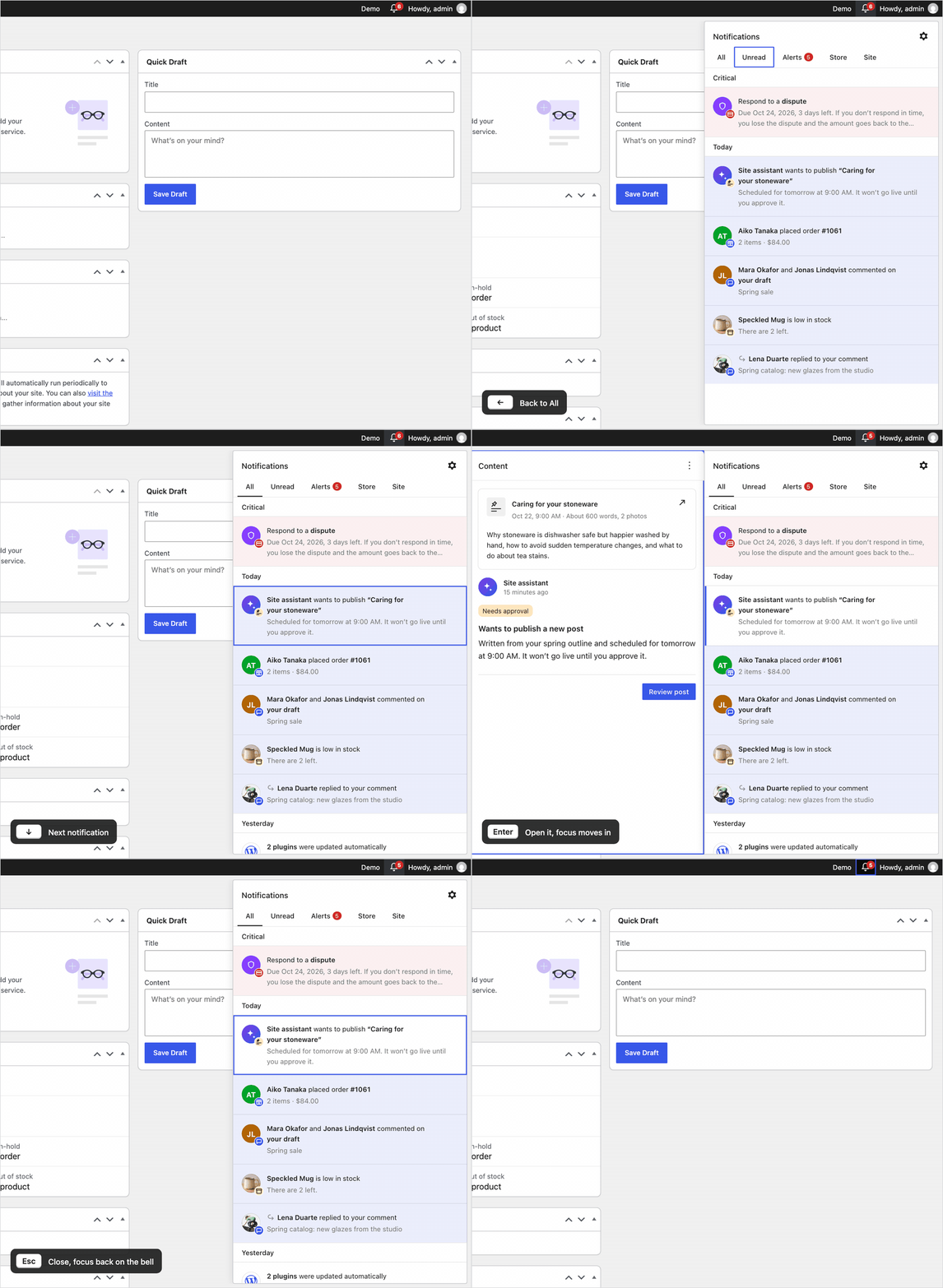
The keyboard follows the WordPress.com panel: arrows move through the list, Enter opens a notification and moves focus into it, Esc goes back to the same row, and Esc again closes the bell. Here’s a short GIF of it in action. Does it work well with screen readers and other assistive technologyAssistive technology Assistive technology is an umbrella term that includes assistive, adaptive, and rehabilitative devices for people with disabilities and also includes the process used in selecting, locating, and using them. Assistive technology promotes greater independence by enabling people to perform tasks that they were formerly unable to accomplish, or had great difficulty accomplishing, by providing enhancements to, or changing methods of interacting with, the technology needed to accomplish such tasks. https://en.wikipedia.org/wiki/Assistive_technology?
What’s next
- Collecting feedback, here and on issue #655.
- Stress-testing the system against other plugins. WooCommerce was the first deep test. Next, more plugins’ notices go through the same catalog, starting with Jetpack, to see how they fit and where the rules need to change.
- A first step in 0.3.0: shaping what core’s first hub can show, so it already moves in this direction.
When could this ship?
Not soon, and that’s fine. 0.3.0 comes first, as a feature pluginFeature Plugin A plugin that was created with the intention of eventually being proposed for inclusion in WordPress Core. See Features as Plugins, and merging into core follows after it. Plugins can only adopt notifications once they’re in WordPress, and and moving over is up to each plugin, at its own pace. Jonathan’s weekly updates follow the plan. There’s time for feedback to shape this.
Feedback
Your feedback is welcome, whether you use WordPress, build plugins that send notifications today, or work on accessibility. Leave a comment on this post, or on issue #655, where the work continues. You can also find us in #feature-notifications on SlackSlack Slack is a Collaborative Group Chat Platform https://slack.com/. The WordPress community has its own Slack Channel at https://make.wordpress.org/chat/.
Props @jameskoster for early feedback, @joen for guidance, and @keoshi for earlier explorations into notifications.

Hopefully, this will also provide a means to stop notices from reappearing over and over again. At the moment, while it is possible to remove a notice using the “X” every time the dashboard is opened, the same notice appears again. Deletion needs to be permanent.

haha, amen to that!

Thanks @adrian33000! This is one of the main problems to solve. Today’s notices come back because WordPress’s “X” button only hides a notice on the page you’re on. Each plugin draws its notice again on every page load, and remembering that you dismissed it is up to the plugin, which doesn’t always happen. In the new system, a notification is sent once and saved for each person, and once you’ve seen it, it moves into Older. It only comes back if the plugin sends a new one.
To make sure that doesn’t happen, I’d propose that core ignores a notification the person already has, so a plugin can’t send the same one twice, plus recommended guidelines for plugins: notify when something happens, not again to remind you. And if a kind of notification still bothers you, you can turn it off in settings, which goes further than dismissing one at a time.
0.3.0 currently has a dismiss button, carried over from how admin notices work today. If notifications don’t come back, I don’t think we need it, and I’d even argue 0.3.0 could ship this logic without the dismiss button. @psykro, what do you think?
Here is what both options could look like.

Personally, I like the dismiss button. That makes it clear that I do not want to see that item again without the need to go to settings or elsewhere.
Too many plugins these days are cluttering up the dashboard with promotions, ads, or notices trying to persuade me to try an add-on or paid version.
Thanks @adrian33000, that’s a fair point! An option on the notification itself to turn that kind off could be useful, or a shortcut straight to its settings. I’ll keep it as an open question.

Finally, WordPress will get rid of those endless half-screen banners that you have to close every time. This is a really great feature—thank you for developing it.
Thank you @vladte4! Just to be clear, existing notices and banners will keep working, since nothing is being removed. The hope, and the direction, is that plugins move to the new system because it’s a better way to reach people: one place, everywhere in WordPress, without pushing the page down. The more plugins that do, the fewer of those banners you’ll see.

So the spammers will be allowed to continue to spam the admin? If that’s the case I doubt they will stop abusing the system, and this will only “help” for the responsible plugin authors…!
It’s a fair worry, thanks @syntaxerrorno. Existing notices keep working because WordPress tries hard not to break plugins people already use. My understanding is that the first step is giving plugins a better way to reach people and seeing how many move over. Stricter rules, for example in the plugin directory guidelines, could come later once it’s in core, but that isn’t decided. @psykro might have more to add here.
Okay, stricter rules should however be aplied allready, as the abusive behaviour users currently are seeing in WP admin can’t continue, it’s harming the use and reputation of WP itself. And anyhow, plugins like Admin Notices Manager etc kind of proves it’s possible to change the display of the existing notices and spam, without breaking anything.

this looks like a good direction. a few suggestions:
– plugins shouldn’t be able to mark promotions or upgrade offers as critical. otherwise we’ll have the same spam problem inside a notification drawer.
– users should be able to mute, dismiss or snooze notifications. dismissed means dismissed, not show it again tomorrow.
– would be great to expose notifications through the wordpress abilities api, so ai agents and external tools can read notifications.
the main goal should be fewer distractions, not just moving all the noise into one place.
Thanks @badhonrocks! I agree that the main goal is fewer distractions, not moving the noise into one place.
– Promotions as critical: agreed. In the design, promotional notifications can never be critical, they sort lower, and each plugin’s can be turned off with one switch.
– Mute, dismiss, snooze: you can mute notifications per plugin and type in settings, which stops a whole kind rather than one at a time. On “dismissed means dismissed”, I agree, and I replied about this above: the idea is that notifications don’t come back in the first place. A notification is sent once, core ignores one the person already has, and recommended guidelines ask plugins to notify when something happens, not again to remind you. If that holds, we may not need a dismiss button at all. Snooze is a nice idea I haven’t explored yet, especially for warnings.
– Abilities API: interesting, and it fits a structured system well. @psykro, is that something you’ve considered?

This is awesome and something that has been long missing from WordPress. The challenge will be once it’s a part of the core getting developers to adopt it, rather than continuing with their methods. I can see more than a few choosing to continue polluting people’s screens with their ads and upsells.
Thanks @campanellafoto! I agree, that will be the hardest part. I think the best thing we can do is make it really worth it for plugins: their notifications show up everywhere in WordPress, in one place people actually check. Hopefully that’s a better deal than an ad most people scroll past.

Great work folks! Loving this direction personally. Here’s a dump of all my thoughts on your open questions.
Overall, this is such an important update to the overall user experience of the WordPress admin that I think a guiding principle should be “less is more”. And this is an area where plugins should not be able to do all kinds of new and crazy things; it needs to be strict without hooks. Simple, predictive, expected, narrowly-focused and not one-size-fits-all.
Badges: one per type, or a few kinds?
Less is more, so I vote a few kinds.
Severity: are three values enough?
Three might be enough, but they have to be defined as entirely unique. What’s the real difference between “Alert”, “Warning”, and “Info” really? If something truly is Critical, it probably shouldn’t be hidden here. This isn’t for necessary, required critical warnings, this is for context and informational cueues.
Who did it and what it’s about: optional extras, or proper fields?
Plugins shouldn’t be able to manipulate this at all. If you want to identify that a plugin did something it should be only according to their respective .org icon (pro plugins can define this too even if they aren’t on .org).
Across channels: where should each event arrive?
This is a slippery slope. I like the idea of giving each user control over how they get these updates but that feels like a v2.0 feature. Admin-only is a good enough first step forward.
Unread: a tab, or a filter?
Unread is the highest ROI aspect of this so it needs to be front and center. I’d even make it the default experience instead of All. If every single time I open the center and it’s ALL by default, it’ll just get overwhelming and become noise and then it’s just another thing I ignore.
Settings: how do they scale?
Every plugin will want to control this, but I think that needs to be avoided. I’m thinking of something like the Site Health panel. Plugins can add Tests there, but with very limited scope and functionality. In the same way, if we have “Tools > Notifications” and it’s a screen of toggles grouped by Core and plugins, then it should be very narrowly generated.
Accessibility: does the keyboard work for you?
Keyboard nav is crucial. I’d even add a shortkey for it similarly to how the Command Palette currently is opened. That would be really useful.
Thanks @webdevmattcrom, this is so helpful! Going through them:
Badges: I like the simplicity of a few kinds too. The tricky part is fitting with what WordPress.com already has for likes, comments and so on. Maybe the balance is keeping those, plus a few general kinds that work for any plugin.
Severity: Fair point. In the design, critical actually shows in both places: on the page it’s about, and pinned in the bell, so there’s one place to find it from any screen. If the whole site is broken, it shows on every screen. Core’s docs already have an “alert” level, which is what I’ve called critical here, so I’d keep it. What do you think?
Who did it: Just to clarify, this means the person behind the event, like the customer who placed an order or a teammate who left a comment, not the plugin. The plugin shows separately as the sender. I agree its icon should come from WordPress.org rather than something it can set freely.
Across channels: Agreed, the bell in the admin is the first step. The question is more about avoiding the same event arriving three times, like a new order does today with the bell, the menu badge and an email.
Unread: I’d keep Unread as a tab right next to All, so it’s always one click away. I’m a bit worried that opening on Unread would make people think they have nothing when it’s all been read. Facebook and Linear both open on everything. Happy to keep it open though!
Settings: That’s pretty much how I’m picturing it: one screen that core builds from the channels each plugin registers, grouped by plugin, with simple toggles. Here’s a first pass from the demo.
Keyboard: Love that! WordPress.com already has a shortcut to open notifications, and the demo lets you move through them with the arrow keys or J and K. A shortcut like the Command Palette’s would be a great addition for core.

If you were going to clone a design and interface, I wouldn’t recommend the .com one. There are notification systems with billions more users and much better design and UX.
Poorly thought through: nothing to address existing banners or spam, just another place to get abused and ignored; poor thought on multi-user and multi-site behavior; and, like with RTC, there isn’t a good way for push or sync to work on shared hosting.
Don’t imagine design as just the interface, we need to update and enforce guidelines in our directories, detect and ban bad actors, and look at the underlying reasons why notifications are being sent and consider whether the issue is notifications, a task list, an inbox, a way to find other things from the same developer, a setup system, how to show in the directory and adjust rankings based on developer use or abuse of new and existing modifications to wp-admin… Design the incentives, feedback loops, governance structure, and what’s afforded by the technology stack. Don’t forget the mobile apps, email, and think about messaging platforms. Consider that people may no longer visit wp-admin at all due to AI managing their site.
Jetpack push goes through .com, do we need an equivalent on .org to do notifications right? How do we register with Apple/Google notification APIs? Deal with spam? Is it additional surface area for 0-click exploits?

.
> Design the incentives, feedback loops, governance structure, and what’s afforded by the technology stack. Don’t forget the mobile apps, email, and think about messaging platforms.
Really good points @matt – Notifications can come from so many places and different people prefer some channels over others. Thinking of my work in GitHub, I’m constantly on the Notifications Inbox to see what needs my attention, while I know colleagues who use email to track those same messages.
I also agree about aligning on incentives and feedback loops. We need a way (for developers) to differentiate between notifications that are upsells vs those that are settings related, vs something that is timely and needs user attention. I see some of that reflected in the designs above already.
> Consider that people may no longer visit wp-admin at all due to AI managing their site.
Right! I’m sure thats happening more, although I also see a future where users are collaborating with their agents inside wp-admin. Co-editing docs with Claude already works this way with comments and chat and feels great.
I would also add user preferences here: a way for users to control what notification channels they are subscribed to or open to receiving or even just a way to silence specific notifications. This came up in the recent work adding notes and thinking about notifying users for “@ mentions”. When a user is mentioned in a Note thread, are they then “subscribed” to the thread receiving notifications of updates? How would they then turn that off or unsubscribe? Something more granular than turning off all notifications (even for a plugin).
> Jetpack push goes through .com, do we need an equivalent on .org to do notifications right?
My guess is “yes” – it would great to collect some (opt-in) telemetry about how successful email notifications are currently. Delivering email reliably is technically hard, I expect our success rates are low.
Overall I like the design direction presented here (nice work @poligilad), but agree the project should try to tackle the larger questions you raised.
Thank you @matt, this is helpful. The proposal started from the angle of backwards compatibility, so I appreciate the clarity, and agree that we should revisit the incentives and feedback loops.
For context, here are the original requirements, which are a bit out of date now. They were scoped down to an MVP to get something out early and learn from feedback, and things like spam, per-user notifications, and email and mobile were part of the longer-term plan. Another way would be to look at this more holistically from the start, not only at the MVP.
A lot of what shows up as admin notices today is setup steps, things to do, plugins promoting their other products. WooCommerce built its own inbox and setup task list for this, but core has neither, so notices end up doing all of these jobs. I see notifications as one piece of a baseline the admin is missing today, and some of these other pieces probably need their own place too. Does anything stand out to you as really good, in this space?
Briefly on push and sync: the bell in wp-admin doesn’t necessarily need push. It can update when a page loads, or check in the background like we do for post locking. Push to phones and other devices is a different problem, I don’t have good answers to these yet. I’ll work through them with @psykro and others.
On not visiting wp-admin: this is an important one. @badhonrocks suggested earlier in the comments that it “would be great to expose notifications through the wordpress abilities api, so ai agents and external tools can read notifications.” That feels like a good direction, and something we should look into.
Over the next few weeks I’ll go through all of this with the broader group, and share an update. Thanks again for taking the time!

Agree with @matt that this isn’t only an interface problem.
Guideline 11 of the plugin directory (don’t hijack the admin dashboard) was rewritten in 2019, and part of the problem was deferred to a core notification system (Trac #46763). Designing both together would give plugins a clear “right way” and make the guideline much easier to enforce.
What would help most:
– Declared intent (operational, setup, promotional), so it can be checked by tooling like Plugin Check.
– Limits enforced by the API (dedupe, rate limits, promotional never critical), not just recommendations.
– Some containment for legacy admin notices, or the plugins abusing them today simply won’t move.
Happy to help coordinate so the guideline and the API go in the same direction.
Wow, “declared intent” is brilliant! We should make that required for admin notices.
Thanks! We can work in that direction.
Thanks @davidperez, great ideas and feedback.
Declared intent fits really well with what we’ve been exploring. The design is already positioned for treating each notification as “operational” or “promotional”, and “setup” makes a lot of sense as a third one.
On containment for legacy notices, one thing I’ve been playing with as a stepping stone: on pages where lots of notices stack up, we could collapse them into one line, like “5 notices”, that you can open if you want. Errors and warnings would still show on the page. This is what it can look like.
It’s not perfect, since today’s types are mostly about color, and plugins don’t always use them in the correct way. With declared intent, it would be a lot easier to decide what stays on the page and what folds. Would love to hear what you think!

I think feature notifications can make WordPress more user-friendly by helping users discover important updates and new features. However, it is important to keep notifications simple, clear, and non-intrusive. Users should also have control over which notifications they want to receive. Accessibility and mobile responsiveness should be considered during the design process. Thank you for inviting community feedback!

I think having a dedicated notification center is a useful improvement, especially for websites that rely on multiple plugins. One feature I would particularly appreciate is the ability to prioritize important updates while keeping routine messages less distracting. It would also be helpful if users could easily customize which types of notifications they want to receive. Overall, this approach could make the WordPress dashboard much cleaner and easier to manage.
Boro Sitnikovski
Community ·
Attendee privacy issue on ticket pages: what happened and what we did
From May 20, 2025 to October 28, 2026, some attendees who had chosen not to appear on an event’s public Attendees page were listed anyway. It’s now fixed, and organizers and attendees of upcoming events will get an email about it.
What happened
The ticket Edit page showed “Yes” for “Do you want to be listed on the public Attendees page?” even when you had answered No. Saving that page, for example to update your name, changed your answer to Yes. The Attendees page shows names and Gravatars. On some events it also shows links attendees added to their ticket, such as a website or social profile, and answers like company name or job title. Based on our review, email addresses, phone numbers, mailing addresses, and dietary or accessibilityAccessibility Accessibility (commonly shortened to a11y) refers to the design of products, devices, services, or environments for people with disabilities. The concept of accessible design ensures both “direct access” (i.e. unassisted) and “indirect access” meaning compatibility with a person’s assistive technology (for example, computer screen readers). (https://en.wikipedia.org/wiki/Accessibility) answers were not shown.
Who was affected
We estimate about 1,280 tickets, across 168 events on WordCamp.org and events.wordpress.orgWordPress.org The community site where WordPress code is created and shared by the users. This is where you can download the source code for WordPress core, plugins and themes as well as the central location for community conversations and organization. https://wordpress.org/. We can’t say exactly who, because the earlier answer wasn’t recorded, so we hid everyone who might have been affected: about 8,580 tickets. The events with the most:
| Event | Tickets hidden | Likely affected (estimate) |
|---|---|---|
| WordCampWordCamp WordCamps are casual, locally-organized conferences covering everything related to WordPress. They’re one of the places where the WordPress community comes together to teach one another what they’ve learned throughout the year and share the joy. Learn more. Asia 2026 | 956 | 149 |
| WordCamp Europe 2026 | 694 | 129 |
| WordCamp Dhaka 2025 | 979 | 83 |
| WordCamp US 2025 | 215 | 46 |
| WordCamp US 2026 | 163 | 46 |
| WordCamp Athens 2025 | 154 | 36 |
| WordCamp Europe 2025 | 131 | 33 |
| WordCamp Rajasthan 2026 | 169 | 30 |
| WordCamp Surat 2025 | 144 | 27 |
| WordCamp Nepal 2026 | 258 | 25 |
The remaining 158 events each had fewer.
What we did
- Fixed the bug on October 28, the day we found it.
- Hid everyone who might have been affected from the Attendees pages, past and upcoming events alike. That includes some who had chosen to be listed, but we’d rather hide someone by mistake than list someone who opted out.
- Emailing organizers and attendees of upcoming events so they know what happened.
Want to be listed again?
- Find the ticket email from the event. Its subject starts with “Your Ticket” or “Your Tickets”.
- Click the link in it to open your ticket.
- Set “Do you want to be listed on the public Attendees page?” to Yes.
- Click “Save Attendee Information”.
If you can’t find the email, ask the event’s organizers to resend your ticket.
Questions
We’re sorry about this. If you have questions or concerns about your data, contact dpo@wordpress.org.

I already received 30+ email with the subject “A privacy fix for public Attendees pages on WordPress events”. That’s a little overkill right? I already emailed Wordcamp support, but I’m not getting ANY response.

Thanks for sharing this update. I have one question: Will WordPress introduce additional safeguards or automated checks to ensure that an attendee’s privacy preferences are always respected, even when ticket information is edited? Also, could there be a way to reduce repeated notification emails about the same incident? Improving both privacy protection and communication would help build greater trust within the community.
Could WordPress consider adding a privacy-status indicator to attendee ticket dashboards, allowing users to easily verify whether their visibility preferences have been applied correctly? Such transparency could help prevent similar incidents and strengthen user confidence in WordPress event management.
 Jason Adams
Core AI ·
WordPress for the Agentic Web
Recently, Google announced that its total users of AI exceeded 1 billion while OpenAI reports around 1.2 billion. Anthropic hasn’t shared a number, but others also share numbers in hundreds of millions. Even accounting for people using accounts across multiple platforms, AI adoption is staggering and shows no signs of slowing down.
This shift toward the Agentic Web is fundamentally changing how people experience the internet. People are increasingly using agents to search the web, find products, build apps, and run their businesses. There are interesting benefits, such as Adobe sharing that AI traffic converts 60% better than non-AI traffic, and brings in 53% more revenue. This means that once a user arrives they’re more confident in why they’re there and what they want to do. As these capabilities expand, users will expect their agents to work with the sites and platforms they already use.
Making WordPress Agent-Ready
Within the WordPress ecosystem, products such as Jetpack, Elementor, and WPVibe have demonstrated demand for users to manage their WordPress sites agentically. Commercialism aside, it’s amazing to think of users being able to build the most incredible versions of their WordPress worlds because their agents raise the bar in what they can achieve. It’s not just another surface by which to control WordPress, it opens another level of possibilities for those users. That’s exciting!
The goal remains: Democratize Publishing. To fulfill that mission in the Agentic Web, WordPress needs to make it possible for everyone to manage their sites with the agents they choose. This isn’t about putting an agent inside WordPress; it’s about making WordPress ready to work with the agents users bring. WordPress is the best solution for the open web, we need to make it the same in the agentic web.
The vision is simple: A user opens their personal agent and says, “I want you to help me with my example.com site.” The agent recognizes WordPress, provides a link to authorize access, and the user signs in. The agent responds, “I’m in! How can I help you with your site?”
Making that experience possible for every WordPress user requires native capabilities that are simple to discover, connect to, and use.
Making Agent Connectivity Native
Agents can already accomplish a lot with WordPress through WP-CLIWP-CLI WP-CLI is the Command Line Interface for WordPress, used to do administrative and development tasks in a programmatic way. The project page is http://wp-cli.org/ https://make.wordpress.org/cli/, the REST APIREST API The REST API is an acronym for the RESTful Application Program Interface (API) that uses HTTP requests to GET, PUT, POST and DELETE data. It is how the front end of an application (think “phone app” or “website”) can communicate with the data store (think “database” or “file system”) https://developer.wordpress.org/rest-api/, and file management. However, these approaches often require local access or more advanced configurations. For users bringing their own agents, connecting to WordPress needs to be much simpler.
MCP has emerged as the open standard for connecting agents to external systems. The existing MCP Adapter plugin provides an important foundation, but users still need to install and configure it, ensure useful Abilities are available (perhaps via the AI plugin), and manually manage authentication through Application Passwords (hopefully not pasting them in plaintext to their agent). This is not a scalable approach for the broad WordPress user base.
To deliver the experience described above, this proposal includes four coordinated areas of work, targeting WordPress 7.3 while using the 7.2 release cycle to establish the necessary foundations.
MCP AdapterMCP Adapter Translates WordPress abilities into Model Context Protocol format, allowing AI assistants like Claude and ChatGPT to discover and invoke WordPress capabilities as tools, resources, and prompts.
We’ll rapidly iterate on the MCP Adapter pluginPlugin A plugin is a piece of software containing a group of functions that can be added to a WordPress website. They can extend functionality or add new features to your WordPress websites. WordPress plugins are written in the PHP programming language and integrate seamlessly with WordPress. These can be free in the WordPress.org Plugin Directory https://wordpress.org/plugins/ or can be cost-based plugin from a third-party., focusing on reliability, security, and usability to have a solid foundation alongside WordPress 7.2. From there the goal is to propose bringing MCP functionality into coreCore Core is the set of software required to run WordPress. The Core Development Team builds WordPress. for WordPress 7.3 either through a direct merge or a bundled approach that allows the adapter to evolve independently.
Abilities
Connecting an agent is only useful if it can accomplish meaningful tasks. We’ll identify a baseline of Abilities needed for common site management workflows, continuing rapid development through the AI and/or MCP Adapter plugins.
We’ll also explore whether a few additional foundational Abilities can land in WordPress 7.2 before the end of the betaBeta A pre-release of software that is given out to a large group of users to trial under real conditions. Beta versions have gone through alpha testing in-house and are generally fairly close in look, feel and function to the final product; however, design changes often occur as part of the process. cycles, with the broader goal of bringing a useful set of native Abilities into core for 7.3.
OAuth Authentication
Users should be able to securely authorize their agents without having to manually generate and share Application Passwords. During the 7.2 cycle, we’ll map out the necessary OAuth flows, architecture, and security considerations, targeting implementation in core for WordPress 7.3.
This functionality would benefit more than just MCP (e.g. the REST API) and should be developed in coordination with the broader Core team. The upcoming Secrets APIAPI An API or Application Programming Interface is a software intermediary that allows programs to interact with each other and share data in limited, clearly defined ways. in WordPress 7.2 also provides an opportunity to support secure token handling.
End-to-End User Experience
The three technical capabilities above need to come together as one simple, intuitive experience. We’ll need to map the complete user journey, from an agent discovering a WordPress site and requesting access to performing tasks and managing or revoking permissions.
During the 7.2 cycle, we’ll need to develop and test prototypes to identify friction and inform all three technical workstreams. For 7.3., the goal is a cohesive experience that allows users to connect their preferred agents to WordPress without complex setup or technical knowledge.
Working Toward WordPress 7.3
These are ambitious goals and delivering them will require clear ownership and close collaboration across the project. We’re looking for a dedicated focus lead for each of these four areas, supported by contributors who want to help. Each lead will establish milestones for WordPress 7.2 and 7.3, coordinate development and testing, and share progress, blockers, and calls for help during our weekly AI contributor meetings.
We also want to pair each focus lead with interested Core Committers, involving them throughout development rather than waiting until features are ready for merge. This will help address architectural, compatibility, and security considerations early.
Security will be especially important as we introduce new ways for external agents to interact with WordPress. Appropriate review and audits, including specialized security-focused AI models, will help ensure these capabilities are safe to use.
While WordPress 7.3 is our shared target, inclusion in core will depend on technical readiness, security, and the normal core review processes.
Get involved
We’re looking for contributors willing to lead or help with MCP, Abilities, OAuth, and UXUX UX is an acronym for User Experience – the way the user uses the UI. Think ‘what they are doing’ and less about how they do it., as well as Core Committers interested in partnering with these efforts.
Join us in the #core-ai channel in SlackSlack Slack is a Collaborative Group Chat Platform https://slack.com/. The WordPress community has its own Slack Channel at https://make.wordpress.org/chat/ or at our weekly AI contributor meeting to help shape the work, volunteer for a focus area, or contribute to the discussion.
Together we can make WordPress ready for the Agentic Web, empowering everyone to build and manage their sites through the agents they choose.
Props @apeatling, @bacoords, @mynameistaken, @jeffpaul, @nikskyverge for pre-publish review.

+make.wordpress.org/core/ +make.wordpress.org/design/

As useful as MCP might be, most AI’s can just work fine using existing REST APIs.
There also should be a focus on adding missing features to the REST API. As of now, I have to use a mix of REST and browser automation (with any tool). I see a real risk in just having “another semi-finished API” added to core in the future.
There is no reason to not add better auth or more fine graned permission control to the existing REST APIs too.
Thanks, Adrian! I think there are pieces of this that would support the REST-first approach as well, and fortunately Abilities can work in both cases.
MCP also enables sites to work in provider marketplaces and things like that. While REST does often work, MCP is quickly becoming the de facto protocol, and continues to improve beyond simply being an RPC layer, such as skills over MCP and the MCP Apps extension for UI.

I would love to take on UX for this. Count me in.

Couldn’t agree more. Let’s get this done.

Excited to see this work, Jason. Could you elaborate a bit more on how we get beyond the basic core abilities you mention? If a plugin author wants to make certain abilities for their plugin specifically via the MCP, how would this work?
Thanks, Job! Great question. Yes, all Abilities are able to be marked as showing up in the MCP server. When registering an Ability you can add meta properties which opt the Ability into the MCP server. It’s as simple as that!
We’ll improve the documentation as we get this into core, of course, but here are some examples for now: https://github.com/WordPress/mcp-adapter/blob/trunk/docs/getting-started/basic-examples.md

Congratulations to everyone behind this. Native MCP, Abilities and OAuth together are the handshake WordPress and AI have been missing: any agent, any site, one simple sign-in.
I build Respira.press, an MCP layer for WordPress, and I already see what opens up once that connection is easy. People are getting faster, better optimized sites and doing work they would never have attempted before, and that’s still early.
Three things from production that may help on the way to 7.3.
OAuth: Claude starts sign-in when the first request gets a 401, while ChatGPT looped on that same 401, and some managed hosts answer /.well-known/ themselves before WordPress runs. Testing both clients on real hosts early should make the sign-in feel as simple as the post describes.
Abilities: about 4 in 5 sites in my telemetry where I can see the editor use a page builder. That’s my customers, so it’s skewed, but it’s a big audience to bring along. On Elementor or Bricks the layout lives in postmeta, so a builder page in the benchmarks would be a great way to include them from the start.
Scale: agents on one staging site made 6,692 read_post calls in 18 minutes tonight. That’s how much appetite agents have for WordPress content, so pagination and rate limits will do a lot for the experience.
I’m already sharing my data with Core AI and will keep it coming. Excited to help get this over the line for everyone.

Sharing where conversation is continuing on OAuth in GitHub so folks can follow the tread >> Add support for OAuth2 for MCP Clients

Pretty please don’t make the “AI” slop part of the core. It’s fine if Blackrock forces you to implement fascist tech, but make it opt in.
I can’t recommend WP to anyone anymore and I am looking for ethical alternatives.
We appreciate your concern and thank you for sharing. We don’t want AI slop more than anyone else. The goal is to give people the option (not force) to use AI to help with the more confusing parts of WordPress so they can focus on doing the most valuable things like writing great content, running stores, and so forth. I use AI to help with my blog but I still hand write every post. AI doesn’t automatically mean slop. There’s nothing stopping folks from having an AI write something and copying and pasting it into any site or CMS in the world. That’s not a goal anyone on the Core AI team wants. 🙂
Makes zero sense. You could’ve done the ethical way and made it a plugin. But I understand your child king wants something else, which is why I am no longer recommending WP.
Thanks.
 Amy Kamala
Hosting ·
Hosting Team Meeting Agenda 2026-10-28
Next Meeting
The next meetings will be in the #hosting SlackSlack Slack is a Collaborative Group Chat Platform https://slack.com/. The WordPress community has its own Slack Channel at https://make.wordpress.org/chat/ channel on Wednesday, October 28, 2026 at 0900 UTC and Wednesday, October 28, 2026 at 1800 UTC. Hope to see you there!
Agenda
- WordPress 7.2 Beta 2 released October 27, 2026
- Beta 3 scheduled for November 3rd
- WCEH Contrib Day next week with HostingHosting A web hosting service is a type of Internet hosting service that allows individuals and organizations to make their website accessible via the World Wide Web. table
- Reminder Call for feedback: Real-time Collaboration (RTC) server-aware approach
- Tickets/PRs
Anything else? Please leave a comment with any additions or suggestions for the meeting.
Props to @chaion07 for the pre-publish review!
Amy Kamala
Core ·
Dev Chat Agenda – October 28, 2026
Dev Chat on October 28th is canceled, and will resume next week
The next WordPress Developers Chat will take place on Wednesday, October 28, 2026, at 15:00 UTC in the core channel on Make WordPress Slack.
The live meeting focuses on upcoming releases and CoreCore Core is the set of software required to run WordPress. The Core Development Team builds WordPress. development, with time for discussions and open floor.
If you have requests for help with a ticketticket Created for both bug reports and feature development on the bug tracker. or another discussion topic, please post details in the comments section at the end of this agenda, or bring it up in Dev Chat during open floor.
Announcements 📢
WordPress 7.2
- WordPress 7.2 Beta 2 released October 27th, 2026
- Beta 3 scheduled for November 3rd
General
- Help shape future Release Roadmaps (by Nov 16th)
- WordPress Contributor Toolkit 2.0: A redesigned app, in your language
- WordCamp Canada next week
Discussions 💬
The discussion section of the agenda is for discussing important topics affecting the upcoming release or larger initiatives that impact the Core Team. To nominate a topic for discussion, please leave a comment on this agenda with a summary of the topic, any relevant links that will help people get context for the discussion, and what kind of feedback you are looking for from others participating in the discussion.
Open floor 🎙️
Any topic can be raised for discussion in the comments, as well as requests for assistance on tickets. Tickets in the milestone for the next major or maintenance release will be prioritized.
Please include details of tickets / PRs and the links in the comments, and indicate whether you intend to be available during the meeting for discussion or will be async.
Props to @kirasong for the pre-publish review.

Can anyone take a look at these, please?
Plugins: Refresh cached translation files when deleting a plugin or theme – #14833
Allow Submenus in Navigation Overlay to respect “Toggle on Click” – #44346
Block Style States: Add -current custom state for Nav Link – #78769
Style States: Scope feature selectors to custom state selectors – #83454
Thanks!
Can you take a look at this?
Block Style Variation for core/navigation-link applies in Editor (via unique generated class) but fails to render on Frontend – https://github.com/WordPress/gutenberg/issues/85833
Thanks
It is exciting to see the ongoing improvements in WordPress. I believe community feedback plays an important role in making new features more useful. Clear documentation and testing instructions would also help new contributors participate.
 Milana Cap
Documentation ·
Open-source CMS documentation meets
On 20th and 21st October in Utrecht, Netherlands, the Open Source CMS 2026 conference brought together contributors from several open-source CMSs as well as vendors, agencies, analysts and customers from Europe and North America. In an informal format, structured around short presentations, roundtables, demos, and themed tracks, contributors discussed common problems, pain points, and possible solutions, but also learned about needs and struggles from people who are using our projects in their day-to-day work and businesses.
While the conference ended with a draft statement of collaboration promises, documentation representatives spent some time sharing experiences, different workflows and tools, and the realisation that we need more time to discuss these things.
This led to a preliminary agreement to meet online and, if possible, keep the conversations going for the foreseeable future. The first one is planned for the week of 16th-20th November. We are still deciding on the exact time and date, in hopes of accommodating everyone’s schedules. So far, confirmed interested attendees:
- Herman Peeren – Joomla!
- Lina Wolf – TYPO3
- Jaap van Otterdijk – phpDocumentor
- Milana Cap – WordPress
- Estela Rueda – WordPress
We are reaching out to Drupal documentation representatives as well. If there’s anyone from the WordPress Documentation team interested in joining, do let me know in the comments or in SlackSlack Slack is a Collaborative Group Chat Platform https://slack.com/. The WordPress community has its own Slack Channel at https://make.wordpress.org/chat/, and I’ll send you the link to a calendar poll.
Teams
-
Core
The coreCore Core is the set of software required to run WordPress. The Core Development Team builds WordPress. team makes WordPress. Whether you’re a seasoned PHPPHP PHP (recursive acronym for PHP: Hypertext Preprocessor) is a widely-used open source general-purpose scripting language that is especially suited for web development and can be embedded into HTML. https://www.php.net/manual/en/index.php, HTMLHTML HTML is an acronym for Hyper Text Markup Language. It is a markup language that is used in the development of web pages and websites., JavaScriptJavaScript JavaScript or JS is an object-oriented computer programming language commonly used to create interactive effects within web browsers. WordPress makes extensive use of JS for a better user experience. While PHP is executed on the server, JS executes within a user’s browser. https://www.javascript.com or CSSCSS CSS is an acronym for cascading style sheets. This is what controls the design or look and feel of a site. developer or are just learning to code, we’d love to have you on board. You can write code, fix bugs, debate decisions, and help with development.
-
Design
The design group is focused on the designing and developing the user interface. It’s a home for designers and UXers alike. There are regular discussions about mockups, design, and user testing.
-
Mobile
The mobile team builds the iOSiOS The operating system used on iPhones and iPads. and Android apps. Lend them your Kotlin, Swift, or ReactReact React is a JavaScript library that makes it easy to reason about, construct, and maintain stateless and stateful user interfaces. https://reactjs.org Native skills. The team also needs designers, UXUX UX is an acronym for User Experience – the way the user uses the UI. Think ‘what they are doing’ and less about how they do it. experts, and testers to give users a smooth experience on every device.
-
Accessibility
The a11yAccessibility Accessibility (commonly shortened to a11y) refers to the design of products, devices, services, or environments for people with disabilities. The concept of accessible design ensures both “direct access” (i.e. unassisted) and “indirect access” meaning compatibility with a person’s assistive technology (for example, computer screen readers). (https://en.wikipedia.org/wiki/Accessibility) group provides accessibilityAccessibility Accessibility (commonly shortened to a11y) refers to the design of products, devices, services, or environments for people with disabilities. The concept of accessible design ensures both “direct access” (i.e. unassisted) and “indirect access” meaning compatibility with a person’s assistive technology (for example, computer screen readers). (https://en.wikipedia.org/wiki/Accessibility) expertise across the project. They make sure that WordPress coreCore Core is the set of software required to run WordPress. The Core Development Team builds WordPress. and all of WordPress’ resources are accessible.
-
Polyglots
WordPress is used all over the world in many different languages. If you’re a polyglot, you can help by translating WordPress into your own language or contributing to the GlotPress project, making translations easier and more effective for everyone.
-
Support
Answering questions in the support forums, IRC, or SlackSlack Slack is a Collaborative Group Chat Platform https://slack.com/. The WordPress community has its own Slack Channel at https://make.wordpress.org/chat/ is one of the easiest ways to start contributing. Everyone knows the answer to something! Since the forums run on bbPress, you can also contribute by helping make the software behind them even better.
-
Documentation
Good documentation lets people help themselves when they get stuck. The docs team is responsible for creating documentation and is always on the look-out for writers. The blog has discussion around the team’s current projects.
-
Themes
The Theme Review Team reviews and approves every Theme submitted to the WordPress Theme repository. Reviewing Themes sharpens your own Theme development skills. You can help out and join the discussion on the blog.
-
Plugins
If you are a PluginPlugin A plugin is a piece of software containing a group of functions that can be added to a WordPress website. They can extend functionality or add new features to your WordPress websites. WordPress plugins are written in the PHP programming language and integrate seamlessly with WordPress. These can be free in the WordPress.org Plugin Directory https://wordpress.org/plugins/ or can be cost-based plugin from a third-party. developer, subscribe to the Plugin review team blog to keep up with the latest updates, find resources, and learn about any issues around Plugin development.
-
Community
If you’re interested in organizing a meetupMeetup All local/regional gatherings that are officially a part of the WordPress world but are not WordCamps are organized through https://www.meetup.com/. A meetup is typically a chance for local WordPress users to get together and share new ideas and seek help from one another. Searching for ‘WordPress’ on meetup.com will help you find options in your area. or a WordCampWordCamp WordCamps are casual, locally-organized conferences covering everything related to WordPress. They’re one of the places where the WordPress community comes together to teach one another what they’ve learned throughout the year and share the joy. Learn more., the community blog is a great place to get started. There are groups working to support events, to create outreach and training programs, and generally support the community.
-
Training
The WordPress training team helps people learn to use, extend, and contribute to WordPress through synchronous and asynchronous learning as well as downloadable lesson plans for instructors to use in live environments, via learn.wordpress.org.
If you enjoy teaching people how to use and build stuff for WordPress, immediately stop what you’re doing and join our team!
-
Test
The Test Team works to improve WordPress quality and usability by advancing the development process through manual and automated testing. Whether through a browser, app, terminal, or code, the team focuses on testing across the entire WordPress ecosystem, including CoreCore Core is the set of software required to run WordPress. The Core Development Team builds WordPress. and GutenbergGutenberg The Gutenberg project is the new Editor Interface for WordPress. The editor improves the process and experience of creating new content, making writing rich content much simpler. It uses ‘blocks’ to add richness rather than shortcodes, custom HTML etc. https://wordpress.org/gutenberg/, mobile apps and themes, and feature plugins and importers.
-
TV
The TV team reviews and approves every video submitted to WordPress.tv. They also help WordCamps with video post-production and are responsible for the captioning and subtitling of published videos. Reviewing videos is a great way to learn about WordPress and help the community: experience is not required to get involved.
-
Marketing
The Marketing team is currently archived to make room for an experimental shift in focus and processes. Check out the WordPress Media Corps to learn more. Amplification requests and Showcase activities are still running, and you can find out more about them on GitHub.
-
CLI
WP-CLIWP-CLI WP-CLI is the Command Line Interface for WordPress, used to do administrative and development tasks in a programmatic way. The project page is http://wp-cli.org/ https://make.wordpress.org/cli/ is the official command line tool for interacting with and managing your WordPress sites.
-
Hosting
The Hosting team maintains distributed testing software that tests pre-release versions of WordPress on hosting systems, and infrastructure-focused documentation.
-
Tide
Tide is a series of automated tests run against every pluginPlugin A plugin is a piece of software containing a group of functions that can be added to a WordPress website. They can extend functionality or add new features to your WordPress websites. WordPress plugins are written in the PHP programming language and integrate seamlessly with WordPress. These can be free in the WordPress.org Plugin Directory https://wordpress.org/plugins/ or can be cost-based plugin from a third-party. and theme in the directory and then displays PHPPHP PHP (recursive acronym for PHP: Hypertext Preprocessor) is a widely-used open source general-purpose scripting language that is especially suited for web development and can be embedded into HTML. https://www.php.net/manual/en/index.php compatibility and test errors/warnings in the directory.
-
Openverse
Openverse is a search engine for openly-licensed media. The Openverse team implements new features and new media types; maintains the public APIAPI An API or Application Programming Interface is a software intermediary that allows programs to interact with each other and share data in limited, clearly defined ways. and front-end search engine; and develops WordPress integrations to share Openverse with the entire WordPress community.
-
Photos
The Photo Directory team moderates every photo submitted to the WordPress Photo Directory, maintains and improves the directory site itself, and provides resources and documentation to educate, encourage, and facilitate photo contributors.
-
Core Performance
The coreCore Core is the set of software required to run WordPress. The Core Development Team builds WordPress. performance team is dedicated to monitoring, enhancing, and promoting performance in WordPress core and its surrounding ecosystem.
-
Playground
The Playground team works on WordPress Playground: the platform that lets you run WordPress instantly on any device without a host, most often in a browser.
-
Core AI
The CoreCore Core is the set of software required to run WordPress. The Core Development Team builds WordPress. AI Team coordinates and accelerates AI efforts across the project, focusing on responsible innovation that aligns with WordPress values. We use a pluginPlugin A plugin is a piece of software containing a group of functions that can be added to a WordPress website. They can extend functionality or add new features to your WordPress websites. WordPress plugins are written in the PHP programming language and integrate seamlessly with WordPress. These can be free in the WordPress.org Plugin Directory https://wordpress.org/plugins/ or can be cost-based plugin from a third-party.-first approach to explore AI-powered features, share a public roadmap, and collaborate with other teams.
-
Core Program
The CoreCore Core is the set of software required to run WordPress. The Core Development Team builds WordPress. Program team is focused on strengthening coordination across teams, improving efficiency and empowering contribution. It’s a home for those who span across product and project work.
Not sure which team to contribute to?
Check out our contributor wizard and find how to get started.
Shape the future of WordPress
Become a Five for the Future participant.
Nur E Tasfiya
A consistent notification experience can make website management much more convenient. I am interested in seeing how this feature evolves and how it will benefit everyday WordPress users.
Reply