What’s new in Gutenberg 10.2? (17 March)

It’s that time of the fortnight again: We’ve just published a new release of GutenbergGutenberg The Gutenberg project is the new Editor Interface for WordPress. The editor improves the process and experience of creating new content, making writing rich content much simpler. It uses ‘blocks’ to add richness rather than shortcodes, custom HTML etc. https://wordpress.org/gutenberg/! Version 10.2 brings to you a number of additions to Full-Site Editing (FSE) and Global Styles, and a sizeable list of improvements to the editing experience, as well as bugbug A bug is an error or unexpected result. Performance improvements, code optimization, and are considered enhancements, not defects. After feature freeze, only bugs are dealt with, with regressions (adverse changes from the previous version) being the highest priority. fixes.

Offering Patterns on BlockBlock Block is the abstract term used to describe units of markup that, composed together, form the content or layout of a webpage using the WordPress editor. The idea combines concepts of what in the past may have achieved with shortcodes, custom HTML, and embed discovery into a single consistent API and user experience. setup

Introducing some initial explorations on how specific patterns can be better surfaced from a block’s placeholder state. Upon inserting a Query block there’s now a setup step that allows picking a block pattern for it to use. This allows users to start with a good design basis. Note that this goes beyond what block variations afford, as it’s an APIAPI An API or Application Programming Interface is a software intermediary that allows programs to interact with each other and share data in limited, clearly defined ways. that can directly connect with a block pattern categoryCategory The 'category' taxonomy lets you group posts / content together that share a common bond. Categories are pre-defined and broad ranging.. The candidate block patterns are fetched via a new API that allows querying for patterns that include a given block type.

Alternatively, the user has the option to “start empty”, in which case they’ll be able to choose from the existing CoreCore Core is the set of software required to run WordPress. The Core Development Team builds WordPress. block variations (e.g. Title & Date, Title & ExcerptExcerpt An excerpt is the description of the blog post or page that will by default show on the blog archive page, in search results (SERPs), and on social media. With an SEO plugin, the excerpt may also be in that plugin’s metabox., etc).

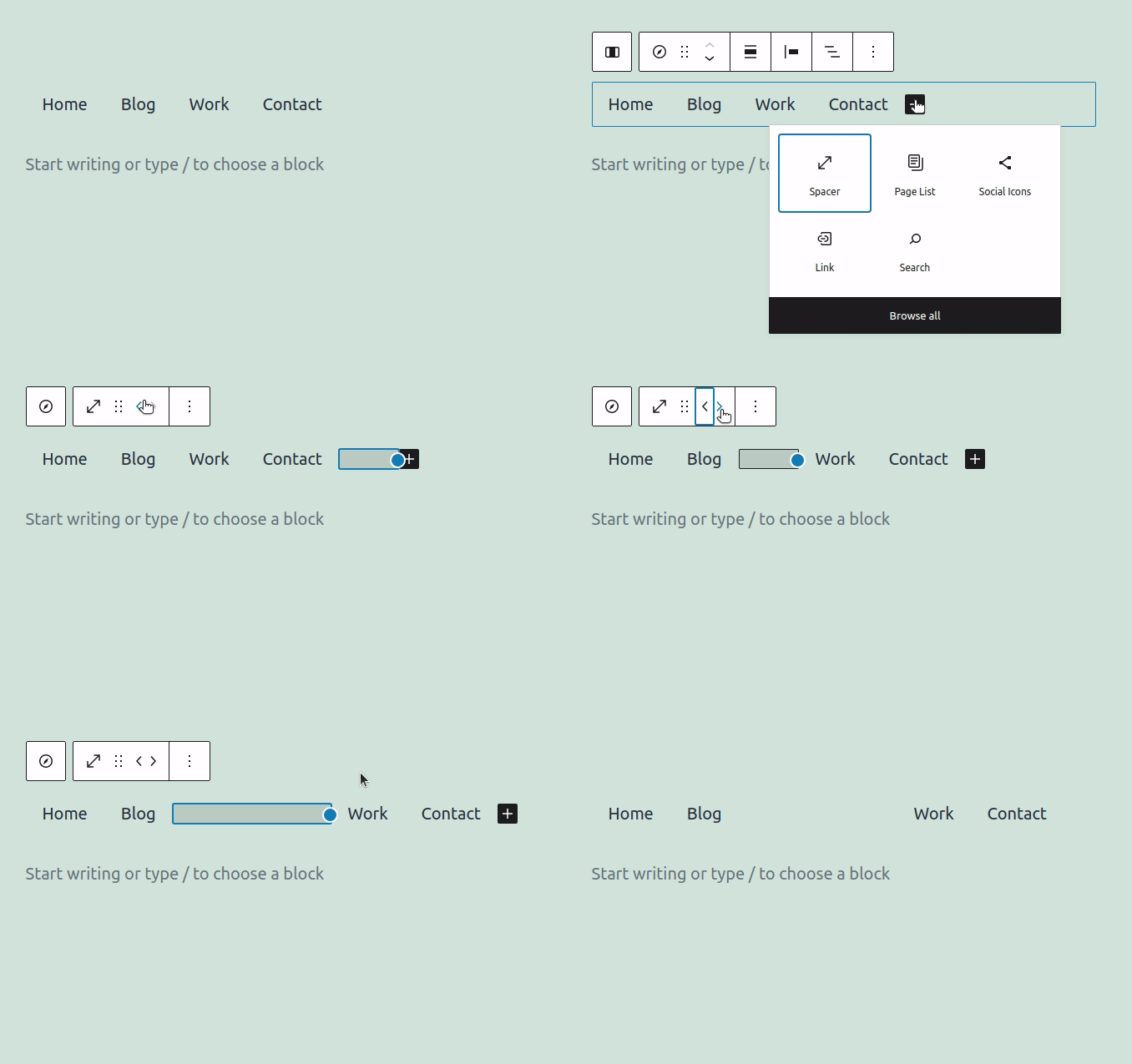
Spacer Block width can be adjusted (in Navigation Block)

When inserted into a parent block that dictates a horizontal orientation (such as the Navigation Block), the spacer block’s width (rather than height) can now be adjusted. This makes some new cool customizations possible on horizontally-stacked blocks.

Transform Media & Text to Columns

It has been possible for a while to transform any single block into a Columns block (with a single column). For the Media & Text block, that behavior is unlikely to produce the desired outcome. Thus, when transforming a Media & Text block into a Columns block, it will now result in two columns (and all the relevant fixings from the original block).

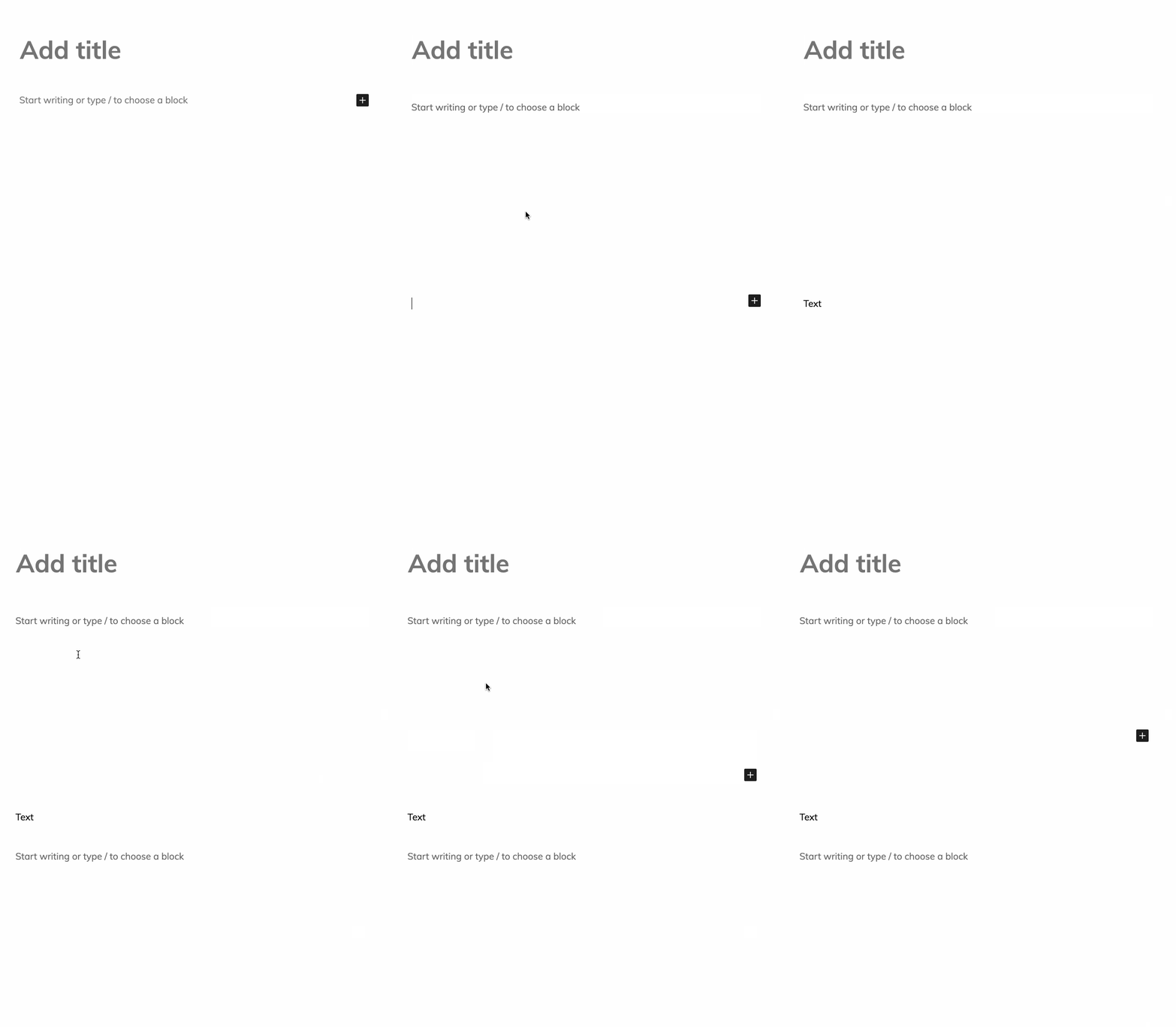
Hide writing prompt from subsequent empty paragraphs

Rather than showing the “Start writing or type / to choose a block” prompt in each of a number of subsequent empty paragraphs, we now only show it in the first one.

10.2

Features

  • Template part block: Add category panel. (29159)

Enhancements

  • Add check for button text before rendering button block. (29717)
  • Skip CSSCSS Cascading Style Sheets. minification via PHPPHP The web scripting language in which WordPress is primarily architected. WordPress requires PHP 7.4 or higher. (29624)
  • Restore the margins of blocks relying on the figure element. (29517)
  • Add Columns transform from Media & Text. (29415)
  • Fix: Invert gallery gravity. (29367)
  • Components: Try to make the order of fills stable in regular slots. (29287)
  • Add expandOnFocus, showHowTo and validateInput experimental props to FormTokenField. (29110)
  • Hide writing prompt from subsequent empty paragraphs. (28275)

New APIs

  • Plugins: Add scoping functionality to the Plugins API. (27438)

The registerPlugin() function (in the @wordpress/plugins package) now accepts a scope argument that will limit that pluginPlugin A plugin is a piece of software containing a group of functions that can be added to a WordPress website. They can extend functionality or add new features to your WordPress websites. WordPress plugins are written in the PHP programming language and integrate seamlessly with WordPress. These can be free in the WordPress.org Plugin Directory https://wordpress.org/plugins/ or can be cost-based plugin from a third-party. to be displayed only by <PluginArea /> components with a matching scope prop. See #27438 for more details.

Bug Fixes

  • Reusable Blocks:
    • Fix editor crash when converting block with visible styles to reusable (after a save and page reload). (29059)
    • Fix reusable block crash when converting a just created reusable block to blocks. (29292)
  • Buttons Block:
    • Buttons: Fix links inside links. (29273)
    • Fix legacy button center alignments inside the buttons block. (29281)
  • Cover Block:
    • Fix cover block content position not migrating correctly from deprecated version. (29542)
    • Fix solid-color only cover has small gray border in the editor only. (29499)
  • Social Icons and Links:
    • Fix social icons vertical spacing issue. (29657)
    • Yelp: Fix foreground color, make background transparent. (29660)
    • Social Links: Replace CSS variables with block context approach. (29330)
  • Table of Contents block:
    • Fix links when in archive loopLoop The Loop is PHP code used by WordPress to display posts. Using The Loop, WordPress processes each post to be displayed on the current page, and formats it according to how it matches specified criteria within The Loop tags. Any HTML or PHP code in the Loop will be processed on each post. https://codex.wordpress.org/The_Loop or when using “Plain” permalink structure. (29394)
    • Fix class attribute. (29317)
  • Add theme styles in the site editor. (29704)
  • Fix broken links to the block editor developer handbook. (29663)
  • Fix in between inserter edge case. (29625)
  • Fix the button component styles when used with a dashicon. (29614)
  • Revert moving is-typing class. (29608)
  • Fix inline block styles minification issues with calc(). (29554)
  • Packages: Update the publishing command for npm with next dist tagtag A directory in Subversion. WordPress uses tags to store a single snapshot of a version (3.6, 3.6.1, etc.), the common convention of tags in version control systems. (Not to be confused with post tags.). (29379)
  • Ignore build folders when native unit tests. (29371)
  • Fix mobile issue template label. (29344)
  • Interface: Fix ReactReact React is a JavaScript library that makes it easy to reason about, construct, and maintain stateless and stateful user interfaces. https://reactjs.org warnings triggered in ActionItem component. (29340)
  • Search block: Add missing space to provide valid HTMLHTML HyperText Markup Language. The semantic scripting language primarily used for outputting content in web browsers.. (29314)
  • Blocks: Ensure that metadata registered on the server for core block is preserved on the client (try 2). (29302)
  • Fix off-center appender in some themes. (29290)
  • Add enableCustomSpacing to block editor settings. (29277)
  • Border Radius Support: Fix application of zero radius values. (28998)
  • Fix Document Outline mouse click. (28589)
  • Fix typos in template part area tags. (29937)
  • Gallery Block: Fix the crop images setting. (29823)
  • Fix Error: Could not process the ‘wp-config.php’ transformation. (29800)

Performance

  • Revert “Block edit: Avoid memoized block context in favour of useSelect”. (29621)

Experiments

  • Global Styles:
    • Do not add padding sub-properties if there’s no values in theme.jsonJSON JSON, or JavaScript Object Notation, is a minimal, readable format for structuring data. It is used primarily to transmit data between a server and web application, as an alternative to XML.. (29712)
    • Fix specificity conflictconflict A conflict occurs when a patch changes code that was modified after the patch was created. These patches are considered stale, and will require a refresh of the changes before it can be applied, or the conflicts will need to be resolved. of blocks with single classes as selectors. (29378)
    • Fix specificity issue between theme and user styles. (29533)
    • Custom Link Color: Do not apply to buttons. (29557)
    • Implement skip serialization for color key in style att. (29253)
  • Full-Site Editing:
    • Site Title: Add text decoration and text transform controls. (29622)
    • Make border work on the site editor. (29618)
    • Prevent clicking on tag and category links in the site editor. (29583)
    • Print nothing in the front end if there are no results in Query block. (29521)
    • [Query block] Remove exclusion of current page id. (29432)
    • Handle missing categories/tags in Query block. (29424)
    • Query block setup with block patterns integration. (28891)
    • Update template descriptions for clarity and humanity. (29531)
    • i18ni18n Internationalization, or the act of writing and preparing code to be fully translatable into other languages. Also see localization. Often written with a lowercase i so it is not confused with a lowercase L or the numeral 1. Often an acquired skill.: Fix the template area unassigned type string. (29617)
    • Template Part: Prevent infinite recursion. (28456)
    • Update title, description, and icon of Post Categories. (29400)
    • Show Site Logo’s block toolbar when selected, after the editor loads. (29336)
    • Remove delete toolbar option from Site Logo. (29331)
  • Navigation Editor and Block:
    • Allow very thin menus. (29555)
    • Refactor and simplify navigation block CSS. (29465)
    • Make navigation placeholder state visible in dark themes. (29366)
    • Update navigation editor menu selection dropdown. (29202)
    • Make Spacer block width adjustable and add it to Navigation block. (29133)
    • Navigation: Try adding navigation link variants via server. (29095)
    • Navigation Editor: Allow menu renaming. (29012)
  • Group Block: Add support for custom border settings. (29591)
  • Pass block settings to the client for all blocks. (29474)
  • Button block: Add color support via block.json. (29382)
  • Add/new nav link icon. (29369)
  • Temporary hack to render blocks in customizerCustomizer Tool built into WordPress core that hooks into most modern themes. You can use it to preview and modify many of your site’s appearance settings.. (29365)
  • Fix shortcodeShortcode A shortcode is a placeholder used within a WordPress post, page, or widget to insert a form or function generated by a plugin in a specific location on your site. not showing in the widgets screen. (29282)
  • Fix: More resilient appender CSS. (28908)

Documentation

  • Add block variations page to Block API summary. (29725)
  • Update Readme of Animate Component to remove todo comment. (29702)
  • Docs; Organize contributors section using READMEs. (29688)
  • Remove mid-paragraph newlines. (29674)
  • Update Versions in WordPress to include release notes. (29532)
  • Extract block variations API into its own handbook page. (29515)
  • Docs: Fix deprecation message to be clear. (29451)
  • Fix typo in block-based-themes.md. (29410)
  • Fix typo in modularity. (29405)
  • Fix typos in git workflow documentation. (29324)
  • Docs: Table of contents – fix typos. (29319)
  • Add NVDA instructions to the accessibilityAccessibility Accessibility (commonly shortened to a11y) refers to the design of products, devices, services, or environments for people with disabilities. The concept of accessible design ensures both “direct access” (i.e. unassisted) and “indirect access” meaning compatibility with a person’s assistive technology (for example, computer screen readers). (https://en.wikipedia.org/wiki/Accessibility) testing documentation. (29312)
  • Component Systems: Update references to external module. (29233)
  • Docs: Add info about npm release types and their schedule. (29028)
  • Docs: Update slug for block-based theme tutorial. (25839)

Code Quality

  • Rename load_separate_block_styles to load_separate_block_assets. (29703)
  • Update the minimum WordPress version required by the gutenberg plugin too 5.6. (29701)
  • Components: Ensure that SlotFill does not use portals in React Native. (29631)
  • Remove the subheading block. (29627)
  • useFocusFirstElement: Include useRef. (29435)
  • Include PHP: Replace dirname( __FILE__ ) with __DIR__. (29404)
  • Run phpcbf to fix PHP CS issues. (29368)
  • Register style attribute when any color property is supported. (29349)
  • Block context:
    • Remove unused onFocus block context. (29318)
    • Reduce memoized block context: Class names. (29186)
    • Remove obsolete block context. (29313)
    • Block edit: Avoid memoized block context in favour of useSelect. (29333)

Tools

  • Scripts:
    • Fork jest-environment-puppeteer to use puppeteer-core directly. (29418)
    • Add TypeScript support to linting command. (27143)
  • Needs Info / Stale bot
    • Add stale issues bot to help triagetriage The act of evaluating and sorting bug reports, in order to decide priority, severity, and other factors. efforts. (29321)
    • Do not automatically close message, update stale message. (29310)
  • Tests:
    • Temporary skip flaky test. (29601)
    • Paragraph block: Add test to ensure unwrapped editable paragraph. (29299)
    • Testing: Use snapshot-diff serializer to remove noise in snapshots. (29270)
    • Inserter: Add end-to-end test to make sure last inserted block is being focused. (29187)
  • Blocks: Preprocess validation log with util.format instead of sprintf. (29334)
  • Docs: Update release.md. (29091)
  • Docs/Tools/CI: Update references from master to trunk. (28433)

Various

  • Full-Site Editing
    • Site Editor: Browsing sidebarSidebar A sidebar in WordPress is referred to a widget-ready area used by WordPress themes to display information that is not a part of the main content. It is not always a vertical column on the side. It can be a horizontal rectangle below or above the content area, footer, header, or any where in the theme. templates menu restructure. (28291)
    • Site Editor: Persistent List View. (28637)
    • Template part block: Add variations based on areas. (29122)
    • Template Part: Update switching trigger. (29257)
    • Template part ‘area’ term – reword confusing ‘type’ terminology. (29679)
    • Add i18n support for template part variations’ descriptions. (29612)
    • Multi entity save panel – remove dynamic copy. (29637)
  • Table of Contents block
    • Add Table of Contents block (dynamic rendering + hooksHooks In WordPress theme and development, hooks are functions that can be applied to an action or a Filter in WordPress. Actions are functions performed when a certain event occurs in WordPress. Filters allow you to modify certain functions. Arguments used to hook both filters and actions look the same. version). (21234)
    • Deregister TOC block until issues are resolved. (29718)
  • Components:
    • Add next Button, ButtonGroup. (29230)
    • Add Card. (29350)
    • Add Divider. (29433)
    • Add Popover. (29084)
    • Add TooltipButton. (29523)
    • Add Tooltip and Shortcut. (29385)
    • Do not use ViewOwnProps for Portal. (29345)
    • Update Elevation story. (29454)
  • Component System:
    • Add basic tests for style system. (29320)
    • Add tests for color utils. (29301)
  • Types
    • api-fetch: Add incremental type checking. (29685)
    • docgen: Add TypeScript support. (29189)
    • docgen: Incrementally add types. (29684)
    • Dom: Add type-checking to data-transfer. (29682)
    • Components: Add types to Shortcut. (29633)
  • Button Block: Removes “Link settings” panel. (29664)
  • Add regressionregression A software bug that breaks or degrades something that previously worked. Regressions are often treated as critical bugs or blockers. Recent regressions may be given higher priorities. A "3.6 regression" would be a bug in 3.6 that worked as intended in 3.5. test for editor JSJS JavaScript, a web scripting language typically executed in the browser. Often used for advanced user interfaces and behaviors. crash caused by rtlcss parsing exception, take 2. (29598)
  • Reset all WP Adminadmin (and super admin) styles in the wrapper of the editor styles. (29590)
  • Revert “[Mobile] – Fix splitting/merging of Paragraph and Heading”. (29587)
  • Try updating the minimum required WordPress version for the plugin. (29579)
  • Documents how the widgets editor works. (29572)
  • Drop zone: Fix media lib duplicate issue. (29567)
  • Update the category icons. (29553)
  • Try: Remove important on disabled switcher state. (29552)
  • Remove base control negative help text margin. (29550)
  • Navigation: Re-enable navigation block end-to-end tests. (29543)
  • Accessibility improvement on #29530 issue. (29534)
  • Pin SHA values as version numbers for 3rd party GHAs. (29485)
  • Update the visual design of the Sidebar Menu. (29476)
  • Focus on block selection: Skip inner blocks. (29434)
  • Use correct classname for nested Navigation Link container. (29380)
  • Integrate AztecEditor-iOSiOS The operating system used on iPhones and iPads. 1.19.4. (29355)
  • Block context: Separate native context. (29315)
  • Focus input when InputControl spinner arrows are pressed. (29305)
  • WP Block Styles: Only load in the editor if a theme opts in. (29252)
  • Add new overlay text icon, and use for image. (29215)
  • Add Missing URLURL A specific web address of a website or web page on the Internet, such as a website’s URL www.wordpress.org state to Navigation Link Block. (28861)
  • Improve dropcap behavior. (28685)
  • Improve the block editor handbook table of content. (28665)
  • RN: Add Bottom Sheet Select Control component. (28543)
  • RichText: Bypass paste filters for internal paste. (27967)
  • Block Directory: Update search results list UIUI User interface. (25521)

Performance Benchmark

The following benchmark compares performance for a particularly sizeable post (~36,000 words, ~1,000 blocks) over the last releases. Such a large post isn’t representative of the average editing experience but is adequate for spotting variations in performance.

VersionLoading TimeKeyPress Event (typing)
Gutenberg 10.25.25s25.8ms
Gutenberg 10.15.01s23.1ms
WordPress 5.75.13s22.3ms

Kudos to all the contributors that helped with the release! 👏

#core-editor, #editor, #gutenberg, #gutenberg-new

CSS Chat Summary: 11 March 2021

The meeting took place here on Slack. @danfarrow facilitated and wrote up these notes.

Housekeeping

  • @ryelle noted that daylight savings comes into effect in the US on March 13th and asked if we should change the meeting time
  • @danfarrow agreed that it would be good to move the meeting time but maybe not until UK daylight savings has come into effect at the end of the month, as otherwise the meeting would be at 11pm in the UK
  • We agreed that the next meeting should stay as 22:00 UTC and we can discuss the change then – if you have a preference please let us know!

Discussion: Ideas for custom property naming

  • @danfarrow shared his custom property naming for buttons mock-up which, with a little cheating, reduces the custom properties to --button-color,
    button-contrast-color and --button-active-color
  • @ryelle liked the use of the word contrast to clarify the intent of the custom property
  • @ryelle’s --color-$n approach received support from @audrasjb & @danfarrow, however it still has the issue of a lack of context. When defining the numbered colour values it’s not clear what the contrast relationships should be between them
  • We concluded by following up @notlaura’s idea from last week of having people mock-up another UIUI User interface component of their choice with custom properties. It would be great if people could bring their mock-ups to the March 25th meeting!

Project updates

  • There were no project updates this week

Open floor / CSSCSS Cascading Style Sheets. link share

  • @sabernhardt shared a link to ticketticket Created for both bug reports and feature development on the bug tracker. #52760: Color not accessibilityAccessibility Accessibility (commonly shortened to a11y) refers to the design of products, devices, services, or environments for people with disabilities. The concept of accessible design ensures both “direct access” (i.e. unassisted) and “indirect access” meaning compatibility with a person’s assistive technology (for example, computer screen readers). (https://en.wikipedia.org/wiki/Accessibility) for AA which @ryelle offered to look at
  • @sabernhardt also asked for anyone with good flexbox knowledge to join the discussion on #28983: Adminadmin (and super admin) bar length or Admin bar on two line

With that our time was up. Thanks everyone!

#core-css, #summary

Trial run: Consistent minor release squad leaders for each major branch

Minor releases (X.Y.Z+1) are WordPress releases that fall between major releases (X.Y+1) providing bugbug A bug is an error or unexpected result. Performance improvements, code optimization, and are considered enhancements, not defects. After feature freeze, only bugs are dealt with, with regressions (adverse changes from the previous version) being the highest priority. fixes, small, self contained enhancements, and security fixes when appropriate. Minor versions are released as necessary. The current cadence is one every 4-6 weeks.

Since WordPress 3.2, minor releases have been released (on average) every 5 weeks after another major or minor releaseMinor Release A set of releases or versions having the same minor version number may be collectively referred to as .x , for example version 5.2.x to refer to versions 5.2, 5.2.1, 5.2.3, and all other versions in the 5.2 (five dot two) branch of that software. Minor Releases often make improvements to existing features and functionality.. This cadence has increased slightly since WordPress 5.0 to an average of roughly every 4.5 weeks.

Pain points

With the minor release cycle, there are currently several pain points that make planning and executing difficult.

(Much) Shorter release cycle

The shorter release timelines for minor releases enable faster iteration on features included in major releases, and allows important bug fixes to be delivered to users faster. Which is great! However, it makes other parts of the release cycle, such as compiling a release team, much more difficult (this process can sometimes take up to 2 weeks).

The real work for a release does not fully commence until after a release team is assembled. This results in minor releases having even less time for actual work than they should (2-4 weeks instead of 4-6).

Unknown scope

While minor releases focus only on bug fixes and small, self contained enhancements, some have a smaller, more targeted scope aimed at a more specific area of the code base.

For example, if Feature A is included in the X.Y major releasemajor release A release, identified by the first two numbers (3.6), which is the focus of a full release cycle and feature development. WordPress uses decimaling count for major release versions, so 2.8, 2.9, 3.0, and 3.1 are sequential and comparable in scope., the scope for the X.Y.1 minor release may be aimed at polishing the user experience of Feature A. It can sometimes take 1-2 weeks to determine whether a more targeted scope is required (this is dictated by the incoming support and ticketticket Created for both bug reports and feature development on the bug tracker. volume).

Contributor focus

Oftentimes, minor releases are organized and executed by contributors that are also working on tickets, tasks, and features for the next major release. This can lead to divided attention and focus spread out between too many items.

Additionally, when the date of an upcoming major release is nearing, it can cause a longer than usual gap when the attention of these contributors shifts fully to the next major release. For example, 5.4 was released nearly 15 weeks after 5.3.2. While this is the longest gap since 5.0, it’s not uncommon for a major release to be released 8-12 weeks after the last minor from the previous branchbranch A directory in Subversion. WordPress uses branches to store the latest development code for each major release (3.9, 4.0, etc.). Branches are then updated with code for any minor releases of that branch. Sometimes, a major version of WordPress and its minor versions are collectively referred to as a "branch", such as "the 4.0 branch". (the average since 5.0 is nearly 8 weeks).

Though as many contributors as possible should focus on testing the next major release, there should not be a huge gap. Having a small team focused solely on minor releases will hopefully help shrink that gap while allowing other contributors continue to focus on the next major release.

Security

Occasionally, a minor release will include fixes for security vulnerabilities. These releases happen under a few different conditions:

  • There are enough security fixes to push out a minor release solely containing security fixes.
  • There is a minor release already planned and the security team is able to have fixes for known issues prepared.

However, it’s difficult for the security team to plan and coordinate when minor releases will occur and, due to the issues mentioned above, know who to coordinate with.

Consistent minor release leads

For the upcoming 5.7.x releases, a release leadRelease Lead The community member ultimately responsible for the Release. and release deputy will be named for all 5.7.x releases, and will serve until 5.8 is released.

These two contributors will be responsible for:

  • Publishing timelines and plans for each minor release.
  • Executing these plans through release day.
  • Coordinating with the Security Team lead to improve the flow of fixes from the team to users.
  • Assembling and requesting help from other volunteers for each release as deemed necessary (docs, test, specific focus areas, etc.).

Ideally, one of these two contributors has a technical background (with the abilities to identify, confirm, test, and approve bug fixes and changes), and the other has a project manager or coordinator background (with the abilities to create release timelines, coordinate contributors, and help unblock efforts).

One additional (potentially optional) criteria would be that either the lead or deputy be a part of the previous major release’s squad, or be very familiar with the changes that were introduced in that major release. This would further increase the speed at which the minor releases are able to fix related bugs, as they are already “up to speed” on the changes.

In recent years, the gap between major releases has been, on average, 3 to 5 months. If necessary, contributors can tagtag A directory in Subversion. WordPress uses tags to store a single snapshot of a version (3.6, 3.6.1, etc.), the common convention of tags in version control systems. (Not to be confused with post tags.) in and out of the role should circumstances change and it becomes necessary.

The hope is that by eliminating the need to plan each and every minor release from scratch, the actual time contributors have to work on active bug fixing, triaging, testing, etc. will be increased, allowing minor releases to deliver fixes to users more quickly and effectively.

If this works and the decision is made to continue this practice into the 5.8.x releases, the next two contributors should be named prior to 5.8’s final release to ensure a smooth transition.

Volunteering

If this is something you are interested in and you anticipate having the bandwidth for the next 3-4 months, or if you will be available to help our for the 5.7.x minor releases in other ways (triagetriage The act of evaluating and sorting bug reports, in order to decide priority, severity, and other factors., documentation, etc.), please feel free to comment below!

And of course, questions and feedback are always welcome!

Props @chanthaboune, @jeffpaul, @cbringmann, and @davidbaumwald for peer reviewing.

Dev Chat Agenda for March 17, 2021

Here is the agenda for this week’s meetings to occur at the following times: March 17, 2021 at 5:00 UTC and March 17, 2021 at 20:00 UTC.

Announcements

  • Last week WordPress 5.7 “Esperanza” was release, in case you missed it

Blogblog (versus network, site) Post Highlights

Blog posts that need feedback

Components check-in and status updates

  • Check-in with each component for status updates.
  • Poll for components that need assistance.

Open Floor

Do you have something to propose for the agenda, or a specific item relevant to our standard list above?

Please leave a comment, and say whether or not you’ll be in the chat, so the group can either give you the floor or bring up your topic for you, accordingly.

This meeting happens in the #core channel. To join the meeting, you’ll need an account on the Making WordPress Slack.

#5-7-1, #5-8, #agenda, #dev-chat

X-post: Proposal: A WordPress Project Contributor Handbook

X-comment from +make.wordpress.org/updates: Comment on Proposal: A WordPress Project Contributor Handbook

X-post: Block-based Themes Meeting Agenda: Mar 17, 2021

X-post from +make.wordpress.org/themes: Block-based Themes Meeting Agenda: Mar 17, 2021

High level feedback from the FSE Program (March 2021)

After a few months and a few rounds of testing for the Full Site Editing Outreach Program, this post summarizes the top pieces of feedback of the current experience to help inform ongoing efforts for an MVPMinimum Viable Product "A minimum viable product (MVP) is a product with just enough features to satisfy early customers, and to provide feedback for future product development." - WikiPedia. Keep in mind that this post is simply a snapshot in time and is inherently going to leave out aspects of the experience that haven’t been the subject of calls for testing yet, for example, Global Styles. If you want a more in-depth look at feedback across the testing calls and a full summary of all issues rather than a sampling, please review the summary posts. If you want to help give feedback, join the calls for testing or test whenever you’d like. 

Previewing content

Across both calls for testing, it quickly became clear that previewing changes is a workflow people rely upon and miss deeply in the current experience, whether it was a desire to preview changes to a template or to preview the entire site. A “Preview Site” option is currently under discussion, along with exploring a possible browsing mode allowing a user to browse around their site within the editor. 

Saving Process

While the saving experience was reliable technically and generally intuitive, it has left a lot to be desired and resulted in a fair bit of confusion around expected behavior. This is likely because multi-entity saving (saving multiple aspects at once) is a new WordPress concept and one that underpins every interaction in the Site Editor. Whether it was mentioning desired features, finding bugs, or confusion around how to accomplish a task, this proved to be a robust area of feedback. 

The distinction between editing the entire site vs. specific content

Similar to the saving process feedback, this is another area where features technically work but are difficult to distinguish across the experience. For example, one can edit a template directly, but it’s not always clear when one is editing a template or editing an item of content. Beyond just clarity in what one is editing, there needs to be the right amount of friction when switching between content that impacts the entire site vs. content on an individual post/page. This is an area of active iteration and exploration to get the right amount of friction in place, as you can see in open issues like this one around clarifying template vs. content editing, and this one around refining the experience of editing a template part in isolation.

Rethinking Width/Alignment

Currently, alignment in Full Site Editing works to optimize traditional themes that provide their own alignment styles. This approach has served the project well until this point, but it’s a key area to reconsider to ensure a true and reliable WYSIWYGWhat You See Is What You Get What You See Is What You Get. Most commonly used in relation to editors, where changes made in edit mode reflect exactly as they will translate to the published page. experience. Thankfully, work is already underway in an important PR by @youknowriad to reimagine how this dynamic should allow for more control over alignments/widths when using the Site Editor. 

General Usability Improvements

As this work moves into a place of refinement, there are numerous enhancements to consider to improve overall usability of the Site Editor. This is a “catch-all” categoryCategory The 'category' taxonomy lets you group posts / content together that share a common bond. Categories are pre-defined and broad ranging. but an important one nonetheless, as it will help the Site Editor experience move from functional to delightful. What follows is a sampling of items both to get a sense of the kinds of issues raised and the spread: 

Improving Placeholders

Placeholders for some of the newer blocks in the site editing experience prove to be both a powerful way to guide people and a point of confusion. This feedback mainly came into play with blocks like the Query Block (including the blockBlock Block is the abstract term used to describe units of markup that, composed together, form the content or layout of a webpage using the WordPress editor. The idea combines concepts of what in the past may have achieved with shortcodes, custom HTML, and embed discovery into a single consistent API and user experience. variations like Posts Lists), Social Icon Block, Featured Image Block, and the Navigation Block. Each currently gets users started in different ways. In the long run, it seems that users will benefit from a standardized, consistent way to interact with placeholder content across all blocks. This is particularly important when viewed through the context of editing a template where you might mostly see placeholder content. 

#core-editor, #fse-outreach-program, #full-site-editing, #gutenberg

A Week in Core – March 15, 2021

Welcome back to a new issue of Week in CoreCore Core is the set of software required to run WordPress. The Core Development Team builds WordPress.. Let’s take a look at what changed on TracTrac An open source project by Edgewall Software that serves as a bug tracker and project management tool for WordPress. between March 8 and March 15, 2021.

  • 12 commits
  • 17 contributors
  • 63 tickets created
  • 9 tickets reopened
  • 70 tickets closed

There has been a low activity this week, as WordPress 5.7 was released last week.

Ticketticket Created for both bug reports and feature development on the bug tracker. numbers are based on the Trac timeline for the period above. The following is a summary of commits, organized by component.

Code changes

Administration

  • AccessibilityAccessibility Accessibility (commonly shortened to a11y) refers to the design of products, devices, services, or environments for people with disabilities. The concept of accessible design ensures both “direct access” (i.e. unassisted) and “indirect access” meaning compatibility with a person’s assistive technology (for example, computer screen readers). (https://en.wikipedia.org/wiki/Accessibility): Use a darker color for post dates in the Activity and Quick Draft dashboard widgets – #52760

Bundled Themes

  • Twenty Seventeen: Remove extra space around post editor – #52816

Site Health: Use a singular string in dashboard widgetWidget A WordPress Widget is a small block that performs a specific function. You can add these widgets in sidebars also known as widget-ready areas on your web page. WordPress widgets were originally created to provide a simple and easy-to-use way of giving design and structure control of the WordPress theme to the user. if there is only one critical issue or recommendation – #52521
Docs: Correct unregister_block_style param for $block_name#52795

Coding Standards

  • Consistently format opendir() calls in get_plugins()#44250

Docs

Editor

  • Make blockBlock Block is the abstract term used to describe units of markup that, composed together, form the content or layout of a webpage using the WordPress editor. The idea combines concepts of what in the past may have achieved with shortcodes, custom HTML, and embed discovery into a single consistent API and user experience. type aware of variations – #52688
  • Classic Editor: Make sure word count is hidden if JavaScriptJavaScript JavaScript or JS is an object-oriented computer programming language commonly used to create interactive effects within web browsers. WordPress makes extensive use of JS for a better user experience. While PHP is executed on the server, JS executes within a user’s browser. https://www.javascript.com is disabled – #52662

Help/About

  • Run image comparison script after all assets have loaded – #52758
  • Use absolute URLs for inline images on About pages – #52743
  • Correct the WebM video URLURL A specific web address of a website or web page on the Internet, such as a website’s URL www.wordpress.org on About page – #52756

Props

Thanks to the 17 people who contributed to WordPress Core on Trac last week:

@audrasjb (4), @sabernhardt (3), @vladytimy (1), @jeremyfelt (1), @mihdan (1), @subrataemfluence (1), @TobiasBg (1), @Otshelnik-Fm (1), @gwwar (1), @timothyblynjacobs (1), @joyously (1), @kraftner (1), @hareesh-pillai (1), @Presskopp (1), @joseeyoast (1), @sergeybiryukov (1), and @mukesh27 (1).

Please join me to say welcome to our 2 new Core contributorsCore Contributors Core contributors are those who have worked on a release of WordPress, by creating the functions or finding and patching bugs. These contributions are done through Trac. https://core.trac.wordpress.org of the week ♥️
@Otshelnik-Fm and @joseeyoast

Core committers: @sergeybiryukov (6), @ryelle (2), @peterwilsoncc (2), @davidbaumwald (1), and @gziolo (1).
Shout out to @davidbaumwald for his first commit 🌟

Please note: it only includes commits with proper props attribution.

#5-7, #week-in-core

Editor Chat Agenda: 17 March 2021

Facilitator and notetaker: @itsjusteileen

This is the agenda for the weekly editor chat scheduled for Wednesday, March 17, 2021, 03:00 PM GMT+1.

This meeting is held in the #core-editor channel in the Making WordPress SlackSlack Slack is a Collaborative Group Chat Platform https://slack.com/. The WordPress community has its own Slack Channel at https://make.wordpress.org/chat/.

  • WordPress 5.7
  • GutenbergGutenberg The Gutenberg project is the new Editor Interface for WordPress. The editor improves the process and experience of creating new content, making writing rich content much simpler. It uses ‘blocks’ to add richness rather than shortcodes, custom HTML etc. https://wordpress.org/gutenberg/ 10.2
  • Monthly Plan for March 2021 and key project updates:
    • Global Styles.
    • BlockBlock Block is the abstract term used to describe units of markup that, composed together, form the content or layout of a webpage using the WordPress editor. The idea combines concepts of what in the past may have achieved with shortcodes, custom HTML, and embed discovery into a single consistent API and user experience. based WidgetWidget A WordPress Widget is a small block that performs a specific function. You can add these widgets in sidebars also known as widget-ready areas on your web page. WordPress widgets were originally created to provide a simple and easy-to-use way of giving design and structure control of the WordPress theme to the user. Editor.
    • Navigation block.
    • Full Site Editing.
  • Task Coordination.
  • Open Floor.

If you are not able to attend the meeting, you are encouraged to share anything relevant for the discussion:

  • If you have anything to share for the Task Coordination section, please leave it as a comment on this post.
  • If you have anything to propose for the agenda or other specific items related to those listed above, please leave a comment below.

#agenda, #core-editor, #core-editor-agenda, #meeting

WP Notify Office Hours Change

I’d like to suggest a shift in the weekly WP Notify Office Hours.

Due to a change in my personal life, I can no longer attend these office hours and successfully contribute.

I would therefore like to suggest that we move office hours to either Tuesdays at 14:00 UTC or Thursdays at 14:00 UTC.

I will leave the comments open until Monday, March 22, 2021, 18:00 UTC, at which time I will update this post with the final agreed upon change.

#feature-notifications, #meeting