Editor chat summary: 10 March, 2021

This post summarizes the weekly editor chat meeting (agenda here) held on Wednesday, March 10, 2021, 03:00 PM GMT+1. in Slack. Moderated by @paaljoachim.

WordPress 5.7

WordPress 5.7 was released on the 9th of March.
Contains features such as various updates to the BlockBlock Block is the abstract term used to describe units of markup that, composed together, form the content or layout of a webpage using the WordPress editor. The idea combines concepts of what in the past may have achieved with shortcodes, custom HTML, and embed discovery into a single consistent API and user experience. Editor, from HTTPHTTP HTTP is an acronym for Hyper Text Transfer Protocol. HTTP is the underlying protocol used by the World Wide Web and this protocol defines how messages are formatted and transmitted, and what actions Web servers and browsers should take in response to various commands. to HTTPSHTTPS HTTPS is an acronym for Hyper Text Transfer Protocol Secure. HTTPS is the secure version of HTTP, the protocol over which data is sent between your browser and the website that you are connected to. The 'S' at the end of HTTPS stands for 'Secure'. It means all communications between your browser and the website are encrypted. This is especially helpful for protecting sensitive data like banking information. in a single click, new Robots APIAPI An API or Application Programming Interface is a software intermediary that allows programs to interact with each other and share data in limited, clearly defined ways., lazy-load iFrames and a lot more. A bit shout out to @noisysocks for his work as the technical Block Editor lead.

GutenbergGutenberg The Gutenberg project is the new Editor Interface for WordPress. The editor improves the process and experience of creating new content, making writing rich content much simpler. It uses ‘blocks’ to add richness rather than shortcodes, custom HTML etc. https://wordpress.org/gutenberg/ 10.2

Download the RCrelease candidate One of the final stages in the version release cycle, this version signals the potential to be a final release to the public. Also see alpha (beta). version of Gutenberg 10.2.0.

Monthly Priorities

March monthly priorities. Along with Key Project updates. Thanks to @priethor!

Global Styles

Update from @nosolosw

Update from @hypest

  • Global Styles and mobile: Working on identifying tasks.

Block based WidgetWidget A WordPress Widget is a small block that performs a specific function. You can add these widgets in sidebars also known as widget-ready areas on your web page. WordPress widgets were originally created to provide a simple and easy-to-use way of giving design and structure control of the WordPress theme to the user. Editor.

  • Check out the SlackSlack Slack is a Collaborative Group Chat Platform https://slack.com/. The WordPress community has its own Slack Channel at https://make.wordpress.org/chat/ channel #feature-widgets-block-editor and various Widgets Screen issues on GithubGitHub GitHub is a website that offers online implementation of git repositories that can easily be shared, copied and modified by other developers. Public repositories are free to host, private repositories require a paid subscription. GitHub introduced the concept of the ‘pull request’ where code changes done in branches by contributors can be reviewed and discussed before being merged by the repository owner. https://github.com/.

Navigation block.

Update from @mkaz

Navigation Editor screen.

Full Site Editing

Update by @youknowriad

  • Still focusing on making sure the experience is as WYSIWYGWhat You See Is What You Get What You See Is What You Get. Most commonly used in relation to editors, where changes made in edit mode reflect exactly as they will translate to the published page. as possible without requiring implicit theme styles.
  • Landing a PR to normalize “figure” element styles.
  • Then another one to reset the WP-Adminadmin (and super admin) styles properly in the editor canvas to avoid CSSCSS Cascading Style Sheets. bleed as much as we can.
  • I’m still iterating on the alignments/widths PR of that work.

Task Coordination

@mkaz

  • Would like to bring focus to this PR. Draft: Pulling JavaScript to the frontend from a Core Block. The PR will require enqueuing JavaScriptJavaScript JavaScript or JS is an object-oriented computer programming language commonly used to create interactive effects within web browsers. WordPress makes extensive use of JS for a better user experience. While PHP is executed on the server, JS executes within a user’s browser. https://www.javascript.com on the front-end which has not been done from a coreCore Core is the set of software required to run WordPress. The Core Development Team builds WordPress. block before. The results of the PR can also help get an accordion block into Gutenberg. Associated merged PR should help enqueing assets.

@sarayourfriend

  • Old project with new focus. To asynchronously load TinyMCE for the freeform block in certain circumstances. Need help in figuring out the particularities of how TinyMCE is integrated into WordPress core. I think it could be a huge performance win if we could offload TinyMCE from the initial page load.

@hypest

  • Landed some fixes (adaptions to newer BlockEdit component is one), and an in-editor banner about deprecating the Classic editor in the apps.
  • In Progress: GSS support, Reusable blocks, removing ability to switch to the Classic editor, editor switch, dual-licensing Gutenberg, progress on Search block, progress adding search to the block inserter, progress on the embed block.
  • Blockers: We’re experiencing flakiness in the native mobile E2E tests, affecting many PRs and we’ll continue to work on fixing it.

@joen

@annezazu

  • Launched the next FSE call for testing and have been doing a fair bit of amplification.
  • Lots of feedback wrangling, issue testing, etc for the second call for testing with a draft in place for a summarized post.
  • Working on the next Core Editor Improvement post on the performance of the core editor itself.
  • Continued work on a “role of the gutenberg pluginPlugin A plugin is a piece of software containing a group of functions that can be added to a WordPress website. They can extend functionality or add new features to your WordPress websites. WordPress plugins are written in the PHP programming language and integrate seamlessly with WordPress. These can be free in the WordPress.org Plugin Directory https://wordpress.org/plugins/ or can be cost-based plugin from a third-party.” post to clear up some confusion (TBD on when that’ll launch).

@ntsekouras

@aristath

@retrofox

@mamaduka

@mikeschroder

@poena

@nosolosw

  • I’ve been helping with reviews, bugfixing, and getting inner blocks working on the quote block. My focus for next week is going to be quote plus tackling some tasks for global styles.

Open Floor

Announcement

@mikeschroder
Gutenberg contributions are being prioritized by GoDaddy, so I’m spending time learning, and will be around the repo a bit more often. As part of that prioritization, I’m excited to welcome @mamaduka, who is joining the team full time for contribution to Gutenberg!

@annezazu
The third call for testing for the FSE Outreach Program that was launched yesterday! It’s centered around creating a custom (and fun) 404 page. Please help test or share the call for testing if you can’t — all of it helps. As always, join #fse-outreach-experiment if you want to stay tuned for more updates.

@priethor
I would like to raise awareness of the ongoing discussion on dropping support for IE11, and invite anybody that hasn’t already to give their feedback on the subject by March 18th.

An issue, PR and release.

@manooweb
Emmanuel wanted to bring attention to the PR: Add preload_paths filter for widgets screen and full site editing.
As well as this issue: Widget-id value used to build form field ids isn’t consistent with hidden widget-id field.

He was also wondering about releases and @annezazu shared https://make.wordpress.org/core/2021/02/11/making-wordpress-releases-easier/
Update: Let’s move forward with the March release, a July release (to give folks time to adjust their company plans), and a final release in December. I will create a plan to help us lessen the burden of releases, and in December I will see what we’ve accomplished and get some 2022/23 target release months published.

#core-editor, #core-editor-summary, #gutenberg, #meeting-notes

Q2 Listening Hours: April 7th, 2021

Earlier this year, Matt and Josepha kicked-off quarterly listening hours and they want to continue hearing from you, our contributors, and community members. This quarter’s listening session is scheduled for April 7th, 2021 from 22:00-24:00 UTC.

If you would like to grab some time with them, please sign up with Calendly. A Zoom link will be added to your calendar invite after booking. The time slots are short—just 15 minutes—so that they can get the chance to chat with as many of you as possible!

#office-hours

Early Thoughts on WP5.8 Planning

Now that WordPress 5.7 has been successfully launched, we’re all turning our attention toward WordPress 5.8. I’ve pulled together some initial thoughts about how we can do some contingency planning as we work toward our April go/no go dates for full site editing so that we’re prepared for either outcome (go or no go).

Right now we’re still in the iteration phase for WordPress 5.7 where we look to quickly reactReact React is a JavaScript library that makes it easy to reason about, construct, and maintain stateless and stateful user interfaces. https://reactjs.org to issues from 5.7 in 5.7.x minor releases, but trunktrunk A directory in Subversion containing the latest development code in preparation for the next major release cycle. If you are running "trunk", then you are on the latest revision. is open for WordPress 5.8 contributions and the GutenbergGutenberg The Gutenberg project is the new Editor Interface for WordPress. The editor improves the process and experience of creating new content, making writing rich content much simpler. It uses ‘blocks’ to add richness rather than shortcodes, custom HTML etc. https://wordpress.org/gutenberg/ pluginPlugin A plugin is a piece of software containing a group of functions that can be added to a WordPress website. They can extend functionality or add new features to your WordPress websites. WordPress plugins are written in the PHP programming language and integrate seamlessly with WordPress. These can be free in the WordPress.org Plugin Directory https://wordpress.org/plugins/ or can be cost-based plugin from a third-party. work is going at full speed. To help us keep our momentum and avoid burning people out, I would like to try the following:

  1. We assemble a skeleton crew of Triagetriage The act of evaluating and sorting bug reports, in order to decide priority, severity, and other factors. and Coordinator who can help us catch bugs for WP5.7.x minor releases, and group tickets into future milestones.
  2. “Go” scenario: If we reach our April dates with a promising prototype in the plugin, then we merge it to trunk, and assemble the rest of the release squad with a focus on full site editing in WP5.8 in July.
    “No go” scenario: If we don’t have a promising prototype, then do not merge it to trunk, and assemble the squad with a focus on essential updates to ensure we’re ready to merge prior to WP5.9 in December.
  3. For the release that includes full site editing, I would like to pause our cohort mentorship processes and replace it with a public coordination channel for the release squad that allows passive learning through observation and release squad transparency. This will allow the release squad to focus fully on the merge of full site editing while not completely halting the ability for others to observe and learn.

I know we have a collective need for some clarity at this point in the process, which I’ve shared with a little depth on Updates. I do want to remind us all to balance our desire for predictability with the knowledge that being a little flexible can result in a better experience for the many users who rely on us.

Block Editor Handbook: restructuring project update (March 12)

This is the third update for the project to restructure the developer documentation of the blockBlock Block is the abstract term used to describe units of markup that, composed together, form the content or layout of a webpage using the WordPress editor. The idea combines concepts of what in the past may have achieved with shortcodes, custom HTML, and embed discovery into a single consistent API and user experience. editor. You can find the first update here and the second here.


During the whole month of February, we worked on restructuring the table of contents of the block editor developer documentation. It was a long process, and we had to think about the best possible organization to bring more consistency to the entire documentation.

We chose to structure the table of contents according to the different needs that a person might have when coming to the documentation; and also according to the stage that this person is at in using or learning the block editor.

For example, someone who is new to development for or with the block editor would be looking for a tutorial on how to quickly set up a development environment, and quickly create a block. While an experienced developer with the block editor might be looking for more advanced concepts like package documentation. A designer who wants to start contributing to the block editor would look for a contribution guide.

These are just some of the use cases that will direct a person to a particular section of the documentation or another.

The new documentation structure was therefore largely inspired by Divio’s “Documentation System” concept. The idea is to build technical documentation around four parts: tutorials, how-to guides, technical reference and explanation.

Each of these parts has a specific function and is intended for a given group of people.

We have merged a couple of days ago the pull request for restructuring the table of contents. We will continue to make changes to iterate on everything we have done since then.

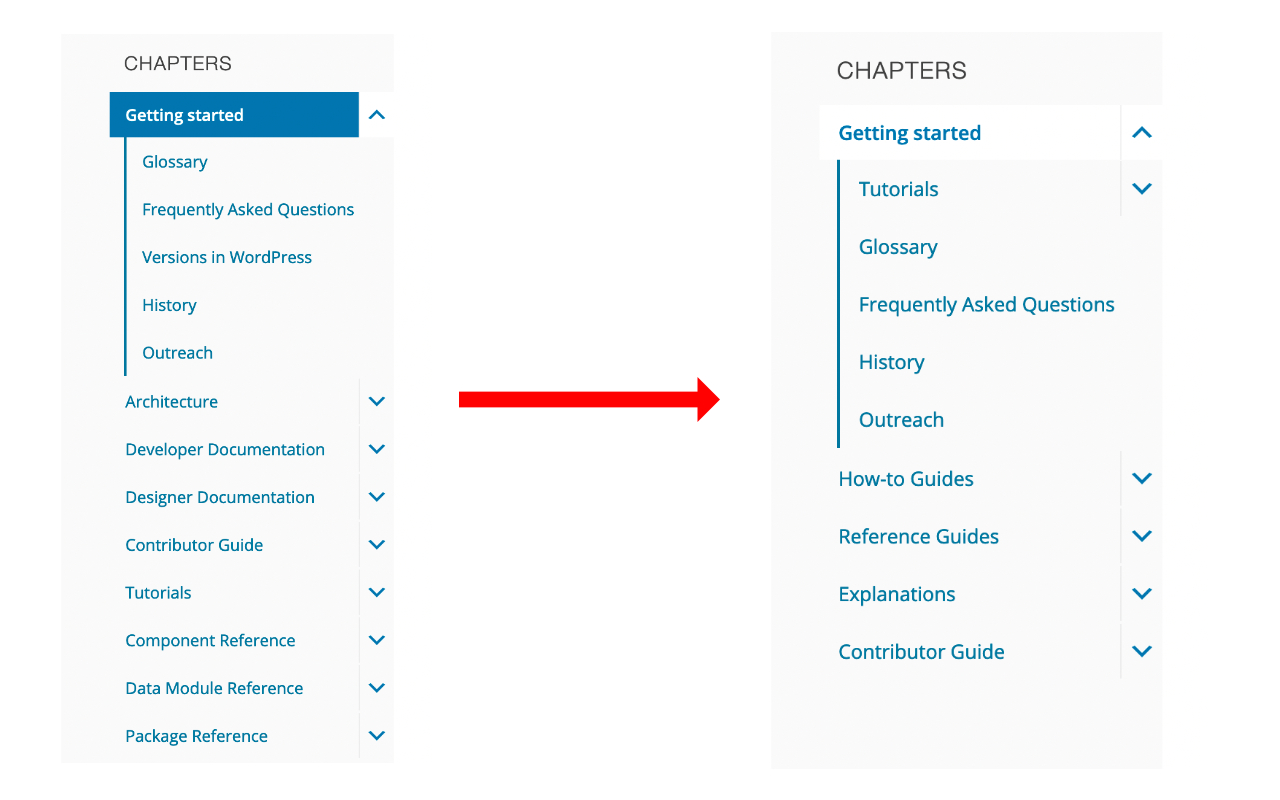
Here is the transition from the old table of contents to the new one:

Block editor handbook table of content transition

For more context, check the pull request and the related issue on GitHubGitHub GitHub is a website that offers online implementation of git repositories that can easily be shared, copied and modified by other developers. Public repositories are free to host, private repositories require a paid subscription. GitHub introduced the concept of the ‘pull request’ where code changes done in branches by contributors can be reviewed and discussed before being merged by the repository owner. https://github.com/.

You can expect a wrapping up post for the project in the coming days/weeks.


Props to all the people who have contributed to this project til now:
@paaljoachim, @annezazu, @omarreiss, @mkaz, @youknowriad, @DaisyOlsen, @mtias, @priethor, @gziolo, @ntsekouras, @aristath for their feedbacks and inputs; and @coffee2code for helping on handling the various MetaMeta Meta is a term that refers to the inside workings of a group. For us, this is the team that works on internal WordPress sites like WordCamp Central and Make WordPress. related tasks for the DevHub website.

Dev Chat Summary for March 10, 2021

@francina hosted this agenda.

Announcements

WordPress 5.7 “Esperanza” was released yesterday.

The 5.7 Field Guide is available.

@audrasjb confirmed all documentation is published and noted that HelpHub end-user documentation pages reflect changes introduced in the 5.7 release.

Blogblog (versus network, site) Post Highlights

These posts detail the latest news on CoreCore Core is the set of software required to run WordPress. The Core Development Team builds WordPress. and GutenbergGutenberg The Gutenberg project is the new Editor Interface for WordPress. The editor improves the process and experience of creating new content, making writing rich content much simpler. It uses ‘blocks’ to add richness rather than shortcodes, custom HTML etc. https://wordpress.org/gutenberg/:

Blog posts that need feedback

Components check-in and status updates

@francina confirmed that UTC time remains in use for dev-chats due to the overwhelming preference expressed in comments.

@annezazu announced that the third call for testing for the Full Site Editing Outreach Program us underway. Published summary on feedback from the second call expected next week.

@sergeybiryukov announced the NPM test workflow now includes testing for Linux and MacOS to confirm that the scripts used to build WordPress also complete successfully in those environments. Also, the jQuery version in trunktrunk A directory in Subversion containing the latest development code in preparation for the next major release cycle. If you are running "trunk", then you are on the latest revision. is now version 3.6.0.

Open Floor

@whyisjake expressed interest in joining a 5.7 minor release.

Discussion commenced on the establishment of a formal triage team. @francina, @desrosj, @hellofromtonya, @sergeybiryukov and @jeffpaul shared updates on those currently involved in the process and the steps to include more people.

@audrasjb started a spirited conversation that included @johnbillion, @marybaum, @clorith, @joyously, @jeffpaul, @sergeybiryukov and @ipstenu on the need for clarity on the authorship of the dark mode feature pluginFeature Plugin A plugin that was created with the intention of eventually being proposed for inclusion in WordPress Core. See Features as Plugins and its mention in Make blog posts. @audrasjb welcomed feedback on several questions he asked addressing this.

Props to @audrasjb for review.

#5-7-1, #summary

CSS Chat Agenda: March 11, 2021

This is the agenda for the upcoming CSSCSS Cascading Style Sheets. meeting scheduled for Thursday, March 11, at 10:00 PM UTC. This meeting will be held in the #core-css channel in the Making WordPress SlackSlack Slack is a Collaborative Group Chat Platform https://slack.com/. The WordPress community has its own Slack Channel at https://make.wordpress.org/chat/.

If there’s any topic you’d like to discuss, or if you have suggestions for discussion questions, please leave a comment below!

  • Housekeeping
  • Discussion: Ideas for custom property naming
    • Continuing our discussion from last week around ideas for naming custom properties for buttons
  • Project Updates
  • Open Floor + CSS Link Share
#agenda, #core-css

Dev Chat Agenda for March 10, 2021

Here is the agenda for this week’s meetings to occur at the following times: March 10, 2021 at 5:00 UTC and March 10, 2021 at 20:00 UTC.

Announcements

Field GuideField guide The field guide is a type of blogpost published on Make/Core during the release candidate phase of the WordPress release cycle. The field guide generally lists all the dev notes published during the beta cycle. This guide is linked in the about page of the corresponding version of WordPress, in the release post and in the HelpHub version page.

In case you missed it, through the Field Guide for a full breakdown of everything you need to know about WordPress 5.7.

Blogblog (versus network, site) Post Highlights

Blog posts that need feedback

Components check-in and status updates

  • Check-in with each component for status updates.
  • Poll for components that need assistance.

Open Floor

Do you have something to propose for the agenda, or a specific item relevant to our standard list above?

Please leave a comment, and say whether or not you’ll be in the chat, so the group can either give you the floor or bring up your topic for you, accordingly.

This meeting happens in the #core channel. To join the meeting, you’ll need an account on the Making WordPress Slack.

#5-7, #agenda, #dev-chat

A Week in Core – March 8, 2021

Welcome back to a new issue of Week in CoreCore Core is the set of software required to run WordPress. The Core Development Team builds WordPress.. Let’s take a look at what changed on TracTrac An open source project by Edgewall Software that serves as a bug tracker and project management tool for WordPress. between March 1st and March 8, 2021.

  • 20 commits
  • 42 contributors
  • 64 tickets created
  • 9 tickets reopened
  • 81 tickets closed

You might have noticed that the activity on Core is still pretty high this week, as we are very close to release WordPress 5.7.

Ticketticket Created for both bug reports and feature development on the bug tracker. numbers are based on the Trac timeline for the period above. The following is a summary of commits, organized by component.

Code changes

Build/Test Tools

  • Ensure the test_php_and_js_shortcode_attribute_regexes_match() test can run when testing using either the src or build directory – #51734
  • Pin SHA versions to the remaining 3rd party actions – #52625
  • Generalize the NPM test workflow – #52658
  • Add path detection when running GitHubGitHub GitHub is a website that offers online implementation of git repositories that can easily be shared, copied and modified by other developers. Public repositories are free to host, private repositories require a paid subscription. GitHub introduced the concept of the ‘pull request’ where code changes done in branches by contributors can be reviewed and discussed before being merged by the repository owner. https://github.com/ Actions on pull_request#52667
  • Change the cancel-workflow-action version to a SHA value – #52625
  • Pin the welcome-action to a specific commit SHA – #52625

Bundled Themes

  • Twenty Twenty-One: Make text readable when dark background is selected for the Media & Text blockBlock Block is the abstract term used to describe units of markup that, composed together, form the content or layout of a webpage using the WordPress editor. The idea combines concepts of what in the past may have achieved with shortcodes, custom HTML, and embed discovery into a single consistent API and user experience.#52702
  • Twenty Twenty-One: Correct inner container background color for Cover Blocks – #52676
  • Twenty Fifteen & Twenty Sixteen: Remove extra space around post editor – #52646

Docs

  • Add a @since note to wp_admin_bar_edit_menu() about the “View Post” link on Comments screen for a single post – #42366

Editor

  • Classic Editor: Make sure word count is hidden if JavaScriptJavaScript JavaScript or JS is an object-oriented computer programming language commonly used to create interactive effects within web browsers. WordPress makes extensive use of JS for a better user experience. While PHP is executed on the server, JS executes within a user’s browser. https://www.javascript.com is disabled – #52662
  • Block Editor: Fix color support for dynamic blocks – #52709

Help/About

  • Clarify two strings – #52347
  • Clarify a string about lazy-loading iframes – #52347
  • Iterate on the 5.7 About Page – #52693

Roles/Caps

  • Return same result from current_user_can and user_can()#52076

Site Health

  • Do not store HTTPSHTTPS HTTPS is an acronym for Hyper Text Transfer Protocol Secure. HTTPS is the secure version of HTTP, the protocol over which data is sent between your browser and the website that you are connected to. The 'S' at the end of HTTPS stands for 'Secure'. It means all communications between your browser and the website are encrypted. This is especially helpful for protecting sensitive data like banking information. request error messages in an option – #52484

Upgrade/Install

  • Display version number on the “Update now” button on WordPress Updates screen – #52513
  • Upgrade/Install: Invalidate OPcache for version.php during update – #36455

XML-RPC

  • Pass an empty array to the xmlrpc_call action in methods that have no arguments – #52524

Props

Thanks to the 42 people who contributed to WordPress Core on Trac last week:

@johnbillion (6), @audrasjb (3), @SergeyBiryukov (3), @paaljoachim (3), @hellofromTonya (3), @desrosj (3), @sabernhardt (2), @peterwilsoncc (2), @davidbaumwald (2), @marybaum (2), @pbiron (2), @flixos90 (1), @tmatsuur (1), @tikifez (1), @lukecarbis (1), @dianeco (1), @mikeschroder (1), @kjellr (1), @sergeybiryukov (1), @cenay (1), @antonlukin (1), @krstarica (1), @stodorovic (1), @francina (1), @clorith (1), @TimothyBlynJacobs (1), @melchoyce (1), @sarahricker (1), @youknowriad (1), @rafhun (1), @nosolosw (1), @mukesh27 (1), @johnjamesjacoby (1), @ryelle (1), @poena (1), @jdy68 (1), @dd32 (1), @alexstine (1), @munyagu (1), @janak007 (1), @afragen (1), and @felipeelia (1).

Please join me to say welcome to our 3 new Core contributorsCore Contributors Core contributors are those who have worked on a release of WordPress, by creating the functions or finding and patching bugs. These contributions are done through Trac. https://core.trac.wordpress.org of the week ♥️
@tikifez, @cenay, and @rafhun.

Core committers: @sergeybiryukov (6), @desrosj (6), @ryelle (4), @johnbillion (1), @peterwilsoncc (1), @noisysocks (1), and @mikeschroder (1).

Please note: it only includes commits with proper props attribution.

#5-7, #week-in-core

CSS Chat Summary: 04 March 2021

The meeting took place here on Slack. @notlaura facilitated and @danfarrow wrote up these notes.

Housekeeping

  • A leader is needed for next week’s (Thursday 11 March @ 21:00 UTC) coreCore Core is the set of software required to run WordPress. The Core Development Team builds WordPress. triagetriage The act of evaluating and sorting bug reports, in order to decide priority, severity, and other factors. bugbug A bug is an error or unexpected result. Performance improvements, code optimization, and are considered enhancements, not defects. After feature freeze, only bugs are dealt with, with regressions (adverse changes from the previous version) being the highest priority. scrub – if you fancy doing it please let us know in SlackSlack Slack is a Collaborative Group Chat Platform https://slack.com/. The WordPress community has its own Slack Channel at https://make.wordpress.org/chat/

Discussion: Compare ideas for naming custom properties for colors in a button

  • In order to start the discussion on naming conventions for custom properties in wp-adminadmin (and super admin) we are asking for people to mock-up examples of how they would name the custom properties for a button
  • @ryelle shared her demo
    • Button appearance is defined in terms of 7 body-level colour variables --color-1, --color-2 etc
    • Colour variations are achieved by overriding the values of the 7 colours
  • @notlaura shared her demo
    • Button appearance is defined by a set of custom properties using a --prefix--element--property[--modifier] naming pattern e.g. --wp-admin-color--button--bg
    • Variations are achieved by overriding the button properties for specific classes e.g. .button--alert
  • Discussing the merits of the differing approaches @williampatton pointed out that the --element--property--modifier pattern can lead to overly verbose CSSCSS Cascading Style Sheets.. @ryelle agreed but felt that the --color-1 etc. approach is also not the right answer either
  • @notlaura suggested that, as buttons are particularly complicated compared to other elements, it might help to also mock-up another element in order to compare solutions

Beyond color

Fallbacks

Next steps

  • @notlaura concluded the discussion with the observation that we need a naming convention which is close to an element selector, but which doesn’t result in a huge number of variables, many having the same value
  • @ryelle‘s use of more general custom properties e.g. --wp-admin--page--background, --wp-admin--text--color could be a better approach – she will explore this further
  • The discussion on this topic will continue!

Project updates

Color Scheming (#49999)

  • @ryelle shared this Trac ticket which could introduce custom property support & tooling
  • @peterwilsoncc asked about the possibility of setting up an npm package with admin colour sass variables, so that pluginPlugin A plugin is a piece of software containing a group of functions that can be added to a WordPress website. They can extend functionality or add new features to your WordPress websites. WordPress plugins are written in the PHP programming language and integrate seamlessly with WordPress. These can be free in the WordPress.org Plugin Directory https://wordpress.org/plugins/ or can be cost-based plugin from a third-party. authors could use to stay in sync. @ryelle responded that the core colours will become custom properties so the sass files will eventually be deprecated.

With that our time was up & the meeting finished. Thanks everyone!

#core-css, #summary

What’s next in Gutenberg? (March 2021)

This monthly update contains the high-level items that GutenbergGutenberg The Gutenberg project is the new Editor Interface for WordPress. The editor improves the process and experience of creating new content, making writing rich content much simpler. It uses ‘blocks’ to add richness rather than shortcodes, custom HTML etc. https://wordpress.org/gutenberg/ contributors are focusing on for March. Please join us in our efforts and let us know in the comments if anything is blocking you from doing so.

How to follow along with Gutenberg:

Here’s an overview of different ways to keep up with Gutenberg and the Full Site Editing project. There is also an index page of Gutenberg development-related posts and a Site Editing Milestone overview issue that breaks down the upcoming work into more concrete next steps. 

BlockBlock Block is the abstract term used to describe units of markup that, composed together, form the content or layout of a webpage using the WordPress editor. The idea combines concepts of what in the past may have achieved with shortcodes, custom HTML, and embed discovery into a single consistent API and user experience.-based WidgetWidget A WordPress Widget is a small block that performs a specific function. You can add these widgets in sidebars also known as widget-ready areas on your web page. WordPress widgets were originally created to provide a simple and easy-to-use way of giving design and structure control of the WordPress theme to the user. Editor

Work on the Block-based Widget Editor (Widgets Screen) is a continued focus for the month ahead. This effort aims to bring the flexibility of block-based editing to the widgets and customizerCustomizer Tool built into WordPress core that hooks into most modern themes. You can use it to preview and modify many of your site’s appearance settings. screens. The current efforts include:

Follow along:

You can find more information about the current work in progress in this exploratory issue for bringing blocks to the customizer and this summary issue for overall items for a block-based widget editor experience, as well as on this project board. Moreover, you can join #feature-widgets-block-editor in WordPress.orgWordPress.org The community site where WordPress code is created and shared by the users. This is where you can download the source code for WordPress core, plugins and themes as well as the central location for community conversations and organization. https://wordpress.org/ SlackSlack Slack is a Collaborative Group Chat Platform https://slack.com/. The WordPress community has its own Slack Channel at https://make.wordpress.org/chat/ for future Widget Screen-focused meetings.

Navigation Screen

Like the Widgets Screen, the Navigation Screen aims to help expand what’s possible with menus while bringing block functionality to yet another part of WordPress to allow for more adoption and offer a more modern experience. Because the Navigation Screen needs to work nicely with the Navigation block (and vice versa), much of the current effort from contributors here is focused on the Navigation Block. With this in mind, current efforts include:

Follow along:

You can follow the progress of this project on this project board or review the new Navigation Screen tracking issue and join #feature-navigation-block-editor in WordPress.org Slack.

Full Site Editing

As with the prior months, work on this major focus for phase 2 is ongoing and is expected to continue as a big-picture goal for 2021. Work this month will include the following focus areas:

Milestone 1 – Site Editing Infrastructure and UI

Milestone 3 – Global Styles

  • Iterate on the block supports mechanism.
  • Add content-width option to GS & theme.jsonJSON JSON, or JavaScript Object Notation, is a minimal, readable format for structuring data. It is used primarily to transmit data between a server and web application, as an alternative to XML.

Milestone 4 – Theme Blocks

  • Continue identifying and bringing required template features to the site editor and site-editor blocks.

Milestone 5 – Query Block

  • The Query Block MVPMinimum Viable Product "A minimum viable product (MVP) is a product with just enough features to satisfy early customers, and to provide feedback for future product development." - WikiPedia is ready! Next up, work will start to polish the experience with a focus on suggesting Patterns in block placeholder states.

Milestone 6 – Navigation Block

Follow along:

You can follow the progress of this project with this overview issue showing key milestones for site editing. For each major milestone, there are related issues you can follow if you want a more granular look at each next step.

If you’re interested in testing Full Site Editing, check out the FSE Outreach Program to learn more. If you have questions about Full Site Editing, check out this recent effort to offer answers.

Areas to be aware of

Block & PluginPlugin A plugin is a piece of software containing a group of functions that can be added to a WordPress website. They can extend functionality or add new features to your WordPress websites. WordPress plugins are written in the PHP programming language and integrate seamlessly with WordPress. These can be free in the WordPress.org Plugin Directory https://wordpress.org/plugins/ or can be cost-based plugin from a third-party. Developers

Contributors

  • As suggested during the recent Hallway Hangout hosted by @bernhard-reiter focused on writing end-to-end tests, contributors are encouraged to file issues requesting end-to-end tests when spotting a regressionregression A software bug that breaks or degrades something that previously worked. Regressions are often treated as critical bugs or blockers. Recent regressions may be given higher priorities. A "3.6 regression" would be a bug in 3.6 that worked as intended in 3.5. with the “[Package] E2E Tests” label.

Theme Developers

Design

Ways to Get Involved

While the above items are our focuses, don’t forget that you can always help with triage, needs testing issues, good first issues, and reviewing PRs. In particular, if you’re interested in helping with triagetriage The act of evaluating and sorting bug reports, in order to decide priority, severity, and other factors. but don’t know where to start, there’s a course on Learn WordPress for how to do triage in GitHub! Check it out and join us.

If there’s anything we can do to make contributing easier, let us know in the comments or in #core-editor chats. While we can’t promise to fix everything, we’d appreciate being aware of any blockers.

Meetings to join:

While you can view all meetings here, here are specific meetings to join depending on your interest. Remember that you need a WordPress.org slack account to participate:

  • CoreCore Core is the set of software required to run WordPress. The Core Development Team builds WordPress. Editor weekly Wednesdays @ 14:00 UTC in #core-editor focused on all-things Gutenberg.
  • Block-Based Themes meeting twice monthly on Wednesday @ 16:00 UTC in #themereview focused on preparing for Full Site Editing.

#core-editor, #gutenberg, #gutenberg-next