The WordPress coreCoreCore is the set of software required to run WordPress. The Core Development Team builds WordPress. development team builds WordPress! Follow this site for general updates, status reports, and the occasional code debate. There’s lots of ways to contribute:
Found a bugbugA bug is an error or unexpected result. Performance improvements, code optimization, and are considered enhancements, not defects. After feature freeze, only bugs are dealt with, with regressions (adverse changes from the previous version) being the highest priority.?Create a ticket in the bug tracker.
Here’s the awesome activity seen in TracTracAn open source project by Edgewall Software that serves as a bug tracker and project management tool for WordPress. between April 17 and April 24, 2023:
WP Feature Notifications: 2023 Status Update: This update explains recent progress toward a CoreCoreCore is the set of software required to run WordPress. The Core Development Team builds WordPress.-targeted modern WordPress user notification system, its interplay with GutenbergGutenbergThe Gutenberg project is the new Editor Interface for WordPress. The editor improves the process and experience of creating new content, making writing rich content much simpler. It uses ‘blocks’ to add richness rather than shortcodes, custom HTML etc.
https://wordpress.org/gutenberg/ Phase 3, and how you can get involved.
WP Briefing: Episode 54: A Bill of Rights for the Open Web: Listen as Josepha explores the four freedoms of open sourceOpen SourceOpen Source denotes software for which the original source code is made freely available and may be redistributed and modified. Open Source **must be** delivered via a licensing model, see GPL., which have been referred to as a “Bill of Rights” for the open web.
6.2.1 Minor ReleaseMinor ReleaseA set of releases or versions having the same minor version number may be collectively referred to as .x , for example version 5.2.x to refer to versions 5.2, 5.2.1, 5.2.3, and all other versions in the 5.2 (five dot two) branch of that software. Minor Releases often make improvements to existing features and functionality.
@audrasjb provided a WP 6.2 triagetriageThe act of evaluating and sorting bug reports, in order to decide priority, severity, and other factors. update:
On Trac, there are 19 tickets in milestone 6.2.1, 9 of them are fixed, and 2 others are awaiting backportbackportA port is when code from one branch (or trunk) is merged into another branch or trunk. Some changes in WordPress point releases are the result of backporting code from trunk to the release branch. to 6.2 (making a total of 11 tickets addressed thus far).
@ironprogrammer asked for confirmation that a small squad is still needed to run the 6.2.1 release, which @audrasjb confirmed. JB then added that an active Gutenberg contributor should ideally help shepherd the related issues/PRs/tasks; and that someone would be needed to help build packages, suggesting that @sergeybiryukov might help with Mission Control.
@ironprogrammer suggested sharing the needs for Gutenberg contributor involvement in the #core-editor channel, which @audrasjb confirmed he would follow up.
Open Floor
During open floor, @presskopp raised visibility on the following Trac tickets:
#53682: tags (keywords) with umlauts don’t get saved in German locale — @audrasjb noted that this ticket still needed a patchpatchA special text file that describes changes to code, by identifying the files and lines which are added, removed, and altered. It may also be referred to as a diff. A patch can be applied to a codebase for testing. to move it forward.
#50081: orderby datetime field — @audrasjb identified this as a Docs (DevHub) issue, and updated the ticket. @leogermani and @sergeybiryukov responded and provided context for when the code example was last updated. JB updated the sample code in DevHub and closed the ticket. 🎉
No updates of Key Projects during the coreCoreCore is the set of software required to run WordPress. The Core Development Team builds WordPress. editor meeting.
There are a few more discussions at the GithubGitHubGitHub is a website that offers online implementation of git repositories that can easily be shared, copied and modified by other developers. Public repositories are free to host, private repositories require a paid subscription. GitHub introduced the concept of the ‘pull request’ where code changes done in branches by contributors can be reviewed and discussed before being merged by the repository owner. https://github.com/ repo on the topic ideas on Developer Blog Content, just in case someone would like to start writing, or wants to chime in.
GutenbergGutenbergThe Gutenberg project is the new Editor Interface for WordPress. The editor improves the process and experience of creating new content, making writing rich content much simpler. It uses ‘blocks’ to add richness rather than shortcodes, custom HTML etc.
https://wordpress.org/gutenberg/15.7 RC1 is released today and available for testing. A big thank you to @bph for handling the release.
Updated the cadence of bugbugA bug is an error or unexpected result. Performance improvements, code optimization, and are considered enhancements, not defects. After feature freeze, only bugs are dealt with, with regressions (adverse changes from the previous version) being the highest priority. scrubs to be every 2 weeks – next one scheduled for April 26, 2023 at 15:00 UTC.
Discussion regarding the decoupling of the SQLite pluginPluginA plugin is a piece of software containing a group of functions that can be added to a WordPress website. They can extend functionality or add new features to your WordPress websites. WordPress plugins are written in the PHP programming language and integrate seamlessly with WordPress. These can be free in the WordPress.org Plugin Directory https://wordpress.org/plugins/ or can be cost-based plugin from a third-party.from the performance lab work. In reference to this conversation that came up in a previous performance chat. Would love to have an open discussion about peoples preferences here and whether we do decouple this?
@olliejones I favor that approach. It will usually be deployedDeployLaunching code from a local development environment to the production web server, so that it's available to visitors. independently of the stuff in PL.
@10upsimon I tend to lean more toward an agreement with @rmccue in that SQLite is not necessarily performance improvements focused (or at least that is not the primary goal), and probably belongs outside of the realm of the performance lab work.
@spacedmonkey To be clear, I think that performance team should continue to support SQlite getting into coreCoreCore is the set of software required to run WordPress. The Core Development Team builds WordPress., to much sure it done in a performant way. But SQlite is not a performance benefit on the face of it, so it is confusing why we part of performance lab plugin.
@rmccue Yeah, that was basically my thought; I think it’s beneficial all-round to separate it out (but with performance still consulting as @spacedmonkey says)
@olliejones yes, having SQLite headed for core is good. I believe the issue is about monorepo and multifunction plugins on the one hand and a separate repo and plugin on the other.
@aristath I agree with what was mentioned above 100%. SQLite can be related to performance, but is not in itself a “performance” module/plugin. It should be developed in collaboration with the performance team since it can have a big impact, but I’d vote to decouple it from the performance-lab plugin
@olliejones Maybe in a parallel universe or another year, there can be a separate database team. But for now the perf. team has the talent.
@spacedmonkey If you want to setup a meeting for a database team, that could work. Many component meetings have less than 5 people.
@flixos90 To clarify, this conversation is slightly different and mostly unrelated to the “unbundling Performance Lab plugin” effort. While we are publishing other PL modules as standalone plugins, those standalone plugins will still be directly associated with the performance team, developed in the monorepo, referenced from the PL main plugin etc. Removing / decoupling SQLite from PL would be different: We would still support getting the plugin towards WP core of course, but it wouldn’t be in any way connected to PL anymore. Maybe that was clear, but just in case.
Next steps clarification:
@aristath I think the only thing to do here would be to remove the module from PL, and add a notice so in case the user previously had the module activated, they’ll be prompted to install the standalone plugin
@joemcgill I assume we’ll remove the module from the performance lab plugin in the same release where we remove other modules. How we handle the transition so as to not break any active sites, is not clear to me at the moment.
@olliejones Do we have any usage telemetry to help guide that decision?
@flixos90 Potentially. As mentioned, I think this conversation is decoupled from the general PL unbundling effort, so we could do it at the same time, but also sooner. I would love to find a way to make the transition smooth though. For sites that already have the SQLite module active, we should probably recommend activating the SQLite plugin before deactivating the feature.
@flixos90 Has anyone tried yet to activate the SQLite standalone plugin on a site where the PL SQLite module is already active? We need to make sure it doesn’t throw fatal errors
@aristath Adding it on my TODO list for tomorrow, though from what I recall I tried it last month and I there were no issues. I’ll need to test that again just to be sure, it’s been a long time
@10upsimon I feel strongly about not intentionally breaking users sites, however few are using it. Perhaps we need to defer the removal to 2 versions from now, and raise a notice or similar in the adminadmin(and super admin) making it very clear that from version n it will no longer be supported as a core PL module.
@flixos90 agreed @10upsimon adding though that for a smooth transition the plugin should be activated before deactivating the PL module, so we have to make sure that that is actually possible
@joemcgill A similar transition plan will be good for all of the modules, to be honest, even though SQLite is the most critical due to potential breakage.
@flixos90@joemcgill I think for the other modules we’ll handle that in a central effort as part of unbundling, but with SQLite it will now be bit different, since that plugin will not be referenced directly from PL in the future. But I agree it’s most critical there to have a smooth transition since switching back to a MySQLMySQLMySQL is a relational database management system. A database is a structured collection of data where content, configuration and other options are stored. https://www.mysql.com / MariaDB database accidentally will break any site that actually relies on SQLite right now
@joemcgill This is a huge one that I had noticed in my profiling research, so nice to see this already addressed!
@10upsimon Call me cheesy, but 15% server time alone across many WP hosts is a positive contribution to the environment alone
@mukesh27 With all this improvement, 6.3 is faster than 6.2
@flixos90 Yeah, this alone will make blockBlockBlock is the abstract term used to describe units of markup that, composed together, form the content or layout of a webpage using the WordPress editor. The idea combines concepts of what in the past may have achieved with shortcodes, custom HTML, and embed discovery into a single consistent API and user experience. theme performance in 6.3 almost as much faster as it got faster in 6.2
@flixos90 Certainly the highest performance improvement in a single PR that I’ve seen so far
@joemcgill Worth noting that the 15% improvement on that PR is compared against WP 6.1.1, not the commit prior to that one, so it would be interesting to A/B against the commit prior (if I’m reading the workflow correctly)
@flixos90 No, the 15% is against today’s trunk. The original metrics on the PR are incorrect, but then I measured it against trunk and that’s where the 15% come from
@olliejones I’ve been on the SQLite Object Cache, making it more useful for @spacedmonkey hopefully – Nothing on the bigger SQLite project.
@spacedmonkey Not related to database, but object caching. I have been working WP CLICLICommand Line Interface. Terminal (Bash) in Mac, Command Prompt in Windows, or WP-CLI for WordPress. support new functionality object cache
JavaScriptJavaScriptJavaScript or JS is an object-oriented computer programming language commonly used to create interactive effects within web browsers. WordPress makes extensive use of JS for a better user experience. While PHP is executed on the server, JS executes within a user’s browser.
https://www.javascript.com & CSSCSSCascading Style Sheets.
@10upsimon Regarding “Enhancing the WP Scripts APIAPIAn API or Application Programming Interface is a software intermediary that allows programs to interact with each other and share data in limited, clearly defined ways. with a Loading Strategy”:
We’ve had a good amount of feedback and iteration on our draft PR
We’ve had some valuable feedback come in this week, so we’ll be addressing that with the goal of opening a PR against core later this week. Thanks @joemcgill@adamsilverstein and @westonruter for the invaluable feedback thus far (and to @spacedmonkey)
We’ve established a mostly approved documentation plan/roadmap, with slight ongoing tweaks thereto. Draft documentation and documentation updates can commence soon
@flixos90 One more thing regarding JSJSJavaScript, a web scripting language typically executed in the browser. Often used for advanced user interfaces and behaviors. & CSS, last week I opened https://github.com/WordPress/gutenberg/issues/49927 to optimize how block CSS is loaded in classic themes (it’s great in block themes, but not so much for classic themes, and we can probably improve that). There have been some great conversations on that. @aristath has pointed out a detailed code example with how we could improve this by printing inline styles per block type right before the first block of each type is rendered
@aristath If you have some capacity to work on a PR, I think that would be a great next step
@flixos90 If we can find a solution that works reliably, maybe we can eventually even change the default behavior so that it’s no longer opt-in but just works out of the box
@joemcgill I’ve been working to prioritize a set of “next steps” for automated performance testing. For me, the “next step” is to turn these tasks into tracTracAn open source project by Edgewall Software that serves as a bug tracker and project management tool for WordPress. tickets that we can address as capacity allows.
One of the big ones is to improve the stability of the results and make them more atomic, so we can use them to evaluate specific PRs (like the discussion we had earlier about the get_block_templates PR)
@joegrainger We’re still progressing through the issues raised in the Plugin Checker Milestone 1 Review/QA and will continue to be working on these over the coming weeks. You can follow the progress on the GitHub repo and any thoughts/ideas/comments are welcome. Thanks!
@flixos90 We’re still waiting to get the Fetchpriority standalone plugin approved, beyond that and then the same for Dominant Color, we have basically completed the work for “Milestone 1” in https://github.com/WordPress/performance/issues/656
@flixos90 Separately, we need to explore what we want the user experience for “Milestone 2” to look like, both in terms of the regular UIUIUser interface of the PL plugin going forward (in which it controls certain plugins as well as the Site Health modules), and for a smooth migrationMigrationMoving the code, database and media files for a website site from one server to another. Most typically done when changing hosting companies. from the modules to remove to their standalone plugins
Based on lab benchmarks, WordPress 6.2 loads 14-18% faster overall for blockBlockBlock is the abstract term used to describe units of markup that, composed together, form the content or layout of a webpage using the WordPress editor. The idea combines concepts of what in the past may have achieved with shortcodes, custom HTML, and embed discovery into a single consistent API and user experience. themes and 2-5% faster overall for classic themes (measured via Largest Contentful Paint / LCP). Particularly server-side performance (measured via Time to First Byte / TTFB) is seeing a major boost of 17-23% for block themes and 3-5% for classic themes, which directly contributes to the overall load time.
This post provides more information and a retrospective on how those performance wins were achieved in the WordPress 6.2 release cycle.
Learning from previous WordPress coreCoreCore is the set of software required to run WordPress. The Core Development Team builds WordPress. releases
During the betaBetaA pre-release of software that is given out to a large group of users to trial under real conditions. Beta versions have gone through alpha testing in-house and are generally fairly close in look, feel and function to the final product; however, design changes often occur as part of the process./RCrelease candidateOne of the final stages in the version release cycle, this version signals the potential to be a final release to the public. Also see alpha (beta). testing phase of WordPress 6.1 in November 2022, it became evident that a few notable performance regressions had made it into the release when compared to the performance of WordPress 6.0. While the single most impactful performance regressionregressionA software bug that breaks or degrades something that previously worked. Regressions are often treated as critical bugs or blockers. Recent regressions may be given higher priorities. A "3.6 regression" would be a bug in 3.6 that worked as intended in 3.5. was addressed before the 6.1 stable release in one of its release candidates, overall performance still regressed slightly when using a block theme. Previous WordPress core releases, especially 6.0, saw more notable performance regressions. Despite other performance enhancements landing in those releases, the regressions effectively ended up canceling out the enhancements. In WordPress 6.2, this is significantly different, with all key metrics improving over the previous release, as highlighted in these performance benchmarks shared by @oandregal.
For WordPress 6.1, the regressions were discussed in a general assessment of WordPress 6.1 RC performance. Despite contributors from different core teams quickly prioritizing and investigating the issues, it was too late in the release cycle to address them all. This was a great learning experience: As much as we are working on performance enhancements, it is as important to continuously monitor performance of existing core features to avoid regressions. The more regressions there are, the less impactful any other performance enhancements are overall. While this seems logical and simple, it sometimes still takes an actual learning experience to get things right.
It is great to see that we have put these learnings into practice, and the performance wins in WordPress 6.2 demonstrate that. So what changed in the 6.2 release cycle?
Increased focus on performance measurement
When trying to summarize how performance work changed between the 6.1 and the 6.2 cycle in a single word, an increased focus on measurement proved to be the deciding factor. The following elaborates on the nuance of that simplified statement.
Identifying performance bottlenecks and opportunities for improvement
It was clearly visible that contributors were keen to rectify the 6.1 regressions and learn from that prior release. This already surfaced in the WordPress 6.1.1 follow up release which contained a few performance-related fixes: 12 of 30 tickets fixed in that release were focused on performance.
Numerous contributors from different core teams actively worked towards identifying and addressing performance bottlenecks, by both benchmarking and profiling WordPress core performance.
Profiling WordPress core has been tremendously helpful in identifying performance issues on the server-side, which has led to the notably improved TTFB performance we are seeing in WordPress 6.2. Common tools used for server-side profiling among contributors have been the open sourceOpen SourceOpen Source denotes software for which the original source code is made freely available and may be redistributed and modified. Open Source **must be** delivered via a licensing model, see GPL. tools Xdebug and XHProf and the SaaS tool Blackfire. Contributors have been starting to define and document standardized ways for using these tools, which are intended to be published in the Make Performance Handbook soon.
For benchmarking WordPress core on the other hand, there was less clarity or known tools that could be used as is. While contributors initially came up with individual tooling of their choice to measure performance, the different benchmarking approaches had varying degrees of accuracy and ease of use, so it soon became clear that a more consistent approach would be needed. This was one of the key topics discussed in the first performance focused hallway hangout in January. From there, several contributors started more coordinated efforts for measuring performance, for both manual benchmarks locally and automated benchmarks via continuous integration.
The Performance Lead role
Another change that was made for the WordPress 6.2 cycle which has been supporting everything I have mentioned so far is the introduction of a new Performance Lead role as part of the release squad. This came as a result of the aforementioned performance focused hallway hangout, and I ended up stepping into this role for the 6.2 release. This enabled me to closely collaborate and support the other contributors and coordinate with them our performance measurement approaches. As mentioned before, I would like to emphasize that the performance wins in this release are a result of excellent work from several contributors on identifying performance weaknesses. The introduction of the Performance Lead role then merely brought a better representation of performance alongside the other members of the release squad.
I hope the role of the Performance Lead is here to stay, and I am excited to see additional contributors step into this role in the future.
Assessing performance on individual WordPress core patches / pull requests
As mentioned before, profiling is the recommended approach to identify performance bottlenecks in WordPress core. However, once a pull request with a potential fix is implemented, it is also crucial to measure the actual performance impact and through that validate whether the outcome is as expected. While profiling gives us an idea about the potential performance impact, it comes with caveats such as the overhead of the profiling tools running on the WordPress site, and also that it only captures a single request, which as mentioned above is subject to a good degree of variance when it comes to performance.
Various contributors in the WordPress 6.2 cycle benchmarked performance on individual pull requests, whether to prove a positive impact or performance or ensure that no regression is introduced. Different tools were used to assess the impact, often CLICLICommand Line Interface. Terminal (Bash) in Mac, Command Prompt in Windows, or WP-CLI for WordPress. commands like “benchmark-server-timing” or “benchmark-web-vitals”. The “benchmark-server-timing” command has been most helpful for individual PRs with server-side performance impact, for example it was used in the #57502ticketticketCreated for both bug reports and feature development on the bug tracker. (see this comment), which is possibly the largest single performance enhancementenhancementEnhancements are simple improvements to WordPress, such as the addition of a hook, a new feature, or an improvement to an existing feature. in the 6.2 release. The “benchmark-web-vitals” command however has still been useful for a few situations where performance decisions came down to exclusively client-side performance, for example in the #56990 ticket (see this comment), which explores the classic-themes.css performance impact.
Launching an automated performance testing workflow
In the WordPress 6.2 cycle, most of these benchmarks were conducted manually, which sometimes is a necessity due to the nature of the pull request, but other times is rather inefficient. Furthermore, it would not be feasible to benchmark performance manually for every WordPress core change – and that is precisely how a performance regression may be merged unnoticed. Several contributors have been collaborating on introducing an automated performance measuring CI workflow to WordPress core, and a first MVPMinimum Viable Product"A minimum viable product (MVP) is a product with just enough features to satisfy early customers, and to provide feedback for future product development." - WikiPedia was committed to WordPress core in [55459]. With this CI workflow, WordPress core performance metrics are now recorded for every single commit and are available in this dashboard. This allows us to easily spot a potential regression where previously it would have gone unnoticed. While at this point, there is still a sizable amount of variance in the data points and a limited number of metrics are available, the team will iterate in the coming weeks and months. This is only the starting point, and additional features like CWV support are already being planned. Needless to say, this is a major milestone and win for monitoring performance in WordPress core and will reduce some of the measuring workload already for the upcoming 6.3 cycle.
Assessing performance of WordPress core holistically
While assessing performance on every individual WordPress core change (pull request / commit) is very important to ensure continuous monitoring of performance and avoid regressions, it is also important to keep track of overall performance in WordPress core. This is particularly true during the Beta and RC stages of a release cycle.
At this point in particular, it is advisable to use the production ZIP version of WordPress core (e.g. a particular Beta or RC release) instead of measuring in the WordPress core development environment. The “benchmark-web-vitals” command mentioned in the previous section is perfect for this use-case, as it provides high-level performance metrics that capture both server-side and client-side performance. The resulting data can then be compared with the same metrics from e.g. the previous stable release, to get an idea how performance of WordPress core has changed (hopefully improved!) in the new release. This approach is what the numbers I shared in the beginning of this post are based on.
Performance benchmarks for WordPress 6.2
I would like to share a few more detailed numbers for the WordPress 6.2 performance improvements. Generally, I have been benchmarking two different scenarios, which showcase particularly the server-side performance enhancements (with #57502 contributing the most to them):
Home page using a block theme (Twenty Twenty-Three) with the default content (“Hello World!” post)
Home page using a classic theme (Twenty Twenty-One) with the default content (“Hello World!” post)
Since WordPress 6.2 included one notable client-side performance enhancement that affects only sites using images (see #56930), I included two more scenarios to assess that impact too:
Home page using a block theme (Twenty Twenty-Three) with the default content (“Hello World!” post) and a featured imageFeatured imageA featured image is the main image used on your blog archive page and is pulled when the post or page is shared on social media. The image can be used to display in widget areas on your site or in a summary list of posts. on that post
Home page using a classic theme (Twenty Twenty-One) with the default content (“Hello World!” post) and a featured image on that post
For all of these scenarios, I then loaded the URLURLA specific web address of a website or web page on the Internet, such as a website’s URL www.wordpress.org 20 times using the “benchmark-web-vitals” command and recorded the metrics. The full metrics include more granular percentiles, but by far the most important ones are the medians (p50). Here is the data for the two scenarios with only the default “Hello world!” post (no featured image):
Scenario
Metric
WP 6.1.1 median
WP 6.2 median
Diff %
Block Theme: Twenty Twenty-Three
LCP
281.7ms
241.15ms
-14.39%
TTFB
176.75ms
137.8ms
-22.04%
Classic Theme: Twenty Twenty-One
LCP
209.65ms
203.65ms
-2.86%
TTFB
75.3ms
72.6ms
-3.59%
For comparison, here is the same data for the two alternative scenarios where the post has a featured image. Note how the LCP improvement for block themes is even more pronounced in this scenario:
To close this section, it should be noted that of course the 4 scenarios above are not representative of what most actual WordPress sites look like. Some other benchmarks were using the theme unit testunit testCode written to test a small piece of code or functionality within a larger application. Everything from themes to WordPress core have a series of unit tests. Also see regression. data, and while that is more content, it is not necessarily more accurate either. There are inevitably limitations from lab analyses, and we will never be able to capture the “average” or “realistic” WordPress site synthetically. However, the Core Performance Team is exploring a few good baseline scenarios as part of enhancing the aforementioned automated core performance testing CI workflow, and it would be great if in the 6.3 cycle we could align the benchmarks to use similar scenarios rather than every contributor including myself having their own scenarios for benchmarking.
For some of the individual ticket highlights that contributed to the performance improvements in WordPress 6.2, please see the recent core editor improvements post.
Comparing performance between block themes and classic themes
You may have noticed in the data above that the classic theme is apparently loading faster than the block theme. Let me clarify that a bit since, while that is technically true based on my benchmarks, the data may be deceiving at first glance.
Let’s take another look at the data from the first table above: For the LCP metric, the classic theme already loads notably faster (203.65ms vs 241.15ms, based on the first two scenarios for WordPress 6.2), but for TTFB, it’s almost twice as fast (72.6ms vs 137.8ms). Server-side performance is better in classic themes mainly because block themes have to handle more data since much of what a classic theme’s code is responsible for is now handled through more dynamic features that furthermore rely on making additional database queries. However, it also needs to be acknowledged that block theme support in WordPress core is still relatively new (little more than 1 year old now), while the logic for classic themes has seen more than a decade of refinements. In other words, chances are there is still a lot of headroom for improving server-side performance of block themes, while for classic themes there is probably less of that. The performance improvements in WordPress 6.2 perfectly indicate that, noting that TTFB with a block theme has improved far more than TTFB with a classic theme.
Now here comes the most important part though: In client-side performance, block themes are much faster than classic themes. The way to spot that is by looking at the difference between the LCP metric and the TTFB metric, and here’s why: LCP can be considered representative of the overall load time, while TTFB is the server response time. So “LCP minus TTFB” is representative of the client-side load time. If you make this calculation for the above data points for WordPress 6.2, you can clearly see the benefits of the block theme when it comes to client-side performance (103.35ms vs 131.05ms). These benefits are evident due to the more dynamic logic that is applied in block themes to e.g. load scripts and stylesheets. Rather than the common pattern of enqueuing a big stylesheet and big script in the theme, block themes load assets more granularly and dynamically, only for what is actually needed on the current page.
You may argue that it doesn’t matter that client-side performance is ~30ms faster in a block theme if at the same time server-side performance is ~65ms slower. Yes, in this benchmark the classic theme is overall ~35ms faster than the block theme – however that is without any caching. It is a common best practice for WordPress sites to use a full page cache to avoid the need for all the WordPress server-side logic to run on every page load or, even better, to avoid the request to hit the WordPress site at all in favor of serving a cached response. While by far not all WordPress sites use a full page cache, many do. And in that case, the server-side performance becomes potentially less relevant. Keep in mind however that even then improving server-side performance is still important: As mentioned, many sites still do not use a full page cache, and even for those that do, certain dynamic content is almost impossible to reliably cache. However, if your WordPress site uses primarily static content and a full page cache, block themes are already faster than classic themes today – because they are faster client-side. You can “cache” away server-side performance problems, but you cannot do that on the client-side. In other words: Despite block themes being slower on the server-side, they provide a better foundation for building performant sites in the long run.
Appendix: Tools to measure and profile performance
To finish this post, here you find a list of links to some of the tools mentioned:
In the last few months we’ve had a good amount of progress, as well as a number of changes, which have led to the recent publication of prerelease 0.2.0.
0.2.0 – A robust JavaScriptJavaScriptJavaScript or JS is an object-oriented computer programming language commonly used to create interactive effects within web browsers. WordPress makes extensive use of JS for a better user experience. While PHP is executed on the server, JS executes within a user’s browser.
https://www.javascript.com system
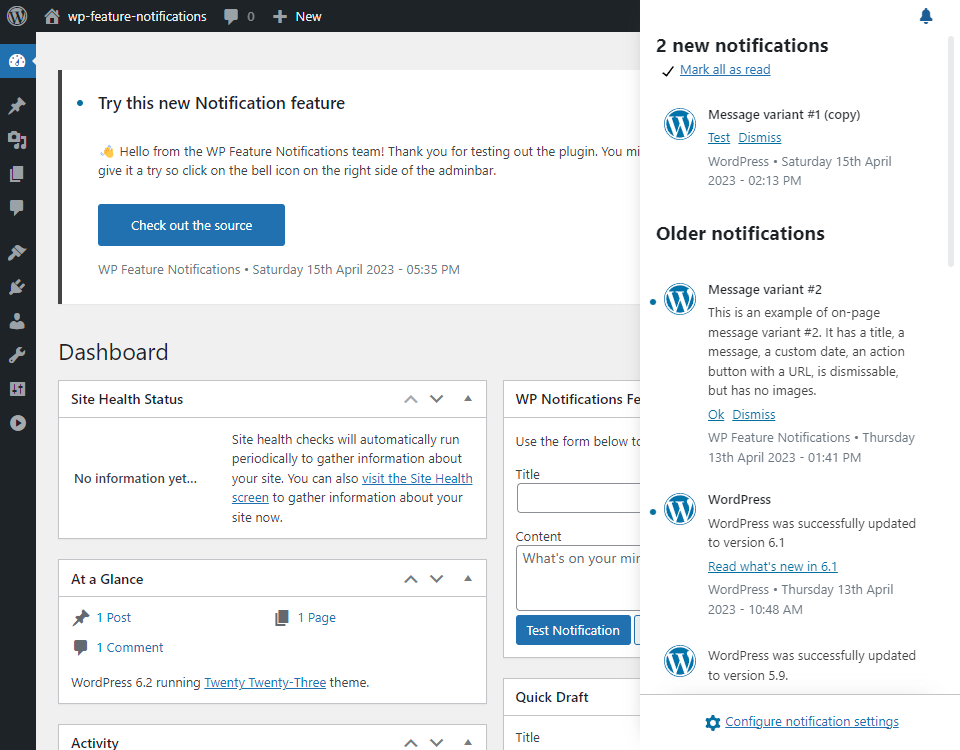
You can test out the current state of the feature pluginFeature PluginA plugin that was created with the intention of eventually being proposed for inclusion in WordPress Core. See Features as Plugins by downloading the latest release at https://github.com/WordPress/wp-feature-notifications/releases/latest. Please note that you will need to be using WordPress 6.2 or above.
What originally started as a UX proof of concept has evolved into a more sophisticated JSJSJavaScript, a web scripting language typically executed in the browser. Often used for advanced user interfaces and behaviors.-based system for displaying notifications based on serialised data. At the moment this uses static dummy data, however in a future update this will interface with the upcoming REST controllers to display persistent data.
Props to @codekraft and @bitmachina for some exceptional work here, which has really progressed the project.
Leadership, planning and the team
After extensive work as project lead, @psykro has decided to step down from the role. On behalf of the whole team, I’d like to thank him for the massive contributions he’s made, and the time and effort he’s put into the project over the last few years. @sephsekla has taken over project leadership in his stead.
In addition to our weekly office hours (15:00 UTC on Wednesday), @sephsekla, @codekraft, @bitmachina and @jason_the_adams have started a monthly planning call, in order to better scope out the future of the projects
To support the project’s long-term goal of becoming part of WP CoreCoreCore is the set of software required to run WordPress. The Core Development Team builds WordPress., the team is looking for partnership from a core committercommitterA developer with commit access. WordPress has five lead developers and four permanent core developers with commit access. Additionally, the project usually has a few guest or component committers - a developer receiving commit access, generally for a single release cycle (sometimes renewed) and/or for a specific component., who can provide guidance on strategy as well as potential barriers to entry.
Core Feature vs Canonical PluginPluginA plugin is a piece of software containing a group of functions that can be added to a WordPress website. They can extend functionality or add new features to your WordPress websites. WordPress plugins are written in the PHP programming language and integrate seamlessly with WordPress. These can be free in the WordPress.org Plugin Directory https://wordpress.org/plugins/ or can be cost-based plugin from a third-party.
Matt’s post around Canonical Plugins late last year sparked some discussion as to whether this should be an option to consider for the future of the project. While this is a valuable concept, and indeed the approach taken for development, the team are in strong agreement that the update to notifications should be merged when ready, and not kept as a separate plugin.
WordPress is currently lacking a fundamental mechanism: sending notifications to users to give them feedback about state changes in the system.
Notification functionality is indeed fundamental, and already in constant use via the admin_notices hook, a workaround that has major issues of standardisation and accessibility. The new APIAPIAn API or Application Programming Interface is a software intermediary that allows programs to interact with each other and share data in limited, clearly defined ways. needs to be universal, and available by default, otherwise admin_notices will remain the de facto option.
GutenbergGutenbergThe Gutenberg project is the new Editor Interface for WordPress. The editor improves the process and experience of creating new content, making writing rich content much simpler. It uses ‘blocks’ to add richness rather than shortcodes, custom HTML etc.
https://wordpress.org/gutenberg/ Phase 3
The team was excited to see the upcoming evolution of the adminadmin(and super admin) experience, which was recently detailed in https://make.wordpress.org/core/2023/03/24/phase-3-collaboration/. As the WordPress dashboard continues to modernise, we are keen to play our part in improving the current admin_notices experience. It’s crucial to ensure that our designs and functionality mesh with the work being done here.
Roadmap and Next steps
The team has recently picked up momentum, but there is still much to be done in order to achieve the project’s goals. Currently the focus is on refining scope and transforming the demo into a minimum viable productMinimum Viable Product"A minimum viable product (MVP) is a product with just enough features to satisfy early customers, and to provide feedback for future product development." - WikiPedia (MVPMinimum Viable Product"A minimum viable product (MVP) is a product with just enough features to satisfy early customers, and to provide feedback for future product development." - WikiPedia). The upcoming 0.3.0 prerelease is planned to be a minimal, but functional notification system, with all demo content removed.
The next (and largest) piece of the puzzle is persistent database storage of notification data. We’re working on finalising the proposed schema, as well as discussing other issues such as retention, translations, multisitemultisiteUsed to describe a WordPress installation with a network of multiple blogs, grouped by sites. This installation type has shared users tables, and creates separate database tables for each blog (wp_posts becomes wp_0_posts). See also network, blog, site support and more.
As we move on to this major phase, the team would greatly welcome additional contributors onto the project, particularly developers specialising in PHPPHPThe web scripting language in which WordPress is primarily architected. WordPress requires PHP 7.4 or higher and SQL.
Expect a consultation and call for feedback on how we approach this database architecture soon!
Get involved
The project is always on the lookout for new contributors. If you would like to contribute to the project, we invite you to join the #feature-notifications channel in the Making WordPress Slack for our weekly office hours, every Wednesday at 15:00 UTC.
We will have a presence at the WordCampWordCampWordCamps are casual, locally-organized conferences covering everything related to WordPress. They're one of the places where the WordPress community comes together to teach one another what they’ve learned throughout the year and share the joy. Learn more. Europe Contributor DayContributor DayContributor Days are standalone days, frequently held before or after WordCamps but they can also happen at any time. They are events where people get together to work on various areas of https://make.wordpress.org/ There are many teams that people can participate in, each with a different focus. https://make.wordpress.org/support/handbook/getting-started/getting-started-at-a-contributor-day/, where we would love to see some new contributors. Regardless of skill set or expertise, Developers, designers, users or any other interested parties are very welcome!
Updated the cadence of bugbugA bug is an error or unexpected result. Performance improvements, code optimization, and are considered enhancements, not defects. After feature freeze, only bugs are dealt with, with regressions (adverse changes from the previous version) being the highest priority. scrubs to be every 2 weeks – next one scheduled for April 26, 2023 at 15:00 UTC.
Welcome back to a new issue of Week in CoreCoreCore is the set of software required to run WordPress. The Core Development Team builds WordPress.. Let’s take a look at what changed on TracTracAn open source project by Edgewall Software that serves as a bug tracker and project management tool for WordPress. between April 17 and April 24, 2023.
27 commits
36 contributors
51 tickets created
6 tickets reopened
53 tickets closed
TicketticketCreated for both bug reports and feature development on the bug tracker. numbers are based on the Trac timeline for the period above. The following is a summary of commits, organized by component and/or focus.
Code changes
Build/Tests Tools
Correct the expected quotes in get_comment_author_url_link() tests – #57839
Bundled Themes
Twenty Nineteen: Fix a translationtranslationThe process (or result) of changing text, words, and display formatting to support another language. Also see localization, internationalization. issue in Comments navigation text – #58149
Coding Standards
Escape edit profile URLURLA specific web address of a website or web page on the Internet, such as a website’s URL www.wordpress.org in default_password_nag() – #58182
Remove unused $key variable in wp-admin/network/sites.php – #57839
Update code layout in default_password_nag() for readability – #57839
Use more meaningful variable names in various comment functions – #57839
Use strict comparison in wp-admin/includes/class-wp-ms-sites-list-table.php – #58139
Use strict comparison in wp-admin/includes/class-wp-site-icon.php – #57839
Use strict comparison where strtolower() is involved – #57839
Use strict comparison where trim() is involved – #57839
Docs
Use third-person singular verbs for WP_Importer related function descriptions, as per docblocks standards – #57840
Use third-person singular verbs in various function descriptions, as per docblocks standards – #57840
Editor
Add selectors field to blockBlockBlock is the abstract term used to describe units of markup that, composed together, form the content or layout of a webpage using the WordPress editor. The idea combines concepts of what in the past may have achieved with shortcodes, custom HTML, and embed discovery into a single consistent API and user experience. type definition – #57585
HTMLHTMLHyperText Markup Language. The semantic scripting language primarily used for outputting content in web browsers.APIAPIAn API or Application Programming Interface is a software intermediary that allows programs to interact with each other and share data in limited, clearly defined ways.
Add support for a few invalidinvalidA resolution on the bug tracker (and generally common in software development, sometimes also notabug) that indicates the ticket is not a bug, is a support request, or is generally invalid. HTML comment forms – #58007
Ensure attribute updates happen only once for case variants – #58146
Fix a case where updates are overlooked when seeking to earlier locations – #58160
Update code style so it passes when backported into GutenbergGutenbergThe Gutenberg project is the new Editor Interface for WordPress. The editor improves the process and experience of creating new content, making writing rich content much simpler. It uses ‘blocks’ to add richness rather than shortcodes, custom HTML etc.
https://wordpress.org/gutenberg/ – #58170
I18Ni18nInternationalization, or the act of writing and preparing code to be fully translatable into other languages. Also see localization. Often written with a lowercase i so it is not confused with a lowercase L or the numeral 1. Often an acquired skill.
Use correct translation function in wp-admin/includes/media.php – #58138
Networks and Sites
Simplify the check for main site on Networknetwork(versus site, blog)Adminadmin(and super admin) → Sites screen – #58150
Improve code style and readability in _wp_normalize_relative_css_links() – #58069
Optimize performance of _wp_normalize_relative_css_links() by more than 2x – #58069, #54243
Security
Update GitHubGitHubGitHub is a website that offers online implementation of git repositories that can easily be shared, copied and modified by other developers. Public repositories are free to host, private repositories require a paid subscription. GitHub introduced the concept of the ‘pull request’ where code changes done in branches by contributors can be reviewed and discussed before being merged by the repository owner. https://github.com/ security policy to refer to H1 – #57937
Site Health
Bump the recommended MariaDB version to 10.4 – #58158
Always lazily load term metaMetaMeta is a term that refers to the inside workings of a group. For us, this is the team that works on internal WordPress sites like WordCamp Central and Make WordPress. – #57645
Users
Cache database queries within WP_User_Query class – #40613
Change cache group from users-queries to user-queries – #40613
Today’s meeting attendance was very low. It started with only two people. During the whole hour @andraganescu@fabiankaegy@bph and @opr18 discussed turning the editor chat into office hours.
There was an attempt to revamp the editor chat last year as well, see the proposal in the improvements to the Core Editor chat agenda and format, but they did not amount to much in terms of generating more interest and participation to this coreCoreCore is the set of software required to run WordPress. The Core Development Team builds WordPress. chat.
What’s new in Gutenberg 15.6? (19 April): Check out the post for details on what’s new in this latest GutenbergGutenbergThe Gutenberg project is the new Editor Interface for WordPress. The editor improves the process and experience of creating new content, making writing rich content much simpler. It uses ‘blocks’ to add richness rather than shortcodes, custom HTML etc.
https://wordpress.org/gutenberg/ release.
Here’s the activity in TracTracAn open source project by Edgewall Software that serves as a bug tracker and project management tool for WordPress. between April 10 and April 17, 2023:
13 commits
33 contributors
39 tickets created
4 tickets reopened
27 tickets closed
and 6 new contributors 🎉
WordPress 6.2 “Dolphy” Retrospective: This is an opportunity to provide feedback on the 6.2 release, and to share your thoughts on how future releases can be smoother.
Recap: WordPress 6.1 “Misha” Retrospective: A good read that reviews feedback and takeaways from the 6.1 release — terrific insight for contributors looking to join a future release squad 🙌.
Status update on the SQLite project: See this update on progress toward official SQLite support in coreCoreCore is the set of software required to run WordPress. The Core Development Team builds WordPress., and how you can help test and provide feedback.
For the Upgrade/Install component, @costdev provided the following updates:
Rollback: Waiting on confirmation from @azaozz that there are no blockers for alpha commit.
PluginPluginA plugin is a piece of software containing a group of functions that can be added to a WordPress website. They can extend functionality or add new features to your WordPress websites. WordPress plugins are written in the PHP programming language and integrate seamlessly with WordPress. These can be free in the WordPress.org Plugin Directory https://wordpress.org/plugins/ or can be cost-based plugin from a third-party. Dependencies: Waiting on @dd32 / @otto42 to confirm that the current PR for Plugin Dependencies contains nothing of concern for WordPress.orgWordPress.orgThe community site where WordPress code is created and shared by the users. This is where you can download the source code for WordPress core, plugins and themes as well as the central location for community conversations and organization. https://wordpress.org/, and that Plugin Dependencies Part 2 is the bit that still needs more discussion/investigation.
Open Floor
6.2.1 Planning
@jeffpaul asked if there had been discussion on timing and focus for the 6.2.1 minor releaseMinor ReleaseA set of releases or versions having the same minor version number may be collectively referred to as .x , for example version 5.2.x to refer to versions 5.2, 5.2.1, 5.2.3, and all other versions in the 5.2 (five dot two) branch of that software. Minor Releases often make improvements to existing features and functionality.. @costdev provided a couple of links (1, 2) from the #6-2-release-leads channel that called for a small squad of volunteers to lead the release. In the comment, @audrasjb suggested 6.2.1 RC1 on May 9, followed by final release on May 16, and asked for input. @ironprogrammer directed volunteers to reply in the #6-2-release-leads channel.
There were no further topics raised, so the meeting wrapped up early.




You must be logged in to post a comment.