Dev Chat Agenda for April 28, 2021

Here is the agenda for this week’s developer meetings to occur at the following times: April 28, 2021 at 5:00 UTC and April 28 2021 at 20:00 UTC.

Blogblog (versus network, site) Post Highlights

Blog posts that need feedback

Components check-in and status updates

  • Check-in with each component for status updates.
  • Poll for components that need assistance.

Open Floor

Do you have something to propose for the agenda, or a specific item relevant to the usual agenda items above?

Please leave a comment, and say whether or not you’ll be in the chat, so the group can either give you the floor or bring up your topic for you accordingly.

This meeting happens in the #core channel. To join the meeting, you’ll need an account on the Making WordPress Slack.

#5-8, #agenda, #dev-chat

DevChat meeting Summary – April 21, 2021

@peterwilsoncc and @audrasjb led the weekly meetings of the WordPress CoreCore Core is the set of software required to run WordPress. The Core Development Team builds WordPress. team, respectively at 05:00 UTC and 20:00 UTC. Here is the meeting agenda.

Link to 05:00 UTC devchat meeting on the core channel on Slack

Link to 20:00 UTC devchat meeting on the core channel on Slack

Release announcements

WordPress 5.7.1

WordPress 5.7.1 was released on Wednesday April 14, 2021. This security and maintenance release features 26 bugbug A bug is an error or unexpected result. Performance improvements, code optimization, and are considered enhancements, not defects. After feature freeze, only bugs are dealt with, with regressions (adverse changes from the previous version) being the highest priority. fixes in addition to two security fixes.

There are only 6 tickets in the next milestone (5.7.2), and as for now there is no urgent thing to address.

WordPress 5.8

Some blogblog (versus network, site) posts were published on Make/Core:

@annezazu shared that 2 weeks are left to go on a Query Quest and give feedback. Worth noting there is also an Italian version of the testing process (props to @piermario). If you have issues with the call for testing or questions about setting up a test site, please feel free to ask @annezazu in the #fse-outreach-experiment channel on SlackSlack Slack is a Collaborative Group Chat Platform https://slack.com/. The WordPress community has its own Slack Channel at https://make.wordpress.org/chat/.

@chanthaboune shared that the next step for WP 5.8 is to get a release team together.

While she’s finally not available to lead the release squad, @francina will be available to help wrangling contributors and mentoring. She will also publish a call for release team members on Make/Core.

Make/Core News

Blog posts that need feedback: FLoC concerns

One blogpost was discussed during most of the meeting time:

@carike posted the proposal, and an active discussion started with more than 100 commenters. For those interested, there is a summary of the discussion on WP Tavern. Worth also noting that @helen, lead developer of the project, published a top comment about the proposal.

@peterwilsoncc previously shared a comment from the Security team in the initial post: based on the information presented, this should not be considered a security issuesecurity issue A security issue is a type of bug that can affect the security of WordPress installations. Specifically, it is a report of a bug that you have found in the WordPress core code, and that you have determined can be used to gain some level of access to a site running WordPress that you should not have. at this time.

Worth noting that 3 people from Google Chrome DevRel team attended the meeting: @michaelkleber as Chrome Tech Lead for the ads-related APIs, @r0wan and @samdutton as Chrome DevRel.

Below you’ll find some direct quotes from this open floor discussion:

@michaelkleber shared that the FLoC initiative is just at the beginning of what Chrome calls an Origin Trial — that’s the way we introduce new proposed APIs to get feedback from developers.

@joyously asked whether FLoC simply is a cookie of another flavor or not.
@r0wan answered there is a key difference with a cookie is that it’s a 1:1 token the server sets on the client. With the FLoC id, it’s a 1:many grouping that does not enable that same direct link back to an individual across different sites. It’s also not a value that the server gets to set for the client.
@michaelkleber added that the key contrast with third-party cookies is that a FLoC cohort can’t be used to know information specifically about you. Instead it allows some kind of probabilistic information about a large group of people that you’re temporarily part of (each FLoC cohort has thousands of people in it).

@carike shared with a detailed use case and asked for the safeguards that are in place to prevent this.

@helen’s asked what is the utility is of disabling FLoC on the content provider front vs. on the consumer front.
@michaelkleber answered that in the final end state, they expect the way FLoC will work is that the only pages that will be relevant to calculating your cohort are the pages that call the FLoC APIAPI An API or Application Programming Interface is a software intermediary that allows programs to interact with each other and share data in limited, clearly defined ways..  So pages will “opt in” by using some new JSJS JavaScript, a web scripting language typically executed in the browser. Often used for advanced user interfaces and behaviors. function call. The HTTPHTTP HTTP is an acronym for Hyper Text Transfer Protocol. HTTP is the underlying protocol used by the World Wide Web and this protocol defines how messages are formatted and transmitted, and what actions Web servers and browsers should take in response to various commands. headerHeader The header of your site is typically the first thing people will experience. The masthead or header art located across the top of your page is part of the look and feel of your website. It can influence a visitor’s opinion about your content and you/ your organization’s brand. It may also look different on different screen sizes. being discussed here was introduced as a way that pages could include random 3rd-party JS without worrying that it would invoke that API without them expecting it. So the HTTP header is saying “There is a new API that exists in the web, and I want to be sure my page cannot use it”.

@michaelkleber: FLoC doesn’t involve saving any new information, it’s just calculated based on the recent browsing history — and not the full URLURL A specific web address of a website or web page on the Internet, such as a website’s URL www.wordpress.org even, just the domain name.

@helen: So on its own by default, a WordPress-served page of content is not going to be used to calculate. However, if you were to, say, embed something that includes a piece of JS, that JS could then call the API and it would include the entire page?
@r0wan answered: so a default WordPress page with no use of the FLoC JS API and no ad-tagged resources in it will not be used as part of the FLoC calculations. If that site includes a third-party that uses FLoC then that would include the top-level page.

@michaelkleber: There is a bunch of on-device clustering that goes into making sure that your FLoC is shared with thousands of other people. If you want to read more about the technical details of clustering, here’s the page that describes it all.

@macmanx: So, is there’s no point in a site blocking FLoC if that site is not using FLoC-enabled resources? If a site were not using AdSense, it’s most likely not even going to be included in FLoC? And, on the other hand, if that site were already running AdSense, it probably benefits from FLoC and would not want to blockBlock Block is the abstract term used to describe units of markup that, composed together, form the content or layout of a webpage using the WordPress editor. The idea combines concepts of what in the past may have achieved with shortcodes, custom HTML, and embed discovery into a single consistent API and user experience.?

@samdutton nodded: During the current FLoC origin trial, a page visit will only be included in the browser’s FLoC computation for one of two reasons:

@macmanx: So, FLoC only triggers when resources that benefit (or are assumed to benefit) from FLoC are present. If I have that right, then WordPress blocking FLoC software-wide would be similar to blocking Google Fonts software-wide. It would have an effect but would actually be more of a negative impact to the site itself.

@michaelkleber: We’re running the Origin Trial so that we can get feedback, and what we hear from people (including you, now) is the kind of feedback that affects the end decision.
So it seems to me that this group is generally in favor of our best-guess plan (only look at pages that actually invoke the FLoC API), for which thank you. But I’m sure we’ll hear other opinions as well.

@mkaz: I think debating the merits of FLoC is a bit beyond the point, it may or may not be evil, probably no more or less than say AdSense. Where we wouldn’t introduce something to WordPress that would explicitly block a site from implementing AdSense, right?
@carike: The proposal just changes it from opt-out to opt-in. It does not prohibit someone from opting in.
@westonruter: If the page has to opt-in to FLoC by using an API then what’s the point of also requiring the site to opt-in to allowing FLoC as well? Going back to the Google Fonts example, if WordPress blocked Google Fonts from being used except if an opt-in is used, then if a theme enqueued a Google Font stylesheet then they’d also have to add the code to opt-in to not blocking Google Fonts. That doesn’t make sense to me. It’s like requiring a double opt-in?
@mkaz: It doesn’t seem like the area of the WordPress software to automatically opt people out of something in their browser.

@helen: So, a user/consumer disabling FLoC in their browser would mean they are not dropped into a bucket that’s used to determine ads/whatever that they see around the web (or… wherever). A WordPress site by default will not be used as a part of determining a given user’s bucket.
@macmanx: It seems to me, based on all this discussion, the best place for anti-FLoC measures are in the browser under control of the viewer, not in the site. If a site is triggering FLoC in the first place, it likely intends to benefit from FLoC in some way.

@carike shared a quote from the Chromium repository: “Any request made within an ad iframeiframe iFrame is an acronym for an inline frame. An iFrame is used inside a webpage to load another HTML document and render it. This HTML document may also contain JavaScript and/or CSS which is loaded at the time when iframe tag is parsed by the user’s browser. is considered an ad resource request.”
@michaelkleber: The point is that Chrome’s Ad Tagging is trying to figure out exactly which resources are ads — very important if you want to, for example, unload ads that use too many bytes.  So the rule is “anything loaded inside an ad counts as part of the ad”. But for FLoC, we’re asking a much coarser question: “Does this page have any ad stuff on it at all?”  So details about which specific items are part of that ad are irrelevant.

@jorbin: In my personal opinion, WordPress is best off making a decision of no action at this time (not that we are making a decision in the meeting). FLoC as of right now is in such a small trial that we as a project should continue to monitor it and try to encourage that the final implementation is one that is going to align with us a project, but as of now it doesn’t present any danger to individuals on the web and in fact has the potential to benefit many publishers.

At the end of the chat, @jorbin shared a reminder about the Post & Comment Guidelines on Make/Core blogs to everyone that has posting abilities on make/core that we do have a page with expectations for posting there and that 1) All posts should be peer reviewed (it currently states by a committercommitter A developer with commit access. WordPress has five lead developers and four permanent core developers with commit access. Additionally, the project usually has a few guest or component committers - a developer receiving commit access, generally for a single release cycle (sometimes renewed) and/or for a specific component., but I personally would say project leaders who are not committer would fall into that bucket) and 2) That the peer reviewer should be recognized in the post.

The Google Chrome DevRel Team members shared that everyone is welcome to get in touch them via the chromiumDev Twitter account or the FLoC repository on GitHub.

After the devchat, @helen opened a ticketticket Created for both bug reports and feature development on the bug tracker. to summarize the discussion and to discuss the next steps: #53069: Consider implications of FLoC and any actions to be taken on the provider (WordPress) front. Everyone is welcome to contribute to the discussion in this Trac ticket.

Thanks @chanthaboune for the quick review.

#5-7-1, #5-8, #dev-chat, #summary

X-post: Automatically Catching Bugs in Plugins

X-post from +make.wordpress.org/meta: Automatically Catching Bugs in Plugins

A Week in Core – April 26, 2021

Welcome back to a new issue of Week in CoreCore Core is the set of software required to run WordPress. The Core Development Team builds WordPress.. Let’s take a look at what changed on TracTrac An open source project by Edgewall Software that serves as a bug tracker and project management tool for WordPress. between April 19 and April 26, 2021.

  • 20 commits
  • 27 contributors
  • 38 tickets created
  • 2 tickets reopened
  • 31 tickets closed

Ticketticket Created for both bug reports and feature development on the bug tracker. numbers are based on the Trac timeline for the period above. The following is a summary of commits, organized by component.

Code changes

Bootstrap/Load

  • Add Function for reliable timing data – #39163
  • Improve get_bookmark() test coverage – #52988
  • Remove Internet Explorer 11 from the browserslist#53077
  • Update the caniuse-lite database – #52624
  • Update several dependencies – #52624
  • Add seeking support to stream test library – #52922, #52826

Coding Standards

  • Remove loose comparison in wp-admin/includes/plugin-install.php#52627
  • Use strict comparison in wp-admin/includes/update-core.php#52627
  • Use strict comparison in wp-admin/includes/class-wp-terms-list-table.php#52627
  • Fix minor, inline spacing issue in wp-admin/setup-config.php#52627

Code Modernization

  • Bring consistency to preparing some fields on Networknetwork (versus site, blog) Settings screen: – #51423

Documentation

  • Add a @since note to wp_mail() about using is_email() for validation – #52628

Editor

  • Shape blockBlock Block is the abstract term used to describe units of markup that, composed together, form the content or layout of a webpage using the WordPress editor. The idea combines concepts of what in the past may have achieved with shortcodes, custom HTML, and embed discovery into a single consistent API and user experience. editor filters to work better with the GutenbergGutenberg The Gutenberg project is the new Editor Interface for WordPress. The editor improves the process and experience of creating new content, making writing rich content much simpler. It uses ‘blocks’ to add richness rather than shortcodes, custom HTML etc. https://wordpress.org/gutenberg/ pluginPlugin A plugin is a piece of software containing a group of functions that can be added to a WordPress website. They can extend functionality or add new features to your WordPress websites. WordPress plugins are written in the PHP programming language and integrate seamlessly with WordPress. These can be free in the WordPress.org Plugin Directory https://wordpress.org/plugins/ or can be cost-based plugin from a third-party.#52920
  • Abstract block editor configuration – #52920

External Libraries

  • Update Underscore to version 1.13.1 – #45785
  • Update Moment.js to the latest version – #52853

Plugins

  • When loading a plugin in a “sandbox” on activation, do it once – #31104
  • When loading a plugin in a “sandbox” on activation, do it in a separate function – #31104

Posts, Post Types

  • Pass the post object to the_password_form filterFilter Filters are one of the two types of Hooks https://codex.wordpress.org/Plugin_API/Hooks. They provide a way for functions to modify data of other functions. They are the counterpart to Actions. Unlike Actions, filters are meant to work in an isolated manner, and should never have side effects such as affecting global variables and output.#29008

Upgrade/Install

  • Prevent possible type errors during installation – #51423

Users

  • Share current user instance across functions – #28020

Props

Thanks to the 27 people who contributed to WordPress Core on Trac last week:

@peterwilsoncc (3), @hellofromTonya (3), @SergeyBiryukov (2), @jrf (2), @hellofromtonya (2), @hareesh-pillai (2), @matt (1), @xknown (1), @youknowriad (1), @nosolosw (1), @jeremyfelt (1), @andraganescu (1), @azaozz (1), @jorbin (1), @silb3r (1), @andy (1), @chaion07 (1), @mensmaximus (1), @DrewAPicture (1), @dd32 (1), @Mike_Cowobo (1), @TimothyBlynJacobs (1), @rmccue (1), @lukecarbis (1), @donmhico (1), @chriscct7 (1), and @shital-patel (1).

Congrats to our 2 new contributors of the week: @silb3r, and @Mike_Cowobo ♥️

Core committers: @sergeybiryukov (7), @peterwilsoncc (4), @desrosj (4), @davidbaumwald (2), @gziolo (2), and @jorbin (1).

#5-8, #week-in-core

Editor Chat Agenda: 28 April 2021

Facilitator and notetaker: @jorgefilipecosta

This is the agenda for the weekly editor chat scheduled for Wednesday, April 28, 2021, 04:00 PM GMT+1.

This meeting is held in the #core-editor channel in the Making WordPress SlackSlack Slack is a Collaborative Group Chat Platform https://slack.com/. The WordPress community has its own Slack Channel at https://make.wordpress.org/chat/.

  • GutenbergGutenberg The Gutenberg project is the new Editor Interface for WordPress. The editor improves the process and experience of creating new content, making writing rich content much simpler. It uses ‘blocks’ to add richness rather than shortcodes, custom HTML etc. https://wordpress.org/gutenberg/ 10.5 RCrelease candidate One of the final stages in the version release cycle, this version signals the potential to be a final release to the public. Also see alpha (beta). release.
  • Full Site Editing Go/No Go: Next steps.
  • IE 11 support phase out plan.
  • Monthly Plan for April 2021 and key project updates:
    • Global Styles.
    • BlockBlock Block is the abstract term used to describe units of markup that, composed together, form the content or layout of a webpage using the WordPress editor. The idea combines concepts of what in the past may have achieved with shortcodes, custom HTML, and embed discovery into a single consistent API and user experience. based WidgetWidget A WordPress Widget is a small block that performs a specific function. You can add these widgets in sidebars also known as widget-ready areas on your web page. WordPress widgets were originally created to provide a simple and easy-to-use way of giving design and structure control of the WordPress theme to the user. Editor.
    • Navigation block.
    • Full Site Editing.
  • Task Coordination.
  • Open Floor.

If you are not able to attend the meeting, you are encouraged to share anything relevant for the discussion:

  • If you have anything to share for the Task Coordination section, please leave it as a comment on this post.
  • If you have anything to propose for the agenda or other specific items related to those listed above, please leave a comment below.

#agenda, #core-editor, #core-editor-agenda, #meeting

Editor chat summary: Wednesday, 21 April 2021

This post summarizes the latest weekly Editor meeting (agenda, slack transcript), held in the #core-editor SlackSlack Slack is a Collaborative Group Chat Platform https://slack.com/. The WordPress community has its own Slack Channel at https://make.wordpress.org/chat/ channel, on Wednesday, April 21, 2021, 14:00 UTC.

Thank you to all of the contributors who tested the BetaBeta A pre-release of software that is given out to a large group of users to trial under real conditions. Beta versions have gone through alpha testing in-house and are generally fairly close in look, feel and function to the final product; however, design changes often occur as part of the process. releases and gave feedback. Testing for bugs is a critical part of polishing every release and a great way to contribute to WordPress.

Full Site Go/No Go

The Full Site Editing Go/No Go demo took place a few days ago, where project leadership determined what new features should be included in WordPress 5.8 based on their current status, feedback gathered in calls for testing, and the prospect of achieving a solid implementation before the feature freeze.

As a next step high-level overview of the focuses to attend to before the feature freeze is defined. WordPress 5.8 FSE must-haves project board is available to trace individual items.

GutenbergGutenberg The Gutenberg project is the new Editor Interface for WordPress. The editor improves the process and experience of creating new content, making writing rich content much simpler. It uses ‘blocks’ to add richness rather than shortcodes, custom HTML etc. https://wordpress.org/gutenberg/ 10.4

Gutenberg 10.4 was released on 14th April introducing cool features like blockBlock Block is the abstract term used to describe units of markup that, composed together, form the content or layout of a webpage using the WordPress editor. The idea combines concepts of what in the past may have achieved with shortcodes, custom HTML, and embed discovery into a single consistent API and user experience. widgets in the CustomizerCustomizer Tool built into WordPress core that hooks into most modern themes. You can use it to preview and modify many of your site’s appearance settings., enhancements to the Site Editor, improvements to rich text placeholders, and, as always, many bugbug A bug is an error or unexpected result. Performance improvements, code optimization, and are considered enhancements, not defects. After feature freeze, only bugs are dealt with, with regressions (adverse changes from the previous version) being the highest priority. fixes as well.

Gutenberg 10.5 RCrelease candidate One of the final stages in the version release cycle, this version signals the potential to be a final release to the public. Also see alpha (beta).

Gutenberg 10.5 RC 1 was released last week test and report bugs.

FSE Outreach

Two weeks remaining to go on a Query (block) Quest with the fse outreach expirement.

Monthly Plan

The monthly update containing the high-level items that Gutenberg contributors are focusing on for January are:

  • Global Styles.
  • Block-based WidgetWidget A WordPress Widget is a small block that performs a specific function. You can add these widgets in sidebars also known as widget-ready areas on your web page. WordPress widgets were originally created to provide a simple and easy-to-use way of giving design and structure control of the WordPress theme to the user. Editor.
  • Navigation block.
  • Full Site Editing.

For detailed plan check out monthly priorities post.

Updates on the key projects

@andraganescu

A brief update on Widgets and Navigation:

  • Focus on figuring out the best approach for backward compatibility and see how much can the block based editor offer.
  • Navigation editor progressed with bug fixes, but still hanging around the coreCore Core is the set of software required to run WordPress. The Core Development Team builds WordPress. issues of how to best reuse the navigation block.

@nosolosw

This week in global styles:

  • Landed theme.jsonJSON JSON, or JavaScript Object Notation, is a minimal, readable format for structuring data. It is used primarily to transmit data between a server and web application, as an alternative to XML. with elements #29891.
  • extract sanitization method #30809.
  • Added block support & theme.json support for: border-color, border-style, and border-width #30124.
  • Clean cached data when switching themes #30830.
  • Standarize block editor settings load #30245.
  • Fix regressionregression A software bug that breaks or degrades something that previously worked. Regressions are often treated as critical bugs or blockers. Recent regressions may be given higher priorities. A "3.6 regression" would be a bug in 3.6 that worked as intended in 3.5. in color panel of global styles sidebarSidebar A sidebar in WordPress is referred to a widget-ready area used by WordPress themes to display information that is not a part of the main content. It is not always a vertical column on the side. It can be a horizontal rectangle below or above the content area, footer, header, or any where in the theme. #31015.
  • Add utility to retrieve classes and styles in color hook #30869 #30870.
  • Polish color labels #30075.
  • changes to shape (working in all editors & front-end) #30541.
  • Allow skipping serialization for typography attributes #30880.
  • Conversation about “overlay” colors #29963 (comment).
  • Migrate more blocks using the skipSerialization mechanism as well as adding more properties #2891.
  • kses filtering (approved) #30888.


The priority continues to be shipping #29891 as soon as possible to unblock related work.
#28913 is a good issue to look at if you can lend a hand (help with reviews, migrate more blocks, more properties, etc).

@mkaz

Navigation block improvements follow all the details in the tracking issue here.

  • Responsive menu is close and got delayed due to external priorities, but I’d expect in 10.6.
  • Home Link has started new since last time.

Task Coordination

Note: Anyone reading this summary outside of the meeting, please drop a comment in the post summary, if you can/want to help with something.

@mamaduka

@joen

Focusing on the navigation block, looking into patterns.

@paaljoachim

  • Working on a few issues for Learn.
  • VVV/Vagrant setup a local dev environment tutorial.
  • Exploring improvements to the Page templates UIUI User interface.

@hypest

Quick update from the native mobile folks: 

  • Block transforms, Interim dual-license for new contributions merged, media insertion flow simplification.
  • Gallery Block Refactor Resumed, Editor Onboarding implementation started.
  • Fixes in Stepper a11yAccessibility Accessibility (commonly shortened to a11y) refers to the design of products, devices, services, or environments for people with disabilities. The concept of accessible design ensures both “direct access” (i.e. unassisted) and “indirect access” meaning compatibility with a person’s assistive technology (for example, computer screen readers). (https://en.wikipedia.org/wiki/Accessibility), Unsupported Block Editor start, Quote block citation newlines.
  • Refined media progress error notice.
  • In Progress: GSS, Reusable blocks, Search block, Block Picker Search, Embed block, Slash inserter.

@nerrad

Published a PR with a proposal introducing a document defining some Gutenberg Principles for the project to adopt. Would be good to get more eyes on it (especially from the coreteam).

@ntsekouras

@mkaz

@get_dave

  • Work on the Navigation editor/screen.
  • Focused on ensuring wp nav menu items are mapped to the correct block types/variations #31004.
  • Exploring a clearer “close” UX for the Site Editor navigation sidebar that appears when you click the `W` icon.

@annezazu

  • Focused on the FSE Outreach Program (responding to feedback, amplifying, testing, writing up the latest summary).
  • Alongside a work in progress core editor improvement post and a post on the role of the Gutenberg pluginPlugin A plugin is a piece of software containing a group of functions that can be added to a WordPress website. They can extend functionality or add new features to your WordPress websites. WordPress plugins are written in the PHP programming language and integrate seamlessly with WordPress. These can be free in the WordPress.org Plugin Directory https://wordpress.org/plugins/ or can be cost-based plugin from a third-party./when to .use Gutenberg for /news to help guide people.

@aristath

Open Floor

@get_dave

  • Block Transforms: deprecating `transform` APIAPI An API or Application Programming Interface is a software intermediary that allows programs to interact with each other and share data in limited, clearly defined ways. in favour of `convert` for block transforms.
  • When the group block was introduced we had to create a new experimental API `convert` to allow us to group a block/selection of blocks via the “Block Transform” UI in the block toolbar.
  • This was because the existing `transform` API only provided access to a limited set of data about the block(s) being transformed, whereas we needed the blocks themselves.
  • In many cases it is more useful to simply receive the block(s) being transformed – this provides access to all data about the block (including `attributes` and `innerBlocks`). This is (for the most part) a “blocks in, blocks out” mindset which feels quite natural.
  • @aduth proposed we promote the `convert()` API and deprecate `transform`. `transform` would remain in place for backwards compatibility so there would be no breakage. The API has been in use for over a year but is not standardised or documented. Also, it cannot easily be removed as the Group block is dependent on it.
  • The PR has fallen dormant and needs a decision to take it forward. I’m happy to help do the work to get it over the line if we can wrangle a decision.

@paaljoachim

  • I am working on the flow of the Page template and I am seeing a few things here and there that needs adjusting. One issue I have met a few times is the lack of ability to discard a save. I made this issue showing how one gets stuck. 
  • There are explorations going on in relation to discarding saves but it is more complex.

@mamaduka

  • I would love to get UXUX User experience feedback on this issue and if it’s okay to hide block controls while an image is uploading.

@aristath

  • Right now I can’t use any non-px values. We can’t say that font-size should be 2em and I suspect that’s from g2. Things that were supposed to work don’t (paddings). If anyone is able to use non-px values for paddings in latest trunktrunk A directory in Subversion containing the latest development code in preparation for the next major release cycle. If you are running "trunk", then you are on the latest revision., please let me know how… Right now I can’t see how it could possibly work, it looks like units is always an empty array and I can’t figure out how/why it was working in the old days

@annezazu

Read complete transcript

#meeting-notes, #core-editor, #editor, #gutenberg, #core-editor-summary

Core Editor Improvement: Refining the Block Toolbar

With a growing amount of customization features being unlocked, the toolbar for each coreCore Core is the set of software required to run WordPress. The Core Development Team builds WordPress. blockBlock Block is the abstract term used to describe units of markup that, composed together, form the content or layout of a webpage using the WordPress editor. The idea combines concepts of what in the past may have achieved with shortcodes, custom HTML, and embed discovery into a single consistent API and user experience. is being transformed one at a time to make it more intuitive and predictable to use. Since the block toolbar contains the most important block tools, this could help improve your workflow as you’re creating content.

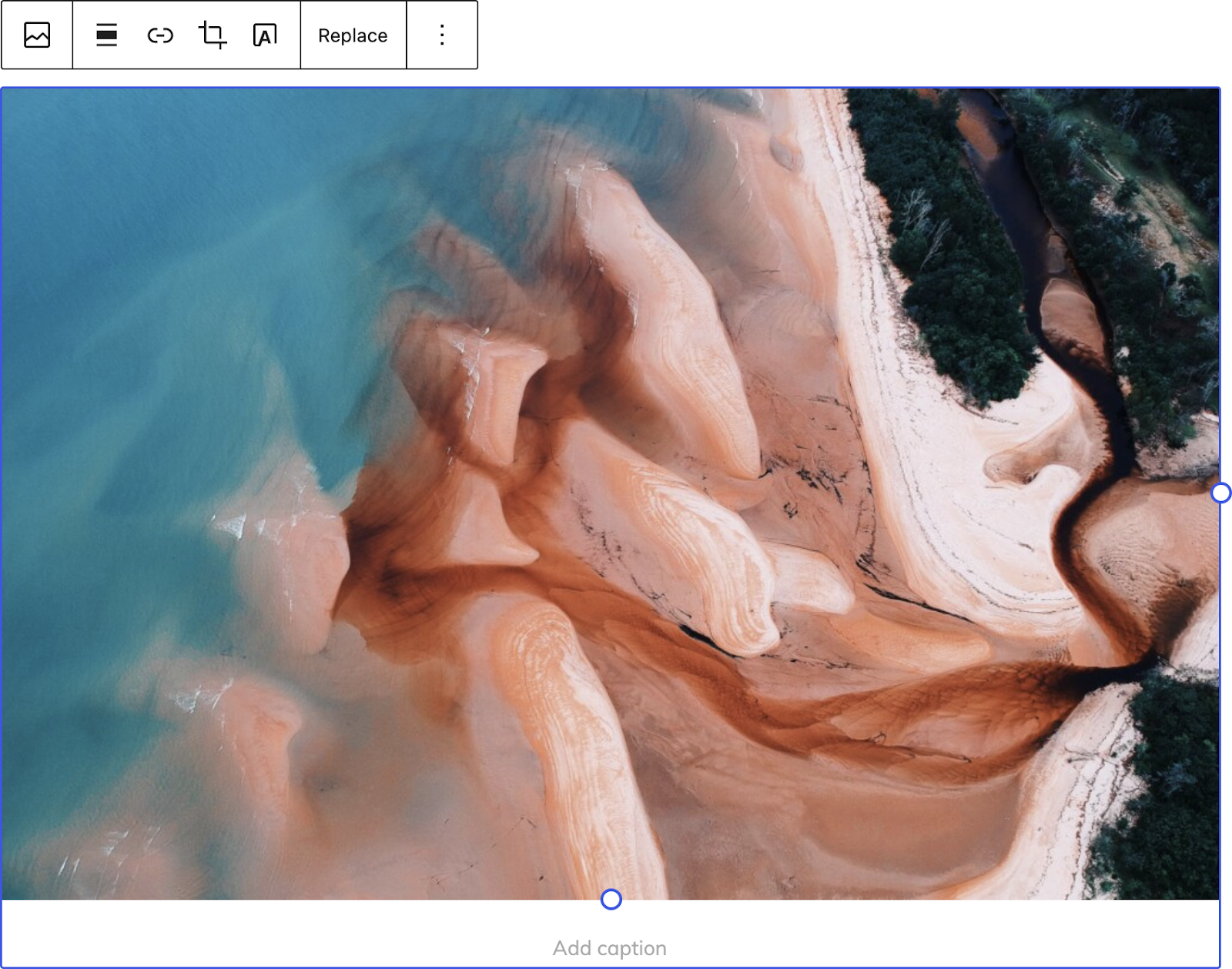
In the same way you might organize tools in a toolbox so you can quickly grab and go, the toolbar is on that same path: grouping related tools based on which level of a block an option impacts. To get a sense of what this actually means, and how it’ll improve your workflows here’s a before and after photo showing the changes in the Image Block:

Before:

Image showing the block toolbar on an Image Block with the tooling before the update occurred.

After:

Image showing the block toolbar on an Image Block with the tooling after the update occurred.

Keep in mind that not all blocks have been revamped just yet, but you can follow this issue to keep track. For now, if you’re using the 10.4.1 release of the GutenbergGutenberg The Gutenberg project is the new Editor Interface for WordPress. The editor improves the process and experience of creating new content, making writing rich content much simpler. It uses ‘blocks’ to add richness rather than shortcodes, custom HTML etc. https://wordpress.org/gutenberg/ pluginPlugin A plugin is a piece of software containing a group of functions that can be added to a WordPress website. They can extend functionality or add new features to your WordPress websites. WordPress plugins are written in the PHP programming language and integrate seamlessly with WordPress. These can be free in the WordPress.org Plugin Directory https://wordpress.org/plugins/ or can be cost-based plugin from a third-party., you can expect to see this update in the following blocks, with more on the way: 

  • Image 
  • Cover
  • Button
  • Buttons
  • List
  • Heading
  • Paragraph
  • Quote
  • Audio
  • File
  • List
  • Video
  • Media & Text
  • Site Logo
  • Post Featured ImageFeatured image A featured image is the main image used on your blog archive page and is pulled when the post or page is shared on social media. The image can be used to display in widget areas on your site or in a summary list of posts.

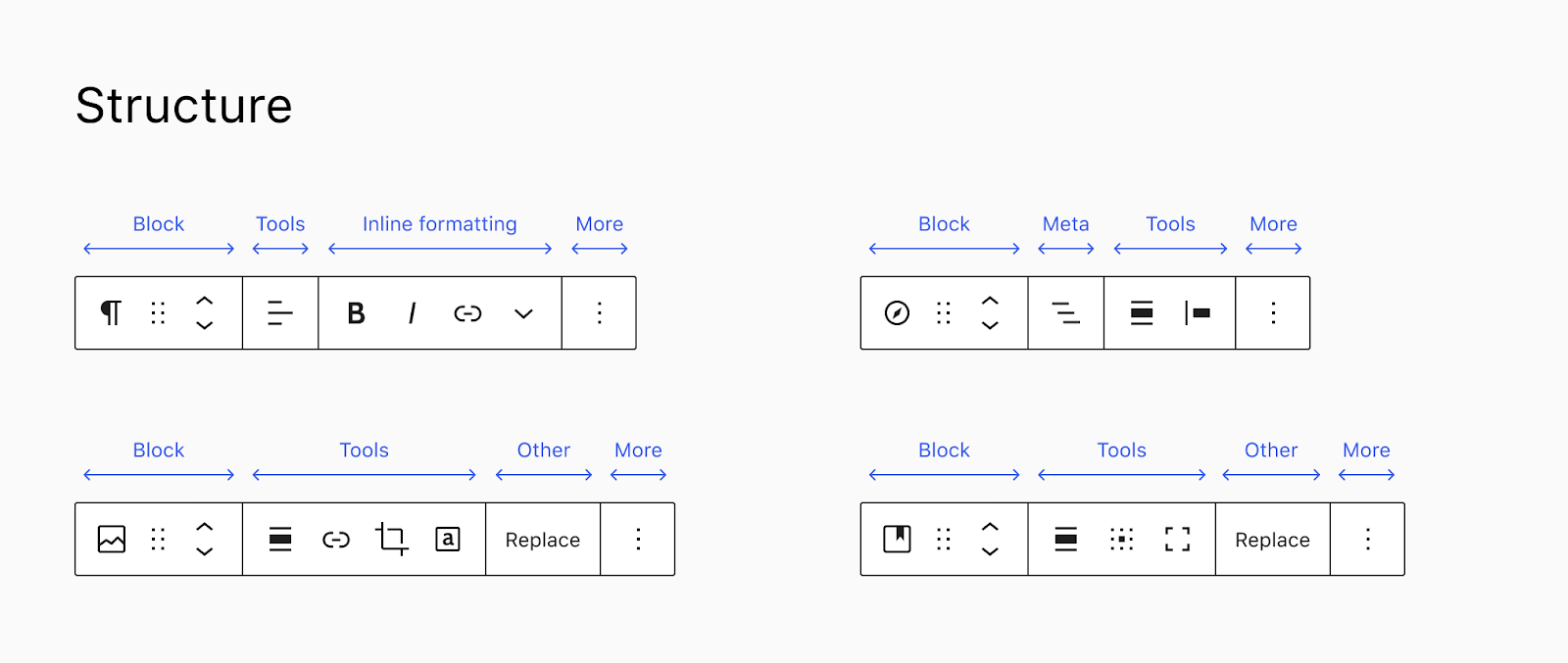
The goal of the effort is to simplify the hierarchy of the block, to make it more predictable what goes where. Here’s a visual outlining the groupings:

The visual is taken from recently updated documentation

  • Block surfaces properties of the block itsef..
  • Tools surfaces tools that affect the whole content of the block, such as alignments or positition.
  • Inline formatting refers mostly to in-text transformations such as bold or italic on a text selection. 
  • Other contains any additional features that do not fit in the other groups.

As each core block gets updated, there will hopefully be a cascading effect, making it predictable to adjust any block how you need to, whether that’s changing block alignment or bolding a specific piece of text.  

Thank you to @joen for helping edit this post (including providing the visuals) and for the excellent guidance throughout.

#core-editor, #core-editor-improvement, #gutenberg

WP5.8 Squad Call for Volunteers

Edit: 4/23/2021 @ 19:10 UTC – changed the references to contributors in the last paragraph to WordPress.orgWordPress.org The community site where WordPress code is created and shared by the users. This is where you can download the source code for WordPress core, plugins and themes as well as the central location for community conversations and organization. https://wordpress.org/ usernames to help to make the connection. – @desrosj

With the schedule finalized and parts of GutenbergGutenberg The Gutenberg project is the new Editor Interface for WordPress. The editor improves the process and experience of creating new content, making writing rich content much simpler. It uses ‘blocks’ to add richness rather than shortcodes, custom HTML etc. https://wordpress.org/gutenberg/ phase 2 getting ready to merge, it’s time to put together a squad of focus leads for WordPress 5.8.

You can read more about the different roles in the handbook.

Here are the squad roles available:

The roles of release leadRelease Lead The community member ultimately responsible for the Release. and marketing/communications lead will be filled by @matt and @chanthaboune, respectively.

Expectations

Focus leads should be available for at least 5-6 hours a week to perform their tasks, with more time as milestones like Betas, Release Candidates, and General release approach. On the days of those milestones, you might need to dedicate 4-6 hours to WordPress on one day.

There are no limitations to where you come from. We are a global community, open 24/7 so you will schedule scrubs, if needed, according to your availability and potentially find a deputy to cover other timezones.

Because 5.8 is going to be a busy release, the squad won’t have mentorship or ride-along opportunities, like it did in the past, but as Josepha mentioned there is a public channel for the team to coordinate so that others can learn through observation.

This doesn’t mean you need to have all the answers to volunteer. 🙂 There will be a bunch of people available to help and support (the CoreCore Core is the set of software required to run WordPress. The Core Development Team builds WordPress. team representatives, long-time contributors, etc…).

Are you interested?

Please leave your name in the comments with the role you are interested in or reach out to me (@francina), @audrasjb or @chanthaboune if you have any questions before raising your hand.

Thanks!

#5-8, #planning

IE 11 Support Phase Out Plan

After recent research and discussion, a decision to drop Internet Explorer 11 support in WordPress was reached. However, the timing for this change was undetermined when the summary post was published.

After discussing with several contributors, the decision has been made to move ahead with officially removing IE11 support in WordPress 5.8.

Note: This change will only affect WordPress and it’s built-in features. For your site visitors, any pluginPlugin A plugin is a piece of software containing a group of functions that can be added to a WordPress website. They can extend functionality or add new features to your WordPress websites. WordPress plugins are written in the PHP programming language and integrate seamlessly with WordPress. These can be free in the WordPress.org Plugin Directory https://wordpress.org/plugins/ or can be cost-based plugin from a third-party. or theme you may be using, which was made with support for IE11 in mind, should still look and feel as if nothing changed.

Phase-Out Plan

IE11 support will be removed in two phases.

Phase 1: WordPress 5.8

For 5.8, the following steps will be taken:

  • Update the `browserslist` for the `package.jsonJSON JSON, or JavaScript Object Notation, is a minimal, readable format for structuring data. It is used primarily to transmit data between a server and web application, as an alternative to XML.` file in `trunktrunk A directory in Subversion containing the latest development code in preparation for the next major release cycle. If you are running "trunk", then you are on the latest revision.`.
  • Run the build process to update generated CSSCSS Cascading Style Sheets..
  • Update the `browserslist` in the GutenbergGutenberg The Gutenberg project is the new Editor Interface for WordPress. The editor improves the process and experience of creating new content, making writing rich content much simpler. It uses ‘blocks’ to add richness rather than shortcodes, custom HTML etc. https://wordpress.org/gutenberg/ repository to remove IE11 support from built CSS and JSJS JavaScript, a web scripting language typically executed in the browser. Often used for advanced user interfaces and behaviors..

This will effectively remove IE11 support in the blockBlock Block is the abstract term used to describe units of markup that, composed together, form the content or layout of a webpage using the WordPress editor. The idea combines concepts of what in the past may have achieved with shortcodes, custom HTML, and embed discovery into a single consistent API and user experience. editor and all generated CSS files used within the adminadmin (and super admin).

A TracTrac An open source project by Edgewall Software that serves as a bug tracker and project management tool for WordPress. ticketticket Created for both bug reports and feature development on the bug tracker. will be opened to discuss whether IE11 specific polyfills should continue to be enqueued in WordPress 5.8. Even if polyfills are not loaded, they will remain bundled with CoreCore Core is the set of software required to run WordPress. The Core Development Team builds WordPress. in case plugins or themes wish to continue loading them.

New features added in 5.8 or later do not need to be tested on or support IE11.

Phase 2: WordPress 5.9 and beyond

Because most of the code in WordPress Core targeting specific browsers maintained manually (not compiled or run through a build process), individual tickets should be created to evaluate removing each instance of IE11 specific code.

These tickets will not be considered in 5.8 unless a committercommitter A developer with commit access. WordPress has five lead developers and four permanent core developers with commit access. Additionally, the project usually has a few guest or component committers - a developer receiving commit access, generally for a single release cycle (sometimes renewed) and/or for a specific component. or release squad member feels it is a blockerblocker A bug which is so severe that it blocks a release. for full site editing and agrees to own the ticket.

Props @jorbin, @chanthaboune, @Clorith, @youknowriad, and @davidbaumwald for discussing the above plan and reviewing before being published.

#5-8

X-post: Upcoming FSE Outreach Program Schedule

X-comment from +make.wordpress.org/test: Comment on Upcoming FSE Outreach Program Schedule