The WordPress coreCoreCore is the set of software required to run WordPress. The Core Development Team builds WordPress. development team builds WordPress! Follow this site for general updates, status reports, and the occasional code debate. There’s lots of ways to contribute:
Found a bugbugA bug is an error or unexpected result. Performance improvements, code optimization, and are considered enhancements, not defects. After feature freeze, only bugs are dealt with, with regressions (adverse changes from the previous version) being the highest priority.?Create a ticket in the bug tracker.
The navigation section of browse mode (technical project name) is being removed for 6.2 RC 2. This does not impact the additional way of managing your menus within the blockBlockBlock is the abstract term used to describe units of markup that, composed together, form the content or layout of a webpage using the WordPress editor. The idea combines concepts of what in the past may have achieved with shortcodes, custom HTML, and embed discovery into a single consistent API and user experience. settings of the Navigation block. This was a joint decision across coreCoreCore is the set of software required to run WordPress. The Core Development Team builds WordPress. editor tech leads, core editor triagetriageThe act of evaluating and sorting bug reports, in order to decide priority, severity, and other factors. leads, and the design lead. Thank you to everyone who helped test, open issues, share designs, and ship PRs to both move this feature forward and make this decision to remove. It sets a strong foundation for reconsideration in future releases and work will continue with the feature remaining in the GutenbergGutenbergThe Gutenberg project is the new Editor Interface for WordPress. The editor improves the process and experience of creating new content, making writing rich content much simpler. It uses ‘blocks’ to add richness rather than shortcodes, custom HTML etc.
https://wordpress.org/gutenberg/pluginPluginA plugin is a piece of software containing a group of functions that can be added to a WordPress website. They can extend functionality or add new features to your WordPress websites. WordPress plugins are written in the PHP programming language and integrate seamlessly with WordPress. These can be free in the WordPress.org Plugin Directory https://wordpress.org/plugins/ or can be cost-based plugin from a third-party. to evolve.
Video explanation:
To better explain what’s changing and prevent any confusion, here’s a video detailing what’s being removed:
As a recap:
This change only impacts the Navigation section, meaning the Templates and Template Parts section will remain.
This change does not impact the additional way to manage menus with the block settings of the Navigation block.
Broader context:
6.2 introduces a new way of interacting with the Site Editor. Rather than being dropped directly into the template powering the homepage, you’ll be able to see the whole of your site. A dark-gray sidebarSidebarA sidebar in WordPress is referred to a widget-ready area used by WordPress themes to display information that is not a part of the main content. It is not always a vertical column on the side. It can be a horizontal rectangle below or above the content area, footer, header, or any where in the theme. contains a list of all templates and template parts; clicking on any of these components will preview it in the editor’s main canvas. This change in experience has used the project name “browse mode” (noted for anyone looking through GitHubGitHubGitHub is a website that offers online implementation of git repositories that can easily be shared, copied and modified by other developers. Public repositories are free to host, private repositories require a paid subscription. GitHub introduced the concept of the ‘pull request’ where code changes done in branches by contributors can be reviewed and discussed before being merged by the repository owner. https://github.com/, slackSlackSlack is a Collaborative Group Chat Platform https://slack.com/. The WordPress community has its own Slack Channel at https://make.wordpress.org/chat/, etc). In Gutenberg 15.1, the last release to be fully included in 6.2, a navigation section was added to this new experience, allowing you to manage your primary navigation from the same dark-gray sidebar, preview the content of the menu items, and edit content within those templates (ie your main site structure pages). This offered a nice middle ground between fully re-introducing content editing and completely having it separated out for the release.
After being added and as the betaBetaA pre-release of software that is given out to a large group of users to trial under real conditions. Beta versions have gone through alpha testing in-house and are generally fairly close in look, feel and function to the final product; however, design changes often occur as part of the process. cycle continued, various bugs and refinements started adding up. In particular, the top pain points revolved around which menu appears (and how to change it), needing a better description of what this newer section did, and improving the general experience of adding links from that section. For example, here’s a very short video showing how the Inserter didn’t prioritize more commonly used blocks, like a Page Link:
These issues led to various ideas for how to better contain the experience while still shipping something of value in the Site Editor, particularly to allow for some level of content editing. For example, prioritizing the Page Link in the inserter (48724) to allow for link editing or, later on, trying a “read only” view of the navigation sidebar (48971) to offer an even more locked down experience. The further in the work got though, the more changes to adapt to the browse mode section bled into other changes, like with the page list block, custom link handling, and the iterations to adding a new menu item. Even with trying to lock the experience further down, bugs continued to pop up and the experience isn’t polished enough to move forward with. This led to a decision amongst Core Editor Tech, Core Editor Triage, and the Design lead ahead of WordPress 6.2 RCrelease candidateOne of the final stages in the version release cycle, this version signals the potential to be a final release to the public. Also see alpha (beta). 2 to remove that was then shared with the wider release squad.
This was an evolving conversation over the last few weeks that’s spread across core editor triage weekly check-ins, weekly triage for the betas/rcs/etc, Gutenberg PRs, and Gutenberg issues. For example, @Nick Diego and I have mentioned the navigation section as a pain point we’re collectively concerned about in various spots including weekly core editor triage update (including today). While this means the discussion was mainly public, it was also sprawling and took great effort to stay up to date. This leaves two main areas to improve upon: 1) recapping or having logistical discussion amongst the Core Editor Tech and Core Editor Triage more public than in either a private DM or buried in threads 2) bring more of the discussions amongst designers in the Gutenberg project into the release squad channel. This would be a great model to consider following in the future with a Gutenberg design focused discussion thread.
Related issues and PRs:
Here is a likely non comprehensive list of places where you can see discussions and iterations happening:
Page links are buried in the inserter and there’s a need to better prioritize commonly used blocks. Issue: 48612 PR: 48724 and 48752. You can see comments about punting to 6.3 there/what to include in 6.2 to get the experience where it needs to be.
Remove parent if page list block is the only block in a menu (and autoexpand): Issue: 48714. PR in progress: 48725.
Unclear which menu is prioritized and need to update the logic for it. PR: 48689.
Add a description and unify the + button placement with the other sections of browse mode. Issue: 48665. PR: 48689
Unable to edit page list or custom link after adding. Issue: 48593
Unable to edit Site Logo, Search, Spacer, Social Icon, Page List blocks. Issue: 48675.
Add descriptions to every single drilldown detail page: 48689
Make it possible to choose the page you link to: 48593.
[Bug] Submenus are added to empty page list or custom link blocks when you use the + button. Issue: 48741.
[Bug] Navigation section randomly changes which menu is shown if you seem to click on a page that 404s. Issue: 48744.
[Bug] Custom link UIUIUser interface does appears outside canvas on the sidebar navigation. PR that fixed: 48633.
Once more, thank you to the immense work everyone has put into this!
If you have any questions/comments/concerns, please share below and I’ll follow up either directly or by tracking down the answer from someone who knows.
Welcome back to a new issue of Week in CoreCoreCore is the set of software required to run WordPress. The Core Development Team builds WordPress.. Let’s take a look at what changed on TracTracAn open source project by Edgewall Software that serves as a bug tracker and project management tool for WordPress. between March 6 and March 13, 2023.
48 commits
62 contributors
47 tickets created
8 tickets reopened
68 tickets closed
TicketticketCreated for both bug reports and feature development on the bug tracker. numbers are based on the Trac timeline for the period above. The following is a summary of commits, organized by component and/or focus.
Code changes
Build/Test Tools
Use assertSame() in Tests_Comment::test_update_comment_from_privileged_user_by_privileged_user() – #56800
Add 6.2 branchbranchA directory in Subversion. WordPress uses branches to store the latest development code for each major release (3.9, 4.0, etc.). Branches are then updated with code for any minor releases of that branch. Sometimes, a major version of WordPress and its minor versions are collectively referred to as a "branch", such as "the 4.0 branch". to the workflow for testing branches
Add the workflow_dispatch event to the performance workflow – #57687
Check if the Docker is available when running npm run env:start – #51898
Fix cleaning of old CSSCSSCascading Style Sheets. files in wp-includes/blocks/* – #57891
Remove all previously built files when running clean:files – #47749
Test the new performance workflow regularly – #57687
Update several GitHubGitHubGitHub is a website that offers online implementation of git repositories that can easily be shared, copied and modified by other developers. Public repositories are free to host, private repositories require a paid subscription. GitHub introduced the concept of the ‘pull request’ where code changes done in branches by contributors can be reviewed and discussed before being merged by the repository owner. https://github.com/ Actions – #57572
Update the URLURLA specific web address of a website or web page on the Internet, such as a website’s URL www.wordpress.org for logging performance workflows – #57687
Prevent registering the same private JavaScriptJavaScriptJavaScript or JS is an object-oriented computer programming language commonly used to create interactive effects within web browsers. WordPress makes extensive use of JS for a better user experience. While PHP is executed on the server, JS executes within a user’s browser.
https://www.javascript.comAPIAPIAn API or Application Programming Interface is a software intermediary that allows programs to interact with each other and share data in limited, clearly defined ways. twice – #57795
Add a unit testunit testCode written to test a small piece of code or functionality within a larger application. Everything from themes to WordPress core have a series of unit tests. Also see regression. for register_block_style_handle() with an RTL localeLocaleA locale is a combination of language and regional dialect. Usually locales correspond to countries, as is the case with Portuguese (Portugal) and Portuguese (Brazil). Other examples of locales include Canadian English and U.S. English. – #56797
Adjust the expected mime type for WOFF fonts on PHPPHPThe web scripting language in which WordPress is primarily architected. WordPress requires PHP 7.4 or higher 8.1.12+ – #56817
Add missing 6.2.0 since mention in get_the_privacy_policy_link() – #56792, #56345
Add security warning in remove_query_arg() docblock to make it consistent with add_query_arg() – #57885, #56792
Improve some DocBlock formatting in wp-includes/class-wp-xmlrpc-server.php – #57840
Editor
Add more details to template descriptions – #57892
Combine Date template description translations – #57892
Move variables to where used in wp_render_layout_support_flag – #57815
Update wordpress packages for 6.2 BetaBetaA pre-release of software that is given out to a large group of users to trial under real conditions. Beta versions have gone through alpha testing in-house and are generally fairly close in look, feel and function to the final product; however, design changes often occur as part of the process. 5 – #57471
Return correct error data from copy_dir() if the directory listing failed – #57907
Formatting
Restore consistent quotes in _make_web_ftp_clickable_cb() – #53290, #56444
HTMLHTMLHyperText Markup Language. The semantic scripting language primarily used for outputting content in web browsers. API
Document shorthand usage of the next_tag() – #57863, #57575
Fix finding RCData and Script tagtagA directory in Subversion. WordPress uses tags to store a single snapshot of a version (3.6, 3.6.1, etc.), the common convention of tags in version control systems. (Not to be confused with post tags.) closers – #57852, #57575
Help/About
Update copy & style for About page and subpages – #57477
No updates of Key Projects during the coreCoreCore is the set of software required to run WordPress. The Core Development Team builds WordPress. editor meeting.
Huge thank you to everyone who wrote and reviewed Dev Notesdev noteEach important change in WordPress Core is documented in a developers note, (usually called dev note). Good dev notes generally include a description of the change, the decision that led to this change, and a description of how developers are supposed to work with that change. Dev notes are published on Make/Core blog during the beta phase of WordPress release cycle. Publishing dev notes is particularly important when plugin/theme authors and WordPress developers need to be aware of those changes.In general, all dev notes are compiled into a Field Guide at the beginning of the release candidate phase. for the editor. It’s been fabulous collaborating with everyone! For quick reference, a complete list of posts and misc dev notes is available as a comment on the Dev Note tracking issue. If you find, there is something small or big missing from the Dev Notes do pingPingThe act of sending a very small amount of data to an end point. Ping is used in computer science to illicit a response from a target server to test it’s connection. Ping is also a term used by Slack users to @ someone or send them a direct message (DM). Users might say something along the lines of “Ping me when the meeting starts.” me @bph on SlackSlackSlack is a Collaborative Group Chat Platform https://slack.com/. The WordPress community has its own Slack Channel at https://make.wordpress.org/chat/.
In the past few weeks, a lot of refinement has gone into the Site Editor, specifically the new Navigation panel coming in 6.2. As with all things related to navigation, some issues have cropped up. Navigation is hard, We are working on identifying what can be punted and what is critical for 6.2. We have made good progress but are not quite there yet. Hopefully, by the end of the day, we should have more clarity.
What I find difficult in adding the Navigation panel in the side editor browse sidebarSidebarA sidebar in WordPress is referred to a widget-ready area used by WordPress themes to display information that is not a part of the main content. It is not always a vertical column on the side. It can be a horizontal rectangle below or above the content area, footer, header, or any where in the theme. to WP 6.2. Is that it is so new and that a lot of things are showing up that are for me not consistent with how it works inside the template…
“What’s new in GutenbergGutenbergThe Gutenberg project is the new Editor Interface for WordPress. The editor improves the process and experience of creating new content, making writing rich content much simpler. It uses ‘blocks’ to add richness rather than shortcodes, custom HTML etc.
https://wordpress.org/gutenberg/” is published following every Gutenberg biweekly release, showcasing new features included in the release. As a reminder, here’s an overview of different ways to keep up with Gutenberg and the Site Editor (formerly called Full Site Editing) projects. Previous release posts can be found via the #gutenberg-newtagtagA directory in Subversion. WordPress uses tags to store a single snapshot of a version (3.6, 3.6.1, etc.), the common convention of tags in version control systems. (Not to be confused with post tags.).
The latest version of Gutenberg, 15.3, tightens up the site editing experience, adds a new “Time to Read” blockBlockBlock is the abstract term used to describe units of markup that, composed together, form the content or layout of a webpage using the WordPress editor. The idea combines concepts of what in the past may have achieved with shortcodes, custom HTML, and embed discovery into a single consistent API and user experience. for adding estimated read time to posts, and a number of Duotone enhancements. Combined with a multitude of improvements across the board, this release is a solid step forward for Gutenberg.
The Site Editor has received a number of enhancements, culminating in a tightened-up, design-forward experience that brings site editing center stage.
With another round of polish, the Site Editor experience is feeling more refined than ever.
New “Time to Read” block
The new “Time to Read” block allows you to display the estimated time the average reader takes to read the current page, or post. Letting readers know right off what their estimated reading time helps them to decide if they should continue reading, or save the post for later. (43403)
The block is relatively simple as-is, with follow-ups to enhance styling capabilitiescapabilityA capability is permission to perform one or more types of task. Checking if a user has a capability is performed by the current_user_can function. Each user of a WordPress site might have some permissions but not others, depending on their role. For example, users who have the Author role usually have permission to edit their own posts (the “edit_posts” capability), but not permission to edit other users’ posts (the “edit_others_posts” capability)..
Leveling-up Duotone
This release includes a number of enhancements around leveling-up the popular Duotone design tool. You can now set a Duotone filterFilterFilters are one of the two types of Hooks https://codex.wordpress.org/Plugin_API/Hooks. They provide a way for functions to modify data of other functions. They are the counterpart to Actions. Unlike Actions, filters are meant to work in an isolated manner, and should never have side effects such as affecting global variables and output. globally within the Site Editor’s Styles panel, whereas in previous releases you could only do this manually within the theme.jsonJSONJSON, or JavaScript Object Notation, is a minimal, readable format for structuring data. It is used primarily to transmit data between a server and web application, as an alternative to XML. file. (48255)
Duotone presets are now stored as slug values, instead of hard-coded color values (i.e. #FFFFFF). Using the preset itself means that Duotones are no longer locked to a specific theme, or theme variation.
If you apply a Duotone, then change a theme to another that uses the same slug value, the new theme’s Duotone will now take effect. (48318)
And last, Duotone styles are now generated using the WordPress Style Engine, meaning that CSSCSSCascading Style Sheets. is generated as part of the block supports CSS — rather than inline. (48281)
Changelog
Enhancements
Site Editor
Refactor the site editor URLs for better backward compatibility. (48063)
Remove TemplateAreas from template details. (48490)
Site Editor SidebarSidebarA sidebar in WordPress is referred to a widget-ready area used by WordPress themes to display information that is not a part of the main content. It is not always a vertical column on the side. It can be a horizontal rectangle below or above the content area, footer, header, or any where in the theme.: Add line-height for template/parts name and update width for edit button. (48160)
Extract a DimensionsPanel component as a reusable component between Global Styles and Block Inspector. (48070)
Remove copy for managing a block’s style variations. (48367)
Block Editor
Apply keyboard shortcut conversions between paragraphs and headings to all editor instances. (47972)
Create automatic change higher order reducer. (48312)
[Inserter]: Preload media categories empty check – client side. (47503)
Post Editor
Revert iframed editor for WP coreCoreCore is the set of software required to run WordPress. The Core Development Team builds WordPress. only. (48076)
PageAttributesCheck: Return boolean value directly from the selector. (48336)
Apply busy status to the publish button in progress and unify button width. (48444)
Add all allowed innerblocks to the inspector animation experiment. (47834)
Make the Site Logo block placeholder state smaller. (48218)
ToggleControl: Remove margin overrides and add opt-in prop. (47866)
Post Terms block: Add transforms for variations. (48328)
Navigation List View: Add block movers to the more menu. (48099)
Navigation: Always create a fallback menu. (47684)
Navigation: Don’t create a fallback navigation menuNavigation MenuA theme feature introduced with Version 3.0. WordPress includes an easy to use mechanism for giving various control options to get users to click from one place to another on a site. if there are inner blocks. (48585)
Navigation: Update the dependencies for the useEffect that handles notifications. (48066)
Navigation: Wrap the dependent functions in useCallback. (48195)
Page List: Move the modal to its own file. (47922)
Classic Block: Replace the deprecated isPrimary prop with variant. (48230)
Refactor core blocks to use HTMLHTMLHyperText Markup Language. The semantic scripting language primarily used for outputting content in web browsers. Tag Processor. (43178)
Block APIAPIAn API or Application Programming Interface is a software intermediary that allows programs to interact with each other and share data in limited, clearly defined ways.
HTML Tag Processor: Add WP 6.3 compat layer. (47933)
Tag Processor: Add bookmark invalidation logic. (47559)
Design Tools
Duotone: Use the style engine to generate CSS for Duotone. (48281)
Duotone: Add Global Styles controls for blocks that support duotone. (48255)
Use Duotone presets in block duotone attributes. (48318)
Duotone: Use CSS variables instead of slugs in block attributes. (48426)
Border Panel: Add missing dep for onBorderChange callback. (48010)
Disable layout toolbar controls for content locked blocks. (47939)
SpacingSizesControl: Fix white dot on thumb. (48574)
List View
Scroll selected block into view when single block selection changes. (46895)
Components
Change higher order with-constraint-tabbing from .js to .tsx. (48162)
CircularOptionPicker: Refactor to TypeScript. (47937)
Extract delete handler to hook for RichText. (48273)
ToolsPanel: Remove unnecessary dep from resetAll callback. (48011)
Link Control – Add support for text only labels. (47930)
Pin floating-ui/reactReactReact is a JavaScript library that makes it easy to reason about, construct, and maintain stateless and stateful user interfaces.
https://reactjs.org-dom version. (48402)
Use React 18 rendering for import dropdown. (48244)
Only add layout classes to inner wrapper if block is a container. (48611)
Widgets Editor
WidgetWidgetA WordPress Widget is a small block that performs a specific function. You can add these widgets in sidebars also known as widget-ready areas on your web page. WordPress widgets were originally created to provide a simple and easy-to-use way of giving design and structure control of the WordPress theme to the user. Editor: Fix a problem with ‘Move to Widget Area’ button not working. (48233)
Block Library
Add support for orientation-based block movers to core/social-links. (48452)
Fix Post ExcerptExcerptAn excerpt is the description of the blog post or page that will by default show on the blog archive page, in search results (SERPs), and on social media. With an SEO plugin, the excerpt may also be in that plugin’s metabox.: Read more link is always on new line in the editor. (47772)
Fix: OffCanvasEditor does not inserts submenu on collapsed items. (48214)
List Item: Avoid an error when the ‘onReplace’ prop is undefined. (48639)
Add missing code on the fix page list loading PR. (48621)
Prevent text decoration from showing up in all blocks. (48117)
Widget Importer: Don’t render controls when there’s nothing to import. (48396)
[Query LoopLoopThe Loop is PHP code used by WordPress to display posts. Using The Loop, WordPress processes each post to be displayed on the current page, and formats it according to how it matches specified criteria within The Loop tags. Any HTML or PHP code in the Loop will be processed on each post. https://codex.wordpress.org/The_Loop] Fix top border in pattern selection modal. (48303)
[Query Loop] Sync gutenberg_build_query_vars_from_query_block with core. (48640)
AvatarAvatarAn avatar is an image or illustration that specifically refers to a character that represents an online user. It’s usually a square box that appears next to the user’s name.: Clean up border application in editor. (48024)
Global Styles
Fix for WP_Theme_JSON_Resolver_Gutenberg::Get_merged_data. (48644)
Playwright: Fix request utils for non Docker envs. (48206)
[Private APIs] Only prevent module re-registration if IS_WORDPRESS_CORE. (48352)
Add a manual performance job that we can trigger from GithubGitHubGitHub is a website that offers online implementation of git repositories that can easily be shared, copied and modified by other developers. Public repositories are free to host, private repositories require a paid subscription. GitHub introduced the concept of the ‘pull request’ where code changes done in branches by contributors can be reviewed and discussed before being merged by the repository owner. https://github.com/UIUIUser interface. (48302)
AccessibilityAccessibilityAccessibility (commonly shortened to a11y) refers to the design of products, devices, services, or environments for people with disabilities. The concept of accessible design ensures both “direct access” (i.e. unassisted) and “indirect access” meaning compatibility with a person’s assistive technology (for example, computer screen readers). (https://en.wikipedia.org/wiki/Accessibility)
Autocomplete: Duplicate list within iframeiframeiFrame is an acronym for an inline frame. An iFrame is used inside a webpage to load another HTML document and render it. This HTML document may also contain JavaScript and/or CSS which is loaded at the time when iframe tag is parsed by the user’s browser. for non visual users. (47907)
Fix the Publish region position and focus style. (48102)
Focus 1st parent block on block remove, if no previous block is available. (48204)
List view: Allow selected block to override roving tabindex. (48339)
Style Book: Allow button text labels for style book icon. (48088)
Style Book: Focus the Style Book when opened, and enable ESCAPE key to close. (48151)
Try to fix a11yAccessibilityAccessibility (commonly shortened to a11y) refers to the design of products, devices, services, or environments for people with disabilities. The concept of accessible design ensures both “direct access” (i.e. unassisted) and “indirect access” meaning compatibility with a person’s assistive technology (for example, computer screen readers). (https://en.wikipedia.org/wiki/Accessibility) test flakiness. (48236)
Make the template customized info accessible. (48159)
Fix perf regressionregressionA software bug that breaks or degrades something that previously worked. Regressions are often treated as critical bugs or blockers. Recent regressions may be given higher priorities. A "3.6 regression" would be a bug in 3.6 that worked as intended in 3.5. in duotone hooksHooksIn WordPress theme and development, hooks are functions that can be applied to an action or a Filter in WordPress. Actions are functions performed when a certain event occurs in WordPress. Filters allow you to modify certain functions. Arguments used to hook both filters and actions look the same.. (48401)
Writing flow: Avoid recalc style on every selection change. (48409)
useAsyncList: Flush state updates when processing queue. (48238)
Components
Autocomplete: Reduce work before finding trigger. (48327)
Disable lazy term metaMetaMeta is a term that refers to the inside workings of a group. For us, this is the team that works on internal WordPress sites like WordCamp Central and Make WordPress. loading render_block_core_template_part. (48000)
Rich text: Only selectively handle keyup/pointerup. (48385)
Lodash: Remove _.merge() from getMappedColumnWidths(). (48032)
Lodash: Remove some _.get() from Gallery block. (48488)
Lodash: Remove some _.get() from Image block. (48489)
Documentation
Clarify backportbackportA port is when code from one branch (or trunk) is merged into another branch or trunk. Some changes in WordPress point releases are the result of backporting code from trunk to the release branch. status of appearance-tools theme support. (48622)
Docs: Clarify release process for major WP BetaBetaA pre-release of software that is given out to a large group of users to trial under real conditions. Beta versions have gone through alpha testing in-house and are generally fairly close in look, feel and function to the final product; however, design changes often occur as part of the process. 1. (48248)
Docs: Markdown fix for wp_enqueue_script usage. (48212)
Fix e2e-test-utils-playwright’s jsdoc and types. (48266)
Fix incorrect css property in editor-color-palette documentation. (48333)
Proactively update versions in WordPress ahead of 6.2. (48145)
Update curation document to include theme.json filters. (48576)
Updates to the curating the editor experience to include 6.1 & 6.2 items. (48294)
First time contributors
The following PRs were merged by first time contributors:
@abhi3315: Link Control – Add support for text only labels. (47930)
@hbhalodia: Change higher order with-constraint-tabbing from .js to .tsx. (48162)
@sboerrigter: Fix incorrect css property in editor-color-palette documentation. (48333)
@shreyasikhar: Site Editor Sidebar: Add line-height for template/parts name and update width for edit button. (48160)
@suvrodattamitu: Style Engine: Fix wrong property name letterSpacing to lineHeight. (48091)
@tomdevisser: Remove copy for managing a block’s style variations. (48367)
Contributors
The following contributors merged PRs in this release:
In classic WordPress tradition, this post will list and answer participant questions that were left in the queue from the live product demo held on March 2, 2023. Release squad members Anne McCarthy and Rich Tabor were joined by moderator, WordPress enthusiast Nathan Wrigley, and nearly 90 live attendees.
The demo covered a number of noteworthy highlights coming to the WordPress 6.2 Release. If you missed the recap and recording you can catch up right here.
6.2 Live Product Demo
Q1. Can you save your new styles to a library — then export the at library to another site?
A1. While not exactly the same process there is a way to achieve this. You can export all your styles as a theme, and then you can use that theme as you would any WordPress theme. This functionality was introduced with WordPress 5.9, Josephine.
Q2. As page speed is a challenge, how are we optimizing blocks for better LCP scores?
A2. Sometimes a question is an opportunity to create the change you’re seeking! Have you considered following the Performance team? Follow their activities, join their meetings, and help out with their tickets and GitHubGitHubGitHub is a website that offers online implementation of git repositories that can easily be shared, copied and modified by other developers. Public repositories are free to host, private repositories require a paid subscription. GitHub introduced the concept of the ‘pull request’ where code changes done in branches by contributors can be reviewed and discussed before being merged by the repository owner. https://github.com/ issues, starting with this Performance tag right here on the Core blog.
Q3. Can you show us how to trigger the focus mode to (say) view the footer on its own?
A3. There are lots of resources for just that sort of thing across the web and social media. Here’s just one item that can help you work with template parts, like footers. A great resource for you is learn.wordpress.org, which houses everything from technical documentation to engaging video courses and workshops for every kind of user and every kind of learner. Learn can show you how to do almost anything with WordPress.
Q4. Is copying and pasting styles as demonstrated just for coreCoreCore is the set of software required to run WordPress. The Core Development Team builds WordPress. blocks? Some blockBlockBlock is the abstract term used to describe units of markup that, composed together, form the content or layout of a webpage using the WordPress editor. The idea combines concepts of what in the past may have achieved with shortcodes, custom HTML, and embed discovery into a single consistent API and user experience. collections have their own C&P, and I’m curious what might carry over, if anything.
A4. In a very unscientific test, one of our release-squad members just added one of the form blocks from the Jetpack pluginPluginA plugin is a piece of software containing a group of functions that can be added to a WordPress website. They can extend functionality or add new features to your WordPress websites. WordPress plugins are written in the PHP programming language and integrate seamlessly with WordPress. These can be free in the WordPress.org Plugin Directory https://wordpress.org/plugins/ or can be cost-based plugin from a third-party., and the options for copying and pasting block styles were still there in the settings. So that functionality does carry over at least to Jetpack blocks.
Q5. Also, if CSSCSSCascading Style Sheets. classes are assigned to a block, will applying global styles to a block be to all of the same block, e.g. H2, or (hopefully) will a custom class allow for more granular global CSS.
A5. That will vary by where that given block is. If you’re in the Style Book editing the H2 from the text page, it will be global. If you’re working in the Query block in a template, and that H2 is the post title, then the styling you apply will be specific to the post title in that template, just as if you were styling it in your CSS editor of choice. And keep in mind that WordPress editors can do a lot of things, but they have not yet repealed the laws of CSS specificity.
Q6. Is full site editing the same thing as GutenbergGutenbergThe Gutenberg project is the new Editor Interface for WordPress. The editor improves the process and experience of creating new content, making writing rich content much simpler. It uses ‘blocks’ to add richness rather than shortcodes, custom HTML etc.
https://wordpress.org/gutenberg/?
A6. The answer to this is somewhat complex so breaking it into smaller parts should help create some clarity.
Gutenberg is at least two things:
It is the plugin that advances the state of the art in block editor development, and if you use it, you will have access to a more advanced set of tools in the block editor than in Core alone.
It is also the name of the long-range, four-phase project that started with the block editor and will culminate with multilanguage collaboration in real time.
So what is full site editing?
Full site editing now known simply as the Site Editor is how project leaders have referred to Phase 2 of the Gutenberg project. It’s also been heralded as the Gutenberg project’s move beyond the post- and page-editing experience that first arrived in WordPress 5.0.
From the perspective of what designers and developers call the Document Object Model, the original block editor handles content. In the beginning, everything in that editor was a child of the post. Specifically, a child of the part of the post is often targeted in CSS as .entry-content. (Or, in markup, as <div class=”entry-content”>
(This goes back to the project’s origin as a blogging tool. Until very recently, every kind of content was in fact a post: pages, products for sale, real estate listings, and, of course, custom post types. Everything was a custom post typeCustom Post TypeWordPress can hold and display many different types of content. A single item of such a content is generally called a post, although post is also a specific post type. Custom Post Types gives your site the ability to have templated posts, to simplify the concept..)
With WordPress 5.9, the Site Editor — available only when you install and activate a Block theme on your site — has expanded its reach beyond the post to other parts of the DOM—the site headerHeaderThe header of your site is typically the first thing people will experience. The masthead or header art located across the top of your page is part of the look and feel of your website. It can influence a visitor’s opinion about your content and you/ your organization’s brand. It may also look different on different screen sizes. and footer, widgetWidgetA WordPress Widget is a small block that performs a specific function. You can add these widgets in sidebars also known as widget-ready areas on your web page. WordPress widgets were originally created to provide a simple and easy-to-use way of giving design and structure control of the WordPress theme to the user. areas, navigation, and more.
Q7. Currently, you can have a template that has no title on the front end, but in the editor, the page is still treated like a standard WP page, with the title at the top of the page.
A7. There have been some explorations around moving the page/post title to the sidebar, but according to Nick Diego of the Editor triagetriageThe act of evaluating and sorting bug reports, in order to decide priority, severity, and other factors. team, there are no active plans for this.
Q8. Is there any more work planned for Pattern management in the future? WPEngine has released a plugin allowing easier management of patterns recently and it would be good to know if we should wait for core, or assume that nothing else is coming soon?
A8. Core is not currently working on a pattern manager like WP Engine’s new plugin, but you can expect more work on improving the pattern creation flow in Core and coming from plugins — it’s a rich space for creativity.
So if you find a tool that helps you build and manage patterns more easily, go ahead and use it now, even if Core might build something like it in the future.
Q9. Will the left sidebarSidebarA sidebar in WordPress is referred to a widget-ready area used by WordPress themes to display information that is not a part of the main content. It is not always a vertical column on the side. It can be a horizontal rectangle below or above the content area, footer, header, or any where in the theme. get the same width flexibility as the site editor sidebar now has? Would love that as with block nesting the view gets cut off at times in list view.
A9. According to Nick, probably not anytime soon.
Props to contributors @ndiego for answering a number of these questions and @laurlittle, and @jpantani for their help in making this post possible.
Are you interested in helping draft Dev Chat summaries? You can volunteer to be added to the rotation, either during the meeting or by contacting abhanonstopnewsuk on the Make Slack.
Announcements
WordPress 6.2 Beta 5 is available to download and test. Thanks to everyone who was involved and tested for BetaBetaA pre-release of software that is given out to a large group of users to trial under real conditions. Beta versions have gone through alpha testing in-house and are generally fairly close in look, feel and function to the final product; however, design changes often occur as part of the process. 5.
Between February 27 and March 6, 2023, there was some great work again on TracTracAn open source project by Edgewall Software that serves as a bug tracker and project management tool for WordPress.:
45 commits
79 contributors
63 tickets created
12 tickets reopened
61 tickets closed
and 5 new contributors!
Please refer to Developer Notes for 6.2 for all the new dev notesdev noteEach important change in WordPress Core is documented in a developers note, (usually called dev note). Good dev notes generally include a description of the change, the decision that led to this change, and a description of how developers are supposed to work with that change. Dev notes are published on Make/Core blog during the beta phase of WordPress release cycle. Publishing dev notes is particularly important when plugin/theme authors and WordPress developers need to be aware of those changes.In general, all dev notes are compiled into a Field Guide at the beginning of the release candidate phase. released this week. It has been a very busy time for the release documentation team, so a big thanks to everyone who has helped write, review, edit, administer GitHubGitHubGitHub is a website that offers online implementation of git repositories that can easily be shared, copied and modified by other developers. Public repositories are free to host, private repositories require a paid subscription. GitHub introduced the concept of the ‘pull request’ where code changes done in branches by contributors can be reviewed and discussed before being merged by the repository owner. https://github.com/, or anything else related to these important communications.
The 6.2 Field GuideField guideThe field guide is a type of blogpost published on Make/Core during the release candidate phase of the WordPress release cycle. The field guide generally lists all the dev notes published during the beta cycle. This guide is linked in the about page of the corresponding version of WordPress, in the release post and in the HelpHub version page. is expected to be published soon. Shout out to @bph, @milana_cap, @webcommsat, and @femkreations, the documentation release group, and to all those who made contributions.
Release Update
Key information for the next major releasemajor releaseA release, identified by the first two numbers (3.6), which is the focus of a full release cycle and feature development. WordPress uses decimaling count for major release versions, so 2.8, 2.9, 3.0, and 3.1 are sequential and comparable in scope.: 6.2
These links contain great reading material and helpful information for anyone wanting to get more involved in the release — make sure to check out the new (⭐️) items:
If you would like to get involved with testing, check out the 6.2 call for testing post to get started.
Read about important accessibility improvements in this post from @annezazu, @joedolson, and @alexstine. Thank you to everyone on the AccessibilityAccessibilityAccessibility (commonly shortened to a11y) refers to the design of products, devices, services, or environments for people with disabilities. The concept of accessible design ensures both “direct access” (i.e. unassisted) and “indirect access” meaning compatibility with a person’s assistive technology (for example, computer screen readers). (https://en.wikipedia.org/wiki/Accessibility) Team and the many other contributors who support this work.
The WordPress 6.2 preview gives focus to highlights in the release for anyone who missed the live demo or would like a recap.
Release Squad Updates
@jeffpaul asked how things look for RC1, and @webcommsat and @audrasjb confirmed that while the regressionregressionA software bug that breaks or degrades something that previously worked. Regressions are often treated as critical bugs or blockers. Recent regressions may be given higher priorities. A "3.6 regression" would be a bug in 3.6 that worked as intended in 3.5. in Trac #57630 was being evaluated, no additional delays were anticipated.
Requests for Help with Tickets/Blockers
@ndiego requested a call out for Gutenberg PR 48731, to address an issue from Beta 4. While developers are confident with the fix, more testing is requested — specifically to confirm that no “white screens” are seen in the editor or when using the browser Back button. Nick also asked emphasized the need for more general testing in the site editor.
@sergeybiryukov provided updates on the Build/Test Tools component:
@sergeybiryukov noted there were no updates for the Date/Time, General, I18Ni18nInternationalization, or the act of writing and preparing code to be fully translatable into other languages. Also see localization. Often written with a lowercase i so it is not confused with a lowercase L or the numeral 1. Often an acquired skill., or Permalinks components.
Open Floor
@ironprogrammer brought up Trac #57891, requesting confirmation of the issue from other contributors. Brian confirmed to @ndiego that the issue applied to trunk, and not Beta 5. @petitphp reproduced the issue and provided a test report.
@sergeybiryukov and @webcommsat highlighted previous interest in running new contributor meetings in different time zones, including APAC-friendly. @sergeybiryukov shared information to help those interested: the guidelines and script link in the handbook for running such meetings. Further discussion on frequency and time(s) will be discussed amongst volunteers after the work on the current release.
@hellofromtonya asked for additional testing and investigation of Trac #57630, a regression or bugbugA bug is an error or unexpected result. Performance improvements, code optimization, and are considered enhancements, not defects. After feature freeze, only bugs are dealt with, with regressions (adverse changes from the previous version) being the highest priority. related to child themes that use parent template parts.
This group is part a cross-team collaboration. The editorial group meets monthly on the first Thursday of each month at 13:00 UTC in the #core-dev-blog channel of the Make WordPress SlackSlackSlack is a Collaborative Group Chat Platform https://slack.com/. The WordPress community has its own Slack Channel at https://make.wordpress.org/chat/.
Slack link to start of the meeting on March 2, 2023.
The GitHubGitHubGitHub is a website that offers online implementation of git repositories that can easily be shared, copied and modified by other developers. Public repositories are free to host, private repositories require a paid subscription. GitHub introduced the concept of the ‘pull request’ where code changes done in branches by contributors can be reviewed and discussed before being merged by the repository owner. https://github.com/ card numbers on this page relate to the Developer Blogblog(versus network, site) GitHub repository.
@bph shared a ‘huge thank you’ to all and to those who helped with direction, editing and reviews.
@greenshady echoed the thanks to reviewers, and that it was ‘a huge help to have the support system to help clean things up and make the content even better.’
Growth in comments on the blog, especially the Intrinsic Design post which has received as of the meeting 20 comments.
@webcommsat update: The call for more ideas and writers was repromoted at Dev Chat yesterday and at WordCampWordCampWordCamps are casual, locally-organized conferences covering everything related to WordPress. They're one of the places where the WordPress community comes together to teach one another what they’ve learned throughout the year and share the joy. Learn more. Asia. Ideas for more promotions are being collated for a future date when the blog is out of betaBetaA pre-release of software that is given out to a large group of users to trial under real conditions. Beta versions have gone through alpha testing in-house and are generally fairly close in look, feel and function to the final product; however, design changes often occur as part of the process.. The Marketing Team is assisting with gathering ideas and is aware that the communication and messaging is limited until post-beta and the formal launch.
Tutorial on block deprecation (#71) (in progress; if anyone has or is aware of frequent questions on this area, please add them to the card to help refine the scope and Q&As on this post)
Topics in the pipeline
A few topics in the pipeline for consideration / approval. They are not all ready to proceed, but writers have started initial thinking on the topics.
General note: in the majority of times, the title on the ticketticketCreated for both bug reports and feature development on the bug tracker. is for the initial discussion for review rather than the title of the post to be written. The writer and review team will collaborate on the post title during the publishing process.
What’s new for Developer (March 2023) – agreement in principle. What’s new for Developers is a monthly column. and it would now not require monthly pre-approval as a topic via the editorial meeting. This way focus can be on the content, and information for it could be collated throughout the month. It would still go through the editorial process of review, but this agreement will streamline its planning. Starting with the April 2023 edition, it will appear each month on the Project Board.
working title only – suggestions can be added to the ticket, eg how to use wp-env
further discussion on the main audience to follow (please add on the ticket): potentially developers who may be using MAMP/WAMP, Local, Valet, etc, and who may have heard of wp-env but are unsure what it is and how it differs from what they’re used to
suggestion of focusing on a survey of local hosting environments, but with an emphasis on wp-env.
discussion that developers would appreciate more in-depth explanation of wp-env than roundup of all the environments. Not too much detail on other environments as developer audience for this post are likely to know about them. Some others have suggested value of highlighting roundup of environments. The audience level set for this post will be crucial to the content focus decided
the audience to be subtly described early on in the piece to help people know of it is for them. This can be summarized with the excerptExcerptAn excerpt is the description of the blog post or page that will by default show on the blog archive page, in search results (SERPs), and on social media. With an SEO plugin, the excerpt may also be in that plugin’s metabox. too.
to focus on encouraging more people to start using wp-env which is officially recommended by WordPress.orgWordPress.orgThe community site where WordPress code is created and shared by the users. This is where you can download the source code for WordPress core, plugins and themes as well as the central location for community conversations and organization. https://wordpress.org/
discussion on other pieces on wp-env, including a more in-depth one, and an article aimed at promoting its take-up and with some case studies on its use, and potentially inviting other case studies
Working with theme.json filters (#82) – agreement in principle. Discussion about how this will be super valuable and a good example to promote use of this dev blog. This would also be important to cross-link with any existing or future plans for related Learn WP resources.
agreement in principle for idea, further discussion to follow
@bph: there will be a Dev Notedev noteEach important change in WordPress Core is documented in a developers note, (usually called dev note). Good dev notes generally include a description of the change, the decision that led to this change, and a description of how developers are supposed to work with that change. Dev notes are published on Make/Core blog during the beta phase of WordPress release cycle. Publishing dev notes is particularly important when plugin/theme authors and WordPress developers need to be aware of those changes.In general, all dev notes are compiled into a Field Guide at the beginning of the release candidate phase. about this new filterFilterFilters are one of the two types of Hooks https://codex.wordpress.org/Plugin_API/Hooks. They provide a way for functions to modify data of other functions. They are the counterpart to Actions. Unlike Actions, filters are meant to work in an isolated manner, and should never have side effects such as affecting global variables and output. hook and this would be a follow-up post to give people more examples and use cases
further developing scope, narrowing its focus to save the writer time, identifying the key items for focus.
potentially rewording the title to reflect its focus and thereby be clearer what readers will find within it
as a title ‘Support resources for developers’ covers a broad area including what the docs team and documentation does, dev notesdev noteEach important change in WordPress Core is documented in a developers note, (usually called dev note). Good dev notes generally include a description of the change, the decision that led to this change, and a description of how developers are supposed to work with that change. Dev notes are published on Make/Core blog during the beta phase of WordPress release cycle. Publishing dev notes is particularly important when plugin/theme authors and WordPress developers need to be aware of those changes.In general, all dev notes are compiled into a Field Guide at the beginning of the release candidate phase., Learn WordPress etc. (more details on a general and regular support resources content below
not necessarily the right thing for the developer blog at this stage of its content development, but potentially move towards the creation of an evergreen post or page that is routinely updated/ regular column rather than a one-off blog post (@ndiego)
Furthermore, to be aware that there are plans for a regular “What’s new on the developer blog”, as discussed at earlier in the meeting
Two items were planned on the agenda for the Open Floor discussion: time was only available for the first one of this meeting.
Recognizing contributors in terms of badges
Discussion on what activity is considered a contributor badge-activity and also which team badge. Given the nature of the content and the Dev Blog covering multiple contributing teams, there are several potential options discussed:
CoreCoreCore is the set of software required to run WordPress. The Core Development Team builds WordPress. Contributor (currently the Dev Blog comes under the Core Team umbrella. Note Core Contributor includes both code and non-code contributions)
Documentation Contributor
Training Contributor
a hybrid arrangement, with the type of contribution determining the badge. If badges were based on type of activity would this work, eg writing or editing a usage studies receive a Docs badge, tutorial development under Training Team badge etc?
a new solution/ dedicated badge within one of the teams listed above, eg a Core Dev Blog contributor badge
a new solution and in the longer term becoming a team in itself. Discussion on potential difficulties with creating a dedicated and additional Make team and its own badge system.
Workflows are still evolving, so there may need to be an interim solution to allow time for this, as with the model used for Learn WordPress.
Discussion noted that it would be important to find a solution which did not result in considerable additional administrative work, especially as it is likely that many contributors would come from other teams, and to keep the cross-team collaboration positioning for the Blog
Balancing administrative items versus the project management and administration associated with the editorial and production cycle for the Blog itself, especially its cross-working with docs, core, training with Learn WordPress, and marketing
@bph summarized the main areas of contribution for the Dev Blog
Participate: Chime in on topic discussions or share your ideas for topics that might help a larger group of developers
Write: Adopt one of the ideas to write about and volunteer as a writer.
Review: each drafted post goes through two reviews. You can contribute by reviewing blog posts according to editorial guidelines or from a technical aspect.
Become a Member of the Editorial Group
Current process for badges:
each Make Team has one or more badges they can allocate
Core-Test, and Core-Performance are their own teams and have their own badges
Actions:
following the discussion and the summary on the Core blog, @bph and @webcommsat will raise the question as in metaMetaMeta is a term that refers to the inside workings of a group. For us, this is the team that works on internal WordPress sites like WordCamp Central and Make WordPress. / as a meta ticket and explore options for the interim
@webcommsat to follow-up in Core about badge documentation in the handbook. Training badge documentation is currently in review. Docs badge documentation will be added to the post.
the above actions may need to wait until the main requirements for the current WordPress release are completed
The next meeting will be on Thursday, April 6, 2023, at 13:00 UTC. Note for some time zones, daylight saving time will have come in by this date.
Props to @bph for facilitating the meeting, @webcommsat for writing the summary, and @bph for peer review.
Now that WordPress 6.2 has entered the Release Candidaterelease candidateOne of the final stages in the version release cycle, this version signals the potential to be a final release to the public. Also see alpha (beta). phase, the following policies are in place.
These policies mainly cover how and when CoreCoreCore is the set of software required to run WordPress. The Core Development Team builds WordPress. committers can commit. For non-committing contributors, this post may help explain why a Core committercommitterA developer with commit access. WordPress has five lead developers and four permanent core developers with commit access. Additionally, the project usually has a few guest or component committers - a developer receiving commit access, generally for a single release cycle (sometimes renewed) and/or for a specific component. makes a certain decision.
String Freeze
To allow the Polyglots teamPolyglots TeamPolyglots Team is a group of multilingual translators who work on translating plugins, themes, documentation, and front-facing marketing copy. https://make.wordpress.org/polyglots/teams/ time to get their local language’s translationtranslationThe process (or result) of changing text, words, and display formatting to support another language. Also see localization, internationalization. of WordPress ready, no new strings are permitted to be added to the release. Existing strings can be removed and/or duplicated if needed.
Seek guidance from the Polyglots team leadership for any strings reported as buggy. A buggy string is one that can not be translated to all languages in its current form.
Tickets on the WordPress 6.2 milestone
For the remainder of the cycle, only two types of tickets may be placed on/remain on the 6.2 milestone:
Regressions: bugs that have been introduced during the WordPress 6.2 development cycle, either to existing or new features.
Test suite expansion: tests can be committed at any time without regard to code or string freezes. This can cover either new or existing features.
TrunktrunkA directory in Subversion containing the latest development code in preparation for the next major release cycle. If you are running "trunk", then you are on the latest revision. is now WordPress 6.3-alpha
WordPress 6.2 was recently forked to its own branchbranchA directory in Subversion. WordPress uses branches to store the latest development code for each major release (3.9, 4.0, etc.). Branches are then updated with code for any minor releases of that branch. Sometimes, a major version of WordPress and its minor versions are collectively referred to as a "branch", such as "the 4.0 branch"., trunk is now open for commits for the next version of the software.
Backporting to the 6.2 branch
Backporting commits of production code (that is, anything that ends up in the zip file) now requires double sign-off by two core committers. The dev-feedback keyword should be used to request a second committer’s review, dev-reviewed should be added to indicate a second committer has reviewed and approved the commit to the 6.2 branch.
Commits to the test suite do not require double sign-off.
This guide shares more of the in-depth changes that you will find in 6.2 and is published with Release Candidaterelease candidateOne of the final stages in the version release cycle, this version signals the potential to be a final release to the public. Also see alpha (beta). 1 to help inform WordPress developers, extenders and others.
In TracTracAn open source project by Edgewall Software that serves as a bug tracker and project management tool for WordPress., there are almost 300 tickets: 110 of which are enhancements and feature requests, 166 bug fixes, and 20 other blessed tasks. This time there are 28 tickets with a focus on performance, 15 for accessibility, and 18 for modernizing code and applying coding standards. GutenbergGutenbergThe Gutenberg project is the new Editor Interface for WordPress. The editor improves the process and experience of creating new content, making writing rich content much simpler. It uses ‘blocks’ to add richness rather than shortcodes, custom HTML etc.
https://wordpress.org/gutenberg/’s GitHubGitHubGitHub is a website that offers online implementation of git repositories that can easily be shared, copied and modified by other developers. Public repositories are free to host, private repositories require a paid subscription. GitHub introduced the concept of the ‘pull request’ where code changes done in branches by contributors can be reviewed and discussed before being merged by the repository owner. https://github.com/ repo brings 1645 pull requests: 292 enhancements, 354 bugbugA bug is an error or unexpected result. Performance improvements, code optimization, and are considered enhancements, not defects. After feature freeze, only bugs are dealt with, with regressions (adverse changes from the previous version) being the highest priority. fixes and 30 accessibilityAccessibilityAccessibility (commonly shortened to a11y) refers to the design of products, devices, services, or environments for people with disabilities. The concept of accessible design ensures both “direct access” (i.e. unassisted) and “indirect access” meaning compatibility with a person’s assistive technology (for example, computer screen readers). (https://en.wikipedia.org/wiki/Accessibility) improvements.
Changes in 6.2 is spread across 44 coreCoreCore is the set of software required to run WordPress. The Core Development Team builds WordPress. components. Below is the breakdown of the most important ones.
BlockBlockBlock is the abstract term used to describe units of markup that, composed together, form the content or layout of a webpage using the WordPress editor. The idea combines concepts of what in the past may have achieved with shortcodes, custom HTML, and embed discovery into a single consistent API and user experience. Editor
Twenty Twelve to Twenty Seventeen now includes font files in the theme folder instead of loading fonts from a remote source (Google Fonts). This update ensures that the themes follow current recommendations for fonts from a privacy perspective.
In WordPress 6.2, the I18ni18nInternationalization, or the act of writing and preparing code to be fully translatable into other languages. Also see localization. Often written with a lowercase i so it is not confused with a lowercase L or the numeral 1. Often an acquired skill. component gets a new wrapper function and it will, also, be easier to switch to a user’s localeLocaleA locale is a combination of language and regional dialect. Usually locales correspond to countries, as is the case with Portuguese (Portugal) and Portuguese (Brazil). Other examples of locales include Canadian English and U.S. English., to name just a couple of improvements. Find the rest in the dedicated dev notedev noteEach important change in WordPress Core is documented in a developers note, (usually called dev note). Good dev notes generally include a description of the change, the decision that led to this change, and a description of how developers are supposed to work with that change. Dev notes are published on Make/Core blog during the beta phase of WordPress release cycle. Publishing dev notes is particularly important when plugin/theme authors and WordPress developers need to be aware of those changes.In general, all dev notes are compiled into a Field Guide at the beginning of the release candidate phase..
Filesystem APIAPIAn API or Application Programming Interface is a software intermediary that allows programs to interact with each other and share data in limited, clearly defined ways.
If you’ve been using the copy_dir() function for moving directories, you will be happy to find a new, move_dir(), function that comes with WordPress 6.2.
wp_opcache_invalidate() invalidates the OPcache for individual PHPPHPThe web scripting language in which WordPress is primarily architected. WordPress requires PHP 7.4 or higher files after overwriting. In #57375wp_opcache_invalidate_directory() was added to recursively invalidate the OPcache for PHP files after overwriting. The function accepts a single argument, (string) $dir, pointing to the directory containing PHP files for which OPcache is to be invalidated.
Changes in WP_Filesystem_Direct::move() function
In #57375WP_Filesystem_Direct::move() had directory support added to make it consistent with ::move() methods in WP_Filesystem_FTPext, WP_Filesystem_ftpsockets and WP_Filesystem_SSH2.
To make sure you get the proper results when searching for a page, or any other post type, by the title, WordPress 6.2 is deprecating the get_page_by_title() function in favour of WP_Query.
WordPress 6.2 brings some major performance wins to WordPress core, visible in the benchmarks for both Web Vitals and Server Timing metrics. Performance is further improved for block themes performance with ~20% faster TTFB and ~14% faster LCP. On pages with hero images, the LCP improvements are even greater at ~19%.
The new filterFilterFilters are one of the two types of Hooks https://codex.wordpress.org/Plugin_API/Hooks. They provide a way for functions to modify data of other functions. They are the counterpart to Actions. Unlike Actions, filters are meant to work in an isolated manner, and should never have side effects such as affecting global variables and output.pre_wp_load_alloptions allows short-circuiting the loading of WordPress’s autoloaded options with custom logic. View ticketticketCreated for both bug reports and feature development on the bug tracker.#56045.
The results of the get_adjacent_post() function are now being cached. View ticket #41131.
Cache keys for WP_Term_Query are now based on SQL without placeholders so that they can actually result in cache hits. View ticket #57298.
WP_Query is now no longer priming post caches twice. View ticket #57373.
Lazy-loading term metadata from the cache is now faster due to using wp_cache_get_multiple(). View ticket #57150.
The results of wp_get_global_settings() are now cached within a single request, resulting in a faster response time of ~8% for WordPress core. View ticket #57502.
Themes
The Themes component brings some new options for theme authors, performance improvements as well as feature removals.
The “Style Variations” tagtagA directory in Subversion. WordPress uses tags to store a single snapshot of a version (3.6, 3.6.1, etc.), the common convention of tags in version control systems. (Not to be confused with post tags.) is added to the list of WordPress theme features. View ticket #56869.
theme.json supports additional link-related pseudo classes, such as :link and :any-link. View ticket #57053.
Account for a numeric theme directory in WP_Theme::__construct() to allow a numeric theme name. View ticket #54645.
Improve performance of _add_block_template_part_area_info and _add_block_template_info functions which result in hitting an existing cache and in much fewer calls to get_option. View ticket #57077.
Caching is added to WP_Theme::is_block_theme(). View ticket #57114.
External libraries
Significant and long-time-awaited changes come in the Requests library: namespaces, minimum PHP version, PHP 8.x compatibility, stricter input validation and others.
More hooksHooksIn WordPress theme and development, hooks are functions that can be applied to an action or a Filter in WordPress. Actions are functions performed when a certain event occurs in WordPress. Filters allow you to modify certain functions. Arguments used to hook both filters and actions look the same., new and renamed, and other notable changes can be found in miscellaneous dev note.
Allow HTTPHTTPHTTP is an acronym for Hyper Text Transfer Protocol. HTTP is the underlying protocol used by the World Wide Web and this protocol defines how messages are formatted and transmitted, and what actions Web servers and browsers should take in response to various commands. URLs for application password responses when using a local environment type. View ticket #52617.
Bootstrap/Load
Check that either mysqli_connect() or mysql_connect() is available. This resolves a fatal error and displays an actionable message if the mysqli PHP extension is missing. View ticket #51988.
Comments
Allow passing $comment_ID parameter to get_comment_time() and comment_time(). This brings consistency with get_comment_date() and comment_date(). View ticket #52322.
External libraries
The following libraries were updated to the latest versions:
By optimizing the low-level function wp_kses_bad_protocol() for the by far most common scenarios, the performance of esc_url() is improved. View ticket #22951.
General
If you’ve been following the progress of improvements to allow for named parameters, massive work has been done on that field in 6.2. View ticket #56788.
Mail
Allow custom attachment filenames in wp_mail() by passing an associative $attachments array, where the key strings will be used as filenames instead. View ticket #28407.
Media
It is now possible to explicitly provide a decoding value of e.g. boolean false in the $attr parameter of the wp_get_attachment_image() function, to ensure the attribute decoding is omitted. View ticket #57086.
Enhance logic to determine LCP image in block themes and avoid lazy-loading it. Additionally, this changeset uses the benefits of block template parts to avoid lazy-loading images in the header block template part, making the lazy-loading heuristics even more accurate for sites using a block theme. A test with a block theme page with an image shows a notable ~19% LCP improvement in 6.2. View tickets #56930 and #57490.
REST APIREST APIThe REST API is an acronym for the RESTful Application Program Interface (API) that uses HTTP requests to GET, PUT, POST and DELETE data. It is how the front end of an application (think “phone app” or “website”) can communicate with the data store (think “database” or “file system”)
https://developer.wordpress.org/rest-api/
Support non-Latin characters in template route regex. Non-Latin characters are URLURLA specific web address of a website or web page on the Internet, such as a website’s URL www.wordpress.org-encoded (e.g. %cf%84%ce%b5%cf%83%cf%84). Matching % in the route ensures templates with non-Latin titles can be properly saved. View ticket #57329.
Users
Add the new wp_set_password action hook, triggered after a password is set for a given user. As several plugins are calling wp_set_password() directly, adding an action to the end of the function will help pluginPluginA plugin is a piece of software containing a group of functions that can be added to a WordPress website. They can extend functionality or add new features to your WordPress websites. WordPress plugins are written in the PHP programming language and integrate seamlessly with WordPress. These can be free in the WordPress.org Plugin Directory https://wordpress.org/plugins/ or can be cost-based plugin from a third-party. authors to catch all instances of password setting. View ticket #57436.
Thanks to @flixos90, @poena, @costdev, @bph for collaborating on this field guideField guideThe field guide is a type of blogpost published on Make/Core during the release candidate phase of the WordPress release cycle. The field guide generally lists all the dev notes published during the beta cycle. This guide is linked in the about page of the corresponding version of WordPress, in the release post and in the HelpHub version page. and @webcommsat, @audrasjb, @annezazu, @mukesh27, and @sabernhardt for peer review.
TracTracAn open source project by Edgewall Software that serves as a bug tracker and project management tool for WordPress.ticketticketCreated for both bug reports and feature development on the bug tracker.#54504 was created to upgrade the Requests library to 2.0.0. Requests 2.0.0 was a major releasemajor releaseA release, identified by the first two numbers (3.6), which is the focus of a full release cycle and feature development. WordPress uses decimaling count for major release versions, so 2.8, 2.9, 3.0, and 3.1 are sequential and comparable in scope. and contains breaking changes. Additional upgrades to 2.0.5 were completed during this process. View the upgrade guide.
Namespacing introduced
Requests 2.0.0 introduces namespacing (PSR-4) for all Requests code. A full backward compatibility layer is included and old PSR-0 class names are still supported. However, using the old PSR-0 class names will generate a deprecation notice.
If your pluginPluginA plugin is a piece of software containing a group of functions that can be added to a WordPress website. They can extend functionality or add new features to your WordPress websites. WordPress plugins are written in the PHP programming language and integrate seamlessly with WordPress. These can be free in the WordPress.org Plugin Directory https://wordpress.org/plugins/ or can be cost-based plugin from a third-party. or theme uses the WordPress native wp_remote_*() functions, you won’t need to do anything.
If your plugin or theme uses Requests directly, and only supports the latest version of WordPress, you should update your code to use the namespaced names. For example, to perform a request with a try-catch using the namespaced names:
// Old: Perform a request with a try-catch in Requests 1.x.
try {
	$response = Requests::request( $url, $headers, $data, $type, $options );
} catch ( Requests_Exception $e ) {
	return new WP_Error( 'http_request_failed', $e->getMessage() );
}

// New: Perform a request with a try-catch in Requests 2.x.
try {
	$response = WpOrg\Requests\Requests::request( $url, $headers, $data, $type, $options );
} catch ( WpOrg\Requests\Exception $e ) {
	return new WP_Error( 'http_request_failed', $e->getMessage() );
}
If your plugin or theme uses Requests directly and supports a wider range of WordPress versions, you may need to conditionally declare the REQUESTS_SILENCE_PSR0_DEPRECATIONS constant as true to silence deprecation notices about the old PSR-0 class names. You should upgrade your code as soon as WordPress 6.2 becomes the minimum WordPress version for your plugin or theme.
wp-includes/class-requests.php and wp-includes/Requests/library/Requests.php have been deprecated in WordPress 6.2.
Class and interface files/directories have been moved.
Old location: wp-includes/Requests/.
New location: wp-includes/Requests/src/.
The Requests class file is now located at wp-includes/Requests/src/Requests.php.
New minimum PHPPHPThe web scripting language in which WordPress is primarily architected. WordPress requires PHP 7.4 or higher version
Requests 2.0.0 drops support for PHP 5.2 – 5.5, and the new minimum supported PHP version is now 5.6.
Support for HHVM has also been dropped formally now.
Many classes now marked final
A large number of classes have been marked as final. These changes were made after researching which classes were being extended by plugin and theme authors, and due diligence was applied before making these changes.
All typical entry point methods in Requests will now, directly or indirectly, validate the received input parameters for being of the correct type.
When an incorrect parameter type is received, a catchable WpOrg\Requests\Exception\InvalidArgument exception will be thrown.
The input validation has been set up to be reasonably liberal, so if Requests was being used as per the documentation, this change should not affect you. If you still find the input validation to be too strict and you have a good use-case of why it should be loosened for a particular entry point, please open an issue to discuss this.
PHP 8.x compatibility
Requests 2.x is compatible with PHP 8.0, 8.1 and 8.2.
A note on bundled certificates
While the changelogs for Requests 2.0.0 – 2.0.5 mention updates for bundled certificates, WordPress uses its own bundled certificates, so these updates do not affect plugins or themes.


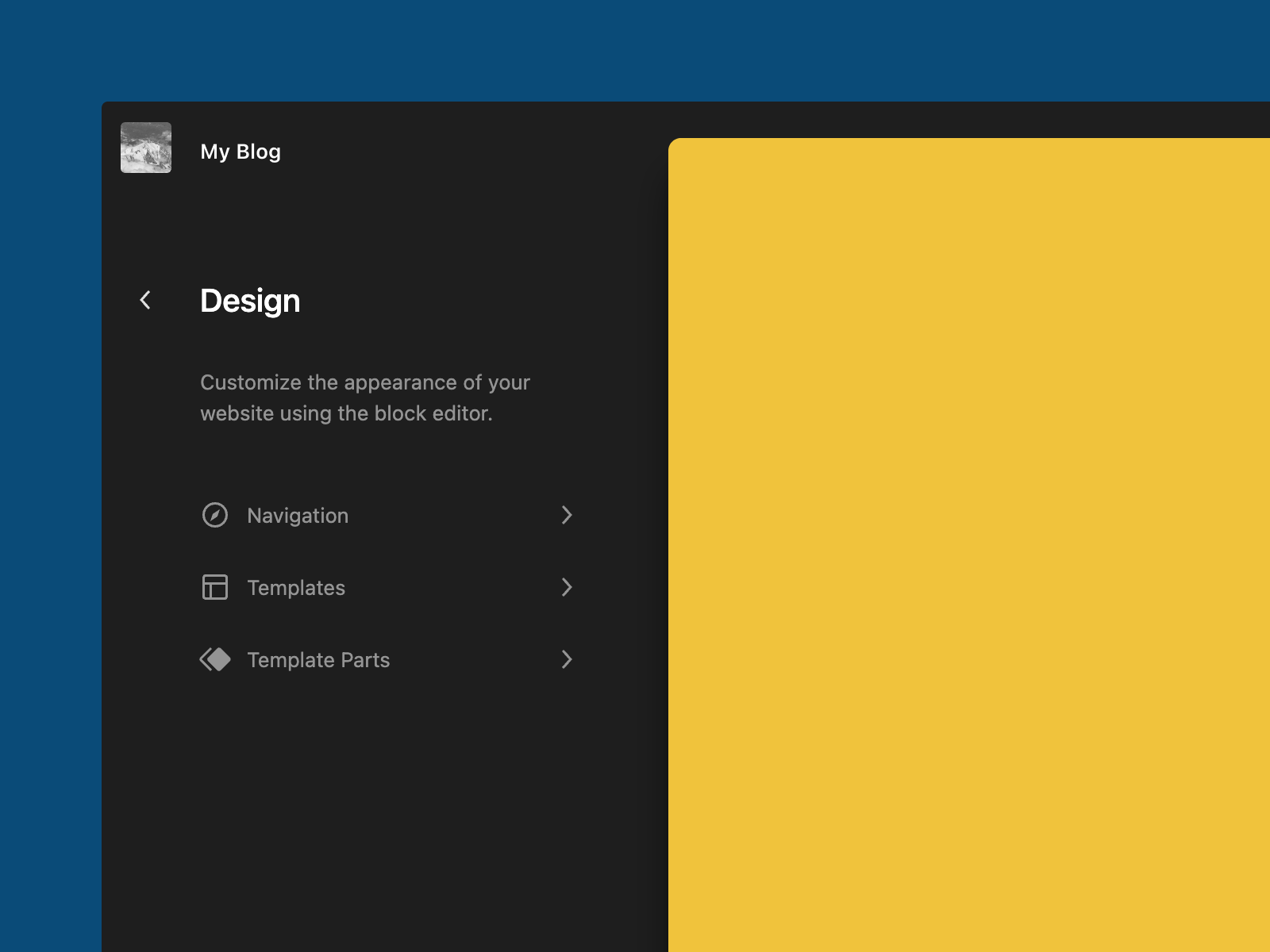

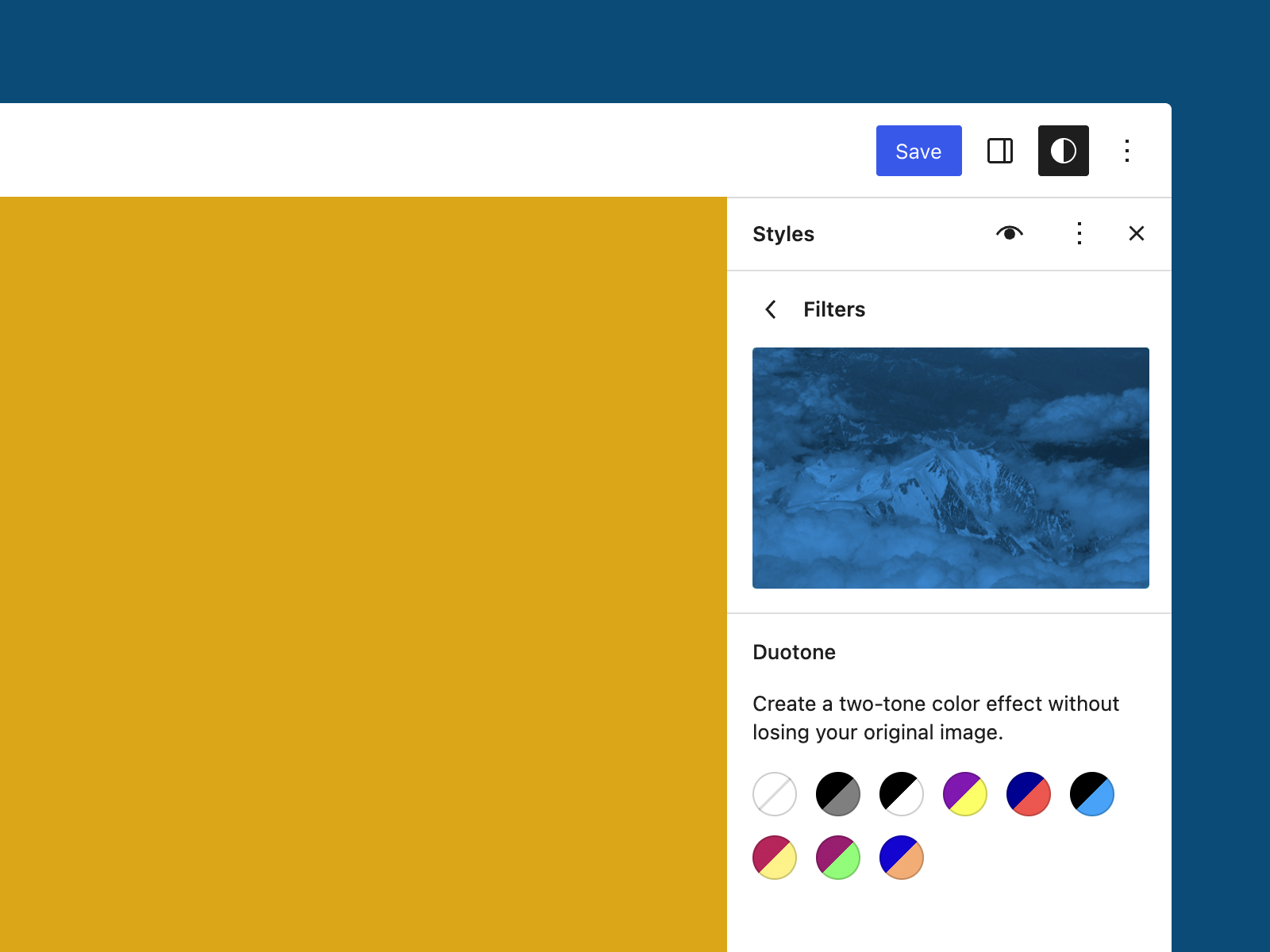


You must be logged in to post a comment.