The WordPress coreCoreCore is the set of software required to run WordPress. The Core Development Team builds WordPress. development team builds WordPress! Follow this site for general updates, status reports, and the occasional code debate. There’s lots of ways to contribute:
Found a bugbugA bug is an error or unexpected result. Performance improvements, code optimization, and are considered enhancements, not defects. After feature freeze, only bugs are dealt with, with regressions (adverse changes from the previous version) being the highest priority.?Create a ticket in the bug tracker.
Note: the 6.2 RC1 release party for will now be on March 8, approximately from 17:00 UTC. Please check for updates in the #6-2-release-leads on SlackSlackSlack is a Collaborative Group Chat Platform https://slack.com/. The WordPress community has its own Slack Channel at https://make.wordpress.org/chat/.
Developer Notes for 6.2 – check out all the new dev notesdev noteEach important change in WordPress Core is documented in a developers note, (usually called dev note). Good dev notes generally include a description of the change, the decision that led to this change, and a description of how developers are supposed to work with that change. Dev notes are published on Make/Core blog during the beta phase of WordPress release cycle. Publishing dev notes is particularly important when plugin/theme authors and WordPress developers need to be aware of those changes.In general, all dev notes are compiled into a Field Guide at the beginning of the release candidate phase.. The Field GuideField guideThe field guide is a type of blogpost published on Make/Core during the release candidate phase of the WordPress release cycle. The field guide generally lists all the dev notes published during the beta cycle. This guide is linked in the about page of the corresponding version of WordPress, in the release post and in the HelpHub version page. is expected to be published soon.
4. Release update
Next major releasemajor releaseA release, identified by the first two numbers (3.6), which is the focus of a full release cycle and feature development. WordPress uses decimaling count for major release versions, so 2.8, 2.9, 3.0, and 3.1 are sequential and comparable in scope.: 6.2 6.2 development cycle 6.2 bug scrub schedule Roadmap to 6.2 Help Test WordPress 6.2
Priority will be given to items associated with the 6.2 release. Please add items for the meeting in comments below.
@ndiego request for callout for #48731. This PR addresses an issue identified after BetaBetaA pre-release of software that is given out to a large group of users to trial under real conditions. Beta versions have gone through alpha testing in-house and are generally fairly close in look, feel and function to the final product; however, design changes often occur as part of the process. 4. It is thought the PR thoroughly fixes the issues, but more testing would be helpful.
General testing of the Site Editor requested as a primary focus.
6. Open floor
If you have an item you would like to be raised in this section of the meeting, you can add the topic in the comments below.
If you can not attend the meeting, as a global project, asynchronous updates are welcome. You can add these into the comments section.
Welcome back to a new issue of Week in CoreCoreCore is the set of software required to run WordPress. The Core Development Team builds WordPress.. Let’s take a look at what changed on TracTracAn open source project by Edgewall Software that serves as a bug tracker and project management tool for WordPress. between February 27 and March 6, 2023.
45 commits
79 contributors
63 tickets created
12 tickets reopened
61 tickets closed
TicketticketCreated for both bug reports and feature development on the bug tracker. numbers are based on the Trac timeline for the period above. The following is a summary of commits, organized by component and/or focus.
Code changes
Build/Test Tools
Use assertSame() in Tests_Comment::test_update_comment_from_privileged_user_by_privileged_user() – #56800
Regenerate correctly the block-json.php file – #57471
Add unit tests for get_next_posts_link() and get_previous_posts_link() – #55751
Adjust the expected mime type for WOFF fonts on PHPPHPThe web scripting language in which WordPress is primarily architected. WordPress requires PHP 7.4 or higher 8.1.12+ – #56817
Ignore EOL differences in a wpautop() test for <math>blockBlockBlock is the abstract term used to describe units of markup that, composed together, form the content or layout of a webpage using the WordPress editor. The idea combines concepts of what in the past may have achieved with shortcodes, custom HTML, and embed discovery into a single consistent API and user experience. elements – #57718
Make sure the correct query is tested for term limits in taxonomyTaxonomyA taxonomy is a way to group things together. In WordPress, some common taxonomies are category, link, tag, or post format. https://codex.wordpress.org/Taxonomies#Default_Taxonomies. queries – #57342
Move some data providers in Tests_Functions next to the tests they are used in – #56793
Second pass at merging file-level and class-level DocBlocks in various unit testunit testCode written to test a small piece of code or functionality within a larger application. Everything from themes to WordPress core have a series of unit tests. Also see regression. files – #57723
Use assertSame() in Tests_Theme_wpThemeJson – #56800, #57621
Bundled Themes
Account for a numeric theme directory in WP_Theme::__construct() – #54645
Twenty Nineteen: Update PostCSS to version 8.x – #57554
Twenty Twenty: Avoid PHP warnings in 8.1 due to incorrect usage of wp_add_inline_style() – #57777
Docs
Fix erroneous since mention in wp_internal_hosts hook – #57796
Fix typo in wp_generate_password() description – #57847
Use the new /documentation/URLURLA specific web address of a website or web page on the Internet, such as a website’s URL www.wordpress.org for HelpHub link in readme.html – #57726
Editor
Correctly merge custom CSSCSSCascading Style Sheets. into global styles – #57833
Ensure Global styles values are reset in the site editor – #57824, #56467
Exclude non-sticky posts in Query LoopLoopThe Loop is PHP code used by WordPress to display posts. Using The Loop, WordPress processes each post to be displayed on the current page, and formats it according to how it matches specified criteria within The Loop tags. Any HTML or PHP code in the Loop will be processed on each post. https://codex.wordpress.org/The_Loop Block when set to “Only” – #57822
Only add layout classes to inner wrapper if block is a container – #55571, #57831
Add ‘path’ query arg to Appearance > Template Parts menu – #57819
Update the WP packages with fixes prior to WP 6.2 betaBetaA pre-release of software that is given out to a large group of users to trial under real conditions. Beta versions have gone through alpha testing in-house and are generally fairly close in look, feel and function to the final product; however, design changes often occur as part of the process. 4 – #57471
Formatting
Add aspect-ratio tests for safecss_filter_attr() – #57664
HTMLHTMLHyperText Markup Language. The semantic scripting language primarily used for outputting content in web browsers.APIAPIAn API or Application Programming Interface is a software intermediary that allows programs to interact with each other and share data in limited, clearly defined ways.
Fix finding RCData and Script tagtagA directory in Subversion. WordPress uses tags to store a single snapshot of a version (3.6, 3.6.1, etc.), the common convention of tags in version control systems. (Not to be confused with post tags.) closers – #57852, #57575
Help/About
Avoid extra redirections on HelpHub Links – #57726
Improve help text about the WordPress URL and Site URL settings – #50886, #57759
Restore the correct URL for Editing Files article on Edit Themes screen – #57726
The Patterns APIAPIAn API or Application Programming Interface is a software intermediary that allows programs to interact with each other and share data in limited, clearly defined ways. is a powerful feature in WordPress that allows developers to create pre-designed blocks of content that can be easily inserted into posts, pages, custom post types, and templates. With the introduction of WordPress 6.2, the Patterns API has been expanded to include a template types property. The property allows pattern developers to specify which templates their patterns fit in. For example, a pattern can declare its purpose is to be used on 404 templates or as author templates, etc. Any template in the WordPress hierarchy is supported.
This is a backend-only update. The work on the UXUXUser experience parts is ongoing and will be available in future GutenbergGutenbergThe Gutenberg project is the new Editor Interface for WordPress. The editor improves the process and experience of creating new content, making writing rich content much simpler. It uses ‘blocks’ to add richness rather than shortcodes, custom HTML etc.
https://wordpress.org/gutenberg/ releases – it is expected to arrive at the Site Editor in WordPress 6.3. The API provides WordPress coreCoreCore is the set of software required to run WordPress. The Core Development Team builds WordPress. information on the patterns and template relationships. This information could be used for multiple purposes. The first usage, in thinking for WordPress 6.3, is to show the user some patterns that make sense on a template when the user starts creating a template. Users can start from a pattern instead of “blank” or the fallback template.
Technical details
The Patterns API’s register_block_pattern() function was updated to include a new template_types parameter. This parameter is an array of strings containing the names of the templates the template is intended for, e.g., 404, author, etc. The parameter template_types is optional, and using it is not mandatory to register a pattern.
The REST APIREST APIThe REST API is an acronym for the RESTful Application Program Interface (API) that uses HTTP requests to GET, PUT, POST and DELETE data. It is how the front end of an application (think “phone app” or “website”) can communicate with the data store (think “database” or “file system”)
https://developer.wordpress.org/rest-api/ was also extended to return the template types of a pattern in case there is one defined.
Testing
Activate the Twenty Twenty-One theme.
In the theme’s inc/block-patterns.php file, after the existing calls to register_block_pattern(), add the sample test pattern with the snippet below (Figure 1). Save the file.
Open the post editor and then the browser’s Developer Tools (Chrome) or Web Developer Tools (Firefox) console.
In the console, enter the following to retrieve the registered patterns: wp.apiFetch( { path: '/wp/v2/block-patterns/patterns' } ).then( console.log );
Verify that the API response includes the pattern query/template-type-test, and template_types has 404 listed (Figure 2).
WordPress 6.2 BetaBetaA pre-release of software that is given out to a large group of users to trial under real conditions. Beta versions have gone through alpha testing in-house and are generally fairly close in look, feel and function to the final product; however, design changes often occur as part of the process. 5 is ready for download and testing!
This version of the WordPress software is under development. Please do not install, run, or test this version of WordPress on production or mission-critical websites. Instead, it’s recommended that you test Beta 5 on a test server and site.
You can test WordPress 6.2 Beta 5 in three ways:
Option 1: Install and activate the WordPress Beta TesterpluginPluginA plugin is a piece of software containing a group of functions that can be added to a WordPress website. They can extend functionality or add new features to your WordPress websites. WordPress plugins are written in the PHP programming language and integrate seamlessly with WordPress. These can be free in the WordPress.org Plugin Directory https://wordpress.org/plugins/ or can be cost-based plugin from a third-party. (select the “Bleeding edgebleeding edgeThe latest revision of the software, generally in development and often unstable. Also known as trunk.” channel and “Beta/RCrelease candidateOne of the final stages in the version release cycle, this version signals the potential to be a final release to the public. Also see alpha (beta). Only” stream).
Option 3: Use the following WP-CLIWP-CLIWP-CLI is the Command Line Interface for WordPress, used to do administrative and development tasks in a programmatic way. The project page is http://wp-cli.org/https://make.wordpress.org/cli/ command:
wp core update --version=6.2-beta5
The current target for the final release is March 28, 2023, which is three weeks away. Your continued help with testing is vital to ensuring everything in this release is the best it can be.
Testing for issues is a critical part of developing any software, and it’s a great way to start contributing to WordPress—now more than ever. This detailed guide is a great place to start if you’ve never tested a beta release.
The 6.2 Release Candidaterelease candidateOne of the final stages in the version release cycle, this version signals the potential to be a final release to the public. Also see alpha (beta)., which will now happen on Thursday, March 9, depends on your confirmation that this fix works well. So please download and test.
A haiku from the beta-five mind for 6.2
One little bugbugA bug is an error or unexpected result. Performance improvements, code optimization, and are considered enhancements, not defects. After feature freeze, only bugs are dealt with, with regressions (adverse changes from the previous version) being the highest priority. found Beta 5 to test a fix RC 1 awaits
Proposed update to our chat structure for future weeks to be focused more around our 2023 performance roadmap
@flixos90 Focusing on the roadmap items sounds great to me. I’d say some of those points are rather broad though, maybe we can still go a bit more granular per project. There’s also some projects on the roadmap that are well underway while others are merely ideas that may not see a lot of updates soon, so we need to think about how to balance that
@clarkeemily I think that would be the plan, to dive more into those sub-bullet point per priority as listed in our roadmap (sorry, should have clarified that!)
This was agreed – for future meetings, the agenda will be structured below, with the goal of diving deeper into each roadmap priority sub-project
Announcements
Roadmap priorities:
Server response time
Database optimization
JavaScriptJavaScriptJavaScript or JS is an object-oriented computer programming language commonly used to create interactive effects within web browsers. WordPress makes extensive use of JS for a better user experience. While PHP is executed on the server, JS executes within a user’s browser.
https://www.javascript.com & CSSCSSCascading Style Sheets.
@spacedmonkey I have been doing some discovery around lazy loading all metaMetaMeta is a term that refers to the inside workings of a group. For us, this is the team that works on internal WordPress sites like WordCamp Central and Make WordPress. data in WordPress
@spacedmonkey Lazy loading term and comment is super easy, as this is done elsewhere in coreCoreCore is the set of software required to run WordPress. The Core Development Team builds WordPress.. Post, user and site might be a little harder
@joegrainger We are working towards completing the infrastructure for the PluginPluginA plugin is a piece of software containing a group of functions that can be added to a WordPress website. They can extend functionality or add new features to your WordPress websites. WordPress plugins are written in the PHP programming language and integrate seamlessly with WordPress. These can be free in the WordPress.org Plugin Directory https://wordpress.org/plugins/ or can be cost-based plugin from a third-party. Checker and once done we’ll have a working plugin with some initial checks. At that point we’ll be taking the time to do some initial testing, review the infrastructure and make any changes before working on the additional checks. You can see progress on the GitHub repo here. Feel free to leave any thoughts/ideas you may have in the repo too!
@mukesh27 Automated performance testing has been committed to the WP core repo https://core.trac.wordpress.org/changeset/55459
@joemcgill The first run of the new performance workflow ran perfectly, except for successfully posting results to the codevitals.run dashboard. I assume it’s because we either have an incorrect project token or some other change was made to the APIAPIAn API or Application Programming Interface is a software intermediary that allows programs to interact with each other and share data in limited, clearly defined ways. there. I’ll follow up with @youknowriad to get this working when he’s back around. Regardless, this is pretty cool to see (copied over from Mar 3)
Trac Ticket 12009 has been updated with a comment describing the work being carried out, and brief instructions on where and how to follow progress. We encourage early feedback.
Work on milestone 2 issues has been completed, and all code approved, unit tested and functionally tested. Further holistic testing is underway but is not a blockerblockerA bug which is so severe that it blocks a release. to progress.
We continue Investigating potential interoperability issues to assess how developers most commonly solve for the async and defer script applications in the absence of this enhancementenhancementEnhancements are simple improvements to WordPress, such as the addition of a hook, a new feature, or an improvement to an existing feature. that is underway, so that we can better understand if and how we need to potentially solve for this in the interest of preserving the work we are doing in core, and being mindful of backward compatibility.
@olliejones Work continues on the SQLite project. Starting to look at popular plugins with their own SQL. (Thousands of them.) Trying to get the top ten to work. (WooCommerce, Yoast, etc).
The work is happening in the standalone repo. Migrating to the monorepo is still in the future.
PR 662 for implementing CLICLICommand Line Interface. Terminal (Bash) in Mac, Command Prompt in Windows, or WP-CLI for WordPress. command for a build process to transform modules into standalone plugins is ready for review
@flixos90 I’ll give the above another review today, really excited to see it moving forward
@spacedmonkey I meet with some hosting companies at WordCampWordCampWordCamps are casual, locally-organized conferences covering everything related to WordPress. They're one of the places where the WordPress community comes together to teach one another what they’ve learned throughout the year and share the joy. Learn more. Asia, but we could do a better job at building bridges between these teams.
@olliejones Can you persuade your contacts to lurk here, or identify themselves? Would love to know what they wish they had from performance.
@olliejones I would really like to have a conversation with a couple of hosting dbms-ops people, to learn more about their problems and how we can help address them.
@spacedmonkey The TLDR of 132, is that as we support older version of DBs, we can’t rollout the indexes? Can we do a progressive enhancement for newer DBs?
@olliejones To oversimplify, (191) indexes don’t do what big sites need. “Progressive enhancement” means “two versions of the database definition”. Is there testing capabilitycapabilityA capability is permission to perform one or more types of task. Checking if a user has a capability is performed by the current_user_can function. Each user of a WordPress site might have some permissions but not others, depending on their role. For example, users who have the Author role usually have permission to edit their own posts (the “edit_posts” capability), but not permission to edit other users’ posts (the “edit_others_posts” capability).? https://www.plumislandmedia.net/index-wp-mysql-for-speed/wordpresss-prefix-keys/ is a writeup on the topic.
@spacedmonkey There are other examples of progressive enhancements in core. And there is a different schema for the user table for multisitemultisiteUsed to describe a WordPress installation with a network of multiple blogs, grouped by sites. This installation type has shared users tables, and creates separate database tables for each blog (wp_posts becomes wp_0_posts). See also network, blog, site for example. Any thoughts on progressive enhancements like this @johnbillion
@tillkruess I’m strongly in favor of databases indices as an opt-in feature.
@olliejones In schema.php we’d put if (the database uses the barracuda storage engine ) { lots of data definition language }
@johnbillion The answer I always give when talking about introducing optional features is, is the intended user capable of making an informed decision about whether or not to enable the feature? If the “user” in this context is a large scale web host then yes, if the “user” is a freelance integrator without much SQL experience then no. So if we can guide an informed decision to be made then I’m in favor of these indices enhancements being opt-in, as much as I’m not a fan of differing schemas the benefit outweighs that here IMO
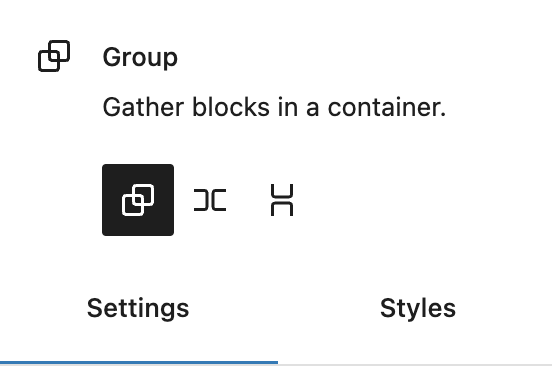
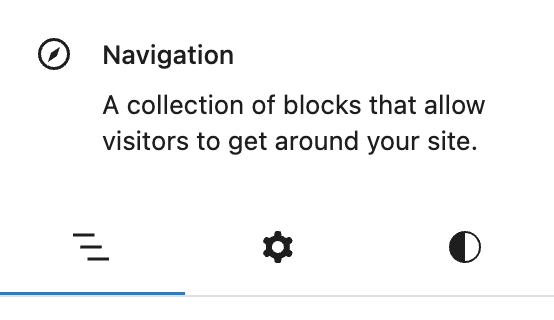
The new BlockBlockBlock is the abstract term used to describe units of markup that, composed together, form the content or layout of a webpage using the WordPress editor. The idea combines concepts of what in the past may have achieved with shortcodes, custom HTML, and embed discovery into a single consistent API and user experience. Inspector tabs aim to help organize and delineate the design tools within the Block Inspector sidebarSidebarA sidebar in WordPress is referred to a widget-ready area used by WordPress themes to display information that is not a part of the main content. It is not always a vertical column on the side. It can be a horizontal rectangle below or above the content area, footer, header, or any where in the theme.. Before these tabs, the sidebar was becoming increasingly crowded and challenging to use. With the release of WordPress 6.2, you’ll find the inspector’s design tools categorized under three tabs;
Settings – Contains configuration settings for the block that are not appearance-related, e.g. Number of columns or whether the block links to another resource.
Appearance – Groups panels and controls related specifically to styling the appearance of the current block, e.g. typography and colors.
List View – Contains controls for managing a block’s children in a similar manner to the editor’s list view, e.g. editing submenus and links in the Navigation block.
Block Inspector Tabs Display
The Block Inspector will only render tabs when it makes sense to do so. As such, there are a few conditions around their display:
A tab is only rendered if it contains items for display.
If the Settings tab would only contain the Advanced panel, it will be consolidated into the Appearance tab.
If the Block Inspector only has a single tab to display, tabs will not be rendered. Instead, the design tools will be rendered directly into the sidebar as they would have been prior to WordPress 6.2.
It is possible that the Block Inspector tabs may not make sense for all blocks. Plugins might also aim to overhaul a block’s available tools. In these cases, it would be desirable to disable Block Inspector tabs. This can be achieved via a new editor setting, blockInspectorTabs. One approach to doing so might be via the block_editor_settings_allfilterFilterFilters are one of the two types of Hooks https://codex.wordpress.org/Plugin_API/Hooks. They provide a way for functions to modify data of other functions. They are the counterpart to Actions. Unlike Actions, filters are meant to work in an isolated manner, and should never have side effects such as affecting global variables and output., like the example below.
If available, the Block Inspector tabs will be displayed in the following order; List View, Settings, and Appearance. The default selected tab will be the first available. For the majority of blocks, this will be the Settings tab.
In addition to stabilizing the __experimentalGroup property, a new styles group has been added, so styles-related controls that do not fit conceptually under the block support panels; border, color, dimensions, typography etc., can be included under the “Appearance” tab in the Block Inspector.
<InspectorControls group="styles">
  // Add your custom styles-related controls here.
</InspectorControls>
Block Inspector Tabs vs InspectorControl Groups
Each Block Inspector tab is responsible for displaying a subset of the available Inspector Controls groups.
Settings Tab – Includes any items rendered into the default, settings (alias for default), advanced, or position groups.
Appearance Tab – Renders block support groups such as; border, color, dimensions, and typography. It also now includes the new styles group, which offers a means of displaying items under the Appearance tab but outside of the block support panels.
List View Tab – Includes only the list group as this tab is only intended for blocks that need to manage their own children in a list.
Settings-only Blocks
During the experiment trialling Block Inspector tabs, it became clear that some blocks should be considered “settings-only”. A great example of this is the Query block. A user’s primary focus while interacting with this block is to configure it to display their desired posts. Attempts to apply styling e.g. colors, at such a high level leads to inconsistent results.
To ease that friction moving forward, the color block support was removed from the Query block, making it settings-only. A new deprecation has been added to migrate existing Query blocks with colour styles. These will have their inner blocks wrapped in a Group block with the original color styles applied.
For blocks considered settings-only, the recommended approach to styling moving forward is to wrap the inner blocks in a style-provider block, e.g. Group.
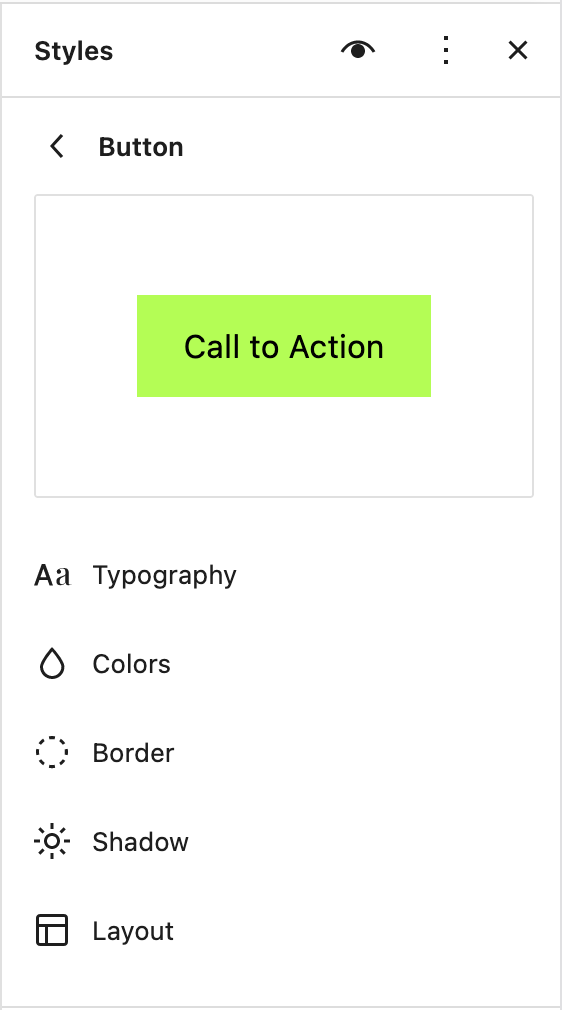
Shadows are an important part of a design – they help to establish a hierarchy of content and help bring focus to particular areas of a site. With WordPress 6.2 it is now possible to add and modify shadows to some blocks using Global Styles and theme.jsonJSONJSON, or JavaScript Object Notation, is a minimal, readable format for structuring data. It is used primarily to transmit data between a server and web application, as an alternative to XML..
Use in theme.json
To apply a shadow using theme.json, you can add this to a blockBlockBlock is the abstract term used to describe units of markup that, composed together, form the content or layout of a webpage using the WordPress editor. The idea combines concepts of what in the past may have achieved with shortcodes, custom HTML, and embed discovery into a single consistent API and user experience.’s definition:
This post was co-authored by Adam Zielinski @zieladam and Dennis Snell @dmsnell
WordPress 6.2 introduces WP_HTML_Tag_Processor – a tool for blockBlockBlock is the abstract term used to describe units of markup that, composed together, form the content or layout of a webpage using the WordPress editor. The idea combines concepts of what in the past may have achieved with shortcodes, custom HTML, and embed discovery into a single consistent API and user experience. authors to adjust HTMLHTMLHyperText Markup Language. The semantic scripting language primarily used for outputting content in web browsers.tagtagA directory in Subversion. WordPress uses tags to store a single snapshot of a version (3.6, 3.6.1, etc.), the common convention of tags in version control systems. (Not to be confused with post tags.) attributes in block markup within PHPPHPThe web scripting language in which WordPress is primarily architected. WordPress requires PHP 7.4 or higher. It’s the first component in a new HTML processing APIAPIAn API or Application Programming Interface is a software intermediary that allows programs to interact with each other and share data in limited, clearly defined ways..
Updating HTML in WordPress has always required using uncomfortable tools. Regular expressions are difficult and prone to all kinds of errors. DOMDocument is resource-heavy, fails to handle modern HTML correctly, and isn’t available on many hosting platforms.
WP_HTML_Tag_Processor takes the first step towards bridging this gap.
The Tag Processor can reliably update HTML attributes
The Tag Processor finds specific tags and can change its attributes. Here’s an example setting an alt attribute on the first img tag within a block of HTML.
$html = '<img src="/husky.jpg">';

$p = new WP_HTML_Tag_Processor( $html );

if ( $p->next_tag() ) {
    $p->set_attribute( 'alt', 'Husky in the snow' );
}

echo $p->get_updated_html();

// Output:
// <img alt="Husky in the snow" src="/husky.jpg">
The next_tag() method moves to the next available tag in the HTML, but also accepts a tag name, a CSSCSSCascading Style Sheets. class, or both in order to find specific tags. According to the HTML specification, lookup of tag and attribute names aren’t case-sensitive, but CSS class names are.
remove an attribute without first checking if it exists,
add a CSS class which might already be there,
set an attribute value without ensuring that it’s not duplicating an existing one.
You no longer need to be concerned that your code mistakes for a real tag the content inside a <textarea>, and attribute value, or even inside an HTML comment.
The Tag Processor conforms to the HTML5 specification, so you don’t have to. It automatically escapes and decodes values where necessary and knows how to handle malformed markup.
$ugly_html = <<<HTML
<textarea title='<div> elements are semantically void'>
    <div><!--<div attr-->="</div>"></div>">
</textarea>
<div></div>
HTML;

$p = new WP_HTML_Tag_Processor( $ugly_html );
if ( $p->next_tag( 'div' ) ) {
    $p->add_class( 'bold' );
}

echo $p->get_updated_html();
// Output:
// <textarea title='<div> elements are semantically void'>
//     <div><!--<div attr-->="</div>"></div>">
// </textarea>
// <div class="bold"></div>
The Tag Processor operates fast enough to run in critical hot code paths and incurs almost no memory overhead. In WordPress 6.2 it replaces bugbugA bug is an error or unexpected result. Performance improvements, code optimization, and are considered enhancements, not defects. After feature freeze, only bugs are dealt with, with regressions (adverse changes from the previous version) being the highest priority.-prone code relying on regular expressions and string-searching to perform similar updates.
For more advanced use of the Tag Processor, read through the extensive in-class documentation and learn how to…
…set bookmarks to re-visit parts of the document which have already been scanned and modified.
…visit closing tags like </div> in addition to the opening tags.
…run advanced and stateful queries by visiting every tag in a document.
Further considerations
There are many things the Tag Processor doesn’t do: it doesn’t build a DOM document tree, find nested tags, or update a tag’s inner HTML or inner text. Work on new HTML-related APIs continues, and a future WordPress release will build upon this work to enable accessing all of a block’s attributes from within PHP (if the block supplies a block.json file), finding tags using a CSS selector, and modifying the HTML structure with new tags, removed tags, and updated inner markup.
You can keep up with further development via this overview issues on the GutenbergGutenbergThe Gutenberg project is the new Editor Interface for WordPress. The editor improves the process and experience of creating new content, making writing rich content much simpler. It uses ‘blocks’ to add richness rather than shortcodes, custom HTML etc.
https://wordpress.org/gutenberg/GitHubGitHubGitHub is a website that offers online implementation of git repositories that can easily be shared, copied and modified by other developers. Public repositories are free to host, private repositories require a paid subscription. GitHub introduced the concept of the ‘pull request’ where code changes done in branches by contributors can be reviewed and discussed before being merged by the repository owner. https://github.com/ Repo.
In this dev notedev noteEach important change in WordPress Core is documented in a developers note, (usually called dev note). Good dev notes generally include a description of the change, the decision that led to this change, and a description of how developers are supposed to work with that change. Dev notes are published on Make/Core blog during the beta phase of WordPress release cycle. Publishing dev notes is particularly important when plugin/theme authors and WordPress developers need to be aware of those changes.In general, all dev notes are compiled into a Field Guide at the beginning of the release candidate phase., you will find a collection of smaller changes to existing features and deprecated APIs and components.
Table of Contents
Fluid typography minimum font size
Following on from the fluid typography settings that were introduced in WordPress 6.1, WordPress 6.1.1 introduced a hard-coded minimum for the fluid typography rules of 14px, to ensure that the generated typography rules would not result in font sizes that were too smaller for readability in narrower viewports.
In WordPress 6.2, themes can define their own minimum font size for fluid typography rules. Depending on the theme’s requirements, sometimes the desired minimum font size value might be greater or less than the provided default of 14px. When used, the minimum font size will result in any font-sizes used that are equal to or less than the minimum being output directly as that font size. For font sizes larger than the minimum font size, the minimum font size will be used as the floor of the fluid typography calculated rule.
How to use the minimum font size in your theme
Within theme.jsonJSONJSON, or JavaScript Object Notation, is a minimal, readable format for structuring data. It is used primarily to transmit data between a server and web application, as an alternative to XML., the property settings.typography.fluid now accepts an object in addition to the existing boolean value. Setting fluid to true will use the default minimum font size of 14px; however, themes can now provide an object with a minFontSize property instead:
With the minFontSize property set to 15px in the above example, the output of a paragraph blockBlockBlock is the abstract term used to describe units of markup that, composed together, form the content or layout of a webpage using the WordPress editor. The idea combines concepts of what in the past may have achieved with shortcodes, custom HTML, and embed discovery into a single consistent API and user experience. set to 15px font size will be as follows with no fluid rules applied:
<p style="font-size:15px">A paragraph at 15px</p>
The output for a paragraph block set to 16px will result in the fluid rules being applied, but with 15px as the minimum font-size:
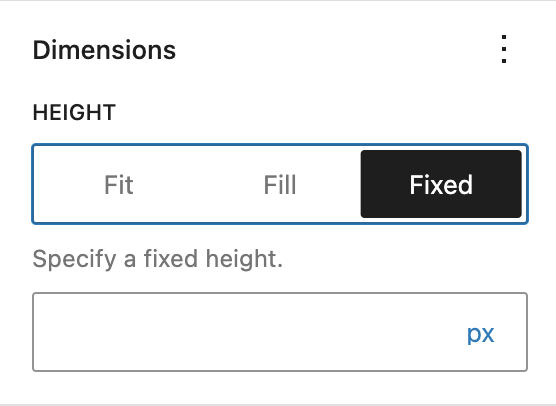
A new Layout feature was added that allows the children of container blocks with Flex type layout to provide controls to change their relative size within their parent block. This feature can be added to the container block in its __experimentalLayout settings in block.json, like so:
The controls for the child blocks will then be displayed under the “Dimensions” panel in the block sidebarSidebarA sidebar in WordPress is referred to a widget-ready area used by WordPress themes to display information that is not a part of the main content. It is not always a vertical column on the side. It can be a horizontal rectangle below or above the content area, footer, header, or any where in the theme.. If the parent’s orientation is horizontal the control will appear as “Width”, and if it’s vertical it will be “Height”.
Three options are available in this control:
“Fit” is the default, and means the block will take up only as much space as its intrinsic dimensions;
“Fill” makes the block stretch to take up all remaining available space within its parent;
“Fixed” allows for setting a fixed width or height (depending on the parent’s orientation) in px, %, em, rem, vw or vh units.
wp-block-heading CSSCSSCascading Style Sheets. class added to every Heading block
In WordPress 6.2, the h1-h6 elements added via the heading block have a brand new wp-block-heading CSS class.
This change enables styling the heading block differently from the regular h1-h6 elements. For example, the following theme.json would add a blue background to all h1 elements and a pink background to only the h1 elements added via the cover block:
WordPress 6.2 introduces a new method called wp_theme_has_theme_json() that returns whether the active theme or its parent has a theme.json file. The goal is to provide 3rd parties with a public APIAPIAn API or Application Programming Interface is a software intermediary that allows programs to interact with each other and share data in limited, clearly defined ways. they can use to query the active theme for this information. It deprecates the private API WP_Theme_JSON_Resolver:theme_has_support(). Details are available in the PR #45168
Edit block style variations from theme.json
This new theme.json API allows existing coreCoreCore is the set of software required to run WordPress. The Core Development Team builds WordPress. block style variations to be styled directly from the theme.json file. It does not currently allow adding new variations. Styles should be added as follows:
Each variation should be targeted by its name, which can be found in the block’s block.json file, under “styles”.
wp_get_global_settings => the result is now cached per request (also known as non-persistent cache), so it’s faster.
wp_get_global_stylesheet => the result is now cache per request (aka non-persistent) while it was cached using 1-minute transient. This caused bugs (the changes in the site editor were not reflected in the front until 1 minute later) that are fixed now.
wp_get_global_styles_svg_filters => the result is now cached per request (aka non-persistent cache) while it was cached using 1-minute transient. While this did not cause any known bugs, it was updated for due diligence.
More details are available in this tracking issue #45171
When users switch themes, the navigation on their site should stay the same, regardless of whether it is a block theme or a classic theme. To enable users to switch from classic themes to block themes, we have made some further refinements to the way that the navigation block imports menus from classic themes.
If a site has a classic menu, and has not yet created a navigation using the navigation block, then the navigation block will automatically import a classic menu to use. Many classic themes (for example TT1) use the primary name and slug as a convention for its main menu location. If a site has a classic menu defined at this location, then the navigation block will import this one. If not, then it will use the most recently created classic menu.
The conditions for deciding which classic menu to import are:
If no wp_navigation menus exist
If the theme has a menu defined at location called primary, use that otherwise
Use the most recently created classic menu
If these conditions are met, the navigation block will display the classic menu, automatically converting it to navigation menuNavigation MenuA theme feature introduced with Version 3.0. WordPress includes an easy to use mechanism for giving various control options to get users to click from one place to another on a site.. More details via the PR (#45976)
Disable Openverse categoryCategoryThe 'category' taxonomy lets you group posts / content together that share a common bond. Categories are pre-defined and broad ranging. in new Media tab
In addition to Blocks and Patterns, with WordPress 6.2 the Inserter shows a new Media tab, giving the user fast access to the images, videos, and audio files in the Media library. It enables users to browse and search the Openverse catalog for Creative Commons licensed images. The Openverse media category can be controlled with a new public block editor setting(enableOpenverseMediaCategory). The default is to show this category, but it can be turned off by updating this setting’s value. (#47404)
In WordPress 6.2 the behavior of removeBlock() changed. Until then, when a block was removed, the previous block was selected and gained focus in the user interface. Occasionally, if there wasn’t any previous block available, it resulted in focus loss, which is a particularly difficult experience when using a screen reader.
With this update, the behavior of the removeBlock() action was changed to select the first parent instead. For a developer writing Custom Blocks or otherwise depending on the result of the removeBlock action, this might require an update to their code, to account for the possibility that sometimes the parent is selected on block removal. There is a way to opt-out of this behavior by passing false as the second argument to removeBlock() function.
Bug fix: Global Styles for adminadmin(and super admin) users on multi-site
In WordPress 6.1 the layout block support was refactored to output CSS values for block spacing, with additional layout controls within global styles being made available. This resulted in a bugbugA bug is an error or unexpected result. Performance improvements, code optimization, and are considered enhancements, not defects. After feature freeze, only bugs are dealt with, with regressions (adverse changes from the previous version) being the highest priority. for admin users without the unfiltered_htmlcapabilitycapabilityA capability is permission to perform one or more types of task. Checking if a user has a capability is performed by the current_user_can function. Each user of a WordPress site might have some permissions but not others, depending on their role. For example, users who have the Author role usually have permission to edit their own posts (the “edit_posts” capability), but not permission to edit other users’ posts (the “edit_others_posts” capability). (e.g. admin users within a multisitemultisiteUsed to describe a WordPress installation with a network of multiple blogs, grouped by sites. This installation type has shared users tables, and creates separate database tables for each blog (wp_posts becomes wp_0_posts). See also network, blog, site instance) where block spacing or layout content sizes were not saved when updated within the global styles interface. (#45520) The cause was that within the Theme JSON class, theme.json values are filtered for users without the unfiltered_html capability based on a lookup to a direct CSS property, e.g. margin or padding. For layout features, the styling rules are stored in indirect properties that don’t directly map to a real CSS property, e.g. blockGap and contentSize.
For WordPress 6.2 (and backported to WordPress 6.1.2) this issue is resolved by the Theme JSON class storing a list of indirect properties (INDIRECT_PROPERTIES_METADATA), with a mapping between a CSS property to use for validation, and the path to the indirect property as stored in theme.json. In this way, blockGap will be validated against the CSS gap property, and contentSize against the CSS max-width property, etc.
For themes using layout features, no changes are required, as the bug fix is an internal implementation detail of how Theme JSON styles are validated and output.
The formatting prop have been deprecated in WordPress 5.4 release and is not available anymore starting from WordPress 6.2. If you want to define the available formats when using the RichText component, use the allowedFormats prop instead. (#46106)
The deprecated useAnchorRef hook from the @wordpress/rich-text package will not be deleted in WordPress 6.3, as initially planned. (#45302)
DateTimePicker deprecated prop removal postponed to 6.3
The removal of the __nextRemoveHelpButton and __nextRemoveResetButton props on the DateTimePicker component in @wordpress/components, initially scheduled for GutenbergGutenbergThe Gutenberg project is the new Editor Interface for WordPress. The editor improves the process and experience of creating new content, making writing rich content much simpler. It uses ‘blocks’ to add richness rather than shortcodes, custom HTML etc.
https://wordpress.org/gutenberg/ 14.6, has been postponed to the Gutenberg 15.8 release. (#46006)
In WordPress 6.2, non-strings as block descriptions have been deprecated.
Previously, we could register a block with a non-string description (like a ReactReactReact is a JavaScript library that makes it easy to reason about, construct, and maintain stateless and stateful user interfaces.
https://reactjs.org Node or any other JavaScriptJavaScriptJavaScript or JS is an object-oriented computer programming language commonly used to create interactive effects within web browsers. WordPress makes extensive use of JS for a better user experience. While PHP is executed on the server, JS executes within a user’s browser.
https://www.javascript.com object for example). Another way to achieve that was to use the blocks.registerBlockTypefilterFilterFilters are one of the two types of Hooks https://codex.wordpress.org/Plugin_API/Hooks. They provide a way for functions to modify data of other functions. They are the counterpart to Actions. Unlike Actions, filters are meant to work in an isolated manner, and should never have side effects such as affecting global variables and output. and change the description with a non-string there.
While there could be niche edge cases that found non-string descriptions useful, contributors discovered that this could cause unexpected bugs and thus have decided to deprecate it. This makes it clearer that the recommended type for block descriptions should be of type string only.
For context and more information, see #44455 and #44233. (top)
Removal of the Navigation Editor screen and associated package
The Navigation Editor screen was an experimental feature of the Gutenberg PluginPluginA plugin is a piece of software containing a group of functions that can be added to a WordPress website. They can extend functionality or add new features to your WordPress websites. WordPress plugins are written in the PHP programming language and integrate seamlessly with WordPress. These can be free in the WordPress.org Plugin Directory https://wordpress.org/plugins/ or can be cost-based plugin from a third-party. that contributors worked on as a potential replacement for the classic Menus screen using a block-based paradigm. The code for this feature existed within a dedicated @wordpress/edit-navigation package.
As the Navigation project has evolved, however, the requirement for a dedicated screen has become less pronounced, with features originally proposed for/included within the screen being incorporated into the Navigation block itself.
During the 6.1 cycle, due to lack of contributions, the experiment was informally deprecated in the Plugin by being removed from the Experiments screen in the Gutenberg Plugin settings page.
With the arrival of list view editing for the Navigation block in WordPress 6.2, menus can now be edited away from the editor canvas, and therefore it is finally time to formally remove the experiment from the codebase.
The @wordpress/edit-navigation package has now been removed from the Gutenberg repository and then associated package unpublished from npm. (#47055)







You must be logged in to post a comment.