Dev Chat Summary, May 24, 2023

The WordPress Developers Chat meeting took place on May 24, 2023 at 20:00 UTC in the core channel of Make WordPress Slack.

Key Links

Announcements

  • WordPress 6.2.2 Security Release: This rapid-response security release addresses a shortcodes regressionregression A software bug that breaks or degrades something that previously worked. Regressions are often treated as critical bugs or blockers. Recent regressions may be given higher priorities. A "3.6 regression" would be a bug in 3.6 that worked as intended in 3.5. from 6.2.1, and further improves security around this feature.
  • Whatโ€™s new in Gutenberg 15.8: Get the latest scoop on whatโ€™s recently shipped inย GutenbergGutenberg The Gutenberg project is the new Editor Interface for WordPress. The editor improves the process and experience of creating new content, making writing rich content much simpler. It uses โ€˜blocksโ€™ to add richness rather than shortcodes, custom HTML etc. https://wordpress.org/gutenberg/. Posted byย @fabiankaegy ๐ŸŽ‰
  • โ€ฆwhich means that Gutenberg 15.8 is available for download.

Highlighted Posts

Hereโ€™s an overview of updates in TracTrac An open source project by Edgewall Software that serves as a bug tracker and project management tool for WordPress. between May 8 and May 22, 2023 โ€” yep, thatโ€™s โ€œTwo Weeks in CoreCore Core is the set of software required to run WordPress. The Core Development Team builds WordPress.โ€:

  • 48 commits
  • 87 contributors
  • 108 tickets created
  • 10 tickets reopened
  • 79 tickets closed
  • ๐Ÿฅ and 5 new contributors in this period ๐ŸŽ‰
  • WP Briefing: Episode 56: What to Know About WordPress Playground: Learn more about experiments surrounding the ever-growing WordPress Playground, and what coding and testingย accessibilityAccessibility Accessibility (commonly shortened to a11y) refers to the design of products, devices, services, or environments for people with disabilities. The concept of accessible design ensures both โ€œdirect accessโ€ (i.e. unassisted) and โ€œindirect accessโ€ meaning compatibility with a personโ€™s assistive technology (for example, computer screen readers). (https://en.wikipedia.org/wiki/Accessibility)ย opportunities this exciting project is making possible.
  • Core Editor Improvement: Smoother Site Editing: See some of the latest updates to the editor, includingย revisionsRevisions The WordPress revisions system stores a record of each saved draft or published update. The revision system allows you to see what changes were made in each revision by dragging a slider (or using the Next/Previous buttons). The display indicates what has changed in each revision.ย history for styles, templates, and template parts.

Release Updates

  • WordPress 6.3 Planning Roundup: Please take a moment to review the latest plans for the next major releasemajor release A release, identified by the first two numbers (3.6), which is the focus of a full release cycle and feature development. WordPress uses decimaling count for major release versions, so 2.8, 2.9, 3.0, and 3.1 are sequential and comparable in scope.. And give a round of applause to the new release squad! (You can find them and follow along overย in #6-3-release-leads, too!)
  • @audrasjb indicated that the full 6.3 bugbug A bug is an error or unexpected result. Performance improvements, code optimization, and are considered enhancements, not defects. After feature freeze, only bugs are dealt with, with regressions (adverse changes from the previous version) being the highest priority. scrub schedule was almost ready to publish. The schedule includes at least 2 scrubs per week, on Tuesdays and Thursdays, and alternatively at 05:00, 06:00, 14:00, and 17:00 UTC. Everyone is welcome to join the first scrub on 25 May at 14:00 UTC.
  • @karmatosed wished to bring awareness to a proposal to include #design triagetriage The act of evaluating and sorting bug reports, in order to decide priority, severity, and other factors. as part of 6.3 #core and #core-editor triages, rather than as separate design-only meetings. The objective is to draw greater designer focus to these release-specific meetings, and encourage better collaboration and alignment between teams. It is planned to record some of these sessions as learning resources. Tammie asked for feedback on this idea and how the Design team can be helpful in the release, with the first meeting plan soon to be posted on make/design. She also called on other contributors to highlight tickets that needed Design team input, so that they could be amplified in #design.
  • @francina also gave a reminder that the #6-3-release-leads channel was a good place to follow along with release coordination efforts, in particular encouraging contributors with interest in helping on the 6.4 release to join the channel and ask questions.

Maintainers: Component Help Requests

@afragen called for additional help in testing the PluginPlugin A plugin is a piece of software containing a group of functions that can be added to a WordPress website. They can extend functionality or add new features to your WordPress websites. WordPress plugins are written in the PHP programming language and integrate seamlessly with WordPress. These can be free in the WordPress.org Plugin Directory https://wordpress.org/plugins/ or can be cost-based plugin from a third-party. Dependencies feature pluginFeature Plugin A plugin that was created with the intention of eventually being proposed for inclusion in WordPress Core. See Features as Plugins, and requested Design team feedback. @karmatosed proposed some options for helping move designer involvement forward.

@oglekler highlighted #11856: URL for 1st comments page is not canonical, indicating it would need a careful approach to resolution.

Open Floor

WP Adminadmin (and super admin) Help Panel

@studionashvegas shared #55342: If the contextual help panel is open and then I scroll, I have to click on help twice to close the panel, asking for review of the patchpatch A special text file that describes changes to code, by identifying the files and lines which are added, removed, and altered. It may also be referred to as a diff. A patch can be applied to a codebase for testing., which addresses a visual bug in WP admin. @audrasjb assigned the ticketticket Created for both bug reports and feature development on the bug tracker. to the 6.3 milestone, and marked for needs-testing.

Special Focus Triage Sessions

@oglekler asked if there were plans for additional โ€œold ticketโ€ triage sessions, and @karmatosed suggested that holding even one session per release would be a good beginning.

@oglekler also wondered if all tickets marked as critical could be triaged, with the belief that many may be mis-classified. She suggested that the critical severityseverity The seriousness of the ticket in the eyes of the reporter. Generally, severity is a judgment of how bad a bug is, while priority is its relationship to other bugs. is most useful when applied correctly. @ironprogrammer asked if reviewing these tickets was part of release scrubs, and @audrasjb indicated that scheduling dedicated scrubs for these tickets would be best, but that it was ultimately up to release Triage co-leads to decide.

@ironprogrammer then asked for volunteers to help facilitate these scrubs, suggesting there could be other interested contributors, and included a link to the Core Handbookโ€™s bug scrub tutorial. @davidbaumwald added a reminder that scrubs could happen any time by anyone. He also indicated agreement that existing critical tickets were mostly normal severity, and could be cleaned up quickly without requiring a meeting. Contributors can request โ€œBug GardenerBug Gardener A contributor who has been given advanced privileges in Trac.โ€ Trac access in the #core channel if they wish to conduct triage.

Next Meeting

The next meeting will be on May 31, 2023 at 20:00 UTC.

Are you interested in helping draft Dev Chat summaries? Volunteer at the start of the next meeting on the #core Slack channel.

Props @audrasjb and @pbiron for peer review of this summary.

#6-3, #6-2-2, #dev-chat, #meeting, #summary

A Week in Core โ€“ May 22, 2023

Welcome back to a new issue ofย Week inย CoreCore Core is the set of software required to run WordPress. The Core Development Team builds WordPress.. Letโ€™s take a look at what changed onย TracTrac An open source project by Edgewall Software that serves as a bug tracker and project management tool for WordPress.ย between May 8 and May 22, 2023 (sorry for not being able to publish a post last week, this one will cover two weeks!).

  • 48 commits
  • 87 contributors
  • 108 tickets created
  • 10 tickets reopened
  • 79 tickets closed

Also, WordPress 6.2.1 and 6.2.2 maintenance and security releases went out!

Ticketticket Created for both bug reports and feature development on the bug tracker.ย numbers are based on theย Trac timeline for the period above. The following is a summary of commits, organized by component and/or focus.

Code changes

Administration

  • Add missing escaping for CSSCSS Cascading Style Sheets. classes on the body tagtag A directory in Subversion. WordPress uses tags to store a single snapshot of a version (3.6, 3.6.1, etc.), the common convention of tags in version control systems. (Not to be confused with post tags.) in the adminadmin (and super admin) โ€“ #58336

Build/Test Tools

  • Call wp_cache_flush_runtime in WP_UnitTestCase. โ€“ #31463
  • Move wp_cache_flush_runtime() next to wp_cache_flush() โ€“ #57841
  • Partial revert of r55745 โ€“ #57841
  • Remove expectation of a deprecation notice from WP_Posts_List_Table tests โ€“ #58157
  • Split the tests from user/author.php into individual test classes โ€“ #57841
  • Use the function get_num_queries across all unit tests โ€“ #57841

Code Modernization

  • Correct fallback return value in get_the_author() โ€“ #58157
  • Explicitly declare all properties in Text_Diff_Engine_native โ€“ #58298

Coding Standards

  • Use esc_url() to escape link URLURL A specific web address of a website or web page on the Internet, such as a websiteโ€™s URL www.wordpress.org value in wp-admin/edit-link-form.php โ€“ #58282

Comments

  • Always lazily load comment metaMeta Meta is a term that refers to the inside workings of a group. For us, this is the team that works on internal WordPress sites like WordCamp Central and Make WordPress. โ€“ #57801

Docs

  • A host of corrections and improvements to inline documentation โ€“ #57840
  • Clarify @param types on get_sample_permalink_html filterFilter Filters are one of the two types of Hooks https://codex.wordpress.org/Plugin_API/Hooks. They provide a way for functions to modify data of other functions. They are the counterpart to Actions. Unlike Actions, filters are meant to work in an isolated manner, and should never have side effects such as affecting global variables and output. โ€“ #58322
  • Correct default value for the $optimize option in Style Engine โ€“ #57840
  • Fix a few more typos in DocBlocks โ€“ #57840
  • Fix a few more typos in DocBlocks and inline comments โ€“ #57840
  • Fix a few more typos in inline comments โ€“ #58334, #57840
  • Fix typo in a comment in Bulk_Upgrader_Skin::header() and ::footer() โ€“ #58334
  • Improve HTMLHTML HyperText Markup Language. The semantic scripting language primarily used for outputting content in web browsers. APIAPI An API or Application Programming Interface is a software intermediary that allows programs to interact with each other and share data in limited, clearly defined ways. file and class headers per the documentation standards โ€“ #57840
  • Improve Style Engine DocBlocks per the documentation standards โ€“ #57840
  • Improve Style Engine file and class headers per the documentation standards โ€“ #57840
  • Improve a few DocBlocks in wp-includes/formatting.php โ€“ #58316
  • Update code examples formatting in WP_HTML_Tag_Processor documentation โ€“ #58028
  • Various corrections and improvements to inline docsinline docs (phpdoc, docblock, xref) and docblocks โ€“ #57840
  • describe return type of _get_block_template_file() โ€“ #57756

Editor

  • Disable lazy loading term meta in get_block_templates โ€“ #58230
  • Ensure blockBlock Block is the abstract term used to describe units of markup that, composed together, form the content or layout of a webpage using the WordPress editor. The idea combines concepts of what in the past may have achieved with shortcodes, custom HTML, and embed discovery into a single consistent API and user experience. comments are of a valid form
  • Remove shortcodeShortcode A shortcode is a placeholder used within a WordPress post, page, or widget to insert a form or function generated by a plugin in a specific location on your site. support from block templates
  • Restore shortcode support for block templates โ€“ #58333
  • Update block editor packages to the latest patchpatch A special text file that describes changes to code, by identifying the files and lines which are added, removed, and altered. It may also be referred to as a diff. A patch can be applied to a codebase for testing. releases โ€“ #58274

Embeds

  • Add protocol validation for WordPress Embed code

General

  • Remove a few is_object() checks followed by instanceof operator โ€“ #58309
  • Use static on closures whenever $this is not used to avoid memory leaks โ€“ #58323

Help/About

  • Remove unwanted space in a link located on about.php โ€“ #58373

I18Ni18n Internationalization, or the act of writing and preparing code to be fully translatable into other languages. Also see localization. Often written with a lowercase i so it is not confused with a lowercase L or the numeral 1. Often an acquired skill.

  • Introduce sanitization function for localeLocale A locale is a combination of language and regional dialect. Usually locales correspond to countries, as is the case with Portuguese (Portugal) and Portuguese (Brazil). Other examples of locales include Canadian English and U.S. English.
  • Replace โ€œRoll backโ€ with โ€œRestoreโ€ in user facing strings โ€“ #58282

Media

  • Conditionally skip lazy-loading on images before the loopLoop The Loop is PHP code used by WordPress to display posts. Using The Loop, WordPress processes each post to be displayed on the current page, and formats it according to how it matches specified criteria within The Loop tags. Any HTML or PHP code in the Loop will be processed on each post. https://codex.wordpress.org/The_Loop to improve LCP performance โ€“ #58211
  • Increase default for wp_omit_loading_attr_threshold to 3 โ€“ #58213
  • Introduce wp_get_attachment_image_context filter โ€“ #58212
  • Prevent CSRF setting attachment thumbnails
  • Prevent special images within post content to skew image counts and cause lazy-loading bugs โ€“ #58089

Networks and Sites

  • Lazy load site meta โ€“ #58185
  • Load WP_Metadata_Lazyloader class file if class does not exist โ€“ #58185
  • Load WP_Metadata_Lazyloader class file if class in meta.php โ€“ #58185

Plugins

  • Remove is_object() check in WP_Hook:build_preinitialized_hooks() โ€“ #58290

Posts, Post Types

  • Add a new filter for query arguments in get_pages โ€“ #12821

RevisionsRevisions The WordPress revisions system stores a record of each saved draft or published update. The revision system allows you to see what changes were made in each revision by dragging a slider (or using the Next/Previous buttons). The display indicates what has changed in each revision.

  • Add edit link functionality for the wp_template and wp_template_part post types โ€“ #57709

TaxonomyTaxonomy A taxonomy is a way to group things together. In WordPress, some common taxonomies are category, link, tag, or post format. https://codex.wordpress.org/Taxonomies#Default_Taxonomies.

  • Do not prime term meta in wp_get_object_terms โ€“ #57701

Props

Thanks to the 87 people who contributed to WordPress Core on Trac last week: @spacedmonkey (15), @peterwilsoncc (10), @costdev (10), @mukesh27 (9), @xknown (6), @flixos90 (6), @sergeybiryukov (5), @westonruter (5), @johnbillion (5), @thekt12 (4), @audrasjb (4), @youknowriad (4), @jrf (4), @davidbaumwald (3), @timothyblynjacobs (3), @isabel_brison (3), @dd32 (3), @antpb (3), @Presskopp (3), @talldanwp (2), @andraganescu (2), @ntsekouras (2), @ocean90 (2), @NekoJonez (2), @oandregal (2), @matveb (2), @rmccue (2), @desrosj (2), @aristath (1), @johnjamesjacoby (1), @antonvlasenko (1), @ramonopoly (1), @ironprogrammer (1), @annezazu (1), @wonderboymusic (1), @boonebgorges (1), @voldemortensen (1), @DrewAPicture (1), @tillkruess (1), @mamaduka (1), @wildworks (1), @mdxfr (1), @hellofromtonya (1), @kebbet (1), @mattwiebe (1), @bph (1), @ndiego (1), @joen (1), @ellatrix (1), @kevin940726 (1), @andrewserong (1), @welcher (1), @juanmaguitar (1), @coffee2code (1), @azaozz (1), @bor0 (1), @thomask (1), @dilipbheda (1), @marianne38 (1), @mikeschroder (1), @ehtis (1), @jorbin (1), @gziolo (1), @chriscct7 (1), @Otto42 (1), @ryelle (1), @joedolson (1), @Clorith (1), @kamplugins (1), @afragen (1), @apermo (1), @kenwins (1), @noisysocks (1), @zunaid321 (1), @martinkrcho (1), @paulkevan (1), @ahsannayem (1), @rutviksavsani (1), @Enchiridion (1), @sumitbagthariya16 (1), @Soean (1), @sabernhardt (1), @salvoaranzulla (1), @ebai4 (1), @sajjad67 (1), @tijmensmit (1), and @dmsnell (1).

Congrats and welcome to our 5 new contributors of the week:ย @marianne38, @ahsannayem, @rutviksavsani, @ebai4, @tijmensmitย โ™ฅ๏ธ

Core committers: @sergeybiryukov (17), @audrasjb (10), @spacedmonkey (9), @flixos90 (4), @johnbillion (2), @desrosj (1), @westonruter (1), @oandregal (1), and @davidbaumwald (1).

#6-3, #core, #week-in-core

Editor Chat Agenda: 24 May 2023

Facilitator and notetaker:ย @paaljoachim

This is the agenda for the weeklyย editor chatย scheduled forย Wednesday, May 24 2023, 03:00 PM GMT+1. This meeting is held in theย #core-editorย channel in the Making WordPressย SlackSlack Slack is a Collaborative Group Chat Platform https://slack.com/. The WordPress community has its own Slack Channel at https://make.wordpress.org/chat/.

Whatโ€™s new in Gutenberg 15.8? (May 17)
GutenbergGutenberg The Gutenberg project is the new Editor Interface for WordPress. The editor improves the process and experience of creating new content, making writing rich content much simpler. It uses โ€˜blocksโ€™ to add richness rather than shortcodes, custom HTML etc. https://wordpress.org/gutenberg/ 15.9 RC1 will be released Wednesday and available for testing.
WordPress 6.3 posts: Roadmap to 6.3 and WordPress 6.3 Planning Roundup.

Key project updates:

Task Coordination.

Open Floor โ€“ extended edition.

If you are not able toย attendย the meeting, you are encouraged to share anything relevant for the discussion:

  • If you have an update for the main site editing projects, please feel free to share as a comment or come prepared for the meeting itself.
  • If you have anything to share for the Task Coordination section, please leave it as a comment on this post.
  • If you have anything to propose for the agenda or other specific items related to those listed above, please leave a comment below.

#agenda, #core-editor, #core-editor-agenda, #meeting

Dev Chat Agenda, May 24, 2023

The next weekly WordPress developers chat will take place onย  Wednesday May 24, 2023 at 20:00 UTC in theย coreย channel ofย Make WordPress Slack. All are welcome.

1. Welcome and housekeeping

Dev Chat summary, May 17, 2023 โ€“ thanks toย @ironprogrammer

2. Announcements

WordPress 6.2.2 Security Release

Whatโ€™s new in Gutenberg 15.8 โ€“ posted by @fabiankaegy.

Gutenberg 15.8 is available to download

3. Highlighted posts

WP Briefing: Episode 56: What to Know About WordPress Playground

Core Editor Improvement: Smoother Site Editing

4. Release updates

The nextย major releasemajor release A release, identified by the first two numbers (3.6), which is the focus of a full release cycle and feature development. WordPress uses decimaling count for major release versions, so 2.8, 2.9, 3.0, and 3.1 are sequential and comparable in scope.ย is 6.3.

6.3 planning update

5. Help with components or tickets

If you have aย ticketticket Created for both bug reports and feature development on the bug tracker.ย which needs some help, do add it in the comments below.

6. Openย floor

If you have an item for this part of the agenda, you can add the topic below.

This post will be updated with any newer items published before the Dev Chat if they are available.

#6-3, #6-2-2, #agenda, #dev-chat

Performance Chat Summary: 23 May 2023

Meeting agenda here and the full chat log is available beginning here on Slack.

Announcements

  • Theย Performance Lab pluginย reached 70k active installations this week
  • Decision on whether to hold the meeting June 6 ahead of travel aroundย WordCampWordCamp WordCamps are casual, locally-organized conferences covering everything related to WordPress. They're one of the places where the WordPress community comes together to teach one another what theyโ€™ve learned throughout the year and share the joy. Learn more.ย Europe
    • Agreed to keep the June 6 meeting

Priority Projects

Server Response Time

Link to roadmap projects

Contributors: @joemcgill @spacedmonkey @aristath

Database Optimization

Link to roadmap projects

Contributors: @aristath @spacedmonkey @olliejones @rjasdfiii

JavaScriptJavaScript JavaScript or JS is an object-oriented computer programming language commonly used to create interactive effects within web browsers. WordPress makes extensive use of JS for a better user experience. While PHP is executed on the server, JS executes within a userโ€™s browser. https://www.javascript.com & CSSCSS Cascading Style Sheets.

Link to roadmap project

Contributors: @mukesh27 @10upsimon @adamsilverstein

  • @10upsimon Enhancing the Script APIAPI An API or Application Programming Interface is a software intermediary that allows programs to interact with each other and share data in limited, clearly defined ways. with a loading strategy:
    • Mergedย @westonrutersย PRย which massively improves how we handle inline script loading
    • Hoping to mergeย @westonrutersย PRย for removal of $args normalization and flattening of that data, hopefully today
    • Looking for review on addingย @coversย  in thisย PR,ย @spacedmonkey if you have a min that would be great
    • Ongoing smaller iterations to the PR as we work through some comms around async handling
    • No further updates at this stage
  • @joemcgill That mostly covers it, I think. Iโ€™m seeing lots of progress on this effort over the last few weeks. Weโ€™ve got lots of great feedback and continue to discuss specifics about the proposal on the Trac ticketticket Created for both bug reports and feature development on the bug tracker.:ย https://core.trac.wordpress.org/ticket/12009
    • Asย @10upsimon said, one of the last remaining issue that weโ€™re trying resolve is making sure weโ€™re all on the same page about how to best handle inline scripts, as there has been some disagreement about the best path forward there. Conversation about that topic is happening in this issue:ย https://github.com/10up/wordpress-develop/issues/63

Images

Link to roadmap projects

Contributors: @flixos90 @thekt12 @adamsilverstein @joemcgill

  • @joemcgill Nothing from me either, though I know Iโ€™ve seen some updates to improving lazy loading landing over last week.
  • @flixos90 I committed the 4th out of 5 lazy-loading fixes for 6.3 yesterday, and the last PRย https://github.com/WordPress/wordpress-develop/pull/4439ย looks like itโ€™s close as well.ย @Jonny Harrisย You previously requested changes, could you give it another look please?
    • Also anybody elseโ€™s feedback would be much appreciated!

Measurement

Link to roadmap projects

Contributors: @adamsilverstein @olliejones @joemcgill @mukesh27

Ecosystem Tools

Link to roadmap projects

Contributors: @joegrainger

  • @joegrainger For theย Plugin Checker, we are working on the final issue that came out of the Review/QA. Once done, weโ€™ll be doing some testing to make sure everything is working as expected and start working towards an initial release. You can follow the progress on theย GitHub repoย here. Thanks!

Creating Standalone Plugins

Link to GitHub overview issue

Contributors: @flixos90 @mukesh27 @10upsimon

  • No updates this week

Open Floor

  • @spacedmonkey Going to re-share from last week โ€“ This discussion has been very active โ€“ย https://github.com/WordPress/performance/issues/403
    • Worth looking into as team ^
    • @joemcgill Is this something that could be handled in a performance lab module (or other pluginPlugin A plugin is a piece of software containing a group of functions that can be added to a WordPress website. They can extend functionality or add new features to your WordPress websites. WordPress plugins are written in the PHP programming language and integrate seamlessly with WordPress. These can be free in the WordPress.org Plugin Directory https://wordpress.org/plugins/ or can be cost-based plugin from a third-party.), or does this need to be a direct to coreCore Core is the set of software required to run WordPress. The Core Development Team builds WordPress. proposal?
    • @spacedmonkey I think this one would directly in core. If you want to do this, you can already do it in a pluginโ€ฆ
    • @joemcgill Got it. So, it seems we either need to decide if itโ€™s worth us pursuing a โ€œcanonicalโ€ version of this plugin that is supported by this team. If not, I think it would be better for this conversation to move from the performance repo and directly to the related Trac ticket. (Also, this is just like, my opinion)
    • @spacedmonkey Personally I am not sure if we should do this in core.
    • This plugin will do the functionality they ask forย https://github.com/stuttter/ludicrousdb It is a โ€œcanonicalโ€ plugin for a lot of advanced database functionality.
    • @johnbillion I canโ€™t see any performance figures anywhere in that ticket, are there any? Lots of theoretical discussion but no numbers
    • @spacedmonkey good point
    • @joemcgill I donโ€™t want to discourage the folks who want to work on this, but if itโ€™s not something this team wants to commit to supporting, then we should politely close the proposal and redirect them to other channels, like Trac or a standalone plugin.
    • @spacedmonkey We need number to validate and an updated patchpatch A special text file that describes changes to code, by identifying the files and lines which are added, removed, and altered. It may also be referred to as a diff. A patch can be applied to a codebase for testing.. Without that, it will have to go to the backlog
  • @westonruter I know there is a problem of orphaned autoloaded options, where plugins add options but donโ€™t clean up after themselves upon uninstall. I know we also have an Autoloaded options Site Health test.
    • Maybe this has already been discussed, but what if the test were extended to check for autoloaded options that arenโ€™t being used anymore?
    • Granted, this wouldnโ€™t need to be a Site Health test and could instead be a cron job.
    • Consider a job that runs once a week which hits the homepage and the most recently-published post, and when running pass a query arg to capture all calls toย get_option()
    • @spacedmonkey I am currently writing a document, where I suggest this.
    • @spacedmonkey Have you read this โ€“ย https://github.com/WordPress/performance/issues/526
    • TDLR, this hooksHooks In WordPress theme and development, hooks are functions that can be applied to an action or a Filter in WordPress. Actions are functions performed when a certain event occurs in WordPress. Filters allow you to modify certain functions. Arguments used to hook both filters and actions look the same. into get_option and tracks what is used on a page load. It when stores an array of used options and then can be used to reset options that are autoloaded but not used.
    • There is a possible of setting autoload no to options that are needed for other parts of WordPress, like sitemaps, rss feeds, rest apis, or the cms
    • There is a chance we could tank performance on some page types and improve it on others.
    • @westonruter Yeah, would need to hit the important endpoints and capture the used options for each
  • @joemcgill I wanted to note that the submission deadline for WCUS is later this week, and it would be great to have good representation from this team. Curious if anyone else is planning to submit anything and if so, Iโ€™d be happy to support folks with feedback or idea development this week.

Our next chat will be held on Tuesday, May 30, 2023 at 15:00 UTC in the #core-performance channel in Slack.

#core-performance, #performance, #performance-chat, #summary

Performance Chat Agenda: 23 May 2023

Here is the agenda for this weekโ€™s performance team meeting scheduled for May 23, 2023 at 15:00 UTC.


This meeting happens in the #core-performance channel. To join the meeting, youโ€™ll need an account on the Make WordPress Slack.

#agenda, #meeting, #performance, #performance-chat

Editor chat summary: May 17th, 2023

This post summarizes the latest weekly Editor meeting (agenda, slack transcript), held in the #core-editor SlackSlack Slack is a Collaborative Group Chat Platform https://slack.com/. The WordPress community has its own Slack Channel at https://make.wordpress.org/chat/ channel, on Wednesday, May 17, 2023, 14:00 UTC.

General Updates

Async key project updates

Read the latest updates directly from the following tracking issues:

@get_dave
Update On Navigation

  • The intended scope of work for the Nav blockBlock Block is the abstract term used to describe units of markup that, composed together, form the content or layout of a webpage using the WordPress editor. The idea combines concepts of what in the past may have achieved with shortcodes, custom HTML, and embed discovery into a single consistent API and user experience. in WP 6.3 has been refined and confirmed (see this Issue).
  • Contributors haveย shipped improvements to the fallback mechanics for the block. This is now normalised in a dedicatedย classย on the PHPPHP The web scripting language in which WordPress is primarily architected. WordPress requires PHP 7.4 or higher side and accessible from the front end via the REST APIREST API The REST API is an acronym for the RESTful Application Program Interface (API) that uses HTTP requests to GET, PUT, POST and DELETE data. It is how the front end of an application (think โ€œphone appโ€ or โ€œwebsiteโ€) can communicate with the data store (think โ€œdatabaseโ€ or โ€œfile systemโ€) https://developer.wordpress.org/rest-api/. These changes improve the UXUX User experience of the block by always ensuring a Navigation MenuNavigation Menu A theme feature introduced with Version 3.0. WordPress includes an easy to use mechanism for giving various control options to get users to click from one place to another on a site. is pre-created meaning there is no โ€œtransitionโ€ state in the block when it moves from uncontrolled to controlled.
  • Contributors have been improving performance byย preloading the key Navigation-related network calls in the Site Editor.
  • Contributors have been engaging in ongoing discussions to refine the scope and purpose ofย Navigation in the Browse Mode sidebar.
  • Work is underway to improve the Link creation interface to improve its utility for the Navigation block (and the editor in general).

Open Floor

@James Cunninghamย 

Highlighted remove shortcodeShortcode A shortcode is a placeholder used within a WordPress post, page, or widget to insert a form or function generated by a plugin in a specific location on your site. support from block templates change in core

@james-roberts
Highlighted issue https://github.com/WordPress/gutenberg/issues/50532 to check if it is right to be in GitHub repo or in trac

Note: Anyone reading this summary outside of the meeting, please drop a comment in the post summary, if you can/want to help with something.

Read complete transcript

#core-editor, #core-editor-summary, #gutenberg, #meeting notes, #summary

Core Editor Improvement: Smoother Site Editing

These โ€œCoreCore Core is the set of software required to run WordPress. The Core Development Team builds WordPress. Editor Improvementโ€ฆโ€ posts (labeled with the #core-editor-improvement tagtag A directory in Subversion. WordPress uses tags to store a single snapshot of a version (3.6, 3.6.1, etc.), the common convention of tags in version control systems. (Not to be confused with post tags.)) are a series dedicated to highlighting various new features, improvements, and more from Core Editor related projects.ย 

Over the last few GutenbergGutenberg The Gutenberg project is the new Editor Interface for WordPress. The editor improves the process and experience of creating new content, making writing rich content much simpler. It uses โ€˜blocksโ€™ to add richness rather than shortcodes, custom HTML etc. https://wordpress.org/gutenberg/ releases, a few more deeply technical changes have unlocked some big improvements across the experience of exploring and using site editing. The result is a smoother experience of exploring blockBlock Block is the abstract term used to describe units of markup that, composed together, form the content or layout of a webpage using the WordPress editor. The idea combines concepts of what in the past may have achieved with shortcodes, custom HTML, and embed discovery into a single consistent API and user experience. themes, making changes, and entering the Site Editor. The work mentioned here addresses key areas of feedback that have been raised over the months and years with the FSE Outreach Program, particularly around revisionsRevisions The WordPress revisions system stores a record of each saved draft or published update. The revision system allows you to see what changes were made in each revision by dragging a slider (or using the Next/Previous buttons). The display indicates what has changed in each revision. and the ability to preview themes. While whatโ€™s shared here is available in the Gutenberg pluginPlugin A plugin is a piece of software containing a group of functions that can be added to a WordPress website. They can extend functionality or add new features to your WordPress websites. WordPress plugins are written in the PHP programming language and integrate seamlessly with WordPress. These can be free in the WordPress.org Plugin Directory https://wordpress.org/plugins/ or can be cost-based plugin from a third-party. (in some cases as an experiment with block theme previewing), please help explore and test these features to ensure they each make it into the official WordPress 6.3 release come August 8th, 2023.ย 

Rely on revisions for templates, template parts, and styles

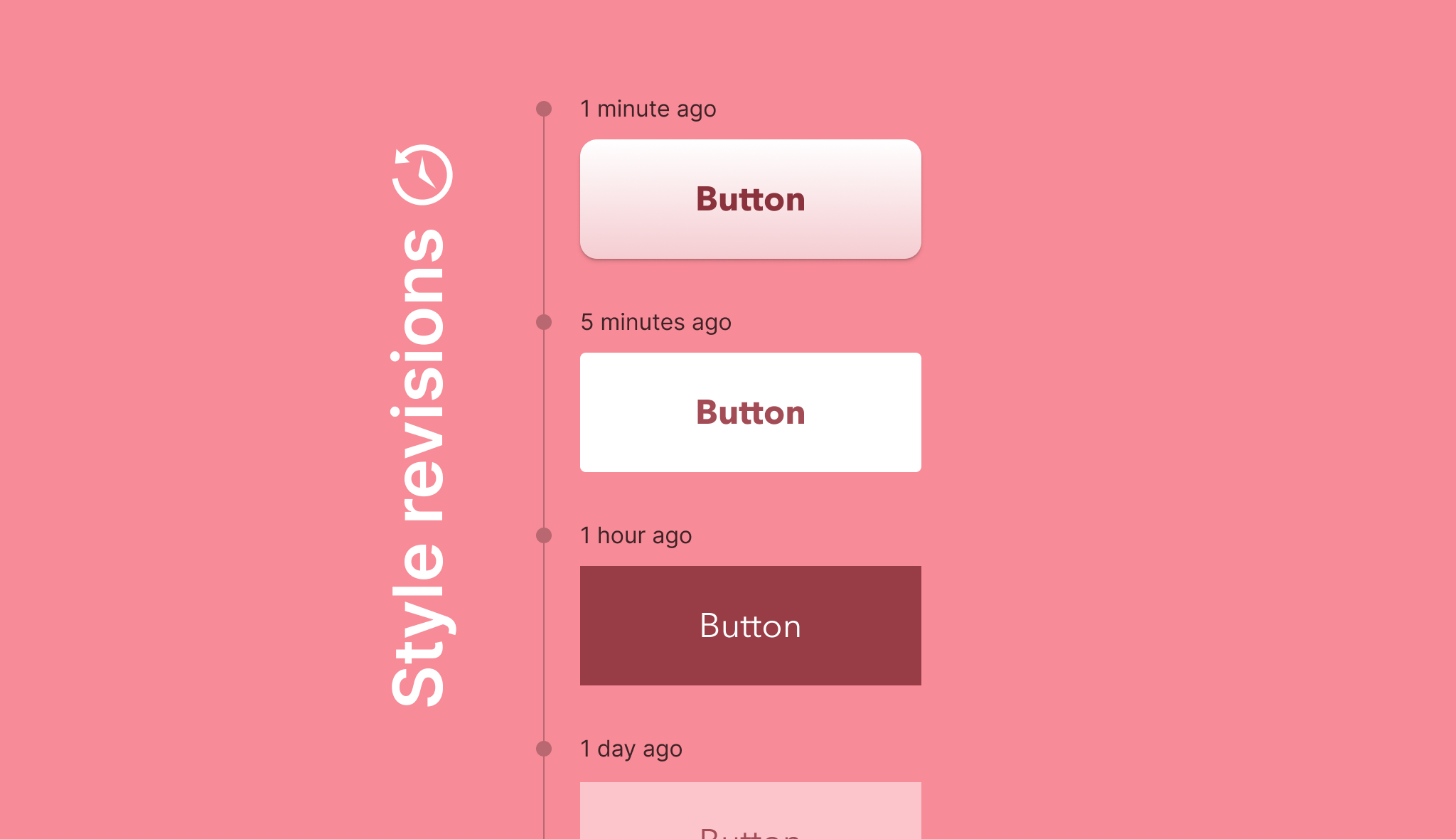
While the undo and redo buttons have a role to play, having access to full revision history allows for a much greater understanding of changes, their impact, and actions one can take. Revisions have been added across the Site Editor to templates, template parts, and style changes providing an across the board safety net for changes youโ€™d like to make (or undo). For styles, changes are shown in a timeline alongside a reference for who made the changes.

This work has addressed a longstanding piece of feedback from the FSE Outreach program, mostly recently shared in the following call for testing:

With all the various changes Iโ€™ve done, I couldnโ€™t help but notice the need of โ€œwhat ifโ€ and wanted to use a previous style, but because I refreshed the editor, I couldnโ€™t use a previous setup so I really felt the need of a revision system.

@jordesign in this comment.

Expect more to come here when phase 3 work gets underway to improve the revision experience, including making them more visual. Of note, a bug fix backport will land in Gutenberg 15.9 to resolve a key pain point in the current experience.

Preview block themes before switching

A while back, @poena shared the following in an FSE Outreach Program exploration that imagined the future of block theme switching:

When I choose a theme to switch to, before I activate it, I can preview it in the customizerCustomizer Tool built into WordPress core that hooks into most modern themes. You can use it to preview and modify many of your siteโ€™s appearance settings.. But it is difficult to view other pages than the frontpage that way. I feel like the โ€œlive previewโ€ for block themes should be in the site editor, not the customizer, and that the flow should be the same; I should be able to โ€œpublishโ€ to activate the new theme.

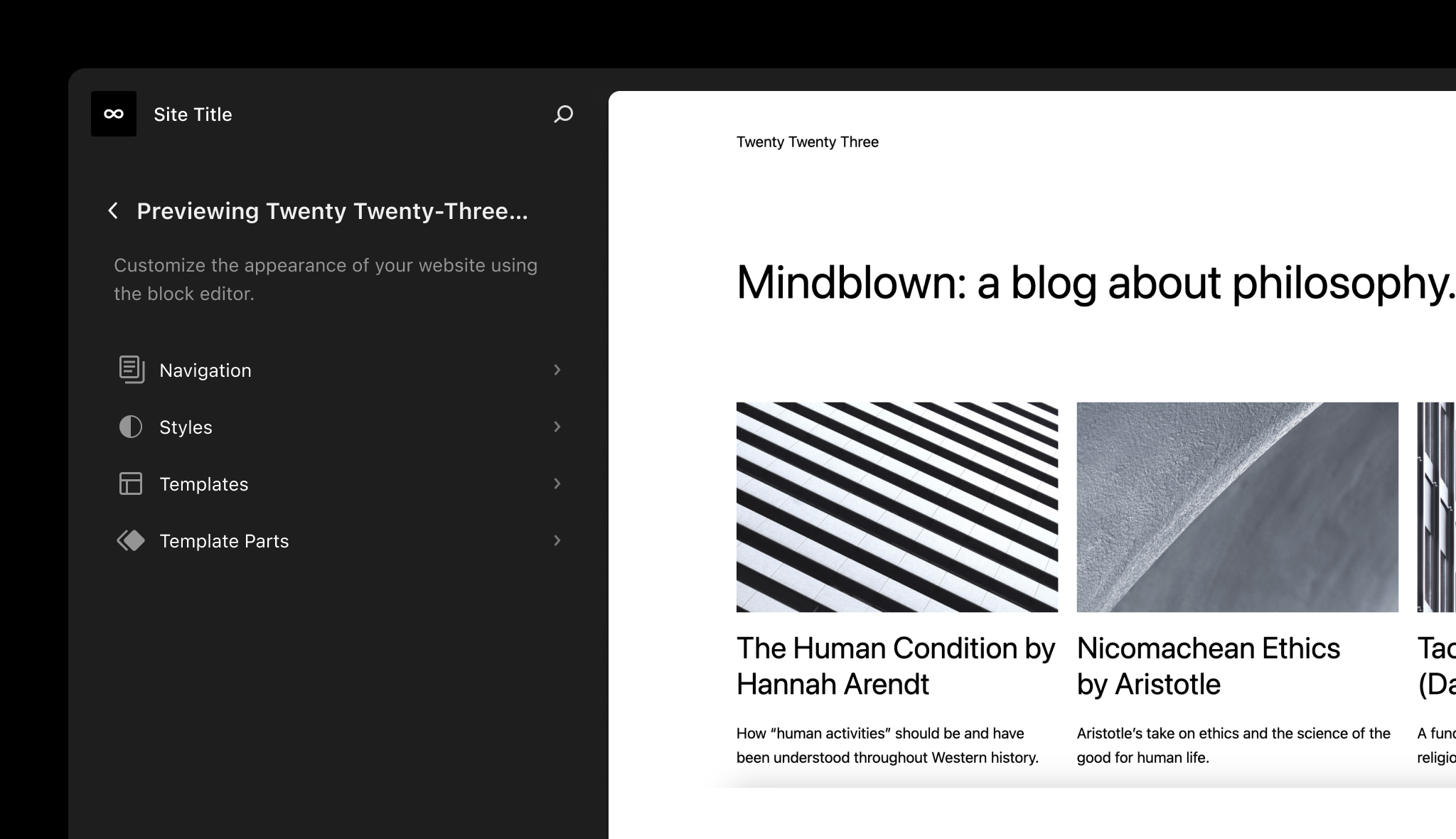
That vision has been reached with a theme preview option built into the Site Editor itself, allowing folks to check out block themes before activating, resolving a major blockerblocker A bug which is so severe that it blocks a release. to exploring block themes in general. While this is currently listed as an experiment to enable under Gutenberg > Experiments, when stabilized it should have a far reaching effect with folks being able to explore block themes and get an early taste of the Site Editor experience all in one.ย 

Please help test and give feedback as work continues to refine this experience. The current FSE Outreach Program Rapid Revamp call for testing explores this option and is a great place to offer relevant feedback.

Enjoy loading state improvements

While 6.2 brought improvements to the loading state, the work hasnโ€™t finished with a recent update greatly improving the editor canvas loading experience. While subtle to some, these improvements help make entering the Site Editor less jarring and more cohesive, showing a fully loaded state before you start interacting. Below are before and after visuals to demonstrate the changes and the smoother experience that exists today as of Gutenberg 15.8.ย 

Video of prior experience:

Video of updated experience:ย 

Alongside the improvements to the loading state, additional animation related changes and general fixes, like removing a screen flash upon deleting templates and template parts, offer a refined, calmer workflow.ย 


Stay tuned for more as work continues for the WordPress 6.3 release.ย 

#core-editor-improvement

Whatโ€™s new in Gutenberg 15.8? (May 17)

Whatโ€™s new in GutenbergGutenberg The Gutenberg project is the new Editor Interface for WordPress. The editor improves the process and experience of creating new content, making writing rich content much simpler. It uses โ€˜blocksโ€™ to add richness rather than shortcodes, custom HTML etc. https://wordpress.org/gutenberg/โ€ฆโ€ posts (labeled with the #gutenberg-new tag)ย  are posted following every Gutenberg release on a biweekly basis, showcasing new features included in each release. As a reminder, hereโ€™s an overview of different ways to keep up with Gutenberg and the Site Editor project (formerly called Full Site Editing)

Gutenberg 15.8ย  has been released and is available for download!

For the latest release of the Gutenberg pluginPlugin A plugin is a piece of software containing a group of functions that can be added to a WordPress website. They can extend functionality or add new features to your WordPress websites. WordPress plugins are written in the PHP programming language and integrate seamlessly with WordPress. These can be free in the WordPress.org Plugin Directory https://wordpress.org/plugins/ or can be cost-based plugin from a third-party., contributors continued improvements to existing UIUI User interface and UXUX User experience for content creators, site owners working on their own site, or theme developers creating new themes. Users will find small changes for streamlined workflows, fixed bugs, and refined responsiveness, just to name a few. The release includes 192 PRs by 63 contributors, of which 4 merged their first contributions. Congratulations to all.

Table of contents

  1. Add the pages menu to the site editor
  2. Add revisions UI to the global styles interface
  3. Add Theme Previews for block themes
  4. Changelog

Add the pages menu to the site editor

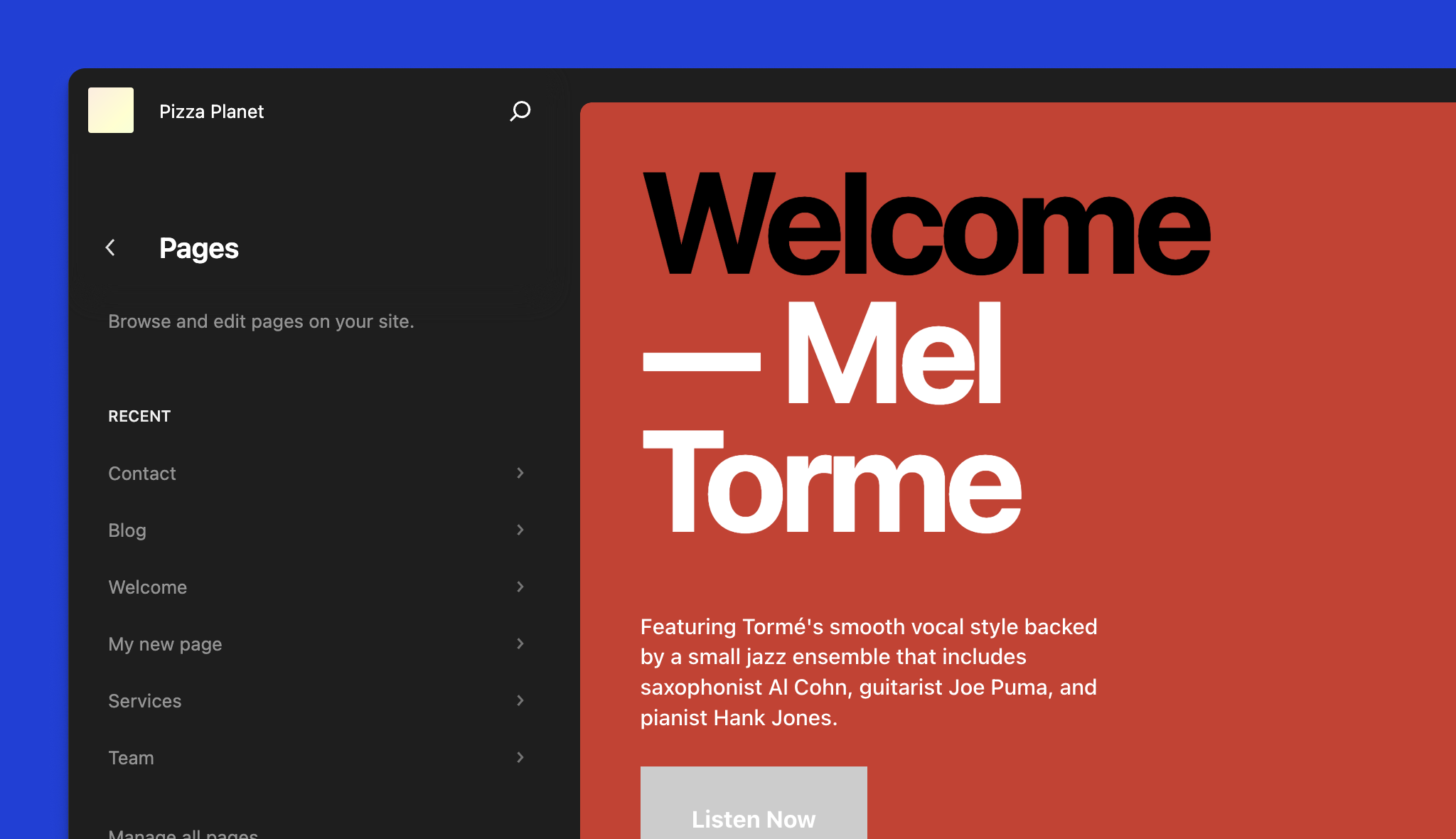
The site editor now exposes the ten most recently updated pages so you can directly jump into editing them. This is another step to explore adding back the ability to edit content right from within the site editor. (50463)

Add revisionsRevisions The WordPress revisions system stores a record of each saved draft or published update. The revision system allows you to see what changes were made in each revision by dragging a slider (or using the Next/Previous buttons). The display indicates what has changed in each revision. UI to the global styles interface

In the global styles interface, you can now navigate through any revisions and browse how the site looked at that point in time. Any saved changes get shown in a timeline with when they occurred and who made the changes. (50089)

Add Theme Previews for blockBlock Block is the abstract term used to describe units of markup that, composed together, form the content or layout of a webpage using the WordPress editor. The idea combines concepts of what in the past may have achieved with shortcodes, custom HTML, and embed discovery into a single consistent API and user experience. themes

Previewing different themes has never been easier. By introducing a new theme_preview parameter, previewing how your site would look with a different theme right inside the site editor is now possible. (50030)

Changelog

Enhancements

Global Styles

  • Fluid typography: Use layout.wideSize as max viewport width. (49815)
  • Global styles revisions: Remove human time diff and custom author fields from the APIAPI An API or Application Programming Interface is a software intermediary that allows programs to interact with each other and share data in limited, clearly defined ways. response. (50234)
  • Unify the global block styles panel with the block inspector panels. (49428)

Post Editor

  • Add <ViewLink> component. (50260)
  • Update background color of post editor when viewing mobile or tablet viewports, or in template mode. (50361)
  • Display device icon on โ€œpreviewโ€ and โ€œviewโ€ buttons. (50218)
  • Improve โ€œswitch to draftโ€ placement. (50217)
  • Post Featured ImageFeatured image A featured image is the main image used on your blog archive page and is pulled when the post or page is shared on social media. The image can be used to display in widget areas on your site or in a summary list of posts.: New design for Replace and Remove buttons. (50269)

Block Library

  • More intuitive Details block with summary and innerBlocks content. (49808)
  • Simplify cover block description. (50355)
  • Cover: Only show overlay controls when color support enabled. (50115)
  • Navigation: Hide color controls when color support is disabled. (50368)
  • Post Featured Image: Hide overlay controls when color support is disabled. (50331)
  • Social Icons: Hide color controls when color support is disabled. (50275)

Fonts API

  • Separate BC Layer. (50077)

Site Editor

  • Add the pages menu to the site editor. (50463)
  • Introduce new PluginTemplateSettingPanel slot. (50257)
  • Add chevrons to the templates and template parts in site editor. (50076)

Components

  • Button: Add opt-in prop for next 40px default size. (50254)
  • Consolidate and add documentation to Storybook. (50226)
  • DimensionControl: Use WordPress package instead of reactReact React is a JavaScript library that makes it easy to reason about, construct, and maintain stateless and stateful user interfaces. https://reactjs.org in code example. (50435)
  • FormTokenField, ComboboxControl: Add opt-in prop for next 40px default size. (50261)
  • Global Styles: Fix palette color popovers. (49975)
  • Relax link pattern matching in CHANGELOG CI check. (50248)
  • Remove custom padding for tertiary buttons. (50276)
  • Update Autocomplete usage example. (49965)
  • Update default accent color. (50193)
  • Update has-text has-icon button spacing. (50277)

CSSCSS Cascading Style Sheets. & Styling

  • Polish confirm dialog padding. (50283)

Template Editor

  • Remove start blank option in template pattern suggestions and add skip button. (50099)
  • Templates: Sort by the rendered title instead of the slug. (50353)

Block Editor

  • List View: Allow dragging to all levels of the block hierarchy. (49742)
  • Allow dragging-and-dropping images from the inserter to image blocks. (49673)
  • Try always showing the dimensions controls. (50305)
  • Adds a renderAdditionalBlockUI prop to ListView. (50465)
  • Update the expanded text color so that it works in both a dark and light context. (50434)
  • Enable Loginout block in Nav block. (49160)
  • Mark related selector as resolved when sideloading Navigation fallback. (50324)
  • Update Template Parts icon to use the symbol. (50410)
  • Use CoreCore Core is the set of software required to run WordPress. The Core Development Team builds WordPress. Data for Nav fallbacks and side load resulting entity into state. (50032)
  • Tweak copy for block settings menu โ€œInsertโ€ฆโ€ to โ€œAddโ€ฆโ€. (50444)
  • Block settings menu: Rearrange items. (50453)

Rest APIREST API The REST API is an acronym for the RESTful Application Program Interface (API) that uses HTTP requests to GET, PUT, POST and DELETE data. It is how the front end of an application (think โ€œphone appโ€ or โ€œwebsiteโ€) can communicate with the data store (think โ€œdatabaseโ€ or โ€œfile systemโ€) https://developer.wordpress.org/rest-api/

  • Update image editor to use new REST API. (28530)

Bug Fixes

Block Library

  • Center align button text in editor. (50228)
  • Comment Template Block: Set commentId context via filterFilter Filters are one of the two types of Hooks https://codex.wordpress.org/Plugin_API/Hooks. They provide a way for functions to modify data of other functions. They are the counterpart to Actions. Unlike Actions, filters are meant to work in an isolated manner, and should never have side effects such as affecting global variables and output.. (50279)
  • Cover: Use overflow: clip, falling back to overflow: Hidden to allow sticky children (technically). (50237)
  • Ensure imported Classic Menu dirty state to include in Editor entity changes list. (50318)
  • File Block: Defer hiding PDF embeds for unsupported browsers until the page has loaded. (50113)
  • Fix template part area variation matching. (49500)
  • Fix the pocket casts embed variation. (50132)
  • Gallery: Fix inner block selection. (50363)
  • Post Terms: Use publicly_queryable to query taxonomies used to register variations. (50244)
  • Remove extraneous โ€œLinkโ€ copy from PanelBody components. (50186)
  • Remove Quote transform from Group (50424)
  • [Post Featured Image]: Revert maxWidth addition. (50427)
  • [Post Title]: Insert default block on Enter at end. (50312)
  • Ensure that view scripts are correctly registered for core blocks. (50364)

Global Styles

  • Close stylebook if the editor canvas container slot is not filled. (50086)
  • Fix positioning of gradient palette popovers on mobile. (50233)
  • Fix/wp get global styles for custom props returns internal variable. (50366)
  • Revisions controller: Fix author and date fields. (50117)
  • Fix hover/focus styles for style variation buttons. (50056)

Block Editor

  • Fix issue with margin collapsing when selecting blocks. (50215)
  • List View / Block Draggable: Fix scroll to top issue when dragging the second last block in the list. (50119)
  • Multi-select: Capitalise B in blocks. (50356)
  • URLInput: Update the โ€˜ENTERโ€™ key down event handler. (50158)
  • Update OffCanvas componentโ€™s more menu to get clientId from block rather than passed in as prop. (50473)
  • Block Toolbar: Donโ€™t use effects for focus management. (50497)
  • Donโ€™t remount the block when the โ€˜templateLockโ€™ is set to โ€˜contentOnlyโ€™. (50292)

Themes

  • Refactor theme previews. (50338)
  • Remove gutenberg plugin mention in schema. (50207)
  • Theme Preview: Restrict to adminadmin (and super admin) users. (50335)
  • Theme Previews: Fix refactor. (50354)

Site Editor

  • Display conditionally the styles in sidebarSidebar A sidebar in WordPress is referred to a widget-ready area used by WordPress themes to display information that is not a part of the main content. It is not always a vertical column on the side. It can be a horizontal rectangle below or above the content area, footer, header, or any where in the theme. main navigation screen. (50329)
  • Remove canvas box shadow. (50374)
  • Save Button: Fix the label in the disabled state. (50284)
  • Remove white background on Site Editor โ€˜Frameโ€™. (48970)
  • Update some visual details in the add-template modal(s). (50143)

Components

  • Spacing: Fix reset of spacing sizes control. (50455)
  • NavigableContailer: Do not trap focus in TabbableContainer. (49846)
  • Remove fill=โ€noneโ€ from levelUp icon. (50264)

AccessibilityAccessibility Accessibility (commonly shortened to a11y) refers to the design of products, devices, services, or environments for people with disabilities. The concept of accessible design ensures both โ€œdirect accessโ€ (i.e. unassisted) and โ€œindirect accessโ€ meaning compatibility with a personโ€™s assistive technology (for example, computer screen readers). (https://en.wikipedia.org/wiki/Accessibility)

  • Add missing tooltip to Site Editor navigation Back icon button. (50104)
  • Fix Multiple Tooltips from Focus Toolbar Shortcut on WidgetWidget A WordPress Widget is a small block that performs a specific function. You can add these widgets in sidebars also known as widget-ready areas on your web page. WordPress widgets were originally created to provide a simple and easy-to-use way of giving design and structure control of the WordPress theme to the user. Editor. (50344)
  • Site Editor Keyboard Navigation Flow. (50296)
  • Small improvements for the sidebars and Close buttons labeling. (49614)

Design Tools

  • Changed so that borders and radius are maintained when Duotone is changed. (50088)
  • LineHeightControl: Fix application of zero values in editor. (48917)

Fonts API

  • [Font API] Do not print in admin using โ€˜admin_print_stylesโ€™ for themes with theme.jsonJSON JSON, or JavaScript Object Notation, is a minimal, readable format for structuring data. It is used primarily to transmit data between a server and web application, as an alternative to XML.. (50259)

Widget Editor

  • Fixes fixed block toolbar in widgets editor. (50371)

Performance

  • Improve Site Editor loading experience(50222)

Experiments

Interactivity API

  • Add Interactivity API runtime. (49994)
  • Navigation block with the Interactivity API. (50041)

Command Center

  • Update the experiment label. (50467)
  • Add an API to open/close the command center. (50423)
  • Fix a style glitch on Safari. (50138)
  • Add a button to open it from the site editor view mode. (50425)
  • Do not show dynamic add new post, add new page commands. (50221)
  • Extract the WordPress reusable commands to a dedicated package. (49956)
  • Fix command menu not re-opening after closing it. (50213)

Documentation

  • Add changelog for eslint-plugin validating dependencies in useSelect and useSuspenseSelect hooksHooks In WordPress theme and development, hooks are functions that can be applied to an action or a Filter in WordPress. Actions are functions performed when a certain event occurs in WordPress. Filters allow you to modify certain functions. Arguments used to hook both filters and actions look the same.. (50247)
  • Add client-side filter reference to Curating the Editor doc and fix links. (50203)
  • Add missing closing parenthesis in code example. (50253)
  • Adds example to change the permalink structure. (50251)
  • Adds links to REST-API reference. (50070)
  • Create-block script includes link to documentation in render.php file. (50206)
  • Block API > Registration: Switch markdown to a-tags. (50110)
  • Donโ€™t use markdown in the callout section. (50437)
  • Remove mention of perf testing from release documentation. (50345)
  • Update Callout documentation on links. (50131)
  • Fix incorrect label in contributor docs. (50201)
  • Fix minor formatting issues in Performance doc. (50202)
  • Fixes incorrect URLs in doc blocks. (50123)
  • Use alert callout in the block deprecation documentation. (50286)
  • Improve CardMedia documentation. (50074)
  • Update README of TreeGrid with data-expanded attribute usage. (50026)

Code Quality

  • Block Editor: Directly import useShouldContextualToolbarShow hook. (50506)
  • BlockControls, InspectorControls: Remove useSlot, unify behavior on bad group. (50198)
  • Enqueue registered block assets and resolve iframeiframe iFrame is an acronym for an inline frame. An iFrame is used inside a webpage to load another HTML document and render it. This HTML document may also contain JavaScript and/or CSS which is loaded at the time when iframe tag is parsed by the userโ€™s browser. styles end-to-end failure. (50185)
  • Make eslint-plugin validate dependencies in useSelect and useSuspenseSelect hooks. (49900)
  • Save Hub: Reuse the save button component to save code. (50145)
  • Use apiFetch instead of window.fetch. (50043)
  • Add types to dispatch and select. (49930)
  • Remove duplicate comment. (50304)

Lodash removal

  • Remove from blocks store reducer. (50471)
  • Remove _.mapValues() from getBlockContentSchemaFromTransforms. (50096)
  • Refactor away from _.mapValues(). (50285)
  • Remove _.mapValues() from blocks reducer. (50097)

Components

  • Fix incorrect focus style widths. (50127)
  • Refactor/toolbar item component to typescript. (49190)
  • SlotFill: Several code cleanups. (50098)
  • SlotFill: Some code cleanups of the bubblesVirtually version. (50133)
  • Convert NavigableContainer to TypeScript. (49377)

Block Editor

  • Block Editor: Add names for the โ€˜editor.BlockListBlockโ€™ filter HoCs. (50513)
  • Refactor around missing dependency in Link Control internal value sync effect. (49509)
  • Donโ€™t export Slot/Fill constants separately. (50274)

Block Library

  • Centralize constants for the navigation block. (50191)
  • Move deprecated Nav block functions to bottom of render file. (50328)
  • Refactor BlockList uses Hooks. (50293)

List View

  • Replace OffCanvasEditor in browse mode with the List View component. (50287)
  • Use block select button class for retaining colors when expanded or hovered. (50155)

Global Styles

  • Global styles revisions: Ensure the revisions endpoint permissions match the global styles controller. (50270)
  • Simplify CustomCSS UI. (49721)

Plugin

  • Update REST API Controller PHPUnit tests. (50120)
  • Update the Gutenberg plugin to require at least the WP 6.1 version. (50079)
  • Update the tested up to version for the gutenberg plugin. (50360)

Native

  • Add a few import required for the React Native wrapper distribution as iOSiOS The operating system used on iPhones and iPads. XCFramework. (50009)

Site Editor

  • Extract the Router APIs and context into a dedicated package. (50100)
  • Move loading logic to a separate hook. (50511)

Tools

wp-env

  • Add wp-env After Setup Command. (50196)
  • Fix wp-env destroy. (50445)
  • Refactored wp-env configuration Parsing. (50071)
  • Wp-env fix exec command in CI. (50411)
  • wp-env: Add better default PHPunit settings, fix Xdebug, and update documentation. (50490)
  • wp-env: Improve run command execution speed. (50007)
  • Cleaned up Port Validation and Removed Unnecessary Default Ports. (50300)
  • Match Containerโ€™s User and Group to Host. (49962)

Testing

  • Add end-to-end test for editing the title of a new custom template part. (50195)
  • Add test to verify image appears on frontend. (50472)
  • Add tests coverage for the navigation block frontend interactivity. (50462)
  • Migrate Adding Patterns Test to Playwright. (50083)
  • Migrate Keep Transform Block Test Case to Playwright. (49719)
  • Migrate PullQuote test case to playwright. (50085)
  • Migrate undo to Playwright. (48701)
  • Prerelease end-to-end Test Utils for Playwright. (43998)
  • Skip creating flaky issues on PRs. (50146)
  • end-to-end tests: Try to fix flaky global styles revisions tests. (50454)
  • Add BlockList text coverage. (50252)

Build Tooling

  • Changelog automation: Apply proper top-level categorization precedence to metaMeta Meta is a term that refers to the inside workings of a group. For us, this is the team that works on internal WordPress sites like WordCamp Central and Make WordPress. PRs. (50208)
  • Do not include first time contributors section in changelog if there are not any. (50291)
  • Publish rich text build types. (49651)
  • Rich text: Rename index.js > index.ts for type-only exports. (50212)
  • Remove PHPUnit and Composer packages. (50408)

Repository Maintainance

  • Add ndiego as codeowner for docs. (50289)

First time contributors

The following PRs were merged by first time contributors:

  • @johnhooks: feature(data): Add types to dispatch and select. (49930)
  • @margolisj: Refactor/toolbar item component to typescript. (49190)
  • @n2erjo00: Create-block script includes link to documentation in render.php file. (50206)
  • @samnajian: Fix/wp get global styles for custom props returns internal variable. (50366)

Contributors

The following contributors merged PRs in this release:

@aaronrobertshaw @afercia @ajlende @alexstine @andrewserong @apeatling @artemiomorales @aurooba @bph @chad1008 @ciampo @DAreRodz @dcalhoun @draganescu @ecgan @fluiddot @fullofcaffeine @geriux @getdave @glendaviesnz @gziolo @hellofromtonya @ironprogrammer @jameskoster @jasmussen @jeryj @jhnstn @johnhooks @jsnajdr @juanfra @kevin940726 @kienstra @Mamaduka @margolisj @mburridge @mirka @mokagio @mtias @n2erjo00 @ndiego @noahtallen @noisysocks @ntsekouras @oandregal @ObliviousHarmony @ocean90 @ockham @pavanpatil1 @pooja-muchandikar @priethor @ramonjd @richtabor @samnajian @SantosGuillamot @scruffian @SiobhyB @t-hamano @talldan @tellthemachines @torounit @tyxla @westonruter @youknowriad


Props to @bph and @jameskoster for their help with this release

#gutenberg, #gutenberg-new

Dev Chat Summary, May 17, 2023

The WordPress Developers Chat meeting took place on 2023-05-17 at 20:00 UTC in theย coreย channel ofย Make WordPress Slack.

Key Links

Announcements

Highlighted Posts

  • Proposal: Retiring Older Default Themes:ย This post summarizes the current state of bundled themes in WordPress before proposes new support states for bundled themes. It also raises two potential ways to decrease the total number of themes receiving regular updates. Thanks toย @desrosjย and everyone who contributed to this post.
  • Command Center: Request for feedback: Check it out and give your feedback on the UXUX User experience and APIAPI An API or Application Programming Interface is a software intermediary that allows programs to interact with each other and share data in limited, clearly defined ways. for this feature.

Release Updates

The nextย major releasemajor release A release, identified by the first two numbers (3.6), which is the focus of a full release cycle and feature development. WordPress uses decimaling count for major release versions, so 2.8, 2.9, 3.0, and 3.1 are sequential and comparable in scope.ย is 6.3.

6.2.1 Minor ReleaseMinor Release A set of releases or versions having the same minor version number may be collectively referred to as .x , for example version 5.2.x to refer to versions 5.2, 5.2.1, 5.2.3, and all other versions in the 5.2 (five dot two) branch of that software. Minor Releases often make improvements to existing features and functionality. Discussion

@audrasjb provided a summary of the recent 6.2.1 release, which included security patches from 4.1.x through 6.2. One fix in particular led to an issue with utilizing shortcodes in templates. The problem was being actively discussed by the Security Editor team, who began plans for a quick follow-up patchpatch A special text file that describes changes to code, by identifying the files and lines which are added, removed, and altered. It may also be referred to as a diff. A patch can be applied to a codebase for testing. to address the issue. See this related ticketticket Created for both bug reports and feature development on the bug tracker.: #58333: WordPress 6.2.1 Shortcodes some shortcode no longer works!.

@nekojonez indicated that the issue only happens with FSE themes, confirming that their non-FSE themes were unaffected. @audrasjb agreed that it only affected template blocks [used in FSE themes]. @pbiron added that shortcodeShortcode A shortcode is a placeholder used within a WordPress post, page, or widget to insert a form or function generated by a plugin in a specific location on your site. blocks used in blockBlock Block is the abstract term used to describe units of markup that, composed together, form the content or layout of a webpage using the WordPress editor. The idea combines concepts of what in the past may have achieved with shortcodes, custom HTML, and embed discovery into a single consistent API and user experience. theme template parts remained functional.

@nekojonez also mentioned concern that the new issue may cause users and members of the WordPress community to get the impression that shortcodes would no longer be supported, and referenced a discussion in #forums that could be taken out of context in support of this misunderstanding.

@ipstenu provided a link to the discussion, and indicated that this was a breaking change that did not include a notification to users beforehand. She suggested that the release post could have been more clear as to why shortcode support in block templates was removed. @nekojonez expressed agreement about wishing for more clarity in the post.

@nekojonez noted that workarounds existed for the issue, and might be shared with clear โ€œuse as your own riskโ€ language. @pbiron explained that one of the options was to move the shortcode block into a template part, and for the template part to replace the original shortcode block used in the template. He added a comment to the ticket explaining this. @webcommsat asked @audrasjb if the post could be updated with information about the workaround.

@azaozz asked if the workarounds โ€œrevertโ€ the security fix, and @audrasjb confirmed that yes, they rewrite the logic and re-introduce the security issuesecurity issue A security issue is a type of bug that can affect the security of WordPress installations. Specifically, it is a report of a bug that you have found in the WordPress core code, and that you have determined can be used to gain some level of access to a site running WordPress that you should not have..

@psdtohtmlguru indicated that the pluginPlugin A plugin is a piece of software containing a group of functions that can be added to a WordPress website. They can extend functionality or add new features to your WordPress websites. WordPress plugins are written in the PHP programming language and integrate seamlessly with WordPress. These can be free in the WordPress.org Plugin Directory https://wordpress.org/plugins/ or can be cost-based plugin from a third-party.-based workaround impacted performance on complex templates, and asked for a link to the security fix ticket. @audrasjb shared a link to the commit, but pointed out the ticket was in Hackerone and not visible to the public. @francina also noted that security fixes are not disclosed publicly, and JB provided a supporting link to the Core Handbookโ€™s security FAQ.

@nekojonez expressed worry that not knowing details of the security flaw may put into question the safety of non-FSE theme shortcode use, and asked for more communication on it. @pbiron added that it was strange the vulnerability would affect shortcode usage directly in a template, but not in a template part of post content. @ndiego asked if anyone could share why shortcodes behaved differently between these usages, and @timothyblynjacobs suggested the discussion was getting too deep for now.

@psdtohtmlguru asked for confirmation that shortcodes in templates donโ€™t work, but that shortcodes in post content would continue to work. @nekojonez indicated the need to await further updates from the security and editor teams, suggesting a clarification post in the meantime. @timothyblynjacobs and @audrasjb agreed, with Timothy suggesting the post primarily clarify that the security team is aware of and discussing solutions to the issue.

@azaozz recommended that shortcodes should not be used in templates, due to performance issues on top of the security concerns. Several attendees responded in the thread explaining that shortcodes were beneficial for numerous reasons, and @asafm7 shared their particular use case. [Editorโ€™s Summary: From this long thread the impression is that regardless of security or performance implications, shortcodes are currently a valuable content mechanism that does not yet have a clear replacement for all use cases.]

6.4 Q&A

@francina asked for an informal Q&A session around WordPress 6.4, details of which can be found in this Slack thread. @karmatosed asked if there was a list of questions for the call, to provide preparation time to address them. @estelaris responded with a link to the spreadsheet (see comment) where more questions could be added. Francesca clarified that the Q&A would be informal and occur on Zoom. @jeffpaul asked about the possibility of two sessions to accommodate timezone differences, the idea which was seconded by Tammie. Francesca agreed to make the calls more formal, and to post about it in make/coreCore Core is the set of software required to run WordPress. The Core Development Team builds WordPress..

Maintainers: Component Help Requests

wp.zip Domain

@francina proposed that the https://wp.zip domain redirect to the latest WordPress release ZIP file โ€” @sergeybiryukov asked if https://wordpress.org/latest.zip was the suggestion โ€” rather than the WordPress.orgWordPress.org The community site where WordPress code is created and shared by the users. This is where you can download the source code for WordPress core, plugins and themes as well as the central location for community conversations and organization. https://wordpress.org/ homepage where it currently leads. @pbiron suggested opening a ticket in Meta Trac, and proposed that https://wordpress.org/download/ย might be preferable to avoid user confusion/concern that might result from a link leading to an automatic download. @webcommsat agreed that avoiding automatic downloads would be better for accessibilityAccessibility Accessibility (commonly shortened to a11y) refers to the design of products, devices, services, or environments for people with disabilities. The concept of accessible design ensures both โ€œdirect accessโ€ (i.e. unassisted) and โ€œindirect accessโ€ meaning compatibility with a personโ€™s assistive technology (for example, computer screen readers). (https://en.wikipedia.org/wiki/Accessibility).

6.3 Tickets

@oglekler shared two tickets that could be moved into the 6.3 milestone, which had been tested:

@webcommsat called for help testing the patches, and reiterated adding test results to tickets for visibility.

Openย Floor

WordCampWordCamp WordCamps are casual, locally-organized conferences covering everything related to WordPress. They're one of the places where the WordPress community comes together to teach one another what theyโ€™ve learned throughout the year and share the joy. Learn more. Europe 2023

@webcommsat called for updating Core and Core Test information for Contributor DayContributor Day Contributor Days are standalone days, frequently held before or after WordCamps but they can also happen at any time. They are events where people get together to work on various areas of https://make.wordpress.org/ There are many teams that people can participate in, each with a different focus. https://make.wordpress.org/support/handbook/getting-started/getting-started-at-a-contributor-day/, thanking @estelaris for gathering the info. Estela emphasized the need to email the info to first-time contributors by Friday, 19 May.

@webcommsat also asked for volunteers to facilitate the Core tables at the event. Both @oglekler and @sergeybiryukov expressed interest.

@webcommsat asked @estelaris if there was to be a table to assist contributors in setting up local environments, noting that a dedicated table has worked well before. Estela confirmed there would be a table, but that emails to first-time contributors could help ensure they are better prepared, particularly with software downloads. @webcommsat also noted the emails could include the date/time for upcoming new contributor meetings.

@webcommsat said they were reviewing Contributor Day info from WC Asia that should be added to the Core Handbook, noting that it was also being added to the Make Teams introduction document (link provided by @estelaris).

@webcommsat asked that Contributor Day attendees share in this postโ€™s comments if they would be able to help at a Core table. @estelaris indicated that there would be approximately six tables dedicated to the Core team, and @desrosj asked which Core focus area had been identified for each table. Estela referred to the introduction document, and that nothing in particular had been mentioned. Jonathan would review the document and try to find other teams to collaborate with.

Finally, @webcommsat noted that tickets were still available for both the conference and Contributor Day.

Next Meeting

The next meeting will be on May 24, 2023 at 20:00 UTC.

Are you interested in helping draft Dev Chat summaries? Volunteer at the start of the next meeting on the #core Slack channel.

Props @ironprogrammer for co-authoring and @audrasjb for peer review of this summary.

#6-3, #6-4, #6-2-1, #dev-chat, #meeting, #summary, #wceu