The WordPress coreCoreCore is the set of software required to run WordPress. The Core Development Team builds WordPress. development team builds WordPress! Follow this site for general updates, status reports, and the occasional code debate. There’s lots of ways to contribute:
Found a bugbugA bug is an error or unexpected result. Performance improvements, code optimization, and are considered enhancements, not defects. After feature freeze, only bugs are dealt with, with regressions (adverse changes from the previous version) being the highest priority.?Create a ticket in the bug tracker.
A pretty quiet week for the project, the key contributors have all been very busy.
@Sephsekla is working on a post for Make CoreCoreCore is the set of software required to run WordPress. The Core Development Team builds WordPress. around user stories and the problems this should solve, aiming to have that out by the next meeting.
@erikyo and @bitmachina are working on the MVPMinimum Viable Product"A minimum viable product (MVP) is a product with just enough features to satisfy early customers, and to provide feedback for future product development." - WikiPedia and switch to TypeScript, no major change
Review of project goals and priorities
@erikyo and @Sephsekla discussed high level goals and current priorities for the project
Create an extensibleExtensibleThis is the ability to add additional functionality to the code. Plugins extend the WordPress core software. notification system with PHPPHPThe web scripting language in which WordPress is primarily architected. WordPress requires PHP 7.4 or higher and REST APIs in WordPress
Improve the admin_notices experience by standardising notices through the new system, making things more accessible
Create an easier and more robust way for plugins/core to notify users by email, replacing the traditional use of wp_mail
Give both users and developers more choice of how notifications are delivered
Discussed the use case of improving email notifications:
This was always a stated goal early on, but we’ve been more focused on dashboard notifications recently
Once the PHP APIAPIAn API or Application Programming Interface is a software intermediary that allows programs to interact with each other and share data in limited, clearly defined ways. is in place, it should be straightforward to add this as a connector for notification channels – this will be a good test case for adding additional implementations
Current priorities
Communication and community engagement, e.g. Make Core post re: user stories
Complete in-progress MVP work (functional database, PHP API, hooked up to REST endpoints)
Complete TypeScript rewrite (since the JSJSJavaScript, a web scripting language typically executed in the browser. Often used for advanced user interfaces and behaviors. codebase is fully typed already, this shouldn’t run into issues)
Plan for upcoming events
Upcoming events discussions: WCEU and WCUS
It’s unclear whether we will have MVP ready for WCEU/WCUS. We’ll evaluate at our next meeting.
WCEU is probably too close to have 0.3.0 ready, but WCUS may be doable.
@Sephsekla will be running a contributor dayContributor DayContributor Days are standalone days, frequently held before or after WordCamps but they can also happen at any time. They are events where people get together to work on various areas of https://make.wordpress.org/ There are many teams that people can participate in, each with a different focus. https://make.wordpress.org/support/handbook/getting-started/getting-started-at-a-contributor-day/ table at WCEU (hoping to be able to do the same at WCUS). What are plans for new contributors?
@erikyo: Unlikely that we can onboard new contributors onto the project to work on the MVP, can we find more granular work?
If we can have PHP API ready, contributors could test building integrations for notification channels (e.g. email, SMS)
Lots of opportunities outside code contribution:
Design discussion
Get feedback on existing prototype
Follow up on user stories work: talk to people about their pain points, suggestions
Collaborate with GutenbergGutenbergThe Gutenberg project is the new Editor Interface for WordPress. The editor improves the process and experience of creating new content, making writing rich content much simpler. It uses ‘blocks’ to add richness rather than shortcodes, custom HTML etc.
https://wordpress.org/gutenberg/ Team on Phase 3 work
We have an opportunity to work with the Gutenberg team on Phase 3 plans for the adminadmin(and super admin), we should make sure to have these conversations
Some good conversation around JS UIUIUser interface refactoring: As previously noted, there are a lot of custom components we could simplify by using existing components from @wordpress/icons and @wordpress/components.
A TBC agenda for next week’s meeting can be found at https://github.com/WordPress/wp-feature-notifications/discussions/328. If you’d like to suggest a topic, or upvote an existing topic, the team would welcome any input from new contributors! Alternatively, feel free to suggest topics to cover in the comments.
Following the planning proposal, this post summarizes the release schedule and squad composition for the next major WordPress release – 6.3. The proposal saw an overwhelmingly high number of volunteers; thank you to everybody who raised their hand to participate and help make WordPress the amazing project it is. 🤝
WordPress 6.3 Schedule
The schedule remains as originally proposed. There was some discussion around the date for BetaBetaA pre-release of software that is given out to a large group of users to trial under real conditions. Beta versions have gone through alpha testing in-house and are generally fairly close in look, feel and function to the final product; however, design changes often occur as part of the process. 2 and the US Independence Day: while the planned date stays the same, the final Beta 2 date can be adjusted by the release squad depending on the availability of contributors around that date.
Milestone
Date
Alpha (trunktrunkA directory in Subversion containing the latest development code in preparation for the next major release cycle. If you are running "trunk", then you are on the latest revision. open for 6.3 release)
March 9, 2023
Beta 1
June 27, 2023
Beta 2
July 3, 2023
Beta 3
July 11, 2023
Release Candidaterelease candidateOne of the final stages in the version release cycle, this version signals the potential to be a final release to the public. Also see alpha (beta). 1
July 18, 2023
Release Candidate 2
July 25, 2023
Release Candidate 3
August 1, 2023
Dry Run
August 7, 2023
WordPress 6.3 General Release
August 8, 2023
WordPress 6.3 Release Squad
Thanks once again to everybody that volunteered for the release squad! Considering all applications for the different roles, a release team has been assembled with input from project leadership to ensure all aspects of the release are properly covered.
Release LeadRelease LeadThe community member ultimately responsible for the Release.: Matías Ventura
The release team has been expanded in a few areas. In particular, the Core and Editor Triage Lead roles have been increased compared to past releases, allowing the squad to run bugbugA bug is an error or unexpected result. Performance improvements, code optimization, and are considered enhancements, not defects. After feature freeze, only bugs are dealt with, with regressions (adverse changes from the previous version) being the highest priority. scrubs in different time zones and triage all around the world!
Unfortunately, even such a big release squad cannot accommodate all raised hands. Contributors are more than welcome to ride along with the release process on the #6-3-release-leadsSlackSlackSlack is a Collaborative Group Chat Platform https://slack.com/. The WordPress community has its own Slack Channel at https://make.wordpress.org/chat/ channel, especially in preparation for participating in 6.4 and future release squads. However, all release decisions will ultimately be the release team’s to make.
WordPress 6.3 is set to be released on August 8th, 2023, bringing a cohesive site editing experience thanks to expanded functionality, richer interfaces, and a dedicated focus on polish. This culmination of work will usher in the Phase 2 finale of Gutenberg.
This release aims to make it easier for users to edit pages, manage navigation, and adjust styles all directly in the Site Editor. It also seeks to provide detailed, relevant information when exploring different parts of the site, such as showing the number of posts per page when viewing relevant blogblog(versus network, site) templates. In addition to these improvements, the release is anticipated to include convenient access to revisionsRevisionsThe WordPress revisions system stores a record of each saved draft or published update. The revision system allows you to see what changes were made in each revision by dragging a slider (or using the Next/Previous buttons). The display indicates what has changed in each revision. across post types (templates, template parts) and styles, the ability to preview blockBlockBlock is the abstract term used to describe units of markup that, composed together, form the content or layout of a webpage using the WordPress editor. The idea combines concepts of what in the past may have achieved with shortcodes, custom HTML, and embed discovery into a single consistent API and user experience. themes, a command tool to speed up workflows, new curated patterns, font management options, and a few new blocks. The following sections will break down the main focus areas, including aspects of the broader CoreCoreCore is the set of software required to run WordPress. The Core Development Team builds WordPress. work that contribute to the overall WordPress experience.
Here’s a design prototype from @saxonfletcher that brings together some of those pieces to offer some inspiration and excitement:
As always, what’s shared here is being actively pursued, but doesn’t necessarily mean each will make it into the final release of WordPress 6.3.
Polishing the Site Editor
The Site Editor has come a long way from a handful of templates to edit with a limited set of blocks in WordPress 5.9 to a full suite of template options, a plethora of blocks to design with, and powerful, evolving tools.
This release brings cohesion and a more complete experience with the addition of content editing to the Site Editor alongside a strong distinction between templates and content. To support this work, revamped interfaces and pathways provide an intuitive way to edit and create what you want without leaving the Site Editor. At the same, the introduction of a command center tool helps one quickly jump to specific pages, templates, or template parts as inspiration strikes.
What follows are the high level projects bringing this to fruition:
To enable more folks to explore the world of Block themes, theme previewing now works within the Site Editor itself, unlocking the ability to preview Block themes and introducing folks to the new Site Editor experience early on.
Video showing an early look at the command center tool.
Iterating on blocks
The Navigation block continues to evolve with a focus on iterating on link control, offering a more nuanced display of menus in the Site Editor, and improving the quickly create draft pages. The wp:pattern block has some early technical changes underway to supercharge it, including explorations to allow for a synced state, possibly laying the groundwork for unifying concepts like template parts and reusable blocks. Alongside these main focuses, a few new blocks are being considered (Footnotes, Details, Table of Contents) and work is underway to add aspect ratio controls to image related blocks.
The power of patterns persist with more curated default patterns to look forward to along with deeper integration in high impact parts of the creation experience. There’s also an early effort underway to add the ability to create and save patterns, similar to the current reusable block experience.
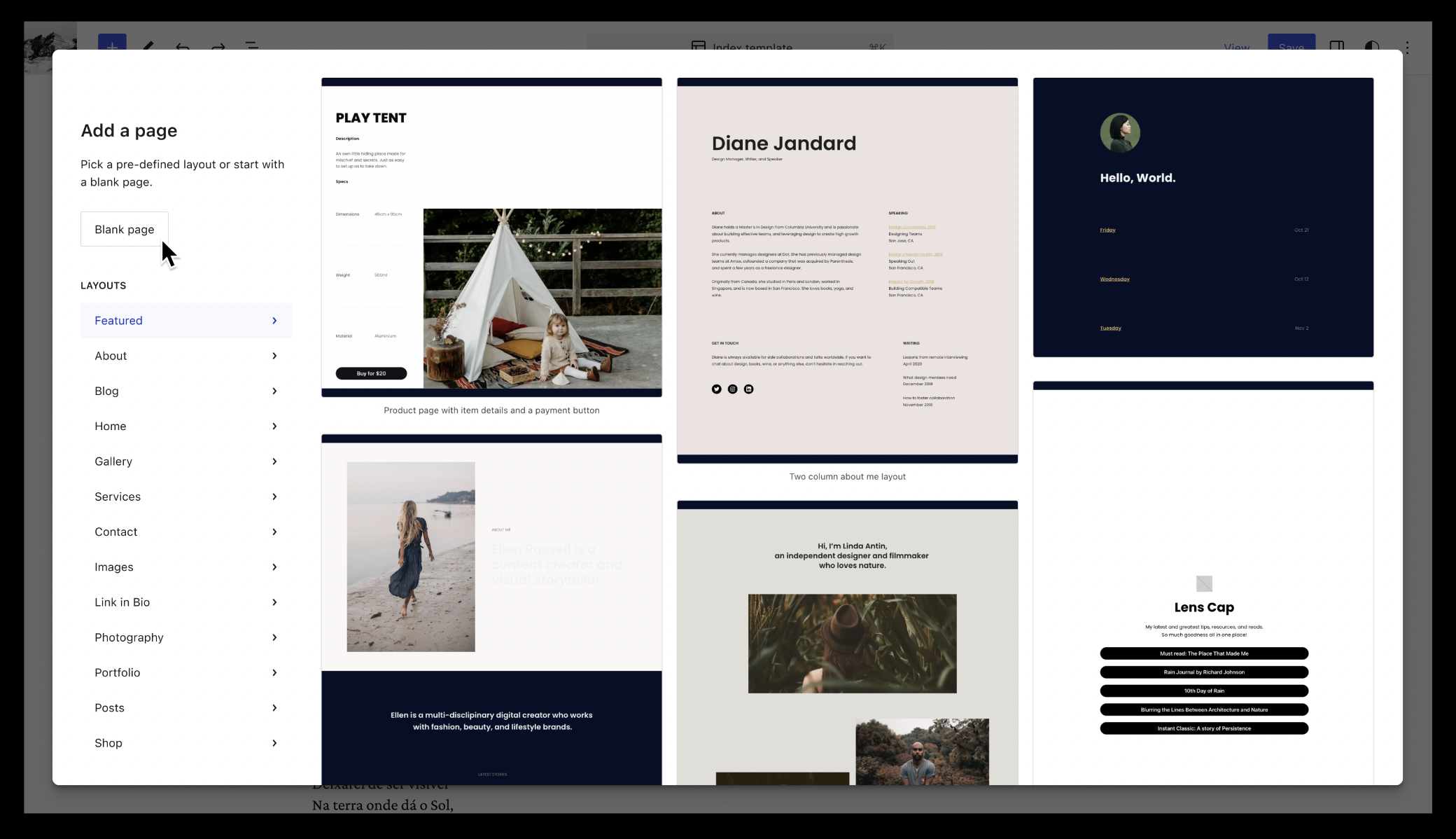
Design for a creation flow for new pages that emphasizes patterns.
Stabilizing usability and prioritizing refinement
With the addition of new features, scaled interfaces, and new pathways, smaller pain points have begun to emerge across the creation experience. To stabilize and polish the experience, a separate board was created to capture these actionable items for developers to quickly solve. Outside of these smaller items, additional larger initiatives are also underway:
Design imagining how a “library” management section might look.
Enhancing design tools
Compared to prior releases, design tooling updates have focused less on adding brand new features and more on simplifying experiences, from managing fonts, or building on current functionality, like CSSCSSCascading Style Sheets. for style variations and sticky positioning iteration.
Addressing PHPPHPThe web scripting language in which WordPress is primarily architected. WordPress requires PHP 7.4 or higher items (8.x compatibility)
Alongside an overarching 6.3 specific issue outlining what’s needed, there are also the following PHP version specific issues:
Outside of these areas, general performance improvements continue, including an improvement for TTFB targeting get_block_templates already showing strong signs of success, alongside a fix for WordPress’s asset handling to only enqueue registered assets once. Expect more to come ahead of the release.
General bugbugA bug is an error or unexpected result. Performance improvements, code optimization, and are considered enhancements, not defects. After feature freeze, only bugs are dealt with, with regressions (adverse changes from the previous version) being the highest priority. fixes and enhancements
In TracTracAn open source project by Edgewall Software that serves as a bug tracker and project management tool for WordPress., there are already 80+ tickets closed across various components and focuses. It’s still very early in the release cycle so expect that number to grow, along with the impact on overall experience of using WordPress.
As the Site Editor and WP-Adminadmin(and super admin) get more and more features, the need to navigate quickly and efficiently across them is becoming increasingly important. Visual editors and code editors alike are adopting the command center as a solution to this problem, with examples such as Visual Studio Code for desktop applications and Notion in the web applications spectrum.
Prototype
Initially proposed as part of the WP-Admin experience revamp post, an early prototype of a command center has now been implemented as an experiment in the GutenbergGutenbergThe Gutenberg project is the new Editor Interface for WordPress. The editor improves the process and experience of creating new content, making writing rich content much simpler. It uses ‘blocks’ to add richness rather than shortcodes, custom HTML etc.
https://wordpress.org/gutenberg/pluginPluginA plugin is a piece of software containing a group of functions that can be added to a WordPress website. They can extend functionality or add new features to your WordPress websites. WordPress plugins are written in the PHP programming language and integrate seamlessly with WordPress. These can be free in the WordPress.org Plugin Directory https://wordpress.org/plugins/ or can be cost-based plugin from a third-party., starting in Gutenberg 15.6. Once enabled in Gutenberg > Experiments, you can navigate to the Site editor and hit the cmd + k (or ctrl + k on Windows and Linux) shortcut to open the command center, run commands and quickly access frequently used actions.
Initially implemented in the Post and Site editors, the command center is meant to be added to all of WP-Admin in the future.
We would love to hear your feedback on this feature and its APIAPIAn API or Application Programming Interface is a software intermediary that allows programs to interact with each other and share data in limited, clearly defined ways.:
How does the user experience feel? (The feature will be tested in the FSE Outreach Program).
Are the APIs (detailed down here) capable enough to address third-party use-cases?
To follow progress and provide feedback, please refer to this issue on GitHubGitHubGitHub is a website that offers online implementation of git repositories that can easily be shared, copied and modified by other developers. Public repositories are free to host, private repositories require a paid subscription. GitHub introduced the concept of the ‘pull request’ where code changes done in branches by contributors can be reviewed and discussed before being merged by the repository owner. https://github.com/: https://github.com/WordPress/gutenberg/issues/48457.
API
Note: The following API is available in Gutenberg trunktrunkA directory in Subversion containing the latest development code in preparation for the next major release cycle. If you are running "trunk", then you are on the latest revision. and will be included in the next Gutenberg release. As it’s an early prototype, both design and API changes are possible before the API lands in CoreCoreCore is the set of software required to run WordPress. The Core Development Team builds WordPress. in the next WordPress release.
One aspect worth highlighting is the proposed API to interact with the command center. The command center has been developed as an independent @wordpress/commands package. It offers APIs to render and register commands dynamically. These extension points allow plugins to inject any commands of their liking and opens the door for interactions with LLMs, as outlined in this previous post.
There are two ways to register commands: static commands and dynamic commands.
Static commands
Static commands can be registered using the wp.data.dispatch( wp.commands.store ).registerCommand action or using the wp.data.useCommand ReactReactReact is a JavaScript library that makes it easy to reason about, construct, and maintain stateless and stateful user interfaces.
https://reactjs.org hook. Both methods receive a command object as an argument, which provides a unique name, a label, an icon, a callback function that is called when the command is selected, and potentially a context.
Dynamic commands, on the other hand, are registered using “command loaders.” These are needed when the command list depends on the search term entered by the user in the command center input. For example, when a user types “contact”, the command center need to filterFilterFilters are one of the two types of Hooks https://codex.wordpress.org/Plugin_API/Hooks. They provide a way for functions to modify data of other functions. They are the counterpart to Actions. Unlike Actions, filters are meant to work in an isolated manner, and should never have side effects such as affecting global variables and output. the available pages using that input.
Commands can be contextual. This means that in a given context (for example, when navigating the site editor, or when editing a template), some specific commands are given more priority and are visible as soon as you open the command center. And when typing the command center, these contextual commands are shown above the rest of the commands.
At the moment, two contexts have been implemented:
site-editor This is the context that is set when you are navigating in the site editor (sidebarSidebarA sidebar in WordPress is referred to a widget-ready area used by WordPress themes to display information that is not a part of the main content. It is not always a vertical column on the side. It can be a horizontal rectangle below or above the content area, footer, header, or any where in the theme. visible).
site-editor-edit This is the context that is set when you are editing a document (template, template part or page) in the site editor.
As the usage of the Command Center expands, more contexts will be added.
To attach a command or a command loader to a given context, it is as simple as adding the context property (with the right context value from the available contexts above) to the useCommand or useCommandLoader calls.
The command center and its API will be valuable additions to WordPress Core, and any feedback you have to offer will be greatly appreciated.
Thank you for your continued support and contributions to WordPress.
Proposal: Retiring older default themes – This post summarizes the current state of bundled themes in WordPress before proposes new support states for bundled themes. It also raises two potential ways to decrease the total number of themes receiving regular updates. Thanks to @desrosj and everyone who contributed to this post.
Release updates
The next major releasemajor releaseA release, identified by the first two numbers (3.6), which is the focus of a full release cycle and feature development. WordPress uses decimaling count for major release versions, so 2.8, 2.9, 3.0, and 3.1 are sequential and comparable in scope. is 6.3.
Help with components or tickets
If you have a ticketticketCreated for both bug reports and feature development on the bug tracker. which needs some help, do add it in the comments below.
Openfloor
If you have an item for this part of the agenda, you can add the topic below.
This post will be updated with any newer items published before the Dev Chat if they are available.
If you are not able to attend the meeting, you are encouraged to share anything relevant for the discussion:
If you have an update for the main site editing projects, please feel free to share as a comment or come prepared for the meeting itself.
If you have anything to share for the Task Coordination section, please leave it as a comment on this post.
If you have anything to propose for the agenda or other specific items related to those listed above, please leave a comment below.
#agenda, #coreCoreCore is the set of software required to run WordPress. The Core Development Team builds WordPress.-editor-agenda, #meeting, #core-editor
Yesterday saw version 2.3.0 of the Performance Lab pluginPluginA plugin is a piece of software containing a group of functions that can be added to a WordPress website. They can extend functionality or add new features to your WordPress websites. WordPress plugins are written in the PHP programming language and integrate seamlessly with WordPress. These can be free in the WordPress.org Plugin Directory https://wordpress.org/plugins/ or can be cost-based plugin from a third-party. released
@aristathAutoloading PHP classes in WP: I’ve been doing some tests and it looks like this PR improves server response times a bit. More importantly though, it reduces memory usage so that’s a big win. The only “controversial” thing about that PR is that it allows users to override CoreCoreCore is the set of software required to run WordPress. The Core Development Team builds WordPress. classes if they load their own classes with the same name early enough.
Pros: No more user hacks in Core files! If users want to override a class in Core, it will be possible. There are many valid reasons and scenarios to do that, since not everything in Core is filterable. What that means is that users will no longer resort to editing Core files directly to do what they need to do – and therefore they will be able to update their sites normally. Responsibility to maintain their own personal overrides falls to them. Maintain your own hacks.
Cons: It’s going to be a tough sell.
@joemcgill Amazing work to see. Would be useful to know what support or feedback @aristath wants from us to keep this moving forward.
@spacedmonkey just created this ticketticketCreated for both bug reports and feature development on the bug tracker.#58327
@joemcgill For our goal, Identifying and addressing the largest server response time bottlenecks in WordPress core – I’ve drafted a blogblog(versus network, site) post summarizing the performance analysis I did of WP 6.2 and plan to post it this week after getting a few eyes on it. @spacedmonkey who has been an early reviewer and contributor to this work has already been busy spinning up tickets for some of what was discovered.
@spacedmonkey The PRs listed above are the “flow hanging fruit” from the review
These are the final commits for my project to lazy load as much metaMetaMeta is a term that refers to the inside workings of a group. For us, this is the team that works on internal WordPress sites like WordCamp Central and Make WordPress. data as possible. Term, comment and site meta now always lazy load.
JavaScriptJavaScriptJavaScript or JS is an object-oriented computer programming language commonly used to create interactive effects within web browsers. WordPress makes extensive use of JS for a better user experience. While PHP is executed on the server, JS executes within a user’s browser.
https://www.javascript.com & CSSCSSCascading Style Sheets.
@joemcgill We’re continuing to track and respond to feedback on the Trac ticket for adding support for script loading strategies to core. I’ve been focused on trying to get consensus with @azaozz about the open question about how to best support async, and in the meantime, @10upsimon has been reviewing and responding to other feedback, @10upsimon anything to add?
@10upsimon I am addressing lower hanging fruit regarding test cases, adding @covers to tests, and adding failure messages. Regarding @covers it is generally unclear which methods and functions I should be adding, as even though we may test something as simple as an inline script in the after position attached to a deferred script, there are many functions in the logic chain that are affected, such as WP_Scripts::do_item, WP_Scripts::get_eligible_loading_strategy etc. Do we add all, some, mose affected etc? @spacedmonkey this is probably more a discussion with you.
@joemcgill Right. I know the WP Core Handbook now has a recommendation to include @covers, but I’m not aware of any specific best practices that have been documented, so some discussion here would be helpful.
@westonruter AFAIK the gist of it is if a given test touches a given function/method, you can add @covers to explicitly state those are being tested. (Not clear to me why this can’t be automatically detected though)
@spacedmonkey Covers is to note what the test covers. What method or function are you testing in this test.
@10upsimon So it should include no methods or functions not explicitly visible in the test function?
Note that the docs explicitly state: This will make sure that code is only marked as covered if there are dedicated tests for it, but not if it used indirectly by the tests for a different class, thus avoiding false positives for code coverage
@spacedmonkey Every new method or function should have a test covering it. That is the point of unit tests, to see what is / isnt covered.
@10upsimon Sure, and they do, but we have some tests that are so reliant on – for example – other methods in the chain that are critical to the outcome of the test, but not called directly in the test. A good example is WP_Scripts::do_item and WP_Scripts::get_eligible_loading_strategy, but given that these have dedicated tests, it appears as though adding them via @covers is not needed at all, only against tests solely created for their coverage.
@spacedmonkey You can have multiple covers comments if you want. It is common to do this in core, as lots of wrapper functions call an class. It makes sense to mark the class / method and function as covers.
@10upsimon ^^ This is where the lines get blurred to me, this is what I have done in a recent PR that I will link to from your PR feedback, I’m just not sure where the buck should stop. Let’s pick this up in the PR itself.
@10upsimon I’m addressing @westonruter CSP feedback as next priority, which will also result in changes to the test suite
@flixos90 Yes, I’m planning to commit https://core.trac.wordpress.org/ticket/58213 (the above PR 4428) today. Any feedback on the other PRs is much appreciated. I’ll also follow up on the latest feedback that came in in the past couple hours
@joegrainer We are working on some of the final issues for the Plugin Checker that came out of the Review/QA. This brings in some bugbugA bug is an error or unexpected result. Performance improvements, code optimization, and are considered enhancements, not defects. After feature freeze, only bugs are dealt with, with regressions (adverse changes from the previous version) being the highest priority. fixes and other enhancements as we work towards an initial release. You can follow the progress on the GitHub repo here. Thanks!
Since 2010, WordPress has released a new default theme every year but one. Each default theme (though sometimes stylistically opinionated) is meant to provide a solid and flexible foundation that site owners can use to build out their new WordPress site.
Though only the three most recent bundled themes are included in new WordPress installs, all 13 of the default “Twenty” themes are currently actively maintained. The level of effort to support 13 themes is not insignificant, especially in the times of the rapidly evolving blockBlockBlock is the abstract term used to describe units of markup that, composed together, form the content or layout of a webpage using the WordPress editor. The idea combines concepts of what in the past may have achieved with shortcodes, custom HTML, and embed discovery into a single consistent API and user experience. editor. The burden of maintaining these themes has historically fallen on the CoreCoreCore is the set of software required to run WordPress. The Core Development Team builds WordPress. team to ensure they continue to receive any needed updates.
Because there are so many, it’s not uncommon for it to take several months before older default themes properly support newer features added in WordPress Core. Additionally, themes created prior to the existence of certain APIs are often unable to fully take advantage of these new features (global styles, block patterns, etc.).
Trimming the number of default themes actively supported will allow contributors to be more effective at providing the best possible experience in modern WordPress through the block editor for sites using newer default themes. It also helps clear the path for work on new block theme-focused experiments and initiatives (such as the Community Themes Initiative) attempting to refine the role that themes will have in the block editor era.
This post summarizes the current state of bundled themes in WordPress before proposing new support states for bundled themes, as well as two potential ways to decrease the total number of themes receiving regular updates.
Documentation and Data
Before proposing any changes to the bundled theme support policy, it’s important to fully document the current state of bundled themes, how they are maintained, and the bundled theme life cycle (which can roughly be divided into three stages).
Bundled Theme Life Cycle
Build Out: Once per year, a new default theme is announced and planned in coordination with a major version of WordPress (typically the final one of the calendar year). A small team of contributors buildeachthemeoutonGitHubGitHubGitHub is a website that offers online implementation of git repositories that can easily be shared, copied and modified by other developers. Public repositories are free to host, private repositories require a paid subscription. GitHub introduced the concept of the ‘pull request’ where code changes done in branches by contributors can be reviewed and discussed before being merged by the repository owner. https://github.com/ over the course of 1-3 months before it’s merged into the WordPress Core SVNSVNSubversion, the popular version control system (VCS) by the Apache project, used by WordPress to manage changes to its codebase. code base for release and future maintenance.
Active Default Theme: The theme is released with the next major version of WordPress where it receives its time in the spotlight being activated as the default for all new sites. The original theme authors typically continue to work on improving the theme and fixing bugs during this stage. Active default themes are usually the first bundled theme to receive support for new features added to Core. Every effort is made to ensure full support when the next version of WP is released within reason and where appropriate. The active default theme ideally shows the full capabilitycapabilityA capability is permission to perform one or more types of task. Checking if a user has a capability is performed by the current_user_can function. Each user of a WordPress site might have some permissions but not others, depending on their role. For example, users who have the Author role usually have permission to edit their own posts (the “edit_posts” capability), but not permission to edit other users’ posts (the “edit_others_posts” capability). of what WordPress can do. Note: “active” default theme is currently not an officially recognized designation.
Maintenance: The next default theme is built and merged into Core and activated for new sites. The previous theme continues to be maintained, but those involved with creating it often are not able to keep up with maintaining it long term, or are assigned to other projects and initiatives. Bundled Theme component maintainers and other Core contributorsCore ContributorsCore contributors are those who have worked on a release of WordPress, by creating the functions or finding and patching bugs. These contributions are done through Trac.
https://core.trac.wordpress.org become almost entirely responsible for maintaining the theme, in addition to all others that came before it.
Defining Maintenance
Maintenance means many things in different contexts. Here is an incomplete list of typical maintenance currently required by and performed on bundled themes in no particular order:
Ensuring compatibility with new versions of PHPPHPThe web scripting language in which WordPress is primarily architected. WordPress requires PHP 7.4 or higher.
Fixing reported bugs.
Adjustments to code utilizing pre-existing WordPress APIs and functions to prevent additional bugs.
Deprecations related to jQuery and other JavaScriptJavaScriptJavaScript or JS is an object-oriented computer programming language commonly used to create interactive effects within web browsers. WordPress makes extensive use of JS for a better user experience. While PHP is executed on the server, JS executes within a user’s browser.
https://www.javascript.com Library updates.
Utilizing new functions, APIs, or best practices as necessary.
Changes required to adhere to new and more modern web standards and requirements.
Adding support for new features in the block editor and throughout Core.
Updating npm dependencies and build scripts.
Security updates.
Curating changelog updates.
Bundling, testing, and pushing releases to the theme directory.
Along with these maintenance tasks, there are some factors that need to be considered and make
When themes are built, they target support for specific browsers and versions. This does not change over time and the support policy is “locked in” for the life of the theme. As an example, older bundled themes likely still contain code that specifically targets IE6-9. It’s usually not worth the effort and risk to remove this code because it’s impossible to anticipate the impact in the wild, especially for any child themes that have been created.
The minimum version of WordPress required for default theme when released is set to the version of WordPress it is initially released with and does not change. As an example, Twenty Ten still technically supports back to WordPress 3.0.
Shipping patterns in themes that support WordPress 5.0 and up is particularly complicated since valid block syntax changes over time (see #53617 for an example).
Adding support for new features is not always straightforward and takes a substantial amount of time to test, especially for older themes (see #56487 for an example).
Current Default Theme Usage
Another important factor to consider before making any changes to a support policy is overall usage. Here is a rough breakdown of the active install counts for the “Twenty” default themes (according to WordPress.orgWordPress.orgThe community site where WordPress code is created and shared by the users. This is where you can download the source code for WordPress core, plugins and themes as well as the central location for community conversations and organization. https://wordpress.org/) as of April 26, 2023 (note: this does not include sites running child themes of any “Twenty” themes):
Twenty Ten: 90,000+ installs (~0.3%)
Twenty Eleven: 100,000+ installs (~0.4%)
Twenty Twelve: 90,000+ installs (~0.3%)
Twenty Thirteen: 50,000+ installs (~0.2%)
Twenty Fourteen: 100,000+ installs (~0.35%)
Twenty Fifteen: 100,000+ installs (~0.45%)
Twenty Sixteen: 100,000+ installs (~0.7%)
Twenty Seventeen: 700,000+ installs (~2.5%)
Twenty Nineteen: 200,000+ installs (~1%)
Twenty Twenty: 600,000+ installs (~2%)
Twenty Twenty-One: 800,000+ installs (~3%)
Twenty Twenty-Two: 800,000+ installs (~3%)
Twenty Twenty-Three: 1M+ installs (~3.5%)
Some interesting findings:
Twenty Thirteen is the least used default theme at roughly 50,000 installs (0.2%).
Twenty Fifteen and older are all active on less than 0.5% of all WordPress sites each. Cumulatively they account for slightly more than 2% of all sites.
Twenty Sixteen and older all have less than 1% of all installs.
Twenty Twenty-Three is currently the most used default theme active on 1M+ sites.
Twenty Twenty through Twenty Twenty-Three all have roughly 2% of all sites or more each, cumulatively accounting for nearly 12% of all sites.
Twenty Seventeen through Twenty Twenty-Three accounts for 15% of all sites.
Defining and clarifying the different default theme states
This proposal is also a good opportunity to refine and clarify what the different states of bundled themes are before deciding if any default themes should be retired. Currently, there is only “actively maintained”. In order to retire older themes, there needs to be a new retired state defined. It would also help to have an intermediary state (similar to long-term support or LTS) where some support and maintenance is performed, but not all.
Actively supported state
This state is for all themes included with new WordPress installs (three most recent). Ensuring the themes in this state are fully compatible with the latest version of WordPress when released is top priority. Themes in this state will receive:
All types of bugbugA bug is an error or unexpected result. Performance improvements, code optimization, and are considered enhancements, not defects. After feature freeze, only bugs are dealt with, with regressions (adverse changes from the previous version) being the highest priority. fixes.
All types of compatibility fixes (PHP, WP, etc.).
Support for all new features added to WordPress (when they are relevant).
Security updates.
Changes to utilize new functions or APIs.
Changes to adhere to best practices or modern web standards.
Maintained state
This state is for all themes that have not yet met the requirements for retirement but are no longer included with new WordPress installs. Themes in this state will receive:
All types of bug fixes.
All types of compatibility fixes (PHP, WP, etc.).
Security updates.
Retired theme state
These themes have met the requirements for retirement and are no longer actively maintained. Themes in this state will receive:
No new enhancements, features, or bug fixes.
Security updates.
In addition, the “Tested up to:” value will no longer be updated with each WordPress release. Any tickets currently open on TracTracAn open source project by Edgewall Software that serves as a bug tracker and project management tool for WordPress. for a theme being placed in the retired state will be scrubbed and closed.
Retiring older bundled themes
Regardless of which methodology is used to identify when themes should be retired, the following points should be considered:
Policies can always be altered as themes and WordPress continue to evolve. What constitutes a theme currently evolving being re-explored. Any support policy set after discussion can always be revisited in the future with new context.
A review of the actively supported themes will be conducted annually. After a new default theme is built and released, the list of default themes will be reviewed using the criteria chosen from this proposal. When a theme qualifies for retirement, a proposal will be made on the Making WordPress blogblog(versus network, site). Barring any compelling evidence that the theme should continue to remain in maintenance state, the open tickets for it will be scrubbed and closed appropriately and the theme will be retired after the next major WordPress release.
Proposed Criteria for retiring bundled themes
The following criteria is proposed as the requirements to retire a bundled theme:
Themes must be supported for a minimum of 5 years. Even if a bundled theme is not widely used, it must be actively supported for at least 5 years.
Themes must be active on fewer than 1% of all WordPress sites (as determined by WordPress.org data).
Themes that would be retired today with this criteria:
Twenty Ten
Twenty Eleven
Twenty Twelve
Twenty Thirteen
Twenty Fourteen
Twenty Fifteen
Twenty Sixteen
Themes that would be moved to maintained status
Twenty Seventeen
Twenty Nineteen
Twenty Twenty
Themes that are actively maintained (currently shipped with WordPress)
Twenty Twenty-One
Twenty Twenty-Two
Twenty Twenty-Three
This proposal uses a minimum percentage of active installs as the criteria for retiring default themes.
While percentages like 1% may seem low, it’s important to call out that when applied to WordPress installs, even 1% equates to a few hundred thousand sites. As more new WordPress sites are created and this number is greater, the policy can be revisited and altered if necessary (see above).
Pros
Brings the number of actively supported themes from 13 to 6.
Drops support for themes with an outdated aesthetic (less emphasis on visual elements, content visually “contained” within a boxed layout, etc.).
Results in both fully block-based themes (2) and some classic-style themes (4) being actively supported or maintained.
Establishes a clear criteria for an annual review going forward.
Reduces the maintenance burden for 3 themes by refining what it means to be maintained vs. actively maintained.
Cons
A non-zero number of WordPress sites currently use these themes (roughly 730,000).
Conclusion
This post presents a thoroughly refined recommendation as a result of feedback from several contributors listed below. However, it is only a proposal and is not concrete. Adjustments can be made to this proposal based on feedback from contributors in the comments below. If you have any thoughts, please do leave them below!
Unless there is a need to republish a modified version of this proposal for further feedback, after a consensus is reached and any needed approval from leadership to implement this proposal is received, the following action items would need to be addressed:
The Making WordPress Core handbook should be updated in the appropriate places to outline the annual process to review for retirement candidates.
Contributors should scrub all tickets for themes being retired and either close them out with a message why, or complete them before the theme retirement date.
A post on WordPress.org/news announcing the retirement of any themes being retired and clarifying what that means.
Any other action items identified while discussing this proposal.
Here is the agenda for this week’s performance team meeting scheduled for May 16, 2023 at 15:00 UTC.
Announcements
Yesterday saw version 2.3.0 of the Performance Lab pluginPluginA plugin is a piece of software containing a group of functions that can be added to a WordPress website. They can extend functionality or add new features to your WordPress websites. WordPress plugins are written in the PHP programming language and integrate seamlessly with WordPress. These can be free in the WordPress.org Plugin Directory https://wordpress.org/plugins/ or can be cost-based plugin from a third-party. released




 and could use eyes:
You must be logged in to post a comment.