The WordPress coreCoreCore is the set of software required to run WordPress. The Core Development Team builds WordPress. development team builds WordPress! Follow this site for general updates, status reports, and the occasional code debate. There’s lots of ways to contribute:
Found a bugbugA bug is an error or unexpected result. Performance improvements, code optimization, and are considered enhancements, not defects. After feature freeze, only bugs are dealt with, with regressions (adverse changes from the previous version) being the highest priority.?Create a ticket in the bug tracker.
On October 13, 2021, 10:00 UTC a hallway hangout was held to discuss the future of the Navigation Editor and BlockBlockBlock is the abstract term used to describe units of markup that, composed together, form the content or layout of a webpage using the WordPress editor. The idea combines concepts of what in the past may have achieved with shortcodes, custom HTML, and embed discovery into a single consistent API and user experience.. See here for the full agenda.
The meeting was convened to discuss some of the challenges contributors have been facing. Those challenges can probably be best dissected into two parts:
What important changes to the Navigation Block need to be made for full site editing?
What is the best path forwards for the Navigation Editor given the proposed changes to the block?
Meeting recording
Here’s a recording for the full meeting. The recording starts halfway through the introductions and didn’t capture the intros for myself (@talldanwp), Tammie (@karmatosed), Joen (@joen) or Emmanuel (@manooweb).
Topics
The meeting was quite a deep dive into the Navigation Block and Editor, exploring concepts like:
How the Navigation Editor and Block development has diverged
Upcoming priorities for the Navigation Block and Editor
Upcoming improvements to the Navigation Block. Largely centered around the block saving data like a Template Part or Reusable block does (described in the GutenbergGutenbergThe Gutenberg project is the new Editor Interface for WordPress. The editor improves the process and experience of creating new content, making writing rich content much simpler. It uses ‘blocks’ to add richness rather than shortcodes, custom HTML etc.
https://wordpress.org/gutenberg/ issue #34612)
There has already been some work on using a Template Part post type for this (pull request #35418)
Some exploration should happen around alternatives – a new post type or using the menu term’s description field
The actual data structure that is saved needs consideration and exploration
Migrating menu data when a user switches theme (e.g. to a block-based theme or between block-based themes)
Backwards compatibility with the current menu system
The shortcomings of the current menu / menu item data structure, the overhead and performance of this system
The current menu and menu item being the best way to achieve full backwards compatibility in the Navigation Editor
MigrationMigrationMoving the code, database and media files for a website site from one server to another. Most typically done when changing hosting companies. paths for extensibility
The navigation block supporting different designs and styles
Some analysis of products and plugins that handle menus
Outcomes
The main outcome was to focus in the short-term on the Navigation Block for WordPress 5.9. (as an addendum to what was discussed in the meeting, this can be tracked via the Twenty Twenty-Two tracking issue (#75), and in the Navigation Block tracking issue (#35521)).
As the Navigation Block develops it will be possible to explore ways that it might work better within the Navigation Editor.
Immediate tasks
Publish a clearer set of goals for the Navigation Editor and Block.
GutenbergGutenbergThe Gutenberg project is the new Editor Interface for WordPress. The editor improves the process and experience of creating new content, making writing rich content much simpler. It uses ‘blocks’ to add richness rather than shortcodes, custom HTML etc.
https://wordpress.org/gutenberg/ 11.7 has been released! This release includes a number of nice enhancements and as usual many bugbugA bug is an error or unexpected result. Performance improvements, code optimization, and are considered enhancements, not defects. After feature freeze, only bugs are dealt with, with regressions (adverse changes from the previous version) being the highest priority. fixes.
Navigation BlockBlockBlock is the abstract term used to describe units of markup that, composed together, form the content or layout of a webpage using the WordPress editor. The idea combines concepts of what in the past may have achieved with shortcodes, custom HTML, and embed discovery into a single consistent API and user experience. And Navigation Editor Advances
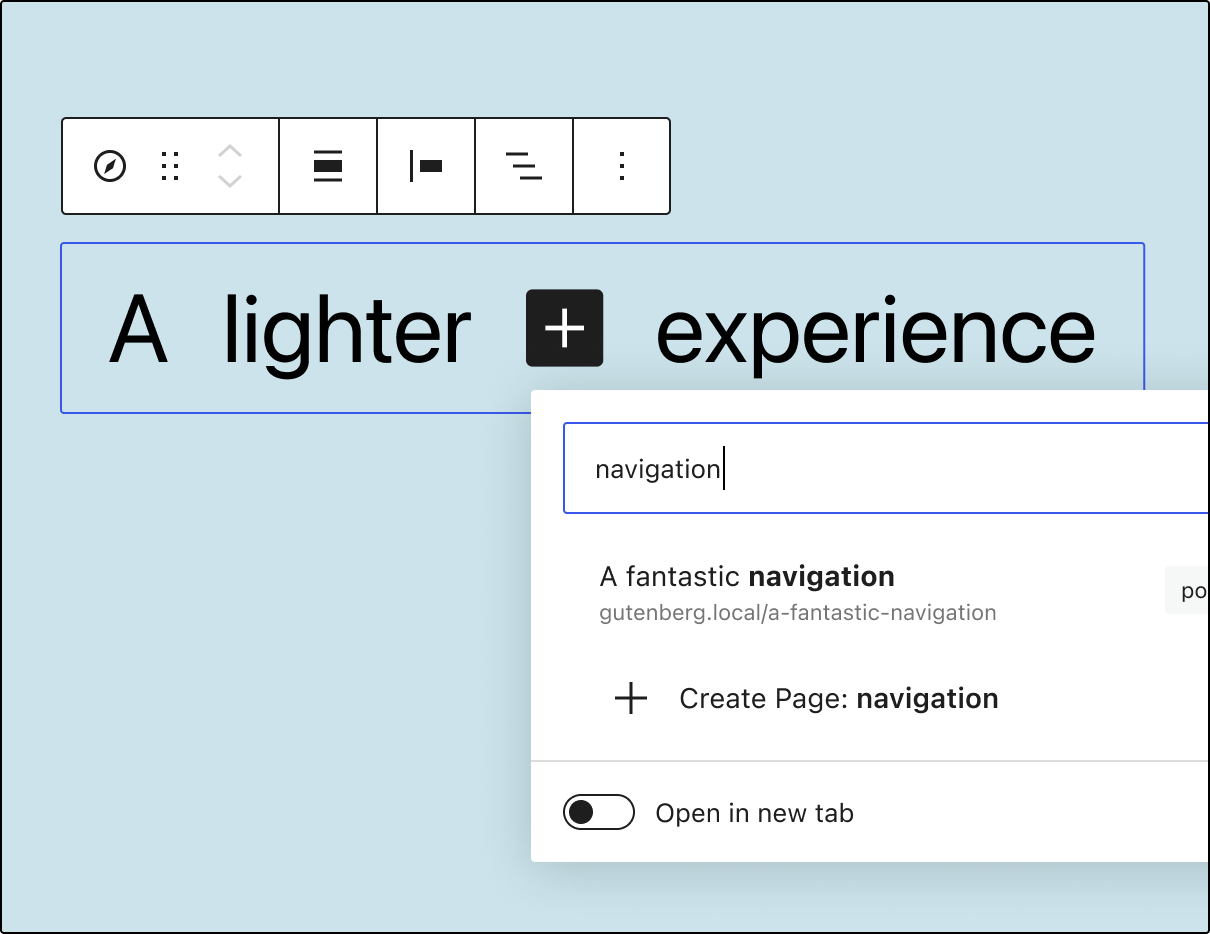
The Navigation Block underwent a series of changes intended to provide a more intuitive navigation management experience. New links are now added instantly after clicking the “+” icon without an additional block selection step. There is also an additional new way of adding links: using a slash inserter. It is worth noting that a slash inserter can be enabled for any block using a new, experimental flag called __experimentalSlashInserter. In addition, navigation links may now be transformed into other allowed block types, such as Site Logo, Home Link, or Social Icons. Finally, it’s easier for users to notice linking mistakes thanks to the squiggly line highlighting empty links similarly to grammar errors.
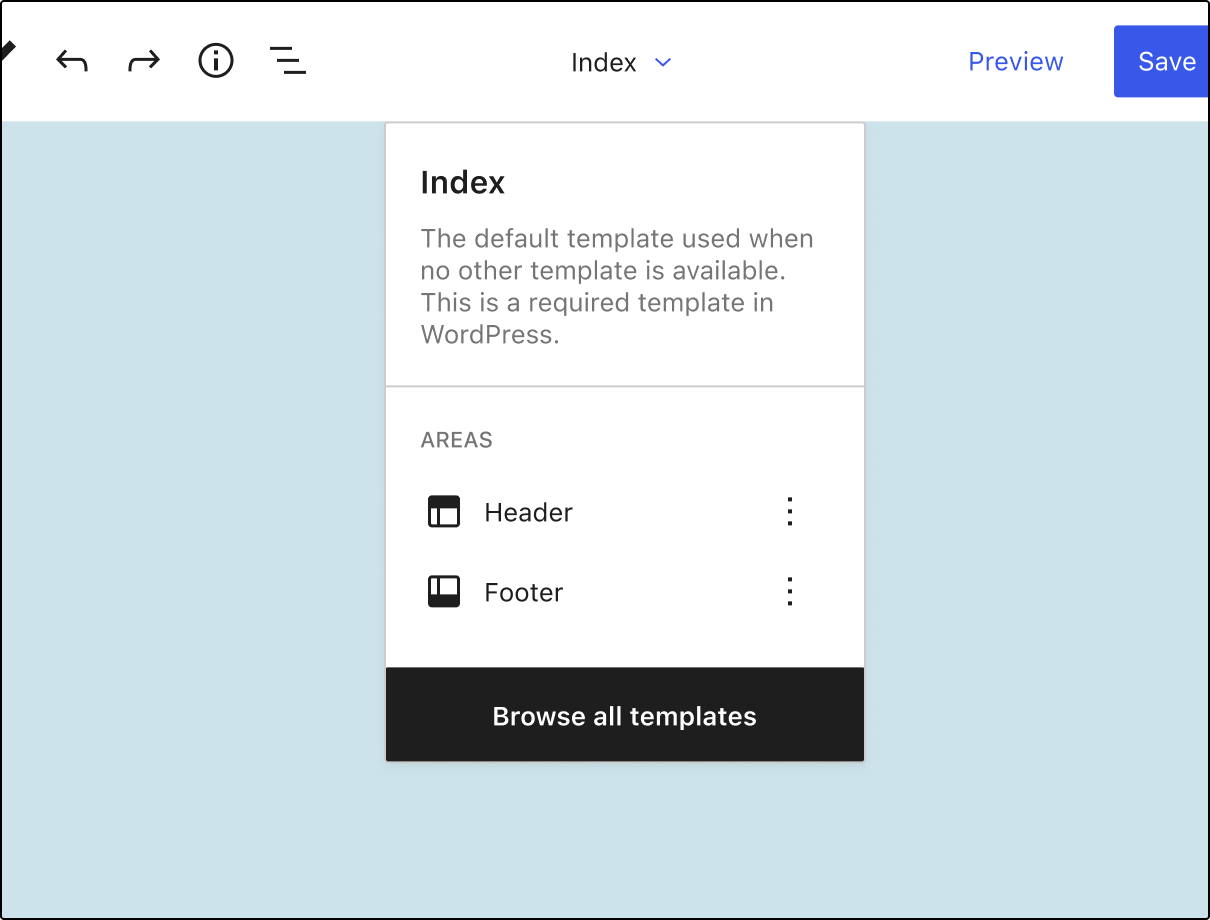
The site editing experience got polished in this recent release. The template part editor gained a convenient back button to ease returning to the site editor. Switching between editing different template parts was made more accessible by listing the available areas in template details. Also, the custom gradient picker was refreshed.
While we’re talking about Duotone, Gutenberg 11.7 enables theme authors to customize the default Duotone filterFilterFilters are one of the two types of Hooks https://codex.wordpress.org/Plugin_API/Hooks. They provide a way for functions to modify data of other functions. They are the counterpart to Actions. Unlike Actions, filters are meant to work in an isolated manner, and should never have side effects such as affecting global variables and output. using theme.json styles:
AccessibilityAccessibilityAccessibility (commonly shortened to a11y) refers to the design of products, devices, services, or environments for people with disabilities. The concept of accessible design ensures both “direct access” (i.e. unassisted) and “indirect access” meaning compatibility with a person’s assistive technology (for example, computer screen readers). (https://en.wikipedia.org/wiki/Accessibility)
Adjust wording for post format suggestions. (14124)
Add a visually hidden label for the Search block. (35034)
Add an accessible label to the Back button in preferences. (35340)
Global Styles: Add accessible label to Back button. (35325)
Template title: Include a button and label text when there is no post/page title. (35148)
Block Editor
Allow other blocks to use the slash inserter. (35196)
Enable ability to create Pages from the inline Link UIUIUser interface. (35083)
Columns block: Enable blockGap and vertical margin support. (34630)
File Block: Only display PDF preview height RangeControl when embed is enabled. (35207)
Navigation: Add transformations from a link to other allowed nav blocks. (34978)
Query LoopLoopThe Loop is PHP code used by WordPress to display posts. Using The Loop, WordPress processes each post to be displayed on the current page, and formats it according to how it matches specified criteria within The Loop tags. Any HTML or PHP code in the Loop will be processed on each post. https://codex.wordpress.org/The_Loop: Include a Query Pagination option on the block variations. (35347)
Show “none” as an alignment option and use contextual text to clarify settings. (34710)
Transform Nav Links with children into Submenus. (34831)
Add an option for displaying the label inside the Navigation Link block. (34952)
Add typography settings for the Navigation Link block. (35324)
Add option to remove/clear logo from the Site Logo block. (34820)
CoreCoreCore is the set of software required to run WordPress. The Core Development Team builds WordPress. data
Add ‘context’ to the query parts type definition. (35069)
Components
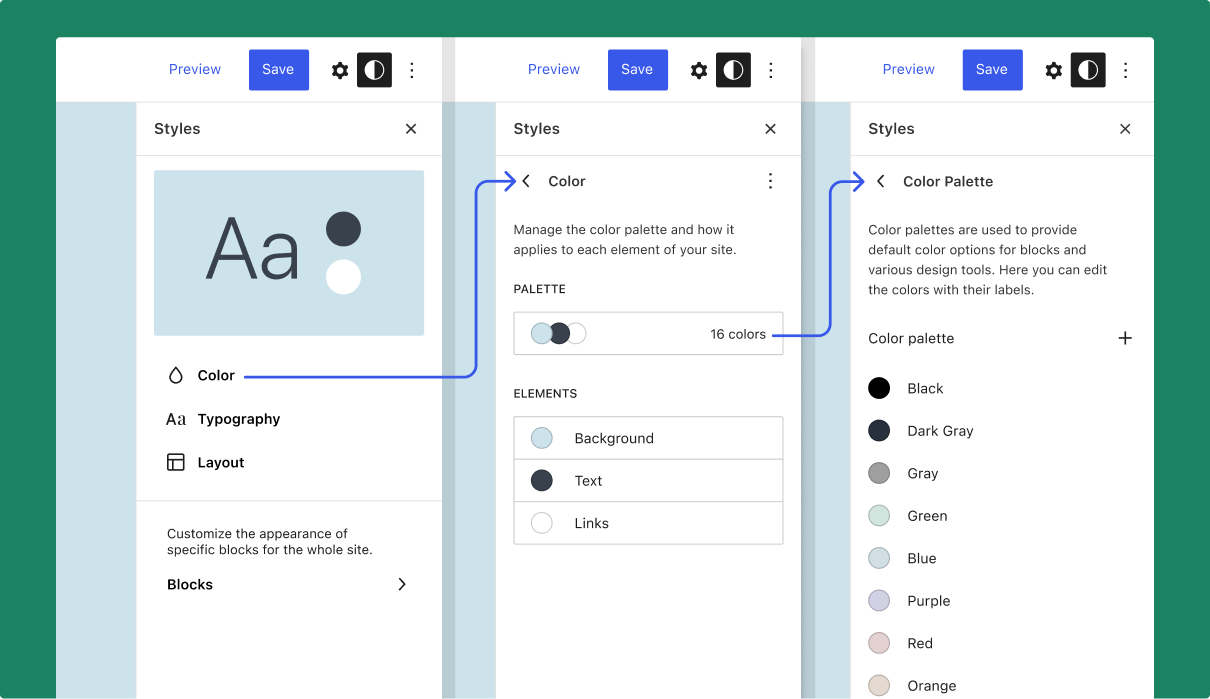
Add new Navigator components and use them in the global styles sidebarSidebarA sidebar in WordPress is referred to a widget-ready area used by WordPress themes to display information that is not a part of the main content. It is not always a vertical column on the side. It can be a horizontal rectangle below or above the content area, footer, header, or any where in the theme.. (34904)
Use _builtin property of classes in navigation link PHPPHPThe web scripting language in which WordPress is primarily architected. WordPress requires PHP 7.4 or higher. (35166)
Item: Remove isAction and use onClick to decide if it should render as button. (35152)
Make tooltip delay configurable with a property. (35246)
Design Tools
Block gap: Only render CSSCSSCascading Style Sheets. variable if corresponding theme setting is enabled. (35209)
Add Padding to the root level of global styles. (35241)
Add duotone theme.jsonJSONJSON, or JavaScript Object Notation, is a minimal, readable format for structuring data. It is used primarily to transmit data between a server and web application, as an alternative to XML. styles support. (34667)
Extract the color palette to its own global styles screen. (35109)
Update the rules to hide/show blocks in the global styles sidebar. (35178)
Synchronize user custom post typeCustom Post TypeWordPress can hold and display many different types of content. A single item of such a content is generally called a post, although post is also a specific post type. Custom Post Types gives your site the ability to have templated posts, to simplify the concept. registration and UI visibility. (35427)
Enqueue preset styles for all themes in the editor. (35424)
Fix toggle off for Duotone control and Post Date block’s date picking control. (35024)
useMultiSelection: Avoid crashing editor when block refs aren’t available. (35177)
Rich text: fix internal paste across multiline and single line instances. (35416)
Block Library
Embed: Remove meetupMeetupAll local/regional gatherings that are officially a part of the WordPress world but are not WordCamps are organized through https://www.meetup.com/. A meetup is typically a chance for local WordPress users to get together and share new ideas and seek help from one another. Searching for ‘WordPress’ on meetup.com will help you find options in your area.-com from variations. (35146)
Featured ImageFeatured imageA featured image is the main image used on your blog archive page and is pulled when the post or page is shared on social media. The image can be used to display in widget areas on your site or in a summary list of posts.: Remove descendent space. (35273)
Fix: Broken disabled select style in the editor area. (35135)
Keyboard shortcut: Prevent post saving through keyboard if post saving locked. (35361)
REST APIREST APIThe REST API is an acronym for the RESTful Application Program Interface (API) that uses HTTP requests to GET, PUT, POST and DELETE data. It is how the front end of an application (think “phone app” or “website”) can communicate with the data store (think “database” or “file system”)
https://developer.wordpress.org/rest-api/
APIAPIAn API or Application Programming Interface is a software intermediary that allows programs to interact with each other and share data in limited, clearly defined ways. Fetch: Improve isMediaUploadRequest check. (34417)
Fix slashing when creating or updating a menu item. (35147)
Server Side Render
Prevent empty renders in ServerSideRender component caused by changing props while already fetching markup (35433)
Remove i18ni18nInternationalization, or the act of writing and preparing code to be fully translatable into other languages. Also see localization. Often written with a lowercase i so it is not confused with a lowercase L or the numeral 1. Often an acquired skill. of help link in navigation editor. (35313)
Add a tooltip to Navigation items in a setup state. (35139)
Fix gap regressionregressionA software bug that breaks or degrades something that previously worked. Regressions are often treated as critical bugs or blockers. Recent regressions may be given higher priorities. A "3.6 regression" would be a bug in 3.6 that worked as intended in 3.5. in navigation screen. (35234)
Replace tinycolor2 with colord on getMostReadableColor util. Add unit testunit testCode written to test a small piece of code or functionality within a larger application. Everything from themes to WordPress core have a series of unit tests. Also see regression.. (34625)
Fix not archiving failure artifacts for flaky tests. (35379)
Plugins
Add oandregal and tellthemachines to codeowners file. (35233)
Performance Benchmark
The following benchmark compares performance for a particularly sizeable post (~36,000 words, ~1,000 blocks) over the last releases. Such a large post isn’t representative of the average editing experience but is adequate for spotting variations in performance.
Version
Time To Render The First Block
KeyPress Event (typing)
Gutenberg 11.7
3.7 s
24.68 ms
Gutenberg 11.6
3.5 s
25.88 ms
WordPress 5.8
4.0 s
34.06 ms
Kudos to all the contributors that helped with the release. 👏
The proposal for a new Make/Performance team was well received by the meeting participants. Encouraging! Please add your feedback in the post comments.
Worth mentioning:
Thanks to the 30 contributors of the past week, including 3 new contributors! Kudos to the 5 coreCoreCore is the set of software required to run WordPress. The Core Development Team builds WordPress. committers of the week, too.
Next minor releaseMinor ReleaseA set of releases or versions having the same minor version number may be collectively referred to as .x , for example version 5.2.x to refer to versions 5.2, 5.2.1, 5.2.3, and all other versions in the 5.2 (five dot two) branch of that software. Minor Releases often make improvements to existing features and functionality.(s)
Please note that 5.8.2 was deferred due to the lack of ready-to-ship tickets.
Reminder: @desrosj and @circlecube are co-leading the 5.8.x releases. The 5.8.x point releases are coordinated in the #5-8-release-leadsSlackSlackSlack is a Collaborative Group Chat Platform https://slack.com/. The WordPress community has its own Slack Channel at https://make.wordpress.org/chat/ channel. This channel is public and will be archived once 5.9 is released.
@sergeybiryukov proposed to also backportbackportA port is when code from one branch (or trunk) is merged into another branch or trunk. Some changes in WordPress point releases are the result of backporting code from trunk to the release branch. changeset [51883] (which is milestoned to 5.8.2) to older branches.
Next major releasemajor releaseA release, identified by the first two numbers (3.6), which is the focus of a full release cycle and feature development. WordPress uses decimaling count for major release versions, so 2.8, 2.9, 3.0, and 3.1 are sequential and comparable in scope.
Concerning the next major release —WordPress 5.9— a planning roundup was published some weeks ago.
The go/no go date for the main WP 5.9 features is October 14.
@audrasjb will run another bugbugA bug is an error or unexpected result. Performance improvements, code optimization, and are considered enhancements, not defects. After feature freeze, only bugs are dealt with, with regressions (adverse changes from the previous version) being the highest priority. scrub on Thursday October 14, 2021 at 20:00 UTC.
Reminder: everyone is welcome to run a bug scrub on the #core Slack channel. If you are interested, please read this handbook post: Leading bug scrubs and get in touch with @audrasjb or @francina for details.
Work has continued on addressing PHPPHPThe web scripting language in which WordPress is primarily architected. WordPress requires PHP 7.4 or higher timeouts or missing files during large pluginPluginA plugin is a piece of software containing a group of functions that can be added to a WordPress website. They can extend functionality or add new features to your WordPress websites. WordPress plugins are written in the PHP programming language and integrate seamlessly with WordPress. These can be free in the WordPress.org Plugin Directory https://wordpress.org/plugins/ or can be cost-based plugin from a third-party. or theme updates. A couple of solutions were implemented so far, but it looks like the issue might not be fully resolved yet. Any testing and feedback welcome! See ticketticketCreated for both bug reports and feature development on the bug tracker.#54166 for more details.
Also, @afragen made a few updates to the new move_dir() function based on @sergeybiryukov’s comments.
Help/About: the component had a scrub Monday and is following up with another on @audrasjb will run another bug scrub on Monday October 18, 2021 at 19:00 UTC. So far two tickets are ready for commit action.
The #core-auto-updates team is still looking on getting a consensus on which approach to proceed with for #22316. Two competing PRs are proposed (1547 and 1724), there is a need to decide what is the best approach.
Open Floor
@johnjamesjacoby raised ticket #38231 and asked for another pair of eyes. @costdev pointed out some possible enhancements in the unit tests provided by the ticket.
@webcommsat shared that the Marketing Team is exploring how to help the Test Team reach extenders with the message to update their test suites to bring them in line with the latest WordPress Core PHP Test Suites.Everyone is welcome to join the collaboration in this document, and they are looking specifically for items to be filled in on the table on page 4 to 6.
This post summarizes the weekly editor chat meeting (agenda here) held in Slack. Moderated by @annezazu.
Announcements
GutenbergGutenbergThe Gutenberg project is the new Editor Interface for WordPress. The editor improves the process and experience of creating new content, making writing rich content much simpler. It uses ‘blocks’ to add richness rather than shortcodes, custom HTML etc.
https://wordpress.org/gutenberg/ 11.7 is set to be released today with some wrangling around any critical bug fixes.
It’s the last day to explore the current #fse-outreach-experiment call for testing. Share your feedback here!
Check out this post to get a peak of the future from @critterverse on design explorations for blockBlockBlock is the abstract term used to describe units of markup that, composed together, form the content or layout of a webpage using the WordPress editor. The idea combines concepts of what in the past may have achieved with shortcodes, custom HTML, and embed discovery into a single consistent API and user experience. theme switching.
Monthly Priorities & Key Project Updates
The overarching plan for October has not yet been shipped yet so we based today’s conversation on the Mid September Plan. As a reminder to those working on these projects, async updates are both welcomed if you can’t make the meeting and needed.
Mobile Team
Shipped
Use theme colors in htmlHTMLHyperText Markup Language. The semantic scripting language primarily used for outputting content in web browsers. mode
Fixes
Small fixes for embed block and help screen
In Progress
Embed block improvements
GSS Font size, line height, colors
Navigation Block & Navigation Editor
The crew working on these projects had a hallway hangout today to chat through the state of their work. There is a longer takeaway here from @spacedmonkey until notes are posted but for now, here’s a TLDR: Focus is on the navigation block / experience in FSE and the nav editor is blocked until the block lands.
Template editor
In 11.7, there are two changes impacting this general area of work:
A PR landed for 11.8 that changes the initial patterns shown to be from a featured list of patterns from the directory rather than an underwhelming alphabetical order. This should really help folks see the power of patterns more readily!
Feel free to add items to this post if you weren’t able to make the meeting. As a reminder, never be shy in sharing what you’re working on! It can sometimes be intimidating to see sponsored contributors share all they are doing but remember it all counts and is so appreciated.
I’m continuing exploration for remaining individual block locking items. Some decisions are needed before I can start building UIUIUser interface, and I would appreciate your feedback.
I created a small PR to hide the “Move to” option when the block is locked.
Also created PR to correctly use data for customTemplates from the theme.jsonJSONJSON, or JavaScript Object Notation, is a minimal, readable format for structuring data. It is used primarily to transmit data between a server and web application, as an alternative to XML.
I will continue supporting folks working on WordPress components.
This week in particular, I believe we’re going to focus on improving the ColorPicker, FontSizePicker, ToggleGroupControl any other control components used in Global Styles sidebarSidebarA sidebar in WordPress is referred to a widget-ready area used by WordPress themes to display information that is not a part of the main content. It is not always a vertical column on the side. It can be a horizontal rectangle below or above the content area, footer, header, or any where in the theme., while coordinating the adoption of ToolsPanel in the Typography Tools
Just want to give a big thank you to everyone contributing so much. I’m finally getting back to theme development after years of neglect, and most of my to-do list is already being addressed by coreCoreCore is the set of software required to run WordPress. The Core Development Team builds WordPress. team. THANK YOU!
As noted by Fabian, this PR touches many areas and would be a huge win for pluginPluginA plugin is a piece of software containing a group of functions that can be added to a WordPress website. They can extend functionality or add new features to your WordPress websites. WordPress plugins are written in the PHP programming language and integrate seamlessly with WordPress. These can be free in the WordPress.org Plugin Directory https://wordpress.org/plugins/ or can be cost-based plugin from a third-party. developers, particularly because it would make building custom blocks with inner blocks so much easier.
Next step: @annezazu will follow up to see if we can get a review in place or figure out what the priority is.
For a while now, the open floor section of the meeting has been fairly quiet/uneventful, which feels a bit like a missed opportunity to connect and share ideas. We chatted about both re-sharing interesting discussions from the GitHubGitHubGitHub is a website that offers online implementation of git repositories that can easily be shared, copied and modified by other developers. Public repositories are free to host, private repositories require a paid subscription. GitHub introduced the concept of the ‘pull request’ where code changes done in branches by contributors can be reviewed and discussed before being merged by the repository owner. https://github.com/ Discussions section in the meeting and having a nice interplay where perhaps a discussion from Core Editor ends up there to continue async. Many folks don’t check that part of GitHub right now so it might help bring larger attention and use there. If other folks have ideas/suggestions, do share in future meeting since this seems to be a longstanding pattern.
On hallway hangouts, a PR ahead of 5.9, and speaking at WordCampWordCampWordCamps are casual, locally-organized conferences covering everything related to WordPress. They're one of the places where the WordPress community comes together to teach one another what they’ve learned throughout the year and share the joy. Learn more. Italia. Raised by @overclokk.
The topic of language barriers with hallway hangouts was brought up as not everyone is comfortable speaking in English but might still want to join hallway hangouts. This was a great chance to share that hallway hangouts don’t require speaking – you can join, listen in, and leave whenever you want. At the same time though, it would be neat to see them done in other languages and to have folks join who aren’t as comfortable with English in order to give feedback about how we can make them more inclusive.
With the Go/No Go session happening this week ahead of WordPress 5.9’s release in December 2021, let’s use this time to dig into any general questions you all might have around Full Site Editing! As it’s possible, please focus questions specifically around WordPress 5.9 as those will be the most high impact to address and not on larger strategic decisions. You are welcome to submit questions using the form below or to leave them as a comment on this post by October 27th:
Keep in mind that because, depending on the questions it’s likely that some answers might take the form of “people are working to figure this out and feedback is welcome here,” rather than a definitive answer. This is especially true for features/milestones that are planned for future releases.
When and where will you share the answers?
I’ll share a recap post on this blogblog(versus network, site) (Make CoreCoreCore is the set of software required to run WordPress. The Core Development Team builds WordPress.) as soon as I possibly can and aim to do so no later than November 1st, 2021. If there are a ton of questions, they will be grouped with corresponding answers for easy review. You can see what the outcome will look like based on the first round and second round. I will work in the open as I go in a collaborative Google doc that will be shared in #fse-outreach-experiment for anyone who wants to collaborate or check in on the work.
Once the post is published, I will follow up via email with everyone who left their email and a question in the form. For anyone who leaves a question as a comment on this post, I will @ your username in the recap post so you don’t miss out too!
What else will this effort help with?
While the main outcome will be a lovely list of answers to grow community knowledge, this collective effort will also be useful for future documentation updates, potential tutorials, hallway hangout topics, and more.
For more information about the FSE outreach program, please review this FAQ for helpful details. To properly join the fun, please head to #fse-outreach-experiment in Make Slack for future testing announcements, helpful posts, and more will be shared there.
@dryanpress shared a link to the Twenty Twenty-Two project which promises to be the first default WordPress theme built for full-site editing and styled with theme.json – very exciting progress!
@dryanpress and @wazeter continued with a long, interesting chat encompassing the Tove theme’s header block pattern, the self-deception of “mobile first design”, the pros and cons of the nav blockBlockBlock is the abstract term used to describe units of markup that, composed together, form the content or layout of a webpage using the WordPress editor. The idea combines concepts of what in the past may have achieved with shortcodes, custom HTML, and embed discovery into a single consistent API and user experience., CSS Grid and Tailwind’s Grid Template Columns, and WordPress & the blockchain
@dryanpress also shared a couple of great CSS Grid learning resources:
Next major releasemajor releaseA release, identified by the first two numbers (3.6), which is the focus of a full release cycle and feature development. WordPress uses decimaling count for major release versions, so 2.8, 2.9, 3.0, and 3.1 are sequential and comparable in scope.: WP 5.9 👉 WordPress 5.9 Planning Roundup 👉 Introducing Twenty Twenty-Two
Components check-in and status updates
Check-in with each component for status updates.
Poll for components that need assistance.
Open Floor
Do you have something to propose for the agenda, or a specific item relevant to the usual agenda items above?
Please leave a comment, and say whether or not you’ll be in the chat, so the group can either give you the floor or bring up your topic for you accordingly.
This meeting happens in the #core channel. To join the meeting, you’ll need an account on the Making WordPress Slack.
Note: a follow up post was published with information about next steps for this proposal.
We (the undersigned) believe that WordPress needs an official Performance team responsible for coordinating efforts to increase the performance (speed) of WordPress.
This proposal outlines why we believe that this is necessary, how we envision such a team might function, and some potential initial areas of focus. It is authored by contributors from Yoast and Google.
What problems are we trying to solve?
Users expect and prefer fast experiences (consciously or otherwise). Research shows that fast websites can provide a better user experience, increase engagement, benefit SEO, increase conversion, and be more economically and ecologically friendly.
The benefits of improving performance driving investment across the web [ref]. This further raises users’ expectations, and thus may comparatively ‘harm’ slow(er) things.
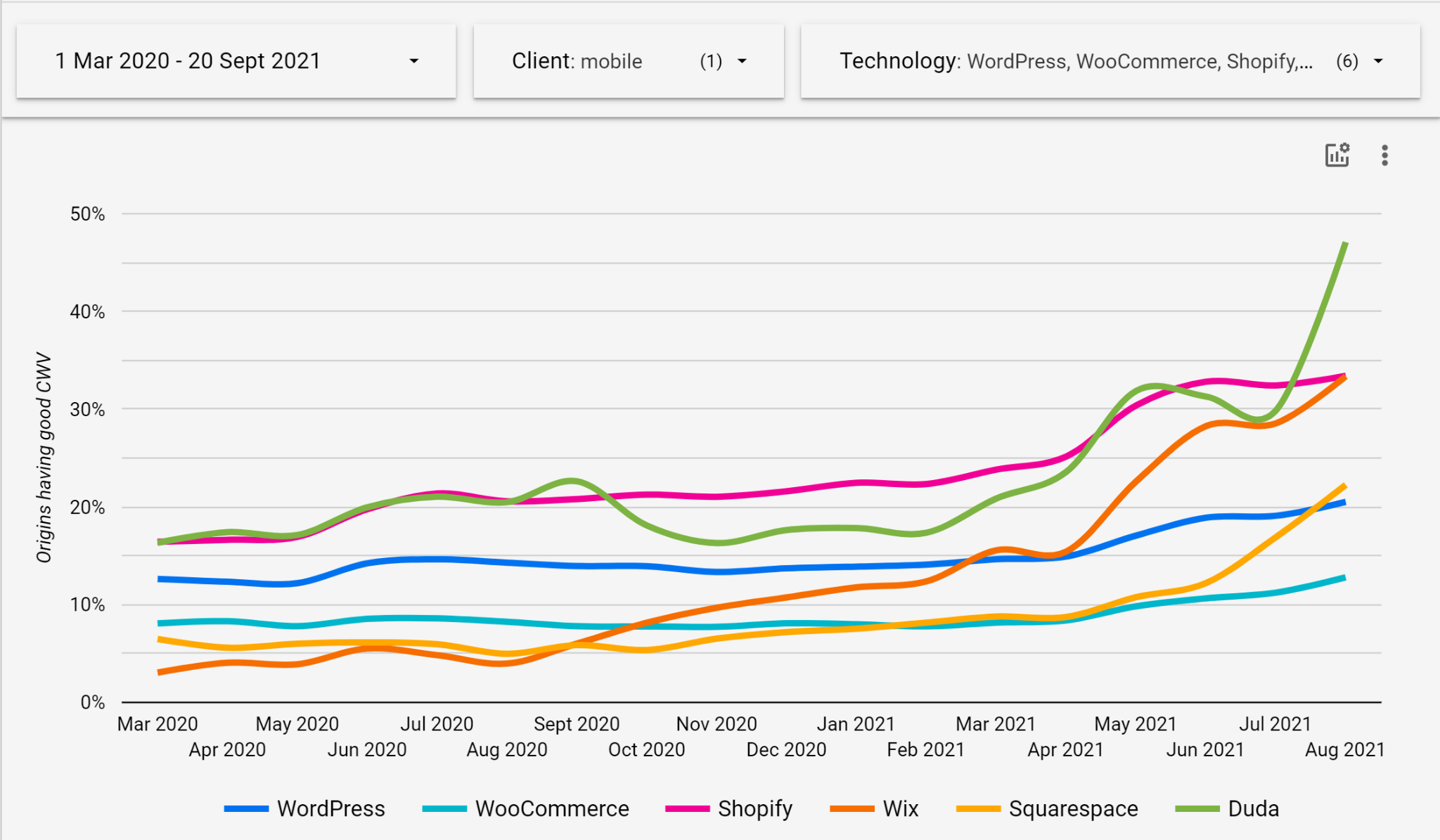
Compared to other platforms (e.g., Wix, Shopify, Squarespace), WordPress is falling behind. Other platforms are on average faster – and becoming increasingly faster – than WordPress websites (see The HTTP Archive’s Core Web Vitals report), and are actively investing in (and marketing) coreCoreCore is the set of software required to run WordPress. The Core Development Team builds WordPress. performance-as-a-feature [1, 2].
We can see the impact of this investment in the widening gap between the proportion of WordPress sites which achieve ‘good’ Core Web Vitals scores, vs other platforms.
Performance graph for CMSs on desktop clients.Performance graph for CMSs on mobile clients.
This gap continues to widen, despite the availability of many performance plugins and performance-focused themes. This suggests that there’s a discovery and/or education problem, or an updating/staleness problem – neither of which the pluginPluginA plugin is a piece of software containing a group of functions that can be added to a WordPress website. They can extend functionality or add new features to your WordPress websites. WordPress plugins are written in the PHP programming language and integrate seamlessly with WordPress. These can be free in the WordPress.org Plugin Directory https://wordpress.org/plugins/ or can be cost-based plugin from a third-party. ecosystem solves for.
In order to meet the increasing needs and expectations of site owners and end-users, WordPress needs to be actively investing in performance in WordPress Core and beyond (e.g., core code, themes & plugins requirements, setup and onboarding processes, adminadmin(and super admin)/editing experiences, education for content creators).
We believe that:
Performance is a fundamental part of user experience, and WordPress should aim to deliver a good user experience.
Achieving reasonable performance levels shouldn’t be plugin territory, but part of core (aka, “performance by default”), because;
All WordPress users (of all types) need a well lit path to good performance.
Average end-users can’t be expected to be performance experts.
Achieving high levels of performance requires technical considerations to be ‘built-in’ across the whole stack; and as this is often not the case with themes/plugins, performance solutions are limited to ‘brute-forcing’ performance solutions over non-performant behaviour (e.g., output buffering).
The plugin ecosystem doesn’t help users who don’t know that they need help, or who are poorly served by the plugin ecosystem.
Users determining which CMS to choose are / will be increasingly influenced by performance (and the associated UXUXUser experience/SEO/conversion factors), and we’ll lose ground to faster platforms.
‘Democratizing publishing’ requires that published content be discoverable; which will be less likely to occur via search engines (which influence or account for the majority of new content discovery) for slow(er) sites.
Web Vitals metrics provide a standardized and accepted mechanism for evaluating performance.
Plugin territory
Whilst we argue that some (perhaps most) performance considerations should be part of core, there are definitely areas that should remain firmly in ‘plugin territory’. For example, the following areas should be handled by plugins:
Integrations with specific CDNs
Template transformation processes (e.g., AMP)
Any non-standardized performance technology
Any experimental standards (e.g., browser APIs / capabilitiescapabilityA capability is permission to perform one or more types of task. Checking if a user has a capability is performed by the current_user_can function. Each user of a WordPress site might have some permissions but not others, depending on their role. For example, users who have the Author role usually have permission to edit their own posts (the “edit_posts” capability), but not permission to edit other users’ posts (the “edit_others_posts” capability). with limited adoption)
These distinctions will need exploring and lines will need drawing (and maintaining) as part of the team’s activity.
A team gives more visibility to the effort: contributors that are not interested in working on Core as a whole can be attracted by working on performance specifically. It also opens up contributing to new types of contributors, like performance or data analysts.
A performance team could also attract contributions from different groups; browsers, hosting, SEO companies, etc.
Resources and efforts
In practical terms, the creation of a performance team requires the following:
A performance tagtagA directory in Subversion. WordPress uses tags to store a single snapshot of a version (3.6, 3.6.1, etc.), the common convention of tags in version control systems. (Not to be confused with post tags.) on Make websites
Two team representatives for administrative purposes: they will be responsible for:
Giving a quarterly report to the project leadership
Assigning roles in the website
A team lead/product owner. They will be responsible to create a mission statement for the team, highlight the areas to tackle, outline the scope and the roadmap for the improvements that need to be made.
Representation in (and influence on) other Make verticals and processes (e.g., themes, plugins, etc)
Next steps
Next steps should be discussed and determined as part of the process of exploring and responding to this proposal.
In the case that there are no objections, the next major steps are likely to be:
Set up Slack channel and meeting schedule, and make.wordpress.orgWordPress.orgThe community site where WordPress code is created and shared by the users. This is where you can download the source code for WordPress core, plugins and themes as well as the central location for community conversations and organization. https://wordpress.org/ infrastructure.
Benchmark performance and define ongoing/future measurement & success criteria
Identify priority projects for CWV improvements with high-level timelines
Assign responsibilities for the projects identified
Props
Thanks to the following for this involvement in outlining this proposal.
Welcome back to a new issue of Week in CoreCoreCore is the set of software required to run WordPress. The Core Development Team builds WordPress.. Let’s take a look at what changed on TracTracAn open source project by Edgewall Software that serves as a bug tracker and project management tool for WordPress. between October 4 and October 11, 2021.
16 commits
30 contributors
29 tickets created
5 tickets reopened
17 tickets closed
The Core team is currently working on the next point (5.8.2) and major (5.9) releases 🛠
TicketticketCreated for both bug reports and feature development on the bug tracker. numbers are based on the Trac timeline for the period above. The following is a summary of commits, organized by component and/or focus.
Code changes
Administration
Allow pluginPluginA plugin is a piece of software containing a group of functions that can be added to a WordPress website. They can extend functionality or add new features to your WordPress websites. WordPress plugins are written in the PHP programming language and integrate seamlessly with WordPress. These can be free in the WordPress.org Plugin Directory https://wordpress.org/plugins/ or can be cost-based plugin from a third-party. action links row to wrap – #53275
Build/Test Tools
Change the patchpatchA special text file that describes changes to code, by identifying the files and lines which are added, removed, and altered. It may also be referred to as a diff. A patch can be applied to a codebase for testing. version used for testing the 5.6 branchbranchA directory in Subversion. WordPress uses branches to store the latest development code for each major release (3.9, 4.0, etc.). Branches are then updated with code for any minor releases of that branch. Sometimes, a major version of WordPress and its minor versions are collectively referred to as a "branch", such as "the 4.0 branch". of PHPPHPThe web scripting language in which WordPress is primarily architected. WordPress requires PHP 7.4 or higher – #54223
Bundled Themes
Twenty Twenty-One: Remove duplicate width and height values from social icons – #54208
Coding Standards
Use strict type check for in_array() in register_block_script_handle() – #54206, #53359
Docs
Add a @since note for the new $parent_block parameter of several filters – #51612
Improve various inline documentation for adminadmin(and super admin) bar functions and hooksHooksIn WordPress theme and development, hooks are functions that can be applied to an action or a Filter in WordPress. Actions are functions performed when a certain event occurs in WordPress. Filters allow you to modify certain functions. Arguments used to hook both filters and actions look the same. – #53399
Update jQuery UIUIUser interface to 1.13.0 final – #52163
Permalinks
Move the NginxNGINXNGINX is open source software for web serving, reverse proxying, caching, load balancing, media streaming, and more. It started out as a web server designed for maximum performance and stability. In addition to its HTTP server capabilities, NGINX can also function as a proxy server for email (IMAP, POP3, and SMTP) and a reverse proxy and load balancer for HTTP, TCP, and UDP servers. https://www.nginx.com/. documentation link to help sidebarSidebarA sidebar in WordPress is referred to a widget-ready area used by WordPress themes to display information that is not a part of the main content. It is not always a vertical column on the side. It can be a horizontal rectangle below or above the content area, footer, header, or any where in the theme. in wp-admin/options-permalink.php – #39258
Privacy
AccessibilityAccessibilityAccessibility (commonly shortened to a11y) refers to the design of products, devices, services, or environments for people with disabilities. The concept of accessible design ensures both “direct access” (i.e. unassisted) and “indirect access” meaning compatibility with a person’s assistive technology (for example, computer screen readers). (https://en.wikipedia.org/wiki/Accessibility): Use red color for action buttons on the Erase Personal Data screen: – #49603
Site Health
Use an integer value as a fallback in the available disk space check – #51857
What’s new in GutenbergGutenbergThe Gutenberg project is the new Editor Interface for WordPress. The editor improves the process and experience of creating new content, making writing rich content much simpler. It uses ‘blocks’ to add richness rather than shortcodes, custom HTML etc.
https://wordpress.org/gutenberg/ (11.7). This release is planned for the day of the meeting.
WordPress 5.9 “Go, no go” date and priorities. This will be more of a heads up as the meeting now happens on October 14th rather than the 12th.
Navigation BlockBlockBlock is the abstract term used to describe units of markup that, composed together, form the content or layout of a webpage using the WordPress editor. The idea combines concepts of what in the past may have achieved with shortcodes, custom HTML, and embed discovery into a single consistent API and user experience. & Navigation Editor.
Template editor.
Patterns.
Styling.
Mobile Team.
Task Coordination.
Open Floor.
If you are not able to attend the meeting, you are encouraged to share anything relevant for the discussion:
If you have an update for the main site editing projects, please feel free to share as a comment or come prepared for the meeting itself.
If you have anything to share for the Task Coordination section, please leave it as a comment on this post.
If you have anything to propose for the agenda or other specific items related to those listed above, please leave a comment below.






You must be logged in to post a comment.