November Month Retrospective

The training Team works in monthly sprints. At the end of eachย Sprint, we ask ourselves the following questions. Below is a compilation of the responses from the team. These are the retrospective discussions held in the #training SlackSlack Slack is a Collaborative Group Chat Platform https://slack.com/. The WordPress community has its own Slack Channel at https://make.wordpress.org/chat/ channel.

What went well?

  • We have good engagement/contributors from the APAC timezone as well during meetings and contribution work as well.
  • Now we are handling different projects with the respective project leads.
  • More engagement in recent online workshops.
  • So many online workshops in APAC-friendly time zones.
  • More contributors hosting and co-hosting Online Workshops.
  • Theย #trainingย channel becomes more lively throughout the year with different discussions and requests. This activity is exciting!
  • Weโ€™ve seen much activity regarding dev issues on our GitHubGitHub GitHub is a website that offers online implementation of git repositories that can easily be shared, copied and modified by other developers. Public repositories are free to host, private repositories require a paid subscription. GitHub introduced the concept of the โ€˜pull requestโ€™ where code changes done in branches by contributors can be reviewed and discussed before being merged by the repository owner. https://github.com/ board

What could we improve?

  • We could continue building the handbook so contributors have more precise guidance.
  • A Better and smooth onboarding experience. Am trying my best to work on this.
  • Is there a way we could improve engagement in the EMEA/America team meetings?

What will we do differently?

  • We can ease the onboarding process for newcomers and beginners.
  • We will definitely improve learning categorization about various tutorials, workshops, and lesson plans starting with basic to advanced levels, and make it easy to navigate and find.
  • Theย Trainingย Team onboarding paths projectย has started! Hopefully, weโ€™ll see some more engagement by new contributors once this has been launched.

#sprint, #training-team

Meeting Agenda for November 29, 2022

Please join us for our Team Meeting Tuesdays at 07:00 UTC (APAC friendly) OR Tuesdays at 17:00 UTC (AMER/EMEA friendly) OR Coffee Hour Friday at 13:00 UTC and Eastern APAC Coffee Hour Friday at 04:00 UTC in the #training Slack channelย for our weekly meetings!


This Weekโ€™s Agenda

  1. Intro/Welcome
  2. News
    1. Meeting Note Takers
    2. Faculty Members Update
    3. Project Thread: Content Localization Foundations
    4. Team Rep Nominations
    5. Training Team Badges
    6. DevHub getting a new look
    7. Team Goal Setting
    8. December 23, and 30, no coffee hour on(EMEA/AMER timezone)
    9. Eastern APAC Coffee Hour Fridays at 04:00 UTC from Dec 2nd.
    10. No Meeting on December 27, 2022
    11. Choosing accessible/contrasting dark theme colors for online workshops and tutorial videos โ€“ two sets of โ€œalternateโ€ or โ€œdarkโ€ colors have been finalized
    12. GithubGitHub GitHub is a website that offers online implementation of git repositories that can easily be shared, copied and modified by other developers. Public repositories are free to host, private repositories require a paid subscription. GitHub introduced the concept of the โ€˜pull requestโ€™ where code changes done in branches by contributors can be reviewed and discussed before being merged by the repository owner. https://github.com/ Pages Update
  3. Published Content
  4. Request for review
    • Tutorial โ€“ Develop Your First Low-Code BlockBlock Block is the abstract term used to describe units of markup that, composed together, form the content or layout of a webpage using the WordPress editor. The idea combines concepts of what in the past may have achieved with shortcodes, custom HTML, and embed discovery into a single consistent API and user experience. Theme Module#3
    • Tutorial โ€“ Comments blockย 
    • Lesson Plan- Template tour lesson plan
  5. Request for comments
    1. Please reach out to @bsanevans if youโ€™re interested in making new onboarding handbook pages for the Training Team.
    2. Do we want to update our GitHub views to match the kanban board columns? (See Slack conversation)
  6. Month Retrospective
    • What went well?
    • What could we improve?
    • What will we do differently?
  7. Open Discussions

Upcoming Meetings

You are welcome to join the team at any time!ย If you are new to the Training Team, please introduce yourself in theย #trainingย channel before the meeting (or anytime!) and feel free to join us in the meeting and participate as you are able.


Training Team Mission

The WordPress training team helps people learn to use, extend, and contribute to WordPress through synchronous and asynchronous learning as well as downloadable lesson plans for instructors to use in live environments, via learn.wordpress.org.

Getting Involved

Everyone is welcome and encouraged to join in, comment on posts, and participate in meetings and on projects.

  1. Learn.WordPress.org
    1. Lesson Plans
    2. Tutorials
    3. Courses
    4. Online Workshops
    5. Pathways to Learn WordPress
  2. Getting Involved
    1. GitHub Website Development
    2. GitHub Content Development
    3. What We Are Currently Working On This Month
  3. About The Team
  4. Our Team Blog

#agenda, #training

Project Thread: Training Team Onboarding Paths

Overview

This post will document updates regarding the creation of new onboarding paths for the Training Team. The original proposal and related discussions can be found here: Proposal: Create a new onboarding experience to the Training Team

Project DRIsDRI Directly Responsible Individual - the people who are taking ownership or responsibility for a particular project or feature.

Project lead

Ben Evans @bsanevans

Project member

Jamie @digitalchild

Project Member

Amit Patel @amitpatelmd

Project member

Pooja Derashri @webtechpooja

(Others are welcome to join in on the efforts, too! Let us know if youโ€™re interested ๐Ÿ™‚)

Project Timeline

November 26th โ€“ Project launch
December 19th โ€“ Project member check-in call
January 16th โ€“ Project member check-in call, drafts ready for team review
February 4th โ€“ Review of drafts completed by Training Team
February 13th โ€“ Onboarding pages published
February 17th โ€“ WordCampWordCamp WordCamps are casual, locally-organized conferences covering everything related to WordPress. They're one of the places where the WordPress community comes together to teach one another what theyโ€™ve learned throughout the year and share the joy. Learn more. Asia Contributor DayContributor Day Contributor Days are standalone days, frequently held before or after WordCamps but they can also happen at any time. They are events where people get together to work on various areas of https://make.wordpress.org/ There are many teams that people can participate in, each with a different focus. https://2017.us.wordcamp.org/contributor-day/ https://make.wordpress.org/support/handbook/getting-started/getting-started-at-a-contributor-day/

Project Details

This project will create new handbook pages that will guide new Training Team contributors to their first contribution to the team, and set them up for success beyond that. The creation of each handbook page will be tracked in the following GitHubGitHub GitHub is a website that offers online implementation of git repositories that can easily be shared, copied and modified by other developers. Public repositories are free to host, private repositories require a paid subscription. GitHub introduced the concept of the โ€˜pull requestโ€™ where code changes done in branches by contributors can be reviewed and discussed before being merged by the repository owner. https://github.com/ issues.

#project-thread

Training Team Meeting Recap for November 22, 2022

Slack Logย for APAC Office Hour (Tuesday 07:00 UTC)

Slack Logย for AMER/EMEA Meeting (Tuesday 17:00 UTC)

(Requires SlackSlack Slack is a Collaborative Group Chat Platform https://slack.com/. The WordPress community has its own Slack Channel at https://make.wordpress.org/chat/ login to view. Set one up if you donโ€™t have a Slack account.)

The meeting agenda.

Introductions and Welcome

Attendees Team meeting (EMEA/AMER): @chetan200891, @courane01, @eboxnet, @caraya, @chrismkindred, @vanpariyar, @robinwpdeveloper, @pitamdey, @lada7042, @sagarladani, @margheweb, @azhiyadev, @arasae, @onealtr, @piyopiyofox, @webtechpooja, @amitpatelmd, @piyushmultidots, @bsanevans

Meeting Note Takers

A meeting recap note is one of the best ways to get started contributing to a team. Please refer to this guide to get started:
https://make.wordpress.org/training/handbook/guidelines/training-team-how-to-guides/how-to-write-a-meeting-agenda-or-recap/

ย Faculty Members Update

As a reminder, faculty meetings have moved to async and will be published as a post with a window for commenting.

November 2022 Faculty Meeting

Training Team Badges

https://github.com/WordPress/Learn/issues/1094
Please use this issue to request a Training Team Badge.

If you would like a badge on yourย WordPress.orgย profile that acknowledges your contributions to the Training Team, you must meet the criteria:ย https://make.wordpress.org/training/handbook/getting-started/team-profile-badges/

Awarding of profile badges: There will be a monthly review of contributions, and badges will be awarded at that time. A list of the new profile badges awarded will then be posted onย https://make.wordpress.org/training/. If you feel you have earned the badge but were not listed, please comment on that monthโ€™s blog post and include yourย WordPress.orgย username.

Team Goal Setting

Itโ€™s time to consider what the training team hopes to accomplish in 2023. Last year we met over 3 different sessions to plan out this year.ย Training Team Goals for 2022ย reflect that plan.

However, we definitely didnโ€™t achieve all of those goals. Should we continue them for next year?

I met recently withย @angelasjin,ย who has offered to hold a team vision-setting meeting, and from that, we can launch into the following yearโ€™s goals. Iโ€™ll work with Angela to plan that first part of the meeting, along with a survey for the best times we can meet via Zoom as a team to do this.

Published Content

Tutorial โ€“ย Padding Versus Margin

Request for review

Tutorial โ€“ย Call to Action

Request for comments

  1. Newly drafted handbook pages for GitHubGitHub GitHub is a website that offers online implementation of git repositories that can easily be shared, copied and modified by other developers. Public repositories are free to host, private repositories require a paid subscription. GitHub introduced the concept of the โ€˜pull requestโ€™ where code changes done in branches by contributors can be reviewed and discussed before being merged by the repository owner. https://github.com/ Process Updates soon to be published โ€“ link to the Google doc is on Slack
  2. When we create titles for Tutorials, Lesson Plans, and Online Workshops, should they be in sentence case or title case? (@west7)
  3. Please reach out toย @bsanevansย if youโ€™re interested in makingย new onboarding handbook pages for the Training Team.
  4. Do we want to update our GitHub views to match the kanban board columns? (See Slack conversation)

Open Discussions

@courane01 Says

We have additional coffee hours starting for Eastern APACย  Fridays at 04:00 UTC from Dec 2nd.
Areย Online Workshop co-hosting opportunitiesย andย Content Error Issuesย a good first issue for Contributors to work on?

Resurfacing this here:

@caraya Says

Feedback request: Iโ€™m working on 6.X updates to existing lesson plans, and Iโ€™m struggling with content organization.ย  If someone is going through the lesson plan sequentially, it makes sense to incorporateย it sequentially with the existing content. However, if people are planning an update to the content theyโ€™ve already created, it would make more sense to put it in a separate section at the bottom of the document,
What do you think is best?

@courane01 Says

Weโ€™ve had the content usually updated right in line (sequentially).ย  Weโ€™re starting to wrap our heads around coordinating w/ย #docsย to have a changelog at the bottom of the file and a way to toggle to earlier versions of WP


Upcoming Meetings

You are welcome to join the team at any time!ย If you are new to the Training Team, please introduce yourself in theย #trainingย channel before the meeting (or anytime!), and feel free to join us in the meeting and participate as you can.


Training Team Mission

The WordPress training team helps people learn to use, extend, and contribute to WordPress through synchronous and asynchronous learning and downloadable lesson plans for instructors to use in live environments via learn.wordpress.org.

Getting Involved

Everyone is welcome and encouraged to join in, comment on posts, and participate in meetings and on projects.

  1. Learn.WordPress.org
    1. Lesson Plans
    2. Tutorials
    3. Courses
    4. Online Workshops
    5. Pathways to Learn WordPress
  2. Getting Involved
    1. GitHub Website Development
    2. GitHub Content Development
    3. What We Are Currently Working On This Month
  3. About The Team
  4. Our Team Blog

#meeting-recap, #training-team

X-post: DevHub getting a new look

X-comment from +make.wordpress.org/docs: Comment on DevHub getting a new look

Meeting Agenda for November 22, 2022

Please join us for our Team Meeting Tuesdays at 07:00 UTC (APAC friendly) OR Tuesdays at 16:00 UTC (AMER/EMEA friendly) OR Coffee Hour Friday at 13:00 UTC in the #training Slack channelย for our weekly meetings!


This Weekโ€™s Agenda

  1. Intro/Welcome
  2. News
    1. Meeting Note Takers
    2. Faculty Members Update
    3. Project Thread: Content Localization Foundations
    4. Team Rep Nominations
    5. Training Team Badges
    6. Team Goal Setting
    7. November 25, December 23 and 30, no coffee hour
    8. Do we hold a meeting on December 27, 2022?
  3. Published Content
  4. Request for review
  5. Request for comments
    1. Newly drafted handbook pages for GitHubGitHub GitHub is a website that offers online implementation of git repositories that can easily be shared, copied and modified by other developers. Public repositories are free to host, private repositories require a paid subscription. GitHub introduced the concept of the โ€˜pull requestโ€™ where code changes done in branches by contributors can be reviewed and discussed before being merged by the repository owner. https://github.com/ Process Updates soon to be published โ€“ link to the Google doc is on SlackSlack Slack is a Collaborative Group Chat Platform https://slack.com/. The WordPress community has its own Slack Channel at https://make.wordpress.org/chat/
    2. When we create titles for Tutorials, Lesson Plans and Online Workshops, should it be in sentence case or title case? (@west7)
    3. Please reach out to @bsanevans if youโ€™re interested in making new onboarding handbook pages for the Training Team.
    4. Do we want to update our GitHub views to match the kanban board columns? (See Slack conversation)
  6. Open Discussions

Upcoming Meetings

You are welcome to join the team at any time!ย If you are new to the Training Team, please introduce yourself in theย #trainingย channel before the meeting (or anytime!) and feel free to join us in the meeting and participate as you are able.


Training Team Mission

The WordPress training team helps people learn to use, extend, and contribute to WordPress through synchronous and asynchronous learning as well as downloadable lesson plans for instructors to use in live environments, via learn.wordpress.org.

Getting Involved

Everyone is welcome and encouraged to join in, comment on posts, and participate in meetings and on projects.

  1. Learn.WordPress.org
    1. Lesson Plans
    2. Tutorials
    3. Courses
    4. Online Workshops
    5. Pathways to Learn WordPress
  2. Getting Involved
    1. GitHub Website Development
    2. GitHub Content Development
    3. What We Are Currently Working On This Month
  3. About The Team
  4. Our Team Blog

#learn-wordpress, #training-team

Nomination for Training Team Reps 2023

This post kicks off the call for Training team reps. See also: Team Rep Nominations, 2022

The Role

Each team has one or more representatives (reps). Team reps are responsible for communicating on behalf of their team to other contributor teams. They represent the team, collaborate with other teams, raise, manage and address any issues. This role averages two to five hours per week in team organizational duties.

In the WordPressย open sourceOpen Source Open Source denotes software for which the original source code is made freely available and may be redistributed and modified. Open Source **must be** delivered via a licensing model, see GPL.ย project, each team has on average one or two representatives, abbreviated asย reps.ย Some teams have more than two.

Historically with the Training team, theย team repTeam Rep A Team Rep is a person who represents the Make WordPress team to the rest of the project, make sure issues are raised and addressed as needed, and coordinates cross-team efforts.ย duration was around two years, though some reps stuck around longer if there was a particularly good fit.

Anyone who serves as a โ€œteam repโ€ is responsible for communicating on behalf of the Training team to the other contributor groups viaย weekly updates, as well as occasional cross-team chats.ย  Reps are also consulted onย Contributor DayContributor Day Contributor Days are standalone days, frequently held before or after WordCamps but they can also happen at any time. They are events where people get together to work on various areas of https://make.wordpress.org/ There are many teams that people can participate in, each with a different focus. https://2017.us.wordcamp.org/contributor-day/ https://make.wordpress.org/support/handbook/getting-started/getting-started-at-a-contributor-day/, helping find someone within the Training team attending an event who can help lead a Training table.ย ย Full details on the Team Rep role is on the Team Update site.

It is not called โ€œteam leadโ€ for a reason.ย  Itโ€™s an administrative role. While people elected as team reps will generally come from the pool of folks that people think of as experienced leaders, remember that the team rep role is designed to change hands regularly..

Here are the main tasks:

  • Publish an update on make.wordpress.org/updates, suggested as a weekly post
    • X-post to Support, Marketing, and Community teams at the end of each sprint (when new content is on LearnWP)
  • Draft the weekly agenda, including reviewing the happenings in SlackSlack Slack is a Collaborative Group Chat Platform https://slack.com/. The WordPress community has its own Slack Channel at https://make.wordpress.org/chat/ over the past week.
    • Nice to have: welcome new channel members during team meeting
  • Conduct weekly Slack meetings
  • Recruit contributors to facilitate portions of the meeting
  • Recruit contributors for meeting recap notetaking
  • Review drafts of recap notes
  • Assist in drafting a post for any Contributor Days

The Election Process

We will follow the same process as other teams, dates may differ slightly.

Nominations

Nominations are now open and remain open until December 2, 2022, at 12:00 UTC. Please add your nominations as a comment on this post. You can nominate yourself or someone else if you think they are a great fit.

Elections

We will review the nominations at our team meeting on December 6, 2022. If there are more than 3 nominations, we will organize a poll to select the Team Reps.

If we need to have a poll, this will be open until December 19, 2022 at 12:00 UTC .

Announcements

We will announce the results at the next team meeting on December 6, 2022. If there are more than 3 nominations, we will announce the results at the December 20, 2022 team meeting.

If you have any questions, please ask in the comments!

#nominations, #training-team

November 2022 Faculty Meeting

Faculty Members have opted in to an asynchronous meeting every 15th of the month (or closest business day). We will hold our meeting over a two week period, and the meeting host (typically the poster) or another assigned individual will post discussion outcomes at the end of the feedback period.

Please find outlined below Updates for review, Topics for Discussion, and items that require assistance in the Working Together section.

Discussion period: November 15-30, 2022

Updates

Here are some recent happenings and open feedback requests.

Topics for Discussion

Please comment on this post with answers to the Faculty Member check-in items and your input on our topics for discussion.

  • Check-in: Please feel free to answer some or all of the below self check-in items
    • How are you doing?
    • Whatโ€™s your bandwidth like?
    • How best can you help or be tapped in this coming month?
    • Anything youโ€™d like extra eyes on?
  • Can Administrators assist with ensuring notes are checked and published in a timely manner?
  • Can Office Hours be held by Faculty Members to aid in redundancy and consistency?
  • Looking for volunteers for the Project Thread: Content Localization Foundations
  • Can Administrators do the admin work for Online Workshops?
    • Weโ€™d like to lessen the barrier to putting on an Online Workshop by allowing Facilitators to simply show up, and Administrators can handle the background tasks

Have any other topics for discussion? Please edit the post to include it here and discuss in the body of the post.

Working Together

Outlined below are the tasks per role that require assistance.

All

The following Faculty Members work to progress the needs of all roles: @courane01, @azhiyadev, @webtechpooja, @hlashbrooke, @piyopiyofox, @courtneypk, @bsanevans

Editors

Faculty Members: @fikekomala @aion11 @mrfoxtalbot, @digitalchild, @afshanadiya

Assistance required

Subject Matter Experts (SMEs)

Faculty Members: @wpscholar, @annezazu, @pbrocks, @richtabor, @chetan200891 , @HardeepAsrani, @chrismkindred, @amitpatelmd, @psykro, @digitalchild, @afshanadiya

Assistance required

Content Creator

Faculty Members: @amitpatelmd, @psykro, @arasae, @west7, @ndiego, @trynet, @chrisbadgett, @colorful-tones, @eboxnet

Assistance required

Administrator

Faculty Members: @onealtr @meaganhanes

Assistance required

Addition

Each locale has left the permalink in their localeโ€™s language. for example:

Which URLURL A specific web address of a website or web page on the Internet, such as a websiteโ€™s URL www.wordpress.org pattern is better from an SEO perspective? It might be better if we have every translated lesson plan permalink as.

Some suggestion

  • lesson-plan-name-in-language-nameย -> /how-to-create-a-lesson-plan-in-hindi
  • language-name/lesson-plan-name -> /hindi/how-to-create-a-lesson-plan

Also, It would be great to have a language/locale shown as a categoryCategory The 'category' taxonomy lets you group posts / content together that share a common bond. Categories are pre-defined and broad ranging. in the sidebarSidebar A sidebar in WordPress is referred to a widget-ready area used by WordPress themes to display information that is not a part of the main content. It is not always a vertical column on the side. It can be a horizontal rectangle below or above the content area, footer, header, or any where in the theme. of the Lesson plan on the front end.


#faculty-meeting

Meeting Agenda for November 15, 2022

Please join us for our Team Meeting Tuesdays at 07:00 UTC (APAC friendly) OR Tuesdays at 17:00 UTC (AMER/EMEA friendly) OR Coffee Hour Friday at 13:00 UTC in the #training Slack channelย for our weekly meetings!


This Weekโ€™s Agenda

  1. Intro/Welcome
  2. News
    1. Meeting Note Takers
    2. Faculty Program Updates
    3. Choosing accessible/contrasting dark theme colors for online workshops and tutorial videos
    4. Project Thread: Content Localization Foundations
      • Looking for project volunteers!
    5. Reimaging the Training Team Contributor Roles
    6. Looking for feedback on these newly drafted handbook pages for GitHub Process Updates
    7. Preparing for Team RepTeam Rep A Team Rep is a person who represents the Make WordPress team to the rest of the project, make sure issues are raised and addressed as needed, and coordinates cross-team efforts. Nominations, we should include information on what the role entails and what it is not and con use this Community Team Rep Nominations for 2023 as a guiding example (See Slack thread about moving forward on this)
  3. Published Content
    1. Tutorial โ€“ Block Spacing
    2. Lesson Plan โ€“ the Nepali Translation of How to Create Lesson Plan
    3. Tutorial โ€“ Intro to the Site Editor and Template Editor
    1. Tutorial โ€“ Streamline your Block Theme development with Create Block Theme
  4. Request for comments
    1. APAC Coffee Hour
      • Based on our Doodle, Tuesdays at 02:00 UTC seems to be the winner. We will hold our first Eastern APAC Coffee Hour during this time next Tuesday, November 22nd.
    2. Proposal: Create a new onboarding experience to the Training Team (by mid-November)
  5. November 2022 Sprint
    1. Information Sources for WP 6.1
    2. Use this site creation tool while creating content and testing WordPress 6.1
  6. Open Discussions
    • GitHubGitHub GitHub is a website that offers online implementation of git repositories that can easily be shared, copied and modified by other developers. Public repositories are free to host, private repositories require a paid subscription. GitHub introduced the concept of the โ€˜pull requestโ€™ where code changes done in branches by contributors can be reviewed and discussed before being merged by the repository owner. https://github.com/ updates
      • Can we add a Published label and remove the Ready to Publish label to items in the Published or Closed column in our GitHub project?
      • Can we update our documentation to include the removal of the Ready for Review label once a piece of content has passed review?
    • Please share the Individual Learner Survey with your networks and at the end of Online Workshops
    • Publishing a content update newsletter on Learn WordPress

Upcoming Meetings

You are welcome to join the team at any time!ย If you are new to the Training Team, please introduce yourself in theย #trainingย channel before the meeting (or anytime!), and feel free to join us in the meeting and participate as you are able.


Training Team Mission

The WordPress training team helps people learn to use, extend, and contribute to WordPress through synchronous and asynchronous learning as well as downloadable lesson plans for instructors to use in live environments, via learn.wordpress.org.

Getting Involved

Everyone is welcome and encouraged to join in, comment on posts, and participate in meetings and on projects.

  1. Learn.WordPress.org
    1. Lesson Plans
    2. Tutorials
    3. Courses
    4. Online Workshops
    5. Pathways to Learn WordPress
  2. Getting Involved
    1. GitHub Website Development
    2. GitHub Content Development
    3. What We Are Currently Working On This Month
  3. About The Team
  4. Our Team Blog

#agenda, #training

Choosing accessible/contrasting dark theme colors for online workshops and tutorial videos

This post seeks to define an accessible set of dark theme colors to be used in content creation. Please comment with your thoughts by Friday 18 November 2022.

Sometimes during an online workshop or recorded tutorial on the Site Editor, choosing a different set of theme colors in the Global Styles interface is required to showcase some functionality.

The content creator might want to use colors that are not already in use in other themes or default theme Global Styles variations for various reasons, such as wanting to use a specific set of colors to show how changes are saved to Global Styles in the database or copied/written to the theme.jsonJSON JSON, or JavaScript Object Notation, is a minimal, readable format for structuring data. It is used primarily to transmit data between a server and web application, as an alternative to XML. file in the theme.

To ensure that the colors selected are viewable on all screens, itโ€™s important that these colors are contrasting enough so that they are accessible to everyone.ย 

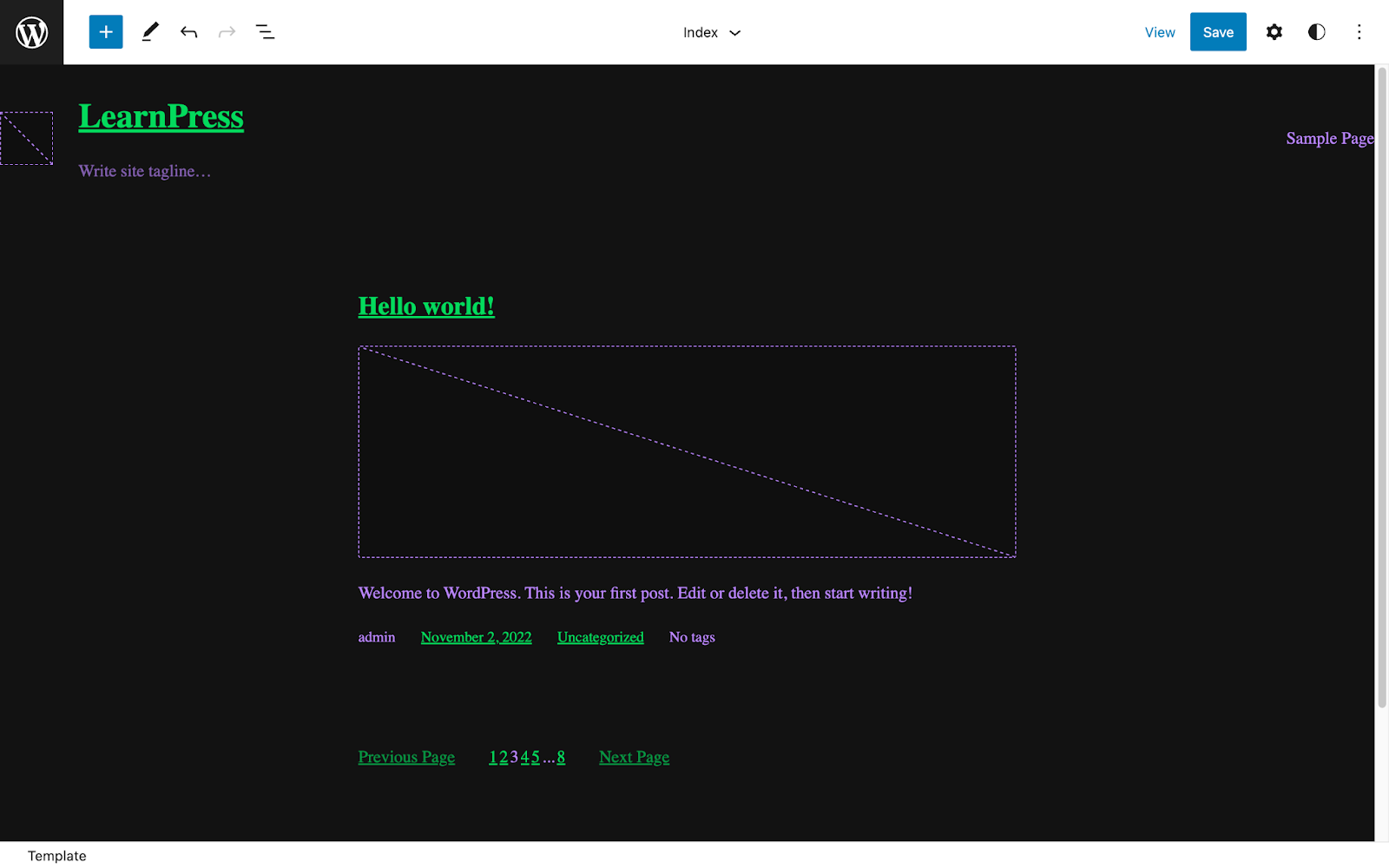
My first attempt at finding dark colors that meet accessibilityAccessibility Accessibility (commonly shortened to a11y) refers to the design of products, devices, services, or environments for people with disabilities. The concept of accessible design ensures both โ€œdirect accessโ€ (i.e. unassisted) and โ€œindirect accessโ€ meaning compatibility with a personโ€™s assistive technology (for example, computer screen readers). (https://en.wikipedia.org/wiki/Accessibility) guidelines was made by digging into Googleโ€™s Material Design, specifically the dark theme guidelines. From that document I extracted the following colors:

  • #121212 (the background color)
  • #BB86FC (the primary purple color)
  • #03DA5C (the secondary color)

The background color could be used for the theme background, and the primary and secondary colors could be used alternatively for text or links.

These colors were applied in a recent blockBlock Block is the abstract term used to describe units of markup that, composed together, form the content or layout of a webpage using the WordPress editor. The idea combines concepts of what in the past may have achieved with shortcodes, custom HTML, and embed discovery into a single consistent API and user experience. theme tutorial video I created. During the review of that tutorial, it was raised that the color contrast in the dark theme example is very low and makes the text very hard to read.

As I am not a color contrast expert, Iโ€™d like to take this opportunity to iterate on the colors as laid out above and choose better primary and secondary colors for a dark theme that are more accessible and easier to read for online workshops and tutorials. We can then add these colors to the Training Team handbook, to be used whenever an alternative color scheme is required.

Letโ€™s define high-contrast, accessible, dark theme colors together! What dark theme color palettes would be the most accessible? What have you seen thatโ€™s worked well? What should we avoid? Share your thoughts below and we will consolidate them into actionable suggestions by Friday 18 November 2022ย  to be added to the training team handbook for content creation.

#accessibility, #training-team