Triage Squad GitHubGitHubGitHub is a website that offers online implementation of git repositories that can easily be shared, copied and modified by other developers. Public repositories are free to host, private repositories require a paid subscription. GitHub introduced the concept of the ‘pull request’ where code changes done in branches by contributors can be reviewed and discussed before being merged by the repository owner. https://github.com/ triage: Biweekly on Thursdays 07:00 UTC
The Training Team’s new onboarding program has been completed by 25 people, of which more than half have continued on with regular contributions to the team. This post considers how the program can be improved further, and proposes a new optional Guide Program for those who would benefit from mentorship by an experienced contributor during onboarding.
What feedback has the Onboarding program received?
In the three and a half months since it launched, 25 people have completed the Onboarding Program. (This data is collected from a survey folks fill out at the end of the material.) Of these:
14 people have contributed to the team beyond onboarding such as by contributing to meetings, reviewing/translating content, and becoming co-hosts in Online Workshops.
8 people completed the program during Contributor Day at WordCamp Asia (February 17th.)
3 people submitted feedback about the program through a feedback form. All feedback was positive.
While the Onboarding program has been successful, it can also feel like there is a human element missing while a new contributor is getting started. Also, the self-serve onboarding program is great for self-driven contributors, but may not meet the needs of every learning style. What can we do to help make an even more welcoming experience for all new contributors?
Proposal: The Guide Program
An optional Guide Program (similar to a mentorship) for the Training Team could serve to support new contributors to the team. The idea is that experienced Training Team members would serve as Guides for these new team members, regularly checking in with them as they make their first contributions to the team. They would be available as a point of contact for new contributors if they have questions while completing the onboarding program.
@courtneypk is working on building out a more detailed proposal on this program for the team to review, and is interested in any thoughts that people have about the idea.
What are your thoughts?
Please leave your thoughts about the following points in the comments below:
Do you have any other observations or feedback about the Onboarding Program?
What are your thoughts about the proposed Guide Program?
Any other ideas that would improve the onboarding experience for new contributors to the Training Team?
Thank you for joining the Training Team for WordCampWordCampWordCamps are casual, locally-organized conferences covering everything related to WordPress. They're one of the places where the WordPress community comes together to teach one another what they’ve learned throughout the year and share the joy. Learn more. Europe 2023 Contributor DayContributor DayContributor Days are standalone days, frequently held before or after WordCamps but they can also happen at any time. They are events where people get together to work on various areas of https://make.wordpress.org/ There are many teams that people can participate in, each with a different focus. https://2017.us.wordcamp.org/contributor-day/https://make.wordpress.org/support/handbook/getting-started/getting-started-at-a-contributor-day/! We’ve prepared activities for both new and experienced contributors to join in on the day.
We plan on hosting some online events during Contributor Day, too, so that people who couldn’t attend WordCamp Europe can still participate remotely! Please follow this post to receive a notice once these online events are scheduled.
Table Lead: Courtney Robertson (@courane01), Jonathan Bossenger (@psykro)
The WordPress training team helps people learn to use, extend, and contribute to WordPress through synchronous and asynchronous learning as well as downloadable lesson plans for instructors to use in live environments via learn.wordpress.org.
I’m new to the Training Team!
Thanks for joining! Please walk through our brand-new Onboarding Program. This will give you an overview of the team, help you set up the accounts you need to contribute, and even walk you through your first contribution!
We expect the onboarding program above to take 30-60 minutes. Once you’ve completed onboarding, jump into these other activities to continue contributing!
Review published content and submit feedback.
The WordPress software continues to grow, and new features get added all the time. Reviewing published content and updating content is important in keeping the Learn WordPress website current. Follow the team guide about reviewing published content to leave feedback about any content below. (Reviewing older content would be helpful!)
Have a look through the Learn WordPress website. Are there any topics you feel would be great to add to the website? Come add your topic ideas to our GitHubGitHubGitHub is a website that offers online implementation of git repositories that can easily be shared, copied and modified by other developers. Public repositories are free to host, private repositories require a paid subscription. GitHub introduced the concept of the ‘pull request’ where code changes done in branches by contributors can be reviewed and discussed before being merged by the repository owner. https://github.com/ repository from the button below:
Thanks for joining! Depending on your interests, there are a few ways you can get involved. For each of the tasks below, the team handbook should help you with process specifics. But if you have any questions, feel free to reach out!
Brainstorm how to engage more Content Creators to join the Training Team.
Ask a Content Translator to share their hurdles in translating content.
Live session on how to create a tutorial – @psykro will conduct a live session to guide potential contributors on How to create a Tutorial?
Content Creation
Content Translation
Subject Matter Expert
Content Reviews
Triage developer issues
Content Creation
Are you interested in creating content? If so, then creating content related to the recent releases is our priority today.
Start by searching for a piece of content you’d like to work on in the Recent Release project board. Once found, comment on the GitHub issue so that we can assign it to you.
Content Translation
Are you interested in translating content? If so, then translate the content mentioned in the LearnWP Content – Localization GitHub Project Board. We have some high-priority content that needs to be translated. There are a few courses about onboarding contribs specifically that will help in the WordPress mentorship program:
Are you interested in editing content? If so, then reviewing content waiting to be published is our priority today.
Start by finding a piece of content to review in our content development board. This GitHub view has filtered all content waiting for reviews before it is published. Follow the team’s Guidelines for reviewing content and leave your reviews right there in GitHub.
Subject Matter Expert
A subject-matter expert is someone who has extensive knowledge in a particular field or area and can provide advice, guidance, and direction in that subject. If you would like to help in vetting topics, Then this new GitHub Project board related to LearnWP Topic Vetting will help you.
Triage Developer Issues
Are you a developer interested in working on issues for the Learn website? If so, then working through our Website Development project board is our priority today.
Start by reviewing issues “In Review.” Any help you can provide regarding issues “In Progress” would be great, too. But in general, any attention you can give to any issue would be much appreciated.
If there are enough interested Developers, then we can also create a developer-focused working group so that they can focus on related issues.
This post presents (i) a summary of the findings of and (ii) an analysis of the results of a survey focusing on the needs of individuals when learning about WordPress. It is part of a fuller and evolving Needs Analysis to identify the most useful and high-impact resources and content for Learn.WordPress.orgWordPress.orgThe community site where WordPress code is created and shared by the users. This is where you can download the source code for WordPress core, plugins and themes as well as the central location for community conversations and organization. https://wordpress.org/. The findings will help guide the future development of this community learning tool.
Preparation for the wider Needs Analysis of WordPress training and skill development began in detail in 2022. It included collaborative sessions to formulate survey questions, developed methodologies to better understand training needs, and ensured surveys were linked to the vision for the free-to-use Learn WordPress.
Key opportunities for the Make WordPress Training team and the implications for cross-working with other teams are highlighted in each of the areas identified in this report. Some of these opportunities will be developed further to identify priorities and time scales, phasing work to optimise the benefit to users and adding value to the project.
Geographic spread
Analytical tools showed that almost all the initial responses to the survey were from the US. To broaden the geographic spread, other regions where content was known to have originated or where interest had been expressed in creating content for Learn WordPress were identified by @webcommsat, @nalininonstopnewsuk and @west7.This data was also matched to locales where there were established links through polyglots and WordPress Translation Day. Requests were submitted directly to individuals and groups in those regions to raise awareness of this survey and to encourage participation and feedback. The returns cut-off date was extended so that it could be presented to attenders at WordCampWordCampWordCamps are casual, locally-organized conferences covering everything related to WordPress. They're one of the places where the WordPress community comes together to teach one another what they’ve learned throughout the year and share the joy. Learn more. Asia. It was a learning point for the survey team that marketing and awareness raising encompassing a wide range of geographic areas was vital and needed to be done at a much earlier stage in the life-cycle of any subsequent surveys.
The initial target of 300-400 respondents was met and surpassed. A total of 583 participants completed all of the survey. There were a number that did not complete the survey, and steps were taken during the survey’s life to address drop-offs. This learning will also be fed into future surveys.
Respondents by region
Region
# of participants(583)
Africa
28
Asia
106
Australia and Oceania
12
Europe
115
Middle East
17
US and Canada
277
South America
28
Note: if a respondent was using a Virtual Private Network (VPN), the survey may have recorded a different regional allocation. This discrepancy could have contributed to the apparent increased response rate from the US.
In response to the question, what is your primary language, 59 different languages were reported. Thirty-one percent of respondents would value more materials to be made available in their primary language. As Learn WordPress was only first piloted at the end of 2020, its vision is to grow and encourage resources to be available in locales in addition to English.
Opportunities
The survey responses gave some examples of potential Training team follow-ups with the Marketing and Polyglots team, and locales where there may be interest in translating or creating resources in other languages.
The data will help the Training team in prioritizing potential follow-ups to encourage awareness and participation in communities where the survey showed a significant engagement and call for materials in local languages. This will also be added to existing data in the team which shows where there has been engagement and interest in contributing to Learn WordPress.
Familiarity with WordPress
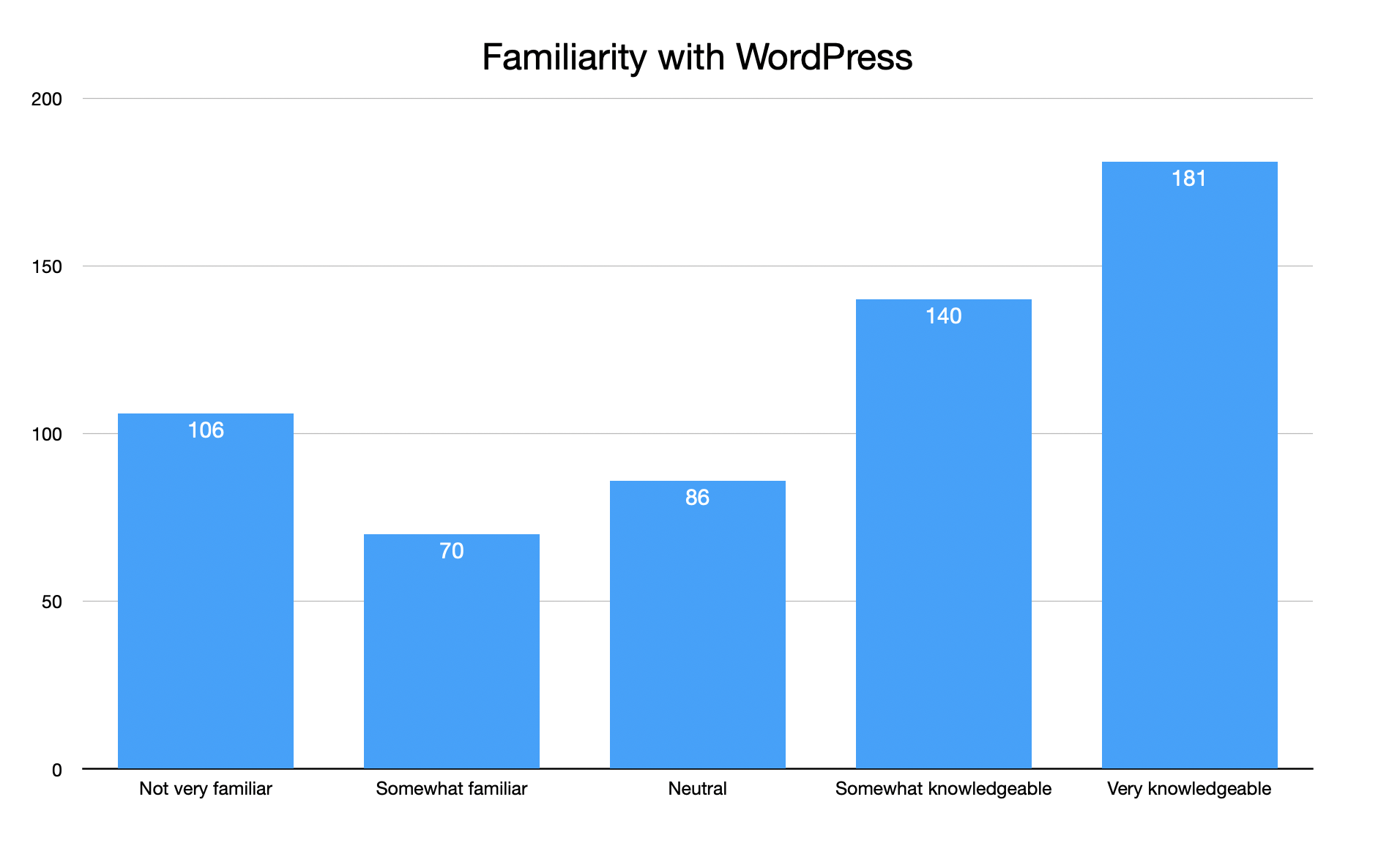
This question was crucial in the survey and will be important in ongoing research as parts of the Needs Analysis. Better understanding how users who were willing to complete the survey describe their knowledge of WordPress is crucial to providing content and links at the most suitable level. This affects type of content, its presentation, its language-usage including technical terms, and more. Though this survey can only give us a snapshot view, its results backed up anecdotal findings, and confirmed that there is a considerable need for outreach and awareness raising of the Learn.WordPress.org provision outside the ‘already aware’ or ‘experienced WordPressers’. From informal research and anecdotes with other teams, it is assumed that there will be some variation between how people might describe their familiarity or skills with using the software with what their knowledge level may be. This is a challenge for a training resource, but supports the need for step by step course structures which can help users measure their own skillsets against and support the creation of a benchmark of learning. This benchmark may in future years lead to certificate levels, but even without that, a well used Learn.WordPress.org which becomes the place for step by step learning and achieving standards or levels in learning has a considerable value and benefit to users and the project as a whole.
A total of 321 people described themselves as ‘somewhat knowledgeable’ or ‘very knowledgeable’ of the WordPress software, which potentially equates to medium of advanced level in how content is being prepared more recently. This compared to a total of 262 who described themselves as ‘unfamiliar’, ‘somewhat familiar’ (potentially equating to a beginner level) or ‘neutral’ which could be seen as an indication of a lack of confidence or being in the early learning stages of the software.
Current WordPress Users:
A breakdown of the current WordPress users based on their experience with the platform is below:
The number of years respondents had used WordPress ranged from 29% for less than one year to 32% for more than 10 years.
Opportunities
This shows there are a number of potential opportunities, including:
to interest and gain following and lifelong learning usage from new users
to produce materials that could be of interest or could be made by users of considerable experience
Roles of WordPress Users
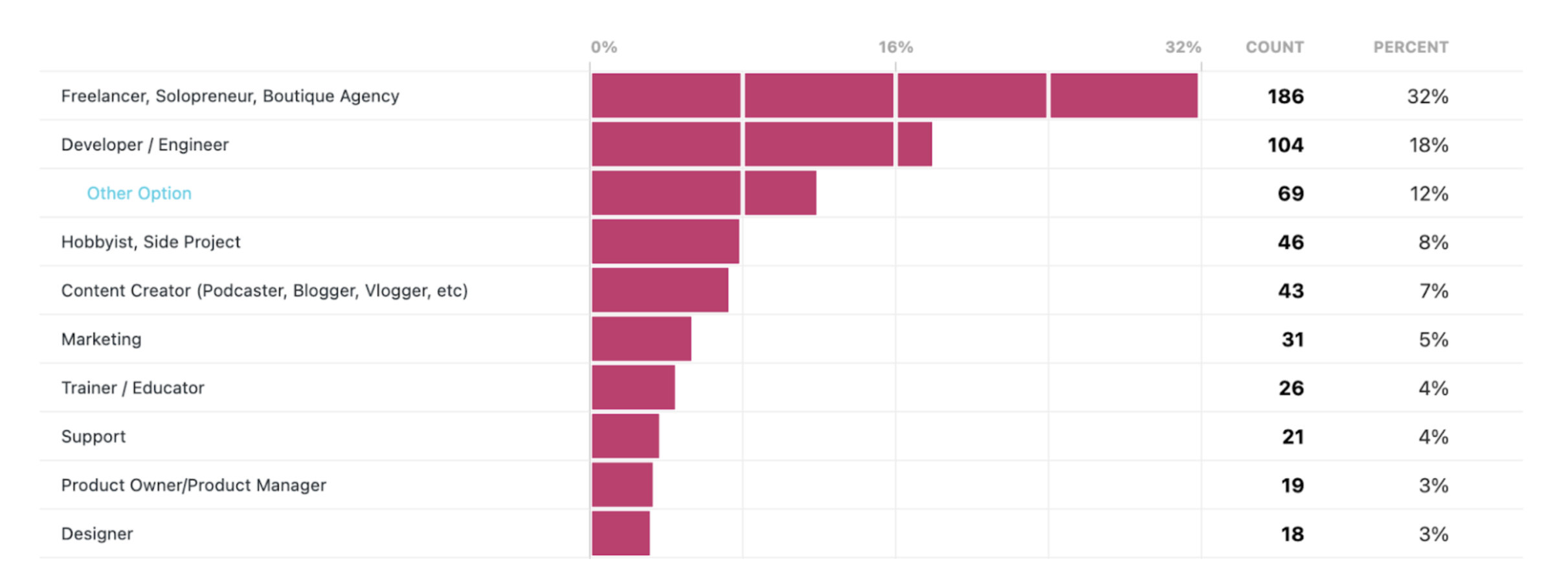
According to the data, the current role of WordPress users, who completed the survey, is mainly as follows. The highest number of responses were from people who described themselves in the categoryCategoryThe 'category' taxonomy lets you group posts / content together that share a common bond. Categories are pre-defined and broad ranging. of combined group of Freelancer, Solopreneur or Boutique Agency at 33%, followed by the Developer/Engineer category at 19%. Content Creator at 8%, and Hobbyist/Side Project at 8%. Other roles include Project Manager at 2%, User at 2%, and Trainer/Educator at 5%. Additionally, there are smaller percentages of role choices as: Product Owner/Product Manager, Support, Marketing, Designer, WordPress-adjacent events, Quality Assurance, Dev Ops, and Learner.
The number of respondents are listed below:
The ‘Other option’ in the table above relates to where the provided descriptions did not match the respondent’s own perception of their role in WordPress.The team is aware that ‘Side project’ group may also include users who work in WordPress category as developers or freelancers etc, but WordPress may not be their principal work or income-stream.
Opportunities
This data shows a considerable engagement in a detailed survey on Learn WordPress from freelancer, solopreneurs and boutique agencies at 32%.
Current Offerings
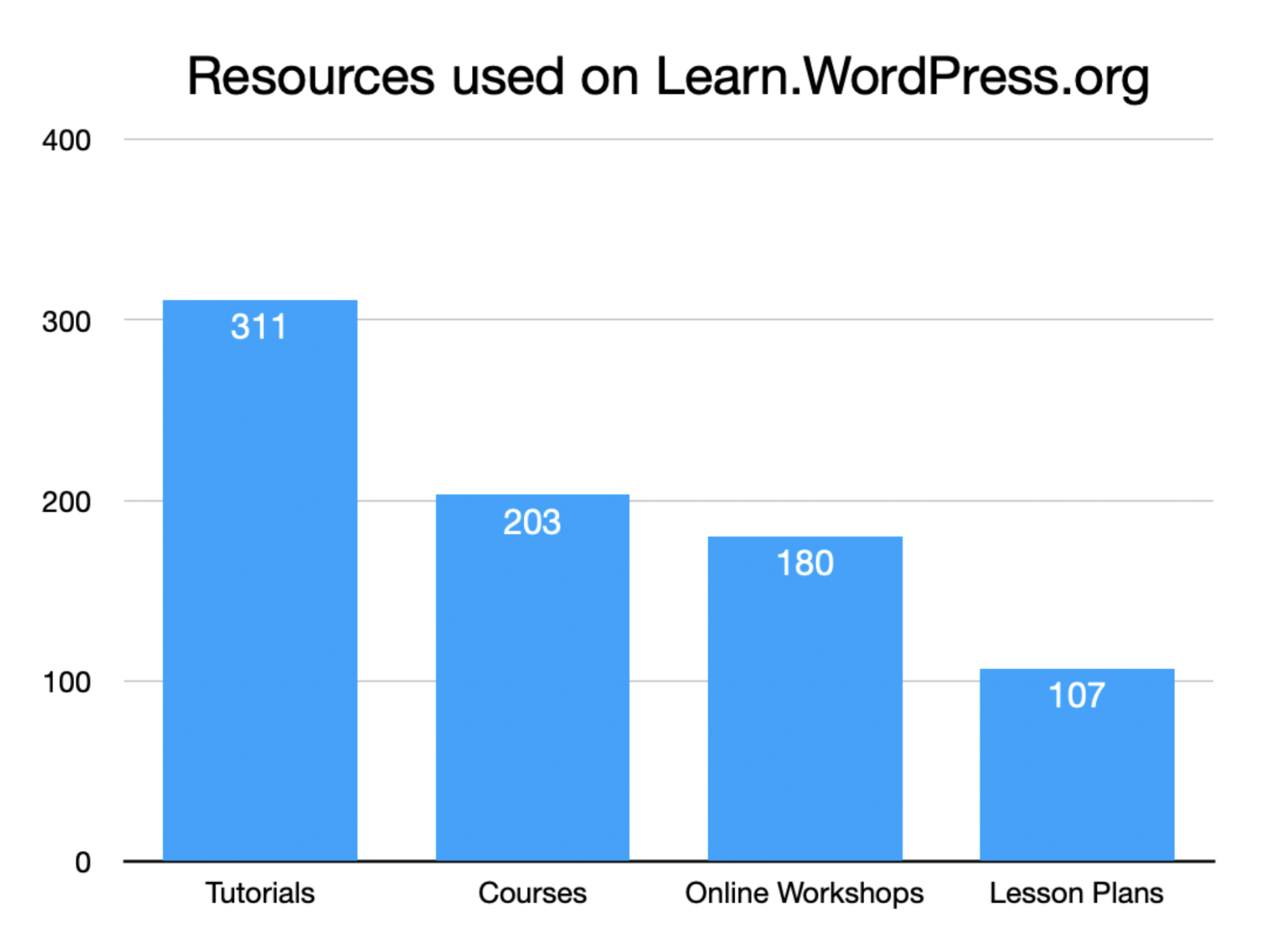
It has been observed that 20% of all respondents said they did not currently utilize any of the resources available on the learn.wordpress.org platform. However, among those who do, the most frequently utilized resources in descending order are tutorials, courses, online workshops, and lesson plans.
Opportunities
The data shows a significant number of users are using more than one resource, with 29 per cent using four or more resources on Learn.WordPress.org. This shows there is a potential opportunity that once users are familiar or aware of Learn WordPress, they will use it for multiple training formats. This can help influence the team’s thinking on how resources can fit together into courses, and related materials can be highlighted to increase the time learners are able to use Learn WordPress and to make their learning journey more useful, structured, smooth and seamless.
The current learning methods
Based on the survey responses, the most popular learning method among the respondents is:
web-based learning (410 respondents)
Learn.WordPress.org (290 respondents)
on-the-job training (229 respondents). In the long-term, Learn.WordPress.org could play a big role in this area, and the opportunities for it can be a follow-up for future surveys and discussions/ promotions with organizations and employers who use WordPress.
conferences came in fourth with 115 respondents (this may have included WordCamps too).
The survey did not specifically mention WordPress meetups or WordCamps. Respondents may have also classed these as in-person learning.
Opportunities
Mentoring and coaching can and is likely to have come through local WordPress networks, such as meetups and WordCamps. This combined with anecdotal information from WordCamp Asia 2023 and WordCamp Europe 2021 shows that these granular events can be a powerful way for Learn.WordPress.org to help users improve their knowledge and keep up-to-date with the software and find ways to participate in the community.
Qualifying this data, some respondents referred to self-learning, which could be either web-based or in-person learning, or a mixture of both. The same issue applied for those choosing on the job training and bootcamps. The Individual Learner Survey was a starting point for the research and improvements into Learn.WordPress.org, and these are some of the areas identified for further exploration.
Broadly, the survey responses at face value indicate a clear preference for web-based learning, but also an ongoing significant use of in-person learning. This supports wider research into emerging training practices and preferences outside WordPress. The data analysis context also has a bearing as within the previous 12 months of the survey, online activity may have been the preferred option due to the pandemic and restrictions. It is just under a year since the major WordCamps returned to some form of in-person events and Meetups having a hybrid of online and in-person. The Training team plans to also use the data from this survey as a benchmark which it will compare against in its future surveys and analyses.
The analysis of the data combined with other research suggests that many of the respondents may be already familiar with where to go for training on WordPress rather than relying just on search engine results.
What the survey results show is a strong usage of online learning, and this is a major boost for what Learn.WordPress.org can offer and its potential for the future. The additional benefit of this resource is that it has the potential to offer online resources that people, groups, and training facilitators can all share with in-person learning environments.
Examples of how Learn.WordPress.org can serve the ongoing need for both online and in-person, and group and individual learning, and provide a flexible learning model.
Online workshops which can be paused for live discussions and questions and workshops. Note: Discussions groups have been renamed and repurposed as online workshops, with a Q&A and questions opportunity in the video-conferencing area.
Lesson Plans: instructors can use or adapt lesson plans for in-person or online classrooms, and as part of courses. Some Lesson Plans include screenshots and examples which can be viewed in a group or individual screen setting.
Tutorials: these can be used by individual learners or in group learning. The Training team with the Community, Marketing and Polyglots teams encourage Meetups to use tutorials in-person or online, share the resources for post-event follow-ups, and add interactivity with their group through discussions and questions. There has been about a year to 18 months of this encouragement, and further focus on this may bring in benefits. This is an example of how Learn.WordPress.org is strengthened by cross-collaboration of teams and can add value to both individual and group learning.
Factors in choosing training
The top three factors in choosing training in general are training time, costs, and content delivery. As for other factors in the customer decision making are location of the training, length of the course, pace of the course, connection with the instructor, quality and relative up-to-date information.
Some learners may want videos ranging from 3 -5 minutes. This may not be practical for Tutorial videos as topics can take time to introduce and present. However, within courses, a series of 3-5 minutes videos would make sense, though possibly not to stand alone. A learner would advance in the course to the next video to continue the topic. Current Tutorial videos range from 3 to 15 minutes on average.
Opportunities
Training time data does not necessarily imply that videos or segments on the resource should be very short. Ongoing product research and learning the lessons from major providers of training in the market will help Learn.WordPress.org be aware of the trends in people’s preferences for learning. It is not possible to say how these stats relate to how long people have been using WordPress. The different journeys discussed in the survey planning would have allowed this to be more useful. This will be incorporated into future research.
This also relates to the shortcomings identified in this survey that content was either too basic or too advanced. This can also be because there is no sequence of the lesson plans and tutorials which would help people find the middle ground. This was supported by the comments in the survey. Comments also focused on not knowing where the start was for a particular area. One of the observations in some follow-up questions during promotion of the survey was that the organizational structure for the available resources is of inconsistent quality in multiple languages presented.
The organizational structure in some areas can be based on publication date rather than the natural or learning progression through a subject. This potential issue is something that the Training team can explore further.
High priority/ greatest need in training material
Respondents in choosing training materials prioritized: time, costs, content delivery, accessibilityAccessibilityAccessibility (commonly shortened to a11y) refers to the design of products, devices, services, or environments for people with disabilities. The concept of accessible design ensures both “direct access” (i.e. unassisted) and “indirect access” meaning compatibility with a person’s assistive technology (for example, computer screen readers). (https://en.wikipedia.org/wiki/Accessibility), and personal learning style. People also referenced the scalability of using WordPress – the basics, blocks, WooCommerce, searchability for training materials, editing pages, and coding.
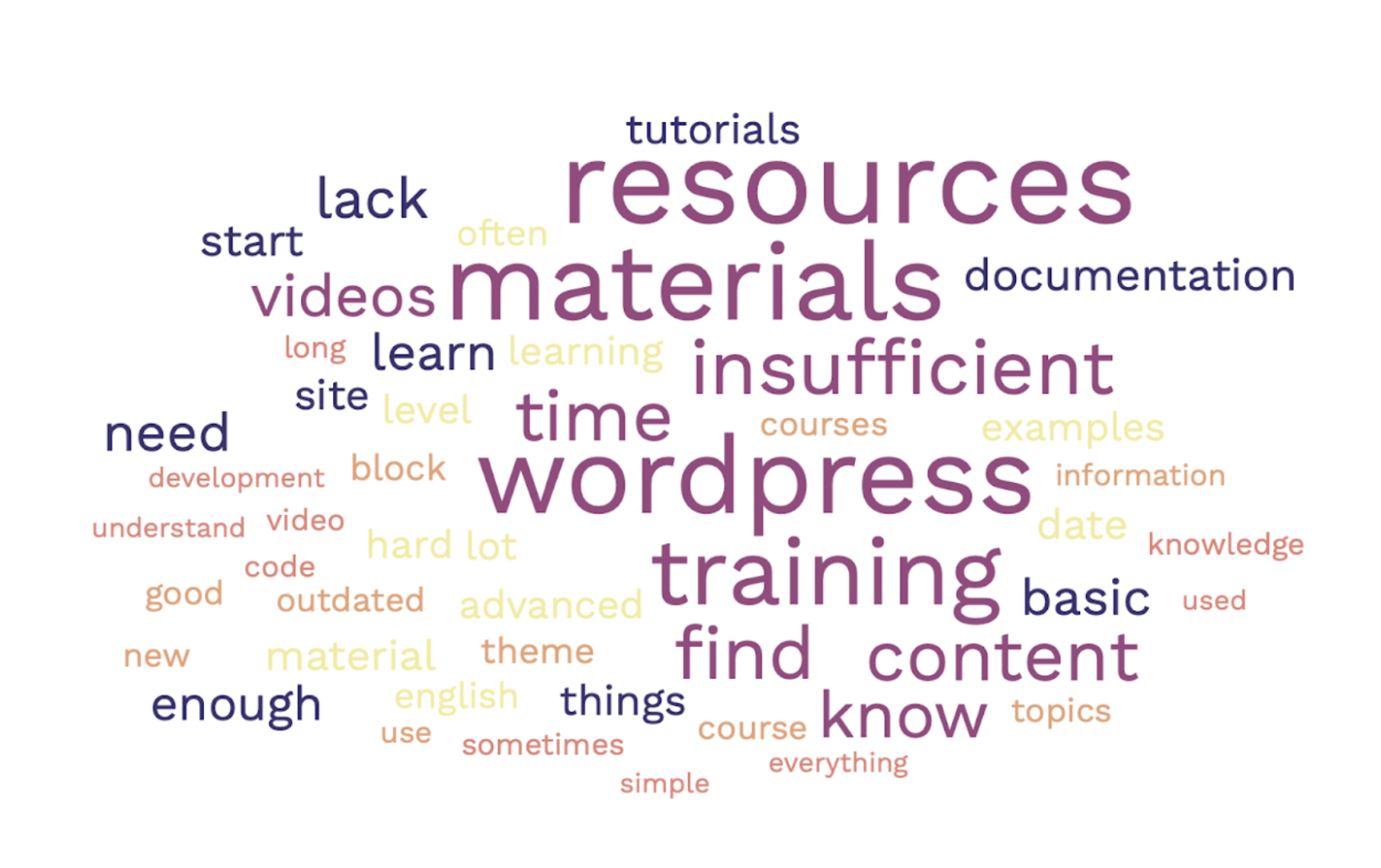
The general tone of the comments in the shortcoming section was that the current content available is vastly different, overwhelming, and confusing for the users that filled in this survey. To better understand the survey, in the data analysis responses were divided into subcategories: resources, skill level, content, language, learning style, costs, searchability, outdated content, problems, personal and instructor.
Resources- problems within the available resources. Respondents who completed this section of the survey would like to see different types of resources such as short books, device friendly resources, and clarity of official documents.
Comments on the shortcomings of WordPress training
A note on the data, that the survey specifically requested information on shortcomings of WordPress training in general to help identify any trends or needs where Learn.WordPress.org could add value or prioritze. Questions around the positive usage of materials were not requested in the Individual Learner Survey 2023. Some of this was addressed in the follow-ups accompanying the promotion of the survey and will help identify further questions that could be asked in future parts of the product development research.
Some suggestions for improvement include:
more structured pathways through the learning, including graphical representation
more mobile-friendly
more on new feature/ releases, and tips on the learning steps to take to better understand and use them
signposting and explaining more of concepts and unfamiliar terms to help users learn and understand the framework
avoid using acronyms without giving the full iteration on first use (i.e. do not assume knowledge)
better sequencing and more logical order
The team is planning to focus more on learning pathways and the insight above will add to findings and observations already identified.
Opportunities
Summary of comments received about shortcomings in WordPress learning materials in general
Opportunities for the Training team and/or steps we have already implemented.
A greater distinction in content skill level between beginners, intermediate, and advanced.
Online workshops are labelled in this way. Tutorials, Courses and Lesson Plans are not labelled in this way currently.
The team could explore how this could be expanded and look at examples of how the Developer Blog uses such audience labels.
A mix of responses on the need for more content on advanced features, too much beginner content, content not written for students that are far advanced.
Requests for more step-by-step guides and connecting related or necessary linked topics together.
Less jargon and increased signposting of terms mentioned. Helping people understand the WordPress developer vocabulary rather than assuming it is known by learners on the site.
There seems to be a mixed response on the level of topics covered.
The Training team could rejoin the cross-team discussions on glossary/ vocabulary in WordPress.
Use language that is easier for those reading who are non-native English speakers/ readers, and avoid truncating words and area-specific expressions.
Encourage more translation of content or create more content in different locales.*
A mix of responses on materials not having enough depth, limited range of topics, limited interactivity, some low quality videos compared to materials available elsewhere.
Video quality will differ as the resource is made for the community by the community.
Discussions on ways to support those making videos are continuing, but there will be some external factors of access to equipment and stable services like internet and electricity have an impact. Ways to support contributors from all parts of the globe would help the team reach more places, and further encourage a focus on diversity and inclusion in its efforts.
The need for more localized content to help learners learn about using WordPress in their preferred languages.
* The Training team has made localization a priority and has recently finished the Content Localization Foundations Project. Further areas to explore have been highlighted.
Link to documentation that can explain things in simpler terms for non-developers.
Building on the cross-linking between the Training team and Documentation team will help this, and signposting to a non-developer level glossary.
The team can also request content contributors avoid terms that may be unfamiliar to audiences, and to signpost more details when introducing concepts or terms that a learner could be be less familiar with.
TagTagTag is one of the pre-defined taxonomies in WordPress. Users can add tags to their WordPress posts along with categories. However, while a category may cover a broad range of topics, tags are smaller in scope and focused to specific topics. Think of them as keywords used for topics discussed in a particular post. resources or provide learning pathways to help learners find materials that match their learning style and follow a structured path.
Don’t over-rely on video content as not suited to all learning styles and may be difficult to follow along without having two screens.
The Learning Pathways will help to address much of this. All video tutorials also have a transcript available to aid learners who would prefer a written text to follow.
Most of the Learn.WordPress.org Courses are a mixture of video and/or text.
More hands-on workshops.
Many of Learn.WordPress.org Online Workshops try to be more hands-on and/or focused on demos.
The team could explore if there is a need for greater visibility of this offering, and how to highlight the range of hands-on material available through Marketing and Community teams.
There is also an ongoing collaboration on increasing relevant cross-links from or to Learn.WordPress.org to materials in Documentation, CoreCoreCore is the set of software required to run WordPress. The Core Development Team builds WordPress. and software releases.
Complete learning plans.
The work on Learning Pathways, linked above, will help provide this.
There is an identified need for increased planning and applying a holistic and structured approach to materials on Learn.WordPress.org. Furthering the efforts on this will help address some of the issues.
Other responses showed users may be expecting all resources to be available in the language they select in the filterFilterFilters are one of the two types of Hooks https://codex.wordpress.org/Plugin_API/Hooks. They provide a way for functions to modify data of other functions. They are the counterpart to Actions. Unlike Actions, filters are meant to work in an isolated manner, and should never have side effects such as affecting global variables and output. on Learn.WordPress.org.
A short clarifying sentence can be added to Learn WordPress near the filter to highlight that not all items in a course may be available in the language chosen by the learner. Adding a call to action button to help make the resource available in the learners’ preferred language may add value too.
Content needs to be able to refer the audience to how to solve the problems.
The team could explore whether adding search engine descriptions for ‘how to’ tutorials could help learners.
A way to remind or help learners finish courses.
Some other training providers have mechanisms to send gentle encouraging reminders to learners. The team could draw on and consider such examples. A popular language-learning app, for example, sends out reminders to users to complete their daily goal.
A way of making sure that content before it goes live is reviewed in-depth.
A system for labelling content that does not apply to particular versions of WordPress.
The Training Team does have a process for review in place. Content is shared for review in GitHubGitHubGitHub is a website that offers online implementation of git repositories that can easily be shared, copied and modified by other developers. Public repositories are free to host, private repositories require a paid subscription. GitHub introduced the concept of the ‘pull request’ where code changes done in branches by contributors can be reviewed and discussed before being merged by the repository owner. https://github.com/, and a review label is used. The team can consider whether more time needs to be given to preparing the structure and content of material, and for review.
The current filtering system on relevance to WordPress software versions may need some information to help users.
Personal time constraints are challenges many adult learners may face.
The team could explore how to add an idea of the minimum time needed to complete courses.
Confusion on which training to follow and if it is the same, eg WordPress.comWordPress.comAn online implementation of WordPress code that lets you immediately access a new WordPress environment to publish your content. WordPress.com is a private company owned by Automattic that hosts the largest multisite in the world. This is arguably the best place to start blogging if you have never touched WordPress before. https://wordpress.com/ Learn, materials available on the web in general which use the descriptor ‘Learn WordPress’.
Continue marketing and elevating Learn.WordPress.org on social media, at WordCamps etc.
Suggestions for other formats suggested by participants
Overwhelming respondents asked for:
case studies (44% of responders)
lectures (12% of responders)
guided courses (8% of responders), and
videos (8% of responders).
other suggestions included: discussion forums, e-books, infographics, in-person workshops, content on media platforms (small bite-size content), podcasts, office hours, interactive quizzes, sample codes, and downloadable slides. One respondent suggested content from Learn.WordPress.org could be available additionally through external training platforms.
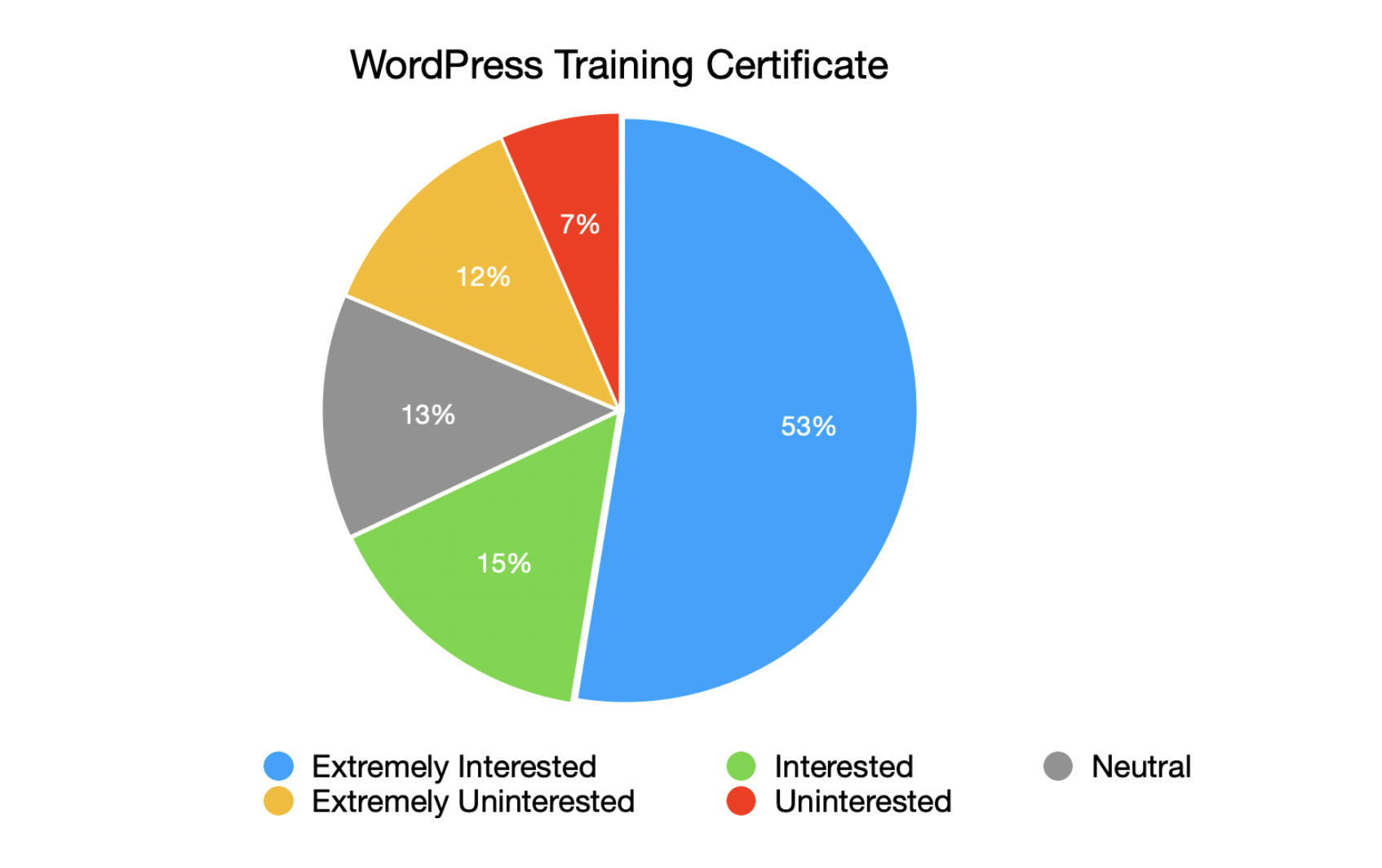
Training Certification
The question at the end of the survey was: “How interested would you be in the possibility of WordPress training certifications?” Majority of the respondents were interested in a training certification.
More exploration of this area is underway, and could be the focus of future parts of the Needs Analysis.
Props to Abha Thakor (@webcommsat) for leading on the analysis and data, Wes Theron (@west7) for co-ordinating the survey work, Nalini Thakor (@nalininonstopnewsuk) for marketing and diversity and inclusion review, Saloni Patel (@Saloni Patel) for initial statistical reporting. To Courtney Robertson (@courane01), Mark- Andrew Nordstrom (@nomadskateboarding), and Amit Patel (@amitpatelmd) for providing peer comments.
Thank you also to Training team members who contributed comments to the development of the questions, to all those who helped in promoting the survey, and to those who completed it. There will be more opportunities for collaboration in the future.
If you were unable to submit your comments during the survey period or would like to follow-up to help expand content or reach in your locale, do join the Training team meetings on the Make WordPress SlackSlackSlack is a Collaborative Group Chat Platform https://slack.com/. The WordPress community has its own Slack Channel at https://make.wordpress.org/chat/. There are lots of ways you can get involved with the efforts of the team and the development of Learn.WordPress.org
Taking Team Meeting notes and posting a recap of the discussion is one of the easiest ways to get involved right away. Please take a look at the upcoming meetings below and consider claiming an open spot if you can.
Members of the WordPress community have been looking for a place to house all code examples used for Learn WordPress and the CoreCoreCore is the set of software required to run WordPress. The Core Development Team builds WordPress. Developer Blog. If you have any thoughts and would like to provide some input on this, please share your thoughts on the github issue link above.
Courtney is working on creating Learn WordPress content pathways. Please visit the link above to learn more about this, then reach out to Courtney or Team Reps if you would like to help.
Amit and Ben recently published the SEO Expert handbook page that Amit has been working on for some time. If you would like to comment or provide input, your feedback is welcome at the page link above or on this Slack thread: https://wordpress.slack.com/archives/C02RW657Q/p1684831067303179
Looking for Volunteers
Volunteer Hosts are needed for the dates below. Visit the linked pages to learn more about these roles.
Links are in the headings for the following topics. There are many opportunities to get involved in the community. Be sure to click through and learn more about each one.
“Next Gen WordCamps” are expected to have clearer audience targeting, more specific content types, and a variety of engaging event formats. Existing WordCamps and meetups will continue, and organizers are encouraged to pitch ideas that align with the new purpose.
The community is invited to share their thoughts and envision the future of these events.
The Contributor Mentorship Program aims to provide cohort-based and 1:1 mentorship to new and aspiring contributors. The program is intended as a pathway to help new contributors find their way into WordPress contributions.
Comments are now closed for this post. There have been so many nice suggestions on what can be done on contributor dayContributor DayContributor Days are standalone days, frequently held before or after WordCamps but they can also happen at any time. They are events where people get together to work on various areas of https://make.wordpress.org/ There are many teams that people can participate in, each with a different focus. https://2017.us.wordcamp.org/contributor-day/https://make.wordpress.org/support/handbook/getting-started/getting-started-at-a-contributor-day/. Thanks to those who provided comments. The team is gathering all feedback and working on the contributor post and will soon publish a detailed post about the planning for Contributor Day on a p2 blog post.
If you are not familiar with these insightful podcasts, this would be a great introductory episode.
WordPress Playground is a WordPress site that runs in your browser. No server or setup is needed. Learn more about experiments surrounding the ever-growing WordPress Playground during this conversation with Rich Tabor and Adam Zielinksi.
When users have feedback about the content on Learn, they submit Content Feedback to the team. This feedback is recorded in GitHubGitHubGitHub is a website that offers online implementation of git repositories that can easily be shared, copied and modified by other developers. Public repositories are free to host, private repositories require a paid subscription. GitHub introduced the concept of the ‘pull request’ where code changes done in branches by contributors can be reviewed and discussed before being merged by the repository owner. https://github.com/ for anyone to come along and process.
Help us welcome new members to the Training Team and foster our growing community.
Open Discussions
@webtechpooja mentioned experiencing some travel glitches related to the upcoming WCEU23. Some discussion followed starting with this Slack thread.
You can see all meetings scheduled on this meeting calendar. If you are new to the Training Team, then come walk through our onboarding program to get to know the team and how we work. And if you have questions, feel free to reach out in the #training Slack channel at any time.
In a recent Faculty survey, we received feedback that Subject Matter Experts (SMEs) aren’t clear on how they can effectively contribute to the Training Team. In particular, the current “Topic Ideas” column in the Content Development project board has over 140 items, making it difficult for SMEs to identify which items fall under their areas of expertise. Additionally, the recently concluded Content Localization Foundations project also received feedback that it is difficult for Content Translators to track translation items in GitHubGitHubGitHub is a website that offers online implementation of git repositories that can easily be shared, copied and modified by other developers. Public repositories are free to host, private repositories require a paid subscription. GitHub introduced the concept of the ‘pull request’ where code changes done in branches by contributors can be reviewed and discussed before being merged by the repository owner. https://github.com/. It has been proposed that two new Project boards be created for more clarity.
Please leave any comments on the p2 post by May 21st.
WordCampWordCampWordCamps are casual, locally-organized conferences covering everything related to WordPress. They're one of the places where the WordPress community comes together to teach one another what they’ve learned throughout the year and share the joy. Learn more. Europe Contributor DayContributor DayContributor Days are standalone days, frequently held before or after WordCamps but they can also happen at any time. They are events where people get together to work on various areas of https://make.wordpress.org/ There are many teams that people can participate in, each with a different focus. https://2017.us.wordcamp.org/contributor-day/https://make.wordpress.org/support/handbook/getting-started/getting-started-at-a-contributor-day/ is on June 8th, and we are brainstorming what exciting things we can do with our contributors. If you have any ideas, please share them on the p2 post by May 22nd.
Members of the WordPress community have been looking for a place to house all code examples used for Learn WordPress and the CoreCoreCore is the set of software required to run WordPress. The Core Development Team builds WordPress. Developer Blog. You can read about this request here.
Thanks to @meaganhanes for volunteering to host today’s EMEA coffee hour and co-host next week’s May 23rd EMEA meeting.
Other News
Some Faculty handbook updates!
The Faculty Member list has been edited to include Areas of Expertise. This is especially important for Content Creators and Editors looking for help from Subject Matter Experts (SMEs) with specific topics.
In addition to the above, some brief tips for working with SMEs have been added to the Faculty Role Guide for both Content Creators and Editors.
You can see all meetings scheduled on this meeting calendar. If you are new to the Training Team, then come walk through our onboarding program to get to know the team and how we work. And if you have questions, feel free to reach out in the #training Slack channel at any time.
We received feedback in Github issue – 158021 asking why we don’t show publication dates on the content, such as https://learn.wordpress.org/tutorial/creating-a-front-page-for-a-block-theme/. Showing a publication date may help learners identify new/fresh content easier. We wanted to open the idea up for discussion. What pros/cons do folks see with adding publication dates to content?
Over the course of 5 months, 28 volunteers created 36 pieces of localized content across 10 locales. Additionally, volunteers translated some of the Training Team’s handbook pages related to content translation into 5 locales. Thanks to those who are involved with this project
Context: in a recent Faculty survey, we received feedback that SMEs aren’t clear on how they can effectively contribute to the Training Team. In particular, the current “Topic Ideas” column in the Content Development project board has over 140 items, making it difficult for SMEs to identify which items fall under their areas of expertise. And additionally, the recently concluded Content Localization Foundations project received feedback that it is difficult for Content Translators to track translation items in GitHubGitHubGitHub is a website that offers online implementation of git repositories that can easily be shared, copied and modified by other developers. Public repositories are free to host, private repositories require a paid subscription. GitHub introduced the concept of the ‘pull request’ where code changes done in branches by contributors can be reviewed and discussed before being merged by the repository owner. https://github.com/ also. So we thought to create two new Projects boards for more clarity.
Please leave your comment on the blog post by May 21st.
Looking for volunteers
We are looking for volunteers who can help us by co-hosting our upcoming meetings and coffee hour. Here you can check how you can help.
I am out on next week May 16th to May 18th, I will be travelling at the time of our next week coffee hour. Is there anyone who would like to volunteer for next week coffee hour?
I’ll take May 16th EMEA/ AMER and May 23 if no one else volunteers
Other news
If you are a Faculty Member, please comment with a casual update on this monthly update Slack thread. (Note: This Slack thread will take you away from this meeting flow)
Any update @amitpatelmd you would like to share with the team? Thanks
Open Discussions
If you have topics you’d liked discussed in the meeting, please go ahead; this is the time you can discuss anything.
@meaganhanes shares that she would love to have a review of our Certifications / Learning Plan ideas. And will add any make notes she finds in this thread, but if others know of them, they’re requested to add them!
@webtechpooja agreed with it and shares that ‘if you can write a proposal post on our p2 blog’.
Other ways to Contribute
Ready to start contributing? Here are a couple ways to get involved today!
Help us welcome new members to the Training Team and foster our growing community.
You can see all meetings scheduled on this meeting calendar. If you are new to the Training Team, then come walk through our onboarding program to get to know the team and how we work. And if you have questions, feel free to reach out in the #training Slack channel at any time.
Only a month left to Contributor Day at WordCamp Europe 2023! In preparation for the day, we’d like to invite you to share your ideas of what contributors at the Training Team table can get involved with on that day.
Below are some ideas to kick-start discussions. Feel free to comment on this post with your ideas, too!
This brainstorming is open until May 22nd (Monday).
Team reps and table leads will consider all ideas and publish a post with a final plan by May 30th.
Experienced Contributors
Review Ready for Review content.
Create content for Recent Releases.
Local Ambassador for locale (We can explore the opportunities to work with a local Ambassador who represents one locale and help the contributors to translate Lean WordPress Content)
@caraya is working on an idea and is looking for feedback on whether this is something that would work as a course or would work better as a learning path. Please leave any comments on the GitHubGitHubGitHub is a website that offers online implementation of git repositories that can easily be shared, copied and modified by other developers. Public repositories are free to host, private repositories require a paid subscription. GitHub introduced the concept of the ‘pull request’ where code changes done in branches by contributors can be reviewed and discussed before being merged by the repository owner. https://github.com/ issue.
Context: Recently the WordPress Developer Blog was officially launched. Many of those articles contain links to code example repositories, usually in the author’s GitHub account. @psykro, and other developer educators in the team, also create code example repositories for our workshops, tutorials, and courses for Learn WordPress, also hosted on our own accounts.
Josepha suggested it might be useful to repurpose the wptrainingteam organization, renaming it to something like learn-wordpress. So we’d like to find out what the training team thinks of this idea.
So far, people who have commented have said they think this is a good idea. But if you have any thoughts, we’d like to hear from you on this Slack thread.
Without adding any code/pluginPluginA plugin is a piece of software containing a group of functions that can be added to a WordPress website. They can extend functionality or add new features to your WordPress websites. WordPress plugins are written in the PHP programming language and integrate seamlessly with WordPress. These can be free in the WordPress.org Plugin Directory https://wordpress.org/plugins/ or can be cost-based plugin from a third-party., what can the team do right now with the site features we already have to solve this problem?
We received feedback this week from one of Learn’s learners asking why we don’t show a publication date on individual Tutorials.
Was this an intentional decision? What pros/cons can you think about showing a publication date on content on Learn? Please leave your thoughts on the GitHub issue.
Looking for volunteers
WordPress Community Summit 2023 – Leadership is looking especially for newer contributors to join, who can bring a fresh perspective to the WordPress project. If you are even a little interested in joining, please apply to attend.
We’ve published a new handbook page that details each of the Faculty roles: Faculty Role Guides
We ask that each Faculty member take a look at the description of their role. But we encourage everyone to take a read too, to better understand how Faculty members can help the team move towards our goals.
Reminder to speak slowly in video content
In consideration of Learn’s global community, let’s remember to speak slowly and insert pauses when publishing video content. Thank you to @weblink for reminding the team about this
You can see all meetings scheduled on this meeting calendar. If you are new to the Training Team, then come walk through our onboarding program to get to know the team and how we work. And if you have questions, feel free to reach out in the #training Slack channel at any time.







 Content published in the last week
 Project updates
 Open Discussions
 Other ways to Contribute
