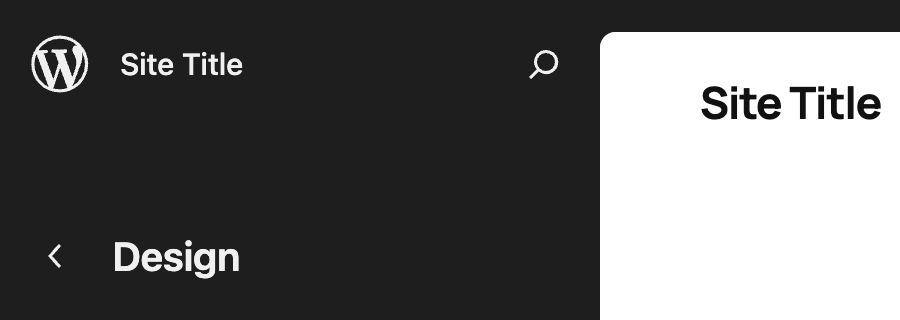
Consistent navigation in WordPress 7.1 with persistent toolbar

WordPress 7.1 makes navigation more consistent across the whole adminadmin (and super admin) interface, including the editor, where the difference is most noticeable.

In the editor, the top-left โ€œWโ€ logo / site icon served as the back button, and clicking it took you out of the editor. But a โ€œWโ€ logo / site icon doesnโ€™t read as a back button, and using it for navigation was a frequent source of confusion. Three changes are implemented to fix this situation:

  • the toolbar now appears in the editor as it does everywhere else (except in the Distraction Free mode),
  • the โ€œWโ€ logo / site icon is replaced with a dedicated back button (a chevron), and
  • the site icon, when set, is shown in the toolbar.

The result is a navigation model where each icon means one thing everywhere: the โ€œWโ€ logo always opens the About page, the site icon (when set) always opens the site menu in the toolbar, and the chevron always goes back to the previous screen. The site title also stays visible throughout the editor, including on the editing canvas. See the following images:

BeforeAfter

or with site icon:

BeforeAfter

What it means for users

The toolbar will be shown in Post and Site Editors by default, as part of the persistent navigation layer. If youโ€™d rather work without it, turn on the Distraction Free mode, where the toolbar is hidden as it is today in that mode.

What it means for pluginPlugin A plugin is a piece of software containing a group of functions that can be added to a WordPress website. They can extend functionality or add new features to your WordPress websites. WordPress plugins are written in the PHP programming language and integrate seamlessly with WordPress. These can be free in the WordPress.org Plugin Directory https://wordpress.org/plugins/ or can be cost-based plugin from a third-party. developers

Before WordPress 7.1, the toolbar could already appear in the Post Editor when the fullscreen mode is turned off. The Site Editor has no such mode, so a persistent toolbar in the Site Editor is a new behavior. If your plugin adds a node in the toolbar, itโ€™s worth double-checking if it still works correctly in the Site Editor.

If youโ€™d prefer not to show your pluginโ€™s toolbar node in the editor at all, you can filterFilter Filters are one of the two types of Hooks https://codex.wordpress.org/Plugin_API/Hooks. They provide a way for functions to modify data of other functions. They are the counterpart to Actions. Unlike Actions, filters are meant to work in an isolated manner, and should never have side effects such as affecting global variables and output. it out on editor screens, e.g. by checking $screen->is_block_editor() as follows:

add_action(
    'admin_bar_menu',
    function ( WP_Admin_Bar $wp_admin_bar ) {
        $screen = function_exists( 'get_current_screen' ) ? get_current_screen() : null;

              // use this check to hide the node in the Site Editor
              if ( $screen && 'site-editor' === $screen->id ) {
                      return;
              }
              // ... or use this check to hide the node in any block editor
              if ( $screen && $screen->is_block_editor() ) {
                      return;
              }


        $wp_admin_bar->add_node( ... );
    },
    100
);

Additional resources

  • TracTrac An open source project by Edgewall Software that serves as a bug tracker and project management tool for WordPress. tickets: #65091, #65088
  • Iteration issue

Props to @tyxla, @mayanktripathi32, @joen, @lucasmdo, @mamaduka, and @annezazu for reviewing this post.

#7-1, #editor, #dev-notes, #dev-notes-7-1

Dev Chat Agenda โ€“ July 8, 2026

The next WordPress Developers Chat will take place on Wednesday, July 8, 2026, at 15:00 UTC in theย coreย channel onย Make WordPress Slack.

The live meeting will focus on the discussion for upcoming releases, and have an open floor section.

The various curated agenda sections below refer to additional items. If you haveย ticketticket Created for both bug reports and feature development on the bug tracker.ย requests for help, please continue to post details in the comments section at the end of this agenda or bring them up during the dev chat.

Announcements ๐Ÿ“ข

7.1

  • 7.1 bug scrub schedule
  • BetaBeta A pre-release of software that is given out to a large group of users to trial under real conditions. Beta versions have gone through alpha testing in-house and are generally fairly close in look, feel and function to the final product; however, design changes often occur as part of the process. 1 is scheduled for next week on Wednesday July 15th at 15:00 UTC
  • Heads up CoreCore Core is the set of software required to run WordPress. The Core Development Team builds WordPress. Committers: Tech and Triagetriage The act of evaluating and sorting bug reports, in order to decide priority, severity, and other factors. leads have started tagging tickets for dev notesdev note Each important change in WordPress Core is documented in a developers note, (usually called dev note). Good dev notes generally include a description of the change, the decision that led to this change, and a description of how developers are supposed to work with that change. Dev notes are published on Make/Core blog during the beta phase of WordPress release cycle. Publishing dev notes is particularly important when plugin/theme authors and WordPress developers need to be aware of those changes.In general, all dev notes are compiled into a Field Guide at the beginning of the release candidate phase.. Deadline for publishing is August 3rd, and the Field GuideField guide The field guide is a type of blogpost published on Make/Core during the release candidate phase of the WordPress release cycle. The field guide generally lists all the dev notes published during the beta cycle. This guide is linked in the about page of the corresponding version of WordPress, in the release post and in the HelpHub version page. targeted for the 4th (just before RC1).
  • Merge Proposal: Expanding WP Core Abilities
  • Classic block will NOT be hidden from inserter in WP 7.1

General

Discussions ๐Ÿ’ฌ

The discussion section of the agenda is for discussing important topics affecting the upcoming release or larger initiatives that impact the Core Team. To nominate a topic for discussion, please leave a comment on this agenda with a summary of the topic, any relevant links that will help people get context for the discussion, and what kind of feedback you are looking for from others participating in the discussion.

  • Dev Chat scheduling during 7.1 cycle

Open floor ย ๐ŸŽ™๏ธ

Any topic can be raised for discussion in the comments, as well as requests for assistance on tickets. Tickets in the milestone for the next major or maintenance release will be prioritized.

Please include details of tickets / PRs and the links in the comments, and indicate whether you intend to be available during the meeting for discussion or will be async.

#7-1, #agenda, #core, #dev-chat

Merge Proposal: Design System Theming

As part of design systems work supporting the admin design project, the GutenbergGutenberg The Gutenberg project is the new Editor Interface for WordPress. The editor improves the process and experience of creating new content, making writing rich content much simpler. It uses โ€˜blocksโ€™ to add richness rather than shortcodes, custom HTML etc. https://wordpress.org/gutenberg/ Components Team has been working on a foundational layer of themeability and design tokens that support consistent, accessible UIUI User interface components across the adminadmin (and super admin) experience. On behalf of this group, I would like to propose the initial theming capabilitiescapability Aย capabilityย is permission to perform one or more types of task. Checking if a user has a capability is performed by the current_user_can function. Each user of a WordPress site might have some permissions but not others, depending on theirย role. For example, users who have the Author role usually have permission to edit their own posts (the โ€œedit_postsโ€ capability), but not permission to edit other usersโ€™ posts (the โ€œedit_others_postsโ€ capability). for merge: a comprehensive set of design tokens and themeability enabled through the ThemeProvider ReactReact React is a JavaScript library that makes it easy to reason about, construct, and maintain stateless and stateful user interfaces. https://reactjs.org component.

Purpose and Goals

The broader design systems effort is aimed at improving consistency and accessibilityAccessibility Accessibility (commonly shortened to a11y) refers to the design of products, devices, services, or environments for people with disabilities. The concept of accessible design ensures both โ€œdirect accessโ€ (i.e. unassisted) and โ€œindirect accessโ€ meaning compatibility with a personโ€™s assistive technology (for example, computer screen readers). (https://en.wikipedia.org/wiki/Accessibility) of components in the WordPress admin experience. Theming and design tokens are the foundational set of styles that support this work. In practice, the net result is a set of CSS custom properties that can be used within components to apply color, typography, border, elevation, or other styling aspects.

Using design token properties instead of hard-coded values helps ensure consistency across components, while still supporting customization like user color scheme. This builds upon established shared styles like those in the @wordpress/base-styles NPM package by providing a basis that can apply to many other types of UI surfaces and controls. With this comprehensive theming approach, those established CSSCSS Cascading Style Sheets. colors will become aliases to tokens within the broader set of design tokens.

One particularly ambitious outcome of this project is a tool for generating color ramps from a pair of accent and background โ€œseedโ€ colors. This tool can create a color scale thatโ€™s configurable, visually harmonious, and provides accessible contrast between color values that are used together.

This configurability is an important aspect of theming, and itโ€™s crucial to unlocking a number of use-cases that should be supported:

  • For users, this enables more personalization over how the interface looks. WordPress can continue to provide smart defaults and support the existing set of admin color palettes, but a user could also have the option to choose whichever color combination they prefer. This can be extended later with more themeable aspects, like roundness or density.
  • For pluginPlugin A plugin is a piece of software containing a group of functions that can be added to a WordPress website. They can extend functionality or add new features to your WordPress websites. WordPress plugins are written in the PHP programming language and integrate seamlessly with WordPress. These can be free in the WordPress.org Plugin Directory https://wordpress.org/plugins/ or can be cost-based plugin from a third-party. developers, they can express their own brand identity while still feeling authentic and consistent with the rest of the WordPress experience. Opting into WordPress theming means they benefit from future improvements automatically, without an ongoing maintenance cost. Design tokens aim to reduce confusion for developers and AI agents in choosing the best styling for a UI element by providing a comprehensive set of tokens aligned to semantic purpose.
  • For WordPress development, it provides an easier pathway to extend the user color scheme consistently to more parts of the admin interface. It also unlocks the ability to more easily implement features like a true โ€œdark modeโ€ feature, since admin surfaces are controlled by the background seed color.

Background

The design system effort has evolved over the last several years, guided by a baseline expectation of accessibility and consistency, and a need for a strong foundation for admin innovation:

While WordPress has had shared styles and shared componentry in many forms over the years, it has required significant ongoing effort to try to maintain consistency. WordPress 7.0โ€™s visual refresh is one example of this (in particular, the reskin effort in #64308). A comprehensive theming system based on CSS properties should reduce this ongoing maintenance cost, in both React-based and non-React-based admin interfaces.

This also tracks with where the software industry is moving. The W3C Design Tokens Community Group published the first stable version of the Design Tokens (DTCG) specification late last year, and the WordPress theme design tokens follow this specification. This specification is seeing adoption in industry tools like Figma, which has added support for importing design tokens as variables. As the discrete foundational unit for styling UI components, a set of documented, semantic design tokens are well-understood by AI agents, which helps maintain a high standard of quality as developers adopt this technology.

Whatโ€™s Proposed for Merge

For developers, the initial set of theming APIs proposed for merge are:

  • A coreCore Core is the set of software required to run WordPress. The Core Development Team builds WordPress. registered stylesheet wp-theme, including a set of prebuilt CSS properties for the default WordPress theme.
  • A core registered JavaScriptJavaScript JavaScript or JS is an object-oriented computer programming language commonly used to create interactive effects within web browsers. WordPress makes extensive use of JS for a better user experience. While PHP is executed on the server, JS executes within a userโ€™s browser. https://www.javascript.com wp-theme, including a single React ThemeProvider component for extending the default theme in an area of the adminโ€™s user interface.

The default theme stylesheet is compiled from a set of design tokens that follow the design token specification. Developers and designers may find these tokens useful, as they can be imported directly into design tools like Figma for use in designs.ย 

For users, the current expected impact should be minimal, aside from more UI component consistency throughout the admin interface. The default theme was intentionally designed to be largely aligned with existing styles, and not radically change the appearance of existing screens.ย 

That being said, a noteworthy feature coming in WordPress 7.1 is the application of the user color scheme to the Site Editor, which is powered by the theming implementation.

Whatโ€™s Next

While not targeted for inclusion in WordPress 7.1, the following features are being considered for future iterations:

  • Better default availability of design tokens: While the new wp-theme stylesheet will be registered, it will only be enqueued by default on specific WordPress screens that use the new theming feature. As theming extends to more parts of the interface, itโ€™s expected that the tokens would be available more universally throughout the admin interface. In the meantime, developers can enqueue the stylesheet themselves.
  • Adoption and support across all screens: Since the design tokens are built on web standard technology (CSS properties) and a goal of the design system is to ensure consistency across all WordPress screens, itโ€™s expected that these design tokens would be adopted across all admin screens, not just React-based screens such as the blockBlock Block is the abstract term used to describe units of markup that, composed together, form the content or layout of a webpage using the WordPress editor. The idea combines concepts of what in the past may have achieved with shortcodes, custom HTML, and embed discovery into a single consistent API and user experience. and site editor. This builds on the work in #64308 in a way that is more sustainable and comprehensive.
  • Enhanced user customization through theming, enabling features like โ€œdark modeโ€: While this initial iteration provides a strong foundation for internal consistency, the true power of theming in providing more user expressiveness and capabilities for a โ€œdark modeโ€-like experience will be explored in future releases. The theming system already supports the capabilitycapability Aย capabilityย is permission to perform one or more types of task. Checking if a user has a capability is performed by the current_user_can function. Each user of a WordPress site might have some permissions but not others, depending on theirย role. For example, users who have the Author role usually have permission to edit their own posts (the โ€œedit_postsโ€ capability), but not permission to edit other usersโ€™ posts (the โ€œedit_others_postsโ€ capability). for this today.

Call for Feedback

Your feedback to this merge proposal is welcomed in the comments below. As this work is focused on the long-term sustainability of UI component development,ย thereโ€™s particular interest in any risks or conflicts to consider in the proposed implementation.

Props to @mciampini, @annezazu, and @0mirka00 for reviewing this post.

+make.wordpress.org/design/

#7-1, #merge-proposals

The Classic block stays in the inserter for WordPress 7.1

In an earlier post, I announced that the Classic blockBlock Block is the abstract term used to describe units of markup that, composed together, form the content or layout of a webpage using the WordPress editor. The idea combines concepts of what in the past may have achieved with shortcodes, custom HTML, and embed discovery into a single consistent API and user experience. (core/freeform) would be hidden from the inserter by default starting in WordPress 7.1, accompanied by a new filterFilter Filters are one of the two types of Hooks https://codex.wordpress.org/Plugin_API/Hooks. They provide a way for functions to modify data of other functions. They are the counterpart to Actions. Unlike Actions, filters are meant to work in an isolated manner, and should never have side effects such as affecting global variables and output. and a companion pluginPlugin A plugin is a piece of software containing a group of functions that can be added to a WordPress website. They can extend functionality or add new features to your WordPress websites. WordPress plugins are written in the PHP programming language and integrate seamlessly with WordPress. These can be free in the WordPress.org Plugin Directory https://wordpress.org/plugins/ or can be cost-based plugin from a third-party..

Iโ€™ve decided to revert this change. The Classic block will continue to appear in the inserter in WordPress 7.1, exactly as it does today. There is no change in behavior for users or developers, and no migrationMigration Moving the code, database and media files for a website site from one server to another. Most typically done when changing hosting companies. is required.

What this means

  • The Classic block remains available in the inserter by default. You can insert new Classic blocks through the inserter, block library, and slash commands as before.
  • The wp_classic_block_supports_inserter filter has been removed. Because this change never shipped in a stable WordPress release, the filter has no backward-compatibility footprint; there is nothing to migrate away from.
  • The block-level deprecation/migration notice has been removed. The Classic block editing experience returns to what it was previously, including the โ€œConvert to blocksโ€ toolbar action.
  • The Enable Classic Block plugin will be closed. With the default behavior restored, the plugin no longer serves a purpose. If you installed it, you can safely deactivate and remove it; no action is otherwise needed.

Why it is being reverted

After discussing this with a number of people and gathering feedback from different places, it became clear that this approach had things largely backward. Itโ€™s one step that makes the experience worse with no direct gain, and it doesnโ€™t really get us any closer to transparently not loading TinyMCE. One of the takeaways is that the Classic block should become obsolete by choice, not by force. I believe time will be better spent to make the alternative genuinely better, while also smoothly, losslessly migrating content, so that users move off Classic block because they want to, not because the door has been removed.

Where the effort goes next

Much of the groundwork from this effort remains valuable, and the intention is to keep pursuing it from a user-first angle:

  • Understanding more in-depth why users still rely on Classic and bridging those gaps
  • Make โ€œConvert to Blocksโ€ flawless โ€“ it still has a bunch of flaws and inconsistencies
  • Work on better and more intuitive conversion/migration mechanisms, including mass migration
  • Improve TinyMCE asset registration and allow it to be disabled under various circumstances.
  • Build a mechanism for declaring proper explicit dependency on TinyMCE and work with plugins to utilize it.
  • Continue exploring ways to load TinyMCE on demand / asynchronously, among other performance improvements
  • Not loading TinyMCE on the block editor if the Classic Block is disabled from the block manager

Thank you to everyone who shared feedback and helped course-correct here. This work continues, pointed more squarely at whatโ€™s best for users.


Props to @mamaduka for reviewing this post.

#7-1, #dev-notes, #dev-notes-7-1

Bug Scrub Schedule for WordPress 7.1

Itโ€™s time to get WordPress 7.1 ready for release, and help is needed to ensure itโ€™s smooth and bugbug A bug is an error or unexpected result. Performance improvements, code optimization, and are considered enhancements, not defects. After feature freeze, only bugs are dealt with, with regressions (adverse changes from the previous version) being the highest priority.-free. Whether youโ€™re an experienced contributor or joining in for the first time, everyone is welcome! ๐ŸŽ‰

Schedule Overview

Regular bug scrubs are being held twice a week with @sajjad67 and @adrianduffell leading them. As the release date approaches and activity ramps up, the number of scrubs may be increased. These efforts will help ensure everything is on track for a smooth launch. Participation is welcome at any of these sessions, so feel free to join. Bring questions, ideas, and letโ€™s scrub some bugs together!

Weekly Bug Scrub Schedule ๐Ÿ—“๏ธ

Alpha Bug Scrubs

6 July 2026 09:00 UTC by @sajjad67
9 July 2026 22:00 UTC by @adrianduffell
13 July 2026 09:00 UTC by @sajjad67

BetaBeta A pre-release of software that is given out to a large group of users to trial under real conditions. Beta versions have gone through alpha testing in-house and are generally fairly close in look, feel and function to the final product; however, design changes often occur as part of the process. Bug Scrubs

Focus: issues reported from the previous beta.

16 July 2026 22:00 UTC by @adrianduffell
20 July 2026 09:00 UTC by @sajjad67
23 July 2026 22:00 UTC by @adrianduffell
27 July 2026 09:00 UTC by @sajjad67
30 July 2026 22:00 UTC by @adrianduffell
3 August 2026 09:00 UTC by @sajjad67

Release Candidaterelease candidate One of the final stages in the version release cycle, this version signals the potential to be a final release to the public. Also see alpha (beta). Bug Scrubs

Focus: issues reported from the previous RCrelease candidate One of the final stages in the version release cycle, this version signals the potential to be a final release to the public. Also see alpha (beta)..

6 August 2026 22:00 UTC by @adrianduffell
10 August 2026 09:00 UTC by @sajjad67
13 August 2026 22:00 UTC by @adrianduffell
17 August 2026 09:00 UTC by @sajjad67

Where?

All scrubs happen in the #core channel on Make WordPress SlackSlack Slack is a Collaborative Group Chat Platform https://slack.com/. The WordPress community has its own Slack Channel at https://make.wordpress.org/chat/. Just hop in at the scheduled time to get started! If you havenโ€™t joined Slack yet, nowโ€™s the perfect time.

Want to Lead a Bug Scrub?ย 

Reach out in Slack, and assistance will be provided to get everything set up. Everyone is welcomeโ€”whether youโ€™re a developer, designer, tester, or work on documentation, you can help! Just hop into the #core channel on Slack during any of the scheduled times. No experience? No problemโ€”feel free to ask for help anytime! Itโ€™s a great way to contribute, learn new things, and connect with the community.

Check this schedule often, as it will change to reflect the latest information.

What about recurring component scrubs and triagetriage The act of evaluating and sorting bug reports, in order to decide priority, severity, and other factors. sessions?

For your reference, here are some of the recurring sessions:

Have a recurring component scrub or triage session?

PingPing The act of sending a very small amount of data to an end point. Ping is used in computer science to illicit a response from a target server to test itโ€™s connection. Ping is also a term used by Slack users to @ someone or send them a direct message (DM). Users might say something along the lines of โ€œPing me when the meeting starts.โ€ @adrianduffell or @sajjad67 on Slack to have it added to this page.

Want to lead a bug scrub?

Did you know that anyone can lead a bug scrub at any time? Yes, you can!

How? Ping @adrianduffell or @sajjad67 on Slack with the day and time youโ€™re considering as well as the report or tickets you want to scrub.

Planning one thatโ€™s 7.1-focused? Awesome! It can be added to the schedule here. Youโ€™ll get well deserved props in Dev Chat, as well as in the #props Slack channel!

Where can you find tickets to scrub?

Need a refresher on bug scrubs? Checkout Leading Bug Scrubs in the coreCore Core is the set of software required to run WordPress. The Core Development Team builds WordPress. handbook.

Props @annezazu for proofreading and review.

#7-1, #bug-scrub, #core

WordPress 7.1 Release Party Schedule

WordPress 7.1 is scheduled for release on August 19, 2026! Below is the proposed calendar with expected start times for each release party, and the release squad contributors involved in release parties for the upcoming 7.1 milestone.

This release party schedule will stay in effect during the Release Candidaterelease candidate One of the final stages in the version release cycle, this version signals the potential to be a final release to the public. Also see alpha (beta). phase and the final release of WordPress 7.1. This enables contributors to attend and assist with release testing during the final weeks of the release cycle.

As always, there may be last-minute adjustments. The release squad will do its best to communicate any changes promptly by publishing a post on the change, and updating this post as the canonical reference.

Join us for the 7.1 release parties in the #core channel on the Making WordPress Slack!

Release Schedule

Date (UTC)MilestoneEmcee / Release LeadRelease Lead The community member ultimately responsible for the Release.Committercommitter A developer with commit access. WordPress has five lead developers and four permanent core developers with commit access. Additionally, the project usually has a few guest or component committers - a developer receiving commit access, generally for a single release cycle (sometimes renewed) and/or for a specific component.SecurityMission Control (Coordination)
July 15, 2026 at 15:00 UTCBetaBeta A pre-release of software that is given out to a large group of users to trial under real conditions. Beta versions have gone through alpha testing in-house and are generally fairly close in look, feel and function to the final product; however, design changes often occur as part of the process. 1@krupajnanda@wildworks@joedolson@sergeybiryukov
July 22, 2026 at 15:00 UTCBeta 2@krupajnanda@wildworks@joedolson@sergeybiryukov
July 29, 2026 at 15:00 UTCBeta 3@benjamin_zekavica@wildworks@joedolson@sergeybiryukov
August 5, 2026 at 15:00 UTCRCrelease candidate One of the final stages in the version release cycle, this version signals the potential to be a final release to the public. Also see alpha (beta). 1@benjamin_zekavica@wildworks@joedolson@sergeybiryukov
August 12, 2026 at 15:00 UTCRC 2@krupajnanda@wildworks@joedolson@sergeybiryukov
August 18, 2026 at 15:00 UTCDry Run / 24-Hour Code Freeze@benjamin_zekavica @krupajnanda@wildworks@joedolson@sergeybiryukov
August 19, 2026 TBDGeneral Release@benjamin_zekavica @krupajnanda@wildworks@joedolson@sergeybiryukov

How to Join the Party

  • All parties happen in the #core channel on Slack.
  • Everyone is welcome! First-timers, veteran contributors, and all those curious about the process are invited.
  • The final General Release will happen during WordCampWordCamp WordCamps are casual, locally-organized conferences covering everything related to WordPress. They're one of the places where the WordPress community comes together to teach one another what theyโ€™ve learned throughout the year and share the joy. Learn more. US 2026.
  • Everyone is encouraged to attend WordCamp US, but traveling and attending the event is not required to participate in the General Release Party. The release party will still happen in the #core channel on Slack.

Here are detailed instructions on how to contribute to a release party.

Thank you to every contributor and community member that helps make 7.1 a success. See you at the parties!

Props to @krupajnanda and @amykamala for collaboration and peer review.

#7-1, #release

Dev Chat summary: July 1, 2026

Startย of the meeting inย SlackSlack Slack is a Collaborative Group Chat Platform https://slack.com/. The WordPress community has its own Slack Channel at https://make.wordpress.org/chat/, facilitated by @audrasjb ๐Ÿ”— See the agenda post.

Announcements ๐Ÿ“ข

7.1

  • Roadmap for 7.1
  • Recent proposals:
  • Recentย dev notesdev note Each important change in WordPress Core is documented in a developers note, (usually called dev note). Good dev notes generally include a description of the change, the decision that led to this change, and a description of how developers are supposed to work with that change. Dev notes are published on Make/Core blog during the beta phase of WordPress release cycle. Publishing dev notes is particularly important when plugin/theme authors and WordPress developers need to be aware of those changes.In general, all dev notes are compiled into a Field Guide at the beginning of the release candidate phase.:

7.0.1

General

Discussion ๐Ÿ’ฌ

Fromย @amykamalaย aboutย handbook updates to AI policies

โ€œIโ€™d like to also propose a new policy: disclosure of use of AI in posts and announcements. It can just be a quick sentence at the bottom of the page saying AI tools were used in the creation of this article or something to that affect.โ€

@westonruter also proposed to apply such a policy to Slack comments, and @desrosj also has some draft for this topic for posts and comments.

@amykamala shared that a draft is being worked on here or here. The coreCore Core is the set of software required to run WordPress. The Core Development Team builds WordPress.-ai update draft could use some feedback. Itโ€™s based on Jonathanโ€™s comments and the comments in the thread. The post comment guidelines draft doesnโ€™t have changes to review yet but folks are welcome to work on it.

@audrasjb advised to use a new section for this topic in the Core Handbook.

Dev Chat scheduling during 7.1 cycle

With all the coming release parties scheduled on Wednesday, it looks like we need to move the meeting to another time slot.

@amykamala and @audrasjb suggest to switch the devchat time slot to 15:00 on Thursdays, starting the week of 7.1 betaBeta A pre-release of software that is given out to a large group of users to trial under real conditions. Beta versions have gone through alpha testing in-house and are generally fairly close in look, feel and function to the final product; however, design changes often occur as part of the process. 1.

@jorbin noted that it will conflict with the monthly Developer Blogblog (versus network, site) Editorial Group meeting,ย the bi-weekly AccessibilityAccessibility Accessibility (commonly shortened to a11y) refers to the design of products, devices, services, or environments for people with disabilities. The concept of accessible design ensures both โ€œdirect accessโ€ (i.e. unassisted) and โ€œindirect accessโ€ meaning compatibility with a personโ€™s assistive technology (for example, computer screen readers). (https://en.wikipedia.org/wiki/Accessibility) team meetings and a weekly core-test meeting. Which is not a blockerblocker A bug which is so severe that it blocks a release., but worth taking this into account. He also noted that Tuesdays are more open but this day is not the best for Amy and JB.

@joedolson noted that the Accessibility team moved its meeting for the 7.0 schedule, which was also on Thursdays, and they could do that again.

@amykamala and @audrasjb will come up next week with one or two proposals so a decision can be made.

Fromย @dmsnellย aboutย concerns about WPCS discrepancies in GitHub and Trac, and proposed change in the general policy

The concern raised in this thread is especially about the array elements alignment rule.

The attendees agreed that while 90% of the time, alignment is prefered, there are some cases where it makes things worse.

From @joedolson: โ€œIt seems to me like the primary point of @dmsnellโ€˜s thread was about misaligned standards between GutenbergGutenberg The Gutenberg project is the new Editor Interface for WordPress. The editor improves the process and experience of creating new content, making writing rich content much simpler. It uses โ€˜blocksโ€™ to add richness rather than shortcodes, custom HTML etc. https://wordpress.org/gutenberg/ and Core, but he seemed to walk that assertion back in the thread? Is there a real issue here? If the standards arenโ€™t aligned, one of them needs to changeโ€

#7-0, #7-0-1, #7-1, #core, #dev-chat

Dev Chat Agenda โ€“ July 1, 2026

The next WordPress Developers Chat will take place on Wednesday, July 1, 2026, at 15:00 UTC in theย coreย channel onย Make WordPress Slack.

The live meeting will focus on the discussion for upcoming releases, and have an open floor section.

The various curated agenda sections below refer to additional items. If you haveย ticketticket Created for both bug reports and feature development on the bug tracker.ย requests for help, please continue to post details in the comments section at the end of this agenda or bring them up during the dev chat.

Announcements ๐Ÿ“ข

7.1

  • Roadmap for 7.1
  • Recent proposals:
  • Recent dev notesdev note Each important change in WordPress Core is documented in a developers note, (usually called dev note). Good dev notes generally include a description of the change, the decision that led to this change, and a description of how developers are supposed to work with that change. Dev notes are published on Make/Core blog during the beta phase of WordPress release cycle. Publishing dev notes is particularly important when plugin/theme authors and WordPress developers need to be aware of those changes.In general, all dev notes are compiled into a Field Guide at the beginning of the release candidate phase.:

General

Discussions ๐Ÿ’ฌ

The discussion section of the agenda is for discussing important topics affecting the upcoming release or larger initiatives that impact the CoreCore Core is the set of software required to run WordPress. The Core Development Team builds WordPress. Team. To nominate a topic for discussion, please leave a comment on this agenda with a summary of the topic, any relevant links that will help people get context for the discussion, and what kind of feedback you are looking for from others participating in the discussion.

Open floor ย ๐ŸŽ™๏ธ

Any topic can be raised for discussion in the comments, as well as requests for assistance on tickets. Tickets in the milestone for the next major or maintenance release will be prioritized.

Please include details of tickets / PRs and the links in the comments, and indicate whether you intend to be available during the meeting for discussion or will be async.

#7-1, #agenda, #core, #dev-chat

Dev Chat Agenda โ€“ June 24, 2026

The next WordPress Developers Chat will take place on Wednesday, June 24, 2026, at 15:00 UTC in theย coreย channel onย Make WordPress Slack.

The live meeting will focus on the discussion for upcoming releases, and have an open floor section.

The various curated agenda sections below refer to additional items. If you haveย ticketticket Created for both bug reports and feature development on the bug tracker.ย requests for help, please continue to post details in the comments section at the end of this agenda or bring them up during the dev chat.

Announcements ๐Ÿ“ข

7.1

General

Discussions ๐Ÿ’ฌ

The discussion section of the agenda is for discussing important topics affecting the upcoming release or larger initiatives that impact the CoreCore Core is the set of software required to run WordPress. The Core Development Team builds WordPress. Team. To nominate a topic for discussion, please leave a comment on this agenda with a summary of the topic, any relevant links that will help people get context for the discussion, and what kind of feedback you are looking for from others participating in the discussion.

Open floor ย ๐ŸŽ™๏ธ

Any topic can be raised for discussion in the comments, as well as requests for assistance on tickets. Tickets in the milestone for the next major or maintenance release will be prioritized.

Please include details of tickets / PRs and the links in the comments, and indicate whether you intend to be available during the meeting for discussion or will be async.

#7-1, #agenda, #core, #dev-chat

Hiding the Classic block from the inserter in WordPress 7.1

Note: this decision was reverted. You can read more about it in the new dev note.

Weโ€™ve just merged a change that will be part of WordPress 7.1 that hides the Classic blockBlock Block is the abstract term used to describe units of markup that, composed together, form the content or layout of a webpage using the WordPress editor. The idea combines concepts of what in the past may have achieved with shortcodes, custom HTML, and embed discovery into a single consistent API and user experience. from the block inserter by default. The Classic block stays registered, every existing Classic block keeps working and remains editable, and a new filterFilter Filters are one of the two types of Hooks https://codex.wordpress.org/Plugin_API/Hooks. They provide a way for functions to modify data of other functions. They are the counterpart to Actions. Unlike Actions, filters are meant to work in an isolated manner, and should never have side effects such as affecting global variables and output. lets anyone bring it back into the inserter. This post explains what changes, why, and how to opt back in if needed.

Whatโ€™s changing

Starting in WordPress 7.1, the Classic block (core/freeform) no longer appears in the block inserter (#11712, Trac #65166, originally #77911 in GutenbergGutenberg The Gutenberg project is the new Editor Interface for WordPress. The editor improves the process and experience of creating new content, making writing rich content much simpler. It uses โ€˜blocksโ€™ to add richness rather than shortcodes, custom HTML etc. https://wordpress.org/gutenberg/). In practice, this means you canโ€™t add a new Classic block from the inserter, the block library, or slash commands.

Nothing else about the block changes:

  • The Classic block remains registered.
  • All existing Classic blocks (including any <!-- wp:freeform --> content) continue to render and stay fully editable, exactly as before.
  • The Classic editor and the underlying TinyMCE experience are untouched. If a post type doesnโ€™t use the block editor, nothing here applies to it.

This is purely about steering new content away from the legacy Classic block, not about removing anything you already have.

To be clear: the Classic editor is not affected at all by this change. This is strictly about the Classic block inside the block editor. If you use the Classic editor (for example, via the Classic Editor pluginPlugin A plugin is a piece of software containing a group of functions that can be added to a WordPress website. They can extend functionality or add new features to your WordPress websites. WordPress plugins are written in the PHP programming language and integrate seamlessly with WordPress. These can be free in the WordPress.org Plugin Directory https://wordpress.org/plugins/ or can be cost-based plugin from a third-party. or on post types that donโ€™t use the block editor), your experience stays exactly the same.

Why weโ€™re doing this

The Classic block has been the bridge from the pre-block era into the block editor, and it has served that role well. But itโ€™s also the one block in CoreCore Core is the set of software required to run WordPress. The Core Development Team builds WordPress. that doesnโ€™t behave like a block:

  • Architectural consistency. Every other Core block is a node in the block tree. The Classic block is the lone exception, opaque HTMLHTML HyperText Markup Language. The semantic scripting language primarily used for outputting content in web browsers. rendered through a separate editor embedded inside the block editor. Keeping it as a default inserter option works against the block-first model on which the editor is built.
  • Reducing the inflow. The migrationMigration Moving the code, database and media files for a website site from one server to another. Most typically done when changing hosting companies. path away from Classic content (Convert to Blocks) has existed for years, and Classic usage keeps shrinking. Hiding the block from the inserter stops new Classic content from being created, so that set keeps getting smaller rather than growing.
  • Maintenance leverage. Many block-library improvements have to special-case the Classic block. Each special handling may be small on its own, but cumulatively, this may slow down work that benefits every other block.

The broader, longer-term goal, which will be covered separately as it matures, is to make the Classic block fully opt-in and eventually to lay the groundwork for loading TinyMCE only when itโ€™s actually needed. WordPress 7.1 is just the first user-facing step on that path. None of the later steps are happening in 7.1, and each will get its own discussion and dev notedev note Each important change in WordPress Core is documented in a developers note, (usually called dev note). Good dev notes generally include a description of the change, the decision that led to this change, and a description of how developers are supposed to work with that change. Dev notes are published on Make/Core blog during the beta phase of WordPress release cycle. Publishing dev notes is particularly important when plugin/theme authors and WordPress developers need to be aware of those changes.In general, all dev notes are compiled into a Field Guide at the beginning of the release candidate phase..

Opting back in

If you (or your users) still want the Classic block available in the inserter, thereโ€™s a dedicated filter: wp_classic_block_supports_inserter.

Return true to show it everywhere:

add_filter( 'wp_classic_block_supports_inserter', '__return_true' );

The filter also receives the post being edited, so you can make the decision conditional, for example, per post type:

add_filter(
	'wp_classic_block_supports_inserter',
	function ( $supports_inserter, $post ) {
		return 'page' === $post->post_type ? true : $supports_inserter;
	},
	10,
	2
);

If youโ€™d rather not write code, thereโ€™s a small plugin that does exactly this, Enable Classic Block, which flips the filter on for you. The plugin has already been submitted for approval to the WordPress Plugin Directory.

Backward compatibility

This change is opt-out by design and doesnโ€™t break anything:

  • No content is modified or migrated. Existing Classic blocks are left exactly as they are.
  • The block, its edit behavior, and the Convert to Blocks action all continue to work.
  • The core/freeform block remains registered, so any code that relies on it being present keeps functioning.
  • Restoring the previous behavior is a one-line filter (or one tiny plugin) away.

Whatโ€™s next

Alongside this change, weโ€™re investing in the surrounding experience so that moving away from the Classic block is smoother for everyone:

  • A deprecation/migration notice (experimental). Thereโ€™s an experiment in Gutenberg that surfaces a notice inside existing Classic blocks, with one-click actions to convert the content to blocks or to a Custom HTML block. Weโ€™re exploring this as a gentle way to highlight that the Classic block is being phased out and to make the migration path more discoverable. Itโ€™s behind an experiment flag for now while we refine it for a WordPress release.
  • Improving everything around it. In parallel, weโ€™re improving and fixing the pieces that live by the Classic block: the Custom HTML block, the Convert to Blocks path, freeform handling and conversion, and related compatibility layers. The goal is that by the time Classic content needs to move, the tools to move it are solid.

These, alongside other planned next steps, can be tracked in the dedicated tracking issue.

Weโ€™d love your feedback

This is an early step in a longer effort, and we want to get it right. If you maintain plugins or custom integrations, run large sites, or have workflows that depend on the Classic block, weโ€™d really like to hear from you, especially around migration and bulk-conversion needs.


Props to @desrosj, @mamaduka, @mukesh27, @westonruter, @wildworks, and @yuliyan for the contributions, feedback, and code reviews.

Props to @mamaduka and @yuliyan for reviewing this post.

#7-1, #dev-notes, #dev-notes-7-1