Main query loop handling for block themes in 6.4

In WordPress 6.4, a change has been applied to how the main query loopLoop The Loop is PHP code used by WordPress to display posts. Using The Loop, WordPress processes each post to be displayed on the current page, and formats it according to how it matches specified criteria within The Loop tags. Any HTML or PHP code in the Loop will be processed on each post. https://codex.wordpress.org/The_Loop is being handled for blockBlock Block is the abstract term used to describe units of markup that, composed together, form the content or layout of a webpage using the WordPress editor. The idea combines concepts of what in the past may have achieved with shortcodes, custom HTML, and embed discovery into a single consistent API and user experience. themes. For singular content, the output of block templates (e.g. single.html or page.html) will be automatically wrapped in the main query loop.

Classic theme background

Historically, classic themes have included a main query loop (sometimes referred to as just โ€œthe loopโ€) in every template where any kind of WordPress posts from the database would be displayed. For reference, this is what the loop roughly looks like in most classic themes:

if ( have_posts() ) {
	while ( have_posts() ) {
		the_post();

		// Render the post.
	}
}

While the loop is primarily intended to iterate over the posts in a list of posts (such as the blogblog (versus network, site) or a categoryCategory The 'category' taxonomy lets you group posts / content together that share a common bond. Categories are pre-defined and broad ranging. archive), even for singular content (e.g. a single post or page) this loop has been historically required for various reasons. For example, the in_the_loop() function is used by many plugins to check whether a post is currently being output.

The loop in block themes

Block themes do not use PHPPHP The web scripting language in which WordPress is primarily architected. WordPress requires PHP 7.4 or higher templates, so they do not manually output a loop like the one shared previously. Instead, blocks are responsible for handling it, typically the โ€œQuery loopโ€ block (core/query). It automatically takes care of rendering the loop correctly.

However, the core/query block is only intended for use in archives, or any content that displays a list of posts. It would not be suitable for singular content as it wraps the posts in list markup, which would be semantically incorrect. Furthermore, while using a loop on singular content has been common knowledge for classic theme developers, end users of WordPress may not be familiar with that concept, and it can certainly be confusing when you learn about it. In other words, there is not a good reason to bother WordPress end users with having to use blocks correctly to make sure the loop is entered.

However, this means that for singular content, there is no coreCore Core is the set of software required to run WordPress. The Core Development Team builds WordPress. block available for handling the loop. Prior to 6.4, the loop was still being established for most cases even on singular content, but it was using a problematic workaround that forced the loop to start based on specific post blocks like โ€œContentโ€ and โ€œFeatured imageFeatured image A featured image is the main image used on your blog archive page and is pulled when the post or page is shared on social media. The image can be used to display in widget areas on your site or in a summary list of posts.โ€ being rendered (core/post-content and core/post-featured-image). This workaround was not reliable as the blocks could also be intentionally used outside of the main query loop, and therefore led to other bugs, such as, #58027.

Current solution

To address the above, two changes [56507] and [57019] were made as part of WordPress 6.4 to automatically wrap the entire block template in a main query loop under the following circumstances:

  • The current main query is for singular content (via the is_singular() function).
  • There is indeed only a single post in the main query result.
  • The current block template is part of the current theme.
    • This is almost always the case. An exception is plugins that may inject their own block templates for specific content.
  • There post is still available to render (via the have_posts() function).

This is generally considered safe because in this situation the loop only contains the single post anyway that the current block template is for. A search through the WordPress pluginPlugin A plugin is a piece of software containing a group of functions that can be added to a WordPress website. They can extend functionality or add new features to your WordPress websites. WordPress plugins are written in the PHP programming language and integrate seamlessly with WordPress. These can be free in the WordPress.org Plugin Directory https://wordpress.org/plugins/ or can be cost-based plugin from a third-party. directory has not found relevant blocks where this would pose a problem. However, if you are developing a custom block plugin that makes specific assumptions about the main query loop, it is recommended that you check your blockโ€™s implementation to be compatible with this change in WordPress 6.4. This may especially be relevant for custom blocks that can be used alternatively to the โ€œQuery loopโ€ block from WordPress core.

For example, if your custom block contains a main query loop similar to the example shown before, you could update it as follows to maintain compatibility with the new behavior:

if ( is_singular() && in_the_loop() ) {
	// Render the post.
} elseif ( have_posts() ) {
	while ( have_posts() ) {
		the_post();

		// Render the post.
	}
}

Please visit #58154 and #59225 for additional context on these changes.

Props to @gziolo and @webcommsat for peer review.

#6-4, #dev-notes, #dev-notes-6-4

An update to the core commit message format

WordPress CoreCore Core is the set of software required to run WordPress. The Core Development Team builds WordPress. uses a standard commit message format to make it easier for people and machines to read and understand the changes that happen. The documentation on commit messages notes that:

We write commit messages for multiple audiences: contemporaries (fellowย coreย developers,ย pluginPlugin A plugin is a piece of software containing a group of functions that can be added to a WordPress website. They can extend functionality or add new features to your WordPress websites. WordPress plugins are written in the PHP programming language and integrate seamlessly with WordPress. These can be free in the WordPress.org Plugin Directory https://wordpress.org/plugins/ or can be cost-based plugin from a third-party.ย developers, anybody following along with core development), future contributors, and computers. Good commit messages serve each of these audiences well. They describe theย whatย and theย whyย of the changeset; theย howย is described by the diff itself.

To assist in this endeavor, the format for commit messages has been updated to take into account backportbackport A port is when code from one branch (or trunk) is merged into another branch or trunk. Some changes in WordPress point releases are the result of backporting code from trunk to the release branch. and follow up commits. The documentation around commit messages has been updated to now include specific sections for follow up, merges, and reviewed by.

A few additional updates have been made to the commit message documentation:

  1. It is now strongly discouraged to use the word props outside of the line where contributors to a commit are recognized as it can lead to false positives in the tools that collect props.ย When referencing properties, please avoid the short formย propsย in favor of the full word.
  2. The props line should only include the word props, wordpress.orgWordPress.org The community site where WordPress code is created and shared by the users. This is where you can download the source code for WordPress core, plugins and themes as well as the central location for community conversations and organization. https://wordpress.org/ usernames and punctuation for the same reason as above. Avoid free-form props. When those are used, please mention them in the message such as โ€œSpecial thanks to the jQuery team for assisting.โ€
  3. The words backport and backports must not be used in commit messages. Backporting is the task of moving a commit from trunk to a specific numbered branchbranch A directory in Subversion. WordPress uses branches to store the latest development code for each major release (3.9, 4.0, etc.). Branches are then updated with code for any minor releases of that branch. Sometimes, a major version of WordPress and its minor versions are collectively referred to as a "branch", such as "the 4.0 branch". and the format described above is to be used then. This is to avoid confusion when reading commit messages.

Note: This update is strictly for commits to WordPress Core SVNSVN Subversion, the popular version control system (VCS) by the Apache project, used by WordPress to manage changes to its codebase., however others are welcome to use this standard.

Thanks to @desrosj for pre-publication review.

#commit

Whatโ€™s new in Gutenberg 17.0? (9 November)

โ€œWhatโ€™s new inย GutenbergGutenberg The Gutenberg project is the new Editor Interface for WordPress. The editor improves the process and experience of creating new content, making writing rich content much simpler. It uses โ€˜blocksโ€™ to add richness rather than shortcodes, custom HTML etc. https://wordpress.org/gutenberg/โ€ฆโ€ posts (labeled with theย #gutenberg-new tag) are posted following every Gutenberg release on a biweekly basis, showcasing new features included in each release. As a reminder,ย hereโ€™s an overviewย of different ways to keep up with Gutenberg.

Gutenberg 17.0 has been released and is available for download!

WordPress 6.4 โ€œShirleyโ€ became available earlier this week. Despite this significant milestone, the Gutenberg pluginPlugin A plugin is a piece of software containing a group of functions that can be added to a WordPress website. They can extend functionality or add new features to your WordPress websites. WordPress plugins are written in the PHP programming language and integrate seamlessly with WordPress. These can be free in the WordPress.org Plugin Directory https://wordpress.org/plugins/ or can be cost-based plugin from a third-party. continues to iterate with a new version: Gutenberg 17.0. This release focuses on maintenance with improvements in performance and accessibilityAccessibility Accessibility (commonly shortened to a11y) refers to the design of products, devices, services, or environments for people with disabilities. The concept of accessible design ensures both โ€œdirect accessโ€ (i.e. unassisted) and โ€œindirect accessโ€ meaning compatibility with a personโ€™s assistive technology (for example, computer screen readers). (https://en.wikipedia.org/wiki/Accessibility), along with a few new features.

  1. Command Palette: improved contextual suggestions when editing patterns
  2. DropdownMenu: a glimpse into the next-gen WordPress components
  3. LinkControl visual cues
  4. Iterating on Accessibility and Performance
  5. Changelog
  6. First-time contributors
  7. Full contributor list

Command Palette: improved contextual suggestions when editing patterns

The popular Command Palette keeps getting better! Since this release, editing patterns inside the site editor will suggest pattern-related commands that adjust better to the context, such as renaming and duplicating the pattern. Small quality-of-life changes like this are what make the Command Palette a joy to use, and future iterations will surely bring us many more improvements in this direction!

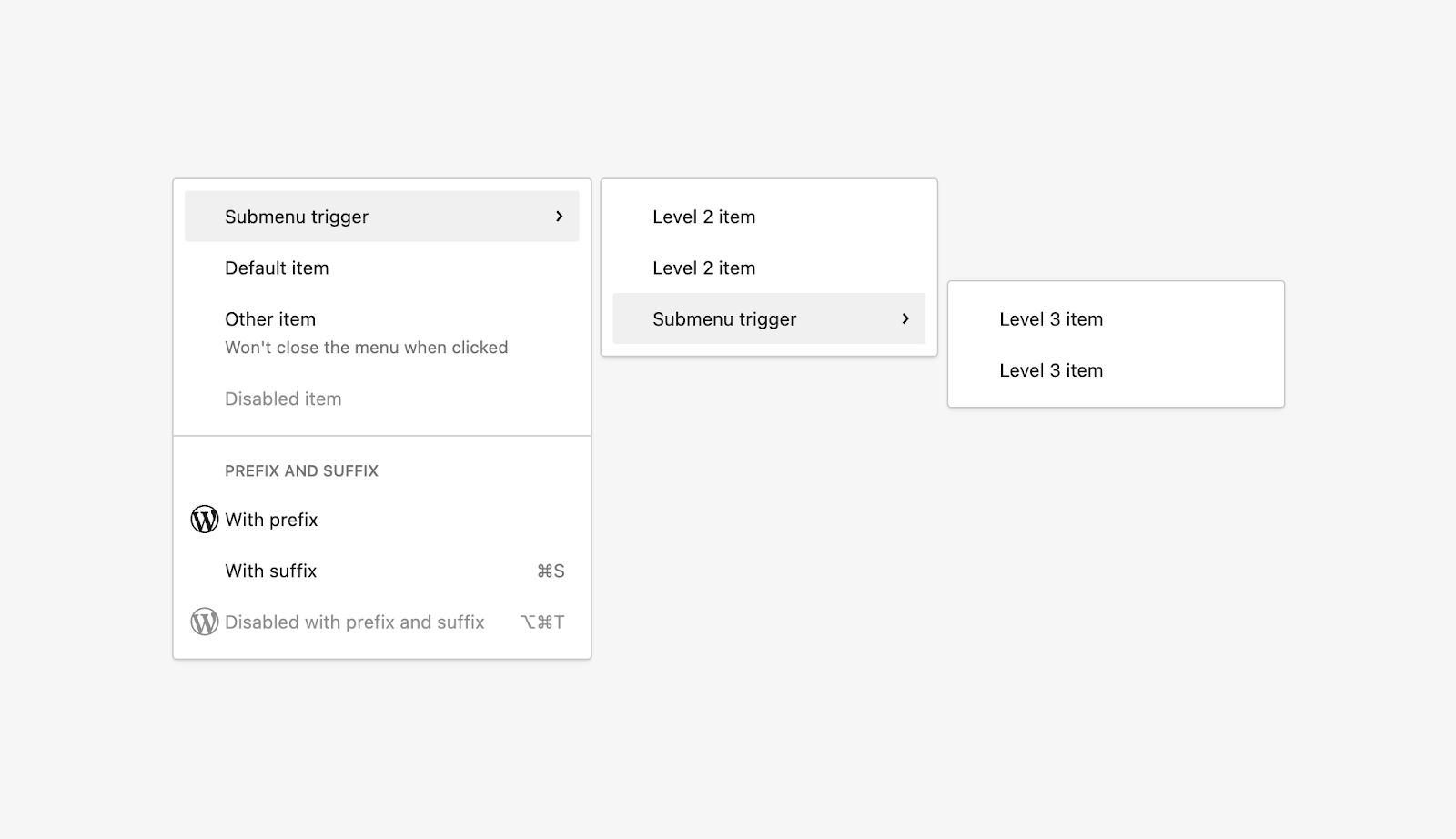
As part of the ongoing efforts to refine the components that power the BlockBlock Block is the abstract term used to describe units of markup that, composed together, form the content or layout of a webpage using the WordPress editor. The idea combines concepts of what in the past may have achieved with shortcodes, custom HTML, and embed discovery into a single consistent API and user experience. Editor, Gutenberg 17.0 brings a new, alternative implementation of the DropdownMenu component based on the Ariakit open-source library. This implementation, although still experimental, offers a good glimpse at what the future of WordPress components holds.

As a reminder, you can check and play with this and other components in the Components Storybook!

Additional visual cues for LinkControl

When searching through the LinkControl, new Block and Home icons are added next to results related to the home and front pages, respectively. These visual cues intend to make finding what youโ€™re looking for easier.

Iterating on Accessibility and Performance

As usual, this Gutenberg release provides a few iterative performance and accessibility improvements.

On the accessibility side of things, itโ€™s worth noting the Autocomplete Voiceover now announces suggestions, among other a11yAccessibility Accessibility (commonly shortened to a11y) refers to the design of products, devices, services, or environments for people with disabilities. The concept of accessible design ensures both โ€œdirect accessโ€ (i.e. unassisted) and โ€œindirect accessโ€ meaning compatibility with a personโ€™s assistive technology (for example, computer screen readers). (https://en.wikipedia.org/wiki/Accessibility) enhancements to the Navigation block and Query LoopLoop The Loop is PHP code used by WordPress to display posts. Using The Loop, WordPress processes each post to be displayed on the current page, and formats it according to how it matches specified criteria within The Loop tags. Any HTML or PHP code in the Loop will be processed on each post. https://codex.wordpress.org/The_Loop block. Regarding performance, some controls like duotone, layout, and alignment have been optimized.

Changelog

Full changelog available here

Enhancements

  • Add blogblog (versus network, site) icon to the blog home page in LinkControl search results. (55610)
  • Add home icon to the front page in LinkControl results. (55606)

Block Theme Preview

  • Block Theme Preview: Display loading state when activating. (55658)

Block Toolbar

  • Improve toolbar button focus visual. (55523)

Components

  • Add new ariakit-based DropdownMenu component. (54939)
  • Update InputControl and SelectControl default heights. (55490)
  • Update ariakit to version 0.3.5. (55365)

Block Editor

  • Adjust the padding of the categoryCategory The 'category' taxonomy lets you group posts / content together that share a common bond. Categories are pre-defined and broad ranging. item to make it visually balanced. (55598)

Patterns

  • Suggest commands when editing pattern in site editor. (55332)

Bug Fixes

  • Fix autocomplete trigger character detection. (55301)
  • Fix typo in FontCollection. (55439)

Block Editor

  • Block Editor: Avoid rendering empty Slot for block alignments. (55689)
  • Block Example: Avoid a crash when block is not registered. (55686)

Command Palette

  • Command Palette: Fix a crash when transform to a block without icon. (55676)
  • Fix: LinkControl on site editor does not show font page and post page indication. (55694)
  • Fix: LinkControl on widgets editor does not show font page and post page indication. (55732)

Interactivity APIAPI An API or Application Programming Interface is a software intermediary that allows programs to interact with each other and share data in limited, clearly defined ways.

  • Fix: Update page title when using enhanced pagination in query loop. (55446)

Block Library

  • Fix: Post terms block: Missing options for prefix and suffix when theโ€ฆ. (55726)
  • Ensure Term Description block is registered in coreCore Core is the set of software required to run WordPress. The Core Development Team builds WordPress.. (55669)
  • Fix #55679 missing space in the string. (55682)
  • Image block: Wrap images with hrefs in an A tagtag A directory in Subversion. WordPress uses tags to store a single snapshot of a version (3.6, 3.6.1, etc.), the common convention of tags in version control systems. (Not to be confused with post tags.). (55470)
  • Image: Improve focus management in lightbox. (55428)
  • Image: Update default fullscreen icon for lightbox trigger. (55463)
  • Navigation block: Remove browser default padding from the two submenu buttons. (50943)
  • Query Loop: Disallow โ€œenhanced paginationโ€ with core blocks that may contain third-party blocks. (55539)
  • Query block enhanced pagination: Detect inner plugin blocks during render. (55714)
  • Query: Require queryId for enhanced pagination to prevent PHPPHP The web scripting language in which WordPress is primarily architected. WordPress requires PHP 7.4 or higher notices. (55720)
  • Update label for lightbox editor UIUI User interface. (55724)
  • [Block] File: Fix embedded PDF files in Safari. (55667)

Patterns

  • Fix bugbug A bug is an error or unexpected result. Performance improvements, code optimization, and are considered enhancements, not defects. After feature freeze, only bugs are dealt with, with regressions (adverse changes from the previous version) being the highest priority. with authors and contributors not seeing user pattern categories. (55553)
  • Fix pattern category renaming causing potential duplicate categories. (55607)

Post Editor

  • Edit Post: Fix revision button misalignment. (55659)
  • Preferences modal: Fix the position of sticky heading when blocks are hidden. (55456)
  • Fix: Add __next40pxDefaultSize to author select in PostAuthor. (55597)

Site Editor

  • Fix the โ€˜Slugโ€™ display for draft pages. (55774)

Data Views

  • List all users in author filterFilter Filters are one of the two types of Hooks https://codex.wordpress.org/Plugin_API/Hooks. They provide a way for functions to modify data of other functions. They are the counterpart to Actions. Unlike Actions, filters are meant to work in an isolated manner, and should never have side effects such as affecting global variables and output.. (55723)
  • Donโ€™t register dataviews postype and taxonomyTaxonomy A taxonomy is a way to group things together. In WordPress, some common taxonomies are category, link, tag, or post format. https://codex.wordpress.org/Taxonomies#Default_Taxonomies. if experiment is disabled. (55743)

Design Tools

  • Remove default dimensions controls from core/avatarAvatar An avatar is an image or illustration that specifically refers to a character that represents an online user. Itโ€™s usually a square box that appears next to the userโ€™s name.. (55596)

Interactivity API

  • Fix server processing of an empty data-wp-context directive. (55482)
  • Make duotone support compatible with enhanced pagination. (55415)
  • Make layout support compatible with enhanced pagination. (55416)

Global Styles

  • Fix duotone not showing in site editor style block level styles. (55361)

Accessibility

Block Library

  • Navigation block: Change aria-haspopup to dialog. (55466)

Components

  • Autocomplete: Fix Voiceover not announcing suggestions. (54902)

Interactivity API

  • Query Loop: Update modal role and focus first element. (54507)

Performance

  • Add useSettings hook for reading multiple settings at once. (55337)
  • Block Editor: Optimize โ€˜Layoutโ€™ controls. (55754)
  • Block Editor: Optimize โ€˜anchorโ€™ inspector controls. (55721)
  • Block Editor: Optimize โ€˜duotoneโ€™ controls. (55753)
  • Block Editor: Optimize alignment toolbar controls. (55692)
  • Start logging site editor metrics in codevitals. (55759)
  • useAvailableAlignments: Avoid useSelect subscription when alignments array is empty. (55449)

Experiments

Data Views

  • TrashTrash Trash in WordPress is like the Recycle Bin on your PC or Trash in your Macintosh computer. Users with the proper permission level (administrators and editors) have the ability to delete a post, page, and/or comments. When you delete the item, it is moved to the trash folder where it will remain for 30 days. Data View: Use trash icon. (55771)
  • Add quick actions. (55488)
  • Update icons and design tweaks. (55391)
  • Add ability to persist dataviews on the database. (55465)
  • Extract search from filters. (55722)
  • Limit users to those who have published pages. (55455)
  • List all pages, not only those with publish and draft statuses. (55476)
  • Add: Default readonly views to dataviews. (55740)
  • Add: Possibility to tree shake DataViewsProvider. (55641)

Form block

  • Blocks: Capitalize title and end the description with a period. (55728)
  • Update copy. (55468)
  • Allow using groups and columns inside the experimental form block. (55758)

Collaborative Editing

  • Remove dangling comma causing PHPUnit failures. (55494)
  • [Try] HTTPHTTP HTTP is an acronym for Hyper Text Transfer Protocol. HTTP is the underlying protocol used by the World Wide Web and this protocol defines how messages are formatted and transmitted, and what actions Web servers and browsers should take in response to various commands. based PHP signaling server for colaborative editing. (53922)

Documentation

  • Adds a few grammar fixes to block-registration documentation. (55663)
  • Block JSONJSON JSON, or JavaScript Object Notation, is a minimal, readable format for structuring data. It is used primarily to transmit data between a server and web application, as an alternative to XML. schema: Add heading/button key to color definition. (55675)
  • DataViews: Document data and filters. (55504)
  • Docs: Fix some typos. (55654)
  • Docs: SidebarSidebar A sidebar in WordPress is referred to a widget-ready area used by WordPress themes to display information that is not a part of the main content. It is not always a vertical column on the side. It can be a horizontal rectangle below or above the content area, footer, header, or any where in the theme. Block editor handbook โ€“ create-block before wp-scripts. (55534)
  • Fix: Typos inside /docs. (55472)
  • Scripts: Fix typo in readme. (55531)
  • Update links to point to getting started guides. (55479)
  • docs: Fix end-to-end test documentation formatting. (55631)

Code Quality

  • Use PostCSS + PostCSS plugins for style transformation. (49521)
  • CS: Remove redundant ignore annotations. (55615)
  • Chore: Fix: Potential access to properties of undefined object. (55697)
  • Fix: Add missing defaultStatuses on PagePages. (55761)
  • Resizeable box (for resizing cover block) should use after block popover slot. (55784)
  • Update: Code quality: Use for each instead of map. (55798)
  • Update: Remove path awareness from data-views specific code. (55695)
  • Update: Remove useless self assignment. (55696)
  • Backportbackport A port is when code from one branch (or trunk) is merged into another branch or trunk. Some changes in WordPress point releases are the result of backporting code from trunk to the release branch. updates from Core during the 6.4 release cycle. (55703)

Data Views

  • DataViews: Iterate on filterโ€™s API. (55440)
  • DataViews: Pass search filter as global, unattached from fields. (55475)
  • DataViews: Remove string from pages sidebar. (55510)
  • Rename TextFilter to Search. (55731)
  • Remove unused file dataview context. (55775)

Block Library

  • Pattern: Unlock the private hook outside the component. (55792)

Patterns

  • Change pattern category taxonomy public param to false. (55748)

Tools

  • Replace โ€˜npxโ€™ with โ€˜nodeโ€™ on test-playwright.js fileโ€™. (55616)
  • wp-env: Fix errors which prevent it from working without internet. (53547)
  • [create-block] Add ABSPATH check. (55533)

Testing

  • E2E: Revert typing delay on the autocomplete mentions test. (55132)
  • Fix flaky โ€˜Switch to Draftโ€™ action in Preview end-to-end tests. (55772)
  • Migrate โ€˜Site Title blockโ€™ end-to-end tests to Playwright. (55704)
  • Migrate โ€˜block contextโ€™ end-to-end tests to Playwright. (55793)
  • Performance tests: Fix canvas locator timeout. (55441)
  • Scripts: Fix default Playwright configuration. (55453)

First-time contributors

The following PRs were merged by first time contributors:

Full contributor list

The following contributors merged PRs in this release:

@aaronrobertshaw @ajlende @alexstine @aristath @artemiomorales @arthur791004 @aurooba @c4rl0sbr4v0 @carolinan @ciampo @DAreRodz @dcalhoun @derekblank @dmsnell @fluiddot @garibiza @geriux @glendaviesnz @iamsadi22 @jameskoster @jeryj @jorgefilipecosta @jsnajdr @juanmaguitar @kevin940726 @KevinBatdorf @luisherranz @MaggieCabrera @Mamaduka @noahtallen @ntsekouras @oandregal @parikshit-adhikari @peterwilsoncc @ramonjd @richtabor @SergeyBiryukov @SiobhyB @Soean @strarsis @swissspidy @t-hamano @talldan @WunderBart @youknowriad


Props to @saxonafletcher for designing assets for this post and @richtabor for proofreading.

#block-editor, #core-editor, #gutenberg, #gutenberg-new

WordPress 6.4.1 Rapid Maintenance Release: Technical Details and Timeline

On November 7, 2023, WordPress 6.4 was released. ๐ŸŽ‰ Every release is a massive undertaking that requires the time and hard work of hundreds of contributors often spanning three to four months. Even though WordPress strives to ship excellent, bugbug A bug is an error or unexpected result. Performance improvements, code optimization, and are considered enhancements, not defects. After feature freeze, only bugs are dealt with, with regressions (adverse changes from the previous version) being the highest priority.-free code, technology is fast-moving and edge cases can sometimes make it past testing.

After the 6.4 release, it was reported that a small change within the bundled library responsible for making and managing HTTPHTTP HTTP is an acronym for Hyper Text Transfer Protocol. HTTP is the underlying protocol used by the World Wide Web and this protocol defines how messages are formatted and transmitted, and what actions Web servers and browsers should take in response to various commands. requests was causing problems for a small subset of sites. The bug was mainly surfacing in the form of failed pluginPlugin A plugin is a piece of software containing a group of functions that can be added to a WordPress website. They can extend functionality or add new features to your WordPress websites. WordPress plugins are written in the PHP programming language and integrate seamlessly with WordPress. These can be free in the WordPress.org Plugin Directory https://wordpress.org/plugins/ or can be cost-based plugin from a third-party. and theme updates where the attempt would take a long time to process and ultimately result in a timeout error. However, custom code using the HTTP APIAPI An API or Application Programming Interface is a software intermediary that allows programs to interact with each other and share data in limited, clearly defined ways. to make requests was also affected.

After an in-depth investigation, the conditions required were finally identified and understood. To reproduce the problem, a server had to be running a version of curl between 7.22.0 and 7.46.0 while also using HTTP1 and `Keep-Alive`. In curl 7.47.0, a change was made to always prefer HTTP/2 when available. HTTP/1.1 requests default to keeping a connection open, but HTTP/2 prohibits connection-specific header fields including `Keep-Alive` and `Connection`. In this scenario, no `Connection: close` headerHeader The header of your site is typically the first thing people will experience. The masthead or header art located across the top of your page is part of the look and feel of your website. It can influence a visitorโ€™s opinion about your content and you/ your organizationโ€™s brand. It may also look different on different screen sizes. was being sent when these conditions were met, so connections remained open until reaching the time out duration and returned an error.

Timeline

Below is a timeline of relevant events (all times are in Coordinated Universal Time or UTC):

November 7, 2023:

November 8, 2023:

November 9, 2023:

Summary

At the time of publishing, approximately 93% of all sites running the 6.4 major version have updated to the 6.4.1 release, with more updating every minute.

To safeguard against future related issues, contributors are exploring ways to better test against different versions of curl. It is always strongly recommended to run current and supported versions of all software. This recommendation is not just for PHPPHP The web scripting language in which WordPress is primarily architected. WordPress requires PHP 7.4 or higher and WordPress itself, but also for command line tools such as curl. As a project, we remain staunchly committed to backwards compatibility, but this is a safety net, not a substitute for that recommendation.

There are many moving parts that make individual WordPress releases increasingly challenging. Preparing, testing, and confidently releasing a version of software that powers over 43% of the web in under 24 hours is an exceptional accomplishment. It would not have happened without the 45+ contributors across the globe who dropped what they were working on to collaborate on solving this problem for site owners everywhere.

Props @chanthaboune, @cbringmann, @jeffpaul, @barry for pre-publish review.

WordPressย 6.4.1ย RC1 is now available

WordPressย 6.4.1ย Releaseย Candidateย 1 (RC1) is available for testing! Some ways you can help test thisย minorย release:

  • Use theย WordPress Beta Testerย pluginPlugin A plugin is a piece of software containing a group of functions that can be added to a WordPress website. They can extend functionality or add new features to your WordPress websites. WordPress plugins are written in the PHP programming language and integrate seamlessly with WordPress. These can be free in the WordPress.org Plugin Directory https://wordpress.org/plugins/ or can be cost-based plugin from a third-party.
    • As this is a minorย RCrelease candidate One of the final stages in the version release cycle, this version signals the potential to be a final release to the public. Also see alpha (beta).ย release, select theย Pointย Releaseย channel and theย Nightliesย stream. This is the latest build including the RC and potentially any subsequent commits inย trunk.
  • Useย WP-CLIWP-CLI WP-CLI is the Command Line Interface for WordPress, used to do administrative and development tasks in a programmatic way. The project page is http://wp-cli.org/ https://make.wordpress.org/cli/ย to test:
    wp core updateย https://wordpress.org/wordpress-6.4.1-RC1.zip
  • Directly download the Beta/RC version.

Whatโ€™s in thisย releaseย candidate?

6.4.1ย RC1 featuresย three (3) fixes.

The followingย tickets are fixed:

Whatโ€™s next?

The finalย releaseย is expected later today Wednesday, November 8, 2023 at 18:00 UTC-6 (tomorrow Nov 9 @ 00:00 UTC). Please note that this timing may change pending issues reported after RC1 isย released. Coordination will happen in theย WordPress.orgWordPress.org The community site where WordPress code is created and shared by the users. This is where you can download the source code for WordPress core, plugins and themes as well as the central location for community conversations and organization. https://wordpress.org/ย SlackSlack Slack is a Collaborative Group Chat Platform https://slack.com/. The WordPress community has its own Slack Channel at https://make.wordpress.org/chat/ย using the #core channel.

A special thanks to everyone who helped test, raised issues, and helped to fix tickets. With thisย releaseย candidate, testing continues, so please help test!

The WordPressย 6.4.1ย releaseย is led by @jorbin coordinating @hellofromtonya @afragen @clorith @desrosj @pbiron @schlessera @azaozz @tomsommer @nexflaszlo @howdy_mcgee @baxbridge @earnjam @timothyblynjacobs @johnbillion @flixos90 @joedolson @jeffpaul @zunaid321 @courane01 @audrasjb @tacoverdo @ironprogrammer @webcommsat @otto42 @barry and @chanthaboune

#6-4, #6-4-1, #minor-releases, #releases

Merging Performant Translations into Core

The coreCore Core is the set of software required to run WordPress. The Core Development Team builds WordPress. performance team spent a lot of time this year looking into the performance of the i18ni18n Internationalization, or the act of writing and preparing code to be fully translatable into other languages. Also see localization. Often written with a lowercase i so it is not confused with a lowercase L or the numeral 1. Often an acquired skill./l10nL10n Localization, or the act of translating code into one's own language. Also see internationalization. Often written with an uppercase L so it is not confused with the capital letter i or the numeral 1. WordPress has a capable and dynamic group of polyglots who take WordPress to more than 70 different locales. system in WordPress, after proving that loading translations had a significant hit on response time. This led to an in-depth performance analysis, followed by a dedicated Performant Translations feature pluginFeature Plugin A plugin that was created with the intention of eventually being proposed for inclusion in WordPress Core. See Features as Plugins offering significant performance boosts for all WordPress sites with zero configuration. Thousands of sites successfully tested the pluginPlugin A plugin is a piece of software containing a group of functions that can be added to a WordPress website. They can extend functionality or add new features to your WordPress websites. WordPress plugins are written in the PHP programming language and integrate seamlessly with WordPress. These can be free in the WordPress.org Plugin Directory https://wordpress.org/plugins/ or can be cost-based plugin from a third-party. under a wide variety of conditions. Now, the team believes the solution is ready for inclusion in WordPress core.

What it does

Performant Translations is powered by a new, lightweight i18n library that is faster at loading binary MO files and uses less memory. It even supports loading multiple locales at the same time, which makes locale switching faster. In addition to that, it supports translations contained in PHPPHP The web scripting language in which WordPress is primarily architected. WordPress requires PHP 7.4 or higher files, avoiding a binary file format and leveraging OPCache if available. If an MO translationtranslation The process (or result) of changing text, words, and display formatting to support another language. Also see localization, internationalization. file has a corresponding PHP file, the latter will be loaded instead, making things even faster and use even less memory. In raw numbers, this is how great the optimization is with this approach:

LocaleLocale A locale is a combination of language and regional dialect. Usually locales correspond to countries, as is the case with Portuguese (Portugal) and Portuguese (Brazil). Other examples of locales include Canadian English and U.S. English.ScenarioMemory UsageLoad Time
en_USDefault15 MB159 ms
de_DEDefault29 MB217 ms
de_DEPerformant Translations17 MB166 ms

These numbers were taken by testing the Performant Translations plugin against WordPress 6.5-alpha-57028 with the Twenty Twenty-One theme and a few active plugins. As you can see, memory usage and load time overhead are reduced to a minimum.

Next steps

The core performance team has opened #59656 to track merging Performant Translations into core in time for the next 6.5 release. A pull request is already available and currently undergoing code review. Once that is completed, it will be ready to be merged into trunktrunk A directory in Subversion containing the latest development code in preparation for the next major release cycle. If you are running "trunk", then you are on the latest revision. where the library will be able to see even wider testing.

There is also a Meta patch ready for serving PHP files as part of language packs shipped by translate.wordpress.org, building upon a GlotPress PR. Both are in need of code review right now. While these two changes unlock the full power of Performant Translations, they are not blockers for the core merge and could even land later.

The Performant Translations plugin will continue to be maintained even after a core merge to build on top of the core solution with a distinct additional feature. As is already the case today, the plugin will automatically convert any MO files to PHP files if a PHP file does not currently exist. This is useful for sites where translations are not coming from translate.wordpress.org or only exist locally on that server.


Thank you to @mukesh27, @westonruter for reviewing and helping with this post.

#core, #i18n, #performance

Dev Chat agenda, November 8, 2023

The next weekly WordPress developers chat will take place onย Wednesday, November 8, 2023 at 20:00 UTCย in theย coreย channel ofย Make WordPress Slack.

Welcome and housekeeping

All are welcome to join Dev Chat.

If you can help with dev chat summaries, please raise your hand in the meeting.

Announcements

WordPress 6.4 is out!
Thank you to every single person who has been involved and continues to contribute to 6.4 related items. As the work continues on post release aspects, another update on props will happen later in the week. It can also capture anyone missed or WordPress IDs to be updated.

Highlighted posts

A proposal for 2024 major release timings has been shared by @chanthaboune. This includes proposed dates for 6.5 to 6.7. Thoughts on timing, focus, or anything else relates to these releases can be added to the comments.
In addition, depending on other items, the Dev Chat facilitator can give time during the meeting for a live discussion.

Accessibility improvements in the 6.4 release

Proposal to discontinue the weekly core-editor meetings. Discussion about incorporating some of this within Dev Chat.

Discussion on shareable performance utils to help incorporating performance testing as part of their development workflow. On a related note, a blogblog (versus network, site) is coming from @swissspidy to help people get started with performance testing.

Reminders:

Call for 6.4x release managers

Help write and review 6.4 End User documentation

Forthcoming release updates

WordPress release: 6.4 โ€“ any issues

Reference information:
โ€“ Field Guide for 6.4
โ€“ All Developer Notes relating to 6.4 can be found using thisย tag.

Next major WordPress release: 6.5

The development cycle page has been created. It will be populated post the discussion on release timings and the finalization of the squad.

Tickets or Components help requests

Please add any items for this part of the agenda to the comments โ€“ tickets for 6.4.x and 6.5 will be prioritized. If you can not attend dev chat live, donโ€™t worry, include a note and the facilitator can highlight a ticketticket Created for both bug reports and feature development on the bug tracker. if needed.

Open floor

If you have any additional items to add to the agenda, please respond in the comments below to help the facilitator highlight them during the meeting.

CoreCore Core is the set of software required to run WordPress. The Core Development Team builds WordPress. Team Reps: 2024 edition โ€“ @webcommsat to reshare the draft post and timings.

#6-4, #agenda, #dev-chat

Performance Chat Summary: 7 November 2023

Meeting agenda here and the full chat log is available beginning here on Slack.

Announcements

  • Welcome to our new members ofย #core-performance
  • WordPress 6.4ย release is today

Priority Projects

Server Response Time

Link to roadmap projects and link to the GitHub project board

Contributors: @joemcgill @swissspidy @thekt12 @mukesh27 @pereirinha

  • @thekt12 working on #59314 Research showed that there is very little benefit going ahead withย file_existsย caching and itโ€™s not easy to cacheย locate_block_template()
    • @joemcgill I think we can probably close #59314 as a wontfix as well, but was waiting to see what the results were of the research you were doing into replacing all of the file_exists checks in coreCore Core is the set of software required to run WordPress. The Core Development Team builds WordPress. with your PoC. Did you ever run any numbers for that?
    • @thekt12 ran into issues while doing it so stopped in between. Will try that again this week
    • @joemcgill Sounds good. I think Iโ€™ll close that ticketticket Created for both bug reports and feature development on the bug tracker. regardless, and if you notice that itโ€™s worth attempting to replace the native file_exists implementation then we can open a new ticket for that.
  • @thekt12 also reviewing #45601
  • @mukesh27 For #59315 I ran function benchmark, which indicated a ~3% performance improvement for the function. Given this result, we recommend closing this ticket with aย wontfixย resolution
  • @swissspidy Regarding i18ni18n Internationalization, or the act of writing and preparing code to be fully translatable into other languages. Also see localization. Often written with a lowercase i so it is not confused with a lowercase L or the numeral 1. Often an acquired skill. performance, still planning a blogblog (versus network, site) post after 6.4 is out

Database Optimization

Link to roadmap projects and link to the GitHub project board

Contributors: @mukesh27 @thekt12

  • @mukesh27 for #56912 we are waiting for @spacedmonkey feedback
    • @spacedmonkey suggest to keep it open and puntpunt Contributors sometimes use the verb "punt" when talking about a ticket. This means it is being pushed out to a future release. This typically occurs for lower priority tickets near the end of the release cycle that don't "make the cut." In this is colloquial usage of the word, it means to delay or equivocate. (It also describes a play in American football where a team essentially passes up on an opportunity, hoping to put themselves in a better position later to try again.) to a future release
    • @flixos90 Iโ€™m not sure about theย site_iconย option. I reviewed that when I looked at the ticket recently, and itโ€™s autoloaded as far as I can tell. Thatโ€™s why I am thinking there is no outstanding work to do
  • @thekt12 This was already ready during 6.4, I feel this is ready to be merged for 6.5 given a second review.
    ย https://github.com/WordPress/wordpress-develop/pull/5295 Itโ€™s a small bugbug A bug is an error or unexpected result. Performance improvements, code optimization, and are considered enhancements, not defects. After feature freeze, only bugs are dealt with, with regressions (adverse changes from the previous version) being the highest priority. fix
    • @joemcgill I can give it a fresh look and commit it if it looks good to go

JavaScriptJavaScript JavaScript or JS is an object-oriented computer programming language commonly used to create interactive effects within web browsers. WordPress makes extensive use of JS for a better user experience. While PHP is executed on the server, JS executes within a userโ€™s browser. https://www.javascript.com & CSSCSS Cascading Style Sheets.

Link to roadmap project and link to the GitHub project board

Contributors: @mukesh27 @10upsimon @westonruter

  • @joemcgill The project board still has this leftover effort for async/defer, which includes #59301. I assume thatโ€™s not something actively being worked on?

Images

Link to roadmap projects and link to the GitHub project board

Contributors: @flixos90 @thekt12 @adamsilverstein @joemcgill @pereirinha @westonruter

  • @westonruter For Image Loading Optimization (overview issue), the initialย pull requestย for LCP and lazy-loading detection (i.e. page metrics) has been merged into the feature branchbranch A directory in Subversion. WordPress uses branches to store the latest development code for each major release (3.9, 4.0, etc.). Branches are then updated with code for any minor releases of that branch. Sometimes, a major version of WordPress and its minor versions are collectively referred to as a "branch", such as "the 4.0 branch". (feature/image-loading-optimization). Iโ€™m working on the nextย pull requestย for page metrics storage which I hope to have ready for review by EOD today. With detection and storage in place, Iโ€™ll move on to applying them to actually apply the optimizations on pages.
    • @joemcgill One question I had about 878 is why you decided to register a separate post type for the storage, rather than post metaMeta Meta is a term that refers to the inside workings of a group. For us, this is the team that works on internal WordPress sites like WordCamp Central and Make WordPress.? Just curious, really.
    • @westonruter Good question. The reason is that URLs needing to be optimized are more than just singular posts, where postmeta is not available. Itโ€™s similar to oEmbed Caches in core, where we have a custom post typeCustom Post Type WordPress can hold and display many different types of content. A single item of such a content is generally called a post, although post is also a specific post type. Custom Post Types gives your site the ability to have templated posts, to simplify the concept. for that as well
  • @joemcgill On a separate topic, Iโ€™ve started some initial research into ways we might be able to improve the accuracy of the algorithm we use to determine theย sizesย attribute that core adds to images. This could be an important optimization if we can be more accurate and potentially avoid serving larger than necessary images to site visitors.
  • @westonruter On the previous topicโ€ฆwhich relates to this, the detection logic is capturing the bounding rect for each image in the viewport, so this could feed into theย sizesย calculation.
    • @joemcgill Oh sureโ€ฆif we could do front-end calculation of the image dimensions, the sizes attribute could be much more accurate.
  • @pbearne Added Backgrounds to images got a plug by Kevin Powellย https://www.youtube.com/watch?v=345V2MU3E_w&ab_channel=KevinPowell

Measurement

Link to roadmap projects and link to the GitHub project board

Contributors: @adamsilverstein @joemcgill @mukesh27 @swissspidy @flixos90

  • @swissspidy My intro blog post about performance testing should be ready soon, just needs some final polish
  • @swissspidy Opened a PRย to expand core performance tests to cover localized sites, wp-adminadmin (and super admin), and memory usage
  • @adamsilverstein One small update from Drupal land where they have been working on a similar effort to add automated performance testingโ€ฆ They recently landed their first test collection piece in core with data going to Grafana โ€“ย https://www.drupal.org/project/drupal/issues/3391689
  • @flixos90 I am looking at metrics (mostly field) a lot these days, for visibility I am resharing the TTFB impact analysis I conducted:ย https://wordpress.slack.com/archives/C02KGN5K076/p1698947714789279
    It begs the question how much WordPress core is in a position to affect TTFB in the field, vs how much TTFB is impacted by other factors outside of our control (e.g. hosting stack, networknetwork (versus site, blog) connection etc.)
  • @joemcgill Iโ€™ve spent a lot of time over the past week getting into the weeds of how weโ€™ve been benchmarking WP versions, in preparation for the 6.4 release. Itโ€™s been a helpful exploration and weโ€™ve made improvements to theย https://github.com/swissspidy/compare-wp-performanceย workflow and added the ability to add variance statistics to the benchmarks taken by our benchmark CLICLI Command Line Interface. Terminal (Bash) in Mac, Command Prompt in Windows, or WP-CLI for WordPress. tools. Iโ€™ll write up some more details and add them to the conversation inย https://github.com/WordPress/performance/issues/849
  • @flixos90 I am also researching a couple other things related to our teamโ€™s potential impact on CWV through LCP, e.g. given we have mostly spent time on improving LCP, how much would that allow us to improveย overallย CWV passing rate of WordPress sites? And the same for TTFB (which, spoiler alert, seems to be a major bottleneck for TTFB)
    • @flixos90 I am going to prepare some of those stats to be a bit more presentable, but from what I am seeing so far, it seems that improving TTFB by letโ€™s say 40% (which obviously is a very ambitious goal) would improve the actual LCP passing rate from the current ~40% to ~60%, which would be huge. Note that ~60% is also the current LCP passing rate of allย non-WordPressย sites in the HTTPHTTP HTTP is an acronym for Hyper Text Transfer Protocol. HTTP is the underlying protocol used by the World Wide Web and this protocol defines how messages are formatted and transmitted, and what actions Web servers and browsers should take in response to various commands. Archive / CrUX dataset. So is TTFB our main issue in WordPress?
    • @flixos90 It would certainly make sense, since TTFB is the metric with the lowest passing rate for WordPress sites. So this probably isnโ€™t even news, but I think itโ€™s a good other angle to look at the situation from. Improving TTFB would have major impact on LCP, and that would then have major impact on CWV. But easier said than done

Ecosystem Tools

Link to roadmap projects and link to the GitHub repo

Contributors: @mukesh27 @swissspidy @westonruter

Creating Standalone Plugins

Link to GitHub overview issue

Contributors: @flixos90 @mukesh27 @10upsimon

Open Floor

  • @pbearne I wasย  on a client site last week and noticed that there was a load of get_options calls to missing options each taking 0.002. I wonder if we could work out a way to return early
    • @joemcgill Do these not get picked up by the not_options cache? Or did that not apply in this case?
    • @pbearne didnโ€™t seem to be so, filled up the queries
    • @joemcgill get_optionย should add any not found option to the cacheย here, unless there is a bug that causes it to get skipped. If the site isnโ€™t using a persistent object cache and itโ€™s only called once, then that optimization wonโ€™t really matter, but otherwise it should.
  • @dmsnell I started working with someone to work on running the GutenbergGutenberg The Gutenberg project is the new Editor Interface for WordPress. The editor improves the process and experience of creating new content, making writing rich content much simpler. It uses โ€˜blocksโ€™ to add richness rather than shortcodes, custom HTML etc. https://wordpress.org/gutenberg/ E2E suite against the Playground with Coreโ€™sย trunk. My schedule was a bit off because of a meetupMeetup All local/regional gatherings that are officially a part of the WordPress world but are not WordCamps are organized through https://www.meetup.com/. A meetup is typically a chance for local WordPress users to get together and share new ideas and seek help from one another. Searching for โ€˜WordPressโ€™ on meetup.com will help you find options in your area. we had a couple weeks ago and a small vacation I took afterwards.

Our next chat will be held on Tuesday, November 14, 2023 at 16:00 UTC in the #core-performance channel in Slack.

#core-performance, #performance, #performance-chat, #summary

Proposal: cancel core editor chat

Proposal: cancel coreCore Core is the set of software required to run WordPress. The Core Development Team builds WordPress. editor chat

The core editor chat is a SlackSlack Slack is a Collaborative Group Chat Platform https://slack.com/. The WordPress community has its own Slack Channel at https://make.wordpress.org/chat/ meeting that takes place every week on Wednesdays in the core-editor channel of the WordPress Slack instance, focused on discussing topics related to the GutenbergGutenberg The Gutenberg project is the new Editor Interface for WordPress. The editor improves the process and experience of creating new content, making writing rich content much simpler. It uses โ€˜blocksโ€™ to add richness rather than shortcodes, custom HTML etc. https://wordpress.org/gutenberg/ blockBlock Block is the abstract term used to describe units of markup that, composed together, form the content or layout of a webpage using the WordPress editor. The idea combines concepts of what in the past may have achieved with shortcodes, custom HTML, and embed discovery into a single consistent API and user experience. editor development.

This meeting has served in time as a place for the following types of communication:

  • general announcements about Gutenberg or WordPress
  • Gutenberg project updates, on various features in development
  • task coordination between the various people contributing
  • community introductions and help during open floor
  • issue escalation โ€“ bringing attention to specific issues
  • requests for help or reviews, a place to ask for an extra pair of hands or eyes

The meeting has served us well over the years, but in the past two years several developments occurred:

  • the post pandemic speed of people picking up these meetings was suboptimal
  • the GitHubGitHub GitHub is a website that offers online implementation of git repositories that can easily be shared, copied and modified by other developers. Public repositories are free to host, private repositories require a paid subscription. GitHub introduced the concept of the โ€˜pull requestโ€™ where code changes done in branches by contributors can be reviewed and discussed before being merged by the repository owner. https://github.com/ project management has been considerably better
    • there are people managing tracking and overview issues, updating them with project status
    • the project features of GitHub itself have been significantly upgraded
  • several other efforts picked up steam:
    • there is a new learn section on wordpress.orgWordPress.org The community site where WordPress code is created and shared by the users. This is where you can download the source code for WordPress core, plugins and themes as well as the central location for community conversations and organization. https://wordpress.org/
    • there is a revamped developer blogblog (versus network, site) on wordpress.org
    • developer experience and outreach programs improved
    • we have a constant stream of events like hallway hangouts on varied topics

Considering the above, I suggest that the meeting has now become an inefficient use of the time for those organizing it.ย 

Itโ€™s not only that the attendance is low, but the topics discussed and the lack of interest in the meeting itself point to the fact that the other avenues are doing a better job at keeping people engaged and updated with the progress of Gutenberg in WordPress, as well as providing much better avenues for getting support to contribute to or implement the core editor.

Therefore we propose discontinuing the meeting.


What do you think? Youโ€™re all invited to chime in with pros and cons, ideas and anything related for the duration of a three week comment time for this proposal to cancel the core editor chat for an indeterminate duration of time.


Thank you

Many thanks to the following list of people who have been helping across the years with running, summarizing and managing the agenda of the core editor chat:

@ajitbohra @annezazu @paaljoachim @fabiankaegy @jorgefilipecosta @get_dave @zieladam @bph

Important note

For the duration of the comment time (three weeks) there will be no more core editor chats (meetings).

#chats, #editor-chat, #proposal

Performance Chat Agenda: 7 November 2023

Here is the agenda for this weekโ€™s performance team meeting scheduled for Nov 7, 2023 at 16:00 UTC. If you have any topics youโ€™d like to add to this agenda, please add them in the comments below.


This meeting happens in the #core-performance channel. To join the meeting, youโ€™ll need an account on the Make WordPress Slack.

#agenda, #meeting, #performance, #performance-chat