The WordPress coreCoreCore is the set of software required to run WordPress. The Core Development Team builds WordPress. development team builds WordPress! Follow this site for general updates, status reports, and the occasional code debate. There’s lots of ways to contribute:
Found a bugbugA bug is an error or unexpected result. Performance improvements, code optimization, and are considered enhancements, not defects. After feature freeze, only bugs are dealt with, with regressions (adverse changes from the previous version) being the highest priority.?Create a ticket in the bug tracker.
WordPress 2.5 introduced copy_dir() for copying a directory from one location to another. This function recursively creates the necessary subdirectories and copies files to their respective location in the new folder.
However, there was previously no function to move a directory that worked on all filesystems. This meant that CoreCoreCore is the set of software required to run WordPress. The Core Development Team builds WordPress., and extenders, had to use copy_dir(), and then delete the original version.
Moving a directory should not require so much memory, diskspace, time, or file operations. It should be quick, easy to call, and reliable.
The solution
WordPress 6.2 (#57375) introduces the move_dir() function, which has the following parameters:
from (string) – The current location of the directory.
to (string) – The new location of the directory.
overwrite (bool) – Whether to overwrite the destination. Default false.
The function will return true on success, or a WP_Error object on failure.
Failures include:
$from and $to are the same.
$overwrite is false and the destination exists.
$overwrite is true, and an existing destination could not be deleted.
If falling back to copy_dir() and the destination cannot be created.
How do you use it?
If your intent is to use move_dir(), and the destination hasn’t already been deleted, then it must be called with $overwrite as true.
You can immediately begin replacing any combinations of copy_dir() and delete with move_dir() in anticipation of WordPress 6.2’s release.
As always, please perform sufficient testing to ensure your code continues to work as expected before publishing it to production/users. This includes testing in all WordPress 6.2 release candidates.
Where is it used in Core?
move_dir() has now been implemented within the WP_Upgrader::install_package() method in #57557. This affects all upgrade paths, reducing diskspace and memory usage, and improving speed to reduce timeouts on systems with lower resources when updating Plugins, Themes and Language Packs.
If an extender sets clear_working to false, or the destination exists and has contents, the upgrade will use copy_dir() instead.
This is not a replacement for the use of copy_dir() in Core updates, as there are several areas where specific subdirectories are not copied in the process.
Not only is this more intuitive for moving directories than a combination of copy_dir() and delete, but it’s also significantly faster, and uses less diskspace and memory on the server.
OPcache is invalidated for all of the moved files, using the newly introduced wp_opcache_invalidate_directory() function. Find out more about this function in the Miscellaneous Dev Notesdev noteEach important change in WordPress Core is documented in a developers note, (usually called dev note). Good dev notes generally include a description of the change, the decision that led to this change, and a description of how developers are supposed to work with that change. Dev notes are published on Make/Core blog during the beta phase of WordPress release cycle. Publishing dev notes is particularly important when plugin/theme authors and WordPress developers need to be aware of those changes.In general, all dev notes are compiled into a Field Guide at the beginning of the release candidate phase. for WordPress 6.2.
Should the move operation fail, move_dir() falls back to copy_dir(). If copy_dir() is successful, the source directory is deleted.
VirtualBox
While working on this function, Core developers encountered a well-known issue in VirtualBox, in which file existence and metadata may not be updated after a move.
This produced a highly destructive result when a combination of Move A to C, Move B to A, Delete C was used via PHPPHPThe web scripting language in which WordPress is primarily architected. WordPress requires PHP 7.4 or higher’s rename() and unlink() functions.
move_dir() makes use of the calls to filesize() and filemtime() within the WP_Filesystem_*::dirlist() method called in wp_opcache_invalidate_directory() to resolve delayed metadata updates. File existence warnings are resolved with a 200ms delay after moving a directory, which gives the filesystem’s cache time to update.
This bugbugA bug is an error or unexpected result. Performance improvements, code optimization, and are considered enhancements, not defects. After feature freeze, only bugs are dealt with, with regressions (adverse changes from the previous version) being the highest priority. was known exclusively to VirtualBox. Extensive testing in VirtualBox 6 and 7 has shown that move_dir() does not encounter this bug, and is safe to use.
Update on 8 March 2023: Add sections about oEmbed providers, search_columns argument, and privacy-policy attribute.
WordPress 6.2 brings more new hooksHooksIn WordPress theme and development, hooks are functions that can be applied to an action or a Filter in WordPress. Actions are functions performed when a certain event occurs in WordPress. Filters allow you to modify certain functions. Arguments used to hook both filters and actions look the same. and methods, as well as security updates.
Media
The Media component brings another filterFilterFilters are one of the two types of Hooks https://codex.wordpress.org/Plugin_API/Hooks. They provide a way for functions to modify data of other functions. They are the counterpart to Actions. Unlike Actions, filters are meant to work in an isolated manner, and should never have side effects such as affecting global variables and output., wp_get_attachment_link_attributes which allows developers to filter the link attributes when getting the attachment link. See #41574.
Besides the new filter, Media has a new method for setting Imagick time limit, WP_Image_Editor_Imagick::set_imagick_time_limit(). PHPPHPThe web scripting language in which WordPress is primarily architected. WordPress requires PHP 7.4 or higher timeout during the ImageMagick operation can cause multiple problems, such as temporary files not being cleaned by ImageMagick garbage collection. The cause of such a timeout is hard to pinpoint as no clear error is provided.
This method is expected to be run before heavy image routines. It is used in ::resize() and ::crop() and it aligns Imagick’s timeout with PHP’s timeout, assuming it is set, which will resolve the cleaning of temporary files issue. See #52569.
The wp_ajax_save_attachment action hook is renamed to wp_ajax_save_attachment_updated to avoid confusion with the similarly named wp_ajax_save-attachment action. See #23148.
Login and Registration
The new release of WordPress will disable spellcheck for password fields. However small this change might seem at first, spellcheck is considered a security and privacy concern by MDN. The specification does not regulate how spellchecking is done and the element’s content may be sent to a third party for spellchecking results. Thus, it is recommended to set spellcheck attribute to false for elements containing sensitive information, which is the case for password fields. See #56763.
Improvements in writing CSSCSSCascading Style Sheets.
Position CSS properties (position, top, right, bottom, left, and z-index) are added in safe_style_css filter (#57504) to support sticky position blockBlockBlock is the abstract term used to describe units of markup that, composed together, form the content or layout of a webpage using the WordPress editor. The idea combines concepts of what in the past may have achieved with shortcodes, custom HTML, and embed discovery into a single consistent API and user experience. support. Read more about it in a dev notedev noteEach important change in WordPress Core is documented in a developers note, (usually called dev note). Good dev notes generally include a description of the change, the decision that led to this change, and a description of how developers are supposed to work with that change. Dev notes are published on Make/Core blog during the beta phase of WordPress release cycle. Publishing dev notes is particularly important when plugin/theme authors and WordPress developers need to be aware of those changes.In general, all dev notes are compiled into a Field Guide at the beginning of the release candidate phase.:
Another improvement in writing CSS happened in #57664, where the aspect-ratio is added as a valid property in kses.
RevisionsRevisionsThe WordPress revisions system stores a record of each saved draft or published update. The revision system allows you to see what changes were made in each revision by dragging a slider (or using the Next/Previous buttons). The display indicates what has changed in each revision.
WordPress 6.2 introduces a new filter for wp_save_post_revision(), wp_save_post_revision_revisions_before_deletion. It allows extenders to exclude specific revisions from being considered for deletion. See #57320.
Example of using this filter to delete all but the oldest revision:
add_filter(
        'wp_save_post_revision_revisions_before_deletion',
        function( $revisions, $post_id ) {
                $original_revision = get_transient( 'original_revision_for_post_' . $post_id );
                if ( $original_revision ) {
                        // Always remove the oldest revision from the array of revisions to potentially delete.
                        unset( $revisions[ $original_revision ] );
                } else {
                        // Set the oldest revision in a transient, so we can verify that it is always ignored.
                        $original_revision = array_key_first( $revisions );
                        set_transient( 'original_revision_for_post_' . $post_id, $original_revision );
                }
                return $revisions;
        },
        10,
        2
);
HTTPHTTPHTTP is an acronym for Hyper Text Transfer Protocol. HTTP is the underlying protocol used by the World Wide Web and this protocol defines how messages are formatted and transmitted, and what actions Web servers and browsers should take in response to various commands.APIAPIAn API or Application Programming Interface is a software intermediary that allows programs to interact with each other and share data in limited, clearly defined ways.
Changes in HTTP API modify WP_Http::make_absolute_url() to prevent it from dropping URLURLA specific web address of a website or web page on the Internet, such as a website’s URL www.wordpress.org fragments, which, in turn, fixes the same issue for links_add_base_url(). If you wish to maintain the legacy behaviour, include strip_fragment_from_url(). See #56231.
Changes in oEmbed providers
Mixcloud oEmbed URL was updated to their new domain. The old endpoint https://www.mixcloud.com/oembed was replaced with https://app.mixcloud.com/oembed. Old URLs will be automatically redirected by Mixcloud to the new endpoint.
See ticketticketCreated for both bug reports and feature development on the bug tracker.#57376 for more information.
oEmbed Support was added for crowdsignal.net surveys. Crowdsignal has a block-editor powered survey/project editor. Surveys created using this editor appears on `*.crowdsignal.net` when published. WP 6.2 adds oEmbed support for these URLs to embed Crowdsignal surveys.
Introducing the search_columns argument to control which fields are searched in a search query
Previously, the s argument of the WP_Query::parse_query() method searched the post_title, post_excerpt, and post_content fields, with no way of controlling this apart from using the posts_search filter and adjust the SQL manually.
WordPress 6.2 adds the ability to specify which fields are searched when performing a query, using the search_columns argument.
For now, only the default post_title, post_excerpt and post_content columns are allowed, but it may be extended on further releases of WordPress.
The default value of the search_columns argument is: array( 'post_title', 'post_excerpt', 'post_content' ).
The example below will search for posts containing foo in their excerptExcerptAn excerpt is the description of the blog post or page that will by default show on the blog archive page, in search results (SERPs), and on social media. With an SEO plugin, the excerpt may also be in that plugin’s metabox. (post_excerp column), excluding post_title and post_content columns.
Introducing the privacy-policy rel attribute on Privacy Policy links
WordPress 6.2 introduces a new rel="privacy-policy" attribute to user-facing links to the Privacy Policy of the website when a privacy policy page is set and available.
The rel attribute defines the relationship between a linked resource and the current document. While adding a rel value for privacy policy links is still a RFC of the Link Types HTML specification, the WordPress CoreCoreCore is the set of software required to run WordPress. The Core Development Team builds WordPress. Team decided to implement it, to help make Privacy Policy links more discoverable for user agents and HTMLHTMLHyperText Markup Language. The semantic scripting language primarily used for outputting content in web browsers. parsers.
As of WP 6.2, all links generated via get_the_privacy_policy_link() will return the following markup:
WordPress 6.2 adds a new position blockBlockBlock is the abstract term used to describe units of markup that, composed together, form the content or layout of a webpage using the WordPress editor. The idea combines concepts of what in the past may have achieved with shortcodes, custom HTML, and embed discovery into a single consistent API and user experience. support feature, beginning with support for sticky positioning, with the Group block opted-in by default. For themes using the appearanceTools feature in theme.json, the Group block will now be able to be set to “sticky”. The sticky positioning feature follows the CSS behavior for position: sticky which sets an element to stick to its immediate parent (in this case, the block’s immediate parent) when the user scrolls down the page.
Because it can be a potentially confusing feature to work with, for WordPress 6.2, the positioning controls will only be displayed for Group blocks at the root of the document. To create a sticky headerHeaderThe header of your site is typically the first thing people will experience. The masthead or header art located across the top of your page is part of the look and feel of your website. It can influence a visitor’s opinion about your content and you/ your organization’s brand. It may also look different on different screen sizes. in a site template, people building themes or sites can wrap a Header template part in a Group block and set that Group block to “sticky”.
This is just the beginning of the position block support feature, and there are ideas for future enhancements, including rolling out sticky to non-root blocks, and improving the UXUXUser experience surrounding building sticky site headers. There is an open issue in the GutenbergGutenbergThe Gutenberg project is the new Editor Interface for WordPress. The editor improves the process and experience of creating new content, making writing rich content much simpler. It uses ‘blocks’ to add richness rather than shortcodes, custom HTML etc.
https://wordpress.org/gutenberg/ repo to track progress beyond 6.2.
How to add sticky position support to a theme
There are two ways to add support for sticky position to a blocks theme. The simplest is to opt in to the appearanceTools setting, which automatically enables several design tools (read more in the developer handbook).
For themes that wish to have more granular control over which UIUIUser interface tools are enabled, the sticky position support can be opted into by setting settings.position.sticky to true in theme.json. For example:
{
	"settings": {
		"position": {
			"sticky": true
How does it work?
When a user sets a block to the sticky position via the drop-down list in the inspector controls, styling rules are output for position: sticky, a top position of 0px (with an offset to account for the logged in adminadmin(and super admin) bar), and a hard-coded z-index value of 10 to ensure that the sticky block sits above other content, while still working correctly in the admin UI. There is not yet support for controlling custom z-index values.
To support the output of these position properties, the safe_style_cssfilterFilterFilters are one of the two types of Hooks https://codex.wordpress.org/Plugin_API/Hooks. They provide a way for functions to modify data of other functions. They are the counterpart to Actions. Unlike Actions, filters are meant to work in an isolated manner, and should never have side effects such as affecting global variables and output.has been updated in core to support the position, top, right, bottom, left, and z-index properties.
The styling rules are output when the block is rendered, and a class name is-position-sticky is injected into the block markup. For themes wishing to add custom CSSCSSCascading Style Sheets. that targets sticky positioned group blocks, this could be achieved by using a selector like .wp-block-group.is-position-sticky.
Why was support for non-root sticky blocks removed in Gutenberg?
While the feature was being developed in the Gutenberg pluginPluginA plugin is a piece of software containing a group of functions that can be added to a WordPress website. They can extend functionality or add new features to your WordPress websites. WordPress plugins are written in the PHP programming language and integrate seamlessly with WordPress. These can be free in the WordPress.org Plugin Directory https://wordpress.org/plugins/ or can be cost-based plugin from a third-party., sticky positioning was initially enabled in all hierarchies of blocks. However, in manual testing, feedback indicated that without additional UI or UX work, it could be confusing for users attempting to create sticky headers if they accidentally set a non-root block to sticky, or for example, a block within a header template part to sticky. The decision was to scale back the feature to just the root blocks for 6.2 to allow more time to explore a suitable solution for nested blocks. See the discussion in this Gutenberg issue for more context.
Why is positioning not available in global styles?
The position block support has been designed to be set within individual block attributes, as positioning is typically set for an individual block, rather than globally for a particular block type. Therefore, within theme.json the position setting can be used to opt in to using the position support, however a block’s position styles cannot be set within global styles. It should instead be set at the individual Group block level, either within a site template, or a page or post.
WordPress 6.2 ships with version 18 of ReactReactReact is a JavaScript library that makes it easy to reason about, construct, and maintain stateless and stateful user interfaces.
https://reactjs.org, the JavaScriptJavaScriptJavaScript or JS is an object-oriented computer programming language commonly used to create interactive effects within web browsers. WordPress makes extensive use of JS for a better user experience. While PHP is executed on the server, JS executes within a user’s browser.
https://www.javascript.com library used to build the BlockBlockBlock is the abstract term used to describe units of markup that, composed together, form the content or layout of a webpage using the WordPress editor. The idea combines concepts of what in the past may have achieved with shortcodes, custom HTML, and embed discovery into a single consistent API and user experience. Editor and all custom blocks. It comes with several new features, improvements, and bugbugA bug is an error or unexpected result. Performance improvements, code optimization, and are considered enhancements, not defects. After feature freeze, only bugs are dealt with, with regressions (adverse changes from the previous version) being the highest priority. fixes, including a new rendering algorithm, called concurrent mode. (#45235)
In concurrent mode, React performs UIUIUser interface updates faster, and keeps the web page responsive. When it works on a large and complex UI update, it can still process all user input (mouse events, scrolling, keyboard events) in real-time, concurrently with the work it’s already doing.
However, it also introduces some potential pitfalls that developers need to be aware of, and which may break some components that rely on the precise timing of events and state updates. These pitfalls affect only a small set of complex and specialized React code. Unless your code relies on the specific timing of state updates, it’s almost certain that your code will continue to work without any changes.
Batched state updates
Almost all concurrent mode pitfalls are related to a feature called “batched state updates”. What does that mean? Consider this React component:
This component will initially render with state 0, and after one second it will do two state updates after each other: first to 1 and then to 2. In React 17, without concurrent mode and automated batching, messages in the console would be logged in this order:
rendering with state 0
started setting state
rendering with state 1
rendering with state 2
finished setting state
Each of the setX calls will immediately and synchronously trigger a component render, and there will be two renders. By the time the script executes the line that logs finished setting state, both renders have already happened. The effects from the setX(1) update has been executed, too. Every so often there is code that relies on the fact that the render and/or effects are already performed at this moment. And exactly this kind of code is a typical source of concurrent mode bugs. Because in concurrent mode, in React 18, the order of the logged messages will be very different:
rendering with state 0
started setting state
finished setting state
rendering with state 2
First, by the time the finished setting state message is being logged, no render has happened yet. At that time it’s merely scheduled, not yet performed.
Second, both setX(1) and setX(2) updates have been batched together, and only one render was performed with the 2 final values, after performing both state updates in a batch. That’s another source of bugs. If your code relied on the render with the state 1 being performed, it will never happen. Effects are also running only with the 2 value, the 1 effects are skipped.
Batched updates and @wordpress/data
A special case of batched state updates, often present in WordPress code, are dispatch calls in @wordpress/data stores:
Here, dispatching the increment action ultimately leads to a state update inside a component that selects from the counterStore. Occasionally, your code can rely on the fact that immediately after the counter.increment() call, all the updates and re-renders have been already synchronously executed. But, as described above, in React 18 concurrent mode that doesn’t happen immediately. The update is merely scheduled at that time.
New APIAPIAn API or Application Programming Interface is a software intermediary that allows programs to interact with each other and share data in limited, clearly defined ways. for mounting a root
If your pluginPluginA plugin is a piece of software containing a group of functions that can be added to a WordPress website. They can extend functionality or add new features to your WordPress websites. WordPress plugins are written in the PHP programming language and integrate seamlessly with WordPress. These can be free in the WordPress.org Plugin Directory https://wordpress.org/plugins/ or can be cost-based plugin from a third-party. or block is mounting its own React UI into the page, instead of exporting React components to be rendered by the Block Editor, you should be aware of the new React 18 APIs for mounting a component root. The old, React 17 way, was the render function from react-dom or from @wordpress/element:
import { render } from '@wordpress/element';

const el = document.getElementById( 'root' );
render( <App />, el );
This still continues to work, and you can continue to use it. The only downsides are that you’ll be getting a console warning about using a React 17 legacy API, and that concurrent mode is disabled in React apps mounted this way.
The React 18 way is to use the new createRoot API:
import { createRoot } from '@wordpress/element';

const el = document.getElementById( 'root' );
const root = createRoot( el );
root.render( <App /> );
There is one extra step: from a DOM element, you create a root, and then you render a JSX element into that root. Apps mounted this way will use the new concurrent mode.
There is also a new API for unmounting a React root. The old one was unmountComponentAtNode( el ), the new one is to call a method on the root object: root.unmount()
Other new APIs in React 18
There are other new API functions in React 18, all of them also exported by the @wordpress/element package:
These are entirely new and don’t introduce any backwards-compatibility concerns. If you would like to learn about them or want to use them, please consult the React 18 Migration Guide and the React docs.
WordPress 6.2 introduces a new skipBlockSupportAttributes prop to exclude attributes and styles related to blockBlockBlock is the abstract term used to describe units of markup that, composed together, form the content or layout of a webpage using the WordPress editor. The idea combines concepts of what in the past may have achieved with shortcodes, custom HTML, and embed discovery into a single consistent API and user experience. supports in the ServerSideRender component. This makes it easier to properly add support to blocks with the ServerSideRender components.
ServerSideRender is a component used for server-side rendering a preview of dynamic blocks to display in the editor. By passing the attributes prop to this component, it is processed on the server side and the block receives the rendered result.
ServerSideRender component should be regarded as a fallback or legacy mechanism, it is not appropriate for developing new features against. New blocks should be built in conjunction with any necessary REST APIREST APIThe REST API is an acronym for the RESTful Application Program Interface (API) that uses HTTP requests to GET, PUT, POST and DELETE data. It is how the front end of an application (think “phone app” or “website”) can communicate with the data store (think “database” or “file system”)
https://developer.wordpress.org/rest-api/ endpoints, so that JavaScriptJavaScriptJavaScript or JS is an object-oriented computer programming language commonly used to create interactive effects within web browsers. WordPress makes extensive use of JS for a better user experience. While PHP is executed on the server, JS executes within a user’s browser.
https://www.javascript.com can be used for rendering client-side in the edit function. This gives the best user experience, instead of relying on using the PHPPHPThe web scripting language in which WordPress is primarily architected. WordPress requires PHP 7.4 or higher render_callback. The logic necessary for rendering should be included in the endpoint, so that both the client-side JavaScript and server-side PHP logic should require a minimal amount of differences.
If you add block supports to the block that contains this component, the problem is that the styles from the block support will be applied to both the block wrapper element and the rendered HTMLHTMLHyperText Markup Language. The semantic scripting language primarily used for outputting content in web browsers. by ServerSideRender component. For example, if you opt for padding and margin as block support, and those styles are applied to the block, you will have double spaces.
By opting in to the new skipBlockSupportAttributes prop introduced in WordPress 6.2, all attributes related to block support will be removed before rendering on the server side, and you will be able to get proper rendering results.
However, if block styles are already defined in the global style or in theme.json, those styles will take precedence and individual block’s overrides may not be applied. In such cases, explicitly handling the block support to be passed to the ServerSideRender component will produce the intended result.
import ServerSideRender from '@wordpress/server-side-render';

const serverSideAttributes = {
	...attributes,
	style: {
		...attributes?.style,
		// Ignore styles related to margin and padding.
		spacing: undefined,
	},
};

const MyServerSideRender = () => (
	<ServerSideRender
		// All block support attributes except margins and padding are passed.
 		attributes={ serverSideAttributes }
		block="core/archives"
		attributes={ attributes }
	/>
);
wp.components.ServerSideRender
The ServerSideRender component has moved to its own package/script in WordPress 5.3 and accessing it using wp.components.ServerSideRender has been deprecated since. Starting WordPress 6.2, you should be able to access it directly using wp.serverSideRender. (#46106)
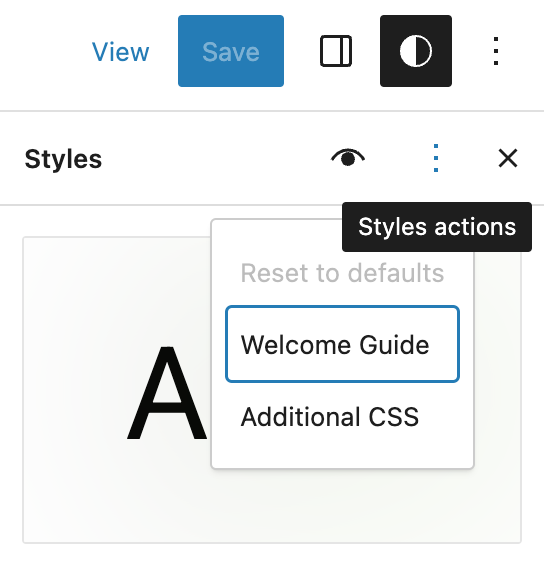
A custom CSS input box has been added to the Global Styles settings in the Site Editor. This provides similar functionality to the custom CSS input available in CustomizerCustomizerTool built into WordPress core that hooks into most modern themes. You can use it to preview and modify many of your site’s appearance settings. for classic themes. This option appears under the global styles actions menu: (#46141)
Ideally, this input should be seen as a last resort fallback to add styling that can not yet be implemented with the other editor design tools. Some other important things to note are:
This custom CSS does not use the same custom_css CPT as the Customizer custom CSS, but instead is part of the existing Global Styles wp_global_styles CPT
As with the other user custom global styles, the custom CSS is specific to the current theme
To support custom CSS as part of Global Styles a new property has been added to theme.jsonJSONJSON, or JavaScript Object Notation, is a minimal, readable format for structuring data. It is used primarily to transmit data between a server and web application, as an alternative to XML. – styles.css
While the addition of the styles.css property to theme.json does allow theme authors to use it to include custom CSS strings in their themes, as with the user input for this property ideally themes should only use this as a last resort fallback to add styling that can’t yet be implemented with the other editor design tools
Theme authors should note that users’ custom CSS can completely override or remove any theme custom CSS set in the theme.json, so in cases where theme authors do not want users to easily wipe custom CSS they should consider including it via the existing style sheet enqueuing methods
Because the standard global styles flow is for user data to override theme data, it would be possible for users to inadvertently override a key theme custom CSS setting, eg. add a custom image background to a group and in the process wipe a background that the theme was adding to headings. For this reason, when a user first edits the custom CSS the theme CSS is shown in the input box to allow the user to selectively and knowingly override/remove any theme custom CSS
Per BlockBlockBlock is the abstract term used to describe units of markup that, composed together, form the content or layout of a webpage using the WordPress editor. The idea combines concepts of what in the past may have achieved with shortcodes, custom HTML, and embed discovery into a single consistent API and user experience. Custom CSS
When a theme that has support for the Site Editor is activated, users do not have easy access to adding additional CSS via the Customizer. In WordPress 6.2, there are two new ways to add per-block custom CSS: Via the Styles interface in the Site Editor and theme.json. (#46571)
To add CSS via the interface:
open the Styles sidebarSidebarA sidebar in WordPress is referred to a widget-ready area used by WordPress themes to display information that is not a part of the main content. It is not always a vertical column on the side. It can be a horizontal rectangle below or above the content area, footer, header, or any where in the theme. in the Site Editor
Next, open the blocks panel and
select a block
Click on Additional block CSS to open the block CSS panel
CSS added in this panel applies to all occurrences of the block. In this panel, you can also see if the active theme adds CSS using theme.json:
You can add per-block custom CSS in theme.json as a string in styles.blocks.block.css. Basic example:
In WordPress 6.2, a new minimum height blockBlockBlock is the abstract term used to describe units of markup that, composed together, form the content or layout of a webpage using the WordPress editor. The idea combines concepts of what in the past may have achieved with shortcodes, custom HTML, and embed discovery into a single consistent API and user experience. support feature has been added, with the Group and Post Content blocks opted-in by default. For themes using the appearanceTools feature in theme.json, the control will be available in the inspector controls, under Dimensions. It is not exposed by default, and users can access the control via the Dimensions panel’s menu. (#45300)
The feature allows users to set a Group or Post Content block to have a minimum height, similar to the control that exists for the Cover block. An example use case is to ensure that a post content area has a minimum height, forcing a footer area to render lower on the page, even if a page has little content. For this reason, it can be quite useful to use viewport relative units when setting minimum height, e.g. 100vh for a block that takes up the entire height of the viewport.
Setting the minimum height for the Stack variation of the Group block is also useful when combined with the new vertical alignment tools added in 6.2 introduced in this Gutenberg PR, as it allows users to align the blocks within the minimum height of the Stack to be at the top, center, bottom positions within the block, or for the blocks to be aligned via space-between.
How to add minHeight support to a theme
There are two ways to add support for the minHeight setting to a block theme. The simplest is to opt in to the appearanceTools setting, which automatically enables several design tools (read more in the Developer Handbook).
For themes that wish to have more granular control over which UIUIUser interface tools are enabled, the minHeight dimensions support can be opted into by setting settings.dimensions.minHeight to true in theme.json. For example:
{
	"settings": {
		"dimensions": {
			"minHeight": true
For styling blocks globally, minHeight can also be set either within the global styles interface, or within theme.json. For example, the Post Content block can be set to have a minimum height of 70vh by setting styles.blocks.core/post-content.dimensions.minHeight to 70vh in theme.json:
In the block’s block.json file, add the supports.dimensions.minHeight property, and set it to true to enable the minimum height control. For static blocks, the min-heightCSSCSSCascading Style Sheets. rule will be saved as an inline style to post content. For dynamic blocks, the min-height rule will be injected into the style attribute returned as part of a call to get_block_wrapper_attributes. For more information on outputting block supports in dynamic blocks, read the entry in the Developer Handbook.
Further reading
The minimum height feature is one part of providing tools to allow sites to align footers to the bottom of the page when the page has no/little content (Gutenberg issue #45117)
A solution has already been implemented in GutenbergGutenbergThe Gutenberg project is the new Editor Interface for WordPress. The editor improves the process and experience of creating new content, making writing rich content much simpler. It uses ‘blocks’ to add richness rather than shortcodes, custom HTML etc.
https://wordpress.org/gutenberg/. An additional BetaBetaA pre-release of software that is given out to a large group of users to trial under real conditions. Beta versions have gone through alpha testing in-house and are generally fairly close in look, feel and function to the final product; however, design changes often occur as part of the process. 5 will be released tomorrow March 7th, at 17:00 UTC, instead of RC1, to allow for proper testing of this solution.
The cycle page has been updated accordingly. Thank you for your patience and continuous commitment to making WordPress!
Due to privacy concerns, the themes from Twenty Twelve to Twenty Seventeen will not fetch their fonts from Google addresses, starting with the next version.
Twenty Twelve
3.9
Twenty Thirteen
3.8
Twenty Fourteen
3.6
Twenty Fifteen
3.4
Twenty Sixteen
2.9
Twenty Seventeen
3.2
Each theme would serve a new stylesheet from the theme directory, under the site’s domain. With multiple fonts, Twenty Thirteen creates a reference like this:
If you have edited or removed the font stylesheet in a child themeChild themeA Child Theme is a customized theme based upon a Parent Theme. It’s considered best practice to create a child theme if you want to modify the CSS of your theme. https://developer.wordpress.org/themes/advanced-topics/child-themes/ or pluginPluginA plugin is a piece of software containing a group of functions that can be added to a WordPress website. They can extend functionality or add new features to your WordPress websites. WordPress plugins are written in the PHP programming language and integrate seamlessly with WordPress. These can be free in the WordPress.org Plugin Directory https://wordpress.org/plugins/ or can be cost-based plugin from a third-party., please verify that your site will work properly with this change.
Language support
When a language has disabled certain custom fonts, the stylesheet should continue to respect that setting.
Google Fonts had offered all character sets, ignoring any specified in the URLURLA specific web address of a website or web page on the Internet, such as a website’s URL www.wordpress.org, so the new styles for all six themes likewise gather the font files for any character sets. Modern browsers select only the sets they need for the page.
Developers may still choose only certain character subsets, either to create a reduced stylesheet or to use in a preload resource hint. Creating an array of language codes could help, mapping them to their script families.
Fixing the editor style within a custom theme-setup function
Twenty Fourteen, Twenty Fifteen and Twenty Sixteen have allowed custom overrides to their setup functions in a child theme.
twentyfourteen_setup()
twentyfifteen_setup()
twentysixteen_setup()
For the blockBlockBlock is the abstract term used to describe units of markup that, composed together, form the content or layout of a webpage using the WordPress editor. The idea combines concepts of what in the past may have achieved with shortcodes, custom HTML, and embed discovery into a single consistent API and user experience. editor, the new font stylesheet URL needs to be relative in the add_editor_style() function, or else it would try fetching fonts from a nonexistent wp-admin URL. If a child theme replaces the setup function, it should remove the theme directory before including the fonts in the editor style array. Twenty Fourteen has this (arranged in fewer lines):
Twenty Fifteen and Twenty Sixteen have allowed replacing the font stylesheet since their debut, and the upcoming versions of the other four themes will enable the same. (Previous versions of those four would cause an error by declaring the function twice.)
To remove the font stylesheet and use system fonts, you could return an empty string in the child theme’s functions.php.
function twentyfifteen_fonts_url() {
	return '';
}
To protect against errors in older versions of Twenty Twelve, Twenty Thirteen, Twenty Fourteen or Twenty Seventeen, the child theme could establish a minimum version for the parent theme before declaring the function.
if ( version_compare( wp_get_theme( 'twentythirteen' )->get( 'Version' ), '3.8', '>=' ) ) {
	function twentythirteen_fonts_url() {
		return '';
	}
}
Including a custom set of fonts in the child theme
A child theme could include a different set of fonts and its own stylesheet. For example, a site that needs additional weights and styles for Montserrat—but does not use Twenty Sixteen’s other fonts—could have this in its functions.php:
function twentysixteen_fonts_url() {
	return get_stylesheet_directory_uri() . '/fonts/montserrat-all.css';
}
Classic Editor would require special considerations for the new URL:
The above example uses '/fonts/montserrat-all.css' because Twenty Sixteen has '/fonts/montserrat.css' in its directory. If the child theme’s filename and directory match a stylesheet in the parent theme, the editor would fetch both stylesheets. Child themes that already have a font stylesheet with the same name and directory could use the mce_cssfilterFilterFilters are one of the two types of Hooks https://codex.wordpress.org/Plugin_API/Hooks. They provide a way for functions to modify data of other functions. They are the counterpart to Actions. Unlike Actions, filters are meant to work in an isolated manner, and should never have side effects such as affecting global variables and output. to remove the extra file.
If the child theme font URL includes a version query string, whether hardcoding ver=1.0 or using add_query_arg(), Classic Editor would ignore the entire stylesheet. If the version is important on the front end, the function could add the parameter only when it is not an administration page.
Child themes also could build similar stylesheets to override choices in the parent font stylesheet. If you want to extend the time limit for fonts to load and replace system fonts, you could change the font-display property to swap and refer to the parent theme’s font files within your theme’s stylesheet.
/* montserrat-latin-400-normal */
@font-face {
	font-family: 'Montserrat';
	font-style: normal;
	font-display: swap;
	font-weight: 400;
	/* Go up two levels if this stylesheet is at '/fonts/montserrat-all.css' in the child theme. */
	src:
		url('../../twentysixteen/fonts/montserrat/montserrat-latin-400-normal.woff2?ver=25') format('woff2'),
		url('../../twentysixteen/fonts/montserrat/montserrat-all-400-normal.woff?ver=25') format('woff');
	unicode-range: U+0000-00FF, U+0131, U+0152-0153, U+02BB-02BC, U+02C6, U+02DA, U+02DC, U+2000-206F, U+2074, U+20AC, U+2122, U+2191, U+2193, U+2212, U+2215, U+FEFF, U+FFFD;
}
Adjusting the query string
If you amended parameters in the Google Fonts URL with add_query_arg or remove_query_arg, those adjustments would not have the desired effect anymore.
Without a child theme, the default stylesheet can be replaced within a plugin:
If you created a custom Google Fonts URL and you do not need to change it to meet privacy laws, you may want to restore the preconnect resource hint filter. A PHPPHPThe web scripting language in which WordPress is primarily architected. WordPress requires PHP 7.4 or higher comment disables it, but either a child theme or a plugin can add the filter again. Each theme has its own filter callback name:




You must be logged in to post a comment.