The Test Team helps manage testing and triage across the WordPress ecosystem. They focus on user testing of the editing experience and WordPress dashboard, replicating and documenting bug reports, and supporting a culture of review and triage across the project.
Please drop by any time in SlackSlackSlack is a Collaborative Group Chat Platform https://slack.com/. The WordPress community has its own Slack Channel at https://make.wordpress.org/chat/ with questions or to help out.
Save the date! WordPress 6.1 is scheduled for release on 1 November 2022. This release is the culmination of over 360 updates and 370 bug fixes. Check out last week’s 6.1 Product Walk-Through for a visual overview of major features shipping with 6.1.
Please only test on a development siteDevelopment SiteYou can keep a copy of your live site in a separate environment. Maintaining a development site is a good practice that can let you make any changes and test them without affecting the live/production environment. and not on a production/live site. You can follow these instructions to set up a local installLocal InstallA local install of WordPress is a way to create a staging environment by installing a LAMP or LEMP stack on your local computer., or use a tool like this to set up a development site.
Once your development site is set up, please install and activate the WordPress Beta Tester Plugin. After activation:
Navigate to Tools > BetaBetaA pre-release of software that is given out to a large group of users to trial under real conditions. Beta versions have gone through alpha testing in-house and are generally fairly close in look, feel and function to the final product; however, design changes often occur as part of the process. Testing.
Set the update channel to “Bleeding edge” and click Save Changes.
Set the stream option to “Beta/RCRelease CandidateA beta version of software with the potential to be a final product, which is ready to release unless significant bugs emerge. only” and click Save Changes again.
Navigate to Dashboard > Updates and click the Update to latest… button.
At a high level, here are a few tips to keep in mind to get the most out of helping to test:
Test across different browsers.
Test in different languages.
Compare features on different screen sizes, including tablets and mobile.
Use just your keyboard to navigate, or use a screen reader.
Test with both blockBlockBlock is the abstract term used to describe units of markup that, composed together, form the content or layout of a webpage using the WordPress editor. The idea combines concepts of what in the past may have achieved with shortcodes, custom HTML, and embed discovery into a single consistent API and user experience. and classic themes.
Important Note: Anything marked with a tool icon (🛠) is more technical, and may be best suited for those comfortable with more advanced testing steps.
Key Features to Test 🔑
Twenty Twenty-Three
WordPress 6.1 introduces a new default theme, Twenty Twenty-Three (aka TT3). This theme ships with 10 unique Styles variations, the result of a month-long community design collaboration, with submissions from around the globe.
HeaderHeaderThe header of your site is typically the first thing people will experience. The masthead or header art located across the top of your page is part of the look and feel of your website. It can influence a visitor’s opinion about your content and you/ your organization’s brand. It may also look different on different screen sizes. and Footer Patterns
This feature has been moved to a future version of WordPress.
To help make finding patterns for specific use, new categorization has been added to the pattern chooser to identify patterns by type. To test, look for the new categoryCategoryThe 'category' taxonomy lets you group posts / content together that share a common bond. Categories are pre-defined and broad ranging. dropdown, and explore the different options available for your theme.
Quote and List Block Updates
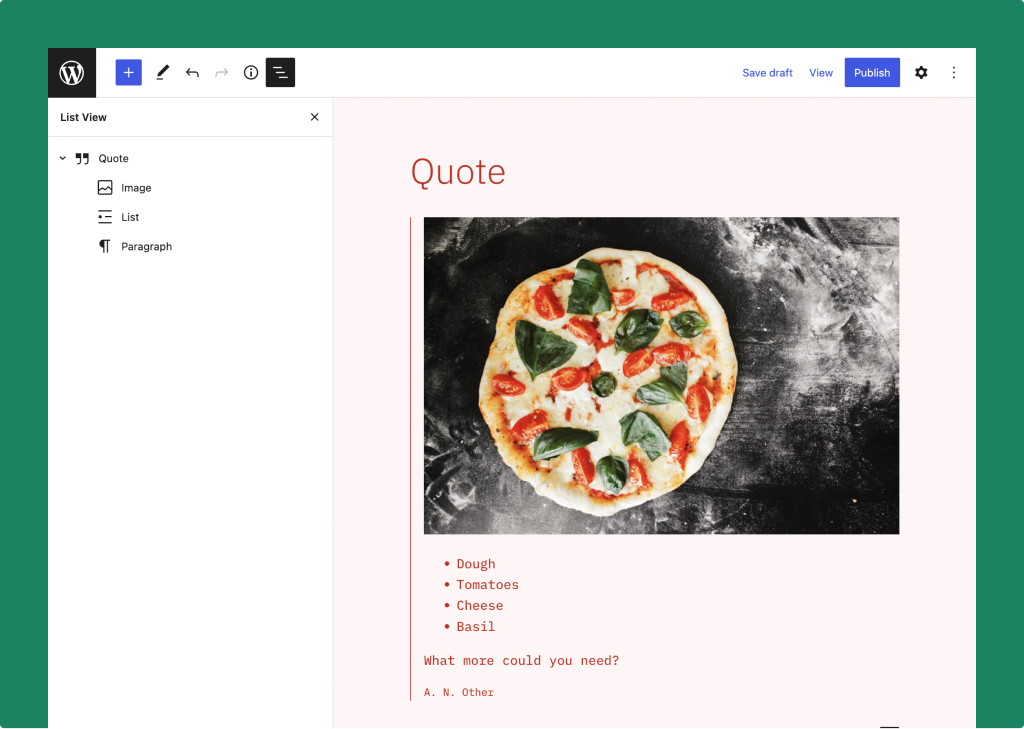
The Quote and List blocks have been supercharged, and now support inner blocks. For instance, Quote can now contain any inner block, such as Heading, Image, List, or even another Quote. And List items are now treated as individual blocks, which makes sorting much easier than before.
Revamped Quote block with support for inner blocks.
To test these updates, create and reorder lists, and make quotes more expressive with inner block options.
Fluid Typography 🛠
The first version of fluid typography support via theme.json is shipping with WordPress 6.1, which allows theme authors to set text that adapts to the user’s viewport.
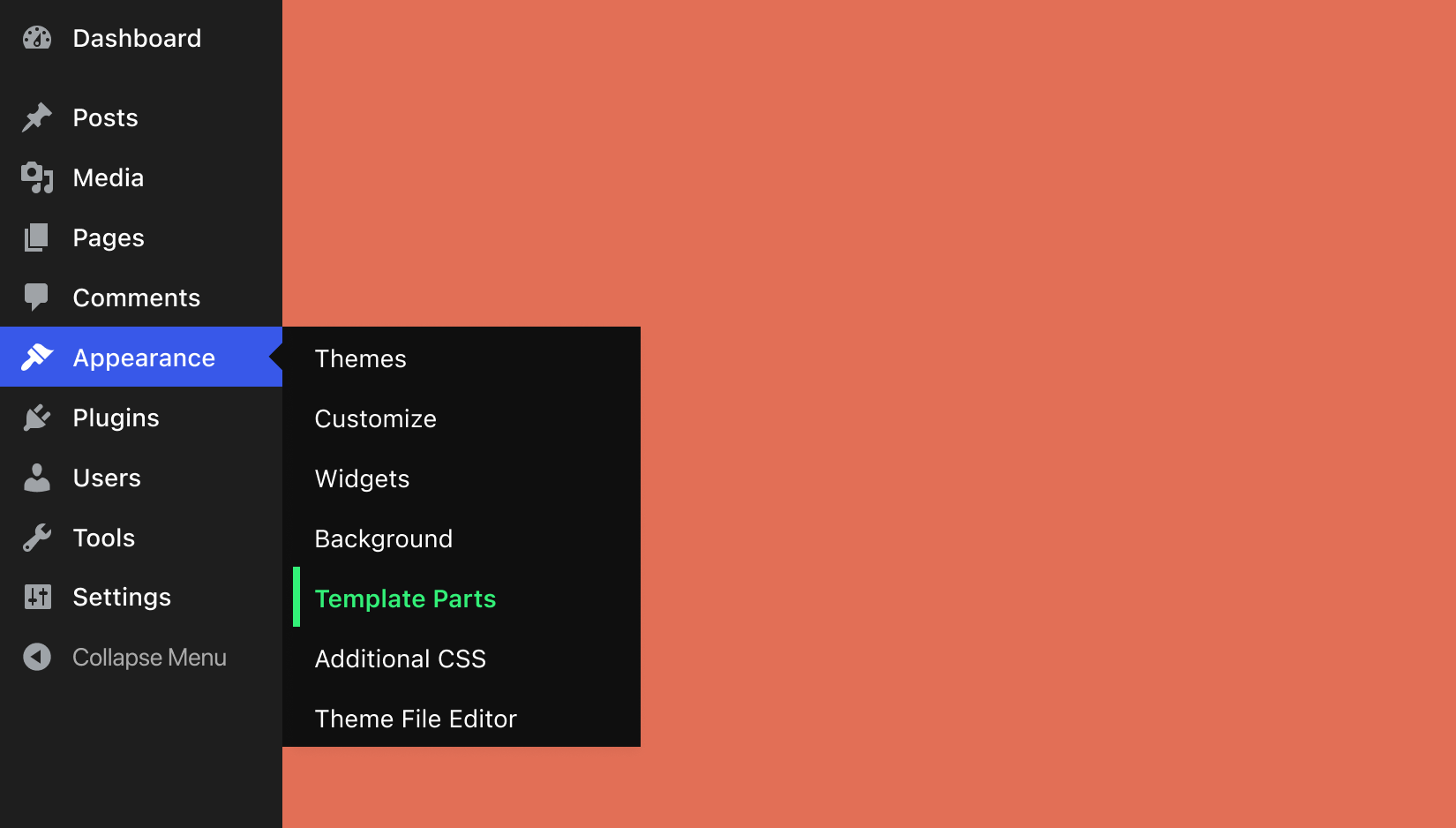
New Appearance > Template Parts menu after block-based template parts opt-in.
More Design Tools
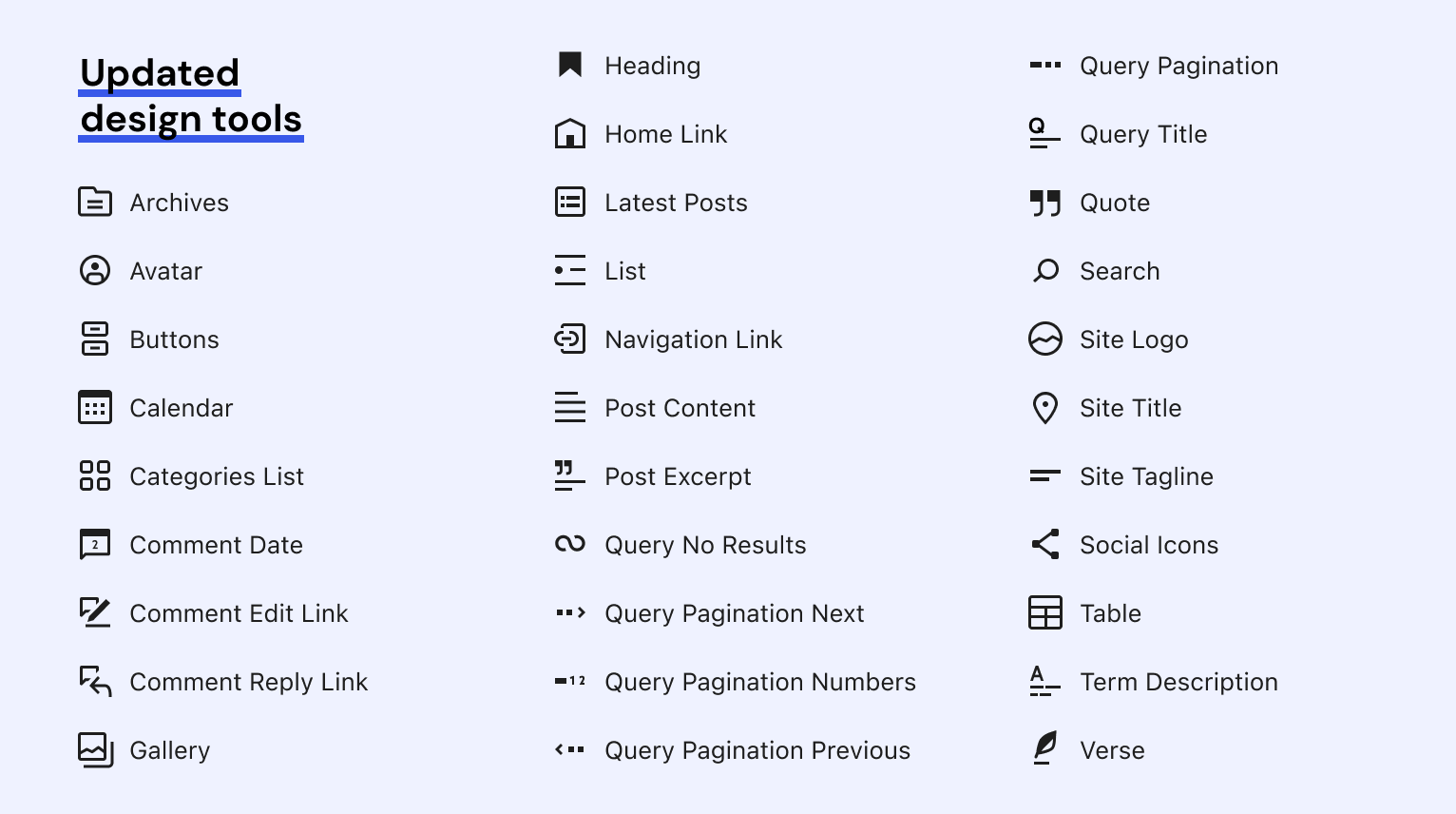
The WordPress editor has undergone extensive usability improvements, including better consistency between editor design controls, and extending style options to a broader range of blocks. These updates allow for more fine-tuned design control over content, enhancing the editor experience.
Demo of new Gallery, Image, and Button block style options.
With 6.1 comes a new Style engine, bringing with it numerous opportunities to optimize and improve style management in themes. Explore each of the following features for information on testing this new functionality.
This feature has been moved to a future version of WordPress so that it may undergo additional testing before release.
Themes that don’t use a theme.json file can now opt-in to enable the editor’s global styles Appearance Tools. To test, add the add_theme_support( 'appearance-tools' ); feature support flag to your theme, and see the Appearance Tools documentation for supported CSSCSSCSS is an acronym for cascading style sheets. This is what controls the design or look and feel of a site. styles.
Note that adopting Appearance Tools in a classic theme can introduce some unexpected visual changes when applying new default styles (via the support flag) or user-selected styles (modified through the editor). Therefore adopters are encouraged to test thoroughly to be aware of how their individual theme is affected.
Block Theme Spacing Presets 🛠
As an alternative to providing users with full control over spacing, block themes can now define preset spacing ranges in theme.json to ensure greater consistency throughout the theme.
Example showing padding constrained by preset values.
The template selection and creation process in the editor has been extended and streamlined, offering an easier way to find, apply, and modify templates, template parts, and patterns – all without code. This has been achieved through the following updates:
To test these updates, begin by creating templates for specific categories, pages, and more. You can also add and edit templates for custom posts types and taxonomies. Get very specific and offer a different template for single categories or tags.
Featured Images in Cover Block
The Cover block now supports using the featured imageFeatured imageA featured image is the main image used on your blog archive page and is pulled when the post or page is shared on social media. The image can be used to display in widget areas on your site or in a summary list of posts. to streamline users’ content editing workflows.
To test this feature, authors can add a patterns folder to their theme, and add these two sample files: new-event-announcement.php and event-recap.php (provided courtesy of #fse-outreach-program). Then try adding a new post to confirm that these custom patterns appear.
Please share feedback as soon as you can before the release on 1 November 2022.
Changelog 🪵
2022-09-20
Initial post.
2022-09-29
Updated “Appearance Tools for Any Theme” to indicate that this feature will be available in a future version of WordPress (refer to this discussion for details).
2022-10-11
Following the 6.1 RC1 release, updated “Header and Footer Patterns” to indicate availability of this enhancement in a future release (discussion for context).
Welcome to another exciting installment of Week in Test, where contributors of any skill level can find opportunities to contribute testing to the WordPress project. You can find the Test Team in #core-test.
Calls for Testing 📣
Calls for Testing can originate from any team, from themes to mobile apps to feature plugins. The following posts highlight features and releases that need special attention over the next couple of weeks:
Here’s a roundup of active tickets that are ready for testing contributions.
Did you know that contributions with the Test Team are also a fantastic way to level up your WordPress knowledge and skill? Dive in to contribute, and gain coveted props 😎 for a coming release.
Reproduction Testing 🔁
Who? Any contributor. Why? It is helpful to show an issue exists for other users in order to move a ticket forward for patching.
The following new tickets are awaiting review, and need testers to attempt to reproduce the reported issue (aka “repro”), and then provide a reproduction test report with the results:
#56505: Un-necessary Language Files are Installed.
#56519: Inner blocks serialization bug in serialize_block function.
Who? All contributors (not just developers) who can set up a local testing environment. Why? It is necessary to apply proposed patches and test per the testing instructions in order to validate that a patch fixes the issue.
The following tickets have been reviewed and a patch provided, and need testers to apply the patch and manually test, then provide feedback through a patch test report:
#55721: Visually align important data on the add new plugins screen.
#47513: JavaScriptJavaScriptJavaScript or JS is an object-oriented computer programming language commonly used to create interactive effects within web browsers. WordPress makes extensive use of JS for a better user experience. While PHP is executed on the server, JS executes within a user’s browser.
https://www.javascript.com TypeError when Video Playlists use native video elements.
#56468: sanitize_option() does not handle deprecated timezones correctly.
PHPUnit Tests 🛟
Who? Any QA or PHPPHPPHP (recursive acronym for PHP: Hypertext Preprocessor) is a widely-used open source general-purpose scripting language that is especially suited for web development and can be embedded into HTML. https://www.php.net/manual/en/index.php developer contributors who can (or are interested in learning how to) build automated PHPUnit tests. Why?Automated tests improve the software development feedback loopLoopThe Loop is PHP code used by WordPress to display posts. Using The Loop, WordPress processes each post to be displayed on the current page, and formats it according to how it matches specified criteria within The Loop tags. Any HTML or PHP code in the Loop will be processed on each post. https://codex.wordpress.org/The_Loop for quality and backward compatibility.
#56325: Some blocks’ RTL stylesheets not loading when RTL language is set.
#55448: WP_Widget_Block outputs empty container if widgetWidgetA WordPress Widget is a small block that performs a specific function. You can add these widgets in sidebars also known as widget-ready areas on your web page. WordPress widgets were originally created to provide a simple and easy-to-use way of giving design and structure control of the WordPress theme to the user. has no output.
#55005: Improve PHP performance for block.json files.
Profile Badge Awards 🎉
Thank you to the following contributors who earned the Test Contributor profile badge by participating in the WordPress 6.0.2 release party:
Update: Piotrek Boniu (@boniu91) has accepted his nomination to serve as second Test Team RepTeam RepA Team Rep is a person who represents the Make WordPress team to the rest of the project, make sure issues are raised and addressed as needed, and coordinates cross-team efforts.. This post has been updated accordingly.
Piotr has been fascinated by WordPress for over 8 years. Firstly, it was just a fun for him, later it became a way to live. He attends WordCamps whenever possible since WCEU 2017 in Paris. In 2019 in Brighton he was a speaker.
Within the project, he was a Test Team Rep for the 2021-2022 term, and served as 5.9 Test Lead.
In his career, he’s transitioning into technical product management for a WordPress performance product company, after having previously served as a QA Engineer and Technical Support Engineer.
On the personal side, Piotr is a resident of Canary Islands, previously lived in Madrid and Warsaw. He resides in a small town called Puerto de la Cruz with a girlfriend and his two cats. He’s obsessed with technology and gadgets that are making life easier, his free time is filled with hiking, sports and swimming in the ocean.
Brian has a background that ranges from graphic design to full-stack development, digital marketing, and customer support. Since being introduced to WordPress in 2007, he has loved exploring the many ways the platform can be extended and used as a serious content management system.
Within the project, he is a full-time sponsored contributor, served as co-Test Lead for 6.0 and is serving as Test Lead for 6.1. After time as interim Test Team Rep, he’s decided to come back for more. He also feels weird writing about himself in the 3rd person.
Brian lives in Portland, Oregon with his wife and daughter, and six egg-laying hens. He runs, cycles, plays the drums, and makes terrific homemade soap. And he never turns down a chance for a cup of good coffee.
Welcome back to Week in Test, where contributors of any skill level can find a handy list of links and opportunities to test WordPress. Join the Test Team in #core-test for questions and thoughtful discussion.
Did you know that contributions with the Test Team are also a fantastic way to level up your WordPress knowledge and skill? Dive in to contribute, and gain coveted props 😎 for a coming release.
Reproduction Testing 🔁
Who? Any contributor. Why? It is helpful to show an issue exists for other users in order to move a ticket forward for patching.
The following new tickets are awaiting review, and need testers to attempt to reproduce the reported issue (aka “repro”), and then provide a reproduction test report with the results:
#56367: Twenty Seventeen: List blockBlockBlock is the abstract term used to describe units of markup that, composed together, form the content or layout of a webpage using the WordPress editor. The idea combines concepts of what in the past may have achieved with shortcodes, custom HTML, and embed discovery into a single consistent API and user experience. padding in Editor does not match the correct frontend style.
#56363: “Generate password” button on Add New User screen does not regenerate password on first click.
Patch Testing 🩹
Who? All contributors (not just developers) who can set up a local testing environment. Why? It is necessary to apply proposed patches and test per the testing instructions in order to validate that a patch fixes the issue.
The following tickets have been reviewed and a patch provided, and need testers to apply the patch and manually test, then provide feedback through a patch test report:
#52584: Metaboxes fail to save after heartbeat/login timeout and subseqent reauthentication. This ticket is planned for 6.1.
#42619: Check open_basedir setting before parsing directories during autoupdate.
#56194: Twenty Twenty: text-transform setting on H6 heading doesn’t match between Editor and frontend.
PHPUnit Tests 🛟
Who? Any QA or PHPPHPPHP (recursive acronym for PHP: Hypertext Preprocessor) is a widely-used open source general-purpose scripting language that is especially suited for web development and can be embedded into HTML. https://www.php.net/manual/en/index.php developer contributors who can (or are interested in learning how to) build automated PHPUnit tests. Why?Automated tests improve the software development feedback loopLoopThe Loop is PHP code used by WordPress to display posts. Using The Loop, WordPress processes each post to be displayed on the current page, and formats it according to how it matches specified criteria within The Loop tags. Any HTML or PHP code in the Loop will be processed on each post. https://codex.wordpress.org/The_Loop for quality and backward compatibility.
#56350: Allow exact text searches in REST APIREST APIThe REST API is an acronym for the RESTful Application Program Interface (API) that uses HTTP requests to GET, PUT, POST and DELETE data. It is how the front end of an application (think “phone app” or “website”) can communicate with the data store (think “database” or “file system”)
https://developer.wordpress.org/rest-api/.
#56340: PHP 8.1: E_DEPRECATED from PasswordHash::gensalt_blowfish.
#56389: Make wp_required_field_indicator and wp_required_field_message filterable. Includes test suggestions to get started.
#56349: Update WordPress coreCoreCore is the set of software required to run WordPress. The Core Development Team builds WordPress. functions to support multiple MIME types (such as WebP). Dev code review is still in progress, so suggest unit tests be submitted to current PR’s branch, rather than through a new PR.
This Call for Nominations is open until 2022-08-26 12:00. Please leave a comment identifying your nominee(s) before then.
For a quick refresher of Team RepTeam RepA Team Rep is a person who represents the Make WordPress team to the rest of the project, make sure issues are raised and addressed as needed, and coordinates cross-team efforts. roles across the project, please see the Team Reps post on Team Updates.
The Role
Reps in the Test Team perform primary and secondary (or backup) duties to help support team chats, make updates to the team’s blog and handbook, remove blockers, keep a pulse on team objectives, and promote testing opportunities within the WordPress project.
As a reminder, Reps are not called “team leads” for a reason. While people elected as Team Reps will generally come from the pool of folks that people think of as experienced leaders, the Team Rep role is designed to change hands regularly.
Help raise awareness for testing needs, especially for upcoming releases.
Raise issues or red flags that other teams should be aware of or discussing.
Participate in quarterly update progress reports (example).
These duties are shared between the primary and secondary Reps (see Rep Responsibilities on the Team Rep page).
Qualifications
A Rep is an active team member who is reliable and trusted, advocates for and is knowledgeable of one or more areas of testing, and wants to represent, nurture, and grow the team to better serve the WordPress open sourceOpen SourceOpen Source denotes software for which the original source code is made freely available and may be redistributed and modified. Open Source **must be** delivered via a licensing model, see GPL. project.
Test Team Reps must be committed to showing up and performing regular duties, and should expect a time commitment of at least 2-4 hours per week. Reps serve for a term of one year.
How Test Team Elections Work
Step 1: Call for Nominations 📣
The first step is to reach out to the community with a Call for Nominations (this post!)
Please nominate in the comments of this post. You can write a comment as simple as “I nominate @the_persons_username.” Self-nominations are also welcome by leaving a comment such as “I nominate myself.”
Private nominations can be submitted by contacting @Piotrek Boniu or @ironprogrammer in SlackSlackSlack is a Collaborative Group Chat Platform https://slack.com/. The WordPress community has its own Slack Channel at https://make.wordpress.org/chat/.
If you’ve been nominated, please accept or decline the nomination as a reply to the same comment.
After the deadline, each nominee will be contacted to discuss qualifications and to confirm their acceptance of the nomination.
If you get nominated, please do not feel like you have to say “yes”. It’s okay for you to decline the nomination if you don’t feel like this is the right fit for any reason. “Thank you, but no thank you!” 😉
Step 2: Vote for Team Reps 🗳
An election will happen only if there are more than two accepted nominations within the nomination period; otherwise the nominees will become the new Test Team Reps.
If held, the election will be conducted by an anonymous poll (example). The poll will remain open for 2 weeks.
Step 3: Announce Team Reps 🎉
Once uncontested nominations have been accepted, or in the event of an election the voting period has passed, the new Test Team Reps will be announced in a post (example).
Time to Nominate!
Are you ready? It’s time to nominate folks to serve as our Test Team Reps for the new term! If you have any questions, please feel free to ask in the comments.





You must be logged in to post a comment.