The WordPress coreCoreCore is the set of software required to run WordPress. The Core Development Team builds WordPress. development team builds WordPress! Follow this site for general updates, status reports, and the occasional code debate. There’s lots of ways to contribute:
Found a bugbugA bug is an error or unexpected result. Performance improvements, code optimization, and are considered enhancements, not defects. After feature freeze, only bugs are dealt with, with regressions (adverse changes from the previous version) being the highest priority.?Create a ticket in the bug tracker.
WordPress 6.3.1 Release Candidate 1 (RC1) is available for testing! Some ways you can help test this minor release:
Use the WordPress Beta TesterpluginPluginA plugin is a piece of software containing a group of functions that can be added to a WordPress website. They can extend functionality or add new features to your WordPress websites. WordPress plugins are written in the PHP programming language and integrate seamlessly with WordPress. These can be free in the WordPress.org Plugin Directory https://wordpress.org/plugins/ or can be cost-based plugin from a third-party.
As this is a minor RCrelease candidateOne of the final stages in the version release cycle, this version signals the potential to be a final release to the public. Also see alpha (beta). release, select the Point Release channel and the Nightlies stream. This is the latest build including the RC and potentially any subsequent commits in trunk.
6.3.1 RC1 features 4 fixes on Core as well as 6 fixes for the BlockBlockBlock is the abstract term used to describe units of markup that, composed together, form the content or layout of a webpage using the WordPress editor. The idea combines concepts of what in the past may have achieved with shortcodes, custom HTML, and embed discovery into a single consistent API and user experience. Editor.
The following coreCoreCore is the set of software required to run WordPress. The Core Development Team builds WordPress. tickets from TracTracAn open source project by Edgewall Software that serves as a bug tracker and project management tool for WordPress. are fixed:
The following block editor issues from GitHubGitHubGitHub is a website that offers online implementation of git repositories that can easily be shared, copied and modified by other developers. Public repositories are free to host, private repositories require a paid subscription. GitHub introduced the concept of the ‘pull request’ where code changes done in branches by contributors can be reviewed and discussed before being merged by the repository owner. https://github.com/ are fixed:
The developer-reviewed workflow (double committer sign-off) is now in effect when making changes to the 6.3 branchbranchA directory in Subversion. WordPress uses branches to store the latest development code for each major release (3.9, 4.0, etc.). Branches are then updated with code for any minor releases of that branch. Sometimes, a major version of WordPress and its minor versions are collectively referred to as a "branch", such as "the 4.0 branch"..
The final release is expected on Tuesday, August 29th, 2023. Please note that this date can change depending on possible issues after RC1 is released. Coordination will happen in the WordPress.orgWordPress.orgThe community site where WordPress code is created and shared by the users. This is where you can download the source code for WordPress core, plugins and themes as well as the central location for community conversations and organization. https://wordpress.org/SlackSlackSlack is a Collaborative Group Chat Platform https://slack.com/. The WordPress community has its own Slack Channel at https://make.wordpress.org/chat/#6-3-release-leads channel.
A special thanks to everyone who helped test, raised issues, and helped to fix tickets. With this release candidate, testing continues, so please help test!
Welcome back to a new issue of Week in CoreCoreCore is the set of software required to run WordPress. The Core Development Team builds WordPress.. Let’s take a look at what changed on TracTracAn open source project by Edgewall Software that serves as a bug tracker and project management tool for WordPress. between August 14 and August 21, 2023.
27 commits
34 contributors
64 tickets created
6 tickets reopened
50 tickets closed
TicketticketCreated for both bug reports and feature development on the bug tracker. numbers are based on the Trac timeline for the period above. The following is a summary of commits, organized by component and/or focus.
Code changes
Administration
Add function to standardize adminadmin(and super admin) notices – #57791
Apply admin notice functions in multisitemultisiteUsed to describe a WordPress installation with a network of multiple blogs, grouped by sites. This installation type has shared users tables, and creates separate database tables for each blog (wp_posts becomes wp_0_posts). See also network, blog, site – #57791
InvalidinvalidA resolution on the bug tracker (and generally common in software development, sometimes also notabug) that indicates the ticket is not a bug, is a support request, or is generally invalid. argument passed in additional_classes – #57791
Send a failure notice in Slack when a run fails to start – #58867
Simplify the required prerequisite jobs for the failed-workflow job – #58867
Update PHPUnit Polyfills to version 1.1.0 – #59150
Use the correct variable for checking the previous conclusion – #58867
Coding Standards
Improve variable names in wp_save_image() – #58831
Use strict comparison in wp-admin/includes/image-edit.php – #58831
Use strict comparison in wp-admin/includes/meta-boxes.php – #58831
Docs
Add missing @ to the return tagtagA directory in Subversion. WordPress uses tags to store a single snapshot of a version (3.6, 3.6.1, etc.), the common convention of tags in version control systems. (Not to be confused with post tags.) in the wp_get_theme_data_template_parts function – #59003
Correct punctuation in some instances of the $crop parameter description – #58833
Fix typo in duplicate hook references for views_{$this->screen->id} – #59102, #58833
Miscellaneous docblockdocblock(phpdoc, xref, inline docs) corrections and improvements – #58833
Editor
Ensure defer loading strategy is only applied to a blockBlockBlock is the abstract term used to describe units of markup that, composed together, form the content or layout of a webpage using the WordPress editor. The idea combines concepts of what in the past may have achieved with shortcodes, custom HTML, and embed discovery into a single consistent API and user experience.’s viewScript – #59115
Fix error handling of converting classic to block menus – #58823
Use defer loading strategy for block view scripts – #59115
update npm packages with critical bugbugA bug is an error or unexpected result. Performance improvements, code optimization, and are considered enhancements, not defects. After feature freeze, only bugs are dealt with, with regressions (adverse changes from the previous version) being the highest priority. fixes for 6.3.1 – #59151
General
Revert the last use of str_starts_with() in update-core.php – #59145
Media
Standardise documentation of the $crop parameter for various media functions and methods – #58833
Posts, Post Types
Remove redundant function calls in get_body_class() – #43661
REST APIREST APIThe REST API is an acronym for the RESTful Application Program Interface (API) that uses HTTP requests to GET, PUT, POST and DELETE data. It is how the front end of an application (think “phone app” or “website”) can communicate with the data store (think “database” or “file system”)
https://developer.wordpress.org/rest-api/
Correct the docblocks for various permission related methods – #58833
Site Health
Correct the check for disk space available to safely perform updates – #59116
Themes
Add wp_get_theme_data_custom_templates function – #59137
Props
Thanks to the 50 people who contributed to WordPress Core on Trac last week:
“What’s new in GutenbergGutenbergThe Gutenberg project is the new Editor Interface for WordPress. The editor improves the process and experience of creating new content, making writing rich content much simpler. It uses ‘blocks’ to add richness rather than shortcodes, custom HTML etc.
https://wordpress.org/gutenberg/…” posts (labeled with the #gutenberg-new tag) are posted following every Gutenberg release on a biweekly basis, showcasing new features included in each release. As a reminder, here’s an overview of different ways to keep up with Gutenberg and the Site Editor project (formerly called Full Site Editing).
This version is packed with enhancements and bugbugA bug is an error or unexpected result. Performance improvements, code optimization, and are considered enhancements, not defects. After feature freeze, only bugs are dealt with, with regressions (adverse changes from the previous version) being the highest priority. fixes, many focused on enriching the Command Palette and enabling further customization of blocks. It features contributions from 63 contributors across 219 pull requests, including five new contributors! 🥳
Since the last update, contributors have added many new features to the Navigation blockBlockBlock is the abstract term used to describe units of markup that, composed together, form the content or layout of a webpage using the WordPress editor. The idea combines concepts of what in the past may have achieved with shortcodes, custom HTML, and embed discovery into a single consistent API and user experience. and also the wider navigation management system within WordPress.
These improvements are designed to help users manage their navigation menus and provide a more consistent and reliable experience.
Let’s take a look at what’s changed…
Navigation List View
One aspect of the navigation block is that parts of it are often hidden – for example submenus aren’t always open. This can make managing the items within a navigation block in the editor canvas challenging.
In addition to the standard block tools, the list view allows all the usual ways of managing navigation items. You can:
Add and remove navigation items.
Reorder navigation items.
Create new submenus.
Adding this feature to the block also prepared the groundwork to allow contributors to unlock several exciting new features in WordPress 6.3.
Navigation in Site View
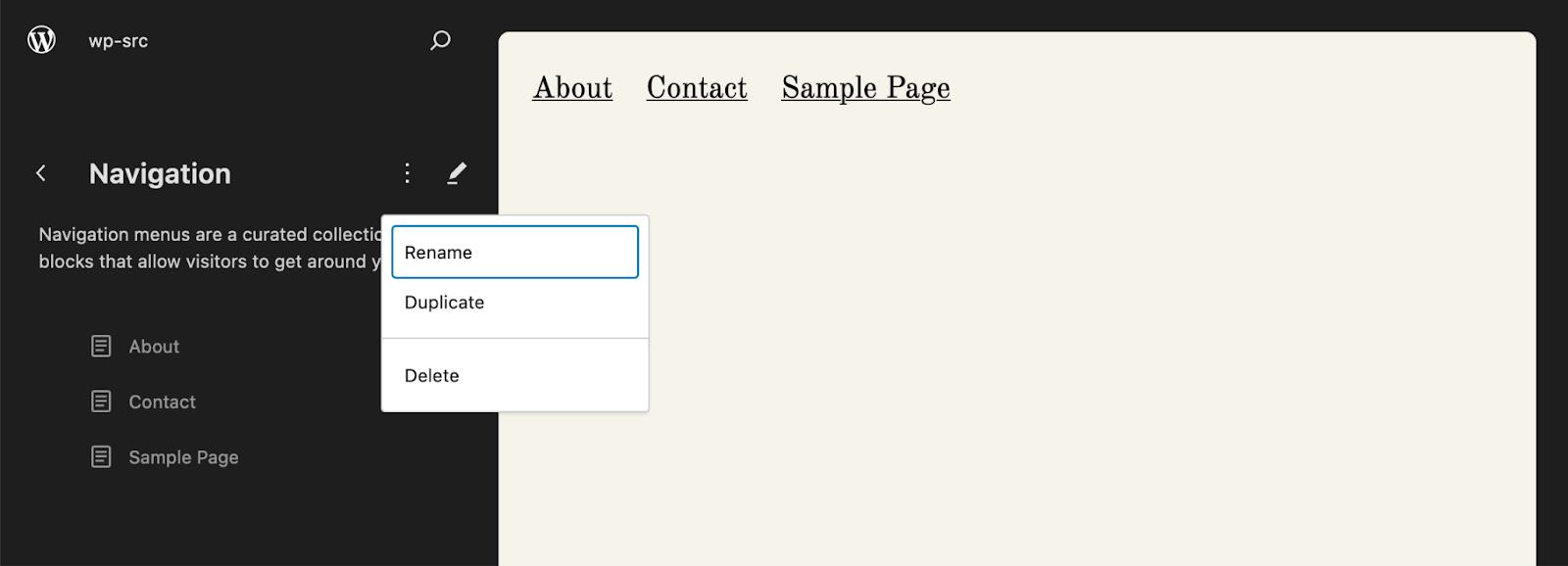
With WordPress 6.3, it is now possible to manage your navigation from outside of the context of a Navigation block and without needing to edit a template.
When in the Site Editor a new “Navigation” section is available within the Site View sidebarSidebarA sidebar in WordPress is referred to a widget-ready area used by WordPress themes to display information that is not a part of the main content. It is not always a vertical column on the side. It can be a horizontal rectangle below or above the content area, footer, header, or any where in the theme. which lists all of your navigation menus and allows you to manage them without having to find the templates (and blocks) they are used within:
One benefit of this view is that when multiple blocks all share the samenavigation menuNavigation MenuA theme feature introduced with Version 3.0. WordPress includes an easy to use mechanism for giving various control options to get users to click from one place to another on a site., the user now has a single place to manage the menu items.
Focus Mode for Navigation
Surfacing navigation as a list within the Site View is excellent for simple use cases, but sometimes it’s useful to see the navigation within the editor canvas to better visualize the changes being made.
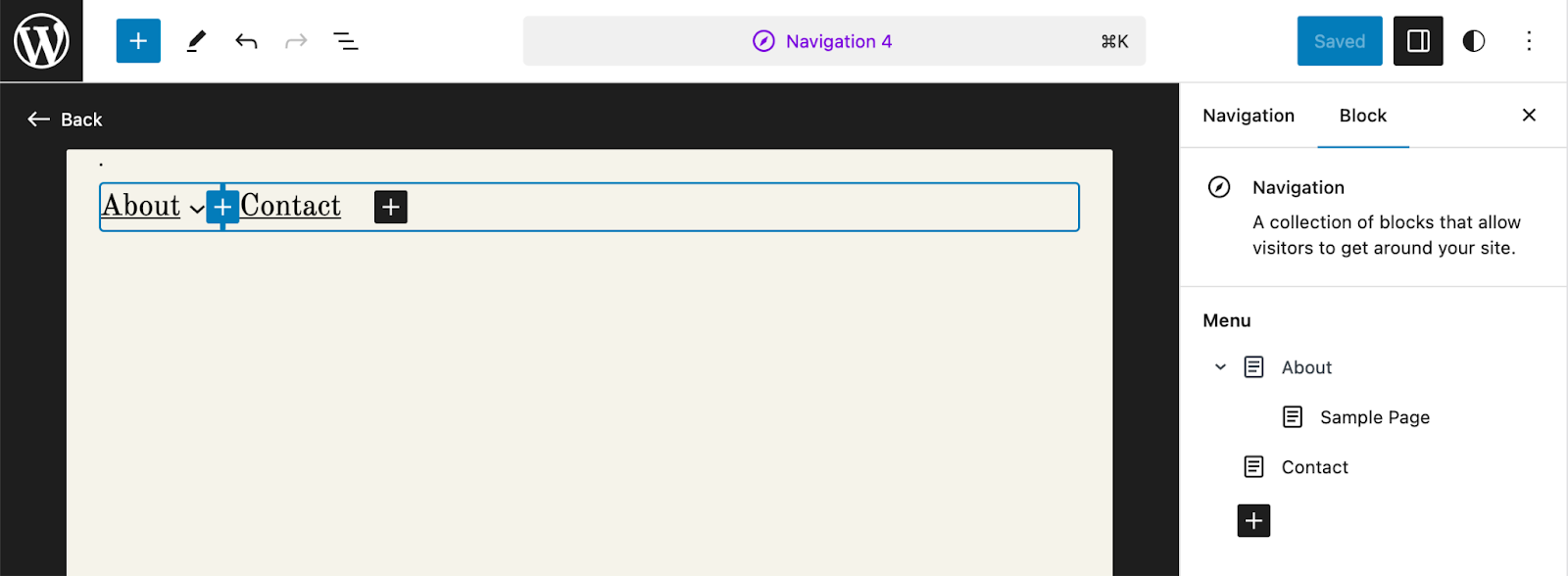
For this reason WordPress 6.3 sees the addition of “Focus Mode” for Navigation whereby the navigation menu is displayed within an editor canvas completely isolated from any surrounding site context.
You can access this new mode by clicking on the “Edit” button within the Navigation block’s toolbar, or by browsing to an individual navigation from the “Navigation” section of the Site View sidebar.
Focus mode provides full scope to modify the blocks that are inside the navigation block (the “menu items”), allowing you to add new items and even make use of the editable list view in the block’s sidebar:
It is important to note that as a given navigation menu may be used across multiple block’s on a site – each of which will have their own place within the overall design of your site – the ability to change the visual representation of the Navigation block itself has been intentionally disabled.
This allows you to focus soley on the contents of the navigation menu.
Another benefit of this feature is that it is now possible to access and edit the inner blocks of a navigation simply by switching the editor to “code view” mode:
Managing your navigation in isolation can be extremely useful, but sometimes it’s handy to see your navigation menu within the context of which it is being displayed. This is precisely what the next feature seeks to address.
Navigation in Patterns and Template Parts
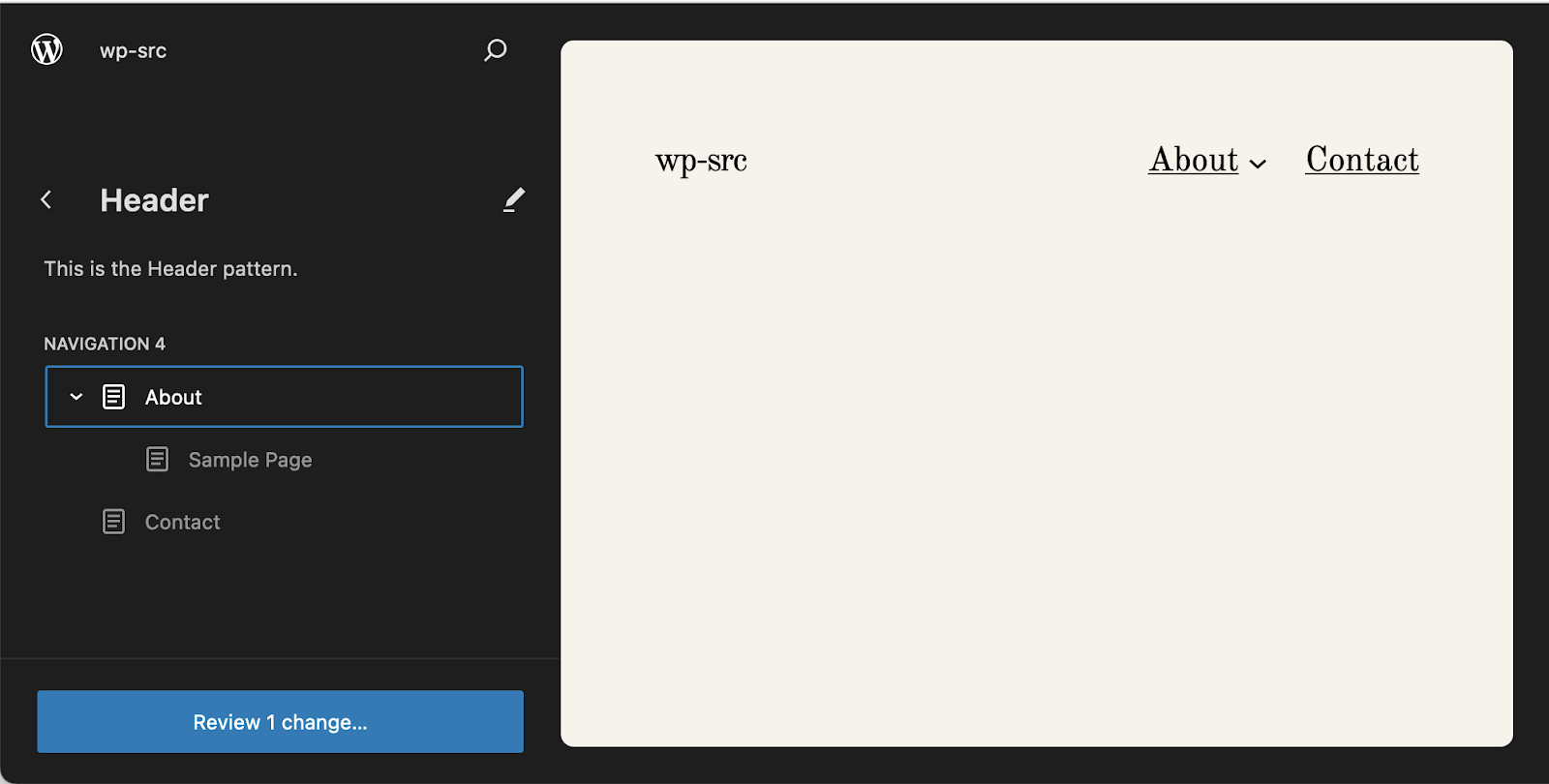
Patterns and Template Parts often contain navigation block’s. The classic example of this is a “HeaderHeaderThe header of your site is typically the first thing people will experience. The masthead or header art located across the top of your page is part of the look and feel of your website. It can influence a visitor’s opinion about your content and you/ your organization’s brand. It may also look different on different screen sizes.” template part containing a site logo block and a navigation block.
This gives you quick access to manage the navigation that is used in the canvas without needing to switch to editing the block directly within the canvas itself.
Previous versions of WordPress had the concept of a “fallback” Navigation which was utilized in scenarios where a Navigation block has no navigation menu associated with it.
Depending on whether the site had existing Navigation Menus, the mechanism would either fetch an existing navigation or create a newone from scratch.
However the implementation provided a suboptimal user experience, with a noticeable loading delay upon block modification caused by fetching/creating the (“fallback”) navigation menu to be associated with the block.
This has been achieved by moving the majority of the fallback logic to the WordPress REST APIREST APIThe REST API is an acronym for the RESTful Application Program Interface (API) that uses HTTP requests to GET, PUT, POST and DELETE data. It is how the front end of an application (think “phone app” or “website”) can communicate with the data store (think “database” or “file system”)
https://developer.wordpress.org/rest-api/. A new dedicated “Navigation Fallback” endpoint now immediately returns the most “suitable” fallback navigation menu for your site.
What does “suitable” mean? This is much the same as for WordPress 6.2, namely when called the endpoint…
Returns the most recently created existing Navigation Menu.
(if not available then…) Returns a Navigation Menu created from the most recently created Classic Menu (note: this is a one time import, and changes to the original Classic Menu are not synced to the block-based Navigation Menu).
(if not available then…) Creates and returns a new Navigation Menu, typically comprising a list of the current site’s Pages.
This heuristic may evolve in future releases to allow the fallback to be sensitive to the context in which it is being displayed. For now however, the improvement to the block’s user experience and reliability is a welcome improvement over previous versions.
Opting out of automatic fallback creation
If you’d like to opt out of automatic creation of Navigation fallbacks you can use the wp_navigation_should_create_fallback hook as follows:
On top of the improvements to perceived performance delivered by improving the fallback navigation system, WordPress 6.3 also provides an additional enhancementenhancementEnhancements are simple improvements to WordPress, such as the addition of a hook, a new feature, or an improvement to an existing feature. to the performance of the navigation system.
This simple change makes it possible to access and manage your navigation, which is a key facet of most websites and makes for a greatly improved user experience.
Login/Logout
It is common for websites to provide a login and logout link for their users. In #49160 we added this block to the list of blocks that are allowed within the navigation block so that users can add this functionality to their navigation.
What do you think?
This concludes our brief overview of the key changes to the navigation system in WordPress.
As always we are open to your feedback. What do you think? Are these improvements impactful for you? What is missing and what you would like to see? Your thoughts are appreciated in the comments below.
Of course, whilst there has been much progress contributors recognise that there is still much to do.
Our focus for future releases will be updated on the relevant Tracking Issue and we encourage you all to take a look and let us know any feedback you might have on the proposals outlined there.
You can also join us on WP CoreCoreCore is the set of software required to run WordPress. The Core Development Team builds WordPress.SlackSlackSlack is a Collaborative Group Chat Platform https://slack.com/. The WordPress community has its own Slack Channel at https://make.wordpress.org/chat/ (sign up required) in the #feature-website-navigation channel.
Props to @scruffian who co-authored this post and to @draganescu and @annezazu for review.
For those new to coreCoreCore is the set of software required to run WordPress. The Core Development Team builds WordPress. and getting set up ready for WordCampWordCampWordCamps are casual, locally-organized conferences covering everything related to WordPress. They're one of the places where the WordPress community comes together to teach one another what they’ve learned throughout the year and share the joy. Learn more. US Contributor DayContributor DayContributor Days are standalone days, frequently held before or after WordCamps but they can also happen at any time. They are events where people get together to work on various areas of https://make.wordpress.org/ There are many teams that people can participate in, each with a different focus. https://make.wordpress.org/support/handbook/getting-started/getting-started-at-a-contributor-day/, there is a New Contributors session in the core SlackSlackSlack is a Collaborative Group Chat Platform https://slack.com/. The WordPress community has its own Slack Channel at https://make.wordpress.org/chat/ today at 19:00 UTC. These take place every two weeks. They are a great place to start.
WordPressCS 3.0.0 is now available – this makes significant changes to improve the accuracy, performance, stability and maintainability of all sniffssniffA module for PHP Code Sniffer that analyzes code for a specific problem. Multiple stiffs are combined to create a PHPCS standard. The term is named because it detects code smells, similar to how a dog would "sniff" out food., and makes WordPressCS much better at handling modern PHPPHPThe web scripting language in which WordPress is primarily architected. WordPress requires PHP 7.4 or higher.
Reminder: WordPress 6.3 developer notes. The Field GuideField guideThe field guide is a type of blogpost published on Make/Core during the release candidate phase of the WordPress release cycle. The field guide generally lists all the dev notes published during the beta cycle. This guide is linked in the about page of the corresponding version of WordPress, in the release post and in the HelpHub version page. has had 6,500 views since it was published on July 18!S
Next major WordPress release: 6.4
New this week are:
Roadmap to 6.4 – this next major releasemajor releaseA release, identified by the first two numbers (3.6), which is the focus of a full release cycle and feature development. WordPress uses decimaling count for major release versions, so 2.8, 2.9, 3.0, and 3.1 are sequential and comparable in scope. is scheduled for November 7, 2023.
6.4 Editor Taskboard on GitHubGitHubGitHub is a website that offers online implementation of git repositories that can easily be shared, copied and modified by other developers. Public repositories are free to host, private repositories require a paid subscription. GitHub introduced the concept of the ‘pull request’ where code changes done in branches by contributors can be reviewed and discussed before being merged by the repository owner. https://github.com/
Tickets or Components help requests
Please add any items for this part of the agenda to the comments. If you can not attend dev chat live, don’t worry, include a note and the facilitator can highlight a ticketticketCreated for both bug reports and feature development on the bug tracker. if needed.
Contributor Day
WordCamp US Contributor Day is tomorrow. A post to help new contributors get started and prepare for the event is available.
New contributors are encouraged to set up local environments in advance and to come along to the New Core Contributor session today, Wednesday August 23, 2023 at 19:00 UTC, in the Core Slack.
Open floor
If you have any additional items to add to the agenda, please respond in the comments below to help the facilitator highlight them during the meeting.
WordPress 6.4 is set to be released on November 7, 2023 and is being led by an underrepresented gender release squad. This release brings a sharp focus to enhancing items across the WordPress experience, from the details of writing a new post to managing patterns across your site. Amongst these efforts, new features aim to be added, like font management and a new default theme, and gaps filled in current functionality, like more tooling to go further with designs. Initial explorations for phase 3 will continue in the GutenbergGutenbergThe Gutenberg project is the new Editor Interface for WordPress. The editor improves the process and experience of creating new content, making writing rich content much simpler. It uses ‘blocks’ to add richness rather than shortcodes, custom HTML etc.
https://wordpress.org/gutenberg/pluginPluginA plugin is a piece of software containing a group of functions that can be added to a WordPress website. They can extend functionality or add new features to your WordPress websites. WordPress plugins are written in the PHP programming language and integrate seamlessly with WordPress. These can be free in the WordPress.org Plugin Directory https://wordpress.org/plugins/ or can be cost-based plugin from a third-party., and any early wins will be added alongside the foundational work already planned in this major releasemajor releaseA release, identified by the first two numbers (3.6), which is the focus of a full release cycle and feature development. WordPress uses decimaling count for major release versions, so 2.8, 2.9, 3.0, and 3.1 are sequential and comparable in scope.. An additional post will be shared covering the various additional wish list items that didn’t make it into this post to provide an update with possible next steps. As always, what’s shared here is being actively pursued, but doesn’t necessarily mean each will make it into the final release of WordPress 6.4. Approximately, 5 Gutenberg releases are planned for inclusion in 6.4.
For a more detailed look at the work related to the blockBlockBlock is the abstract term used to describe units of markup that, composed together, form the content or layout of a webpage using the WordPress editor. The idea combines concepts of what in the past may have achieved with shortcodes, custom HTML, and embed discovery into a single consistent API and user experience. editor, please refer to this overview issue for ongoing work and the 6.4 board.
Introducing new functionality
Font Library
The Font Library aims to make it easy for anyone to install and use fonts across the site, with the added goal of extension points for plugins. The Font Library will be available globally, independently of the theme activated, similar to the Media Library. Efforts can be followed in this tracking issue.
Font Face
The Font Face works alongside the Font Library, handling the server-side @font-face styles generation and printing. Efforts can be followed in this tracking issue.
RevisionsRevisionsThe WordPress revisions system stores a record of each saved draft or published update. The revision system allows you to see what changes were made in each revision by dragging a slider (or using the Next/Previous buttons). The display indicates what has changed in each revision. for templates and template parts
Building on the effort to add revisions to Styles, revisions for templates and template parts will complete the editing experience allowing for the ability to roll back any change made anywhere. Efforts can be followed in this trac issue.
New blocks
Three new blocks are being considered for 6.4 with relevant GitHubGitHubGitHub is a website that offers online implementation of git repositories that can easily be shared, copied and modified by other developers. Public repositories are free to host, private repositories require a paid subscription. GitHub introduced the concept of the ‘pull request’ where code changes done in branches by contributors can be reviewed and discussed before being merged by the repository owner. https://github.com/ issues:
Below is a visual showing the Time to Read block in use:
Image lightbox
Lightbox functionality is being explored as an option to toggle on for individual image blocks to start. Efforts can be followed in this tracking issue.
Auto-insert blocks
To better accommodate more intuitive experiences, the ability to auto-insert a block into context specific sections is being explored. For example, imagine upon installing a plugin, an option appears when editing your navigation to enable a log in and out option automatically. The outcome of this work is likely to take the form of a new block inspector panel for now until the experience can be further refined. Efforts can be followed in this tracking issue.
Post formats in block themes
WordPress has supported post formats since 3.1 and, while block themes align with post formats in various ways, there are a number of enhancements to center and take advantage of the post format including:
Handling of title less posts in the loopLoopThe Loop is PHP code used by WordPress to display posts. Using The Loop, WordPress processes each post to be displayed on the current page, and formats it according to how it matches specified criteria within The Loop tags. Any HTML or PHP code in the Loop will be processed on each post. https://codex.wordpress.org/The_Loop and in templates.
Starting with a pattern in a new post flow.
Improving the specific formatting of the post content block in the query loop..
Efforts and discussions can be followed in this issue.
Advancing current features and experiences
Writing experience
Writing in WordPress, whether a latest post or new page, needs to be seamless and enjoyable–the tooling should aid creativity rather than get in the way. Blocks with all of their variations, design tools, and transforms should make you feel empowered to create what you want. This release contains a dedicated focus to ensure this remains the case. Efforts can be followed in this tracking issue for writing specific issues, in this tracking issue for link control improvements, and in these additional efforts to capture toolbars for a few specific situations (List Items, Quotes, Navigation items).
Interfaces and tools
The tools available continue to be improved to make creating a site or writing a post more streamlined with the following focus areas:
Below is the latest design iteration for the Command Palette:
Site editing
Outside of the various sub items that make up all of site editing, like the Navigation block or Global Styles, the following specific refinements and enhancements are a focus for this cycle to improve the broader experience:
Efforts can be followed in this tracking issue. Below is an early look at what it might look like to switch between templates in Pages in the Site Editor:
Design tools
To enable more complex designs, various design tooling related enhancements and additional functionality is being explored. These efforts range from block specific changes, like adding support for background images to the Group block, to larger efforts, like extending theme.jsonJSONJSON, or JavaScript Object Notation, is a minimal, readable format for structuring data. It is used primarily to transmit data between a server and web application, as an alternative to XML. to provide spacing size presets:
Efforts can be followed in this tracking issue. Below is an early design exploration of the box shadow component:
Global styles (Styles, Style Book, and more)
Global styles is both a system and an interface for managing styling across your site, from individual changes to a block to sweeping changes across an entire site. This current effort continues to evolve along the same lines and across a broad range of items, from more technical updates in theme.json to more UI centered work around the Style book tool. To continue to broaden the possibilities with the built-in style system and to make it as easy as possible to use, the following work is planned:
Efforts can be followed in this tracking issue. Below is an early design exploration of adding the ability to focus on individual block types in the Style book:
Patterns
After introducing the ability to create patterns directly in the editing experience, more advanced features and various quality of life improvements are planned for 6.4, including the following:
As a stretch goal, partially synced patterns are being explored, allowing for the layout and styling components to be locked while part of the content can be updated independently.
Efforts can be followed in this project board. Below is a demonstration of how adding pattern categories might look:
Navigation creation and management
As with every release since WordPress 5.9, the Navigation block and navigation management continues to have a specific focus to make it more robust and useful, including when it comes to various responsive needs:
Query block: client-side pagination, powered by the Interactivity APIAPIAn API or Application Programming Interface is a software intermediary that allows programs to interact with each other and share data in limited, clearly defined ways..
This work will likely evolve based on the needs of Twenty Twenty-Four.
Footnotes
Introduced in WordPress 6.3, the Footnotes block continues to evolve with more design tooling available and custom post typeCustom Post TypeWordPress can hold and display many different types of content. A single item of such a content is generally called a post, although post is also a specific post type. Custom Post Types gives your site the ability to have templated posts, to simplify the concept. compatibility work:
Below is an example of a Footnotes block using additional block supports:
Twenty Twenty-Four
The Twenty Twenty-Four default theme will launch alongside 6.4, bringing with it a unique take on the power of using the latest and greatest from WordPress. It brings together the complete experience, bringing everything from block themes together. Expect designs to be shared as work progress and join #core-themes-projects to learn more.
Performance
The Performance team and broader contributors will be focusing on the following:
Making use of the new script loading strategy APIs in CoreCoreCore is the set of software required to run WordPress. The Core Development Team builds WordPress..
Expanding capabilitiescapabilityA capability is permission to perform one or more types of task. Checking if a user has a capability is performed by the current_user_can function. Each user of a WordPress site might have some permissions but not others, depending on their role. For example, users who have the Author role usually have permission to edit their own posts (the “edit_posts” capability), but not permission to edit other users’ posts (the “edit_others_posts” capability). of the automated performance testing workflows and dashboard.
Rollback for plugin and theme updates for automatic updates
Building on prior efforts released in WordPress 6.3, rollbacks for automatic updates to plugins and themes is underway.. Specifically, this means that checks will be added to ensure that an updated plugin does not cause a PHPPHPThe web scripting language in which WordPress is primarily architected. WordPress requires PHP 7.4 or higher fatal error when activated. If it does, this error is captured and the previously installed version is restored, along with an email sent to the site adminadmin(and super admin). Efforts can be followed in this trac ticket.
General bugbugA bug is an error or unexpected result. Performance improvements, code optimization, and are considered enhancements, not defects. After feature freeze, only bugs are dealt with, with regressions (adverse changes from the previous version) being the highest priority. fixes and enhancements
In TracTracAn open source project by Edgewall Software that serves as a bug tracker and project management tool for WordPress., there are already 38 tickets closed and 8 set for early across various components and focuses. It’s still early in the cycle so expect these efforts to continue.
Early, foundational Phase 3 Work
While initial phase 3 plans have been shared, only a very limited and iterative set of work is being explored for 6.4 including the following:






You must be logged in to post a comment.