The WordPress coreCoreCore is the set of software required to run WordPress. The Core Development Team builds WordPress. development team builds WordPress! Follow this site for general updates, status reports, and the occasional code debate. There’s lots of ways to contribute:
Found a bugbugA bug is an error or unexpected result. Performance improvements, code optimization, and are considered enhancements, not defects. After feature freeze, only bugs are dealt with, with regressions (adverse changes from the previous version) being the highest priority.?Create a ticket in the bug tracker.
Welcome back to a new issue of Week in CoreCoreCore is the set of software required to run WordPress. The Core Development Team builds WordPress.. Let’s take a look at what changed on TracTracAn open source project by Edgewall Software that serves as a bug tracker and project management tool for WordPress. between August 16 and August 23, 2021.
27 commits
21 contributors
58 tickets created
5 tickets reopened
43 tickets closed
Pending the appointment of the WordPress 5.9 team, a number of tickets have been fixed, waiting for the next minor and major releasemajor releaseA release, identified by the first two numbers (3.6), which is the focus of a full release cycle and feature development. WordPress uses decimaling count for major release versions, so 2.8, 2.9, 3.0, and 3.1 are sequential and comparable in scope.(s).
TicketticketCreated for both bug reports and feature development on the bug tracker. numbers are based on the Trac timeline for the period above. The following is a summary of commits, organized by component and/or focus.
Check the return type of parse_url() in WP::parse_request() – #53635
Check the return type of parse_url() in download_url() – #53635
Check the return type of parse_url() in ms_cookie_constants() – #53635
Check the return type of parse_url() on PluginPluginA plugin is a piece of software containing a group of functions that can be added to a WordPress website. They can extend functionality or add new features to your WordPress websites. WordPress plugins are written in the PHP programming language and integrate seamlessly with WordPress. These can be free in the WordPress.org Plugin Directory https://wordpress.org/plugins/ or can be cost-based plugin from a third-party./Theme Editor screens – #53635
Correct handling of null in wp_parse_str() – #53635
Only set auto_detect_line_endings in PHPPHPThe web scripting language in which WordPress is primarily architected. WordPress requires PHP 7.4 or higher < 8.1 – #53635
Pass correct default value to http_build_query() in WP_Sitemaps_Provider::get_sitemap_url() – #53635
Silence the deprecation warning for auto_detect_line_endings – #53635
Customize
Hide native control on background position field – #53803
Editor
Replace the remaining references to wp.editor with wp.oldEditor – #53762
External Libraries
Restore the phpcs:ignore statements in PHPMailer – #53953
REST APIREST APIThe REST API is an acronym for the RESTful Application Program Interface (API) that uses HTTP requests to GET, PUT, POST and DELETE data. It is how the front end of an application (think “phone app” or “website”) can communicate with the data store (think “database” or “file system”)
https://developer.wordpress.org/rest-api/
Remove trailing slashes when preloading requests and add unit tests for it – #51636
Toolbar
Limit the icon transition style to color only – #43423
First dev notedev noteEach important change in WordPress Core is documented in a developers note, (usually called dev note). Good dev notes generally include a description of the change, the decision that led to this change, and a description of how developers are supposed to work with that change. Dev notes are published on Make/Core blog during the beta phase of WordPress release cycle. Publishing dev notes is particularly important when plugin/theme authors and WordPress developers need to be aware of those changes.In general, all dev notes are compiled into a Field Guide at the beginning of the release candidate phase. for WordPress 5.9 is out: Gallery Block Refactor Dev Note
Do you have something to propose for the agenda, or a specific item relevant to the usual agenda items above?
Please leave a comment, and say whether or not you’ll be in the chat, so the group can either give you the floor or bring up your topic for you accordingly.
This meeting happens in the #core channel. To join the meeting, you’ll need an account on the Making WordPress Slack.
Navigation BlockBlockBlock is the abstract term used to describe units of markup that, composed together, form the content or layout of a webpage using the WordPress editor. The idea combines concepts of what in the past may have achieved with shortcodes, custom HTML, and embed discovery into a single consistent API and user experience. & Navigation Editor.
Template editor.
Patterns.
Styling.
Mobile Team.
Task Coordination.
Open Floor.
If you are not able to attend the meeting, you are encouraged to share anything relevant for the discussion:
If you have anything to share for the Task Coordination section, please leave it as a comment on this post.
If you have anything to propose for the agenda or other specific items related to those listed above, please leave a comment below.
The aim of the chat is to check the status of the rollback for failed plugin/theme updates after last Friday’s testing session and triagetriageThe act of evaluating and sorting bug reports, in order to decide priority, severity, and other factors./scrub tickets in the component.
Got something to propose for the agenda? Please leave a comment below.
@dryanpress outlined the goal of the project: To replace hard-coded colors in WordPress CoreCoreCore is the set of software required to run WordPress. The Core Development Team builds WordPress. stylesheets with CSS Custom Properties
Work is continuing on (ryelle/wordpress-develop)[https://github.com/ryelle/wordpress-develop/pull/2]
Last week’s chat summary here covers our discussion around box-shadow, why we can’t use HSL and that we’ll be continuing discussion on this PR
This project is targeted for experimental release in WordPress 5.9 and then a stable release in 6.0. To make WordPress 5.9, the project probably needs to be merge-ready by end of August
If you have ever added a custom link to an image blockBlockBlock is the abstract term used to describe units of markup that, composed together, form the content or layout of a webpage using the WordPress editor. The idea combines concepts of what in the past may have achieved with shortcodes, custom HTML, and embed discovery into a single consistent API and user experience. and then tried to do the same on a Gallery image, you will understand the frustration and confusion of not having consistency between different types of image blocks. This inconsistency is because the coreCoreCore is the set of software required to run WordPress. The Core Development Team builds WordPress. Gallery block stores the details of the included images as nested <img> elements within the block content. Therefore, the images within a gallery look and behave different from images within an individual image block. There are some long-standing open issues related to this:
The only way to fix this with the Gallery block in its current state is to try and replicate the additional functionality that the Image block has in the Gallery block, and vice versa. While this would be possible, it would lead to an additional maintenance overhead to keep the UIUIUser interface and underlying code in sync between the two blocks.
Changes made
To make the behavior of images consistent between the Image Block and Gallery, while avoiding code duplication, the core Gallery block has been refactored to save the individual images as nested core Image blocks using the standard core innerBlocks APIs. To make this work with the innerBlocksAPIAPIAn API or Application Programming Interface is a software intermediary that allows programs to interact with each other and share data in limited, clearly defined ways., the gallery structure also had to change from an ordered list to a collection of figure elements within a figure. This structure change also brings the core Gallery block into line with the W3C WAI guidelines on the grouping of images.
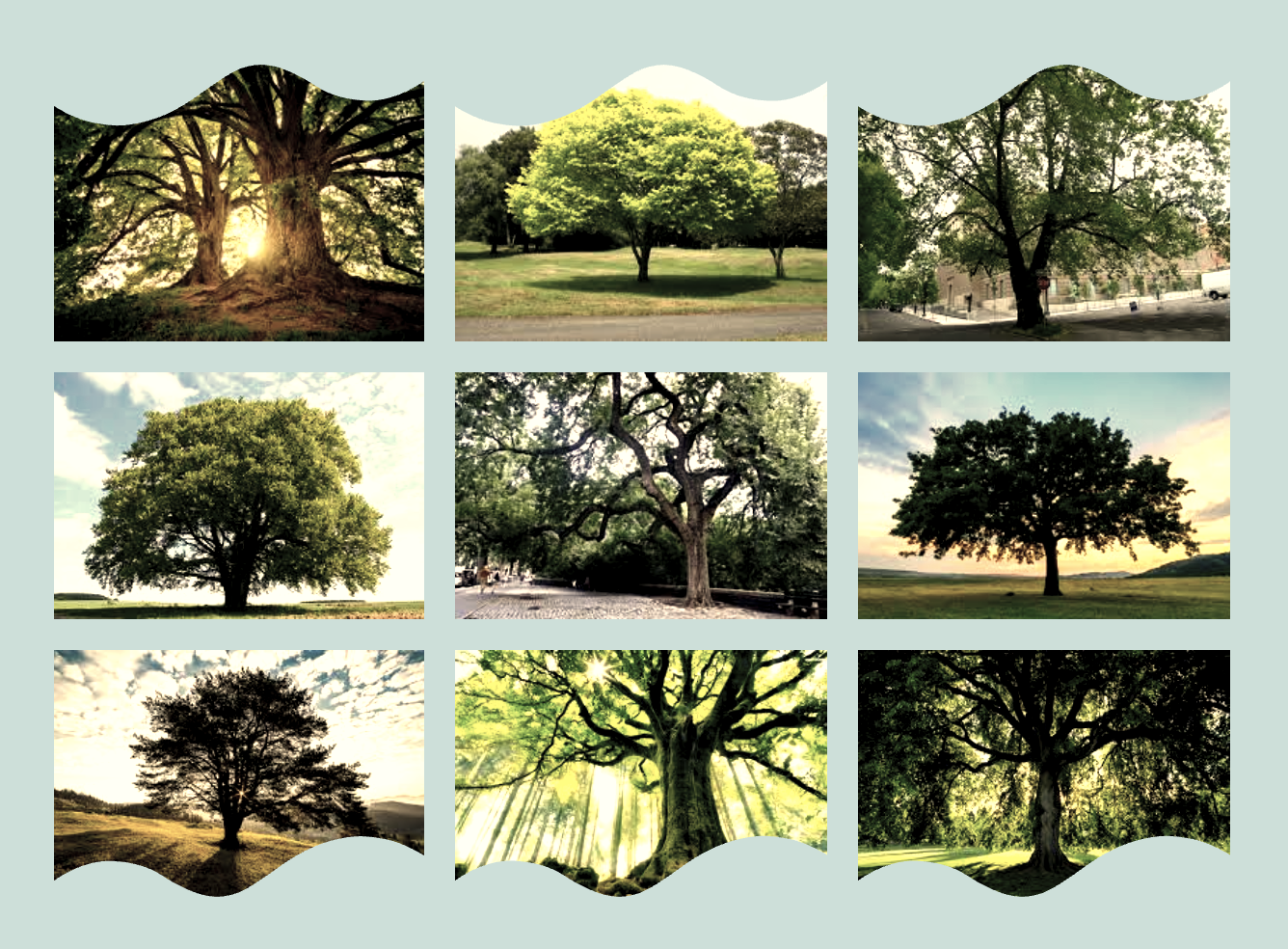
The structure change means that Gallery images now have the ability to add custom links, or custom styles, for each image. An example of the flexible Gallery layouts this opens up can be seen below.
Gallery images will also automatically inherit new functionality that is added to the Image block, including those added by plugins. Below is an example of a Gallery block making us of the Image wave style and vintage filterFilterFilters are one of the two types of Hooks https://codex.wordpress.org/Plugin_API/Hooks. They provide a way for functions to modify data of other functions. They are the counterpart to Actions. Unlike Actions, filters are meant to work in an isolated manner, and should never have side effects such as affecting global variables and output. option added by the CoBlocks pluginPluginA plugin is a piece of software containing a group of functions that can be added to a WordPress website. They can extend functionality or add new features to your WordPress websites. WordPress plugins are written in the PHP programming language and integrate seamlessly with WordPress. These can be free in the WordPress.org Plugin Directory https://wordpress.org/plugins/ or can be cost-based plugin from a third-party..
Other benefits include being able to use the standard move, drag and drop, copy, duplicate, and remove block functionalities. Keyboard navigation also benefits from the adoption of the standard block model by the Gallery block.
Accessing the new Gallery Block
To access the new Gallery block you will need to download the latest version of the GutenbergGutenbergThe Gutenberg project is the new Editor Interface for WordPress. The editor improves the process and experience of creating new content, making writing rich content much simpler. It uses ‘blocks’ to add richness rather than shortcodes, custom HTML etc.
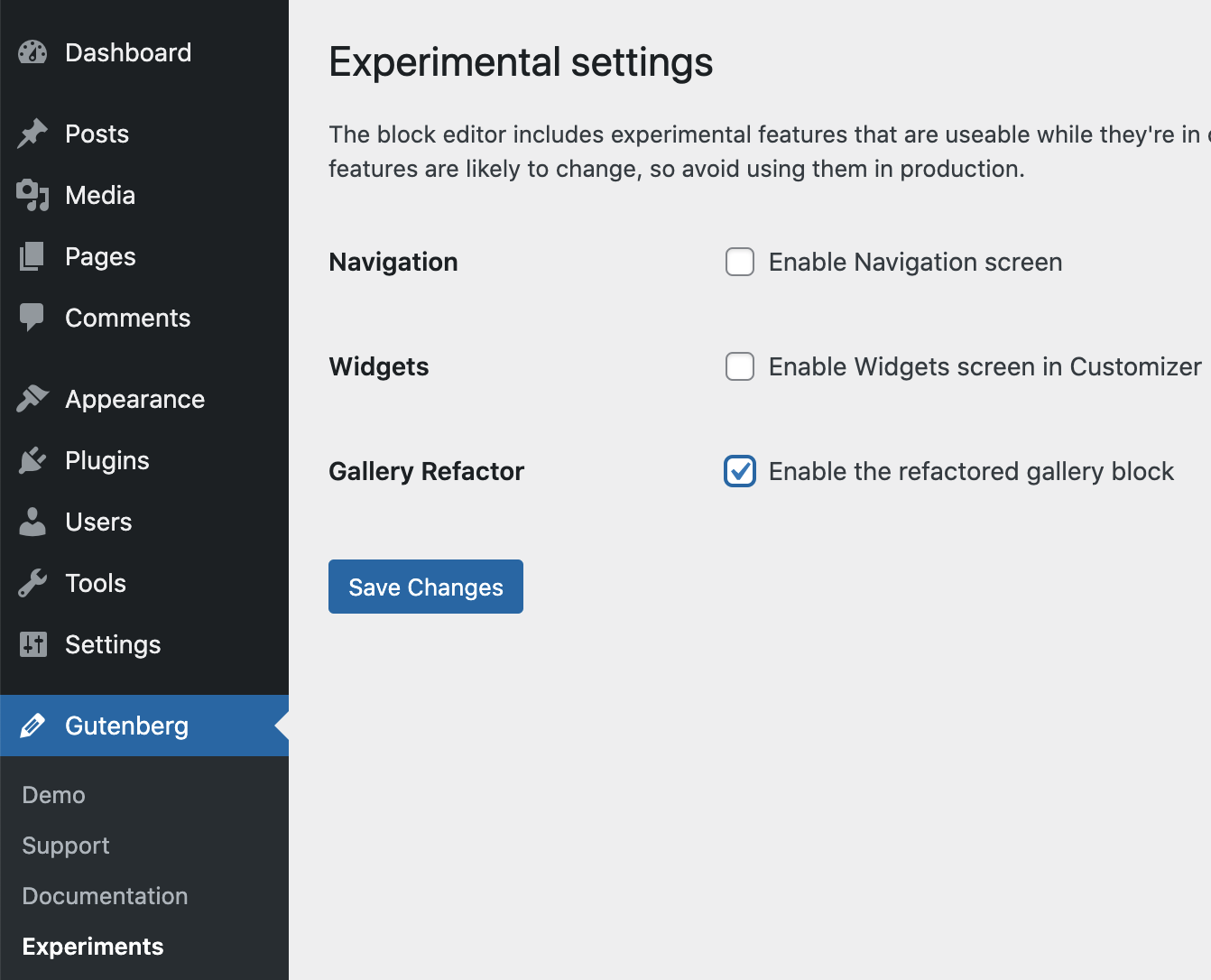
https://wordpress.org/gutenberg/ plugin. At the time of writing the change is still under an experimental flag, so once the plugin is installed check for an experimental setting ‘Enable the refactored gallery block’ and enable it if it is present:
If this flag is not present it means that the changes have been taken out of the experimental phase.
Currently, only new gallery blocks added after the experimental flag is turned on will be in the new format, all existing galleries will be editable and viewable in the current format. You can manually transform an old format gallery to the new format by clicking the ‘Update’ button that will appear in the block toolbar.
What theme and plugin authors need to do before 5.9
To support the new Gallery block format, plugin and theme authors should aim to do the following before the December release of this change in WordPress 5.9.
Add additional selectors to target the new nested image block in both the editor and front end (existing selectors must remain to support the existing gallery block content). The new structure can be seen below.
Test block transformations. Temporary transformation filters have been added to handle the transformation of 3rd party blocks to and from the new core gallery block format. However, block plugins with gallery transforms should still be tested with the Gutenberg plugin to ensure these transformations work correctly.
In the future, the temporary transformation filters may be deprecated, and plugin authors will then need to update their transformations to handle the new Gallery format. Notice will be given ahead of this change being made.
Additional context and considerations
Other existing solutions
Third-party block developers are currently solving some of the problems caused by the limitations of the core Gallery block by implementing their custom Gallery blocks. These include some of the missing functionality, like the ability to add custom links to individual images. This can be problematic for site owners and content editors due to a large number of Gallery blocks that offer very similar functionality, but none of which appear to provide a close match to the functionality available with individual core Image blocks.
There do not appear to be any examples of plugins that already solve this problem in a way that utilizes Image blocks as inner blocks.
Backwards compatibility considerations
This is a breaking change due to the fundamental change in the underlying Gallery structure. Due to the large number of Gallery blocks already in use, along with themes and plugins that may rely on the existing structure, the following steps have been taken to mitigate the impact of this change on theme and plugin developers as much as possible:
For the initial release in the Gutenberg plugin, there will be no automatic migrationMigrationMoving the code, database and media files for a website site from one server to another. Most typically done when changing hosting companies. of existing gallery content. This means that all existing gallery content will behave the same in the editor and front end as it does now, so will be compatible with existing plugins and themes. Only new gallery blocks added after this change will have the new structure in the editor and the front-end. The plan is to add automatic migration of existing gallery content when loaded in the editor to the 5.9 WordPress release.
Two temporary transformation filters have been added that will handle the transformation of 3rd party blocks to and from the new core gallery block format.
Possible edge cases
The refactored Gallery format has been tested against the following sample block libraries that have existing transforms to and from the core Gallery block:
While the refactored gallery works effectively with these plugins and themes, there may be edge cases in other plugins and themes that have not been accounted for. Themes that heavily modify the gallery CSS based on the existing <ul><li></li></ul> will definitely need to be updated if the same style changes need to be applied to the new gallery format. Therefore, it is recommended that theme and plugin authors test the changed gallery block well in advance of the 5.9 release.
Updated Oct 18 with additional information on Transformation, and CSS selectors. Updated Oct 25 with instructions on how to access the new Gallery block while experimental
We welcomed a couple of first-time attendees, always a happy chat when it happens!
Highlighted blogblog(versus network, site) posts
The attendees did not add comments to the posts highlighted in the agenda, but Francesca encouraged everyone to test WordPress trunktrunkA directory in Subversion containing the latest development code in preparation for the next major release cycle. If you are running "trunk", then you are on the latest revision. with the BetaBetaA pre-release of software that is given out to a large group of users to trial under real conditions. Beta versions have gone through alpha testing in-house and are generally fairly close in look, feel and function to the final product; however, design changes often occur as part of the process. Tester pluginPluginA plugin is a piece of software containing a group of functions that can be added to a WordPress website. They can extend functionality or add new features to your WordPress websites. WordPress plugins are written in the PHP programming language and integrate seamlessly with WordPress. These can be free in the WordPress.org Plugin Directory https://wordpress.org/plugins/ or can be cost-based plugin from a third-party. and report bugs.
Worth mentioning
Thanks to the 31 people who contributed to WordPress CoreCoreCore is the set of software required to run WordPress. The Core Development Team builds WordPress. on TracTracAn open source project by Edgewall Software that serves as a bug tracker and project management tool for WordPress. last week, including 3 new contributors! Kudos to the 2 core committers of the week, too.
@hellofromtonya invited everyone to join the weekly working session where core contributorsCore ContributorsCore contributors are those who have worked on a release of WordPress, by creating the functions or finding and patching bugs. These contributions are done through Trac.
https://core.trac.wordpress.org will cover testing docs, dev notesdev noteEach important change in WordPress Core is documented in a developers note, (usually called dev note). Good dev notes generally include a description of the change, the decision that led to this change, and a description of how developers are supposed to work with that change. Dev notes are published on Make/Core blog during the beta phase of WordPress release cycle. Publishing dev notes is particularly important when plugin/theme authors and WordPress developers need to be aware of those changes.In general, all dev notes are compiled into a Field Guide at the beginning of the release candidate phase., open tickets for PHPPHPThe web scripting language in which WordPress is primarily architected. WordPress requires PHP 7.4 or higher 8.1 testing, and for recent test modernization. They are announced in the core-test channel in SlackSlackSlack is a Collaborative Group Chat Platform https://slack.com/. The WordPress community has its own Slack Channel at https://make.wordpress.org/chat/, so keep an eye on them!
Component maintainers
Build/Test Tools
@sergeybiryukov announced that the WordPress test suite is compatible with PHPUnit 8 & 9, and runs tests on PHP 8.1 beta (scheduled for release in November). See tickets #46149 and #53891 for more details.
As some of these test improvements were an unavoidable backward compatibility break for plugins/themes running tests on the WordPress core framework, there is an ongoing discussion about backporting some of these changes to older branches. Two main reasons for backporting:
Make WP security releases easier by not having to rewrite the tests that accompany security backports for older PHPUnit versions.
Help minimize the impact on the extender community who need to do cross-version testing against older versions of WordPress.
You can check #53911 for more details. Feedback welcome!
General
#53635 – Work continues on making various compatibility fixes for PHP 8.1.
A lively discussion ensued about the state of old tickets that lose momentum. It’s important to keep the conversation alive. Everyone is invited to add comments to tickets, refresh patches, and bring them up during dev-chat or scrubs when they will be scheduled for WordPress 5.9 and beyond.
Francesca also pointed new attendees to some resources that can be helpful if you want to contribute to WordPress.
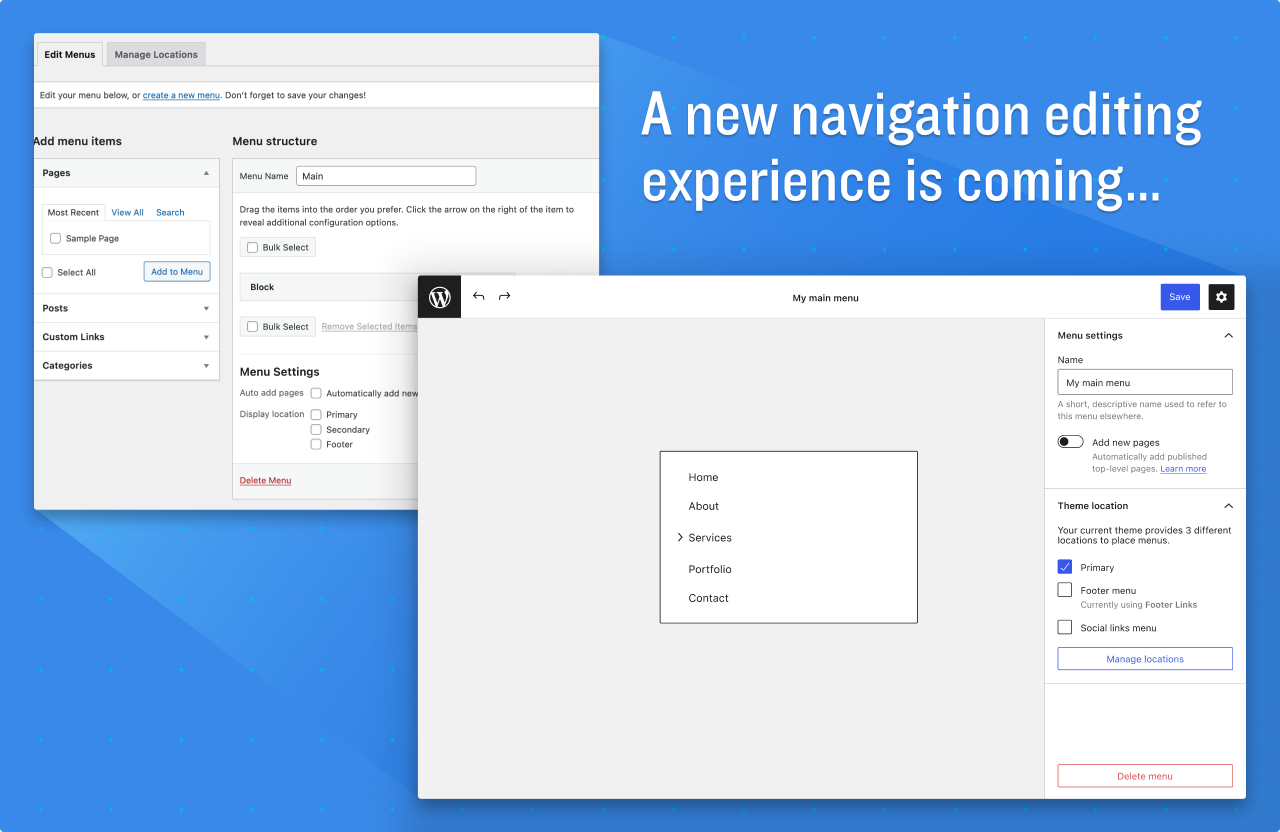
Topic: comparing and contrasting the classic menu screen with the experimental blockBlockBlock is the abstract term used to describe units of markup that, composed together, form the content or layout of a webpage using the WordPress editor. The idea combines concepts of what in the past may have achieved with shortcodes, custom HTML, and embed discovery into a single consistent API and user experience.-based navigation screen.
Goal: derive a list of tasks that are required in order for the two screens to have feature parity (from both UXUXUser experience and UIUIUser interface perspectives).
Intended Audience: past and future contributors to the navigation editor and block. Contributors to other related parts of WordPress.
Note Taker: any volunteers to be the official note keeper?
Preparation:
Please could participants test drive the old and new screens. Try creating the same menus on both screens.
Then come prepared with features they feel are missing from the block-based Navigation screen that are present in the classic Menu screen, or any bugs encountered.
Agenda
Introduction
Facilitator introductions.
Welcome to attendees.
Recap hangout topic and goal.
Terminology – block-based vs classic Navigation screens.
Format
Explain the format.
Facilitator will share screen to demonstrate which parts of the experience are being discussed.
Questions to consider about the new screen:
Where is it lacking polish?
What bugs are in evidence?
What steps are harder to achieve?
What steps are not possible to achieve?
What steps are easier to achieve?
What features are entirely missing?
Summary
Brief summary of key discussion points from notetaker.
Summary of action points including Issues to be created or further explorations required.
@dryanpress (fka @Dave Ryan) linked to his PR which introduces some commonly used theme variables to defined colours indicating statuses such as success and error :
@robertgasked a question about where new custom properties should be defined. @ryelle answered that they should be in custom-properties.css, in the body selector so that they can be overridden by colour themes later
@notlaura started the 20 minute session where contributors can work on the project while having help available in the SlackSlackSlack is a Collaborative Group Chat Platform https://slack.com/. The WordPress community has its own Slack Channel at https://make.wordpress.org/chat/ channel
@robertg asked if the :hover and :focus pseudo-classes should have separate custom-properties. @ryelle answered that one custom-property can be defined for --hover and also used for :focus
@wazeter asked about the timeline. @notlaura replied that for the 5.9 release we would be aiming for the end of August. @ryelle clarified that this is the target for “early“ consideration. We’ll know the target for the completed project when the real cutoff has been announced but she expects it to be around early-mid October
@notlaura added that next week’s meeting (August 18) is the last scheduled week for working time
@wazeter asked where questions about quirks should be addressed. @notlaura replied post in the #core-css channel or comment in the PR
@robertg asked if we are just targetting color, background-color, and border-colors for now. @notlaura added box-shadow, noting that this will need some additional discussion
BlockBlockBlock is the abstract term used to describe units of markup that, composed together, form the content or layout of a webpage using the WordPress editor. The idea combines concepts of what in the past may have achieved with shortcodes, custom HTML, and embed discovery into a single consistent API and user experience. based WidgetWidgetA WordPress Widget is a small block that performs a specific function. You can add these widgets in sidebars also known as widget-ready areas on your web page. WordPress widgets were originally created to provide a simple and easy-to-use way of giving design and structure control of the WordPress theme to the user. Editor.
Navigation Block & Navigation Editor.
Template editor.
Patterns.
Styling.
Mobile Team.
Task Coordination.
Open Floor.
If you are not able to attend the meeting, you are encouraged to share anything relevant for the discussion:
If you have anything to share for the Task Coordination section, please leave it as a comment on this post.
If you have anything to propose for the agenda or other specific items related to those listed above, please leave a comment below.



You must be logged in to post a comment.