Triage Squad GitHubGitHubGitHub is a website that offers online implementation of git repositories that can easily be shared, copied and modified by other developers. Public repositories are free to host, private repositories require a paid subscription. GitHub introduced the concept of the ‘pull request’ where code changes done in branches by contributors can be reviewed and discussed before being merged by the repository owner. https://github.com/ triage: Biweekly on Thursdays 07:00 UTC
For those who are new here, the WordPress Training Team helps people learn to use, extend, and contribute to WordPress through educational content hosted on Learn.WordPress.org.
Note takers, please remember to wait until the Tuesday following the meeting to publish the notes. This allows team members time to read and provide asynchronous comments.
After publishing the notes, please comment in the meeting agenda’s GitHubGitHubGitHub is a website that offers online implementation of git repositories that can easily be shared, copied and modified by other developers. Public repositories are free to host, private repositories require a paid subscription. GitHub introduced the concept of the ‘pull request’ where code changes done in branches by contributors can be reviewed and discussed before being merged by the repository owner. https://github.com/ issue with the link to the notes and then close the issue.
Training Team 2024 Half Year Review is out! Let’s celebrate another 6 months of goals and projects accomplished! Please read through the post and share any additional thoughts in the comments.
Do we need a separate LearnWP Topic Vetting board for vetting topics? The team’s dynamics have changed since then, so let’s reevaluate. What is the value of having a dedicated board for topic vetting? Could we add back a column at the left of the LearnWP Content- Development board for issues waiting vetting?
According to @bsanevans Last year, SMEs struggled to find relevant issues to vet due to all topics being in a single column, leading to a backlog of 100+ issues. The topic vetting project board, with its categoryCategoryThe 'category' taxonomy lets you group posts / content together that share a common bond. Categories are pre-defined and broad ranging. tabs, made it easier for SMEs to locate their issues. Now, only 5 issues are waiting to be vetted, a significant improvement from last year. This change allows us to consider reverting to a single column in the content development project board. The backlog was primarily due to Training creating many new issues per release, but this process has paused, making the vetting board more manageable.
@piyopiyofox closed all Lesson Plans and Tutorials unless requested to be converted into a Lesson. The team could benefit from an editorial calendar for release-related content and a general checklist to vet other content for relevancy and priority.
@webcommsat consider using the Dev Blog model for idea planning and discussion, though the emoji thumb voting might not work due to more people involved in training. Using GitHub for planning could be effective. We can filterFilterFilters are one of the two types of Hooks https://codex.wordpress.org/Plugin_API/Hooks. They provide a way for functions to modify data of other functions. They are the counterpart to Actions. Unlike Actions, filters are meant to work in an isolated manner, and should never have side effects such as affecting global variables and output. the existing board for ideas and adapt some Dev Blog practices for training. This could also aid in cross-mapping and linking published items, which is increasingly important. I already consider training when reviewing new Dev Blog ideas and posts.
At WordCampWordCampWordCamps are casual, locally-organized conferences covering everything related to WordPress. They're one of the places where the WordPress community comes together to teach one another what they’ve learned throughout the year and share the joy. Learn more. EU’s Contributor DayContributor DayContributor Days are standalone days, frequently held before or after WordCamps but they can also happen at any time. They are events where people get together to work on various areas of https://make.wordpress.org/ There are many teams that people can participate in, each with a different focus. https://2017.us.wordcamp.org/contributor-day/https://make.wordpress.org/support/handbook/getting-started/getting-started-at-a-contributor-day/, the team began creating thumbnails for Learn content, but many more are needed. @zoonini is hosting an online workshop next week to continue this effort. Click the link above to sign up and join the Thumbnail-a-thon!
@zoonini will be leading this transition and will let the team know of next-steps soon.
As of today, we’ll be closing the Faculty application form.
New team meeting section – “Contributor Updates”. Although the Faculty program is ending, the “Faculty Updates” section in team meetings has been valuable. We want to continue this tradition and invite all training team members to share their current issues or projects.
Starting next week, the “Faculty Updates” section will be renamed “Contributor Updates” and all 2,655 Training Team members are invited to share their updates.
@piyopiyofox has been cleaning up the Topic Vetting Board by closing non-Lesson, non-Learning Pathways, and non-Online Workshop issues. We will next close similar issues in the Content Development Project board.
Suggestion to pause new Tutorial Presenter applications.We’re temporarily closing the Tutorial application form due to spam. We’re focusing on updating the content creator application process while keeping the Online Workshop facilitator application form open for vetted submissions. Please share any questions or thoughts in the threads above.
Props: Special thanks to all the contributors who created thumbnail graphics for the new Learn WordPress site during and after WCEU Contributor Day. A particular shout-out to @sumitsingh and @bsanevans!
Props: @agiljulio for his work on creating the final video lessons for the Beginner developer learning pathway.
Learn WordPress Thumbnail creation ( From @zoonini ) The thumbnail creation project needs more help, and it’s fun to do! These graphics are used for courses, lessons, and tutorials on the new site. Check out examples in the Featured Courses and Courses sections on the new site, which can be previewed here. Join our “thumbnail-a-thon” online workshop on June 25 at 17 UTC to learn how to create them—no graphic design skills needed!
New learner satisfaction surveys on Learn WordPress content ( From @zoonini ) The Training team plans to add anonymous satisfaction surveys to Learn.WordPress.org courses, aiming for an average score of at least 4 out of 5. These surveys will measure satisfaction, gather improvement suggestions, assess skill confidence, and collect optional testimonials Here’s the draft survey. Survey results will be regularly reviewed, and feedback will be shared with content creators. Please provide feedback on the draft survey by July 3.
Open Discussions
You can see all meetings scheduled on this meeting calendar. If you are new to the Training Team, then come walk through our onboarding program to get to know the team and how we work. And if you have questions, feel free to reach out in the #training Slack channel at any time.
On June 14, I had the privilege to present the Training Team’s vision for Learn WordPress at WordCampWordCampWordCamps are casual, locally-organized conferences covering everything related to WordPress. They're one of the places where the WordPress community comes together to teach one another what they’ve learned throughout the year and share the joy. Learn more. Europe 2024. The presentation saw an engaged audience of 300-400 people in the main hall, with many more tuning in online. I wanted to document the feedback I received here for the team to consider as we continue improving Learn WordPress.
The presentation slides are available for download and reuse: Google Slides, PDF
Ideas from the community
Show Learn content in the WordPress dashboard.
Hosts would love for a way to show content right there without the user having to leave their site.
Provide Learn content in a way that hosts etc. can add/subtract modules as needed for their use cases.
Building a pluginPluginA plugin is a piece of software containing a group of functions that can be added to a WordPress website. They can extend functionality or add new features to your WordPress websites. WordPress plugins are written in the PHP programming language and integrate seamlessly with WordPress. These can be free in the WordPress.org Plugin Directory https://wordpress.org/plugins/ or can be cost-based plugin from a third-party. was one idea as a way to achieve this.
Clarify how users can get help with the content.
Learn could show a call-to-action “click here for help” within content.
Offer a glossary so that users know what to call the things they’re learning.
There have been previous efforts to create a unified WordPress glossary (Slack conversation) which would be great to integrate on Learn for learners.
For those who are new here, the WordPress Training Team helps people learn to use, extend, and contribute to WordPress through educational content hosted on Learn.WordPress.org.
Meeting recap notes are one of the best ways to get started contributing to a team, and you can find details on how to write notes on this handbook page.
Looking for feedback
The Training Team has had an Administration project board in GitHubGitHubGitHub is a website that offers online implementation of git repositories that can easily be shared, copied and modified by other developers. Public repositories are free to host, private repositories require a paid subscription. GitHub introduced the concept of the ‘pull request’ where code changes done in branches by contributors can be reviewed and discussed before being merged by the repository owner. https://github.com/ for a couple of years. With the majority of project tracking now happening on the team blog, team reps are planning on cleaning out the board, leaving just the meeting agenda and handbook feedback items. Are any team members still actively using this board?
Looking for volunteers
@Jonathan and @westnz started triaging the Tutorials in this spreadsheet, marking those that the team should keep, modify, or retire. There are still over 100 Tutorials that need triaging. Feel free to add your thoughts directly in the spreadsheet, or comment here if you need assistance.
Other News
Our WordCamp Europe 2024 Contributor Day post is now up for contributors to review. You can participate either in person or online, so click this link to find out how to contribute Try and get a group photo.
Join our June Content Creation Coffee Hours! It’s a great chance for anyone working on or interested in learning pathway content to meet, discuss projects, ask questions, or find new content to work on. Meetings alternate between two time zones each month.
Check out these informal discovery and Q&A sessions about the Five for the Future program at WCEU this week for companies interested in joining. Sessions are on Saturday, June 15, at 9:00 AM and 3:15 PM, meeting at the Community Booth. The location might change based on attendance. Spread the word and refer to the newly published Five for the Future Handbook for more information. Thank you!
A new handbook page on Video Best Practices has been published, featuring an embedded online workshop. For the list of resources, please share any other free video editing software you recommend for their excellent performance.
What have you been working on and how has it been going?
@lada7042 created a lesson on the Group blockBlockBlock is the abstract term used to describe units of markup that, composed together, form the content or layout of a webpage using the WordPress editor. The idea combines concepts of what in the past may have achieved with shortcodes, custom HTML, and embed discovery into a single consistent API and user experience. and worked on video editing and publishing. She encountered issues but received assistance from @westnz.
@piyopiyofox began as a Guide in the Guide Program, onboarded @Jamie Madden as a new co-rep, and is actively involved in the content maintenance proposal while creating a half-year goals post.
@westnz has recently created two new lessons for the Intermediate user learning pathway and is involved in the Guide program.
@devmuhib recently co-hosted workshops on “WordPress Support Engineer Roles and Responsibilities” and “Training Team WordCampWordCampWordCamps are casual, locally-organized conferences covering everything related to WordPress. They're one of the places where the WordPress community comes together to teach one another what they’ve learned throughout the year and share the joy. Learn more. Europe Contributor Day Online” with @jagirbahesh. He is actively managing HelpScout tickets, onboarded two new content creators this week, and is currently triaging GitHub issues related to content translation.
@zoonini is currently coordinating a thumbnail creation/replacement project, matching guides with new contributors, and overseeing the Faculty program retirement proposal. She is also involved in coordinating marketing and communication plans for the site relaunch and recently hosted an online workshop with @westnz on recording impressive demos.
Anything you’ve accomplished since the last meeting?
@westnz is completing work on the custom post-type video.
You can see all meetings scheduled on this meeting calendar. If you are new to the Training Team, then come walk through our onboarding program to get to know the team and how we work. And if you have questions, feel free to reach out in the #training Slack channel at any time.
Hey there friends! With it now being June, it’s time for the team to take a look at how we are tracking toward the goals we set at the beginning of the year. We will use this post as a guide for ongoing conversations in our team meetings going forward as well.
Outlined below are the goals we have completed, what is currently in progress, and the details of the goal’s current state.
We have completed 4 out of 7 goals for the first half of the year, and have 5 goals from the second half of this year currently in progress.
January to March 2024 – 1 Completed, and 3 In Progress
🚧Create a Marketing Campaign for Learning Pathways with Marketing (Complete Q2)
Launch communication plan shared in GitHub, including a video tour of the new site
🚧Brainstorm the evolution of Online Workshops
We are working to send out a survey to folks in our Online Workshops meetupMeetupAll local/regional gatherings that are officially a part of the WordPress world but are not WordCamps are organized through https://www.meetup.com/. A meetup is typically a chance for local WordPress users to get together and share new ideas and seek help from one another. Searching for ‘WordPress’ on meetup.com will help you find options in your area. group to get their feedback on how they’d like to see Online Workshops evolve
✅ Implement data analyzing practices to gauge the health and effectiveness of the Training Team and Learn’s Content
✅ Create and maintain shared resources that promote the Training Team and Learn
We have a shared Google Drive folder which includes resources like slides for volunteers and contributors to use to promote the Training Team and Learn WordPress
✅ Create or update a handbook page that clarifies where people’s contributions to the team will appear/be displayed
🚧 Work with the Community team to promote Learning Pathways at Meetups
We’ve been encouraged to share updates with the Community Team so that they can include it in their monthly newsletter
🚧 Figure out a method to manage localized content translation
The team had a great conversation around what Translation plugin to use4 for Learn, and we are currently testing out TranslatePress on the Learn WordPress staging site
In preparation for the relaunch of Learn.WordPress.org and Learning Pathways scheduled for July, we need to create a large quantity of small graphics – called thumbnails – to serve as featured images for each course, lesson, and tutorial. This will create a visually appealing site that will entice learners to dive in and get started on their learning journey.
We invite volunteers at WCEU’s Contributor Day on June 13 – and beyond – to pitch in and create as many of these thumbnails as possible. Even if you’re not attending WCEU in person, you’re welcome to help out. Just follow the steps below, and let the team know in the #training channel in Slack so we can recognize your contributions.
Thank you in advance to everyone who’s able to lend a hand with this group effort! We’ll keep the project going for as long as needed.
Open the content-tracking spreadsheet. (You’ll find the link in the Training team’s SlackSlackSlack is a Collaborative Group Chat Platform https://slack.com/. The WordPress community has its own Slack Channel at https://make.wordpress.org/chat/ bookmarks – screenshot.)
Working from the top down in one of the three sheets (tabs), choose a lesson, course, or tutorial for which you’ll create a thumbnail. (Ignore anything with a “Deprecated” status.)
Put your name in the Thumbnail by column to claim it.
For those who speak a language other than English, see if there are any lessons, courses, or tutorials in that language and prioritize those first.
Step 2: Create your thumbnail
Create the thumbnail by going through the thumbnail creation guide, also following these important points specific to this project:
Vary the colour palette and slide template style. Try not to repeat the same template or colour palette on consecutive images. Keep in mind that the order in which the content is listed in the spreadsheet is the order in which the thumbnails will appear on the site, so the idea is to vary the thumbnail styles and colours that are next to each other. The goal is to end up with something a bit random like this:
And not end up with something where there are a lot of the same colour-palette variations repeated next to each other, like this:
Copy-paste the course/lesson/tutorial title into the text area of the thumbnail generator, from the column that says Lesson (tutorial/course) title – for copying. It’s not obligatory to use the title in your graphic; if you find a great image to represent the course/lesson/tutorial, feel free to use one of the templates without text. (More on finding images below.)
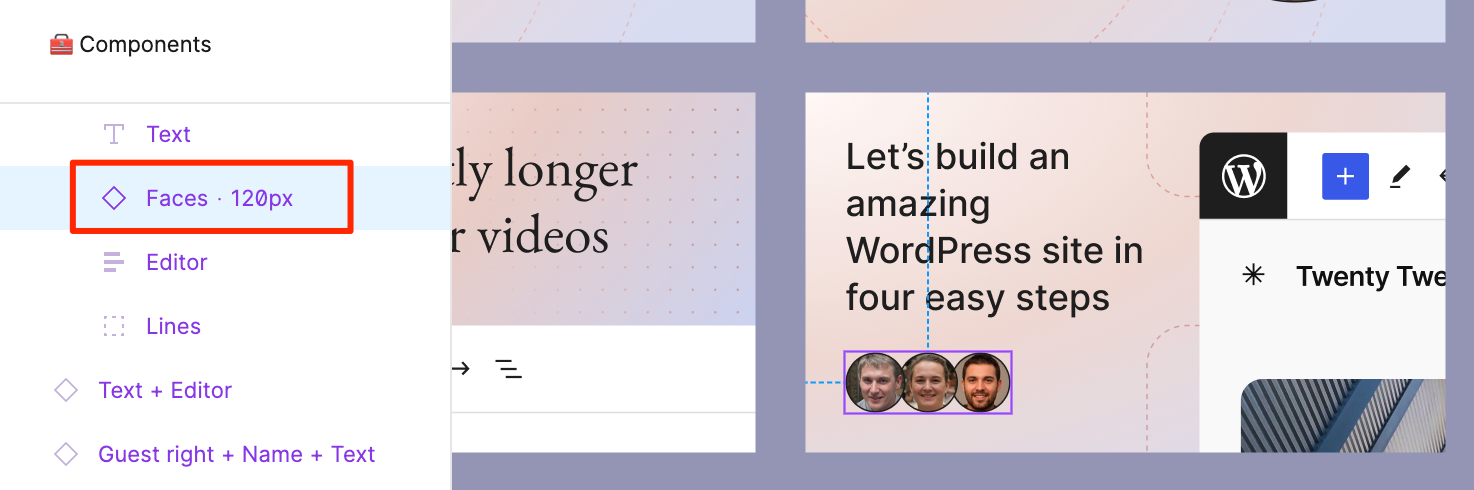
We are not using Faces or Guest names for these thumbnails. If you’ve chosen a template with any Faces (avatars), click the Faces component and click the eye icon next to it to hide it, or right-click the component and select the “Show/Hide” option in the menu.
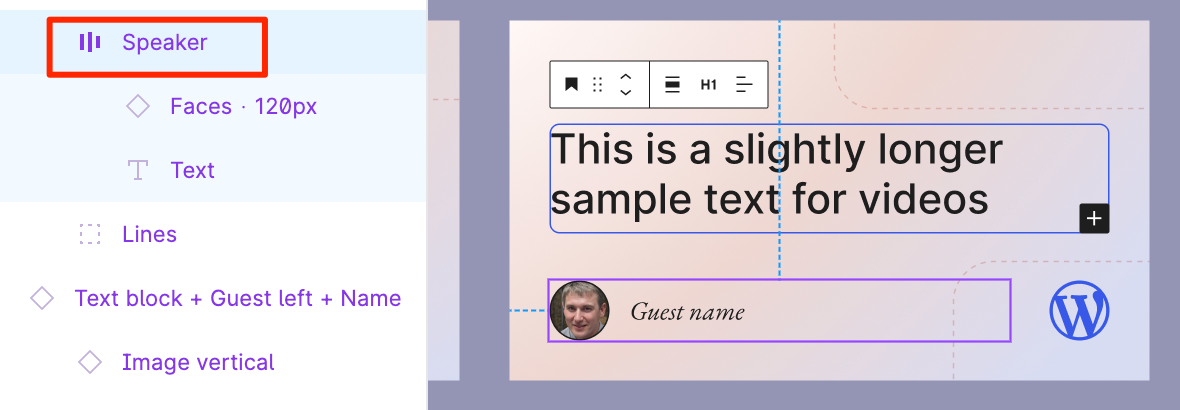
Similarly, if you’re using a template with Guest names, select the Speaker component and and click the eye icon next to it to hide it, or right-click the component and select the “Show/Hide” option in the menu.
If you’ve chosen a template that features an image (other than the ones that feature a preselected BlockBlockBlock is the abstract term used to describe units of markup that, composed together, form the content or layout of a webpage using the WordPress editor. The idea combines concepts of what in the past may have achieved with shortcodes, custom HTML, and embed discovery into a single consistent API and user experience. Editor image), replace it with an open sourceOpen SourceOpen Source denotes software for which the original source code is made freely available and may be redistributed and modified. Open Source **must be** delivered via a licensing model, see GPL. image from the WordPress Photo Directory, Openverse, or Pexels. Make sure no credit is required in the image’s license terms.
Step 3: Export, upload, and record your thumbnail
Export your thumbnail by following the handbook instructions. Rename the file using this naming convention: yyyy-mm-dd-name-of-tutorial-or-other-content-type Example: 2024-06-13-introducing-the-twenty-twenty-four-theme for a tutorial titled “Introducing the Twenty Twenty-Four theme.” (Do not use any spaces or uppercase letters in the file name.) The file will automatically be given the .png extension by the generator – don’t change it.
Upload the thumbnail file to the Google Drive, in either the Courses, Lessons, or Tutorials folder. (You’ll find the link in the Training team’s Slack bookmarks – screenshot.)
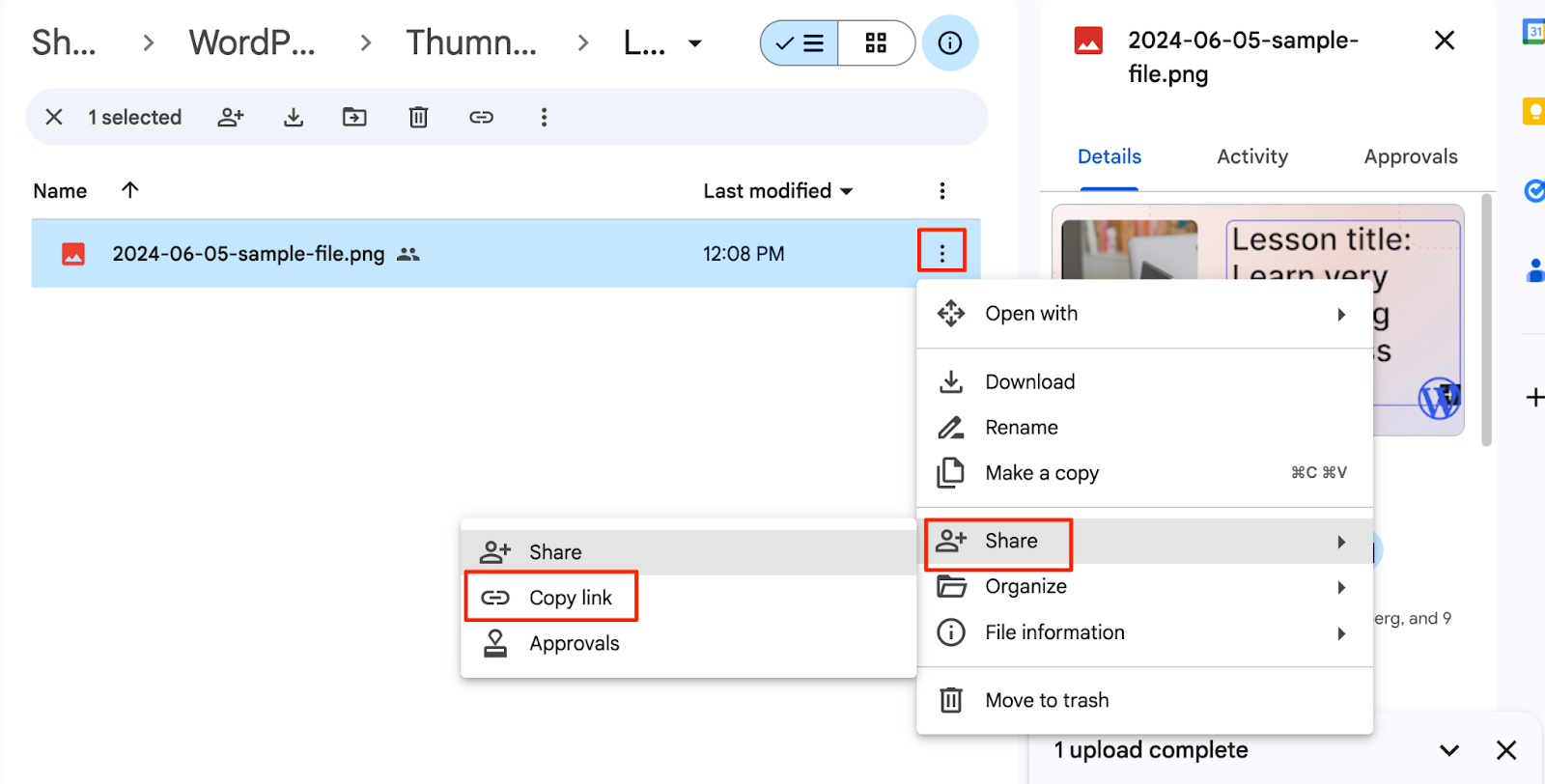
In the spreadsheet’s Thumbnail URLURLA specific web address of a website or web page on the Internet, such as a website’s URL www.wordpress.org column, paste the URL from the Google Drive by clicking the three dots next to the file > Share > Copy link.
Leave all other columns blank, unless you receive further instructions.
If you haven’t been able to upload thumbnails for all the ones you “claimed” in step 1, go back and remove your name next to that piece of content so someone else can get to it.
We got some input from a Marketing team member last week. Please continue to contribute to this conversation by providing your thoughts on the post by June 13th.
The team has had an administration project board for a couple of years. With the majority of project tracking now happening on the team blog, team reps are planning on cleaning out the board, leaving just meeting agenda and handbook feedback items. Are any team members still actively using this board?
Faculty program retirement
We’d like to share a proposal to retire the Faculty program in its current form. This proposal was already discussed within the Faculty group, and since the overall consensus was to go ahead with retiring the program, we’re now sharing the proposal with the whole team before we move forward with any of the suggested steps.
@bsanevans has proposed the below plan to the team and team agreed on that. Below are the @bsanevans proposal:
Firstly, we wanted to give a huge thank you for all your hard work in keeping things running so smoothly. Thanks to you all, we’ve been able to set up team processes, catch up on a backlog of tasks, and set ourselves up for future success.
Over the past while, we’ve observed that the Faculty program is due for a rethink. For example, many folks in the Faculty group are no longer active on the team at all, and there are many roles that are under-used and difficult to recruit for. As well, there’s a level of administrative overhead that’s somewhat complicated, and having to be part of the Faculty program may be seen by contributors as a barrier to doing certain types of work on the team. Finally, the now-established Guide Program serves as a welcoming path for people to get more involved in the team.
We’ve been thinking of ways to streamline things to make the team run more efficiently. In turn, this should free up time to focus more on higher-impact areas.
In thinking things over, we’d like to suggest retiring the Faculty program in its current form. We propose the following steps:
Add a new area in the handbook, outlining the history of Learn.WordPress.org and the Training team. This section would also include the names of past team reps and Faculty members, so that folks’ contributions are visible and recognized in the context of the Training team’s history.
Shift the work done by the current Faculty Admin group to a smaller group of administrators, starting with the team reps. Additional admins will be added over time, while the current admin needs of the team are reassessed. We will likely look for Training team members who have made consistent contributions over the last 6-12 months.
Update the handbook to remove the Faculty Program section.
Feedback on sharing experienced content creator processes with the team
@psykro and @west7 have identified a need for content creators to view their content creation process. They plan to add the following links as additional resources to the “Create a Lesson” page. They are also considering creating an informal video recording of these processes to support visual learners. We welcome any feedback or concerns you might have regarding this plan.
To simplify Learn.WordPress.org, two content types will be gradually phased out: tutorials and lesson plans. As a first step, before launching the new site some outdated tutorials are going to be unpublished. A redirect will be added for each one, to send visitors to the most relevant alternative content.
@west7 and @psykro have already started going through all existing tutorials to note whether they should be kept, deprecated (unpublished), or updated.
We are looking for volunteers to continue going through the rest of the tutorials to indicate the status of each (keep/deprecate/update) and a potential redirect URLURLA specific web address of a website or web page on the Internet, such as a website’s URL www.wordpress.org. If you are available, please make edits directly to the spreadsheet.
Note that some of this content is in languages other than English, but you could use an online translation tool to translate the tutorial title to help determine whether it’s still relevant or has a more up-to-date equivalent tutorial or lesson.
You can participate either in person or online, so click this link above to find out how to contribute WordCampWordCampWordCamps are casual, locally-organized conferences covering everything related to WordPress. They're one of the places where the WordPress community comes together to teach one another what they’ve learned throughout the year and share the joy. Learn more. EU Contributor DayContributor DayContributor Days are standalone days, frequently held before or after WordCamps but they can also happen at any time. They are events where people get together to work on various areas of https://make.wordpress.org/ There are many teams that people can participate in, each with a different focus. https://2017.us.wordcamp.org/contributor-day/https://make.wordpress.org/support/handbook/getting-started/getting-started-at-a-contributor-day/ will be happening on June 13th.
The WordPress Project’s Video Thumbnail Generator
The WordPress project has a new handbook page on how to create video and event thumbnails. Going forward, please use this thumbnail generator for all thumbnails that need to be created for Courses, Lessons, and Online Workshops.
When using the generator, please first watch the walkthrough video shared on the handbook page. I’ll also link the video here:
All Online Workshops going forward should use the same pale blue template as this image. This is also noted in our handbook
This is a big process change for the team. So don’t hesitate to ask questions in this channel as you get used to using the thumbnail generator
After WordCamp Europe, I will be absent from the team for three months, taking a sabbatical from work and WordPress contributions. I’ll be back from September 25th, though, so don’t worry
While I’m away, @digitalchild will be stepping in as interim team lead. Please see the post above for more details.
This is an opportunity for anyone working on learning pathway content or anyone interested in learning pathway content to meet, discuss what content they are working on, ask questions, or find content to work on for the learning pathways. Currently, we alternate meetings between two time zones each month.
Jonathan—13 June 2024 @ 14:00 UTC (The Zoom link will be shared the day before the session and again on the day of the session, just before it begins.)
We found out this week that the Learn news letter wasn’t sending to subscribers until now Thanks to @adamwood for identifying this issue, and fixing it in preparation for the site relaunch.
One exciting development is that a theme switcher now lets you preview the new theme on the production siteProduction SiteA production site is a live site online meant to be viewed by your visitors, as opposed to a site that is staged for development or testing., with all its data. You can try it at: https://learn.wordpress.org/?new-theme=1
Open Discussion
First of all, thank you to @lada7042@zoonini and @west7 for adding additional meeting topics on the GitHub agenda beforehand Each week, if anybody else has topics they’d like discussed, feel free to add it to the agenda so we can dedicate space for it within the meeting
And finally… Was there any other topic folks wanted to bring up today?
It’s just one more week until WordCamp Europe starts I can’t wait to present all the exciting things the Training Team has been doing with Learning Pathways and the site redesign
And with that, I’ll close this week’s meeting. Thanks to everyone who attend live, and to everyone who attended asynchronously. See you all next week!
You can see all meetings scheduled on this meeting calendar. If you are new to the Training Team, then come walk through our onboarding program to get to know the team and how we work. And if you have questions, feel free to reach out in the #training Slack channel at any time.
For those who are new here, the WordPress Training Team helps people learn to use, extend, and contribute to WordPress through educational content hosted on Learn.WordPress.org.
Our WordCamp Europe 2024 Contributor Day post is now available for review. You can participate either in person or online. Click this link to learn how to contribute.
The Training Team Reps are preparing a survey for our Meetup.com Online Workshop group. We will email this survey through MeetupMeetupAll local/regional gatherings that are officially a part of the WordPress world but are not WordCamps are organized through https://www.meetup.com/. A meetup is typically a chance for local WordPress users to get together and share new ideas and seek help from one another. Searching for ‘WordPress’ on meetup.com will help you find options in your area. to better understand the types of workshops participants are interested in for the future.
We have a new handbook page on how to create video and event thumbnails for Learn WordPress and our Online Workshop group. Going forward, please use this thumbnail generator for all thumbnails that need to be created for Courses, Lessons, and Online Workshops.
Props: @zoonini and @fcoveram for creating the video best practices handbook page, and together both are creating the video for our new thumbnails and handbook page.
Props: @sumitsingh for his hard work on publishing the WordCampWordCampWordCamps are casual, locally-organized conferences covering everything related to WordPress. They're one of the places where the WordPress community comes together to teach one another what they’ve learned throughout the year and share the joy. Learn more. Europe Contributor DayContributor DayContributor Days are standalone days, frequently held before or after WordCamps but they can also happen at any time. They are events where people get together to work on various areas of https://make.wordpress.org/ There are many teams that people can participate in, each with a different focus. https://2017.us.wordcamp.org/contributor-day/https://make.wordpress.org/support/handbook/getting-started/getting-started-at-a-contributor-day/ Post.
May 27th update: Thumbnail generator work is complete, and development progresses with the landing page receiving its first update with the new design.
Open Discussions
You can see all meetings scheduled on this meeting calendar. If you are new to the Training Team, then come walk through our onboarding program to get to know the team and how we work. And if you have questions, feel free to reach out in the #training Slack channel at any time.
Training Team co-reps @bsanevans@lada7042 and I are very excited to welcome Jamie Madden as interim Training Team co-representative (co-rep).
A few months ago we discussed the idea of an interim lead with the team, and the idea was largely accepted. An interim co-rep is an active Training Team member who fits our documented criteria, and is able to step in to help lead the team when another co-rep is on a leave for longer than 1 month.
Our fellow team repTeam RepA Team Rep is a person who represents the Make WordPress team to the rest of the project, make sure issues are raised and addressed as needed, and coordinates cross-team efforts.@bsanevans will be away on a three month sabbatical on June 24th, and we will begin onboarding Jamie to the co-representative team starting from this week (June 3rd). He will be staying on as an interim co-rep until the end of the year.
Jamie Madden has been involved in open-source long before WordPress’ first release. He made his first contribution to the Red Hat kernel in 1999. Since then, he’s been contributing to the WordPress documentation, testing, and, of course, Training Team.
Jamie has been an active contributor in the Training Team since July 2022, and joined us as a Faculty Member in September that year lending his Subject Matter Expert and Editor expertise to the team.




 Thanks to
  I can’t wait to present all the exciting things the Training Team has been doing with Learning Pathways and the site redesign


