The WordPress coreCoreCore is the set of software required to run WordPress. The Core Development Team builds WordPress. development team builds WordPress! Follow this site for general updates, status reports, and the occasional code debate. There’s lots of ways to contribute:
Found a bugbugA bug is an error or unexpected result. Performance improvements, code optimization, and are considered enhancements, not defects. After feature freeze, only bugs are dealt with, with regressions (adverse changes from the previous version) being the highest priority.?Create a ticket in the bug tracker.
WordPress 6.5 is introducing a new way of extending blocks that substantially reduces the custom code needed to integrate different kinds of data in the blockBlockBlock is the abstract term used to describe units of markup that, composed together, form the content or layout of a webpage using the WordPress editor. The idea combines concepts of what in the past may have achieved with shortcodes, custom HTML, and embed discovery into a single consistent API and user experience. editor.
This can now be done through the new Block Bindings APIAPIAn API or Application Programming Interface is a software intermediary that allows programs to interact with each other and share data in limited, clearly defined ways..
What is the Block Bindings API?
Given a coreCoreCore is the set of software required to run WordPress. The Core Development Team builds WordPress. block, rather than displaying a user’s inline written content inside of it, imagine wanting to populate that block with data from a particular source instead. For example, the post metadata or custom PHPPHPThe web scripting language in which WordPress is primarily architected. WordPress requires PHP 7.4 or higher logic. What would be the process for doing that?
This is actually a trick question: In previous versions of WordPress, you were unable to do this with GutenbergGutenbergThe Gutenberg project is the new Editor Interface for WordPress. The editor improves the process and experience of creating new content, making writing rich content much simpler. It uses ‘blocks’ to add richness rather than shortcodes, custom HTML etc.
https://wordpress.org/gutenberg/’s core blocks — it would instead require creating a custom block with particular logic for reading from the source in question. But this is no longer the case.
With the Block Bindings API, you can now bind core blocks to read from different sources without needing to write custom block boilerplate — this means it is possible to bind a Paragraph to read from a post’s metadata, or a Heading to read from a pluginPluginA plugin is a piece of software containing a group of functions that can be added to a WordPress website. They can extend functionality or add new features to your WordPress websites. WordPress plugins are written in the PHP programming language and integrate seamlessly with WordPress. These can be free in the WordPress.org Plugin Directory https://wordpress.org/plugins/ or can be cost-based plugin from a third-party.’s PHP logic, all without needing to deal with ReactReactReact is a JavaScript library that makes it easy to reason about, construct, and maintain stateless and stateful user interfaces.
https://reactjs.org, block registration, and other particulars of writing custom blocks from scratch for each new source you want to read from.
This initial release of the Block Bindings API in WordPress 6.5 is a big step towards simplifying the process of extending the editor and expanding the capabilitiescapabilityA capability is permission to perform one or more types of task. Checking if a user has a capability is performed by the current_user_can function. Each user of a WordPress site might have some permissions but not others, depending on their role. For example, users who have the Author role usually have permission to edit their own posts (the “edit_posts” capability), but not permission to edit other users’ posts (the “edit_others_posts” capability). of blocks. Under the hood, the API already powers a showcase feature being shipped in WordPress 6.5 alongside it: Connecting core blocks to custom fields in the post metadata.
Using the same functionality, as an advanced use case, it is also possible to define and have blocks read from custom sources — more on that briefly below.
Note: For a more detailed walkthrough on creating and using Block Bindings than can be related in this brief dev notedev noteEach important change in WordPress Core is documented in a developers note, (usually called dev note). Good dev notes generally include a description of the change, the decision that led to this change, and a description of how developers are supposed to work with that change. Dev notes are published on Make/Core blog during the beta phase of WordPress release cycle. Publishing dev notes is particularly important when plugin/theme authors and WordPress developers need to be aware of those changes.In general, all dev notes are compiled into a Field Guide at the beginning of the release candidate phase., see the Introducing Block Bindings tutorial from the WordPress Developer Blogblog(versus network, site).
How do block bindings work?
Overview
Before getting into the rich functionality Block Bindings can enable via custom sources, this section will first review how the API works in general, then detail how to bind core blocks to custom fields in the post metadata.
The following table shows the current compatible blocks and attributes that can be bound:
Supported Blocks
Supported Attributes
Image
url, alt, title
Paragraph
content
Heading
content
Button
url, text, linkTarget, rel
While the list of compatibility is short for now, this already enables a wide range of use cases, and support for the rest of the core blocks, as well as custom blocks, is planned for the future.
To use Block Bindings, you would specify that these attributes should be read from particular registered sources using the block markup; the logic for those sources would then be executed when rendering on the frontend.
Upon being bound, editing of the attribute in question will be locked and indicators will appear in the editor to signal that the binding has been created.
Specifically, here is how to make use of this via the built-in custom fields support.
Custom fields
Importantly, in this first version of the Block Bindings API, there is no UIUIUser interface for binding attributes to custom fields yet. Therefore, it is necessary to add the markup manually using the Code Editor in Gutenberg.
To bind a supported attribute to a custom fieldCustom FieldCustom Field, also referred to as post meta, is a feature in WordPress. It allows users to add additional information when writing a post, eg contributors’ names, auth. WordPress stores this information as metadata. Users can display this meta data by using template tags in their WordPress themes. in the post metadata, you would use markup such as the following:
In order for this to work, you would need to make sure the field is registered to the post metadata by including code such as the following in the theme’s functions.php or a plugin.
*Note that the show_in_rest property must be set to true for the time being due to security considerations, though there are plans to explore how to remove this requirement in the future.
Future sources
Support for post metadata is just a start, and the plan is to add more built-in sources, such as site, user, and taxonomyTaxonomyA taxonomy is a way to group things together. In WordPress, some common taxonomies are category, link, tag, or post format. https://codex.wordpress.org/Taxonomies#Default_Taxonomies. data, for WordPress 6.6.
That being said, the Block Bindings API already has the functionality to allow for registering of custom sources as well, which is the same functionality used internally to register the core/post-meta source above.
Registering a custom source
Overview
To register a Block Bindings source, one needs to use the register_block_bindings_source() function, which has the following signature:
$source_name: A unique name for the custom binding source in the form of namespace/slug. The namespace is required.
$source_properties: An array of properties to define the binding source:
label: An internationalized text string to represent the binding source. Note: this is not currently shown anywhere in the UI.
get_value_callback: A PHP callable (function, closure, etc.) that is called when a block’s bound attribute source matches the $source_name parameter.
uses_context:(Optional) Extends the block instance with an array of contexts if needed for the callback. For example, to use the current post ID, it should be set to [ 'postId' ].
When WordPress encounters the custom bindings source while parsing a block, it will run the get_value_callbackfunction, whose signature should look like this:
Of course, this is a simple example, and you could make use of the other parameters in the callback signature to create more extensive logic.
Additional API functions
Additionally, there are a few other functions currently part of the public API:
unregister_block_bindings_source( $string source_name ): Unregisters a source
get_all_registered_block_bindings_sources(): Gets all registered sources
get_block_bindings_source( $string source_name ): Retrieves a registered source
Also, please note that while the core sources use shared APIs in the editor UI, be aware that these editor APIs will remain private for the time being while discussion continues on how to standardize extensions to the UI around this feature.
This means that if you would like to implement a UI to handle your custom fields easily, for now, you will need to create that functionality yourself.
With that in mind, Block Bindings are just getting started, and future plans include:
Add the possibility of editing the value of the metaMetaMeta is a term that refers to the inside workings of a group. For us, this is the team that works on internal WordPress sites like WordCamp Central and Make WordPress. fields directly from the UI.
Add UI to allow users to add bindings through the Editor.
Create new built-in sources: Site data, post data, and taxonomy data.
Add support for more core blocks.
Add the ability for developers to extend the Editor UI.
As always, feedback is more than welcome, and we invite you to share your ideas and use cases on Github, this post, or WordPress SlackSlackSlack is a Collaborative Group Chat Platform https://slack.com/. The WordPress community has its own Slack Channel at https://make.wordpress.org/chat/ to help shape the development of the Block Bindings API.
A big thanks to @greenshady for providing code snippets and the initial ideas for this post, as well as @santosguillamot, and @czapla for offering their feedback.
Now that WordPress 6.5 has entered the Release Candidaterelease candidateOne of the final stages in the version release cycle, this version signals the potential to be a final release to the public. Also see alpha (beta). phase, the following policies are in place.
These policies mainly cover how and when CoreCoreCore is the set of software required to run WordPress. The Core Development Team builds WordPress. committers can commit. For non-committing contributors, this post may help explain why a Core committercommitterA developer with commit access. WordPress has five lead developers and four permanent core developers with commit access. Additionally, the project usually has a few guest or component committers - a developer receiving commit access, generally for a single release cycle (sometimes renewed) and/or for a specific component. makes a certain decision.
String Freeze
To allow the Polyglots teamPolyglots TeamPolyglots Team is a group of multilingual translators who work on translating plugins, themes, documentation, and front-facing marketing copy. https://make.wordpress.org/polyglots/teams/ time to get their local language’s translationtranslationThe process (or result) of changing text, words, and display formatting to support another language. Also see localization, internationalization. of WordPress ready, no new strings are permitted to be added to the release. Existing strings can be removed and/or duplicated if needed.
Seek guidance from the Polyglots team leadership for any strings reported as buggy. A buggy string is one that can not be translated to all languages in its current form.
Tickets on the WordPress 6.5 milestone
For the remainder of the cycle, only two types of tickets may be placed on/remain on the 6.5 milestone:
Regressions: bugs that have been introduced during the WordPress 6.5 development cycle, either to existing or new features.
Test suite expansion: tests can be committed at any time without regard to code or string freezes. This can cover either new or existing features.
TrunktrunkA directory in Subversion containing the latest development code in preparation for the next major release cycle. If you are running "trunk", then you are on the latest revision. is now WordPress 6.6-alpha
WordPress 6.5 was recently forked to its own branchbranchA directory in Subversion. WordPress uses branches to store the latest development code for each major release (3.9, 4.0, etc.). Branches are then updated with code for any minor releases of that branch. Sometimes, a major version of WordPress and its minor versions are collectively referred to as a "branch", such as "the 4.0 branch"., trunk is now open for commits for the next version of the software.
Backporting to the 6.5 branch
Backporting commits of production code (that is, anything that ends up in the zip file) now requires double sign-off by two core committers. The dev-feedback keyword should be used to request a second committer’s review, dev-reviewed should be added to indicate a second committer has reviewed and approved the commit to the 6.5 branch.
Commits to the test suite do not require double sign-off.
The live meeting will focus on the discussion of proposals and releases, updates on 6.5, and have an open floor section.
Additional items will be referred to in the various curated agenda sections, as below. If you have ticketticketCreated for both bug reports and feature development on the bug tracker. requests for help, please do continue to post details in the comments section at the end of this agenda.
Announcements
WordPress 6.5 RC 1 was released on March 5, 2024. Thanks to everyone involved and those who helped test.
Forthcoming releases
Next major releasemajor releaseA release, identified by the first two numbers (3.6), which is the focus of a full release cycle and feature development. WordPress uses decimaling count for major release versions, so 2.8, 2.9, 3.0, and 3.1 are sequential and comparable in scope.: 6.5
Updates from the release squad can be shared in the Dev Chat.
Please continue to test the 6.5 release. See this list of key features to test, which was published alongside WP 6.5 BetaBetaA pre-release of software that is given out to a large group of users to trial under real conditions. Beta versions have gone through alpha testing in-house and are generally fairly close in look, feel and function to the final product; however, design changes often occur as part of the process. 3.
Next GutenbergGutenbergThe Gutenberg project is the new Editor Interface for WordPress. The editor improves the process and experience of creating new content, making writing rich content much simpler. It uses ‘blocks’ to add richness rather than shortcodes, custom HTML etc.
https://wordpress.org/gutenberg/ release: 17.9
This week the discussion will focus on any priority topics that need to be raised before the next RCrelease candidateOne of the final stages in the version release cycle, this version signals the potential to be a final release to the public. Also see alpha (beta). for WordPress 6.5.
Proposed topics
Are there any priority topics needed for discussion ahead of WordPress 6.5 RC 2?
How can we make it easier to follow the decision process of major decisions across the project?
Discussion continues around where to store uploaded fonts in the Font Library.
The pattern selector has been added to the template inspector panel, making it easier for users to switch out templates and template parts for patterns.
Pattern styles: a new tracking issue for work that would enable theme authors to ship multiple ways of styling content based on a single palette, using theme.jsonJSONJSON, or JavaScript Object Notation, is a minimal, readable format for structuring data. It is used primarily to transmit data between a server and web application, as an alternative to XML..
Latest design share, including an initial Inspector and Select mode refresh.
Upcoming PR for 17.9 that Adds Shuffle option to sections via pattern category, starting work that, in the future, could allow you to shuffle through patterns using the same content (this is randomized currently).
Tickets for 6.5 will be prioritized. Please include detail of tickets / PR and the links into comments, and if you intend to be available during the meeting if there are any questions or will be async.
#22316 introduces PluginPluginA plugin is a piece of software containing a group of functions that can be added to a WordPress website. They can extend functionality or add new features to your WordPress websites. WordPress plugins are written in the PHP programming language and integrate seamlessly with WordPress. These can be free in the WordPress.org Plugin Directory https://wordpress.org/plugins/ or can be cost-based plugin from a third-party. Dependencies to WordPress.
Extensibility of WordPress through plugins and the HooksHooksIn WordPress theme and development, hooks are functions that can be applied to an action or a Filter in WordPress. Actions are functions performed when a certain event occurs in WordPress. Filters allow you to modify certain functions. Arguments used to hook both filters and actions look the same.APIAPIAn API or Application Programming Interface is a software intermediary that allows programs to interact with each other and share data in limited, clearly defined ways. is one of its most beneficial features. There are many plugins that act purely as extensions of others, building functionality on top. The Plugin Dependencies feature aims to make the process of installing and activating addons (dependents) and the plugins they rely on (dependencies) consistent and easy.
New Plugin HeaderHeaderThe header of your site is typically the first thing people will experience. The masthead or header art located across the top of your page is part of the look and feel of your website. It can influence a visitor’s opinion about your content and you/ your organization’s brand. It may also look different on different screen sizes.
A new Requires Plugins header has been introduced.
This must contain a comma-separated list of WordPress.orgWordPress.orgThe community site where WordPress code is created and shared by the users. This is where you can download the source code for WordPress core, plugins and themes as well as the central location for community conversations and organization. https://wordpress.org/-formatted slugs for its dependencies, such as my-plugin (my-plugin/my-plugin.php is not supported). It does not support commas in plugin slugs.
The following requirements are placed on dependent plugins:
Cannot be installed until its dependencies are installed.
Cannot be activated until its dependencies are activated.
Dependency plugins
The following requirements are placed on dependency plugins:
Cannot be deactivated while its dependents are activated.
Cannot be deleted while its dependents are installed.
What happens if a dependency is no longer met?
If a dependency plugin is deleted via FTPFTPFTP is an acronym for File Transfer Protocol which is a way of moving computer files from one computer to another via the Internet. You can use software, known as a FTP client, to upload files to a server for a WordPress website. https://codex.wordpress.org/FTP_Clients or deployment, a notice will be displayed on the administration’s plugin screens, informing the user that there are missing dependencies to install and/or activate. Additionally, each dependent whose dependencies are no longer met will have an error notice in their plugin row.
What happens if a plugin update has a new dependency?
The update will be allowed for now, and the dependent will remain active. A notice will be displayed on the administration’s plugin screens, informing the user that there are missing dependencies to install and/or activate.
What happens if there are circular dependencies?
A circular dependency is when two or more plugins form a loopLoopThe Loop is PHP code used by WordPress to display posts. Using The Loop, WordPress processes each post to be displayed on the current page, and formats it according to how it matches specified criteria within The Loop tags. Any HTML or PHP code in the Loop will be processed on each post. https://codex.wordpress.org/The_Loop in their requirements.
For example: Plugin A requires Plugin B requires Plugin C requires Plugin A
Plugin Dependencies includes circular dependency detection, and will display a notice to inform users of plugins whose requirements are invalidinvalidA resolution on the bug tracker (and generally common in software development, sometimes also notabug) that indicates the ticket is not a bug, is a support request, or is generally invalid.. The plugins cannot be activated, and users should contact the plugin authors so that this circular reference can be broken where appropriate.
Is defensive coding still needed?
Yes. Plugin Dependencies makes it easier for the user to install and activate required plugins, and informs them when these are not met. This means plugin authors can safely remove checks and notices when their dependencies are not installed or activated.
However, at this time, Plugin Dependencies does not include minimum or maximum version support for dependencies, nor does it account for the loading order of plugins. Plugin authors should therefore continue to use function|class|interface_exists() and version checks where their plugin relies on specific functionality being available at a given time.
Does Plugin Dependencies affect WP-CLIWP-CLIWP-CLI is the Command Line Interface for WordPress, used to do administrative and development tasks in a programmatic way. The project page is http://wp-cli.org/https://make.wordpress.org/cli/?
Plugin Dependencies does not prevent the installation of dependent plugins without their dependencies via WP-CLI, as it is assumed that those using WP-CLI are advanced users that are aware of their dependency stack. However, to avoid missing dependencies going unnoticed, dependent plugins cannot be activated using WP-CLI until their dependencies are activated.
This affects wp plugin activate --all, which may need to be run multiple times if a dependent appears alphabetically earlier than its dependencies. We plan to collaborate with WP-CLI maintainers on possible ways of easing this burden by exploring loading order in WordPress CoreCoreCore is the set of software required to run WordPress. The Core Development Team builds WordPress., WP-CLI, or both, if appropriate.
Limitations
Plugins hosted on WordPress.org
Dependent plugins hosted on WordPress.org can only declare dependencies that are also hosted on WordPress.org. If your plugin hosted on WordPress.org requires plugins that are not hosted there, it is recommended that you do not use the Requires Plugins header in your plugin at this time.
Plugins not hosted on WordPress.org
Dependent plugins not hosted on WordPress.org can declare dependencies whether hosted on WordPress.org or elsewhere. However, the UIUIUser interface will not provide an installation link for the third-party dependencies, and these must continue to be installed manually by the user.
Must-Use plugins as dependencies
Must-Use plugins as dependencies are not officially supported by WordPress Core at this time. Discussion will continue in #60504 and we will release further information when decisions about possible future support have been made.
Themes that require plugins
Themes that require plugins are not supported by Plugin Dependencies at this time, and theme authors should continue to use the checks and messaging that they have in place.
New FilterFilterFilters are one of the two types of Hooks https://codex.wordpress.org/Plugin_API/Hooks. They provide a way for functions to modify data of other functions. They are the counterpart to Actions. Unlike Actions, filters are meant to work in an isolated manner, and should never have side effects such as affecting global variables and output.
The wp_plugin_dependencies_slug filter hook has been introduced to allow for alterations to dependency slugs. For example, if a dependent plugin declares my-plugin as a dependency, and a premium version of my-plugin exists, the premium version can filter the slug and convert it to my-plugin-pro so that it can be detected by Plugin Dependencies.
function convert_myplugin_to_myplugin_pro( $slug ) { if ( 'my-plugin' === $slug ) { $slug = 'my-plugin-pro'; } return $slug; }
UI Changes
Plugins > Installed plugins
The following changes are made:
Dependent plugin rows now contain a list of their dependencies, linked to the respective plugin modal to install and activate the dependency.
Dependency plugin rows now contain a list of their dependents.
If a plugin has dependencies that are not installed and active, the Activate link is disabled.
If a plugin has dependents that are active, the Deactivate and Delete links are disabled.
Bulk Actions are disabled for dependency plugins.
Before
No dependents or dependencies are listed.
After
Dependents and dependencies are listed, and actions are enabled/disabled based on the status of requirements.
Plugins > Add New
The following changes are made:
If a plugin has unmet dependencies, the Install Now and Activate buttons are disabled, both in their plugin card and their plugin information modal.
Dependent plugin cards now contain a notice listing their dependencies, with a More Details link to the dependency’s information modal which contains Install Now or Activate buttons based on their current installation status.
Plugin information modals are now persistent after button clicks, and modal-based plugin installation and activation are now performed through AJAX directly within the modal.
Before
Plugin card with no dependencies listed and an active Install Now button despite unmet dependencies.
After
Plugin card with dependencies listed with modal links to install and activate each dependency, and the Install Now button disabled while dependencies are unmet.
Onboarding experiences
Due to the unified AJAX approach now used on the Plugins > Add New screen, activation of a plugin will no longer automatically redirect to the Plugins > Installed plugins screen, or to onboarding experiences implemented by plugin authors. This allows users to install and activate multiple plugins without leaving their current context.
Plugins with onboarding experiences usually incorporate checks so that if, for example, their plugin is installed and activated using WP-CLI, the onboarding experience will be triggered when the user enters one of the plugin’s settings screens. Such implementations will be unaffected by Plugin Dependencies, as will activation from the Plugins > Installed plugins screen Activate link.
New WP_Plugin_Dependencies Class
A new WP_Plugin_Dependencies class has been introduced.
The following public API methods are available:
static ::initialize() Initializes Plugin Dependencies by reading dependencies from the Requires Plugins header, and fetching Plugins API data for dependencies. This runs only once per execution.
static ::has_dependents( $plugin_file ) Determines whether the plugin has plugins that depend on it.
Parameters string $plugin_file – The plugin file, relative to the plugins directory.
Return value bool Whether the plugin has plugins that depend on it.
static ::has_dependencies( $plugin_file ) Determines whether the plugin has plugin dependencies.
Parameters string $plugin_file – The plugin file, relative to the plugins directory.
Return value bool Whether the plugin has plugin dependencies.
static ::has_active_dependents( $plugin_file ) Determines whether the plugin has active dependents.
Parameters string $plugin_file – The plugin file, relative to the plugins directory.
Return value bool Whether the plugin has active dependents.
static ::get_dependents( $slug ) Gets filepaths of plugins that require the dependency.
Parameters string $slug – The dependency’s slug.
Return value array An array of dependent plugin filepaths, relative to the plugins directory.
static ::get_dependencies( $plugin_file ) Gets the slugs of plugins that the dependent requires.
Parameters string $plugin_file – The dependent plugin’s filepath, relative to the plugins directory.
Return value array An array of dependency plugin slugs.
static ::get_dependent_filepath( $slug ) Gets a dependent plugin’s filepath.
Parameters string $slug – The dependent plugin’s slug.
Return value string|false The dependent plugin’s filepath, relative to the plugins directory, or false if the plugin has no dependencies.
static ::get_dependency_filepath( $slug ) Gets the filepath for a dependency, relative to the plugin’s directory.
Parameters string $slug – The dependency’s slug.
Return value string|false If installed, the dependency’s filepath relative to the plugins directory, otherwise false.
static ::has_unmet_dependencies( $plugin_file ) Determines whether the plugin has unmet dependencies.
Parameters string $plugin_file – The plugin’s filepath, relative to the plugins directory.
Return value bool Whether the plugin has unmet dependencies.
static ::has_circular_dependency( $plugin_file ) Determines whether the plugin has a circular dependency.
Parameters string $plugin_file – The plugin’s filepath, relative to the plugins directory.
Return value bool Whether the plugin has a circular dependency.
static ::get_dependent_names( $plugin_file ) Gets the names of plugins that require the plugin.
Parameters string $plugin_file – The plugin’s filepath, relative to the plugins directory.
Return value array An array of dependent names.
static ::get_dependency_names( $plugin_file ) Gets the names of plugins required by the plugin.
Parameters string $plugin_file – The dependent plugin’s filepath, relative to the plugins directory.
Return value array An array of dependency names.
static ::get_dependency_data( $slug ) Returns API data for the dependency.
Parameters string $slug – The dependency’s slug.
Return value array|false The dependency’s API data on success, otherwise false.
FAQs
Where can I stay updated on the future development of Plugin Dependencies?
The Plugin Dependencies feature plugin will no longer receive updates now that the Plugin Dependencies feature has been merged into WordPress Core. The feature will be primarily maintained by contributors to the Upgrade/Install and Plugins components. You can stay updated on Plugin Dependencies and other developments by subscribing to the blog.
How can I get involved in the future development of Plugin Dependencies?
You can search for an existing ticket or create a new ticket with the type of defect (bugbugA bug is an error or unexpected result. Performance improvements, code optimization, and are considered enhancements, not defects. After feature freeze, only bugs are dealt with, with regressions (adverse changes from the previous version) being the highest priority.) on WordPress Core TracTracAn open source project by Edgewall Software that serves as a bug tracker and project management tool for WordPress..
How can I request an enhancementenhancementEnhancements are simple improvements to WordPress, such as the addition of a hook, a new feature, or an improvement to an existing feature.?
In WordPress 6.5, the site editor has been refactored to match the post editor UIUIUser interface and behavior closely.
Preferences
The preferences have been unified between the post and site editor. For instance, if a user enables the top toolbar in the post editor, it will be honored in the site editor and vice versa.
This means that the following preferences have been moved from the core/edit-post or core/edit-site scopes into the core scope.
allowRightClickOverrides
distractionFree
editorMode
fixedToolbar
focusMode
hiddenBlockTypes
inactivePanels
keepCaretInsideBlock
mostUsedBlocks
openPanels
showBlockBreadcrumbs
showIconLabels
showListViewByDefault
Accessing the preferences using the previous scope will continue to work but it’s deprecated, you can now access and modify these preferences using:
The site editor now relies on the editor package, thie means that in order to retrieve the currently edited post or entity, you can use the editor store selectors:
WordPress 6.5 brings significant updates to the HTMLHTMLHyperText Markup Language. The semantic scripting language primarily used for outputting content in web browsers.APIAPIAn API or Application Programming Interface is a software intermediary that allows programs to interact with each other and share data in limited, clearly defined ways.. Notably, the Tag Processor received a major overhaul allowing it to scan every token in an HTML document and unlocking a broad array of new functionality. The HTML Processor supports much more of the HTML specification than it did when it was minimally introduced in WordPress 6.4.
New functionality in the Tag Processor.
The Tag Processor was designed to scan every tagtagA directory in Subversion. WordPress uses tags to store a single snapshot of a version (3.6, 3.6.1, etc.), the common convention of tags in version control systems. (Not to be confused with post tags.) in an HTML document, skipping all of the non-tag tokens. In WordPress 6.5 it can scan everything. Tokens are the fundamental pieces that make up a document; in the case of HTML, they are the tags, comments, doctype definitions, and text nodes. This means that it’s now possible to read the text content of an HTML document, trivializing previously-complicated operations like stripping tags or truncating HTML.
Supporting this work is the introduction of a new concept called modifiable text. Modifiable text represents content within token boundaries, or content which can be changed without affecting the structure of the document as a whole. Different tokens contain different types of modifiable text:
The entire span of a text node is modifiable text.
The inside contents of an HTML comment is modifiable text.
The content between the opening and closing tags of special elements is modifiable content.
In this case, special elements refer to elements whose inner contents cannot contain other HTML tags. These include the contents of SCRIPT and STYLE elements as well as the contents of the TITLE and TEXTAREA elements. There are a few more representing deprecated or invalidinvalidA resolution on the bug tracker (and generally common in software development, sometimes also notabug) that indicates the ticket is not a bug, is a support request, or is generally invalid. syntax: see the class documentation for a comprehensive list.
New Methods.
next_token() advances to the next token in the document, including closing tags. Unlike next_tag() there is no query for this method. It scans everything.
get_token_type() indicates what kind of token was found, e.g. a #tag or #text or #comment.
get_token_name() returns a value roughly corresponding to the DOM nodeName, e.g. SPAN or #text or html (for doctype declarations).
get_modifiable_text() returns the properly-decoded text content for a matched token.
get_comment_type() indicates why the token is a comment, since different kinds of invalid markup become HTML comments. For example, <![CDATA[text]]> is an HTML comment of the type COMMENT_AS_CDATA_LOOKALIKE because it appears as though it was intended to be a CDATA section, which doesn’t exist within HTML content.
paused_at_incomplete_token() indicates if the Tag Processor reached the end of the document in the middle of a token. For example, it may have been truncated in the middle of a tag.
WordPress is now able to recognize and properly parse most HTML. There are only a few major exceptions.
The HTML Processor will bail any time it encounters a FORM, MATH, SVG, TABLE, or TEMPLATE tag. These elements introduce complicated parsing rules that require additional care, testing, and design work.
There are times when an HTML parser needs to implicitly create an element that wasn’t in the HTML itself, or when it needs to move a tag to an earlier place in the document. This requires further design work to properly communicate that the document has retroactively changed.
If the HTML Processor is fed full HTML documents or snippets that exist outside of a BODY element (e.g. a document HEAD), then it will abort, as it currently only supports parsing HTML inside a BODY context.
The last point highlights that the HTML Processor has been developed following the needs of blockBlockBlock is the abstract term used to describe units of markup that, composed together, form the content or layout of a webpage using the WordPress editor. The idea combines concepts of what in the past may have achieved with shortcodes, custom HTML, and embed discovery into a single consistent API and user experience.-related code and focused on rules in the HTML specification relating to how tags ought to be interpreted inside a BODY element. Once this section is complete, the others will be added. Thankfully, this is the hardest section by a long shot, and parsing full documents should follow quickly after the primary work is done.
Notes for experimenters.
If you’ve been experimenting with the HTML API and building custom subclasses of the Tag Processor then it’s important to understand two changes: handling of incomplete documents, and special HTML tags with modifiable text.
Incomplete documents.
Previously, when the Tag Processor reached the end of a document and there was an incomplete token (for instance, “<div cl“), it would return false and finish parsing the document. Now that the Tag Processor can scan and visit every token in the document, however, it will indicate if it encountered such a situation. When it does, it will still return false, but it will back up to the beginning of the token and freeze. In a future release, it will be possible to extend the document and continue processing. For now, if paused_at_incomplete_token() returns true, then you can know that there might have been more to the original HTML that was sent into the processor than it received.
Special HTML tags with modifiable text.
The HTML Processor properly tracks document structure and is the appropriate method for determining when an element starts and ends. Many simpler approaches will often seem correct enough for practical use, but these will all break down in common situations. While the Tag Processor makes it easier to estimate structure than regex-based approaches, be cautioned whenever skipping the rules that the HTML Processor implements, as even normative HTML often breaks simple mental models for translating HTML text into DOM structure.
For those who are relying on the Tag Processor to estimate structure, there’s a change in behavior that might break your subclasses: the Tag Processor no longer visits the closing tag for the group of special elements. These are tags like SCRIPT, STYLE, and TITLE. The reason for this change is that these elements cannot contain other tags inside of them. It will often look like they do (for instance, with <title>an <img> is plain text</title>), but the inner content is parsed as text and not as HTML. This change prevents misinterpreting those inner contents as HTML tags.
When the Tag Processor encounters a SCRIPT tag or any of these special elements, it will continue parsing until it finds the associated closing tag and then the inner contents will be available as modifiable text. For algorithms tracking depth in a document, they will not only need to check if the tag is_void(), but also if it’s a special element since the closing tag will no longer be separately visited.
Note that it’s still possible to visit a closing tag for a special element, but only if they are unexpected and come without a corresponding opening tag.
Follow along in the CoreCoreCore is the set of software required to run WordPress. The Core Development Team builds WordPress.SlackSlackSlack is a Collaborative Group Chat Platform https://slack.com/. The WordPress community has its own Slack Channel at https://make.wordpress.org/chat/ channel #core-html-api or watch here for updated posts to be part of the conversation driving and developing this API.
Props to @stevenlinx for copy review on this post.
The Interactivity APIAPIAn API or Application Programming Interface is a software intermediary that allows programs to interact with each other and share data in limited, clearly defined ways. provides a standard way for developers to add interactions to the frontend of their blocks.
This standard aims to make it easier for developers to create rich, interactive user experiences, from simple cases like counters or pop-ups to more complex features like instant page navigation, instant search, carts, or checkouts.
Blocks can share data, actions, and callbacks between them. This makes communication between blocks simpler and less error-prone. For example, clicking on an “add to cart” blockBlockBlock is the abstract term used to describe units of markup that, composed together, form the content or layout of a webpage using the WordPress editor. The idea combines concepts of what in the past may have achieved with shortcodes, custom HTML, and embed discovery into a single consistent API and user experience. can seamlessly update a separate “cart” block.
To understand better the reasoning behind it, you can take a look at the original proposal, where it is explained in more detail.
This dev notedev noteEach important change in WordPress Core is documented in a developers note, (usually called dev note). Good dev notes generally include a description of the change, the decision that led to this change, and a description of how developers are supposed to work with that change. Dev notes are published on Make/Core blog during the beta phase of WordPress release cycle. Publishing dev notes is particularly important when plugin/theme authors and WordPress developers need to be aware of those changes.In general, all dev notes are compiled into a Field Guide at the beginning of the release candidate phase. covers the APIs included in 6.5 and how to use the Interactivity API.
How to create interactions using the Interactivity API
It’s important to highlight that the block creation workflow doesn’t change.
Until now, WordPress has been intentionally unopinionated about the different solutions used on the frontend of blocks. The Interactivity API changes that. It adds a new standard way to easily add frontend interactivity to blocks while the APIs handling the Block Editor remain the same.
You need first to declare its compatibility with the API by adding the interactivity property inside supports, in the block.json file:
"supports": {
    "interactivity": true
},
Refer to the Block Editor handbook to get a more detailed description of the interactivity support property.
The Interactivity API script requires using the new script modules coming in WordPress 6.5, so blocks should enqueue the JavaScriptJavaScriptJavaScript or JS is an object-oriented computer programming language commonly used to create interactive effects within web browsers. WordPress makes extensive use of JS for a better user experience. While PHP is executed on the server, JS executes within a user’s browser.
https://www.javascript.com by using viewScriptModule:
You can easily scaffold and test an interactive block followingthis quick start guide, which explains how to use a CLICLICommand Line Interface. Terminal (Bash) in Mac, Command Prompt in Windows, or WP-CLI for WordPress. command to speed up this process.
With that in mind, in order to add interactivity to blocks powered by the Interactivity API, developers would need to:
Add directives to the markup to add specific interactions to the block.
Create a store with the logic (state, actions, or callbacks) for interactivity.
Let’s use a simple example to explain it: a button that shows and hides some text. Let’s also send a message in the console whenever the button is hidden or revealed.
1. Add the directives
Directives are custom attributes that are added to the markup of your block to add interactions to its DOM elements. They are placed in the render.php file (for dynamic blocks).
The very first step is to add the data-wp-interactive directive. This is used to “activate” the Interactivity API in a DOM element and its children, and its value must be the unique namespace of your pluginPluginA plugin is a piece of software containing a group of functions that can be added to a WordPress website. They can extend functionality or add new features to your WordPress websites. WordPress plugins are written in the PHP programming language and integrate seamlessly with WordPress. These can be free in the WordPress.org Plugin Directory https://wordpress.org/plugins/ or can be cost-based plugin from a third-party. or block:
<div data-wp-interactive="myPlugin">
    <!-- Interactivity API zone -->
</div>
The rest of the directives can be added with the desired interactions.
// render.php
$context = array('isOpen' => false);
<div
  data-wp-interactive='myPlugin'
  data-wp-watch="callbacks.logIsOpen"
>
  <button>
    Toggle
  </button>
  <p id="p-1">
    This element is now visible!
  </p>
</div>
Additionally, directives can also be injected dynamically using the HTML Tag Processor.
Don’t worry if you don’t understand how it works yet. So far, the important part is that the example above uses directives like wp-on and wp-bind to add interactivity to the HTMLHTMLHyperText Markup Language. The semantic scripting language primarily used for outputting content in web browsers.. This is the list of directives available in WordPress 6.5:
You can find a deeper explanation of each directive and examples of how to use it in the relevant links.
wp-interactive: This attribute must be set to the unique identifier of your plugin or block in order for it to use the Interactivity API.
wp-context: It provides a local state available to a specific HTML node and its children. It accepts stringified JSONJSONJSON, or JavaScript Object Notation, is a minimal, readable format for structuring data. It is used primarily to transmit data between a server and web application, as an alternative to XML. as a value. It’s recommended to use wp_interactivity_data_wp_context() to set it in PHPPHPThe web scripting language in which WordPress is primarily architected. WordPress requires PHP 7.4 or higher.
wp-bind: It allows HTML attributes to be set on elements based on a boolean or string value. It follows the syntax data-wp-bind--[attribute]. (like data-wp-bind--value)
wp-class: It adds or removes a class to an HTML element, depending on a boolean value. It follows the syntax data-wp-class--[classname].
wp-style: It adds or removes inline style to an HTML element, depending on its value. It follows the syntax data-wp-style--[css-property].
wp-text: It sets the inner text of an HTML element. It only accepts strings as the parameter.
wp-on: It runs code on dispatched DOM events like click or keyup. Its syntax is data-wp-on--[event] (like data-wp-on--click or data-wp-on--keyup).
wp-on-window: It allows to attach global window events like resize, copy, focus and then execute a defined callback when those happen. Its syntax is data-wp-on-window--[window-event] (like data-wp-on-window--resize or data-wp-on-window--languagechange).
wp-on-document: It allows to attach global document events like scroll, mousemove, keydown and then execute a defined callback when those happen. Its syntax is data-wp-on-document--[document-event] (like data-wp-on-document--keydown or data-wp-on-document--selectionchange).
wp-watch: It runs a callback when the node is created and runs it again when the state or context changes.
wp-init: It runs a callback only when the node is created.
wp-run: It runs the passed callback during node’s render execution.
wp-key: It assigns a unique key to an element to help the Interactivity API identify it when iterating through arrays of elements.
wp-each: It is intended to render a list of elements.
wp-each-child: Ensures hydration works as expected, is added automatically on the server processing of wp-each directive.
2. Create the store
The store is used to create the logic that will link the directives with the data used inside that logic.
All stores are referenced by a unique namespace, separating the logic and avoiding name collisions between different store properties and functions.
If there are multiple stores defined with the same namespace, they will be merged into a single store.
The store is usually created in the view.js file of each block, although the state can be initialized in the backend, for example, in the render file of the block.
The state is a global object, available to all HTML nodes of the page. It is defined by the store() function. If you need a local state for just a node and its children, check the context definition.
The object can accept any property, in order to keep consistency between projects, this convention is recommended.
State: Defines data available to the HTML nodes of the page. Properties inside the state will be available globally. If you need to edit them, the recommended way is by using getters.
Derived State. If you need a modified version of any state property, getters are the recommended approach (more on deriving state below).
Actions: Usually triggered by the data-wp-on directive (using event listeners).
Callbacks: Automatically reactReactReact is a JavaScript library that makes it easy to reason about, construct, and maintain stateless and stateful user interfaces.
https://reactjs.org to state changes. Usually triggered by data-wp-on-window, data-wp-on-document or data-wp-init directives.
Returning to our example, this could be a simple store in one block, a global state has been added for having a complete sample of how a store could look like.
// view.js
import { store, getContext } from "@wordpress/interactivity";

const { state } = store( 'myPlugin', {
 state: {
  likes: 0,
  getDoubleLikes() {
    return 2 * state.likes;
  }
 },
  actions: {
    toggle: () => {
      const context = getContext();
      context.isOpen = !context.isOpen;
    },
  },
  callbacks: {
    logIsOpen: () => {
      const context = getContext();
      // Log the value of `isOpen` each time it changes.
      console.log(`Is open: ${context.isOpen}`);
    },
  },
});
There can be cases where only actions and callbacks are defined in the store.
DOM elements are connected to data stored in the state and context through directives. If data in the state or context change directives will react to those changes, updating the DOM accordingly (see diagram).
When creating the store, there are some important things to be aware of:
Using derived state
Derived state uses getters to return a computed version of the state. It can access both state and context.
The store contains all the store properties, like state, actions, or callbacks. They are returned by the store() call, so you can access them by destructuring it:
Note that context is not part of the store and is accessed through the getContext function.
If you want to take a deeper view about how the store() function works, feel free to check the function documentation here.
Async actions
Async actions should use generator functions instead of async/await or promises. The Interactivity API needs to be able to track async behavior in order to restore the proper scope. Otherwise, getContext may return stale values if it was updated concurrently with the async operation. Instead of awaiting the promise, yield it from the generator function, and the Interactivity API will handle awaiting its completion.
So, instead of:
const { state } = store("myPlugin", {
  state: {
    get isOpen() {
      return getContext().isOpen;
    },
  },
  actions: {
    someAction: async () => {
      state.isOpen; // This is the expected context.
      await longDelay();
      state.isOpen; // This may not get the proper context unless it's properly restored.
    },
  },
});

function longDelay() {
  return new Promise( ( resolve ) => {
    setTimeout( () => resolve(), 3_000 );
  } );
}
The store should be:
const { state } = store("myPlugin", {
  state: {
    get isOpen() {
      return getContext().isOpen;
    },
  },
  actions: {
    someAction: function* () {
      state.isOpen; // This is the expected context.
      yield longDelay(); // With generators, the caller controls when to resume this function.
      state.isOpen; // This context is correct because the scope was restored before resuming after the yield.
    },
  },
});

function longDelay() {
  return new Promise( ( resolve ) => {
    setTimeout( () => resolve(), 3_000 );
  } );
}
If you want to take a deeper look at the example, check the API reference.
Working with other namespaces
Interactive blocks can share data between them, unless they are private stores.
Directives
In order to access the store of a different namespace in a directive, add the namespace before the directive value. For example:
<!-- This accesses the current store -->
<div data-wp-bind--id="state.text"></div>
<!-- This accesses the "otherPlugin" store -->
<button data-wp-bind--id="otherPlugin::state.text">>Button</button>
Context
Context from a different namespace can be accessed by providing the desired namespace as an argument to getContext( namespace ):
A store can be “locked” to prevent its content from being accessed from other namespaces. To do so, set the lock option to true in the store() call, like in the example below. When the lock is set, subsequent executions of store() with the same locked namespace will throw an error, meaning that the namespace can only be accessed where its reference was returned from the first store() call. This is especially useful for developers who want to hide part of their plugin stores so it doesn’t become accessible for extenders.
const { state } = store("myPlugin/private", {
  state: {
      messages: [ "private message" ]
    }
  },
  { lock: true }
);

// The following call throws an Error!
store( "myPlugin/private", { /* store part */ } );
There is also a way to unlock private stores: instead of passing a boolean, you can use a string as the lock value. Such a string can then be used in subsequent store() calls to the same namespace to unlock its content. Only the code with the lock string will be able to access the protected store. This is useful for complex stores defined across multiple files.
const { state } = store("myPlugin/private", {
  state: {
      messages: [ "private message" ]
    }
  },
  { lock: PRIVATE_LOCK }
);

// The following call works as expected.
store( "myPlugin/private", { /* store part */ }, { lock: PRIVATE_LOCK } );
Interactivity API client methods
The following methods are for use in JavaScript and are provided by the wordpress/interactivity script module available in WordPress 6.5.
getContext()
The context defined with the data-wp-context attribute can be retrieved with the getContext function:
Retrieves a representation of the element where a function from the store is being evaluated. This representation is read-only, and contains a reference to the DOM element and its attributes.
Retrieves a configuration object that was previously defined in the server via wp_interactivity_config() function.
Configuration is immutable on the client, it cannot be modified. You can get an example later in this document.
store()
Creates the store used to link the data and actions with their respective directives. Check the main section for more information.
withScope()
Actions can depend on the scope when they are called, e.g., when you call getContext() or getElement().
When the Interactivity API runtime execute callbacks, the scope is set automatically. However, if you call an action from a callback that is not executed by the runtime, like in a setInterval() callback, you need to ensure that the scope is properly set. Use the withScope() function to ensure the scope is properly set in these cases.
An example, where actions.nextImage would trigger an undefined error without the wrapper:
It is used to initialize the state on the server and ensure that the HTML sent by it, and the HTML after the client hydration are the same. And it also allows you to use any WordPress API like coreCoreCore is the set of software required to run WordPress. The Core Development Team builds WordPress. translations.
Generates a data-wp-context attribute ready to be server side rendered. This function escapes the array to prevent external attacks, apart from any error that may appear when writing JSON strings manually.
$context is an array containing the keys and values of the context.
$store_namespace allows referencing different stores, and is empty by default.
Sets or gets configuration for an interactivity store. An immutable copy of the configuration can be read by the client.
Consider config as a global setting that can affect the full site and won’t be updated on client interactions. For example, determining if a site can handle client-side navigation or not.
<?php
wp_interactivity_config( 'myPlugin', array( 'setting' => true ) );
 $config = wp_interactivity_config( 'myPlugin' );
?>
<div>
  My interactive div
</div>
Processes directives within HTML content, updating the markup where necessary.
This is the core functionality of the Interactivity API. It’s public so that any HTML can be processed, not just blocks.
For blocks with supports.interactivity, directives are automatically processed. Developers do not need to call wp_interactivity_process_directives in this case.
<?php
$html_content = '<div data-wp-text="myPlugin::state.message"></div>';

wp_interactivity_state( 'myPlugin', array( 'message' => 'hello world!' ) );

// Process directives in HTML content.
$processed_html = wp_interactivity_process_directives( $html_content );

// output: <div data-wp-text="myPlugin::state.message">hello world!</div>
A new “Script Modules” interface has been introduced to support native JavaScript modules in WordPress. JavaScriptJavaScriptJavaScript or JS is an object-oriented computer programming language commonly used to create interactive effects within web browsers. WordPress makes extensive use of JS for a better user experience. While PHP is executed on the server, JS executes within a user’s browser.
https://www.javascript.com modules use import and export and are often referred to as ECMAScript Modules or “ESM”.
This post will refer to “scripts” and “modules” for Scripts and Script Modules concepts, respectively.
JavaScript modules are a coreCoreCore is the set of software required to run WordPress. The Core Development Team builds WordPress. web technology with a number of benefits like import and export for proper scoping, forced strict mode, and deferred loading. It’s important for WordPress to support modules and encourage their use as the future of JavaScript development.
Script Modules APIAPIAn API or Application Programming Interface is a software intermediary that allows programs to interact with each other and share data in limited, clearly defined ways.
The interface is modeled after the existing scripts interface and should feel familiar. Modules are identified by a unique identifier (ID), analogous to a script handle.
The registered module ID should be identical to the imported module name in JavaScript. For example, the @wordpress/interactivity module can be used in another module as:
import * as interactivity from '@wordpress/interactivity';
Registered modules have an array of module dependencies. Dependencies can be a simple string (the dependency module ID) or an associative array of the following form:
The array form optionally includes an import key with the value 'static' (default) or 'dynamic'. Dependencies that may not be needed or should only be loaded under some circumstances should use 'import' => 'dynamic'.
Note that these dependencies are module dependencies, not script dependencies. Script handles should not be listed as module dependencies.
The following functions are the most relevant parts of the interface for developers working with modules:
wp_enqueue_script_module( string $id, string $src = '', array $deps = array(), $version = false ): Marks the module to be enqueued. An optional $src argument can be provided to enqueue and register the module.
wp_deregister_script_module( string $id ): Deregisters the module.
wp_dequeue_script_module( string $id ): Unmarks the module so it is not enqueued.
Important notes
It’s strongly recommended that developers currently utilizing JavaScript modules in their extensions migrate to the Script Modules API. This will standardize behavior, bring a number of benefits, and prevent some of the following potential issues:
If a module appears before an import map, an error will be triggered that causes the import map to be ignored. This would break some critical functionality that the Script Modules API relies on.
It’s important to migrate to the new API to prevent these issues. If it’s unfeasible to migrate, moving modules script to the footer may mitigate some of the potential issues.
@wordpress/interactivity-router defines an Interactivity API store with the core/router namespace, exposing relevant state and actions for client-side navigation.
There are no other core modules available at this time. The JavaScript packages available as scripts before 6.5 are not available as modules. For example, the @wordpress/api-fetch package corresponds to the wp-api-fetch script and is not available in WordPress as a module.
Working with Script Modules
The most relevant functions for working with modules are wp_register_script_module to register and wp_enqueue_script_module to enqueue modules. For example:
// Registers a module, it can now appear as a dependency or be enqueued.
wp_register_script_module(
	'@my-plugin/shared',
	plugin_dir_url( __FILE__ ) . 'shared.js'
);

// Registers and enqueues a module.
wp_enqueue_script_module(
	'@my-plugin/entry',
	plugin_dir_url( __FILE__ ) . 'entry.js',
	array( '@my-plugin/shared' )
);

// Enqueues a previously registered module.
wp_enqueue_script_module( '@my-plugin/a-registered-module' );
In this example, the @my-plugin/shared module will be available to the @my-plugin/entry module:
// "@my-plugin/entry" module at …/entry.js
import * as shared from '@my-plugin/shared';
shared.doSomethingInteresting();
Developers familiar with modern JavaScript development will recognize the module system and may wonder, “Do I have to register all my modules with WordPress in order to use them?” The short answer is no, but the recommended approach is to register all the modules.
JavaScript modules can import be imported by URLs. It’s common to see imports like import { utility } from './utilities.js' in modern applications. Because the Script Modules API is built on top of native JavaScript modules,it’s possible for modules to import relative paths in WordPress. However, the recommended approach is to register modules and use the registered ID to import the module. This has a few benefits:
Registered modules are available globally. There’s no need to worry about the module URLURLA specific web address of a website or web page on the Internet, such as a website’s URL www.wordpress.org.
Registered modules have versions. The Script Modules API transparently handles associating a module ID with the correct URL and version.
Risk of module duplication is reduced. If a module is imported through different URLs, the browser may fetch and execute multiple copies of what is ostensibly the same module.
Dependencies that are imported statically will be preloaded when the module is enqueued. This allows the browser to fetch them in parallel.
Relative imports to unregistered modules may be useful for prototyping and exploration, but the best practice for production code is to register modules with the Script Modules API.
Limitations
Modules and scripts are not compatible at this time. Modules cannot depend on scripts and scripts cannot depend on modules. This means that modules cannot depend on scripts like wp-i18n, wp-api-fetch, etc.
There is a workaround to use scripts from modules. Script functionality is shared by adding variables to the window scope, for example wp-api-fetch can be accessed via window.wp.apiFetch. To use scripts from modules at this time, developers must:
Ensure that the script is enqueued: wp_enqueue_script( ‘wp-api-fetch’ )
Access the script through the global scope: const { apiFetch } = window.wp
JavaScript modules have excellent support in most browsers today. In addition, the Script Modules API includes a polyfill for browsers with lacking or incomplete support to make the number of supported browsers even greater.
Technical details
A full explanation of how the Script Modules API works is beyond the scope of this note, but this section will provide a brief overview.
The Script Modules API will track registered and enqueued modules. For each enqueued module, a <script type="module">tagtagA directory in Subversion. WordPress uses tags to store a single snapshot of a version (3.6, 3.6.1, etc.), the common convention of tags in version control systems. (Not to be confused with post tags.) will be added to load and execute the module.
A <script type="importmap"> tag will be added. The import map tells the browser how to map module IDs to URLs so that when it sees an import for '@wordpress/interactivity', it knows that the module should be fetched from the URL /wp-includes/js/dist/interactivity.min.js?ver=xyz. The import map includes all the dependencies of all enqueued modules, and all the dependencies of those dependencies, etc. The import map will not include dependencies of all the registered modules, only those that may be required on the page as dependencies, and it will not include the enqueued modules unless they are in the dependency graph of other enqueued modules.
A <link rel="modulepreload"> will be added for all static dependencies. Static dependencies are all dependencies that are not defined as array( 'id' => '…', 'import' => 'dynamic' ). This is an optimization hint for browsers, read more about it here.
The BlockBlockBlock is the abstract term used to describe units of markup that, composed together, form the content or layout of a webpage using the WordPress editor. The idea combines concepts of what in the past may have achieved with shortcodes, custom HTML, and embed discovery into a single consistent API and user experience.APIAPIAn API or Application Programming Interface is a software intermediary that allows programs to interact with each other and share data in limited, clearly defined ways. now recognizes the viewScriptModule field in block.json metadata. This provides an experience for script modules that’s analogous to what scripts and the viewScript field currently provide. The script module declared in viewScriptModule will be enqueued when a block is rendered for viewing on the frontend.
This new field is important so that developers can use script modules on the frontend. Scripts cannot depend on script modules, so script modules are necessary to use script modules like the Interactivity API (via the @wordpress/interactivity script module).
You can generate a simple block pluginPluginA plugin is a piece of software containing a group of functions that can be added to a WordPress website. They can extend functionality or add new features to your WordPress websites. WordPress plugins are written in the PHP programming language and integrate seamlessly with WordPress. These can be free in the WordPress.org Plugin Directory https://wordpress.org/plugins/ or can be cost-based plugin from a third-party. using the @wordpress/create-block-interactive-template package:
REST APIREST APIThe REST API is an acronym for the RESTful Application Program Interface (API) that uses HTTP requests to GET, PUT, POST and DELETE data. It is how the front end of an application (think “phone app” or “website”) can communicate with the data store (think “database” or “file system”)
https://developer.wordpress.org/rest-api/
The @wordpress/scripts package is the standard way of compiling JavaScriptJavaScriptJavaScript or JS is an object-oriented computer programming language commonly used to create interactive effects within web browsers. WordPress makes extensive use of JS for a better user experience. While PHP is executed on the server, JS executes within a user’s browser.
https://www.javascript.com assets for use in WordPress. Experimental functionality has been added to the build and start scripts to support compiling modules. It can be enabled using --experimental-modules on the command line, for example:
wp-scripts build --experimental-modules
Script module compilation with @wordpress/scripts does not support using your own webpack file at this time.
The example plugin above was compiled using the experimental module build with @wordpress/scripts.
@wordpress/dependency-extraction-webpack-plugin has been updated to produce script module asset files. No special configuration is required. See the package documentation for details.
First introduced in WordPress 6.4, BlockBlockBlock is the abstract term used to describe units of markup that, composed together, form the content or layout of a webpage using the WordPress editor. The idea combines concepts of what in the past may have achieved with shortcodes, custom HTML, and embed discovery into a single consistent API and user experience.HooksHooksIn WordPress theme and development, hooks are functions that can be applied to an action or a Filter in WordPress. Actions are functions performed when a certain event occurs in WordPress. Filters allow you to modify certain functions. Arguments used to hook both filters and actions look the same. offer an extensibility mechanism for Block Themes that allows extenders to inject a dynamic block in a location specified by an “anchor” block and a relative position. (For example, before or after the Post Content block.)
WordPress 6.5 updates Block Hooks to make them more widely useful and includes some frequently requested new features.
New features
Modified layouts
Previously restricted to layouts – templates, template parts, and patterns – that didn’t have any user modifications, Block Hooks now also work with modified layouts. This works out of the box; extenders do not need to update their code to benefit from this. Block Hooks will continue to respect user customizations. If a user moves or deletes a hooked block in the Site Editor, the Block Hooks mechanism will not re-insert it, thus preserving the user’s express intentions.
Navigation block
Additionally, it is now possible to inject hooked blocks into the Navigation block. Previously, a hooked block could only be added before or after the Navigation block, but now it can also be added as its first or last child.
As a consequence, the hooked_block_typesfilterFilterFilters are one of the two types of Hooks https://codex.wordpress.org/Plugin_API/Hooks. They provide a way for functions to modify data of other functions. They are the counterpart to Actions. Unlike Actions, filters are meant to work in an isolated manner, and should never have side effects such as affecting global variables and output.’s $context argument can now also be a WP_Post object with its post type set to wp_navigation.
This means that a negative condition, such as if ( ! $context instanceof WP_Block_Template ), is no longer sufficient to conclude that $context is an array (i.e., a pattern). Instead, use an affirmative check, such as if ( is_array( $context ) ).
The following example adds a (hypothetical) Shopping Cart block as the Navigation block’s last child, after ensuring that the block isn’t already present elsewhere in the Navigation menuNavigation MenuA theme feature introduced with Version 3.0. WordPress includes an easy to use mechanism for giving various control options to get users to click from one place to another on a site.:
function add_shopping_cart_block_to_navigation_block( $hooked_block_types, $relative_position, $anchor_block_type, $context ) {
	// Is $context a Navigation menu?
	if ( ! $context instanceof WP_Post || 'wp_navigation' !== $context->post_type ) {
		return $hooked_block_types;
	}

	// Does the Navigation menu already contain the block?
	if ( str_contains( $context->post_content, '<!-- wp:my-ecommerce/shopping-cart' ) ) {
		return $hooked_block_types;
	}

	if ( 'last_child' === $relative_position && 'core/navigation' === $anchor_block_type ) {
		$hooked_block_types[] = 'my-ecommerce/shopping-cart';
	}
	return $hooked_block_types;
}
add_filter( 'hooked_block_types', 'add_shopping_cart_block_to_navigation_block', 10, 4 );
New filters
In order to offer more fine-grained control over hooked blocks, two new filters have been introduced: hooked_block and hooked_block_{$hooked_block_type}. Both share the following signature:
$parsed_hooked_block(array|null) – The hooked block, in parsed block array format, or null, indicating that a previous filter has suppressed the injection of the given block.
$hooked_block_type(string) – The hooked block type name.
$relative_position(string) – The relative position of the hooked block (can be one of before, after, first_child, or last_child).
$parsed_anchor_block(array) – The anchor block, in parsed block array format.
$context(WP_Block_Template|WP_Post|array) – The block template, template part, wp_navigation post type, or pattern that the anchor block belongs to.
One of the most frequently requested features for Block Hooks was the ability to set a hooked block’s attributes. While it is generally advised to choose default values for block attributes that work well when the block is used as a hooked block, it is now possible to set custom values for its attributes via these new filters.
In addition, the filters allow setting a hooked block’s inner blocks (and, by extension, wrapping it inside of another block), or suppressing the hooked block altogether (by returning null).
Finally, the filters are also given the anchor block instance as an argument, so it’s possible to, for example, set the hooked block’s attributes based on the anchor block’s:
function set_block_layout_attribute_based_on_adjacent_block( $hooked_block, $hooked_block_type, $relative_position, $anchor_block ) {
	// Has the hooked block been suppressed by a previous filter?
	if ( is_null( $hooked_block ) ) {
		return $hooked_block;
	}

	// Is the hooked block adjacent to the anchor block?
	if ( 'before' !== $relative_position && 'after' !== $relative_position ) {
		return $hooked_block;
	}

	// Does the anchor block have a layout attribute?
	if ( isset( $anchor_block['attrs']['layout'] ) ) {
		// Copy the anchor block's layout attribute to the hooked block.
		$hooked_block['attrs']['layout'] = $anchor_block['attrs']['layout'];
	}

	return $hooked_block;
}
add_filter( 'hooked_block_my/like-button', 'set_block_layout_attribute_based_on_adjacent_block', 10, 4 );
The toggles for each hooked block in the block inspector’s “Plugins” panel have been updated to fix a confusing behavior that would remove the toggle in certain cases after it was deactivated. Furthermore, toggles are now shown for blocks added by the hooked_block_types filter; note that due to technical limitations, this currently only works for layouts that have user modifications.
Under the hood
The major technical challenge to making Block Hooks work with modified layouts was to ensure they would continue respecting user customizations to a given layout. That is, when a block was persisted, moved, or deleted by the user in the Site Editor, it wouldn’t end up being re-inserted by the Block Hooks mechanism.
It turned out that this problem could be solved by essentially a “finer-grained” version of the same principle (i.e., modified vs. unmodified). This is achieved by storing information about hooked block types in an ignoredHookedBlocks array inside the global metadata attribute on the anchor block. Specifically, it works via the two following operations:
On write (i.e., persisting a modified layout to the database): All hooked block types that were present during the edit are persisted to their respective anchor block’s ignoredHookedBlocks arrays. (Note that this is regardless of the nature of the edit: It works the same both for when the hooked block is persisted and when it is removed.)
On read (i.e., rendering on the front end or loading into the Site Editor): The Block Hooks mechanism will now look for the presence of a given hooked block type inside its anchor block’s ignoredHookedBlocks array. If a hooked block’s type name is found in that array, it will be ignored (i.e., not injected).
See this Trac ticket for more information on how this solution was conceived.
For controlled inner blocks: For inner blocks that aren’t present inside the containing block but loaded separately at runtime, the same ignoredHookedBlocks array is stored, but in a new post metaMetaMeta is a term that refers to the inside workings of a group. For us, this is the team that works on internal WordPress sites like WordCamp Central and Make WordPress. field _wp_ignored_hooked_blocks instead of in the containing block’s attributes. This is how hooked blocks work in the Navigation block with its external wp_navigation post.
With these new features in place and several important limitations lifted, Block Hooks can now be used across a large number of layouts, without paying heed to whether the user has modified a layout or not. Specialized filters allow you to fine-tune hooked blocks by setting their attributes and inner blocks while also taking information about the anchor block instance into account when doing so. This makes Block Hooks a more intuitive and powerful tool for extending Block Themes.
We’re looking forward to seeing what extenders will create with this APIAPIAn API or Application Programming Interface is a software intermediary that allows programs to interact with each other and share data in limited, clearly defined ways.!


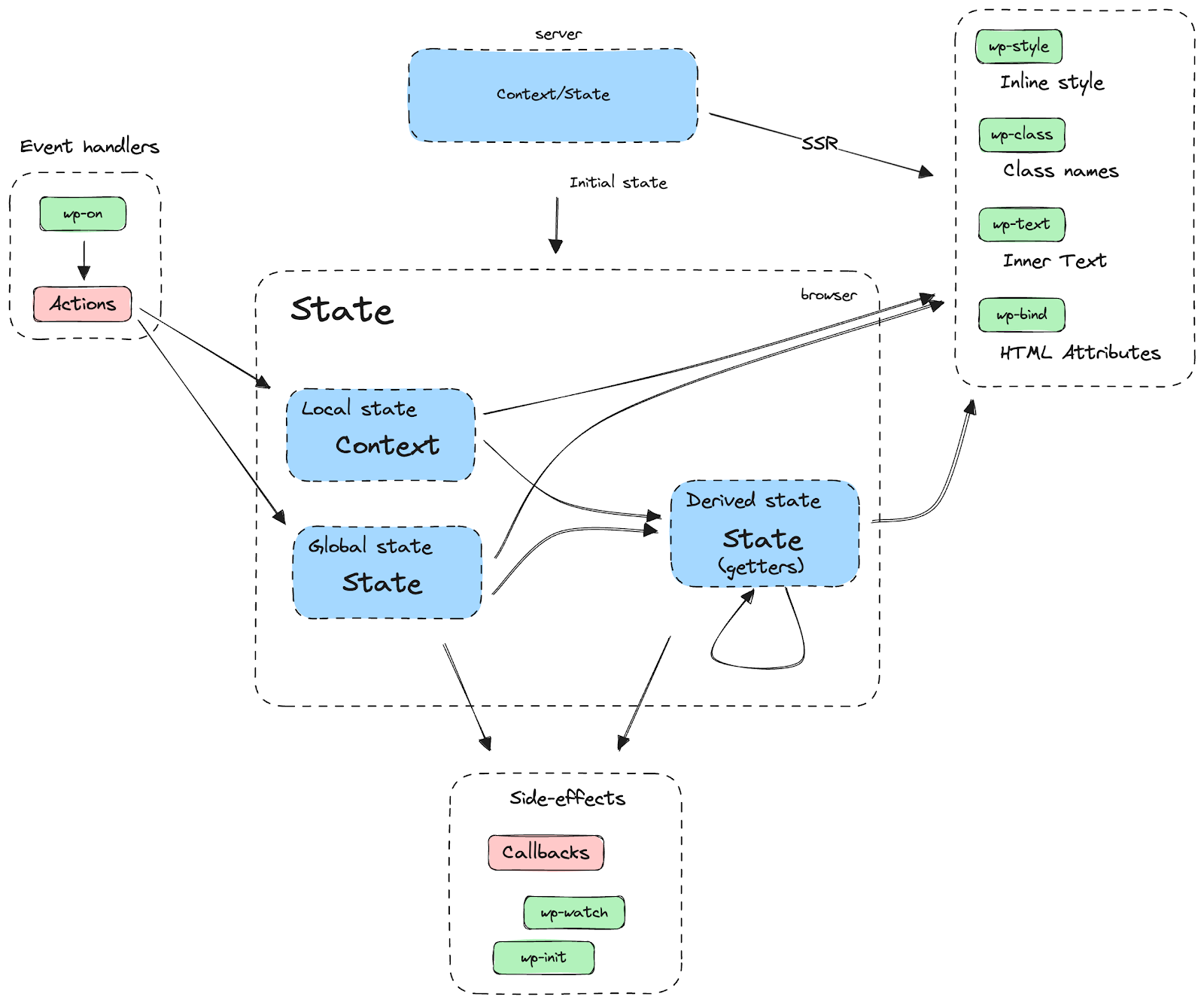


You must be logged in to post a comment.