The WordPress coreCoreCore is the set of software required to run WordPress. The Core Development Team builds WordPress. development team builds WordPress! Follow this site for general updates, status reports, and the occasional code debate. There’s lots of ways to contribute:
Found a bugbugA bug is an error or unexpected result. Performance improvements, code optimization, and are considered enhancements, not defects. After feature freeze, only bugs are dealt with, with regressions (adverse changes from the previous version) being the highest priority.?Create a ticket in the bug tracker.
Almost 8 years ago the Preferred Languages feature project was kicked off in response to a feature requestfeature requestA feature request should generally begin the process in the ideas forum, on a mailing list, as a plugin, or brought to the attention of the core team, such as through scope meetings held for each major release. Unsolicited tickets of this variety are typically, therefore, discouraged. in #28197. Right now it is probably the oldest active feature pluginFeature PluginA plugin that was created with the intention of eventually being proposed for inclusion in WordPress Core. See Features as Plugins. Over time there were numerous updates, bugbugA bug is an error or unexpected result. Performance improvements, code optimization, and are considered enhancements, not defects. After feature freeze, only bugs are dealt with, with regressions (adverse changes from the previous version) being the highest priority. fixes, and even a complete refactor. Preferred Languages was always built and maintained with the goal in mind to merge it into coreCoreCore is the set of software required to run WordPress. The Core Development Team builds WordPress. one day. Now the time is finally right to do so.
Purpose & Goals
As a quick reminder, Preferred Languages replaces the existing languages dropdown with a supercharged version that lets you select multiple preferred languages. WordPress then tries to load the translations for the first language that’s available, falling back to the next language in your list otherwise. Without this, WordPress would just fall back to English (US) in such cases, which is not a great experience. Such a UIUIUser interface is a pretty standard feature that can be seen for example also in operating system and browser settings.
Example of the Preferred Languages UI on the settings page
Note: Preferred Languages works for both the site language (can be set at Settings -> General) and the user language (can be set in the profile).
Project Background
You may wonder why it took such a long time. Since the project’s inception, a lot has changed in WordPress. For example, GutenbergGutenbergThe Gutenberg project is the new Editor Interface for WordPress. The editor improves the process and experience of creating new content, making writing rich content much simpler. It uses ‘blocks’ to add richness rather than shortcodes, custom HTML etc.
https://wordpress.org/gutenberg/ happened. That’s why Preferred Languages saw a complete rewrite using the same ReactReactReact is a JavaScript library that makes it easy to reason about, construct, and maintain stateless and stateful user interfaces.
https://reactjs.org components that also power the blockBlockBlock is the abstract term used to describe units of markup that, composed together, form the content or layout of a webpage using the WordPress editor. The idea combines concepts of what in the past may have achieved with shortcodes, custom HTML, and embed discovery into a single consistent API and user experience. editor. With Gutenberg we also saw the introduction of JavaScript localization, which required further iterations to Preferred Languages. Then there was a need for merging incomplete translations, reducing the chances that you see missing strings in English. However, merging translations was very bad for performance, as it involves loading lots of translationtranslationThe process (or result) of changing text, words, and display formatting to support another language. Also see localization, internationalization. files. In WordPress 6.5 we finally completely replaced the localization library with a more performant solution that natively supports loading multiple files at once. So this last remaining blockerblockerA bug which is so severe that it blocks a release. is now finally resolved!
Internationalization and localization is a core part of WordPress and relevant for more than half of all users. That’s why this functionality belongs natively into WordPress core and not in a (canonical) plugin. Merging Preferred Languages into core would allow the fallback logic to run much closer to where translation loading happens, reducing the risk for bugs and pluginPluginA plugin is a piece of software containing a group of functions that can be added to a WordPress website. They can extend functionality or add new features to your WordPress websites. WordPress plugins are written in the PHP programming language and integrate seamlessly with WordPress. These can be free in the WordPress.org Plugin Directory https://wordpress.org/plugins/ or can be cost-based plugin from a third-party. incompatibilities. Plus, the UI impact is minimal, as it simply expands an existing language dropdown with additional features.
Implementation Details
The UI is built using TypeScript and React and the @wordpress/* npm packages also used for Gutenberg. This makes for a consistent look & feel and will make it easy to integrate it into any revamped WordPress adminadmin(and super admin) UI. The back end parts were developed in such a way that merging them into core eventually is as straightforward as possible, so a patchpatchA special text file that describes changes to code, by identifying the files and lines which are added, removed, and altered. It may also be referred to as a diff. A patch can be applied to a codebase for testing. can be developed relatively quickly.
Preferred Languages has been tested in production websites over numerous years by thousands of users. It works in all major browsers supported by WordPress, follows accessibilityAccessibilityAccessibility (commonly shortened to a11y) refers to the design of products, devices, services, or environments for people with disabilities. The concept of accessible design ensures both “direct access” (i.e. unassisted) and “indirect access” meaning compatibility with a person’s assistive technology (for example, computer screen readers). (https://en.wikipedia.org/wiki/Accessibility) best practices, and gracefully falls back to the old single language dropdown if JavaScriptJavaScriptJavaScript or JS is an object-oriented computer programming language commonly used to create interactive effects within web browsers. WordPress makes extensive use of JS for a better user experience. While PHP is executed on the server, JS executes within a user’s browser.
https://www.javascript.com is disabled.
Contributors and Feedback
While I (@swissspidy) have been the lead developer of the plugin, valuable input and contributions have come from others in the community.
This is a proposal and is subject to revision based on your feedback. If you haven’t already tried out the plugin, please download and install it from WordPress.orgWordPress.orgThe community site where WordPress code is created and shared by the users. This is where you can download the source code for WordPress core, plugins and themes as well as the central location for community conversations and organization. https://wordpress.org/ or the comfort of your WordPress admin. You can review the current code and leave feedback at the project’s GitHub repository or in #core-i18n on SlackSlackSlack is a Collaborative Group Chat Platform https://slack.com/. The WordPress community has its own Slack Channel at https://make.wordpress.org/chat/.
All feedback will be collected over the next couple of weeks. After that, the received feedback will be discussed and next steps determined. The goal is to work on and land a patch quickly to ensure that the feature gets plenty of testing in WordPress trunktrunkA directory in Subversion containing the latest development code in preparation for the next major release cycle. If you are running "trunk", then you are on the latest revision..
The HTMLHTMLHyperText Markup Language. The semantic scripting language primarily used for outputting content in web browsers.APIAPIAn API or Application Programming Interface is a software intermediary that allows programs to interact with each other and share data in limited, clearly defined ways. continues to receive paced and steady development. The Tag Processor was introduced in WordPress 6.2, the HTML Processor in WordPress 6.4, and the ability to traverse all syntax tokens in a document was added in WordPress 6.5. What’s been happening since then and what’s in store for the coming releases?
Quick Review
The last Progress Report explained what the HTML API provides and why it was introduced. The HTML API is being designed to provide a reliable, safe, convenient, and efficient means for understanding and modifying HTML from the server. The driving motivation is to support all server-side needs when working with HTML, while the pace of development is governed by moving as fast as possible without compromising safety and reliability.
While the eventual goal is to provide an assortment of DOM-like methods (for example, set_inner_html()), work continues to ensure that the foundation on which these are built is steady, so that you can trust it from day one.
What’s being worked on right now?
Finish the HTML Processor.
The largest remaining goal is adding full support to the HTML Processor. While the Tag Processor understands each tagtagA directory in Subversion. WordPress uses tags to store a single snapshot of a version (3.6, 3.6.1, etc.), the common convention of tags in version control systems. (Not to be confused with post tags.), each comment, each text node in isolation and can even change a tag’s attributes, it’s unaware of where one element begins and ends. HTML is, from a certain perspective, a shorthand script for a full DOM document, and the tags which are or are not present may not correspond to what a browser creates when parsing them. The HTML Processor takes the stream of tokens produced by the Tag Processor and builds a map of how the tags relate to elements.
<p>This is <b>bold.<p>This is also bold.</p>
For example, a <p> tag can appear after another <p> tag but before a </p> has been found. This is often referred to as having missing or overlapping tags. However, the HTML specification’s rules are clear in this situation: the second <p> tag implies the closing of the first one as well as any other elements which were already open, and it starts a new P elements as a sibling of the first. The HTML Processor knows this so you don’t have to.
Unfortunately there are extensive rules and the HTML Processor doesn’t currently understand them all. Thankfully, if it doesn’t understand a situation it finds itself in, then it will “bail” by returning false and storing an error, retrievable with get_last_error().
The past couple releases saw major progression in supporting more HTML elements, but one obstacle has stood in the way: so-called virtual nodes that don’t exist in the HTML text itself.
<li><p>One</p></p><p>Two</p></li>
Given the snippet of HTML above, what would you guess is the innerText of the second P element (p:nth-child(2))? You probably already know this is a trick question: it’s empty!
The rules of HTML dictate that when encountering an unexpected closing </p> tag for which there’s no corresponding opening tag, an empty P element without any attributes is created. Most tags don’t do this, but P does. If someone is using the HTML Processor to find the second P element in a document, it shouldn’t lead them astray, but how should it represent tags which in a sense don’t actually exist?
This problem has held up a number of the remaining tags because many of them lead to situations where not only one element appears, but possibly many elements are created between a very simple-looking boundary.
The HTML Processor is therefore undergoing an internal refactor to change the way it represents movement through the document. It will pause at these virtual nodes and represent them so that calling code can find them, though they will remain read-only for now. There’s a spectacular side-effect to this change though: the HTML Processor will be presenting a view of HTML in an idealized form. Because virtual nodes appear not only on openings, but also on closings, the processor will present the document as if it were entirely normative. There are no missing, unexpected, or overlapping tags; every opening tag expecting a closer will find one in the right place. It will be possible through the HTML Processor interface to reliably assume basic structure of HTML: that’s right, all of those “what if” question about quirky or mangled HTML are irrelevant, because the HTML Processor thinks in terms of HTML and not in terms of strings.
This snippet above looks broken, and very few parsers will know how to handle it the way a browser does. Consider, however, the sequence of tags or tokens that the HTML Processor will find (in the next snippet, imagine that the loopLoopThe Loop is PHP code used by WordPress to display posts. Using The Loop, WordPress processes each post to be displayed on the current page, and formats it according to how it matches specified criteria within The Loop tags. Any HTML or PHP code in the Loop will be processed on each post. https://codex.wordpress.org/The_Loop is printing a + for an opening tag and a - for a closing tag):
While this may appear confusing, it’s worth spending some time pondering. The HTML Processor found many more tags than actually exist in the text of the HTML, because it knows it needs to create them as it steps through the document. There’s a really incredible implication here: traversing inside an element is trivial. This means that finding inner content and matching tags can be done the way we often expect or want it to, and that it’s a reliable means to do so. Every <a> opening tag will be followed by a </a> no matter what else is in the HTML. Even when dealing with nested tags and sibling tags, finding the end of an element is as simple as looking for the first closing tag of the same name at the same depth – it’s guaranteed to exist!
$div_depth = $processor->get_depth();
// Find where the DIV closes.
while (
    'DIV' !== $processor->get_tag() &&
    ! $processor->is_tag_closer() &&
    $div_depth !== $processor->get_depth() &&
    $processor->next_token()
) {
    // Whatever this is, it's inside the DIV.
}
Like most things in HTML, proper parsing is more complicated than it would appear at first. When decoding text content from the HTML, this is worse than it seems, because PHPPHPThe web scripting language in which WordPress is primarily architected. WordPress requires PHP 7.4 or higher currently lacks the ability to properly decode character references. Character references are what people often call “entities” (a term borrowed from XML). They start with & and what follows is either a number (in decimal or hexadecimal) that represents a Unicode code point, or a name found in a lookup table to map to a specific code point or sequence of code points (for example, ≂̸ maps to U+2242 U+0338 producing a not-approximately-equal sign ≂̸).
HTML incorporates special rules when decoding these character references to maintain backwards compatibility with common practices that predate HTML5. These mostly revolve around what happens when the final semicolon ; is missing. In many cases the ; isn’t necessary while in other cases it is. Notably, when the semicolon is optional, there are additional restrictions inside attribute values when the reference name could be ambiguous. This rule preserves cases when URLURLA specific web address of a website or web page on the Internet, such as a website’s URL www.wordpress.org query arguments aren’t properly encoded, as every & in a URL ought to be encoded as &, but often aren’t.
PHP’s html_entity_decode() currently lacks full support:
There are 1,730 named character references it’s unaware of.
⟨ and ⟩ are improperly decoded as if decoding HTML4 instead of HTML5.
It doesn’t provide a way to govern whether the ambiguous ampersand rule should be applied.
It’s unable to decode named character references without a trailing ;.
It doesn’t handle border cases where the character references end a string, such as at the end of an attribute value or right before another tag appears (at the end of a text node).
Further, HTML applies special rules to a range of code points when decoded from numeric character references. Many of you have problem seen cases where “smart quotes” turn into junk when rendered. This is because HTML may store certain code points as if they representing the Windows-1252 encoding, but only from numeric character references. This transformation is not applied in html_entity_decode() and the references are left intact.
The HTML API needs a mechanism for properly decoding text content by default, and that will likely appear in the form of two new methods:
WP_HTML_Decoder::decode_text_node() for decoding text found in normal markup (#text nodes).
WP_HTML_Decoder::decode_attribute() for decoding text found inside attribute values.
There is nothing special about these methods other than they should be a reliable mechanism for reading (in UTF-8) the actual text a browser would read for the given HTML. The HTML API knows the intricate details of HTML so you don’t have to.
For WordPress 6.6 these are the two primary changes planned: ensure that the HTML Processor visits all virtual nodes, and properly decode all text. For the most part that means no major changes to the interface; everything is in a sense a bugbugA bug is an error or unexpected result. Performance improvements, code optimization, and are considered enhancements, not defects. After feature freeze, only bugs are dealt with, with regressions (adverse changes from the previous version) being the highest priority.-fix to more closely conform the implementation to its design.
What’s coming after these internal improvements?
Reading and modifying sourced blockBlockBlock is the abstract term used to describe units of markup that, composed together, form the content or layout of a webpage using the WordPress editor. The idea combines concepts of what in the past may have achieved with shortcodes, custom HTML, and embed discovery into a single consistent API and user experience. attributes.
There’s a very exciting development that is resurfacing that started over a year ago: reading block attributes from the server, at least for blocks with a block.json file. The ability to read the “sourced attributes” for a block was one of the driving reasons that work on the HTML API progressed beyond the Tag Processor. It mainly comprises parsing a CSSCSSCascading Style Sheets. selector, finding a matching location with an HTML document, and then reading an attribute, inner text, or inner HTML.
While the initial prototypes were encouraging, it was clear that it would be important to truly understand HTML structure in order to do this right. The concept of balanced tags1 simply isn’t a very useful model for understanding HTML. Now that the HTML Processor is so much further along, however, rebuilding the attribute sourcer is turning out to be not only more reliable, but considerably simpler too!
It’s our hope that we have a working system ready by the time that WordPress 6.6 is released so that we can test it for the whole 6.7 release cycle. This is useful not only for individual render functions, but the Block Bindings project needs to be able to read and modify these attributes as well. By ensuring that the system is robust to handle whatever HTML comes its way, we can make Block Bindings work for any block attribute.
Full HTML support.
With the issue of virtual nodes taken care of it is possible to push forward on supporting even more HTML tags and situations. One issue will remain, which is a tricky situation where something called fostering occurs. This can happen, for instance, when tags are found where they shouldn’t be, such as a <div> tag inside a TABLE element but not inside a TD or TH. Strangely enough, that DIV element will be moved up in front of the TABLE element. This implies that there’s a kind of retroactive change in the document after we’ve visited a location in it. There is currently no clear way to represent this situation or communicate it to calling code, so the HTML Processor will continue to bail in these rare scenarios.
Apart from that the rest of the HTML support is large and tedious but straightforward. Expect that in WordPress 6.7 you will be able to send it almost any HTML and it will be able to fully understand the document.
Little bits of semantic meaning.
With the introduction of the block editor, WordPress largely lost Shortcodes, which were the go-to way of incorporating small tidbits of external content or meaning into a post. Shortcodes had their shortcomings, but they also had value. For more than a couple years we’ve been discussing various approaches to bringing shortcodes back: safely and without the most significant drawbacks (breaking HTML, taking over layout, ambiguous nesting rules, introducing a full page of content, etc…). The HTML API changed the game for all of these explorations because it offers a way to build a context-aware auto-escaping templating engine that can power the next generation of Shortcodes, what we have lately been calling “Bits” (Blocks are big, and Bits are small 😉).
While it’s currently possible to add a post author block into a post template, or use a block binding to replace a paragraph’s content with a custom fieldCustom FieldCustom Field, also referred to as post meta, is a feature in WordPress. It allows users to add additional information when writing a post, eg contributors’ names, auth. WordPress stores this information as metadata. Users can display this meta data by using template tags in their WordPress themes., Bits will open up new opportunity to place these snippets of external content anywhere you want them, even inside the middle of a paragraph or image caption!
In WordPress 6.6 look for explorations in the editor for how to enter and configure Bits. Work has already started in WordPress’s backend to ensure that the Bit syntax is preserved through post saves and renders. This is going to be a large project with many different systems working together, so it won’t likely be available anytime soon, but many of the independent pieces will be appearing in the next couple releases for those who want to explore the foundations of how they work.
Following the progress
For updates to the HTML API keep watch here for new posts.
If you want to follow the development work you can review Trac tickets in the HTML API component or start watching new HTML API tickets from the component overview page. If you want to talk details or bugs or applications, check out the #core-html-api channel in WordPress.orgWordPress.orgThe community site where WordPress code is created and shared by the users. This is where you can download the source code for WordPress core, plugins and themes as well as the central location for community conversations and organization. https://wordpress.org/SlackSlackSlack is a Collaborative Group Chat Platform https://slack.com/. The WordPress community has its own Slack Channel at https://make.wordpress.org/chat/.
“Balanced tags” is a best-effort guess at HTML structure based on scanning from an element’s opening tag until an appropriate closing tag is found. Opening tags along the way will increase a depth just as closing tags decrease the depth. In the idealized view of HTML that the HTML Processor provides this guess is reliable, but without that, it’s very difficult in practice with real HTML documents to reliably understand where an element opens and closes. ↩︎
WordPress performance TracTracAn open source project by Edgewall Software that serves as a bug tracker and project management tool for WordPress. tickets
Current release (WP 6.6)
Performance Lab pluginPluginA plugin is a piece of software containing a group of functions that can be added to a WordPress website. They can extend functionality or add new features to your WordPress websites. WordPress plugins are written in the PHP programming language and integrate seamlessly with WordPress. These can be free in the WordPress.org Plugin Directory https://wordpress.org/plugins/ or can be cost-based plugin from a third-party. (and other performance plugins)
Active priority projects
Improve template loading
INP research opportunities
Improving the calculation of image size attributes
Optimized autoloaded options
WordPress Performance Trac Tickets
For WordPress 6.6:
No updates today, watch out for the bugbugA bug is an error or unexpected result. Performance improvements, code optimization, and are considered enhancements, not defects. After feature freeze, only bugs are dealt with, with regressions (adverse changes from the previous version) being the highest priority. scrub happening tomorrow
Performance Lab Plugin (and other Performance Plugins)
The team continued to discuss the number of levels and also #59653
@westonruter It would be great for coreCoreCore is the set of software required to run WordPress. The Core Development Team builds WordPress. to adopt it with a populated baseline so that all existing issues are ignored but new issues are reported as they arise
@joemcgill The PHPStan work will likely cause bumps to all of our plugins, not just the ones with issues in milestones. Are those going to be reflected in changelogs?
@westonruter Yeah, we need to bump the versions. Maybe a general changelog entry for improving code quality?
@joemcgill That makes sense, we can even add the overarching ticketticketCreated for both bug reports and feature development on the bug tracker. to all the project milestones perhaps?
@johnbillion RE PHPStan, core ticket #52217 is about fixing issues it identified, but I would be in favour of a follow-up proposing implementing PHPStan at some level.
#61112 is related to the above, and looks ready for commit to both GutenbergGutenbergThe Gutenberg project is the new Editor Interface for WordPress. The editor improves the process and experience of creating new content, making writing rich content much simpler. It uses ‘blocks’ to add richness rather than shortcodes, custom HTML etc.
https://wordpress.org/gutenberg/ and Core. I don’t have commit access to GB but can handle the Core merge
@joemcgill All this need to make the same change in both repos seems inefficient to me, and is part of the larger conversation about improving the syncing process from GB > WP-dev repos. I’ve started this thread specifically about improving the way the theme.jsonJSONJSON, or JavaScript Object Notation, is a minimal, readable format for structuring data. It is used primarily to transmit data between a server and web application, as an alternative to XML. stuff is managed
@joemcgill I think we can handle the isGlobalStylesUserThemeJSON change in a follow-up pending discussion in the GB repo
@thekt12 Yes. But do we need to fix inconstancy in core PR now or we should do it after the next GB pr?
@joemcgill No, that needs to be fixed when the change in the GB repo is synced to Core. That’s why the inconsistency exists, and highlights the problem with maintaining redundant classes in both repos.
@adamsilverstein I’ve been working a little on adding instrumentation to the Interactivity APIAPIAn API or Application Programming Interface is a software intermediary that allows programs to interact with each other and share data in limited, clearly defined ways. in a draft PR
Improving the calculation of image size attributes
@joemcgill No changes since last week, but are planning to start development on #GH1187 soon
Optimized autoloaded options
@joemcgill Yesterday, I committed r58105, which is a follow-up on our previous autoload options changes
As a side effect, it revealed that there are some issues with the way we are collecting performance metrics in the codevitals dashboard that I plan to follow up on later today
Also @pbearne and I have been collaborating on a dev notedev noteEach important change in WordPress Core is documented in a developers note, (usually called dev note). Good dev notes generally include a description of the change, the decision that led to this change, and a description of how developers are supposed to work with that change. Dev notes are published on Make/Core blog during the beta phase of WordPress release cycle. Publishing dev notes is particularly important when plugin/theme authors and WordPress developers need to be aware of those changes.In general, all dev notes are compiled into a Field Guide at the beginning of the release candidate phase. for r57920, which is close to being ready for review.
@spacedmonkey The blockerblockerA bug which is so severe that it blocks a release. for the above was at the lack of action to.
it is all well and good highlighting that there are 20 options that are very large, but with no way to fix it, a user it out of luck. I had planned to have a way of changing options to be from being autoloaded or not. Think checkbox and rest apiREST APIThe REST API is an acronym for the RESTful Application Program Interface (API) that uses HTTP requests to GET, PUT, POST and DELETE data. It is how the front end of an application (think “phone app” or “website”) can communicate with the data store (think “database” or “file system”)
https://developer.wordpress.org/rest-api/ to update the row in the database. I haven’t had anytime to look at now I am not sponsored.
WordPress performance TracTracAn open source project by Edgewall Software that serves as a bug tracker and project management tool for WordPress. tickets
Current release (6.6)
Future release
Performance Lab pluginPluginA plugin is a piece of software containing a group of functions that can be added to a WordPress website. They can extend functionality or add new features to your WordPress websites. WordPress plugins are written in the PHP programming language and integrate seamlessly with WordPress. These can be free in the WordPress.org Plugin Directory https://wordpress.org/plugins/ or can be cost-based plugin from a third-party. (and other performance plugins)
Active priority projects
Improve template loading
INP research opportunities
Improving the calculation of image size attributes
Optimized autoloaded options
Open floor
If you have any topics you’d like to add to this agenda, please add them in the comments below.
A new filterFilterFilters are one of the two types of Hooks https://codex.wordpress.org/Plugin_API/Hooks. They provide a way for functions to modify data of other functions. They are the counterpart to Actions. Unlike Actions, filters are meant to work in an isolated manner, and should never have side effects such as affecting global variables and output. runs for each Script Module that is enqueued or in the dependency graph. This filter allows arbitrary data to be associated with a given Script Module and added to the rendered page.
Script Module data is embedded in the page as JSONJSONJSON, or JavaScript Object Notation, is a minimal, readable format for structuring data. It is used primarily to transmit data between a server and web application, as an alternative to XML. in a <script type="application/json">tagtagA directory in Subversion. WordPress uses tags to store a single snapshot of a version (3.6, 3.6.1, etc.), the common convention of tags in version control systems. (Not to be confused with post tags.).
Script Modules are responsible for reading the data and performing their own initialization.
This is a proposal. Everything in this post is open to feedback and discussion. Please, share your thoughts and ideas.
The feedback period will end 2024-05-24 (Friday, May 24). Please provide any feedback before then.
This post will use “scripts” to refer to WP Scripts and “modules” to refer to WP Script Modules.
Scripts or modules?
Most JavaScriptJavaScriptJavaScript or JS is an object-oriented computer programming language commonly used to create interactive effects within web browsers. WordPress makes extensive use of JS for a better user experience. While PHP is executed on the server, JS executes within a user’s browser.
https://www.javascript.com for WordPress is probably using scriptsunless it was specifically compiled as a module. Modern JavaScript is often authored using import apiFetch from '@wordpress/api-fetch', which is module syntax. Until very recently, WordPress build tooling has always removed the module syntax and compiled a script.
Only the most recent WordPress version 6.5 introduced support for modules. WordPress CoreCoreCore is the set of software required to run WordPress. The Core Development Team builds WordPress. includes exactly two modules to expose functionality at this time: @wordpress/interactivity and @wordpress/interactivity-router. JavaScript that uses the Interactivity APIAPIAn API or Application Programming Interface is a software intermediary that allows programs to interact with each other and share data in limited, clearly defined ways. is probably a module.
This post will talk about a common script dependency, wp-api-fetch. The @wordpress/api-fetchmodule mentioned in this post is hypothetical; it does not exist at this time.
A note about modules
It’s important to know a few things about scripts versus modules in the context of this post. A few key differences:
Scripts and their dependencies will be executed as the page is parsed even if a dependency is never directly used.
Script “exports” are attached to the window object, e.g. wp-api-fetch is available as window.wp.apiFetch.
Modules will execute after the page has finished parsing.
Module dependencies can be loaded on demand.
Modules have true encapsulation, using import and export to share values.
More about scripts and modules…
Scripts that are either enqueued or are dependencies of enqueued scripts will be added to the page as script tags, like <script src="path/to/script.js">. The browser will fetch and execute these scripts before it continues to parse the page. There are attributes like async and defer that can change how the browser executes scripts.
Modules that are enqueued will appear on the page as script tags of type module, like <script src="path/to/module.js" type="module">. Processing of modules is deferred, they will be executed after the whole document has been parsed. The async attribute will cause a module to execute in parallel as the document is parsed. WordPress Script Modules do not use async at this time.
Modules that are in the dependency graph of enqueued modules will appear in an importmap. This is a mapping of names to URLs so that a browser knows what module to fetch when it sees an import. It’s what associates the module used in a statement like import "a-module"; with a URLURLA specific web address of a website or web page on the Internet, such as a website’s URL www.wordpress.org{ "imports": { "a-module": "path/to/a-module.js" } }.
The problem
Scripts often require some initialization or other data to work correctly in WordPress. The wp-api-fetch script is a good example, it requires a significant amount of configuration. For example, Core uses the following inline script to initialize wp-api-fetch so it can send requests to the appropriate place:
This snippet uses PHPPHPThe web scripting language in which WordPress is primarily architected. WordPress requires PHP 7.4 or higher to create a string of JavaScript code with some data from PHP embedded. This will be included in a script tag that appears immediately after the script tag for wp-api-fetch, something like this:
<script src="path/to/wp-api-fetch.js"></script>
<script>
// The JavaScript code is printed here:
wp.apiFetch.use( wp.apiFetch.createRootURLMiddleware( "…/index.php?rest_route=/" ) );
// More code may follow from other calls to `wp_add_inline_script`…
</script>
Notice that the JavaScript depends on wp-api-fetch, it imperatively calls wp.apiFetch.use(…). That same approach with a hypothetical @wordpress/api-fetch module would look something like this:
In this approach, the initialization module would fetch and execute the @wordpress/api-fetch module just to initialize it! That eliminates one of the important advantages of modules, their ability to load on-demand. 🤔 It looks like this imperative initialization isn’t a good fit for modules. Let’s see if there’s a better solution…
The proposal
Here are some requirements that arise from the naive implementation:
Modules should be fetched and initialized on demand.
Modules should be responsible for their own initialization when they’re executed.
Variables should be scoped to modules and not pollute the global namespace.
The data should introduce minimal overhead.
Add server data via filters
Filters provide a nice method to collect the data needed by modules. The WP_Script_Modules class introduces a new filter that runs for each module that is enqueued or present in the dependency graph. Adding or modifying data for a module looks like this:
Multiple filters can be added to add or modify the data exposed to the script, and if no data is added, nothing will be serialized on the page for the client. It’s also worth mentioning that no JavaScript code is written in PHP, a nice improvement over wp_add_inline_script which requires valid JavaScript to be added.
A drawback to this approach is that all the data passed must pass through JSON. Data without a valid JSON representation is not supported by default.
Use an inert script tag to expose data on the client
The data is embedded it in the HTMLHTMLHyperText Markup Language. The semantic scripting language primarily used for outputting content in web browsers. in a script tag:
<script id="scriptmoduledata_@wordpress/api-fetch" type="application/json">
{ "theData": "JSON Serializable data can be shared" }
</script>
Because modules are always deferred, it should be safe to print these script tags at the bottom of the page. They should have limited impact on page load because the browser will not parse or execute the contents.
Modules read data from the script tag
This script tag doesn’t do anything on its own. The module is responsible for getting the data and performing its initialization when it executes:
if ( typeof document !== 'undefined' ) {
	const serializedData = document.getElementById(
		'scriptmoduledata_@wordpress/api-fetch'
	)?.textContent;
	if ( serializedData ) {
		let config = null;
		try {
			config = JSON.parse( serializedData );
		} catch {
			// there was a problem parsing the serialized data
		}
		performInitialization( config );
	}
}
function performInitialization( config ) {
	if ( config?.rootURL ) {
		registerMiddleware( createRootURLMiddleware( config.rootURL ) );
	}
	// etc.
}
I’ve prototyped this proposal in the following PRs:
WordPress-develop PR 6433 applies the filters and adds the necessary filters to expose data to @wordpress/api-fetch. The proposal in this post is contained in this PR.
Gutenberg PR 60952 builds and registers the @wordpress/api-fetch module. This PR is helpful for testing, but is beyond the scope of this post.
Try it in the WordPress Playground here. If you run the following JavaScript in the inspector console —make sure you pick the JavaScript context, something like wp (scope:abc123)— you’ll see the @wordpress/api-fetch module log some initialization when it’s imported and then work as expected:
WordPress 6.6 is set to be released on July 16, 2024. With a slightly shorter cycle, this release heavily builds on the foundation of the last with some new items, like section styles and overrides in synced patterns, and loads of enhancements to features that landed in the last few releases, including the Font Library and Interactivity APIAPIAn API or Application Programming Interface is a software intermediary that allows programs to interact with each other and share data in limited, clearly defined ways.. Data Views, the first taste of the admin redesign work introduced in 6.5, continues to evolve with new layout options, a combined template part and pattern experience, and more readily accessible management sections. Finally, design tools take center stage with everything from grid layout support to section styles to more power baked into style variations out of the box.
As always, what’s shared here is being actively pursued, but doesn’t necessarily mean each will make it into the final release of WordPress 6.6.
For a more detailed look at the work related to the blockBlockBlock is the abstract term used to describe units of markup that, composed together, form the content or layout of a webpage using the WordPress editor. The idea combines concepts of what in the past may have achieved with shortcodes, custom HTML, and embed discovery into a single consistent API and user experience. editor, please refer to the 6.6 board and review the currently open Iteration issues. After a recent organization effort, Iteration issues are meant to reflect active work that’s been scoped down for a major releasemajor releaseA release, identified by the first two numbers (3.6), which is the focus of a full release cycle and feature development. WordPress uses decimaling count for major release versions, so 2.8, 2.9, 3.0, and 3.1 are sequential and comparable in scope.. To get a sense of some of what’s being worked on both for this release and beyond, check out the demos shared in a recent hallway hangout.
Foundational experience
Advancing the new Data Views in the Site Editor
Building on an initial launch in 6.5, the new views in the Site Editor continue to be refined and advanced. This includes work to bring the various management pages forward (manage all templates, manage all template parts, manage all pages) so those options are immediately seen when visiting the respective sections, reducing the number of steps to access important information. For pages, a new side by side layout will be introduced so one can see both a list of all pages and a preview of the currently selected page. For patterns, template part management will be removed and integrated into the current overall patterns section. Interspersed within all of these larger changes are smaller enhancements in functionality and feel.
A few different initiatives are coming together to allow one to focus on building with patterns rather than granular block editing, including advancing contentOnly editing and zoomed out view. Key features planned include:
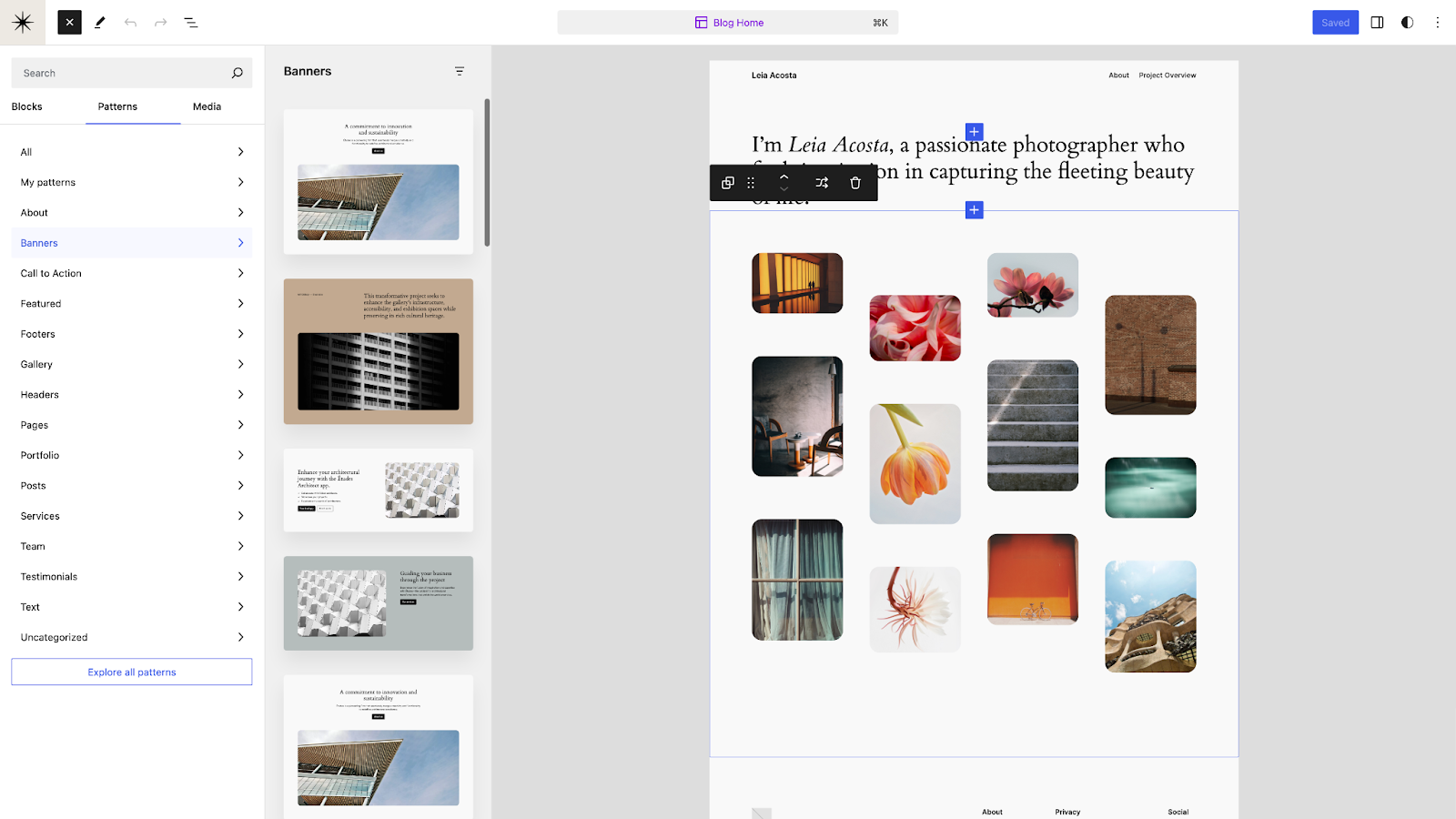
A zoomed out experience in the editor when inserting patterns to facilitate high level overview of the site.
Ability to shuffle top level patterns within a template in order to quickly explore alternative patterns.
Ability to manipulate patterns in the template via moving, deleting, etc while zoomed out.
Improvements to UXUXUser experience for dragging patterns (e.g. vertical displacement).
Taken together, this work aims to offer a first step towards a new way to interact with and build with patterns. Some questions remain including whether zooming out will be invoked in certain situations, like the patterns tab of the Inserter, or if it’s something that could be toggle on/off as one wants.
Knowing where a block’s style comes from is key to knowing where a change might need to be made. For 6.6, work is underway to show locally the value that a block inherits globally, when applicable. This means that, for example, if you set a paragraph to always have blue text in Styles, every paragraph you added will show blue text and the block settings will show the blue color as the chosen text color. This is in contrast to today’s confusing experience, where it shows a circle with a line through it, to indicate that no local color has been set despite the block inheriting it globally.
Unifying editor experiences, including publish flow
This is both a technical and design effort, consolidating shared code and creating a single, coherent flow across the post and site editors for common tasks. The more noticeable and big pieces will be seen in a unified publish flow and a new singular “summary” inspector panel, which will also be reused within the site editor when you are bulk editing.
Mix and match typography and color palettes from all styles variations
Style variations allow you to change the look and feel of your site, all while using the same theme. To build on the design possibilities of a block theme with style variations, 6.6 aims to add the ability to mix and match the color and typography styles of each individual style variations. This means the eight community created style variations baked into the Twenty Twenty-Four theme turns into 48 styling combinations, thanks to the six typography presets and eight color presets available. Add in more typography options thanks to the Font Library and the optionality available is immense, alongside all of the granular tinkering you want to do. This evolution in style variation possibilities will work out of the box with all block themes with style variations with no additional opting in or adjustments on the theme author’s end.
Syncing specific blocks and attributes of patterns
Building upon synced patterns, overrides in synced patterns would allow users to ensure a synced layout and style across patterns while allowing each instance of the pattern to have customized content. This allows for consistency in design across different pieces of content. For instance, consider a testimonial pattern in a grid. With the enhanced feature, someone can insert this testimonial pattern into multiple posts, ensuring that the layout and styling components, such as the overall design of the recipe card, remain consistent across instances. Meanwhile, the content, such as Name, Image, and Role, would be local to each instance allowing for individual customization. Additionally, folks would then be able to revisit and modify the design of the overall testimonial pattern without affecting the content in existing instances. To get a sense of the current work happening here, check out the “overrides in synced patterns” demo from a recent hallway hangout below:
Expanding block style variations for more styling options
Through work to extend the block style variations mechanism, 6.6 is set to introduce the ability for theme authors to define style options for sections of multiple blocks, including inner blocks. With just a few clicks, folks using block themes that add this functionality could quickly change just a section of a page or template to predefined styles that an author provided, like a light or dark version of a section. This feature is coming together thanks to work to expand the block style variations API. There are a few ways folks are aiming to offer this functionality:
Programmatically via gutenberg_register_block_style
By standalone theme.jsonJSONJSON, or JavaScript Object Notation, is a minimal, readable format for structuring data. It is used primarily to transmit data between a server and web application, as an alternative to XML. partials within a theme’s /block-styles subdirectory
Via theme style variations defining block style variations under styles.blocks.variations.
Grid is a new layout variation for the Group block that allows you to display the blocks within the group as a grid, offering new flexibility. There are two options for the Grid layout:
“Auto” generates the grid rows and columns automatically using a minimum width for each item.
“Manual” allows specifying the exact number of columns.
Outside of expanding functionality, including trying to implement drag and drop resizing, work is also underway to improve using layout tooling in general to make it simpler and clearer to accomplish what you want.
To build on its debut in 6.5, the Font Library will continue to see bugbugA bug is an error or unexpected result. Performance improvements, code optimization, and are considered enhancements, not defects. After feature freeze, only bugs are dealt with, with regressions (adverse changes from the previous version) being the highest priority. fixes and enhancements based on incoming feedback. This work will be less about adding new functionality and more about refining what’s landed.
Bringing the Site Editor experience for Pattern management to Classic Themes
Thanks to some internal code changes, the path is set to enable Classic Themes to have access to the new Patterns experience that the Site Editor provides. This will provide an upgraded, modern experience of managing and creating patterns.
This release cycle, a variety of initiatives are focused on improved loading times, especially template loading with improved caching of theme.json, block templates and computed styles as well as optimizing autoload options. Research and initial work to address potential improvements to the INP (Interaction to next pain) metric is also continuing in coreCoreCore is the set of software required to run WordPress. The Core Development Team builds WordPress. and the Interactivity API. In addition, ongoing performance improvements for the editor for this release are being tracked in this iteration issue, including major improvements to template loading.
Outside of the above efforts, work continues to improve performance tooling, including our automated performance test actions running in both GutenbergGutenbergThe Gutenberg project is the new Editor Interface for WordPress. The editor improves the process and experience of creating new content, making writing rich content much simpler. It uses ‘blocks’ to add richness rather than shortcodes, custom HTML etc.
https://wordpress.org/gutenberg/ and core. The current effort is focused on making the performance tests more consistent, robust and reliable and on providing an easy-to-use GitHub action developers can leverage to implement the performance tests in their own pluginPluginA plugin is a piece of software containing a group of functions that can be added to a WordPress website. They can extend functionality or add new features to your WordPress websites. WordPress plugins are written in the PHP programming language and integrate seamlessly with WordPress. These can be free in the WordPress.org Plugin Directory https://wordpress.org/plugins/ or can be cost-based plugin from a third-party. or theme.
API iterations
Various APIs recently introduced in the last few releases are all slated for continued upgrades.
Interactivity API
The Interactivity API provides a standard way to allow developers to add interactivity to the frontend of their blocks. After the release of the initial version of the Interactivity API in 6.5, this next round of work is focused solely on enhancing the developer experience with better test coverage and code quality, improved error reporting, debugging tools, and fixing reported bugs.
Block HooksHooksIn WordPress theme and development, hooks are functions that can be applied to an action or a Filter in WordPress. Actions are functions performed when a certain event occurs in WordPress. Filters allow you to modify certain functions. Arguments used to hook both filters and actions look the same.
Introduced in WordPress 6.4 and iterated upon in 6.5, the Block Hooks API is an extensibility mechanism that allows you to dynamically insert blocks into block themes. At this stage of maturity, work is underway to help determine a proper UIUIUser interface for hooked blocks and continued improvements to the developer experience.
HTMLHTMLHyperText Markup Language. The semantic scripting language primarily used for outputting content in web browsers. API
Building on the initial launch in 6.2, work continues to evolve the HTML API with a focus on two aims for 6.6:
Complete and rely on a custom and spec-compliant encoder/decoder.
Design how to communicate when an HTML document has retroactively changed, allow calling code to match on, stop at, and modify implicitly-created elements, including when elements are closed.
The Block Bindings API launched in 6.5 allows you to bind dynamic data to block attributes, solving many use cases for custom blocks and powering other features, like overrides in synced patterns. This next round of work is focused on allowing the editing of connected sources directly from the block. As showcased in a recent Hallway Hangout, users can update the value of a custom fieldCustom FieldCustom Field, also referred to as post meta, is a feature in WordPress. It allows users to add additional information when writing a post, eg contributors’ names, auth. WordPress stores this information as metadata. Users can display this meta data by using template tags in their WordPress themes. by editing the paragraph connected to it. As part of that, the existing editor implementation is being refactored, and the editor APIs are being defined with the goal of “potentially” making them public for 6.6. Outside of the broader technical work, initial explorations are underway around a UI to create bindings, but it’s unlikely to land for 6.6.
Dropping support for PHPPHPThe web scripting language in which WordPress is primarily architected. WordPress requires PHP 7.4 or higher 7.0 and 7.1
Support for PHP 7.0 and 7.1 will be dropped in WordPress 6.6, scheduled for release in July 2024. The new minimum supported version of PHP will be 7.2.24. The recommended version of PHP remains at 7.4 or greater. Read more in the Dropping Support for PHP 7.1 Make Core post.
Add rollbacks to auto-updates
Since WordPress 6.3, when an administrator is manually updating plugins, the plugin will not be reactivated if the update causes a PHP fatal error. During an auto-update, this reactivation check does not occur and the next time the site runs users will see the white screen of death (WSOD). To further protect websites and increase confidence in automatic plugin updates, 6.6 aims to include the ability to perform rollbacks when fatal errors occur during attempted plugin auto-updates by default. To learn more, please review the merge proposal for this feature.
Find something missing? Want to help?
If you have something you’re working on that you don’t see reflected in this post, please share a comment below so we can all be aware! If you’re reading this and want to help, a great place to start is by looking through each issue associated with each area or by diving into the Polish board where a curated set of issues are in place that anyone can jump in on.
Summary of the WordPress Developer Blogblog(versus network, site) meeting, which took place in the #core-dev-blog channel on the Make WordPress SlackSlackSlack is a Collaborative Group Chat Platform https://slack.com/. The WordPress community has its own Slack Channel at https://make.wordpress.org/chat/. Start of the meeting in Slack.
A first look at the Interactivity API by Magdalena Paciorek, reviewed by Birgit Pauli-Haack, Luis Herranz, Carlos Bravo, Jon Surrell, Ryan Welcher, and Justin Tadlock
The project board for Developer Blog content is on GitHubGitHubGitHub is a website that offers online implementation of git repositories that can easily be shared, copied and modified by other developers. Public repositories are free to host, private repositories require a paid subscription. GitHub introduced the concept of the ‘pull request’ where code changes done in branches by contributors can be reviewed and discussed before being merged by the repository owner. https://github.com/.
If you are interested in taking on a topic from this list or know someone who would be a good person to write about them, comment on the Issue or pingPingThe act of sending a very small amount of data to an end point. Ping is used in computer science to illicit a response from a target server to test it’s connection. Ping is also a term used by Slack users to @ someone or send them a direct message (DM). Users might say something along the lines of “Ping me when the meeting starts.”@bph in slack either in the #core-dev-blog channel or in a DM.
Topics closed
Learnings from two Site Migrations After consulting Jasmine, it was clear that her idea wasn’t suitable for the developer blog. I offered to assist her to publish some place else.
There were no clear approval signals, and it seems the topics still need to narrow down the proposal to clear problem statements and suggested solutions. The discussions continue.
Open Floor
Next meeting: Jun 6, 2024, at 13:00 UTC in the #core-dev-blog channel
Project Objective: Create and launch a Data Liberation solution that allows users to do what they want with their own content.
Project Overview
Based on the initial vision for the project, in conjunction with a period of outreach the project seeks to introduce new tools that make it easier to migrate to WordPress from any platform, and also to export content out.
Project Timeline
Based on conversations with those working on the following projects, it seems feasible to have a prototype/proof of concept by early June, followed by refinements and delivery of the final project around October/November.
Start: January 2024 End: November 2024
Data Liberation PluginPluginA plugin is a piece of software containing a group of functions that can be added to a WordPress website. They can extend functionality or add new features to your WordPress websites. WordPress plugins are written in the PHP programming language and integrate seamlessly with WordPress. These can be free in the WordPress.org Plugin Directory https://wordpress.org/plugins/ or can be cost-based plugin from a third-party.
This work will involve taking the existing MVP/Prototype plugin and building it out to be the way users all around the world take advantage of Data Liberation. This work may include:
Working on the UIUIUser interface/UXUXUser experience to provide a seamless and delightful experience for users.
Cataloging/utilizing existing user guides, plugins, and tools to walk the user through import.
Integrating Playground to provide staging/temporary migrationMigrationMoving the code, database and media files for a website site from one server to another. Most typically done when changing hosting companies. sites.
Deliverables
An installable plugin that includes:
Functionality to detect the source platform and guide user to method for that platform
Ability to clone site into a new WordPress Playground
Ability to overwrite current site with Playground version Deadline: Nov 30, 2024
Transforming Blocks > HTMLHTMLHyperText Markup Language. The semantic scripting language primarily used for outputting content in web browsers.
This work centers around ways to provide HTML to GutenbergGutenbergThe Gutenberg project is the new Editor Interface for WordPress. The editor improves the process and experience of creating new content, making writing rich content much simpler. It uses ‘blocks’ to add richness rather than shortcodes, custom HTML etc.
https://wordpress.org/gutenberg/ and improving the way it is validated and converted to Blocks. As an initial proof of concept this will involve taking public sites and importing them as HTML pages into new Gutenberg/blockBlockBlock is the abstract term used to describe units of markup that, composed together, form the content or layout of a webpage using the WordPress editor. The idea combines concepts of what in the past may have achieved with shortcodes, custom HTML, and embed discovery into a single consistent API and user experience. pages.
This functionality may be integrated into the main Data Liberation plugin eventually – but will be initially developed separately.
Deliverables
Plugin/Solution to import HTML pages/files into WordPress pages/posts with block content Deadline: June 31, 2024
Platform-specific guides and tools
This work centers around the creation of Guides (like these examples) and identification and improvement of existing tools for each platform we expect people will want to migrate from.
This work would be ideal for folks who have experience with specific platforms – making it easier for others on that platform to migrate away.
Deliverables
A full list of third-party platforms and the current migration pathways Deadline: June 7, 2024
Written Guides for all major platforms
Cataloging of existing tools available for all major platforms. Deadline: Nov 30, 2024
Get Involved
This is a bold plan with potentially huge impact for the WordPress ecosystem – and it needs your help to be made a reality. Right now we are looking for contributors to all aspects of this work.
Design
The existing prototype plugin would definitely benefit from UX and interface work – as for many users this could be one of their first experiences with WordPress.
Time Commitment/Duration This is likely to be a higher time commitment in the early stages (over the next 6 weeks) but will then need ongoing work through the life of the project. Ability to commit at least 5 hours a week would be valuable.
Plugin Development
This would be more traditional WordPress plugin work – improving the plugin itself – including:
Detecting platform of source sites
logic/decision making about what guide/tool/process is needed based on the platform
Integration of ‘Guides’ which are also separately managed/hosted
Solutions for installing/using other plugins/tools initiated from the main plugin.
Time Commitment/Duration This is likely to be a higher time commitment in the early stages (over the next 6 weeks) and then concentrated ongoing work over the life of the project. We would be looking for at least a couple of contributors to commit to 5-10+ hours a week to drive this project, but there will likely be opportunities for contribution with lower time commitment as well.
HTML > Blocks
Working on the scraping of HTML and conversion into block-based content will involve working closely with the Gutenberg code base, and potentially the WordPress playground – including:
scraping/navigating sites/structures to gather pages
Parsing of HTML and transforming to Block-friendly code
Creation of pages/posts/content within WordPress
Validation of HTML and insertion of block-based content.
Time Commitment/Duration This is likely to be a higher time commitment in the early stages (over the next 6 weeks) and then concentrated ongoing work over the life of the project. We would be looking for at least a couple of contributors to commit to 5-10+ hours a week to drive this project, but there will likely be opportunities for contribution with lower time commitment as well.
If you are interested in being involved, or have any questions – you can do so in the comments of this post, by joining the #data-liberation channel in Make Slack or by sending a SlackSlackSlack is a Collaborative Group Chat Platform https://slack.com/. The WordPress community has its own Slack Channel at https://make.wordpress.org/chat/ DM to @jordan Gillman
This is an incredibly exciting project – and I’m looking forward to working with you all!
Over the last 2 months I’ve been reaching out and talking to folks in the community about the Data Liberation project. I want to say thank you to all those who provided feedback and input in survey responses, SlackSlackSlack is a Collaborative Group Chat Platform https://slack.com/. The WordPress community has its own Slack Channel at https://make.wordpress.org/chat/, emails, Zoom meetings, and in person.
From that feedback here are a few trends and insights I would like to share:
One of the biggest challenges when migrating to WordPress is the handling of content as it is transformed to Blocks. Validating BlockBlockBlock is the abstract term used to describe units of markup that, composed together, form the content or layout of a webpage using the WordPress editor. The idea combines concepts of what in the past may have achieved with shortcodes, custom HTML, and embed discovery into a single consistent API and user experience. markup is tricky (as it happens on the client side) particularly when third party platforms may have malformed or custom HTMLHTMLHyperText Markup Language. The semantic scripting language primarily used for outputting content in web browsers..
Although there is always room for improvement, the WordPress -> WordPress migrationMigrationMoving the code, database and media files for a website site from one server to another. Most typically done when changing hosting companies. space is well served by plugins and tools like WPCLI.
There is lots of interest in how to handle the importing of custom fields and post metaMetaMeta is a term that refers to the inside workings of a group. For us, this is the team that works on internal WordPress sites like WordCamp Central and Make WordPress..
Folks agree philosophically with better, more usable exports from WordPress.
Key Principles
Based on the feedback and discussion so far – I wanted to highlight some key principles for the project as we move forward.
Data Liberation starts as a pluginPluginA plugin is a piece of software containing a group of functions that can be added to a WordPress website. They can extend functionality or add new features to your WordPress websites. WordPress plugins are written in the PHP programming language and integrate seamlessly with WordPress. These can be free in the WordPress.org Plugin Directory https://wordpress.org/plugins/ or can be cost-based plugin from a third-party.
In terms of the initial delivery method – a plugin is where we will start. This existing proposalincludes prototype plugin that detects the platform of a site and utilizes existing user guides to prompt the user through the migration process (using the ‘Tour’ functionality found on other Make P2s).
This plugin can provide a great base for us to guide users through the steps, and to the tools they need to migrate.
Playground plays a vital role
Leaning into the power and flexibility of WordPress Playground is a fantastic opportunity. It brings the potential of previewing a migration without impacting your existing site,or even if you don’t have a WordPress site at all yet!
Transforming HTML to Blocks is the path forward
Improving the way HTML is converted into blocks and validates brings advantages across all kinds of migrations. Whether provided in an import file, or scraped from platforms that don’t provide an export – transforming HTML into coreCoreCore is the set of software required to run WordPress. The Core Development Team builds WordPress. blocks is what will help us free user’s content.
Content Portability is the primary goal
The aim of any Data Liberation solution is to allow users to do what they want with their own content. Whilst any efforts to include appearance and styling, in order to achieve visual parity, are a bonus – the key goal is portability of the content itself.
Better export is important (but comes next)
Philosophically, any effort of Data Liberation needs to consider exporting content from WordPress as well as importing. There are definite improvements we will work towards here – but this will be something that we work on in the future after first improving importing.
With these principles to guide us – our next step (stay tuned) is a defined plan for the project.
WordPress 6.5.3 Release Candidate 1 (RC1) is available for testing! Some ways you can help test this minor release:
Use the WordPress Beta TesterpluginPluginA plugin is a piece of software containing a group of functions that can be added to a WordPress website. They can extend functionality or add new features to your WordPress websites. WordPress plugins are written in the PHP programming language and integrate seamlessly with WordPress. These can be free in the WordPress.org Plugin Directory https://wordpress.org/plugins/ or can be cost-based plugin from a third-party.
As this is a minor RCrelease candidateOne of the final stages in the version release cycle, this version signals the potential to be a final release to the public. Also see alpha (beta). release, select the Point Release channel and the Nightlies stream. This is the latest build including the RC and potentially any subsequent commits in trunk.
6.5.3 RC1 features 11 fixes in Core as well as 8 fixes for the BlockBlockBlock is the abstract term used to describe units of markup that, composed together, form the content or layout of a webpage using the WordPress editor. The idea combines concepts of what in the past may have achieved with shortcodes, custom HTML, and embed discovery into a single consistent API and user experience. Editor.
The following coreCoreCore is the set of software required to run WordPress. The Core Development Team builds WordPress. tickets from TracTracAn open source project by Edgewall Software that serves as a bug tracker and project management tool for WordPress. are fixed:
The following block editor issues from GitHubGitHubGitHub is a website that offers online implementation of git repositories that can easily be shared, copied and modified by other developers. Public repositories are free to host, private repositories require a paid subscription. GitHub introduced the concept of the ‘pull request’ where code changes done in branches by contributors can be reviewed and discussed before being merged by the repository owner. https://github.com/ are fixed:
#60489 – Layout: Skip outputting base layout rules that reference content or wide sizes if no layout sizes exist
#60620 – Fix inserter pattern pagination focus loss
#60661 – Interactivity APIAPIAn API or Application Programming Interface is a software intermediary that allows programs to interact with each other and share data in limited, clearly defined ways.: Allow multiple event handlers for the same type with data-wp-on.
#60845 – List View: Fix stuck dragging mode in UIUIUser interface in Firefox when dealing with deeply nested lists
#60764 – Don’t output base flow and constrained layout rules on themes without theme.jsonJSONJSON, or JavaScript Object Notation, is a minimal, readable format for structuring data. It is used primarily to transmit data between a server and web application, as an alternative to XML.
What’s next?
The dev-reviewed workflow (double committer sign-off) is now in effect when making changes to the 6.5 branchbranchA directory in Subversion. WordPress uses branches to store the latest development code for each major release (3.9, 4.0, etc.). Branches are then updated with code for any minor releases of that branch. Sometimes, a major version of WordPress and its minor versions are collectively referred to as a "branch", such as "the 4.0 branch"..
The final release is expected on Tuesday, May 7th, 2024. Please note that this date can change depending on possible issues after RC1 is released. Coordination will happen in the WordPress.orgWordPress.orgThe community site where WordPress code is created and shared by the users. This is where you can download the source code for WordPress core, plugins and themes as well as the central location for community conversations and organization. https://wordpress.org/SlackSlackSlack is a Collaborative Group Chat Platform https://slack.com/. The WordPress community has its own Slack Channel at https://make.wordpress.org/chat/#6-5-release-leads channel.
A special thanks to everyone who helped test, raised issues, and helped to fix tickets. With this release candidate, testing continues, so please help test!




You must be logged in to post a comment.