Summary, Dev Chat, May 15, 2024

Startย of the meeting inย SlackSlack Slack is a Collaborative Group Chat Platform https://slack.com/. The WordPress community has its own Slack Channel at https://make.wordpress.org/chat/, facilitated by @annezazu. ๐Ÿ”— Agenda post.

Announcements

A reminder that theย WordPress 6.6 roadmapย has been published. Please also read and leave feedback on theย Server to client data sharing for Script Modules proposal. Feel free to leave feedback either during Dev Chat or on the proposal post.

Forthcoming Releases

Weโ€™re currently in theย WordPress 6.6 release cycle. You can find out more about the release squad inย this post.

@annezazu noted that after a discussion in the publicย #6-6-release-leadsย channel,ย there is an update underwayย for the remaining roles yet to be filled. This has now been posted here.

For any folks who want to learn more about the releaseย andย help contribute back, I want to call attention to this post onย Early opportunities to Test WordPress 6.6. Help the release and learn about it at the same time!

Discussion

Release Squad: A lengthy discussion ensued about the fact that 3 weeks from BetaBeta A pre-release of software that is given out to a large group of users to trial under real conditions. Beta versions have gone through alpha testing in-house and are generally fairly close in look, feel and function to the final product; however, design changes often occur as part of the process. 1 that the full release squad has not been filled. There were questions about why this release has been so hard to fill and what we could do to improve this in the future. Some questioned the size of the release squad making it difficult to fill and others questioned the length of the cycle. Suggestions were made to try to recruit a release squad earlier in the cycle, or even at the end of the previous cycle.

Note: Since the meeting, the WordPress 6.6 release squad is ready.

Canonical blockBlock Block is the abstract term used to describe units of markup that, composed together, form the content or layout of a webpage using the WordPress editor. The idea combines concepts of what in the past may have achieved with shortcodes, custom HTML, and embed discovery into a single consistent API and user experience. plugins proposal: There is an initial issue and discussion here, and a follow-up Gutenberg PR is currently in progress to create a time to read block. Have folks had a chance to catch up here? Any questions or concerns?

  • @jeffpaul questioned what problem this would solve compared with either shipping these blocks in CoreCore Core is the set of software required to run WordPress. The Core Development Team builds WordPress. or allow them to be maintained as community plugins.
  • @jorbin expressed support for the idea, but identified that there were some questions that need to be answered in addition to what @grantmkin shared in this GitHub comment.
  • @annezazu shared that the difference is useful in that some blocks havenโ€™t been a great fit for Core, for a variety of reasons. This separation allows the base experience to remain the same while offering strong, supported blocks provided by Core that folks can add on.
  • This was a lengthy discussion. Everyone is encouraged to provide feedback on the related issue.

Proposal: Server to client data sharing for Script Modules: This proposal is still looking for feedback.

Open Floor

@kkmuffme requested guidance on several tickets that have stalled, that he is hoping will get picked up in time for the 6.6 release. Following the meeting, @jeffpaul scrubbed the list and pinged relevant core developers who might be able to review and provide feedback.

Note: Anyone reading this summary outside of the meeting, please drop a comment in the post summary, if you can/want to help with something.

Props to @mikachan for proofreading.

#6-6, #core, #dev-chat, #summary

WordPress 6.6 release squad ready

This post is a follow-up to the WordPress 6.6 call for volunteers update.

Iโ€™m glad to announce the WordPress 6.6 release squad is ready and the CoreCore Core is the set of software required to run WordPress. The Core Development Team builds WordPress. Triagetriage The act of evaluating and sorting bug reports, in order to decide priority, severity, and other factors. and Documentation lead roles have been filled:

Big thanks to everybody who volunteered to the release squad or to mentor and support!


Thanks to @chanthaboune for reviewing this post.

#6-6 #planning

Agenda, Dev Chat, Wednesday May 15, 2024

The next WordPress Developers Chat will take place onย  Wednesday May 15, 2024 at 20:00 UTC in theย coreย channel onย Make WordPress Slack.

The live meeting will focus on the discussion for upcoming releases, and have an open floor section.

Additional items will be referred to in the various curated agenda sections, as below. If you haveย ticketticket Created for both bug reports and feature development on the bug tracker.ย requests for help, please do continue to post details in the comments section at the end of this agenda.

Announcements

A reminder that the WordPress 6.6 roadmap has been published. Please also read and leave feedback on the Server to client data sharing for Script Modules proposal. Feel free to leave feedback either during Dev Chat or on the proposal post.

Forthcoming releases

Next major releasemajor release A release, identified by the first two numbers (3.6), which is the focus of a full release cycle and feature development. WordPress uses decimaling count for major release versions, so 2.8, 2.9, 3.0, and 3.1 are sequential and comparable in scope.: 6.6

We are currently in the WordPress 6.6 release cycle.

Next GutenbergGutenberg The Gutenberg project is the new Editor Interface for WordPress. The editor improves the process and experience of creating new content, making writing rich content much simpler. It uses โ€˜blocksโ€™ to add richness rather than shortcodes, custom HTML etc. https://wordpress.org/gutenberg/ release: 18.4

Gutenberg 18.4 is scheduled for release on May 22 and includesย these issues.

Discussions

This week, we will continue to discuss the Roadmap for the WordPress 6.6 release cycle, in case anyone has any questions or would like to chat about any of the proposed features, including:

If we have time, we can also discuss the canonical blockBlock Block is the abstract term used to describe units of markup that, composed together, form the content or layout of a webpage using the WordPress editor. The idea combines concepts of what in the past may have achieved with shortcodes, custom HTML, and embed discovery into a single consistent API and user experience. plugins proposal. There is an initial issue and discussion here, and a follow-up Gutenberg PR is currently in progress.

Feel free to suggest additional topics in the comments.

Highlighted posts

CoreCore Core is the set of software required to run WordPress. The Core Development Team builds WordPress. Editor Updates

Props to @annezazu for putting together these updates.

Get involved:

Updates:

    Tickets for assistance

    Tickets for 6.6 will be prioritized.

    Please include details of tickets / PRs and the links in the comments, and if you intend to be available during the meeting if there are any questions or you will be async.

    Open floor

    Items for this can be shared in the comments.

    Props to @joemcgill for reviewing.

    #agenda, #core, #dev-chat

    Performance Chat Summary: 7 May 2024

    Meeting agenda here and the full chat log is available beginning here on Slack.

    Announcements

    • Welcome to our new members ofย #core-performance
    • Performance lab 3.1.0 release scheduled for May 20

    Priority Items

    Structure:

    • WordPress performance TracTrac An open source project by Edgewall Software that serves as a bug tracker and project management tool for WordPress. tickets
      • Current release (WP 6.6)
    • Performance Lab pluginPlugin A plugin is a piece of software containing a group of functions that can be added to a WordPress website. They can extend functionality or add new features to your WordPress websites. WordPress plugins are written in the PHP programming language and integrate seamlessly with WordPress. These can be free in the WordPress.org Plugin Directory https://wordpress.org/plugins/ or can be cost-based plugin from a third-party. (and other performance plugins)
    • Active priority projects
      • Improve template loading
      • INP research opportunities
      • Improving the calculation of image size attributes
      • Optimized autoloaded options

    WordPress Performance Trac Tickets

    • For WordPress 6.6:
      • @adamsilverstein onlyย 14 ticketsย milestoned for 6.6 in the performance focus,ย  the bugbug A bug is an error or unexpected result. Performance improvements, code optimization, and are considered enhancements, not defects. After feature freeze, only bugs are dealt with, with regressions (adverse changes from the previous version) being the highest priority. scrubs have been effective at keeping tickets moving
      • @spacedmonkey I would consider adding my ticketticket Created for both bug reports and feature development on the bug tracker. for loading multiple networknetwork (versus site, blog) options at once. I am hoping to get #61053 into this release.
        • @pbearne That would a good add, and we can it to the Dev notedev note Each important change in WordPress Core is documented in a developers note, (usually called dev note). Good dev notes generally include a description of the change, the decision that led to this change, and a description of how developers are supposed to work with that change. Dev notes are published on Make/Core blog during the beta phase of WordPress release cycle. Publishing dev notes is particularly important when plugin/theme authors and WordPress developers need to be aware of those changes.In general, all dev notes are compiled into a Field Guide at the beginning of the release candidate phase.
      • @westonruter Happy to share that post embeds will now get lazy-loaded in 6.6 where previously they were excluded. This was committed yesterdayย https://core.trac.wordpress.org/changeset/58143

    Performance Lab Plugin (and other Performance Plugins)

    • Performance lab plugin and the following performance plugins:
      • Auto-sizes for Lazy-loaded Images
      • Embed Optimizer
      • Fetchpriority
      • Image Placeholders
      • Modern Image Formats
      • Optimization Detective (Developer Preview)
      • Performant Translations
      • Speculative Loading

    • Modern images: @adamsilverstein for modern images work has continued on adding AVIF support, that is very close to ready โ€“ย https://github.com/WordPress/performance/pull/1176
    • @ashwinparthasarathiย Worked on a couple of features and PRs are underway,
    • @benoitfouc AVIF is now mainly supported, iโ€™m agree with this proposition
      • @adamsilverstein supported in all browsers, however only ~30% of WordPress sites have theย serverย support they need to upload AVIFs (and generate srcset images)
      • @benoitfouc is there a way to control this support on the plugin? Using WebP by default when the server do not support AVIF
      • @westonruter Yes, thatโ€™s how it works. And there is a user option to decide which format when AVIF is available
    • @adamsilverstein that would be my preference. then, what happens if users are already outputting WebP, does that change automatically to AVIF when they upgrade the plugin, or do they need to go in and change the output setting?
      • One thing we areย trying to decideย on that PR is haw to handle the default settings โ€“ especially for users who upgrade from the current version
    • @westonruter Would anyone be explicitly wanting WebP instead of AVIF, I guess the question is. Adam suggested doing a major version bump from 1.x to 2 as a signal for this significant change. Might be sufficient as a way to alert users that their attention may be needed. Otherwise, I guess an adminadmin (and super admin) pointer could be added, but that seems noisy. Maybe add an Upgrade Notice in the readme as well?
      • Agreement reached:
      • Going back up toย @ashwinparthasarathiย PRย https://github.com/WordPress/performance/pull/1208ย to improve visibility of the featuresโ€™ Settings screens, take a look at theย last comment on the PR. How about adding a link to the settings in the activation notice? โ€œFeature activated. Review settings.โ€
      • Whereย settingsย is a link to the relevant settings screen. A settings link also appears with each feature once activated, but the thinking is that the user may not notice this appear all of a sudden
    • @ashwinparthasarathi yes, it makes sense, and I will make the changes to include it in the Activation notice. I also thought that your earlier idea to make those settings links more visible is a good one. I think if we could make it stand out, itโ€™ll work.
    • @westonruter for Speculative Loading: Whether we should go ahead and prevent speculative loading for logged-in users (and when PHPPHP The web scripting language in which WordPress is primarily architected. WordPress requires PHP 7.4 or higher sessions are being used):ย https://github.com/WordPress/performance/pull/1178
      • After thinking about it some more, I wonder if it may be premature to add this as we havenโ€™t had any reports in the wild of this being a problem. The one user who reported it did so as part of an overallย set of suggestions.
      • Perhaps we sit on this awhile longer to bake
      • There could also be a new setting we could add for turning off speculative loading for logged-in users. But ideally weโ€™d be able to make a decision and not add to the userโ€™s set of tasks. Although there are currently pretty low-level settings for prefetch vs prerender already, so maybe this isnโ€™t a big deal for a feature pluginFeature Plugin A plugin that was created with the intention of eventually being proposed for inclusion in WordPress Core. See Features as Plugins as we figure out what makes sense for coreCore Core is the set of software required to run WordPress. The Core Development Team builds WordPress..
      • Oh, I stand corrected, one user did report wanting to be able to disable speculative loading this in the support forumSupport Forum WordPress Support Forums is a place to go for help and conversations around using WordPress. Also the place to go to report issues that are caused by errors with the WordPress code and implementations.:ย https://wordpress.org/support/topic/sl-lsc/#post-17699897

    Active Priority Projects

    Improve template loading

    • @thekt12 Last week I worked on feedback from #59595 and also worked on itโ€™s unittest, just a few more checks and I should be able to give it for review today. Iโ€™ll resume back #57789

    INP research opportunities

    Improving the calculation of image size attributes

    Optimized autoloaded options

    • No updates this week

    Open Floor

    • @benoitfouc i want to know if somebody are interesting about working on this PR :ย https://github.com/WordPress/performance/issues/371 This PR make sens, and is on the same way that the new version of Modern Images Formats plugin
    • @clarkeemily I think last week one suggestion was made to have aย bug scrub specifically for the Performance Lab pluginย โ€“ wondered if folks were in favor of this in principle, then we can perhaps work to define the scheduling etc later

    Our next chat will be held on Tuesday, May 21, 2024 at 15:00 UTC in the #core-performance channel in Slack.

    #core-performance, #performance, #performance-chat, #summary

    Performance Chat Agenda: 14 May 2024

    Here is the agenda for this weekโ€™s performance team meeting scheduled for May 14, 2024 at 15:00 UTC.

    • Announcements
      • Welcome to our new members of #core-performance
      • Performance lab 3.1.0 release scheduled for May 20
    • Priority items
      • WordPress performance TracTrac An open source project by Edgewall Software that serves as a bug tracker and project management tool for WordPress. tickets
        • Current release (6.6)
        • Future release
      • Performance Lab pluginPlugin A plugin is a piece of software containing a group of functions that can be added to a WordPress website. They can extend functionality or add new features to your WordPress websites. WordPress plugins are written in the PHP programming language and integrate seamlessly with WordPress. These can be free in the WordPress.org Plugin Directory https://wordpress.org/plugins/ or can be cost-based plugin from a third-party. (and other performance plugins)
      • Active priority projects
        • Improve template loading
        • INP research opportunities
        • Improving the calculation of image size attributes
        • Optimized autoloaded options
    • Open floor

    If you have any topics youโ€™d like to add to this agenda, please add them in the comments below.


    This meeting happens in the #core-performance channel. To join the meeting, youโ€™ll need an account on the Make WordPress Slack.

    #agenda, #meeting, #performance, #performance-chat

    Summary, Dev Chat, May 8, 2024

    Startย of the meeting inย SlackSlack Slack is a Collaborative Group Chat Platform https://slack.com/. The WordPress community has its own Slack Channel at https://make.wordpress.org/chat/, facilitated by @joemcgill. ๐Ÿ”— Agenda post.

    Announcements

    Theย WordPress 6.6 roadmapย has been published.

    WordPress 6.5.3 was releasedย on Tuesday, May 7. This minor releaseMinor Release A set of releases or versions having the same minor version number may be collectively referred to as .x , for example version 5.2.x to refer to versions 5.2, 5.2.1, 5.2.3, and all other versions in the 5.2 (five dot two) branch of that software. Minor Releases often make improvements to existing features and functionality. features 12 bugbug A bug is an error or unexpected result. Performance improvements, code optimization, and are considered enhancements, not defects. After feature freeze, only bugs are dealt with, with regressions (adverse changes from the previous version) being the highest priority. fixes in CoreCore Core is the set of software required to run WordPress. The Core Development Team builds WordPress. and 9 bug fixes for the blockBlock Block is the abstract term used to describe units of markup that, composed together, form the content or layout of a webpage using the WordPress editor. The idea combines concepts of what in the past may have achieved with shortcodes, custom HTML, and embed discovery into a single consistent API and user experience. editor. You can review a summary of the maintenance updates in this release by readingย the Release Candidate announcement.

    Gutenberg 18.3 was released on Wednesday, May 8. The release highlights include a full page client-side navigation experiment, negative values for margin controls, and adding a publish flow to the editor.

    Forthcoming Releases

    We are currently in theย WordPress 6.6 release cycle and 4 weeks away from BetaBeta A pre-release of software that is given out to a large group of users to trial under real conditions. Beta versions have gone through alpha testing in-house and are generally fairly close in look, feel and function to the final product; however, design changes often occur as part of the process. 1. The latest update on the release squad is detailed in this post and there are a few TBD roles for Core triagetriage The act of evaluating and sorting bug reports, in order to decide priority, severity, and other factors. and Docs leads. During the meeting, @OGlekler volunteered to be Core Triage Lead for 6.6. @priethor also followed up with a note to say:

    • Would the Core Triage role benefit from a second lead?
    • The Docs lead role is nearly ready too.

    @jorbin confirmed that 6.5.3 came out on May 7. Thank you to everyone who helped. We now need to consider whether we should plan a 6.5.4. As of now, there is one potential regressionregression A software bug that breaks or degrades something that previously worked. Regressions are often treated as critical bugs or blockers. Recent regressions may be given higher priorities. A "3.6 regression" would be a bug in 3.6 that worked as intended in 3.5. that is being investigated, so @jorbin suggested that we give it one to two weeks before making a decision. The 6.5.4 milestone has already been added in tracTrac An open source project by Edgewall Software that serves as a bug tracker and project management tool for WordPress..

    @annezazu noted that the only other feedback is around this:ย https://github.com/WordPress/gutenberg/issues/59511:ย Thereโ€™s been some feedback from an enterprise client as they can no longer change titles easily. The problem is thereโ€™s not an intermediate solution in the works and it will be resolved by 6.6 when the site editor pattern experience comes to classic themes. This will be discussed further in #6-5-release-leads.

    Discussion

    Here are a couple of follow-ups from previous meetings:

    • New slack channels:ย #core-interactivity-apiย was created to help folks working there better organize and collaborate.
    • GutenbergGutenberg The Gutenberg project is the new Editor Interface for WordPress. The editor improves the process and experience of creating new content, making writing rich content much simpler. It uses โ€˜blocksโ€™ to add richness rather than shortcodes, custom HTML etc. https://wordpress.org/gutenberg/ commits:ย as a wayย to bring additional visibilityย to changes committed in the Gutenberg repo, weโ€™ve started an experiment to show commits to the trunktrunk A directory in Subversion containing the latest development code in preparation for the next major release cycle. If you are running "trunk", then you are on the latest revision. branchbranch A directory in Subversion. WordPress uses branches to store the latest development code for each major release (3.9, 4.0, etc.). Branches are then updated with code for any minor releases of that branch. Sometimes, a major version of WordPress and its minor versions are collectively referred to as a "branch", such as "the 4.0 branch". (PR merges) in theย #coreย channel.

    We dedicated a lot of discussion time to the 6.6 roadmap and any updates about the major efforts listed on the Roadmap.

    @afragen gave an update about Rollback Auto-Update: there have been zero reported issues with the PR. Weโ€™re currently just looking at making some of the comments a bit more descriptive. Hopefully Rollback Auto-Update will be committed in the next day or so.

    @johnbillion raised #61173: if anyone wants to help with that workflow that would be great.

    Open Floor

    @azaozz requested for โ€œmore eyesโ€ and reviews onย https://github.com/WordPress/wordpress-develop/pull/6407#issuecomment-2101275000. This is a PR that properly fixes the infinite loopLoop The Loop is PHP code used by WordPress to display posts. Using The Loop, WordPress processes each post to be displayed on the current page, and formats it according to how it matches specified criteria within The Loop tags. Any HTML or PHP code in the Loop will be processed on each post. https://codex.wordpress.org/The_Loop as reported on #60652 (the current patchpatch A special text file that describes changes to code, by identifying the files and lines which are added, removed, and altered. It may also be referred to as a diff. A patch can be applied to a codebase for testing. just hides it, that PR removes the possibility for a loop to happen). It also fixes the possibility for a pluginPlugin A plugin is a piece of software containing a group of functions that can be added to a WordPress website. They can extend functionality or add new features to your WordPress websites. WordPress plugins are written in the PHP programming language and integrate seamlessly with WordPress. These can be free in the WordPress.org Plugin Directory https://wordpress.org/plugins/ or can be cost-based plugin from a third-party. to completely remove the newย font_dirย filterFilter Filters are one of the two types of Hooks https://codex.wordpress.org/Plugin_API/Hooks. They provide a way for functions to modify data of other functions. They are the counterpart to Actions. Unlike Actions, filters are meant to work in an isolated manner, and should never have side effects such as affecting global variables and output. which is a pretty nasty thing to do and would break all other plugins that are using that filter.

    @kkmuffme requested some final reviews on the following PRs:

    @grantmkin also noted: @vcanalesย and I have started exploring โ€œcanonical block plugins,โ€ an idea to have more community developed blocks that are shipped as stand-alone block plugins, for blocks that arenโ€™t a fit in the default block library shipped with Gutenberg/WordPress. The primary issue is atย https://github.com/WordPress/gutenberg/issues/58773, in case youโ€™d like to learn more about, follow, discuss, or contribute to the effort. There will likely be a follow-up on make/core to get more feedback.

    Note: Anyone reading this summary outside of the meeting, please drop a comment in the post summary, if you can/want to help with something.

    Props to @joemcgill for proofreading.

    #6-6, #core, #dev-chat, #summary

    Core Editor Improvement: Upgrade your designs

    These โ€œCoreCore Core is the set of software required to run WordPress. The Core Development Team builds WordPress. Editor Improvementโ€ฆโ€ posts (labeled with the #core-editor-improvement tagtag A directory in Subversion. WordPress uses tags to store a single snapshot of a version (3.6, 3.6.1, etc.), the common convention of tags in version control systems. (Not to be confused with post tags.)) are a series dedicated to highlighting various new features, improvements, and more from Core Editor related projects.ย 

    Important design tools have shipped in the last few GutenbergGutenberg The Gutenberg project is the new Editor Interface for WordPress. The editor improves the process and experience of creating new content, making writing rich content much simpler. It uses โ€˜blocksโ€™ to add richness rather than shortcodes, custom HTML etc. https://wordpress.org/gutenberg/ releases, with additional ways to take advantage of the creative flexibility already available with blockBlock Block is the abstract term used to describe units of markup that, composed together, form the content or layout of a webpage using the WordPress editor. The idea combines concepts of what in the past may have achieved with shortcodes, custom HTML, and embed discovery into a single consistent API and user experience. themes. Hereโ€™s a closer look at what these tools unlock ahead of the next major WordPress release.

    Offer individual typography and color variations

    Style variations bundled with block themes allow you to seamlessly transform your siteโ€™s look and feel fast, all while using the same theme. Sometimes though, you may want to offer more design options without offering entirely new styling changes. 6.6 is slated to add the ability to target color or typography only variations and offers them as presets, separate from overall style variations. These new color and typography presets offer more contained changes, making it simple to offer broader color options or typography options out of the box with your theme. To use this new option, theme authors will need to create color or typography only variations that ideally work well with the overall variatiosn youโ€™re already offering. For example, perhaps you want to provide a few more typography options for folks to use across each variation. Of note, for any style variations that only contain color and typography changes, these will now automatically appear in this separate preset flow.

    For a greater view of this general area, dive into the Colors and typeset presets from theme style variations overview issue and see the latest.ย 

    Create overlapping designs with negative margins

    Previously, you could only create overlapping designs with negative margins. As of Gutenberg 18.3, you can add negative margins right in the Site Editor for all blocks that support margin controls. The negative values need to be manually entered to balance some UXUX User experience considerations and add some guardrails, meaning they canโ€™t be selected by dragging.ย 

    Want to share something you create with this new option in the next WordPress release? Share it in the Pattern Directory! For now, enjoy exploring.

    Embrace the Grid

    Grid is a new layout variation for the Group block stabilized in Gutenberg 17.8 that allows you to display the blocks within the group using CSSCSS Cascading Style Sheets.ย grid. Of note, any block can use this new grid layout thanks to the supports key in block.json. There are two options for the grid layout:

    • โ€œAutoโ€ generates the grid rows and columns automatically using a minimum width for each item.ย 
    • โ€œManualโ€ lets you specify the exact number of columns.

    This is just the beginning. Efforts are underway to let you drag and drop, andresize blocks on the grid, providing a more visual and intuitive experience. Work is also in progress to improve how folks create layouts in general. If you want to follow how this feature evolves, check out this tracking issue, watch the recent demo, and join the dedicated #feature-grid SlackSlack Slack is a Collaborative Group Chat Platform https://slack.com/. The WordPress community has its own Slack Channel at https://make.wordpress.org/chat/ channel.ย 

    Changelog

    June 6th: updated the Mix and Match variations in light of a discussion that has changed this feature changing it to allow theme authors to create typography or color only variations that show up outside of the main style variation flow.

    Thanks to @richtabor and @laurlittle for help with editing this post.

    #core-editor, #core-editor-improvement, #gutenberg

    Whatโ€™s new in Gutenberg 18.3? (8 May)

    โ€œWhatโ€™s new in GutenbergGutenberg The Gutenberg project is the new Editor Interface for WordPress. The editor improves the process and experience of creating new content, making writing rich content much simpler. It uses โ€˜blocksโ€™ to add richness rather than shortcodes, custom HTML etc. https://wordpress.org/gutenberg/โ€ฆโ€ posts (labeled with the #gutenberg-new tag) are posted following every Gutenberg release on a biweekly basis, showcasing new features included in each release. As a reminder, hereโ€™s an overview of different ways to keep up with Gutenberg and the Editor.


    Gutenberg 18.3 has been released and is available for download!

    A special welcome to three new first time contributors!

    The latest release includes 157 pull requests from 44 contributors, and generally focuses on polishing features, and addressing bugs. Significant activity has also been directed towards improving documentation and code quality.

    In this issue:

    Full page client-side navigation experiment

    As part of continuing to bring a single page application experience to WP sites, this change enables an experimental setting for whole-DOM-replacement on the client navigating between different pages without the need for a full page refresh.ย  Previously this was only available for region-based replacement. (#59707)

    Allow negative values for margin controls

    Negative margin values can now be added directly in the editing experience, resolving a longstanding feature requestfeature request A feature request should generally begin the process in the ideas forum, on a mailing list, as a plugin, or brought to the attention of the core team, such as through scope meetings held for each major release. Unsolicited tickets of this variety are typically, therefore, discouraged. and matching the current theme.jsonJSON JSON, or JavaScript Object Notation, is a minimal, readable format for structuring data. It is used primarily to transmit data between a server and web application, as an alternative to XML. support. This expands the design options for users leveraging the Editor. (#60347)

    Add defaultFontSizes option to theme.json (incrementing theme.json to v3)

    A previous attempt at adding the ability to add a defaultFontSizes option to theme.json didnโ€™t stick (#56661) and this change reintroduces that ability.ย  Because the default behavior of overriding font sizes has changed this has caused the version of theme.json to increment to version 3.ย  (See this comment for more details.) Now defaultFontSizes can be set to false in theme.json to disable showing the default font sizes supplied from Gutenberg. (#58409)

    Add publish flow in site editor

    This continues the work on unifying the publishing flow between post and site editors and adds to the site editor the publish/save button that is used in post editor. This means we have the same publishing flow between the two editors. (#61136)

    Other Notable Highlights

    • The Zoom Out Mode got some love:
      • Insert patterns at the end of the root section (#60855)
      • Make the zoom out inserters work for sections inside the section root (#60909)
      • Donโ€™t show appender at all inside sections on zoom-out mode (#60948)
      • Drop patterns and blocks between sections only in zoom out mode (#60828)
    • In the Post Editor we moved around word count, post status and last edited info in page summary (#61235)
    • Bumped the required WordPress version to 6.4 and tested up to to 6.5. (#60780)

    Changelog

    Full changelog Available

    Enhancements

    • Output post classes in the editor. (60642)
    • Abstract keyboard shortcuts for heading to paragraph transform and vice-versa. (60606)
    • Capitalize more occurrences of Navigation MenuNavigation Menu A theme feature introduced with Version 3.0. WordPress includes an easy to use mechanism for giving various control options to get users to click from one place to another on a site.. (60747)
    • Clean up top toolbar to use same metrics as blockBlock Block is the abstract term used to describe units of markup that, composed together, form the content or layout of a webpage using the WordPress editor. The idea combines concepts of what in the past may have achieved with shortcodes, custom HTML, and embed discovery into a single consistent API and user experience. toolbar. (61126)
    • Update template and template parts labels. (61146)
    • Update the template preview menu item text in the Template option. (57802)
    • Upgrade ReactReact React is a JavaScript library that makes it easy to reason about, construct, and maintain stateless and stateful user interfaces. https://reactjs.org to v18.3. (61202)

    Site Editor

    • Add PluginDocumentSettingPanel in template inspector controls. (60961)
    • Add publish flow in site editor. (61136)
    • Classic Theme: Expose new Patterns page and remove Template Parts submenu. (61080)
    • Consolidate editor/canvas resize handles. (60712)
    • Patterns data view: Remove icons in favor of dedicated sync status field. (60833)
    • Patterns: Remove โ€œManage all partsโ€ page & link. (60689)
    • Tweak Template/Template Parts/Page creation modal. (61005)
    • Drop patterns and blocks between sections only in zoom out mode. (60828)
    • Insert patterns at the end of the root section. (60855)
    • Typography Panel: Use simple labels. (60886)
    • Font Library: Convert heading text to heading elements and group fonts as a list. (58834)

    Block Editor

    • Add new TextAlignmentControl component. (60841)
    • Editor: Sort style overrides by block client ids. (61039)
    • Inserter: Bail early when a user has no permission to upload media. (60983)
    • List View: Use โ€˜isMatchโ€™ for unselect the shortcut. (61223)
    • Move search into inserter tabs. (61108)
    • Polish Autocomplete popover. (60131)

    Global Styles

    • Add scoping of feature level selectors for custom block style variations. (61033)
    • Allow negative values for margin controls. (60347)
    • Allow opt out of certain sets of styles in the editor. (61035)
    • FilterFilter Filters are one of the two types of Hooks https://codex.wordpress.org/Plugin_API/Hooks. They provide a way for functions to modify data of other functions. They are the counterpart to Actions. Unlike Actions, filters are meant to work in an isolated manner, and should never have side effects such as affecting global variables and output. out color and typography variations. (60220)
    • Update utils for scoping CSSCSS Cascading Style Sheets. selectors. (61026)
    • Add defaultFontSizes theme.json (theme.json v3). (58409)

    Block Library

    • Group: Remove hardcoded Group block example styles. (61027)
    • Remove Button component from social link block, replace with button element. (61270)
    • List View: Unify shortcut handlers. (61130)
    • Update list view spacing. (60713)

    Post Editor

    • Editor: Move around word count, post status and last edited info in page summary. (61235)
    • Editor: Update post excerptExcerpt An excerpt is the description of the blog post or page that will by default show on the blog archive page, in search results (SERPs), and on social media. With an SEO plugin, the excerpt may also be in that pluginโ€™s metabox. panel with new designs. (60894)
    • Add duplicate post action. (60637)
    • Make duplicate post action available only on the pluginPlugin A plugin is a piece of software containing a group of functions that can be added to a WordPress website. They can extend functionality or add new features to your WordPress websites. WordPress plugins are written in the PHP programming language and integrate seamlessly with WordPress. These can be free in the WordPress.org Plugin Directory https://wordpress.org/plugins/ or can be cost-based plugin from a third-party. for now. (61192)

    Data Views

    • Unbox items in grid layout. (61159)
    • Update alignment of preview contents in Patterns and Templates data views. (61190)

    Components

    • ComboboxControl: Simplify string normalization. (60893)
    • Update help text alignment in CheckboxControl. (60787)
    • RangeControl: Remove deprecated reducedMotion util. (61119)
    • components โ€“ inputStyleNeutral: Remove deprecated reducedMotion util. (61122)

    Bug Fixes

    • Editor: Do not show scrollbars when closing sidebars. (60889)
    • Fix block tab spacing when few available blocks. (61296)
    • Fix pattern preview focus styles. (60881)
    • Fix styles panel headerHeader The header of your site is typically the first thing people will experience. The masthead or header art located across the top of your page is part of the look and feel of your website. It can influence a visitorโ€™s opinion about your content and you/ your organizationโ€™s brand. It may also look different on different screen sizes.. (61319)
    • Fix typo in clear customizations text. (61089)
    • Fix: Missing format, categories, and tags on the duplicate post action. (61194)
    • Fix: Post actions in post card panel is not checking for eligibility. (60994)
    • Notices: Fix snackbar placement. (60912)
    • Setup Node action โ€“ Set arch for key value. (61010)
    • docgen: Fix qualified types with type parameters. (61097)
    • Background image: Tools panel shouldnโ€™t show reset button for inherited values. (61304)
    • Fix template files query by post-type. (61244)
    • Remove unnecessary period in template block selection notice. (61087)
    • Fix issue where pattern override values reset when saving. (61023)
    • Blocks: Merge variations bootstrapped from a server with the client definitions. (60832)
    • Bump minimum required WordPress version to 6.4. (60780)

    Site Editor

    • DocumentBar: Account for when top toolbar is open. (61118)
    • Donโ€™t show appender at all inside sections on zoom-out mode. (60948)
    • Editor: Avoid triggering the start page modal on unsaved pages. (61082)
    • Fix zoom out mode background color on Safari. (60873)
    • Fix: Pattern details page backpath. (61174)
    • Make the zoom out inserters work for sections inside the section root. (60909)
    • Select last section if parent section doesnโ€™t exist. (61002)

    Components

    • Box Control: Fix issue with negative values. (60984)
    • Fix usages of uSES with missing getServerSnapshot. (60943)

    Block Library

    • Avoid unnecessary heading level and paragraph transform via keyboard shortcuts. (60955)
    • Navigation: Remove unnecessary __experimentalStyle. (60965)

    AccessibilityAccessibility Accessibility (commonly shortened to a11y) refers to the design of products, devices, services, or environments for people with disabilities. The concept of accessible design ensures both โ€œdirect accessโ€ (i.e. unassisted) and โ€œindirect accessโ€ meaning compatibility with a personโ€™s assistive technology (for example, computer screen readers). (https://en.wikipedia.org/wiki/Accessibility)

    • Add aria-haspopup=โ€dialogโ€ to Enable/Disable overrides button. (61309)
    • Fix unlabeled PostURL Copy button. (61195)
    • [Data Views] User patterns: Use excerpt as description. (60549)

    Performance

    • Block lib: columns: Remove store subs on mount. (61123)
    • Block: Remove outline related store selecting. (61139)
    • Rich text: Combine all ref effects. (60936)
    • Template lock: Batch block disabling. (60934)
    • useBlockSync: Avoid replacing blocks twice on mount. (60967)
    • useMatchMedia: Cache queries. (61000)
    • ListViewBlock: Combine โ€˜useSelectโ€™ hooksHooks In WordPress theme and development, hooks are functions that can be applied to an action or a Filter in WordPress. Actions are functions performed when a certain event occurs in WordPress. Filters allow you to modify certain functions. Arguments used to hook both filters and actions look the same., part two. (61054)
    • Remove showFixedToolbar from useShowBlockTools. (60717)
    • Editor: Optimize some of the post-support panels. (61003)
    • CoreCore Core is the set of software required to run WordPress. The Core Development Team builds WordPress. data: getEditedEntityRecord: Do not return empty object. (60988)
    • Drop zone: Avoid media query on mount. (60546)
    • Nav link: Use rich text value. (60503)

    Experiments

    Interactivity APIAPI An API or Application Programming Interface is a software intermediary that allows programs to interact with each other and share data in limited, clearly defined ways.

    • Add full page client-side navigation experiment setting. (59707)

    Documentation

    • Add AutosaveMonitor component JSDoc enhancements. (60905)
    • Add Documentation for CharacterCount component. (60906)
    • Add EditorSnackbars component documentation. (61110)
    • Add documentation for DocumentOutline and DocumentOutlineCheck components. (61129)
    • Add documentation for EditorHistoryRedo and EditorHistoryUndo. (60932)
    • Add documentation for EditorKeyboardShortcuts and EditorKeyboardShortcutsRegister. (60933)
    • Add documentation for PostAuthor, PostAuthorCheck, PostAuthorPanel components. (61090)
    • Added doc for components PageAttributesCheck, PageAttributesPanel, PageAttributesOrder, PageAttributesParent. (60977)
    • Change the name of the Interactivity API quick start guide markdown file. (61198)
    • Docs: Fix import statement of PluginMoreMenuItem. (60931)
    • Docs: Handle โ€œoneOfโ€ in theme.json schema doc generation. (61024)
    • Fix import in block editorโ€™s readme example. (61218)
    • Fix use local version of theme.json schema in bundled files. (61312)
    • FontSizerPicker: Improve documentation for default units. (60996)
    • InputControl: Added password visibility story. (60898)
    • Move iAPI documentation from package to reference guides. (61143)
    • Refresh the folder structure documentation page. (60953)
    • Small-typo-change. (61178)
    • Theme JSON: Backportbackport A port is when code from one branch (or trunk) is merged into another branch or trunk. Some changes in WordPress point releases are the result of backporting code from trunk to the release branch. PHPPHP The web scripting language in which WordPress is primarily architected. WordPress requires PHP 7.4 or higher annotations from Core. (61301)
    • Update an anchor link in block-in-the-editor.md. (59527)
    • Update block-deprecation.md. (60768)
    • Update documentation for theme.json version 3. (61221)
    • Update main readme file with relevant current information. (60942)

    Code Quality

    • DataViews: Enable types. (61185)
    • Editor: Cleanup edit-post classnames and documentation. (61240)
    • Editor: Consistently deprecate edit-post and edit-site slots. (61134)
    • Editor: Unify the BlockContextualToolbar component between post and site editors. (61104)
    • Editor: Unify the more menu. (60910)
    • Editor: Unify the region navigation keyboard shortcuts. (60907)
    • Fix: Actions moved to the editor package still reference edit-site on their ids. (60899)
    • Remove unnecessary usesContext from paragraph block. (61008)
    • Removed Extra Space Before Since. (60918)
    • ToolsMoreMenuGroup: Remove form post editor. (61132)
    • Unify placeholders. (59275)
    • Use math.div for scss division. (61285)
    • useBlockProps: Remove dead code. (61133)
    • useBlockSync: Just testing without isControlled effect. (61114)
    • Add eslint autofix commit to ignored git commits. (61253)
    • Rephrasing for accuracy and link to Core TracTrac An open source project by Edgewall Software that serves as a bug tracker and project management tool for WordPress. ticketticket Created for both bug reports and feature development on the bug tracker.. (61284)
    • Blocks: Add a warning when registering variation without a name. (61037)
    • DataViews: Cleanup unused type property. (61197)
    • DataViews: More dataviews types. (61193)
    • Quality: Fix php warning error. (61321)
    • UseLocation instead of window.location.href. (61230)
    • Use contentOnly locking for pattern block. (61227)
    • Editor: No need to memorize callback in โ€˜SwapTemplateButtonโ€™. (61049)
    • Improve data-wp-context debugging by validating it as a stringified JSON Object. (61045)
    • Theme JSON: Extract util to get valid block style variations. (61030)
    • Elements: Deprecate old block support filter callbacks. (59538)

    Components

    • AlignmentMatrixControl: Remove deprecated reducedMotion util. (61113)
    • FocalPointPicker: Remove deprecated reducedMotion util. (61116)
    • Navigation: Remove deprecated reducedMotion util. (61117)
    • Remove โ€œexperimentalโ€ designation for CustomSelectControlV2. (61078)
    • ToggleGroupControl: Remove deprecated reducedMotion util. (61120)
    • View: Fix TypeScript types. (60919)
    • components/elevation: Remove deprecated reducedMotion util. (61115)

    Block Editor

    • Convert Media Inserter to Tabs Pattern. (60970)
    • Obviate mousetrap around Navigation Link popover. (61050)
    • editPost: Deprecate __experimentalPluginPostExcerpt. (61188)
    • editPost: __experimentalPluginPostExcerpt return <PluginPostExcerpt />. (61238)
    • useBlockRefs: Use more efficient lookup map, use uSES. (60945)
    • withBlockTree: Simplify code that replaces/removes controlled blocks. (61234)

    Tools

    • ESLint Plugin: Handle multi-line translator comments. (61096)

    Testing

    • Components: Fix snapshot tests of ToggleGroupControl. (61228)
    • Fix ESLint warning in Performance test files. (61311)
    • Hotfix: Fixed failing snapshot test. (61274)
    • Update 3rd party actions within composite action. (61211)

    Build Tooling

    • Remove block-editor package usage from components. (60999)
    • lint-staged-typecheck: Donโ€™t run TSC when no TS project is affected. (60998)

    First time contributors

    The following PRs were merged by first time contributors:

    Contributors

    The following contributors merged PRs in this release:

    @aaronrobertshaw @afercia @ajlende @carolinan @cbravobernal @colorful-tones @DaniGuardiola @desrosj @draganescu @ellatrix @fabiankaegy @fullofcaffeine @geriux @huubl @itzmekhokan @jameskoster @jasmussen @jeryj @jorgefilipecosta @jsnajdr @juanfra @juanmaguitar @lanresmith @MaggieCabrera @Mamaduka @mirka @ntsekouras @oandregal @ockham @ramonjd @retrofox @richtabor @SantosGuillamot @scruffian @shail-mehta @sirreal @stokesman @sunil25393 @swissspidy @t-hamano @talldan @twstokes @tyxla @youknowriad

    #block-editor,ย #core-editor,ย #gutenberg,ย #gutenberg-new

    #gutenberg-new

    Agenda, Dev Chat, Wednesday May 8, 2024

    The next WordPress Developers Chat will take place onย  Wednesday May 8, 2024 at 20:00 UTC in theย coreย channel onย Make WordPress Slack.

    The live meeting will focus on the discussion for upcoming releases, and have an open floor section.

    Additional items will be referred to in the various curated agenda sections, as below. If you haveย ticketticket Created for both bug reports and feature development on the bug tracker.ย requests for help, please do continue to post details in the comments section at the end of this agenda.

    Announcements

    The WordPress 6.6 roadmap has been published.

    WordPress 6.5.3 was released on Tuesday, May 7. This minor releaseMinor Release A set of releases or versions having the same minor version number may be collectively referred to as .x , for example version 5.2.x to refer to versions 5.2, 5.2.1, 5.2.3, and all other versions in the 5.2 (five dot two) branch of that software. Minor Releases often make improvements to existing features and functionality. features 12 bugbug A bug is an error or unexpected result. Performance improvements, code optimization, and are considered enhancements, not defects. After feature freeze, only bugs are dealt with, with regressions (adverse changes from the previous version) being the highest priority. fixes in CoreCore Core is the set of software required to run WordPress. The Core Development Team builds WordPress. and 9 bug fixes for the blockBlock Block is the abstract term used to describe units of markup that, composed together, form the content or layout of a webpage using the WordPress editor. The idea combines concepts of what in the past may have achieved with shortcodes, custom HTML, and embed discovery into a single consistent API and user experience. editor. You can review a summary of the maintenance updates in this release by reading the Release Candidate announcement.

    Forthcoming releases

    Next major releasemajor release A release, identified by the first two numbers (3.6), which is the focus of a full release cycle and feature development. WordPress uses decimaling count for major release versions, so 2.8, 2.9, 3.0, and 3.1 are sequential and comparable in scope.: 6.6

    We are currently in the WordPress 6.6 release cycle.

    Next maintenance release: 6.5.4

    Now that 6.5.3 is released, letโ€™s discuss planning for the next maintenance release.

    Next GutenbergGutenberg The Gutenberg project is the new Editor Interface for WordPress. The editor improves the process and experience of creating new content, making writing rich content much simpler. It uses โ€˜blocksโ€™ to add richness rather than shortcodes, custom HTML etc. https://wordpress.org/gutenberg/ release: 18.3

    Gutenberg 18.3 is scheduled for May 8 and will includeย these issues.

    Discussions

    Following up with some updates from previous weekโ€™s discussion:

    • New slackSlack Slack is a Collaborative Group Chat Platform https://slack.com/. The WordPress community has its own Slack Channel at https://make.wordpress.org/chat/ channels:ย #core-interactivity-apiย was created to help folks working there better organize and collaborate.
    • Gutenberg commits: as a way to bring additional visibility to changes committed in the Gutenberg repo, weโ€™ve started an experiment to show commits to the trunktrunk A directory in Subversion containing the latest development code in preparation for the next major release cycle. If you are running "trunk", then you are on the latest revision. branchbranch A directory in Subversion. WordPress uses branches to store the latest development code for each major release (3.9, 4.0, etc.). Branches are then updated with code for any minor releases of that branch. Sometimes, a major version of WordPress and its minor versions are collectively referred to as a "branch", such as "the 4.0 branch". (PR merges) in the #core channel.

    This week, we will have time for open discussion about the Roadmap for the WordPress 6.6 release cycle.

    Feel free to suggest additional topics in the comments.

    Highlighted posts

    Core Editor Updates

    Props to @annezazu for helping put together these updates.

    Tickets for assistance

    Tickets for 6.6 will be prioritized.

    Please include detail of tickets / PR and the links into comments, and if you intend to be available during the meeting if there are any questions or will be async.

    Open floor

    Items for this can be shared in the comments.

    Props to @annezazu for reviewing.

    #agenda, #core, #dev-chat

    Recap: WordPress 6.5 โ€œReginaโ€ Retrospective

    This post summarizes the feedback received from theย WordPress 6.5 retrospective. Thank you to those who contributed their feedback via the retrospective survey and comments on the post.ย  For ease of reading, feedback has been synthesized. Full feedback is available for review in theย anonymized form responsesย and comments to the original post.

    Please remember that the following feedback are suggestions to bear in mind for future releases rather than action items for implementation.ย 

    What would you keep?

    • More than one Editor tech lead
    • 24-hour Comitter freeze before the release party
    • Run the release party by release coordinators

    What would you add?

    • A lead dev, specifically identified for each feature project. More lead dev or coreCore Core is the set of software required to run WordPress. The Core Development Team builds WordPress. committercommitter A developer with commit access. WordPress has five lead developers and four permanent core developers with commit access. Additionally, the project usually has a few guest or component committers - a developer receiving commit access, generally for a single release cycle (sometimes renewed) and/or for a specific component. feedback for feature projectsย 
    • Transparency of โ€œleadershipโ€ decisions.
    • Increase in our release cadence. Docs lead & design team collaboration increase for Dev notedev note Each important change in WordPress Core is documented in a developers note, (usually called dev note). Good dev notes generally include a description of the change, the decision that led to this change, and a description of how developers are supposed to work with that change. Dev notes are published on Make/Core blog during the beta phase of WordPress release cycle. Publishing dev notes is particularly important when plugin/theme authors and WordPress developers need to be aware of those changes.In general, all dev notes are compiled into a Field Guide at the beginning of the release candidate phase. & Field GuideField guide The field guide is a type of blogpost published on Make/Core during the release candidate phase of the WordPress release cycle. The field guide generally lists all the dev notes published during the beta cycle. This guide is linked in the about page of the corresponding version of WordPress, in the release post and in the HelpHub version page.. A field guide can be made simpler as GutenbergGutenberg The Gutenberg project is the new Editor Interface for WordPress. The editor improves the process and experience of creating new content, making writing rich content much simpler. It uses โ€˜blocksโ€™ to add richness rather than shortcodes, custom HTML etc. https://wordpress.org/gutenberg/ releases updates posts.ย 
    • Form the upcoming release squad early. Provide heads-up to selected squad members before x.y Release squad post gets published. Also, Allow them to set the Roadmap.
    • Improve Gutenberg feature merges into Core. If a feature satisfies the MVPMinimum Viable Product "A minimum viable product (MVP) is a product with just enough features to satisfy early customers, and to provide feedback for future product development." - WikiPedia, include it; half-baked features should wait until they, too, work at the MVP level.ย 
    • Automate some parts of the Release process to avoid errors & reduce release party time.

    What would you change, reduce, or remove?

    • Sync GB packages more often. Make Gutenberg follow the same rules as TracTrac An open source project by Edgewall Software that serves as a bug tracker and project management tool for WordPress. for commit.ย ย 
    • Document Release LeadRelease Lead The community member ultimately responsible for the Release. role rights. The person should:
      • Give the squad a clear vision/structure.ย 
      • Be the final arbiter of what gets included or punted from a release.
      • In the absence of a release lead, clearly delegate that responsibility to other roles.
    • Include the Theme Wrangler role in the Squad if major changes will come to themes (and not otherwise).
    • Publish major feature architecture early, to accommodate changes easily.ย 
    • Improve the release-process documentation to include communication with other teams. For example:
      • Notify Theme Wrangler to work on changes that impact Default themes.
      • Collaborate with Themes and Plugins teams to keep extenders aware of breaking changes and other docs they need to prepare for the release. At the moment, this consists mostly of an email to pluginPlugin A plugin is a piece of software containing a group of functions that can be added to a WordPress website. They can extend functionality or add new features to your WordPress websites. WordPress plugins are written in the PHP programming language and integrate seamlessly with WordPress. These can be free in the WordPress.org Plugin Directory https://wordpress.org/plugins/ or can be cost-based plugin from a third-party. developers and, lately, one to theme authors,ย 
    • We need to be better at sticking to feature deadlines for releases. Update Project philosophies to include exception criteria for Release delay.ย 
    • The โ€œSource of Truthโ€ post that Anne publishes for each release is super helpful. If we can make it a process to publish this on make/core, it will save a lot of duplicated effort. It will also give the Marketing/Media Relations, Docs and Training better information and more time to get the wider ecosystem prepared for new features.

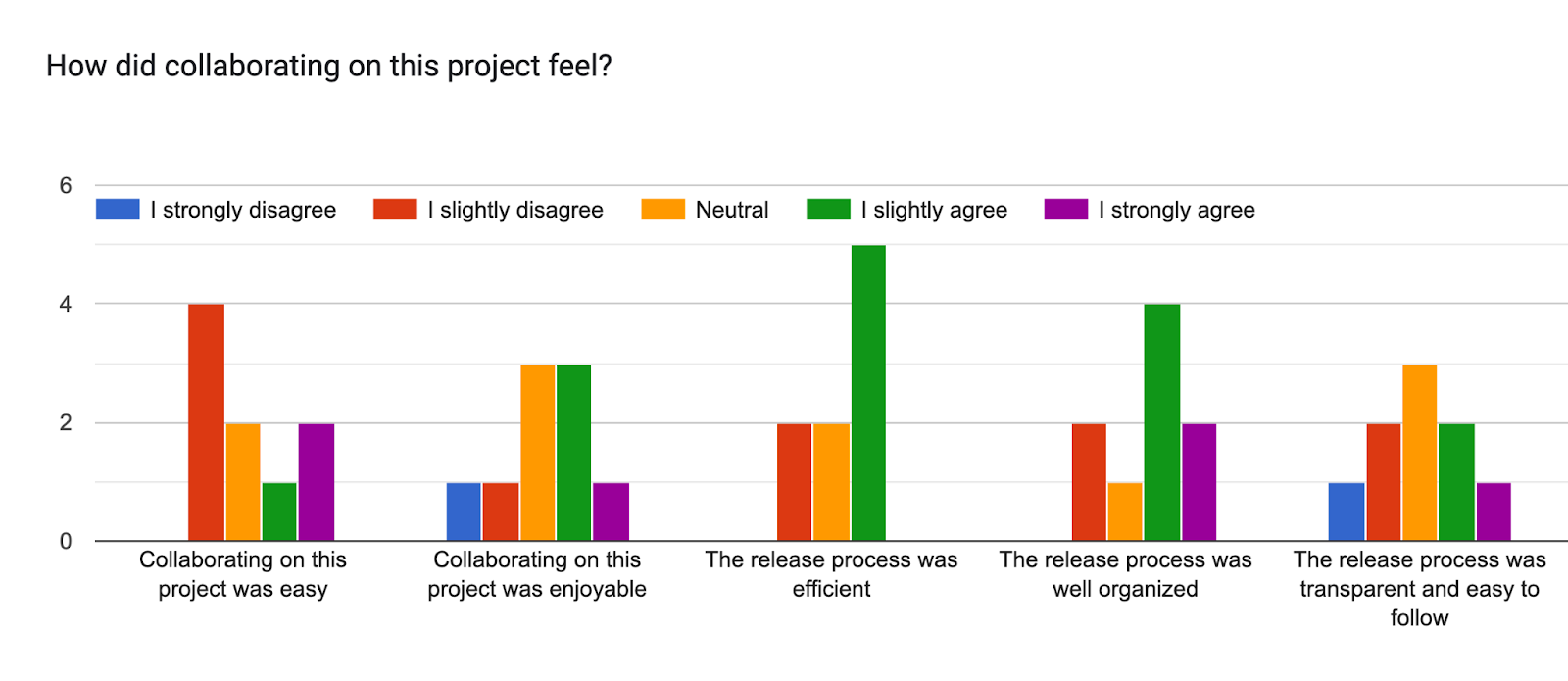
    How did the collaboration feel?

    This section included ways for one to indicate how much they agreed or disagreed with a statement around collaboration.

    Forms response chart. Question title: How did collaborating on this project feel?. Number of responses: .

    Would you like to be part of future release squads?

    • 11.1%: I havenโ€™t been part of the squad but I would like to try in the future.
    • 66.7%: I have been part of a release squad and I will gladly repeat.
    • 0%: I have been part of the release squad but will not repeat in the near future
    • 0%: I havenโ€™t been part of the squad but I would like to try in the future
    • 11.1%: Day job doesnโ€™t allow for the consistent time.
    • 11.1%: I have been part of a release squad and I will repeat, However perhaps in some time.ย 

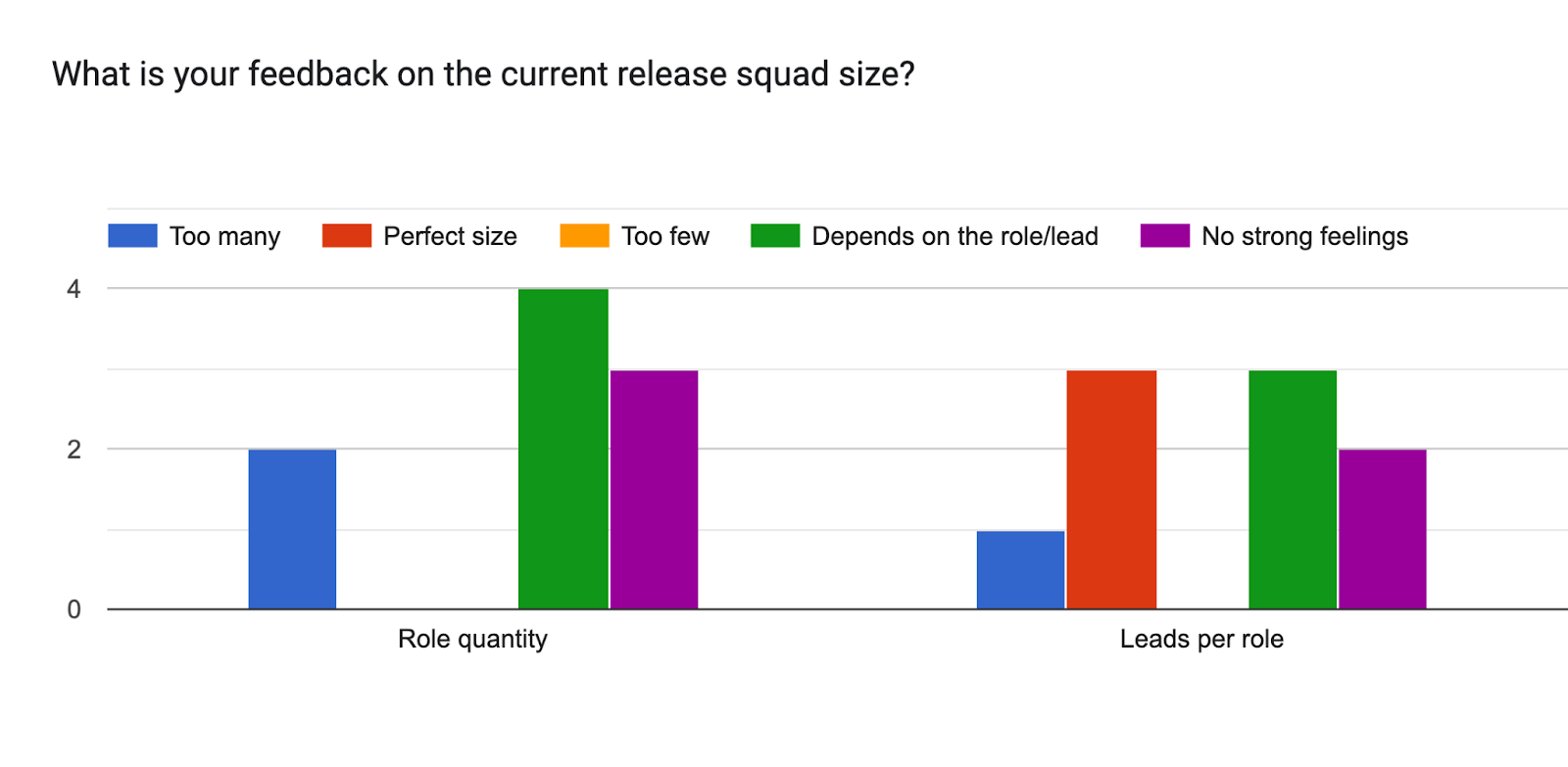
    What is your feedback on the current release squad size?

    Forms response chart. Question title: What is your feedback on the current release squad size?. Number of responses: .

    Takeaways and next steps

    • Several very long-term contributors mentioned that the current process for adding new editor features diverges significantly from traditional processes, and they found it hard to influence direction before those features incurred predictable consequences.
    • The fixes they propose echo those of other respondents:
      • More frequent syncing of the editor package to the wordpress-dev repo
      • More posts on Make that highlight important discussions on the Gutenberg repo
    • Contributors across the board would like to see more communication with extenders about new features and breaking changes.
    • Contributors value the Source of Truth documentation that comes from Anne McCarthy and have come to rely on it.
    • That said, they would like information about new features even more often, earlier, and in more media.
    • Contributors would also like more information on the roles of release leads (not just coordinators) and what decisions the lead makes versus what decisions are the purview of the tech leads.
    • Finally, respondents would like to see updates in the Handbook that specify what issues can legitimately delay a release and that a squad will follow the principle that deadlines are not arbitrary the rest of the time.

    Props toย @priethor,@marybaum and @akshayarย for compiling retrospective responses & reviewing this post.ย 

    #6-5, #retrospective