The WordPress coreCoreCore is the set of software required to run WordPress. The Core Development Team builds WordPress. development team builds WordPress! Follow this site for general updates, status reports, and the occasional code debate. There’s lots of ways to contribute:
Found a bugbugA bug is an error or unexpected result. Performance improvements, code optimization, and are considered enhancements, not defects. After feature freeze, only bugs are dealt with, with regressions (adverse changes from the previous version) being the highest priority.?Create a ticket in the bug tracker.
WordPress 6.3 ships with a new command palette. Initially included in the post and site editors, users can open the command palette using the ctrl + k or command + k keyboard shortcuts.
Registering commands
The command palette includes a number of coreCoreCore is the set of software required to run WordPress. The Core Development Team builds WordPress. commands that you can use by default including things like:
Navigating the site editor.
Creating new posts and pages.
Toggling UIUIUser interface elements.
Toggling editor preferences.
and more.
It also offers an APIAPIAn API or Application Programming Interface is a software intermediary that allows programs to interact with each other and share data in limited, clearly defined ways. for third-party developers to register or unregister commands.
There are two ways to register commands: static commands and dynamic commands.
Static commands
Static commands can be registered using the wp.data.dispatch( wp.commands.store ).registerCommand action or using the wp.commands.useCommandReactReactReact is a JavaScript library that makes it easy to reason about, construct, and maintain stateless and stateful user interfaces.
https://reactjs.org hook. Both methods receive a command object as an argument, which provides a unique name, a label, an icon, a callback function that is called when the command is selected, and potentially a context.
Dynamic commands, on the other hand, are registered using “command loaders.” These are needed when the command list depends on the search term entered by the user in the command palette input or when some commands are only available when some conditions are met.
For example, when a user types “contact”, the command palette need to filterFilterFilters are one of the two types of Hooks https://codex.wordpress.org/Plugin_API/Hooks. They provide a way for functions to modify data of other functions. They are the counterpart to Actions. Unlike Actions, filters are meant to work in an isolated manner, and should never have side effects such as affecting global variables and output. the available pages using that input.
Commands can be contextual. This means that in a given context (for example, when navigating the site editor, or when editing a template), some specific commands are given more priority and are visible as soon as you open the command palette. And when typing the command palette, these contextual commands are shown above the rest of the commands.
At the moment, two contexts have been implemented:
site-editor This is the context that is set when you are navigating in the site editor (sidebarSidebarA sidebar in WordPress is referred to a widget-ready area used by WordPress themes to display information that is not a part of the main content. It is not always a vertical column on the side. It can be a horizontal rectangle below or above the content area, footer, header, or any where in the theme. visible).
site-editor-edit This is the context that is set when you are editing a document (template, template part or page) in the site editor.
As the usage of the command palette expands, more contexts will be added.
To attach a command or a command loader to a given context, it is as simple as adding the context property (with the right context value from the available contexts above) to the useCommand or useCommandLoader calls.
WordPress Data API
The command palette also offers a number of selectors and actions to manipulate its state which includes:
Retrieving the registered commands and command loaders using the following selectors getCommands and getCommandLoader
Checking if the command palette is open using the isOpen selector.
Programmatically open or close the command palette using the open and close actions.
As part of the release of WordPress 6.3, the new Performance team has been working on several improvements to the coreCoreCore is the set of software required to run WordPress. The Core Development Team builds WordPress.. There are a few new additions to the WordPress Cache APIAPIAn API or Application Programming Interface is a software intermediary that allows programs to interact with each other and share data in limited, clearly defined ways., improved validation, and new actions.
Change cache groups for all query caches
There are a number of places in WordPress where the results of queries are cached, for example, all the major query classes like WP_Query, WP_Comment_Query, and WP_Term_Query. As of WordPress 6.3, the class WP_User_Query also caches the result of queries. In previous versions, the query results were stored in the same cache group as the corresponding object. For instance, post query data would be stored in the “posts” group. However, starting from WordPress 6.3, this approach has been modified.
The update introduces new cache groups specific to queries, offering developers greater control over the handling of objects within these groups. Core functionality now enables developers to specify the expiration time for a cache group, allowing them to set a duration of, for instance, one day. If desired, developers can also use the wp_cache_flush_group() function to clear a specific cache group (if their object cache implementation supports it). Additionally, this change allows developers to designate a cache group as non-persistent, if needed. The following are the newly added cache groups:
post-queries
term-queries
comment-queries
networknetwork(versus site, blog)-queries ( global cache group )
site-queries ( global cache group )
user-queries ( global cache group )
For sites with persistent object caching enabled, ensure that it supports wp_cache_add_global_groups function (added in WP 2.6) to add global cache groups . If not, you will have to manually add the three new global cache groups.
A new utility function, wp_cache_set_last_changed(), has been introduced in WordPress 6.3. This function is utilized to update the last updated value in the cache. It complements the existing wp_cache_get_last_changed() function, which was added in WordPress 4.7. In the core codebase, all instances where the last changed value was updated have been replaced with calls to this new function.
In addition to the new utility function, a corresponding action called wp_cache_set_last_changed has been introduced. This action provides valuable information such as the cache group, the newly updated value, and the old value. Developers can leverage this action to implement custom cache invalidation strategies. When combined with the new cache groups mentioned earlier and the wp_cache_flush_group() function, it becomes possible to clear an entire cache group programmatically.
Here is some sample code of this action that can be used along with the wp_cache_flush_group() function.
function wpdocs_cache_clear_query_groups( $group ){

  switch( $group ){

     case 'comment':

        $cache_group = 'comment-queries';

        break;

     case 'sites':

        $cache_group = 'site-queries';

        break;

     case 'networks':

        $cache_group = 'network-queries';

        break;

     case 'posts':

        $cache_group = 'post-queries';

        break;

     case 'terms':

        $cache_group = 'term-queries';

        break;

     case 'users':

        $cache_group = 'user-queries';

        break;

     default:

        $cache_group = false;

  }

  if( $cache_group ){

     wp_cache_flush_group( $cache_group );

  }

}

add_action( 'wp_cache_set_last_changed', 'wpdocs_cache_clear_query_groups' );
Validation added to _get_non_cached_ids() for invalidinvalidA resolution on the bug tracker (and generally common in software development, sometimes also notabug) that indicates the ticket is not a bug, is a support request, or is generally invalid. IDs
The _get_non_cached_ids() function has been updated to perform validation, ensuring that only an array of unique integers are passed as input. In the previous version, no validation was conducted on the input, leading to potential validation errors and even PHPPHPThe web scripting language in which WordPress is primarily architected. WordPress requires PHP 7.4 or higher fatal errors. This function now only supports passing an array of integers. If incorrect values are passed, a _doing_in_wrong message is triggered to inform developers of the error. See #57593
Misc changes
The PHPUnit test suite now calls wp_cache_flush_runtime() instead of manually resetting class properties of the object cache. The wp_cache_flush_runtime() function was added into core back in WordPress 6.0. If you are running the WordPress core unit tests with an object cache drop-in enabled, please ensure that the wp_cache_flush_runtime() function is present. See #31463
The function wp_cache_get_multiple was introduced in WordPress 5.5., and in WordPress 6.3, it is now in a couple of new places. It is now used to prime network options in wp_load_core_site_options in a single cache call. The wp_cache_get_multiple was also implemented in fill_descendants in WP_Comment_Query. This method is used to fill in descendant comments. This increases the performance of sites that heavily use nested comments. See #57803 and #56913
The Social Icons blockBlockBlock is the abstract term used to describe units of markup that, composed together, form the content or layout of a webpage using the WordPress editor. The idea combines concepts of what in the past may have achieved with shortcodes, custom HTML, and embed discovery into a single consistent API and user experience. provides options to set both an “Icon color” and an “Icon background color”. In versions prior to WordPress 6.3, the selected colors were hardcoded as hex code values within the block, even if you chose a color from the theme palette defined in theme.jsonJSONJSON, or JavaScript Object Notation, is a minimal, readable format for structuring data. It is used primarily to transmit data between a server and web application, as an alternative to XML..
Let’s take the example of the Twenty Twenty-Three theme, where the icon color is set to “Base” and the background color to “Secondary.” The icons’ frontend markup would include inline styles like this:
As you can see, the inline styles reflect the hardcoded hex code values for the base and secondary colors defined in Twenty Twenty-Three’s theme.json file, which are #ffffff and #345C00 respectively.
This approach caused issues when modifying the color palette in Global Styles, manually changing the theme.json file, or selecting different theme style variations. The icon colors did not update whenever the values for base or secondary were changed.
This problem is clearly demonstrated in the following video. Despite choosing different style variations, which have their own values for base or secondary, the icon colors remain fixed at #ffffff and #345C00.
To address this, WordPress 6.3 introduces CSSCSSCascading Style Sheets. classes to the Social Icons block that correspond to the selected color values. These classes are used all over WordPress and are automatically generated based on the color palette set in the theme.json file. They follow the format:
has-[color_slug]-color
has-[color_slug]-background-color
It’s important to note that these classes will not be applied if a user selects a custom color.
With the application of these CSS classes, any changes made to the base or secondary colors in Global Styles or theme.json will be automatically reflected in the Social Icons block. Here’s an updated example of the code (scroll to the right to view the classes):
While these CSS classes take precedence over the hardcoded hex values, it’s important to mention that the hardcoded values are still retained. This design ensures that if a user switches to a theme that doesn’t support the base or secondary colors, the icons will still display correctly using the original hardcoded hex values.
The following video shows that the Social Icons block now updates as the user changes the theme style variation in Global Styles.
Finally, it’s worth noting that this change won’t require any action from theme developers or users unless some custom functionality has been implemented. The rendering of the Social Icons block is handled through PHPPHPThe web scripting language in which WordPress is primarily architected. WordPress requires PHP 7.4 or higher, meaning that if any updates are made to the color palette defined in theme.json and the icon or background color is set to one of the colors from that palette, the icons will automatically update to reflect the changes.
For additional context and to review the technical implementation of this change, please see #51020.
The new BlockBlockBlock is the abstract term used to describe units of markup that, composed together, form the content or layout of a webpage using the WordPress editor. The idea combines concepts of what in the past may have achieved with shortcodes, custom HTML, and embed discovery into a single consistent API and user experience. Selectors APIAPIAn API or Application Programming Interface is a software intermediary that allows programs to interact with each other and share data in limited, clearly defined ways. allows more flexibility in how global styles are applied to blocks. As the available design tools grow in number and complexity, not all styles can be applied neatly to a block’s wrapping element.
In WordPress 5.8, the __experimentalSelector property was introduced and later evolved to facilitate applying feature-level global styles, such as borders, colors, and typography, to arbitrary selectors. Similarly, the __experimentalDuotone property was also introduced in WordPress 5.8 to support the application of SVG filters.
As advancements in design tools continue, the need for greater control over the application of global styles has grown more pressing. It is, for this reason, the selectors API has been extended and stabilized.
New selectors API features
Through the new API, a block can configure multiple CSSCSSCascading Style Sheets. selectors for use in generating global styles. These can be set at three different levels; root, feature, and sub-feature.
Root selectors
A root selector is the block’s primary CSS selector.
All blocks require a primary CSS selector for their global style declarations to be included under. If one hasn’t been supplied via the Block Selectors API, a default will be generated in the form of .wp-block-<name>.
This level of selector relates to styles for specific block support, such as border, color, typography, etc. They allow for a block to apply such styles to different elements within a block. For example, applying colors to the block’s wrapper but typographic styles to an inner text element.
These selectors relate to individual styles provided by block support e.g. background-color or border-radius.
A subfeature can now have styles generated under its own unique selector. This is most useful when a single feature’s styles need to be applied to separate elements. For example, a block’s typography might require font-family on the wrapper but text-decoration and font-size on different inner elements.
For convenience, instead of specifying the same selector for every subfeature, you can define a simple string at the feature level.
Fallbacks
If a selector has not been configured for a given feature, it will fall back to the block’s root selector. Similarly, if a subfeature has no custom selector set, it will fall back first to its parent feature’s selector before the block’s root selector.
Blocks currently using the __experimentalSelector and __experimentalDuotone support properties will continue to function as before.
However, if a block adds a selectors property in its block.jsonJSONJSON, or JavaScript Object Notation, is a minimal, readable format for structuring data. It is used primarily to transmit data between a server and web application, as an alternative to XML., that selectors configuration will be honored in its entirety. In other words, a block cannot use both the Selectors API and the old experimental properties.
Help test WordPress 6.3 Beta 4. What’s new in Gutenberg 16.1? (June 29) Gutenberg 16.2 RC3 is available for testing. Final version of GutenbergGutenbergThe Gutenberg project is the new Editor Interface for WordPress. The editor improves the process and experience of creating new content, making writing rich content much simpler. It uses ‘blocks’ to add richness rather than shortcodes, custom HTML etc.
https://wordpress.org/gutenberg/ 16.2 will be released Wednesday.
No updates of Key Projects during the coreCoreCore is the set of software required to run WordPress. The Core Development Team builds WordPress. editor meeting.
I’m going through the bugbugA bug is an error or unexpected result. Performance improvements, code optimization, and are considered enhancements, not defects. After feature freeze, only bugs are dealt with, with regressions (adverse changes from the previous version) being the highest priority. reports from WP 6.3 board, checking what we can fix.
The Fonts APIAPIAn API or Application Programming Interface is a software intermediary that allows programs to interact with each other and share data in limited, clearly defined ways. is being replaced by Font Face to support the new Font Library. Font Face has been merged into trunktrunkA directory in Subversion containing the latest development code in preparation for the next major release cycle. If you are running "trunk", then you are on the latest revision. but will only load into memory when Font Library is available. Making all aware that the new approach no longer includes register or enqueue of fonts, as plugins will integrate into the Font Library instead. And Font Face becomes read only of theme.jsonJSONJSON, or JavaScript Object Notation, is a minimal, readable format for structuring data. It is used primarily to transmit data between a server and web application, as an alternative to XML. merged data, which will eliminate issues with what fonts appear in typography pickers.
This work is very low level. The new Font Face will not impact the UIUIUser interface directly. Indirectly, its impact is on printing the font-face CSSCSSCascading Style Sheets. so that fonts visually look correctly, ie use their font files to render properly. That CSS generator and printer role though has not changed from the Fonts API. What has changed? Where plugins introduce their fonts for user consideration and selection. That role moves to the Font Library.
FYI: Fonts API will not get replaced until the Font Library is introduced. And this work is not being introduced into WP 6.3, as it’s still experimental.
WP 6.3 is dropping PHPPHPThe web scripting language in which WordPress is primarily architected. WordPress requires PHP 7.4 or higher 5.6 support, raising the minimum supported version to 7.0. Gutenberg though needs to run on the last 2 WP major releases, meaning it can’t yet drop PHP 5.6 support. The 2 PHP 5.6 PHPUnit CI jobs running on WordPress trunk have been removed from Gutenberg. Why? They were failing because Core no longer runs on PHP 5.6.
Update your PRs if they are failing for PHP 5.6 CI jobs.
As I low-level contributor and triagetriageThe act of evaluating and sorting bug reports, in order to decide priority, severity, and other factors. member, there were some suggestions within the past couple months ( i think here or in make.wordpress.orgWordPress.orgThe community site where WordPress code is created and shared by the users. This is where you can download the source code for WordPress core, plugins and themes as well as the central location for community conversations and organization. https://wordpress.org/ comments), that a release be devoted primarily to bug cleanup.
I’d just like to suggest that again… as a triager, I’m aware that some blockBlockBlock is the abstract term used to describe units of markup that, composed together, form the content or layout of a webpage using the WordPress editor. The idea combines concepts of what in the past may have achieved with shortcodes, custom HTML, and embed discovery into a single consistent API and user experience. editor issues in githubGitHubGitHub is a website that offers online implementation of git repositories that can easily be shared, copied and modified by other developers. Public repositories are free to host, private repositories require a paid subscription. GitHub introduced the concept of the ‘pull request’ where code changes done in branches by contributors can be reviewed and discussed before being merged by the repository owner. https://github.com/ can be closed when new features are introduced but there are nearly 1,000 PRs (yes, some of them are drafts and probably be disregarded) but I imagine fellow contributors recognize the frustration of keeping up with PRs and searching through issues when they’ve already been reported.
“What’s new in GutenbergGutenbergThe Gutenberg project is the new Editor Interface for WordPress. The editor improves the process and experience of creating new content, making writing rich content much simpler. It uses ‘blocks’ to add richness rather than shortcodes, custom HTML etc.
https://wordpress.org/gutenberg/…” posts (labeled with the #gutenberg-new tag) are posted following every Gutenberg release biweekly, showcasing new features included in each release. As a reminder, here’s an overview of different ways to keep up with Gutenberg.
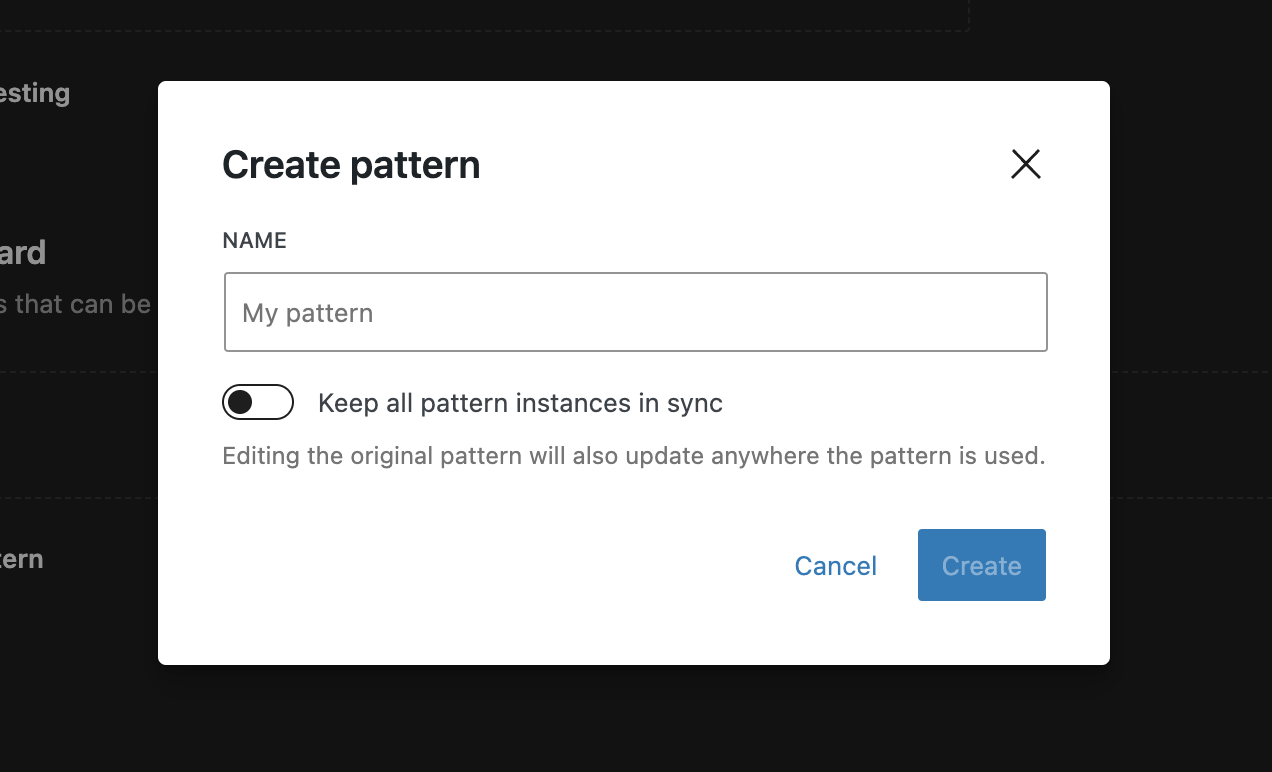
Building on our work to harmonize reusable blocks and patterns that started with the previous release, we’re continuing to make the Patterns section (previously known as “Library”) more intuitive: The pattern sidebarSidebarA sidebar in WordPress is referred to a widget-ready area used by WordPress themes to display information that is not a part of the main content. It is not always a vertical column on the side. It can be a horizontal rectangle below or above the content area, footer, header, or any where in the theme. now includes a pattern’s sync status in its “Details” section.
The pattern creation modal in the Patterns section has been updated to be consistent with the one triggered from the editor.
The “Custom Patterns” subsection has been renamed to “My Patterns” and given a more prominent position at the top of both the Patterns sidebar, and of the inserter. Finally, the icons in the grid items in the library were updated to indicate if a given template part is a headerHeaderThe header of your site is typically the first thing people will experience. The masthead or header art located across the top of your page is part of the look and feel of your website. It can influence a visitor’s opinion about your content and you/ your organization’s brand. It may also look different on different screen sizes., footer, or uncategorized.
Footnotes
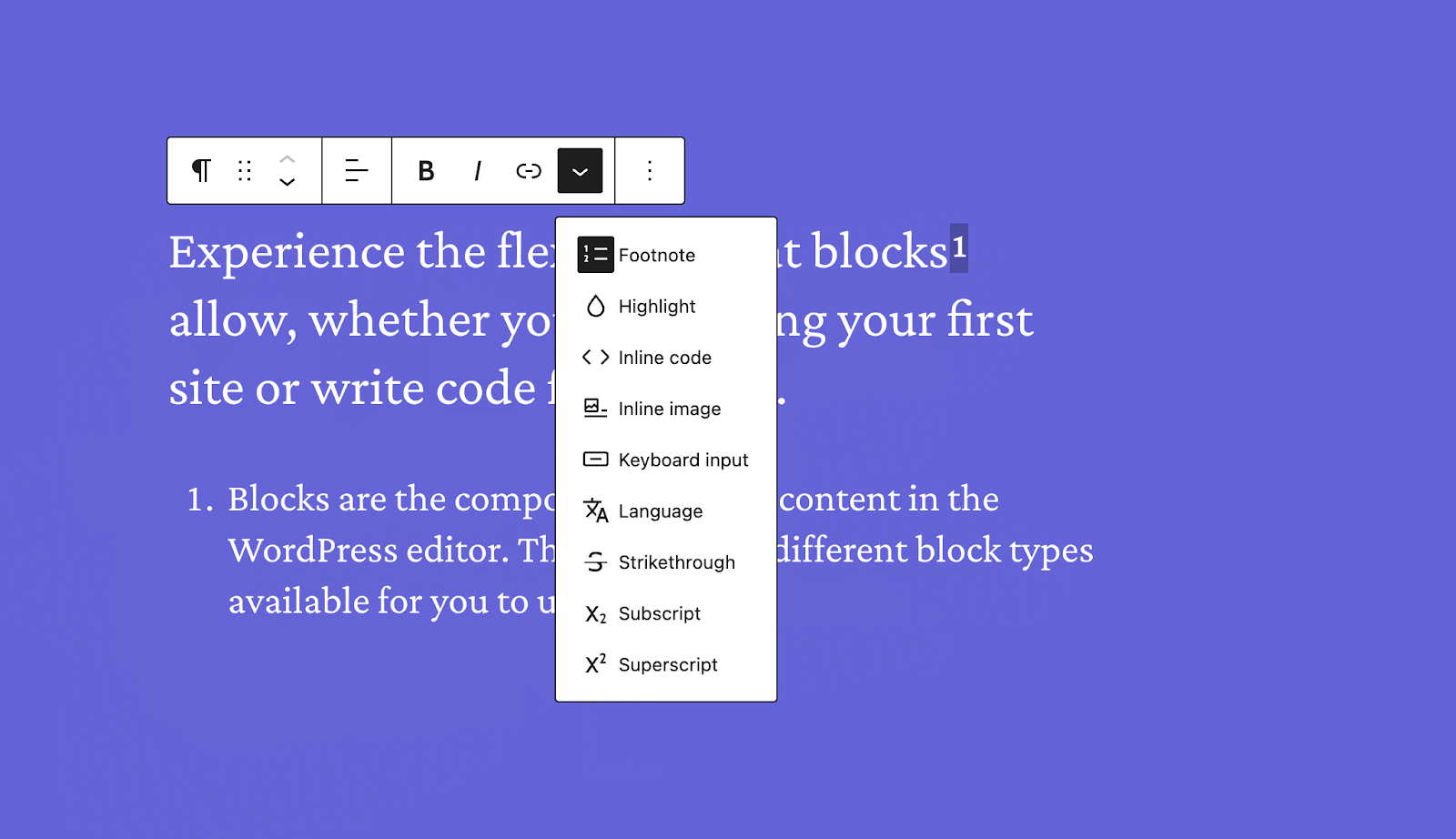
First introduced in Gutenberg 16.1, Footnotes have received a number of bugbugA bug is an error or unexpected result. Performance improvements, code optimization, and are considered enhancements, not defects. After feature freeze, only bugs are dealt with, with regressions (adverse changes from the previous version) being the highest priority. fixes to make them more reliable. Furthermore, it is now possible to manually insert the Footnotes blockBlockBlock is the abstract term used to describe units of markup that, composed together, form the content or layout of a webpage using the WordPress editor. The idea combines concepts of what in the past may have achieved with shortcodes, custom HTML, and embed discovery into a single consistent API and user experience. – among other things; this makes it a lot easier to re-insert Footnotes after deleting them.
Vertical text orientation
Themes can now opt into a new Text Orientation feature (available via a block’s Typography settings panel) that allows text to be written vertically. This new feature is a first step towards full support of vertically written languages as well as for decorative purposes in website design.
The “Home” template was easily conflated with the actual homepage, so we changed it to “Blogblog(versus network, site) Home”.
The quick inserter’s “Browse All” button, which had gone missing due to a regressionregressionA software bug that breaks or degrades something that previously worked. Regressions are often treated as critical bugs or blockers. Recent regressions may be given higher priorities. A "3.6 regression" would be a bug in 3.6 that worked as intended in 3.5. in a previous Gutenberg version, has been restored.
Finally, we’ve added a new Gutenberg Experiment to explore a potential path towards the deprecation of TinyMCE. When enabled, it prevents loading TinyMCE assets and Classic blocks by default, only enabling them if usage is detected. The update also handles scenarios where posts contain Classic blocks or users input raw HTMLHTMLHyperText Markup Language. The semantic scripting language primarily used for outputting content in web browsers., offering conversion options or reloading to use the Classic block.
Use block label and icon for the inserter draggable chip.. (51048)
Wrap “Move to trashTrashTrash in WordPress is like the Recycle Bin on your PC or Trash in your Macintosh computer. Users with the proper permission level (administrators and editors) have the ability to delete a post, page, and/or comments. When you delete the item, it is moved to the trash folder where it will remain for 30 days.” and “Switch to draft” buttons when labels are too long to fit on a single row. (52249)
Design Tools
Add Typography: Text orientation (writing mode). (50822)
Components
RangeControl: Add support for large 40px number input size. (49105)
i18ni18nInternationalization, or the act of writing and preparing code to be fully translatable into other languages. Also see localization. Often written with a lowercase i so it is not confused with a lowercase L or the numeral 1. Often an acquired skill.: Add context to the word “Filters”. (52198)
Export store for the coreCoreCore is the set of software required to run WordPress. The Core Development Team builds WordPress./customize-widgets package. (52189)
Export the store for the core/edit-widgets package. (52190)
New APIs
Block Editor
Add new registerInserterMediaCategory APIAPIAn API or Application Programming Interface is a software intermediary that allows programs to interact with each other and share data in limited, clearly defined ways. to make media categories extensibleExtensibleThis is the ability to add additional functionality to the code. Plugins extend the WordPress core software.. (51542)
Bug Fixes
Adjust the position of sticky headings in preferences modal. (52248)
Fix fetching Nav fallback ID flushing Navigation entity cache. (52069)
Fix: Term Description block should only be available in the site editor. (51053)
Footnotes: Register metaMetaMeta is a term that refers to the inside workings of a group. For us, this is the team that works on internal WordPress sites like WordCamp Central and Make WordPress. field for pages. (52024)
Image block: Fix cursor style when lightbox is opened. (52187)
Navigation: Add the draft status to the navigation title. (51967)
Navigation: Fix end-to-end test failures caused by sidebar title change. (52308)
Fix: Pattern focus mode DocumentActions should use the pattern icon. (52031)
Include template parts for custom areas in Uncategorized categoryCategoryThe 'category' taxonomy lets you group posts / content together that share a common bond. Categories are pre-defined and broad ranging.. (52159)
Remove ability for user to toggle sync status after pattern creation. (51998)
Rename sync_status and move to top level field on rest return instead of a meta field. (52146)
Check that core hasn’t already moved sync status meta before moving and unsetting. (52494)
Global Styles
Check if experiment enabled for realsies this time. (52315)
Check randomizer experiment is enabled before rendering button. (52306)
Navigation MenuNavigation MenuA theme feature introduced with Version 3.0. WordPress includes an easy to use mechanism for giving various control options to get users to click from one place to another on a site. Sidebar
Make the entire preview clickable in order to enter “edit” mode in focus mode. (51973)
Restore sidebar in focus mode on Pattern click through in Browse Mode Library. (51897)
Page Content Focus
Hide parent selector when parent’s block editing mode is ‘disabled’ or ‘contentOnly’. (52264)
Post Editor
Editor: Avoid remounting pre-publish sidebar contents during autosave. (52208)
Block Editor
Enable draft entity creation in Nav block offcanvas. (52166)
IframeiframeiFrame is an acronym for an inline frame. An iFrame is used inside a webpage to load another HTML document and render it. This HTML document may also contain JavaScript and/or CSS which is loaded at the time when iframe tag is parsed by the user’s browser.: avoid asset parsing & fix script localisation (52405)
[Edit Post]: Add toggle fullscreen mode and list view commands. (52184)
History
Update the behavior of the cached undo/redo stack. (51644)
Components
DropdownMenu: Fix icon style when dashicon is used. (43574)
AccessibilityAccessibilityAccessibility (commonly shortened to a11y) refers to the design of products, devices, services, or environments for people with disabilities. The concept of accessible design ensures both “direct access” (i.e. unassisted) and “indirect access” meaning compatibility with a person’s assistive technology (for example, computer screen readers). (https://en.wikipedia.org/wiki/Accessibility)
Fix incorrect aria-describedby attributes for theme patterns. (52263)
Guide: Place focus on the guide’s container instead of its first tabbable. (52300)
Site Editor: Update headings hierarchy in the ‘Manage all’ screens. (52271)
Navigation block: Do not toggle aria-expanded on hover when the overlay menu is opened. (52170)
Navigation block: Don’t close submenu when it has focus. (52177)
Social links: Reverts updating class and style attributes. (52019)
tests: Configure as a production environment. (52016)
Add caching to schema of REST APIREST APIThe REST API is an acronym for the RESTful Application Program Interface (API) that uses HTTP requests to GET, PUT, POST and DELETE data. It is how the front end of an application (think “phone app” or “website”) can communicate with the data store (think “database” or “file system”)
https://developer.wordpress.org/rest-api/. (52045)
Navigation block: Check that the modal is set before using contains. (51962)
Image block: Remove extra lookup for external image dimensions in lightbox. (52178)
Image block: Use built-in directive for mouseover event in lightbox. (52067)
Fix md5 class messed up with new block key. (52557)
Documentation
Add @examples to the wordpress/rich-text package selectors and hide the actions from documentation. (52089)
Add examples for core/keyboard-shortcut package. (42831)
Block Editor: Add README for FontFamilyControl component. (52118)
Block Editor: Add README for PanelColorSettings component. (52327)
Block Editor: Add README for RecursionProvider. (52334)
Docs: Update release documentation to use the right cherry-picking command. (51935)
Code Quality
Lodash: Refactor away from _.kebabCase() in getCleanTemplatePartSlug. (51906)
Lodash: Refactor away from _.kebabCase() in add page modal. (51911)
Lodash: Refactor away from _.kebabCase() in generic template modal. (51910)
Lodash: Remove completely from wordpress/style-engine package. (51726)
Sidebar Navigation: Refactor delete modal with ConfirmDialog component. (51867)
Template revisionsRevisionsThe WordPress revisions system stores a record of each saved draft or published update. The revision system allows you to see what changes were made in each revision by dragging a slider (or using the Next/Previous buttons). The display indicates what has changed in each revision. API: Move back to experimental. (51774)
Block editor store: Also attach private APIs to old store descriptor. (52088)
Blocks: Remove gutenberg refs in PHPPHPThe web scripting language in which WordPress is primarily architected. WordPress requires PHP 7.4 or higher files. (51978)
Refactor, document, and fix image block deprecations. (52081)
Block Supports: Change prefix in gutenberg_apply_colors_support to wp_ in dynamic blocks. (51989)
Move grid function kses patchpatchA special text file that describes changes to code, by identifying the files and lines which are added, removed, and altered. It may also be referred to as a diff. A patch can be applied to a codebase for testing. into 6.3 compat folder. (52098)
Return primitive value for ‘hideInserter’ in Appender component. (52161)
Remove redundant call to Navigation selector in Browse Mode. (51988)
Block removal prompt: Let consumers pass their own rules. (51841)
Revise LinkControl suggestions UIUIUser interface to use MenuItem. (50978)
Restore “Buttons > can resize width” test. (51865)
Remove serverSideBlockDefinitions from a test. (52215)
Fix flaky tests in navigation.spec.js and other tests related to the Post Editor Template mode. (51790)
Build Tooling
Use moment-timezone-data-webpack-pluginPluginA plugin is a piece of software containing a group of functions that can be added to a WordPress website. They can extend functionality or add new features to your WordPress websites. WordPress plugins are written in the PHP programming language and integrate seamlessly with WordPress. These can be free in the WordPress.org Plugin Directory https://wordpress.org/plugins/ or can be cost-based plugin from a third-party. to optimize timezones shipped in wp/date. (51519)
Plugin
BackportbackportA port is when code from one branch (or trunk) is merged into another branch or trunk. Some changes in WordPress point releases are the result of backporting code from trunk to the release branch. from core: Rename gutenberg_get_remote_theme_patterns to gutenberg_get_theme_directory_pattern_slugs. (51784)
[GithubGitHubGitHub is a website that offers online implementation of git repositories that can easily be shared, copied and modified by other developers. Public repositories are free to host, private repositories require a paid subscription. GitHub introduced the concept of the ‘pull request’ where code changes done in branches by contributors can be reviewed and discussed before being merged by the repository owner. https://github.com/-Actions-Workflows][Plugin-Release] Allow shipping a point-release for an older stable release. (49082)
Global Styles Revisions API: Backport changes from Core. (52095)
Move block editor settings filterFilterFilters are one of the two types of Hooks https://codex.wordpress.org/Plugin_API/Hooks. They provide a way for functions to modify data of other functions. They are the counterpart to Actions. Unlike Actions, filters are meant to work in an isolated manner, and should never have side effects such as affecting global variables and output. into 6.3 compat folder. (52100)
Project Management
Add code owners for the Interactivity API runtime. (52174)
Contributors
The following contributors merged PRs in this release:
WordPress 6.3 introduces a new concept called “development mode”, which affects certain nuances in how WordPress behaves. Going forward, sites will be able to configure their development mode using a new WP_DEVELOPMENT_MODE constant, which is recommended for any development sites.
What is the development mode?
The development mode configured on a site defines the kind of development work that the site is being used for.
Possible values for WP_DEVELOPMENT_MODE are:
“coreCoreCore is the set of software required to run WordPress. The Core Development Team builds WordPress.” indicates that this site is used as a WordPress core development environment. For example, this may be relevant when you are contributing directly to WordPress core.
“pluginPluginA plugin is a piece of software containing a group of functions that can be added to a WordPress website. They can extend functionality or add new features to your WordPress websites. WordPress plugins are written in the PHP programming language and integrate seamlessly with WordPress. These can be free in the WordPress.org Plugin Directory https://wordpress.org/plugins/ or can be cost-based plugin from a third-party.” indicates that this site is used as a WordPress plugin development environment. For example, this may be relevant when you are working on a plugin for the plugin repository.
“theme” indicates that this site is used as a WordPress theme development environment. For example, this may be relevant when you are working on a theme for the theme repository.
“all” indicates that this site is used as a WordPress development environment where all three aspects may be modified. For example, this may be relevant when you are working on a specific site as a whole, e.g. for a client.
An empty string indicates that no particular development mode is enabled for this site. This is the default value and should be used on any site that is not used for development.
Per this definition, setting a development mode is only relevant for sites where any kind of development is occurring. For example, it is not advised or relevant to use on a production siteProduction SiteA production site is a live site online meant to be viewed by your visitors, as opposed to a site that is staged for development or testing..
What specifically does the development mode do?
There are currently only a few use-cases in WordPress core which are determined by the development mode, but this will likely increase in the future. Most usage today relates to theme.json caching.
It is also a great example for the kind of nuance that the development mode of a site affects:
On most sites, caching certain data from theme.json is reliable since that data would only be invalidated when the theme is updated.
However, if you are actively developing a theme on the site and modifying theme.json constantly, having to manually invalidate the cache all the time would be detrimental to the development workflow. Therefore, that specific caching functionality is bypassed if the development mode is set to “theme”.
On the flipside, if you are directly contributing to WordPress core (i.e. setting your development mode to “core”), your site should behave as close to the actual behavior as possible, so even though you are in a development environment as well, having the theme.json data cache bypassed would not represent the actual behavior intended for a regular WordPress site.
That is why that specific caching functionality is only bypassed during theme development, but not during core development.
Difference between development mode, environment type, and debug mode
WordPress already contains two seemingly related concepts, which are the environment type (WP_ENVIRONMENT_TYPE constant) and debug mode (WP_DEBUG constant). Here is how they differ:
WP_DEBUG (boolean) toggles general debugging mode, which results in additional notices being displayed or logged.
WP_ENVIRONMENT_TYPE (string) defines whether the site is a local, development, staging, or production environment. This value can be used to set defaults for other configuration parameters or toggle certain features on the site.
WP_DEVELOPMENT_MODE (string) defines a specific scope of development that applies to the current site, which results in certain low-level WordPress behavior to change. This is different from WP_DEBUG which does not affect actual behavior. Additionally, WP_DEBUG typically applies to any development environment, while WP_DEVELOPMENT_MODE is more specific, as explained in the aforementioned example.
It is likely that you will only use the WP_DEVELOPMENT_MODE constant on a site where WP_DEBUG is enabled and WP_ENVIRONMENT_TYPE is either “development” or “local”, since it is not advised for development to occur directly against staging or production environments. That said, the constant is still decoupled, also because it defines the kind of development that is occurring more granularly than a simple on/off switch like WP_DEBUG.
Setting the development mode for a site
To set the development mode for a site, simply add a definition of the WP_DEVELOPMENT_MODE constant to your wp-config.php file. For example, if your site is a development environment for your plugin:
define( 'WP_DEVELOPMENT_MODE', 'plugin' );
Most likely, in this case you also want to make sure you have WP_DEBUG enabled and WP_ENVIRONMENT_TYPE set to “development” or “local”.
Checking the development mode for a site
A new function wp_is_development_mode( $mode ) is the recommended way to check whether a given development mode is enabled for the WordPress site. The function expects you to pass a $mode parameter that you would like to check for (e.g. “core”, “plugin”, or “theme”) and returns a boolean for whether said mode is enabled.
Per the aforementioned list of possible values, if a site has WP_DEVELOPMENT_MODE set to “all”, the function will return true for any $mode passed.
Here is an example:
if ( wp_is_development_mode( 'theme' ) ) {
	/*
	 * This could contain some logic that only applies when developing a theme
	 * on the site.
	 */
}
Additionally to wp_is_development_mode( $mode ), another lower-level function wp_get_development_mode() has also been added in WordPress 6.3, which returns the value of the WP_DEVELOPMENT_MODE constant directly. However, accessing the constant value directly is discouraged. Due to special values such as “all” that can encompass multiple other development modes, it is advised to always use wp_is_development_mode( $mode ) instead.
If you are logged into the WP Adminadmin(and super admin) interface, you can access the current value of the WP_DEVELOPMENT_MODE constant under Tools > Site Health > Info, in the WordPress Constants section.
Update July 17, 2023: The function wp_in_development_mode() was renamed to wp_is_development_mode() after initial publication of this article (see [56249]). All references have been updated.
Here are the dev notesdev noteEach important change in WordPress Core is documented in a developers note, (usually called dev note). Good dev notes generally include a description of the change, the decision that led to this change, and a description of how developers are supposed to work with that change. Dev notes are published on Make/Core blog during the beta phase of WordPress release cycle. Publishing dev notes is particularly important when plugin/theme authors and WordPress developers need to be aware of those changes.In general, all dev notes are compiled into a Field Guide at the beginning of the release candidate phase. for layout-related changes in the editor.
Layout support stabilization and updates
BlockBlockBlock is the abstract term used to describe units of markup that, composed together, form the content or layout of a webpage using the WordPress editor. The idea combines concepts of what in the past may have achieved with shortcodes, custom HTML, and embed discovery into a single consistent API and user experience. support for layout has now graduated from experimental to stable. Everything works the same; the only difference is that when adding block support for layout in block.json, its name is now layout instead of __experimentalLayout. Support for the __experimentalLayout syntax will be maintained for a while, but it is recommended to upgrade any custom blocks using layout to the stable layout syntax. (#51434)
Code example (in block.json):
"supports": {
    "layout": true
}
Changes in CSSCSSCascading Style Sheets. specificity for some layout types
The CSS output for the margin styles of children of constrained and flow (default) layout containers has changed. The generic rules used to have a specificity of 0,1,0 for all blocks; they have now changed to 0,0,0 for all blocks with an extra 0,2,0 rule applied only to the first and last blocks in the container.
This fixes the issue of global margin styles for specific blocks being overridden by layout styles (see #43404).
Compound block and layout type classname applied to inner wrapper of layout blocks
As of WP 6.2, layout classnames are added to the block inner wrapper. For most blocks, this is the same as the outer wrapper, but some blocks (e.g. coreCoreCore is the set of software required to run WordPress. The Core Development Team builds WordPress. Cover) have multiple inner containers. In 6.3, a new classname is added to the inner wrapper of all blocks with layout, comprised of block classname + layout classname, e.g.: .wp-block-cover-is-layout-constrained. This is the updated Cover block markup:
This makes it possible for blocks with a complex markup structure to support custom spacing styles.
Layout definitions removed from core theme.json
The layout definitions object, which stores base styles for the layout block support, has been removed from the core theme.json (settings.layout.definitions) and moved into the internal layout support files. Extending or overriding core layout definitions was never officially supported and including those definitions in a theme theme.json file resulted in bugs such as #49914.
Create Block Theme pluginPluginA plugin is a piece of software containing a group of functions that can be added to a WordPress website. They can extend functionality or add new features to your WordPress websites. WordPress plugins are written in the PHP programming language and integrate seamlessly with WordPress. These can be free in the WordPress.org Plugin Directory https://wordpress.org/plugins/ or can be cost-based plugin from a third-party. generated theme.json files that included the layout definitions object before the bugbugA bug is an error or unexpected result. Performance improvements, code optimization, and are considered enhancements, not defects. After feature freeze, only bugs are dealt with, with regressions (adverse changes from the previous version) being the highest priority. was fixed in #50268, so theme authors are advised to remove any layout definitions that may have been inadvertently included in their theme.json files in order to prevent buggy behavior.
New Grid layout type
A new grid layout type is available, based on CSS Grid, and defaulting to an auto-fill approach with configurable column width. It is also possible to set a fixed number of columns, by using the columnCount property in the layout object. (#49018)
To create a block with a grid layout, the following needs to be added in the supports object of the block’s block.json:
"layout": {
			"default": {
				"type": "grid"
			}
		}
Layout and block spacing support added to Post Template block
Previously, the Post Template block had custom layout styles that allowed for either a “list” or a “grid” (implemented behind the scenes with CSS flex) layout, with controls living in its parent Query block.
For 6.3, layout and block spacing support have been added to Post Template, and its controls now live in the Post Template toolbar. There is still a choice of “list” and “grid” styles, but “grid” is now implemented with the grid layout type. (#49050)
Spacer block gets orientation from the parent block layout
Spacer blocks inside a flex type layout block will now use the orientation of the parent layout. It is still possible to pass Spacer an orientation value from the parent block context, but Spacer blocks inside flex layouts will prioritize the flex orientation over the context one. (#49322)
In WordPress 6.3, the function get_pages() has been updated to utilize WP_Query internally, resolving a 13-year-old ticketticketCreated for both bug reports and feature development on the bug tracker. (#12821). This modification significantly reduces the complexity of the get_pages() function by offloading the burden of querying databases and handling the cache to WP_Query. The change builds upon the previous enhancementenhancementEnhancements are simple improvements to WordPress, such as the addition of a hook, a new feature, or an improvement to an existing feature. introduced in #22176, which introduced query caching to WP_Query.
As a result, this update eliminates redundant code and ensures that all filters running in WP_Query are now also applied during the call to get_pages(). Users who leverage filters like posts_pre_query or posts_results to customize the behavior of WP_Query, such as retrieving data from alternative sources like cache or another database (e.g., elastic search), will benefit from this change.
Additionally, based on feedback from the glotpress team, a new filterFilterFilters are one of the two types of Hooks https://codex.wordpress.org/Plugin_API/Hooks. They provide a way for functions to modify data of other functions. They are the counterpart to Actions. Unlike Actions, filters are meant to work in an isolated manner, and should never have side effects such as affecting global variables and output. named get_pages_query_args has been added. This filter enables developers to modify the parameters passed to WP_Query, maintaining compatibility with the original parameter arguments.





You must be logged in to post a comment.