Improved Caching for Database Queries in WP_User_Query

In WordPress 6.3, significant enhancements have been made to the WP_User_Query class, specifically regarding caching of database queries. This update builds upon the ongoing efforts of the performance team to optimize query caching for various WordPress CoreCore Core is the set of software required to run WordPress. The Core Development Team builds WordPress. query classes. WP_Query introduced query caching in WordPress 6.1, while other query classes like WP_Comment_Query, WP_Site_Query, WP_Network_Query, and WP_Term_Query already had built-in query caching. As a result, WP_User_Query was the only remaining query class lacking this caching capabilitycapability capability is permission to perform one or more types of task. Checking if a user has a capability is performed by the current_user_can function. Each user of a WordPress site might have some permissions but not others, depending on their role. For example, users who have the Author role usually have permission to edit their own posts (the “edit_posts” capability), but not permission to edit other users’ posts (the “edit_others_posts” capability)..

The implementation of query caching in WP_User_Query aligns with that of other query classes. Once a query is executed, the resulting database queries are cached, and subsequent queries with the same parameters will retrieve the data from the cache. This caching behavior, when combined with persistent object caching, ensures that the database query won’t be executed again until the caches are invalidated, leading to a substantial reduction in overall database queries. Even sites using in-memory caching will benefit from avoiding repetitive queries, although the performance improvement may not be as significant.

It’s important to note that starting from this version onward, all calls to WP_User_Query will be automatically cached by default. However, if you wish to disable query caching for specific queries, you can simply set the cache_results parameter to false, as demonstrated in the following example:

$args = array(

   'number' => 50,

   'cache_results' => false

);

$query = new WP_User_Query( $args );

Alternatively, you can globally disable caching by using a filterFilter Filters are one of the two types of Hooks https://codex.wordpress.org/Plugin_API/Hooks. They provide a way for functions to modify data of other functions. They are the counterpart to Actions. Unlike Actions, filters are meant to work in an isolated manner, and should never have side effects such as affecting global variables and output., as shown below:

function disable_caching( $wp_user_query ) {

   $wp_user_query->query_vars['cache_results'] = false;

}

add_action( 'pre_get_users', 'disable_caching' );

For developers working on custom solutions, it’s essential to utilize Core functions such as wp_insert_user for adding users to the database. These functions are well-maintained and ensure proper cache invalidation. If you directly update the database, it is strongly recommended to call the clean_user_cache function after modifying the respective database row.

With this update, a new global cache group called user-queries is introduced to store the results of queries. If your site uses persistent object caching, make sure it supports adding global cache groups by utilizing the wp_cache_add_global_groups function, introduced in WP 2.6. If not, you will need to manually add the three new global cache groups.

It’s worth noting that caching will be disabled for user queries that utilize the field parameter and request more than 3 fields. This decision is made to prevent cache values from becoming excessively large and to avoid filling up caches with data unlikely to be reused.

Lastly, plugins utilizing the users_pre_query hook to modify the returned values will bypass caching and continue to function as they did in previous versions of WordPress.

For additional context on the changes, please see #40613.

Props to @flixos90 and @adamsilverstein for peer review, to @stevenlinx for review.

#6-3, #dev-notes, #dev-notes6-3

I18N Improvements in 6.3

Various internationalization (i18n) improvements are in WordPress 6.3, and this developers note will focus on these.

Allow to short-circuit load_textdomain()

In #58035 / [55928], a new pre_load_textdomain filterFilter Filters are one of the two types of Hooks https://codex.wordpress.org/Plugin_API/Hooks. They provide a way for functions to modify data of other functions. They are the counterpart to Actions. Unlike Actions, filters are meant to work in an isolated manner, and should never have side effects such as affecting global variables and output. was introduced. This is useful for plugins to develop and test alternative loading/caching strategies for translations. This brings consistency with the existing pre_load_script_translations filter for JavaScriptJavaScript JavaScript or JS is an object-oriented computer programming language commonly used to create interactive effects within web browsers. WordPress makes extensive use of JS for a better user experience. While PHP is executed on the server, JS executes within a user’s browser. https://www.javascript.com translations.

Improvements to just-in-time translationtranslation The process (or result) of changing text, words, and display formatting to support another language. Also see localization, internationalization. loading

In #58321, it was reported that _load_textdomain_just_in_time() was firing too often if no translations were found for a given text domain, which typically is the case on site running English (US).

[55865] addresses this issue, which resulted in some minor performance improvements.

Props to @spacedmonkey for technical review, to @stevenlinx for proofreading.

#6-3, #dev-notes, #dev-notes6-3, #i18n

Registering scripts with `async` and `defer` attributes in WordPress 6.3

WordPress 6.3 introduces support for registering scripts with async and defer attributes as part of an enhancementenhancement Enhancements are simple improvements to WordPress, such as the addition of a hook, a new feature, or an improvement to an existing feature. to coreCore Core is the set of software required to run WordPress. The Core Development Team builds WordPress.’s existing Scripts APIAPI An API or Application Programming Interface is a software intermediary that allows programs to interact with each other and share data in limited, clearly defined ways.. This addresses a long-standing Trac ticket, and adds the ability to define a loading strategy for scripts. Supported strategies are as follows:

  • Blocking (default, this strategy is not supplied)
  • Deferred (by supplying a defer loading strategy)
  • Asynchronous (by supplying an async loading strategy)

This enhancement was originally proposed in December 2022.

Why is this enhancement useful?

Adding defer or async to script tags enables script loading without “blocking” the rest of the page load, resulting in more performant sites via improved Largest Contentful Paint (LCP) performance. This leads to a better user experience. This has been common practice in web engineering for over a decade, yet to date there have been no core methods or a means of achieving this when registering/enqueuing scripts using core WordPress APIs.

Prior to this enhancement, developers have had to resort to less than ideal alternatives such as directly filtering the tags at the point of output (using the script_loader_tag filterFilter Filters are one of the two types of Hooks https://codex.wordpress.org/Plugin_API/Hooks. They provide a way for functions to modify data of other functions. They are the counterpart to Actions. Unlike Actions, filters are meant to work in an isolated manner, and should never have side effects such as affecting global variables and output., or worse the clean_url filter), or handling the tagtag A directory in Subversion. WordPress uses tags to store a single snapshot of a version (3.6, 3.6.1, etc.), the common convention of tags in version control systems. (Not to be confused with post tags.) output directly using wp_print_script_tag and the wp_script_attributes filter. Although fairly common practice (as it was the only means available prior), it is considered “hacky” as it does not take into account the dependency tree, or inline scripts for that matter, which can lead to interoperability issues or bugs with other scripts.

The difference between deferred (via the defer script attribute) and asynchronous (via the async script attribute) scripts is as follows:

  • Deferred scripts
    Scripts marked for deferred execution — via the defer script attribute — are only executed once the DOM tree has fully loaded (but before the DOMContentLoaded and window load events). Deferred scripts are executed in the same order they were printed/added in the DOM, unlike asynchronous scripts.
  • Asynchronous scripts
    Scripts marked for asynchronous execution — via the async script attribute — are executed as soon as they are loaded by the browser. Asynchronous scripts do not have a guaranteed execution order, as script B (although added to the DOM after script A) may execute first given that it may complete loading prior to script A. Such scripts may execute either before the DOM has been fully constructed or after the DOMContentLoaded event.

Summary of the changes

At a high level, the changes can be summarized as follows:

  • WordPress now adds support for specifying a script loading strategy via the wp_register_script() and wp_enqueue_script() functions.
  • These functions have new function signatures, with the prior $in_footer boolean parameter being overloaded to accept a new $args array parameter in order to facilitate an easy entry point for specifying a loading strategy for a script, while still retaining full backward compatibility for $in_footer implementations; this retains the means of specifying whether a script should be printed in the footer or not via a key within the new $args parameter. Note that the strategy can also be specified in a backwards-compatible way via wp_script_add_data().

Various additions and enhancements to the WP_Scripts class were made to facilitate the necessary business logic that prepares and outputs a script’s loading strategy.

Example 1: Specifying a loading strategy for a script

A loading strategy may be assigned via the wp_register_script() and wp_enqueue_script() functions by passing a strategy key value pair to the new/overloaded $args parameter. 

The following example showcases a new script with handle 'foo' being registered as a deferred script:

wp_register_script( 
	'foo', 
	'/path/to/foo.js', 
	array(), 
	'1.0.0', 
	array(
		'strategy' => 'defer'
	) 
);

This exact same means of specifying a loading strategy may be achieved via the wp_enqueue_script() function.

Example 2: Specifying that a script be printed in the footer via the new API

The next example showcases a second script being specified for footer printing using the new API, while also supplying the async loading strategy at the same time:

wp_register_script( 
	'bar', 
	'/path/to/bar.js', 
	array(), 
	'1.0.0', 
	array(
		'in_footer' => true,
		'strategy'  => 'async',
	)
)

This exact same means of specifying footer printing may be achieved via the wp_enqueue_script() function.

Implementation details

This feature enhances the existing Scripts API by providing a simple means of specifying a loading strategy by extending commonly used & well known aspects of the Scripts API. It also takes into consideration a script’s dependency tree (its dependencies and/or dependents) when deciding on an “eligible strategy” so as not to result in application of a strategy that is valid for one script but detrimental to others in the tree by causing an unintended out of order of execution. This is near-impossible to achieve via the prior means of adding script loading strategy attributes when using the alternative “hacky” means outlined in the section above.

Technical implementation of the script loading strategy enhancements have been undertaken within the existing Scripts API, notably within the WP_Scripts class, and via enhancements to the familiar and commonly used wp_register_script() and wp_enqueue_script() functions.

A note on dependencies vs dependents
To avoid confusion regarding terminology, let’s clarify the difference between a script’s dependencies vs. its dependents. A script’s dependencies refers to the scripts that said script itself depends on, i.e they must be enqueued prior to said script being enqueued. A script’s dependents on the other hand refers to the scripts that depend on said script, i.e scripts that define said script in their dependencies array.

Changes to the $in_footer parameter of wp_register_script() and wp_enqueue_script() functions

The most notable change to the existing wp_register_script() and wp_enqueue_script() functions is the function signature change, where $in_footer (previously a boolean parameter) has been overloaded to also accept an array $args parameter, with any of the following keys:

  • (bool) in_footer
    • Behaves just like prior implementation of the top level $in_footer param.
  • (string) strategy
    • Accepts an intended loading strategy for the given script being registered/enqueued. Acceptable string values available at the time of implementation are defer for deferred scripts and async for asynchronous scripts.
    • Defaults to blocking behavior, thus retaining backward compatibility for existing script registrations and enqueues.

Retaining backward compatibility

For prior/existing usage of the wp_register_script() and wp_enqueue_script() functions making use of the $in_footer boolean param, backward compatibility is retained via logic that explicitly sets the scripts group to the applicable value for footer or headerHeader The header of your site is typically the first thing people will experience. The masthead or header art located across the top of your page is part of the look and feel of your website. It can influence a visitor’s opinion about your content and you/ your organization’s brand. It may also look different on different screen sizes. printing based on the boolean value passed to the new/overloaded $args parameter. Thus, full backward compatibility is retained and this is a non-breaking enhancement of the API.

While the changes introduced within this feature themselves are considered non-breaking, when making use of the new $args parameter (replacing/overloading the previous $in_footer parameter) in a pluginPlugin A plugin is a piece of software containing a group of functions that can be added to a WordPress website. They can extend functionality or add new features to your WordPress websites. WordPress plugins are written in the PHP programming language and integrate seamlessly with WordPress. These can be free in the WordPress.org Plugin Directory https://wordpress.org/plugins/ or can be cost-based plugin from a third-party./theme/codebase powered by WordPress <6.3, there is one scenario where the $in_footer intention would be misunderstood by core. Take for example the following scenario:

wp_register_script( 
	'foo', 
	'/path/to/foo.js', 
	array(), 
	'1.0.0', 
	array( 
		'strategy'  => 'defer',
		'in_footer' => false, // Note: This is the default value.
	)
);

In WordPress >=6.3 this would be correctly evaluated as being printed in the head via the in_footer array key value being false (which is also the default).

In WordPress versions <6.3, however, the presence of the above array assigned to the $in_footer parameter would itself evaluate to a boolean value of true, the opposite of what may be intended by the developer. That being said, one could rightfully argue that in versions of WordPress that do not support deferred/asynchronous scripts, having them printed in the footer is the next best alternative.

The simplest way to prevent this interoperability problem is to pass the strategy via a different means than the $args param to wp_register_script() or wp_enqueue_script() functions.

It can be passed instead via wp_script_add_data(), in which case it will be understood by WordPress 6.3 but ignored by older versions.

wp_register_script( 
	'foo', 
	'/path/to/foo.js', 
	array(), 
	'1.0.0', 
	false
);
wp_script_add_data( 'foo', 'strategy', 'defer' );

Alternatively, interoperability between WordPress versions newer and older than 6.3 using a single function call per script can be achieved by wrapping script registrations/enqueues within a wrapper function that accounts for new and old function signatures, thus retaining total backward compatibility.

An example of such a script registration/enqueue wrapper may look something as follows:

myplugin_register_script( $handle, $src, $deps, $ver, $args ) { 
    global $wp_version;

    // If >= 6.3, re-use wrapper function signature.
    if ( version_compare( $wp_version,'6.3', '>=' ) ) { 
        wp_register_script(
            $handle,
            $src,
            $deps,
            $ver,
            $args
            );
        } else {
        // Extract in_footer value for older version usage.
        $in_footer = isset( $args['in_footer'] ) ? $args['in_footer'] : false;
        
        wp_register_script(
            $handle,
            $src,
            $deps,
            $ver,
            $in_footer
        );
    }
}

Intended vs. eligible loading strategies

It should be noted that while a developer may intend for a given script to contain a certain loading strategy, the final loading strategy may differ based on factors such as script dependencies/dependents and inline scripts. 

For example, if a developer registers script foo with a strategy of defer, its dependencies must either use a defer or blocking strategy and its dependents must use a defer strategy in order for the intended execution order to be maintained. If a dependent of said script foo is then registered with a blocking intended strategy, script foo and all of its dependencies would then become blocking.

Newly added logic within the WP_Scripts class is responsible for exercising a series of logical checks that ensure that the final strategy for a given script handle is the most eligible strategy based on the factors outlined further above.

A handle will never inherit a strategy that is “more strict” than the one intended, i.e. a script marked for deferred loading will never be changed to asynchronous loading, but the reverse may indeed be the outcome if environmental factors warrant it.

Inline scripts

There are some nuances when applying a loading strategy to scripts (or scripts in the dependency tree) that have inline scripts attached to them, as this ultimately has an effect on the final outcome of an intended/eligible strategy.

Inline scripts that are registered in the before position, remain largely unchanged in behavior, given that they will inherently be parsed and/or executed before the main/parent script is parsed for immediate, deferred or asynchronous execution.

Inline scripts that are registered in the after position (the default for wp_add_inline_script()), however, will affect the final loading strategy of a main/parent script if said main/parent script has an async or deferred eligible strategy. This is largely due to the complexity in ensuring that inline scripts attached to deferred/asynchronous scripts execute at the appropriate and expected time, while not having a negative impact on the parent script itself, and the dependency tree as a whole.

Therefore, if a given script handle contains inline scripts in the after position, this script will be assumed to be blocking and any intended strategy such as defer/async will be removed, with the final eligible strategy being blocking. This, in turn, may affect the script’s dependency tree, and all scripts within it, may too, be treated as blocking scripts in a bid to retain correct execution order and functionality of the enqueued scripts. Logic is explicitly employed to ensure correct execution order of the script tree in these instances.

A follow-up ticketticket Created for both bug reports and feature development on the bug tracker. #58632 has been opened to continue ongoing discussions and proof of concept implementations to potentially introduce delayed execution of inline after scripts in the future which would preserve their loading order.

Migrating to the new API

Code implementations making use of legacy methods of adding async or defer attributes to script tags should migrate to the new API. These include scenarios where the attributes have historically been added to a script tag by way of the script_loader_tag filter, or worse via the clean_url filter.

The following examples show implementation that make use of the script_loader_tag and clean_url filters, which are now considered less-than-ideal approaches, and then show how it should be done using the new API:

MigrationMigration Moving the code, database and media files for a website site from one server to another. Most typically done when changing hosting companies. Consideration Example 1: Adding a defer attribute via the script_loader_tag filter

function old_approach( $tag, $handle ) {
// Only affects foo script.
    if ( 'foo' !== $handle) {
        return $url;
    }

// Modern implementations may employ WP_HTML_Tag_Processor here.
    return str_replace( ' src=', ' defer src=', $tag );
}
add_filter( 'script_loader_tag', old_approach, 10, 2 );

Migration Consideration Example 2: Adding a defer attribute via the clean_url filter

// WARNING: THIS HAS ALWAYS BEEN BRITTLE AND IS NOT RECOMMENDED.
function old_brittle_approach( $url ) {
    // Only affects foo script.
    if ( false === strpos( $url, 'foo.js' ) ) {
        return $url;
    }

    return "$url' defer "; // Assumes single-quoted attributes!
}
add_filter( 'clean_url', 'old_brittle_approach' );

If you are using an approach similar to the one above to add defer or async attributes to a script, please migrate to the new API by using any one of the approaches outlined earlier in this post.

Props: @joemcgill @flixos90 @westonruter @adamsilverstein @jyolsna @stevenlinx

#6-3, #dev-notes, #dev-notes6-3

Core Editor Improvement: Advancing the power of Patterns

These “CoreCore Core is the set of software required to run WordPress. The Core Development Team builds WordPress. Editor Improvement…” posts (labeled with the #core-editor-improvement tagtag A directory in Subversion. WordPress uses tags to store a single snapshot of a version (3.6, 3.6.1, etc.), the common convention of tags in version control systems. (Not to be confused with post tags.)) are a series dedicated to highlighting various new features, improvements, and more from Core Editor related projects. 

The following covers a few new features, big and small, coming to WordPress 6.3 that impact the experience of creating and using patterns. You can explore these features if you’re using Gutenberg 16.2 with the exception of the ability to rename and duplicate custom patterns coming to 16.3.

Create your own patterns (synced or unsynced)

Since GutenbergGutenberg The Gutenberg project is the new Editor Interface for WordPress. The editor improves the process and experience of creating new content, making writing rich content much simpler. It uses ‘blocks’ to add richness rather than shortcodes, custom HTML etc. https://wordpress.org/gutenberg/ 16.1, users can create patterns within the Editor. This includes a “Patterns” section where you can create and manage Patterns and Template Parts. As a result, you can now use your theme’s patterns, patterns from the Pattern Directory, and your patterns (and any combination you can think of) as you build your site.

Patterns section of the Site Editor, showing the sidebar with template parts and theme patterns on the left and previews of patterns on the right.


With the ability to set the sync status of patterns as well, Reusable blocks have a new name: Synced Patterns. This is a step forward in reducing the concepts you need to learn, and unlocking functionality for folks to create their own patterns:

  • A Synced Pattern means that any change made to one Pattern gets deployedDeploy Launching code from a local development environment to the production web server, so that it's available to visitors. to all instances of that Pattern across your site.
  • Unsynced Patterns are included in the Inserter alongside other patterns. Changes to these patterns will not be reflected throughout your site and you can customize each instance to your liking.
  • You can edit, rename, duplicate, and delete patterns all from within the Patterns section with the launch of Gutenberg 16.3.
  • Once you’ve set the sync status, you cannot change it after the fact. You will need to duplicate the pattern and create it again to change the sync status.
  • For blockBlock Block is the abstract term used to describe units of markup that, composed together, form the content or layout of a webpage using the WordPress editor. The idea combines concepts of what in the past may have achieved with shortcodes, custom HTML, and embed discovery into a single consistent API and user experience. themes, all patterns are listed alongside template parts in the Site Editor > Patterns section, where you can enter an isolated editing mode to make changes.
  • For classic themes, the prior reusable block management page has been reused to house patterns in a list, similar to the Posts > All Posts view. 
  • Custom pattern categories will likely arrive in a future release. You can read more here

Nudges have been added throughout the interface to help with this shift, including in the pattern creation process itself:

Modal for pattern creation showing a notice about the change from Reusable blocks to synced patterns, alongside options to name the pattern and keep it in sync before saving.


Keep design integrity with aspect ratio added to Image blocks

Aspect ratio controls have been added to Image blocks, unlocking the ability to set the design you want for an image, knowing that it’ll be preserved when that image is replaced. While it’s a small change, this has a big impact on the capabilitiescapability capability is permission to perform one or more types of task. Checking if a user has a capability is performed by the current_user_can function. Each user of a WordPress site might have some permissions but not others, depending on their role. For example, users who have the Author role usually have permission to edit their own posts (the “edit_posts” capability), but not permission to edit other users’ posts (the “edit_others_posts” capability). and experience of using patterns. Now you can worry less about skewing carefully curated layouts and more about your content.

In the future, imagine being able to set height/width and aspect ratio with just the Image block placeholder so patterns don’t have to include images at all, and you can begin setting the structure of content without needing images. 

Explore new bundled Core patterns

To continue offering unique and beautiful designs, the Pattern Directory includes a variety of new patterns with a focus on adding banner, text, and image-related options:

A new Pattern Directory filterFilter Filters are one of the two types of Hooks https://codex.wordpress.org/Plugin_API/Hooks. They provide a way for functions to modify data of other functions. They are the counterpart to Actions. Unlike Actions, filters are meant to work in an isolated manner, and should never have side effects such as affecting global variables and output. makes it easy to search for Curated patterns provided by Core or Community patterns created by WordPress contributors.

Pattern directory view with the new Curated vs Community filter displayed.


Add starter patterns to ease the template creation process

Building on changes made to the Patterns API in WordPres 6.2, you can also register custom patterns meant for specific template types (e.g., single post, 404, etc.) and they will appear in the start modal to ease the creation process. This is especially helpful for theme authors and site owners as it expands the power of patterns as starter content for template and post types alike.

Thank you to @richtabor @eidolonnight @dansoschin for helping review and edit this post.  

#6-3, #core-editor-improvement

Image performance enhancements in WordPress 6.3

WordPress 6.3 comes with several enhancements that improve load time performance for content with images. The benefits can be seen in the Largest Contentful Paint metric (short “LCP”), which captures the time from the beginning of the request until the largest content element in the viewport has been rendered.

Summary of the changes

At a high level, the changes can be summarized as follows:

  • WordPress now automatically adds the fetchpriority attribute with a value of “high” to the image it determines most likely to be the “LCP image”, i.e. the image that is the largest content element in the viewport. The attribute tells the browser to prioritize this image, even before it has computed the layout, which typically improves LCP by 5-10%. See the original proposal post for additional context.
  • Further adjustments and fixes have been implemented to improve the automatic handling of lazy-loading via the loading attribute to more reliably detect when to omit the attribute from some images. This effort was started in WordPress 5.9 and continued in WordPress 6.2. Most recently, a holistic assessment of the remaining issues led to all of them being fixed in WordPress 6.3. See the relevant WordPress 5.9 dev note post for additional context on why not lazy-loading in-viewport images, especially the LCP image, is important for performance.

In order to implement the automated fetchpriority support, some refactoring was needed to decouple the logic for detecting in-viewport images from the lazy-loading specific functionality. As a result, the fetchpriority and loading attributes are now controlled by a single function in WordPress coreCore Core is the set of software required to run WordPress. The Core Development Team builds WordPress.. If you have been relying on specific parts of WordPress core’s lazy-loading logic in your pluginPlugin A plugin is a piece of software containing a group of functions that can be added to a WordPress website. They can extend functionality or add new features to your WordPress websites. WordPress plugins are written in the PHP programming language and integrate seamlessly with WordPress. These can be free in the WordPress.org Plugin Directory https://wordpress.org/plugins/ or can be cost-based plugin from a third-party. or theme, please continue reading to learn more about those changes.

New function wp_get_loading_optimization_attributes()

A new function wp_get_loading_optimization_attributes( string $tag_name, array $attr, string $context ) is introduced in WordPress 6.3, which returns an associative array of additional attributes and their values. This provides a central place to get HTMLHTML HyperText Markup Language. The semantic scripting language primarily used for outputting content in web browsers. attributes that potentially improve the load time performance of images. For now, the function can only return a fetchpriority or loading attribute (or neither if not applicable), though this may be enhanced with other performance-related attributes in the future.

The new function is now used everywhere in WordPress core where fetchpriority or loading attributes are handled for images, most importantly:

  • Handling in-content images, via wp_filter_content_tags()
  • Handling programmatically rendered images, via wp_get_attachment_image() / get_the_post_thumbnail()
  • Handling avatarAvatar An avatar is an image or illustration that specifically refers to a character that represents an online user. It’s usually a square box that appears next to the user’s name. images, via get_avatar()
  • Handling the custom headerHeader The header of your site is typically the first thing people will experience. The masthead or header art located across the top of your page is part of the look and feel of your website. It can influence a visitor’s opinion about your content and you/ your organization’s brand. It may also look different on different screen sizes. image, via get_header_image_tag() (support added via #58680)
  • Handling images within shortcodes, via do_shortcode() (support added via #58681)
  • Handling images in the image widgetWidget A WordPress Widget is a small block that performs a specific function. You can add these widgets in sidebars also known as widget-ready areas on your web page. WordPress widgets were originally created to provide a simple and easy-to-use way of giving design and structure control of the WordPress theme to the user., via the WP_Widget_Media_Image class (support added via #58704)

That by itself is an improvement already, leading to consistent behavior across the board. Prior to this change, the above functions were using slightly different implementations for lazy-loading which could potentially lead to issues.

In order to use the function, pass the HTML element’s tagtag A directory in Subversion. WordPress uses tags to store a single snapshot of a version (3.6, 3.6.1, etc.), the common convention of tags in version control systems. (Not to be confused with post tags.) name and attributes to the new function, alongside a context string depending on how the image is being rendered in WordPress (for example “the_content”, or “wp_get_attachment_image”). Providing the tag name is important as the function is not limited to only images. At the moment it supports “img” tags (for fetchpriority and loading attributes) and “iframeiframe iFrame is an acronym for an inline frame. An iFrame is used inside a webpage to load another HTML document and render it. This HTML document may also contain JavaScript and/or CSS which is loaded at the time when iframe tag is parsed by the user’s browser.” tags (for loading attributes), though this may be expanded in the future. The return value of the function is always an array, which can be merged into the tag’s existing array of attributes, or alternatively specific attribute values can be extracted as needed.

Here you can see an example on how to potentially use the function:

$attr = array(
	'src'    => 'my-image.jpg',
	'width'  => 500,
	'height' => 300,
);
$attr = array_merge(
	$attr,
	wp_get_loading_optimization_attributes( 'img', $attr, 'wp_get_attachment_image' )
);
echo '<img';
foreach ( $attr as $key => $value ) {
	echo ' ' . sanitize_key( $key ) . '="' . esc_attr( $value ) . '"';
}
echo '>';

Note that the example uses the “wp_get_attachment_image” context, which is typically used only in the wp_get_attachment_image() function. While you could provide another arbitrary value here, at the moment it is advisable to use the most suitable core context as WordPress core only handles those specifically. Assuming that this is a generic image being rendered, the “wp_get_attachment_image” context works well.

Which additional attributes are returned in the above example depend on the specific context and place where the function is called. If the image is the first large image rendered in the response, the return value would be array( 'fetchpriority' => 'high' ). If it is an image that is likely further down the page, the return value would be array( 'loading' => 'lazy' ). There is also a chance that the array would be empty; for example, if the image is likely in the viewport but not large enough to be eligible as the LCP image.

Note that the function will never return both fetchpriority="high" and loading="lazy" for the same image, as those two attribute-value combinations are mutually exclusive and should never be used on the same element: lazy-loading an image while also marking it as high priority is an anti-pattern that should be avoided.

Rendering a custom header image in your theme

Custom header images are a feature that classic themes have supported for many years. With WordPress 6.3, the get_header_image_tag() function has received support to automatically include relevant loading optimization attributes, using the new wp_get_loading_optimization_attributes() function.

If you are developing or maintaining a theme that has custom header image support, it is advisable to use the get_header_image_tag() function to render the image. If you’re concerned about supporting WordPress versions prior to when this function was introduced in WordPress 4.4, see #58675 for how older core themes are updated to use this function when available.

If for some reason you are unable to use the get_header_image_tag() function and need to render the image tag manually while retrieving the image URLURL A specific web address of a website or web page on the Internet, such as a website’s URL www.wordpress.org with the get_header_image() function, you can still ensure the loading optimization attributes are applied. For example consider the following code:

$attr = array(
	'src'    => get_header_image(),
	'width'  => (int) get_custom_header()->width,
	'height' => (int) get_custom_header()->height,
);
$attr = array_merge(
	$attr,
	wp_get_loading_optimization_attributes( 'img', $attr, 'get_header_image_tag' )
);
echo '<img';
foreach ( $attr as $key => $value ) {
	echo ' ' . sanitize_key( $key ) . '="' . esc_attr( $value ) . '"';
}
echo '>';

Additionally, if you are certain that the header image is also the LCP image of the page, you can manually mark it as such, by adding 'fetchpriority' => 'high' to the $attr array before calling wp_get_loading_optimization_attributes(). Calling the function would still be crucial to ensure WordPress core considers the image so that subsequent images on the page also receive the correct attributes.

Customization of image priority and lazy-loading behavior

With the new function being used consistently anywhere images are rendered in WordPress core, support for customizing is also improved. The function will never override attributes that are already provided, so if you set a fetchpriority or loading attribute on an image before this function is called, the attribute will be kept as is. This allows fine tuning by not enforcing the default automated behavior. If doing so, keep in mind never to set both fetchpriority="high" and loading="lazy" for an element. If the function encounters those two attribute-value combinations together, it will trigger a warning.

Modifying the default behavior for lazy-loading works just like before. Relevant filters like wp_lazy_loading_enabled, wp_img_tag_add_loading_attr, and wp_omit_loading_attr_threshold have not been modified in this release. However, the default value for the wp_omit_loading_attr_threshold filterFilter Filters are one of the two types of Hooks https://codex.wordpress.org/Plugin_API/Hooks. They provide a way for functions to modify data of other functions. They are the counterpart to Actions. Unlike Actions, filters are meant to work in an isolated manner, and should never have side effects such as affecting global variables and output. has been modified from 1 to 3 (see #58213 for context) in order to better support the common pattern of multi-column layouts with images. Please refer to the lazy-loading dev notedev note Each important change in WordPress Core is documented in a developers note, (usually called dev note). Good dev notes generally include a description of the change, the decision that led to this change, and a description of how developers are supposed to work with that change. Dev notes are published on Make/Core blog during the beta phase of WordPress release cycle. Publishing dev notes is particularly important when plugin/theme authors and WordPress developers need to be aware of those changes.In general, all dev notes are compiled into a Field Guide at the beginning of the release candidate phase. posts for WordPress 5.5 and for WordPress 5.9 for more information on those existing filters.

For fetchpriority, a new filter wp_min_priority_img_pixels was introduced, which allows developers to modify the size threshold above which an image is considered eligible to receive fetchpriority="high". This minimum threshold value is in place to ensure only images of a certain size are considered for the LCP image. For example, a small icon would never be the LCP image — even if there were no other images above the fold, the LCP element would most likely be a non-image element, e.g. a heading.

The size is defined as a the product of “width * height” of the image, and the default threshold is 50,000. For example, this means that an image with a width of 300 pixels and height of 200 pixels is eligible (since 300*200=60000) while an image with a width of 200 pixels and height of 200 pixels is not (since 200*200=40000).

Here is an example: Imagine you have an image that is 200×200 pixels, and despite being that small, you know it is the LCP image of the specific URL it appears on. You could then use the new filter to ensure the image can receive fetchpriority="high".

add_filter(
	'wp_min_priority_img_pixels',
	function( $size ) {
		if ( is_this_the_url_with_the_image() ) {
			return 200 * 200; // Images at least as big as 200x200 
		}
		return $size;
	}
);

Keep in mind that in such a situation you could alternatively provide fetchpriority="high" on the image manually, which is just another arguably more direct way to achieve the same result. Therefore this approach is better suited for dynamic content in layouts where you might not know the exact image.

Deprecated functions

With the new wp_get_loading_optimization_attributes() function controlling both fetchpriority and loading attributes, a few existing functions are being deprecated as part of the WordPress 6.3 release.

wp_get_loading_attr_default() is superseded by the new function and therefore should not be used anymore. If you are currently calling this function in your plugin, you can use code such as the one below to remain compatible with WordPress versions before and after this deprecation:

function myplugin_get_loading_attr_default( $tag_name, $attr, $context ) {
	// For WP >= 6.3.
	if ( function_exists( 'wp_get_loading_optimization_attributes' ) ) {
		$loading_optimization_attr = wp_get_loading_optimization_attributes( $tag_name, $attr, $context );
		if ( isset( $loading_optimization_attr['loading'] ) ) {
			return $loading_optimization_attr['loading'];
		}
		return false;
	}

	// For WP < 6.3.
	return wp_get_loading_attr_default( $context );
}

While the above works well for a transition period, for the long term consider also supporting fetchpriority, e.g. by using the new function directly.

The other function that has been deprecated is wp_img_tag_add_loading_attr(), as this function is superseded by a new wp_img_tag_add_loading_optimization_attrs(), which also encompasses the fetchpriority enhancementenhancement Enhancements are simple improvements to WordPress, such as the addition of a hook, a new feature, or an improvement to an existing feature.. Note that both of these functions are intended for parsing HTML content from the database, so it is advisable for plugins to not rely on either of them. Try to use wp_get_loading_optimization_attributes() or a wrapper function like the above instead to add loading optimization attributes to a specific image.

Please see #58235 for more information on fetchpriority support.

Lazy-loading issues addressed

As mentioned before, WordPress 6.3 addresses several outstanding problems where loading="lazy" was being added to images that should not receive it. Other than the aforementioned change of the default value for the wp_omit_loading_attr_threshold filter from 1 to 3 (see #58213), those fixes do not affect the underlying developer APIs in any way.

Here is a list of the other lazy-loading bugs that were addressed:

  • Images in the header (before “the loopLoop The Loop is PHP code used by WordPress to display posts. Using The Loop, WordPress processes each post to be displayed on the current page, and formats it according to how it matches specified criteria within The Loop tags. Any HTML or PHP code in the Loop will be processed on each post. https://codex.wordpress.org/The_Loop”) in classic themes are now eligible for having the loading=”lazy” attribute omitted. See #58211.
    • For blockBlock Block is the abstract term used to describe units of markup that, composed together, form the content or layout of a webpage using the WordPress editor. The idea combines concepts of what in the past may have achieved with shortcodes, custom HTML, and embed discovery into a single consistent API and user experience. themes, this was already fixed in WordPress 6.2, via #56930.
  • Programmatically rendered images which are injected into post content no longer incorrectly affect the lazy-loading logic. See #58089.
  • Rendering an excerptExcerpt An excerpt is the description of the blog post or page that will by default show on the blog archive page, in search results (SERPs), and on social media. With an SEO plugin, the excerpt may also be in that plugin’s metabox. where the full post contains images no longer incorrectly affects the lazy-loading logic. See #56588.
  • A duplicate call to get the loading attribute value in get_the_post_thumbnail() has been removed. See #58212.
  • Images before “the loop” are now counted towards the threshold for not lazy-loading. See #58635.

Props @westonruter @joemcgill for technical review, @mukesh27 @stevenlinx for proofreading.

#6-3, #dev-notes, #dev-notes6-3

Real-time Collaboration: architecture

The goal of this issue is to lay down the technical architecture to implement real-time collaboration in WP Adminadmin (and super admin) (Post and Site editor). See the following bootstrap post for more information on the scope and features of the project.

There are different use-cases we want to enable as outlined on the post but all of them come down to these two fundamental aspects:

  • Data needs to be shared and synchronized between users connected to the same WP-Admin.
  • If the networknetwork (versus site, blog) is disconnected, the data is persisted locally and synchronized back to the server the network is restored.

In addition to that I’d like to add another guiding principle to the technical solution we try to conceptualize: 

Ideally, developers working on the UIUI User interface of WP-Admin/editors shouldn’t have to think about whether the data is local/remote/synchronized/merged… Developers declare their “data requirements” and these requirements are fulfilled for them by a separate and automated layer. 

This principle is important for multiple reasons:

  • It frees developers from thinking about the synchronization and the collaboration for every new feature and piece of UI that they add. Additional data will be collaborative by default and offline-ready.
  • It is also important to ensure the backward compatibility of our existing public facing APIs to access and manipulate WordPress Data.

This is also the same guiding principle that we put in place when we initially developed the @wordpress/data package to address the local and remote data needs.

Current architecture

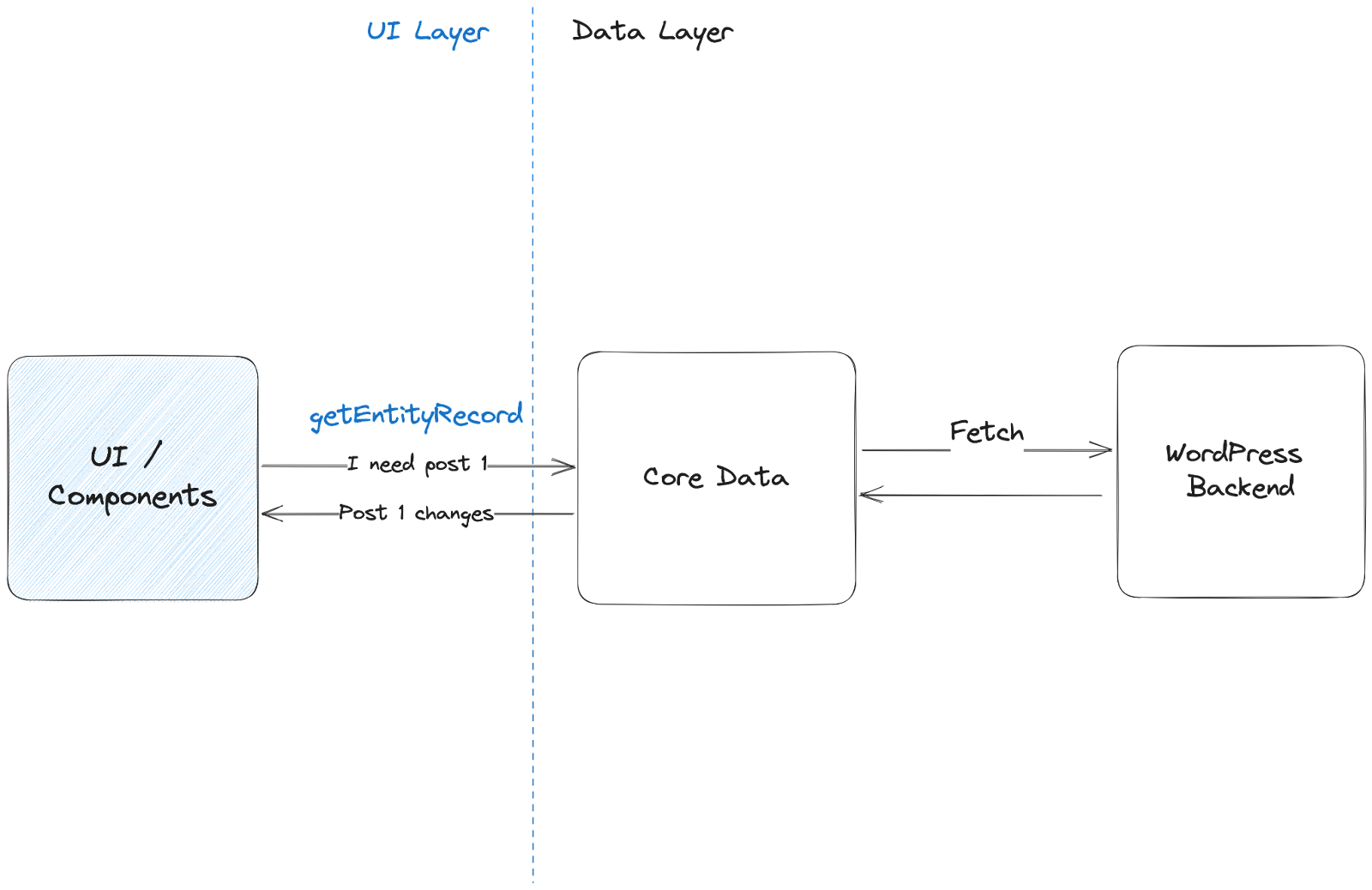
The following schema represents how the data flows in the site and post editor code-bases.

The architecture is separated into two sections: 

  • The UI layer: A developer working on this is typically writing components, declaring its data needs using selectors (like the `getEntityRecord` selector in the example above and is notified of data changes automatically. Developers can also make use of actions to perform mutations. (Editing posts, saving posts…).
  • The CoreCore Core is the set of software required to run WordPress. The Core Development Team builds WordPress. Data layer: Responsible for addressing the data needs, retrieving the data from the server or locally, caching data if needed and notifying the consumers (UI layer) of any changes.

Proposal

So the goal here is to introduce data synchronization between remote peers (collaborators) while also persisting the data locally, without impacting the UI layer. To do so we can introduce a sync engine.

Prior art: Take a look at this resource if you want to read more about offline sync engines in SPAs and prior art (Figma, Linear…)

To understand better how such a sync engine would work, let’s take a look at a small example. First thing to note is that all the data that is rendered / shared / persisted can be represented as a simple list of documents / objects. So the role of the sync engine is to fetch / retrieve / persist locally any changes happening to these objects separately.

  • The user (UI components) asks for the post with id 1 by calling the `getEntityRecord` APIAPI An API or Application Programming Interface is a software intermediary that allows programs to interact with each other and share data in limited, clearly defined ways. of our core-data package. 
  • Internally, Core Data asks the sync engine to bootstrap a document of type post and its identifier is 1.
  • First, the sync engine creates a “document” in memory that will represent the source of truth.
  • The sync engine tries to load that document from the local database. If not found, it creates an empty database to persist any future changes of that particular document.
  • The sync engine then performs what we call the handshake where it connects to the remote peers, all the collaborators working on the same document (type post, identifier 1) and merges the local copy with the remote peers copy.
  • The sync engine also asynchronously triggers a fetch call to retrieve the document from the WordPress backend and refreshes the local copy or initializes it if there were no local copy or remote peers connected.
  • Finally, any changes that happen to the local document, regardless of the source of the change (user triggered change, loaded from the local database, change triggered by a remote peer) all trigger the same change handler in the core data package.
  • Once the change handler is called, the UI component is going to be notified (re-rendered).

Introducing Yjs

We can split the implementation of the proposed sync engine into the following steps:

  1. Introduce the observable documents objects: in-memory document objects with an API to make an update and to subscribe to changes.
  2. Support merging changes from multiple sources into the observable documents. Note that there are essentially two ways to synchronize changes: a conflictconflict A conflict occurs when a patch changes code that was modified after the patch was created. These patches are considered stale, and will require a refresh of the changes before it can be applied, or the conflicts will need to be resolved.-free replicated data type (CRDT) and operational transformation (OT). Previous explorations have shown that OT is too complex to implement on top of our existing architecture. 
  3. Loading and persisting document changes to a local database.
  4. A communication layer between all the users connected to the same WordPress Admin.  

Fortunately, there are some open sourceOpen Source Open Source denotes software for which the original source code is made freely available and may be redistributed and modified. Open Source **must be** delivered via a licensing model, see GPL. solutions that can help us implement the proposed sync engine and address most of these requirements. The most promising one that has been used in the previous explorations is Yjs.

Yjs is an implementation of CRDT. You can think of it as a data structure that you can use to represent the objects being synchronized. Once you use that special representation, Yjs offers adapters to address all the requirements above: observe changes, merge changes from different sources, persist into a local database and potentially communicate with other peers.

Q&A

While this library solves most of our requirements, explorations have shown that the devil is in the details. Writing sync engines is a challenging project and there are a lot of questions that need to be addressed.

What about the performance impact of the added observable objects and the back and forth transformations from our regular objects into their equivalent CRDT format?

The sync engine is most likely going to have a small performance impact even on local changes, it remains to be seen whether this impact is going to be a blockerblocker A bug which is so severe that it blocks a release. or not. We do have the tools in place (performance metrics) to help assess the question once everything is in place.

Yjs allows using WebRTC or WebSockets by default to synchronize documents between peers, what communication layer is the most adapted to WordPress?

As mentioned in the bootstrap post, this is one of the biggest challenges for us. The most performant transport layers rely on a centralized web socket server and a lot of PHPPHP The web scripting language in which WordPress is primarily architected. WordPress requires PHP 7.4 or higher hosting providers don’t have support for restful communication using web sockets. 

This means that we need an alternative communication layer that can work with any WordPress install by default while allowing the communication layer to be replaceable by plugins/hosts.

Can we use WebRTC as the default communication layer as it’s P2P and should work with all WordPress installs?

While WebRTC is indeed P2P, most existing implementations of WebRTC, including the default Yjs WebRTC adapter rely on a centralized signaling server. This is a very light server used to perform the handshake (for the peers to discover each other) and in general rely on web sockets.

Since we can’t rely on web sockets, there are three possibilities that we can explore:

  • Build a public signaling server (on .org infrastructure for instance).
  • Implement WebRTC signaling using long polling instead of web-sockets (supported in all WordPress instances) and a public stun server (there are existing public stun servers and .org infrastructure can also ship one if needed). This also involves providing a custom Yjs adapter to support the polling based signaling server.
  • Avoid WebRTC by default and use long polling to perform both the handshake and then data changes. In this case, no public server is needed but performance can suffer.

What should we also consider as part of project

  • Performance impact.
  • Memory footprint of the shared documents.
  • Storage footprint of the local database. (yjs stores the history of changes with some optimizations).
  • Security: Prevent access to peers without the necessary rights.
  • Undo/Redo.

Get involved!

We’re just getting started in this journey, there’s a number of open questions and If you are interested in the challenges or want to leave any feedback on the project, please chime in.

#gutenberg, #phase-3

Improvements to the metadata API in WordPress 6.3

WordPress 6.3 brings significant improvements to the metadata APIAPI An API or Application Programming Interface is a software intermediary that allows programs to interact with each other and share data in limited, clearly defined ways., enhancing the lazy loading capabilitiescapability capability is permission to perform one or more types of task. Checking if a user has a capability is performed by the current_user_can function. Each user of a WordPress site might have some permissions but not others, depending on their role. For example, users who have the Author role usually have permission to edit their own posts (the “edit_posts” capability), but not permission to edit other users’ posts (the “edit_others_posts” capability). for term, comment, and site metadata. These enhancements aim to improve performance, optimize code readability, and ensure a consistent developer experience across different metadata types.

For context: Lazy loading metadata in WordPress refers to a technique where metadata associated with various elements, such as terms, is loaded only when it is actually needed. Instead of fetching and loading all metadata upfront, the metadata is deferred to a queue until the specific metadata type is requested, reducing unnecessary database queries or cache lookups and improving overall performance. 

Term metadata lazy loading improvements

Term metaMeta Meta is a term that refers to the inside workings of a group. For us, this is the team that works on internal WordPress sites like WordCamp Central and Make WordPress. in WordPress has always been lazily loaded since its introduction in WordPress 4.4. However, this behavior was only applicable to WP_Query. In other CoreCore Core is the set of software required to run WordPress. The Core Development Team builds WordPress. components like WP_Term_Query, term meta was always primed by default, unless developers explicitly set the update_term_meta_cache parameter to false. Unfortunately, many developers overlooked this parameter, resulting in unnecessary loading of term meta. 

In WordPress 6.3, WP_Term_Query has been improved so that instead of priming term meta, which involves performing a database or cache lookup, terms are now added to a queue dedicated to loading term meta. This queue, implemented as an array stored in memory, offers excellent performance. Additionally, it allows developers to conveniently include term IDs if they anticipate requiring them later. Only when the first call to get_term_meta is made, will all the term meta be primed in a single request.

To facilitate the lazy loading of term meta, a new function called wp_lazyload_term_meta() has been introduced in Core. This function provides an efficient mechanism for handling term meta and contributes to optimizing the overall performance of WordPress. To use, pass an array of term IDs to the function like this: 

wp_lazyload_term_meta( array( 1, 2, 3 ) );

For more information, please check out the original ticketticket Created for both bug reports and feature development on the bug tracker. #57645.

WordPress 6.3 introduces further enhancements to the handling of term meta in WP_Query.  Currently, in the WP_Query class, the function wp_queue_posts_for_term_meta_lazyload is invoked, which adds the term IDs of all terms linked to the queried posts into the lazy load metadata queue. Improvements to this function were made in WordPress 6.2, which improved the performance of this function by utilizing wp_cache_get_multiple()

In this new release, an unnecessary check to verify term existence has been eliminated. As a result, when wp_queue_posts_for_term_meta_lazyload() is called, it no longer executes get_term for every individual term ID, as it is highly unlikely that the term would not exist. See #57966

There were also a number of other places where term meta was not loaded at all as it is completely unneeded. See #58230, #57701

Comment metadata lazy loading improvements

Similar to term meta, comment meta in WordPress was previously lazily loaded only within the context of WP_Query. Now, rather than priming comment meta in the WP_Comment_Query class, it is added to the lazily loaded metadata queue and loaded only when used. This keeps the logic consistent between term and comment meta and also makes the code much more readable. As a result, the wp_queue_comments_for_comment_meta_lazyload() function, which is now unnecessary, has been deprecated. See #57801, #58301

Site metadata is now lazily loaded

Site meta was introduced in #40647 and allows developers to extend multisitemultisite Used to describe a WordPress installation with a network of multiple blogs, grouped by sites. This installation type has shared users tables, and creates separate database tables for each blog (wp_posts becomes wp_0_posts). See also network, blog, site functionality by adding metadata to a site on the multisite. Site meta is not to be confused with networknetwork (versus site, blog) meta, which is used for network options. Site meta is only used in one place in core and designed for pluginPlugin A plugin is a piece of software containing a group of functions that can be added to a WordPress website. They can extend functionality or add new features to your WordPress websites. WordPress plugins are written in the PHP programming language and integrate seamlessly with WordPress. These can be free in the WordPress.org Plugin Directory https://wordpress.org/plugins/ or can be cost-based plugin from a third-party. use. 

Previously, when calling WP_Site_Query or get_sites(), developers had to pass an update_site_meta_cache parameter to the query to ensure that site meta was not primed, resulting in a cache lookup or database query. Now, whenever update_site_meta_cache is true, site ids are added to the queue to be lazily loaded. If get_site_meta() is called, all the IDs in the queue are loaded in a single call. 

A new function has been added in core to add site IDs to the queue called wp_lazyload_site_meta(). It can be used by passing an array of site IDs, like this:

wp_lazyload_site_meta( array( 1, 2, 3 ) );

For more information, please check out the original ticket #58185.

General improvements to the Lazy loading API

The WP_Metadata_Lazyloader class, responsible for lazy loading metadata, underwent a significant refactor to enhance code maintainability. As part of this refactoring, the lazyload_term_meta and lazyload_comment_meta methods of the class have been deprecated. These methods have been replaced with a more versatile lazyload_meta_callback method, which can be reused for any metadata type. 

If your code currently utilizes the lazyload_term_meta and lazyload_comment_meta methods, it is recommended that you transition to using lazyload_meta_callback. This improvement allows for easy extension of the metadata data API to support additional metadata types in the future, such as posts and users.

Further enhancements were made to the lazy loading metadata API. A check is now implemented to verify if the requested ID is already present in the queue before processing. Here’s an example scenario: Let’s say your page request has added three items (IDs 5, 6, and 7) to the metadata lazy loading queue. However, when you call the get_term_meta function, you request ID 9, which is not in the queue. Previously, this would have led to an additional database or cache lookup. With the latest improvement, the queue is checked before processing to see if the current ID is already in the queue. If it’s not, the ID is added to the queue, preventing unnecessary lookups. See #57901

There have been significant changes in how metadata is handled for comments, terms, and sites. In the updated implementation, the prime meta parameters in functions such as _prime_term_cache() and WP_Term_Query are always respected. However, instead of directly priming the meta, it is now added to the metadata queue. Previously, there were inconsistencies in these functions and classes. For example, in _prime_term_cache(), if the term was already present in the cache, the term meta would not be primed. This led to a confusing developer experience and degraded performance.

Now, with the latest improvements, adding an ID to the queue has minimal to no performance impact when requested. As a result, these functions and classes are expected to behave in a more predictable manner. Developers can rely on consistent behavior and improved performance regarding metadata handling for comments, terms, and sites. See #57227

Props to @flixos90 and @joemcgill for peer review, to @stevenlinx, @leonnugraha and @costdev for review.

#6-3, #dev-notes, #dev-notes6-3

Dev Chat Summary: July 12, 2023

The notes from the weekly WordPress developers chat which took place on Wednesday July 12, 2023 in the core channel of Make WordPress Slack.

Start of the meeting on Slack

Announcements

  • WordPress 6.3 Beta 4: BetaBeta A pre-release of software that is given out to a large group of users to trial under real conditions. Beta versions have gone through alpha testing in-house and are generally fairly close in look, feel and function to the final product; however, design changes often occur as part of the process. 4 is available for testing.

Highlighted posts

Upcoming releases

WordPress 6.3

The first Release Candidaterelease candidate One of the final stages in the version release cycle, this version signals the potential to be a final release to the public. Also see alpha (beta). for 6.3 release is expected to be released next Tuesday, July 18, 2023.

Stay in the loopLoop The Loop is PHP code used by WordPress to display posts. Using The Loop, WordPress processes each post to be displayed on the current page, and formats it according to how it matches specified criteria within The Loop tags. Any HTML or PHP code in the Loop will be processed on each post. https://codex.wordpress.org/The_Loop with 6.3 by following along in the #6-3-release-leads channel in SlackSlack Slack is a Collaborative Group Chat Platform https://slack.com/. The WordPress community has its own Slack Channel at https://make.wordpress.org/chat/.

Open Floor

Three tickets were brought to the group:

If you’d like to contribute to these tickets, feel free to comment in TracTrac An open source project by Edgewall Software that serves as a bug tracker and project management tool for WordPress..

A question was asked about non-committercommitter A developer with commit access. WordPress has five lead developers and four permanent core developers with commit access. Additionally, the project usually has a few guest or component committers - a developer receiving commit access, generally for a single release cycle (sometimes renewed) and/or for a specific component. contributors being able to accept review assignments on Pull Requests in GitHubGitHub GitHub is a website that offers online implementation of git repositories that can easily be shared, copied and modified by other developers. Public repositories are free to host, private repositories require a paid subscription. GitHub introduced the concept of the ‘pull request’ where code changes done in branches by contributors can be reviewed and discussed before being merged by the repository owner. https://github.com/. It was noted that anyone can review code but only committers are “trusted reviewers”, and anyone is welcome to review any code. An “approving” or “requesting changes” comment is always welcome from any contributor.

It was also reminded that only a few days remain before 6.3 Release Candidate, so any tickets that people have been working on have to either be committed or moved to the 6.4 milestone.

Props to @jorbin, @webcommsat, and @azaozz for reviewing the summary.

#6-3#dev-chat#summary

#6-3, #meeting

Developer Blog Editorial Meeting – 06 July 2023

A complete transcript of the meeting can be found in the #core-dev-blog channel in Making WordPress SlackSlack Slack is a Collaborative Group Chat Platform https://slack.com/. The WordPress community has its own Slack Channel at https://make.wordpress.org/chat/.

Attendees: @greenshady (facilitator), @marybaum, @milana_cap, @mburridge @oglekler @bworkz . Asynchronous: @webcommsat

Agenda

  • Site updates and new posts
  • Project Board
    • In the works
    • Reviews needed
    • To be approved
    • new discussions on topics
  • Open floor

Site updates and new posts

Update 1:

The What’s new for developers? (June 2023) was amplified by official WordPress social media profiles (Twitter, LinkedIn, Facebook). It seems Facebook doesn’t pick up all the metaMeta Meta is a term that refers to the inside workings of a group. For us, this is the team that works on internal WordPress sites like WordCamp Central and Make WordPress. tagtag A directory in Subversion. WordPress uses tags to store a single snapshot of a version (3.6, 3.6.1, etc.), the common convention of tags in version control systems. (Not to be confused with post tags.). Discussion via this issue on the Developer Blogblog (versus network, site) Theme repository. 

Update 2

To recruit new writers we added a Call to Action on every post: (also team effort with design, latest version by @greenshady)

screenshot of Call to action for new writers

How to identify topics that are available? If potential authors or reviewers are interested in a topic that is under discussion, you can add a comment to the a discussion issue on GitHubGitHub GitHub is a website that offers online implementation of git repositories that can easily be shared, copied and modified by other developers. Public repositories are free to host, private repositories require a paid subscription. GitHub introduced the concept of the ‘pull request’ where code changes done in branches by contributors can be reviewed and discussed before being merged by the repository owner. https://github.com/. Potential authors can identify if someone is working on a topic or what this person should do to claim the topic. If a GitHub discussion on a potential topic is locked and the issue is assigned to someone, the this topic has been taken.

Update 3:

At WordCampWordCamp WordCamps are casual, locally-organized conferences covering everything related to WordPress. They're one of the places where the WordPress community comes together to teach one another what they’ve learned throughout the year and share the joy. Learn more. Europe 2023, a group of contributors identified a GitHub space where Developer Blog writers and Learn WordPress faculty can upload code examples, themes and plugins that are used for educational content.

Once there are a few basic rules in place, we can give access to it and also move existing repos from personal to the Learn WordPress GitHub organization. Huge thank you to @psykro and @courane01 for awesome team work on this. 

Project Board

Closed issue: “not planned” How to add starter content to WordPress themes View comment on the issue

New Posts published since the last meeting:

Posts in the works

On the To-Do list:

To be approved

The following topics were approved:

These topics have been converted to issues and the discussions closed. Prospective authors who would like to contribute to the Developer Blog are invited to select one of these to work on, that have not already been assigned an author.

The group discussion on the post 10 things that all WordPress plugin developers should avoid quite lively. The discussion continues on GitHub issue itself.

Regarding the topic idea: A first look at the Interactivity API. As the feature hasn’t been released yet, there is time to flesh out the topic some more and bring it back to the editorial meeting later this year.

Open floor

@greeshady inquired about formatting a post title that belongs to a series. Example: “Beyond blockBlock Block is the abstract term used to describe units of markup that, composed together, form the content or layout of a webpage using the WordPress editor. The idea combines concepts of what in the past may have achieved with shortcodes, custom HTML, and embed discovery into a single consistent API and user experience. styles: part 1: integrating the wp-scripts package into themes”

Mary Baum has two ideas:

  • use a comma to separate the series and the part number, then we only have one colon, or
  • make the series and part a kicker (= a slug above the titel)

@mburridge brought the latest topic idea to the attendee’s attention: Periodic video round-ups by @eidolonnight. The biggest hurdles for such a round-up would be the external link policy. In the meantime, the discussion has been closed.

Next meeting

The next meeting of the Developer Blog Editorial Group will be on August 3, 2023 at 13:00 UTC in the core-dev-blog channel of the Make WordPress Slack. Contributors continue on GitHub.

Props or reviewing this post to @webcommsat and @oglekler

#core-dev-blog, #meeting, #summary

Admin Design

This is part of the Phase 3: Collaboration roadmap. The main projects are Real-Time Collaboration, Workflows, Revisions, Media Library, Block Library, and Admin Design.

Introduction

About a year ago, some early notions of how we could evolve the admin experience were shared. The site editor, and the foundation set by its fluid browsing and editing flows, provides a pathway for revitalising the adminadmin (and super admin) experience. Given all the workflows and collaboration requirements through the upcoming phase 3 projects, it’s time to look more in depth at these ideas and where they might lead.

There are multiple goals to account for with this effort. The state of the art and user expectations for digital software are constantly changing and there’s a tangible need to revitalize the wp-admin design, improve its visual clarity, reduce cognitive weight, better support user workflows, and expand the personalization of the interface. WordPress thrives within its flexibility and its pluginPlugin A plugin is a piece of software containing a group of functions that can be added to a WordPress website. They can extend functionality or add new features to your WordPress websites. WordPress plugins are written in the PHP programming language and integrate seamlessly with WordPress. These can be free in the WordPress.org Plugin Directory https://wordpress.org/plugins/ or can be cost-based plugin from a third-party. ecosystem. The counter part to that can often be a complicated information density, particularly at the top level navigation, which can negatively affect the user experience — we’ve all seen admin dashboards with very long and daunting sidebars!

As WordPress turns twenty years old, the overall aim of this work is to improve upon this experience at a foundational design level, giving plugins and users more control over the navigation while ensuring each WordPress experience is recognizable, intuitive, accessible, and delightful.

Mockup of site editor admin with a light colored admin theme in place.

So how can we design the overall admin in such a way that it can be shaped to any need, regardless of their simplicity or sophistication? How can we then manage complexity without being complicated? How can we make designing and building great interfaces on the platform easier and more expressive to usher it through the next two decades? This balance cannot just be achieved with good practices but needs to be reflected in the semantics and the design of the software itself. For example, offering a way to customize the most important menu items at the highest level might allow both a blogger and a commerce store manager to have the best possible experiences, without trading compromises. Shaping WordPress to the particular needs of each person and project can be a large part of ensuring its continued long term success as the operating system of the web, democratizing access, and championing a diversity of experiences. The challenge is doing it without sacrificing the important aspect of good defaults and the “it just works” ethos.

In order to achieve this we’d want to clarify some of the main extension points as semantically as possible. What structures and surfaces does WordPress provide so that plugins and platforms can make use of them to achieve their visions? What does it mean to register settings, sections, or to add blocks? What elements of the interface are relevant? How can they be navigated? This is crucial to establish not just for ease of development but to ensure a usable and accessible experience for all.

Mockup showing a plugin section in the admin. The navigation is focused on the plugin tools in the sidebar.

This effort is also an opportunity to formalize the design primitives and interaction paradigms that are part of the UIUI User interface component system begun in wordpress/components. A crucial aspect is to ensure WordPress itself is built with the same pieces and APIs that plugin authors can use. Aside from color themes, our set of primitive components also need to work in dense environments like the editor, as well as environments that need more breathing room and focus like admin sections. Density, clarity, usability, and accessibilityAccessibility Accessibility (commonly shortened to a11y) refers to the design of products, devices, services, or environments for people with disabilities. The concept of accessible design ensures both “direct access” (i.e. unassisted) and “indirect access” meaning compatibility with a person’s assistive technology (for example, computer screen readers). (https://en.wikipedia.org/wiki/Accessibility) are paramount. A related discussion can be found here. As part of leveraging the components across the admin interface, we need to address functional gaps (like table and list views, bulk editing operations, etc) and assist plugin needs for anything that might not be already addressed that should be addressed. Ultimately, the design library needs to be showcased in the wordpress.orgWordPress.org The community site where WordPress code is created and shared by the users. This is where you can download the source code for WordPress core, plugins and themes as well as the central location for community conversations and organization. https://wordpress.org/ website as a clear resource for people building upon WordPress. A great developer experience should naturally guide people to accomplish great and consistent user experiences.

Mockup of the block editor sidebar showing several UI components.

Another primary goal is to achieve a cohesive experience between all editing and management activities. It goes without saying, but navigating through your tasks should feel seamless, whether editing with blocks or managing settings; going through default WordPress sections or plugin areas; or whether the user is operating as an author or an administrator. Considering the space afforded by a malleable browsing experience, combined with the collaboration work, it’s also a good opportunity to look at how offline support might work and its implication for handling optimistic interactive updates to user data. There are a lot of great efforts — from Playground to SQLite — that could also align to provide a fantastic platform experience with all the modern expectations for speed, access, and performance.

Scope

There remain a lot of open questions to work through before going into further technical details but the following should offer an outline of some concrete aspects to consider as more in depth design explorations are done:

  • Define the structural pieces of the admin experience, from a design and instrumental perspective. Formalize its semantic extensibility. What structures and surfaces does WordPress provide so that plugins and platforms can make use of them to extend and reduce what’s possible?
  • Restructure admin menu design to support a drill-down interactivity model. Leverage and augment existing APIs for maximum backwards compatibility. Explore using the frame as the encapsulated target destination for existing admin views.
  • Look into user personalization with the ability to reorganize top level admin menus. It could work in a similar fashion to “pinning” plugin sidebars in the blockBlock Block is the abstract term used to describe units of markup that, composed together, form the content or layout of a webpage using the WordPress editor. The idea combines concepts of what in the past may have achieved with shortcodes, custom HTML, and embed discovery into a single consistent API and user experience. editor, where both plugins and users are in control. Also consider coreCore Core is the set of software required to run WordPress. The Core Development Team builds WordPress. sections on the same level so that they could be toggled on or off based on needs.
  • Deep accessibility support for navigating regions, tuning global preferences (like button text labels over icons across the UI, and other affordances) as part of further refining each user experience according to people’s needs and preferences.
  • Look at wider deployment of Command Palette across admin sections and formalize its APIs.
  • Introduce more semantic placement of quick actions: for example, organize all “add new” options and hooksHooks In WordPress theme and development, hooks are functions that can be applied to an action or a Filter in WordPress. Actions are functions performed when a certain event occurs in WordPress. Filters allow you to modify certain functions. Arguments used to hook both filters and actions look the same.; place notifications, user profile, other top level extension markers, and so on.
  • Work on completing and evolving the design system gaps. Develop set of components to handle table and list views. Introduce full theme color support. Consider what sort of requirements for SSR are relevant.
  • Revise the design of general settings views by applying and structuring these components.
  • Look at the current role of the dashboard home and perhaps embrace admin blocks for improving its widgetWidget A WordPress Widget is a small block that performs a specific function. You can add these widgets in sidebars also known as widget-ready areas on your web page. WordPress widgets were originally created to provide a simple and easy-to-use way of giving design and structure control of the WordPress theme to the user.-like personalization. Improve built-ins like quick posts, post formats, and title-less posts as outlined in the workflows project.
  • Connect with notifications project and a path for reducing ad hoc notices across the admin.
  • Look into the implications for multi-site networks and its navigation patterns.
  • Address the state of front-end admin bar or equivalent.
  • Contemplate solutions that maintain as much backwards compatibility as possible for admin sections that may never be updated by the original authors.

Get Involved!

Please, share any feedback, ideas, or requests you might have as we embark on this road. Every voice in the WordPress ecosystem should be reflected in this work as we balance all the different needs and expectations.

#gutenberg, #phase-3