Updates to the Interactivity API in 6.6

The Interactivity APIAPI An API or Application Programming Interface is a software intermediary that allows programs to interact with each other and share data in limited, clearly defined ways. development for WordPress 6.6 has been focused on maintenance. Its updates include new features and directives, a better debugging experience, and improved code quality.

Table of Contents

New async directives

WordPress 6.6 includes three new directives aimed at improving performance:

  • data-wp-on-async
  • data-wp-on-async-document
  • data-wp-on-async-window

Theseย asyncย directives optimize event callbacks by first yielding to the main thread. That way, complex interactions wonโ€™t contribute to long tasks, improving theย Interaction to Next Paintย (INP). You can read more about this approach inย Optimize Interaction to Next Paint.

These directives are recommended over the sync ones (data-wp-on,ย data-wp-on-document, andย data-wp-on-window), but you can use them only when you donโ€™t need synchronous access to theย eventย object, specifically if you need to callย event.preventDefault(),ย event.stopPropagation(), orย event.stopImmediatePropagation(). The directives in coreCore Core is the set of software required to run WordPress. The Core Development Team builds WordPress. blocks have been updated to use async where available.

When you must resort to using the non-async directives, theย @wordpress/interactivityย package now exports aย splitTaskย function which can be used to manually split yield an action to the main thread after calling the synchronous event API. Please see the documentation onย async actionsย for how to implement this.

GitHubGitHub GitHub is a website that offers online implementation of git repositories that can easily be shared, copied and modified by other developers. Public repositories are free to host, private repositories require a paid subscription. GitHub introduced the concept of the โ€˜pull requestโ€™ where code changes done in branches by contributors can be reviewed and discussed before being merged by the repository owner. https://github.com/ pull requests: #61885 and #62665

Support for derived state props inside wp_interactivity_state

Since WordPress 6.5, developers can define the initial state of interactive blocks in the server with wp_interactivity_state(). Directives referencing these state properties are evaluated to render the final HTMLHTML HyperText Markup Language. The semantic scripting language primarily used for outputting content in web browsers.. However, derived state props, defined as getters in JavaScriptJavaScript JavaScript or JS is an object-oriented computer programming language commonly used to create interactive effects within web browsers. WordPress makes extensive use of JS for a better user experience. While PHP is executed on the server, JS executes within a userโ€™s browser. https://www.javascript.com, were a feature missing in PHPPHP The web scripting language in which WordPress is primarily architected. WordPress requires PHP 7.4 or higher.

In WordPress 6.6, the wp_interactivity_state() function now accepts derived state props using Closures (anonymous functions). This feature is equivalent to the getters already used in JavaScript inside the store() function exposed from the @wordpress/interactivity package.

const { state } = store( 'myPlugin', {
	state: {
		taxRate: 0.21,
		shippingFee: 4,
		get priceWithTax() {
			const context = getContext();
			return context.basePrice * ( 1 + state.taxRate );
		},
		get totalPrice() {
			return state.priceWithTax + state.shippingFee;
		}
} );

In the same way, the Closures can access the current Interactivity API context by calling the new wp_interactivity_get_context() functionโ€•equivalent to their JavaScript version, getContext(). This function returns the current context for either the current namespaceโ€•when omittedโ€•or the specified one. Also, wp_interactivity_state() can be used when the value depends on other parts of the state.

wp_interactivity_state( 'myPlugin', array(
	'taxRate'      => 0.21,
	'shippingFee'  => 4,
	'priceWithTax' => function() {
		$state = wp_interactivity_state();
		$context = wp_interactivity_get_context();
		return $context['basePrice'] * ( 1 + $state['taxRate'] );
	},
	'totalPrice'   => function() {
		$state = wp_interactivity_state();
		return $state['priceWithTax']() + $state['shippingFee'];
	}
) );

Itโ€™s important to note that using Closures for derived state is not always necessary. When the initial value is static, and the Closure will always return the same value because the values it depends on do not change on the server, regular values can be used instead:

$basePrice    = 100;
$taxRate      = 0,21;
$shippingFee  = 4;
$priceWithTax = $basePrice * ( 1 + $taxRate );
$totalPrice   = $priceWithTax + $shippingFee;

wp_interactivity_state( 'myPlugin', array(
	'basePrice'    => $basePrice,
	'taxRate'      => $taxRate,
	'shippingFee'  => $shippingFee,
	'priceWithTax' => $priceWithTax,
	'totalPrice'   => $totalPrice,
) );

Read more about this new feature on the TRACTrac An open source project by Edgewall Software that serves as a bug tracker and project management tool for WordPress. ticketticket Created for both bug reports and feature development on the bug tracker. #61037 and in the GitHub Issue #6394

Integration with Preact Devtools

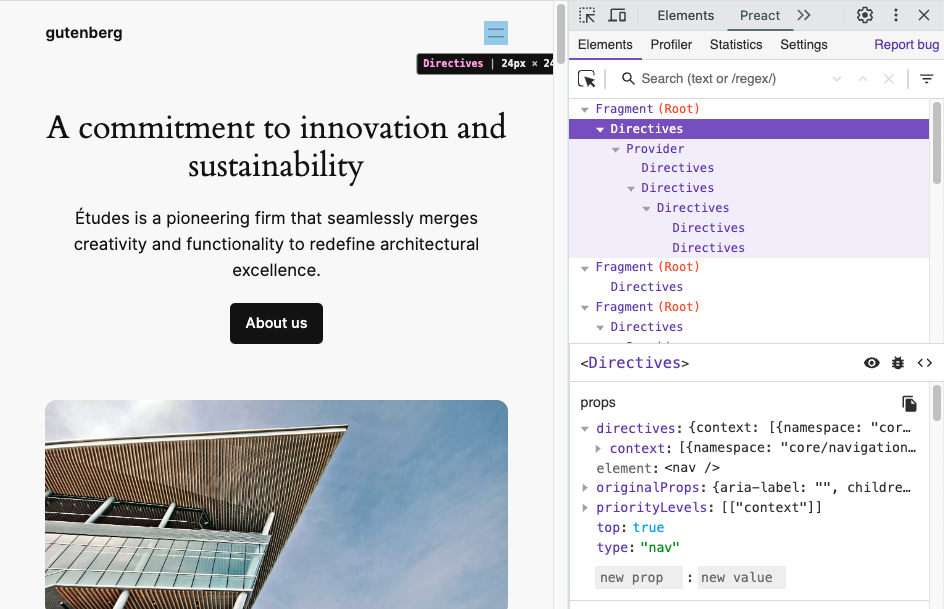
The Interactivity API runtime uses Preact internally to transform directives into components and manage all DOM updates. Since WordPress 6.6, developers can use Preact Devtools to inspect interactive blocks and check the component tree for all rendered directives.

To enable this feature, the SCRIPT_DEBUG constant must be enabled. This constant makes WordPress serve an extended version of the Interactivity API runtime thatโ€™s compatible with the Preact dev tools.

In the future, there are plans to improve the displayed information by including the names of the directives used in each of the elements, among other enhancements.

Read more about this new feature on the TRAC ticket #61171 and in the GitHub PR #60514

Interactivity API warnings in 6.6

In WordPress 6.6, both the server-side directives processing and the JavaScript runtime will warn developers when the directives, the namespace, or the markup cannot be evaluated.

To enable this feature, the SCRIPT_DEBUG constant must be enabled.

Warning messages will be shown for the following cases:

Unbalanced HTML tags

If the processed HTML contains any unbalanced tagtag A directory in Subversion. WordPress uses tags to store a single snapshot of a version (3.6, 3.6.1, etc.), the common convention of tags in version control systems. (Not to be confused with post tags.), the server processing will bail out. This causes the flash effect on page load. Now, developers will find which tag is missing within a warning message.

One example could be <span data-wp-text=โ€helloโ€ />

Unsupported HTML tags

Some tags, like SVG or MathML ones, are not yet supported by the HTML API, which is used internally by the Interactivity API. Directives inside them or in their inner tags wonโ€™t be server-side processed. Now, a warning will appear if any directives are found in those positions.

Non-parseable data inside data-wp-context

The context data provided to data-wp-context directives must be a valid JSONJSON JSON, or JavaScript Object Notation, is a minimal, readable format for structuring data. It is used primarily to transmit data between a server and web application, as an alternative to XML. stringified object.

Invalidinvalid A resolution on the bug tracker (and generally common in software development, sometimes also notabug) that indicates the ticket is not a bug, is a support request, or is generally invalid. namespace inside data-wp-interactive

The value passed to data-wp-interactive directive cannot be an empty object {}, an empty string, or a null value. Namespaces must be non-empty strings.

Props to @darerodz, @westonruter and @luisherranz for co-authoring this post
and to @fabiankaegy and @juanmaguitar for review

#6-6, #dev-notes, #dev-notes-6-6, #interactivity-api

Summary, Dev Chat, June 26, 2024

Startย of the meeting inย SlackSlack Slack is a Collaborative Group Chat Platform https://slack.com/. The WordPress community has its own Slack Channel at https://make.wordpress.org/chat/, facilitated by @joemcgill. ๐Ÿ”— Agenda post.

Announcements

  • WordPress 6.6 RC1ย was released on June 25. We are now in a hard string freeze. Note that theย dev-feedbackย andย dev-reviewedย workflow is required prior to committing to the 6.6 branchbranch A directory in Subversion. WordPress uses branches to store the latest development code for each major release (3.9, 4.0, etc.). Branches are then updated with code for any minor releases of that branch. Sometimes, a major version of WordPress and its minor versions are collectively referred to as a "branch", such as "the 4.0 branch". (handbook reference).
  • WordPress 6.5.5, a security release, was shipped on June 24.
  • Gutenberg 18.6.1ย was released on June 25.

Great work getting all of these milestones done this weekย :tada:

Forthcoming Releases

Nextย major releasemajor release A release, identified by the first two numbers (3.6), which is the focus of a full release cycle and feature development. WordPress uses decimaling count for major release versions, so 2.8, 2.9, 3.0, and 3.1 are sequential and comparable in scope.: 6.6

We are currently in theย WordPress 6.6 release cycle. The WordPress 6.6 RC2 release is scheduled for next Tuesday, July 2. Please reviewย this postย for an update about the Release Candidaterelease candidate One of the final stages in the version release cycle, this version signals the potential to be a final release to the public. Also see alpha (beta). Phase.

@meher brought up a discussion from the #6-6-release-leads channel about the string freeze in the release candidate stage. We discussed when the soft string freeze should happen and if it should exist, when the hard string should happen, how these two different freezes are different and if there are any exceptions.

@audrasjb highlighted the glossary items:

Hard freeze:
Seeย String freeze. A hard string freeze or a hard freeze is announced when all the strings of the upcoming release are frozen including the strings of the About page. A hard freeze is the final string freeze before a release.

Soft freeze
Seeย String freeze. A soft string freeze or โ€œsoft freezeโ€ is announced when all the strings of an upcoming WordPress release are frozen, except for the strings of the About page.

@desrosj suggested we decide on the course of action for this release (6.6) and then do the research suggested here to adjust the practice going forward.

@audrasjb also found an example of a string change after the hard string freezeย here.

@joemcgill summarised the next steps as follows:

  • Weโ€™re currently operating in a Hard Freeze for 6.6
  • @audrasjb is going to check with Polyglots to see if we can extend that date to RCrelease candidate One of the final stages in the version release cycle, this version signals the potential to be a final release to the public. Also see alpha (beta). 3
  • If we really do need Hard Freeze to start at RC1, we will update our docs for future releases

Weโ€™ll aim to have an update and share by next weekโ€™s Dev Chat.

Next maintenance release

No maintenance releases are currently being planned. However, we discussed follow-up tickets that were opened following the 6.5.5 release.

@audrasjb noted:

The most annoying post-6.5.5 ticketticket Created for both bug reports and feature development on the bug tracker. was #61488.
It was fixed in trunktrunk A directory in Subversion containing the latest development code in preparation for the next major release cycle. If you are running "trunk", then you are on the latest revision. and is waiting for potential backportbackport A port is when code from one branch (or trunk) is merged into another branch or trunk. Some changes in WordPress point releases are the result of backporting code from trunk to the release branch. to branch 6.5. Question is: do we need a 6.5.6 for this?

@jorbin noted that weโ€™re waiting to see how #61489 shakes out, and we should allow for a day or two if possible so that 6.5.7 does not need to follow quickly behind.

Next GutenbergGutenberg The Gutenberg project is the new Editor Interface for WordPress. The editor improves the process and experience of creating new content, making writing rich content much simpler. It uses โ€˜blocksโ€™ to add richness rather than shortcodes, custom HTML etc. https://wordpress.org/gutenberg/ release: 18.7

Gutenberg 18.7ย is scheduled for July 3 and will includeย these issues. This version will NOT be included in the WordPress 6.6 release.

Discussion

The main discussion was around 6.6 this week, so we moved straight onto the Open Floor section.

Open Floor

@grantmkin asked if we could discuss this issue to allow themes to side-load single block plugins, which could help seamlessly open up more creativity and options baked into blockBlock Block is the abstract term used to describe units of markup that, composed together, form the content or layout of a webpage using the WordPress editor. The idea combines concepts of what in the past may have achieved with shortcodes, custom HTML, and embed discovery into a single consistent API and user experience. themes:

As Iโ€™ve been looking into the idea of canonical block plugins, one point of feedback Iโ€™ve received from theme designers is a desire to use such blocks in theme templates and patterns. One example shared was the desire for a tabs block to use in a product page template. If youโ€™re releasing the theme for general use (rather than it being specific to an individual site) youโ€™re currently limited to using coreCore Core is the set of software required to run WordPress. The Core Development Team builds WordPress. blocks. And naturally, weโ€™re conservative about adding new blocks to core. So Iโ€™m curious about possibilities for making more blocks available for use in themes and patterns.

There were several comments and questions raised, including:

  • Sounds a lot like pluginPlugin A plugin is a piece of software containing a group of functions that can be added to a WordPress website. They can extend functionality or add new features to your WordPress websites. WordPress plugins are written in the PHP programming language and integrate seamlessly with WordPress. These can be free in the WordPress.org Plugin Directory https://wordpress.org/plugins/ or can be cost-based plugin from a third-party. dependencies for theme. โ€“ @afragen
  • So not just starter content for themes, but starter blocks?ย  Interesting, seems pretty reasonable desire for themes. โ€“ @jeffpaul
  • I wonder what a fallback would look like if a block was no longer available in the repo as well? Would it just no longer show, or would there be a way for the external block to fall back to core blocks? โ€“ @joemcgill
  • In principle the idea of blocks like this is good because keeps them outside theme.ย โ€“ @karmatosed

@poena highlightedย if the plugin that has that block is not installed, the user will be prompted to install it. If they donโ€™t install it, they can keep the block as is, or delete it. So what is the problem weโ€™re trying to solve with side-loading single block plugins?

@poena also noted that themes in theย wordpress.orgย theme directory are not allowed toย requireย plugins. That does not mean that those themes are not allowed toย recommendย and use block plugins.

@joemcgill encouraged folks to keep the convo going in theย GH issue.

@mmaattiiaass also raised a discussion about the WordPress Importer project:

I would like to discuss the current state ofย WordPress-importerย project. I think itโ€™s an important piece for production sites, and it seems to be unattended.
Example: the font assets can not be imported automatically because that functionality wasnโ€™t shipped to the users.ย Thereโ€™s a PR adding that functionalityย that has been sleeping for months without any review despite being flagged as a blockerblocker A bug which is so severe that it blocks a release. for the font library in the WordPress 6.5 release.

@jeffpaul noted that the Import component team is vacant:ย https://make.wordpress.org/core/components/import/.

@joemcgill offered to do some research to find some answers.

Finally, @azaozz asked for more reviews on #60835:

#360835ย is a fix for few bugs introduced in WP 6.5. Itโ€™s been ready for about two months now. Yes, there are some different opinions there but the best way to iron out any differences is to have more reviews, right?ย 

@joemcgill highlighted that as an aside, it seemed like one of the things that has stalled the refactoring efforts is that there was an expectation set that there would be a proposal posted on make/core outlining the plan for more top-level directories like theย /fontsย directory. Joe offered to follow up with any updates for this.

Note: Anyone reading this summary outside of the meeting, please drop a comment in the post summary, if you can/want to help with something.

Props to @joemcgill for proofreading.

#6-6, #core, #dev-chat, #summary

WordPress 6.6 Field Guide

This guide outlines major developer features and breaking changes in 6.6 and is published in the Release Candidaterelease candidate One of the final stages in the version release cycle, this version signals the potential to be a final release to the public. Also see alpha (beta). cycle to help inform WordPress extending developers, CoreCore Core is the set of software required to run WordPress. The Core Development Team builds WordPress. developers, and others.

There are almost 299 Core TRACTrac An open source project by Edgewall Software that serves as a bug tracker and project management tool for WordPress. tickets included in WordPress 6.6, 108 of which are enhancements and feature requests, 171 bug fixes, and 10 other blessed tasks. This time, 16 tickets focused on performance, 24 on accessibility, and 15 on modernizing code and applying coding standards. Changes in 6.6 are spread across 40 Core components.

This release includes 392 enhancements, 462 bugbug A bug is an error or unexpected result. Performance improvements, code optimization, and are considered enhancements, not defects. After feature freeze, only bugs are dealt with, with regressions (adverse changes from the previous version) being the highest priority. fixes, and 46 accessibilityAccessibility Accessibility (commonly shortened to a11y) refers to the design of products, devices, services, or environments for people with disabilities. The concept of accessible design ensures both โ€œdirect accessโ€ (i.e. unassisted) and โ€œindirect accessโ€ meaning compatibility with a personโ€™s assistive technology (for example, computer screen readers). (https://en.wikipedia.org/wiki/Accessibility) improvements for the Block Editor (a.k.a. gutenbergGutenberg The Gutenberg project is the new Editor Interface for WordPress. The editor improves the process and experience of creating new content, making writing rich content much simpler. It uses โ€˜blocksโ€™ to add richness rather than shortcodes, custom HTML etc. https://wordpress.org/gutenberg/).

Below is the breakdown of the most important developer-related changes included in WordPress 6.6.


Table of contents


BlockBlock Block is the abstract term used to describe units of markup that, composed together, form the content or layout of a webpage using the WordPress editor. The idea combines concepts of what in the past may have achieved with shortcodes, custom HTML, and embed discovery into a single consistent API and user experience. Editor

WordPress 6.6 brings 8 Gutenberg releases into core โ€“ 17.8, 17.9, 18.0, 18.1, 18.2, 18.3, 18.4, and 18.5. The Block Editor receives several improvements related to the ReactReact React is a JavaScript library that makes it easy to reason about, construct, and maintain stateless and stateful user interfaces. https://reactjs.org library, the Block APIAPI An API or Application Programming Interface is a software intermediary that allows programs to interact with each other and share data in limited, clearly defined ways., Themes, and more.

React

A new version of React and the new JSX transform is available in WordPress 6.6.

Block API

Some Block API improvements available in WordPress 6.6 include:

  • Unification of slots and extensibility APIs between the post and site editors
  • Improvements on isActive property of Block variations
  • Improvements on some core blocks
  • Block Bindings: Editing custom fields from connected blocks

Themes

WordPress 6.6 introduces several theme-related updates, including:

  • A new version 3 of theme.json
  • Uniform CSSCSS Cascading Style Sheets. specificity applied across core styles
  • Introduction of section styles to streamline the styling of blocks and their internal elements
  • Additional features for the grid layout type in blocks
  • Capabilitycapability Aย capabilityย is permission to perform one or more types of task. Checking if a user has a capability is performed by the current_user_can function. Each user of a WordPress site might have some permissions but not others, depending on theirย role. For example, users who have the Author role usually have permission to edit their own posts (the โ€œedit_postsโ€ capability), but not permission to edit other usersโ€™ posts (the โ€œedit_others_postsโ€ capability). to define site-wide background images in theme.json and the Site Editor

Miscellaneous Block Editor Changes

Some other updates to the Block Editor are also included in WordPress 6.6:

A table on design tools supported per block at WordPress 6.6 has been published as a reference.

Interactivity API

WordPress 6.6 includes updates for the Interactivity API, such as new async directives, support for derived state props from PHPPHP The web scripting language in which WordPress is primarily architected. WordPress requires PHP 7.4 or higher, integration with Preact Devtools, and new warning messages available when the SCRIPT_DEBUG configuration constant is enabled.

HTMLHTML HyperText Markup Language. The semantic scripting language primarily used for outputting content in web browsers. API

WordPress 6.6 includes a helpful maintenance release to theย HTMLย API. This work includes a few new features and a major improvement to the HTML Processorโ€™s usability. This continues the fast-paced development sinceย WordPress 6.5.

Thereโ€™s also a new data structure coming in WordPress 6.6 for the HTML API: theย WP_Token_Map.

Options API

Several changes have been made to the Options API to support an optimization for the autoloading behavior, and to create a way to apply further optimizations going forward.

PHPย Support

Support for PHP 7.0 and 7.1 is dropped in WordPress 6.6.

I18Ni18n Internationalization, or the act of writing and preparing code to be fully translatable into other languages. Also see localization. Often written with a lowercase i so it is not confused with a lowercase L or the numeral 1. Often an acquired skill.

Various internationalization (i18n) improvementsย are in WordPress 6.6, including:

Miscellaneous Developer Changes

Some other changes included in WordPress 6.6 are:

Other updates

One of the highlight features included in WordPress 6.6 is the automatic rollback of pluginPlugin A plugin is a piece of software containing a group of functions that can be added to a WordPress website. They can extend functionality or add new features to your WordPress websites. WordPress plugins are written in the PHP programming language and integrate seamlessly with WordPress. These can be free in the WordPress.org Plugin Directory https://wordpress.org/plugins/ or can be cost-based plugin from a third-party. auto-updates upon detecting PHP fatal errors.

New/Modified HooksHooks In WordPress theme and development, hooks are functions that can be applied to an action or a Filter in WordPress. Actions are functions performed when a certain event occurs in WordPress. Filters allow you to modify certain functions. Arguments used to hook both filters and actions look the same.

For a list of all new and updated Functions/Hooks/Classes/Methods in WP 6.6, please see this page on Developer Resources after the release: https://developer.wordpress.org/reference/since/6.6.0/.

Modified FilterFilter Filters are one of the two types of Hooks https://codex.wordpress.org/Plugin_API/Hooks. They provide a way for functions to modify data of other functions. They are the counterpart to Actions. Unlike Actions, filters are meant to work in an isolated manner, and should never have side effects such as affecting global variables and output. Hooks

New Filter Hooks

  • interactivity_process_directives [58234]
  • wp_theme_files_cache_ttl [58025]
  • wp_default_autoload_value [57920]
  • wp_max_autoloaded_option_size [57920]
  • wp_autoload_values_to_autoload [57920]
  • lang_dir_for_domain [58236]
  • activate_tinymce_for_media_description [58372]
  • site_status_autoloaded_options_action_to_perform [58332]
  • site_status_autoloaded_options_size_limit [58332]
  • site_status_autoloaded_options_limit_description [58332]

New Action Hooks

  • delete_post_{$post->post_type} [57853]
  • deleted_post_{$post->post_type} [57853]

Props to @sabernhardt, @milana_cap, @stevenlinx and @bph for review.

#6-6, #dev-notes, #field-guide

Recap Hallway Hangout: Theme Building with Playground, Create-block-theme plugin, and GitHub

On Wednesday, June 19, 2024, contributors attended the Hallway Hangout: Theme Building with Playground, Create-block-theme plugin (CBT), and GitHubย , to discuss an example of a no-code workflow for theme building, that also integrates with version controlversion control A version control system keeps track of the source code and revisions to the source code. WordPress uses Subversion (SVN) for version control, with Git mirrors for most repositories. on GitHubGitHub GitHub is a website that offers online implementation of git repositories that can easily be shared, copied and modified by other developers. Public repositories are free to host, private repositories require a paid subscription. GitHub introduced the concept of the โ€˜pull requestโ€™ where code changes done in branches by contributors can be reviewed and discussed before being merged by the repository owner. https://github.com/.ย 

At the beginning of the Hallway Hangout, @beafialho demonstrated how she updates a theme stored in a GitHub repo using WordPress Playground and the Create block theme plugin.

You can watch the video here with a detailed description of the workflow below.

The Workflow

Getting started: connecting to GitHub and install necessary plugins.ย 

Beatriz started Playground via https://playground.wordress.netย  and changed two settings:

  • Storage type to Browser and
  • enabled the Networknetwork (versus site, blog) access.

Then she selected from the Hamburger menu Import from GitHub. This requires a connection to GitHub. Then she pointed Playground to the GitHub URLURL A specific web address of a website or web page on the Internet, such as a websiteโ€™s URL www.wordpress.org of the repository. In the modal on screen, she selected Theme from the dropdown and identified the theme with the directory name. A click on Import button completed this step.

After the theme was successfully imported and activated, Beatriz manually installed the two plugins

and activated them, too.

Note: Utilizing a Playground blueprint would load the playground instance with plugins preinstalled.

Making changes via the Site editor

Now she was ready for making her changes: She went to the Site Editor > Templates. She can easily add padding to the theme headerHeader The header of your site is typically the first thing people will experience. The masthead or header art located across the top of your page is part of the look and feel of your website. It can influence a visitorโ€™s opinion about your content and you/ your organizationโ€™s brand. It may also look different on different screen sizes. by unchecking โ€œInner blocks use content widthโ€ in the layout settings.

Note: This was a very short part of the workflow demonstration, but thatโ€™s when the design process of themes takes place. ย 

Saving the UIUI User interface changes stored in the database and in theme files

The changes to the Template Part in the Site editor were saved in the site editor, and then Beatriz switched over to the CBT sidebarSidebar A sidebar in WordPress is referred to a widget-ready area used by WordPress themes to display information that is not a part of the main content. It is not always a vertical column on the side. It can be a horizontal rectangle below or above the content area, footer, header, or any where in the theme. and clicked on Save Changes to Theme. On the next screen, she added a check to the bottom three options as well:ย 

  • Localize Text โ€“ make strings in the resulting theme translatableย 
  • Localize Images โ€“ adds images uploaded to the media library from templates or template parts to the /assets folder of the theme.
  • Remove Navigation Refs โ€“ returns navigation to the default state so it can be reused on other sites.ย 

A click on Save Changes finished the update process.ย 

Create Pull Request via Playground

To create a Pull request for the GitHub repository, open the Hamburger menu, and select Export Pull Request to GitHub. Playground filled in all the information automatically.ย The only thing missing was the commit message, that was added in the comment box.

Beatriz also clicked the checkbox below the commit message to also Save the changes in zip file โ€œjust in caseโ€. A clock on Create Pull Request button automatically created a Pull request on the GitHub Repo. From the confirmation screen one can click on the link to open the particular pull request on the GitHub site. There Beatriz double-checked the file changes.

So far, the workflow.

Discussion and shared resources

It was noted that what is missing from the Create BlockBlock Block is the abstract term used to describe units of markup that, composed together, form the content or layout of a webpage using the WordPress editor. The idea combines concepts of what in the past may have achieved with shortcodes, custom HTML, and embed discovery into a single consistent API and user experience. theme pluginPlugin A plugin is a piece of software containing a group of functions that can be added to a WordPress website. They can extend functionality or add new features to your WordPress websites. WordPress plugins are written in the PHP programming language and integrate seamlessly with WordPress. These can be free in the WordPress.org Plugin Directory https://wordpress.org/plugins/ or can be cost-based plugin from a third-party. a wayย  for designers toย  add patterns created with the Site editor to be saved back to the theme files.ย 

Here are a few GitHub discussions about this topic:ย 

There was also a discussion on how more and more block themes grow their custom styles section in the theme.jsonJSON JSON, or JavaScript Object Notation, is a minimal, readable format for structuring data. It is used primarily to transmit data between a server and web application, as an alternative to XML., and it becomes a bit unwieldy, and how to handle this better.

There is the PR for users to change presets via UIย  Font size presets UIย 

Other resources shared:ย 

You can follow along the discussion with the below AI-generated transcript.

Props to @mikachan and @beafialho for review of the post.

Transcript

AI generated

0:00
All right, all right. So welcome to our hallway hangout talking about theme development using the site editor, using the create theme block, theme plugin and playground, and all comes together in GitHub as the version control so so we know how thatโ€™s all going to work. I asked Beatriz, who is a theme developer, Automattic how they are organizing the work, because there are multiple designers and multiple themes and how that goes. And she has provided a little video to demo the process, to want us thoughts. Hi. We also have Sarah, sorry, sorry. We have Pia, whoโ€™s a designer also did a lot of designs for wordpress.orgWordPress.org The community site where WordPress code is created and shared by the users. This is where you can download the source code for WordPress core, plugins and themes as well as the central location for community conversations and organization. https://wordpress.org/ and Sarah is also here to tell us more about the Create block or answer question about the Create theme, create block, theme plugin. We need a better name for that. I stumbled with it, but the floor is yours. Bea,

1:25
yeah, Sarah will probably answer the questions that I donโ€™t know how to answer because Iโ€™m a designer, not a developer, but yeah, I prepared a demo just to guarantee some fluidity in my explanations. And Iโ€™m sharing my screen. Let me know if audio is not good. Okay. Hi everyone. Today, Iโ€™m going to do a demo of how I usually update a theme thatโ€™s stored in a GitHub repo, and I do that with WordPress playground and the Create block theme plugin. This is the GitHub repo where my theme is located. As you can see here, itโ€™s called foam and and the design adjustment that I want to make is I want to add the side paddings to the header. It currently has some bugbug A bug is an error or unexpected result. Performance improvements, code optimization, and are considered enhancements, not defects. After feature freeze, only bugs are dealt with, with regressions (adverse changes from the previous version) being the highest priority. or something was not set up correctly, and I want to add some side paddings. Weโ€™re going to go to WordPress playground, and the first thing weโ€™re going to do is select a different storage type. We want to store our changes in the browser so that we donโ€™t lose any changes that we make. And we also want to select Network Access, because that allows us to install plugins. Weโ€™re going to go to the upper right corner and select Import from GitHub. We have to connect our GitHub account. And after weโ€™ve done that, we want to copy the link the URL of our GitHub repo, and we click Import. You can select, I am importing a theme, and then you write the name of your theme.

3:35
Click Import again. Okay, thatโ€™s done. Now we have our theme installed in the playground website, and now weโ€™re going to go and install our plugins. Itโ€™s good to install GutenbergGutenberg The Gutenberg project is the new Editor Interface for WordPress. The editor improves the process and experience of creating new content, making writing rich content much simpler. It uses โ€˜blocksโ€™ to add richness rather than shortcodes, custom HTML etc. https://wordpress.org/gutenberg/, because we never know this theme was built on it, and itโ€™s always best to have it as well, and weโ€™re going to install, create block theme.

4:10
Click Install and activate. Weโ€™re going to activate Gutenberg as well, and weโ€™re ready to go into the editor now. Okay, so weโ€™re going to make that change, and Iโ€™m going to go to my header, which is right here, and it should be very easy to add, or in this case, I think weโ€™ll just click a toggle and remove it out here. All right. Now thereโ€™s the padding. That was missing.

5:07
We want to save the changes that we made, all of them with create block theme.

5:21
All right. Now weโ€™re going to go to the hamburger menu again and export pull request to GitHub. Now all of these fields are automatically filled. The only thing that Iโ€™m going to add is what I changed add missing side padding to header, and Iโ€™m also going to click export the changes as a zip file, just in case, and Iโ€™m going to click Create pull request. This is going to automatically create the pull request in your GitHub repo.

6:01
Okay, now we can visit the pull request, and here it is our theme with the changes, we can see the files that have changed since I made this change. It is here, and this is how you can update the theme using WordPress playground and create block theme plugin.

6:39
Okay, stop sharing now.

6:53
Very cool. So am I understanding correctly that what youโ€™ve just shown thatโ€™s basically for working on the theme, templates, template parts, patterns, maybe whatever else is there to submit the pull request back in. So itโ€™s purely for the code at the moment, because the most common usage that we that we have, or that Iโ€™ve seen mentioned on social media and stuff, isnโ€™t just for covid, for for editing the themes in that way, but itโ€™s also for stuff thatโ€™s still in the database, so for managing client sites. And I know thatโ€™s a huge, a huge topic and very difficult to answer, but

7:39
let us back up a little bit. The reason Bayer used to create block theme plugin is because of exactly that. Yeah, that the change because she made changes to the template header and because it was through the user interface, it was actually only stored in the database, but with the Create block theme plugin X save feature, she was able to the to save that back into the HTMLHTML HyperText Markup Language. The semantic scripting language primarily used for outputting content in web browsers. file of the theme, so all the changes that are made through the site editor that are stored in database, if you use that plugin, will be saved into the theme files, and then from there the GitHub repo. The theme was pushed into the GitHub repo. So there are quite a few so create block theme is for saving the changes that are. So if she, if you change some of the color palette which is also in the database, yeah, and you save it through the Create block theme plugin, it will also update the same JSON file, yeah, so it will be a contained theme plugin. Theme, complain theme, or am I explaining that wrong?

9:07
No, that makes sense. I mean, thatโ€™s kind of what Iโ€™ve been using, what weโ€™ve been using, the Create block, the plugin for anyway, in that weโ€™ll do stuff, weโ€™ll change stuff on a staging server, will the client, will change everything, and then weโ€™ll save it back out to the theme and then, and then deal with it separately in a GitHub process. So I think that, I think, I think that itโ€™s kind of as manual control on our side as an agency, that we only do it at a set point we can say to the client, right, stop working. Now. We have to implement, implement your changes, and create, like a new version. And thatโ€™s then the new baseline. So the kind of the addition that is, I mean, I donโ€™t know, is that a new thing? Sarah put the link in, I think that itโ€™s a functionality which is in playground. Itโ€™s not in the plugin, whereby you can get stuff to go straight back into GitHub. And thatโ€™s kind of a missing bridge, because weโ€™re. WordPress, I think, has focused a lot on SVNSVN Subversion, the popular version control system (VCS) by the Apache project, used by WordPress to manage changes to its codebase., on subversion, until now. So having that ability to get stuff back into GitHub directly as a pull request, whether itโ€™s an automatic theme, whether itโ€™s our own GitHub setup, whatever, I think thatโ€™s going to be incredibly useful. The question would be, is that something that is staying in playground, or is that something thatโ€™s going to be feeding back into the Create block theme plugin?

10:29
I donโ€™t know for sure, but I would think itโ€™s going to stay in playground, definitely for, you know, a longish time. You know, Iโ€™m thinking months, if not years. Certainly no plans to move it to create what clean book, because playground provides that functionality. Yeah, okay.

10:46
I also think that the GitHub functionality and playground is actually more than themes. You could actually get in plugins as well. Yeah. So if you if thereโ€™s a mechanism to or a whole site, so you could have a sip file in, or have your site in GitHub, the whole site, and then grab, grab it from the link when playground updated, and then updated back into your GitHub repo. But thatโ€™s the whole theme. Yeah. So you could also do your plugins and custom development and custom post types and all that as well.

11:32
So did you see that question that Tammy raised in the chat?

11:35
Yeah? Just reading it. Yeah. So Tammy, right?

11:43
So I probably can answer to

11:45
Yeah, but can you? Can you read it also, so we have it in the recording, please.

11:50
Okay, Tammy is asking how this works for a pattern you might add to a theme or template part, and this would work like in the the example that I showed, I made a modification to an existing pattern. In this case, a template part. If you added a new one, it would work exactly the same. You would see it added after you saved it to your theme. You would see it in the code after youโ€™ve saved it with the Create block theme, does that answer the question? The issue I find, though, is how you unpick

12:31
Iโ€™m going to try and speak. So bear with me. Excited. Um, sometimes when you use the Create block theme on the export, it puts everything together. So if you want to use template parts, or you want to use patterns, and we want to have them separated, it you canโ€™t do that. Sarah is nodding. So Iโ€™m hoping Sarah gets what Iโ€™m saying, and Iโ€™m going to pass it to Sarah to explain,

13:04
yes, I think I know what you mean, and I think this is probably leading to hopefully upcoming pattern management and create block theme. So, yeah, currently, when you export a pattern thatโ€™s been that youโ€™re using in a theme template, itโ€™s all like, bundled into the template, and isnโ€™t separated into the pattern, like in the patterns, directly within the theme. And yet, that is currently expected, because itโ€™s not functionality that exists yet and is hopefully coming soon. And well, actually, let me post a link as well so you can follow along with the progress. But yeah, I know itโ€™s a itโ€™s often an often requested functionality as well for create block themes. So itโ€™s, itโ€™s certainly a priority, and, yeah, we recognize it as a priority. So

13:52
the moment that happens, I will be incredibly happy and so many people because it really, it allows you to have a lot safer, a lot cleaner code. So yeah, Iโ€™m very excited.

14:05
So if I understood that problem correctly, is that if I as a user create new patterns in the site editor, it does not add them to a template. Itโ€™s only in the template, but not in the pattern when itโ€™s saved down to the file. Okay, yeah, yeah, yeah, and thank you for the link. Sarah, thatโ€™s a great, great issue to follow along on that problem save so I saw in the Create block theme as well a functionality to save and Bayer had to link click on it separately. It wasnโ€™t a default option to to save localized text and localized images. What does exactly do so?

15:00
Yeah, so they, theyโ€™re the the options are separate, so you can pick and choose which options you want depending on what youโ€™re doing. The localized text wraps any text strings in a translationtranslation The process (or result) of changing text, words, and display formatting to support another language. Also see localization, internationalization. function, so that the WordPress translation functions, so that, so itโ€™s a itโ€™s a requirement for the.org the wordpress.org theme directory, that things are translatable, but obviously for different use cases, you might not want to translate everything, because you just might not need it, or maybe you donโ€™t think you need it, maybe you do need it, but yeah, itโ€™s there so you can turn it off if you donโ€™t need those functions. And then what was the other one? The localized images, images. So thatโ€™s for if youโ€™ve uploaded an image thatโ€™s part of a template. So say, any an image block, cover block, or youโ€™ve got, like a hero image in a template. When you export anything currently with the base export functionality, it wonโ€™t include assets, so things like images and fonts. But if youโ€™re using this create block theme function, it will include the image asset inside the theme assets directory, and it will reference the the image from that directory. So itโ€™s a relative link, like if youโ€™re used to building with things, and youโ€™ll probably know the kind of link, I mean. But normally this doesnโ€™t happen with the base x functionality. Weโ€™re WordPress, yeah, thatโ€™s the magic. Itโ€™s kind of like an automatic relative link. Okay,

16:31
so thatโ€™s for instance, if I have a background image that I attached to a group block, or if I have a sideway back background image, it would only land through playground in the media library of that site, but if I wanted in the theme, I need to kind of check that so it kind of come will be saved also in the assets folder of the Theme. Okay. Yeah. Okay, good. Um, any other questions? Yeah.

17:03
I wish there were. I guess sync. I guess sync patterns that have been created by one of the editors, one of the users, wouldnโ€™t be ignored in that process. Or would they also be included?

17:14
They will be ignored at the moment. So sync patterns currently donโ€™t work on theme export. Thatโ€™s kind of all whatโ€™s wrapped up in this, the pattern management, yeah, idea as well. But,

17:27
yeah, they currently thatโ€™s as a good thing, as a good thing, as you all want to I mean, well, I say itโ€™s a good thing. I mean, it will be helpful for agency clients like us who want to version the content as well as the as well as the tech behind it, but I think thatโ€™s, thatโ€™s a more complicated scope, and I donโ€™t think thatโ€™s necessarily part of WordPress coreCore Core is the set of software required to run WordPress. The Core Development Team builds WordPress. functionality. I think thatโ€™s something that we should be solving, not on an individual basis, but I donโ€™t think thatโ€™s something that should be part of the block theme, because it would start to get very complicated for users who are kind of, I mean, I say freelancers or individual users who are creating sites and using playground, for example, or using their own logic to define how to do this kind of stuff, because every agencyโ€™s case is different. You know, do you version the content? You version the patterns? Thereโ€™s so many different ways that it could be configured that I think adding that kind of thing into the into a standardized plugin might just mean that weโ€™ll all sync under all of the options, and nobody will understand how to get to where they need to be. Kind of too many features, if you

18:31
know, yeah, complex. Itโ€™s getting complex quickly, but I know there is so not in 6.6 but for 6.7 there is an issue on GitHub to actually have sync patterns for themes, so themes can put patterns into the pattern directory that also have block bindings to custom fields and those, if they change. I think that would be probably on the roadmap for create block theme plugin to actually also save those out. Or maybe it would be possible to save out the sync pattern from the users, the think pattern overrides from the users, and then have them into the file repository, as well as patterns. Iโ€™m not sure if thatโ€™s going to be really that might be straightforward because, yeah, I donโ€™t know. I think thatโ€™s one level too complex for me at the moment too, but itโ€™s certainly something to think about, because sink pattern overrides for themes is in the works. Somehow you want it, yeah, so Tammy also wrote that the big one sheโ€™s coming back to our shortcodes, which. Outside the scope of this. But itโ€™s, I think takes a poor, poor block to sink, and itโ€™s far simpler, yeah, I think so too. Yeah, Iโ€™m not quite sure. And then, so, when you have a custom value in the same JSON, so Iโ€™m just reading what dem is saying, one thing I do have, though, is when you went to custom value in a theme JSON, when not to I think many of us create block themes and have an ever growing custom section and theme JSON. What are thoughts on that from those creating themes? Yeah, thatโ€™s definitely a question for Bea and Carolina and Sarah. Yeah,

20:59
Iโ€™m not sure I understand the question, I

21:03
would try again and explain so to particularly values, to the custom values in theme. Jason, I find that Iโ€™m having an ever growing amount of those custom variables in theme. Jason, the simple block themes, 100% No, I donโ€™t need it, but I donโ€™t generally deal with simple themes. And once you go beyond that, you just need more. You maybe want different. Pod scales, line heights, is a good example all these ones, and it feels like with every block scene that people are making, that custom section is getting bigger. I know with the investor, we have more potential with same Jason three, for it to get smaller. But I just, I just wondered if whatever people are feeling, and Iโ€™ve looked at some of the recent themes, and also seeing that other peopleโ€™s theme, Jasonโ€™s have that custom section going as well.

22:10
Okay, yeah, I donโ€™t think, like, when Iโ€™m creating the theme, Iโ€™m not really thinking about if itโ€™s big, like, if itโ€™s growing too much, because, like, Oops, okay, thatโ€™s Iโ€™m basically, like changing the global styles in the editor, And like evaluating from a visual perspective. And I try not to add any extra CSSCSS Cascading Style Sheets. too much or anything like that. But sometimes I find itโ€™s itโ€™s needed to go there and theme JSON and change the values, like the the the fluid values, for example, those. I changed them a lot, and I havenโ€™t ventured too much on the spacings. I usually deal with the base theme that Iโ€™m working and use those, but sometimes itโ€™s a little frustrating because theyโ€™re not exactly how I would use them. But that the short answer is, the short answer is, I donโ€™t think too much about that. Iโ€™m not sure if that is, yeah, but thatโ€™s probably a more designery Question Answer.

23:37
I mean, I can speak from that, because itโ€™s something that weโ€™ve sort of been right through the whole process, right from 2018 right through to now, is trying all the different options, working out the best processes and stuff. And I agree that some projects, we will use custom values in the sheet theme. Jason, for example, if weโ€™ve got a fixed header bar that doesnโ€™t it remains fixed and doesnโ€™t scroll, we might need to dynamically know the height of that thing, or we need to define it by breakpoint, or whatever. Then thatโ€™s, can be okay, a use case for custom variables in theme, JSON,

24:12
correct. Iโ€™m not talking CSS variables, though. Thatโ€™s not what Iโ€™m talking about here. Custom CSS. What Iโ€™m talking about is things that donโ€™t. So actually having line height is a great example. So for finding those variables in there, itโ€™s something Ollie Foss, lots of other theme developers already have. Theyโ€™re not actually writing, sorry, custom CSS. Thatโ€™s not what Iโ€™m talking about, no,

24:41
no, no, no. But youโ€™re referring to setting the value of typography, line height, for example, to a custom value or no.

24:50
So youโ€™d write that line height, youโ€™d have a line height scale that you would use, and then youโ€™d be able to use that

24:56
throughout, yeah, those are the presets that you can get in the cage. Sonia and you feel that you have a need to kind of create, aside from the default presets, more and more presets for your sites. That not only is

25:14
where the gap exists where there isnโ€™t a predefined preset already that you can use in theme, Jason, and thatโ€™s where the gap is generally telling us where we need to do future presets. Yeah, yeah.

25:31
I mean, I think weโ€™re on the same page. I understand what you mean, yeah. I mean, the experience I have is basically to really take us take a step back and say, Is this Configure? Is this going to be used on more than one site? Is this going to be configurable? Can we change this down the line? Is it something we might need to adjust that scale in the future for the for this project or for this client? And if it mostly, if itโ€™s going to be reusable, like, Iโ€™ve got a multi site with, I donโ€™t know, 10 sites that are all using slightly different variations of the same block theme in the site editor. Then these values might be slightly different according to the font, for example. Then thatโ€™s something that will be I will put into theme. Jason, if it is a really custom value, then Iโ€™m, Iโ€™m General. I mean, if weโ€™re talking about CSS or PHPPHP The web scripting language in which WordPress is primarily architected. WordPress requires PHP 7.4 or higher, whatever, thatโ€™s something, then I tend to not put it into theme Jason, because I donโ€™t want it to be controlled by a configuration option. Rather, itโ€™s setting a value which canโ€™t be changed, which applies to that theme. Because I see theme Jason as something you would set up once, and then maybe as a project continues or progresses or develops, then maybe go and modify it. Or if itโ€™s on multiple sites, then itโ€™s different on each site. So my case is different to somebody whoโ€™s using it on a one off website. Itโ€™s different from something like Olli. Well, the Olli theme, for as an example, is going to be on installed on 1000s of websites, and every single website could be slightly different. So thatโ€™s the case for using theme JSON without having to touch any code.

27:06
So I tend to not use CSS anymore. I use theme Jason, even if I just do one site. So I think thatโ€™s the difference, because I use it as a design system approach. I create a theme as a design system there. Yeah.

27:20
I mean, weโ€™ve got, weโ€™ve weโ€™ve tried, weโ€™ve tried two projects where we said, No, weโ€™re just going to use theme Jason, and nothing else. And we ended up with several 100 lines of custom stuff in theme Jason, which was not real. Itโ€™s not doesnโ€™t make sense to us.

27:32
Well, so 3000 lines in CSS,

27:36
it is absolutely and thatโ€™s why weโ€™ve got the combination of the two. We use theme Jason up to the limit where it doesnโ€™t make sense anymore, and then anything else we say, Write this kind of stuff in itโ€™s not something we want people to change the configuration of. It has to be done like this, like a CSS reset, for example, to make certain stuff in Firefox happen correctly. Thatโ€™s not something thatโ€™s a configuration option. Thatโ€™s something thatโ€™s like, no, itโ€™s a fix. Itโ€™s something that has to always apply. But I do know that thatโ€™s quite an advanced use case. So it is not saying we use a theme Jason for the minimum and everything else we did my hand. Thatโ€™s not the case. We start with theme Jason, and we get to a point where we say thatโ€™s not achievable within Jason, then it probably never will, because itโ€™s too specific for our for our use case. So So

28:20
Sarah was so kind enough to share a link to an issue or a pull request, rather to add UI for users to change the funds presets for a site. So that is certainly something that will also then need to be kind of in that process that we are talking about. Need then to be also safe through create block theme and then feed out into the through the theme JSON, probably, but yeah, so if something is fixed, Iโ€™m kind of wondering why that wouldnโ€™t be in theme JSON, because if itโ€™s fixed in, in right out of the bat, then you donโ€™t have to do any other customization, and it you can make it that itโ€™s everything,

29:23
yeah. I mean, to me, I prefer to go to the engage in just one places. From the QA perspective, itโ€™s just easier. I think you can have an endless debate about it depends on what implementations youโ€™re doing. Yeah,

29:43
but yeah, Iโ€™m more so behind that, like one source of truth. So

29:50
it depends on what project you using, what libraries and what implementation. But it also for me, I kind of did that it. It is in. Up that. But itโ€™s also about maybe we should be surfacing more where weโ€™re using those question values, where weโ€™re having the really long amounts and saying, Hey, these things do need to have more visibility as well, and not just accepting that weโ€™re doing the custom phase,

30:20
probably not theme based, but the immediate thought that comes to mind is custom plots, where, to a certain extent, you can use the configuration in theme JSON to handle that, but some custom blocks are going to come with a very locked down set of code, CSS. Iโ€™ll take CSS as an easy example, where itโ€™s not configurable. Itโ€™s just it is how it is. And you donโ€™t want to try and offer that as a configuration option for a custom block. But again, thatโ€™s, you know, I mean, I know the general pushes towards core and commonality and everything following core as closely as possible. But there are, there is a very valid use case for custom blocks and for custom Absolutely. I call them custom patterns, but you canโ€™t even edit them in the block editor. You know, theyโ€™re absolutely locked down for better usability for users that they donโ€™t want to have to go and fight, fight their way through nested blocks and stuff like that. They just want to have a field where they can change the image and done but, but thatโ€™s not, again, thatโ€™s not thatโ€™s one of the things I feel quite strongly about is thatโ€™s not something that core should be solving. Thatโ€™s down to the individual developer to make it work well for the project and for the agency and for the client needs. So when weโ€™re talking about custom plots, thatโ€™s not something I donโ€™t think right now. I think the core focus should be on what makes sense for everybody, and not what makes sense for these 10% of people who are intent on doing it themselves, certainly not in the current state. Thereโ€™s too much to be worked on, yet too much to be improved. Before you start getting to into really outline non specific or very specific use cases that that link that you said shared, Sarah, to the to the editor, what kind I mean Iโ€™ve only just very, very quickly flick through it is, whatโ€™s the feedback there? Is it? Should we do it? Or how do we do it? What feedback is needed there?

32:08
So I think itโ€™s a yes, we should do it. It was more, I was wondering if it would help, if, if all these custom, potential, custom values had a UI that matched up, so it doesnโ€™t reduce the amount thatโ€™s in theme JSON, which I know is the initial complaint, but if thereโ€™s somewhere to, like, visually organize them, and maybe, if we got to that for all the presets, then maybe they could be exported as a separate json file as well. Oh, you know, there was the option to export them as a separate file to Maurice. So

32:42
an additional, an additional section, like custom book to call that I know, for example, presets, where these custom names, keys and values get applied, sounds like a really good idea. Yeah, definitely. What

32:53
it helps is it makes the invisible visible. And I think one of the problems I have at the moment is Iโ€™m craving a lot of invisibles, something that is meant to be encouraging visibles. And then that means I can benefit from the dream evenness in the most beautiful way when Iโ€™m rapidly creating. And one of these things, which will no matter what weโ€™re doing, whatever we create, and dictates and creates variables that we can use in blogs, whatever we use. So we need to also remember that no matter what we are creating there, we do have these variables created that we can call out as well. Yeah.

33:29
But side question on that, when we got when we create in custom colors in the Styles editor, when we save those out with create block theme, are they being added to the palette array and brought into the Yeah, okay, yeah.

33:43
So, Sarah, whatโ€™s next for the whatโ€™s on the rave map for the gray block theme plugin, in terms of whatโ€™s coming into WordPress six and further on?

33:59
Yeah? Well, the most recent changes, we feel that are in a good place, where weโ€™ve just kind of finished a big refactor from moving from the WP adminadmin (and super admin) page into the the editor UI, yeah. So we feel like thatโ€™s in a good place. Thereโ€™s probably more we can do. There always is, but weโ€™ve moved everything that exists currently in the WP admin into the editor, and then next was actually pattern management, which hopefully addresses the first thing we were talking about. But weโ€™re trying to, weโ€™re trying to work as closely as possible with the sync patterns discussion and work thatโ€™s going in to both 6.6 and 6.7 let me find another issue as well, a Gutenberg issue for 6.7 but, yeah, I think that the issue, the Create block theme issue that I faced before, about pattern management, I think weโ€™re coming to the idea that weโ€™re going to experiment with pattern management in that plugin and just work alongside whateverโ€™s happening in Gutenberg as well. And yeah, and hopefully just. Like proof of concepts and things out and see, see what lands. But, yeah, we know itโ€™s a big wanted feature to manage patterns in the editor.

35:14
Was that the one that you let her know, who is it? Justin, whoโ€™s done a block pattern manager? Somebody. I canโ€™t remember it was now, Iโ€™m sure I saw someone on GitHub, just

35:23
very Yeah, Justin was one. There was also a blockmeister kind of thing. JB orders had a plugin that lets you do pattern from but they were all kind of pattern management from the editor. That was that feature wasnโ€™t available in core back then, when the plugins were created, but now itโ€™s available in core. So those plugins are the only thing. What you canโ€™t do in core right now is create new categories, but that has also well couldnโ€™t do before, but now you can so that the whole part is kind of built into core now. And yeah, and now, thank you for sharing the sync pattern iteration for WordPress 6.7 that has the overrides for theme patterns and a few other things that are in there. Expand block support for sync patterns, because right now itโ€™s only available for four blocks the sync pattern overrides that certainly needs to be expanded a bit so it also covers other blocks

36:35
going going back to Sarahโ€™s comments about the UI for presets, one thing that would be very useful would be if we can have a way of changing the font sizes through UI that are predefined so large, instead of 18 pixels, is 19 pixels, and then saving that back out to theme Jason, because at the moment, thatโ€™s something that still requires a manual a manual change, which is something I As a very pernickety typo guy, I change the size of my fonts every, every few weeks, because itโ€™s like it needs to be a little bit smaller, a little bit bigger. So if thereโ€™s a way of actually implementing that into the process, so that that can be versioned as well through GitHub, in the way that weโ€™ve seen in playground, or even just that thereโ€™s an interface to say max for the fluid sizes, just for a little bit of fine tuning, maybe after a launch, or maybe the client has a change, but we donโ€™t have time to go into the code and change stuff that would be very useful, because the way that we manage most of our client sites is they tend to ask for changes, minor changes, two weeks after the project has gone live and we think weโ€™re finished, so we just say, weโ€™ll change it in the weโ€™ll change it in the site editor And or the sales editor. Leave it there for the time being, and weโ€™ll come back to it in another in the next iteration, and then use the plugin to save all those little itty bitty changes back out into the file. Yeah, I was just gonna say, is there already an issue for that? Or shall I put one?

38:01
I think itโ€™s probably the same issue. I think thatโ€™s the UI is for for editing those font size presets within the editor, so you donโ€™t go into the code and change them. Weโ€™re also starting with font sizes, but weโ€™re probably going to follow up pretty closely with spacing presets as well the spacing size presets and then others. But yeah, definitely those two to begin with.

38:25
Yeah, spacing sizes will be very handy, because thatโ€™s something where I have to go and remind myself of the of the preset slugs every time I do it, to go and actually adjust them and try and not use my own spacing unit, a spacing presets actually trying to support ones. So yeah,

38:40
be very handy. Sounds like we all need the same tool? Yeah, thatโ€™s yeah.

38:47
Is that something I mean, bear, Sarah, are you? Are you working on? Are you working on things for automatic directly or

38:55
so Iโ€™m primarily working on, like tools to support theme builders and anyone else the editor often theme builders. So, yeah, thatโ€™s where the that font size is, PR comes in.

39:06
Okay, how about you bear? Do you what are you working actively on the themes? Or,

39:11
yeah, Iโ€™m, Iโ€™m a designer. My background is a designer, but I recently started to build them in the editor and do all this. And I also released the themes in wordpress.org,

39:24
so thatโ€™s kind of these tools that weโ€™ve been talking about now are very much something that you can see as a, letโ€™s say, a theme creator for people, that hundreds or 1000s of people, people are going to be using it. Thatโ€™s these are use cases for that from that side of the target audience as well, cool, exactly.

39:41
Yeah, so when you were talking about clients, thatโ€™s kind of, I understand that, but yeah, probably the process is itโ€™s different, because your clients, they get into the websites and they want to change it themselves for out. Automatic themes. Itโ€™s like all these people that are going to use the theme, so yeah, but the tools are these tools are incredible, like the Create Blogblog (versus network, site) theme plugin and playground, they have been so useful for me in the process. Yeah,

40:17
yeah, for us who I mean, I mean, you say that about clients. Our clients our clients tend to be small and medium sized businesses, and honestly, they donโ€™t care. They donโ€™t want to, they donโ€™t want to know. They just want to write their content. They donโ€™t care what I mean, they care about how it looks, but they donโ€™t want to have to go into the site editor. They never, I mean, like 95% of my clients donโ€™t even know there is a site editor. And they donโ€™t care, and they donโ€™t want to know, but they come and say, Can we change the spacing, that font, that title needs to be a little bit bigger, all this kind of stuff. And thatโ€™s an iterative process, because theyโ€™re never happy with it. Theyโ€™re happy with it for a month, and then they want to change it again. So yeah, itโ€™s coming from it. Itโ€™s coming from the same problem from a slightly different angle. But itโ€™s great to find that there are solutions that are working or being worked on, I should say, and being provided for, for US agencies, and also for normal users, if we can put it that way. Well,

41:05
at the great block theme plugin as well as the playground. They are open sourceOpen Source Open Source denotes software for which the original source code is made freely available and may be redistributed and modified. Open Source **must be** delivered via a licensing model, see GPL.. They can be adopted to any other scenario of having themes in in GitHub version control. So I donโ€™t think itโ€™s a big client versus small client, or 15,000 users versus one site using a theme. I think it could also always be version control, and that probably is, and itโ€™s a fantastic workflow. I havenโ€™t seen anybody else yet using that workflow. Thatโ€™s why we kind of had, yeah, gee. Tammy raised her hand and said, Iโ€™m using it, yeah. So yeah, but I think we is there anything on

42:01
that for me, Iโ€™ve been using that workflow ever since the plugin came out, because it makes it makes no sense not using that workflow. To me, Iโ€™m having been using Iโ€™ve only recently been adding the playground to my workflow.

42:15
But to me,

42:18
create bot plugin, and doing that completely makes sense. It just hasnโ€™t made any sense to do it any other way, from small projects to large enterprise, agencies, food, whatever, it doesnโ€™t make any sense, even if you go down to the just starting to have a theme, and whatever you thought from, or whatever you create, whatever base you create from through to using it like dream leader, just to do the least. And thatโ€™s what, like the root of the plugin can do. Playground is an addition to it, and I think that depends on whether you have ddev or you have different environments as you kind of get into those different scales. Yeah. So

43:00
there are some things coming out of WordPress, point six, 6.6 that will change a little bit how you create themes or how you do Iโ€™m talking about the section styles. Bia. Have you been any testing or experience with that on how thatโ€™s going to work and how how you feel about what you feel about that, and how you use it?

43:30
Sorry, could you repeat the question? Because there was something in the audio. Okay,

43:35
so I was thinking that WordPress 6.6 comes with section styles. And have you done any experimentation or explorations about that? And is there anything that you would kind of share with us what your experience was?

43:52
In fact, I havenโ€™t experienced experimented with it, so I canโ€™t share anything useful, not yet.

44:01
All right, anybody else Carolina or Tammy or Sarah? Have you done any experimentation with that? All right, then I think thatโ€™s another, yeah, Carolina kind of put into hasnโ€™t had time yet for it, and I can understand that itโ€™s still three weeks out, so I think we have another developer hours or hallway hang out about that. I just so Iโ€™m thinking, if there arenโ€™t any other questions, I give everybody kind of 10 minutes back from their time. It was wonderful to have you here and have this discussion. Thank you for Bear. Bear to put this little video together, the demo together so we can all see how it goes from from first step to to then the pull request. And that was very, very helpful. And also for Sarah to have all the answers for the. These wonderful questions from Mark and Tammy and in our show, I want to just before you go, have for you the next hallway hangout is in November. November. Oh, I wish it were November 26 in June, 26 at 11 UTC and itโ€™s about grid layouts and how to use the functionality from 6.6 and whatโ€™s coming in 6.7 and then a day before, itโ€™s a developer hour on what theme, what comes whatโ€™s important for theme developers for 6.6 so, and thatโ€™s on June 25 1500 UTC Iโ€™m just going to throw that out so you can note it down or the thing, I think it shared it at the beginning, but maybe I need to share it again. So there is that. Thatโ€™s the Hangout announcement. And here is the developer hour for next week, so we all have it in our browsers. And with that, I thank everybody, and I see you.

46:15
Quick question, very quick question, the hallway Hangouts, are they going onto meetup.com?

46:20
No, theyโ€™re not going on meetup.com. On meetup.com but there will be a summary post on make core blog for the Yeah. So I shared the recording, and I share the links that we had, and also transcript and the separate video from Bayerโ€™s demonstration, so you donโ€™t have to watch a whole hour to just see that demonstration. All right, this, this is it, and thank you all for and see you next week. Bye, thanks

46:49
for your time, guys. Bye. Bye. You.

#hallway-hangout, #outreach, #summary

Miscellaneous developer changes in WordPress 6.6


Table of contents


Autosave

Allowed disabling autosave support for individual post types

[58201] added a way to allow disabling autosave support for individual post types. Not all post types support autosaving. By making autosave a post type feature, support can be more granularly handled without any workarounds or hardcoded allowlists. For backward compatibility reasons, adding editor support implies autosave support, so one would need to explicitly use remove_post_type_support() to remove it.

See #41172 for more details.

Bundled Theme

Twenty Sixteen: Fixed mismatch of visual and DOM order of elements

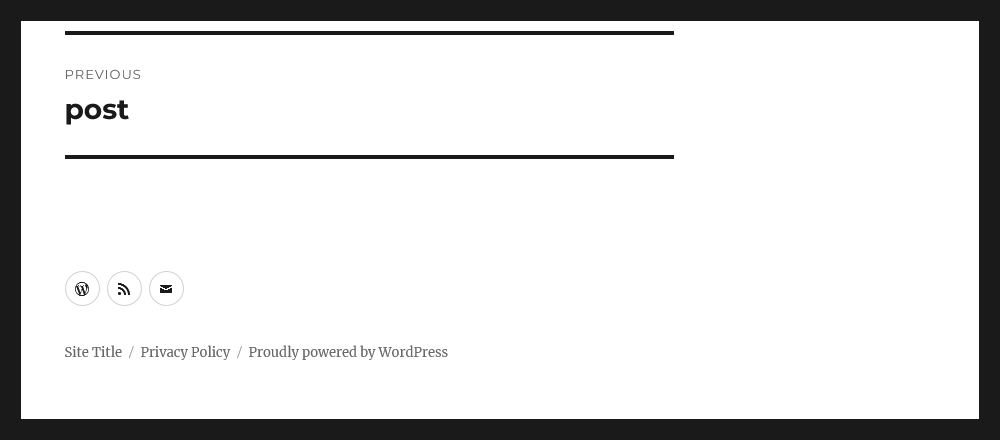
Starting in Twenty Sixteenโ€™s version 3.3 (released with WordPress 6.6), the site information links remain below the social navigation at any screen size. Before that, the social navigation had displayed after the site information on larger screens, which created a mismatch between the visual order and the Document Object Model (DOM) order.

Site, Privacy Policy, and Proudly powered by WordPress links appear beneath three social icon links in the site footer
The two footer elements are stacked, now at screen widths larger than 910 pixels.

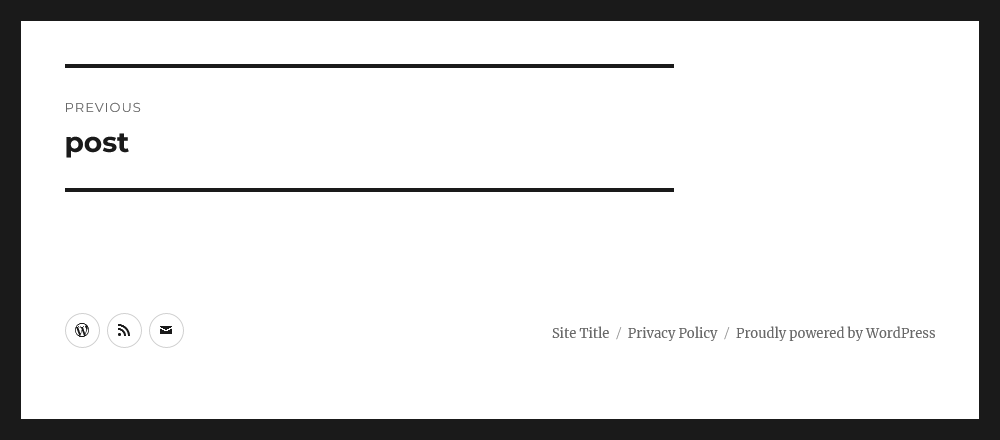
If you would like to have the two elements side-by-side, with the social navigation first, you could paste styles in a child themeChild theme A Child Theme is a customized theme based upon a Parent Theme. Itโ€™s considered best practice to create a child theme if you want to modify the CSS of your theme. https://developer.wordpress.org/themes/advanced-topics/child-themes/ or in the Customizerโ€™s Additional CSS panel.

Check the instructions on how to do this
@media screen and (min-width: 56.875em) {
	/*
	  1. Reset the social navigation width.
	  2. Adjust margins to place site info along the right edge.
	*/
	.site-footer .social-navigation {
		width: auto;
		margin: 0.538461538em auto 0.538461538em 0;
	}
	.site-info {
		margin: 0;
	}


	/* Reverse the margins for right-to-left languages. */
	.rtl .site-footer .social-navigation {
		margin: 0;
	}
	.rtl .site-info {
		margin: 0.538461538em auto 0.538461538em 0;
	}
}
Three social icon links appear on the left side of the site footer, but Site, Privacy Policy, and Proudly powered by WordPress links are on the right.
Custom CSSCSS Cascading Style Sheets. could place the site information links on the right side.

See #60496 for more details.

Comments

Default length of time for comment author cookies has changed

[58401] changed the default length of time for comment author cookies from 0.95129375951 of a year to 1 year by taking advantage of the YEAR_IN_SECONDS constant. The comment_cookie_lifetime filterFilter Filters are one of the two types of Hooks https://codex.wordpress.org/Plugin_API/Hooks. They provide a way for functions to modify data of other functions. They are the counterpart to Actions. Unlike Actions, filters are meant to work in an isolated manner, and should never have side effects such as affecting global variables and output. can still be used to change this value.

See #61421 for more details.

Editor

Site Editor Patterns on Classic Themes

#61109 now directs a classic themeโ€™s Appearance > Patterns menu to the site editor Patterns view (/wp-admin/site-editor.php?path=/patterns), providing a consistent pattern and template management experience regardless of theme type. For themes with block-template-parts support, the Appearance > Template Parts menu has been removed, with template parts now accessible under the site editorโ€™s Patterns > Template Parts view.

Fluid Typography

Some theme.json presets require custom logic to generate their values, for example, when converting font size preset values toย clamp()ย values.

The custom logic is handled by callback functions defined against theย value_funcย key inย WP_Theme_JSON::PRESETS_METADATA. The callback functions are invoked inย WP_Theme_JSON::get_settings_values_by_slug().

In WordPress 6.6, settings of the currentย WP_Theme_JSONย instance,ย are now passed to these callback functions. The permits callback functions to return values that rely on other settings in the theme.jsonJSON JSON, or JavaScript Object Notation, is a minimal, readable format for structuring data. It is used primarily to transmit data between a server and web application, as an alternative to XML. tree.

In the case of font sizes presets,ย it fixes a bugย whereby the callback function โ€”ย wp_get_typography_font_size_value()ย โ€” was not taking into account settings values passed directly to theย WP_Theme_JSONย class.

External libraries

jQuery UIUI User interface library update

The jQuery UI library was updated to version 1.13.3. For more information on the changes included, see jQuery UI 1.13.3 release notes.

Login and Registration

New array arguments for wp_login_form

Theย wp_login_form()ย function has two new array arguments:ย required_usernameย andย required_password. Passing true to these arguments adds the โ€˜requiredโ€™ attribute to the input fields.

$args = array(
    'required_username' => true,
    'required_password' => true,
);
wp_login_form( $args );

There is no change to the default field output.

See #60062 for more details.

Multisitemultisite Used to describe a WordPress installation with a network of multiple blogs, grouped by sites. This installation type has shared users tables, and creates separate database tables for each blog (wp_posts becomes wp_0_posts). See also network, blog, site

Custom ports for multisite site addresses

#21077 made it possible to install and operate a Multisite installation on a host name that includes a port number, and the corresponding #52088 added full support for this to the local development environment. This means itโ€™s now possible to run Multisite on an address such as localhost:8889.

Update enabled mime types for new multisite installs

In #53167, the list of mime types that are enabled for upload were aligned to those enabled by regular sites by switching from a hard-coded list of types (that had become outdated) to using coreCore Core is the set of software required to run WordPress. The Core Development Team builds WordPress.โ€™s get_allowed_mime_types function. This ensures that new multisite installs are up to date with the current mime types supported in core, including the recently enabled image/webp and image/avif types.

Note that, since this is only used to populate the schema for new networks, it will only affect newly created multisite networks โ€“ it does not change the allowed mime types for existing networks. To adjust the mime types allowed for existing sites, developers can continue to use an approach as follows for filtering the upload_filetypes option:

Script Loader

Obsolete polyfills dependencies have been removed

In [57981], now obsolete polyfills such as wp-polyfill, wp-polyfill-inert and regenerator-runtime were removed from the react script dependency in WordPress, as they are no longer needed in modern browsers supported by WordPress. Developers relying on wp-polyfill need to manually add it as a dependency to their scripts.

See #60962 for more details.

Script modules can now be used in the WordPress adminadmin (and super admin)

With #61086, script modules can now be used in the WordPress admin. Before WordPress 6.6, script modules were only available on the front end.

Toolbar

Search has a much later priority

Inย [58215], the search input on the front-end admin bar is added at a different priority. It was previously inserted at priority 4 and then floated to appear at the end of the admin bar. It is now inserted at priority 9999 to load at the end of the admin bar without CSS manipulation.

Extenders placing admin bar nodes after the search or replacing core search should take the new priority into consideration.

Example: Assign different priority based on WordPress version

$priority = ( version_compare( $GLOBALS['wp_version'], '6.6-alpha', '>=' ) ) ? 4 : 9999;
add_action( 'admin_bar_menu', 'wpadmin_toolbar_test_link', $priority );
/**
 * Add a node to the WP admin toolbar.
 *
 * @param object $wp_admin_bar WP Admin Bar object.
 */
function wpadmin_toolbar_test_link( $wp_admin_bar ) {
	$wp_admin_bar->add_node(
		array(
			'parent' => 'top-secondary',
			'id'     => 'mylink',
			'href'   => '#',
			'title'  => __( 'My Link' ),
		)
	);
}

See #60685 for more details.


Props to @swissspidy, @jorbin, @johnbillion, @audrasjb, @joedolson, @ironprogrammer, @ramonopoly, @jonsurrell, @sabernhardt, @jdy68, @afercia and @juanmaguitar for their contribution and/or reviews.

#6-6, #dev-notes, #dev-notes-6-6

Updates to the HTML API in 6.6

WordPress 6.6 includes a helpful maintenance release to the HTMLHTML HyperText Markup Language. The semantic scripting language primarily used for outputting content in web browsers. APIAPI An API or Application Programming Interface is a software intermediary that allows programs to interact with each other and share data in limited, clearly defined ways.. Included in this work are a few new features and a major improvement to the usability of the HTML Processor. This continues paced development since WordPress 6.5.

Table of Contents

  1. A spec-compliant text decoder.
    1. An idealized view of an HTML document.
    2. An optimized class for looking up string tokens and their associated mappings.
  2. Features
  3. Bug Fixes

A spec-compliant text decoder.

This may be surprising, but PHPPHP The web scripting language in which WordPress is primarily architected. WordPress requires PHP 7.4 or higher leaves us hanging if we want to properly read the text content of an HTML document. The html_entity_decode() and htmlspecialchars_decode() functions work somewhat well for pure XML documents, but HTML contains more complicated rules for decoding, rules which change depending on whether the text is found inside an attribute value or normal text. These functions default to XML and HTML4 parsing rules and require manually setting the ENT_HTML5 flag on every invocation (for example, HTML5 redefined two of HTML4โ€™s character references), but are still wrong in many cases.

Luckily you shouldnโ€™t need to know about or call the new decoder, developed in Core-61072. It fits into get_modified_text(), further improving the HTML APIโ€™s implementation without requiring you to change any of your existing code. With WordPress 6.6 your existing code becomes more reliable for free.

One part of this change you might want to know about is WP_HTML_Decoder::attribute_starts_with(). This new method takes a plaintext prefix and a raw attribute value and indicates if the decoded value starts with the given prefix. This can be invaluable for efficiently detecting strings at the start of an attribute, as some attributes can be extremely large, and if not careful, naive parsers can overlook content hidden behind long slides of zeros.

$html = 'bob&#x00000000000000000003a,';

'bob&#x00000000000000000003a,' === html_entity_decode( $html, ENT_HTML5 );
'bob:,' === WP_Text_Decoder::decode_attribute( $html );
true    === WP_Text_Decoder::attribute_starts_with( $html, 'bob:' );

In the case of extremely long attribute values (for example, when pasting content from cloud document editors which send images as data URIs), the attribute_starts_with() can avoid megabytes of memory overhead and return much quicker than when calling functions which entirely decode the attribute value.

The new text decoder will mostly help ensure that the HTML API remains safe and reliable. There are complicated rules in parsing HTML, so as always, itโ€™s best to leave the low-level work to the HTML API, preferring to call functions like get_attribute() and get_modified_text() directly instead of parsing raw text segments.

An idealized view of an HTML document.

The Tag Processor was initially designed to jump from tagtag A directory in Subversion. WordPress uses tags to store a single snapshot of a version (3.6, 3.6.1, etc.), the common convention of tags in version control systems. (Not to be confused with post tags.) to tag, then it was refactored to allow scanning every kind of syntax token in an HTML document. Likewise, the HTML Processor was initially designed to jump from tag to tag, all the while also acknowledging the complex HTML parsing rules. These rules largely exist in the form of a stack machine that tracks which elements are currently open. While the HTML Processor has always maintained this stack, it has never exposed it to calling code.

In WordPress 6.6 the HTML Processor underwent a major internal refactor to report those stack events (when an element opens and when an element closes) rather than when it finds raw text that represents things like tag openers and tag closers. This is a really big change for calling code! Previously, the HTML Processor would track all elements, but only return when a tag or token appeared in an HTML document. For instance, it always knew that <p><p> represents two sibling P elements, but it only presented each opening P tag to calling code. Now, the HTML processor is going to present not only the tags and tokens that exist in the raw HTML text, but also the โ€œvirtual nodesโ€ that are implied but not textually present.

$processor = WP_HTML_Processor::create_fragment( '<h1>One</h3><h2>Two<p>Three<p>Four<h3>Five' );
while ( $processor->next_token() ) {
	$depth = $processor->get_current_depth();
    $slash = $processor->is_tag_closer() ? '/' : '';
	echo "{$depth}: {$slash}{$processor->get_token_name()}: {$processor->get_modifiable_text()}n";
}

Letโ€™s compare the output in WordPress 6.5 against the output in WordPress 6.6.

HTML Processor in WordPress 6.5

H1:
#text: One
/H3:
H2:
#text: Two
P:
#text: Three
P:
#text: Four
H3:
#text: Five

HTML Processor in WordPress 6.6

3: H1:
4: #text: One
2: /H1:
3: H2:
4: #text: Two
4: P:
5: #text: Three
4: /P:
4: P:
5: #text: Four
3: /P:
3: /H2:
3: H3:
4: #text: Five
0: /H3:

With the HTML API in WordPress 6.6, itโ€™s possible to treat an HTML document in the idealized way we often think about it: where every tag has an appropriate corresponding closing tag in the right place, and no tags overlap. In WordPress 6.5, only the opening tags which appeared in the document return from next_tag(), and the </h3> closing tag appears as an H3 closing tag, even though the HTML specification indicates that it closes the already-open H1 element. In WordPress 6.6, every opening tag gets its closer, and the </h3> appears as if it were an </h1>. This is because the HTML Processor is exposing the document structure instead of the raw text.

Two new methods make working with HTML even easier:

  • WP_HTML_Processor->get_current_depth() returns the depth into the HTML structure where the current node is found.
  • WP_HTML_Processor->expects_closer() indicates if the opened node expects a closing tag or if it will close automatically when proceeding to the next token in the document. For example, text nodes and HTML comments and void elements never expect a closer.

With the help of these methods itโ€™s possible to trivially detect when an element opens and closes, because the HTML Processor guarantees a โ€œperfectโ€ view of the structure.

$processor = WP_HTML_Processor( $block_html );
if ( ! $processor->next_tag( 'DIV' ) ) {
	return $block_html;
}

$depth = $processor->get_current_depth();
while ( $processor->get_current_depth() >= $depth && $processor->next_token() ) {
	// Everything inside of here is inside the open DIV.
}
if ( ! isset( $processor->get_last_error() ) ) {
	// This is where the DIV closed.
}

An optimized class for looking up string tokens and their associated mappings.

As part of the text decoder work the WP_Token_Map was introduced. This is a handy and efficient utility class for mapping between keys or tokens and their replacements. Itโ€™s also handy for efficient set membership; for example, to determine if a given username is found within a set of known usernames.

Read more in the Token Map announcement.

Features

  • The HTML Processor will now return the depth of the current node in the stack of open elements with get_current_depth(). [58191]
  • The HTML Processor now includes expects_closer() to indicate the currently-matched node expect a closing token. For example, no HTML void element expects a closer, no text node expects a closer, and none of the elements treated specially in the HTML API as atomic elements (such as SCRIPT, STYLE, TITLE, or TEXTAREA) expect a closer. [58192]
  • The WP_HTML_Decoder class can take a raw HTML attribute or text value and decode it, assuming that the source and destination are UTF-8. The HTML API now uses this instead of html_entity_decode() for more reliable parsing of HTML text content. [58281]
  • The HTML Processor now visits all real and virtual nodes, not only those which are also present in the text of the HTML, but those which are implied by whatโ€™s there or not there. [58304]

Bug Fixes

  • Funky-comments whose contents are only a single character are now properly recognized. Previously the parser would get off track in these situations, consuming text until the next > after the funky comment. [58040]
  • The HTML Processor now respects the class_name argument if passed to next_tag(). Formerly it was overlooking this constraint. [58190]
  • The Tag Processor was incorrectly tracking the position of the last character in some tokens, internally and when bookmarking. While this bugbug A bug is an error or unexpected result. Performance improvements, code optimization, and are considered enhancements, not defects. After feature freeze, only bugs are dealt with, with regressions (adverse changes from the previous version) being the highest priority. did not affect the operation of the Tag Processor, it has been fixed so that future code which might rely upon it will work properly. [58233]
  • When subclassing WP_HTML_Processor the ::create_fragment() method will return the subclass instance instead of a WP_HTML_Processor instance. [58365]

Props to @gziolo, @jonsurrell, @juanmaguitar, and @westonruter for reviewing this post and providing helpful feedback.

#6-6, #dev-notes, #dev-notes-6-6, #html-api

Introducing the Token Map

Thereโ€™s a new data structure coming in WordPress 6.6: the WP_Token_Map, but what is it? The ongoing work in the HTML API required the ability to find named character references like &hellip; in an HTMLHTML HyperText Markup Language. The semantic scripting language primarily used for outputting content in web browsers. document, but given that there are 2,231 names this is no easy task. The WP_Token_Map is a purpose-built class designed to take a large set of static string tokens with static string replacements, and then be used as a lookup and replacement mechanism. Thatโ€™s all very technical, so letโ€™s see it in action and consider how it might be useful to you.

As an important note: you probably donโ€™t need this because itโ€™s an optimized data structure built for lookup with a very large set of tokens. The examples are unrealistically short but are meant only to illustrate the class usage in a readable form. If working with small datasets itโ€™s possibly faster for most purposes to stick with familiar tools like in_array() or associative arrays.

The Token Map, in short, is a new semantic utility meant to answer one simple question: given a string and a byte offset into that string, does the next sequence of bytes match one of a known set of tokens, and if so, what is the replacement for that token? Itโ€™s designed as a low-level utility for use in combination with other string parsing logic.

Continue reading โ†’

#6-6, #dev-notes, #dev-notes-6-6

Proposal: Block Variation Aliases

To provide an easy way for blockBlock Block is the abstract term used to describe units of markup that, composed together, form the content or layout of a webpage using the WordPress editor. The idea combines concepts of what in the past may have achieved with shortcodes, custom HTML, and embed discovery into a single consistent API and user experience. authors to specify variations of a given block that only differ in some attributes and/or inner blocks, WordPress has been providing the Block Variations mechanism, first introduced in version 5.4. This mechanism is widely used in CoreCore Core is the set of software required to run WordPress. The Core Development Team builds WordPress. itself; for example, the Group block has โ€œRowโ€, โ€œStackโ€, and โ€œGridโ€ variations (that can be selected from the block inspector); the Social Icon block has variations for individual social networks, e.g. wordpress, tumblr, etc.

For WordPress 6.7, weโ€™d like to propose some changes to Block Variations, most notably the following:

  1. Add a variation-specific class name to the block wrapper (i.e. wp-block-${blockName}-${variationName} in addition to the existing wp-block-${blockName}).
    1. Implement server-side detection of the active block variation.
  2. Include the variation name in block markup persisted in the database (e.g. <!-- wp:core/social-link/wordpress {"url":"wordpress.org","service":"wordpress"} /-->).

Below, we discuss each of these suggested changes in more detail.

Add a variation-specific class name to the block wrapper

TracTrac An open source project by Edgewall Software that serves as a bug tracker and project management tool for WordPress. Ticketticket Created for both bug reports and feature development on the bug tracker.: #61265. GutenbergGutenberg The Gutenberg project is the new Editor Interface for WordPress. The editor improves the process and experience of creating new content, making writing rich content much simpler. It uses โ€˜blocksโ€™ to add richness rather than shortcodes, custom HTML etc. https://wordpress.org/gutenberg/ PR: #61864.

Adding a variation-specific class name will allow block authors to style individual variations of their blocks differently. Some blocks do this already on an individual basis, e.g. the Social Icon block adds a wp-block-social-link-${service} class name.

There is a number of questions that need to be answered here:

First, should a block need to opt in to having the variation class name added, or should it be added automatically? Since thereโ€™s already the className block-supports flag โ€“ which also controls the addition of the โ€œdefaultโ€ wp-block-${blockName} class name โ€“ it might make sense to couple the variation class name to the same flag.

Second, how should existing block markup be handled? Thereโ€™s the precedent of block deprecations (and migrations) which applies changes to existing blocks when theyโ€™re edited โ€“ and leaves them otherwise unchanged. If we follow this pattern (albeit probably not on an individual block level but more globally), blocks wonโ€™t get the variation class name added as long as the existing markup is not edited.

A different strategy was chosen for the List block whose wrapper element was only recently given the wp-block-list default class name. Here, a server-side render callback was added to inject the new class name into the (otherwise static) existing block markup; i.e., existing List blocks now have the wp-block-list class name added to their wrapper element on the frontend, even if theyโ€™re never edited.

In Gutenberg PR #61864, weโ€™ve opted against introducing a new block-supports flag for the variation-specific class name; furthermore, the new class name is currently only added to existing markup when editing it.

If we want a mechanism to add the wp-block-${blockName}-${variationName} class name on the frontend, we need to be able to infer the active block variation for a given block on the server side. This problem is covered in the next section.

Implement server-side detection of the active block variation

Core PR: #6602.ย 

Block variations support an isActive property to determine if a given block instance matches the variation, i.e. if the variation is active. That property can either be a JavaScriptJavaScript JavaScript or JS is an object-oriented computer programming language commonly used to create interactive effects within web browsers. WordPress makes extensive use of JS for a better user experience. While PHP is executed on the server, JS executes within a userโ€™s browser. https://www.javascript.com function (only if registration of the variation happens on the client side) or an array of block attribute names to compare.

In order for the block variation class name to be added on the server side โ€“ which is required to include it on the frontend for dynamic blocks, or for existing static blocks (see previous section) โ€“ the server needs to be able to determine which variation is active. To that end, there needs to be a server-side counterpart to the clientโ€™s getActiveBlockVariation function that, given the same set of variations, yields the same result. (Note some recent improvements made to the client-side function that the server would need to reproduce.)

Include the variation name in block markup persisted in the database

Gutenberg Issue: #43743. PR: #61678 (experimental).

Finally, we propose to append the variation name (separated by a slash) to the block type name thatโ€™s used in block delimiters when persisting markup to the database, so that e.g.ย  <!-- wp:social-link {"url":"wordpress.org","service":"wordpress"} /--> becomes <!-- wp:core/social-link/wordpress {"url":"wordpress.org","service":"wordpress"} /-->.

This was first proposed by #43743 for the following reasons:

To allow theme developers and users to customize block variationsโ€™ styles granularly, e.g. in theme.json, or in the Global Styles panel (#40621). As a corollary, this would allow for an optimization, by attaching variation-specific CSSCSS Cascading Style Sheets. only when the corresponding block variation is present.

Developers could furthermore benefit from all other Block APIAPI An API or Application Programming Interface is a software intermediary that allows programs to interact with each other and share data in limited, clearly defined ways. tools that work on a block type basis. For example, it could be possible to limit usage of a given block variation as another blockโ€™s child block via the allowedBlocks field, or to limit the number of instances of a variation in a given post via multiple block support.

One particularly noteworthy example of how block variations can unlock some desirable enhancements for other features is the Block Hooks API: It is currently not possible to use it to insert multiple blocks in the same position if they share the same block type (and are only distinguished by their attributes). Including variation names in the persisted block names can solve this problem, allowing multiple different variations of the same block to be inserted as hooked blocks in the same position.

Finally, using named block variations in persisted markup would give easier access for site owners to the content analysis to determine which blocks and variations are used in posts and templates.

Architecture

Note that while this change would affect the persisted markup, we would seek to contain it there, so that it becomes at once available to some tooling but doesnโ€™t affect everything else adversely. Specifically, weโ€™re not planning to introduce a separate WP_Block_Type object for every single variation; even for WP_Block class instances, weโ€™re currently thinking to strip the /${variationName} part from the block type name upon construction. This way, the appended variation name would be confined to the lowest level of block markup processing, i.e. the โ€œparsed block formatโ€ that parses block markup into nested arrays that look as follows:

array(
	'blockName'    => 'core/social-link/wordpress',
	'attrs'        => array(
		'service' => 'wordpress',
		'url'     => 'wordpress.org',
	),
	'innerBlocks'  => array(),
	'innerContent' => array(),
);

Note that this parsing step โ€“ unlike the later creation of WP_Block objects โ€“ is โ€œdumbโ€ in that it doesnโ€™t have any knowledge of what blocks and block variations are registered.

Furthermore, we would shield the client from this new format by simply removing the appended /${variationName} upon loading the markup in the editor, and by re-appending it upon saving, i.e. when loading markup like <!-- wp:core/social-link/wordpress {"url":"wordpress.org","service":"wordpress"} /--> , it will be transformed intoย  <!-- wp:social-link {"url":"wordpress.org","service":"wordpress"} /-->ย  (and back when saving it).

Generated vs arbitrary aliases

Note that #43743 originally proposed allowing arbitrary aliases (e.g. wp:core/wordpress-link). Arbitrary aliases would allow some further improvements that go beyond what is possible with generated aliases. For example, a number of Core blocks could be redefined as variations of other (simpler) Core blocks, by using Block Bindings: For instance, the Post Title block could be redefined as an alias of a variation of the Heading block, where the latterโ€™s content is bound to the current postโ€™s title (which is done via the blockโ€™s metadata.bindings attribute and can thus be used to define the variation).

Another benefit of arbitrary aliases is that they do not require the server to determine the active block variation based on the blockโ€™s attribute values, as that information is already contained in the alias.

While weโ€™re considering arbitrary aliases for a later stage, weโ€™d like to start by using the information thatโ€™s readily available (the block and variation names) rather than introducing a new alias field; it also simplifies the required transformation in the editor (which can simply remove the /${variationName} suffix; inferring the correct variation name on the client side to re-attach it upon saving is no different than determining the active variation via getActiveBlockVariation).

Conclusion

Weโ€™re curious to hear your thoughts and feedback on these suggestions, and on the architecture weโ€™re having in mind. Please use the comments below this post to share your feedback on this proposal. Alternatively, you can comment on the individual Trac tickets, issues, and pull requests linked from it.

The feedback period for this proposal will end in three weeksโ€™ time, on 2024-07-14, in order to give us enough time for implementation.

Props @gziolo and @tjcafferkey for review.

Miscellaneous Editor changes in WordPress 6.6

In this post, you will find dev notesdev note Each important change in WordPress Core is documented in a developers note, (usually called dev note). Good dev notes generally include a description of the change, the decision that led to this change, and a description of how developers are supposed to work with that change. Dev notes are published on Make/Core blog during the beta phase of WordPress release cycle. Publishing dev notes is particularly important when plugin/theme authors and WordPress developers need to be aware of those changes.In general, all dev notes are compiled into a Field Guide at the beginning of the release candidate phase. for smaller changes to the editor in WordPress 6.6.


Table of contents


Added wp-block-listย class to the list blockBlock Block is the abstract term used to describe units of markup that, composed together, form the content or layout of a webpage using the WordPress editor. The idea combines concepts of what in the past may have achieved with shortcodes, custom HTML, and embed discovery into a single consistent API and user experience.

Styling a list block using the Site Editor or theme.jsonJSON JSON, or JavaScript Object Notation, is a minimal, readable format for structuring data. It is used primarily to transmit data between a server and web application, as an alternative to XML. also applied the style to other lists, partially or in full. This caused styling conflicts with blocks that use lists internally and with lists in the editor interface.

The problem has been fixed by adding the CSSCSS Cascading Style Sheets. classย wp-block-listย to theย <ul>ย andย <ol>ย elements of the list block, and only applying the styling to lists with this class name.

If you have relied on the list block styles to style generic lists, you may need to update your CSS.

GitHubGitHub GitHub is a website that offers online implementation of git repositories that can easily be shared, copied and modified by other developers. Public repositories are free to host, private repositories require a paid subscription. GitHub introduced the concept of the โ€˜pull requestโ€™ where code changes done in branches by contributors can be reviewed and discussed before being merged by the repository owner. https://github.com/ pull request: #56469

Props to @poena for writing the dev notedev note Each important change in WordPress Core is documented in a developers note, (usually called dev note). Good dev notes generally include a description of the change, the decision that led to this change, and a description of how developers are supposed to work with that change. Dev notes are published on Make/Core blog during the beta phase of WordPress release cycle. Publishing dev notes is particularly important when plugin/theme authors and WordPress developers need to be aware of those changes.In general, all dev notes are compiled into a Field Guide at the beginning of the release candidate phase..

Allow view access of the template REST APIREST API The REST API is an acronym for the RESTful Application Program Interface (API) that uses HTTP requests to GET, PUT, POST and DELETE data. It is how the front end of an application (think โ€œphone appโ€ or โ€œwebsiteโ€) can communicate with the data store (think โ€œdatabaseโ€ or โ€œfile systemโ€) https://developer.wordpress.org/rest-api/ endpoint to anyone with the edit_post capabilitycapability Aย capabilityย is permission to perform one or more types of task. Checking if a user has a capability is performed by the current_user_can function. Each user of a WordPress site might have some permissions but not others, depending on theirย role. For example, users who have the Author role usually have permission to edit their own posts (the โ€œedit_postsโ€ capability), but not permission to edit other usersโ€™ posts (the โ€œedit_others_postsโ€ capability).

Before WordPress 6.6 the templates and template-parts REST API endpoints were restricted to only be viewed/edited by anyone with the edit_theme_options capability (Administrators). WordPress 6.6 changes the permission checks to allow any user role with the edit_post capability to view these endpoints. Editing is still restricted to the edit_theme_options capability.

This change is because the post editor now includes the ability to preview a postโ€™s template while editing the post. In WordPress 6.5, this option was limited to administrators only. However, WordPress 6.6 now supports previewing the template for all user roles.

GitHub pull request: #60317

Props to @fabiankaegy for writing the dev note.

Unified split logic for writing flow

RichTextโ€™s optional onSplit prop was deprecated and replaced with a block.json support key called splitting. The onSplit prop was only used by a few coreCore Core is the set of software required to run WordPress. The Core Development Team builds WordPress. blocks (paragraph, heading, list item, and button), so itโ€™s not expected that this affects a lot of third-party blocks.

In any case, when the onSplit is used, splitting will still work but canโ€™t be controlled as granularly as before: the callback wonโ€™t be called, and the block will split in a generic way.

GitHub pull request: #54543

Props to @ellatrix for writing the dev note.

BlockPopover Component is now public

The BlockPopover component is now publicly accessible. For more details, you can check the README.

GitHub pull request: #61529

Props to @gigitux for writing the dev note.

Add filterFilter Filters are one of the two types of Hooks https://codex.wordpress.org/Plugin_API/Hooks. They provide a way for functions to modify data of other functions. They are the counterpart to Actions. Unlike Actions, filters are meant to work in an isolated manner, and should never have side effects such as affecting global variables and output. to modify the list of post content block types

When WordPress renders a post/pageโ€™s template at the same time as the content, most template blocks are disabled/locked. However, some blocks, like the Post Title, Post Content, and Post Featured ImageFeatured image A featured image is the main image used on your blog archive page and is pulled when the post or page is shared on social media. The image can be used to display in widget areas on your site or in a summary list of posts., still allow users to edit the content within them. They get rendered in the contentOnly rendering mode.

WordPress 6.6 now adds a filter to modify this list of blocks that should get the contentOnly rendering mode applied when rendered as part of the template preview.

import { addFilter } from '@wordpress/hooks';

function addCustomPostContentBlockTypes( blockTypes ) {
    return [ ...blockTypes, 'namespace/hello-world' ];
}

addFilter(
    'editor.postContentBlockTypes',
    'namespace/add-custom-post-content-block-types',
    addCustomPostContentBlockTypes
);

It is important that only settings that store their data in custom ways are exposed when rendered in this contentOnly mode. An example is a block that stores a subtitle in post metaMeta Meta is a term that refers to the inside workings of a group. For us, this is the team that works on internal WordPress sites like WordCamp Central and Make WordPress.. Anything that gets stored to the standard block attributes wonโ€™t persist.

GitHub pull request: #60068

Props to @fabiankaegy for writing the dev note.

Global Styles: Filter out color and typography variations

In addition to style variations, WordPress 6.6 adds the ability for themes to create color and typography presets. These are subsets of style variations and give users the ability to replace the color or typography of a site without all the other changes that come in a style variation.

To add color and typography presets to a theme, developers follow the same process as adding style variations, except that each variation must contain only color or typography rules. Any style variations that contain only these rules will be treated as presets and will appear under Global Styles > Typography or Global Styles > Colors > Palette.

Style variations that already conform to this requirement, i.e. they contain only color or typography rules, will automatically be treated in this way. That means these style variations will no longer appear under Global Styles > Browse styles, but instead in the relevant section for either colors or typography.

GitHub pull request: #60220

Props to @scruffian for writing the dev note.

Add custom Aspect Ratio presets throughย theme.json

WordPress 6.6 adds a new two new properties to the settings.dimensions object in theme.json. settings.dimensions.aspectRatios allows defining your own custom Aspect Ratio presets. These presets will be used by any block that uses the aspectRatio block support. In core that means the Image, Featured Image, and Cover block.

{
    "version": 2,
    "settings": {
        "dimensions": {
            "aspectRatios": [
                {
                     "name": "Square - 1:1",
                     "slug": "square",
                     "ratio": "1"
                 },
                 {
                     "name": "Standard - 4:3",
                     "slug": "4-3",
                     "ratio": "4/3"
                 },
            ]
        }
    }
}

Additionally the settings.dimensions.defaultAspectRatios key allows you to disable the list of core aspect ratio presets.

{
    "version": 2,
    "settings": {
        "dimensions": {
            "defaultAspectRatios": false
        }
    }
}

GitHub pull request: #47271

Props to @fabiankaegy for writing the dev note.

Root padding style updates

Root padding styles have been updated to address inconsistencies in pattern display and make the application of padding more predictable across different sets of markup. Itโ€™s now expected that:

  • Padding is applied to the outermost block with constrained layout (this is the layout enabled when โ€œInner blocks use content widthโ€ is set).
  • Padding is applied to all blocks with constrained layout that are full width or wide width.
  • Padding is applied to all blocks with constrained layout inside a full width flow layout (this is the layout enabled when โ€œInner blocks use content widthโ€ is unset) block.
  • Nested full width blocks will always be full width: a full width block inside another full width block will extend to the edges of the viewport.

GitHub pull request: #60715

Props to @isabel_brison for writing the dev note.

Added Text alignment block support

WordPress 6.6 adds new block support for setting the horizontal alignment of text.

This support is controlled by settings.typography.textAlign in theme.json, which defaults to true. To opt-in to this support for a block, add the supports.typography.textAlign field in block.json. For example:

{
    "$schema": "https://schemas.wp.org/trunk/block.json",
    "apiVersion": 3,
    "name": "gutenpride/my-block",
    "title": "My Block",
    "supports": {
        "typography": {
            "textAlign": true
        }
    }
}

Currently, core blocks do not support textAlign and the Text Alignment UIUI User interface is implemented separately without this block support. In the future, it is planned to gradually migrate core blocks to this support as well, and progress will be tracked in this Github issue: #60763.

The default horizontal alignment style can also be defined via theme.json. For example:

{
    "$schema": "https://schemas.wp.org/trunk/theme.json",
    "version": 3,
    "styles": {
        "blocks": {
            "core/heading": {
                "typography": {
                    "textAlign": "center"
                }
            }
        }
    }
}

There is a known issue where the default horizontal alignment defined in the global styles orย theme.jsonย cannot be overridden on a block instance, which is currently being addressed in #62260.

GitHub pull request: #59531

Props to @wildworks for writing the dev note.


Props to @juanmaguitar for review.

#6-6, #dev-notes, #dev-notes-6-6

Internationalization improvements in 6.6

Various internationalization (i18n) improvements are in WordPress 6.6, and this developers note focuses on these.

Enhanced support for only using PHPPHP The web scripting language in which WordPress is primarily architected. WordPress requires PHP 7.4 or higher translationtranslation The process (or result) of changing text, words, and display formatting to support another language. Also see localization, internationalization. files

WordPress 6.5 shipped with a completely new localization system with improved performance, which uses .l10n.php files in addition to .po and .mo files. This system was slightly enhanced in 6.6 to better support scenarios where only these PHP translation files exist, but not the others. This specifically applies to wp_get_installed_translations(), which is used to check which translations are installed, and the Language_Pack_Upgrader for updating translations.

See #60554 for more details.

New lang_dir_for_domain filterFilter Filters are one of the two types of Hooks https://codex.wordpress.org/Plugin_API/Hooks. They provide a way for functions to modify data of other functions. They are the counterpart to Actions. Unlike Actions, filters are meant to work in an isolated manner, and should never have side effects such as affecting global variables and output.

A new lang_dir_for_domain filter has been added to WP_Textdomain_Registry, allowing plugins to override the determined languages folder when using just-in-time translation loading. This is mostly useful for multilingual plugins.

See #61206 for more details.

Additional context for the load_translation_file filter

The load_translation_file filter was introduced in WordPress 6.5 to support changing the file path when loading translation files, regardless if itโ€™s a PHP or an MO translation file. In 6.6, the localeLocale A locale is a combination of language and regional dialect. Usually locales correspond to countries, as is the case with Portuguese (Portugal) and Portuguese (Brazil). Other examples of locales include Canadian English and U.S. English. is passed as an additional argument to this filter, bringing it more in line with similar i18ni18n Internationalization, or the act of writing and preparing code to be fully translatable into other languages. Also see localization. Often written with a lowercase i so it is not confused with a lowercase L or the numeral 1. Often an acquired skill. filters.

See #61108 for more details.

Props to @audrasjb and @juanmaguitar for review.

#6-6, #dev-notes, #dev-notes-6-6, #i18n