The Test Team helps manage testing and triage across the WordPress ecosystem. They focus on user testing of the editing experience and WordPress dashboard, replicating and documenting bug reports, and supporting a culture of review and triage across the project.
Please drop by any time in SlackSlackSlack is a Collaborative Group Chat Platform https://slack.com/. The WordPress community has its own Slack Channel at https://make.wordpress.org/chat/ with questions or to help out.
Get ready for the next big release in the WordPress world! WordPress 6.3 is set to launch on August 8, 2023. Every major releaseMajor ReleaseA set of releases or versions having the same major version number may be collectively referred to as “X.Y” -- for example version 5.2.x to refer to versions 5.2, 5.2.1, and all other versions in the 5.2. (five dot two dot) branch of that software. Major Releases often are the introduction of new major features and functionality. comes with exciting new features and improvements, and we need your help to make sure it’s the best it can be!
This is the first Call for Testing post for the 6.3 release. Be on the lookout 👀 for future posts that highlight additional enhancements in the release.
Please only test on a development siteDevelopment SiteYou can keep a copy of your live site in a separate environment. Maintaining a development site is a good practice that can let you make any changes and test them without affecting the live/production environment. and not on a production/live site. You can follow these instructions to set up a local installLocal InstallA local install of WordPress is a way to create a staging environment by installing a LAMP or LEMP stack on your local computer. or use a tool like this to set up a development site.
Once your development site is set up, please install and activate the WordPress Beta Tester Plugin. After activation:
Navigate to Tools > BetaBetaA pre-release of software that is given out to a large group of users to trial under real conditions. Beta versions have gone through alpha testing in-house and are generally fairly close in look, feel and function to the final product; however, design changes often occur as part of the process. Testing.
Set the update channel to “Bleeding edge” and click Save Changes.
Set the stream option to “Beta/RCRelease CandidateA beta version of software with the potential to be a final product, which is ready to release unless significant bugs emerge. only” and click Save Changes again.
Navigate to Dashboard > Updates and click the Update to latest… button.
At a high level, here are a few tips to keep in mind to get the most out of helping to test:
Test across different browsers.
Test in different languages.
Compare features on different screen sizes, including tablets and mobile.
Use just your keyboard to navigate, or use a screen reader.
Test with both blockBlockBlock is the abstract term used to describe units of markup that, composed together, form the content or layout of a webpage using the WordPress editor. The idea combines concepts of what in the past may have achieved with shortcodes, custom HTML, and embed discovery into a single consistent API and user experience. and classic themes.
Key Features to Test 🔑
Interface
Command Palette
The new Command Palette (formerly “Command Center”) allows users to quickly navigate to specific pages, templates, or template parts, as well as offers an easy way to start to create new content in the site editor. From within the editor just use Cmd-k (macOS) or Ctrl-k (Windows) and start typing for a context-aware selection of commands and shortcuts. (49330)
Extenders can also find information on creating custom static, dynamic, and context-aware commands with this feature’s public API. (51169)
Improved Page Management
The site editor now allows site builders to manage pages, edit content, access page details, and even draft new pages to be published later. Look for the new Pages menu from Appearance > Editor. (50857, 50767, 50565, 47142)
Content Editing in Site Editor
This feature allows site authors to seamlessly switch between template and page content editing within the site editor. UIUIUI is an acronym for User Interface - the layout of the page the user interacts with. Think ‘how are they doing that’ and less about what they are doing. improvements also highlight what’s being edited – template or content – and allow for a more efficient workflow when building out a site. (44461, 50857)
Distraction Free Mode in Site Editor
Distraction Free mode, previously available in only the post and page editor, now brings the calmness to the site editor, offering a 1:1 preview to site authors. (51173)
Block Theme Preview
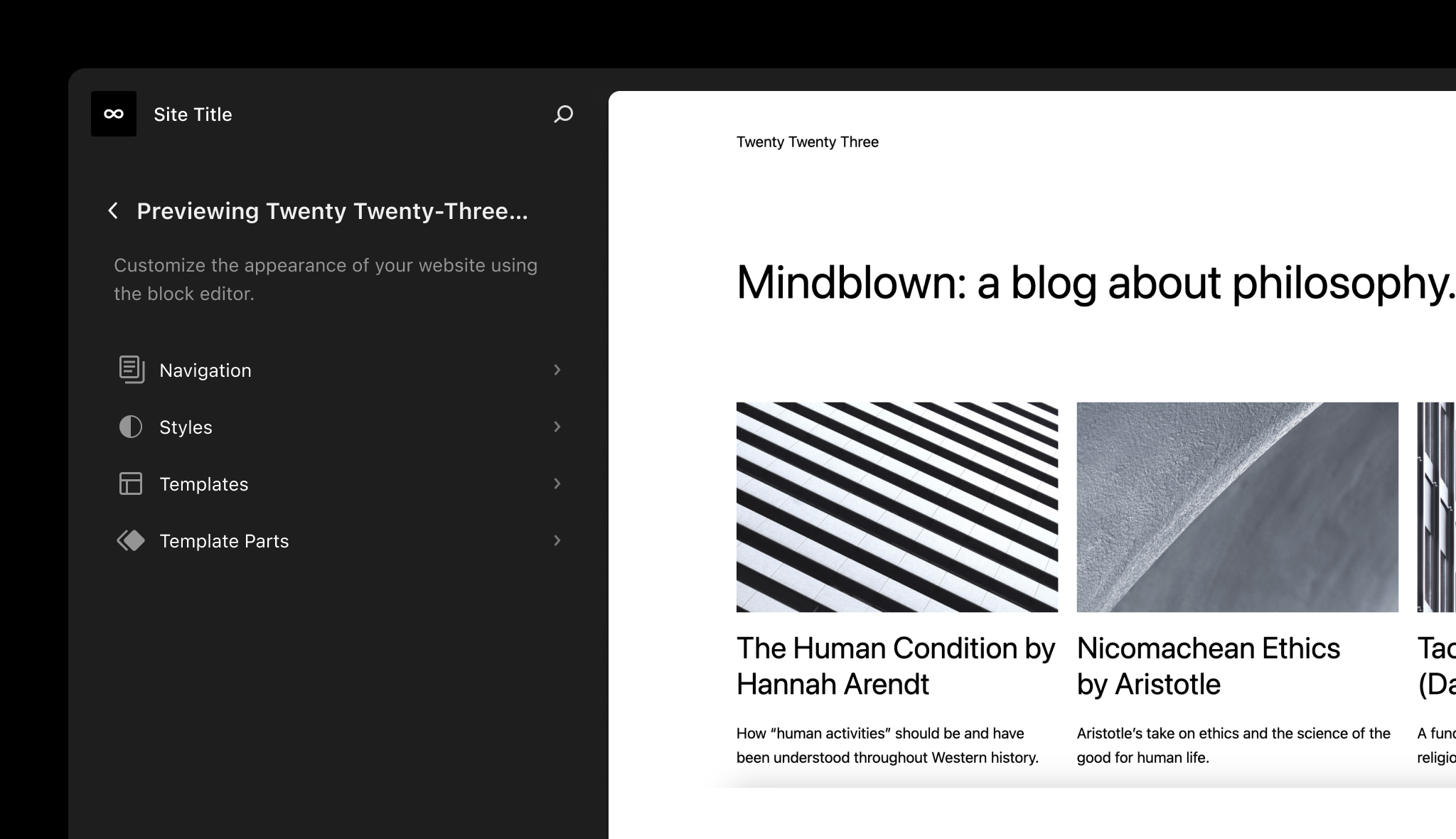
Previews of block themes now launch in the site editor, providing efficient previews of locally-installed themes. To see this feature in action, navigate to Appearance > Themes and click “Live Preview” on any block-based theme.
This feature can also be accessed by appending the following to a site editor or frontend URLURLA specific web address of a website or web page on the Internet, such as a website’s URL www.wordpress.org: ?wp_theme_preview=theme-slug where theme-slug is a locally installed theme to preview (e.g. twentytwentytwo). (50030, Trac 58561)
Using the Style Book in the Styles’ Site View
The Style Book can now be activated while browsing global style options for easier visualization of effects on various page elements. (50566, 50393)
Styles RevisionsRevisionsThe WordPress revisions system stores a record of each saved draft or published update. The revision system allows you to see what changes were made in each revision by dragging a slider (or using the Next/Previous buttons). The display indicates what has changed in each revision.
This update introduces support for global style revisions in the site editor, providing the ability to review or roll back to a previous state. (50089)
Top Toolbar Improvements
The editor’s “Top toolbar” has been refined with better handling of the limited space in this area, and better accounts for browser viewport width limitations. (40450, 49634)
Blocks
Time to Read Block
This feature has been moved to a future version of WordPress so that it may undergo additional testing before release.
The new Time to Read block allows you to display the estimated time the average reader takes to read the current page or post. Letting readers know right off what their estimated reading time is helps them to decide if they should continue reading, or save the post for later.
Begin by adding the block from the block picker, or from an empty Paragraph block starting with the forward-slash (“/”) key, and start typing the block name: /time to read. (43403)
Details Block
WordPress now introduces the versatile Details block, offering a seamless way to toggle the visibility of content, such as very long text, code samples, or spoilers. This block comes with two new inner blocks: Details Summary and Details Content. The summary is always visible, and the content is collapsable to be shown or hidden when readers toggle it.
Add the Details block through the block picker, or from an empty Paragraph block starting with the forward-slash (“/”) key, and start typing the block name: /details. (45055)
Color and layout support for the Cover block
The Cover block now supports the text color design tool. The enhancement makes it easier for users and theme authors to customize the color for all inner blocks with a single setting. Along with this benefit, this change makes it easier to handle transforms from the Media & Text block. (41572)
Footnotes
The new Footnotes block is a powerful addition that automatically links and formats footnotes, allowing users to work efficiently while annotating content. Not an insertable block per se, Footnotes are activated by highlighting text in a block, and then in the context menu selecting More > Footnote. (51201)
Caption Styling
Theme authors can now create custom styles for Caption elements directly via theme.json. Once added, options become available in the Styles interface, and allow creators and users to customize captions without touching code. (49141)
Image Aspect Ratios
Adding a powerful feature to the Image Block that makes usage of this block much easier. Until now, to effectively replace one image with another, their size had to be the same. The image aspect ratio section solves this problem completely. New image size controller that comes with aspect ratio, scale, width, and height options. (51138, 51545)
Patterns
More Curated Patterns
The new “Curated” filter in the pattern directory helps users differentiate between CoreCoreCore is the set of software required to run WordPress. The Core Development Team builds WordPress.-bundled and community contributed patterns.
Easier Pattern Creation
Effortlessly design and save patterns, just like the convenient reusable blocks you’re familiar with. Now you can easily create and save your favorite patterns as synced or unsynced patterns, saving you time and effort when designing your projects. You can find your saved patterns under Custom Patterns. (46248)
Core Editor Improvement: Smoother Site Editing: See some of the latest updates to the editor, including revisionsRevisionsThe WordPress revisions system stores a record of each saved draft or published update. The revision system allows you to see what changes were made in each revision by dragging a slider (or using the Next/Previous buttons). The display indicates what has changed in each revision. history for styles, templates, and template parts.
WP Briefing: Episode 56: What to Know About WordPress Playground: Learn more about experiments surrounding the ever-growing WordPress Playground, and what coding and testing accessibilityAccessibilityAccessibility (commonly shortened to a11y) refers to the design of products, devices, services, or environments for people with disabilities. The concept of accessible design ensures both “direct access” (i.e. unassisted) and “indirect access” meaning compatibility with a person’s assistive technology (for example, computer screen readers). (https://en.wikipedia.org/wiki/Accessibility) opportunities this exciting project is making possible.
What’s new in Gutenberg 15.8? (May 17): Get the latest scoop on what’s recently shipped in GutenbergGutenbergThe Gutenberg project is the new Editor Interface for WordPress. The editor improves the process and experience of creating new content, making writing rich content much simpler. It uses ‘blocks’ to add richness rather than shortcodes, custom HTML etc.
https://wordpress.org/gutenberg/.
WordPress 6.2.2 Security Release: This rapid-response security release addresses a shortcodes regression from 6.2.1, and further improves security around this feature.
FSE Program Testing Call #23: Rapid Revamp: Follow along with this #fse-outreach-experiment to test features planned for the 6.3 release. With clear instructions on setup and what to test, both experienced and new contributors to testing will find this an interesting way to test and explore new features.
And last, but not least:
WordPress’s 20th Anniversary: WordPress turns 20 this Saturday, 27 May! Celebrate this historic milestone with others from around the WordPress world!
@ironprogrammer drew attention to the recent release of wp-now (npm package), part of the WordPress Playground project. He noted that wp-now works with Node.js, and could be a possible replacement for wp-env. He gave an example of having navigated to a pluginPluginA plugin is a piece of software containing a group of functions that can be added to a WordPress website. They can extend functionality or add new features to your WordPress websites. WordPress plugins are written in the PHP programming language and integrate seamlessly with WordPress. These can be free in the WordPress.org Plugin Directory https://wordpress.org/plugins/ or can be cost-based plugin from a third-party. source directory and running wp-now start, which quickly launched a new WordPress site to test the plugin.
@ironprogrammer mentioned that the utility could be a fast way for contributors to get set up for testing or development, and referred to WCEU as a possible testing ground for test contributors to try it out.
@oglekler provided a link to a MeetupMeetupAll local/regional gatherings that are officially a part of the WordPress world but are not WordCamps are organized through https://www.meetup.com/. A meetup is typically a chance for local WordPress users to get together and share new ideas and seek help from one another. Searching for ‘WordPress’ on meetup.com will help you find options in your area. event that featured Playground, occurring shortly after Test Chat.
@ironprogrammer then shared his plans to draft wp-now setup instructions to propose for addition to the Test Handbook, and asked the team to try out the utility and report any blockers or challenges they encounter.
@boniu91 asked if PRs and patches could be applied to sites running on wp-now. @ironprogrammer confirmed having tested with plugin repos, but that testing with the wordpress-develop repo would be important before recommending it for broader Test Team use.




You must be logged in to post a comment.