The WordPress coreCoreCore is the set of software required to run WordPress. The Core Development Team builds WordPress. development team builds WordPress! Follow this site for general updates, status reports, and the occasional code debate. There’s lots of ways to contribute:
Found a bugbugA bug is an error or unexpected result. Performance improvements, code optimization, and are considered enhancements, not defects. After feature freeze, only bugs are dealt with, with regressions (adverse changes from the previous version) being the highest priority.?Create a ticket in the bug tracker.
“What’s new in GutenbergGutenbergThe Gutenberg project is the new Editor Interface for WordPress. The editor improves the process and experience of creating new content, making writing rich content much simpler. It uses ‘blocks’ to add richness rather than shortcodes, custom HTML etc.
https://wordpress.org/gutenberg/…” posts (labeled with the #gutenberg-new tag) are posted following every Gutenberg release on a biweekly basis, showcasing new features included in each release. As a reminder, here’s an overview of different ways to keep up with Gutenberg and the Editor.
This release comes with a new place for notes: they now float in a margin next to the content, so collaborating no longer means closing the Settings sidebarSidebarA sidebar in WordPress is referred to a widget-ready area used by WordPress themes to display information that is not a part of the main content. It is not always a vertical column on the side. It can be a horizontal rectangle below or above the content area, footer, header, or any where in the theme.. Adding a categoryCategoryThe 'category' taxonomy lets you group posts / content together that share a common bond. Categories are pre-defined and broad ranging., a tagtagA directory in Subversion. WordPress uses tags to store a single snapshot of a version (3.6, 3.6.1, etc.), the common convention of tags in version control systems. (Not to be confused with post tags.), or a post to a navigation menuNavigation MenuA theme feature introduced with Version 3.0. WordPress includes an easy to use mechanism for giving various control options to get users to click from one place to another on a site. now takes a single search, and the Gallery blockBlockBlock is the abstract term used to describe units of markup that, composed together, form the content or layout of a webpage using the WordPress editor. The idea combines concepts of what in the past may have achieved with shortcodes, custom HTML, and embed discovery into a single consistent API and user experience. can sort its images and tint all of them with one duotone.
The design tools consistency work started in 24.1 continues with about 80 more PRs, and the release also includes more than 60 bugbugA bug is an error or unexpected result. Performance improvements, code optimization, and are considered enhancements, not defects. After feature freeze, only bugs are dealt with, with regressions (adverse changes from the previous version) being the highest priority. fixes plus some accessibilityAccessibilityAccessibility (commonly shortened to a11y) refers to the design of products, devices, services, or environments for people with disabilities. The concept of accessible design ensures both “direct access” (i.e. unassisted) and “indirect access” meaning compatibility with a person’s assistive technology (for example, computer screen readers). (https://en.wikipedia.org/wiki/Accessibility) and performance improvements. For developers, ReactReactReact is a JavaScript library that makes it easy to reason about, construct, and maintain stateless and stateful user interfaces.
https://reactjs.org 19 is now enabled by default, and feedback on it is welcome and needed.
Notes move into a canvas margin beside the content
Until now, floating notes and the Settings sidebar couldn’t be open at the same time, and the notes column took space away from the content. In Gutenberg 24.2, notes live in a margin the editor reserves next to the canvas, so they stay visible while you change blocks or post settings (#83786).
When the canvas gets narrower, each thread shrinks to its author’s avatarAvatarAn avatar is an image or illustration that specifically refers to a character that represents an online user. It’s usually a square box that appears next to the user’s name., and clicking the avatar expands the thread again. A new Notes submenu in the Options menu expands, minimizes, or hides the notes, and the editor remembers your choice (#83768).
Other changes make working with notes safer: deleting a note now shows an Undo action (#83988), a note or reply you haven’t sent is kept when you select another block (#84110), and the notes scroll together with the canvas (#83852).
One search for every link in a navigation menu
Adding anything other than a page to a navigation menu used to mean knowing the right block first, like Category Link or Tag Link, and then searching inside it. Now the link search of the Navigation block looks through every type of content at once and shows the type beside each result, so pages, posts, categories, and tags are one search away (#83408). Switching an existing link to another type, for example from a category to a page, also no longer means deleting it and adding it again.
The same search lists the blocks a navigation menu accepts, so typing “Home” finds the Home Link block (#83652). Results are now ranked by type too, with posts and pages before categories, tags, and media, and nothing is discarded when several types are searched together. That ranking applies to every link search in the editor, so on large sites, tags and attachments no longer push the post you’re looking for out of the results (#83407).
Sort any gallery and tint all of its images
The Order by control of the Gallery block now works for galleries of hand-picked images too. Choosing Newest to oldest, Oldest to newest, A → Z, or Z → A sorts the images once, and you can still drag them into any other order afterwards. Random moved into the same control and shuffles the images on the front end each time the page loads (#83438).
Galleries also gain duotone support. One filterFilterFilters are one of the two types of Hooks https://codex.wordpress.org/Plugin_API/Hooks. They provide a way for functions to modify data of other functions. They are the counterpart to Actions. Unlike Actions, filters are meant to work in an isolated manner, and should never have side effects such as affecting global variables and output. now tints every image in a gallery, either from the block settings or, for every gallery on the site, from Global Styles. A duotone set on a single image keeps priority over the one set on the gallery (#83978).
Design tools reach even more blocks
The design tools consistency work continues with about 80 more PRs. Some highlights:
Minimum width and height controls, previously available on five blocks, now reach 40, including Buttons, Columns, Heading, Media & Text, and Post Title.
Shadows reach ten more blocks, including Paragraph, List, Buttons, Social Icons, and Gallery.
Duotone reaches Gallery, Media & Text, and Video, so a video can now match the tint of the images around it (#83979, #83981).
Background images and gradients reach Button, List, List Item, and Media & Text.
Line indent reaches Heading, Post Author Biography, and Poetry, which also gains text columns and fit text.
Every block and support is listed in the changelog.
React 19 is now on by default and some Interactivity APIAPIAn API or Application Programming Interface is a software intermediary that allows programs to interact with each other and share data in limited, clearly defined ways.enhancements
Gutenberg 24.2 turns the React 19 experiment on by default (#83784). Sites now load React 19 for the react and react-dom scripts, unless a theme or pluginPluginA plugin is a piece of software containing a group of functions that can be added to a WordPress website. They can extend functionality or add new features to your WordPress websites. WordPress plugins are written in the PHP programming language and integrate seamlessly with WordPress. These can be free in the WordPress.org Plugin Directory https://wordpress.org/plugins/ or can be cost-based plugin from a third-party. known to have compatibility issues is active, so folks using one of those keep React 18. That list started from the issues observed on WordPress.comWordPress.comAn online implementation of WordPress code that lets you immediately access a new WordPress environment to publish your content. WordPress.com is a private company owned by Automattic that hosts the largest multisite in the world. This is arguably the best place to start blogging if you have never touched WordPress before. https://wordpress.com/ and was extended for this release (#84607).
If you maintain a plugin or theme that uses React, please test it with Gutenberg 24.2 and report any issue you find. If something breaks on a site, turn React 19 off under Gutenberg > Experiments. To set the inert attribute in a way that works with both React 18 and React 19, use the new @wordpress/react-inert-value package (#83987).
The Interactivity API also gets two additions. The new data-wp-html directive renders HTMLHTMLHyperText Markup Language. The semantic scripting language primarily used for outputting content in web browsers. from the store, the same way data-wp-text renders text, and it only accepts values marked as trusted with asDangerousHTML() (#83092):
import { asDangerousHTML, store } from '@wordpress/interactivity';

store( 'myPlugin', {
	state: {
		get description() {
			return asDangerousHTML(
				'<p>A <strong>formatted</strong> description.</p>'
			);
		},
	},
} );
The router now exposes state.navigating and state.initiator, so a block knows when a client-side navigation is in progress and which block started it (#83280).
Other notable highlights
Restore original image: after cropping an image, the Image editor offers Restore original image in its More options menu, so going back to the uncropped image no longer needs a trip to the Media Library (#81805).
Button links: the link popover of the Button block opens only when you click Link or press the keyboard shortcut, instead of every time you select a linked button (#30166).
Columns: the column count slider is gone. Add a column with the plus button next to the Columns button in the block toolbar, and remove one like any other block (#83262).
Options menu: the View group now has Appearance, Notes, and Panels submenus. Sidebars added by plugins moved into Panels, and their pinned toolbar buttons stay where they were (#82976).
Post author: the author field is always searchable, and it searches users on the server, so the right person shows up on sites with many users (#83323).
Navigation Link states: Global Styles can style the hover, focus, focus-visible, and active states of navigation links, starting with typography (#83451).
Icon search: the icon library also matches keywords, so “hamburger” finds the Menu icon and “gear” finds Settings (#82367).
Reduced motion: the Video and Cover blocks don’t autoplay in the editor when reduced motion is preferred, and Cover background embeds don’t autoplay on the front end either (#83337, #83452).
Inserter performance: opening the inserter blocks the main thread for less time, and selecting another block while it’s open no longer re-renders every item in it (#83437, #83284).
New post slugs: a new post could be published with the auto-draft slug after clicking into the Slug field. That no longer happens (#83518).
Interactivity API Router: Add reactive navigation lifecycle and initiator API. (83280)
Enhancements
Dashboard Widgets: Let a mounted widgetWidgetA WordPress Widget is a small block that performs a specific function. You can add these widgets in sidebars also known as widget-ready areas on your web page. WordPress widgets were originally created to provide a simple and easy-to-use way of giving design and structure control of the WordPress theme to the user. declare actions at runtime. (83877)
Avatar: Explain that avatars use the GravatarGravatarIs an acronym for Globally Recognized Avatar. It is the avatar system managed by WordPress.com, and used within the WordPress software.
https://gravatar.com service. (83567)
Button: Add background image, size, and gradient support. (83950)
Button: Only open the link popover on explicit user action. (30166)
Buttons: Add minimum width and height support. (83894)
Post ExcerptExcerptAn excerpt is the description of the blog post or page that will by default show on the blog archive page, in search results (SERPs), and on social media. With an SEO plugin, the excerpt may also be in that plugin’s metabox.: Add minimum width and height support. (83578)
Post Featured ImageFeatured imageA featured image is the main image used on your blog archive page and is pulled when the post or page is shared on social media. The image can be used to display in widget areas on your site or in a summary list of posts.: Add border style support. (83956)
Post Terms: Add minimum width and height support. (83586)
Post Time to Read: Add minimum width and height support. (83598)
Post Title: Add minimum width and height support. (83600)
Preformatted: Add minimum width and height support. (83587)
Block Supports: Add background-clip block support infrastructure. (77141)
Block Supports: Ensure position type is a string. (83500)
Block Switcher: Show design system focus ring on pattern previews. (83933)
Fit text: Size each block instance in a loopLoopThe Loop is PHP code used by WordPress to display posts. Using The Loop, WordPress processes each post to be displayed on the current page, and formats it according to how it matches specified criteria within The Loop tags. Any HTML or PHP code in the Loop will be processed on each post. https://codex.wordpress.org/The_Loop independently. (83985)
Fix translator comments for block count announcements. (83555)
Honour background skip serialization in the editor. (83943)
Inserter: Use design system focus ring for previews. (83126)
Notes: Move floating notes into a canvas margin. (83786)
Bug Fixes
Connectors: Keep a stored API key read-only when it can’t be verified. (83889)
Date: Drop a trailing backslash instead of formatting it as “undefined”. (81528)
Experiments: Don’t invalidate saved option with a legacy key. (84619)
useServerSideRender: Parse messages from caught errors. (83365)
Components
BorderControl: Remove % from the border width units. (83492)
Checkbox: Prevent rounded themes from making checkboxes circular. (83526)
CollapsibleCard: Scope the headerHeaderThe header of your site is typically the first thing people will experience. The masthead or header art located across the top of your page is part of the look and feel of your website. It can influence a visitor’s opinion about your content and you/ your organization’s brand. It may also look different on different screen sizes. focus ring to its own trigger. (81314)
FocalPointPicker: End a drag released over the editor canvas. (83348)
Menu: Disable triggers instead of roots in consumers. (83791)
PaletteEdit: Stop changing the slug when renaming a preset. (83750)
Popover: Close non-modal popovers on iframeiframeiFrame is an acronym for an inline frame. An iFrame is used inside a webpage to load another HTML document and render it. This HTML document may also contain JavaScript and/or CSS which is loaded at the time when iframe tag is parsed by the user’s browser. interaction. (83509)
Popover: Drop the will-change hint once the popover stops moving. (77359)
RadioControl: Keep a 16px visual with a larger hit target. (83840)
SandBox: Fix embed previews that require a referrer in Safari. (84014)
TextControl: Use design system colors when disabled. (83307)
Theme: Fix virtual modules, root styles, and seed validation. (83355)
Theme: Improve accessibility, API documentation, and compatibility checks. (83358)
Theme: Make JavaScriptJavaScriptJavaScript or JS is an object-oriented computer programming language commonly used to create interactive effects within web browsers. WordPress makes extensive use of JS for a better user experience. While PHP is executed on the server, JS executes within a user’s browser.
https://www.javascript.com token fallback transforms syntax-aware. (83356)
Theme: Preserve global token references in Lightning CSS. (83359)
UI: Align selection popup checkmarks with the first label line. (82942)
UI: Preserve Autocomplete item type inference. (84095)
Columns: Allow dropping a column at the outer edges. (83274)
Fix ‘Manage allowed blocks’ not shown when it’s the only ‘Advanced’ control. (84067)
Fix style / nested attribute overwrite during multi-selection. (80070)
Paste: Give each pasted data-URI image unique filename to avoid upload collisions. (79480)
Paste: Replace non-breaking spaces at the edges of text with regular spaces. (83464)
Rich text: Fix iOSiOSThe operating system used on iPhones and iPads. double tap selection, preventing focus capture under editable host. (81042)
Show whitespace changes in the Resolve Block diff. (82397)
Style states: Fix exception when there’s no selected block. (84140)
Typography: List only the weights inside a variable font’s range. (83128)
Block Library
Group, Cover: Track drop zone element in state. (83756)
Image: Fix invalidinvalidA resolution on the bug tracker (and generally common in software development, sometimes also notabug) that indicates the ticket is not a bug, is a support request, or is generally invalid. CSS url() value in circle-mask style. (82333)
Image: Fix lightbox using thumbnail aspect ratio instead of original image ratio. (79058)
Image: Fix the lightbox overlay becoming unusable (can’t close) when it isn’t a direct child of <body>. (83480)
Image: Improve specificity of the lightbox button selector. (70800)
Math: Store cell alignment in the MathML and polyfill alignment and overlines in Chromium. (83164)
Post Featured Image: Fix crash when isLink is enabled. (81584)
Tag Cloud: Update styles and add !important. (70224)
Template Part: Fall back to rendering a template part from the theme file if the db version is unavailable. (83809)
Collaboration
Notes: Delete permanently when the trashTrashTrash in WordPress is like the Recycle Bin on your PC or Trash in your Macintosh computer. Users with the proper permission level (administrators and editors) have the ability to delete a post, page, and/or comments. When you delete the item, it is moved to the trash folder where it will remain for 30 days. is disabled. (84102)
Notes: Draw the canvas divider from body so it uses the theme text color. (84158)
Notes: Keep anchor writes out of undo history. (84079)
Notes: Preserve unsent note and reply drafts. (84110)
Notes: Reset paragraph top margin in floating notes. (84101)
Notes: Restore child notes trashed along with their parent note. (84100)
Notes: Restrict menu actions for resolution notes and resolved threads. (73243)
Notes: Scroll floating notes with the canvas. (83852)
Media
Media Editor: Fix pan drag flooding undo history after wheel zoom. (83558)
Media Editor: Stop the crop pixel snap from recording undo history. (83571)
MediaEdit: Show a checkerboard background behind image previews. (83846)
MediaUpload: Fix console error when reopening Gallery media library. (76749)
MediaUpload: Fix the gallery prop ignoring allowedTypes. (78257)
Data Layer
CoreCoreCore is the set of software required to run WordPress. The Core Development Team builds WordPress. Data: Rank link suggestions by type, and stop discarding merged results. (83407)
RTC: Fix undo breaking for non-synced entities. (83888)
DataViews
Fields: Fix AuthorView for users who can’t edit users. (83498)
Measure the container as the data view mounts to avoid a single column flash. (83752)
Post Editor
Editor: Fix new posts being published with the auto-draft slug. (83518)
REST APIREST APIThe REST API is an acronym for the RESTful Application Program Interface (API) that uses HTTP requests to GET, PUT, POST and DELETE data. It is how the front end of an application (think “phone app” or “website”) can communicate with the data store (think “database” or “file system”)
https://developer.wordpress.org/rest-api/: Add action-trash link to posts and comments. (84045)
Site Editor
ExtensibleExtensibleThis is the ability to add additional functionality to the code. Plugins extend the WordPress core software. Site Editor: Pass custom block categories to the blocks store. (83762)
Global Styles: Fix popover position in Styles screen. (84048)
DataViews: Fix README to describe sort() as receiving field values, not items. (83483)
Design System: Clarify tooltip labeling and UI review guidance. (83898)
Docs: Clarify wordpress/ui icon color requirements. (83564)
Docs: Describe isolated dependencies for agents. (84141)
Docs: Fix published Vitest migrationMigrationMoving the code, database and media files for a website site from one server to another. Most typically done when changing hosting companies.-guide links. (83449)
Docs: Note that block attributes and global styles values are untrusted at render time. (83473)
Docs: Recommend UI Tabs for switching views. (83516)
Docs: Refine design system agent guidance. (84007)
Docs: Remove CheckboxControl heading from InspectorControls example. (83844)
Docs: Update deprecation testing guidance for shared reset. (83989)
Env: Change the core branchbranchA directory in Subversion. WordPress uses branches to store the latest development code for each major release (3.9, 4.0, etc.). Branches are then updated with code for any minor releases of that branch. Sometimes, a major version of WordPress and its minor versions are collectively referred to as a "branch", such as "the 4.0 branch". from trunktrunkA directory in Subversion containing the latest development code in preparation for the next major release cycle. If you are running "trunk", then you are on the latest revision. to master in the documentation. (83566)
Media Editor: Remove initial state seeding from the session. (83893)
Media Utils: Add MediaEdit as a private API. (84046)
Return 0 from the edit root lookup when there is no edit root. (84096)
Block Library
Breadcrumbs: Fix typo in aria label translationtranslationThe process (or result) of changing text, words, and display formatting to support another language. Also see localization, internationalization. context. (84112)
Playlist: Replace the waveform player patchpatchA special text file that describes changes to code, by identifying the files and lines which are added, removed, and altered. It may also be referred to as a diff. A patch can be applied to a codebase for testing. with its no-autoinit entry. (83132)
Global Styles: Ignore theme.jsonJSONJSON, or JavaScript Object Notation, is a minimal, readable format for structuring data. It is used primarily to transmit data between a server and web application, as an alternative to XML. values of unexpected types. (84523)
Tools
PR metaMetaMeta is a term that refers to the inside workings of a group. For us, this is the team that works on internal WordPress sites like WordCamp Central and Make WordPress.: Move the props list into the shared comment. (82302)
Props Bot: Skip bare reviews that duplicate their review comment runs. (84076)
Testing
Block editor: Isolate mutable test fixtures. (83098)
Block editor: Wait for final keyboard link suggestions. (83489)
Block library: Isolate order-sensitive test interactions. (83101)
Blocks: Isolate registration state in tests. (83099)
Build Tools: Fix flaky ESM package types test timeout. (84068)
Changelog validator: Ignore Markdown, Storybook, and configuration files. (83618)
CI: Check CHANGELOG presence for published tooling and configuration packages. (83577)
Coding standards: Skip anonymous class methods in block library function name sniffsniffA module for PHP Code Sniffer that analyzes code for a specific problem. Multiple stiffs are combined to create a PHPCS standard. The term is named because it detects code smells, similar to how a dog would "sniff" out food.. (83900)
Developer tools: Simplify editor setup and add Zed settings. (84143)
Fix check type declarations errors when running npm run dev. (84070)
Ignore composer vendor files from top-level gitignore. (22283)
Link upstream fixes for Storybook and Vitest warnings. (83632)
Release Tooling: Read the npm v12 JSON output shapes. (84075)
Release: Rewrite SVNSVNSubversion, the popular version control system (VCS) by the Apache project, used by WordPress to manage changes to its codebase. publication scripts in Node.js. (84034)
“What’s new in GutenbergGutenbergThe Gutenberg project is the new Editor Interface for WordPress. The editor improves the process and experience of creating new content, making writing rich content much simpler. It uses ‘blocks’ to add richness rather than shortcodes, custom HTML etc.
https://wordpress.org/gutenberg/…” posts (labeled with the #gutenberg-new tag) are posted following every Gutenberg release on a biweekly basis, showcasing new features included in each release. As a reminder, here’s an overview of different ways to keep up with Gutenberg and the Editor.
This version is all about design tool consistency, with about 140 dedicated PRs. Background image, size and gradient, shadow, borders, link, heading and button colors, typography and text columns now reach almost every coreCoreCore is the set of software required to run WordPress. The Core Development Team builds WordPress.blockBlockBlock is the abstract term used to describe units of markup that, composed together, form the content or layout of a webpage using the WordPress editor. The idea combines concepts of what in the past may have achieved with shortcodes, custom HTML, and embed discovery into a single consistent API and user experience.. And a new text-shadow control arrives alongside them.
More block design tools
Accordion, Tabs, Comments, Post blocks and more all get the same set of background and color tools (dozens of PRs, check the changelog). The Group (#83425), Post Author Biography (#83424), and Terms List (#83432) blocks gain column support. Tabs (#83431) and Tab Panel (#83428) gain typography controls.
Expanded text shadow support
The text shadow functionality introduced in Gutenberg 23.5 (#73320) now is fully supported by theme.jsonJSONJSON, or JavaScript Object Notation, is a minimal, readable format for structuring data. It is used primarily to transmit data between a server and web application, as an alternative to XML., gains its own panel in Global Styles, and is available by the Paragraph and Heading blocks (#79584).
Media selection in the block inspector panel
The block inspector panel of the Cover (#82751) and Media & Text (#82593) blocks has a new media selection functionality, matching the Image and Site Logo blocks.
Other notable highlights
Start page patterns: the modal now has categoryCategoryThe 'category' taxonomy lets you group posts / content together that share a common bond. Categories are pre-defined and broad ranging. filtering and search (#81396).
Add Template: the modal shows each template’s description (#83064).
Blocks inside patterns: the parent selector now shows for them (#82912).
Alignment menu: unavailable wide and full alignments are listed as unavailable instead of silently disappearing (#82600).
Viewport states: position can be set per viewport (#83094), and custom controls get a public APIAPIAn API or Application Programming Interface is a software intermediary that allows programs to interact with each other and share data in limited, clearly defined ways. for viewport states (#82741).
Icon redraw finished: the last 238 icons were converted to strokes (#82540, #82754), completing the redraw started in 24.0.
Changelog
Features
Components
UIUIUser interface: Add CheckboxGroup form primitive. (82556)
Adminadmin(and super admin) bar: BackportbackportA port is when code from one branch (or trunk) is merged into another branch or trunk. Some changes in WordPress point releases are the result of backporting code from trunk to the release branch. removal of site icon background from 7.1.1. (83433)
Command Palette: Only add the admin bar node when Core does not provide it. (82733)
Post Date: Add background gradient support. (83218)
Post ExcerptExcerptAn excerpt is the description of the blog post or page that will by default show on the blog archive page, in search results (SERPs), and on social media. With an SEO plugin, the excerpt may also be in that plugin’s metabox.: Add background image, size, and gradient support. (83221)
i18ni18nInternationalization, or the act of writing and preparing code to be fully translatable into other languages. Also see localization. Often written with a lowercase i so it is not confused with a lowercase L or the numeral 1. Often an acquired skill.: Add context to breadcrumbs area label. (78134)
Components
Autocomplete: Show focus with design system’s focus ring. (82766)
Links: Update LinkControl and LinkPicker to use Badge from wordpress/ui. (82684)
BoxControl: Migrate the side indicator to an SCSS module. (82570)
Checkbox: Align CheckboxControl border, hover, and disabled colors with UI. (83271)
Checkbox: Align CheckboxControl checkmark and disabled styles with UI. (82555)
Checkbox: Expand hit target without changing visual size. (82597)
Circular Option Picker: Show focus with button’s outline ring. (82521)
Custom Gradient Picker: Show the control point’s focus ring with the design system’s outline. (82834)
DataViews: Let a picker compose its footer from the page select and its actions. (83281)
Palette: Use wordpress/ui Menu for palette options. (82768)
Radio: Expand hit target without changing visual size. (83275)
Select Positioner: Revert to Base UI alignItemWithTrigger default. (82043)
Snackbar: Clean up legacy focus/button overrides in Snackbar and Notice. (82640)
Storybook: Fold Foundations, DataViews, Fields, Admin UI and Icons under Design System. (82430)
Storybook: Group WidgetWidgetA WordPress Widget is a small block that performs a specific function. You can add these widgets in sidebars also known as widget-ready areas on your web page. WordPress widgets were originally created to provide a simple and easy-to-use way of giving design and structure control of the WordPress theme to the user. Primitives, Widget Dashboard and Grid under Widgets. (82431)
Storybook: Group component packages under Components. (82433)
Storybook: Group the editor UI under Editor. (82432)
Storybook: Guard the set of top-level sidebarSidebarA sidebar in WordPress is referred to a widget-ready area used by WordPress themes to display information that is not a part of the main content. It is not always a vertical column on the side. It can be a horizontal rectangle below or above the content area, footer, header, or any where in the theme. folders with a test. (82436)
Storybook: List every top-level folder in the sidebar order, design system first. (82429)
Storybook: Remove the legacy Tokens pages. (82434)
Storybook: Rewrite the introduction page as the front door of the design system. (82437)
Storybook: Show the component status in the sidebar as status-* tags. (82435)
UI: Add Select.ItemLabel and ItemDescription. (82369)
UI: Add statusContent to searchable selects. (82592)
UI: Tighten Fieldset legend and description gap. (82729)
Post Editor
Collaborators: Update to use design system’s focus ring in headerHeaderThe header of your site is typically the first thing people will experience. The masthead or header art located across the top of your page is part of the look and feel of your website. It can influence a visitor’s opinion about your content and you/ your organization’s brand. It may also look different on different screen sizes.avatarAvatarAn avatar is an image or illustration that specifically refers to a character that represents an online user. It’s usually a square box that appears next to the user’s name. stack when collaborator is present. (82941)
Featured imageFeatured imageA featured image is the main image used on your blog archive page and is pulled when the post or page is shared on social media. The image can be used to display in widget areas on your site or in a summary list of posts. field: Support the editor.PostFeaturedImage filterFilterFilters are one of the two types of Hooks https://codex.wordpress.org/Plugin_API/Hooks. They provide a way for functions to modify data of other functions. They are the counterpart to Actions. Unlike Actions, filters are meant to work in an isolated manner, and should never have side effects such as affecting global variables and output. in the post summary. (83133)
Global Styles: Switch the revisionsRevisionsThe WordPress revisions system stores a record of each saved draft or published update. The revision system allows you to see what changes were made in each revision by dragging a slider (or using the Next/Previous buttons). The display indicates what has changed in each revision. screen to the DataViews pickerActivity layout. (80856)
Keycodes: Add a shared keyboard shortcut representation helper. (82632)
Media Utils: Stabilize unstableFeaturedImageFlow as featuredImageFlow. (83439)
Patterns: Add category filtering to the start page options patterns modal. (81396)
Post Taxonomies: Replace FormTokenField in the flat term selector. (80967)
Textarea: Replace TextareaAutosize with native textareas and field-sizing. (64208)
Block Editor
Blocks: Highlight the block when its content list item is hovered. (83049)
Blocks: List unavailable wide and full alignments instead of hiding them. (82600)
Block Editor: Consolidate search ranking into one shared module. (83312)
Block Inspector: Enable setting position within viewport states. (83094)
ship required icons for admin bar and menu with public: False. (79451)
Dashboard
Widget Dashboard: Default tile padding to padding-lg. (82961)
Widget Dashboard: Show a clipped widget title in the header infotip. (82226)
Widget Dashboard: Use UI Menu for dashboard controls. (81929)
Widget Dashboard: Use UI Spinner and remove Components dependency. (82837)
Widget Primitives: Add HostLink over the links capabilitycapabilityA capability is permission to perform one or more types of task. Checking if a user has a capability is performed by the current_user_can function. Each user of a WordPress site might have some permissions but not others, depending on their role. For example, users who have the Author role usually have permission to edit their own posts (the “edit_posts” capability), but not permission to edit other users’ posts (the “edit_others_posts” capability).. (82952)
Widgets: Carry declarative attributes through the widget pipeline. (82485)
DataViews
Excerpt field: Render nothing when the excerpt is empty. (82423)
Fields: Use the post type labels in the featured image field and drop mediaUploadProps. (83445)
Data Layer
Data: Add getResolutionArgs to share a resolution across selector calls. (82638)
Data: Stabilize __unstableNormalizeArgs as normalizeArgs. (83067)
Site Editor
Add Template: Show template descriptions in the template list. (83064)
ExtensibleExtensibleThis is the ability to add additional functionality to the code. Plugins extend the WordPress core software. Site Editor: Use the view configuration form for Quick Edit. (82962)
Fix: Social Icons: In-between inserter does not work. (83327)
Hide alignment control when nothing available. (83265)
Inner Blocks: Support legacy inherit-based layouts. (82637)
Keep the iOSiOSThe operating system used on iPhones and iPads. keyboard capitalized after Return inside the editing host. (82911)
Link Control: Only tagtagA directory in Subversion. WordPress uses tags to store a single snapshot of a version (3.6, 3.6.1, etc.), the common convention of tags in version control systems. (Not to be confused with post tags.) pages as the front page or blogblog(versus network, site) home. (83082)
Media: Detect HEIC uploads from the file header rather than the file name. (81737)
Media: Stop injecting crossorigin attributes under Document-Isolation-Policy. (82614)
PHPPHPThe web scripting language in which WordPress is primarily architected. WordPress requires PHP 7.4 or higher-only blocks: Detect enums in array attributes. (83394)
Revise block direct dragging to fix adjacent issues. (72983)
Rich text: Fix mobile selection hair pin grab at edge of block. (83041)
Rich text: Select an inline image by clicking it, and show the edit UI of the object clicked. (83370)
Rich text: Show the format boundary when the canvas root has focus. (83385)
Show the in-between inserter on wrapped lines. (83276)
Components
BorderBoxControl: Restore the split borders layout. (82939)
DataForm: Hide the edit button of disabled fields in the panel layout. (82957)
DataViews: Label clickable grid media by the item title when the title is hidden. (82639)
Give control labels an explicit foreground color. (83318)
Menu: Fix vertical alignment across item combinations. (82847)
Storybook: Load the media editor package styles in its stories. (83303)
Storybook: Omit the recommended checkmark from the sidebar. (83309)
Post Editor
Avoid re-registering command loaders on every render. (82819)
Distraction Free: Raise top bar above notices when revealed by hover or keyboard focus. (80349)
Editor: Add a fixedRenderingMode prop for contexts with one mode. (82711)
Editor: Coerce multiple to a boolean in the media modal wrapper. (82715)
Editor: Default block gap is ignored in the editor for themes without block gap support. (82401)
Editor: Honor post types in post-thumbnails theme support when registering the featured image field. (82773)
Fix post editor: MetaMetaMeta is a term that refers to the inside workings of a group. For us, this is the team that works on internal WordPress sites like WordCamp Central and Make WordPress. boxes become invisible in Code Editor view. (78644)
PostLastRevisionPanel: Fix doubled focus ring on the revisions button. (82955)
Template panel: Hide edit and create actions from users who can’t create templates. (82858)
Site Editor
Site Editor: Restore Global Styles access on the front page. (82624)
Site Editor v2: Show the template on the routes that show the site. (82712)
Allow rect and circle in the registry sanitizer. (82846)
Restore the dimmed box on the side and corner icons. (82940)
DataViews
Fields: Hide the date, author and password fields when the user can’t publish or reassign. (82844)
Fields: Show the template field to users who can’t create templates. (82857)
Show a message in MediaEdit when the user can’t upload media. (82720)
Connectors screen
Add missing listitem role to ConnectorItem. (82664)
Fix Connectors and Fonts pages background color and contrast. (82827)
Media
Media Editor: Fix crop canvas handlers and rotation ruler in RTL. (83304)
Upload media: Guard processItem against re-entrant dispatch. (83031)
AccessibilityAccessibilityAccessibility (commonly shortened to a11y) refers to the design of products, devices, services, or environments for people with disabilities. The concept of accessible design ensures both “direct access” (i.e. unassisted) and “indirect access” meaning compatibility with a person’s assistive technology (for example, computer screen readers). (https://en.wikipedia.org/wiki/Accessibility)
Components
UI: Fix highlighted item indicator in forced-colors mode. (82772)
Widgets Editor
Fix: Widgets customizerCustomizerTool built into WordPress core that hooks into most modern themes. You can use it to preview and modify many of your site’s appearance settings. Undo and Redo buttons are disabled and the document tools focus style is not visible. (82412)
Widgets: Fix the Welcome Guide menu item triggering a preference speak message. (82395)
Performance
Data Layer
Data: Defer async-mode useSelect notification to idle time. (82821)
Data: Keep a pending listener when store not yet registered. (83346)
Data: Optimize store listeners and their execution. (82842)
Block Editor
Avoid a store subscription per inserter item. (83434)
Stop rendering a hidden drag preview and a media query per draggable. (83423)
Documentation
API Fetch: Document that requests are meant for the current site’s REST APIREST APIThe REST API is an acronym for the RESTful Application Program Interface (API) that uses HTTP requests to GET, PUT, POST and DELETE data. It is how the front end of an application (think “phone app” or “website”) can communicate with the data store (think “database” or “file system”)
https://developer.wordpress.org/rest-api/. (82373)
Data: Fix the latest changelog entry and structure. (82959)
DataViews README: Clarify readOnly vs isDisabled. (82956)
Docs: Add blank line between since and param/return in block parser. (82690)
Docs: Add missing since tags to two functions. (83116)
UI: Document that public –wp-ui-* CSSCSSCascading Style Sheets. custom properties are frozen. (83147)
UI: Mark Select and SelectControl as recommended. (83030)
UI: Place Fieldset description after the legend in stories. (83144)
Code Quality
CI: Disable setup-node npm caching in the Create Block packed package job. (82833)
CI: Keep the bundled npm when devEngines is absent. (82823)
CI: Stop actions/setup-node from invoking the bundled npm. (82775)
Code Modernization: Use null coalescing operator in WP_Block_Parser methods. (82763)
Global Styles: Replace experimental ZStack in the palette preview. (83060)
Interactivity API: Remove the interactivity-router script module data shim. (83011)
Monorepo tools: Move the experimental API audit out of bin/. (83081)
Release tools: Move the pluginPluginA plugin is a piece of software containing a group of functions that can be added to a WordPress website. They can extend functionality or add new features to your WordPress websites. WordPress plugins are written in the PHP programming language and integrate seamlessly with WordPress. These can be free in the WordPress.org Plugin Directory https://wordpress.org/plugins/ or can be cost-based plugin from a third-party. ZIP build out of bin/. (83087)
Tooling: Add wordpress/monorepo-tools to root devDependencies. (82824)
Tooling: Name the shared tsconfig presets tsconfig.*.json. (83077)
Unit Tests: Resolve @ariakit/utils through its dependents. (82756)
Upgrade ReactReactReact is a JavaScript library that makes it easy to reason about, construct, and maintain stateless and stateful user interfaces.
https://reactjs.org 19 to 19.3.0. (82760)
Layout hooksHooksIn WordPress theme and development, hooks are functions that can be applied to an action or a Filter in WordPress. Actions are functions performed when a certain event occurs in WordPress. Filters allow you to modify certain functions. Arguments used to hook both filters and actions look the same.: Roll out usage of normalizeLegacyLayout to the block-editor layout hooks. (82710)
Remove the deprecated __experimentalGroup prop. (83171)
Remove the zero width space hack from getRectangleFromRange. (82977)
Replace denylisted layout components in the Duotone filter label. (83061)
Replace experimental ZStack in overlapping color indicators. (83062)
Rich text: Separate applying the selection from focusing the field. (82581)
Update block visibility badges to use from wordpress/ui package. (82670)
Post Editor
Collaborators Presence & Document Bar: Clean up styles by removing overrides. (83013)
Editor: Remove pass-through more menu Slot wrappers. (82759)
Interface: Convert the package to TypeScript. (82753)
Interface: Fix the ActionItem click handler and selector types. (82758)
Post template panel: Remove the dead template read capability check. (82861)
Use WCCheckboxControl alias for legacy CheckboxControl imports. (83145)
Use WCSelectControl alias for legacy SelectControl imports. (83027)
Data: Remove the unused AsyncModeConsumer export. (82822)
Block Library
Calendar Block: Use the args array signature of get_calendar(). (82943)
Icons
Test that the registry sanitizer preserves every library icon. (83008)
Test the registry sanitizer with a data provider. (83024)
wp-build
Build: Declare wordpress/theme as a dev dependency of wordpress/build. (83129)
Widget primitives
Fix prettier lint issues after prettier upgrade. (83015)
Plugin
Icons: Move plugin icon registration out of the 7.1 compat directory. (82832)
Bump minimum required WordPress version to 7.0. (82404)
Font Library
Fonts: Remove the deprecated Fonts API BC layer and leftovers. (82813)
Jest console
Test: Remove obsolete internal test setup and transforms. (82761)
Tools
CI: Run the required trunktrunkA directory in Subversion containing the latest development code in preparation for the next major release cycle. If you are running "trunk", then you are on the latest revision. changes check through the pr-baseline action. (82725)
CI: Scope the required trunk changes refresh to what a move can invalidate. (82767)
Project Management: Exclude private APIs configuration from CODEOWNERS. (82750)
Testing
Automated Testing: Document and validate expected changelog structure. (83043)
Customize Widgets: Fix asynchronous updates in the header history test. (82963)
E2E: Reset preferences in the post editor preload spec. (82818)
Fields: Resolve the MediaEdit picker through the editor.MediaUpload filter. (82678)
Fix the high-severityseverityThe seriousness of the ticket in the eyes of the reporter. Generally, severity is a judgment of how bad a bug is, while priority is its relationship to other bugs. adm-zip audit failure in AI development tests. (83170)
Move the unit-test-date.sh script to workspace, rewrite to JSJSJavaScript, a web scripting language typically executed in the browser. Often used for advanced user interfaces and behaviors.. (83066)
Scripts: Switch unit tests to Vitest and deprecate Jest tooling. (82843)
Speed up collaboration end-to-end by shortening poll interval. (78746)
Test: Finish repository Vitest migrationMigrationMoving the code, database and media files for a website site from one server to another. Most typically done when changing hosting companies. and expand Browser Mode coverage. (82742)
Test: Run rendered browser behavior in Vitest Browser Mode. (80995)
Test: Strengthen Menu iframeiframeiFrame is an acronym for an inline frame. An iFrame is used inside a webpage to load another HTML document and render it. This HTML document may also contain JavaScript and/or CSS which is loaded at the time when iframe tag is parsed by the user’s browser. listener cleanup assertions. (82575)
Tests: Isolate deprecation warnings between cases. (83097)
Tests: Remove obsolete internal Jest infrastructure. (82975)
Tests: Update Testing Library DOM to 10.4.2. (83279)
Build Tooling
AI development tests: Use repository Node version. (82662)
Dependency Extraction Webpack Plugin: Add global-styles-engine and global-styles-ui as bundled packages. (82589)
Packages: Backport the September 10 npm release metadata to trunk. (82709)
Packages: Remove npm from package engines. (83326)
Release: Verify SVNSVNSubversion, the popular version control system (VCS) by the Apache project, used by WordPress to manage changes to its codebase. deployment after publication. (82513)
Stylelint: Add –_wp-* to custom-property-pattern rule. (83075)
Stylelint: Add custom-property-pattern to disallow –_gcd-* custom properties. (83025)
Test: Make browser tests independent of execution order. (82743)
TypeScript: Give each widget its own typecheck project. (83328)
Workflows: Refine and complete the push and pull_request branchbranchA directory in Subversion. WordPress uses branches to store the latest development code for each major release (3.9, 4.0, etc.). Branches are then updated with code for any minor releases of that branch. Sometimes, a major version of WordPress and its minor versions are collectively referred to as a "branch", such as "the 4.0 branch". filters. (82744)
GutenbergGutenbergThe Gutenberg project is the new Editor Interface for WordPress. The editor improves the process and experience of creating new content, making writing rich content much simpler. It uses ‘blocks’ to add richness rather than shortcodes, custom HTML etc.
https://wordpress.org/gutenberg/’s JavaScriptJavaScriptJavaScript or JS is an object-oriented computer programming language commonly used to create interactive effects within web browsers. WordPress makes extensive use of JS for a better user experience. While PHP is executed on the server, JS executes within a user’s browser.
https://www.javascript.com unit and integration tests now use Vitest, bringing better support for modern JavaScript modules and real-browser component testing.
Tests explicitly import Vitest APIs. Filenames select Node, jsdom, or Browser Mode according to what each test needs.
@wordpress/scripts 36.0.0 makes Vitest the default for test-unit-js. Projects install and configure their own test runner.
Existing projects can keep their Jest tests through test-unit-jest, after a one-time setup update. This command receives maintenance support and has no scheduled removal.
Following the initial announcement in #core-editor, Gutenberg has completed its migrationMigrationMoving the code, database and media files for a website site from one server to another. Most typically done when changing hosting companies. from Jest to Vitest for JavaScript unit and integration tests.
The migration changes both Gutenberg’s test setup and the published WordPress test tooling. Most tests keep a familiar structure, with more explicit control over their environment.
Why Vitest?
Modern JavaScript module support and real-browser testing are two major benefits.
As more dependencies adopted ECMAScript modules, or ESM, Gutenberg’s CommonJS-based Jest setup needed additional compatibility configuration. For example, we maintained an explicit list of dependencies that Babel needed to transform for Jest. Updating a dependency could therefore require changes to the test configuration too.
Vitest’s native ESM support reduces the need for these workarounds. Tests run in Node by default, with DOM or browser environments selected explicitly when needed. This makes the test environment easier to understand and avoids supplying simulated browser behavior to tests that don’t need it.
Browser Mode runs focused unit and integration tests in a real browser. Component tests can check computed styles, element sizes, scrolling, focus, and keyboard interactions without recreating those behaviors through jsdom mocks. jsdom remains available for DOM tests that don’t depend on browser rendering.
Maintainability also matters. Jest’s maintainers have acknowledged a period of slower progress and fewer releases, though recent versions have brought performance and compatibility improvements. Gutenberg’s move to Vitest addresses longer-term needs: reducing custom compatibility configuration and sharing the Vite tooling already used by Storybook. Its Jest-compatible APIs also made an incremental migration possible.
The migration adds real-browser coverage while keeping test execution parallel. Browser Mode tests run alongside the Node and jsdom suites and, in our migration benchmarks, finished before the longest-running Node/jsdom group. Browser testing therefore did not determine the overall test completion time in that measured configuration. We also optimized test workers and shared setup to reduce runtime during the migration.
What changes for Gutenberg contributors?
Tests explicitly import APIs such as describe, test, expect, and vi from vitest. Some mocking APIs, assertions, and command-line options differ from Jest, so existing examples may need more than a change of imports.
Test filenames select the environment:
*.test.* without an environment suffix runs in Node.
*.jsdom.test.* runs in jsdom for DOM structure, events, and state that don’t depend on browser rendering.
*.browser.test.* runs in Browser Mode for real CSSCSSCascading Style Sheets., layout, and browser-dependent interaction.
Browser Mode also requires a browser installation and uses different ReactReactReact is a JavaScript library that makes it easy to reason about, construct, and maintain stateless and stateful user interfaces.
https://reactjs.org rendering and interaction APIs from jsdom tests. The Testing Overview in the Block Editor Handbook covers setup, choosing an environment, and writing and running tests.
The main contributor commands remain npm test and npm run test:unit.
What changes for consumers of WordPress test tooling?
Starting with @wordpress/scripts 36.0.0, wp-scripts test-unit-js uses the project’s installed Vitest. This release includes breaking changes to test configuration, dependencies, APIs, and command-line options.
For a new test setup, start with the test-unit-js documentation. It explains installation and configuration and links to examples for Node, jsdom, and Browser Mode. Projects own their configuration and choose the environments and supporting dependencies they need.
Existing projects have two options:
Move to Vitest. Follow the migration guidance linked from the package documentation to update dependencies, configuration, tests, and commands.
Keep Jest. Switch Jest commands from wp-scripts test-unit-js to wp-scripts test-unit-jest, install the required Jest dependencies directly, and configure the project explicitly. Existing tests and snapshots can stay on Jest.
Keeping Jest requires more than renaming the command if your project relied on the defaults previously bundled with @wordpress/scripts. The package no longer supplies Jest, its environment, or the WordPress Jest configuration and transformer. The documented upgrade steps cover how to retain that setup using the published packages.
The public test-unit configuration in @wordpress/eslint-plugin 27.0.0 and the default wp-scripts lint-js unit-test rules also switch to Vitest. Projects keeping Jest need explicit Jest lint rules; the upgrade guidance covers these too.
test-unit-jest remains a maintenance-only command with no scheduled removal. New testing features target Vitest.
What happens to the WordPress Jest packages?
@wordpress/jest-preset-default and @wordpress/jest-console are deprecated and will no longer receive updates. Their published versions remain available for existing Jest projects.
Most of the functionality that motivated separate WordPress packages can now use Vitest’s built-in features and configuration. There are therefore no corresponding @wordpress/vitest-preset-default or @wordpress/vitest-console packages.
Some behavior still needs explicit setup. For example, Vitest’s spies can check expected console calls, but automatically failing tests on unexpected console output requires additional setup. The configuration examples explain which behavior projects need to configure themselves.
The “Post” (or “Page”) tab of the editor’s Settings sidebarSidebarA sidebar in WordPress is referred to a widget-ready area used by WordPress themes to display information that is not a part of the main content. It is not always a vertical column on the side. It can be a horizontal rectangle below or above the content area, footer, header, or any where in the theme. is being rebuilt on top of DataForm, the same form that Quick Edit uses in the Site Editor. It’s available as a GutenbergGutenbergThe Gutenberg project is the new Editor Interface for WordPress. The editor improves the process and experience of creating new content, making writing rich content much simpler. It uses ‘blocks’ to add richness rather than shortcodes, custom HTML etc.
https://wordpress.org/gutenberg/ experiment and it’s ready for testing, mostly by pluginPluginA plugin is a piece of software containing a group of functions that can be added to a WordPress website. They can extend functionality or add new features to your WordPress websites. WordPress plugins are written in the PHP programming language and integrate seamlessly with WordPress. These can be free in the WordPress.org Plugin Directory https://wordpress.org/plugins/ or can be cost-based plugin from a third-party. developers whose code extends that part of the editor. If you’re a site owner using plugins that add things there, there is a flow for you too.
What is it?
With the “Editor Inspector: Use DataForm” experiment on, in the blockBlockBlock is the abstract term used to describe units of markup that, composed together, form the content or layout of a webpage using the WordPress editor. The idea combines concepts of what in the past may have achieved with shortcodes, custom HTML, and embed discovery into a single consistent API and user experience. editor the classic summary panels of the post inspector (featured imageFeatured imageA featured image is the main image used on your blog archive page and is pulled when the post or page is shared on social media. The image can be used to display in widget areas on your site or in a summary list of posts., excerptExcerptAn excerpt is the description of the blog post or page that will by default show on the blog archive page, in search results (SERPs), and on social media. With an SEO plugin, the excerpt may also be in that plugin’s metabox., status, date, author, template, etc.) are replaced by a DataForm, for every post type that uses the block editor. The settings follow what each post type supports.
The same form definition is also used to build the Quick Edit interface in the Site Editor.
For users, a cohesive experience: the inspector in the post editor and Quick Edit in the Site Editor show the same information and should look and behave the same, instead of drifting apart.
Quick Edit interface
For developers, APIs that work across both screens: controlling which settings show (this is one example, and it’s possible today with the view config filterFilterFilters are one of the two types of Hooks https://codex.wordpress.org/Plugin_API/Hooks. They provide a way for functions to modify data of other functions. They are the counterpart to Actions. Unlike Actions, filters are meant to work in an isolated manner, and should never have side effects such as affecting global variables and output.), and adding your own fields through the fields APIAPIAn API or Application Programming Interface is a software intermediary that allows programs to interact with each other and share data in limited, clearly defined ways., so they show up in the inspector and in Quick Edit (#61084, #74865). The fields API is aimed for 7.2.
How to test
Install Gutenberg 24.0 or newer on a test site and turn on “Editor Inspector: Use DataForm” under Settings > Gutenberg. Then open a post and compare the Post tab with the experiment on and off. It’s always better to test in trunktrunkA directory in Subversion containing the latest development code in preparation for the next major release cycle. If you are running "trunk", then you are on the latest revision. because it’s the most current version, but Gutenberg 24.0 is acceptable.
Note: Gutenberg trunk needs WordPress 7.0 or later, the 24.0 release also works on 6.9. Either way, please mention which version you tested.
If you develop a plugin, your own dev environment with Gutenberg installed is all you need.
For a quick look without setting anything up there is WordPress Playground, with the experiment already on: Gutenberg 24.0 or trunk. To test your own plugin there, install it from the Plugins screen as usual, or upload its zip.
What to expect
PluginDocumentSettingPanel, PluginPrePublishPanel, PluginPostPublishPanel, PluginSidebar, PluginPostStatusInfo fills and removeEditorPanel keep working.
The PluginPostExcerpt slot is not ported. It’s a deprecated API and we’re considering not adding it at all, so whatever you render there should move to a PluginDocumentSettingPanel.
The editor.PostFeaturedImage filter doesn’t work in 24.0. Trunk has it since #83133 (not in Quick Edit), so it will be in 24.1. Anything targeting the classic panels’ CSSCSSCascading Style Sheets. class names or markup won’t be ported.
The featured image picker doesn’t go through the editor.MediaUpload filter in 24.0. Trunk has it since #82678 (not in Quick Edit), so it will be in 24.1.
Hiding a default setting or changing where its label sits is already possible with the server side view config filter, get_entity_view_config_posttype_post for posts (see docs). There is an example in this GitHub issue.
Suggested testing flows
You don’t have to follow these exactly, they’re mostly here to give you ideas.
What your plugin adds to the inspector
Open a post with your plugin active. Is everything you add to or change in the Post tab (panels, fills, filters, styles, scripts) still there, and does it still work?
Your custom post types
If you register post types that use the block editor, open one of them. You should only see the settings the post type supports (for example no excerpt setting without excerpt support). Please report anything missing or extra there.
Other user roles
Log in as an editor, author or contributor and open a post. The settings should match what the role can do, like in the classic inspector (an author doesn’t get the Author setting, for example), and saving should still work. Some known issues have already be fixed in trunk (#82844, #82857, #82858).
The editor.MediaUpload and editor.PostFeaturedImage filters
The featured image picker doesn’t go through the editor.MediaUpload filter in 24.0. If your plugin replaces the media picker through editor.MediaUpload, trunk has it since #82678 (not in Quick Edit, which keeps the plain picker), so test it with the trunk Playground link or a trunk build.
The same goes for editor.PostFeaturedImage: trunk has it since #83133, also not in Quick Edit.
Site owners
You don’t need to be a developer for this one. If you use plugins that add things to the Post or Page tab (SEO or social fields, custom panels, that kind of thing), enable the experiment on a test site or in Playground and check they are still there. If something is missing, please share the plugin name and version, and a screenshot with the experiment on and off.
Sharing your feedback
Comments on this post are fine, but the best place is the GitHub issue for this call for testing. Share what you extend, what changed, and whether you can adapt on your side or need something from Gutenberg. “Checked X, nothing changed” is useful too. Feedback about the inspector itself (layout, labels, missing controls) is welcome on the tracking issue, where the open design questions are discussed.
There is no deadline, but the sooner the better, since this is aimed for 7.2.
Out of scope
The goal here is compatibility, what happens to the things plugins add to the inspector. A few things are handled separately:
Block editing, taxonomyTaxonomyA taxonomy is a way to group things together. In WordPress, some common taxonomies are category, link, tag, or post format. https://codex.wordpress.org/Taxonomies#Default_Taxonomies. panels and metaMetaMeta is a term that refers to the inside workings of a group. For us, this is the team that works on internal WordPress sites like WordCamp Central and Make WordPress. boxes. The experiment doesn’t touch them.
Some design questions are still open, like which settings should be regular fields instead of panels, or the Reset button of the Date setting, which isn’t there for now and may come back in a follow up. These live in the tracking issue.
Thanks in advance for testing! Props to @mcsf for reviewing this post.
“What’s new in GutenbergGutenbergThe Gutenberg project is the new Editor Interface for WordPress. The editor improves the process and experience of creating new content, making writing rich content much simpler. It uses ‘blocks’ to add richness rather than shortcodes, custom HTML etc.
https://wordpress.org/gutenberg/…” posts (labeled with the #gutenberg-new tag) are posted following every Gutenberg release on a biweekly basis, showcasing new features included in each release. As a reminder, here’s an overview of different ways to keep up with Gutenberg and the Editor.
This version extends visual revisionsRevisionsThe WordPress revisions system stores a record of each saved draft or published update. The revision system allows you to see what changes were made in each revision by dragging a slider (or using the Next/Previous buttons). The display indicates what has changed in each revision. to include the post title, gives the Gallery blockBlockBlock is the abstract term used to describe units of markup that, composed together, form the content or layout of a webpage using the WordPress editor. The idea combines concepts of what in the past may have achieved with shortcodes, custom HTML, and embed discovery into a single consistent API and user experience. a grid layout with per-breakpoint controls, and lets a site title scale to the width it is given.
Visual revisions now cover the post title
Visual revisions have been growing over the last few releases, and until now the post title sat outside them. In 24.0, the title participates like any other piece of content, including displaying change diffs directly in the post title (#82536, #82586).
Seeing it in the same view as body changes removes the need to guess when a rename happened.
A more adaptable Gallery block
The Gallery block gains a Grid variation that can be switched on from the block inspector, replacing the default non-editable flex layout with a fully customizable grid (#81909).
“Column count” and “Crop images to fit” can now also be set per breakpoint through viewport states. A gallery can show four columns on a wide screen and two on a tablet without any custom CSSCSSCascading Style Sheets. (#82003).
Site titles that fill their available space
The Site Title block now supports fit-text (#82074). Toggle it on from the ellipsis menu in the typography panel and the title scales to the full width available to it, rather than being sized in points and left to wrap or fall short.
Other notable highlights
A redrawn icon set. Nearly 100 icons have been redrawn from a mix of filled and outlined shapes into a single, consistently stroke-based visual language (78812, 78808, 82338).
Tab indents lists. In the List block, Tab and Shift+Tab now indent and outdent a fully selected list item, and work across a multi-item selection instead of only at the caret (82460, 82411).
Background images from a URLURLA specific web address of a website or web page on the Internet, such as a website’s URL www.wordpress.org. Background image support can now accept an image URL, rather than requiring an entry in the Media Library (82230).
Non-breaking spaces are visible. The format library now visualizes non-breaking spaces, so a character that silently changes wrapping is no longer invisible while editing (74040).
Changelog
Enhancements
Components
Add defaultShown, onShownChange to ToolsPanelItem. (78010)
Border Box Control: Try moving the unlink button to the label row, and rename the panel to Borders. (82163)
DataForm: Add a showPlaceholderIfEmpty option to the panel layout. (82527)
DataForm: Communicate the timezone in the datetime control. (82291)
Editor: Migrate post-card-panel Badge to UI Badge. (82500)
Global Styles UI: Migrate revisions Active Badge to UI Badge. (82560)
Icons: Redraw 35 prominent icons with consistent stroke widths. (78808)
Icons: Redraw 64 icons to be stroke-based. (78812)
Menu: Stabilize portaled iframeiframeiFrame is an acronym for an inline frame. An iFrame is used inside a webpage to load another HTML document and render it. This HTML document may also contain JavaScript and/or CSS which is loaded at the time when iframe tag is parsed by the user’s browser.unit testunit testCode written to test a small piece of code or functionality within a larger application. Everything from themes to WordPress core have a series of unit tests. Also see regression.. (82092)
Menu: Use Text for item labels and descriptions. (82237)
SearchableSelect: Add form primitive to wordpress/ui. (80961)
Storybook: Persist sidebarSidebarA sidebar in WordPress is referred to a widget-ready area used by WordPress themes to display information that is not a part of the main content. It is not always a vertical column on the side. It can be a horizontal rectangle below or above the content area, footer, header, or any where in the theme. theme in URL. (82111)
Support isAny and isNonefilterFilterFilters are one of the two types of Hooks https://codex.wordpress.org/Plugin_API/Hooks. They provide a way for functions to modify data of other functions. They are the counterpart to Actions. Unlike Actions, filters are meant to work in an isolated manner, and should never have side effects such as affecting global variables and output. operators for numeric fields. (77942)
Tab Panel: Show focus with outline instead of legacy box-shadow ring. (82421)
Validated form controls: Use design token for invalidinvalidA resolution on the bug tracker (and generally common in software development, sometimes also notabug) that indicates the ticket is not a bug, is a support request, or is generally invalid. focus rings. (82410)
List: Indent and outdent a fully selected list item with Tab. (82460)
List: Indent and outdent multi-selected items with Tab. (82411)
Query LoopLoopThe Loop is PHP code used by WordPress to display posts. Using The Loop, WordPress processes each post to be displayed on the current page, and formats it according to how it matches specified criteria within The Loop tags. Any HTML or PHP code in the Loop will be processed on each post. https://codex.wordpress.org/The_Loop: Rename the “Keyword” filter to “Search terms” and add help text. (82387)
Query: Replace the “Reload full page enabled” modal with a snackbar notice. (82246)
feat: Introduce ‘Add Media’ in the block controls for media-text block. (82420)
Post Editor
Autocompleters: Consider email address context in user mention. (47249)
CSS Styling: Represent focus with outline for list view component. (82129)
DataViews: Append an ellipsis to action labels that open a dialog. (81994)
Editor: Refactor the Options menu to use the Menu component. (81564)
Editor: Refactor the View menu to use the Menu component. (82321)
Editor: Render change diffs in the post title in revisions. (82586)
Editor: Show revision data in Post Title component. (82536)
Media: Attach unattached media to the current post on save/publish. (81977)
Menu: Align selection indicators and prefix icons with item labels. (82346)
Post slug: Prefer server sanitization in the editor. (78135)
Try: Add “reading settings” link to Front Page template. (81987)
Site Editor
Add New Template: Show the design system focus ring instead of legacy box-shadow rings. (82164)
Add a root error boundary to prevent a blank screen. (82486)
Site editor v2: Identity takes its form from the view configuration endpoint. (82692)
Site editor v2: Navigation takes view configuration from endpoint. (82138)
Site editor v2: Pages take view configuration from endpoint. (82140)
Site editor v2: Patterns take view configuration from endpoint. (82458)
Site editor v2: Template parts take view configuration from endpoint. (82457)
Site editor v2: Templates take view configuration from endpoint. (82456)
Site editor v2: Use the canonical template fields in the templates list. (82666)
Site editor v2: Use the canonical wp_block fields in the patterns list. (82672)
Block Editor
Background image: Support setting the image from a URL. (82230)
BlockPreview: Assert preview contents are inert. (82682)
Format library: Visualise non-breaking spaces. (74040)
List View: Disable block icon colors while the block is selected. (82498)
Show the block outline where the grab cursor shows. (81798)
Tab trap escape hatch: Leave/enter the canvas with Escape/Enter. (82314)
Dashboard
Site Health widgetWidgetA WordPress Widget is a small block that performs a specific function. You can add these widgets in sidebars also known as widget-ready areas on your web page. WordPress widgets were originally created to provide a simple and easy-to-use way of giving design and structure control of the WordPress theme to the user.: Route the body’s review link through the host. (82066)
Widget Dashboard: Add a Policy provider to govern what users may do. (81967)
Widget Dashboard: Enforce the policy on the staging layer for every instance operation. (82256)
Widget Dashboard: Govern Reset to default through the policy. (82255)
APIAPIAn API or Application Programming Interface is a software intermediary that allows programs to interact with each other and share data in limited, clearly defined ways. fetch
Add unregister to remove a registered middleware. (82408)
Expose defaultFetchHandler so overrides can restore it. (82553)
api-fetch: Resolve to null for a 200 response with an empty body. (79325)
Accordion Panel: Reset padding-block when panel is hidden. (81782)
Fix categories block handling of invalid taxonomyTaxonomyA taxonomy is a way to group things together. In WordPress, some common taxonomies are category, link, tag, or post format. https://codex.wordpress.org/Taxonomies#Default_Taxonomies.. (82153)
Fix: Footnote IDs can start with a digit and break CSS selectors. (82398)
Fix: Tabs block: Anchor links in tab panels are not functional. (81744)
Gallery block: Fix ‘Crop images to fit’ broken in editor. (82318)
Gallery: Shorten “Use images attached to the post” button, add description. (82617)
Image block cropping: Sync image size and link destination settings. (82316)
List: Merge into the previous line on Backspace instead of outdenting. (82145)
List: Outdent an empty middle item without adding an item. (82011)
Navigation: Restore flex-grow on container when accessible label is present. (78447)
Query Loop: Fall back to post when the query has no postType. (82465)
Query: Don’t write excludeCurrent into blocks that never had it. (82147)
Block Editor
Columns: Fix appender drop zone visibility when dragging into empty column. (77852)
DOM: Exclude visibility-hidden elements from focusable results. (82574)
Fix auto-capitalization after Enter on iOSiOSThe operating system used on iPhones and iPads. Safari. (82475)
Fix editor link colour cascade order for nested blocks. (77833)
Fix: Responsive horizontal orientation does not override a vertical layout. (82364)
Fix: Retain focus and caret position after Backspace undo of a prefix block transform. (82116)
List View: Don’t focus the last Table cell on keyboard activation. (81964)
Rich text: Restore contenteditable on pointercancel. (82598)
Writing Flow: Bail out of Enter handling when no block is selected. (82424)
Post Editor
Editor: Deprecate the as prop of the pluginPluginA plugin is a piece of software containing a group of functions that can be added to a WordPress website. They can extend functionality or add new features to your WordPress websites. WordPress plugins are written in the PHP programming language and integrate seamlessly with WordPress. These can be free in the WordPress.org Plugin Directory https://wordpress.org/plugins/ or can be cost-based plugin from a third-party. menu item components. (82319)
Editor: Derive post-only block list layout from the assigned template. (82599)
Editor: Store the finalize response as the attachment record. (81947)
Fields: Hide the slug field for posts without a permalink. (82341)
Media: Refuse a multi-file drop on a placeholder that takes one file. (82046)
Media: Stop claiming “Upload complete” when every upload failed. (81397)
MetaMetaMeta is a term that refers to the inside workings of a group. For us, this is the team that works on internal WordPress sites like WordCamp Central and Make WordPress. Boxes: Move meta box markup with moveBefore to keep classic editors alive. (82243)
Post URL: Translate the copy permalink button label. (82642)
wp-build
Build Package: Restore CoreCoreCore is the set of software required to run WordPress. The Core Development Team builds WordPress. Boot layout compatibility. (82112)
Build: Fix regular CSS injection in Vitest Browser Mode. (82154)
Pages: Require authentication and a capabilitycapabilityA capability is permission to perform one or more types of task. Checking if a user has a capability is performed by the current_user_can function. Each user of a WordPress site might have some permissions but not others, depending on their role. For example, users who have the Author role usually have permission to edit their own posts (the “edit_posts” capability), but not permission to edit other users’ posts (the “edit_others_posts” capability). to render generated standalone pages. (82254)
Data Layer
Core Data: Return a stable record for equivalent _fields queries. (82552)
Core Data: Scope revisionId to the entity it is provided for. (82517)
Media: Only blame the browser’s codecs when HEIC really cannot be decoded. (82265)
Media: Report server upload failures in plain language. (81735)
Site Editor
Boot, Site Editor: Seed content surfaces with default background color. (81646)
Fields: Remove unused custom sort from the author fields. (82559)
Global Styles
Global styles engine: Return a copy from getResolvedValue instead of mutating. (82278)
Resolve theme-relative background image URLs for display. (82242)
Env
wp-env: Fix Docker build errors with Debian Bullseye repositories. (82478)
Layout
Fix: Restore layout styles for block style variations. (82335)
Format library
Fix Edit as HTMLHTMLHyperText Markup Language. The semantic scripting language primarily used for outputting content in web browsers. crash with background-only highlight. (82215)
Views
useViewConfig: Don’t request the view configuration twice. (82141)
Dashboard
Widget Dashboard: Keep the plain anchor for an empty-string download. (82073)
Font Library
Keep CSS custom properties unquoted in font previews. (82010)
Fields
Fix pattern export filenames by normalizing special characters. (77033)
AccessibilityAccessibilityAccessibility (commonly shortened to a11y) refers to the design of products, devices, services, or environments for people with disabilities. The concept of accessible design ensures both “direct access” (i.e. unassisted) and “indirect access” meaning compatibility with a person’s assistive technology (for example, computer screen readers). (https://en.wikipedia.org/wiki/Accessibility)
Workflow: Replace cmdk with the wordpress/ui Autocomplete primitive. (82504)
Components
Match the wordpress/ui disabled styles in form controls. (82454)
Tests: Skip pull requests that only change Storybook stories. (82459)
Themes
Theme JSONJSONJSON, or JavaScript Object Notation, is a minimal, readable format for structuring data. It is used primarily to transmit data between a server and web application, as an alternative to XML.: Avoid rebuilding identical block schemas during sanitization. (82203)
Block Supports: Bail early in state styles when a block has no style attribute. (81908)
Block Editor
Rich text: Resolve owned event listeners once instead of per subscriber. (80605)
Experiments
Editor assets endpoint: Prime the theme JSON resolver before capturing. (82134)
Post Editor
ExtensibleExtensibleThis is the ability to add additional functionality to the code. Plugins extend the WordPress core software. site editor: Add a revisions entry point to the Styles route. (82142)
Media Modal Experiment: Allow filtering by attached to the post, or unattached. (81974)
Block Fields Media: Handle ‘audio’ in chooseItemLabel. (82389)
Site Editor
Extensible site editor: Fall back to the raw title in edit route document titles. (82143)
Navigation Menus
Extensible Site Editor: Let menu items be added from the navigation screen. (82125)
Documentation
API Fetch: Rename defaultFetchHandler parameter to options. (82588)
Add recommended bulk suppressions configuration for ESLint VSCode. (82303)
Components: Add an Emotion-to-SCSS migrationMigrationMoving the code, database and media files for a website site from one server to another. Most typically done when changing hosting companies. skill and guide. (82567)
CI: Pin npm version in the private API check job. (82222)
CodeRabbit: Disable the review status comment. (82534)
CodeRabbit: Only review on request, keep PR descriptions untouched. (82448)
Docs: Align param tagtagA directory in Subversion. WordPress uses tags to store a single snapshot of a version (3.6, 3.6.1, etc.), the common convention of tags in version control systems. (Not to be confused with post tags.) columns in lib/ docblocks. (81902)
Docs: Align param tag columns in phpunit/ docblocks. (81904)
Docs: Remove the blank line between param and return in test docblocks. (81907)
Packages: Exclude src from block-serialization-default-parser package. (77307)
Performance tests: Reuse the plugin an earlier trunktrunkA directory in Subversion containing the latest development code in preparation for the next major release cycle. If you are running "trunk", then you are on the latest revision. run already built. (82223)
Replace npm-run-all with native npm script chaining. (82166)
Reusable Blocks: Remove leftover merge conflictconflictA conflict occurs when a patch changes code that was modified after the patch was created. These patches are considered stale, and will require a refresh of the changes before it can be applied, or the conflicts will need to be resolved. markers from the changelog. (82126)
list-reusable-blocks: Exclude src from published files. (77305)
CSS Styling: Cleanup focus outline override for grid component. (82337)
Migrate __experimentalText and __experimentalHeading to wordpress/ui Text in Inspector Popover HeaderHeaderThe header of your site is typically the first thing people will experience. The masthead or header art located across the top of your page is part of the look and feel of your website. It can influence a visitor’s opinion about your content and you/ your organization’s brand. It may also look different on different screen sizes.. (77449)
Migrate __experimentalText to wordpress/ui Text in Allowed Blocks Modal. (78119)
Migrate __experimentalText to wordpress/ui Text in Block switcher bindings hint. (77366)
Migrate __experimentalText to wordpress/ui Text in Pattern Overrides Dropdown. (77492)
Span the writing flow focus capture elements over the canvas. (82354)
TypeScript: Migrate format-library package to TS. (79486)
Post Editor
Block Editor: Remove the dead Write/Design editor tool plumbing. (82677)
Editor: Apply the showListViewByDefault preference in the shared editor. (82119)
Editor: Fix disabled and link items of the more menu adapter. (82428)
Editor: Mark __unstableSaveForPreview options as optional. (81858)
Remove the content-only inspector fields (block fields) experiment. (82531)
Data Layer
Core Data: Convert hooksHooksIn WordPress theme and development, hooks are functions that can be applied to an action or a Filter in WordPress. Actions are functions performed when a certain event occurs in WordPress. Filters allow you to modify certain functions. Arguments used to hook both filters and actions look the same. tests to renderHook and drop JSX. (82276)
Remove the template activation experiment. (82241)
Validate tsconfig references against declared dependencies. (82106)
feat: Improve TypeScript definitions in the getEntityRecord function. (81863)
Fields
Declare the caption, alt text, description and pingPingThe act of sending a very small amount of data to an end point. Ping is used in computer science to illicit a response from a target server to test it’s connection. Ping is also a term used by Slack users to @ someone or send them a direct message (DM). Users might say something along the lines of “Ping me when the meeting starts.” status controls through the Field API. (82539)
Remove unused CSS rule from slug field control. (77961)
Widgets Editor
Edit Widgets: Guard canInsertBlockInWidgetArea against an empty block list. (82107)
Widgets: Replace {TODO} placeholder with PR number in changelog entries. (82450)
REST APIREST APIThe REST API is an acronym for the RESTful Application Program Interface (API) that uses HTTP requests to GET, PUT, POST and DELETE data. It is how the front end of an application (think “phone app” or “website”) can communicate with the data store (think “database” or “file system”)
https://developer.wordpress.org/rest-api/
Templates REST API: Prevent fatal error when a null template reaches prepare_item_for_response. (82374)
View Config: Move the table column style descriptions to the 7.2 compat layer. (82372)
Create Block
Test package at supported Node.js versions. (82657)
Site Editor
View config: Remove stale fields from the wp_template default view. (82602)
Make BlockTransform a discriminated union over its type. (81831)
A11yAccessibilityAccessibility (commonly shortened to a11y) refers to the design of products, devices, services, or environments for people with disabilities. The concept of accessible design ensures both “direct access” (i.e. unassisted) and “indirect access” meaning compatibility with a person’s assistive technology (for example, computer screen readers). (https://en.wikipedia.org/wiki/Accessibility)
Packages: Exclude src from autop published package. (77283)
Tools
Point to docmumentation about release assets. (82250)
Project Management: Add validation for missing GitHubGitHubGitHub is a website that offers online implementation of git repositories that can easily be shared, copied and modified by other developers. Public repositories are free to host, private repositories require a paid subscription. GitHub introduced the concept of the ‘pull request’ where code changes done in branches by contributors can be reviewed and discussed before being merged by the repository owner. https://github.com/ labels configuration. (76263)
Project Management: Remove empty entries from CODEOWNERS. (82292)
Project Management: Restore CODEOWNERS exclusions for suppression lists. (82538)
Project Management: Update CODEOWNERS to reflect current participation. (82262)
Add more end-to-end tests for the editor inspector consolidation experiment. (82239)
Add more end-to-end tests for the editor inspector consolidation experiment. (82327)
Add promptfoo for testing agent development setup and skills. (80812)
Add the template end-to-end tests for the editor inspector consolidation experiment. (82394)
Automated Testing: Enforce .tsx for all new ReactReactReact is a JavaScript library that makes it easy to reason about, construct, and maintain stateless and stateful user interfaces.
https://reactjs.org files. (80123)
Automated Testing: Fix failing categories test on trunk. (82182)
Automated Testing: Fix unit test compatibility with Node.js v26. (82618)
CI: Add “Required changes from trunk” PR check. (82272)
CI: Add a per-workflow status check job and filter paths. (81015)
CI: Unify the automation comments into a single PR comment. (82249)
DataViews: Remove obsolete Node 20 timezone test gate. (82644)
DateTime tests: Freeze the clock in the empty-value calendar test. (82282)
e2e-test-utils-playwright: Update Lighthouse and web-vitals. (81916)
E2E: Run the site editor suite against the extensible site editor too. (82117)
Fix privacy policy page setting unit test on multisitemultisiteUsed to describe a WordPress installation with a network of multiple blogs, grouped by sites. This installation type has shared users tables, and creates separate database tables for each blog (wp_posts becomes wp_0_posts). See also network, blog, site. (82467)
Test: Drop the jest-dom Vitest entry point from test files. (82606)
Test: Enforce JavaScriptJavaScriptJavaScript or JS is an object-oriented computer programming language commonly used to create interactive effects within web browsers. WordPress makes extensive use of JS for a better user experience. While PHP is executed on the server, JS executes within a user’s browser.
https://www.javascript.com test runner ownership. (82299)
Bundled packages: Add a check for transitive private API usage. (82027)
CI: Collapse package CHANGELOG check exclusions into a single grep pattern. (82121)
CI: Read the required npm version from a single source. (82235)
Change stray ubuntu-latest to ubuntu-24.04. (82156)
Fix the high-severityseverityThe seriousness of the ticket in the eyes of the reporter. Generally, severity is a judgment of how bad a bug is, while priority is its relationship to other bugs. sharp audit failure in AI development tests. (82627)
Framework: Error on npm versions older than the required floor. (82320)
As of September 8th, the versions of Node.js and npm required for WordPress development are now 24.x (minimum 24.18.0) and 11.x (minimum 11.16.0).
This applies to trunk in both repositories, the wp/7.1branchbranchA directory in Subversion. WordPress uses branches to store the latest development code for each major release (3.9, 4.0, etc.). Branches are then updated with code for any minor releases of that branch. Sometimes, a major version of WordPress and its minor versions are collectively referred to as a "branch", such as "the 4.0 branch". in gutenberg, and the 7.1 branch in wordpress-develop. Older branches remain unchanged (requiring >=20.10.0 and >=10.2.3 of Node.js and npm, respectively). See “What’s next” below for details on the long-term plan.
Required action by contributors
Here is a list of steps that you may need to take to continue contributing to WordPress:
Update your local environment to a version of Node.js >=24.18.0.
With nvm, run nvm install && nvm use inside your wordpress-develop or gutenberg checkout to pick up the version from .nvmrc, then reinstall dependencies with npm ci.
Similar commands exist if you use fnm (Fast Node Manager): fnm install && fnm use.
If you have an open pull request, merge or rebase the latest trunk into it. In GutenbergGutenbergThe Gutenberg project is the new Editor Interface for WordPress. The editor improves the process and experience of creating new content, making writing rich content much simpler. It uses ‘blocks’ to add richness rather than shortcodes, custom HTML etc.
https://wordpress.org/gutenberg/, the required CI checks now run on Node.js 24, so PRs based on an older trunktrunkA directory in Subversion containing the latest development code in preparation for the next major release cycle. If you are running "trunk", then you are on the latest revision. will not contain the required checks until updated merging will be blocked by the repository’s configured rulesets.
The .nvmrc files temporarily pin 24.18 (major.minor) to make it easier for contributors to have the required version when they use nvm use. It will be relaxed to the major version later, per the upgrade handbook page.
Timing Node.js Upgrades
While running the most recent version of any software is highly desirable, sometimes it’s perfectly fine to remain on a stable, supported version. While 20.x has not been Active LTS since October 2024, it has remained a Maintenance LTS release until reaching end-of-life in April 2026. As a result, packages and ecosystems have begun to drop support (GitHubGitHubGitHub is a website that offers online implementation of git repositories that can easily be shared, copied and modified by other developers. Public repositories are free to host, private repositories require a paid subscription. GitHub introduced the concept of the ‘pull request’ where code changes done in branches by contributors can be reviewed and discussed before being merged by the repository owner. https://github.com/announced the removal of 20.x from Actions runner images), and a growing queue of tooling and security work has combined to make running more modern versions a necessity.
What this unblocks
Over the past year, PR-72973 accumulated a long list of work blocked on these versions. Highlights:
Isolated dependencies (PR-76195): switching Gutenberg to npm’s linked install-strategy so packages can only import what they declare. This closes a six-year class of “works in the monorepo, breaks for consumers” bugs in the published @wordpress/* packages. The implementation (PR-75814) has been ready since February and kept rebased against trunk the whole time. That continuous testing surfaced bugs in npm’s isolated mode and led to three major features contributed upstream to npm 12, so the tooling is ready the moment we flip the switch.
OIDC trusted publishing (PR-77227): publishing the @wordpress/* packages from CI without a long-lived npm token, eliminating a whole categoryCategoryThe 'category' taxonomy lets you group posts / content together that share a common bond. Categories are pre-defined and broad ranging. of supply-chain risk. Requires npm 11.5.1+.
Supply-chain hardening for every contributor: the minimumReleaseAge protection already configured in Gutenberg only takes effect on npm 11, so it now applies to every local installLocal InstallA local install of WordPress is a way to create a staging environment by installing a LAMP or LEMP stack on your local computer., not just CI.
Queued dependency updates that require Node.js 22+: Lerna 10, Lighthouse 13, webpack-dev-server 6, markdownlint-cli, and others.
Platform improvements: full ES module/CommonJS interop, and native glob, fetch, and crypto APIs that let us drop packages like rimraf, fast-glob, uuid, and node-fetch, shrinking the dependency tree that supply-chain attacks target.
npm 12 locally: npm 12’s Node.js requirement (^22.22.2 || ^24.15.0 || >=26.0.0) is now satisfied, so contributors can adopt its install-time security improvements today.
What’s next?
This is just the first step in this plan to upgrade the WordPress codebase to use the latest versions of Node.js. Here is an outline of the tasks that are targeted next.
Upgrading to Node.js 26.x
When choosing which version to target, the guidance is to only choose versions with Active LTS status (currently 24.x). 26.x will be given this status later this year, in October. The goal is to ride the momentum from this change and upgrade to 26.x at that time.
The relevant workflows in both repositories will be updated to run the relevant tests against Node.js 26 to get a head start on this effort.
What does this mean for older branches?
In general, the goal is for the underlying tools to be as consistent as possible across all versions of WordPress that are eligible to receive security patches. This includes the versions of Node.js and npm whenever possible, provided upgrading does not result in changes to the user-facing software.
Contributors have begun exploring the feasibility of updating Node.js to 24.x in the 6.4-7.0 branches of WordPress (and wp/X.Y branches in gutenberg), all of which currently use 20.x. The hope is that all of these branches can also be updated to 26.x in October along with trunk.
The 6.3-4.7 branches will remain on Node.js 14.x and there are currently no plans to upgrade them.
Increase the minimum required version of npm
As detailed above, the jump to 11.16.0 unlocks several security features. Security-focused work has continued into npm 12.x with install-time improvements.
The Node.js team recently announced that npm 12 will not be bundled with Node.js 26. Historically, the minimum version of npm required to contribute to WordPress has been set to the version bundled with the respective Node.js version. This avoids making the requirement more complicated than it needs to be, and contributors are always free to run any version that satisfies the minimum.
Because these security features are significant, the goal is to raise the minimum required version of npm to 12.x to ensure that everyone contributing to WordPress benefits from these security features.
Because this deviates from the historical practice, it requires some exploration to ensure that the w.org build server and explicit pins in each relevant repository all work as intended. That roadblock is already been cleared in the gutenberg repository when PR-82235 made devEngines.packageManager in package.json the single source of truth for the npm version that CI and the release tooling install. Moving Gutenberg to npm 12 now becomes a one-line change.
Because this upgrade may involve more changes due to enhanced security measures, upgrading this independent of Node.js will likely make this more manageable.
The update initially landed in the Gutenberg repository through PR-80395 but was reverted due to some unanticipated Actions workflow failures in older numbered branches of wordpress-develop. These were addressed in #66040, and the changes were merged again in gutenberg through PR-82370. In wordpress-develop, the upgrade landed in r63539/#65451.
Preparing for this update took a considerable amount of time and effort. Thank you to everyone involved for helping to make WordPress better and easier to maintain. There are awesome things ahead.
Questions or problems after updating? Comment here or ask in #core-editor.
“What’s new in GutenbergGutenbergThe Gutenberg project is the new Editor Interface for WordPress. The editor improves the process and experience of creating new content, making writing rich content much simpler. It uses ‘blocks’ to add richness rather than shortcodes, custom HTML etc.
https://wordpress.org/gutenberg/…” posts (labeled with the #gutenberg-new tag) are posted following every Gutenberg release on a biweekly basis, showcasing new features included in each release. As a reminder, here’s an overview of different ways to keep up with Gutenberg and the Editor.
This version of Gutenberg brings some big quality-of-life editing improvements around blockBlockBlock is the abstract term used to describe units of markup that, composed together, form the content or layout of a webpage using the WordPress editor. The idea combines concepts of what in the past may have achieved with shortcodes, custom HTML, and embed discovery into a single consistent API and user experience. insertion and custom styling.
Stop searching for the inserter
Finding the inserter was challenging on some block selections. Now, you can insert from the block toolbar. Easily add a new block to a group or another image to your gallery without having to change selection or scroll to find the inserter. Be on the lookout for more improvements to the block inserter in upcoming releases.
Easily find custom style overrides
Global Styles now makes it easy to see which blocks have custom overrides applied to them. Rather than drilling through each block to find which ones have custom styles, a dot indicator is on each block with a custom style. If you want to see all of the customized blocks together, there’s an option to filterFilterFilters are one of the two types of Hooks https://codex.wordpress.org/Plugin_API/Hooks. They provide a way for functions to modify data of other functions. They are the counterpart to Actions. Unlike Actions, filters are meant to work in an isolated manner, and should never have side effects such as affecting global variables and output. only by blocks with custom styles.
Other Notable Highlights
Axial block gap for the group block. Flex and grid layouts can now have independent vertical and horizontal block gap spacing so you can dial in your design. (81476)
Global Styles for more elements: Citations, Inputs, and Selects were all available in theme.json, but now you can use Global Styles to easily customize them. (80852)
Add custom Duotone colors to Global Styles.theme.json could provide duotone palettes, but you couldn’t add custom ones via Global Styles. Now, if you don’t like the theme’s provided duotones, add your own via the new Duotone tab in the Global Styles Colors section. (81605)
Changelog
Enhancements
Components
Adminadmin(and super admin)UIUIUser interface: Add Navigation component and Page navigation slot. (79746)
Align legacy form control focus rings with WPDS. (80417)
Base Styles: Align input-control mixin to design system. (81357)
Base styles: Streamline focus ring override. (81242)
CollapsibleCard: Support multiple headerHeaderThe header of your site is typically the first thing people will experience. The masthead or header art located across the top of your page is part of the look and feel of your website. It can influence a visitor’s opinion about your content and you/ your organization’s brand. It may also look different on different screen sizes. descriptions. (81227)
DataViews: Pass the WordPress localeLocaleA locale is a combination of language and regional dialect. Usually locales correspond to countries, as is the case with Portuguese (Portugal) and Portuguese (Brazil). Other examples of locales include Canadian English and U.S. English. to the date/datetime calendar controls. (81592)
Global Styles: Allow editing duotone palettes. (81605)
More block: Clarify description about excerptExcerptAn excerpt is the description of the blog post or page that will by default show on the blog archive page, in search results (SERPs), and on social media. With an SEO plugin, the excerpt may also be in that plugin’s metabox. vs full content. (80619)
Playlist Track: Show upload spinner inline. (81445)
Command Palette: Allow commands to override the categoryCategoryThe 'category' taxonomy lets you group posts / content together that share a common bond. Categories are pre-defined and broad ranging. icon. (81787)
Editor: Defer hierarchical term filtering and soften announcements. (81422)
Editor: Migrate hierarchical term selector to @wordpress/ui. (81848)
Editor: Refactor ‘ErrorBoundary’ to use the new recommended components. (81638)
Editor: Simplify List View sidebarSidebarA sidebar in WordPress is referred to a widget-ready area used by WordPress themes to display information that is not a part of the main content. It is not always a vertical column on the side. It can be a horizontal rectangle below or above the content area, footer, header, or any where in the theme. shortcut handling. (81693)
Editor: Surface debugging details in the ErrorBoundary. (81642)
Editor: Use PluginSidebar in GlobalStylesSidebar. (81570)
Pre-publish panel: Remove the headings that repeat the panel title. (81806)
Global Styles: Expose additional elements in Typography and Colors. (80852)
Patterns explorer: Refactor the category sidebar to use Tabs. (81807)
Quick Inserter: Standardize the design of the Browse all button. (81827)
Writing flow: Select next block on Enter key. (63484)
Inbetween Inserter: Use average width of adjacent blocks for inserter size. (68074)
Dashboard
Dashboard Widgets: Let the host decide which component renders an action link. (81740)
Dashboard Widgets: Promote high-relevance actions into a chrome footer. (81556)
Dashboard Widgets: Resolve widgetWidgetA WordPress Widget is a small block that performs a specific function. You can add these widgets in sidebars also known as widget-ready areas on your web page. WordPress widgets were originally created to provide a simple and easy-to-use way of giving design and structure control of the WordPress theme to the user. types without a metadata module. (81738)
DataViews: Sync the displayed calendar month with external value changes. (81635)
Duotone Picker: Stop the duotone bar offering to move its control points. (81850)
Fix Storybook accessibilityAccessibilityAccessibility (commonly shortened to a11y) refers to the design of products, devices, services, or environments for people with disabilities. The concept of accessible design ensures both “direct access” (i.e. unassisted) and “indirect access” meaning compatibility with a person’s assistive technology (for example, computer screen readers). (https://en.wikipedia.org/wiki/Accessibility) issues in stories. (81777)
Improve text detection for button icon-with-text. (81521)
InputControl: Vertically center date and time input values in Safari. (81361)
Menu: Close non-modal menus on iframeiframeiFrame is an acronym for an inline frame. An iFrame is used inside a webpage to load another HTML document and render it. This HTML document may also contain JavaScript and/or CSS which is loaded at the time when iframe tag is parsed by the user’s browser. interaction. (81952)
Modal: Stop Escape key propagation on dismiss. (81785)
PaletteEdit: Expose palette swatches as command buttons. (82023)
Storybook: Handle production module load failures. (81867)
Theme: Improve color ramp contrast safeguards. (81185)
UI: Fix accessibility issues in form primitives and their stories. (81853)
Block Library
Accordion Heading: Route theme.jsonJSONJSON, or JavaScript Object Notation, is a minimal, readable format for structuring data. It is used primarily to transmit data between a server and web application, as an alternative to XML. spacing to the toggle button. (81976)
Dynamic Gallery block: Skip transforms that expect inner blocks, e.g. Image and Grid transforms. (82009)
Enable blockGap spacing supports in Query loopLoopThe Loop is PHP code used by WordPress to display posts. Using The Loop, WordPress processes each post to be displayed on the current page, and formats it according to how it matches specified criteria within The Loop tags. Any HTML or PHP code in the Loop will be processed on each post. https://codex.wordpress.org/The_Loop block. (79689)
Fix: Accordion: Anchored hash inside the accordion throws the malformed URLURLA specific web address of a website or web page on the Internet, such as a website’s URL www.wordpress.org console error. (81780)
Fix: Skip empty block markup in navigation to prevent split UL elements. (78793)
Icon: Fix margin being applied twice in the editor. (81292)
Inner Blocks: Fix bugbugA bug is an error or unexpected result. Performance improvements, code optimization, and are considered enhancements, not defects. After feature freeze, only bugs are dealt with, with regressions (adverse changes from the previous version) being the highest priority. that caused alignment controls to show in Image blocks within a Gallery. (81606)
Post Template: Fix mover arrows and labels for blocks inside the grid view. (81120)
Preserve layout and style attributes on Column transform. (81855)
Rename the media editor toolbar button to ‘Edit image’. (81705)
Post Editor
Add context to change “revisionsRevisionsThe WordPress revisions system stores a record of each saved draft or published update. The revision system allows you to see what changes were made in each revision by dragging a slider (or using the Next/Previous buttons). The display indicates what has changed in each revision. code diff”. (81820)
Editor: Correctly mark ToolsMoreMenuGroup as a private SlotFill. (81503)
Clamp the truncated file name slice in filterURLForDisplay. (81529)
Fix: getQueryArgs discards everything after the second = in a query argument value. (81066)
Fix: URL: normalizePath drops the rest of the query after a second “?”. (81612)
Stop normalizePath throwing on a malformed percent sequence. (81086)
Data Layer
CoreCoreCore is the set of software required to run WordPress. The Core Development Team builds WordPress. Data: Stop storing NaN pagination totals for unpaginated endpoints. (82059)
Core Data: Validate the parsed-blocks cache against registered block types. (81809)
Env
Fall back to cached docker images when the registry is unreachable. (81631)
Update git to latest commit when --update passed. (81447)
Build Package: Use Core’s boot module when a pluginPluginA plugin is a piece of software containing a group of functions that can be added to a WordPress website. They can extend functionality or add new features to your WordPress websites. WordPress plugins are written in the PHP programming language and integrate seamlessly with WordPress. These can be free in the WordPress.org Plugin Directory https://wordpress.org/plugins/ or can be cost-based plugin from a third-party. has none. (81761)
Font Library
Fix the preview weight for variable fonts. (81748)
Media
Fix clipped focus outlines in the media editor Details sidebar. (81703)
Site Editor
Use inverted ThemeProvider seed for portaled UI. (81653)
DOM
Treat a caret at a soft line wrap as an ambiguous position in Firefox. (81003)
Media Utils
Prevent white screen crash during undo operations when Media Modal is open. (79898)
Parsing
Fix: Line Break Tags Added to Scripts and Styles. (77542)
Paste
Fix: Stop stripping spaces inside inline HTMLHTMLHyperText Markup Language. The semantic scripting language primarily used for outputting content in web browsers. elements on paste. (76696)
Accessibility
Post Editor
Editor: Announce publish date changes to screen readers. (81629)
Boot: Preview the site where the canvas has nothing to open. (81749)
Boot: Sync the editor’s device preview with the URL. (81617)
Boot: Translate the canvas click-to-edit label. (81620)
Boot: Warn before leaving with unsaved changes. (81625)
Edit Site Init: Seed the editor preferences the editor expects. (81628)
ExtensibleExtensibleThis is the ability to add additional functionality to the code. Plugins extend the WordPress core software. Site Editor: Add a theme preview page with global styles editing. (81954)
Extensible Site Editor: Add the Identity route. (81576)
Extensible Site Editor: Preview the site on Home for classic themes. (81578)
Extensible Site Editor: Show only the style book on Styles for classic themes. (81579)
Extensible Site Editor: Gate theme screens on theme support. (81581)
Lazy Editor: Keep the theme’s editor styles on the canvas. (81747)
Lazy Editor: Render the editor preferences modal. (81630)
Docs: Fix broken link to the Document-Isolation-Policy explainer. (81790)
Docs: Fix broken link to the getEntityRecords selector reference. (81791)
Docs: Fix broken links to the Block APIAPIAn API or Application Programming Interface is a software intermediary that allows programs to interact with each other and share data in limited, clearly defined ways. reference guides. (81571)
Docs: Fix broken skip ahead anchor on the custom block editor guide. (81835)
Docs: Fix dead link in the dynamic blocks tutorial. (81399)
Docs: Narrow the tsconfig split guidance to the standard layout. (81828)
Docs: Require site editor features to land in the extensible site editor too. (81752)
Docs: Align param tagtagA directory in Subversion. WordPress uses tags to store a single snapshot of a version (3.6, 3.6.1, etc.), the common convention of tags in version control systems. (Not to be confused with post tags.) columns in test/ docblocks. (81905)
Components
BorderControl, BorderBoxControl: Migrate styles to CSS Modules. (80437)
ComboboxControl: Narrow onChange callback type to string | null. (81568)
Tabs: Number generated tab IDs from 1 and keep them sequential. (81781)
Playlist: Remove block toolbar sharing between parent and child blocks. (81432)
Update waveform player dependency patchpatchA special text file that describes changes to code, by identifying the files and lines which are added, removed, and altered. It may also be referred to as a diff. A patch can be applied to a codebase for testing.. (81454)
Post Editor
ActionItem: Move the more menu deduplication out of the Slot. (81507)
Block Editor: Never spotlight blocks in a preview. (81615)
Editor: Remove FlexItem usage from NoteCard. (81851)
Use WCInputControl alias for legacy InputControl imports. (81830)
Use WCTextareaControl alias for legacy TextareaControl imports. (81834)
Data Layer
Core Data: Allow keyless entities to be addressed without a record ID. (81857)
TypeScript: Drop redundant undefined casts for keyless entity record IDs. (82018)
refactor: Convert createColorHOC to functional component. (70408)
Dashboard
Dashboard widgets & Grid: Use kebab-case for CSS selectors. (82053)
Quick Draft widget: Drop a reference to a class that does not exist. (82064)
Media
Media Editor Route: Add missing dependency to media-editor route. (81845)
Fields
Migrate last remaining JSJSJavaScript, a web scripting language typically executed in the browser. Often used for advanced user interfaces and behaviors. file to TS. (81808)
Styles Route: Reference the api-fetch and html-entities projects. (81989)
Test: Add Vitest ReactReactReact is a JavaScript library that makes it easy to reason about, construct, and maintain stateless and stateful user interfaces.
https://reactjs.org, Emotion compilation, console, and snapshot parity. (81039)
TypeScript: Add typecheck script and split root tsconfig into build and dev solutions. (81499)
TypeScript: Put route projects under the typecheck run. (81829)
Validation: Update dependency-audit to 0.4.6 and ignore the dataviews ./wp bundle. (81928)
Testing
Automated Testing: Change Storybook default a11yAccessibilityAccessibility (commonly shortened to a11y) refers to the design of products, devices, services, or environments for people with disabilities. The concept of accessible design ensures both “direct access” (i.e. unassisted) and “indirect access” meaning compatibility with a person’s assistive technology (for example, computer screen readers). (https://en.wikipedia.org/wiki/Accessibility) test to error on failure. (81597)
Block Library: Fix failing test in playlist block. (81950)
List View: Fix flaky global shortcut test and re-enable it. (81690)
Perf: Report the first block selection as its own metric. (81616)
Test: Port shared Vitest test environment. (81038)
Tests: Make PHPUnit tests independent of test configuration flags and theme root. (79159)
Vitest: Resolve @flakiness/vitest reporter to an absolute path. (81582)
end-to-end Tests: Use str_starts_with()/str_contains() in hide-user-rest-routes plugin. (82030)
Data Layer
Update 23.8 release changes on trunktrunkA directory in Subversion containing the latest development code in preparation for the next major release cycle. If you are running "trunk", then you are on the latest revision.. (81485)
ESLint plugin
Remove fixable on i18n-no-flanking-whitespace. (70279)
First-time contributors
The following PRs were merged by first-time contributors:
Thanks to @mciampini and @aduth for helping with the npm package distribution and stable release, @manzoorwanijk, @onemaggie and @softglaze for release candidaterelease candidateOne of the final stages in the version release cycle, this version signals the potential to be a final release to the public. Also see alpha (beta). support and testing, @coreyhall93 for the video highlights, and @tyxla, @ramonopoly, and @ellatrix for reviewing this post.
“What’s new in GutenbergGutenbergThe Gutenberg project is the new Editor Interface for WordPress. The editor improves the process and experience of creating new content, making writing rich content much simpler. It uses ‘blocks’ to add richness rather than shortcodes, custom HTML etc.
https://wordpress.org/gutenberg/…” posts (labeled with the #gutenberg-new tag) are posted following every Gutenberg release on a biweekly basis, showcasing new features included in each release. As a reminder, here’s an overview of different ways to keep up with Gutenberg and the Editor.
Version 23.8 continues to build on recent releases, adding shareable URLs and an in-editor code diff view to visual revisionsRevisionsThe WordPress revisions system stores a record of each saved draft or published update. The revision system allows you to see what changes were made in each revision by dragging a slider (or using the Next/Previous buttons). The display indicates what has changed in each revision., email notifications for users mentioned in a note, major List View performance improvements on large posts, and a smoother writing flow that renders a real default blockBlockBlock is the abstract term used to describe units of markup that, composed together, form the content or layout of a webpage using the WordPress editor. The idea combines concepts of what in the past may have achieved with shortcodes, custom HTML, and embed discovery into a single consistent API and user experience. in place of the empty-canvas appender.
Visual revisions: Shareable URLs and a code diff view
Visual revisions keep getting more capable. You can now link directly to a specific revision: opening a URLURLA specific web address of a website or web page on the Internet, such as a website’s URL www.wordpress.org with a revision parameter takes you straight to that revision in the editor, and the address bar stays up to date as you move through history so sharing the exact change you’re discussing is as simple as copying the URL. Toggle the code editor to see the diff in code. (79934, 80314)
Email notifications for mentions in notes
Collaboration in the editor took another step forward: when someone @-mentions you in a note, you now receive an email letting you know, written in your own language and linking to the editor where the conversation is happening. This completes the mentions feature whose autocomplete UIUIUser interface landed in a previous release. (79606)
Other notable highlights
The List View received a series of performance improvements that add up to a dramatically better experience on long posts. Opening it is faster thanks to a leaner rendering path that cuts most of its DOM nodes and skips a second render pass, expanding and collapsing sections triggers far fewer re-renders, and a freeze when selecting all blocks on large posts is gone. On a post with 1,000 paragraphs, “Select all” dropped from 16.8 seconds to 0.4 seconds. (81210, 80953, 80929, and others)
The empty canvas now renders a real default block instead of a lookalike appender, so what you see before typing is exactly what you get (81231). Along the same lines, a new block added next to an existing one now inherits its neighbor’s styling consistently, no matter how it was inserted (81250).
The experimental Playlist block became easier to work with: Audio blocks can transform into a Playlist and back, and you can select multiple audio files from the Media Library at once (80926). The Tabs block now shows each tab’s actual title in the Document Overview instead of a generic “Tab” label (81427) and supports Home and End keys for keyboard navigation (80912).
For developers, blocks can now declare their inner blocks template directly in registerBlockType() settings, applied synchronously at insertion (80027); @wordpress/element is importable in ReactReactReact is a JavaScript library that makes it easy to reason about, construct, and maintain stateless and stateful user interfaces.
https://reactjs.org 19 (80053); DataViews gained a time field type (80830) and configurable preview aspect ratios (79329); and @wordpress/ui now offers public Calendar and RangeCalendar components (81337).
Element: Make the package importable in React 19. (80053)
Interface: Let CSSCSSCascading Style Sheets. own the ComplementaryArea width and use AnimatePresence custom for exit. (81363)
WidgetWidgetA WordPress Widget is a small block that performs a specific function. You can add these widgets in sidebars also known as widget-ready areas on your web page. WordPress widgets were originally created to provide a simple and easy-to-use way of giving design and structure control of the WordPress theme to the user. Dashboard: Preserve widget chrome flex layout. (80570)
DataViews: Add time field type and control. (80830)
DataViews: Make grid and table item preview aspect ratio configurable. (79329)
IconButton: Improve keyboard shortcut accessibilityAccessibilityAccessibility (commonly shortened to a11y) refers to the design of products, devices, services, or environments for people with disabilities. The concept of accessible design ensures both “direct access” (i.e. unassisted) and “indirect access” meaning compatibility with a person’s assistive technology (for example, computer screen readers). (https://en.wikipedia.org/wiki/Accessibility). (80402)
Icons: Move the inline image icon into the library. (81271)
SearchableChipSelect: Add form primitive to wordpress/ui. (80779)
UI: Add Calendar and RangeCalendar, moved from components private APIs. (81337)
UI: Derive Base UI direction from WordPress i18ni18nInternationalization, or the act of writing and preparing code to be fully translatable into other languages. Also see localization. Often written with a lowercase i so it is not confused with a lowercase L or the numeral 1. Often an acquired skill.. (80399)
Editor: Migrate settings sidebarSidebarA sidebar in WordPress is referred to a widget-ready area used by WordPress themes to display information that is not a part of the main content. It is not always a vertical column on the side. It can be a horizontal rectangle below or above the content area, footer, header, or any where in the theme. to Tabs from wordpress/ui. (81054)
Notes: Display shortcut for form action buttons. (81064)
Visual revisions: Add a code diff view inside the editor. (80314)
Dashboard
Dashboard Widgets: Add icon and relevance to the widget action envelope. (81275)
Dashboard Widgets: Split action icons into wire and resolved forms. (81381)
Widget Dashboard: Host-tunable tile spacing via public custom properties. (81352)
Widgets: Carry a declarative icon through the widget pipeline. (80969)
Widgets Editor
Add ThemeProvider for adminadmin(and super admin) color schemes. (81173)
CustomizerCustomizerTool built into WordPress core that hooks into most modern themes. You can use it to preview and modify many of your site’s appearance settings. widgets: Add ThemeProvider for admin color schemes. (81174)
Global Styles
Migrate font size presets to the shared preset layer. (79811)
Migrate shadows presets to use the preset management layer. (79812)
Bug Fixes
BackportbackportA port is when code from one branch (or trunk) is merged into another branch or trunk. Some changes in WordPress point releases are the result of backporting code from trunk to the release branch.coreCoreCore is the set of software required to run WordPress. The Core Development Team builds WordPress. fixes for finalize route. (81465)
Boot: Adjust specificity of the image reset styles so components can size their own images. (80845)
Fix end-to-end tests that break when shard rebalancing changes their neighbors. (81117)
Fix: Add missing target to the webpack dev server proxy configuration. (81141)
Interface: Increase footer breadcrumb height to prevent focus ring clipping. (81145)
Views: Honor all developer-defined view configuration overrides. (80832)
Interface: Stop the secondary sidebar animating into place on page load. (81362)
Site editor: Fix sidebar item hover color. (81317)
theme.jsonJSONJSON, or JavaScript Object Notation, is a minimal, readable format for structuring data. It is used primarily to transmit data between a server and web application, as an alternative to XML. schema: Allow responsive states on block style variations. (81309)
Dashboard Widgets: Remove the Hello Dolly download action. (81272)
Decode HTMLHTMLHyperText Markup Language. The semantic scripting language primarily used for outputting content in web browsers. entities in Identity fields. (81269)
Make downloadable block item labels translatable. (81237)
Edit Widgets: Fix headerHeaderThe header of your site is typically the first thing people will experience. The masthead or header art located across the top of your page is part of the look and feel of your website. It can influence a visitor’s opinion about your content and you/ your organization’s brand. It may also look different on different screen sizes. toolbar button focus ring. (81176)
Fix template modified and date return value for file templates. (80733)
Block Editor
Background: Fix the legacy gradient UI where a gradient cannot be selected. (81056)
Block Inspector: Disable the ‘Edit original’ button when the entity ID is missing. (81288)
Copy: Preserve the block when its entire text is selected. (80994)
Disclose the nested block count of a multi selection. (80745)
Fix Escape from the block toolbar and stop redundant last focus dispatches. (81319)
Fix empty list block with anchor persisting after backspace deletion. (77000)
Fix overflowing block UI being covered after a block is moved. (80824)
Link Control: Restore the preview title underline. (81083)
Make the Group action wrap blocks with a group transform. (80891)
PanelColorSettings: Restore the missing space below the panel header. (81155)
Quote & List v2: Deleting empty list item should delete list block. (42503)
Return false from isBlockSelected when there is no client ID. (81212)
Style states: Fix state deselection when selecting the already selected block. (81277)
URLInput: Skip search requests while an IME composition is in progress. (80602)
Writing flow: Forward delete an empty paragraph without breaking apart the next block. (80813)
Block Library
Clarify the GIF Video variation description. (81181)
Fix: Tabs block: Start with empty tab labels with placeholders. (81009, 81429)
Media: Reword the HEIC upload error and keep it up until dismissed. (81130)
Navigation Overlay Close: Inherit typography and color from the overlay. (80751)
Playlist: Improve audio conversion and track selection. (80926)
Playlist: Normalize Waveform Player configuration handling. (81342)
Post Author Biography: Fix horizontal overflow with long unbroken text. (81018)
Remove the editableRoot opt-in from the paragraph block. (81184)
Video: Hide settings for the GIF variation. (81142)
Fix: Add optional chaining for empty reusable block (#81165). (81177)
Components
Button: Suppress UA focus ring when focused and pressed. (81113)
DataViews: Fix array field type validation for empty values. (81378)
DataViews: Fix the between datefilterFilterFilters are one of the two types of Hooks https://codex.wordpress.org/Plugin_API/Hooks. They provide a way for functions to modify data of other functions. They are the counterpart to Actions. Unlike Actions, filters are meant to work in an isolated manner, and should never have side effects such as affecting global variables and output. losing a manually typed date on blur. (81150)
DataViews: Pass only eligible items to a bulk action callback. (81198)
Scope breakpoint media queries to screen so printing does not look like a resize. (81367)
Theme: Omit color properties when neither provided nor inherited. (80600)
Admin UI: Reset the wp-admin li margin that misaligns Breadcrumbs. (81134)
Post Editor
Add ThemeProvider for admin color schemes. (81112)
DataViews: Move the rich text control into the editor package. (81430)
Footnotes: Guard against invalidinvalidA resolution on the bug tracker (and generally common in software development, sometimes also notabug) that indicates the ticket is not a bug, is a support request, or is generally invalid. post metaMetaMeta is a term that refers to the inside workings of a group. For us, this is the team that works on internal WordPress sites like WordCamp Central and Make WordPress. values. (81201)
RTC: Remove excess autosave notices (when not useful). (80539)
Render viewport state element styles in the editor. (81307)
Collaboration
Notes: Fix the mention notification email composition. (81187)
RTC: Disable custom autosave controller when RTC is disabled. (80769)
Accessibility
Fix: New route-based admin pages are empty when no JSJSJavaScript, a web scripting language typically executed in the browser. Often used for advanced user interfaces and behaviors.. (80628)
Interface: Remove incorrect aria-expanded from pin-to-toolbar button. (79874)
wp-build: Render the no-JS fallback in the generated page templates. (81365)
Block Editor
Block Mover: Add the keyboard shortcut to the buttons’ spoken description. (81380)
Components
Menu: Restore Modal focus return when menu items close. (81164)
Block Library
Tabs: Support Home and End keys for keyboard navigation. (80912)
List View: Collapse off-window placeholder rows into a single spacer row. (80953)
List View: Narrow the dependants of the memoized List View tree. (81129)
List View: Only subscribe to the block subtree for rows that can show images. (81076)
List View: Reduce per-row store subscriptions. (81136)
List View: Speed up opening by removing a forced style recalculation. (80929)
List View: Speed up opening by removing a second render pass. (80935)
List View: Pass only minimal required data to sub-tree branches. (81111)
List View: Split the context and drop dead props to cut re-renders on expand and collapse. (81159)
Documentation
Agents: Add a defensive data design skill and route to the copy guide. (81131)
Block JSON schema & PHPPHPThe web scripting language in which WordPress is primarily architected. WordPress requires PHP 7.4 or higher-only blocks: Add autoRegister support. (80173)
Block Library: Document security patchpatchA special text file that describes changes to code, by identifying the files and lines which are added, removed, and altered. It may also be referred to as a diff. A patch can be applied to a codebase for testing. releases. (81295)
Changed Build Process Link and remove unused tags. (81360)
Docs: Explain how the theme.json schema fixtures work. (81263)
Docs: Fix broken Figma links on the design resources page. (81166)
Docs: Fix broken link to the Node.js debugging guide. (81398)
Docs: Fix broken links to the removed JavaScriptJavaScriptJavaScript or JS is an object-oriented computer programming language commonly used to create interactive effects within web browsers. WordPress makes extensive use of JS for a better user experience. While PHP is executed on the server, JS executes within a user’s browser.
https://www.javascript.com build setup guide. (81232)
Docs: Fix typo in block file structure guide. (81348)
Docs: Remove breakpoint-only element style example from global styles guide. (81308)
Docs: Remove dependency group import guidance. (81245)
Docs: Use gutenberg instead of Gutenberg in package name. (81051)
Keycodes: Make withIgnoreIMEEvents a public APIAPIAn API or Application Programming Interface is a software intermediary that allows programs to interact with each other and share data in limited, clearly defined ways.. (81343)
Migrate Spinner styles from Emotion to SCSS module. (80511)
New kebab-case package: Extract utility and migrate private API calls. (81294)
Theme: Colocate pluginPluginA plugin is a piece of software containing a group of functions that can be added to a WordPress website. They can extend functionality or add new features to your WordPress websites. WordPress plugins are written in the PHP programming language and integrate seamlessly with WordPress. These can be free in the WordPress.org Plugin Directory https://wordpress.org/plugins/ or can be cost-based plugin from a third-party. tests with implementations. (81247)
Types: Replace remaining @ts-expect-error suppressions with proper typing. (81200)
UI: Upgrade React DayPicker to version 10. (81439)
Spacing Sizes Control: Make the control label translatable independently of the input aria label. (81240)
URLInput: Simplify keyboard handling and fix arrow keys with a text selection. (80780)
Block Library
Cover: Avoid passing null as the featured imageFeatured imageA featured image is the main image used on your blog archive page and is pulled when the post or page is shared on social media. The image can be used to display in widget areas on your site or in a summary list of posts. size. (81444)
List View: Replace expand/collapse callbacks with reducer dispatch. (81138)
Query: Guard non-scalar queryId to avoid fatal in enhanced pagination. (80724)
Revise CODEOWNERS for package ownership (removing nerrad). (81175)
ESLint: Ban @ts-ignore in favour of @ts-expect-error. (81148)
Testing
Automated Testing: Add Storybook component documentation regressionregressionA software bug that breaks or degrades something that previously worked. Regressions are often treated as critical bugs or blockers. Recent regressions may be given higher priorities. A "3.6 regression" would be a bug in 3.6 that worked as intended in 3.5. testing. (80655)
CI: Add job timeouts to E2E, static checks, bundle size, and create block. (80801)
CI: Build once and reuse the build across end-to-end tests shards. (81031)
CI: Cache the system packages Playwright downloads for WebKit. (80846)
Fix: TrunktrunkA directory in Subversion containing the latest development code in preparation for the next major release cycle. If you are running "trunk", then you are on the latest revision. end-to-end failures caused by the navigation spec leaving plain permalinks. (81238)
Storybook e2e: Add small, compact and icon examples to button matrix. (80793)
Test: Add Vitest migrationMigrationMoving the code, database and media files for a website site from one server to another. Most typically done when changing hosting companies. routing guardrails. (81036)
Test: Add private Vitest configuration and migrate a pilot test. (81037)
Tests: Replace page-level selectors with locators in end-to-end specs. (81053)
“What’s new in GutenbergGutenbergThe Gutenberg project is the new Editor Interface for WordPress. The editor improves the process and experience of creating new content, making writing rich content much simpler. It uses ‘blocks’ to add richness rather than shortcodes, custom HTML etc.
https://wordpress.org/gutenberg/…” posts (labeled with the #gutenberg-new tag) are posted following every Gutenberg release on a biweekly basis, showcasing new features included in each release. As a reminder, here’s an overview of different ways to keep up with Gutenberg and the Editor.
Version 23.7 includes many improvements over features added with 23.6, with updates to the BlockBlockBlock is the abstract term used to describe units of markup that, composed together, form the content or layout of a webpage using the WordPress editor. The idea combines concepts of what in the past may have achieved with shortcodes, custom HTML, and embed discovery into a single consistent API and user experience. Editor, the new Gallery block’s dynamic mode, user control to enable the Global Styles inheritance UIUIUser interface, and a series of smaller visible editor layout fixes.
Much of the 23.7 cycle has been focused on smaller visual editor improvements. Floated blocks no longer overlap sticky blocks, the empty block appender now sits in the right place inside blocks that capture their own toolbars, and the Pullquote block finally honors a custom line height in the editor so it matches the front end. Fixed device preview heights are also restored for the mobile and tablet views.
Gallery block dynamic mode improvements
The new Gallery block dynamic mode that shipped in Gutenberg 23.6 had an ambiguous “Convert to images” toolbar button that didn’t describe what it actually did. That button has been renamed to “Detach”, and a modal appears to better explain to the user what happens when detaching images
Other Notable Highlights
Global Styles inheritance UI. This experimental feature is now opt-in, and is enabled from the Gutenberg Experiments settings page (#80815).
Math block: LaTeX errors stop interrupting you. Parse errors no longer fire on every keystroke — LaTeX input now uses ValidatedTextareaControl, so feedback is deferred until the field first loses focus and the per-keystroke screen reader announcement is gone (#80500).
Grouped options across the form primitives. Combobox, Select, and SelectControl gain Group and GroupLabel subcomponents, so grouped options compose consistently across the item-popup families (#80574).
Changelog
Enhancements
Base styles: Allow overriding focus ring color in outset-ring__focus. (80587)
WidgetWidgetA WordPress Widget is a small block that performs a specific function. You can add these widgets in sidebars also known as widget-ready areas on your web page. WordPress widgets were originally created to provide a simple and easy-to-use way of giving design and structure control of the WordPress theme to the user. Dashboard: Measure the headerHeaderThe header of your site is typically the first thing people will experience. The masthead or header art located across the top of your page is part of the look and feel of your website. It can influence a visitor’s opinion about your content and you/ your organization’s brand. It may also look different on different screen sizes. fit and document the chrome. (80423)
Widget Primitives: Ship as a script module. (80149)
Components
Combobox, Select, SelectControl: Add Group and GroupLabel. (80574)
DataViews/Font Library: Give search fields a fixed width to stop layout shift. (80315)
DataViewsPicker: Add Shift+Click range selection to the picker-table, picker-grid, and picker-activity layouts. (80413)
Enhance sandbox component to accept sandbox prop. (69617)
Input: Hide native spin controls for type=”number”. (80646)
SearchControl: Render the suffix only if there’s one. (80356)
Update view configuration APIAPIAn API or Application Programming Interface is a software intermediary that allows programs to interact with each other and share data in limited, clearly defined ways. versioning. (80319)
Account for non-lowercase VIDEO tagtagA directory in Subversion. WordPress uses tags to store a single snapshot of a version (3.6, 3.6.1, etc.), the common convention of tags in version control systems. (Not to be confused with post tags.) in render_block_core_video(). (80537)
Query LoopLoopThe Loop is PHP code used by WordPress to display posts. Using The Loop, WordPress processes each post to be displayed on the current page, and formats it according to how it matches specified criteria within The Loop tags. Any HTML or PHP code in the Loop will be processed on each post. https://codex.wordpress.org/The_Loop: Add translationtranslationThe process (or result) of changing text, words, and display formatting to support another language. Also see localization, internationalization. context to the ‘Offset’ setting label. (80582)
Social Link: Fix stray closing tag in Tumblr icon markup. (80257)
Block Tools: Fix empty block appender position inside blocks that capture toolbars. (80592)
Fix cursor position during forward delete of empty blocks. (77525)
Fix preset round-trip test imports after preset utils consolidation. (80589)
Global Styles panels: Fix wrong preset committed and shown when two color presets share a hex. (80497)
Global Styles: Resolve link element styles in block inspector controls for blocks that are links. (80607)
RTC: Prevent controlled block synchronization from intercepting undo. (80503)
Rich text: Remove tabIndex from editable elements again to fix shift+click selection. (80651)
Writing flow: Extend block selections with shift+arrow when there is no native selection. (80687)
Writing flow: Mark shift+click as a multi-selection gesture. (80286)
Writing flow: Stop the page scrolling on caret moves within blocks taller than the viewport. (80708)
RichText: Don’t apply input transform when there’s no onReplace. (80978)
RichText: Fix paste handler crash when pasting files. (81010)
Post Editor
Editor: Leave undo to the browser in fields that handle their own undo. (80768)
Editor: Restore fixed device preview height for mobile and tablet. (80271)
MetaMetaMeta is a term that refers to the inside workings of a group. For us, this is the team that works on internal WordPress sites like WordCamp Central and Make WordPress. boxes: Match heading styles with Gutenberg panels. (80670)
Notes: Capture the target block before saving a block-level note. (80690)
Notes: Register the inline note format at import time. (80576)
Notes: Report save success consistently from note actions. (80748)
Notes: Sync the sidebarSidebarA sidebar in WordPress is referred to a widget-ready area used by WordPress themes to display information that is not a part of the main content. It is not always a vertical column on the side. It can be a horizontal rectangle below or above the content area, footer, header, or any where in the theme. selection to the inline marker under the caret. (80610)
Post Lock: Fix modal flipping to “Someone else has taken over” for a locked-out viewer. (79997)
Wrap notices in ThemeProvider with 0 corner radius. (79523)
iOSiOSThe operating system used on iPhones and iPads.: Remove jumping hack, add typewriter. (74596)
Components
DataForm: Stop card and details validation from hijacking focus. (80685)
ToolsPanel: Migrate styles to an SCSS Module. (80445)
Client Side Media
Fix upload hang when converting long animated GIFs: Decode only the first frame for still outputs. (80260)
Media: Stop forcing crossorigin on IMG tags in media templates. (80532)
wp-build: Sync the page template preload field list with coreCoreCore is the set of software required to run WordPress. The Core Development Team builds WordPress.-data. (80648)
Collaboration
Notes: Detach core’s mention kses filterFilterFilters are one of the two types of Hooks https://codex.wordpress.org/Plugin_API/Hooks. They provide a way for functions to modify data of other functions. They are the counterpart to Actions. Unlike Actions, filters are meant to work in an isolated manner, and should never have side effects such as affecting global variables and output. in the baseline strip test. (80656)
Media REST APIREST APIThe REST API is an acronym for the RESTful Application Program Interface (API) that uses HTTP requests to GET, PUT, POST and DELETE data. It is how the front end of an application (think “phone app” or “website”) can communicate with the data store (think “database” or “file system”)
https://developer.wordpress.org/rest-api/: BackportbackportA port is when code from one branch (or trunk) is merged into another branch or trunk. Some changes in WordPress point releases are the result of backporting code from trunk to the release branch. sideload from URLURLA specific web address of a website or web page on the Internet, such as a website’s URL www.wordpress.org path upload size check. (80659)
Global Styles
Theme JSONJSONJSON, or JavaScript Object Notation, is a minimal, readable format for structuring data. It is used primarily to transmit data between a server and web application, as an alternative to XML.: Level block-level preset class specificity with :Where(). (80657)
Data Layer
RTC: Preserve collaborators’ unsaved edits when another user saves. (79936)
AccessibilityAccessibilityAccessibility (commonly shortened to a11y) refers to the design of products, devices, services, or environments for people with disabilities. The concept of accessible design ensures both “direct access” (i.e. unassisted) and “indirect access” meaning compatibility with a person’s assistive technology (for example, computer screen readers). (https://en.wikipedia.org/wiki/Accessibility)
Block Library
Improve the various Alignment controls props handling. (63696)
Navigation: Fixes aria-expanded not updating on hover submenu inside overlay. (77563)
Performance
Block Editor
Rich text: Read the contentEditable attribute in ownsSelection to avoid forced layout. (80549)
Try to fix typing performance regressionregressionA software bug that breaks or degrades something that previously worked. Regressions are often treated as critical bugs or blockers. Recent regressions may be given higher priorities. A "3.6 regression" would be a bug in 3.6 that worked as intended in 3.5.. (80507)
Post Editor
Editor: Avoid unnecessary term re-fetches in FlatTermSelector. (80623)
Data Layer
Core Data: Move EntitiesSavedState component out of editor (rebase of #71948). (80485)
Docs: Clarify getBlock behavior with inner block controllers. (80773)
Docs: Expand the back-porting to WP Core guide. (80593)
Docs: Require view configuration filter callbacks to return the container. (80642)
Docs: Update iframeiframeiFrame is an acronym for an inline frame. An iFrame is used inside a webpage to load another HTML document and render it. This HTML document may also contain JavaScript and/or CSS which is loaded at the time when iframe tag is parsed by the user’s browser. guidance for Gutenberg 23.6. (80629)
Theme: Update Storybook adminadmin(and super admin) color scheme examples. (80569)
Update documentation for server-side view configuration filters. (80744)
Used link for URL in inline documentation. (80716)
Code Quality
ESLint: Add missing not-recommended components to denylist. (80754)
Fix: Update webpack-dev-server to ^5.2.1 to help with dep alerts. (80347)
GitHubGitHubGitHub is a website that offers online implementation of git repositories that can easily be shared, copied and modified by other developers. Public repositories are free to host, private repositories require a paid subscription. GitHub introduced the concept of the ‘pull request’ where code changes done in branches by contributors can be reviewed and discussed before being merged by the repository owner. https://github.com/ workflows: Fix changelog checks for forked PRs. (80538)
Interactivity API: Refactor directives into self-registering modules. (79975)
RTC: Use array_any() for newer-compaction check in polling sync server. (80522)
RTC: Use str_contains() in WP_Sync_Config. (80476)
Storybook: Build the resolve specifier as a URL-style string. (80416)
Tools: Resolve dependencies independently of the node_modules layout. (80414)
Components
Autocomplete: Reference the suggestions list with aria-controls and aria-haspopup. (80403)
ExternalLink: Use shared focus ring mixin. (80573)
Make useSelectionProps hook layout agnostic. (80677)
Theme: Update colorjs.io dependency and drop bugbugA bug is an error or unexpected result. Performance improvements, code optimization, and are considered enhancements, not defects. After feature freeze, only bugs are dealt with, with regressions (adverse changes from the previous version) being the highest priority. workaround. (80272)
UI: Improve component code readability in Storybook by using arrays for children. (80352)
Rename unit testunit testCode written to test a small piece of code or functionality within a larger application. Everything from themes to WordPress core have a series of unit tests. Also see regression. files and drop .spec.js suffix. (80711)
Site Editor
Edit Site: Replace Theme usage in canvas loader with CSSCSSCascading Style Sheets.. (80688)
Collaboration
Move real-time collaboration code to lib/experimental/collaboration. (80469)
Tools
Docs: Update the release form screenshot for GitHub’s new Release label UI. (80567)
Release: Require a working GitHub CLICLICommand Line Interface. Terminal (Bash) in Mac, Command Prompt in Windows, or WP-CLI for WordPress. for cherry-picking. (80568)
Build Tooling
Build: Add independent reactReactReact is a JavaScript library that makes it easy to reason about, construct, and maintain stateless and stateful user interfaces.
https://reactjs.org-18 vendor package. (80367)
Build: Handle project paths containing spaces in dev script. (80519)
Components: Skip polymorphism prop typings on intersection. (80364)
DependencyExtractionWebpackPlugin: Include extracted styles in the asset version hash. (80601)
React 19: Add end-to-end compat test for boolean inert attribute. (80397)
Resolve Prettier explicitly for isolated layout. (80529)
Storybook: Remove Emotion as JSX import source. (80647)
RTC: Fix deleted-user test on multisitemultisiteUsed to describe a WordPress installation with a network of multiple blogs, grouped by sites. This installation type has shared users tables, and creates separate database tables for each blog (wp_posts becomes wp_0_posts). See also network, blog, site. (80463)
Site Editor: Add end-to-end coverage for view configuration extensibility. (80577)
Various
Components
Base Styles: Remove accent color parameter from input-control. (80595)
“What’s new in GutenbergGutenbergThe Gutenberg project is the new Editor Interface for WordPress. The editor improves the process and experience of creating new content, making writing rich content much simpler. It uses ‘blocks’ to add richness rather than shortcodes, custom HTML etc.
https://wordpress.org/gutenberg/…” posts (labeled with the #gutenberg-new tag) are posted following every Gutenberg release on a biweekly basis, showcasing new features included in each release. As a reminder, here’s an overview of different ways to keep up with Gutenberg and the Editor.
This release adds cropping controls to the Media editor, brings it to the Cover blockBlockBlock is the abstract term used to describe units of markup that, composed together, form the content or layout of a webpage using the WordPress editor. The idea combines concepts of what in the past may have achieved with shortcodes, custom HTML, and embed discovery into a single consistent API and user experience., and extends responsive style states with aspect-ratio, flex-alignment, and text-shadow controls. Other changes include a minimum WordPress version bump to 6.9, Icon block transforms, and real-time collaboration improvements.
Two blocks that have lived behind the block experiments flag are now part of the default block library, and are available to everyone without enabling an experiment.
The Playlist block plays a list of audio tracks with track metadata, artwork, and the waveform and track length options. The tracklist itself is configurable: you can set the play order, and toggle the artwork, artist names, track numbers, and track length individually to suit the design of your page. For more details on where the block is headed, see the iteration issue for WordPress 7.1.
Notes continues to move toward a full commenting workflow, with two significant additions in this release.
Inline notes let you attach a note to a specific text selection rather than to a whole block. Select part of a paragraph, add a note, and the highlight stays anchored to that text as you keep editing around it. A single block can carry multiple inline notes, sorted by the order they appear in the block, and none of the highlighting shows up in the published post. (#78218)
@mention autocomplete makes it possible to direct a note at a specific person. Typing @ inside a note opens an inline, keyboard-navigable list of users; selecting one inserts a mention chip that links to the user’s author page and carries the mentioned user’s ID. (#79604)
A dynamic mode for the Gallery block
The Gallery block can now display media dynamically instead of only the images you pick by hand. The new Dynamic Gallery variation shows all media currently attached to the post, in both the editor and on the frontend.
Rather than being a separate block, it is a variation of the Gallery block, so you can move between the two without losing your settings: start a Dynamic Gallery from the block placeholder, and switch it to a regular gallery whenever you want to edit the list of images by hand. (#78796)
Icon collections and a custom icon registration APIAPIAn API or Application Programming Interface is a software intermediary that allows programs to interact with each other and share data in limited, clearly defined ways.
Icons can now be registered by plugins and themes, and are organized into collections.
Alongside the default coreCoreCore is the set of software required to run WordPress. The Core Development Team builds WordPress. icons, the API has been extended and utility functions added so that you can publish an icon set of your own as a collection. Icons are shared data for the whole site, available in both the editor and on the frontend. (#77260)
The icon picker has been updated to match. A new Collections tab lists collections in the sidebarSidebarA sidebar in WordPress is referred to a widget-ready area used by WordPress themes to display information that is not a part of the main content. It is not always a vertical column on the side. It can be a horizontal rectangle below or above the content area, footer, header, or any where in the theme. — like the Pattern Explorer — so you can browse and search within one set rather than scrolling a single combined list. The collection containing the currently selected icon is opened by default, and icons load asynchronously to keep the UIUIUser interface responsive when a large number of them are registered. (79681) (#78332)
Other Notable Highlights
Customizable viewport sizes. Tablet and mobile preview widths can now be set in theme.json, so device previews can match your theme’s actual breakpoints. (#79104)
The adminadmin(and super admin) bar is shown by default in both the Post Editor and the Site Editor. (#79197)
Apply Globally is now selective. When applying a block’s styles globally, you can choose which style properties to apply instead of applying all of them. (#79839)
New block support for the Custom HTMLHTMLHyperText Markup Language. The semantic scripting language primarily used for outputting content in web browsers. block.innerContent support for static inner blocks has been added and adopted by the HTML block. (#79115)
Background gradient support has been added to the Accordion, Post Content, Pullquote, Quote, and Verse blocks. (#79840, #79842, #79841, #79843, #79391)
The Post Editor is now always iframed, aligning its rendering with the Site Editor. (#74042)
Changelog
Features
Post Editor
Allow setting viewport tablet and mobile values in theme.jsonJSONJSON, or JavaScript Object Notation, is a minimal, readable format for structuring data. It is used primarily to transmit data between a server and web application, as an alternative to XML.. (79104)
Experimental: Expand DataForm inspector to patterns. (79452)
Show the admin bar in the Post and Site Editor by default. (79197)
Block Editor
Share block-bindings context assembly between call sites. (79855)
Data Layer
Blocks: Add innerContent support for static inner blocks, adopt it in the HTML block. (79115)
Components
DataViews: Add a richtext control backed by a private RichTextControl shell in wordpress/components. (78471)
Block Library
Icons: Add PHPPHPThe web scripting language in which WordPress is primarily architected. WordPress requires PHP 7.4 or higher method(s) for rendering inline SVG icons from the registry. (78332)
Enhancements
CSSCSSCascading Style Sheets.: Follow-up fixes to split_selector_list(). (79723)
Document widgetWidgetA WordPress Widget is a small block that performs a specific function. You can add these widgets in sidebars also known as widget-ready areas on your web page. WordPress widgets were originally created to provide a simple and easy-to-use way of giving design and structure control of the WordPress theme to the user. relevance, help. (80007)
Expose widget categoryCategoryThe 'category' taxonomy lets you group posts / content together that share a common bond. Categories are pre-defined and broad ranging. through the build pipeline and REST APIREST APIThe REST API is an acronym for the RESTful Application Program Interface (API) that uses HTTP requests to GET, PUT, POST and DELETE data. It is how the front end of an application (think “phone app” or “website”) can communicate with the data store (think “database” or “file system”)
https://developer.wordpress.org/rest-api/. (79638)
Omnibar: Move the ‘site icon in admin bar’ feature from experiment to 7.1 compat. (79807)
Scripts: Make ‘test-e2e’ run Playwright and remove Puppeteer. (80058)
Site Editor v2 experiment: Hide admin bar in distraction-free mode. (79937)
Widget Dashboard: Reserve paint space for tile focus rings. (79990)
Widget Primitives: Add WidgetAttributeField for typed attribute schemas. (79544)
Widgets: Add a declarative help metadata field, surfaced as a headerHeaderThe header of your site is typically the first thing people will experience. The masthead or header art located across the top of your page is part of the look and feel of your website. It can influence a visitor’s opinion about your content and you/ your organization’s brand. It may also look different on different screen sizes. infotip. (79830)
Widgets: Add attribute relevance and inline editing in the tile toolbar. (79735)
Widgets: Translate title, description, and keywords server-side. (79701)
Add ariaLabel supports for Tab List Block. (79948)
Add icon state classes to Accordion block. (74257)
Add layout and block spacing support to Latest Posts block. (77989)
Add option to exclude current post from query block. (64916)
Animated GIF to video conversion (via mediabunny). (78410)
Classic block: Remove migrationMigrationMoving the code, database and media files for a website site from one server to another. Most typically done when changing hosting companies. notice and restore inserter availability. (79894)
Cover: Allow restricting video embed providers. (80092)
File Block: Deduplicate the file to audio/video/image transforms. (80158)
GIF to video conversion: Make it opt-in. Switching via block transforms. (80072)
Icons: FilterFilterFilters are one of the two types of Hooks https://codex.wordpress.org/Plugin_API/Hooks. They provide a way for functions to modify data of other functions. They are the counterpart to Actions. Unlike Actions, filters are meant to work in an isolated manner, and should never have side effects such as affecting global variables and output. the icon library picker by collection. (79681)
UI: Update @base-ui/reactReactReact is a JavaScript library that makes it easy to reason about, construct, and maintain stateless and stateful user interfaces.
https://reactjs.org to 1.6.0. (79408)
UnitControl: Hard deprecate 40px default size. (79721)
View config: Add better post type default form. (79625)
Visual revisionsRevisionsThe WordPress revisions system stores a record of each saved draft or published update. The revision system allows you to see what changes were made in each revision by dragging a slider (or using the Next/Previous buttons). The display indicates what has changed in each revision.: Label autosaves in the revisions timeline. (79950)
Visual revisions: Make the autosave notice work with the visual revisions UI. (79947)
Notes: Remove “Add note” from the inline styles dropdown. (80531)
Device preview dropdown: Use active color for device icon when responsive styles are active. (80346)
Editor: Allow selecting which block styles to apply globally. (79839)
Notes: Add placeholders to the RichText fields. (80296)
Notes: Increase contrast between avatarAvatarAn avatar is an image or illustration that specifically refers to a character that represents an online user. It’s usually a square box that appears next to the user’s name. border colors. (80285)
Block Editor
Add contrast checking for viewport and pseudo states. (80223)
Block variations: Support innerContent for the Custom HTML block. (79659)
PluginPluginA plugin is a piece of software containing a group of functions that can be added to a WordPress website. They can extend functionality or add new features to your WordPress websites. WordPress plugins are written in the PHP programming language and integrate seamlessly with WordPress. These can be free in the WordPress.org Plugin Directory https://wordpress.org/plugins/ or can be cost-based plugin from a third-party.
Experiments: Move screen under Settings, drop top-level Gutenberg menu and Demo page. (79456)
Release: Harden all npm package release paths. (79905)
Command Palette: Show the search icon on desktop as well. (79881)
Fix: DataForm inspector shows raw “auto-draft” status for new posts. (79914)
Media: Fix fatal error from narrowed create_item_from_url() visibility. (79972)
Site Editor: Update default theme color from fresh to modern. (79814)
design-system-mcp: Use fixed version for alpha MCP server. (80061)
lintstaged: Avoid appending filenames to the prelint:Js command. (79800)
Core Abilities: Restore the ready promise and lazy-load via dynamic import. (79155)
Block Library
Add translationtranslationThe process (or result) of changing text, words, and display formatting to support another language. Also see localization, internationalization. comment to waveform styles. (80112)
Block position: Allow options dropdown to flip. (79798)
Blocks: Rename _gutenberg_apply_content_filters() to _wp_apply_content_filters(). (80191)
Cover Block: Fix unsaveable state when clearing an embed video background. (80184)
Enable default gap processing on Gallery block. (79984)
File Block: Changed the context for fetching the media. (80085)
Fix – Accordion: Text in a closed accordion panel cannot be found via the browser search. (74744)
Fix and permit unitless zeros used in CSS calc functions. (79786)
GIF block variation: Remove icons from “Display as” toolbar buttons and only show when block can be inserted. (79985)
Icon block: When the default icon is unregistered, nothing is displayed. (80166)
Latest Posts: Parse blocks in full content display. (74866)
Make playlist pause button visually match play button. (80217)
Navigation Link/Submenu: Run post-status check also without Gutenberg plugin (draft/deleted links regressionregressionA software bug that breaks or degrades something that previously worked. Regressions are often treated as critical bugs or blockers. Recent regressions may be given higher priorities. A "3.6 regression" would be a bug in 3.6 that worked as intended in 3.5.). (79748)
Navigation Link: Fix “[object Object]” in link preview for untitled entities. (79616)
PHP-Only blocks: Forward current post ID to server render. (78909)
Playlist block: Avoid laggy layout shift when changing tracks. (79497)
Playlist: Fix flashing track state when adding new track. (80076)
Responsive editing: Apply crop dimensions to image block placeholder. (80162)
Select tab panel when caret moves into tab. (79558)
Tab List: Fix render inline formatting on frontend. (79554)
Tabs: Fix active tab switching from a stale inner-block selection. (79981)
Tabs: Fix dirty editor state on mount caused by tab-list sync. (79540)
Tabs: Fix rich text label comparison when syncing the list. (79582)
Tabs: Prevent tab list from moving focus during revision navigation. (79730)
Tabs: Remove redundant block selection from Add/Remove tab actions. (79571)
Fix crashes when manipulating locked blocks. (80509)
Playlist: Fix playback of tracks served without CORS headers. (80533)
Fix default aspect ratio for lazy loaded Featured imageFeatured imageA featured image is the main image used on your blog archive page and is pulled when the post or page is shared on social media. The image can be used to display in widget areas on your site or in a summary list of posts.. (80386)
Tabs: Fix stale overflow fade as content settles on load. (79856)
Theme: Fix token story swatch accessibilityAccessibilityAccessibility (commonly shortened to a11y) refers to the design of products, devices, services, or environments for people with disabilities. The concept of accessible design ensures both “direct access” (i.e. unassisted) and “indirect access” meaning compatibility with a person’s assistive technology (for example, computer screen readers). (https://en.wikipedia.org/wiki/Accessibility). (79960)
useMergeRefs: Apply ref changes after out-of-render attachment. (80133)
ContentEditableControl: Fix invalidinvalidA resolution on the bug tracker (and generally common in software development, sometimes also notabug) that indicates the ticket is not a bug, is a support request, or is generally invalid. label association with contenteditable div. (80441)
BackportbackportA port is when code from one branch (or trunk) is merged into another branch or trunk. Some changes in WordPress point releases are the result of backporting code from trunk to the release branch. ColorPicker cursor shaking fix to WordPress 7.1. (80435)
DataViews: Fix the list layout ignoring some settings when groupBy is set. (80255)
DataViews: Fix the unintended gap between list layout items when groupBy is set. (80254)
UI: Backport compat overlay fixes to WordPress 7.1. (80322)
fix: Set dataviews popover hover text color. (80105)
Block Editor
DimensionControl: Include styles in stylesheet. (79916)
Editor: Use the DS focus color for all sidebar elements. (80087)
Fix clipped/doubled focus outline on inserter block list items. (79845)
Fix unsetting values in viewport states for grid and constrained layouts. (79520)
HTML Block: Preserve innerContent when transforming to group, columns. (79887)
Move inspector controls styles slot back to previous position. (80111)
Render the selected static inner block synchronously. (79726)
Rich text: Cut through the record instead of execCommand. (80155)
Writing flow: Fix selection end mapping at block boundaries. (80126)
useTypingObserver: Capture the window reference for cleanup. (78772)
Global Styles: Resolve per-level heading element styles in block inspector controls. (80495)
Redirect editing events to extension handlers under editableRoot. (80287)
Writing flow: Fully select the items when a selection extends down into a nested item. (80492)
Post Editor
Editor: Render back button as proper , which cleans up custom CSS. (79862)
Editor: Render post preview action as a menu item. (80195)
Fix clipped focus ring on the document bar. (80084)
Image: Sideload external images on the server when uploading to the library. (79409)
Notes: Allow canceling the autocompleter popover with Escape without dismissing the note form. (80224)
Device type preview: Fix collapsing to content height. (80553)
Notes: Align floating threads with their inline marker. (79877)
Wrap notices in ThemeProvider with 0 corner radius. (80557)
Editor: Disable canvas resizing while zoomed out. (80391)
Fix upload snackbar stuck in uploading state on server-side uploads. (80345)
Notes: Finish WPDS treatment for mention chips. (80300)
Responsive styles: Open inspector sidebar when toggling. (80307)
Responsive styles: Use viewport dropdown to control states for in-editor global styles sidebar. (80339)
Fix upload snackbar double-counting a single HEIC upload in Safari. (80436)
Editor: Restore fixed device preview height for mobile and tablet. (80466)
Site Editor
Editor: Fix regression and restore the back button focus ring. (80029)
Editor: Render mobile back button as proper and remove custom CSS. (80032)
Editor: restore the behavior of only showing back button focus ring on :Focus-visible. (80114)
Style Book: Pass site editor settings to StyleBookPreview on the styles route. (80035)
Media
Experimental Media Modal: Ensure selection is properly cleared between open/close. (79731)
Media Modals: Invalidate attachment caches when closing the modal. (79844)
Media editor modal: Balance top padding for sidebar controls. (79660)
Client Side Media
Apply and correct EXIF orientation for client side sub-sizes. (79384)
Media: Backport client-side media improvements from WordPress core backports. (79603)
Vips: Preserve bit depth of high-bit-depth AVIF in sub-sizes. (79556)
Icons
Playlist icon: Fix bugbugA bug is an error or unexpected result. Performance improvements, code optimization, and are considered enhancements, not defects. After feature freeze, only bugs are dealt with, with regressions (adverse changes from the previous version) being the highest priority. with missing viewbox. (80180)
Store the sanitized SVG content when registering an icon. (80508)
Block API
Block Supports: Ensure that custom CSS is output after the block library styles. (80062)
Guidelines
Render block icons like the editor so every icon displays correctly. (79738)
Notes: Arm the mention kses allowance on REST note creation. (80221)
Style States
Style Engine: Preserve important gradient declarations. (79568)
Hide block style variations when state is enabled in global styles. (80341)
Data Layer
RTC: Fix undo / redo breakage when plug-in with metaboxMetaboxA post metabox is a draggable box shown on the post editing screen. Its purpose is to allow the user to select or enter information in addition to the main post content. This information should be related to the post in some way. is loaded. (79510)
Connectors screen
Prevent overscroll bounce for stage and inspector surfaces. (78587)
Global Styles
Block Supports: Handle nested array block gap values properly. (80464)
Style Book: Restore live global styles updates on the styles route. (80459)
Accessibility
Media
Media editor: Address accessibility review feedback. (79966)
Post Editor
Editor: Move focus to revisions slider when entering revisions mode. (79691)
Replaces the title attributes used by revision inline diff annotations with aria-describedby. (80440)
Revisions: Specify block level diff status via aria-label. (77779)
Components
A11yAccessibilityAccessibility (commonly shortened to a11y) refers to the design of products, devices, services, or environments for people with disabilities. The concept of accessible design ensures both “direct access” (i.e. unassisted) and “indirect access” meaning compatibility with a person’s assistive technology (for example, computer screen readers). (https://en.wikipedia.org/wiki/Accessibility): Replace local aria-live regions with speak(). (79600)
CI: Avoid full-history checkout for the root-dependencies check. (79489)
Block Library
Latest Posts: Fix slow category selection with large category lists. (80198)
Data Layer
RTC: Only apply CRDT updates synchronously when collaborating. (79991)
Block API
Block Supports: Prevent Additional CSS duplication inside Query LoopLoopThe Loop is PHP code used by WordPress to display posts. Using The Loop, WordPress processes each post to be displayed on the current page, and formats it according to how it matches specified criteria within The Loop tags. Any HTML or PHP code in the Loop will be processed on each post. https://codex.wordpress.org/The_Loop. (78282)
Global Styles
prepend_to_selector: Optimized with str_replace(). (76556)
Backfill unreleased changelog entries for the widget packages. (79909)
Badge: Update storybook with “don’t use icons” example. (79585)
Components: Add missing descriptions for design system components. (79460)
Components: Document CSS module class composition. (79490)
Components: Link recommended UI component. (80127)
Design system MCP: Document Codex CLICLICommand Line Interface. Terminal (Bash) in Mac, Command Prompt in Windows, or WP-CLI for WordPress. prerequisite for MCP setup. (79917)
Docs: Add a widget anatomy doc and lighten the widget system doc. (79435)
Docs: Add image hosting guidance to the documentation contributors guide. (79574)
Docs: Add missing since, param, and return tags in REST API compat file. (80079)
Block Supports: Guard elements hover rendering against missing hover selector. (79511)
Plugin
Move icon tests out of phpunit/experimental. (79695)
Move real-time collaboration compat code to wordpress-7.1. (79863)
Icons: Fix collection unregister not removing icons after core added its own registry. (80292)
Guidelines
Guidelines end-to-end Tests: Wait for boot to load copy page. (79663)
Use str_starts_with() in is_block_meta_key(). (79491)
DataViews
Sync changes from core for view-config version handling. (80170)
Widgets Editor
Edit Widgets: Remove unused customizerCustomizerTool built into WordPress core that hooks into most modern themes. You can use it to preview and modify many of your site’s appearance settings.-edit-widgets-initializer style.scss. (79915)
Client Side Media
Vips: Add positional-crop test for high-bit-depth AVIF. (79880)
Vips/upload-media: Consolidate optional params into options objects. (80330)
CI: Enforce pruned ESLint suppressions during lint. (79708)
Docs: Generalize the npx guidance in AGENTS.md to cover wp-scripts. (79973)
GithubGitHubGitHub is a website that offers online implementation of git repositories that can easily be shared, copied and modified by other developers. Public repositories are free to host, private repositories require a paid subscription. GitHub introduced the concept of the ‘pull request’ where code changes done in branches by contributors can be reviewed and discussed before being merged by the repository owner. https://github.com/ workflows: Extend package changelog nudge to bundled packages. (78934)
React 19 patchpatchA special text file that describes changes to code, by identifying the files and lines which are added, removed, and altered. It may also be referred to as a diff. A patch can be applied to a codebase for testing.: Log warnings when polyfills are hit. (79624)
React 19: Patch to support legacy inert attribute values. (79475)
Backport changelog and package version updates from NPM. (79816)
Components
Add an editableRoot block support for native cross-block selection. (79105)
Post Editor
Always iframeiframeiFrame is an acronym for an inline frame. An iFrame is used inside a webpage to load another HTML document and render it. This HTML document may also contain JavaScript and/or CSS which is loaded at the time when iframe tag is parsed by the user’s browser.. (74042)
Security
Opt in to npm v11 supply-chain security features. (79614)


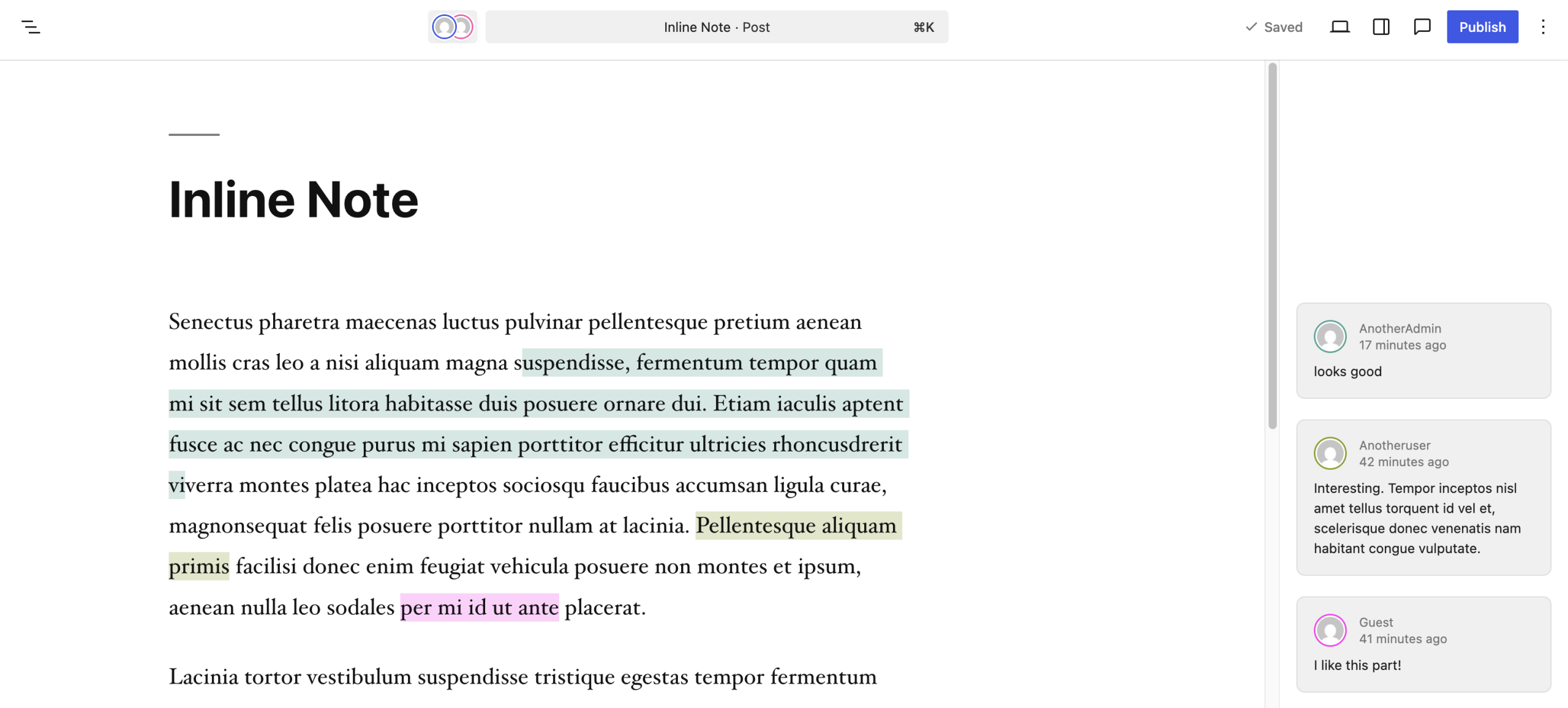


You must be logged in to post a comment.