Welcome to the official blog for the Plugins Team.
The team acts as gate-keepers and fresh eyes on newly submitted plugins, as well as reviewing any reported security or guideline violations.
Quick Links
The team acts as gate-keepers and fresh eyes on newly submitted plugins, as well as reviewing any reported security or guideline violations.
Quick Links
X-comment from +make.wordpress.org/core: Comment on External Library updates in WordPress 5.5: call for testing
As of 21:45 ET on 18 June, this SHOULD be resolved.
The original post remains below.
We are currently experiencing issues with pluginPlugin A plugin is a piece of software containing a group of functions that can be added to a WordPress website. They can extend functionality or add new features to your WordPress websites. WordPress plugins are written in the PHP programming language and integrate seamlessly with WordPress. These can be free in the WordPress.org Plugin Directory https://wordpress.org/plugins/ or can be cost-based plugin from a third-party. updates properly displaying on the front end.
Systems is looking into this. We will have this resolved as soon as possible, however we do not have an ETA at this time. We ask for your patience and understanding.
12:31 ET – The issue has been identified, and the people to address it are being brought in. At this time, we ask you NOT attempt to push your code again. It won’t help.
12:46 ET – While we’re working on a permanent fix, we are attempting to manually clear the backlog. You may see some plugins updating, but this does not mean the issue is resolved.
13:10 ET – We’ve cleared out as much of the backlog as possible, however the issue has not been resolved. No new commits will go through. Again, please don’t try to push code. It’s still down.
15:15 ET – Some preemptive patches have been applied for when the fix is finalized, however updates are still not functioning properly.
17:10 ET – The situation is still ongoing. Our attempted fixes did not correct the issue.
19:20 ET – No ETA, fix is still being worked on. In the meantime, we’re devising a way to let us manually run the jobs without the need for system intervention, in order to ensure security fixes are pushed in a timely fashion.
21:45 ET – A commit has been made to properly trigger the cron job that does the magic. We believe the situation to be resolved.
Please thank @otto42, @ocean90, and @dd32 for their hard work!
X-comment from +make.wordpress.org/docs: Comment on External Linking Policy – Trusted Sources
X-comment from +make.wordpress.org/core: Comment on Call for feedback – WP Notify v1 requirements document
X-comment from +make.wordpress.org/core: Comment on Merge Announcement: Plugins & Themes Auto-Updates
An early commit for WordPress 5.5 (which isn’t even in betaBeta A pre-release of software that is given out to a large group of users to trial under real conditions. Beta versions have gone through alpha testing in-house and are generally fairly close in look, feel and function to the final product; however, design changes often occur as part of the process., don’t get scared) is a long awaited update to SimplePie! That’s right #36669 has finally gone through.
The library has been updated in WordPress trunk from version 1.3.1 to version 1.5.5. Trunk always contains the bleeding edge, unreleased WordPress code that is being worked on for the next release. When you have a chance, please take the time to test your pluginPlugin A plugin is a piece of software containing a group of functions that can be added to a WordPress website. They can extend functionality or add new features to your WordPress websites. WordPress plugins are written in the PHP programming language and integrate seamlessly with WordPress. These can be free in the WordPress.org Plugin Directory https://wordpress.org/plugins/ or can be cost-based plugin from a third-party. on trunk to ensure you do not experience any issues or unintended behavior after this update.
Here are some resources that may help you:
Later, we will be emailing people whom we feel would be directly impacted by this change, but for now if your plugin uses RSS feeds in any way, or directly integrates with SimplePie, we ask you take the time to check if everything is still working.
Technically you always could, but now you can officially change the owner of a pluginPlugin A plugin is a piece of software containing a group of functions that can be added to a WordPress website. They can extend functionality or add new features to your WordPress websites. WordPress plugins are written in the PHP programming language and integrate seamlessly with WordPress. These can be free in the WordPress.org Plugin Directory https://wordpress.org/plugins/ or can be cost-based plugin from a third-party..
For most of you, this is going to be a “Meh, who cares” change. For me? Well, it’s always nice to let people take agency of their own plugins 🙂
In the newly renamed ‘Danger Zone’ of the advanced tab, we have a way for you to transfer ownership to someone. This must be done by the actual owner of the plugin, and they need to select the new owner from the drop down, which looks like this:
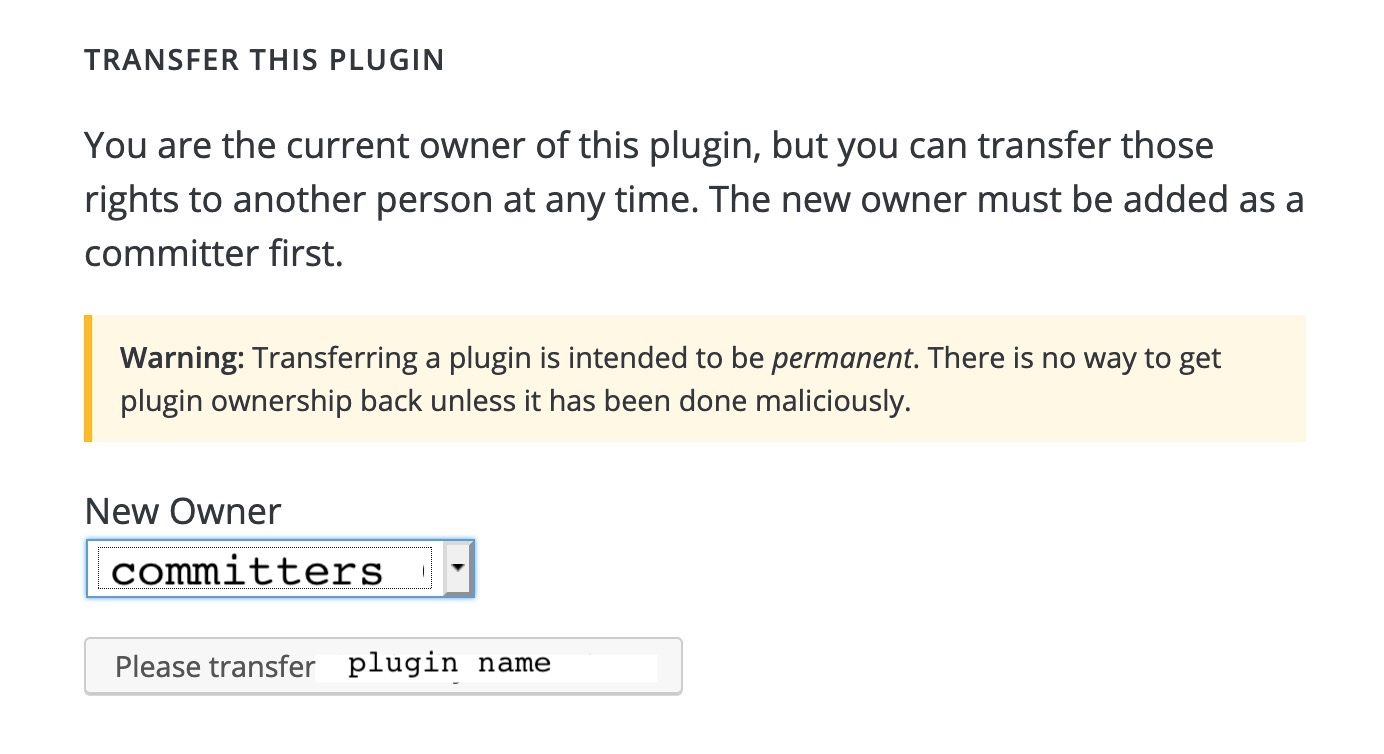
It’s pretty rare, but sometimes people want a specific account to be THE official owner of a plugin. Usually this relates to company-owned plugins.
The page will tell you who, but in most cases it’s whomever submitted the plugin.
Actually yes. At the end of the day, the owner accepts responsibility of everyone else who does things in the name of the plugin.
You can ask, but we’ll have to talk to the new owner to make sure this was actually a mistake and not something else.
I am well aware of the confusion caused by releasing this today, but this isn’t a joke.
Starting April 2020 you have the ability to close your own plugin without having to email us and explain why!
Log in with a committer account and go to the ADVANCED tab on your plugin. There, you will see a CLOSE THIS PLUGIN section that looks like this:

Read the warning. If you understand that the change is permanent, and you still want to close the plugin, press the button. Like magic, your plugin will be closed.
Anyone who has COMMIT access to a plugin. So now is the time for you to check who you gave commit access to, and prune the list. Please keep in mind, if you are managing a company plugin, it needs to be owned by a company account who has commit access. This is for your own legal protection.
Not without emailing the plugins team (plugins@wordpress.org) and explaining why you changed your mind.
The purpose of this requirement is to limit abuse (it does warn you the closure is intended to be permanent) and create a better experience for users. If people are constantly closing and reopening plugins, it makes users doubt the stability and security of the plugin.
Email plugins@wordpress.org and explain what the situation is, we’ll help you sort it out.
X-comment from +make.wordpress.org/core: Comment on Updating the Coding standards for modern PHP


