Welcome to the official blog for the Plugins Team.
The team acts as gate-keepers and fresh eyes on newly submitted plugins, as well as reviewing any reported security or guideline violations.
Quick Links
The team acts as gate-keepers and fresh eyes on newly submitted plugins, as well as reviewing any reported security or guideline violations.
Quick Links
X-comment from +make.wordpress.org/community: Comment on Cultivating More Effective Contributing on Contributor Days
tl;dr – If you use a tool to generate code (be that a website that generates settings pages, or something complex like an AI to build the whole pluginPlugin A plugin is a piece of software containing a group of functions that can be added to a WordPress website. They can extend functionality or add new features to your WordPress websites. WordPress plugins are written in the PHP programming language and integrate seamlessly with WordPress. These can be free in the WordPress.org Plugin Directory https://wordpress.org/plugins/ or can be cost-based plugin from a third-party.), remember that YOU are responsible for licensing.
All code hosted on WordPress.orgWordPress.org The community site where WordPress code is created and shared by the users. This is where you can download the source code for WordPress core, plugins and themes as well as the central location for community conversations and organization. https://wordpress.org/ has to be GPLGPL GPL is an acronym for GNU Public License. It is the standard license WordPress uses for Open Source licensing https://wordpress.org/about/license/. The GPL is a ‘copyleft’ license https://www.gnu.org/licenses/copyleft.en.html. This means that derivative work can only be distributed under the same license terms. This is in distinction to permissive free software licenses, of which the BSD license and the MIT License are widely used examples. Compatible. This is not in doubt. More and more people are using tools to build code for them, based on bare-bones input. With the advent of ChatGPT, this has become more popular.
To be clear here: There is no guideline AGAINST using generated code.
You’re welcome to use whatever tool you want to build plugins. That said, you are 100% responsible for that code if you chose to host it here. This is not a change to any guideline, merely a reminder that if you claim it’s your code, you are responsible for it.
But the important bit here is that if means if ChatGPT, for example, built your plugin, you have to verify that all the code used is GPL compatible. Just like you are expected to validate licenses on libraries and code-snippets, everything in your plugin has to be GPL compatible. Should we determine that your code is a copy of someone else’s or includes code from non-GPL plugins, your submission will be rejected and any live plugins will be closed.
Sadly this has already become a small issue, as people asked an AI to build a ‘scroll to top’ plugin and it literally copied code from another, existing, plugin hosted on WordPress.org. Actually five times. And they were all rejected since it was pretty obvious.
Now before someone asks, yes it’s fine to fork code. You have to credit them, however, and that’s something those AIs have been pretty bad at doing. Also remember that the AI can tell you how to submit a plugin and be wrong. And by wrong I mean totally, 100%, that was really some bad advice someone got wrong. Make sure you double check. Robots won’t take our jobs yet.
If you submit code, it’s your responsibility. Nothing’s changed.
tl;dr: I will be stepping down from pluginPlugin A plugin is a piece of software containing a group of functions that can be added to a WordPress website. They can extend functionality or add new features to your WordPress websites. WordPress plugins are written in the PHP programming language and integrate seamlessly with WordPress. These can be free in the WordPress.org Plugin Directory https://wordpress.org/plugins/ or can be cost-based plugin from a third-party. reviews by 1 July, 2023.
I will be stepping down from plugin reviews this year. I have been a part of this team for over a decade (and the rep for the majority of the time) and recognize a departure like this can be confusing, and could cause people jump to a whole lot of assumptions about the why.
This is a personal decision and has nothing to do with my passion for WordPress. It is a 100% personal, non-WordPress related, decision I made long ago (I told the team in July ’22). Suffice to say there is life ‘stuff’ going on and I cannot devote the time I once could to plugin reviews.
Many people have noticed and complained, with varying degrees of empathy, about the sudden uptick in delays with reviews (be they new plugins or security related). Those delays are directly related to that ‘stuff’ going on. I simply am not available as much as I was, and out of fairness to myself and the community, it’s time for me to retire from plugins.
We’re trying to figure out an onboarding doc, some demo plugins to help people test, getting people in a place where they can fill in the gaps. But this is not a fast process. We’ve actually never had real onboarding (I was thrown into the fire when I stepped in), and it’s going to be a challenge get a team to the place where they have as much weird plugin knowledge and gotchas as I have from my 10 years of experience.
There will absolutely be a learning curve for the people who step in after me. Things will be missed, things will be confusing, and mistakes will happen. I ask everyone be kind and patient.
I understand it became a one-woman show and I apologize for not asking for help and stepping down sooner before it became a crisis. At that point, it was impossible to set up a flag for help without causing these kinds of delays. But things like this happen out of your control, even when you plan. None of us expected the world to spiral like it did in 2019/20.
What’s next for me and WordPress? Writing and managing my plugins, developing code, and being around for some questions. I won’t vanish in the night, but after a decade? I think it will be good for us all to have someone fresh in there.
Some quick answers:
So again, I ask we all please be patient with all the changes coming. Once we sort out onboarding, we hope to be able to invite even more people, just like you, to the team!
X-comment from +make.wordpress.org/training: Comment on Introduction to WordPress Development: A proposed learning path
X-comment from +make.wordpress.org/community: Comment on Apply to Attend the 2023 Community Summit
tl;dr: Twitter will begin charging for APIAPI An API or Application Programming Interface is a software intermediary that allows programs to interact with each other and share data in limited, clearly defined ways. access, possibly as early as the 9th of February. If your pluginPlugin A plugin is a piece of software containing a group of functions that can be added to a WordPress website. They can extend functionality or add new features to your WordPress websites. WordPress plugins are written in the PHP programming language and integrate seamlessly with WordPress. These can be free in the WordPress.org Plugin Directory https://wordpress.org/plugins/ or can be cost-based plugin from a third-party. integrates with the API (be it v1.1 or v2), PLEASE make sure you look into the changes and how they might impact you!
Yesterday Twitter announced it will be charging for access to the API.
Estimated cost is ~$100/month, with a requirement of a valid ID, however there is no information yet as to how much traffic that entails. Since information is not going to be provided until next week (giving everyone a whopping max 3 days to figure this out), I wanted to make sure everyone was as notified as can be.
This will likely impact:
Access to search is already a pay-only service.
If your plugin (or the related service) does any of those, you will have to investigate if this change impacts you. If you are impacted, you will need to update (or close) your plugin accordingly. I know a lot of free plugins will have some hard choices to make here.
For plugin users, if a plugin suddenly breaks on/around the 9th, please be generous and kind to the developers. They really got blindsided by this, and it’s a lot to sort out in a short amount of time.
tl;dr: Do you have demo plugins that are dangerous on purpose? We want to see them!
One of the behind-the-scenes steps going on right now is figuring out HOW to onboard and make sure people are good at looking through plugins, finding the security/guideline issues, and can explain what they are and why they’re bad. While most of the explanation we have covered in pre-defined replies, you should know why something is wrong 🙂
In order to do this, we need some intentionally busted plugins so people can get experience in looking for ‘wrong’ in a safe situation.
By ‘wrong’ I mean…
This is an incomplete list. I doubt anyone can make a plugin with 100% of all the things we look for since that changes nearly every day as people come up with new and inventive ways to be dangerous. Of course if you can, I’d love to see that too!
While we certainly can use some submitted/closed plugins for this, it would be nice to have a set of “These are some busted plugins to practice on”
I know some of you are clever folks and have things like that for fun, and right now, we want to see them! Email them (either zip or link to your repo) to plugins@wordpress.org with the subject “Demo Plugin for Reviewers” (we make heavy use of email filtering, so that subject is important!).
tl;dr: All representatives of a pluginPlugin A plugin is a piece of software containing a group of functions that can be added to a WordPress website. They can extend functionality or add new features to your WordPress websites. WordPress plugins are written in the PHP programming language and integrate seamlessly with WordPress. These can be free in the WordPress.org Plugin Directory https://wordpress.org/plugins/ or can be cost-based plugin from a third-party. are required to comply with the Community Code of Conduct.
One of the longstanding open tickets for the Plugin Guidelines has been adding in the Community Code of Conduct.
With the announcement of the Incident Team, we have updated the guidelines to indicate that all representatives of a plugin must comply with the Community Code of Conduct.
The updates can be found in the “Developer Expectations” (where we list out the guidelines/CoCs you must comply with) and in Guideline #9 (Developers and their plugins must not do anything illegal, dishonest, or morally offensive.)
Effectively? Yes, you actually do have to follow the Community Code of Conduct if you want to be part of the community.
This shouldn’t be a surprise to anyone.
After State of the WordState of the Word This is the annual report given by Matt Mullenweg, founder of WordPress at WordCamp US. It looks at what we’ve done, what we’re doing, and the future of WordPress. https://wordpress.tv/tag/state-of-the-word/., you may have noticed a couple new things for plugins and themes.

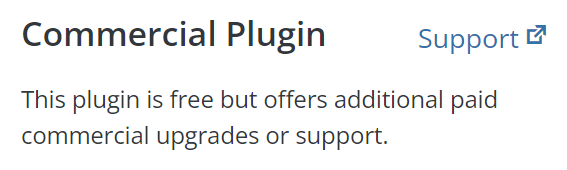
This is the start of a broader categorization of plugins and themes. The eventual goal of which is to help users to better find plugins or themes that fit their needs.
So we started looking at basic categories for plugins and themes, and how we would integrate that into wordpress.orgWordPress.org The community site where WordPress code is created and shared by the users. This is where you can download the source code for WordPress core, plugins and themes as well as the central location for community conversations and organization. https://wordpress.org/.
One thing we noticed immediately was that there are a lot of commercial plugins and themes. They’re not the majority, but there are a lot of them that have a lot of users.
The other thing we noticed was there were a lot of community based plugins and themes, which are open sourceOpen Source Open Source denotes software for which the original source code is made freely available and may be redistributed and modified. Open Source **must be** delivered via a licensing model, see GPL. on GithubGitHub GitHub is a website that offers online implementation of git repositories that can easily be shared, copied and modified by other developers. Public repositories are free to host, private repositories require a paid subscription. GitHub introduced the concept of the ‘pull request’ where code changes done in branches by contributors can be reviewed and discussed before being merged by the repository owner. https://github.com/ or some other repository system.
In both cases, it became very clear that we didn’t have any easy way to link back to those systems. We have support forums for all of the plugins, but we often get questions about the commercial version of a pluginPlugin A plugin is a piece of software containing a group of functions that can be added to a WordPress website. They can extend functionality or add new features to your WordPress websites. WordPress plugins are written in the PHP programming language and integrate seamlessly with WordPress. These can be free in the WordPress.org Plugin Directory https://wordpress.org/plugins/ or can be cost-based plugin from a third-party.. Similarly, we don’t have any obvious way to link back to a github, for example, to provide users a way to contribute to that community.
So we introduced a new taxonomyTaxonomy A taxonomy is a way to group things together. In WordPress, some common taxonomies are category, link, tag, or post format. https://codex.wordpress.org/Taxonomies#Default_Taxonomies. to our systems, and now plugins and theme authors can opt into it, if they want.
To opt in a plugin or theme, email plugins@wordpress.org, or themes@wordpress.org, and simply ask to opt into it. This is a manual process for now. In the future, we will be adding a method for plugins and themes to do it themselves.
Once your plugin or theme is added, you will get a new feature (on the advanced tab for plugins, or at the bottom of the listing page for themes). For both cases, it’s a simple URLURL A specific web address of a website or web page on the Internet, such as a website’s URL www.wordpress.org entry.

For commercial, this will show up as a support link. For community, this will show up as a contribute link.
And, of course, this is in no way final. We plan to use this and other categories in the future to improve the overall directory system as a whole. In what ways, we don’t exactly know just yet. We value your input, and look forward to seeing what ideas the community has. 🙂


