The AccessibilityAccessibilityAccessibility (commonly shortened to a11y) refers to the design of products, devices, services, or environments for people with disabilities. The concept of accessible design ensures both “direct access” (i.e. unassisted) and “indirect access” meaning compatibility with a person’s assistive technology (for example, computer screen readers). (https://en.wikipedia.org/wiki/Accessibility) Team shares their expertise to improve the accessibility of WordPress coreCoreCore is the set of software required to run WordPress. The Core Development Team builds WordPress. and resources.
Introducing the AccessibilityAccessibilityAccessibility (commonly shortened to a11y) refers to the design of products, devices, services, or environments for people with disabilities. The concept of accessible design ensures both “direct access” (i.e. unassisted) and “indirect access” meaning compatibility with a person’s assistive technology (for example, computer screen readers). (https://en.wikipedia.org/wiki/Accessibility) Lab pluginPluginA plugin is a piece of software containing a group of functions that can be added to a WordPress website. They can extend functionality or add new features to your WordPress websites. WordPress plugins are written in the PHP programming language and integrate seamlessly with WordPress. These can be free in the WordPress.org Plugin Directory https://wordpress.org/plugins/ or can be cost-based plugin from a third-party.! The plugin aims to offer a combination of CoreCoreCore is the set of software required to run WordPress. The Core Development Team builds WordPress. related experiments and practical tools that solve shared problems for all to benefit from. The goal is not to move accessibility fixes out of Core and into a separate plugin.
Please consider this plugin an early approach to gather around and improve before we add it to the plugin repository as a canonical plugin.
Why a canonical plugin
The Accessibility Lab plugin follows the approach of two existing plugins in the WordPress project: Performance Lab plugin and the AI plugin. Each plugin provides a combination of features and experiments that anyone can help test and use. Each plugin is also maintained by their respective team.
From the Performance Lab plugin, the Accessibility Lab plugin takes inspiration from how they ship individual modules as a way to test and get feedback for features slated for Core that can’t exist in Core for different reasons. Unlike Performance Lab, the features won’t be broken into individual plugins. They’ll stay bundled in a single Accessibility plugin for ease of use.
From the AI plugin, it borrows the idea of bringing solutions together. When someone in the community has already built something that works well and wants to contribute it back to the wider community, it makes more sense to give it an official, centralized home. Accessibility needs come up again and again across WordPress in schools, agencies, and everywhere in between. This plugin is a way to collect that work in one place for all to benefit from.
Together, these two ideas shape what this plugin is for: a new contribution pathway for folks who want to test early items headed to Core, and a reliable community resource for features that solve problems shared across the project.
What is the Accessibility Lab plugin
This plugin aims to have every module fall into one of these two buckets:
Core experiments: this includes features that are architecturally hard to get right (a real migrationMigrationMoving the code, database and media files for a website site from one server to another. Most typically done when changing hosting companies., schema change, or performance tradeoff) and need a working implementation gathering real data before Core can responsibly commit to them. This ensures that the best option ships in Core based on real-world usage.
Practical tools: this includes both features developed directly in the plugin or bringing in plugins already doing real, useful accessibility work in the wild with full credit to the people who built them. These items do not necessarily come with an implied promise that they’re trying to land in Core and are instead meant to be shared utilities for the community to benefit from.
This means success looks like a combination of the following:
Features are proposed and merged into Core from the Accessibility Lab plugin, based on real-world testing and experimentation in the plugin first.
Practical tools that solve shared problems are ready for the broader community to benefit from with a community-backed option that can be relied upon.
Solid adoption of the plugin to ensure greater testing and confidence in different features.
More folks contribute to Accessibility efforts, with the Accessibility Lab plugin being an additional option to contribute over just Core.
What it’s not
This is not “install this plugin to have accessibility needs met” or “to make WordPress accessible”. That approach causes real harm.
The Accessibility Lab plugin is not a substitute for fixing accessibility in Core. It is a place to test new ideas, gather feedback, and develop features that need real-world testing before they are ready for Core.
If a feature or fix does not clearly fit into one of the purposes described above, it does not belong in Accessibility Lab, no matter how useful it might be.
Straightforward accessibility bugs should still be fixed directly in WordPress Core or GutenbergGutenbergThe Gutenberg project is the new Editor Interface for WordPress. The editor improves the process and experience of creating new content, making writing rich content much simpler. It uses ‘blocks’ to add richness rather than shortcodes, custom HTML etc.
https://wordpress.org/gutenberg/. They do not need to become Accessibility Lab modules first. Examples include adding or correcting ARIA attributes, using the proper HTMLHTMLHTML is an acronym for Hyper Text Markup Language. It is a markup language that is used in the development of web pages and websites. elements and semantics, fixing missing accessible names or labels, correcting keyboard interactions, or resolving other clear failures of established accessibility standards.
Accessibility Lab is most useful when a solution needs more discussion, testing, or feedback from real users. It gives the Accessibility Team a way to try solutions without delaying smaller accessibility fixes.
The goal is to improve accessibility throughout WordPress, not to move accessibility fixes out of Core and into a separate plugin. When the right solution is clear, the fix should happen where the problem exists.
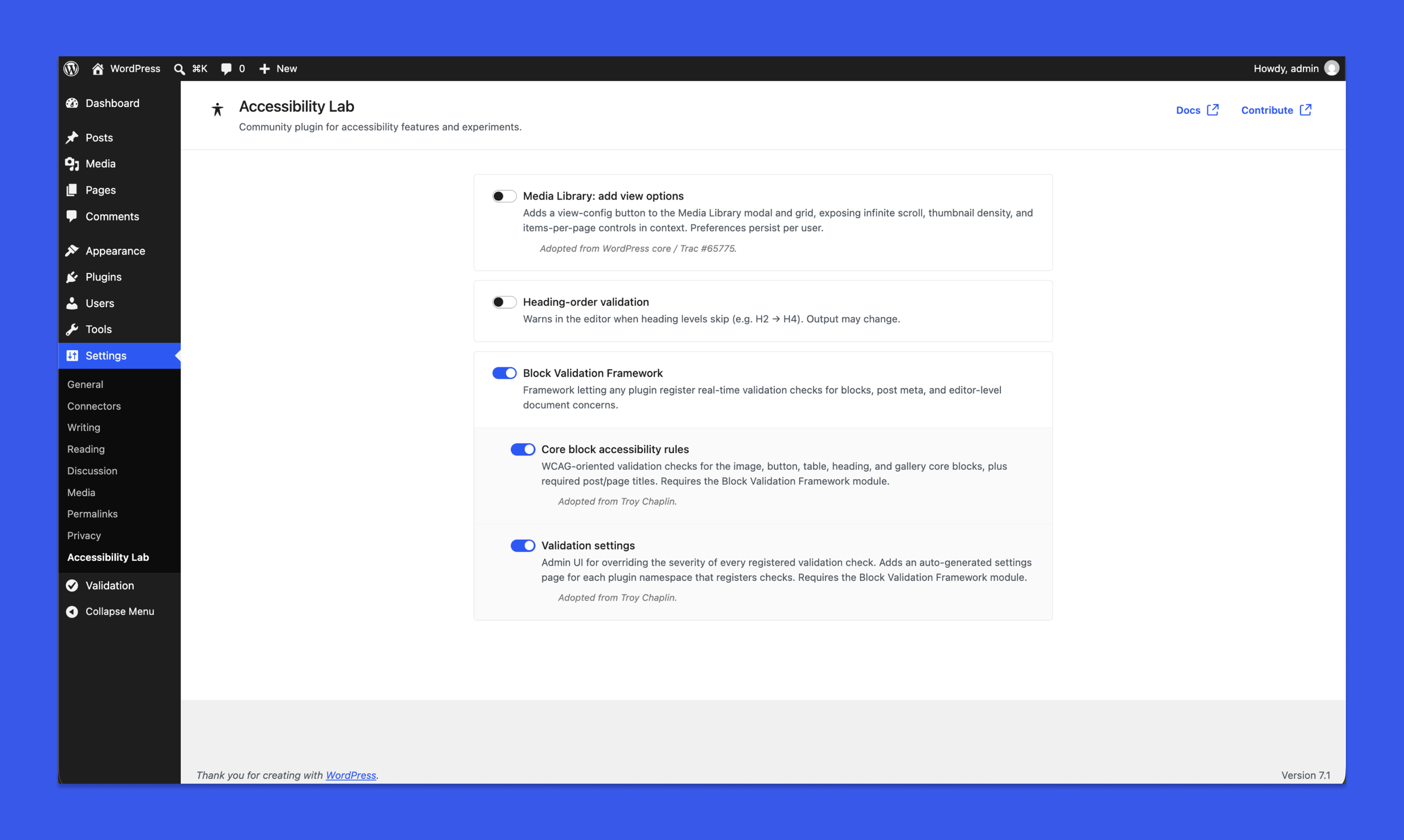
WordPress’s media library now defaults to infinite scroll as of WordPress 7.1, with an opt-out available in user profiles. There’s an active conversation happening in Core right now about the right long-term UIUIUI is an acronym for User Interface - the layout of the page the user interacts with. Think ‘how are they doing that’ and less about what they are doing. for surfacing this choice differently (PR #12795 and Trac #65775). This option in the Accessibility Lab plugin goes beyond turning infinite scroll on/off in the Media Library and includes additional view options to control how many items show by default, the density level, and whether to always show file names. Bringing in feedback from folks using this option can help shape the placement and the approach for an iteration on where and what surfaces in Core for the Media Library.
BlockBlockBlock is the abstract term used to describe units of markup that, composed together, form the content or layout of a webpage using the WordPress editor. The idea combines concepts of what in the past may have achieved with shortcodes, custom HTML, and embed discovery into a single consistent API and user experience. Accessibility Checks
To help address the shared problem of inaccessible content going out with things like missing alt text or skipped heading levels, an additional module brings in the great work from Troy Chaplin. His Block Accessibility Checks plugin brings a real-time, three-tier WCAGWCAGWCAG is an acronym for Web Content Accessibility Guidelines. These guidelines are helping make sure the internet is accessible to all people no matter how they would need to access the internet (screen-reader, keyboard only, etc) https://www.w3.org/TR/WCAG21/. validation for blocks, metaMetaMeta is a term that refers to the inside workings of a group. For us, this is the team that works on internal WordPress sites like WordCamp Central and Make WordPress. fields, and document structure, with a hook system open enough that blocks from other plugins get checked too. Troy was game for this to be added to the Accessibility Lab plugin so a higher ed accessibility office and a hobbyist blogger can point to the same trusted answer to this problem (and ideally help improve it). The block accessibility validation tools are a practical exploration for providing authors with better accessibility tools. It’s not currently slated for inclusion into core, but different pieces can be evaluated in the future.
Heading-order validation
Skipping heading levels (ex: an H2 followed by an H4) breaks the document outline that screen readers and other assistive tech use to summarize and navigate a page. WCAG 1.3.1 (Info and Relationships) treats it as a failure, and it’s one of the most common accessibility mistakes editors make without realizing it. There’s a longstanding proposal to fix this in #10581 that asks for a hierarchy-checker notice inside the Heading block settings so writers see the problem as they set the level. #69891 also covers surfacing the same errors from the Document Outline panel. Both are open, and neither has landed yet. This module ships a version people can rely on now with a real-time editor warning as soon as a heading block introduces a gap, so writers can correct the outline in the moment rather than discovering the issue in a later accessibility audit. It builds on the plugin’s Block Validation Framework, so warnings share the same UI and severity controls as every other check the framework surfaces.
Ideas for what’s next
Searchable alt text is the clearest example of where this work could go next. Shout out to Joe Dolson for flagging this. For context, alt text lives in postmeta today, which is why it can’t be searched at scale. Trac #39004 has been asking for exactly this for years, tangled up with the broader postmeta search performance problem tracked in Trac #39358. It’s precisely the kind of problem this plugin exists for: worth fixing, and architecturally hard enough that Core can’t move forward without a real implementation to test against first.
If you know of other Core accessibility problems stuck in that same spot, please share below. I’d love a running list of ideas and problems to tackle as the plugin takes shape.
How you can help
Test the plugin as it’s in the prototype stage. File ideas as GitHubGitHubGitHub is a website that offers online implementation of git repositories that can easily be shared, copied and modified by other developers. Public repositories are free to host, private repositories require a paid subscription. GitHub introduced the concept of the ‘pull request’ where code changes done in branches by contributors can be reviewed and discussed before being merged by the repository owner. https://github.com/ issues. Open PRs. If you want to help shape what comes next, join the #accessibility channel and introduce yourself to get started.