Title: HelpHub | Page 3 | Make WordPress Documentation
---
# Category Archives: HelpHub
[ ](https://profiles.wordpress.org/estelaris/) [Estela Rueda](https://profiles.wordpress.org/estelaris/)
8:03 am _on_ October 5, 2022
Tags: [docs ( 159 )](https://make.wordpress.org/docs/tag/docs/),
[helphub ( 44 )](https://make.wordpress.org/docs/tag/helphub/)
# [Reclassification of end-user documentation](https://make.wordpress.org/docs/2022/10/05/reclassification-of-end-user-documentation/)
The team did a second revision of the first recommended site map because we still
found articles that should be moved to the developers documentation. The reason
is that we want to keep the end-user documentation as clean as possible of developer
jargon and make sure it only provides advice on **how to use WordPress** not **how
to alter it with code**.
The main goal of article reclassification is to improve search and allow new articles
to be added into the existing categories without creating a ‘miscellaneous’ categoryCategory
The 'category' taxonomy lets you group posts / content together that share a common
bond. Categories are pre-defined and broad ranging..
The first [site map](https://docs.google.com/spreadsheets/d/11RxfocYIC8NjdS5em0yTk4eGGwZPhZbnR7E-CzUGT84/edit?usp=sharing)
included 4 main categories and subcategories under each. The new recommendation
maintains the 4 main categories, some subcategories have been renamed to better
work in the future.

[Link to the spreadsheet for better reading](https://docs.google.com/spreadsheets/d/11RxfocYIC8NjdS5em0yTk4eGGwZPhZbnR7E-CzUGT84/edit?usp=sharing)
## The revision
As mentioned before, the [review focused on removing all articles that were developer-focused](https://docs.google.com/spreadsheets/d/11RxfocYIC8NjdS5em0yTk4eGGwZPhZbnR7E-CzUGT84/edit?usp=sharing).
Some articles only require content review and move some of the too-technical parts.
These parts were not discarded as they are still valuable information and will be
moved to DevHub.
## Categories and subcategories
The categories for end-user documentation were created to improve search, making
it easier for the user to find the information. A secondary goal is to allow a continued
learning path.
### WordPress overview
WordPress Overview is the first category with 3 subcategories:
* Where to start
* FAQs
* About WordPress
The intention of these subcategories is to provide a starting point for the new
user and a quick access to resources to more seasoned users in the form of FAQs.
About WordPress provides background information on how to become a contributor,
WordPress’ history, etc.
### Technical guides
Technical guides is the second category which includes 3 subcategories:
* Installation
* Security
* Maintenance
Although the technical guides include topics that could be seen as developer-focused,
there is some basic information that the end-user needs to learn about installing
WordPress and working with their hosting companies, as well as maintaining a healthy
and secured site.
### Support guides
Support guides is the third category, also includes 3 subcategories:
* The dashboard
* Publishing
* Media
These guides are all about the software, getting to know the moving parts of the
front end, how to manage and publish content and media. The guides include articles
for Classic Editor as well as the BlockBlock Block is the abstract term used to
describe units of markup that, composed together, form the content or layout of
a webpage using the WordPress editor. The idea combines concepts of what in the
past may have achieved with shortcodes, custom HTML, and embed discovery into a
single consistent API and user experience. Editor.
### Customization
This is the fourth category and as the titles says, it is all about giving the site
or blog the look and feel that the user wants. The number of subcategories increased
to 9 and this will help with categorization as the FSE features and new blocks are
developed.
* Appearance
* Default themes
* Block Editor
* Media blocks
* Text blocks
* Design blocks
* Embed blocks
* Theme blocks
* WidgetWidget A WordPress Widget is a small block that performs a specific function.
You can add these widgets in sidebars also known as widget-ready areas on your
web page. WordPress widgets were originally created to provide a simple and easy-
to-use way of giving design and structure control of the WordPress theme to the
user. blocks
## Related tickets
Because there are many moving parts on the site map, everything has been documented
in tickets in the [documentation issue tracker repository](https://github.com/WordPress/Documentation-Issue-Tracker)
in GH
| [190](https://github.com/WordPress/Documentation-Issue-Tracker/issues/190) | Merge articles |
| [192](https://github.com/WordPress/Documentation-Issue-Tracker/issues/192) | Change article title |
| [373](https://github.com/WordPress/Documentation-Issue-Tracker/issues/373) | Delete articles from HH |
| [388](https://github.com/WordPress/Documentation-Issue-Tracker/issues/388) | Move from HH to DH |
| [425](https://github.com/WordPress/Documentation-Issue-Tracker/issues/425) | Content review duplicated article? Dimension Controls Overview |
| [426](https://github.com/WordPress/Documentation-Issue-Tracker/issues/426) | FAQ’s content review |
| [427](https://github.com/WordPress/Documentation-Issue-Tracker/issues/427) | Content review Finding WP Help |
| [429](https://github.com/WordPress/Documentation-Issue-Tracker/issues/429) | Content review How WP processes post content |
| [430](https://github.com/WordPress/Documentation-Issue-Tracker/issues/430) | Content review Creating a Search page |
| [442](https://github.com/WordPress/Documentation-Issue-Tracker/issues/442) | Content review New to WordPress – Where to Start |
| [443](https://github.com/WordPress/Documentation-Issue-Tracker/issues/443) | Content review Introduction to Blogging |
| [458](https://github.com/WordPress/Documentation-Issue-Tracker/issues/458) | Content review Comments in WP |
| [469](https://github.com/WordPress/Documentation-Issue-Tracker/issues/469) | Content review Video shortcodeShortcode A shortcode is a placeholder used within a WordPress post, page, or widget to insert a form or function generated by a plugin in a specific location on your site. |
| [470](https://github.com/WordPress/Documentation-Issue-Tracker/issues/470) | Content review Weblog client |
| [471](https://github.com/WordPress/Documentation-Issue-Tracker/issues/471) | Content review WP feeds |
| [473](https://github.com/WordPress/Documentation-Issue-Tracker/issues/473) | Content review duplicate: WP.org vs WP. com |
| [Tech parts](https://github.com/orgs/WordPress/projects/26/views/1) | Inventory of Technical Parts From End User Docs |
## Next steps
The [#docs](https://make.wordpress.org/docs/tag/docs/) team will collaborate with
other teams to find the best way to make all the changes. So far, the hosting team
is collaborating in moving articles to DevHub.
* Create new categories and subcategories
* Change title names to articles and create 301s for older URLs (with the metaMeta
Meta is a term that refers to the inside workings of a group. For us, this is
the team that works on internal WordPress sites like WordCamp Central and Make
WordPress. team’s direction)
* Merge pages and create 301’s
* Delete pages and redirect to similar content pages/articles.
## Other articles written as part of the redesign of HelpHub
* [Findings in the reclassification of WordPress.org documentation](https://make.wordpress.org/docs/2020/02/21/findings-in-the-reclassification-of-wordpress-org-documentation/)
* [Exploration of a new classification for user documentation](https://make.wordpress.org/docs/2020/06/22/exploration-of-a-new-classification-for-user-documentation/)
* [Requirements for a new design for the article pages in user documentation](https://make.wordpress.org/docs/2021/02/01/requirements-for-a-new-design-for-the-article-pages-in-user-documentation/)
* [Update on the revision of documentation](https://make.wordpress.org/docs/2021/04/05/update-on-the-revision-of-documentation/)
* [The hashtag and its future in documentation articles](https://make.wordpress.org/docs/2022/02/20/the-hashtag-and-its-future-in-documentation-articles/)
* [First review on the new site map for HelpHub](https://make.wordpress.org/docs/2022/03/07/first-review-on-the-new-sitemap-for-helphub-or-documentation/)
## Contributions
If you are interested in making any content review on any of the tickets above,
reach out to [@estelaris](https://profiles.wordpress.org/estelaris/) on SlackSlack
Slack is a Collaborative Group Chat Platform [https://slack.com/](https://slack.com/).
The WordPress community has its own Slack Channel at [https://make.wordpress.org/chat/](https://make.wordpress.org/chat/)
or leave a comment in the GH ticket.
_Props to [@femkreations](https://profiles.wordpress.org/femkreations/) for reviewing
the many opened tickets. [@milana\_cap](https://profiles.wordpress.org/milana_cap/)
and [@kenshino](https://profiles.wordpress.org/kenshino/) for reviewing the content.__
[@jonoaldersonwp](https://profiles.wordpress.org/jonoaldersonwp/) for providing
SEO recommendations._
[#helphub](https://make.wordpress.org/docs/tag/helphub/)
* [Login to Reply](https://login.wordpress.org/?redirect_to=https%3A%2F%2Fmake.wordpress.org%2Fdocs%2F2022%2F10%2F05%2Freclassification-of-end-user-documentation%2F%23respond&locale=en_US)
[ ](https://profiles.wordpress.org/estelaris/) [Estela Rueda](https://profiles.wordpress.org/estelaris/)
5:52 pm _on_ March 7, 2022
Tags: [docs ( 159 )](https://make.wordpress.org/docs/tag/docs/),
[helphub ( 44 )](https://make.wordpress.org/docs/tag/helphub/)
# [First review on the new Sitemap for HelpHub](https://make.wordpress.org/docs/2022/03/07/first-review-on-the-new-sitemap-for-helphub-or-documentation/)
Following up on the post [Explorations of a new classification for user documentation](https://make.wordpress.org/docs/2020/06/22/exploration-of-a-new-classification-for-user-documentation/),
we suggested to create 4 pillars (categories) and subcategories. My suggestion is
to keep the subcategories to the minimum and add as many articles as needed, this
will allow the system to grow as needed.
## The 4 pillars in HelpHub
The 4 suggested pillars with their own subcategories are:
1. WP Overview
2. * About WordPress
* Resources
* FAQs
3. Technical guides
4. * WordPress installation
* WordPress multisites
* Configuration
* Maintenance
* Security
* Troubleshooting
5. Support guides
6. * Get to know the dashboard
* Publishing
* Media
7. Customization
8. * Appearance
* Default themes
* Classic Editor
* BlockBlock Block is the abstract term used to describe units of markup that,
composed together, form the content or layout of a webpage using the WordPress
editor. The idea combines concepts of what in the past may have achieved with
shortcodes, custom HTML, and embed discovery into a single consistent API and
user experience. Editor
* Common Blocks
* Formatting
* Layout elements
* Theme Blocks
* Widgets
* Embeds
## What has been done
During Google Season of Docs 2020, there was a project to reclassify all the articles,
change article titles to follow the new style guide being written at the time and
review the content (including links, outdated content, etc).
[These are some of title changes](https://github.com/WordPress/Documentation-Issue-Tracker/issues/192)
given and the team will discuss the next steps to either change the affected URLs
or not, but that is for another post.
Due to the rotation of contributors and the team focusing on other issues, the revision
of content is still ongoing. If you would like to help out, join a meeting or reach
out to [@femkreations](https://profiles.wordpress.org/femkreations/) on WordPress.
orgWordPress.org The community site where WordPress code is created and shared by
the users. This is where you can download the source code for WordPress core, plugins
and themes as well as the central location for community conversations and organization.
[https://wordpress.org/](https://wordpress.org/), [@Femy](https://profiles.wordpress.org/femy/)
on [Slack](https://make.wordpress.org/chat/) and she will guide you.
The new titles and the reclassification has been done. We will continue to include
articles that are still to be written, as well as any new article.
## The first draft
[This is a first draft of the Sitemap](https://docs.google.com/spreadsheets/d/1_Ea2yeF5Rfy_YDk7pBRJ4rdljhMjygXFqBq8gWwhbaE/edit?usp=sharing)
and we need your help to make sure articles are in the correct categoryCategory
The 'category' taxonomy lets you group posts / content together that share a common
bond. Categories are pre-defined and broad ranging. or if there is anything else
we need to add. You can leave your comments on this post or in the Draft of the
Sitemap linked above.
### What is up for review
* Category names
* Subcategory names
* Articles classified in the correct category/subcategory
### What is not for review
* The four pillars (the title yes, but we won’t be adding anymore pillars)
* Order of articles under categories nor order of subcategories (we will review
them at a later time)
* New name titles for articles (these were given during GSoD and have been already
reviewed and accepted/rejected by the [#docs](https://make.wordpress.org/docs/tag/docs/)
team)
## Other articles written as part of the redesign of HelpHub
* [Findings in the reclassification of WordPress.org documentation](https://make.wordpress.org/docs/2020/02/21/findings-in-the-reclassification-of-wordpress-org-documentation/)
* [Exploration of a new classification for user documentation](https://make.wordpress.org/docs/2020/06/22/exploration-of-a-new-classification-for-user-documentation/)
* [Requirements for a new design for the article pages in user documentation](https://make.wordpress.org/docs/2021/02/01/requirements-for-a-new-design-for-the-article-pages-in-user-documentation/)
* [Update on the revision of documentation](https://make.wordpress.org/docs/2021/04/05/update-on-the-revision-of-documentation/)
* [The hashtag and its future in documentation articles](https://make.wordpress.org/docs/2022/02/20/the-hashtag-and-its-future-in-documentation-articles/)
If you would like to contribute or have any questions, reach out to [@estelaris](https://profiles.wordpress.org/estelaris/)
on [Slack](https://make.wordpress.org/chat/) or leave a comment.
_Props to _[@milana_cap](https://profiles.wordpress.org/milana_cap/) _for peer review._
[#helphub](https://make.wordpress.org/docs/tag/helphub/)
* [Login to Reply](https://login.wordpress.org/?redirect_to=https%3A%2F%2Fmake.wordpress.org%2Fdocs%2F2022%2F03%2F07%2Ffirst-review-on-the-new-sitemap-for-helphub-or-documentation%2F%23respond&locale=en_US)
[ ](https://profiles.wordpress.org/estelaris/) [Estela Rueda](https://profiles.wordpress.org/estelaris/)
7:31 pm _on_ February 20, 2022
Tags: [accessibility ( 4 )](https://make.wordpress.org/docs/tag/accessibility/),
[docs ( 159 )](https://make.wordpress.org/docs/tag/docs/), [helphub ( 44 )](https://make.wordpress.org/docs/tag/helphub/)
# [The hashtag and its future in documentation articles](https://make.wordpress.org/docs/2022/02/20/the-hashtag-and-its-future-in-documentation-articles/)
[In a previous post](https://make.wordpress.org/docs/2021/02/01/requirements-for-a-new-design-for-the-article-pages-in-user-documentation/),
we listed the requirements for the new design for HelpHub. This article is going
to discuss one particular requirement, the** hashtag at the end of the headlines
inside an article**.
Basically, we want to remove the # character from the headlines. It may be a radical
change but it is necessary for accessibilityAccessibility Accessibility (commonly
shortened to a11y) refers to the design of products, devices, services, or environments
for people with disabilities. The concept of accessible design ensures both “direct
access” (i.e. unassisted) and “indirect access” meaning compatibility with a person’s
assistive technology (for example, computer screen readers). (https://en.wikipedia.
org/wiki/Accessibility) reasons.
First of all, let’s mention the requirements to remove or replace the hashtag. The
function must be:
1. Clear on purpose
2. Easy to read with keyboard
3. Reduce visual noise
4. Not polluting the link’s list for screen readers
## # is it an anchor or a link?
The hashtag is used at the end of a headline in the articles as seen in the image
below. In order to define its future, we need to understand its behavior.

Image of a headline including the hashtag
The hashtag is a link; the anchor is the H2 in the example above. It’s the anchor
element, but it’s the link behavior, so it is ambiguous.
Technically, anchor refers to the target of an on-page link. This appears to be
a link that gives easy access to identify the URLURL A specific web address of a
website or web page on the Internet, such as a website’s URL www.wordpress.org that
will give you access to the current location on the document. That’s…actually kind
of complicated.
## What about accessibility?
The icon of the character used is not as important as communicating the function
of the link. Right now, the** #** has aria-hidden=true label, so it won’t be read
at all.
```wp-block-code
```
[Link](https://meta.trac.wordpress.org/browser/sites/trunk/wordpress.org/public_html/wp-content/plugins/support-helphub/inc/handbook-toc/table-of-contents.php#L196)
to the code page, line 196
It’s backed by screen reader text that duplicates the heading title, but is also
nested inside the heading; this means that the heading text will be read (e.g.)“
Recommended setup Recommended setup”. It’s creating duplicate text nested inside
the heading and does not expose any visible text to explain the purpose.
## The options
After some research, I have found several options for replacing and/or removing
the hashtag.
* Adding the link to the heading with a character
* Making the heading a link
* Replacing the hashtag with a fly-out menu
### Adding the link to the heading
Adding the link to the heading,[ as used by GitHub](https://docs.github.com/en/actions/learn-github-actions/introduction-to-github-actions#steps),
where the link is currently the method to expose the link to that section. It can
also be linked from the topics table, at the top of the article. We would have to
make sure the implementation is accessible to others besides sighted mouse users.
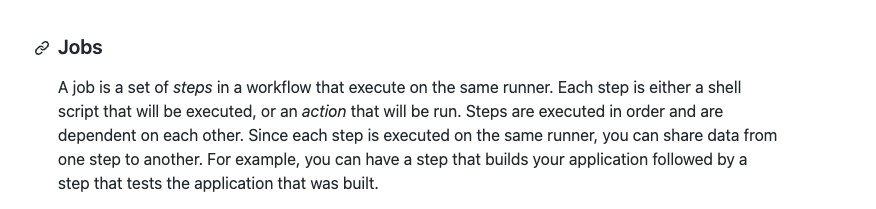
The link element can be added at the beginning of the headline.
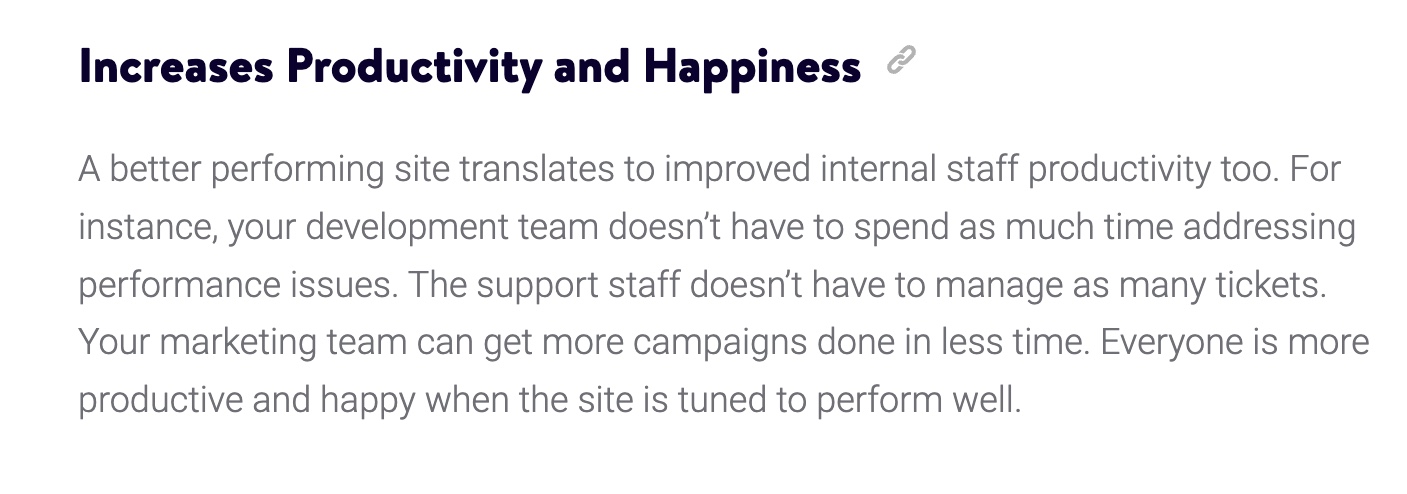
The link element can also be inserted at the end of the headline.
### Adding the link to the heading
Adding the link to the heading is reasonable and the simplest solution to replace
the hashtag, as it will simplify the problem: the functionality will be clear and
the visual noise would be reduced considerably.
There are arguments against providing links that point to themselves, however, as
it can make a confusing interaction. One of the arguments against this method is
that it pollutes the link list on a screen reader. The way the hashtag is presented
now, already pollutes the screen reader’s link list.
### Replacing the hashtag
Replacing the hashtag with a fly-out menu, as [explained by the w3.org](https://www.w3.org/WAI/tutorials/menus/flyout/).
The w3.org recommends using the fly-out menu to meet WCAGWCAG WCAG is an acronym
for Web Content Accessibility Guidelines. These guidelines are helping make sure
the internet is accessible to all people no matter how they would need to access
the internet (screen-reader, keyboard only, etc) [https://www.w3.org/TR/WCAG21/](https://www.w3.org/TR/WCAG21/)..
The fly-out menu removes the need for multiple page loads. The biggest disadvantage
is for people with reduced dexterity who can have trouble or it could be almost
impossible to operate fly-out menus,which can be prevented with the correct implementation.
_Video showing how the fly-out menu operates_

The design above would be changed to meet the WordPress.orgWordPress.org The community
site where WordPress code is created and shared by the users. This is where you
can download the source code for WordPress core, plugins and themes as well as the
central location for community conversations and organization. [https://wordpress.org/](https://wordpress.org/)
design style.
### Removing the Symbol
[_Is removing the symbol entirely an option?_](https://www.w3.org/WAI/WCAG21/Techniques/html/H4#examples)_
_Another recommendation from w3.org is placing the interactive elements in an order
that follows sequence. This means adding a table of contents which will link to
the interactive element, the headline in this case. Basically, the way it is right
now but without the hashtag.
_Video showing mouse-click to headline and the URL pointing to that headline_
## References
* [Best Practices for Accessible Links, CA State University – Accessible Technology Initiative](https://www.fullerton.edu/ATI/website/best-practices-accessible-links.php)
* [Making Accessible Links: 15 Golden Rules For Developers, Sitepoint](https://www.sitepoint.com/15-rules-making-accessible-links/)
* [Are your Anchor Links Accessible? – Automating accessible anchor links by Amber Wilson](https://amberwilson.co.uk/blog/are-your-anchor-links-accessible/#automating-accessible-anchor-links)
* [Suggestion: adding an option to render a more accessible anchor link issue #82 – valeriangalliat/markdown-it-anchor – GitHub](https://github.com/valeriangalliat/markdown-it-anchor/issues/82)
* [: The External Resource Link element – HTML – Providing alternative stylesheets- MDN web docs](https://developer.mozilla.org/en-US/docs/Web/HTML/Element/link#providing_alternative_stylesheets)
* [Accessibility: heading – Almanac by HTTP archive](https://almanac.httparchive.org/en/2019/accessibility#headings)
* [Creating valid and accessible links – a11yproject](https://www.a11yproject.com/posts/creating-valid-and-accessible-links/)
We would like to hear from you. Do you have another solution that could meet all
the requirements?
_Props to _[@ryokuhi](https://profiles.wordpress.org/ryokuhi/),_ _[@joedolson](https://profiles.wordpress.org/joedolson/)_,_
[@milana_cap](https://profiles.wordpress.org/milana_cap/)_, _[@jillmugge](https://profiles.wordpress.org/jillmugge/)_
for peer review._
## Update 8 March 2022
We are moving the discussion to a [meta ticket](https://meta.trac.wordpress.org/ticket/6171#ticket)
to discuss options and accessibility.
[#accessibility](https://make.wordpress.org/docs/tag/accessibility/), [#docs](https://make.wordpress.org/docs/tag/docs/),
[#helphub](https://make.wordpress.org/docs/tag/helphub/)
* [Login to Reply](https://login.wordpress.org/?redirect_to=https%3A%2F%2Fmake.wordpress.org%2Fdocs%2F2022%2F02%2F20%2Fthe-hashtag-and-its-future-in-documentation-articles%2F%23respond&locale=en_US)
[ ](https://profiles.wordpress.org/estelaris/) [Estela Rueda](https://profiles.wordpress.org/estelaris/)
1:40 pm _on_ April 5, 2021
# [Update on the revision of documentation](https://make.wordpress.org/docs/2021/04/05/update-on-the-revision-of-documentation/)
This article is part of the Help Hub redesign series. Previous articles on this
project at listed at the bottom.
As previously established, the Help Hub articles have problematic navigation as
they are now. There are numerous reasons why that has happened but the new plan
focuses on better use of categories.
As of now, there are 9 main categories and some articles have 2 or more categories
making the navigation confusing. Another issue is that the landing page does not
contain a table of contents per se, instead shows links to some articles.
The plan is to create 4 pillars and add categories to each pillar. Because this
work is not done, there will be another post with more details. Let’s talk about
the articles.
The proposal for a new navigation includes reading, reviewing, and classifying each
one of the 170+ articles on Help Hub plus the articles for the blockBlock Block
is the abstract term used to describe units of markup that, composed together, form
the content or layout of a webpage using the WordPress editor. The idea combines
concepts of what in the past may have achieved with shortcodes, custom HTML, and
embed discovery into a single consistent API and user experience. editor.
## What are we reviewing?
* Content: what is the article about? wherein the website creation does it fall
into?
* Codex links: are links still directing to a Codex page? does that Codex page
still exists or has been migrated (without updating the link)?
* Information: is the feature/process/tool described/recommended still valid or
are they outdated?
* External links: are links up-to-date or are they too old? is the link directing
to a 404? flag all external links for docs team review.
* Structure: are there too many links in the same paragraph? is the article following
the new style guide (wording, headlines, punctuation, etc.)
* Code snippets: are they well structured? is the code complete? are they needed?
* Images: is it a good example? is it the latest version?
We feel that the revision is not exhaustive, but we will be as detailed as time
and resources allow it.[ The work is being tracked on a spreadsheet](https://docs.google.com/spreadsheets/d/1_Ea2yeF5Rfy_YDk7pBRJ4rdljhMjygXFqBq8gWwhbaE/edit?usp=sharing)
because it needs to be reviewed by different contributors:
## The process
The revision of articles began as a project under the 2020 Google Season of Docs.
The assessment done by the GSoD technical writer included title changes and suggestions
of merging/deleting pages with repeated or similar content. [@dmivelli](https://profiles.wordpress.org/dmivelli/)
also came up with a first navigation proposal.
As a designer, I am reading each article to understand the documentation structure
and can propose logical navigation, and at the same time, making recommendations
on outdated content, structure, flag links, and image updates.
[@atachibana](https://profiles.wordpress.org/atachibana/) from the documentation
team is commenting on my recommendations, finding new links to replace flagged links
and revisiting outdated content.
We still need the review of a developer to check on the code snippets and other
technical information we are not familiar with.
Before making any updates to the articles, the documentation team will have a chance
to have a final assessment.
We are working as fast as we can, but we need help with reviewing. If you are interested
in helping to review articles and giving your recommendations, please reach out
to [@estelaris](https://profiles.wordpress.org/estelaris/) on the [#docs](http://wordpress.slack.com/messages/docs/)
SlackSlack Slack is a Collaborative Group Chat Platform [https://slack.com/](https://slack.com/).
The WordPress community has its own Slack Channel at [https://make.wordpress.org/chat/](https://make.wordpress.org/chat/)
channel.
## Previous articles
* [Findings in the reclassification of WordPress.org documentation](https://make.wordpress.org/docs/2020/02/21/findings-in-the-reclassification-of-wordpress-org-documentation/)
* [Explorations for a new classification of end-user documentation](https://make.wordpress.org/docs/2020/06/22/exploration-of-a-new-classification-for-user-documentation/)
* [Requirements for a new design for the article pages in end-user documentation](https://make.wordpress.org/docs/2021/02/01/requirements-for-a-new-design-for-the-article-pages-in-user-documentation/)
_Props to [@zzap](https://profiles.wordpress.org/zzap/) and [@atachibana](https://profiles.wordpress.org/atachibana/)
for post edits_.
* [Login to Reply](https://login.wordpress.org/?redirect_to=https%3A%2F%2Fmake.wordpress.org%2Fdocs%2F2021%2F04%2F05%2Fupdate-on-the-revision-of-documentation%2F%23respond&locale=en_US)
[ ](https://profiles.wordpress.org/tacitonic/) [Atharva Dhekne](https://profiles.wordpress.org/tacitonic/)
6:45 pm _on_ March 7, 2021
Tags: Atharva Dhekne, [documentation ( 2 )](https://make.wordpress.org/docs/tag/documentation/),
Google, Google Developers, Google Season of Docs, Google Season of Docs 2020, GSoD,
GSoD 2020, Style Guide, tacitonic, [WordPress ( 2 )](https://make.wordpress.org/docs/tag/wordpress/),
WordPress Documentation Style Guide
# [WordPress Documentation Style Guide – Google Season of Docs 2020 Project Report](https://make.wordpress.org/docs/2021/03/07/wordpress-documentation-style-guide-google-season-of-docs-2020-project-report-tacitonic/)
[⌊Google Season of Docs logo, WordPress logo⌉⌊Google Season of Docs logo, WordPress
logo⌉[
Google established the [Season of Docs](https://developers.google.com/season-of-docs)
program to improve documentation for open sourceOpen Source Open Source denotes
software for which the original source code is made freely available and may be
redistributed and modified. Open Source **must be** delivered via a licensing model,
see GPL. projects while also enabling technical writers to acquire valuable experience
with open source organizations and technical writing. My proposal for [A Full and Renewed Set of Documentation Style Guide](https://developers.google.com/season-of-docs/docs/2020/participants/project-wordpress-tacitonic)
was accepted by WordPress, which was a participating organization in Google Season
of Docs 2020.
Quick links:
* [WordPress Documentation Style Guide](https://make.wordpress.org/docs/style-guide/)
* [GitHub project repository – WordPress Documentation Style Guide](https://github.com/WordPress/WordPress-Documentation-Style-Guide)
* [Google Season of Docs original project proposal for tacitonic (Atharva Dhekne) – Google Developers](https://developers.google.com/season-of-docs/docs/2020/participants/project-wordpress-tacitonic)
The reason I chose this project in particular, was that this was one of the only
projects in Google Season of Docs 2020 where there was a chance to implement something
totally new. An extensive style guide that would govern all WordPress documentation
was a testing task that I loved to take on. Additionally, out of all the projects
listed on Season of Docs 2020, WordPress had the most suitable project for me in
terms of technical proficiency and familiarity with the platform. From the technical
aspect, I had been developing websites on WordPress for over 4 years at that time.
I had recently completed a research fellowship with a non-profit organization in
open source development and administration, so I was already accustomed to an open
source environment. Furthermore, the direct impact of my efforts working with WordPress
Documentation were unlike any other organization. Having a direct influence in impacting
millions of developers and users is what motivated me to work with WordPress for
GSoD 2020.
## Project description
### Synopsis
WordPress is a global non-profit software organization that is dedicated to serving
the global community with software that emphasizes accessibilityAccessibility Accessibility(
commonly shortened to a11y) refers to the design of products, devices, services,
or environments for people with disabilities. The concept of accessible design ensures
both “direct access” (i.e. unassisted) and “indirect access” meaning compatibility
with a person’s assistive technology (for example, computer screen readers). (https://
en.wikipedia.org/wiki/Accessibility), performance, security, and ease of use. WordPress’
cause strives to democratize publishing and open source software on the web. In
our digital age, a website is quite literally the online facade of an organization
or individual; and WordPress serves an immense task of efficiently serving hundreds
of millions of users – attributed to the 40% of the internet it runs – with their
software. To further efficiently serve these users, documentation proves to be essential
and is used by most developers, administrators, and end-users. Therefore, documentation
can be established as a principal factor of the WordPress ecosystem. At the time,
WordPress documentation didn’t include a universal and unified set of rules and
style guidelines for publishing. The motive of this project was to create a full
and renewed set of documentation style guidelines, universally applicable for WordPress
documentation. The project idea involved consolidating all aspects of design and
style guidelines like semantics, syntactics, grammar guidelines, punctuation, development-
specific rules, design attributes and formatting specifics. It also incorporated
language conventions like voice, tone, tense, all parts of speech, as well as naming
conventions. The tools, languages and platforms used were WordPress, GitHubGitHub
GitHub is a website that offers online implementation of git repositories that can
easily be shared, copied and modified by other developers. Public repositories are
free to host, private repositories require a paid subscription. GitHub introduced
the concept of the ‘pull request’ where code changes done in branches by contributors
can be reviewed and discussed before being merged by the repository owner. [https://github.com/](https://github.com/),
Markdown, PHPPHP PHP (recursive acronym for PHP: Hypertext Preprocessor) is a widely-
used open source general-purpose scripting language that is especially suited for
web development and can be embedded into HTML. [https://www.php.net/manual/en/index.php](https://www.php.net/manual/en/index.php),
MySQLMySQL MySQL is a relational database management system. A database is a structured
collection of data where content, configuration and other options are stored. [https://www.mysql.com](https://www.mysql.com/),
HTMLHTML HTML is an acronym for Hyper Text Markup Language. It is a markup language
that is used in the development of web pages and websites./CSSCSS CSS is an acronym
for cascading style sheets. This is what controls the design or look and feel of
a site., and JavaScriptJavaScript JavaScript or JS is an object-oriented computer
programming language commonly used to create interactive effects within web browsers.
WordPress makes extensive use of JS for a better user experience. While PHP is executed
on the server, JS executes within a user’s browser. [https://www.javascript.com](https://www.javascript.com/).
## Project plan
### State of WordPress Documentation Style Guides
The WordPress Documentation Team has been implementing an undeclared but unanimous
methodology of publishing guidelines. But once in a while, some elements are presupposed
and the process becomes speculative. There didn’t exist any fixed standard and criterion
for the purpose of writing and publishing articles for WordPress. The documentation
team had written project specific style guidelines, but none that were universally
applicable. Most style guidelines that existed were not consolidated in one handbook,
or are deprecated and need to be updated. Hence, there was a need to design and
develop a unified style guide to standardize WordPress documentation.
### Objectives
Over 40% of the internet’s websites run on WordPress, which in turn indicates that
millions of developers and end-users are utilizing WordPress’ impressive functionalities.
Documentation is an essential element in assisting these developers and users to
efficiently fulfill these functionalities without any hassles, even in case of inconveniences.
The overall objective of this project was to standardize a design and style guide,
unify existing style guides, and update, as well as append new regulations and specifications
for WordPress documentation. This would enable ease of use, simplicity, and uniformity
in WordPress documentation.
### Implementation
#### Tools and methodologies
Before commencement of the project, my mentors and I established that a collaborative
platform would be best suited to accomodate the Style Guide. Even though WordPress
itself can efficiently manage editing and site administration, we chose GitGit Git
is a free and open source distributed version control system designed to handle
everything from small to very large projects with speed and efficiency. Git is easy
to learn and has a tiny footprint with lightning fast performance. Most modern plugin
and theme development is being done with this version control system. [https://git-scm.com/](https://git-scm.com/)
and GitHub, as they provide a collaborative platform with a commit history and proper
version control. This was especially advantageous as, with WordPress – one of the
largest open source communities – come numeorus contributions and thereby various
contributors, which would also make the Style Guide future-proof.
The documents were written in Markdown – of the GitHub Flavored Markdown (GFM) variety,
and then were parsed by a custom parser for make.wordpress.orgWordPress.org The
community site where WordPress code is created and shared by the users. This is
where you can download the source code for WordPress core, plugins and themes as
well as the central location for community conversations and organization. [https://wordpress.org/](https://wordpress.org/),
courtesy of [@coffee2code](https://profiles.wordpress.org/coffee2code/) from the
MetaMeta Meta is a term that refers to the inside workings of a group. For us, this
is the team that works on internal WordPress sites like WordCamp Central and Make
WordPress. team.
#### Contributions
Leading up to the project, I had already started my contributions to WordPress well
before the project commencement. I wrote, reviewed, and published various user and
support articles for the GutenbergGutenberg The Gutenberg project is the new Editor
Interface for WordPress. The editor improves the process and experience of creating
new content, making writing rich content much simpler. It uses ‘blocks’ to add richness
rather than shortcodes, custom HTML etc. [https://wordpress.org/gutenberg/](https://wordpress.org/gutenberg/)
BlockBlock Block is the abstract term used to describe units of markup that, composed
together, form the content or layout of a webpage using the WordPress editor. The
idea combines concepts of what in the past may have achieved with shortcodes, custom
HTML, and embed discovery into a single consistent API and user experience. Editor
End-user (BEE) Documentation team. As a mentor for the WordPress Documentation Mentorship
team, I assisted new members and contributors to get conditioned to WordPress’ work
protocols and contributing guidelines. Additionally, I also participated at the
Virtual Contributors Day at WCEU 2020, and contributed to the WordPress CoreCore
Core is the set of software required to run WordPress. The Core Development Team
builds WordPress., Meta, and Polyglots communities.
Altogether, these interactions, involvements, and contributions proved to be beneficial
for me to distinguish myself as a proficient technical writer, as well as a key
contributor and team member that would efficiently complete a project.
During the doc development phase, even though there was no explicit requirement,
I made an intention to consistently push commits to the repository everyday for
the duration of the project – without diminishing the standard of my contributions.
With the exclusion of one day, (December 1, 2020 to be exact – where I lost track
of time submitting my Master’s applications :P) I achieved my intention of contributing
daily.
These are my daily contributions to WordPress on GitHub (for what they’re worth).
[[
[Contributions to WordPress in 2020](https://github.com/tacitonic) by [@tacitonic](https://profiles.wordpress.org/tacitonic/)
[[
[Contributions to WordPress in 2021](https://github.com/tacitonic) by [@tacitonic](https://profiles.wordpress.org/tacitonic/)
GitHub repository for the WordPress Documentation Style Guide: [https://github.com/WordPress/WordPress-Documentation-Style-Guide](https://github.com/WordPress/WordPress-Documentation-Style-Guide)
This repository was specifically created for the WordPress Documentation Style Guide
and my Google Season of Docs project. Accordingly, all of my commits and issues
pertinent to the project can be found on the repository.
Commits authored by [tacitonic](https://github.com/tacitonic): [https://github.com/WordPress/WordPress-Documentation-Style-Guide/commits?author=tacitonic](https://github.com/WordPress/WordPress-Documentation-Style-Guide/commits?author=tacitonic)
#### Timeline and deliverables
Initially, my project was a standard-length project (3 months). 20 days into the
project, I realized that there was a lot more to this project than what was my initial
idea. As I researched extensively into style guides, dictionaries, and existing
documentation, I came across newer topics and articles that needed to be added.
Additionally, I had also been spending more time on writing every article than expected.
So, I asked my mentors whether I could extend my project duration from standard-
length to long-running (5 months). They coordinated with the respective individuals
and officially extended the project to a long-running one.
My main concern towards extending the project was that if the project were to be
limited to the standard-length, the essential aspects of the Style Guide would have
been left for some contributor after myself. I, having already researched so much
into style guides, had a clear path of what else was needed. Moreover, every contributor
volunteers their own time to any open source project; there’s no assurance that
any individual would commit their time for an extensive project such as this one.
So conclusively, I extended my project duration – giving myself more time to complete
my deliverables.
#### Article structure of the WordPress Documentation Style Guide
* [Introduction](https://make.wordpress.org/docs/style-guide/)
- [Changelog](https://make.wordpress.org/docs/style-guide/welcome/changelog/)
- [Highlights](https://make.wordpress.org/docs/style-guide/welcome/highlights/)
* [General guidelines](https://make.wordpress.org/docs/style-guide/general-guidelines/)
- [Document structure](https://make.wordpress.org/docs/style-guide/general-guidelines/document-structure/)
- [Style, voice, and tone](https://make.wordpress.org/docs/style-guide/general-guidelines/style-voice-tone/)
- [Accessibility](https://make.wordpress.org/docs/style-guide/general-guidelines/accessibility/)
- [Global audience](https://make.wordpress.org/docs/style-guide/general-guidelines/global-audience/)
- [Inclusivity](https://make.wordpress.org/docs/style-guide/general-guidelines/inclusivity/)
- [Facts and claims](https://make.wordpress.org/docs/style-guide/general-guidelines/facts-claims/)
- [External sources](https://make.wordpress.org/docs/style-guide/general-guidelines/external-sources/)
- [Contributing to the Style Guide](https://make.wordpress.org/docs/style-guide/general-guidelines/contributing-to-style-guide/)
* [Language and grammar](https://make.wordpress.org/docs/style-guide/language-grammar/)
- [Abbreviations](https://make.wordpress.org/docs/style-guide/language-grammar/abbreviations/)
- [Articles (a, an, the)](https://make.wordpress.org/docs/style-guide/language-grammar/articles/)
- [Capitalization](https://make.wordpress.org/docs/style-guide/language-grammar/capitalization/)
- [Clauses](https://make.wordpress.org/docs/style-guide/language-grammar/clauses/)
* - [Contractions](https://make.wordpress.org/docs/style-guide/language-grammar/contractions/)
* - [Direct and indirect speech](https://make.wordpress.org/docs/style-guide/language-grammar/direct-indirect-speech/)
* - [Grammatical person](https://make.wordpress.org/docs/style-guide/language-grammar/grammatical-person/)
* - [Nouns](https://make.wordpress.org/docs/style-guide/language-grammar/nouns/)
* - [Plurals](https://make.wordpress.org/docs/style-guide/language-grammar/plurals/)
* - [Possessives](https://make.wordpress.org/docs/style-guide/language-grammar/possessives/)
* - [Prefixes and suffixes](https://make.wordpress.org/docs/style-guide/language-grammar/prefixes-suffixes/)
* - [Prepositions](https://make.wordpress.org/docs/style-guide/language-grammar/prepositions/)
* - [Pronouns](https://make.wordpress.org/docs/style-guide/language-grammar/pronouns/)
* - [Tense](https://make.wordpress.org/docs/style-guide/language-grammar/tense/)
* - [Verbs](https://make.wordpress.org/docs/style-guide/language-grammar/verbs/)
* - [Voice](https://make.wordpress.org/docs/style-guide/language-grammar/voice/)
* - [Word Choice](https://make.wordpress.org/docs/style-guide/language-grammar/word-choice/)
* [Punctuation](https://make.wordpress.org/docs/style-guide/punctuation/)
- [Apostrophes](https://make.wordpress.org/docs/style-guide/punctuation/apostrophes/)
- [Colons](https://make.wordpress.org/docs/style-guide/punctuation/colons/)
- [Commas](https://make.wordpress.org/docs/style-guide/punctuation/commas/)
- [Dashes](https://make.wordpress.org/docs/style-guide/punctuation/dashes/)
* - [Ellipses](https://make.wordpress.org/docs/style-guide/punctuation/ellipses/)
* - [Exclamation points](https://make.wordpress.org/docs/style-guide/punctuation/exclamation-points/)
* - [Hyphens](https://make.wordpress.org/docs/style-guide/punctuation/hyphens/)
* - [Parentheses](https://make.wordpress.org/docs/style-guide/punctuation/parentheses/)
* - [Periods](https://make.wordpress.org/docs/style-guide/punctuation/periods/)
* - [Question marks](https://make.wordpress.org/docs/style-guide/punctuation/question-marks/)
* - [Quotation marks](https://make.wordpress.org/docs/style-guide/punctuation/quotation-marks/)
* - [Semicolons](https://make.wordpress.org/docs/style-guide/punctuation/semicolons/)
* - [Slashes](https://make.wordpress.org/docs/style-guide/punctuation/slashes/)
* [Formatting](https://make.wordpress.org/docs/style-guide/formatting/)
- [Dates and times](https://make.wordpress.org/docs/style-guide/formatting/dates-times/)
- [Examples and scenarios](https://make.wordpress.org/docs/style-guide/formatting/examples/)
- [Filenames, file formats, and types](https://make.wordpress.org/docs/style-guide/formatting/filenames/)
* - [Footnotes](https://make.wordpress.org/docs/style-guide/formatting/footnotes/)
* - [Headings and titles](https://make.wordpress.org/docs/style-guide/formatting/headings/)
* - [Key terms](https://make.wordpress.org/docs/style-guide/formatting/key-terms/)
* - [Lists](https://make.wordpress.org/docs/style-guide/formatting/lists/)
* - [Media](https://make.wordpress.org/docs/style-guide/formatting/media/)
* - [Numbers](https://make.wordpress.org/docs/style-guide/formatting/numbers/)
* - [Notices](https://make.wordpress.org/docs/style-guide/formatting/notices/)
* - [Obsolete content](https://make.wordpress.org/docs/style-guide/formatting/obsolete-content/)
- [Phone numbers](https://make.wordpress.org/docs/style-guide/formatting/phone-numbers/)
- [Procedures and instructions](https://make.wordpress.org/docs/style-guide/formatting/procedures/)
- [Tables](https://make.wordpress.org/docs/style-guide/formatting/tables/)
- [Text formatting](https://make.wordpress.org/docs/style-guide/formatting/text/)
- [Trademarks](https://make.wordpress.org/docs/style-guide/formatting/trademarks/)
- [Units of measurement](https://make.wordpress.org/docs/style-guide/formatting/units-of-measurement/)
- [Words as words](https://make.wordpress.org/docs/style-guide/formatting/words-as-words/)
* [Linking](https://make.wordpress.org/docs/style-guide/linking/)
- [Cross-references](https://make.wordpress.org/docs/style-guide/linking/cross-references/)
- [External links](https://make.wordpress.org/docs/style-guide/linking/external-links/)
- [Headings as link targets](https://make.wordpress.org/docs/style-guide/linking/heading-targets/)
- [Image links](https://make.wordpress.org/docs/style-guide/linking/image-links/)
- [Link text](https://make.wordpress.org/docs/style-guide/linking/link-text/)
* [Developer content](https://make.wordpress.org/docs/style-guide/developer-content/)
- [Code examples](https://make.wordpress.org/docs/style-guide/developer-content/code-examples/)
- [Code in text](https://make.wordpress.org/docs/style-guide/developer-content/code-in-text/)
- [Coding standards](https://make.wordpress.org/docs/style-guide/developer-content/coding-standards/)
- [Command-line syntax](https://make.wordpress.org/docs/style-guide/developer-content/command-line-syntax/)
- [Placeholders](https://make.wordpress.org/docs/style-guide/developer-content/placeholders/)
- [UI elements and interaction](https://make.wordpress.org/docs/style-guide/developer-content/ui-elements/)
* [Word list and usage dictionary](https://make.wordpress.org/docs/style-guide/word-list/)
- [Numbers](https://make.wordpress.org/docs/style-guide/word-list/numbers/),
[Symbols](https://make.wordpress.org/docs/style-guide/word-list/symbols/),
[A-Z](https://make.wordpress.org/docs/style-guide/word-list/)
#### Research and references
While planning as well as designing and writing, I researched existing style guides,
dictionaries, and WordPress documentation extensively:
* [Google Developer Documentation Style Guide](https://developers.google.com/style)
* [Microsoft Writing Style Guide](https://docs.microsoft.com/style-guide/welcome/)
* [Apple Style Guide](https://help.apple.com/applestyleguide/)
* [IBM developerWorks editorial style guide](https://www.ibm.com/developerworks/library/styleguidelines/index.html)
* [Red Hat technical documentation style guide](https://stylepedia.net/)
* [Mozilla Writing style guide](https://developer.mozilla.org/docs/MDN/Guidelines/Writing_style_guide)
* [The Chicago Manual of Style](https://www.chicagomanualofstyle.org/home.html)
* [American Heritage Dictionary](https://ahdictionary.com/)
* [Merriam-Webster Dictionary](https://www.merriam-webster.com/)
* [WordPress Glossary](https://wordpress.org/support/article/glossary/)
* [WordPress Jargon Glossary – Make WordPress.org Marketing](https://make.wordpress.org/marketing/handbook/wordpress-jargon-glossary/)
* [Handbook – Make WordPress Documentation](https://make.wordpress.org/docs/handbook/documentation-team-handbook/)
* [WordPress Developer resources](https://developer.wordpress.org/)
## Collaboration
### Mentors
Mentor: Milana Cap [@milana_cap](https://profiles.wordpress.org/milana_cap/)
Mentor: Felipe Elia [@felipeelia](https://profiles.wordpress.org/felipeelia/)
Org admin: Chloé Bringmann [@cbringmann](https://profiles.wordpress.org/cbringmann/)
Documentation Team Lead: Jon Ang [@kenshino](https://profiles.wordpress.org/kenshino/)
### Weekly meetings
Even before the community bonding phase, I participated in weekly meetings over
SlackSlack Slack is a Collaborative Group Chat Platform [https://slack.com/](https://slack.com/).
The WordPress community has its own Slack Channel at [https://make.wordpress.org/chat/](https://make.wordpress.org/chat/)
to know more about the functioning of WordPress, the Documentation team, as well
as many other teams. During the doc development phase, I provided my weekly updates
every Monday during the Docs team meeting. Occasionally the team would also discuss
particular elements or articles in the Style Guide which were worth exchanging views
about.
I would also clear up issues and difficulties during meetings; or would have them
promptly cleared up in async – thanks to my mentors.
## Challenges
There were a fair share of challenges that I encountered during writing the Style
Guide. The first thing that I recollect thinking about challenges, is that I could
not come up with relevant examples by any means whatsoever. I had my own tribulations
while inventing my own examples. But once I referred to relevant documentation,
existing handbooks, and support articles, I was comfortable with writing them.
What is imperative for a style guide, I had to spend plenty of time researching
into what some might even consider trivial details. A great proportion of my time
was dedicated towards writing accurate and unambiguous documentation.
Another challenge was related to the inherent functioning of any open source organization.
Though WordPress is one of the largest open source communities, each contributor
volunteers their own time to progress the project. You cannot expect and presume
that someone would do a task on time as if they were employed by the organization.
You have to be accomodating, and you’ll get your tasks done in good time. Regardless,
WordPress’ contributors are dedicated individuals who are the benefactors of free
and open source software.
## Peculiar learnings
Having to build a style guide from scratch, I researched hundreds of pages in style
guides, manuals, and developer documentation. Aside from researching, another huge
task was to actually design and write the Style Guide. One might say that as a technical
writer, you just have to formulate a plan and write documentation. But in the eight
months since I started working on this project, I learned quite a lot of things
in addition to writing and designing, that normally I wouldn’t have – and rather
quite expeditiously.
Just to enumerate a few:
* I refreshed my [grammar](https://make.wordpress.org/docs/style-guide/language-grammar/)
memory and satisfied my appetite for meticulous punctuation.
* I learnt a great deal about [accessibility](https://make.wordpress.org/docs/style-guide/general-guidelines/accessibility/),
and how most of us don’t even consider how impactful it might be to many individuals.
* WordPress is a global project and working with the WordPress community gave me
a unique [global perspective](https://make.wordpress.org/docs/style-guide/general-guidelines/global-audience/).
I wrote documentation with the likelihood that it would be translated to hundreds
of locales.
* As is my bland vocabulary, I learnt hundreds, if not thousands of new words by
searching for synonyms.
* I rejoiced writing down minute technicalities in [Punctuation](https://make.wordpress.org/docs/style-guide/punctuation/)
and [Formatting](https://make.wordpress.org/docs/style-guide/formatting/).
* I adopted the [Oxford/Serial comma](https://make.wordpress.org/docs/style-guide/punctuation/commas/#oxfordserial-commas)
in my writing.
* I learnt hundreds of new concepts that would certainly benefit me in the course
of time. A few of them:
- [Command-line syntax](https://make.wordpress.org/docs/style-guide/developer-content/command-line-syntax/)
- [Heading targets](https://make.wordpress.org/docs/style-guide/linking/heading-targets/)
- [Trademarks](https://make.wordpress.org/docs/style-guide/formatting/trademarks/)
- [Straight and curly (typographer’s) quotation marks](https://make.wordpress.org/docs/style-guide/punctuation/quotation-marks/)
- [Acronyms, initialisms, contractions, and shortened terms](https://make.wordpress.org/docs/style-guide/language-grammar/abbreviations/)
- [Inclusive documentation](https://make.wordpress.org/docs/style-guide/general-guidelines/inclusivity/)
* Being probably the last generation that uses _fax_, I learnt that it is an abbreviation
of _facsimile_.
* I explored more music genres and expanded my playlists while writing articles.
😛
I think, in this regard, Google Season of Docs and other open source programs prove
to be exceptional avenues in upskilling individuals.
## Future prospects
* Assign a permanent location for the Style Guide in WordPress docs.
* Iron out parser inconsistencies.
* Write the remaining articles in the word list and usage dictionary.
* Complete internal linking and cross-referencing.
* Review regulations that apply across all documentation.
In the immediate future, I plan to continue contributing to new projects and documentation
as a team member of the WordPress Documentation Team. As I have earlier, I will
also participate in and contribute to other WordPress teams such as Meta, Core,
and Polyglots. I’ll continue supporting the Documentation Style Guide in my role
as project committer and maintainer.
## Conclusion
I sincerely hope that the Style Guide proves to be beneficial for WordPress developers
and users alike. Designing and writing the Style Guide for a well-known organization
such as WordPress was a unique opportunity, and I would like to thank Google for
providing a program and platform for technical writers to achieve these opportunities.
I was able to advance my technical writing and write over a 100 articles in a rather
brief period of time. I would definitely distinguish this project as successful,
and a favourable outcome for both WordPress and myself. The WordPress community
has been one of the most affable and engaging communities in open source, and I
look forward to a lot more persistent contributions to WordPress.
[#atharva-dhekne](https://make.wordpress.org/docs/tag/atharva-dhekne/), [#documentation](https://make.wordpress.org/docs/tag/documentation/),
[#google](https://make.wordpress.org/docs/tag/google/), [#google-developers](https://make.wordpress.org/docs/tag/google-developers/),
[#google-season-of-docs](https://make.wordpress.org/docs/tag/google-season-of-docs/),
[#google-season-of-docs-2020](https://make.wordpress.org/docs/tag/google-season-of-docs-2020/),
[#gsod](https://make.wordpress.org/docs/tag/gsod/), [#gsod-2020](https://make.wordpress.org/docs/tag/gsod-2020/),
[#style-guide](https://make.wordpress.org/docs/tag/style-guide/), [#tacitonic](https://make.wordpress.org/docs/tag/tacitonic/),
[#wordpress](https://make.wordpress.org/docs/tag/wordpress/), [#wordpress-documentation-style-guide](https://make.wordpress.org/docs/tag/wordpress-documentation-style-guide/)
* [Login to Reply](https://login.wordpress.org/?redirect_to=https%3A%2F%2Fmake.wordpress.org%2Fdocs%2F2021%2F03%2F07%2Fwordpress-documentation-style-guide-google-season-of-docs-2020-project-report-tacitonic%2F%23respond&locale=en_US)
[ ](https://profiles.wordpress.org/estelaris/) [Estela Rueda](https://profiles.wordpress.org/estelaris/)
10:58 pm _on_ February 1, 2021
# [Requirements for a new design for the article pages in user documentation](https://make.wordpress.org/docs/2021/02/01/requirements-for-a-new-design-for-the-article-pages-in-user-documentation/)
This is post one on a four-part series. The focus on these series is the redesign
of documentation that will include a new template, new categorization, new navigation
and some renaming of articles. On this post, we will focus on requirements.
Some of these requirements are very straight forward, others still need a bit of
discussion. The links to the PRs are included.
# List of requirements:
1. Article voting ([#7](https://github.com/WordPress/HelpHub/issues/7)) vs feedback:
contributions from the public ([#240](https://github.com/WordPress/HelpHub/issues/240))
2. Search area ([#9](https://github.com/WordPress/HelpHub/issues/9))
3. SidebarSidebar A sidebar in WordPress is referred to a widget-ready area used
by WordPress themes to display information that is not a part of the main content.
It is not always a vertical column on the side. It can be a horizontal rectangle
below or above the content area, footer, header, or any where in the theme. navigation
styling ([#111](https://github.com/WordPress/HelpHub/issues/111))
4. TOC styling (see #111)
5. Language ([#201](https://github.com/WordPress/HelpHub/issues/201)) vs localization(
[#283](https://github.com/WordPress/HelpHub/issues/283))
6. CategoryCategory The 'category' taxonomy lets you group posts / content together
that share a common bond. Categories are pre-defined and broad ranging. terms
archive ([#231](https://github.com/WordPress/HelpHub/issues/231))
7. Mobile view ([#235](https://github.com/WordPress/HelpHub/issues/235))
8. Mobile sidebar ([#236](https://github.com/WordPress/HelpHub/issues/236))
9. WP version page ([#245](https://github.com/WordPress/HelpHub/issues/245))
10. Add changelog ([example](https://wordpress.org/support/article/classic-block/))
11. Index dev notes by release ([example](https://make.wordpress.org/core/handbook/references/keeping-up-with-gutenberg-index/))
12. 404 with link to forum ([#47](https://github.com/WordPress/HelpHub/issues/47))
13. Icon for external links ([example](https://developers.google.com/style/cross-references#out-page))
14. Add breadcrumbs
15. Change hovering anchor# icon
## 1. Article voting ([#7](https://github.com/WordPress/HelpHub/issues/7)) vs feedback: contributions from the public ([#240](https://github.com/WordPress/HelpHub/issues/240))
The difference between “article voting” and “feedback: contributions from the public”
is the type of information we gather from the user.
Is knowing if an article is useful to a user, better than having the user’s feedback?
Is there a way to merge both? Or do we want to keep them both and separate? Or would
only one fulfill the documentation goals?
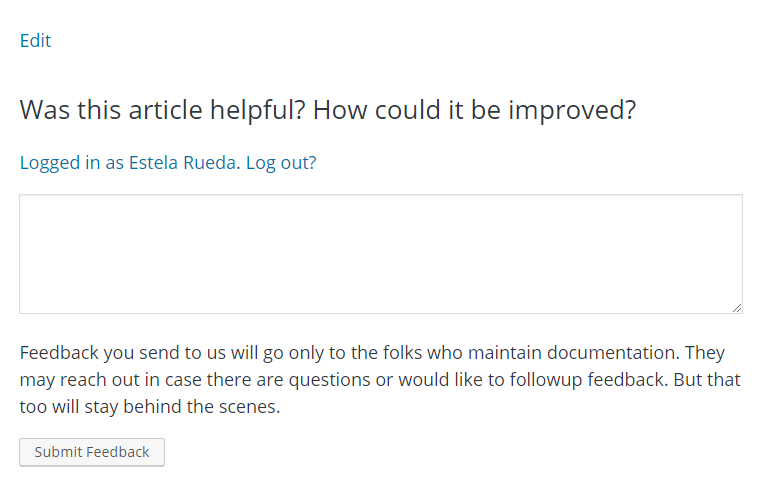
At the moment, there is a[ feedback form](https://wordpress.org/support/article/wordpress-editor)
being tried out. The questions are: Was this article helpful? How could it be improved?
The reply box is for a long comment and none of these replies/feedback is posted
online.
Question is, being that the features require different information and some articles
are already too long, do we need both features?
### Article voting recommendation

**No** triggers a feedback box:

And the article will show the number of yes replies

### Feedback: contributions from the public (the form that is being tested in WP.org at the moment this post was written)
## 2. Search area ([#9](https://github.com/WordPress/HelpHub/issues/9))
Maintain the search area for documentation and forums. Make it prominent for mobile.
## 3. Sidebar navigation styling ([#111](https://github.com/WordPress/HelpHub/issues/111))
Follow the new style for pages in WP.org. Use only the main category items on the
menu with links to each subcategory TOC pages

## 4. TOC styling (see #111)

## 5. Language ([#201](https://github.com/WordPress/HelpHub/issues/201)) vs localization ([#283](https://github.com/WordPress/HelpHub/issues/283))
Are there Rosetta sites that will not be using the HelpHub pluginPlugin A plugin
is a piece of software containing a group of functions that can be added to a WordPress
website. They can extend functionality or add new features to your WordPress websites.
WordPress plugins are written in the PHP programming language and integrate seamlessly
with WordPress. These can be free in the WordPress.org Plugin Directory [https://wordpress.org/plugins/](https://wordpress.org/plugins/)
or can be cost-based plugin from a third-party. to translate documentation? Is it
still necessary to add the language feature?
## 6. Category terms archive ([#231](https://github.com/WordPress/HelpHub/issues/231))
This PR will be resolved with the[ new classification for the articles](https://make.wordpress.org/docs/2020/02/21/findings-in-the-reclassification-of-wordpress-org-documentation/)
that was done[ via GSoD](https://docs.google.com/spreadsheets/d/1_Ea2yeF5Rfy_YDk7pBRJ4rdljhMjygXFqBq8gWwhbaE/edit?usp=sharing).
## 7. Mobile view ([#235](https://github.com/WordPress/HelpHub/issues/235))
Currently the view on mobile for documentation uses a very large band and it gives
the impression that there is nothing else. So increase information above the fold.

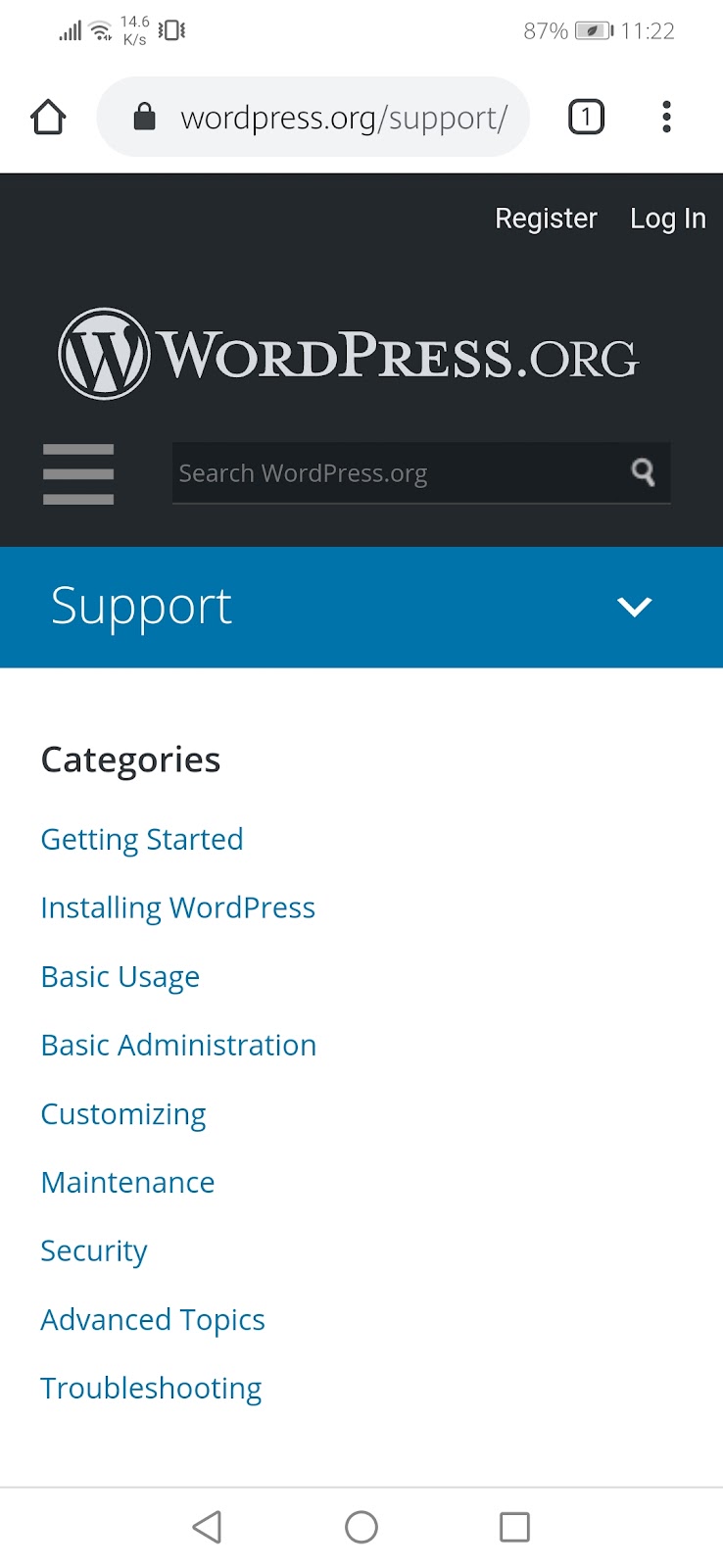
## 8. Mobile sidebar ([#236](https://github.com/WordPress/HelpHub/issues/236))
The sidebar on the mobile version will be affected with the new navigation. At the
moment, it looks like this:
## 9. WP version page ([#245](https://github.com/WordPress/HelpHub/issues/245))
There will be a review but will use the same template as the documentation articles.
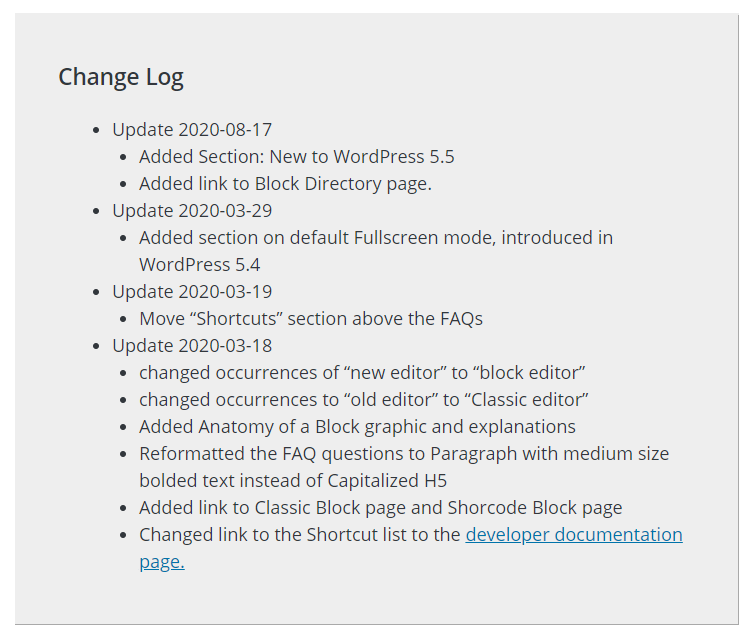
## 10. Add changelog ([example](https://wordpress.org/support/article/classic-block/))
A changelog is essential to keep users informed on what has been changed and when.
It is being tested at the time this post was written.
## 11. Indexed dev notes by release ([example](https://make.wordpress.org/core/handbook/references/keeping-up-with-gutenberg-index/))
Although the dev notes are written for developers, the docs team is interested in
keeping an index page of all the dev notes written for a release. The index page
will be linked from the release version page.
## 12. 404-not-found with link to the forum ([#47](https://github.com/WordPress/HelpHub/issues/47))
The new design will include a 404 page with a link to the support forums.
## 13. Icon for external links ([example](https://developers.google.com/style/cross-references#out-page))
In the article template, include an icon to highlight a recommended site or external
link.

## 14. Add breadcrumbs for navigation
Breadcrumbs will be added to ease navigation
## 15. Change hovering anchor icon
Nowadays the hashtag # symbol has other connotations as it is common in social media.
The link icon is commonly used as a hovering anchor

This list is by far what the docs team has gathered. The post will be open for discussion
and recommendations until 12 February 2021.
The next posts on this series will be:
**Part 2:** Documentation: a different classification, navigation and SEO
**Part 3:** Draft templates for article documentation
**Part 4:** Proposal for a new design for documentation
_Props **[@milana\_cap](https://profiles.wordpress.org/milana_cap/) **for proofreading
and final review._
* [Login to Reply](https://login.wordpress.org/?redirect_to=https%3A%2F%2Fmake.wordpress.org%2Fdocs%2F2021%2F02%2F01%2Frequirements-for-a-new-design-for-the-article-pages-in-user-documentation%2F%23respond&locale=en_US)
[ ](https://profiles.wordpress.org/milana_cap/) [Milana Cap](https://profiles.wordpress.org/milana_cap/)
12:17 pm _on_ November 1, 2020
# [HelpHub Feedback Section – new feature for contributors](https://make.wordpress.org/docs/2020/11/01/helphub-feedback-section-new-feature-for-contributors/)
At Docs team, we are putting a lot of effort into onboarding process and helping
contributors to get started. One of those efforts is a “Feedback Section” for [HelpHub](https://make.wordpress.org/docs/handbook/helphub/)(
[end user documentation](https://wordpress.org/support/)).
Feedback section is resembling the [User Contributed Notes](https://make.wordpress.org/docs/handbook/workflows/reporting-an-issue/#user-notes)
section at [DevHub](https://make.wordpress.org/docs/handbook/code-reference/)‘ [Code Reference](https://developer.wordpress.org/reference/),
so this is a comment section but with a difference of HelpHub’ Feedback Section
not being publicly visible.
## What is it for?
Feedback section is meant **to help contributors report issues** such as typos,
out of date info, missing facts etc. Even though this feedback is not publicly visible,
it is not anonymous. The contributor has to be logged in to send feedback. If logged
out, visitor will see the message “Please log in to leave the feedback”.
## Where is this feedback visible then?
This feature is enabled on **HelpHub and all Rosetta sites** with HelpHub enabled.
All the feedback can be found **in dashboard’ comments section**. It doesn’t really
matter if you approve them or not so you can use this status system as a sort of
tracking issues system.
We hope this will reduce the gap between new or passing by contributors and the
team; and mimic the ease of contributing at Codex.
Complete discussion and the code can be found here: https://meta.trac.wordpress.
org/ticket/4915
* [Login to Reply](https://login.wordpress.org/?redirect_to=https%3A%2F%2Fmake.wordpress.org%2Fdocs%2F2020%2F11%2F01%2Fhelphub-feedback-section-new-feature-for-contributors%2F%23respond&locale=en_US)
[ ](https://profiles.wordpress.org/bph/) [Birgit Pauli-Haack](https://profiles.wordpress.org/bph/)
1:55 pm _on_ October 19, 2020
Tags: [meta-helphub ( 9 )](https://make.wordpress.org/docs/tag/meta-helphub/)
# [Digital Check-in for 🐝-docs team week October 19](https://make.wordpress.org/docs/2020/10/19/digital-check-october-19/)
Our Digital Check-in for this week:
**Please share the following in the comments:**
* What did you work on last week?
* What would you like to work on this week?
* What are your blockers (things that stand in your way of your work) ?
**This week is release week: **
* **WordPress 5.6 BetaBeta A pre-release of software that is given out to a large
group of users to trial under real conditions. Beta versions have gone through
alpha testing in-house and are generally fairly close in look, feel and function
to the final product; however, design changes often occur as part of the process.
1** is schedule for October 20, which starts the beta/rc release testing phase.
You can get a preview of the upcoming version via the [WordPress Beta Tester plugin](https://wordpress.org/plugins/wordpress-beta-tester/)
* **GutenbergGutenberg The Gutenberg project is the new Editor Interface for WordPress.
The editor improves the process and experience of creating new content, making
writing rich content much simpler. It uses ‘blocks’ to add richness rather than
shortcodes, custom HTML etc. [https://wordpress.org/gutenberg/](https://wordpress.org/gutenberg/)
pluginPlugin A plugin is a piece of software containing a group of functions
that can be added to a WordPress website. They can extend functionality or add
new features to your WordPress websites. WordPress plugins are written in the
PHP programming language and integrate seamlessly with WordPress. These can be
free in the WordPress.org Plugin Directory [https://wordpress.org/plugins/](https://wordpress.org/plugins/)
or can be cost-based plugin from a third-party. RCRelease Candidate A beta version
of software with the potential to be a final product, which is ready to release
unless significant bugs emerge. 9.2 **will be published later today (Oct 19)
and that is the version that will be merged into WordPress 5.6 coreCore Core
is the set of software required to run WordPress. The Core Development Team builds
WordPress..
* **Gutenberg plugin 9.2** release is scheduled for October 21.
**Our reading list for this week:**
* [How to prepare for WordPress 5,.6 Release on the Block Editor End-User documentation – a Proposal](https://docs.google.com/document/d/1VcwjesspLHt-dTEhuTF74LQ09RB4WWceumlxBFOLaI8/edit?usp=sharing)–
Please review and comment on the doc on
* [What’s next in Gutenberg? (October)](https://make.wordpress.org/core/2020/10/01/whats-next-in-gutenberg-october/)–
to get an overview what’s in store for the Gutenberg plugins and WordPress 5.6
from the core editor team.
* [Call for Testing the Widgets Screen in Gutenberg 9.1](https://make.wordpress.org/core/2020/09/30/call-for-testing-the-widgets-screen-in-gutenberg-9-1/)–
if you have time, please consider help testing the next big feature to come to
WordPress core in 5.6.
**Contributor Links**
* [Getting started as a new contributors.](https://make.wordpress.org/docs/2020/05/18/block-editor-end-user-documentation-needs-help/)
* The [Google sheet](https://docs.google.com/spreadsheets/d/1OcGGtgXHPYhkHWHw79JRWI7mWkYRrP8OpyuGpnapqfE/edit#gid=0)
also has an **“Experienced Contributors”** tab and gives us an overview of what
people are editing and what is on our priority list.
* The source of truth for our ongoing work is the [**Trello board**](https://trello.com/b/JnTCzOsL/gutenberg-end-user-docs)
with the columns “Need changes /New Pages” and “Work in Progress”.
* The process is not finalized, but there is an [outline pinned](https://wordpress.slack.com/archives/CG47GT4G2/p1598279273080900)
on the slackSlack Slack is a Collaborative Group Chat Platform [https://slack.com/](https://slack.com/).
The WordPress community has its own Slack Channel at [https://make.wordpress.org/chat/](https://make.wordpress.org/chat/)
channel [#meta-helphub](https://make.wordpress.org/docs/tag/meta-helphub/)
Looking forward to ‘seeing’ many of you at the next 🐝 docs Slack meeting on [October 26, 2020 at 14:00 UTC](https://www.timeanddate.com/worldclock/fixedtime.html?iso=20201026T1400)
* [Login to Reply](https://login.wordpress.org/?redirect_to=https%3A%2F%2Fmake.wordpress.org%2Fdocs%2F2020%2F10%2F19%2Fdigital-check-october-19%2F%23respond&locale=en_US)
[ ](https://profiles.wordpress.org/estelaris/) [Estela Rueda](https://profiles.wordpress.org/estelaris/)
2:29 pm _on_ June 22, 2020
# [Exploration of a new classification for user documentation](https://make.wordpress.org/docs/2020/06/22/exploration-of-a-new-classification-for-user-documentation/)
# Background
While working on a new design for HelpHub or documentation in WordPress.orgWordPress.
org The community site where WordPress code is created and shared by the users.
This is where you can download the source code for WordPress core, plugins and themes
as well as the central location for community conversations and organization. [https://wordpress.org/](https://wordpress.org/),
we discovered that the implementation of a menu or a table of contents was difficult
because the articles were included in several categories.
Documentation is maintained manually by contributors and it is being moved from
the old Codex. The structure is 17 years old and as WordPress develops and grows,
the categories that worked 5 or 10 years ago are not necessarily the same that work
now.
In order to continue with the design of documentation, we need to define a documentation
structure that is clear and fulfills the user’s needs.
# Problems with the actual categorization
The issues below affect the way users consult the articles in the documentation
section.
* There is a lack of definition of user personas.
* Search is not user-friendly because navigation is not clear, making article discoverability
challenging.
* Inside a categoryCategory The 'category' taxonomy lets you group posts / content
together that share a common bond. Categories are pre-defined and broad ranging.
with several pages, articles jump order, making navigation confusing.
* Some titles are not descriptive enough or use only one word.
# What are we looking for
It is important to define first what the goal is for the documentation structure
in order to define the categories. Envisioning what our ideal documentation section
should look like:
* It should be easy to navigate: a user should understand where they are.
* Categories should be broken into subcategories to ease mobile navigation.
* Categories should be descriptive enough to quickly answer the question: “_where
does this article go?_”
* It should be reliable: if an article is not found where it should be, it means
that the article simply doesn’t exist
* Titles should be descriptive enough for any type of user to understand what the
article is about.
* Maintenance or updating of the articles should be easy with a clear documentation
structure
* The structure should allow the incorporation of new categories or subcategories
as the software develops.
The docs team worked on creating some stories that can help us verify if the proposed
solution will work. You can find the complete list of stories [here](https://docs.google.com/spreadsheets/d/1_Ea2yeF5Rfy_YDk7pBRJ4rdljhMjygXFqBq8gWwhbaE/edit#gid=1431454973):
* If I am new to WordPress, how do I know if it is the right CMS for my project?
* If I am a blogger who receives many comments, is my data secure in WordPress?
* If I am not a developer, can I still create a website and add my own branding?
* If I am a business owner, can I sell products in WordPress?
* If I am a website designer, where can I find information about new releases and
upcoming features?
# What documentation looks like now
So far, there are 171 articles being moved from Codex into HelpHub. Separately there
are new articles being written about the blockBlock Block is the abstract term used
to describe units of markup that, composed together, form the content or layout
of a webpage using the WordPress editor. The idea combines concepts of what in the
past may have achieved with shortcodes, custom HTML, and embed discovery into a
single consistent API and user experience. editor, so far 40 articles have been
added and there are plans for more.
In the image below, we can see a snapshot of how articles are included in several
categories. At the moment, the articles were arranged in alphabetical order because
the articles jump order while scrolling through the pages:

A better view of the list can be [found here](https://docs.google.com/spreadsheets/d/1lNxlyouZ9N6NuwA21lld3t_TZ6T--TVQGzB8fdjBl-M/edit?usp=sharing).
## Example scenario
Let’s review an example from the image above where the articles jump order inside
a category with multiple pages.
In the video below, we are looking at the category **Getting Started**. A session
was recorded following the **Next Page** link at the bottom of the page and then
returned to the first page following the **Previous Page** link. The first page
at the beginning has different articles than the first page that we returned to.
### What it is like on a computer
The first page begins with the following list of articles:
* Appearance Menus Screen
* Backing Up Your WordPress Files
* Pages Add New Screen
* New to WordPress – Where to Start
* Administering Your Blog
* Resetting Your Password
* Creating a Search Page
* Managing Plugins
We navigated to the last page via the Next Page link at the bottom of the page and
then returned to the first page, using the Previous Page link.
When arriving to the first page, the list of articles is different from what we
have above:
* Comments in WordPress
* phpMyAdmin
* Creating a Static Front PageStatic Front Page A WordPress website can have a
dynamic blog-like front page, or a “static front page” which is used to show
customized content. Typically this is the first page you see when you visit a
site url, like wordpress.org for example.
* Users Your Profile Screen
* Update Services
* Settings Writing Screen
* Administration Screens
* Giving WordPress Its Own Directory
* Settings Reading Screen
* Dashboard Screen
### What it is like on mobile
On mobile, the situation is the same.
# Looking into the future
## Target audience
As mentioned before, the end-user of documentation is not well defined but the existing
documentation can shed some light into identifying who the users are.
### Who is the content intended for?
From the stories written, we can identify some groups, but we have not explored
the many user personas that access the documentation. Here are some examples:
* New users looking for a CMS to build a website.
* Bloggers/website designers that want to customize a site.
* Content creators looking for content to write tutorials/posts.
* WordPress consultants that provide services to their clients.
* Others?
## Type of content
In order to define a navigation structure that suits the project and allows for
growth, we need to explore information pillars. Pillars shouldn’t be more than 4
or 5, as these can be split into categories and subcategories to form a logical
navigation structure. These are suggestions for information pillars:
* WP basics – overview, features, history, glossary, semantics, contributing.
* Technical documentation: installation guides, requirements, best practices, technical
how-to, security, troubleshooting.
* Support documentation – dashboard structure, user permissions, screens, media
screens.
* Project related documentation – customization, themes & plugins, design how-to’s(
blocks)
## Relation to time and development
There are articles that have been superseded by new development and are either no
longer relevant to the software itself or must be updated. We need to include 4
buckets where we should add articles:
* No longer relevant or valid
* Need update
* Convert from Codex as is
* Create new documentation
# Next Steps?
The docs team will continue working on defining the user personas, as well as the
information pillars.
We plan on having a proposal on documentation structure that includes clear navigation
and new classification, by the end of the summer.
If you would like to contribute to the project, leave your comments. Comments will
be discussed during the [#docs](http://wordpress.slack.com/messages/docs/) team
meetings on Mondays at 15:00 UTC
* [Login to Reply](https://login.wordpress.org/?redirect_to=https%3A%2F%2Fmake.wordpress.org%2Fdocs%2F2020%2F06%2F22%2Fexploration-of-a-new-classification-for-user-documentation%2F%23respond&locale=en_US)
[ ](https://profiles.wordpress.org/pmbaldha/) [Prashant Baldha](https://profiles.wordpress.org/pmbaldha/)
10:55 pm _on_ March 11, 2020
Tags: Documentation License, external linking,
[meetings ( 169 )](https://make.wordpress.org/docs/tag/meetings/)
# [Summary for Docs Team Meeting: 09 March Meeting](https://make.wordpress.org/docs/2020/03/11/summary-for-docs-team-meeting-09-march-meeting/)
The agenda for this meeting is on the [https://make.wordpress.org/docs/2020/03/09/agenda-for-docs-team-meeting-9-march-2020/](https://make.wordpress.org/docs/2020/03/09/agenda-for-docs-team-meeting-9-march-2020/).
## Attendance
[@Kenshino](https://profiles.wordpress.org/kenshino/) (Jon), [@cristiano](https://profiles.wordpress.org/cristiano/).
zanca, [@milana_cap](https://profiles.wordpress.org/milana_cap/), [@atachibana](https://profiles.wordpress.org/atachibana/),
[@pmbaldha](https://profiles.wordpress.org/pmbaldha/), [@tomf](https://profiles.wordpress.org/tomf/),
[@bph](https://profiles.wordpress.org/bph/), [@leogermani](https://profiles.wordpress.org/leogermani/),
[@nullbyte](https://profiles.wordpress.org/nullbyte/), [@themiked](https://profiles.wordpress.org/themiked/),
[@johnbillion](https://profiles.wordpress.org/johnbillion/), [@felipeelia](https://profiles.wordpress.org/felipeelia/),
[@chetan200891](https://profiles.wordpress.org/chetan200891/), [@yui](https://profiles.wordpress.org/yui/),
[@pbrocks](https://profiles.wordpress.org/pbrocks/)
## **Documentation License for HelpHub, DevHub**
[@kenshino](https://profiles.wordpress.org/kenshino/) (Jon) have chatted with Matt
Mullenweg and he is okay for multi-license setup with a specific reason as long
as GPLv2 is the default for all documentation across the WordPress project.
CCO provides a more open domain in comparison to GPLGPL GPL is an acronym for GNU
Public License. It is the standard license WordPress uses for Open Source licensing
[https://wordpress.org/about/license/](https://wordpress.org/about/license/). The
GPL is a ‘copyleft’ license [https://www.gnu.org/licenses/copyleft.en.html](https://www.gnu.org/licenses/copyleft.en.html).
This means that derivative work can only be distributed under the same license terms.
This is in distinction to permissive free software licenses, of which the BSD license
and the MIT License are widely used examples.. The GPL isn’t necessarily the best
for the documentation but it isn’t really explored how that manifests in real-life
usage.
Documentation Team members should decide which license will be used. [@milana_cap](https://profiles.wordpress.org/milana_cap/)
will write the post in p2 for license feedback. [@kadamwhite](https://wordpress.slack.com/team/U02RR5V4G)
had replied that he was comfortable with GPL for the REST APIREST API The REST API
is an acronym for the RESTful Application Program Interface (API) that uses HTTP
requests to GET, PUT, POST and DELETE data. It is how the front end of an application(
think “phone app” or “website”) can communicate with the data store (think “database”
or “file system”) [https://developer.wordpress.org/rest-api/](https://developer.wordpress.org/rest-api/)
handbook, but The CLICLI Command Line Interface. Terminal (Bash) in Mac, Command
Prompt in Windows, or WP-CLI for WordPress. handbook is licensed under the MIT.
[@Kenshino](https://profiles.wordpress.org/kenshino/) (Jon) strongly recommends
each representative for projects in Docs to chime in Theme Handbook, PluginPlugin
A plugin is a piece of software containing a group of functions that can be added
to a WordPress website. They can extend functionality or add new features to your
WordPress websites. WordPress plugins are written in the PHP programming language
and integrate seamlessly with WordPress. These can be free in the WordPress.org
Plugin Directory [https://wordpress.org/plugins/](https://wordpress.org/plugins/)
or can be cost-based plugin from a third-party. Handbook, WP-CLIWP-CLI WP-CLI is
the Command Line Interface for WordPress, used to do administrative and development
tasks in a programmatic way. The project page is [http://wp-cli.org/](http://wp-cli.org/)
[https://make.wordpress.org/cli/](https://make.wordpress.org/cli/) Handbook etc.
Once the documentation team decides then the documentation team members need to
place license info into each logical division of our documentation.
## **Project Updates **
[@milana_cap](https://profiles.wordpress.org/milana_cap/) had written the documentation
team profile badge page [https://make.wordpress.org/docs/handbook/get-involved/documentation-team-profile-badge/](https://make.wordpress.org/docs/handbook/get-involved/documentation-team-profile-badge/).
As per the [@themiked](https://profiles.wordpress.org/themiked/), [@garrett-eclipse](https://profiles.wordpress.org/garrett-eclipse/)
had given some updates for the privacy bits for the plugin handbook but no changes
made until now.
Moreover, [@themiked](https://profiles.wordpress.org/themiked/) has said that the
wpdb documentation page is done but the PR to update the inline docs in code ([https://core.trac.wordpress.org/ticket/49477](https://core.trac.wordpress.org/ticket/49477))
isn’t done yet.
[@stevenlinx](https://profiles.wordpress.org/stevenlinx/) and [@atachibana](https://profiles.wordpress.org/atachibana/)
are working on setting a re-routing codex page. According to the [@atachibana](https://profiles.wordpress.org/atachibana/),
397 of 1069 (37.1%) code reference for functions pages have been rerouted.
According to the [@leogermani](https://profiles.wordpress.org/leogermani/), 13 hooksHooks
In WordPress theme and development, hooks are functions that can be applied to an
action or a Filter in WordPress. Actions are functions performed when a certain
event occurs in WordPress. Filters allow you to modify certain functions. Arguments
used to hook both filters and actions look the same. have been migrated out of 255(
3.7%) from codex page to the Devhub. It’s really easy task. If anyone wants to help
and don’t know how, please pingPing The act of sending a very small amount of data
to an end point. Ping is used in computer science to illicit a response from a target
server to test it’s connection. Ping is also a term used by Slack users to @ someone
or send them a direct message (DM). Users might say something along the lines of“
Ping me when the meeting starts.” to the [@leogermani](https://profiles.wordpress.org/leogermani/).
[@nullbyte](https://profiles.wordpress.org/nullbyte/) was ready to contribute to
it.
## **Policy for external linking**
It is a very controversial topic. Few members are in favor to put external links
and Other few members aren’t in favor of it.
[@milana_cap](https://profiles.wordpress.org/milana_cap/) proposed to allow external
links by people who are active in wordpress.orgWordPress.org The community site
where WordPress code is created and shared by the users. This is where you can download
the source code for WordPress core, plugins and themes as well as the central location
for community conversations and organization. [https://wordpress.org/](https://wordpress.org/)
team members (no companies) in that specific topic.
[@bph](https://profiles.wordpress.org/bph/) said that WP docs should be self-contained.
External links are outdated by time. To monitor them time by time is vast task for
documentation team.
[@milana_cap](https://profiles.wordpress.org/milana_cap/) will write this up into
a coherent P2P2 P2 or O2 is the term people use to refer to the Make WordPress blog.
It can be found at [https://make.wordpress.org](https://make.wordpress.org/) post
and outline the possible routes the documentation team can go.
## **Workflow for content change approval**
All team members are agree with below workflow which has proposed by the [@Kenshino](https://profiles.wordpress.org/kenshino/)(
Jon):
1. Any documentation project member should be able to ask the project rep for review
2. Any project rep change (not #1 but their own change) – some other project rep or
[@Kenshino (Jon)](https://wordpress.slack.com/team/U02RS1LUZ) can be the second
pair of eyes
3. Tiny grammatical / screenshot changes need not go through this approval process
The workflow will be tracked by appropriate and transparent communications in [#docs](https://wordpress.slack.com/archives/C02RP4WU5).
## Open Floor
All project representatives should read the Badge policy that [@milana_cap](https://wordpress.slack.com/team/U04FURMK8)
wrote on the [https://make.wordpress.org/docs/handbook/get-involved/documentation-team-profile-badge/](https://make.wordpress.org/docs/handbook/get-involved/documentation-team-profile-badge/).
[@Kenshino](https://profiles.wordpress.org/kenshino/) (Jon) want to get a consensus
in the next meeting.
[@tomf](https://profiles.wordpress.org/tomf/) will facilitate next meeting.
[@leogermani](https://profiles.wordpress.org/leogermani/) said that the i18n section
of the plugin handbook is one is very outdated. [@themiked](https://profiles.wordpress.org/themiked/)
will add it to his whiteboard list. There is a need to redirect the localization/
internationalization pieces to the Common APIAPI An API or Application Programming
Interface is a software intermediary that allows programs to interact with each
other and share data in limited, clearly defined ways. handbook. It isn’t unique
to plugins or themes. The Plugins handbook needs a deeper refactoring.
[#documentation-license](https://make.wordpress.org/docs/tag/documentation-license/),
[#external-linking](https://make.wordpress.org/docs/tag/external-linking/), [#meetings](https://make.wordpress.org/docs/tag/meetings/)
* [Login to Reply](https://login.wordpress.org/?redirect_to=https%3A%2F%2Fmake.wordpress.org%2Fdocs%2F2020%2F03%2F11%2Fsummary-for-docs-team-meeting-09-march-meeting%2F%23respond&locale=en_US)
# Post navigation
[← Older posts](https://make.wordpress.org/docs/category/helphub/page/4/?output_format=md)
[Newer posts →](https://make.wordpress.org/docs/category/helphub/page/2/?output_format=md)