Welcome to the official home of the WordPress Documentation Team.
This team is responsible for coordinating all documentation initiatives around WordPress, including the handbooks and other general wordsmithing across the WordPress project.
Want to get involved?
Start here to find out more about what we do and how to contribute:
Documentation Issue Tracker on GitHub: Submit any Documentation Team-related issues on GitHubGitHubGitHub is a website that offers online implementation of git repositories that can easily be shared, copied and modified by other developers. Public repositories are free to host, private repositories require a paid subscription. GitHub introduced the concept of the ‘pull request’ where code changes done in branches by contributors can be reviewed and discussed before being merged be the repository owner. https://github.com/
Weekly meetings
Join our discussions of documentation issues here on the blog and on Slack.
This is post one on a four-part series. The focus on these series is the redesign of documentation that will include a new template, new categorization, new navigation and some renaming of articles. On this post, we will focus on requirements.
Some of these requirements are very straight forward, others still need a bit of discussion. The links to the PRs are included.
List of requirements:
Article voting (#7) vs feedback: contributions from the public (#240)
SidebarSidebarA sidebar in WordPress is referred to a widget-ready area used by WordPress themes to display information that is not a part of the main content. It is not always a vertical column on the side. It can be a horizontal rectangle below or above the content area, footer, header, or any where in the theme. navigation styling (#111)
CategoryCategoryThe 'category' taxonomy lets you group posts / content together that share a common bond. Categories are pre-defined and broad ranging. terms archive (#231)
1. Article voting (#7) vs feedback: contributions from the public (#240)
The difference between “article voting” and “feedback: contributions from the public” is the type of information we gather from the user.
Is knowing if an article is useful to a user, better than having the user’s feedback? Is there a way to merge both? Or do we want to keep them both and separate? Or would only one fulfill the documentation goals?
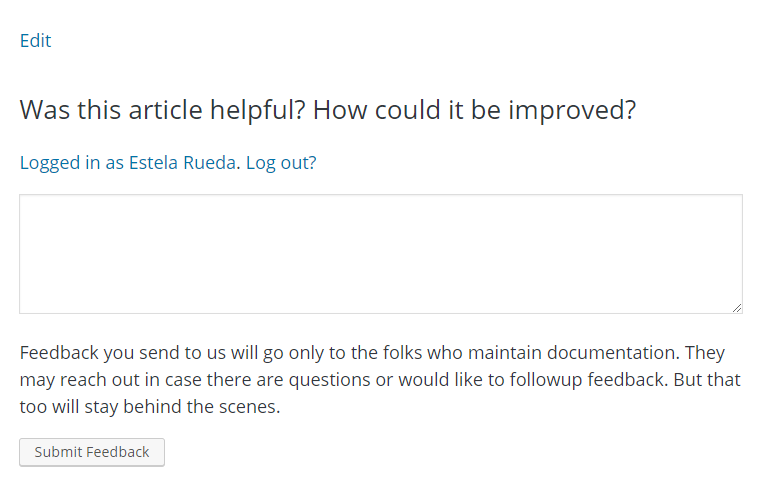
At the moment, there is a feedback form being tried out. The questions are: Was this article helpful? How could it be improved? The reply box is for a long comment and none of these replies/feedback is posted online.
Question is, being that the features require different information and some articles are already too long, do we need both features?
Article voting recommendation
No triggers a feedback box:
And the article will show the number of yes replies
Feedback: contributions from the public (the form that is being tested in WP.org at the moment this post was written)
Are there Rosetta sites that will not be using the HelpHub pluginPluginA plugin is a piece of software containing a group of functions that can be added to a WordPress website. They can extend functionality or add new features to your WordPress websites. WordPress plugins are written in the PHP programming language and integrate seamlessly with WordPress. These can be free in the WordPress.org Plugin Directory https://wordpress.org/plugins/ or can be cost-based plugin from a third-party to translate documentation? Is it still necessary to add the language feature?
Currently the view on mobile for documentation uses a very large band and it gives the impression that there is nothing else. So increase information above the fold.
Although the dev notes are written for developers, the docs team is interested in keeping an index page of all the dev notes written for a release. The index page will be linked from the release version page.
At Docs team, we are putting a lot of effort into onboarding process and helping contributors to get started. One of those efforts is a “Feedback Section” for HelpHub (end user documentation).
Feedback section is resembling the User Contributed Notes section at DevHub‘ Code Reference, so this is a comment section but with a difference of HelpHub’ Feedback Section not being publicly visible.
What is it for?
Feedback section is meant to help contributors report issues such as typos, out of date info, missing facts etc. Even though this feedback is not publicly visible, it is not anonymous. The contributor has to be logged in to send feedback. If logged out, visitor will see the message “Please log in to leave the feedback”.
Where is this feedback visible then?
This feature is enabled on HelpHub and all Rosetta sites with HelpHub enabled.
All the feedback can be found in dashboard’ comments section. It doesn’t really matter if you approve them or not so you can use this status system as a sort of tracking issues system.
We hope this will reduce the gap between new or passing by contributors and the team; and mimic the ease of contributing at Codex.
Complete discussion and the code can be found here: https://meta.trac.wordpress.org/ticket/4915
Our Digital Check-in for this week: Please share the following in the comments:
What did you work on last week?
What would you like to work on this week?
What are your blockers (things that stand in your way of your work) ?
This week is release week:
WordPress 5.6 BetaBetaA pre-release of software that is given out to a large group of users to trial under real conditions. Beta versions have gone through alpha testing in-house and are generally fairly close in look, feel and function to the final product; however, design changes often occur as part of the process. 1 is schedule for October 20, which starts the beta/rc release testing phase. You can get a preview of the upcoming version via the WordPress Beta Tester plugin
GutenbergGutenbergThe Gutenberg project is the new Editor Interface for WordPress. The editor improves the process and experience of creating new content, making writing rich content much simpler. It uses ‘blocks’ to add richness rather than shortcodes, custom HTML etc. https://wordpress.org/gutenberg/pluginPluginA plugin is a piece of software containing a group of functions that can be added to a WordPress website. They can extend functionality or add new features to your WordPress websites. WordPress plugins are written in the PHP programming language and integrate seamlessly with WordPress. These can be free in the WordPress.org Plugin Directory https://wordpress.org/plugins/ or can be cost-based plugin from a third-partyRCRelease CandidateA beta version of software with the potential to be a final product, which is ready to release unless significant bugs emerge. 9.2 will be published later today (Oct 19) and that is the version that will be merged into WordPress 5.6 coreCoreCore is the set of software required to run WordPress. The Core Development Team builds WordPress..
Gutenberg plugin 9.2 release is scheduled for October 21.
While working on a new design for HelpHub or documentation in WordPress.orgWordPress.orgThe community site where WordPress code is created and shared by the users. This is where you can download the source code for WordPress core, plugins and themes as well as the central location for community conversations and organization. https://wordpress.org/, we discovered that the implementation of a menu or a table of contents was difficult because the articles were included in several categories.
Documentation is maintained manually by contributors and it is being moved from the old Codex. The structure is 17 years old and as WordPress develops and grows, the categories that worked 5 or 10 years ago are not necessarily the same that work now.
In order to continue with the design of documentation, we need to define a documentation structure that is clear and fulfills the user’s needs.
Problems with the actual categorization
The issues below affect the way users consult the articles in the documentation section.
There is a lack of definition of user personas.
Search is not user-friendly because navigation is not clear, making article discoverability challenging.
Inside a categoryCategoryThe 'category' taxonomy lets you group posts / content together that share a common bond. Categories are pre-defined and broad ranging. with several pages, articles jump order, making navigation confusing.
Some titles are not descriptive enough or use only one word.
What are we looking for
It is important to define first what the goal is for the documentation structure in order to define the categories. Envisioning what our ideal documentation section should look like:
It should be easy to navigate: a user should understand where they are.
Categories should be broken into subcategories to ease mobile navigation.
Categories should be descriptive enough to quickly answer the question: “where does this article go?”
It should be reliable: if an article is not found where it should be, it means that the article simply doesn’t exist
Titles should be descriptive enough for any type of user to understand what the article is about.
Maintenance or updating of the articles should be easy with a clear documentation structure
The structure should allow the incorporation of new categories or subcategories as the software develops.
The docs team worked on creating some stories that can help us verify if the proposed solution will work. You can find the complete list of stories here:
If I am new to WordPress, how do I know if it is the right CMS for my project?
If I am a blogger who receives many comments, is my data secure in WordPress?
If I am not a developer, can I still create a website and add my own branding?
If I am a business owner, can I sell products in WordPress?
If I am a website designer, where can I find information about new releases and upcoming features?
What documentation looks like now
So far, there are 171 articles being moved from Codex into HelpHub. Separately there are new articles being written about the blockBlockBlock is the abstract term used to describe units of markup that, composed together, form the content or layout of a webpage using the WordPress editor. The idea combines concepts of what in the past may have achieved with shortcodes, custom HTML, and embed discovery into a single consistent API and user experience. editor, so far 40 articles have been added and there are plans for more.
In the image below, we can see a snapshot of how articles are included in several categories. At the moment, the articles were arranged in alphabetical order because the articles jump order while scrolling through the pages:
Let’s review an example from the image above where the articles jump order inside a category with multiple pages.
In the video below, we are looking at the category Getting Started. A session was recorded following the Next Page link at the bottom of the page and then returned to the first page following the Previous Page link. The first page at the beginning has different articles than the first page that we returned to.
What it is like on a computer
The first page begins with the following list of articles:
Appearance Menus Screen
Backing Up Your WordPress Files
Pages Add New Screen
New to WordPress – Where to Start
Administering Your Blog
Resetting Your Password
Creating a Search Page
Managing Plugins
We navigated to the last page via the Next Page link at the bottom of the page and then returned to the first page, using the Previous Page link.
When arriving to the first page, the list of articles is different from what we have above:
Comments in WordPress
phpMyAdmin
Creating a Static Front PageStatic Front PageA WordPress website can have a dynamic blog-like front page, or a “static front page” which is used to show customized content. Typically this is the first page you see when you visit a site url, like wordpress.org for example.
Users Your Profile Screen
Update Services
Settings Writing Screen
Administration Screens
Giving WordPress Its Own Directory
Settings Reading Screen
Dashboard Screen
What it is like on mobile
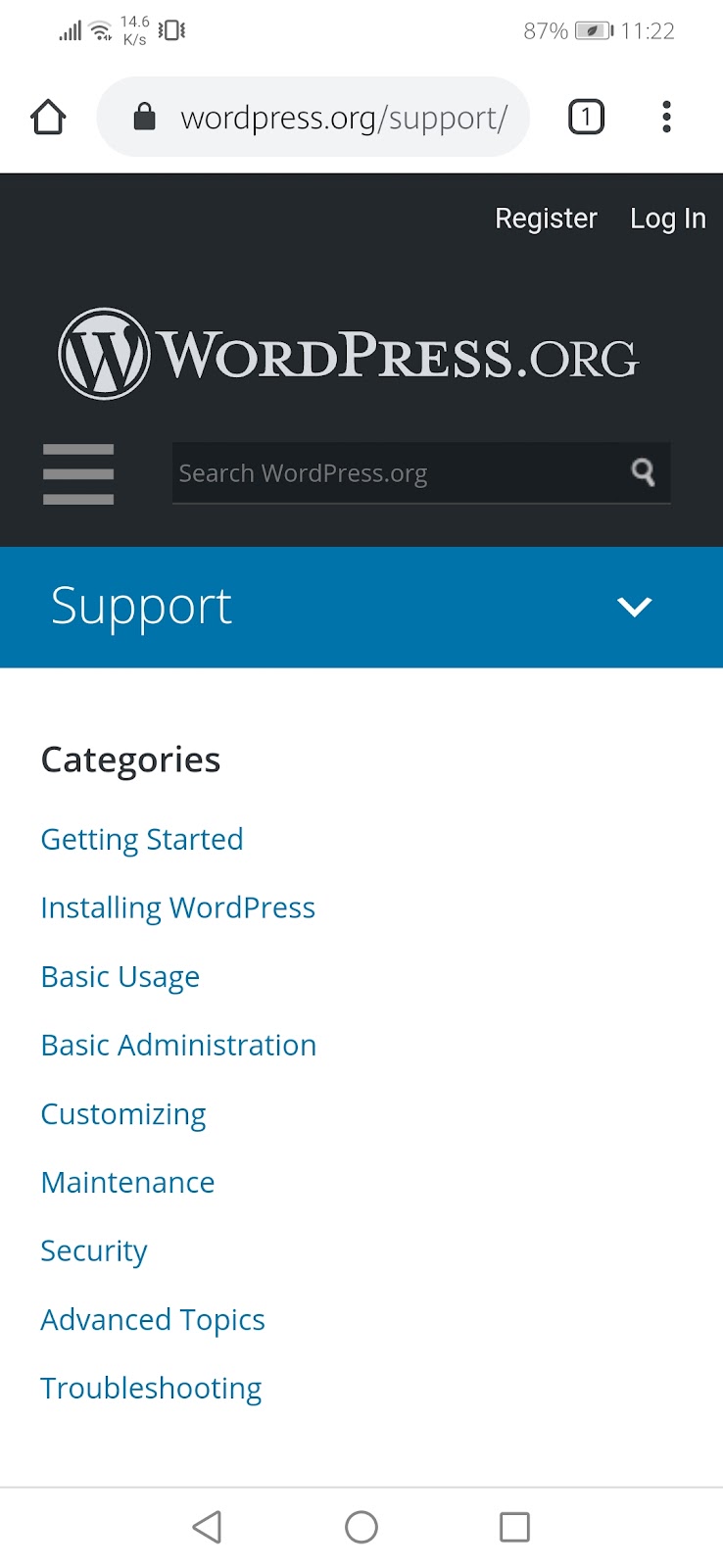
On mobile, the situation is the same.
Looking into the future
Target audience
As mentioned before, the end-user of documentation is not well defined but the existing documentation can shed some light into identifying who the users are.
Who is the content intended for?
From the stories written, we can identify some groups, but we have not explored the many user personas that access the documentation. Here are some examples:
New users looking for a CMS to build a website.
Bloggers/website designers that want to customize a site.
Content creators looking for content to write tutorials/posts.
WordPress consultants that provide services to their clients.
Others?
Type of content
In order to define a navigation structure that suits the project and allows for growth, we need to explore information pillars. Pillars shouldn’t be more than 4 or 5, as these can be split into categories and subcategories to form a logical navigation structure. These are suggestions for information pillars:
There are articles that have been superseded by new development and are either no longer relevant to the software itself or must be updated. We need to include 4 buckets where we should add articles:
No longer relevant or valid
Need update
Convert from Codex as is
Create new documentation
Next Steps?
The docs team will continue working on defining the user personas, as well as the information pillars.
We plan on having a proposal on documentation structure that includes clear navigation and new classification, by the end of the summer.
If you would like to contribute to the project, leave your comments. Comments will be discussed during the #docs team meetings on Mondays at 15:00 UTC
@kenshino (Jon) have chatted with Matt Mullenweg and he is okay for multi-license setup with a specific reason as long as GPLv2 is the default for all documentation across the WordPress project.
CCO provides a more open domain in comparison to GPLGPLGPL is an acronym for GNU Public License. It is the standard license WordPress uses for Open Source licensing https://wordpress.org/about/license/. The GPL is a ‘copyleft’ license https://www.gnu.org/licenses/copyleft.en.html. This means that derivative work can only be distributed under the same license terms. This is in distinction to permissive free software licenses, of which the BSD license and the MIT License are widely used examples.. The GPL isn’t necessarily the best for the documentation but it isn’t really explored how that manifests in real-life usage.
Documentation Team members should decide which license will be used. @milana_cap will write the post in p2 for license feedback. @kadamwhite had replied that he was comfortable with GPL for the REST APIREST APIThe REST API is an acronym for the RESTful Application Program Interface (API) that uses HTTP requests to GET, PUT, POST and DELETE data. It is how the front end of an application (think “phone app” or “website”) can communicate with the data store (think “database” or “file system”) https://developer.wordpress.org/rest-api/. handbook, but The CLICLICommand Line Interface. Terminal (Bash) in Mac, Command Prompt in Windows, or WP-CLI for WordPress. handbook is licensed under the MIT.
@Kenshino (Jon) strongly recommends each representative for projects in Docs to chime in Theme Handbook, PluginPluginA plugin is a piece of software containing a group of functions that can be added to a WordPress website. They can extend functionality or add new features to your WordPress websites. WordPress plugins are written in the PHP programming language and integrate seamlessly with WordPress. These can be free in the WordPress.org Plugin Directory https://wordpress.org/plugins/ or can be cost-based plugin from a third-party Handbook, WP-CLIWP-CLIWP-CLI is the Command Line Interface for WordPress, used to do administrative and development tasks in a programmatic way. The project page is http://wp-cli.org/https://make.wordpress.org/cli/ Handbook etc.
Once the documentation team decides then the documentation team members need to place license info into each logical division of our documentation.
@stevenlinx and @atachibana are working on setting a re-routing codex page. According to the @atachibana, 397 of 1069 (37.1%) code reference for functions pages have been rerouted.
According to the @leogermani, 13 hooksHooksIn WordPress theme and development, hooks are functions that can be applied to an action or a Filter in WordPress. Actions are functions performed when a certain event occurs in WordPress. Filters allow you to modify certain functions. Arguments used to hook both filters and actions look the same. have been migrated out of 255 (3.7%) from codex page to the Devhub. It’s really easy task. If anyone wants to help and don’t know how, please pingPingThe act of sending a very small amount of data to an end point. Ping is used in computer science to illicit a response from a target server to test it’s connection. Ping is also a term used by Slack users to @ someone or send them a direct message (DM). Users might say something along the lines of “Ping me when the meeting starts.” to the @leogermani. @nullbyte was ready to contribute to it.
Policy for external linking
It is a very controversial topic. Few members are in favor to put external links and Other few members aren’t in favor of it.
@milana_cap proposed to allow external links by people who are active in wordpress.orgWordPress.orgThe community site where WordPress code is created and shared by the users. This is where you can download the source code for WordPress core, plugins and themes as well as the central location for community conversations and organization. https://wordpress.org/ team members (no companies) in that specific topic.
External links are outdated by time. To monitor them time by time is vast task for documentation team.
@milana_cap will write this up into a coherent P2P2P2 or O2 is the term people use to refer to the Make WordPress blog. It can be found at https://make.wordpress.org/. post and outline the possible routes the documentation team can go.
Workflow for content change approval
All team members are agree with below workflow which has proposed by the @Kenshino (Jon):
Any documentation project member should be able to ask the project rep for review
Any project rep change (not #1 but their own change) – some other project rep or @Kenshino (Jon) can be the second pair of eyes
Tiny grammatical / screenshot changes need not go through this approval process
The workflow will be tracked by appropriate and transparent communications in #docs.
@leogermani said that the i18n section of the plugin handbook is one is very outdated. @themiked will add it to his whiteboard list. There is a need to redirect the localization/internationalization pieces to the Common APIAPIAn API or Application Programming Interface is a software intermediary that allows programs to interact with each other and share data in limited, clearly defined ways. handbook. It isn’t unique to plugins or themes. The Plugins handbook needs a deeper refactoring.
One of the goals for the redesign of the documentation in WordPress.orgWordPress.orgThe community site where WordPress code is created and shared by the users. This is where you can download the source code for WordPress core, plugins and themes as well as the central location for community conversations and organization. https://wordpress.org/ is to create a better search. The best way to do it is by reclassifying all the articles and creating categories with subcategories.
In discussions with the #docs team, we agreed that the best option to do this was by working with a group of people that included developers, documentation, designers and content specialists.
Our goals for the working session were:
Classify documentation articles in categories and provide subcategories if possible
Utilize the already existent categories and perhaps add one or two. The reasoning is that we already have many users that are familiar with it.
Think of the final user: new user to advanced user, not necessarily advanced developers
A working session during Contributors Days at WordCamp Vienna with about 15 contributors gave us some ideas. The results show the following recommendations:
Some articles need a more descriptive title
There are still articles that do not have updated information
Articles should be placed in one categoryCategoryThe 'category' taxonomy lets you group posts / content together that share a common bond. Categories are pre-defined and broad ranging./subcategory, even if the information could be related to other categories
There are unnecessary articles that must be removed. An example of this is the article WordPress Lessons that only offers links to other articles. Once the reclassification is done, there won’t be a need for this type of articles
Revisiting 170+ articles is going to take a lot of time. Some participants from WC Vienna agreed on continuing reading the articles but we will need more people
@atachibana reported that there are no any movements for HelpHub except new release notes such as 5.3. The team is working on some page of GutenbergGutenbergThe Gutenberg project is the new Editor Interface for WordPress. The editor improves the process and experience of creating new content, making writing rich content much simpler. It uses ‘blocks’ to add richness rather than shortcodes, custom HTML etc. https://wordpress.org/gutenberg/ User Guide that was missing.
@kenshino started an idea to do a survey to find out the completeness and quality of end-user documentation. The survey is targeted to go out by February 2020. @atachibana and @bph will help create a survey about all end-user documentation.
HelpHub Localisation
@atachibana updated that there were 30 Japanese Codex pages migrated to Japanese HelpHub on the Contributor DayContributor DayContributor Days are standalone days, frequently held before or after WordCamps but they can also happen at any time. They are events where people get together to work on various areas of https://make.wordpress.org/ There are many teams that people can participate in, each with a different focus. https://2017.us.wordcamp.org/contributor-day/https://make.wordpress.org/support/handbook/getting-started/getting-started-at-a-contributor-day/. at WordCampWordCampWordCamps are casual, locally-organized conferences covering everything related to WordPress. They're one of the places where the WordPress community comes together to teach one another what they’ve learned throughout the year and share the joy. Learn more. Osaka.
Common APIAPIAn API or Application Programming Interface is a software intermediary that allows programs to interact with each other and share data in limited, clearly defined ways. Handbook
@leogermani fixed some error on i18n page and has been working on editing plugins and themes handbooks.
DevHub Updates
@atachibana reported: Content: 280 of 1069 (26.2%) pages were redirected. Last week was 264 of 1069 (24.7%).
Next week meeting focus
@kenshino suggested about next meeting focus on discussing the Docs team organisation generally which could include Badges, Handbook, Management, or Meetings.
This discussion started in Slack during one of Docs team meetings. It was discussion about the best tool for tracking progress and issues for blockBlockBlock is the abstract term used to describe units of markup that, composed together, form the content or layout of a webpage using the WordPress editor. The idea combines concepts of what in the past may have achieved with shortcodes, custom HTML, and embed discovery into a single consistent API and user experience. editor end user documentation. However, the question of tool is widely applicable to all Docs projects, hence the need for this post and discussion.
Having complete documentation on Codex made contributing to Docs team easy in a way that everyone, as long as logged in, could modify existing or add completely new parts of it. However, this method had its flaws. It was impossible to track which parts of documentation were modified. And if we can’t track modifications then we can’t check the correctness of newly added information as well as the quality of code examples.
It took few years but we moved big parts of Codex to new places, built on WordPress. While we have more control as complete content goes under our review, this move made contributions to documentation team fairly difficult. The process itself is unclear, different Docs team’s projects use different tools (none of which covers all we need) but the common scenario we end up with is people reporting issues in SlackSlackSlack is a Collaborative Group Chat Platform https://slack.com/. The WordPress community has its own Slack Channel at https://make.wordpress.org/chat/.#docs channel.
The Tools
Documentation team uses several tools in contributing process. We have several Trello boards with more or less activity. Also, progress for almost all projects is tracked in Google Docs.
Contributing to code reference can be done with code examples through User Contributed Notes (e.g. User Contributed Notes for activate_plugin() function) or with inline documentation via Core Trac (which is more CoreCoreCore is the set of software required to run WordPress. The Core Development Team builds WordPress. than Docs team’s responsibility).
We also have Documentation Trac available. It hasn’t been used for anything before.
What is the problem?
Different projects have different workflows and, therefore, different tools. However, we have several problems to solve:
Access – while we do welcome everyone to contribute to Docs team, we also need to be careful with giving access to handbooks hosted at wp.org. If we want to make sure that only curated info gets into handbooks we need to limit access. That also means that whole burden of reviewing and maintaining handbooks falls on these few people who have access.
Keeping track of contributions and contributors – the easiest way to keep track of contributions/contributors is to use tools we have available at wp.org (TracTracTrac is the place where contributors create issues for bugs or feature requests much like GitHub.https://core.trac.wordpress.org/. and Slack). On the other hand, Trac is not the most intuitive tool for wider range of WordPress users and Slack tends to burry information so the history is lost in tons of archives. Also, in some cases it is important that we have a history of a decision/discussion available at one, easy to access, place.
Project managing – each project is different but it is a project nevertheless. It is important that the tool we use for it have project managing features which will make contributing to the project easier (joyful is preferable).
Onboarding and taking over – Onboarding is huge problem of every open sourceOpen SourceOpen Source denotes software for which the original source code is made freely available and may be redistributed and modified. Open Source **must be** delivered via a licensing model, see GPL. project and it’s naive to think we can solve it with one tool. But also, it’s not just to tool we need to onboard people in, it’s the workflow as well. The tool we chose and the way we use it should be intuitive enough not to stand on our way to contribute and not to make project depended on a specific person. Most of this could be solved with a detailed documentation on the workflow itself.
There could be more, leave your thoughts in comments.
What are we deciding here?
We are not trying to decide on one tool over the other. We are trying to discuss all the tools we already use, how they solve our problems and how they help our workflow.
Most importantly, we want to figure out the way for reporting and discussing Docs issues. Preferably, we would come up with a unique way for all docs projects but given the differences between projects, it wouldn’t be considered as a failure if we don’t.
However, it is important that we come up with a way to report and discuss issues for each project. Results of this discussion will end up in our Handbook as a reference for contributing to Documentation team.
The next HelpHub Meeting will happen in the #docsSlackSlackSlack is a Collaborative Group Chat Platform https://slack.com/. The WordPress community has its own Slack Channel at https://make.wordpress.org/chat/. channel at:
GitHubGitHubGitHub is a website that offers online implementation of git repositories that can easily be shared, copied and modified by other developers. Public repositories are free to host, private repositories require a paid subscription. GitHub introduced the concept of the ‘pull request’ where code changes done in branches by contributors can be reviewed and discussed before being merged be the repository owner. https://github.com/ repo – https://github.com/WordPress/HelpHub
GITGitGit is a free and open source distributed version control system designed to handle everything from small to very large projects with speed and efficiency. Git is easy to learn and has a tiny footprint with lightning fast performance. Most modern plugin and theme development is being done with this version control system. https://git-scm.com/./SVNSVNApache Subversion (often abbreviated SVN, after its command name svn) is a software versioning and revision control system. Software developers use Subversion to maintain current and historical versions of files such as source code, web pages, and documentation. Its goal is to be a mostly compatible successor to the widely used Concurrent Versions System (CVS). WordPress core and the wordpress.org released code are all centrally managed through SVN. https://subversion.apache.org/. workflow is being set by @netweb
anchor symbol They are thinking about using a similar treatment to GitHubGitHubGitHub is a website that offers online implementation of git repositories that can easily be shared, copied and modified by other developers. Public repositories are free to host, private repositories require a paid subscription. GitHub introduced the concept of the ‘pull request’ where code changes done in branches by contributors can be reviewed and discussed before being merged be the repository owner. https://github.com/. It will be global as well.
@estelaris added needs-design keyword to 3 tracTracTrac is the place where contributors create issues for bugs or feature requests much like GitHub.https://core.trac.wordpress.org/. tickets:
@estelaris will look into those 3 this week and will add screenshots
Improbements for archives
Docs Team did make some decisions on previous meeting that should improve usability of them
Team agreed to use custom excerpts for each article – this is extra work for content but we can all help perhaps we can add another column to @atachibana ‘s document.
Order of posts will be set manually because we want to make it contextual/complexity/step-by-step order This can’t really be automated and applicable to every categoryCategoryThe 'category' taxonomy lets you group posts / content together that share a common bond. Categories are pre-defined and broad ranging. so we’ll use the order functionality in Post Attributes and @felipeelia already created patch for it.
Dev flow setup
@kenshino will catch up with @netweb. @leogermani will test the documentation to get the dev environment up.
HelpHub rosetta release
Now, there are two releases: Serbian and Japanese. Serbian team had HelpHub enabled on wrong site. It was disabled then and enabled on /support/ so they are ready to go. Japanese team shared guide for getting started with this.
French, Brazil, Russia and some other countries are in the line for that activation.
HelpHub contents migrationMigrationMoving the code, database and media files for a website site from one server to another. Most typically done when changing hosting companies.
@leogermani migrated content and hooksHooksIn WordPress theme and development, hooks are functions that can be applied to an action or a Filter in WordPress. Actions are functions performed when a certain event occurs in WordPress. Filters allow you to modify certain functions. Arguments used to hook both filters and actions look the same.. Top 3 actions and filters (total of 6) were done and @millana_cap reviewed.
Open floor
@milana_cap suggested to have different people leading the meetings, Like rotating but more volunteering. We can call it a facilitator rather than “leading”. The agenda already mentions people sho will “lead” each topic.