Title: interactivity API – Make WordPress Core
---
# Tag Archives: interactivity API
[ ](https://profiles.wordpress.org/luisherranz/) [luisherranz](https://profiles.wordpress.org/luisherranz/)
9:43 pm _on_ February 23, 2026
Tags: [7-0 ( 61 )](https://make.wordpress.org/core/tag/7-0/),
[dev-notes ( 617 )](https://make.wordpress.org/core/tag/dev-notes/), [dev-notes-7-0 ( 20 )](https://make.wordpress.org/core/tag/dev-notes-7-0/),
interactivity API
# [Changes to the Interactivity API in WordPress 7.0](https://make.wordpress.org/core/2026/02/23/changes-to-the-interactivity-api-in-wordpress-7-0/)
### New `watch()` function
WordPress 7.0 adds a `watch()` function to the `@wordpress/interactivity` package.
This brand-new function subscribes to changes in any reactive value accessed inside
a callback—and reruns it anytime those values change.
Now, you can tie the Interactivity APIAPI An API or Application Programming Interface
is a software intermediary that allows programs to interact with each other and
share data in limited, clearly defined ways.’s `data-wp-watch` to a DOM element’s
lifecycle and use that for reacting to state changes. But how would a process observe
those changes programmatically, independently of the DOM? How could you set something
up to run side effects at the store level, set up logging, or synchronize state
between stores? The `watch()` function fills this gap.
```notranslate
import { store, watch } from '@wordpress/interactivity';
const { state } = store( 'myPlugin', {
state: {
counter: 0,
},
} );
// Runs immediately and re-runs whenever `state.counter` changes.
watch( () => {
console.log( 'Counter is ' + state.counter );
} );
```
The function returns an `unwatch` callback that stops the watcher:
```notranslate
const unwatch = watch( () => {
console.log( 'Counter is ' + state.counter );
} );
// Later, to stop watching:
unwatch();
```
The callback can also return a cleanup function that runs before each re-execution
and when `unwatch()` disposes of the watcher:
```notranslate
const unwatch = watch( () => {
const handler = () => { /* ... */ };
document.addEventListener( 'click', handler );
return () => {
document.removeEventListener( 'click', handler );
};
} );
```
See [#75563](https://github.com/WordPress/gutenberg/pull/75563) for more details.
Props to [@luisherranz](https://profiles.wordpress.org/luisherranz/) for the implementation.
### Deprecated `state.navigation` properties in `core/router`
The `state.navigation.hasStarted` and `state.navigation.hasFinished` properties
in the `core/router` store were always intended as internal implementation details.
Used for the loading bar animation, they were never intended to be part of the public
API.
Starting in WordPress 7.0, accessing `state.navigation` from the `core/router` store
is **_deprecated_** and will trigger a console warning in development mode (`SCRIPT_DEBUG`).
Plus, in a future version of WordPress, direct access will not work at all. WordPress
7.1 will add an official mechanism for tracking navigation states.
See [#70882](https://github.com/WordPress/gutenberg/pull/70882) for more details.
Props to [@yashjawale](https://profiles.wordpress.org/yashjawale/) for the implementation.
### `state.url` from `core/router` is now populated on the server
Previously, you initialized `state.url` in the `core/router` store on the client
by setting it to `window.location.href`. That meant the value was `undefined` until
the `@wordpress/interactivity-router` module finished loading asynchronously, and
you had to guard against that initial `undefined` state and filterFilter Filters
are one of the two types of Hooks [https://codex.wordpress.org/Plugin_API/Hooks](https://codex.wordpress.org/Plugin_API/Hooks).
They provide a way for functions to modify data of other functions. They are the
counterpart to Actions. Unlike Actions, filters are meant to work in an isolated
manner, and should never have side effects such as affecting global variables and
output. out the subsequent initialization. Or else things would reactReact React
is a JavaScript library that makes it easy to reason about, construct, and maintain
stateless and stateful user interfaces. [https://reactjs.org](https://reactjs.org/)
to it as an actual navigation.
Starting in WordPress 7.0, this value is populated on the server during directive
processing. So its value doesn’t change until the first client-side navigation occurs.
And that means you can combine `watch()` and `state.url` to reliably track client-
side navigations, for example, to send analytics on every virtual page view:
```notranslate
import { store, watch } from '@wordpress/interactivity';
const { state } = store( 'core/router' );
watch( () => {
// This runs on every client-side navigation.
sendAnalyticsPageView( state.url );
} );
```
See [#10944](https://github.com/WordPress/wordpress-develop/pull/10944) for more
details.
Props to [@luisherranz](https://profiles.wordpress.org/luisherranz/) for the implementation.
[#7-0](https://make.wordpress.org/core/tag/7-0/), [#dev-notes](https://make.wordpress.org/core/tag/dev-notes/),
[#dev-notes-7-0](https://make.wordpress.org/core/tag/dev-notes-7-0/), [#interactivity-api](https://make.wordpress.org/core/tag/interactivity-api/)
* [Login to Reply](https://login.wordpress.org/?redirect_to=https%3A%2F%2Fmake.wordpress.org%2Fcore%2F2026%2F02%2F23%2Fchanges-to-the-interactivity-api-in-wordpress-7-0%2F%23respond&locale=en_US)
[ ](https://profiles.wordpress.org/darerodz/) [David Arenas](https://profiles.wordpress.org/darerodz/)
1:41 pm _on_ November 12, 2025
Tags: [6-9 ( 87 )](https://make.wordpress.org/core/tag/6-9/),
[dev-notes ( 617 )](https://make.wordpress.org/core/tag/dev-notes/), [dev-notes-6-9 ( 25 )](https://make.wordpress.org/core/tag/dev-notes-6-9/),
interactivity API
# [Changes to the Interactivity API in WordPress 6.9](https://make.wordpress.org/core/2025/11/12/changes-to-the-interactivity-api-in-wordpress-6-9/)
### Standardized APIAPI An API or Application Programming Interface is a software intermediary that allows programs to interact with each other and share data in limited, clearly defined ways. to set unique IDs in directives
HTMLHTML HyperText Markup Language. The semantic scripting language primarily used
for outputting content in web browsers. does not allow multiple attributes with
the same name on a single element, yet multiple plugins may need to add directives
of the same type to the same element. To address this, WordPress 6.9 introduces
a standardized way to assign unique IDs to Interactivity API directives, allowing
an element to have multiple directives of the same type, as long as each directive
has a different ID.
To assign a unique ID to a directive, append a triple-dash (`---`) followed by the
ID, as shown in the following example.
```notranslate
```
The triple-dash syntax unambiguously differentiates unique IDs from suffixes. In
the example below, `click` is the suffix, while `plugin-a` and `plugin-b` are the
unique IDs. The order is also important: the unique ID must always appear at the
end of the attribute name.
```notranslate
```
See [#72161](https://github.com/WordPress/gutenberg/pull/72161) for more details.
Props to [@luisherranz](https://profiles.wordpress.org/luisherranz/) and [@santosguillamot](https://profiles.wordpress.org/santosguillamot/)
for the implementation.
### Deprecated `data-wp-ignore` directive
The `data-wp-ignore` directive was designed to prevent hydration of a specific part
of an interactive region. However, its implementation broke context inheritance
and caused potential issues with the client-side navigation feature of the `@wordpress/
interactivity-router` module, without addressing a real use case.
Since WordPress 6.9, this directive is deprecated and will be removed in subsequent
versions.
See [](https://github.com/WordPress/gutenberg/pull/70945)[#70945](https://github.com/WordPress/gutenberg/pull/70945)
for more details.
Props to [@Sahil1617](https://github.com/Sahil1617) for the implementation.
### New `AsyncAction` and `TypeYield` type helpers
WordPress 6.9 introduces two new TypeScript helper types, `AsyncAction` and `TypeYield`, to the Interactivity API. These types help developers address
potential TypeScript issues when working with asynchronous actions.
**`AsyncAction`**
This helper lets developers explicitly type the return value of an asynchronous
action (generator). By using `any` for yielded values, it breaks circular type dependencies
when `state` is used within `yield` expressions or in the final return value.
**`TypeYield Promise`**
This helper lets developers explicitly type the value that a `yield` expression
resolves to by providing the type of the async function or operation being yielded.
For more information and examples, see the [Typing asynchronous actions](https://developer.wordpress.org/block-editor/reference-guides/interactivity-api/core-concepts/using-typescript/#typing-asynchronous-actions)
section in the [Interactivity API reference > Core Concepts > Using TypeScript](https://developer.wordpress.org/block-editor/reference-guides/interactivity-api/core-concepts/using-typescrip)
guide.
See [#70422](https://github.com/WordPress/gutenberg/pull/70422) for more details.
Props to [@luisherranz](https://profiles.wordpress.org/luisherranz/) for the implementation.
[#6-9](https://make.wordpress.org/core/tag/6-9/), [#dev-notes](https://make.wordpress.org/core/tag/dev-notes/),
[#dev-notes-6-9](https://make.wordpress.org/core/tag/dev-notes-6-9/), [#interactivity-api](https://make.wordpress.org/core/tag/interactivity-api/)
[ ](https://profiles.wordpress.org/darerodz/) [David Arenas](https://profiles.wordpress.org/darerodz/)
1:39 pm _on_ November 12, 2025
Tags: [6-9 ( 87 )](https://make.wordpress.org/core/tag/6-9/),
[dev-notes ( 617 )](https://make.wordpress.org/core/tag/dev-notes/), [dev-notes-6-9 ( 25 )](https://make.wordpress.org/core/tag/dev-notes-6-9/),
interactivity API
# [Interactivity API’s client navigation improvements in WordPress 6.9](https://make.wordpress.org/core/2025/11/12/interactivity-apis-client-navigation-improvements-in-wordpress-6-9/)
In WordPress 6.9, the client-side navigation feature provided by the `@wordpress/
interactivity-router` module has been expanded to cover additional use cases that
were previously unsupported.
### Support for new script modules and stylesheets
Previously, only the HTMLHTML HyperText Markup Language. The semantic scripting
language primarily used for outputting content in web browsers. of the new page
was updated, keeping the styles present in the initial page and ignoring any new
script modules. This worked for basic client-side navigation cases, but it didn’t
handle more complex situations, such as when new blocks appear on the next page.
With this update, WordPress now replaces stylesheets and loads any script modules
after client-side navigation.
* The new algorithm reuses the stylesheets shared with the previous page to minimize
networknetwork (versus site, blog) requests, loads any new stylesheet not present
in the previous navigations, and disables those that no longer apply.
* The new algorithm also loads all the script modules belonging to interactive
blocks that didn’t exist on the previous pages. To correctly support module dependencies,
new `importmap` definitions are also supported.
* To maintain the experience of instant navigations, prefetching a page also prefetches
all the stylesheets and script modules that were not previously prefetched or
loaded.
While all styles are handled in the browser by the Interactivity APIAPI An API or
Application Programming Interface is a software intermediary that allows programs
to interact with each other and share data in limited, clearly defined ways. runtime,
script modules must be explicitly marked as compatible with client-side navigation.
For blocks, this is done automatically by checking the `supports.interactivity`
to either `true` or contain an object with ` { clientNavigation: true }` to mark
its support in their `block.json` file (see docs [here](https://developer.wordpress.org/block-editor/reference-guides/block-api/block-supports/#interactivity)).
If that’s the case, the corresponding `viewScriptModule` will be automatically marked
as compatible.
For other script modules registered “manually”, developers must use the `add_client_navigation_support_to_script_module`
method of the main `WP_Interactivity_API` instance, as shown in the example below.
```notranslate
wp_register_script_module( 'my-module', '/my-module.js' );
wp_interactivity()->add_client_navigation_support_to_script_module( 'my-module' );
wp_enqueue_script_module( 'my-module' );
```
That method would mark the passed script module ID as compatible, and its `script`
tagtag A directory in Subversion. WordPress uses tags to store a single snapshot
of a version (3.6, 3.6.1, etc.), the common convention of tags in version control
systems. (Not to be confused with post tags.) would include a `data-wp-router-options`
directive containing the value `{"loadOnClientNavigation":true}`.
Script modules without that directive are ignored and not imported. Remember that
regular scripts are simply ignored regardless of whether they contain the `data-
wp-router-options` directive, as they are not supported by the Interactivity API.
For details on the implementation, see [#70353](https://github.com/WordPress/gutenberg/pull/70353).
### Support for router regions inside interactive elements
Router regions are those elements marked with the `data-wp-router-region` directive.
When the `navigate()` action from `@wordpress/interactivity-router` is invoked,
the content of these regions is updated to match the newly requested page.
In previous WordPress versions, router regions needed to match a root interactive
element (i.e., one of the top-most elements with a `data-wp-interactive` directive).
This meant that if the `data-wp-router-region` directive was used anywhere else
in an interactive region, its content wouldn’t be updated.
```notranslate
I wasn't updated on client navigation (now I am!)
```
Now, router regions are updated whenever they are placed in an interactive region.
The only requirement is that they must still be used alongside the `data-wp-interactive`
directive so they receive the corresponding namespace.
For more details, refer to the related issue [#71519](https://github.com/WordPress/gutenberg/issues/71519)
and pull request [#71635](https://github.com/WordPress/gutenberg/pull/71635).
### New `attachTo` option for router regions
In WordPress 6.9, router regions accept an `attachTo` property that can be defined
inside the `data-wp-router-region` directive, allowing the region to be rendered
even when it was missing on the initial page. This option supports cases like overlays
that are necessary for a blockBlock Block is the abstract term used to describe
units of markup that, composed together, form the content or layout of a webpage
using the WordPress editor. The idea combines concepts of what in the past may have
achieved with shortcodes, custom HTML, and embed discovery into a single consistent
API and user experience., but may appear outside all the regions.
The `attachTo` property should be a valid CSSCSS Cascading Style Sheets. selector
that points to the parent element where the new router region should be rendered.
For example, the following router region would be rendered in `` if it appears
on a visited page, even if it wasn’t initially rendered.
```notranslate
I'm in a new region!
```
See [#70421](https://github.com/WordPress/gutenberg/pull/70421) for more details.
### Improved `getServerState` and `getServerContext` functions
When using the Interactivity API with client-side navigation, the `getServerState()`
and `getServerContext()` functions now properly handle the following scenarios:
1. Properties that are modified on the client but should reset to server values on
navigation
Now, whenever `getServerState` or `getServerContext` is tracking a
value that doesn’t change after a client-side navigation, it will still trigger
an invalidation so that it can be used to reset values, such as:
```notranslate
const { state } = store( 'myPlugin', {
// ...
callbacks: {
resetCounter() {
const serverState = getServerState(); // Always { counter: 0 };
state.counter = serverState.counter; // Reset to 0;
},
},
} );
```
2. Properties that only exist on certain pages
Server state and contexts are now fully
overwritten: only the properties present on the current page are retained, and
those from previous pages are removed. This allows having the certainty of knowing
if a property doesn’t exist in the server state, even if it was present on the
previous page.
```notranslate
store( 'myPlugin', {
// ...
callbacks: {
onlyWhenSomethingExists() {
const serverState = getServerState();
if ( serverState.something ) {
// Do something...
}
},
},
} );
```
Additionally, these functions now include proper type definitions and error messages
in debug mode, among other improvements.
See [#72381](https://github.com/WordPress/gutenberg/pull/72381) for more details.
Props to [@darerodz](https://profiles.wordpress.org/darerodz/) and [@luisherranz](https://profiles.wordpress.org/luisherranz/)
for the implementations.
[#6-9](https://make.wordpress.org/core/tag/6-9/), [#dev-notes](https://make.wordpress.org/core/tag/dev-notes/),
[#dev-notes-6-9](https://make.wordpress.org/core/tag/dev-notes-6-9/), [#interactivity-api](https://make.wordpress.org/core/tag/interactivity-api/)
[ ](https://profiles.wordpress.org/flixos90/) [Felix Arntz](https://profiles.wordpress.org/flixos90/)
9:04 pm _on_ March 24, 2025
Tags: [6-8 ( 91 )](https://make.wordpress.org/core/tag/6-8/),
[dev-notes ( 617 )](https://make.wordpress.org/core/tag/dev-notes/), [dev-notes-6-8 ( 15 )](https://make.wordpress.org/core/tag/dev-notes-6-8/),
interactivity API, [performance ( 407 )](https://make.wordpress.org/core/tag/performance/)
# [Interactivity API best practices in 6.8](https://make.wordpress.org/core/2025/03/24/interactivity-api-best-practices-in-6-8/)
WordPress 6.8 comes with a few new best practices and requirements in the Interactivity
APIAPI An API or Application Programming Interface is a software intermediary that
allows programs to interact with each other and share data in limited, clearly defined
ways. that are part of a longer-term continuous-improvement effort. Some of the
relevant changes in 6.8 are an intermediary step: They do not include these enhancements
themselves, but they prepare the project to add them in a future release by adding
two new deprecation warnings.
If you have been using the Interactivity API in your project, especially if you
have been writing your own stores, please read on to learn how you can prepare your
changes for the latest and future behavior of the API.
## How to apply the latest best practices (and avoid deprecation warnings)
To help the Interactivity API speed up WordPress, the project is working towards
running most store actions asynchronously by default, as a better foundation for
achieving good INP (“Interaction to Next Paint”) performance. Right now, browsers
invoke all synchronous Interactivity API event handlers as part of the same task—
this means they stack up. This can make the user wait for longer than 50 milliseconds(
also called a [“long task”](https://web.dev/articles/optimize-long-tasks)) for the
site to reactReact React is a JavaScript library that makes it easy to reason about,
construct, and maintain stateless and stateful user interfaces. [https://reactjs.org](https://reactjs.org/)
to some interaction, like clicking a button.
Starting with 6.8, and going forward, the Interactivity API’s push towards asynchronous
handlers as the default will make those long tasks less likely. The 6.8 release
only prepares for the transition. In the following WordPress release, the API will
automatically yield to the main thread in between handlers, so ideally there’s nothing
to stack up, and nothing to make the user wait. (Also refer to [async actions](https://developer.wordpress.org/block-editor/reference-guides/interactivity-api/api-reference/#:~:text=%7D%20)%3B-,Async%20actions,-Async%20actions%20should)
and the [`splitTask()` function](https://developer.wordpress.org/block-editor/reference-guides/interactivity-api/api-reference/#:~:text=API%20provides%20the-,splitTask(),-function%20for%20that).)
This performance enhancementenhancement Enhancements are simple improvements to
WordPress, such as the addition of a hook, a new feature, or an improvement to an
existing feature. also helps with cross-pluginPlugin A plugin is a piece of software
containing a group of functions that can be added to a WordPress website. They can
extend functionality or add new features to your WordPress websites. WordPress plugins
are written in the PHP programming language and integrate seamlessly with WordPress.
These can be free in the WordPress.org Plugin Directory [https://wordpress.org/plugins/](https://wordpress.org/plugins/)
or can be cost-based plugin from a third-party. compatibility, as handlers for the
same event may come from different plugins. The new requirements outlined below
are an important step to prepare the Interactivity API for that future.
### Wrap certain action callbacks in `withSyncEvent()`
Pay attention to any store action that is attached to an event listener (like `data-
wp-on--click`) _and_ accesses the `event` object: If the action callback uses any
of the `event` properties or methods below, you need to wrap it in a newly added
utility function called `withSyncEvent()`:
* Property: `event.currentTarget`
* Method: `event.preventDefault()`
* Method: `event.stopImmediatePropagation()`
* Method: `event.stopPropagation()`
**Starting in WordPress 6.8, if any action callback uses the above `event` properties
or methods and is not wrapped in `withSyncEvent()`, that action callback will trigger
a deprecation warning.** For now, the logic will continue to work as before. But
in a future WordPress release it will break if you do not migrate. For example, `
event.preventDefault()` will not prevent the default action since the action will
be asynchronous by default. As such, please make sure to resolve any deprecation
warnings you see.
This _correct_ (✅) code example illustrates how to use `withSyncEvent()`:
```notranslate
import { store, withSyncEvent } from '@wordpress/interactivity';
store( 'myPlugin', {
actions: {
// `event.preventDefault()` requires synchronous event access.
preventNavigation: withSyncEvent( ( event ) => {
event.preventDefault();
} ),
// `event.target` does not require synchronous event access.
logTarget: ( event ) => {
console.log( 'event target => ', event.target );
},
// Not using `event` at all does not require synchronous event access.
logSomething: () => {
console.log( 'something' );
},
},
} );
```
This _bad_ (❌) example will, going forward, emit a deprecation warning:
```notranslate
import { store } from '@wordpress/interactivity';
store( 'myPlugin', {
actions: {
// Missing `withSyncEvent()` around synchronous event access.
preventNavigation: ( event ) => {
event.preventDefault();
},
},
} );
```
### Do not use actions to determine HTMLHTML HyperText Markup Language. The semantic scripting language primarily used for outputting content in web browsers. attribute values
If you have been relying on Interactivity API store functions (like `actions` or`
callbacks`) to determine HTML attribute values (e.g. via `data-wp-bind--attr`),
please revise these attributes now. Instead, use [global state, local context, or derived state](https://developer.wordpress.org/block-editor/reference-guides/interactivity-api/core-concepts/undestanding-global-state-local-context-and-derived-state/).
And please do not combine these function calls with directive logic like the `!`
operator.
**Starting in WordPress 6.8, any directive using a store function in combination
with the `!` operator will emit a deprecation warning.** The logic will continue
to work as before for now, but in a future WordPress release it will break if you
do not migrate. More broadly, if you are using store functions in directives that
determine HTML attribute values, please migrate to using [global state, local context, or derived state](https://developer.wordpress.org/block-editor/reference-guides/interactivity-api/core-concepts/undestanding-global-state-local-context-and-derived-state/)
instead. More deprecation warnings around incorrect usage of store functions are
expected soon, and eventually unmigrated code is going to break.
Please refer to the following _correct_ (✅) code example to illustrate how to use
derived state:
```notranslate
import { store } from '@wordpress/interactivity';
store( 'myPlugin', {
state: {
get isOpen() {
const ctx = getContext();
return !! ctx.open;
},
},
} );
```
```notranslate
Content.
```
This _bad_ (❌) example will, going forward, emit a deprecation warning:
```notranslate
import { store } from '@wordpress/interactivity';
store( 'myPlugin', {
actions: {
isOpen() {
const ctx = getContext();
return !! ctx.open;
},
},
} );
```
```notranslate
Content.
```
To provide context on why this new requirement is relevant: Using store functions
for anything other than the “on”, “init”, or “watch” groups of directives has always
been an anti-pattern. It is now being more formally discouraged, and will in the
future be made impossible.
## Support for the `.length` property in directives
An additional Interactivity API enhancement in WordPress 6.8 is support for the `.
length` property on strings and numeric arrays in directives, ensuring consistency
between server and client rendering.
Previously, the `.length` property was unavailable on the server, requiring workarounds.
This update allows developers to use `.length` within all directives that reference
[global state, local context, or derived state](https://developer.wordpress.org/block-editor/reference-guides/interactivity-api/core-concepts/undestanding-global-state-local-context-and-derived-state/),
aligning behavior across environments.
This code example illustrates using the `.length` property:
```notranslate
```
This improvement streamlines logic and improves developer experience.
## Summary and further reading
Please refer to the following links for further reading:
* GutenbergGutenberg The Gutenberg project is the new Editor Interface for WordPress.
The editor improves the process and experience of creating new content, making
writing rich content much simpler. It uses ‘blocks’ to add richness rather than
shortcodes, custom HTML etc. [https://wordpress.org/gutenberg/](https://wordpress.org/gutenberg/)
pull request [#68097](https://github.com/WordPress/gutenberg/pull/68097) for
the `withSyncEvent` and new directive requirement enhancements
* Gutenberg issues [#64944](https://github.com/WordPress/gutenberg/issues/64944)
and [#69552](https://github.com/WordPress/gutenberg/issues/69552) with additional
context on the long-term plans to run Interactivity API actions asynchronously
by default.
* Gutenberg issue [#69269](https://github.com/WordPress/gutenberg/issues/69269)
with additional context on the long-term plans to more clearly separate directives
that _do_ something vs that determine a _value_.
* TracTrac An open source project by Edgewall Software that serves as a bug tracker
and project management tool for WordPress. ticketticket Created for both bug
reports and feature development on the bug tracker. [#62582](https://core.trac.wordpress.org/ticket/62582)
for support of the `.length` property.
* Documentation for understanding [global state, local context, or derived state](https://developer.wordpress.org/block-editor/reference-guides/interactivity-api/core-concepts/undestanding-global-state-local-context-and-derived-state/).
_Co-authored by [@gziolo](https://profiles.wordpress.org/gziolo/)._
_Props to [@westonruter](https://profiles.wordpress.org/westonruter/),
[@jonsurrell](https://profiles.wordpress.org/jonsurrell/), [@webcommsat](https://profiles.wordpress.org/webcommsat/),
[@marybaum](https://profiles.wordpress.org/marybaum/) for review and proofreading._
[#6-8](https://make.wordpress.org/core/tag/6-8/), [#dev-notes](https://make.wordpress.org/core/tag/dev-notes/),
[#dev-notes-6-8](https://make.wordpress.org/core/tag/dev-notes-6-8/), [#interactivity-api](https://make.wordpress.org/core/tag/interactivity-api/),
[#performance](https://make.wordpress.org/core/tag/performance/)
[ ](https://profiles.wordpress.org/cbravobernal/) [Carlos Bravo](https://profiles.wordpress.org/cbravobernal/)
9:38 am _on_ June 28, 2024
Tags: [6-6 ( 57 )](https://make.wordpress.org/core/tag/6-6/),
[dev-notes ( 617 )](https://make.wordpress.org/core/tag/dev-notes/), [dev-notes-6.6 ( 19 )](https://make.wordpress.org/core/tag/dev-notes-6-6/),
interactivity API
# [Updates to the Interactivity API in 6.6](https://make.wordpress.org/core/2024/06/28/updates-to-the-interactivity-api-in-6-6/)
The Interactivity APIAPI An API or Application Programming Interface is a software
intermediary that allows programs to interact with each other and share data in
limited, clearly defined ways. development for WordPress 6.6 has been focused on
maintenance. Its updates include new features and directives, a better debugging
experience, and improved code quality.
## Table of Contents
* [New async directives](https://make.wordpress.org/core/tag/interactivity-api/?output_format=md#New-async-directives)
* [Support for derived state props inside `wp_interactivity_state`](https://make.wordpress.org/core/tag/interactivity-api/?output_format=md#support-for-derived-state-props-inside-wp-interactivity-state)
* [Integration with Preact Devtools](https://make.wordpress.org/core/tag/interactivity-api/?output_format=md#integration-with-preact-devtools)
* [Interactivity API warnings in 6.6](https://make.wordpress.org/core/tag/interactivity-api/?output_format=md#interactivity-api-warnings-in-6-6)
- [Unbalanced HTML tags](https://make.wordpress.org/core/tag/interactivity-api/?output_format=md#unbalanced-html-tags)
- [Unsupported HTML tags](https://make.wordpress.org/core/tag/interactivity-api/?output_format=md#unsupported-html-tags)
- [Non-parseable data inside `data-wp-context`](https://make.wordpress.org/core/tag/interactivity-api/?output_format=md#non-parseable-data-inside-data-wp-context)
- [Invalid namespace inside `data-wp-interactive`](https://make.wordpress.org/core/tag/interactivity-api/?output_format=md#invalid-namespace-inside-data-wp-interactive)
## New async directives
WordPress 6.6 includes three new directives aimed at improving performance:
* `data-wp-on-async`
* `data-wp-on-async-document`
* `data-wp-on-async-window`
These `async` directives optimize event callbacks by first yielding to the main
thread. That way, complex interactions won’t contribute to long tasks, improving
the [Interaction to Next Paint](https://web.dev/articles/inp) (INP). You can read
more about this approach in [Optimize Interaction to Next Paint](https://web.dev/articles/optimize-inp#yield-to-allow-rendering-work-to-occur-sooner).
These directives are recommended over the sync ones (`data-wp-on`, `data-wp-on-document`,
and `data-wp-on-window`), but you can use them only when you don’t need synchronous
access to the `event` object, specifically if you need to call `event.preventDefault()`,`
event.stopPropagation()`, or `event.stopImmediatePropagation()`. The directives
in coreCore Core is the set of software required to run WordPress. The Core Development
Team builds WordPress. blocks have been updated to use async where available.
When you must resort to using the non-async directives, the `@wordpress/interactivity`
package now exports a `splitTask` function which can be used to manually split yield
an action to the main thread after calling the synchronous event API. Please see
the documentation on [async actions](https://github.com/WordPress/gutenberg/blob/trunk/docs/reference-guides/interactivity-api/api-reference.md#async-actions)
for how to implement this.
GitHubGitHub GitHub is a website that offers online implementation of git repositories
that can easily be shared, copied and modified by other developers. Public repositories
are free to host, private repositories require a paid subscription. GitHub introduced
the concept of the ‘pull request’ where code changes done in branches by contributors
can be reviewed and discussed before being merged by the repository owner. [https://github.com/](https://github.com/)
pull requests: [#61885](https://github.com/WordPress/gutenberg/pull/61885) and [#62665](https://github.com/WordPress/gutenberg/pull/62665)
## Support for derived state props inside `wp_interactivity_state`
Since WordPress 6.5, developers can define the initial state of interactive blocks
in the server with `wp_interactivity_state()`. Directives referencing these state
properties are evaluated to render the final HTMLHTML HyperText Markup Language.
The semantic scripting language primarily used for outputting content in web browsers..
However, derived state props, defined as getters in JavaScriptJavaScript JavaScript
or JS is an object-oriented computer programming language commonly used to create
interactive effects within web browsers. WordPress makes extensive use of JS for
a better user experience. While PHP is executed on the server, JS executes within
a user’s browser. [https://www.javascript.com](https://www.javascript.com/), were
a feature missing in PHPPHP The web scripting language in which WordPress is primarily
architected. WordPress requires PHP 7.4 or higher.
In WordPress 6.6, the [`wp_interactivity_state()` function](https://developer.wordpress.org/reference/functions/wp_interactivity_state/)
now accepts derived state props using Closures (anonymous functions). This feature
is equivalent to the getters already used in JavaScript inside the `store()` function
exposed from the `@wordpress/interactivity` package.
```notranslate
const { state } = store( 'myPlugin', {
state: {
taxRate: 0.21,
shippingFee: 4,
get priceWithTax() {
const context = getContext();
return context.basePrice * ( 1 + state.taxRate );
},
get totalPrice() {
return state.priceWithTax + state.shippingFee;
}
} );
```
In the same way, the Closures can access the current Interactivity API context by
calling the new `wp_interactivity_get_context()` function―equivalent to their JavaScript
version, `getContext()`. This function returns the current context for either the
current namespace―when omitted―or the specified one. Also, `wp_interactivity_state()`
can be used when the value depends on other parts of the state.
```notranslate
wp_interactivity_state( 'myPlugin', array(
'taxRate' => 0.21,
'shippingFee' => 4,
'priceWithTax' => function() {
$state = wp_interactivity_state();
$context = wp_interactivity_get_context();
return $context['basePrice'] * ( 1 + $state['taxRate'] );
},
'totalPrice' => function() {
$state = wp_interactivity_state();
return $state['priceWithTax']() + $state['shippingFee'];
}
) );
```
It’s important to note that using Closures for derived state is not always necessary.
When the initial value is static, and the Closure will always return the same value
because the values it depends on do not change on the server, regular values can
be used instead:
```notranslate
$basePrice = 100;
$taxRate = 0,21;
$shippingFee = 4;
$priceWithTax = $basePrice * ( 1 + $taxRate );
$totalPrice = $priceWithTax + $shippingFee;
wp_interactivity_state( 'myPlugin', array(
'basePrice' => $basePrice,
'taxRate' => $taxRate,
'shippingFee' => $shippingFee,
'priceWithTax' => $priceWithTax,
'totalPrice' => $totalPrice,
) );
```
Read more about this new feature on the TRACTrac An open source project by Edgewall
Software that serves as a bug tracker and project management tool for WordPress.
ticketticket Created for both bug reports and feature development on the bug tracker.
[#61037](https://core.trac.wordpress.org/ticket/61037) and in the GitHub Issue [#6394](https://github.com/WordPress/wordpress-develop/pull/6394)
## Integration with Preact Devtools
The Interactivity API runtime uses[ Preact](https://preactjs.com/) internally to
transform directives into components and manage all DOM updates. Since WordPress
6.6, developers can use [Preact Devtools](https://preactjs.github.io/preact-devtools/)
to inspect interactive blocks and check the component tree for all rendered directives.
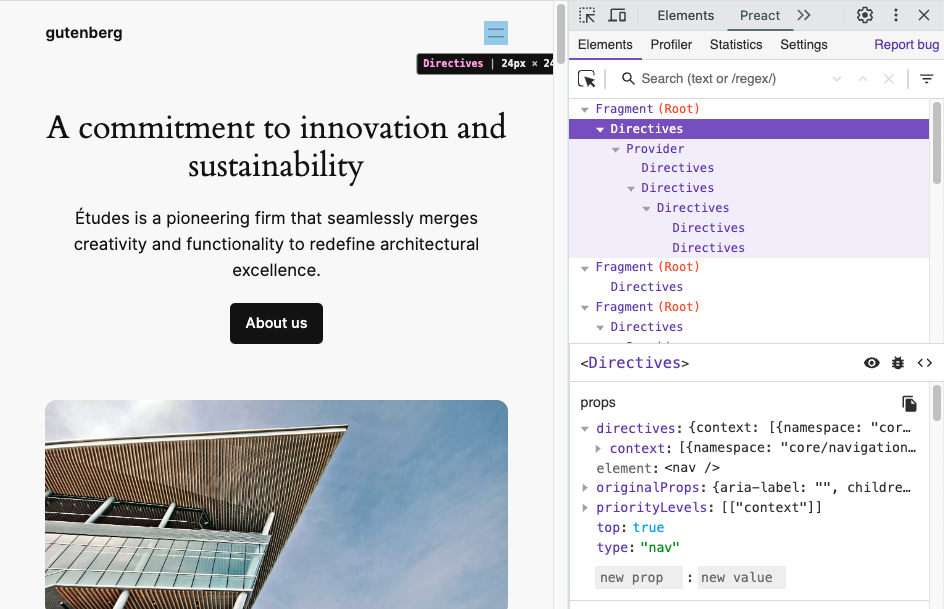
To enable this feature, the[ SCRIPT_DEBUG](https://developer.wordpress.org/advanced-administration/debug/debug-wordpress/#script_debug)
constant must be enabled. This constant makes WordPress serve an extended version
of the Interactivity API runtime that’s compatible with the Preact dev tools.
In the future, there are plans to improve the displayed information by including
the names of the directives used in each of the elements, among other enhancements.
Read more about this new feature on the TRAC ticket [#61171](https://core.trac.wordpress.org/ticket/61171)
and in the GitHub PR [#60514](https://github.com/WordPress/gutenberg/pull/60514)
## Interactivity API warnings in 6.6
In WordPress 6.6, both the server-side directives processing and the JavaScript
runtime will warn developers when the directives, the namespace, or the markup cannot
be evaluated.
To enable this feature, the [`SCRIPT_DEBUG`](https://developer.wordpress.org/advanced-administration/debug/debug-wordpress/#script_debug)
constant must be enabled.
Warning messages will be shown for the following cases:
### Unbalanced HTML tags
If the processed HTML contains any unbalanced tagtag A directory in Subversion.
WordPress uses tags to store a single snapshot of a version (3.6, 3.6.1, etc.),
the common convention of tags in version control systems. (Not to be confused with
post tags.), the server processing will bail out. This causes the flash effect on
page load. Now, developers will find which tag is missing within a warning message.
One example could be ``
### Unsupported HTML tags
Some tags, like [SVG](https://developer.mozilla.org/en-US/docs/Web/SVG/Element)
or [MathML](https://developer.mozilla.org/en-US/docs/Web/MathML/Element) ones, are
not yet supported by the HTML API, which is used internally by the Interactivity
API. Directives inside them or in their inner tags won’t be server-side processed.
Now, a warning will appear if any directives are found in those positions.
### Non-parseable data inside `data-wp-context`
The context data provided to `data-wp-context` directives must be a valid JSONJSON
JSON, or JavaScript Object Notation, is a minimal, readable format for structuring
data. It is used primarily to transmit data between a server and web application,
as an alternative to XML. stringified object.
### Invalidinvalid A resolution on the bug tracker (and generally common in software development, sometimes also _notabug_) that indicates the ticket is not a bug, is a support request, or is generally invalid. namespace inside `data-wp-interactive`
The value passed to `data-wp-interactive` directive cannot be an empty object {},
an empty string, or a null value. Namespaces must be non-empty strings.
_Props to [@darerodz](https://profiles.wordpress.org/darerodz/), [@westonruter](https://profiles.wordpress.org/westonruter/)
and [@luisherranz](https://profiles.wordpress.org/luisherranz/) for co-authoring
this post
and to [@fabiankaegy](https://profiles.wordpress.org/fabiankaegy/) and
[@juanmaguitar](https://profiles.wordpress.org/juanmaguitar/) for review
[#6-6](https://make.wordpress.org/core/tag/6-6/), [#dev-notes](https://make.wordpress.org/core/tag/dev-notes/),
[#dev-notes-6-6](https://make.wordpress.org/core/tag/dev-notes-6-6/), [#interactivity-api](https://make.wordpress.org/core/tag/interactivity-api/)
[ ](https://profiles.wordpress.org/cbravobernal/) [Carlos Bravo](https://profiles.wordpress.org/cbravobernal/)
2:57 pm _on_ March 4, 2024
Tags: [6-5 ( 76 )](https://make.wordpress.org/core/tag/6-5/),
[dev-notes ( 617 )](https://make.wordpress.org/core/tag/dev-notes/), [dev-notes-6.5 ( 15 )](https://make.wordpress.org/core/tag/dev-notes-6-5/),
interactivity API
# [Interactivity API in 6.5](https://make.wordpress.org/core/2024/03/04/interactivity-api-dev-note/)
The Interactivity APIAPI An API or Application Programming Interface is a software
intermediary that allows programs to interact with each other and share data in
limited, clearly defined ways. provides a standard way for developers to add interactions
to the frontend of their blocks.
This standard aims to make it **easier for developers to create rich, interactive
user experiences**, from simple cases like counters or pop-ups to more complex features
like instant page navigation, instant search, carts, or checkouts.
Blocks can share data, actions, and callbacks between them. This makes communication
between blocks simpler and less error-prone. For example, clicking on an “add to
cart” blockBlock Block is the abstract term used to describe units of markup that,
composed together, form the content or layout of a webpage using the WordPress editor.
The idea combines concepts of what in the past may have achieved with shortcodes,
custom HTML, and embed discovery into a single consistent API and user experience.
can seamlessly update a separate “cart” block.
To understand better the reasoning behind it, you can take a look at [the original proposal](https://make.wordpress.org/core/2023/03/30/proposal-the-interactivity-api-a-better-developer-experience-in-building-interactive-blocks/),
where it is explained in more detail.
More information about it can be found in the [merge announcement](https://make.wordpress.org/core/2024/02/19/merge-announcement-interactivity-api/),
the [status update post](https://make.wordpress.org/core/2023/08/15/status-update-on-the-interactivity-api/),
and the [Trac ticket](https://core.trac.wordpress.org/ticket/60356) for the Interactivity
API.
This dev notedev note Each important change in WordPress Core is documented in a
developers note, (usually called dev note). Good dev notes generally include a description
of the change, the decision that led to this change, and a description of how developers
are supposed to work with that change. Dev notes are published on Make/Core blog
during the beta phase of WordPress release cycle. Publishing dev notes is particularly
important when plugin/theme authors and WordPress developers need to be aware of
those changes.In general, all dev notes are compiled into a Field Guide at the beginning
of the release candidate phase. covers the APIs included in 6.5 and how to use the
Interactivity API.
## **How to create interactions using the Interactivity API**
It’s important to highlight that **the block creation ****_workflow_**** doesn’t
change**.
Until now, WordPress has been intentionally unopinionated about the different solutions
used on the frontend of blocks. The Interactivity API changes that. It adds **a
new standard way to easily add frontend interactivity to blocks** while the APIs
handling the Block Editor remain the same.
You need first to declare its compatibility with the API by adding the interactivity
property inside supports, in the `block.json` file:
```notranslate
"supports": {
"interactivity": true
},
```
Refer to the [Block Editor handbook](https://developer.wordpress.org/block-editor/reference-guides/block-api/block-supports/#interactivity)
to get a more detailed description of the `interactivity` support property.
The Interactivity API script requires using [the new script modules coming in WordPress 6.5](https://make.wordpress.org/core/2024/03/04/script-modules-in-6-5/),
so blocks should enqueue the JavaScriptJavaScript JavaScript or JS is an object-
oriented computer programming language commonly used to create interactive effects
within web browsers. WordPress makes extensive use of JS for a better user experience.
While PHP is executed on the server, JS executes within a user’s browser. [https://www.javascript.com](https://www.javascript.com/)
by using viewScriptModule:
```notranslate
// block.json
{
...
"viewScriptModule": "file:./view.js"
}
```
_You can easily scaffold and test an interactive block following_[_ __this quick start guide_](https://developer.wordpress.org/block-editor/reference-guides/packages/packages-interactivity/#quick-start-guide)_,
which explains how to use a CLICLI Command Line Interface. Terminal (Bash) in Mac,
Command Prompt in Windows, or WP-CLI for WordPress. command to speed up this process._
With that in mind, in order to add interactivity to blocks powered by the Interactivity
API, developers would need to:
1. Add directives to the markup to add specific interactions to the block.
2. Create a store with the logic (state, actions, or callbacks) for interactivity.
Let’s use a simple example to explain it: a button that shows and hides some text.
Let’s also send a message in the console whenever the button is hidden or revealed.
### **1. Add the directives**
Directives are custom attributes that are added to the markup of your block to add
interactions to its DOM elements. They are placed in the render.php file (for dynamic
blocks).
The very first step is to add the `data-wp-interactive` directive. This is used
to “activate” the Interactivity API in a DOM element and its children, and its value
must be the unique namespace of your pluginPlugin A plugin is a piece of software
containing a group of functions that can be added to a WordPress website. They can
extend functionality or add new features to your WordPress websites. WordPress plugins
are written in the PHP programming language and integrate seamlessly with WordPress.
These can be free in the WordPress.org Plugin Directory [https://wordpress.org/plugins/](https://wordpress.org/plugins/)
or can be cost-based plugin from a third-party. or block:
```notranslate
```
The rest of the directives can be added with the desired interactions.
```notranslate
// render.php
$context = array('isOpen' => false);
This element is now visible!
```
Additionally, directives can also be injected dynamically using the[ HTML Tag Processor](https://make.wordpress.org/core/2023/03/07/introducing-the-html-api-in-wordpress-6-2).
Don’t worry if you don’t understand how it works yet. So far, the important part
is that the example above uses directives like `wp-on` and `wp-bind` to add interactivity
to the HTMLHTML HyperText Markup Language. The semantic scripting language primarily
used for outputting content in web browsers.. This is the list of directives available
in WordPress 6.5:
_You can find a deeper explanation of each directive and examples of how to use
it in the relevant links._
* [wp-interactive](https://developer.wordpress.org/block-editor/reference-guides/packages/packages-interactivity/packages-interactivity-api-reference/#wp-interactive):
This attribute **must be set** to the unique identifier of your plugin or block
in order for it to use the Interactivity API.
* [wp-context](https://developer.wordpress.org/block-editor/reference-guides/packages/packages-interactivity/packages-interactivity-api-reference/#wp-context):
It provides a **local** state available to a specific HTML node and its children.
It accepts stringified JSONJSON JSON, or JavaScript Object Notation, is a minimal,
readable format for structuring data. It is used primarily to transmit data between
a server and web application, as an alternative to XML. as a value. It’s recommended
to use `wp_interactivity_data_wp_context()` to set it in PHPPHP The web scripting
language in which WordPress is primarily architected. WordPress requires PHP
7.4 or higher.
* [wp-bind](https://developer.wordpress.org/block-editor/reference-guides/packages/packages-interactivity/packages-interactivity-api-reference/#wp-bind):
It allows HTML attributes to be set on elements based on a boolean or string
value. It follows the syntax `data-wp-bind--[attribute]`. (like `data-wp-bind--
value`)
* [wp-class](https://developer.wordpress.org/block-editor/reference-guides/packages/packages-interactivity/packages-interactivity-api-reference/#wp-class):
It adds or removes a class to an HTML element, depending on a boolean value.
It follows the syntax `data-wp-class--[classname]`.
* [wp-style](https://developer.wordpress.org/block-editor/reference-guides/packages/packages-interactivity/packages-interactivity-api-reference/#wp-style):
It adds or removes inline style to an HTML element, depending on its value. It
follows the syntax `data-wp-style--[css-property].`
* [wp-text](https://developer.wordpress.org/block-editor/reference-guides/packages/packages-interactivity/packages-interactivity-api-reference/#wp-text):
It sets the inner text of an HTML element. It only accepts strings as the parameter.
* [wp-on](https://developer.wordpress.org/block-editor/reference-guides/packages/packages-interactivity/packages-interactivity-api-reference/#wp-on):
It runs code on dispatched DOM events like click or keyup. Its syntax is `data-
wp-on--[event]` (like `data-wp-on--click` or `data-wp-on--keyup`).
* [wp-on-window](https://developer.wordpress.org/block-editor/reference-guides/packages/packages-interactivity/packages-interactivity-api-reference/#wp-on-window):
It allows to attach global window events like resize, copy, focus and then execute
a defined callback when those happen. Its syntax is `data-wp-on-window--[window-
event]` (like `data-wp-on-window--resize` or `data-wp-on-window--languagechange`).
* [wp-on-document](https://developer.wordpress.org/block-editor/reference-guides/packages/packages-interactivity/packages-interactivity-api-reference/#wp-on-document):
It allows to attach global document events like scroll, mousemove, keydown and
then execute a defined callback when those happen. Its syntax is `data-wp-on-
document--[document-event]` (like `data-wp-on-document--keydown` or `data-wp-
on-document--selectionchange`).
* [wp-watch](https://developer.wordpress.org/block-editor/reference-guides/packages/packages-interactivity/packages-interactivity-api-reference/#wp-watch):
It runs a callback **when the node is created and runs it again when the state
or context changes**.
* [wp-init](https://developer.wordpress.org/block-editor/reference-guides/packages/packages-interactivity/packages-interactivity-api-reference/#wp-init):
It runs a callback **only when the node is created**.
* [wp-run](https://developer.wordpress.org/block-editor/reference-guides/packages/packages-interactivity/packages-interactivity-api-reference/#wp-run):
It runs the passed callback **during node’s render execution**.
* [wp-key](https://developer.wordpress.org/block-editor/reference-guides/packages/packages-interactivity/packages-interactivity-api-reference/#wp-key):
It assigns a unique key to an element to help the Interactivity API identify
it when iterating through arrays of elements.
* [wp-each](https://developer.wordpress.org/block-editor/reference-guides/packages/packages-interactivity/packages-interactivity-api-reference/#wp-each):
It is intended to render a list of elements.
* [wp-each-child](https://developer.wordpress.org/block-editor/reference-guides/packages/packages-interactivity/packages-interactivity-api-reference/#wp-each-child):
Ensures hydration works as expected, is added automatically on the server processing
of wp-each directive.
### **2. Create the store**
The store is used to create the logic that will link the directives with the data
used inside that logic.
All stores are referenced by a unique namespace, separating the logic and avoiding
name collisions between different store properties and functions.
If there are multiple stores defined with the same namespace, they will be merged
into a single store.
The store is usually created in the view.js file of each block, although the state
can be initialized in the backend, for example, [in the render file of the block.](https://developer.wordpress.org/block-editor/reference-guides/block-api/block-metadata/#render)
The state is a global object, available to all HTML nodes of the page. It is defined
by the `store()` function. If you need a local state for just a node and its children,
check the context definition.
The object can accept any property, in order to keep consistency between projects,
this convention is recommended.
* **State**: Defines data available to the HTML nodes of the page. Properties inside
the state will be available globally. If you need to edit them, the recommended
way is by using getters.
- **Derived State.** If you need a modified version of any state property, [getters](https://developer.mozilla.org/en-US/docs/Web/JavaScript/Reference/Functions/get)
are the recommended approach (more on deriving state below).
* **Actions**: Usually triggered by the `data-wp-on` directive (using event listeners).
* **Callbacks**: Automatically reactReact React is a JavaScript library that makes
it easy to reason about, construct, and maintain stateless and stateful user
interfaces. [https://reactjs.org](https://reactjs.org/) to state changes. Usually
triggered by `data-wp-on-window`, `data-wp-on-document` or `data-wp-init` directives.
Returning to our example, this could be a simple store in one block, a global state
has been added for having a complete sample of how a store could look like.
```notranslate
// view.js
import { store, getContext } from "@wordpress/interactivity";
const { state } = store( 'myPlugin', {
state: {
likes: 0,
getDoubleLikes() {
return 2 * state.likes;
}
},
actions: {
toggle: () => {
const context = getContext();
context.isOpen = !context.isOpen;
},
},
callbacks: {
logIsOpen: () => {
const context = getContext();
// Log the value of `isOpen` each time it changes.
console.log(`Is open: ${context.isOpen}`);
},
},
});
```
There can be cases where only actions and callbacks are defined in the store.
DOM elements are connected to data stored in the state and context through directives.
If data in the state or context change directives will react to those changes, updating
the DOM accordingly (see[ diagram](https://excalidraw.com/#json=T4meh6lltJh6TCX51NTIu,DmIhxYSGFTL_ywZFbsmuSw)).
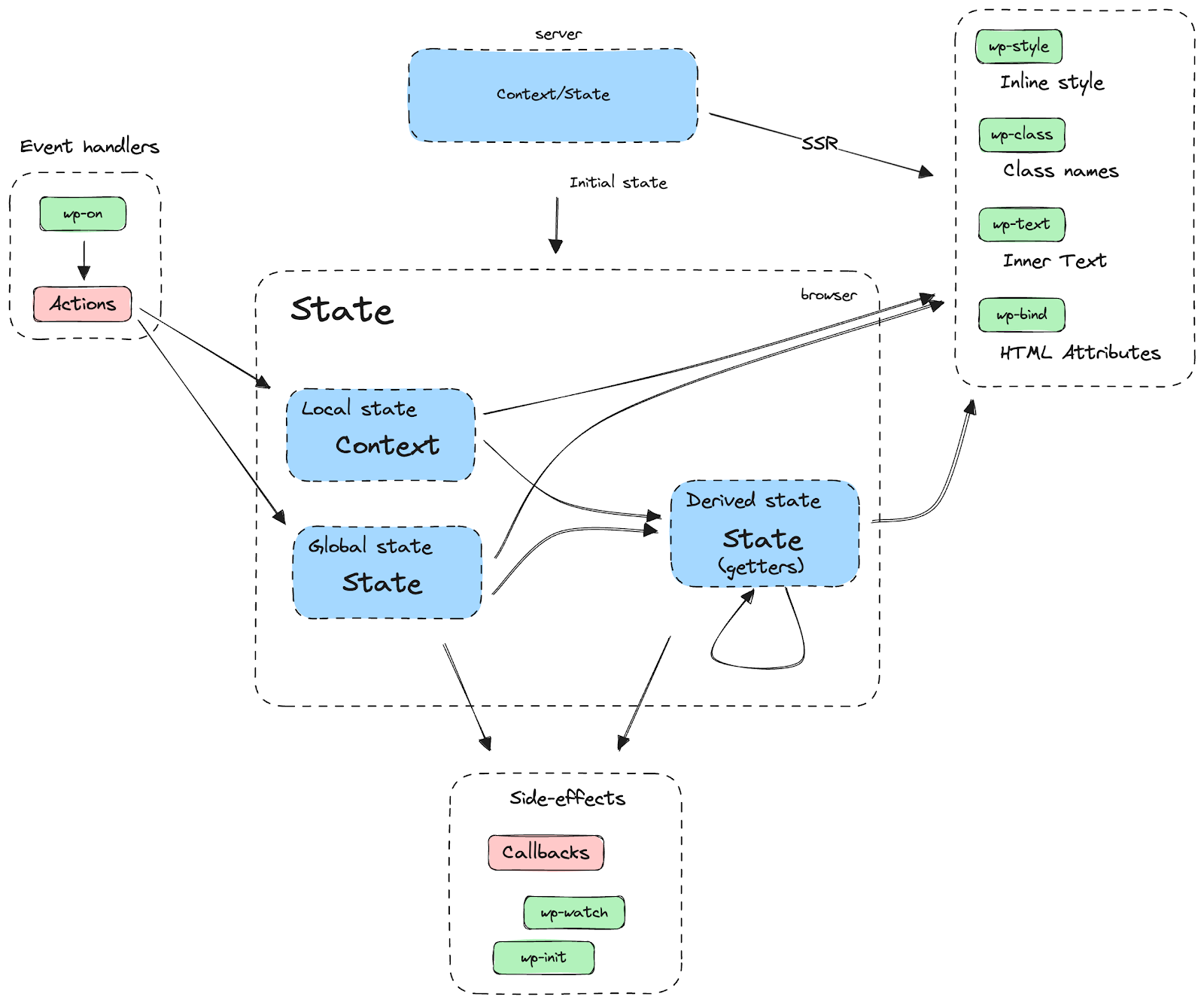
When creating the store, there are some important things to be aware of:
#### **Using derived state**
Derived state uses [getters](https://developer.mozilla.org/en-US/docs/Web/JavaScript/Reference/Functions/get)
to return a computed version of the state. It can access both state and context.
```notranslate
// view.js
const { state } = store( "myPlugin", {
state: {
amount: 34,
defaultCurrency: 'EUR',
currencyExchange: {
USD: 1.1,
GBP: 0.85,
},
get amountInUSD() {
return state.currencyExchange[ 'USD' ] * state.amount,
},
get amountInGBP() {
return state.currencyExchange[ 'GBP' ] * state.amount,
},
},
} );
```
#### **Accessing the store**_ _**by destructuring**
The store contains all the store properties, like state, actions, or callbacks.
They are returned by the `store()` call, so you can access them by destructuring
it:
```notranslate
const { state, actions, callbacks } = store( "myPlugin", {
// ...
} );
```
Note that context is not part of the store and is accessed through the `getContext`
function.
If you want to take a deeper view about how the `store()` function works, feel free
to check the function documentation [here](https://github.com/WordPress/gutenberg/blob/8cb23964d58f3ce5cf6ae1b6f967a4b8d4939a8e/packages/interactivity/src/store.ts#L208).
#### **Async actions**
Async actions should use [generator functions](https://developer.mozilla.org/en-US/docs/Web/JavaScript/Reference/Statements/function*)
instead of async/await or promises. The Interactivity API needs to be able to track
async behavior in order to restore the proper scope. Otherwise, `getContext` may
return stale values if it was updated concurrently with the async operation. Instead
of awaiting the promise, yield it from the generator function, and the Interactivity
API will handle awaiting its completion.
So, instead of:
```javascript
const { state } = store("myPlugin", {
state: {
get isOpen() {
return getContext().isOpen;
},
},
actions: {
someAction: async () => {
state.isOpen; // This is the expected context.
await longDelay();
state.isOpen; // This may not get the proper context unless it's properly restored.
},
},
});
function longDelay() {
return new Promise( ( resolve ) => {
setTimeout( () => resolve(), 3_000 );
} );
}
```
The store should be:
```javascript
const { state } = store("myPlugin", {
state: {
get isOpen() {
return getContext().isOpen;
},
},
actions: {
someAction: function* () {
state.isOpen; // This is the expected context.
yield longDelay(); // With generators, the caller controls when to resume this function.
state.isOpen; // This context is correct because the scope was restored before resuming after the yield.
},
},
});
function longDelay() {
return new Promise( ( resolve ) => {
setTimeout( () => resolve(), 3_000 );
} );
}
```
If you want to take a deeper look at the example, check the [API reference](https://developer.wordpress.org/block-editor/reference-guides/packages/packages-interactivity/packages-interactivity-api-reference/).
---
### **Working with other namespaces**
Interactive blocks can share data between them, unless they are private stores.
#### **Directives**
In order to access the store of a different namespace in a directive, add the namespace
before the directive value. For example:
```language-markup
```
### **Context**
Context from a different namespace can be accessed by providing the desired namespace
as an argument to `getContext( namespace )`:
```javascript
import { getContext } from "@wordpress/interactivity";
const otherPluginContext = getContext( "otherPlugin" );
```
### **Store**
Like context, different stores can be accessed by passing the desired namespace
as an argument:
```javascript
const { state: otherState, actions: otherActions } = store( "otherPlugin" );
```
#### **Private stores**
A store can be “locked” to prevent its content from being accessed from other namespaces.
To do so, set the lock option to true in the store() call, like in the example below.
When the lock is set, subsequent executions of store() with the same locked namespace
will throw an error, meaning that the namespace can only be accessed where its reference
was returned from the first store() call. This is especially useful for developers
who want to hide part of their plugin stores so it doesn’t become accessible for
extenders.
```javascript
const { state } = store("myPlugin/private", {
state: {
messages: [ "private message" ]
}
},
{ lock: true }
);
// The following call throws an Error!
store( "myPlugin/private", { /* store part */ } );
```
There is also a way to unlock private stores: instead of passing a boolean, you
can use a string as the lock value. Such a string can then be used in subsequent
store() calls to the same namespace to unlock its content. Only the code with the
lock string will be able to access the protected store. This is useful for complex
stores defined across multiple files.
```javascript
const { state } = store("myPlugin/private", {
state: {
messages: [ "private message" ]
}
},
{ lock: PRIVATE_LOCK }
);
// The following call works as expected.
store( "myPlugin/private", { /* store part */ }, { lock: PRIVATE_LOCK } );
```
### **Interactivity API client methods**
The following methods are for use in JavaScript and are provided by the wordpress/
interactivity script module available in WordPress 6.5.
#### **getContext()**
The context defined with the `data-wp-context` attribute can be retrieved with the
getContext function:
```javascript
const { state } = store( "myPlugin", {
actions: {
someAction() {
const context = getContext();
const otherPluginContext = getContext( 'otherPlugin' );
// ...
}
}
} );
```
[Handbook description.](https://developer.wordpress.org/block-editor/reference-guides/packages/packages-interactivity/packages-interactivity-api-reference/#store-client-methods)
#### **getElement()**
Retrieves a representation of the element where a function from the store is being
evaluated. This representation is read-only, and contains a reference to the DOM
element and its attributes.
[Handbook description.](https://developer.wordpress.org/block-editor/reference-guides/packages/packages-interactivity/packages-interactivity-api-reference/#store-client-methods)
#### **getConfig()**
Retrieves a configuration object that was previously defined in the server via `
wp_interactivity_config()` function.
Configuration is immutable on the client, it cannot be modified. You can get an
example [later in this document.](https://make.wordpress.org/core/tag/interactivity-api/?output_format=md#wp-interactivity-config)
#### **store()**
Creates the store used to link the data and actions with their respective directives.
Check the main section for more information.
#### **withScope()**
Actions can depend on the scope when they are called, e.g., when you call `getContext()`
or `getElement()`.
When the Interactivity API runtime execute callbacks, the scope is set automatically.
However, if you call an action from a callback that is not executed by the runtime,
like in a `setInterval()` callback, you need to ensure that the scope is properly
set. Use the `withScope()` function to ensure the scope is properly set in these
cases.
An example, where `actions.nextImage` would trigger an undefined error without the
wrapper:
```javascript
store('mySliderPlugin', {
callbacks: {
initSlideShow: () => {
setInterval(
withScope( () => {
actions.nextImage();
} ),
3_000
);
}
},
})
```
### **Interactivity API server functions**
These are the PHP functions the Interactivity API includes:
#### **wp_interactivity_state( $store_namespace, $state )**
It is used to initialize the state on the server and ensure that the HTML sent by
it, and the HTML after the client hydration are the same. And it also allows you
to use any WordPress API like coreCore Core is the set of software required to run
WordPress. The Core Development Team builds WordPress. translations.
```php
// render.php
wp_interactivity_state( "movies", array(
"1" => array(
"id" => "123-abc",
"movieName" => __("someMovieName", "textdomain")
),
) );
```
It receives two arguments, a string with the namespace that will be used as a reference
and an [associative array](https://www.php.net/manual/en/language.types.array.php)
containing the values.
The state defined on this function gets merged with the stores defined in the view.
js files.
#### **wp_interactivity_data_wp_context( $context, $_store\_namespace _)**
Generates a `data-wp-context` attribute ready to be server side rendered. This function
escapes the array to prevent external attacks, apart from any error that may appear
when writing JSON strings manually.
`$context` is an array containing the keys and values of the context.
`$_store\_namespace_` allows referencing different stores, and is empty by default.
```wp-block-code
get_the_ID(),
'show' => true,
)
)
?>
>
My interactive div
```
Will return
```wp-block-code
My interactive div
```
#### **wp_interactivity_config( $store_namespace, $config )**
Sets or gets configuration for an interactivity store. An immutable copy of the
configuration can be read by the client.
Consider config as a global setting that can affect the full site and won’t be updated
on client interactions. For example, determining if a site can handle client-side
navigation or not.
```php
true ) );
$config = wp_interactivity_config( 'myPlugin' );
?>
My interactive div
```
This config can be retrieved in the client:
```wp-block-code
// view.js
import { getConfig } from '@wordpress/interactivity';
const { setting } = getConfig('myPlugin');
console.log( 'setting => ', setting);
```
#### **wp_interactivity_process_directives( $html )**
Processes directives within HTML content, updating the markup where necessary.
This is the core functionality of the Interactivity API. It’s public so that any
HTML can be processed, not just blocks.
For blocks with `supports.interactivity,` directives are automatically processed.
Developers do not need to call **wp_interactivity_process_directives** in this case.
```wp-block-code
';
wp_interactivity_state( 'myPlugin', array( 'message' => 'hello world!' ) );
// Process directives in HTML content.
$processed_html = wp_interactivity_process_directives( $html_content );
// output:
hello world!
```
### Relevant links
* [Showcase](https://github.com/WordPress/gutenberg/discussions/55642)
* [Store API proposal](https://github.com/WordPress/gutenberg/discussions/53586)
Props to [@gziolo](https://profiles.wordpress.org/gziolo/), [@darerodz](https://profiles.wordpress.org/darerodz/),
[@santosguillamot](https://profiles.wordpress.org/santosguillamot/), [@luisherranz](https://profiles.wordpress.org/luisherranz/)
and [@jonsurrell](https://profiles.wordpress.org/jonsurrell/) for technical review.
Props to [@leonnugraha](https://profiles.wordpress.org/leonnugraha/) for copy review.
[#6-5](https://make.wordpress.org/core/tag/6-5/), [#dev-notes](https://make.wordpress.org/core/tag/dev-notes/),
[#dev-notes-6-5](https://make.wordpress.org/core/tag/dev-notes-6-5/), [#interactivity-api](https://make.wordpress.org/core/tag/interactivity-api/)
[ ](https://profiles.wordpress.org/cbravobernal/) [Carlos Bravo](https://profiles.wordpress.org/cbravobernal/)
1:05 pm _on_ February 19, 2024
Tags: [6-5 ( 76 )](https://make.wordpress.org/core/tag/6-5/),
[feature plugins ( 122 )](https://make.wordpress.org/core/tag/feature-plugins/),
[feature projects ( 52 )](https://make.wordpress.org/core/tag/feature-projects/),
interactivity API, [merge-proposals ( 6 )](https://make.wordpress.org/core/tag/merge-proposals/)
# [Merge Announcement: Interactivity API](https://make.wordpress.org/core/2024/02/19/merge-announcement-interactivity-api/)
View the [kickoff post](https://make.wordpress.org/core/2023/03/30/proposal-the-interactivity-api-a-better-developer-experience-in-building-interactive-blocks/),
the [status update post](https://make.wordpress.org/core/2023/08/15/status-update-on-the-interactivity-api/),
and the [Trac ticket ](https://core.trac.wordpress.org/ticket/60356)for the Interactivity
APIAPI An API or Application Programming Interface is a software intermediary that
allows programs to interact with each other and share data in limited, clearly defined
ways..
## Purpose & Goals
Currently, pluginPlugin A plugin is a piece of software containing a group of functions
that can be added to a WordPress website. They can extend functionality or add new
features to your WordPress websites. WordPress plugins are written in the PHP programming
language and integrate seamlessly with WordPress. These can be free in the WordPress.
org Plugin Directory [https://wordpress.org/plugins/](https://wordpress.org/plugins/)
or can be cost-based plugin from a third-party. authors implement their chosen JavaScriptJavaScript
JavaScript or JS is an object-oriented computer programming language commonly used
to create interactive effects within web browsers. WordPress makes extensive use
of JS for a better user experience. While PHP is executed on the server, JS executes
within a user’s browser. [https://www.javascript.com](https://www.javascript.com/)
frameworks (or vanilla JSJS JavaScript, a web scripting language typically executed
in the browser. Often used for advanced user interfaces and behaviors.) to enhance
user experiences on WordPress sites. There is no consistency or standardized pattern
for developing frontend JavaScript in WordPress.
The Interactivity API provides a standard way for developers to add interactions
into the frontend of their blocks.
The API has been designed and created with these requirements:
* **BlockBlock Block is the abstract term used to describe units of markup that,
composed together, form the content or layout of a webpage using the WordPress
editor. The idea combines concepts of what in the past may have achieved with
shortcodes, custom HTML, and embed discovery into a single consistent API and
user experience.-first and PHPPHP The web scripting language in which WordPress
is primarily architected. WordPress requires PHP 7.4 or higher-first.** Prioritizing
blocks for building sites and server side rendering for better SEO and performance.
Combining the best for user and developer experience.
* **Backward compatible. **Ensuring compatibility with both classic and block themes
and optionally with other JavaScript frameworks, though it’s advised to use the
API as the primary method. It also works with hooksHooks In WordPress theme and
development, hooks are functions that can be applied to an action or a Filter
in WordPress. Actions are functions performed when a certain event occurs in
WordPress. Filters allow you to modify certain functions. Arguments used to hook
both filters and actions look the same. and internationalization.
* **Declarative and reactive. **Utilizing declarative code to define interactions,
listening for changes in data, and updating only relevant parts of the DOM accordingly.
* **Performant**: Optimizing runtime performance to deliver a fast and lightweight
user experience.
* **Send less JavaScript. **Reduce the overall amount of JS being sent on the page
by providing a common framework that blocks can reuse. So the more that blocks
leverage the Interactivity API, the less JS will be sent overall.
A live demo of what can be achieved was announced in the State of the WordState
of the Word This is the annual report given by Matt Mullenweg, founder of WordPress
at WordCamp US. It looks at what we’ve done, what we’re doing, and the future of
WordPress. [https://wordpress.tv/tag/state-of-the-word/](https://wordpress.tv/tag/state-of-the-word/)..
[Live site demo](https://wpmovies.dev/)
In case you want to read more about the goals, you can refer to the [initial proposal.](https://make.wordpress.org/core/2023/03/30/proposal-the-interactivity-api-a-better-developer-experience-in-building-interactive-blocks/)
## Project Background
The project started as an[ experimental plugin](https://github.com/WordPress/block-interactivity-experiments/)
in early 2022. Then, the first API version debuted in [Gutenberg 16.2](https://make.wordpress.org/core/2023/07/14/whats-new-in-gutenberg-16-2-12-july/#interactivity-api)
and has been continually refined until [Gutenberg 17.7](https://make.wordpress.org/core/2024/02/14/whats-new-in-gutenberg-17-7-14th-february/#:~:text=Multiple%20performance%20improvements%2C%20refinement%20of,new%20Gutenberg%20release%20is%20bringing.).
In WordPress 6.4,the Image, Search, File, Navigation, and Query coreCore Core is
the set of software required to run WordPress. The Core Development Team builds
WordPress. blocks were refactored using the private version of the Interactivity
API, addressing accessibilityAccessibility Accessibility (commonly shortened to
a11y) refers to the design of products, devices, services, or environments for people
with disabilities. The concept of accessible design ensures both “direct access”(
i.e. unassisted) and “indirect access” meaning compatibility with a person’s assistive
technology (for example, computer screen readers). (https://en.wikipedia.org/wiki/
Accessibility) issues and adding the long-time expected [lightbox](https://developer.wordpress.org/themes/global-settings-and-styles/settings/lightbox/)(
or “expand on click”) feature for images.
The development has been done in GutenbergGutenberg The Gutenberg project is the
new Editor Interface for WordPress. The editor improves the process and experience
of creating new content, making writing rich content much simpler. It uses ‘blocks’
to add richness rather than shortcodes, custom HTML etc. [https://wordpress.org/gutenberg/](https://wordpress.org/gutenberg/),
using a [Tracking Issue](https://github.com/WordPress/gutenberg/issues/56803) to
monitor progress and a [Discussions category](https://github.com/WordPress/gutenberg/discussions/categories/interactivity-api)
to solicit feedback and offer guidance to developers who assisted in testing.
## Implementation Details
The Interactivity API is a standard system of directives, based on declarative code,
for adding frontend interactivity to blocks.
Directives are special HTMLHTML HyperText Markup Language. The semantic scripting
language primarily used for outputting content in web browsers. attributes that
tell the Interactivity API to attach a specified interaction to a DOM element or
to transform it, similar to [HTMX](https://htmx.org/) or [AlpineJS](https://alpinejs.dev/).
Using HTML as the templating language enables the API to understand the directives
both in the server (PHP) and in the client (JS).
As part of this project, and all the interactivity scripts are now implemented leveraging
the new script modules which are also [shipping in WordPress 6.5](https://make.wordpress.org/core/2023/11/21/exploration-to-support-modules-and-import-maps/).
All of them will only be loaded on the frontend if at least one interactive block
is present, to avoid sending unnecessary JavaScript to the frontend.
Here is an example of an interactive block, with a JavaScript file in charge of
increasing or decreasing a counter, and a PHP file in charge of counter initialization
and rendering.
```notranslate
// JS File - viewScriptModule.js
import { store } from "@wordpress/interactivity";
const { state } = store("my-counter-block", {
actions: {
increaseCounter: () => {
state.counter = state.counter + 1;
},
decreaseCounter: () => {
state.counter = state.counter - 1;
},
},
});
```
```notranslate
// PHP File - render.php
wp_interactivity_state('my-counter-block', array(
'counter' => 0,
))
?>
data-wp-interactive="create-block"
>
```
This would result in a block like this one:
For developers looking to get started, there is a [Getting Started guide available](https://developer.wordpress.org/block-editor/reference-guides/packages/packages-interactivity/#quick-start-guide),
with plans to transition it to a handbook in the near future.
Additionally, a detailed dev notedev note Each important change in WordPress Core
is documented in a developers note, (usually called dev note). Good dev notes generally
include a description of the change, the decision that led to this change, and a
description of how developers are supposed to work with that change. Dev notes are
published on Make/Core blog during the beta phase of WordPress release cycle. Publishing
dev notes is particularly important when plugin/theme authors and WordPress developers
need to be aware of those changes.In general, all dev notes are compiled into a
Field Guide at the beginning of the release candidate phase. will be released, providing
further insights into utilizing the API and understanding its internal workings.
## Modules and Import maps.
[The Interactivity API brings along the support of Modules and Import Maps.](https://make.wordpress.org/core/2023/11/21/exploration-to-support-modules-and-import-maps/)
JavaScript modules have transformed the way developers write and organize JavaScript
code. They provide a cleaner and more modular architecture, making code easier to
maintain, test and reuse across projects.
With the addition of native support for registering and enqueueing JavaScript modules,
WordPress can keep pace with web development by using efficient, effective and battle-
tested methods to handle JavaScript libraries and their dependencies.
There will be another dev note about JavaScript Modules and a guide to use them.
[Guide to Javascript Modules.](https://developer.mozilla.org/en-US/docs/Web/JavaScript/Guide/Modules)
## Contributions and Feedback.
The Interactivity API is intended to be a long-term project with future enhancements;
feedback is highly welcome. The best way to reach out is via [GitHub Discussions](https://github.com/WordPress/gutenberg/discussions/categories/interactivity-api).
Code and documentation contributions are also welcomed, and the [Gutenberg repository](https://github.com/WordPress/gutenberg/tree/trunk/packages/interactivity)
is the place to go.
Some examples of contributing could be:
* Test the Interactivity API, create your own interactions, and share feedback
about what you like and you don’t.
* Suggest new features to include in the API.
* Help creating tutorials or share demos that can inspire other people.
## Spread the word
The more developers who use Interactivity API in their projects, the more consistency
there will be in the WordPress ecosystem, and the less JavaScript will be sent to
the world!
Feel free to spread the word about the Interactivity API in social media and events
with your colleagues, friends, and everyone!
_Props to _[@cbringmann](https://profiles.wordpress.org/cbringmann/), [@gziolo](https://profiles.wordpress.org/gziolo/),
[@swissspidy](https://profiles.wordpress.org/swissspidy/), [@westonruter](https://profiles.wordpress.org/westonruter/),
[@santosguillamot](https://profiles.wordpress.org/santosguillamot/), [@luisherranz](https://profiles.wordpress.org/luisherranz/),
and [@rmartinezduque](https://profiles.wordpress.org/rmartinezduque/)_ for peer
review._
[#6-5](https://make.wordpress.org/core/tag/6-5/), [#feature-plugins](https://make.wordpress.org/core/tag/feature-plugins/),
[#feature-projects](https://make.wordpress.org/core/tag/feature-projects/), [#interactivity-api](https://make.wordpress.org/core/tag/interactivity-api/),
[#merge-proposals](https://make.wordpress.org/core/tag/merge-proposals/)
[ ](https://profiles.wordpress.org/juanmaguitar/) [JuanMa Garrido](https://profiles.wordpress.org/juanmaguitar/)
3:53 pm _on_ August 15, 2023
Tags: [block-api ( 5 )](https://make.wordpress.org/core/tag/block-api/),
[block-developer-experience ( 5 )](https://make.wordpress.org/core/tag/block-developer-experience/),
[gutenberg ( 538 )](https://make.wordpress.org/core/tag/gutenberg/), interactivity
API
# [Status update on the Interactivity API](https://make.wordpress.org/core/2023/08/15/status-update-on-the-interactivity-api/)
The[ Interactivity API proposal](https://make.wordpress.org/core/2023/03/30/proposal-the-interactivity-api-a-better-developer-experience-in-building-interactive-blocks/)
was published a few months ago. This APIAPI An API or Application Programming Interface
is a software intermediary that allows programs to interact with each other and
share data in limited, clearly defined ways. aims to create a new standard for WordPress
that simplifies and empowers building rich interactive web applications with WordPress
using [declarative and reactive](https://make.wordpress.org/core/2023/03/30/proposal-the-interactivity-api-a-better-developer-experience-in-building-interactive-blocks/#declarative-and-reactive)
programming principles.
Since the proposal was published, a dedicated group of contributors has been focused
on incorporating the Interactivity API into the GutenbergGutenberg The Gutenberg
project is the new Editor Interface for WordPress. The editor improves the process
and experience of creating new content, making writing rich content much simpler.
It uses ‘blocks’ to add richness rather than shortcodes, custom HTML etc. [https://wordpress.org/gutenberg/](https://wordpress.org/gutenberg/)
project, albeit in an experimental capacity. Fresh documentation resources have
also been prepared to guide you through this API’s exciting possibilities.
While the Interactivity API is experimental, you can already start exploring its
potential, testing its features, and exploring what’s to come.
This update shares the current state of the Interactivity API, the avenues to track
its progress, the learning resources available, and how you can contribute.
## **Table of Contents**
* [**Current Status and RoadMap**](https://make.wordpress.org/core/2023/08/15/status-update-on-the-interactivity-api/#current-status-and-roadmap)
- [What’s its current status?](https://make.wordpress.org/core/2023/08/15/status-update-on-the-interactivity-api/#what-s-its-current-status)
- [What lies ahead in the roadmap?](https://make.wordpress.org/core/2023/08/15/status-update-on-the-interactivity-api/#what-lies-ahead-in-the-roadmap)
- [Keeping Tabs on Progress](https://make.wordpress.org/core/2023/08/15/status-update-on-the-interactivity-api/#keeping-tabs-on-progress)
* [**Learning Resources**](https://make.wordpress.org/core/2023/08/15/status-update-on-the-interactivity-api/#learning-resources)
- [Where can I find technical documentation?](https://make.wordpress.org/core/2023/08/15/status-update-on-the-interactivity-api/#where-can-i-find-technical-documentation)
- [How can I get started?](https://make.wordpress.org/core/2023/08/15/status-update-on-the-interactivity-api/#how-can-i-get-started)
- [Where can I ask questions?](https://make.wordpress.org/core/2023/08/15/status-update-on-the-interactivity-api/#where-can-i-ask-questions)
* [**Contribute to the project**](https://make.wordpress.org/core/2023/08/15/status-update-on-the-interactivity-api/#contribute-to-the-project)
- [How can I contribute?](https://make.wordpress.org/core/2023/08/15/status-update-on-the-interactivity-api/#how-can-i-contribute)
- [Where can I share my feedback?](https://make.wordpress.org/core/2023/08/15/status-update-on-the-interactivity-api/#where-can-i-share-my-feedback)
* [**Summary**](https://make.wordpress.org/core/2023/08/15/status-update-on-the-interactivity-api/#summary)
## **Current Status and RoadMap**
_Wondering about the current state of affairs and how to stay in the loopLoop The
Loop is PHP code used by WordPress to display posts. Using The Loop, WordPress processes
each post to be displayed on the current page, and formats it according to how it
matches specified criteria within The Loop tags. Any HTML or PHP code in the Loop
will be processed on each post. [https://codex.wordpress.org/The\_Loop](https://codex.wordpress.org/The_Loop)?
Let’s dive right in._
### **What’s its current status?**
The [Interactivity API was added to Gutenberg 16.2](https://make.wordpress.org/core/2023/07/14/whats-new-in-gutenberg-16-2-12-july/#interactivity-api)
as the [`interactivity` package](https://github.com/WordPress/gutenberg/tree/trunk/packages/interactivity).
It’s worth noting that this package is only accessible within Gutenberg, as it is
still very experimental and prone to changes.
Some coreCore Core is the set of software required to run WordPress. The Core Development
Team builds WordPress. blocks are [already embracing the Interactivity API’s](https://github.com/search?q=repo%3AWordPress%2Fgutenberg%20%40wordpress%2Finteractivity&type=code)
potential, but its integration is still very limited.
Contributors are still working on the [experimental Interactivity API](https://github.com/WordPress/gutenberg/tree/trunk/packages/interactivity)
in Gutenberg. This work is being tracked at [Tracking Issue: Expose the full Interactivity API in @wordpress/interactivity](https://github.com/WordPress/gutenberg/issues/51056).
### **What lies ahead in the roadmap?**
The list of tasks planned for the Interactivity API is available in the [Roadmap – Current list of tasks](https://github.com/WordPress/gutenberg/discussions/52904)
discussion. This roadmap evolves and adapts as contributors learn more about the
needs of this initiative.
### **Keeping Tabs on Progress**
The ongoing work on the Interactivity API is held at the [Gutenberg repository](https://github.com/WordPress/gutenberg):
* Collaborations and conversations happen in the [Interactivity API discussions](https://github.com/WordPress/gutenberg/discussions/categories/interactivity-api).
* The Interactivity API is being developed under the distinctive label [[Feature] Interactivity API](https://github.com/WordPress/gutenberg/issues?q=label%3A%22%5BFeature%5D+Interactivity+API%22).
A good way to keep track of the development of the Interactivity API is to subscribe
to [Roadmap – Current list of tasks](https://github.com/WordPress/gutenberg/discussions/52904),
as this discussion will be updated whenever new Tracking Issues are introduced or
fresh plans emerge for this proposal’s future.
Given its experimental state, rapid iterations and occasional disruptions are expected.
The [Changelog – Tracking Breaking Changes in the Interactivity API](https://github.com/WordPress/gutenberg/discussions/52906)
discussion ensures you’re properly informed about any breaking change on new Gutenberg
releases.
## Learning Resources
_Ready to expand your knowledge about the Interactivity API? Here’s where to start._
### **Where can I find technical documentation?**
Technical documentation for the Interactivity API can be located within the [`docs` folder of the `interactivity` package](https://github.com/WordPress/gutenberg/tree/trunk/packages/interactivity/docs).
This documentation currently hosts the following resources:
* [“Getting Started” guide](https://github.com/WordPress/gutenberg/blob/trunk/packages/interactivity/docs/1-getting-started.md)
* [API Reference](https://github.com/WordPress/gutenberg/blob/trunk/packages/interactivity/docs/2-api-reference.md)
Bear in mind that this documentation is still a work in progress, so don’t hesitate
to [open a new discussion](https://github.com/WordPress/gutenberg/discussions/new?category=interactivity-api)
to ask any questions. If you want to contribute to documentation efforts, join the
[Coordinating our documentation efforts](https://github.com/WordPress/gutenberg/discussions/51928)
discussion.
The [Getting Started – and other learning resources](https://github.com/WordPress/gutenberg/discussions/52894)
discussion is your go-to source for updates on new learning materials about the
Interactivity API.
### **How can I get started?**
To get started with the Interactivity API, you can follow this [Quick Start Guide](https://github.com/WordPress/gutenberg/blob/trunk/packages/interactivity/docs/1-getting-started.md#quick-start-guide)
taking into account the [current requirements of the Interactivity API](https://github.com/WordPress/gutenberg/blob/trunk/packages/interactivity/docs/1-getting-started.md#requirements-of-the-interactivity-api).
This guide will show you how to create your first interactive blockBlock Block is
the abstract term used to describe units of markup that, composed together, form
the content or layout of a webpage using the WordPress editor. The idea combines
concepts of what in the past may have achieved with shortcodes, custom HTML, and
embed discovery into a single consistent API and user experience. with the Interactivity
API that you can test in your WordPress projects.
Once your interactive block is up and running, you can learn more from the [Interactivity API Reference](https://github.com/WordPress/gutenberg/blob/trunk/packages/interactivity/docs/2-api-reference.md)
to continue adding interactivity to your blocks with this API.
### **Where can I ask questions?**
The [Interactivity API Discussions](https://github.com/WordPress/gutenberg/discussions/52882)
is the best place to ask questions about the Interactivity API.
## Contribute to the project.
_Eager to contribute to the Interactivity API’s evolution? Your input is invaluable._
### **How can I contribute?**
The best way to contribute to the Interactivity API is to share your ideas or suggestions
in the [Interactivity API discussions.](https://github.com/WordPress/gutenberg/discussions/categories/interactivity-api)
If you’re interested in helping with [specific issues related to the Interactivity API](https://github.com/WordPress/gutenberg/issues?q=label%3A%22%5BFeature%5D+Interactivity+API%22)
feel free to comment on them to offer your help or add your insights.
### **Where can I share my feedback?**
The [Interactivity API Discussions](https://github.com/WordPress/gutenberg/discussions/52882)
is the best place to share your feedback about the Interactivity API.
## Summary
* The [Interactivity API is available in Gutenberg from version 16.2](https://make.wordpress.org/core/2023/07/14/whats-new-in-gutenberg-16-2-12-july/#interactivity-api),
encapsulated within the [“interactivity” package](https://github.com/WordPress/gutenberg/tree/trunk/packages/interactivity).
- Technical documentation is nestled within the [“docs” folder of this package](https://github.com/WordPress/gutenberg/tree/trunk/packages/interactivity/docs).
* The ongoing work on the Interactivity API is being held at the [Gutenberg repository](https://github.com/WordPress/gutenberg):
- Conversations and collaborations are taking place in [Interactivity API discussions](https://github.com/WordPress/gutenberg/discussions/categories/interactivity-api).
- The Interactivity API is developed under the label[ [Feature] Interactivity API](https://github.com/WordPress/gutenberg/issues?q=label%3A%22%5BFeature%5D+Interactivity+API%22).
* The following discussions are excellent references to keep track of this proposal:
- [Getting Started – and other learning resources](https://github.com/WordPress/gutenberg/discussions/52894)
- [Roadmap – Current list of tasks](https://github.com/WordPress/gutenberg/discussions/52904)
- [Changelog – Tracking Breaking Changes in the Interactivity API](https://github.com/WordPress/gutenberg/discussions/52906)
As WordPress advances toward more powerful interactive experiences, seize the opportunity
to engage. Your insights and contributions will help shape this proposal.
_Props to [@poliuk](https://profiles.wordpress.org/poliuk/), [@luisherranz](https://profiles.wordpress.org/luisherranz/),
[@czapla](https://profiles.wordpress.org/czapla/), and [@greenshady](https://profiles.wordpress.org/greenshady/)
for the review and help to shape this post. _
[#block-api](https://make.wordpress.org/core/tag/block-api/), [#block-developer-experience](https://make.wordpress.org/core/tag/block-developer-experience/),
[#gutenberg](https://make.wordpress.org/core/tag/gutenberg/), [#interactivity-api](https://make.wordpress.org/core/tag/interactivity-api/)
[ ](https://profiles.wordpress.org/santosguillamot/) [Mario Santos](https://profiles.wordpress.org/santosguillamot/)
6:49 pm _on_ March 30, 2023
Tags: [block-api ( 5 )](https://make.wordpress.org/core/tag/block-api/),
[block-developer-experience ( 5 )](https://make.wordpress.org/core/tag/block-developer-experience/),
[gutenberg ( 538 )](https://make.wordpress.org/core/tag/gutenberg/), interactivity
API
# [Proposal: The Interactivity API – A better developer experience in building interactive blocks](https://make.wordpress.org/core/2023/03/30/proposal-the-interactivity-api-a-better-developer-experience-in-building-interactive-blocks/)
What if effortlessly creating performant, fluid, and idiomatic frontend interactivity
on blockBlock Block is the abstract term used to describe units of markup that,
composed together, form the content or layout of a webpage using the WordPress editor.
The idea combines concepts of what in the past may have achieved with shortcodes,
custom HTML, and embed discovery into a single consistent API and user experience.-
based WordPress sites was possible? Imagine plugins providing interactions like “
heart this post” or “add to cart” without page reloads. Picture instant search,
commenting, and native full-page transitions as best-in-class built-ins without
complex scaffolding or external tools. Envision achieving this in any block theme
by default without sacrificing PHPPHP The web scripting language in which WordPress
is primarily architected. WordPress requires PHP 7.4 or higher server rendering
and the pluginPlugin A plugin is a piece of software containing a group of functions
that can be added to a WordPress website. They can extend functionality or add new
features to your WordPress websites. WordPress plugins are written in the PHP programming
language and integrate seamlessly with WordPress. These can be free in the WordPress.
org Plugin Directory [https://wordpress.org/plugins/](https://wordpress.org/plugins/)
or can be cost-based plugin from a third-party. ecosystem for a JSJS JavaScript,
a web scripting language typically executed in the browser. Often used for advanced
user interfaces and behaviors. runtime. Visualize block developers easily declaring
and extending such behaviors in a way that is immediately familiar and compatible
with the block ecosystem.
That’s what we, the contributors involved in this project, aim to explore and unlock
with the **Interactivity APIAPI An API or Application Programming Interface is a
software intermediary that allows programs to interact with each other and share
data in limited, clearly defined ways.**. The demo below shows some of this power
and flexibility in action.
[Live site demo](https://wpmovies.dev/) / [WP Movies GitHub](https://github.com/wordpress/wp-movies-demo)
GutenbergGutenberg The Gutenberg project is the new Editor Interface for WordPress.
The editor improves the process and experience of creating new content, making writing
rich content much simpler. It uses ‘blocks’ to add richness rather than shortcodes,
custom HTML etc. [https://wordpress.org/gutenberg/](https://wordpress.org/gutenberg/)
has evolved a lot over the past few years, though most of the improvements have
focused on the block developer experience within the block editor. Today, we’d like
to update you on **the Interactivity API, which aims to be a standard way to allow
developers to add interactivity to the frontend of their blocks.**
Your feedback will be highly appreciated to help shape its next iteration. _Here’s
some _[_background reading on the Interactivity API_](https://make.wordpress.org/core/2023/01/11/update-on-the-work-to-make-building-interactive-blocks-easier/)_._
A couple of important notes before diving in:
* The Interactivity API is for the frontend of blocks, not for the block editor.
This means the API is not expected to be used inside the `edit` function. It’s
a way to create interactive user interfaces for your site visitors. Having said
that, we’d like to explore whether some directives could be reused across the
frontend and the editor to unify the whole block developer experience.
* **This is still experimental.** Functionalities are missing, documentation is
scarce, and the final API may look different. The API’s design is open to debate,
and any feedback is key to ensuring the Interactivity API accounts for the entirety
of WordPress’ diverse needs and requirements.
### Table of contents
* [API Goals](https://make.wordpress.org/core/tag/interactivity-api/?output_format=md#api-goals)
* [What’s being proposed?](https://make.wordpress.org/core/tag/interactivity-api/?output_format=md#whats-being-proposed)
* [How to create interactive blocks using this API](https://make.wordpress.org/core/tag/interactivity-api/?output_format=md#how-to-create-interactive-blocks)
* [How can users learn more and keep track of the API?](https://make.wordpress.org/core/tag/interactivity-api/?output_format=md#how-can-users-learn-more)
* [Next steps](https://make.wordpress.org/core/tag/interactivity-api/?output_format=md#next-steps)
* [FAQ](https://make.wordpress.org/core/tag/interactivity-api/?output_format=md#faq)
## API Goals
The main goal of the Interactivity API is to **provide a standard and simple way
to handle the frontend interactivity of Gutenberg blocks**.
A standard makes it **easier for developers to create rich, interactive user experiences**,
from simple cases like counters or popups to more complex features like instant
page navigation, instant search, or carts and checkouts.
All these user experiences are technically possible right now without the Interactivity
API. However, the more complex the user experience and the more blocks interact
with each other, the harder it becomes for developers to build and maintain sites.
There are a lot of challenges they have to figure out themselves. The API aims to
provide out-of-the-box means for supporting these kinds of interactions.
To address this challenge, before researching different approaches, some requirements/
goals for the API were defined:
* **Block-first and PHP-first**: The API must work well with PHP and the current
block system, including dynamic blocks, widely extended in WordPress. It must
support server-side rendering. Server-rendered HTMLHTML HyperText Markup Language.
The semantic scripting language primarily used for outputting content in web
browsers. and client-hydrated HTML must be exactly the same. This is important
for SEO and the user experience.
* **Backward compatible**: The API must be compatible with WordPress hooksHooks
In WordPress theme and development, hooks are functions that can be applied to
an action or a Filter in WordPress. Actions are functions performed when a certain
event occurs in WordPress. Filters allow you to modify certain functions. Arguments
used to hook both filters and actions look the same., which could, for example,
modify server-rendered HTML. It must also be compatible with internationalization
and existing JS libraries on the site (such as jQuery).
* **Optional and gradual adoption**: Related to the previous point, the API must
remain optional. It should be possible to adopt it gradually, meaning that interactive
blocks not using this API can coexist with those using it.
* **Declarative and reactive**: The API must use declarative code, listen to changes
in the data, and update only the parts of the DOM that depend on that data.
* **Performant**: The runtime must be fast and lightweight to ensure the best user
experience.
* **ExtensibleExtensible This is the ability to add additional functionality to
the code. Plugins extend the WordPress core software.**: In the same way WordPress
focuses on extensibility, this new system must provide extensibility patterns
to cover most use cases.
* **Atomic and composable**: Having small reusable parts that can be combined to
create more complex systems is required to create flexible and scalable solutions.
* **Compatible with the existing block development tooling:** The API must be integrated
with the existing block-building tools without requiring additional tooling or
configuration by the developer.
Apart from all these requirements, integrating **client-side navigation** on top
of any solution should be easy and performant. Client-side navigation is the process
of navigating between site pages without reloading the entire page, which is one
of the most impressive user experiences demanded by web developers. For that reason,
this functionality should be compatible with this new system.
## What’s being proposed?
The Interactivity API **is a standard system of directives, based on declarative
code, for adding frontend interactivity to blocks**.
**Directives extend HTML with special attributes** that tell the Interactivity API
to attach a specified behavior to a DOM element or even to transform it. For those
familiar with [Alpine.js](https://alpinejs.dev/), it’s a similar approach but explicitly
designed to work seamlessly with WordPress.
### Why directives?
Directives are the result of deep [research into different possibilities and approaches](https://make.wordpress.org/core/tag/interactivity-api/?output_format=md#approaches-considered).
We’ve found that this design covers the requirements most effectively.
**Block-first and PHP-friendly**
The API is designed for the world of blocks and takes WordPress history of being
closely attached to web standards to heart.
As directives are added to the HTML,
they work great with dynamic blocks and PHP._Dynamic block example_
```notranslate
This element is now visible!
```
As you can see, directives like `data-wp-on--click` or `data-wp-show` are added
as custom HTML attributes. WordPress can process this HTML on the server, handling
the directives’ logic and creating the appropriate markup.
**Backward compatible**
As the Interactivity API works perfectly with server-side rendering, you can use
all the WordPress APIs, including:
* **WordPress filters and actions**: You can keep using WordPress hooks to modify
the HTML or even to modify directives. Additionally, existing hooks will keep
working as expected.
* **CoreCore Core is the set of software required to run WordPress. The Core Development
Team builds WordPress. Translationtranslation The process (or result) of changing
text, words, and display formatting to support another language. Also see [localization](https://make.wordpress.org/core/tag/interactivity-api/?output_format=md#l10n),
[internationalization](https://make.wordpress.org/core/tag/interactivity-api/?output_format=md#i18n).
API**: e.g. `[__()](https://developer.wordpress.org/reference/functions/__/)`
and `[_e()](https://developer.wordpress.org/reference/functions/_e/)`. You can
use it to translate the text in the HTML (as you normally would) and even use
those APIs on the server side of your directives.
**Optional and gradual adoption**
The Interactivity API pipeline promotes **progressive enhancementenhancement Enhancements
are simple improvements to WordPress, such as the addition of a hook, a new feature,
or an improvement to an existing feature.** by building on top of WordPress’s solid
foundation and patterns. It was carefully designed not to force any use cases to
pay for the costs of other use cases.
For example, blocks with directives can coexist with other (interactive or non-interactive)
blocks. This means that if there are other blocks on the page using other frameworks
like jQuery, everything will work as expected.
**Declarative and reactive**
The Interactivity API follows an approach similar to other popular JS frameworks
by separating state, actions, and callbacks and defining them declaratively. Why
declaratively?
Declarative code describes **what** a program should do, while imperative code describes**
how** the program should do it. Using a declarative approach, the UIUI User interface
automatically updates in response to changes in the underlying data. With an imperative
approach, you must manually update the UI whenever the data changes. Compare the
two code examples:
_Imperative code_
```notranslate
This element is now visible!
```
_Declarative code_
This is the same use case shared above but serves as an example of declarative code
using this new system. The JavaScriptJavaScript JavaScript or JS is an object-oriented
computer programming language commonly used to create interactive effects within
web browsers. WordPress makes extensive use of JS for a better user experience.
While PHP is executed on the server, JS executes within a user’s browser. [https://www.javascript.com](https://www.javascript.com/)
logic is defined in the `view.js` file of the block, and add the directives to the
markup in the `render.php` .
```notranslate
// view.js file
import { store, getContext } from "@wordpress/interactivity";
store( 'wpmovies', {
actions: {
toggle: () => {
const context = getContext();
context.isOpen = !context.isOpen;
},
},
});
```
```notranslate
This element is now visible!
```
Don’t worry if you don’t fully understand this example yet. It will be explained
in detail later in the post.
Using imperative code may be easier when creating _simple_ user experiences, but
it becomes much more difficult as blocks become more complex. The Interactivity
API must cover all use cases, from the simplest to the most challenging. That’s
why a declarative approach using directives better fits the Interactivity API.
**Performant**
The API has been designed to be as performant as possible:
* **The runtime code needed for the directives is just ~10 KB**, and it only needs
to be loaded once for all the blocks.
* **It only loads the directives needed** by the blocks present on the page. For
example, if no blocks are using `data-wp-show`, the code for this directive won’t
be loaded.
* **The scripts will load without blocking the page rendering**.
* There are ongoing explorations about the possibility of **delaying the scripts
loading once the block is in the viewport**. This way, the initial load would
be optimized without affecting the user experience.
**Extensible**
Directives can be added, removed, or modified directly from the HTML. For example,
users could use the [`render_block` filter](https://developer.wordpress.org/reference/hooks/render_block/)
to modify the HTML and its behavior.
In addition to using built-in directives, users can create custom directives to
add any custom behaviors to their HTML.
**Atomic and composable**
Each directive controls a small part of the DOM, and you can combine multiple directives
to create rich, interactive user experiences.
**Compatible with the existing block development tooling**
Using built-in directives does not require a build step and only requires a small
runtime. A build step is necessary only when creating custom directives that return
JSX. For such use cases, the API works out of the box with common block-building
tools like `[wp-scripts](https://developer.wordpress.org/block-editor/reference-guides/packages/packages-scripts/)`.
**Client-side navigation**
The Interactivity API comes with built-in primitives for adding client-side navigation
to your site. This functionality is completely optional, but it opens the possibility
to create these user experiences without having to opt out of the WordPress rendering
system.
It also pairs very well with the [View Transitions API](https://developer.chrome.com/docs/web-platform/view-transitions/)
allowing developers to animate page transitions easily.
### Why a standard?
Blocks using the Interactivity API and interactive blocks using other approaches
like jQuery can coexist, and everything will work as expected. However, the Interactivity
API comes with some benefits for your interactive blocks:
* **Blocks can communicate with each other easily**. With a standard, this communication
is handled by default. When different blocks use different approaches to frontend
interactivity, inter-block communication becomes more complex and almost impossible
when separate developers create blocks.
* **Composability and compatibility**: You can combine interactive blocks, and
nest them in structures with defined behaviors. Thanks to following the same
standard, they are fully cross-compatible. If each block used a different approach
to interactivity, they would likely break.
* **Fewer KBs will be sent to the browser**. If each plugin author uses a different
JS framework, more code will be loaded in the frontend. If all the blocks use
the same one, the code is reused.
* If all the blocks on a page use this standard,** site-wide features like [client-side navigation](https://make.wordpress.org/core/tag/interactivity-api/?output_format=md#client-side-navigation)
can be enabled**.
Additionally, with a standard, **WordPress can absorb the maximum amount of complexity
from the developer** because it will handle most of what’s needed to create an interactive
block.
_Complexities absorbed by the standard_

With this absorption, less knowledge is required to create interactive blocks, and
developers have fewer decisions to worry about.
Additionally, if the community adopts a standard, learning from other interactive
blocks would be simpler, which fosters collaboration and code reusability. This
should simplify the development process and make it friendlier to less experienced
developers.
## How to create interactive blocks using the API
It’s important to highlight that **the block creation _workflow_ doesn’t change**.
Until now, WordPress has been intentionally unopinionated about the different solutions
used on the frontend of blocks. The Interactivity API changes that. It adds **a
new standard way to easily add frontend interactivity to blocks** while the APIs
handling the Block Editor remain the same.
To add interactivity to blocks using the Interactivity API, developers would need
to:
1. Add directives to the markup to add specific behavior to the block.
2. If needed, create a store with the logic (state, actions, or callbacks) needed
for interactivity. Blocks using only directives with self-sufficient logic like`
data-wp-link`, don’t need this step.
Before explaining each step in more detail, let’s return to our example: a button
that shows and hides some text. We’ll also add logic to send a message in the console
whenever the button is hidden/revealed.
_**Add directives**_
Directives are added to the markup of your block. In the `render.php` file (for
dynamic blocks) or the `save.js` file (for static blocks).
```notranslate
This element is now visible!
```
In this example, the directive `data-wp-context` is used to define some local state(`"
isOpen": false`) that will be available to that HTML node and all its children.
All the actions and callbacks used in those nodes can access that data. Knowing
that, other directives like `data-wp-on--click` can trigger actions and callbacks
reading that context.
**_Create the store_**
In this part, the logic (actions and callbacks) called by the directives is defined.
The store is created in the `view.js` file of each block. Although it works at a
block level right now, the possibility of sharing code that multiple blocks need
will be investigated as well.
```notranslate
// view.js
import { store, getContext } from "@wordpress/interactivity";
store( 'wpmovies', {
actions: {
toggle: () => {
const context = getContext();
context.isOpen = !context.isOpen;
},
},
callbacks: {
logIsOpen: () => {
const context = getContext();
// Log the value of `isOpen` each time it changes.
console.log(`Is open: ${context.isOpen}`);
},
},
});
```
For those familiar with ReactReact React is a JavaScript library that makes it easy
to reason about, construct, and maintain stateless and stateful user interfaces.
[https://reactjs.org](https://reactjs.org/), this would be an equivalent React component:
```notranslate
const Comp = () => {
const [isOpen, setIsOpen] = useState(false);
useEffect(() => {
// Log the value of `isOpen` each time it changes.
console.log(`Is Open: ${isOpen}`);
}, [isOpen]);
const toggle = () => {
setIsOpen(!isOpen);
};
return (
{isOpen &&
This element is visible!
}
);
};
```
Let’s take a look at each step in detail:
### 1. Add the directives
Directives are custom HTML attributes whose value can contain options or references
to the store.
Let’s return to our previous example:
_Dynamic block example_
```notranslate
// render.php
```
This is how it would work in a static block:
_Static block example_
```notranslate
// save.js
const save = () => {
return `
This element is now visible!
`;
};
```
The example above uses directives like `wp-show` and `wp-on` to add interactivity
to the HTML. Below is the initial list of core directives planned, which aims to
cover the most common use cases for adding interactivity. It has been inspired by
other frameworks like Alpine, VueVue Vue (pronounced /vjuː/, like view) is a progressive
framework for building user interfaces. [https://vuejs.org/](https://vuejs.org/).,
or Svelte:
* `wp-context` provides **local** state available to a specific HTML node and its
children.
* `wp-on` runs code on dispatched DOM events like `click` or `keyup`. The format
of this directive is `data-wp-on--[event]`, like `data-wp-on--click` or `data-
wp-on--keyup`.
* `wp-show` shows and hides elements depending on the state or context.
* `wp-each` creates DOM elements by iterating through a list.
* `wp-bind` allows setting HTML attributes on elements.
* `wp-class` adds or removes a class to an HTML element, depending on its value.
* `wp-style` adds or removes inline style to an HTML element, depending on its
value.
* `wp-text` sets the inner content of an HTML element.
* `wp-html` sets the innerHTML property of an HTML element.
* `wp-slot` / `wp-fill` moves snippets of HTML from one place (fills) to another(
slots).
* `wp-watch` runs an expression when the node is created and runs it again when
the state or context changes.
* `wp-init` runs an expression only when the node is created.
* `wp-error` captures errors in other interactive blocks.
Please bear in mind that this list may vary, and not all these core directives have
been implemented yet. Additionally, the API is extensible: **anyone can create their
own directives if needed**.
An important feature is that, when needed, **directives support server-side rendering
in PHP**. This results in a better user experience and better SEO. This is usually
taken for granted with WordPress but, when using modern frameworks like React to
add interactivity to blocks, it is common to show empty content until client-side
JavaScript updates the HTML.
### 2. Create the store
The store contains the reactive state and the actions and callbacks that modify
it.
* **State:** Defines data available to the HTML nodes of the page. It is important
to differentiate between two ways to define the data:
- **Global state**: It is defined using the `store()` function, and the data
is available to all the HTML nodes of the page.
- **Context/Local State**: It is defined using the `data-wp-context` directive
in an HTML node, and the data is available to that HTML node and its children.
* **Actions**: Usually triggered by the `data-wp-on` directive (using event listeners)
or other actions.
* **Callbacks**: Automatically react to state changes. Usually triggered by `data-
wp-callback` or `data-wp-init` directives.
Returning to our example, this could be a simple store in one block:
```notranslate
// view.js
import { store, getContext } from "@wordpress/interactivity";
store( 'wpmovies', {
actions: {
toggle: () => {
const context = getContext();
context.isOpen = !context.isOpen;
},
},
callbacks: {
logIsOpen: () => {
const context = getContext();
// Log the value of `isOpen` each time it changes.
console.log(`Is open: ${context.isOpen}`);
},
},
});
```
In this specific case, only actions and callbacks are defined, but some `state`
could also be included. For example, you could define the `state` in another block
to create a list with your “Favorite movies”. It might look something like this:
```notranslate
// view.js - A favorite movies block
import { store, getContext } from '@wordpress/interactivity';
const { state } = store( 'wpmovies', {
state: {
favoriteMovies: [],
},
actions: {
addMovie: () => {
const context = getContext();
// We assume that there is a `wp-context` directive
// on the block which provides the item ID.
state.favoriteMovies.push(context.item.id);
},
clearFavoriteMovies: () => {
state.favoriteMovies = [];
},
},
});
```
**Note: **The `store` function will automatically merge the store definitions from
all the blocks using `store` into a single reactive object. This way, you can use
the global state defined in other blocks.
#### Initializing the store on the server with `wp_initial_state()`
The state can also be _initialized_ on the server using the `wp_initial_state()`
function. You would typically do this in the `render.php` file of your block (the`
render.php` templates were [introduced](https://make.wordpress.org/core/2022/10/12/block-api-changes-in-wordpress-6-1/)
in WordPress 6.1). Initializing your state on the server allows you to populate
it with some data from the server without worrying about serializing that data or
making additional API requests.
The store defined on the server with `wp_initial_state()` gets merged with the stores
defined in the `view.js` files. For example, the “Favorite movies” block from above
could initialize its store on the server like this:
```notranslate
// render.php
wp_initial_state( 'wpmovies', array(
favoriteMovies => get_favorite_movies(),
) );
```
And then its `view.js` file would be simplified to:
```notranslate
// view.js - A favorite movies block
import { store, getContext } from '@wordpress/interactivity';
const { state } = store( 'wpmovies', {
actions: {
addMovie: () => {
const context = getContext();
// We assume that there is a `wp-context` directive
// on the block which provides the item ID.
state.favoriteMovies.push(context.item.id);
},
clearFavoriteMovies: () => {
state.favoriteMovies = [];
},
},
});
```
Initializing the store in the server also allows you to use any WordPress API. For
example, you could use the Core Translation API to translate part of your state:
```notranslate
// render.php
wp_initial_state(
'wpmovies',
array(
"favoriteMovies" => array(
"1" => array(
"id" => "123-abc",
"movieName" => __("someMovieName", "textdomain")
),
),
)
);
```
#### References
When creating a directive, you might notice that its value is a string pointing
to a specific state, an action, or a callback. For instance, in the example that
we’ve been using in this post, the value of the `data-wp-on--click` directive was`
actions.toggle`, and the value of `data-wp-watch` was `callbacks.logIsOpen`.
Those values are **references** to a particular property in the store. They are
wired to the directives automatically so that each directive “knows” what `actions.
toggle` refers to without any additional configuration.
When a directive is evaluated, the reference callback receives an object with:
* The `store` containing the `state`, `actions` and `callbacks`.
* The context (an object containing the context defined in all the `wp-context`
ancestors).
* The reference to the DOM element on which the directive was defined (a `ref`).
* Other properties relevant to the directive. For example, the `data-wp-on--click`
directive also receives the instance of the [MouseEvent](https://developer.mozilla.org/en-US/docs/Web/API/MouseEvent)
triggered by the user.
```notranslate
import { store, getContext, getElement } from "@wordpress/interactivity"
const { state } = store( 'wpmovies', {
state: {
theme: false,
},
actions: {
toggle: ( event ) => {
console.log(state);
// `{ "theme": false }`
const context = getContext();
console.log(context);
// `{ "isOpen": true }`
const { ref } = getElement();
console.log(ref);
// The DOM element
console.log(event);
// The Event object if using the `data-wp-on`
}
}
})
```
This approach enables some functionalities that make directives flexible and powerful:
* Actions and callbacks can read and modify the state and the context.
- _Movie Tabs_ block reads and modifies [the context](https://github.com/WordPress/wp-movies-demo/blob/c4ca64bc6f89fa7f78786e71fc1fd82c4f8c0085/src/blocks/interactive/movie-tabs/view.js#L11-L19).
- _Video Player_ block reads and modifies [the state](https://github.com/WordPress/wp-movies-demo/blob/c4ca64bc6f89fa7f78786e71fc1fd82c4f8c0085/src/blocks/interactive/video-player/view.js#L10-L22).
* Actions and state in blocks can be accessed by other blocks:
- _Movie Trailer Button_ block uses[ `action.wpmovies.setVideo`](https://github.com/WordPress/wp-movies-demo/blob/c4ca64bc6f89fa7f78786e71fc1fd82c4f8c0085/src/blocks/interactive/movie-trailer-button/render.php#L19),
which is [defined in the _Video Player_ block](https://github.com/WordPress/wp-movies-demo/blob/c4ca64bc6f89fa7f78786e71fc1fd82c4f8c0085/src/blocks/interactive/video-player/view.js#L15).
* Actions and callbacks can do anything a regular JavaScript function can do, like
access the DOM or make API requests.
* Callbacks automatically react to state changes.
## How can users learn more and keep track of the API?
If you are interested in this proposal, let us know in the comments or the [Interactivity API GitHub repo](https://github.com/WordPress/block-interactivity-experiments).
Your feedback is highly appreciated. If you want to learn more about the Interactivity
API, here is a list of relevant links with more information:
* [GitHub repo](https://github.com/WordPress/block-interactivity-experiments):
This is where most aspects are discussed and a way to follow the development
process. Feel free to open any [issue](https://github.com/WordPress/block-interactivity-experiments/issues),
[discussion](https://github.com/WordPress/block-interactivity-experiments/discussions),
or [pull request](https://github.com/WordPress/block-interactivity-experiments/pulls).
* [Movies demo repo](https://github.com/WordPress/wp-movies-demo): An example with
some interactive blocks and user experiences. If you are interested in the code
or even reproducing it locally, the information is gathered [here](https://github.com/WordPress/wp-movies-demo/blob/main/README.md).
There will be more resources in the future, including technical documentation, to
explain everything in more detail.
## Next steps
**There will be two sessions on April 17th, 2023 ([one at 08:00UTC](https://www.meetup.com/learn-wordpress-online-workshops/events/292575913/)
and [another at 17:00UTC](https://www.meetup.com/learn-wordpress-online-workshops/events/292575942/))
featuring a live product demo followed by a Q&A**. The specifics for each session
will be announced on the Make Core blogblog (versus network, site). If you’re interested
in the Interactivity API, have any related questions, or want to provide feedback,
feel free to join us. For those who cannot attend or prefer to share feedback in
writing, comment on this post. Additionally, the session will be recorded and posted
it here.
_EDIT: **These are the links to both sessions**, where the Interactivity API is
explained in more detail and answered some questions:_
* _[First session](https://wordpress.tv/2023/04/17/developer-hours-interactivity-api-apac-emea/):
Hosted by Michael Burridge and led by Mario Santos and Luis Herranz._
* _[Second session](https://wordpress.tv/2023/04/18/developer-hours-introduction-to-the-interactivity-api/):
Hosted by Ryan Welcher and led by Michal Czaplinski_
With this in mind, these are the next steps for the Interactivity API:
* Gather and address the feedback received in the live session and this post.
* Keep developing the API, incorporating the feedback.
* Work on more technical documentation to explain in detail how the Interactivity
API works.
* Once there is enough feedback and the API feels confident enough, **the intent
is to add the API as an experimental feature to Gutenberg so block authors can
start building with it **(with the eventual goal of including it in Core).
## FAQ
#### How does the Interactivity API work under the hood?
Its three main components are:
* [Preact](https://preactjs.com/) combined with [Preact Signals](https://preactjs.com/guide/v10/signals/)
for hydration, client logic, and client-side navigation.
* HTML [Directives](https://make.wordpress.org/core/tag/interactivity-api/?output_format=md#add-directives)
that can be understood by both the client and server.
* Server-side logic, handled by the [HTML_Tag_Processor](https://make.wordpress.org/core/2023/03/07/introducing-the-html-api-in-wordpress-6-2/).
There will be more technical documentation to explain the API in more detail in
the future. In the meantime, please share any questions in the comments or on the
[GitHub repo](https://github.com/WordPress/block-interactivity-experiments/discussions).
#### Why did you choose Preact to build the directives system? Why not React or another JavaScript framework?
Preact has a number of advantages over React and other JavaScript frameworks like
Vue, Svelte, or Solid in the context of the frontend (which is the focus of the
Interactivity API):
* It’s small: 8kB, including [hooks](https://preactjs.com/guide/v10/hooks/) and
[signals](https://preactjs.com/blog/introducing-signals/).
* It’s battle-tested.
* It’s performant (even more when used with signals).
* It’s compatible with React (through `preact/compat`, useful to share the same
Editor components for some use cases where SSR is not important, and the components
are very complex, like an e-commerce cart and checkout, for example).
* It’s HTML-friendly (unlike React).
* It gives us DOM diffing out of the box.
* It’s **extremely extensible** through their Option Hooks. They use that extensibility
for the hooks (`preact/hooks`), compatibility with React (`preact/compat`) and
their signals (`@preact/signals`). Basically, everything but the DOM diffing
algorithm.
* Its core team has been great and very helpful. They are also interested in enhancing
this “island-based” usage of Preact.
#### Is Gutenberg going to move from React to Preact since the Interactivity API uses it?
No. At the moment, there are no plans to make that transition. The requirements
and advantages of the editor, as a fully interactive application, are quite different.
Preact _does_ have a [`@preact/compat`](https://preactjs.com/guide/v10/switching-to-preact/)
package that enables full compatibility with the React ecosystem, and many large
web applications use it. However, using Preact in the block editor would **not**
offer advantages like it does on the frontend in the Interactivity API.
#### What approaches have been considered instead of using directives?
Many alternative approaches were considered. Here’s a brief summary of some of them:
**_React and other JavaScript frameworks_**
React was considered first because Gutenberg developers are familiar with it. Other
popular JS frameworks like Svelte, Vue.js, or Angular were also considered, but
none of them (including React) are PHP-friendly or compatible with WordPress hooks
or internationalization. See [above](https://make.wordpress.org/core/tag/interactivity-api/?output_format=md#why-preact)
for a longer explanation.
**_Alpine.js_**
Alpine.js is a great framework, and it inspired a lot of functionality in the Interactivity
API. However, it doesn’t support server-side rendering of its [directives](https://github.com/alpinejs/alpine/tree/d7f9d641f7a763c56c598d118bd189a406a22383/packages/docs/src/en/directives),
and having a similar system tailored for WordPress blocks has many benefits.
**_Plain JavaScript_**
See [the answer](https://make.wordpress.org/core/tag/interactivity-api/?output_format=md#why-not-jquery)
below.
**_Template DSL_**
The possibility of creating a [DSL](https://en.wikipedia.org/wiki/Domain-specific_language)
for writing interactive templates was also researched. The code written in that
Template DSL would then be compiled into both JavaScript and PHP. However, creating
a production-grade Template compiler is complex and would be a large and risky investment
of effort. This approach is still being considered for the future, with the directives
serving as a compilation target.
#### Why should I, as a block developer, use the Interactivity API rather than React?
Using React on the frontend doesn’t work smoothly with server rendering in PHP.
Every approach that uses React to render blocks has to load content using client-
side JavaScript. If you only render your blocks on the client, it typically results
in a poor user experience because the user stares at empty placeholders and spinners
while waiting for content to load.
Now, it’s possible to server-render a block in PHP **and** use React to render the
same block on the frontend. However, this results in a poor developer experience
because the logic has to be duplicated across the PHP and React parts. Not only
that, but you have now exposed yourself to subtle bugs caused by WordPress hooks!
Imagine installing a third-party plugin with a hook (filterFilter Filters are one
of the two types of Hooks [https://codex.wordpress.org/Plugin_API/Hooks](https://codex.wordpress.org/Plugin_API/Hooks).
They provide a way for functions to modify data of other functions. They are the
counterpart to Actions. Unlike Actions, filters are meant to work in an isolated
manner, and should never have side effects such as affecting global variables and
output.) that modifies the server-rendered HTML. Let’s say this filter adds a single
CSSCSS Cascading Style Sheets. class to your block’s HTML. That CSS class will be
present in the server-rendered markup. On the frontend, your block will render again
in React, but now the content will **not** include that CSS class because there
is no way to apply WordPress hooks to React-rendered content!
On the other hand, the Interactivity API is designed to work perfectly with WordPress
hooks because directives enhance the server-rendered HTML with behaviors. This also
means it works out of the box with WordPress backend APIs like i18ni18n Internationalization,
or the act of writing and preparing code to be fully translatable into other languages.
Also see [localization](https://make.wordpress.org/core/tag/interactivity-api/?output_format=md#l10n).
Often written with a lowercase i so it is not confused with a lowercase L or the
numeral 1. Often an acquired skill..
To summarize, using the Interactivity API rather than just using React comes with
these benefits:
* If you use React, your interactive blocks must generate the same markup on the
client as they do on the server in PHP. Using the Interactivity API, there is
no such requirement as directives are added to server-rendered HTML.
* The Interactivity API is PHP-friendlier. It works out of the box with WordPress
hooks or other server functionalities such as internationalization. For example,
with React, you can’t know which hooks are applied on the server, and their modifications
would be overwritten after hydration.
* All the [benefits of using a standard](https://make.wordpress.org/core/tag/interactivity-api/?output_format=md#why-a-standard).
#### What are the benefits of Interactivity API over just using jQuery or vanilla JavaScript?
The main difference is that the Interactivity API is **declarative and reactive**,
so writing and maintaining complex interactive experiences should become way easier.
Additionally, it has been **specially designed to work with blocks**, providing
a standard that comes with the benefits mentioned above, like inter-block communication,
compatibility, or site-wide features such as client-side navigation.
Finally, comparing it with jQuery, **the Interactivity API runtime is ~10kb**, which
is much more lightweight. Actually, there is an ongoing effort to remove heavy frameworks
like jQuery across the WordPress ecosystem, and this would help in this regard.
#### Do I need to know React, PHP, and this new Interactivity API?
If you want to add frontend interactivity to your blocks using this API, the short
answer is yes. If your block is not interactive, the block creation workflow will
remain exactly the same.
As mentioned in the post, this API only adds a new standard way to easily add frontend
interactivity to blocks, which didn’t exist until now. This means that you will
still need to use React to handle the editor part of your blocks.
In the future, we’d like to explore the possibility of expanding the usage of directives
to unify the developer experience among the Editor as well.
On the other hand, if you want to create an interactive block, with the Interactivity
API you don’t have to deal with complex topics like tooling, integration with WordPress,
inter-block communication, or the server-side rendering of the interactive parts.
#### Does this mean I must migrate all my interactive blocks to use this API?
No. Blocks outside the Interactivity API can coexist with blocks using it. However,
as explained above, keep in mind that there are some benefits for blocks that use
the API:
* **Blocks can communicate with each other easily**. With a standard, this communication
is handled by default. When different blocks use different approaches to frontend
interactivity, inter-block communication becomes more complex and gets almost
impossible when separate developers create blocks.
* **Composability and compatibility**: You can combine interactive blocks, nest
them in structures with defined behaviors, and, thanks to following the same
standard, they are fully cross-compatible. If each block were to use a different
approach to interactivity, they would likely break.
* **Fewer KBs will be sent to the browser**. If each plugin author uses a different
JS framework, more code will be loaded in the frontend. If all the blocks use
the same one, the code is reused.
* If all the blocks on a page use this standard,** site-wide features like [client-side navigation](https://make.wordpress.org/core/tag/interactivity-api/?output_format=md#client-side-navigation)
can be enabled**.
#### What are the performance implications of using this API? Is it worth loading the Interactivity API for very simple use cases?
The API has been designed with performance in mind, so it shouldn’t be a problem:
* **The runtime code needed for the directives is just ~10 KB**, and it only needs
to be loaded once for all the blocks.
* **It only loads the directives needed** by the blocks present on the page. For
example, if no blocks use `data-wp-show`, that directive won’t be loaded.
* **All the scripts that belong to the Interactivity API (including the `view.js`
files) will load without blocking the page rendering**.
* There are ongoing explorations about the possibility of **delaying the scripts
loading once the block is in the viewport**. This way, the initial load would
be optimized without affecting the user experience.
#### Can I use directives in the block editor?
No. Right now, directives only work in the frontend of blocks. However, it’ll be
investigated whether some directives (and also your custom directives) could be
reused across the frontend and the editor. It’s worth emphasizing that the realities
of the editor application and the frontend of a website are very different, particularly
around the interactivity they afford. It needs to be ensured that the right tools
are built for the right context. An interesting area to explore further would be
to expose directives in the editor so users and builders can use them to attach
behaviors to their sites on demand.
#### Does it work with the Core Translation API?
It does! As the Interactivity API works perfectly with server-side rendering, you
can use all the WordPress APIs including `[__()](https://developer.wordpress.org/reference/functions/__/)`
and `[_e()](https://developer.wordpress.org/reference/functions/_e/)`. You can use
it to translate the text in the HTML (as you normally would) and even use it inside
the store when using `wp_initial_state()` on the server side. It might look something
like this:
```notranslate
// render.php
wp_initial_state(
'wpmovies',
array(
"favoriteMovies" => array(
"1" => array(
"id" => "123-abc",
"movieName" => __("someMovieName", "textdomain")
),
),
)
);
```
#### How can I test it?
Before testing, bear in mind that the Interactivity API is still experimental and
very likely to change before an official release. There are still missing functionalities
that may break your site, and the API hasn’t been documented yet properly. If you
plan to use it, do so at your own risk.
If you want to test the Interactivity API, you can install [the latest version of the plugin](https://github.com/WordPress/block-interactivity-experiments/releases/latest/download/block-interactivity-experiments.zip)
on your site. Note that it requires the latest version of Gutenberg to work. Once
installed, you can start creating interactive blocks using the API.
If you prefer to test the Interactivity API in a demo site with some interactive
blocks already in place, you can look at the[ WP Movies demo](https://github.com/WordPress/wp-movies-demo).
#### How can interactive blocks update/save the state on the server?
It is still an active area of research, but is on the roadmap for the Interactivity
API. For example, there’s an ongoing experiment to create an[ interactive version of the Comments Form block](https://github.com/WordPress/gutenberg/pull/49305#issuecomment-1487141538)
that can persist comments on the site and refresh itself without a full page reload.
#### Is it going to be a plugin? Or will it be part of Gutenberg/Core?
Although it is now distributed as a plugin, it aims to be added as an experimental
feature to Gutenberg. The goal is to include it in Core once enough feedback has
been gathered, and it’s clear that it’s the right direction.
#### I’m concerned about XSS; can JavaScript be injected into directives?
No. The Interactivity API only allows for [References](https://make.wordpress.org/core/tag/interactivity-api/?output_format=md#references)
to be passed as values to the directives. This way, there is no need to `eval()`
full JavaScript expressions, so it’s not possible to perform XSS attacks.
#### Does this work with CSP?
Yes. The Interactivity API does not use [`eval()`](https://developer.mozilla.org/en-US/docs/Web/JavaScript/Reference/Global_Objects/eval)
or the [`Function()`](https://developer.mozilla.org/en-US/docs/Web/JavaScript/Reference/Global_Objects/Function/Function)
constructor, so it doesn’t violate the [`unsafe-eval`](https://developer.mozilla.org/en-US/docs/Web/HTTP/Headers/Content-Security-Policy#unsafe_keyword_values)
content security policy. It is also designed to work with any custom content security
policy.
#### Can you use directives to make AJAX/REST-API requests?
Sure. Actions and callbacks called by directives can do anything a JavaScript function
can, including making API requests.
---
As mentioned during the post, **it’d be great to hear your thoughts and new ideas
in the [GitHub repo](https://github.com/WordPress/block-interactivity-experiments/discussions)**.
Special props to [@czapla](https://profiles.wordpress.org/czapla/) , who coauthored
this blog post with me from the start, and to [@kristastevens](https://profiles.wordpress.org/kristastevens/)
for her invaluable help in shaping the document and ensuring everything was cohesive.
And also thanks to [@luisherranz](https://profiles.wordpress.org/luisherranz/),
[@bernhard-reiter](https://profiles.wordpress.org/bernhard-reiter/), [@poliuk](https://profiles.wordpress.org/poliuk/),
[@darerodz](https://profiles.wordpress.org/darerodz/), [@cbravobernal](https://profiles.wordpress.org/cbravobernal/),
[@dmsnell](https://profiles.wordpress.org/dmsnell/), [@gziolo](https://profiles.wordpress.org/gziolo/),
[@zieladam](https://profiles.wordpress.org/zieladam/), [@artemiosans](https://profiles.wordpress.org/artemiosans/),
[@matveb](https://profiles.wordpress.org/matveb/), [@richtabor](https://profiles.wordpress.org/richtabor/),
[@annezazu](https://profiles.wordpress.org/annezazu/), [@isabel_brison](https://profiles.wordpress.org/isabel_brison/),
[@azaozz](https://profiles.wordpress.org/azaozz/), [@westonruter](https://profiles.wordpress.org/westonruter/),
[@flixos90](https://profiles.wordpress.org/flixos90/), [@fabiankaegy](https://profiles.wordpress.org/fabiankaegy/),
[@tweetythierry](https://profiles.wordpress.org/tweetythierry/), [@mamaduka](https://profiles.wordpress.org/mamaduka/),
[@kadamwhite](https://profiles.wordpress.org/kadamwhite/), [@alexstine](https://profiles.wordpress.org/alexstine/),
[@andraganescu](https://profiles.wordpress.org/andraganescu/), [@greenshady](https://profiles.wordpress.org/greenshady/),
[@juanmaguitar](https://profiles.wordpress.org/juanmaguitar/), [@mburridge](https://profiles.wordpress.org/mburridge/),
[@welcher](https://profiles.wordpress.org/welcher/), [@bph](https://profiles.wordpress.org/bph/),
[@griffbrad](https://profiles.wordpress.org/griffbrad/), [@jsnajdr](https://profiles.wordpress.org/jsnajdr/),
[@youknowriad](https://profiles.wordpress.org/youknowriad/), [@mcsf](https://profiles.wordpress.org/mcsf/),
[@nerrad](https://profiles.wordpress.org/nerrad/), [@assassinateur](https://profiles.wordpress.org/assassinateur/),
[@yscik8](https://profiles.wordpress.org/yscik8/), [@jorbin](https://profiles.wordpress.org/jorbin/),
and [@davidbaumwald](https://profiles.wordpress.org/davidbaumwald/) for all the
feedback about the API and reviewing and helping shape this post!
[#interactivity-api](https://make.wordpress.org/core/tag/interactivity-api/), [#block-developer-experience](https://make.wordpress.org/core/tag/block-developer-experience/),
[#block-api](https://make.wordpress.org/core/tag/block-api/), [#gutenberg](https://make.wordpress.org/core/tag/gutenberg/)
[ ](https://profiles.wordpress.org/juanmaguitar/) [JuanMa Garrido](https://profiles.wordpress.org/juanmaguitar/)
3:43 pm _on_ January 11, 2023
Tags: [block-developer-experience ( 5 )](https://make.wordpress.org/core/tag/block-developer-experience/),
interactive-blocks, interactivity API, [visitor-experience ( 2 )](https://make.wordpress.org/core/tag/visitor-experience/)
# [Update on the work to make building interactive blocks easier](https://make.wordpress.org/core/2023/01/11/update-on-the-work-to-make-building-interactive-blocks-easier/)
Over the last ten months, **a [group of contributors](https://github.com/WordPress/block-hydration-experiments/graphs/contributors)****
has been working on a way to make it easier to build interactive blocks.** These
plans were first made public in the [Exploration to enable better Developer and Visitor Experiences with blocks](https://make.wordpress.org/core/2022/04/27/exploration-to-enable-better-developer-and-visitor-experiences-with-blocks/)
post, and the work they’ve been doing since then has been shared publicly [in this GitHub repository](https://github.com/WordPress/block-hydration-experiments).
Additionally, [@poliuk](https://profiles.wordpress.org/poliuk/), who has been involved
in this exploratory work, presented a talk sharing the group’s [vision of the future of WordPress frontend](https://wordpress.tv/2022/06/23/a-glimpse-into-the-future-of-wordpress-from-a-frontend-point-of-view/)
at WordCampWordCamp WordCamps are casual, locally-organized conferences covering
everything related to WordPress. They're one of the places where the WordPress community
comes together to teach one another what they’ve learned throughout the year and
share the joy. [Learn more](https://central.wordcamp.org/about/). Europe, held in
June 2022 in Porto.
As stated in [this post](https://make.wordpress.org/core/2022/04/27/exploration-to-enable-better-developer-and-visitor-experiences-with-blocks/)
from April, these are some of the questions that have been explored:
> How to enable a much more powerful interactive and dynamic Visitor Experience
> with blocks?
> How to have a much more delightful Developer Experience when building
> blocks? How to offer a standard way to create interactive blocks so blockBlock
> Block is the abstract term used to describe units of markup that, composed together,
> form the content or layout of a webpage using the WordPress editor. The idea combines
> concepts of what in the past may have achieved with shortcodes, custom HTML, and
> embed discovery into a single consistent API and user experience. developers don’t
> have to reinvent the wheel? How to ensure the block editor takes care of performance
> optimizations for visitors?How to enable nice and faster page transitions with
> blocks?
This new update is to share with the community that there has been progress on these
areas and to announce that **an initial proposal that could positively impact WordPress’
DX & UXUX User experience will be shared soon**. The goal of this proposal is to
create a new standard that simplifies building rich interactive web applications
with WordPress using declarative and reactive programming principles.
If you can’t wait until the initial proposal gets published and are curious about
the work done so far, please visit [this GitHub repo](https://github.com/WordPress/block-hydration-experiments).
Here’s a list of the main areas where these contributors have been working on:
* **WordPress Directives PluginPlugin A plugin is a piece of software containing
a group of functions that can be added to a WordPress website. They can extend
functionality or add new features to your WordPress websites. WordPress plugins
are written in the PHP programming language and integrate seamlessly with WordPress.
These can be free in the WordPress.org Plugin Directory [https://wordpress.org/plugins/](https://wordpress.org/plugins/)
or can be cost-based plugin from a third-party.** ([tracking issue](https://github.com/WordPress/block-hydration-experiments/issues/80))
by [@cbravobernal](https://profiles.wordpress.org/cbravobernal/), [@santosguillamot](https://profiles.wordpress.org/santosguillamot/),
[@darerodz](https://profiles.wordpress.org/darerodz/), [@luisherranz](https://profiles.wordpress.org/luisherranz/)&
[@czapla](https://profiles.wordpress.org/czapla/): An installable plugin that
adds a set of basic directives and client-side transitions.
* **Directives Hydration** ([tracking issue](https://github.com/WordPress/block-hydration-experiments/issues/64))
by the same contributors: This issue tracks the work done to implement this mechanism
to hydrate the DOM.
* **Stress testing** ([tracking issue](https://github.com/WordPress/block-hydration-experiments/issues/92))
by the same contributors: This issue tracks the work done to test the performance
and resilience of the Directives Hydration mechanism.
* **Server-side rendering of directives** ([PR](https://github.com/WordPress/block-hydration-experiments/pull/125))
by [@bernhard-reiter](https://profiles.wordpress.org/bernhard-reiter/): Experimental
PR to use [`WP_HTML_Tag_Processor`](https://make.wordpress.org/core/2022/08/19/a-new-system-for-simply-and-reliably-updating-html-attributes/)
to transform `wp-` directives into[ markup that’s ready for client-side hydration](https://github.com/WordPress/block-hydration-experiments/pull/118#issuecomment-1353407526).
* **Client-side navigation of the Query LoopLoop The Loop is PHP code used by WordPress
to display posts. Using The Loop, WordPress processes each post to be displayed
on the current page, and formats it according to how it matches specified criteria
within The Loop tags. Any HTML or PHP code in the Loop will be processed on each
post. [https://codex.wordpress.org/The_Loop](https://codex.wordpress.org/The_Loop)
block using directives** ([PR](https://github.com/WordPress/gutenberg/pull/44034))
by [@luisherranz](https://profiles.wordpress.org/luisherranz/): An experiment
to implement client-side transitions in the Query Loop block.
* **Replicate Navigation block using directives** ([PR](https://github.com/WordPress/gutenberg/pull/44509))
by [@luisherranz](https://profiles.wordpress.org/luisherranz/), [@santosguillamot](https://profiles.wordpress.org/santosguillamot/),&
[@darerodz](https://profiles.wordpress.org/darerodz/): An experiment to switch
from `micromodal` + imperative code to declarative directives.
Stay tuned for the next update, in which they’ll explain these areas of exploration
in more detail, demonstrate how they fit together, and outline the alternatives
that were considered.
Meanwhile, anyone who wants to contribute will be warmly welcomed, so if you want
to join in with this work and get involved, please raise your hand in the comments
section below or open a conversation in [this Discussion board](https://github.com/WordPress/block-hydration-experiments/discussions/).
Thanks to [@luisherranz](https://profiles.wordpress.org/luisherranz/), [@priethor](https://profiles.wordpress.org/priethor/),
[@poliuk](https://profiles.wordpress.org/poliuk/), [@bph](https://profiles.wordpress.org/bph/),
[@bernhard-reiter](https://profiles.wordpress.org/bernhard-reiter/), [@cbravobernal](https://profiles.wordpress.org/cbravobernal/),
[@czapla](https://profiles.wordpress.org/czapla/), and [@mburridge](https://profiles.wordpress.org/mburridge/)
for reviewing and helping shape this post!
Special thanks to [@poliuk](https://profiles.wordpress.org/poliuk/), who wrote the
initial draft of this post.
[#block-developer-experience](https://make.wordpress.org/core/tag/block-developer-experience/),
[#interactive-blocks](https://make.wordpress.org/core/tag/interactive-blocks/),
[#interactivity-api](https://make.wordpress.org/core/tag/interactivity-api/), [#visitor-experience](https://make.wordpress.org/core/tag/visitor-experience/)
# Post navigation
[← Older posts](https://make.wordpress.org/core/tag/interactivity-api/page/2/?output_format=md)