The WordPress coreCoreCore is the set of software required to run WordPress. The Core Development Team builds WordPress. development team builds WordPress! Follow this site forย general updates, status reports, and the occasional code debate. Thereโs lots of ways to contribute:
Found a bugbugA bug is an error or unexpected result. Performance improvements, code optimization, and are considered enhancements, not defects. After feature freeze, only bugs are dealt with, with regressions (adverse changes from the previous version) being the highest priority.?Create a ticket in the bug tracker.
WordPress 7.0 introduces the Connectors APIAPIAn API or Application Programming Interface is a software intermediary that allows programs to interact with each other and share data in limited, clearly defined ways. โ a new framework for registering and managing connections to external services. The initial focus is on AI providers, giving WordPress a standardized way to handle API key management, provider discovery, and adminadmin(and super admin)UIUIUser interface for configuring AI services.
This post walks through what the Connectors API does, how it works under the hood, and what pluginPluginA plugin is a piece of software containing a group of functions that can be added to a WordPress website. They can extend functionality or add new features to your WordPress websites. WordPress plugins are written in the PHP programming language and integrate seamlessly with WordPress. These can be free in the WordPress.org Plugin Directory https://wordpress.org/plugins/ or can be cost-based plugin from a third-party. developers need to know.
A connector represents a connection to an external service. Each connector carries standardized metadata โ a display name, description, logo, authentication configuration, and an optional association with a WordPress.orgWordPress.orgThe community site where WordPress code is created and shared by the users. This is where you can download the source code for WordPress core, plugins and themes as well as the central location for community conversations and organization. https://wordpress.org/ plugin. The system currently focuses on providers that authenticate with an API key, but the architecture is designed to support additional connector types in future releases.
WordPress 7.0 comes with three featured connectorsโAnthropic, Google, and OpenAIโaccessible from the newย Settings โ Connectorsย screen, making installation seamless.
Each connector is stored as an associative array with the following shape:
If youโre building an AI provider plugin that integrates with the WP AI Client, you donโt need to register a connector manually. The Connectors API automatically discovers providers from the WP AI Clientโs default registry and creates connectors with the correct metadata.
Hereโs what happens during initialization:
Built-in connectors (Anthropic, Google, OpenAI) are registered with hardcoded defaults.
The system queries the AiClient::defaultRegistry() for all registered providers.
For each provider, metadata (name, description, logo, authentication method) is merged on top of the defaults, with provider registry values taking precedence.
The wp_connectors_init action fires so plugins can override metadata or register additional connectors.
In short: if your AI provider plugin registers with the WP AI Client, the connector is created for you. No additional code is needed.
The Settings > Connectors admin screen
Registered connectors appear on a new Settings > Connectors admin screen. The screen renders each connector as a card, and the registry data drives whatโs displayed:
name, description, and logo_url are shown on the card.
plugin.file โ the value is the pluginโs main file path relative to the plugins directory (e.g.,ย akismet/akismet.phpย orย hello.php). The screen uses it to check whether the associated plugin is installed and active, and shows the appropriate action button.
authentication.credentials_url is rendered as a link directing users to the providerโs site to obtain API credentials.
For api_key connectors, the screen shows the current key source (environment variable, PHPPHPThe web scripting language in which WordPress is primarily architected. WordPress requires PHP 7.4 or higher constant, or database) and connection status.
Connectors with other authentication methods are stored in the PHP registry and exposed via the script module data, but currently require a client-side JavaScriptJavaScriptJavaScript or JS is an object-oriented computer programming language commonly used to create interactive effects within web browsers. WordPress makes extensive use of JS for a better user experience. While PHP is executed on the server, JS executes within a userโs browser.
https://www.javascript.com registration for custom frontend UI.
Authentication and API key management
Connectors support two authentication methods:
api_key โ Requires an API key, which can be provided via environment variable, PHP constant, or the database (checked in that order).
none โ No authentication required.
The authentication method (api_key or none) is determined by the authentication metadata registered with the connector. For providers using api_key, a database setting name is automatically generated using the pattern connectors_{$provider_type}_{$provider_id}_api_key. Itโs also possible to set a custom name using setting_name property. API keys stored in the database are not encrypted but are masked in the user interface. Encryption is being explored in a follow-up ticketticketCreated for both bug reports and feature development on the bug tracker.:ย #64789.
For AI providers, there is a specific naming convention in place for environment variables and PHP constants: {PROVIDER_ID}_API_KEY (e.g., the anthropic provider maps to ANTHROPIC_API_KEY). For other types of providers, an environment variable (env_var_name) and a PHP constant (constant_name) can be optionally set to any value.
API key source priority
For api_key connectors, the system looks for a setting value in this order:
Returns an associative array with keys: name, description, type, authentication, and optionally logo_url and plugin. Returns null if the connector is not registered.
wp_get_connectors()
Retrieves all registered connectors, keyed by connector ID:
The wp_connectors_init action fires after all built-in and auto-discovered connectors have been registered. Plugins can use this hook to override metadata on existing connectors.
Since the registry rejects duplicate IDs, overriding requires an unregister, modify, register sequence:
Always check is_registered() before calling unregister() โ calling unregister() on a non-existent connector triggers a _doing_it_wrong() notice.
unregister() returns the connector data, which you can modify and pass back to register().
Connector IDs must match the pattern /^[a-z0-9_-]+$/ (lowercase alphanumeric, underscores, and hyphens only).
Registry methods
Within the wp_connectors_init callback, the WP_Connector_Registry instance provides these methods:
Method
Description
register( $id, $args )
Register a new connector. Returns the connector data or null on failure.
unregister( $id )
Remove a connector and return its data. Returns null if not found.
is_registered( $id )
Check if a connector exists.
get_registered( $id )
Retrieve a single connectorโs data.
get_all_registered()
Retrieve all registered connectors.
Outside of the wp_connectors_init callback, use the public API functions (wp_get_connector(), wp_get_connectors(), wp_is_connector_registered()) instead of accessing the registry directly.
The initialization lifecycle
Understanding the initialization sequence helps when deciding where to hook in:
During the init action, _wp_connectors_init() runs and:
Creates the WP_Connector_Registry singleton.
Registers built-in connectors (Anthropic, Google, OpenAI) with hardcoded defaults.
Auto-discovers providers from the WP AI Client registry and merges their metadata on top of defaults.
Fires the wp_connectors_init action โ this is where plugins override metadata or register additional connectors.
The wp_connectors_init action is the only supported entry point for modifying the registry. Attempting to set the registry instance outside of init triggers a _doing_it_wrong() notice.
Looking ahead
The Connectors API in WordPress 7.0 was optimized for AI providers, but the underlying architecture is designed to grow. Currently, only connectors with api_key authentication receive the full admin UI treatment. The PHP registry already accepts any connector type โ whatโs missing is the frontend integration for connectors with different authentication mechanisms.
Future releases are expected to:
Expand support for additional authentication methods beyond api_key and none.
Offer more built-in UI integrations beyond api_key.
Provide a client-side JavaScript registration API for custom connector UI.
When those capabilitiescapabilityAย capabilityย is permission to perform one or more types of task. Checking if a user has a capability is performed by the current_user_can function. Each user of a WordPress site might have some permissions but not others, depending on theirย role. For example, users who have the Author role usually have permission to edit their own posts (the โedit_postsโ capability), but not permission to edit other usersโ posts (the โedit_others_postsโ capability). land, the wp_connectors_init action will be the primary hook for registering new connector types.
Props to @jorgefilipecosta, @shaunandrews, @flixos90, @westonruter, @justlevine, and others for contributing to the Connectors screen and this dev notedev noteEach important change in WordPress Core is documented in a developers note, (usually called dev note). Good dev notes generally include a description of the change, the decision that led to this change, and a description of how developers are supposed to work with that change. Dev notes are published on Make/Core blog during the beta phase of WordPress release cycle. Publishing dev notes is particularly important when plugin/theme authors and WordPress developers need to be aware of those changes.In general, all dev notes are compiled into a Field Guide at the beginning of the release candidate phase..
Welcome back to a new issue of Week in CoreCoreCore is the set of software required to run WordPress. The Core Development Team builds WordPress.. Letโs take a look at what changed on TracTracAn open source project by Edgewall Software that serves as a bug tracker and project management tool for WordPress. between December 13 and December 20, 2021.
TicketticketCreated for both bug reports and feature development on the bug tracker.ย numbers are based on theย Trac timeline for the period above. The following is a summary of commits, organized by component and/or focus.
Code changes
Build/Test Tools
Reduce the use of unnecessary randomness in tests โ #37371
Remove the assertion in filter_rest_url_for_leading_slash() โ #54661
Add an assertion to test the WP_REST_Server::add_site_logo_to_index() method โ #53516, #53363
Add unit tests for theme features that blockBlockBlock is the abstract term used to describe units of markup that, composed together, form the content or layout of a webpage using the WordPress editor. The idea combines concepts of what in the past may have achieved with shortcodes, custom HTML, and embed discovery into a single consistent API and user experience. themes should support by default โ #54597
Mock the HTTPHTTPHTTP is an acronym for Hyper Text Transfer Protocol. HTTP is the underlying protocol used by the World Wide Web and this protocol defines how messages are formatted and transmitted, and what actions Web servers and browsers should take in response to various commands. request response in download_url() tests โ #54420, #53363
Move the tests for theme features that block themes should support by default to a more appropriate place โ #54597
Use shared fixtures in block theme tests โ #53363
Bundled Themes
Twenty Twenty-Two: Sync updates from GitHubGitHubGitHub is a website that offers online implementation of git repositories that can easily be shared, copied and modified by other developers. Public repositories are free to host, private repositories require a paid subscription. GitHub introduced the concept of the โpull requestโ where code changes done in branches by contributors can be reviewed and discussed before being merged by the repository owner. https://github.com/ for BetaBetaA pre-release of software that is given out to a large group of users to trial under real conditions. Beta versions have gone through alpha testing in-house and are generally fairly close in look, feel and function to the final product; however, design changes often occur as part of the process. 3 โ #54318
Twenty Twenty-Two: Sync updates from GitHub for Beta 4 โ #54318
Customize
Customize: Overlay incompatible banner for block themes โ #54549
Database
Correct and improve documentation for properties and parameters in wpdb โ #53399
Docs
Capitalize โIDโ, when referring to a widgetWidgetA WordPress Widget is a small block that performs a specific function. You can add these widgets in sidebars also known as widget-ready areas on your web page. WordPress widgets were originally created to provide a simple and easy-to-use way of giving design and structure control of the WordPress theme to the user. ID or sidebarSidebarA sidebar in WordPress is referred to a widget-ready area used by WordPress themes to display information that is not a part of the main content. It is not always a vertical column on the side. It can be a horizontal rectangle below or above the content area, footer, header, or any where in the theme. ID, in a more consistent way โ #53399
Typo correction in TinyMCE related JSJSJavaScript, a web scripting language typically executed in the browser. Often used for advanced user interfaces and behaviors. file โ #53399
Typo correction in wp_dropdown_languages()DocBlockdocblock(phpdoc, xref, inline docs) โ #53399
Use generic references to โDatabaseโ in wp-config-sample.php โ #54610
Editor
Activate missing default theme features for block themes โ #54597
Add โFeaturedโ patterns from pattern directory to Patterns in block inserter โ #54623
FilterFilterFilters are one of the two types of Hooks https://codex.wordpress.org/Plugin_API/Hooks. They provide a way for functions to modify data of other functions. They are the counterpart to Actions. Unlike Actions, filters are meant to work in an isolated manner, and should never have side effects such as affecting global variables and output. custom block templates with PHPPHPThe web scripting language in which WordPress is primarily architected. WordPress requires PHP 7.4 or higher โ #54335
External Libraries
Update the SimplePie library to version 1.5.7 โ #54659
Fix selections in Media Library Featured ImageFeatured imageA featured image is the main image used on your blog archive page and is pulled when the post or page is shared on social media. The image can be used to display in widget areas on your site or in a summary list of posts. modal on open โ #53765
Posts, Post Types
Add missing translationtranslationThe process (or result) of changing text, words, and display formatting to support another language. Also see localization, internationalization. context on FSE related post types labels โ #54611
REST APIREST APIThe REST API is an acronym for the RESTful Application Program Interface (API) that uses HTTP requests to GET, PUT, POST and DELETE data. It is how the front end of an application (think โphone appโ or โwebsiteโ) can communicate with the data store (think โdatabaseโ or โfile systemโ)
https://developer.wordpress.org/rest-api/
Add block theme support for valid non-alphanumeric characters in themeโs directory name โ #54596
Ensure that the get_theme_item method should respect fields param โ #54595
Ensure that the parent link, uses the rest_get_route_for_post function โ #53656
Script Loader
Fix deprecated usage of passing null to explode() โ #53635
Site Health
Typo correction in Site Health help tab โ #54656
Themes
Rename public static functions in WP_Theme_JSON_Resolver to remove custom_post_type references โ #54517
โWhatโs new in GutenbergGutenbergThe Gutenberg project is the new Editor Interface for WordPress. The editor improves the process and experience of creating new content, making writing rich content much simpler. It uses โblocksโ to add richness rather than shortcodes, custom HTML etc.
https://wordpress.org/gutenberg/โฆโ posts (labeled with the #gutenberg-newtagtagA directory in Subversion. WordPress uses tags to store a single snapshot of a version (3.6, 3.6.1, etc.), the common convention of tags in version control systems. (Not to be confused with post tags.)) are posted following every Gutenberg release on a biweekly basis, discovering new features included in each release. As a reminder, hereโs an overview of different ways to keep up with Gutenberg and the Full Site Editing project.
Itโs the end of November and Gutenberg 12.0.0 has been released! With contributor efforts being geared towards preparing for WordPress 5.9, this release is more maintenance-focused but still offers a few new features as well as many bugbugA bug is an error or unexpected result. Performance improvements, code optimization, and are considered enhancements, not defects. After feature freeze, only bugs are dealt with, with regressions (adverse changes from the previous version) being the highest priority. fixes.
BlockBlockBlock is the abstract term used to describe units of markup that, composed together, form the content or layout of a webpage using the WordPress editor. The idea combines concepts of what in the past may have achieved with shortcodes, custom HTML, and embed discovery into a single consistent API and user experience. Styles Preview
Until this release, Block Styles appeared in both the blockโs toolbar and in the editorโs sidebarSidebarA sidebar in WordPress is referred to a widget-ready area used by WordPress themes to display information that is not a part of the main content. It is not always a vertical column on the side. It can be a horizontal rectangle below or above the content area, footer, header, or any where in the theme.. These previews, although rather small, added to the overall height of the sidebar accordion. Gutenberg 12.0 moves the sidebar previews so they only appear when the style is hovered or has keyboard focus. This reduces the overall sidebar footprint and also puts more emphasis on the styleโs name.
Featured ImageFeatured imageA featured image is the main image used on your blog archive page and is pulled when the post or page is shared on social media. The image can be used to display in widget areas on your site or in a summary list of posts. Block Visual Enhancements
Before this release, the Featured Image block did not provide a clear representation during its placeholder state, displaying a selection box with a fixed height. With Gutenberg 12.0 the blockโs placeholder state is a better representation of how it would look when using real images, as it displays a placeholder image that respects both the height and width settings.
Paragraph block combined typography controls
As of 12.0.0, the Drop Cap setting for the paragraph block has been moved from its own section in the Block Settings sidebar into the Typography section. This change keeps all Typography related controls together for the block to provide a consistent experience.
Site Editor Welcome Guide
In preparation to stabilize and release the block theme Editor in WordPress 5.9, a new welcome guide has been added to help users get started with both the Editor and the Styles sidebar.
Official JSONJSONJSON, or JavaScript Object Notation, is a minimal, readable format for structuring data. It is used primarily to transmit data between a server and web application, as an alternative to XML. Schema updates
Official schemas for block.json and theme.json were introduced with Gutenberg 11.9.0. This release provides some updates as well as new URLs to easily access them:
The URLs above redirect to the latest version of the schema but as WordPress coreCoreCore is the set of software required to run WordPress. The Core Development Team builds WordPress. versioned are released, they can also target specific versions of WordPress starting with WordPress 5.9!
New Developer Experience section in the Changelog
Recently, contributors have been putting an even bigger focus on improving the developer experience, and there is more to come. So much so, that we are introducing a new section for it in the changelog. This speaks to the commitment from contributors to not only create a great experience for users of Gutenberg but also those that extend it. To keep updated or contribute to the discussion, you can check the recent GitHub discussions on Developer Experience.
Changelog
Enhancements
Block Library
Move WP_REST_Block_Navigation_Areas_Controller from Gutenberg to Core. (36374)
Change all the uses of โwebsiteโ to โsiteโ. (36220)
Featured Image: Let Featured Image block inherit dimensions, look like a placeholder. (36517)
Navigation: Enable Previews for Navigation Link Blocks. (36412)
Navigation: Apply i18ni18nInternationalization, or the act of writing and preparing code to be fully translatable into other languages. Also see localization. Often written with a lowercase i so it is not confused with a lowercase L or the numeral 1. Often an acquired skill. functions to Nav block menu drops when selecting existing Menu. (36301)
Navigation: Refactor and simplify setup state. (36375)
Navigation: Rename fse_navigation_area to wp_navigation_area. (36460)
Navigation: Return wp error from wp_insert_post. (36483)
Paragraph: Merge text settings into typography panel. (36334)
Update back button URLURLA specific web address of a website or web page on the Internet, such as a websiteโs URL www.wordpress.org. (36313)
Improve compatibility with menu endpoints WordPress 5.9. (36372)
ReactReactReact is a JavaScript library that makes it easy to reason about, construct, and maintain stateless and stateful user interfaces.
https://reactjs.org to any errors coming up in gutenberg_migrate_menu_to_navigation_post. (36461)
Change edit links for templates and template parts. (36294)
Block APIAPIAn API or Application Programming Interface is a software intermediary that allows programs to interact with each other and share data in limited, clearly defined ways.
Update schema to require either a type or an enum. (36267)
Add _wp_array_set and _wp_to_kebab_case to 5.8 compat. (36399)
ToolsPanel: Allow additional props on ToolsPanel. (36428)
Typography Panel: Make letter spacing jsDoc and prop use consistent. (36367)
Bug Fixes
Block Library
Fix background colours in nested submenus. (36476)
Fix colour rendering in Navigation overlay. (36479)
Fix duplicate custom classnames in navigation submenu block. (36478)
Fix submenu justification and spacer orientation. (36340)
Group โ Fix overzealous regex when restoring inner containers. (36221)
Hide visilibility and status for navigation posts. (36363)
Nav block menu switcher โ decode HTMLHTMLHyperText Markup Language. The semantic scripting language primarily used for outputting content in web browsers. entities and utilise accessible markup pattern. (36397)
Site Editor โ prevent loading state from showing the adminadmin(and super admin) menu. (36455)
Global Styles
Replace get_theme_file_path in theme_has_support. (36398)
Chore: Fix small typos on the rest endpoints. (36272)
Block Editor
Strip metaMetaMeta is a term that refers to the inside workings of a group. For us, this is the team that works on internal WordPress sites like WordCamp Central and Make WordPress. tags from pasted links in Chromium. (36356)
Add webp extension in filePasteHandler and getPasteEventData. (36361)
Polish metaboxMetaboxA post metabox is a draggable box shown on the post editing screen. Its purpose is to allow the user to select or enter information in addition to the main post content. This information should be related to the post in some way. container. (36297)
Data: Clean up registerGenericStore param names. (36300)
Prepare navigation php code for core patchpatchA special text file that describes changes to code, by identifying the files and lines which are added, removed, and altered. It may also be referred to as a diff. A patch can be applied to a codebase for testing.. (36336)
Add comment to Remove filterFilterFilters are one of the two types of Hooks https://codex.wordpress.org/Plugin_API/Hooks. They provide a way for functions to modify data of other functions. They are the counterpart to Actions. Unlike Actions, filters are meant to work in an isolated manner, and should never have side effects such as affecting global variables and output. to allow WP variables after min version is 5.8. (36281)
Fix Performance CI tests and make them always use the latest major as base branchbranchA directory in Subversion. WordPress uses branches to store the latest development code for each major release (3.9, 4.0, etc.). Branches are then updated with code for any minor releases of that branch. Sometimes, a major version of WordPress and its minor versions are collectively referred to as a "branch", such as "the 4.0 branch".. (36463)
Fix failing tests and compatibility with 5.9. (36368)
Add integration tests with core blocks schema validation. (36351)
Theme switch on the global styles rest apiREST APIThe REST API is an acronym for the RESTful Application Program Interface (API) that uses HTTP requests to GET, PUT, POST and DELETE data. It is how the front end of an application (think โphone appโ or โwebsiteโ) can communicate with the data store (think โdatabaseโ or โfile systemโ)
https://developer.wordpress.org/rest-api/unit testunit testCode written to test a small piece of code or functionality within a larger application. Everything from themes to WordPress core have a series of unit tests. Also see regression.. (36277)
Fix not transforming logical assignments for packages. (36484)
Performance ย Benchmark
Version
Time to Render First Block
KeyPress Event (typing)
Gutenberg 12.0
6.18s
39.99ms
Gutenberg 11.9
5.89s
40.75ms
WordPress 5.8
6.56s
49.54ms
Thank you to @shaunandrews for the assets included in this post, @priethor for coordinating the release process and proofreading, @vcanales for the moral support and answering questions about the release process, and to all those who contributed to this release!
Welcome back to a new issue of Week in CoreCoreCore is the set of software required to run WordPress. The Core Development Team builds WordPress.. Letโs take a look at what changed on TracTracAn open source project by Edgewall Software that serves as a bug tracker and project management tool for WordPress. between November 15 and November 22, 2021.
TicketticketCreated for both bug reports and feature development on the bug tracker.ย numbers are based on theย Trac timeline for the period above. The following is a summary of commits, organized by component and/or focus.
Code changes
Administration
Restores โCustomizeโ menu item for non-blockBlockBlock is the abstract term used to describe units of markup that, composed together, form the content or layout of a webpage using the WordPress editor. The idea combines concepts of what in the past may have achieved with shortcodes, custom HTML, and embed discovery into a single consistent API and user experience. themes and moves for block themes โ #54418
Build/Test Tools
Add the ruleset file to the cache key for PHPCSPHP Code SnifferPHP Code Sniffer, a popular tool for analyzing code quality. The WordPress Coding Standards rely on PHPCS. and PHPPHPThe web scripting language in which WordPress is primarily architected. WordPress requires PHP 7.4 or higher compatibility scans โ #54425
Cache the results of PHP_CodeSniffer across workflow runs โ #49783
Restore the httpsHTTPSHTTPS is an acronym for Hyper Text Transfer Protocol Secure. HTTPS is the secure version of HTTP, the protocol over which data is sent between your browser and the website that you are connected to. The 'S' at the end of HTTPS stands for 'Secure'. It means all communications between your browser and the website are encrypted. This is especially helpful for protecting sensitive data like banking information.URLURLA specific web address of a website or web page on the Internet, such as a websiteโs URL www.wordpress.org for browserify-aes โ #54337
Update all 3rd party GitHubGitHubGitHub is a website that offers online implementation of git repositories that can easily be shared, copied and modified by other developers. Public repositories are free to host, private repositories require a paid subscription. GitHub introduced the concept of the โpull requestโ where code changes done in branches by contributors can be reviewed and discussed before being merged by the repository owner. https://github.com/ actions to the latest versions โ #53363
Bundled Themes
Update the โTested up toโ headerHeaderThe header of your site is typically the first thing people will experience. The masthead or header art located across the top of your page is part of the look and feel of your website. It can influence a visitorโs opinion about your content and you/ your organizationโs brand. It may also look different on different screen sizes. to 5.9 โ #53797
Twenty Nineteen: Apply coding standards fix from running composer format โ #54392
Twenty Sixteen: Correctly align columns within table blocks as configured in the editor โ #54317
Twenty Twenty-One: Check if anchor exists before triggering in-page navigation โ #53619
Twenty Twenty-One: Correct description of Dark Mode in the CustomizerCustomizerTool built into WordPress core that hooks into most modern themes. You can use it to preview and modify many of your siteโs appearance settings. โ #53892
Twenty Twenty-One: Prevent notice thrown in twenty_twenty_one_get_attachment_image_attributes() โ #54464
Twenty Twenty-One: Remove RSS feedRSS FeedRSS is an acronym for Real Simple Syndication which is a type of web feed which allows users to access updates to online content in a standardized, computer-readable format. This is the feed.widgetWidgetA WordPress Widget is a small block that performs a specific function. You can add these widgets in sidebars also known as widget-ready areas on your web page. WordPress widgets were originally created to provide a simple and easy-to-use way of giving design and structure control of the WordPress theme to the user. icon link โ #52880
Twenty Twenty-Two: Import the latest changes from GitHub โ #54318
Twenty Twenty-Two: Sync updates from GitHub โ #54318
Coding Standards
Wrap some long lines in js/_enqueues/admin/post.js per the JSJSJavaScript, a web scripting language typically executed in the browser. Often used for advanced user interfaces and behaviors. coding standards for better readability โ #53359
Check if the $args[0] value exists in wpdb::prepare() before accessing it โ #54453
Docs
Add missing null allowed type for the $id parameter of wp_set_current_user() โ #53399
Add missing parameters in in_plugin_update_message-{$file}filterFilterFilters are one of the two types of Hooks https://codex.wordpress.org/Plugin_API/Hooks. They provide a way for functions to modify data of other functions. They are the counterpart to Actions. Unlike Actions, filters are meant to work in an isolated manner, and should never have side effects such as affecting global variables and output. โ #40006
Corrections relating to types used in inline documentation for comment ID and site ID proprties โ #53399
Improve the documentation for registering block patterns and block pattern categories โ #53399
Remove instances of the โeg.โ abbreviation in favor of โexampleโ or โfor exampleโ โ #53330
Update documentation for the $plugin_data parameter of various hooksHooksIn WordPress theme and development, hooks are functions that can be applied to an action or a Filter in WordPress. Actions are functions performed when a certain event occurs in WordPress. Filters allow you to modify certain functions. Arguments used to hook both filters and actions look the same. โ #53399
Various corrections and improvements relating to types used in inline documentation โ #53399
Editor
Add missing label to new-post-slug input on Classic Editor โ #53725
Check the correct post type support property for initial_edits โ #53813
Do not provide initial_edits for properties that are not supported by the current post type โ #53813
Update the regenerator-runtime package to version 0.13.9 โ #54027
Formatting
Add additional support for single and nestable tags in force_balance_tags() โ #50225
HTTPHTTPHTTP is an acronym for Hyper Text Transfer Protocol. HTTP is the underlying protocol used by the World Wide Web and this protocol defines how messages are formatted and transmitted, and what actions Web servers and browsers should take in response to various commands.APIAPIAn API or Application Programming Interface is a software intermediary that allows programs to interact with each other and share data in limited, clearly defined ways.
Remove empty ? when only anchor remains in add_query_arg() โ #44499
KSES
Use correct global in wp_kses_xml_named_entities() โ #54060
Login and Registration
Wrap long usernames in login error message โ #54168
Add support for v1 and v2 gallery block in get_post_galleries() โ #43826
Featured imageFeatured imageA featured image is the main image used on your blog archive page and is pulled when the post or page is shared on social media. The image can be used to display in widget areas on your site or in a summary list of posts. modal loads only selected image โ #42937
Featured image modal loads only selected image โ #53765
Move dismiss upload errors button after errors โ #42979
Revert media uploader input change in [52059] โ #42937
improve error message for failed image uploads โ #53985
Menus
Add audible notice on menu item add or remove โ #53840
Posts, Post Types
Increment post_count option value during blogblog(versus network, site) creation โ #54462, #53443
Increment post_count option value only on multisitemultisiteUsed to describe a WordPress installation with a network of multiple blogs, grouped by sites. This installation type has shared users tables, and creates separate database tables for each blog (wp_posts becomes wp_0_posts). See also network, blog, site installations โ #54462
Multisite: Decrement post_count option value when a post is deleted โ #53443
Use global post as the default for wp_get_post_parent_id() โ #48358
Query
Correct and standardise the metaMetaMeta is a term that refers to the inside workings of a group. For us, this is the team that works on internal WordPress sites like WordCamp Central and Make WordPress. query documentation โ #53467
REST APIREST APIThe REST API is an acronym for the RESTful Application Program Interface (API) that uses HTTP requests to GET, PUT, POST and DELETE data. It is how the front end of an application (think โphone appโ or โwebsiteโ) can communicate with the data store (think โdatabaseโ or โfile systemโ)
https://developer.wordpress.org/rest-api/
Make the templates controller follow core REST patterns โ #54422
Remove experimental block menu item types โ #40878
Script Loader
Document path as an accepted value for $key in wp_style_add_data() โ #53792
Add timezone info to last checked update time โ #53554
Correct the weekly cron event for clearing the temp-backup directory: โ #51857
Deactivate the GutenbergGutenbergThe Gutenberg project is the new Editor Interface for WordPress. The editor improves the process and experience of creating new content, making writing rich content much simpler. It uses โblocksโ to add richness rather than shortcodes, custom HTML etc.
https://wordpress.org/gutenberg/pluginPluginA plugin is a piece of software containing a group of functions that can be added to a WordPress website. They can extend functionality or add new features to your WordPress websites. WordPress plugins are written in the PHP programming language and integrate seamlessly with WordPress. These can be free in the WordPress.org Plugin Directory https://wordpress.org/plugins/ or can be cost-based plugin from a third-party. if its version is 11.8 or lower โ #54405
Differentiate en_US version strings from localized ones โ #53710
Improve the accuracy of the auto_update_{$type} filter docblockdocblock(phpdoc, xref, inline docs) โ #53330
Remove 5.8 function and fix deactivate Gutenberg plugin version compare < 11.9 โ #46371
Users
Prevent infinite loopLoopThe Loop is PHP code used by WordPress to display posts. Using The Loop, WordPress processes each post to be displayed on the current page, and formats it according to how it matches specified criteria within The Loop tags. Any HTML or PHP code in the Loop will be processed on each post. https://codex.wordpress.org/The_Loop when using capabilitycapabilityAย capabilityย is permission to perform one or more types of task. Checking if a user has a capability is performed by the current_user_can function. Each user of a WordPress site might have some permissions but not others, depending on theirย role. For example, users who have the Author role usually have permission to edit their own posts (the โedit_postsโ capability), but not permission to edit other usersโ posts (the โedit_others_postsโ capability). checks during determine_current_user on multisite โ #53386
WPDB
Call wp_load_translations_early() in wpdb::_real_escape() โ #32315
Call wp_load_translations_early() in wpdb::query() and wpdb::process_fields() โ #32315
Capture error in wpdb::$last_error when insert fails instead of silently failing for invalidinvalidA resolution on the bug tracker (and generally common in software development, sometimes also notabug) that indicates the ticket is not a bug, is a support request, or is generally invalid. data or value too long โ #37267
Widgets
Wraps long widget titles in classic Widgets screen โ #37451
Welcome back to a new issue of Week in CoreCoreCore is the set of software required to run WordPress. The Core Development Team builds WordPress.. Letโs take a look at what changed on TracTracAn open source project by Edgewall Software that serves as a bug tracker and project management tool for WordPress. between November 1 and November 8, 2021.
60 commits
115 contributors
45 tickets created
5 tickets reopened
35 tickets closed
The Core team is currently working on the next point (5.8.2) and major (5.9) releases ๐
TicketticketCreated for both bug reports and feature development on the bug tracker.ย numbers are based on theย Trac timeline for the period above. The following is a summary of commits, organized by component and/or focus.
Code changes
Administration
Make dashboard widgetWidgetA WordPress Widget is a small block that performs a specific function. You can add these widgets in sidebars also known as widget-ready areas on your web page. WordPress widgets were originally created to provide a simple and easy-to-use way of giving design and structure control of the WordPress theme to the user. control submit button text more clear โ #54229
display guiding text & link in user-edit.php when unavailable โ #53658
Build/Test Tools
Add end-to-end (e2e) tests for edit posts page โ #49507
Add missing @covers and visibility for Tests_Admin_includesMisc โ #39265
Add missing @covers tags for Tests_Admin_includesFile โ #39265
Add missing @covers tags for Tests_Admin_includesListTable โ #39265
Introduce local visual regressionregressionA software bug that breaks or degrades something that previously worked. Regressions are often treated as critical bugs or blockers. Recent regressions may be given higher priorities. A "3.6 regression" would be a bug in 3.6 that worked as intended in 3.5. testing โ #49606
Restore changes to package.jsonJSONJSON, or JavaScript Object Notation, is a minimal, readable format for structuring data. It is used primarily to transmit data between a server and web application, as an alternative to XML. โ #54054
Restore the httpsURLURLA specific web address of a website or web page on the Internet, such as a websiteโs URL www.wordpress.org for browserify-aes โ #54054
Remove polyfills from blockBlockBlock is the abstract term used to describe units of markup that, composed together, form the content or layout of a webpage using the WordPress editor. The idea combines concepts of what in the past may have achieved with shortcodes, custom HTML, and embed discovery into a single consistent API and user experience. view scripts โ #53690
Clean up the $_REQUEST superglobal in WP_UnitTestCase_Base::clean_up_global_scope() โ #53363
Correct @covers tags in WP_Comments_List_Table tests โ #39265
Split WP_Posts_List_Table and WP_Comments_List_Table tests into two separate files for clarity โ #53363
Bundled Themes
TwentySixteen โ correct invalidinvalidA resolution on the bug tracker (and generally common in software development, sometimes also notabug) that indicates the ticket is not a bug, is a support request, or is generally invalid.CSSCSSCascading Style Sheets.font-style value โ #46807
Add privacy policy link to Twenty Twenty footer โ #53446
Ensure logo displays in CustomizerCustomizerTool built into WordPress core that hooks into most modern themes. You can use it to preview and modify many of your siteโs appearance settings. previewer โ #51337
Remove the โroleโ attribute on HTMLHTMLHyperText Markup Language. The semantic scripting language primarily used for outputting content in web browsers. elements with a default landmark role โ #54079
Code Modernization
Pass correct default value to http_build_query() in get_core_checksums() and wp_version_check() โ #54229
Coding Standards
Add public visibility to methods in tests/phpunit/includes/ โ #54177
Add visibility to methods in tests/phpunit/tests/ โ #54177
Consistently escape attribute in wp-admin/themes.php โ #54256
Fix some WPCSWordPress Community SupportA public benefit corporation and a subsidiary of the WordPress Foundation, established in 2016. errors and warnings in wp-admin/user-edit.php โ #53658
Move wp-includes/class-http.php to wp-includes/class-wp-http.php โ #54389, #53359
Rename the $strResponse argument to $str_response in WP_Http::processResponse() โ #53359
Comments
Add noopener noreferrer to author links in list table โ #40916
Clarify the path usage register_block_type_from_metadata โ #53806
Fix some docblockdocblock(phpdoc, xref, inline docs) syntax errors and add a missing canonical reference โ #53399, #52867, #38942, #53668
Various docblock improvements and corrections โ #53399
Editor
Update structure of title element for editing โ #52314
External Libraries
Update the Iris color picker to version 1.1.1 โ #54224
General
Remove the svn:executable property from wp-admin/_index.php โ #54321
Help/About
Improve the Welcome text in wp-admin/_index.php โ #54321
Improve typography in the Welcome to your WordPress Dashboard! text โ #54321
Simplifies WordPress version in โHelpโ sidebarSidebarA sidebar in WordPress is referred to a widget-ready area used by WordPress themes to display information that is not a part of the main content. It is not always a vertical column on the side. It can be a horizontal rectangle below or above the content area, footer, header, or any where in the theme. โ #47848
add WordPress version to contextual โHelpโ sidebar area โ #47848
Media
Add filterFilterFilters are one of the two types of Hooks https://codex.wordpress.org/Plugin_API/Hooks. They provide a way for functions to modify data of other functions. They are the counterpart to Actions. Unlike Actions, filters are meant to work in an isolated manner, and should never have side effects such as affecting global variables and output. for post thumbnail id โ #23983
REST APIREST APIThe REST API is an acronym for the RESTful Application Program Interface (API) that uses HTTP requests to GET, PUT, POST and DELETE data. It is how the front end of an application (think โphone appโ or โwebsiteโ) can communicate with the data store (think โdatabaseโ or โfile systemโ)
https://developer.wordpress.org/rest-api/
GutenbergGutenbergThe Gutenberg project is the new Editor Interface for WordPress. The editor improves the process and experience of creating new content, making writing rich content much simpler. It uses โblocksโ to add richness rather than shortcodes, custom HTML etc.
https://wordpress.org/gutenberg/ย PluginPluginA plugin is a piece of software containing a group of functions that can be added to a WordPress website. They can extend functionality or add new features to your WordPress websites. WordPress plugins are written in the PHP programming language and integrate seamlessly with WordPress. These can be free in the WordPress.org Plugin Directory https://wordpress.org/plugins/ or can be cost-based plugin from a third-party. releases
The โgo, no goโ review date forย WordPress 5.9ย is coming up onย October 12, 2021.
Gutenberg 11.6.0 was the final full release of theย GutenbergPluginย prior to that date (although weโll have an RCrelease candidateOne of the final stages in the version release cycle, this version signals the potential to be a final release to the public. Also see alpha (beta). for 11.7.0 on the 6th October which can be used for the โgo/no goโ).
The main goal for 5.9 is getting full site editing to all WordPress users.
Weโve landed the drill down Navigation in theย sidebarSidebarA sidebar in WordPress is referred to a widget-ready area used by WordPress themes to display information that is not a part of the main content. It is not always a vertical column on the side. It can be a horizontal rectangle below or above the content area, footer, header, or any where in the theme.ย and we are iterating on the different panels and components. (you can follow the updates on the issue)
Also related to this, @mciampini provided an update from the folks working on the components package:
Weโveย renamed them toย NavigatorProviderย andย added tests. Remaining work on these components is beingย tracked in this issue. These components provide support for hierarchical navigation without including their own opinionated styles, making them suitable for a range of use cases in the editor.
Weโre now moving to use theย NavigatorProviderย components in other contexts in Gutenberg,ย including the preferences modal.
This will help us to validate the APIAPIAn API or Application Programming Interface is a software intermediary that allows programs to interact with each other and share data in limited, clearly defined ways. of the component and reduce overlap with the existingย Navigationย components that specifically render the โWโ sidebar in the full site editor.
Discussion is ongoing on the best way to ensure interoperability and compatibility betweenย Nav blockBlockBlock is the abstract term used to describe units of markup that, composed together, form the content or layout of a webpage using the WordPress editor. The idea combines concepts of what in the past may have achieved with shortcodes, custom HTML, and embed discovery into a single consistent API and user experience.ย andย Nav Editor.
Lots of bugbugA bug is an error or unexpected result. Performance improvements, code optimization, and are considered enhancements, not defects. After feature freeze, only bugs are dealt with, with regressions (adverse changes from the previous version) being the highest priority. fixes continue to roll in for the Editor. Great work by everyone involved.
Continuing with light navigation related thingsย such as URLURLA specific web address of a website or web page on the Internet, such as a websiteโs URL www.wordpress.org dialog improvements for the basic mode of the menu, and mockups for transforms to switch to advanced building.
Use tarball instead of git tagtagA directory in Subversion. WordPress uses tags to store a single snapshot of a version (3.6, 3.6.1, etc.), the common convention of tags in version control systems. (Not to be confused with post tags.) for reactReactReact is a JavaScript library that makes it easy to reason about, construct, and maintain stateless and stateful user interfaces.
https://reactjs.org-native-editor forked dependencies
Added native version of Dashicon component for mobile
Iโve PR that should fix editor crash whenย dragging multiple blocksย intoย innerBlocks.ย Iโm not very familiar with this part of the code, and I would appreciate extraย eyesย on it.
Also started working onย useSelectย callย optimizationsย because of missing dependencies across the codebase.
Working on the next call for testing for the outreach program.
Midway through a coreCoreCore is the set of software required to run WordPress. The Core Development Team builds WordPress. editor improvement post on accessibilityAccessibilityAccessibility (commonly shortened to a11y) refers to the design of products, devices, services, or environments for people with disabilities. The concept of accessible design ensures both โdirect accessโ (i.e. unassisted) and โindirect accessโ meaning compatibility with a personโs assistive technology (for example, computer screen readers). (https://en.wikipedia.org/wiki/Accessibility) improvements.
Iโm planning to drop it into the new contributors meeting to enlist some help. Iโve also started aย Twitch streamย doing general Gutenberg development topics.
Iโve been working on some UXUXUser experience updates and fixes for theย Link UIUIUser interface.ย Mainly based on these issues listed inย the tracking issue:
I will continue refining theย Navigator*ย components and theย ItemGroupย andย Itemย components.
Helping with PR reviews around theย @wordpress/componentsย package.
Helping Riad with the updated Global Styles sidebar.
Open Floor
Adding locking capabilitiescapabilityAย capabilityย is permission to perform one or more types of task. Checking if a user has a capability is performed by the current_user_can function. Each user of a WordPress site might have some permissions but not others, depending on theirย role. For example, users who have the Author role usually have permission to edit their own posts (the โedit_postsโ capability), but not permission to edit other usersโ posts (the โedit_others_postsโ capability). to Reusable Blocks
@paaljoachim explained that at the moment it is too easy to make an accidental change to a Reusable block.
@johnstonphilip queries whether locking is enough to ensure that the user understands the action they are taking is destructive across other pages.
@get_dave noted that the Update/Publish flow now separates out changes to the current Post vs Reusable Blocks (similar to how the Site Editor handles saving template parts).
@get_dave recommend raising an Issue to suggest having a more explicit warning inline on the Reusable Block to flag that you are making changes to a global entity.
Getting useInnerBlockProps and LinkControl out of โexperimentalโ status
@fabiankaegy brought up two tickets related to features that are currently marked asย __experimentalย which he thinks are at the point where they can be moved out of the experimental state.
When a new feature is added, itโs easy to see what the feature does right now rather than the many things it allows you to do, particularly when combined with other tools. This is especially true as design tools continue to evolve! This post offers a quick dive into how improvements to the Featured ImageFeatured imageA featured image is the main image used on your blog archive page and is pulled when the post or page is shared on social media. The image can be used to display in widget areas on your site or in a summary list of posts.blockBlockBlock is the abstract term used to describe units of markup that, composed together, form the content or layout of a webpage using the WordPress editor. The idea combines concepts of what in the past may have achieved with shortcodes, custom HTML, and embed discovery into a single consistent API and user experience. lead to more possibilities for content creation.ย
Greater control of posts layout
Thanks to some recent changes to the Featured Image block, the Query LoopLoopThe Loop is PHP code used by WordPress to display posts. Using The Loop, WordPress processes each post to be displayed on the current page, and formats it according to how it matches specified criteria within The Loop tags. Any HTML or PHP code in the Loop will be processed on each post. https://codex.wordpress.org/The_Loop block just got even more powerful. As a reminder, the Query Loop block is an advanced block that allows you to display posts based on various parameters and was released in WordPress 5.8. Within the Query Loop block, different blocks, like the Featured Image block, can be placed within it to show the Featured Images for each post listed. While youโve been able to control the general placement of the Featured Image, until GutenbergGutenbergThe Gutenberg project is the new Editor Interface for WordPress. The editor improves the process and experience of creating new content, making writing rich content much simpler. It uses โblocksโ to add richness rather than shortcodes, custom HTML etc.
https://wordpress.org/gutenberg/ 11.3, you couldnโt control the basics of the resulting image. This came up a few times during testing with the FSE Outreach Program as a pain point with folks wanting deeper customization options. Now, you can control the sizing and scale of the image to your liking opening up the beginnings of a new world of layout options!
Video showing the new Featured Image Block options within the Query Loop block.
More options when creating templates
This change also impacts anyone using the Template Editor as you can now customize how the Featured Image shows up in a template you created. This is just a start too with more size tooling planned for the Featured Image block. Most recently too, the ability to add duotone filters to spruce up your images with endless color options was included in Gutenberg 11.4. Just like with the Query Loop block example above, this allows you to add a Featured Image block with a duotone filterFilterFilters are one of the two types of Hooks https://codex.wordpress.org/Plugin_API/Hooks. They provide a way for functions to modify data of other functions. They are the counterpart to Actions. Unlike Actions, filters are meant to work in an isolated manner, and should never have side effects such as affecting global variables and output. added and then apply that to any post or page youโd like so all posts have the same duotone shading:
Video showing the new Featured Image Block options within the Template Editor.
Welcome back to a new issue of Week in CoreCoreCore is the set of software required to run WordPress. The Core Development Team builds WordPress.. Letโs take a look at what changed on TracTracAn open source project by Edgewall Software that serves as a bug tracker and project management tool for WordPress. between June 28 and July 5, 2021.
64 commits
52 contributors
65 tickets created
16 tickets reopened
67 tickets closed
Please note that the WordPress Core team released WordPress 5.8 RCย 1 last week. Everyone is welcome to help testing the next major releasemajor releaseA release, identified by the first two numbers (3.6), which is the focus of a full release cycle and feature development. WordPress uses decimaling count for major release versions, so 2.8, 2.9, 3.0, and 3.1 are sequential and comparable in scope. of WordPress ๐
TicketticketCreated for both bug reports and feature development on the bug tracker.ย numbers are based on theย Trac timeline for the period above. The following is a summary of commits, organized by component and/or focus.
Code changes
Build/Test Tools
Add the 5.8 branchbranchA directory in Subversion. WordPress uses branches to store the latest development code for each major release (3.9, 4.0, etc.). Branches are then updated with code for any minor releases of that branch. Sometimes, a major version of WordPress and its minor versions are collectively referred to as a "branch", such as "the 4.0 branch". to the workflow for testing branches
Add the artifacts directory to svn-ignore and .gitignore โ #53549
Replace assertInternalType() usage in unit tests โ #53491, #46149
Split packages and blocks to their webpack configs โ #53397
Bundled Themes
Correct @since tags for blockBlockBlock is the abstract term used to describe units of markup that, composed together, form the content or layout of a webpage using the WordPress editor. The idea combines concepts of what in the past may have achieved with shortcodes, custom HTML, and embed discovery into a single consistent API and user experience. patterns โ #52628, #53461
Twenty Seventeen: Avoid JSJSJavaScript, a web scripting language typically executed in the browser. Often used for advanced user interfaces and behaviors. errors when displaying legacy widgets โ #53512
Twenty Twenty-One: Add missing documentation for some filters โ #52628, #53461
Twenty Twenty-One: Ensure Duotone images are displayed correctly in Dark Mode โ #53531
Twenty Twenty-One: Ensure the dropdown arrow displays for <select> elements when focused โ #53560
Twenty Twenty-One: Improve documentation per the documentation standards: โ #52628, #53461
Twenty Twenty: Add missing documentation for some filters โ #52628, #53461
Coding Standards
Add missing visibility keywords to WP_Theme, WP_Theme_JSON, and WP_Theme_JSON_Resolver tests โ #52627
Apply an alignment fix after composer format โ #53375
Remove redundant type casting to array in WP_Query::get_posts() โ #53359
Documentation
Add @since tags for WP_Theme class properties โ #53399
Add @ticket references to some WP_Theme_JSON tests โ #52628, #53461
Add and correct examples of common names for various dynamic hooksHooksIn WordPress theme and development, hooks are functions that can be applied to an action or a Filter in WordPress. Actions are functions performed when a certain event occurs in WordPress. Filters allow you to modify certain functions. Arguments used to hook both filters and actions look the same. โ #53581
Add missing @since tags for some REST APIREST APIThe REST API is an acronym for the RESTful Application Program Interface (API) that uses HTTP requests to GET, PUT, POST and DELETE data. It is how the front end of an application (think โphone appโ or โwebsiteโ) can communicate with the data store (think โdatabaseโ or โfile systemโ)
https://developer.wordpress.org/rest-api/ methods added in 5.8 โ #52628, #53461
Add missing @since tags for some WP_Theme_JSON methods
Adjust wp_dashboard_browser_nag()DocBlockdocblock(phpdoc, xref, inline docs) per the documentation standards โ #52628, #53461
Correct @see references for hooks in the get_option() description โ #52628, #53461
Correct @since annotation for WP_Block_Type->view_script โ #53397
Correct description for the $image parameter of the wp_save_image_filefilterFilterFilters are one of the two types of Hooks https://codex.wordpress.org/Plugin_API/Hooks. They provide a way for functions to modify data of other functions. They are the counterpart to Actions. Unlike Actions, filters are meant to work in an isolated manner, and should never have side effects such as affecting global variables and output. โ #53399
Correct description for the upgrader_pre_install filter โ #53546
Correct documentation for rest_{$post_type}_query and rest_{$taxonomy}_query filters โ #53568
Corrections and improvements to types used in docblocks for symbols, properties, and filters โ #53399
Descriptive improvements and corrections for various docblocks โ #53399
Document common names for dynamic hooks relating to metadata โ #53581
Document the globals used in WP_REST_Widget_Types_Controller and WP_REST_Widgets_Controller โ #52628, #53461
Document the globals used in some REST API methods โ #53399
Fix the documentation for the $tests parameter of the site_status_tests filter โ #53399, #46573
Further Improve documentation for wp_should_load_separate_core_block_assets() โ #53505
Further type corrections and improvements for various docblocks โ #53399
Improve documentation for wp_should_load_separate_core_block_assets() โ #53505
Improve documentation for optional parameters in WP_Theme_JSON_Resolver methods per the documentation standards โ #52628, #53461
Improve documentation for optional parameters in WP_Theme_JSON methods per the documentation standards โ #52628, #53461
List the expected type first instead of WP_Error in some REST API methods added in 5.8 โ #52628, #53461
Update documentation for WP_Widget_Block per the documentation standards โ #52628, #53461
Update syntax for multi-line comments per the documentation standards โ #52628, #53461
Update the IRCIRCInternet Relay Chat, a network where users can have conversations online. IRC channels are used widely by open source projects, and by WordPress. The primary WordPress channels are #wordpress and #wordpress-dev, on irc.freenode.net. link from Freenode to Libera.chat โ #53590
Editor
Ensure global styles are loaded in the footer when loading core assets individually โ #53494
Ensure the Query block pattern categoryCategoryThe 'category' taxonomy lets you group posts / content together that share a common bond. Categories are pre-defined and broad ranging. is translatable โ #53577
Prevent block stylesheets from loading when they do not exist โ #53375
Remove the experimental experimental-link-color feature โ #53175
Include the latest fixes targetted for 5.8 RC1 โ #53397
Package updates including fixes from GutenbergGutenbergThe Gutenberg project is the new Editor Interface for WordPress. The editor improves the process and experience of creating new content, making writing rich content much simpler. It uses โblocksโ to add richness rather than shortcodes, custom HTML etc.
https://wordpress.org/gutenberg/ for WordPress 5.8 RC1 โ #53397
Remove unnecessary function_exists check in get_the_block_template_html โ #53578, #53176
Check each post-typeโs capabilitiescapabilityAย capabilityย is permission to perform one or more types of task. Checking if a user has a capability is performed by the current_user_can function. Each user of a WordPress site might have some permissions but not others, depending on theirย role. For example, users who have the Author role usually have permission to edit their own posts (the โedit_postsโ capability), but not permission to edit other usersโ posts (the โedit_others_postsโ capability). when querying multiple post-types โ #48556
REST API
Allow multiple widgets to be deleted in a single batch request โ #53557
Script Loader
Add file block assets to the svn-ignore list โ #53397
Fix PHPPHPThe web scripting language in which WordPress is primarily architected. WordPress requires PHP 7.4 or higher notice caused by the viewScript for the core/file block โ #53397
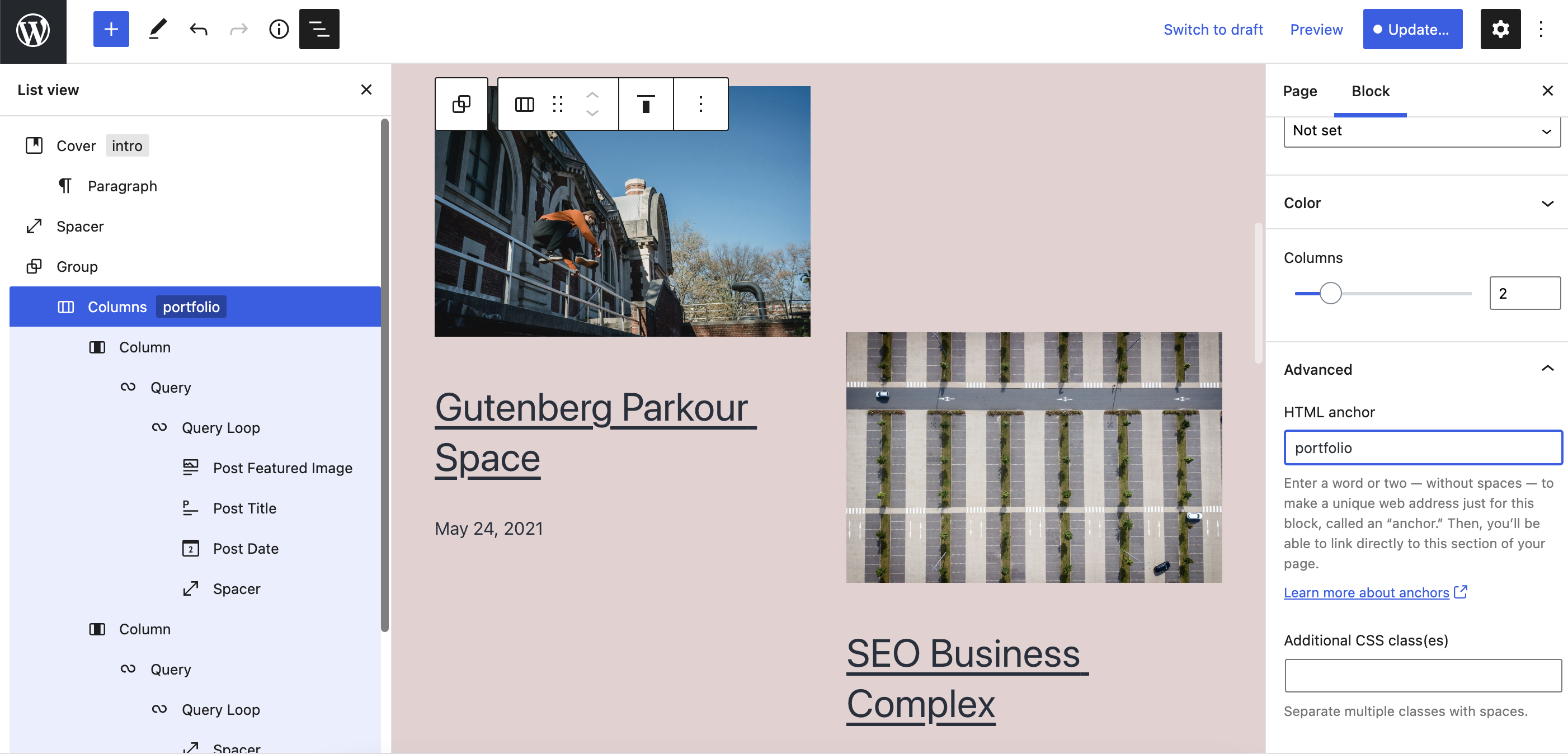
As blocks increase, patterns emerge, and content creation gets easier, new solutions are needed to make complex content easy to navigate. List View is the latest and greatest to add to your toolbox when it comes to jumping between layers of content and nested blocks. Itโs currently visible in the Top Toolbar and will remain open as you navigate through your content. This makes it easy to bounce between the exact pieces of content you want to alter, whether thatโs an individual Paragraph blockBlockBlock is the abstract term used to describe units of markup that, composed together, form the content or layout of a webpage using the WordPress editor. The idea combines concepts of what in the past may have achieved with shortcodes, custom HTML, and embed discovery into a single consistent API and user experience. at the very end of a post or a Columns block that contains a beautiful selection of products to choose from. Think of it as the ultimate tool to navigate block complexity, select exactly what you need, and easily view all of the blocks that make up your content at once. Better yet, you can toggle it on/off as you need. Check out how it works in action in the video below:ย
Video showing someone selecting various blocks with the List View and making changes.
Going a step further, if a block has an ID/anchor set, itโs displayed in List View so itโs easier to distinguish between other blocks and reference as you want. Hereโs an example with a portfolio anchor:
While it was originallyimagined for the Site Editor where youโre dealing with even more layers of content, it quickly became apparent that the Post Editor would benefit from this tool too and it was incorporated into GutenbergGutenbergThe Gutenberg project is the new Editor Interface for WordPress. The editor improves the process and experience of creating new content, making writing rich content much simpler. It uses โblocksโ to add richness rather than shortcodes, custom HTML etc.
https://wordpress.org/gutenberg/ 10.7. Keep in mind that more improvements are planned and youโll have access to this feature in WordPress 5.8, so stay tuned and get excited!
Welcome back to a new issue of Week in CoreCoreCore is the set of software required to run WordPress. The Core Development Team builds WordPress.. Letโs take a look at what changed on TracTracAn open source project by Edgewall Software that serves as a bug tracker and project management tool for WordPress. between May 24 and May 31, 2021.
65 commits
98 contributors
48 tickets created
11 tickets reopened
83 tickets closed
TicketticketCreated for both bug reports and feature development on the bug tracker.ย numbers are based on theย Trac timeline for the period above. The following is a summary of commits, organized by component and/or focus.
Code changes
Administration
Improve the message about installing the Link Manager pluginPluginA plugin is a piece of software containing a group of functions that can be added to a WordPress website. They can extend functionality or add new features to your WordPress websites. WordPress plugins are written in the PHP programming language and integrate seamlessly with WordPress. These can be free in the WordPress.org Plugin Directory https://wordpress.org/plugins/ or can be cost-based plugin from a third-party. to use legacy Links screen โ #52669
BlockBlockBlock is the abstract term used to describe units of markup that, composed together, form the content or layout of a webpage using the WordPress editor. The idea combines concepts of what in the past may have achieved with shortcodes, custom HTML, and embed discovery into a single consistent API and user experience. Editor
Load the classic layout stylesheet conditionallty โ #53175
Fix logic to enable custom colors, gradients, and font sizes โ #53175
Update the GutenbergGutenbergThe Gutenberg project is the new Editor Interface for WordPress. The editor improves the process and experience of creating new content, making writing rich content much simpler. It uses โblocksโ to add richness rather than shortcodes, custom HTML etc.
https://wordpress.org/gutenberg/branchbranchA directory in Subversion. WordPress uses branches to store the latest development code for each major release (3.9, 4.0, etc.). Branches are then updated with code for any minor releases of that branch. Sometimes, a major version of WordPress and its minor versions are collectively referred to as a "branch", such as "the 4.0 branch". used to launch Gutenberg e2e tests โ #52991
Update packages and backportbackportA port is when code from one branch (or trunk) is merged into another branch or trunk. Some changes in WordPress point releases are the result of backporting code from trunk to the release branch. the latest Gutenberg fixes โ #52991
Introduce block templates for classic themes โ #53176
Load theme resolver class in script loader โ #53175
Move assignment out of condition in phpunit/includes/speed-trap-listener.php โ #52625
Further update the code for bulk menu items deletion to better follow WordPress coding standardsWordPress Coding StandardsThe Accessibility, PHP, JavaScript, CSS, HTML, etc. coding standards as published in the WordPress Coding Standards Handbook.
May also refer to The collection of PHP_CodeSniffer rules (sniffs) used to format and validate PHP code developed for WordPress according to the PHP coding standards. โ #21603
Apply some minor coding standards fixes โ #21603
Simplify a condition in wp-admin/admin-footer.php โ #53306
Use strict comparison in wp-includes/class-wp-customize-nav-menus.php โ #52627
Apply some minor coding standards adjustments โ #41683, #53156, #53175
Comments
Include a โView Postโ link on the Comments screen for a single post โ #52353
Documentation
Improve documentation for get_option(). Clean up, clarify the returned types and the exceptions, and add few
Improve documentation for the wp_resource_hintsfilterFilterFilters are one of the two types of Hooks https://codex.wordpress.org/Plugin_API/Hooks. They provide a way for functions to modify data of other functions. They are the counterpart to Actions. Unlike Actions, filters are meant to work in an isolated manner, and should never have side effects such as affecting global variables and output. โ #52842
Document that has_block() does not check reusable blocks โ #53140
Improve documentation for wp_list_filter() and wp_filter_object_list() โ #52808
Use a duplicate hook reference for widgets_admin_page in wp-admin/widgets-form-blocks.php โ #51506
External Libraries
Update two polyfill libraries to their latest versions โ #52854
Update the phpass library to version 0.5 โ #51549
Formatting
Add โmainโ tagtagA directory in Subversion. WordPress uses tags to store a single snapshot of a version (3.6, 3.6.1, etc.), the common convention of tags in version control systems. (Not to be confused with post tags.) to kses โ #53156
Correct the inline code examples for _wp_array_get() and _wp_array_set() โ #53264
Avoid a PHPPHPThe web scripting language in which WordPress is primarily architected. WordPress requires PHP 7.4 or higher warning when checking the mbstring.func_overload PHP value โ #53282
Pass on the user data received by wp_insert_user() to related hooksHooksIn WordPress theme and development, hooks are functions that can be applied to an action or a Filter in WordPress. Actions are functions performed when a certain event occurs in WordPress. Filters allow you to modify certain functions. Arguments used to hook both filters and actions look the same. โ #53110
REST APIREST APIThe REST API is an acronym for the RESTful Application Program Interface (API) that uses HTTP requests to GET, PUT, POST and DELETE data. It is how the front end of an application (think โphone appโ or โwebsiteโ) can communicate with the data store (think โdatabaseโ or โfile systemโ)
https://developer.wordpress.org/rest-api/
Update โobjectโ strings to use the appropriate nouns โ #40720
Add widgetWidgetA WordPress Widget is a small block that performs a specific function. You can add these widgets in sidebars also known as widget-ready areas on your web page. WordPress widgets were originally created to provide a simple and easy-to-use way of giving design and structure control of the WordPress theme to the user. endpoints โ #41683
You must be logged in to post a comment.