Recap Hallway Hangout: Exploring Grid Layouts

The conversation revolved around challenges in creating grid layouts in GutenbergGutenberg The Gutenberg project is the new Editor Interface for WordPress. The editor improves the process and experience of creating new content, making writing rich content much simpler. It uses โ€˜blocksโ€™ to add richness rather than shortcodes, custom HTML etc. https://wordpress.org/gutenberg/, Attendees discussed ongoing experimentation with the grid system in web development, including recent changes to the manual mode including a recent experimental feature that changes manual mode to allow positioning grid items. They also addressed the challenges of using grid layouts with images of different aspect ratios, suggesting the use of a gallery blockBlock Block is the abstract term used to describe units of markup that, composed together, form the content or layout of a webpage using the WordPress editor. The idea combines concepts of what in the past may have achieved with shortcodes, custom HTML, and embed discovery into a single consistent API and user experience. to crop images to fit. Isabel Brison demonstrated the new feature coming to WordPress 6.6 and then shared what she has been working on since then. Behind the experimental flag, new features are implemented.ย 

Recording of Hallway Hangout. Transcript at the end of the post.

Covered topics

Coming to WordPress 6.6 (see also Dev Notesdev note Each important change in WordPress Core is documented in a developers note, (usually called dev note). Good dev notes generally include a description of the change, the decision that led to this change, and a description of how developers are supposed to work with that change. Dev notes are published on Make/Core blog during the beta phase of WordPress release cycle. Publishing dev notes is particularly important when plugin/theme authors and WordPress developers need to be aware of those changes.In general, all dev notes are compiled into a Field Guide at the beginning of the release candidate phase. Grid layout type)

  • Differences between auto and manual grid layouts in the Post Template, with auto resizing and manual having a fixed number of columns.
  • Ability to resize children of a grid, allowing for more flexibility in layout design.
  • Resize grid cells by pulling on handles, making it easier to visually change the look of the grid. The feature uses container queries to resize items inside the grid based on the size of the actual grid, rather than the viewport.

Working on for WordPress 6.7ย 

Most of the enhancements are still experimental, so you would need to enable the Grid Interactivity feature via the Gutenberg > Experiments screen. (or use this Playground instance to start testing)

  • New grid system in WordPress with manual positioning.
  • manually position items inside a grid.
  • define number of columns and rows in the grid in Auto mode, with items auto-placing in spaces
  • block movers in manual mode of grid, allowing for overlap and partial overlaps.
  • Grid layouts, auto and manual modes, and image resizing.
  • how manual grid mode has been updated to allow for more flexibility in defining grid layouts.
  • Add more responsiveness to manual grid mode, with minimum column width field for resizing and reflowing.
  • grid behavior with images, including resizing and rearranging.
  • Using a gallery block to display images with different aspect ratios, suggesting it can crop images to fit

Q & A

  • Demo: how to make an image partially overlap with text in a grid layout, but notes that there is no control over row height in the block editor.
  • Suggested: defining column width in fractions, rather than pixelsย 
  • Suggested: adding controls for aligning and justifying elements in the Grid Layouts

Shared resources:ย 

Announcements

About Grid Layouts

If you have further discussion or questions in context of this Hallway Hangout, you can leave a comment here or start chatting in the #outreach channel on SlackSlack Slack is a Collaborative Group Chat Platform https://slack.com/. The WordPress community has its own Slack Channel at https://make.wordpress.org/chat/.

Props to @isabel_brison and @luminuu for review

Transcript (AI generated)

This component. So this is the hardware hangout on exploring grid layout. And Isabel Bryson is gonna demo whatโ€™s come whatโ€™s possible in WordPress 6.6 and we also when are going to discuss whatโ€™s coming in 6.7 so take it away. Isabel,

yes. Okay, so Iโ€™m going to share my screen, and what am I? Can you see my screen? Okay, yes, actually, not. Okay. So,

sukat, there

are many things that I can show you. I canโ€™t actually, when big it said that I was going to show you all the cool layouts that you can do. I canโ€™t actually show you all the cool layouts, because thereโ€™s so many things, so many different things that you can do in terms of layout with these basic tools that, oh, I was afraid of I say that Iโ€™m not a designer, so Iโ€™m doing my best here, but Iโ€™ll show you the tools that are available, and I can show you what they do. And then you can go and like, make all the cool layouts that you can think of with them. Okay, so first, whatโ€™s shipping in 6.6 Iโ€™m I think Iโ€™m just gonna pop that over there. Okay, whatโ€™s shipping in 6.6 is a grid block which was experimental in the Gutenberg pluginPlugin A plugin is a piece of software containing a group of functions that can be added to a WordPress website. They can extend functionality or add new features to your WordPress websites. WordPress plugins are written in the PHP programming language and integrate seamlessly with WordPress. These can be free in the WordPress.org Plugin Directory https://wordpress.org/plugins/ or can be cost-based plugin from a third-party. for quite a while, Iโ€™m going to say a few months, maybe even longer than that, but weโ€™ve all weโ€™ve enhanced it. So for 6.6 the gridlock has a bit more functionality than it did up until recently, in the plugin. And Iโ€™m not going to say weโ€™re shipping a grid layout, because that the actual layout had already shipped. So the layout has been in coreCore Core is the set of software required to run WordPress. The Core Development Team builds WordPress.. The layout block support has been in core since 6.2 or 6.3 I think, and itโ€™s just been available as something that you could add to any custom block that you might build. And there was one, there was one block using it so far, which is the post template block. So post template has a sort of list variant and the grid variant, and that grid variant was created with the grid layout, but now we have a grid block, which is, itโ€™s basically just a variation of the group block, and it creates a grid layout. So you can, you can add it. So when you gonna just go here, you can, you can type a group and and youโ€™ll see the grid as one of the featured layouts, featured variations of the group. Or you can just directly type grid from the inserter, and itโ€™ll appear. And Iโ€™m just going to show you the ones Iโ€™ve already got ready here. So the grid that was in the plugin until recently, only had, really only two options, which was auto. The Auto option will create a grid with as many columns as will fit in in the container given a minimum column width. And thatโ€™s the sort of default. The default What should I say? Itโ€™s 9pm words are failing me. So the default state of the grid is this auto layout, and it will resize automatically. So when, when your grid container becomes smaller, youโ€™ll have as many columns as will fit in there, given that the minimum width is, in this case, itโ€™s 15 REM. But it could be anything. It could be in pixels. It could be an M or REM, okay. And then you have the other option, which is manual, which are is slightly different, because you for the manual grid, youโ€™ll define a number of columns, and the grid will always have that number of columns no matter what size it is. So you can CCC, this is the manual grid. So in comparison with the auto grid, which resizes and the blocks reflow. The manual grid will will always have the same number of columns. And in addition to that, so this is these, these sort of two manual, auto variations were the ones that were initially shipped in the block layout support. And the the new, the new, new thing that we did for 6.6 is the ability to resize the children of the grid. So before you could only have you can only have a grid with items, basically with items only with having the span of one column and one row. So each. Item would just fit neatly into one grid cell, and anything else that you wanted to do on top of that, youโ€™d have to basically write your custom CSSCSS Cascading Style Sheets., which is possible, but itโ€™s a bit of a pain. And thatโ€™s not what the block editors of app you want to be able to do stuff with the UIUI User interface. And so we came up with, not, well, we, I said, basically, I and one of my colleagues, Rob Anderson, we too, worked on this for few months, up to 6.6 so thatโ€™s the particular we that. I mean when I say we, in this case, and we created this thing, this sort of these resize handles, where you can actually change the size of the block by pulling on the handles, and it will become bigger or smaller as you resize it with the handles. So thatโ€™s sort of a handy way of like being able to visually change the whole sort of look of the grid and play around and move things around stuff. Yeah, so thatโ€™s, I guess, the so to make, to make that workable. I donโ€™t know if you can see because it doesnโ€™t have very high contrast, but hopefully you can see that there are little grid lines visible. So in addition to the handles, the handles are more visible because they have this sort of bright blue color, but there are these sort of thinner grayish grid lines that are running through the whole grid. And those are, those are that they show you what the tracks of the grid are and how many cells the item that you have is taking up. Yeah, so pretty much. I mean, this is whatโ€™s going to ship in, 6.6 Iโ€™d add that this is kind of a detail when you have them. So the auto grid that reflows when you resize the screen, itโ€™s sort of, thereโ€™s a little bit of responsive behavior built into it, so that the items that span multiple columns and rows will also resize as you resize the grid. Because if that didnโ€™t happen, youโ€™d end up with a very, very messy layout. So thatโ€™s we just built that in to sort of so that it would work a bit more efficiently. And that is, if youโ€™re curious about that sort of thing, we built that behavior using Container queries. And so the items inside a grid will resize depending not on the size of the viewport, but on the size of the actual grid. So if you stick this grid into, say, a roadblock that has other things in it, and suddenly it becomes really small, then the items will reflow inside the grid. Yeah. So this, Iโ€™m pretty much this is whatโ€™s shipping in, 6.6 does anyone have any questions at this point? I

Are you big? Youโ€™re muted so

we donโ€™t have any questions mute in the chat, but if you have any question, just be free and unmute yourself and just so you donโ€™t have to type it, itโ€™s probably easier. This is a highway hand, so itโ€™s not as strictly structured as a developer. So youโ€™re welcome to,

yeah, yeah. I mean, please, if thereโ€™s anything that you donโ€™t know, what youโ€™re wondering, if itโ€™s possible to do this or that, please, please ask. Because Iโ€™ve let Iโ€™ve been working on this thing for so long that I can no longer see the things which might be obvious to other people. Itโ€™s like, oh, thatโ€™s not intuitive. Or like, how do you do this? Or can you do that? Iโ€™m like, you know, Iโ€™ll probably forget to say stuff. So please ask all the questions that you might have.

Yeah, I have a question. So container query are relatively new for browsers, right? Are they now supported by every browser? Yeah,

theyโ€™ve got decent support. Let me see actually, do we have, can I use contain the query? So there we go, can I use container queries? Okay, it doesnโ€™t look too bad. Itโ€™s 90, almost 92% of browsers. So the thing is, yeah. And the thing is this, the thinking behind using Container queries in this particular instance is that, are they? If a browser doesnโ€™t support them, theyโ€™ll just not work. And then any items that have, you know, multiple column span will sort of throw off the the layout of the grid a bit. Because what happens so when you have a grid, what. Where a certain number of columns is defined. And when you have this sort of auto reflowing grid, say, you know, you say minimum column width is 15 REM, and then the window starts going down, and the grid becomes smaller. Then, then, say, becomes smaller than 30 REM. So it canโ€™t, it really canโ€™t fit two columns in anymore, so itโ€™d go down to one column. But if an item inside that grid has a spat is spanning more than one column, then the grid goes, Ah, I canโ€™t go down to one column because I have a multi column item in here. And so it does this weird, dodgy thing where it keeps the first column with the width that you that you stipulated. So itโ€™ll be like a 15 REM column, and then itโ€™ll create like an a second auto column. But that column will not have 15 REM because that no longer fits, and so itโ€™ll just be like a very narrow second column. And so this means that layouts can look extremely weird. And that was the reason why we thought, letโ€™s do a container query, because you never know where, where the gridโ€™s going to be. And so this can happen, like, if youโ€™re using a grid inside another container, then media queries wonโ€™t really do the job there. And so container query was the best way to solve the problem. And I guess for the small percentage of browsers that donโ€™t support it, I mean, the worst that can happen is the layout will look slightly off. You wonโ€™t lose any content. All the blocks will still be displayed. Itโ€™s just there. Some might be bigger than others. You know, it might not be of a uniform size sort of thing.

Excellent. Any other question.

Nope. Keep on going.

Okay, so, um, I want to also show you the stuff that Iโ€™m really excited about right now, which is what Iโ€™ve been building in the past few days, which is what is hopefully going to ship with, 6.7 now, I say hopefully, because you never know this is WordPress, and this thing that weโ€™re Building is highly experimental. So the first part of it is, and I think the biggest piece here, which is what we in. I think, I mean, when we started working on this sort of multi span thing, we thought it would be really neat to get this into 6.6 but then it became obvious that we wouldnโ€™t have time to make it stable. Itโ€™s pretty complex thing to build, so now we hopefully targeting it, targeting it at 6.7 and that is the ability to position items inside the grid. So I can show you what I mean here. So this is what Iโ€™m showing you now. Is in Gutenberg trunktrunk A directory in Subversion containing the latest development code in preparation for the next major release cycle. If you are running "trunk", then you are on the latest revision., but itโ€™s behind an experiment flag, so you can go, where are we? Okay, so you, you know youโ€™re in here. Youโ€™ve got the Gutenberg plugin. You open up this experiments page, and you select, you check this box which says grid interactivity, and you save it, and then you go back to your editor, and you can see all the new stuff that was merged yesterday in the pull request. And itโ€™s going to so the RCrelease candidate One of the final stages in the version release cycle, this version signals the potential to be a final release to the public. Also see alpha (beta). for 18.7 was just today, so this is going to be behind that experiment flag in 18.7 for anyone who wants to try. So what we have here is a grid. Yep, this is a grid, and itโ€™s set to manual. Youโ€™ll notice that beside the column control, now thereโ€™s a row control in here, so you can define the number of columns and rows that you want. And these grid items are not positioned as they usually are on other grids. So in the grids that we saw previously, all the grid items are sort of side by side. And if you if I make this one smaller, then something else will flow in and take its place. Itโ€™s thereโ€™s never an empty space in this grid. The items all sort of follow on another, so theyโ€™re being auto placed inside the grid. And now what we have is the ability to place items manually in certain parts of the grid. So you could grab one of these and move it somewhere else, or you can use these. We change the block movers a bit when youโ€™re inside this manual mode of grid. And so you can actually use the block movers to move up, move left, move down. You can move things on top of other things, which can be really confusing. If the blocks are precisely the same size, itโ€™s this is one of the things that Iโ€™m hoping that weโ€™ll get plenty of testing and feedback on. And folks. Will, you know, give us their opinions on if it works well, because we do want to provide the ability for blocks to overlap other blocks, right? Because you could, you could maybe have a really big block, and then maybe you want this block to fit on top of, oh, wait, that went under. This shoe is handy when youโ€™re doing this sort of thing, because you can move things in markup order. Wait, where are we? Whereโ€™s the other block? Okay, see, this is one of those things that is basically the reason why this is an experiment. Okay, so where did you go. So we havenโ€™t got the interaction 100% right here. I reckon this could still use some work. Okay, so say this, this picture takes up four cells, and I can drag this picture, maybe put it on top of that one. And so you can have an overlap, and you can have sort of partial overlaps, because maybe this picture could be a bit bigger, too, and then it were what happened there was supposed to overlap. The other one. Never mind smoking a bit buggy. Okay, still an experiment. This is what happens when you have experiments. Theyโ€™re usually not very stable, but itโ€™s super exciting, because this can allow you to do almost anything. You can create all sorts of like, really cool layouts with this. So this, I beg you please go and test this and write issues if you come across bugs and tell me how we can improve it. Because this really needs, I think this really needs some real world use. And and folks going, Oh, hey, this doesnโ€™t work. Or maybe it should do this instead. Or maybe we could add this functionality, and it would help a lot. You know, that sort of feedback is really useful. And so auto So, yeah, so what? Whatโ€™s happening here, basically, is we, we hijacked that manual mode where you previously you would only define the number of columns, and we make it work in a way that you can now place all the grid cells wherever you like. The auto mode is still the same as it was. I think this is this grid is in auto mode. Yeah, thatโ€™s in auto mode. So auto mode still works the same. Itโ€™s still resizable. Uh, manual mode is not resizable. But there is a pull request in progress at this very moment that I would also ask you to check out and test if youโ€™re feeling adventurous, and that is a pull request that will add, itโ€™s a bit more responsiveness to this, to this, so I can show you that. Ah, yeah, this is the one that has the recycling Iโ€™ve got, like branches in different tabs, trying not to get confused with which is which. Okay, so in this pull request, this is in progress so highly, highly unstable, Iโ€™m hoping that maybe it can be merged behind the experimental flag in the next few days to see if more folks might be able to test it. So this is so still our manual grid with our items positioned wherever we like, but now youโ€™ll see that in addition to the columns and rows, we also have a minimum Column Width field, and that allows us to define a minimum column width, which, in addition to the number of columns, means that our grid will always have maximum number of columns, whatever we define. But minimum column width means that when the columns become less than that width, they will resize and reflow, and so youโ€™ll end up with basically a one column grid. And the other thing is, weโ€™re experimenting with this so that folks can still have a way of defining a grid with fixed number of columns, like the manual mode that is currently in core and about to ship in 6.6 where you can only define the number of columns. You canโ€™t position the elements. We have kind of moved that into auto mode, and so thereโ€™s an in auto you now can define number of columns, and you can define minimum column width, and if you define both, you get maximum number of columns that you defined, and the minimum width means that theyโ€™ll break and reflow. Or you can just wipe the minimum column width and youโ€™ll just have the number of columns, and that means that they wonโ€™t reflow, which is the current manual mode, or you can just define minimum column width, and you can not define any columns. And then, okay, what happened? There? Zero columns? Uh huh. This might be a bugbug A bug is an error or unexpected result. Performance improvements, code optimization, and are considered enhancements, not defects. After feature freeze, only bugs are dealt with, with regressions (adverse changes from the previous version) being the highest priority., as I said, highly unstable. Let me make a note of that before I forget, columns should be resettable to the intent is that you can have, you know, just minimum column. Itโ€™s defined, and it will give you as many columns as fit on the on the window or in the container. Yeah. So that is still in progress, and thatโ€™s like the latest highly experimental thing. Other things that are coming. Is there a question? I see a hand, hi? Yes,

I have a quick question. Hi. I had noticed that all of the images youโ€™re using are landscape images. Are they also all, all of them the same pixel resolution as well, pixel dimensions.

Ah, thatโ€™s a good question. They probably are, because at some point I just saved a bunch of pictures from my phone into my computer to use test images. But did were you wondering what this might look like with a different, reshaped image or vertical

right either in the middle, either introducing both landscape and portrait into the same grid? Yes.

So what happens there is, letโ€™s say I replace one of these image. Replace, okay, replace. I do have There we go. Thatโ€™s a vertical image. Yes. And so what happens is, this is sort of default grid behavior. The grid rows are going to assume whatever the size of the biggest element in them is. And so if you have one vertical image and a bunch of horizontal ones in in the same grid row, then the horizontal ones might look a bit odd, but what you can do is you can make that one take up two rows. Okay. Now these rows look huge. What is going on here? I think this might look better if that were, yeah, so you can kind of play with it. So if you wanted this to look really wanted the images to sort of line up really well, youโ€™d probably be better off using a gallery block, because the images inside the gallery block can be sort of cropped to fit, and they always look all right. And the gallery block isnโ€™t using grid yet, but thatโ€™s something that I hope will be able to change in a little while. So thereโ€™s actually, thereโ€™s, thereโ€™s an experimental PR that I havenโ€™t worked on for a while. I had it up here on playground. Thatโ€™s what a gallery block would look like if it were using grid. And I hope that this link still works. Okay, yeah, and so this would be a grid where each image actually occupies multiple columns and rows, so that we can sort of distribute them around in a way that doesnโ€™t look too even. So theyโ€™re all sort of different sizes, and it looks pretty organic. And these images are a mix of vertical and horizontal. Say, for instance, this image here originally was horizontal, but the thing that the gallery does to the images inside it is you have, I think it might so thatโ€™s the gallery block, right? I can never find my way around when itโ€™s just like, so thereโ€™s a setting crop images to fit. Yes, it was right here in front of you. So if you donโ€™t crop images to fit in the gallery, theyโ€™ll just however, you know theyโ€™ll have whatever aspect ratio they usually have, but you can crop them to fit, and theyโ€™ll suddenly look very pretty. So, yeah, so in the case of having different images with different aspect ratios, that is probably what Iโ€™d recommend, although you can also try. I mean, Iโ€™m using images for the gridlock because I had to have some content for the demo. And this is what, you know, I like cat pictures, and so Iโ€™m going to use cat pictures, yeah. But yeah. And as I said, I mean, Iโ€™m not really a designer, so Iโ€™m sure there are loads more use cases, so more interesting and useful,

yeah? So Hans get asked if if it possible to retry this issue. Well, Hans, good. Which issue was that? Was it that overlapping issue that you so you can try to reproduce it?

Which? Oh, wait, which? Which issue was? Yeah. It, I

donโ€™t know. Iโ€™m scared. Could you unmute yourself and try that again?

Yes, this issue you showed some time before, where you write on the issue on, yes, my English skirts are very bad.

Where was it the issue that, uh, well, thatโ€™s another one. Thatโ€™s a known issue, actually. So interestingly enough, when the grid visualizer goes slightly off screen, this second horizontal scroll bar appears. Iโ€™m trying to figure out why, why that happens. Havenโ€™t figured it out yet. Okay, so this kind of went off a bit when we added this portrait image, that the issue that I made a note of earlier was not being able to remove the number of columns from here, it just assumes that thereโ€™s always one column minimum, that that shouldnโ€™t happen. We should be able to remove the number of columns and it will just act like, like auto mode currently acts, which is, let me see if I have Okay. It seems

as a issue that Burgett has written the chat I think,

oh, okay, so thatโ€™s a PR.

Whereโ€™s the chat? Yeah,

I just shared the PR link to your manual placement to set manual grid mode and our responsive behavior in both modes.

Oh, thank you. 62777, yeah, thatโ€™s actually okay. Yes, I should actually share the link to, where is it? Improvements to grid layout? Yes, this is the tracking issue. So there are a bunch of known bugs and known enhancements, well, things that we want to build. So what we have here in the list of things that we want to build for 6.7 is, apart from the positioning, being able to make both kinds of grid responses increase it fund a little bit on that. Okay, thank you. So, so what we have is, apart from the making responsive, which is this PR in progress that I showed to you, itโ€™s a bit flaky. Never mind. Itโ€™ll be better before itโ€™s an experiment, yeah. And what we also want to do is allow dragging blocks from outside the grid, which you currently canโ€™t drag them into a specific position. And thatโ€™s thatโ€™s very annoying. We need to get that to work and also allow adding a new block to any position. So say youโ€™re in here, youโ€™ve got empty grid cells. You should be able to click on one of these grid cells, and an inserter would appear, and youโ€™d be able to add any block in there and that. I think thatโ€™s probably the most important feature, if we think about it, because if you consider that, say, if you had a grid that was sort of like container block for a whole template, you could potentially build a whole template just by sort of clicking and dragging create the headerHeader The header of your site is typically the first thing people will experience. The masthead or header art located across the top of your page is part of the look and feel of your website. It can influence a visitorโ€™s opinion about your content and you/ your organizationโ€™s brand. It may also look different on different screen sizes. and then create so that would actually be a really cool way of building templates. If it well, if we can get it, we will get it when we get it to work seamlessly, yeah. So thatโ€™s one of the things, yep. And then thereโ€™s some not quite sure how lists you should behave, because ListView gives you a list of blocks in markup order. Currently, if you drag and drop in the ListView, it changes the markup order. If the block has a position, it wonโ€™t change it visually, which is really weird. So we need to fix that, improve the design of the block movers when the grid is in manual mode. Yeah, thatโ€™s them. So having these block movers in manual mode, having basically four buttons, which is like, move up, move down, move left, move right. Maybe not great. Maybe it should be a sort of arrangement like you have on the keyboard, where you have left, right, top, bottom, one on top of the other, that sort of thing. By the way, if youโ€™re wondering what this looks like with actual icons, I can show you. I always have button text labels enabled because I get really confused with the icons. They all look the same to me. But yeah, so basically, right now, this is four arrows each pointing in whatever direction. So it doesnโ€™t look great. We probably need to improve that. Text labels going again, and what else do we have on the list?

Improving them? Movers bug causing double scrollbar. Yes, we know about that one. And then thereโ€™s a few code improvements to be done that wonโ€™t really affect the interaction. If you are yet. Iโ€™ll have to add that columns should be resell. Iโ€™ll just work on that on the PR. I donโ€™t think itโ€™s worth adding to this list because itโ€™s, itโ€™s sort of part of that PR that Iโ€™m working on right now, if you find anything else with with the stuff thatโ€™s already merged into trunk. So whatโ€™s in the plugin behind that experiment flag? If you find anything else thatโ€™s dodgy, or if you have any ideas for other functionality that might be useful here, please, please create an issue or add a comment to this tracking issue, either way, you know, like, just let us know about it

cool. So are there additional questions, or if that was too fast, do you want Isabel to kind of repeat some of that, I think we can ask her. So for that, I saw that you wanted to have one picture overlap the others. Is that also possible with a different block? So if I have a picture, well, I know thereโ€™s a group block or a cover block, where I can do particular layering. But is there a sensor to just put a paragraph on top of that image? Or,

yeah, I mean, you could say I have paragraph here, and I could potentially put this on top of an image, okay, yeah, or it could just partially overlap. If I had a big image, the paragraph might be like, if I have an image occupying these four grid cells, then maybe that paragraph, oh, I just resized the paragraph. See, this is not super

intuitive. Yeah, itโ€™s hard to kind of aim for it,

and then I have to try and resize the image. And then, yeah, I guess I could move it down, or I could move it, yeah, right,

yeah. So gives a little bit more positioning, yeah? So Iโ€™m not sure what the Iโ€™m not sure what advantage would be, but itโ€™s just kind of the idea to be able to do that minimal,

yeah, I mean, you do already have the cover block. I guess I think it might be more. So I did this little experiment with images, and I just had a bunch of PNGs with with the background cut out, and so I was just sort of playing around with them and and I put them inside the grid, so each of these is occupying multiple grid cells, and thatโ€™s how you can make them kind of overlap with each other. And I was testing this and seeing what it would look like if that so I could show you here, maybe itโ€™s easier. So the top one is not responsive. The grid cells always stay in the same place in relation to one another. So you can make it go really small. It kind of itโ€™s weird, because the rows donโ€™t really change their height. I think one thing that might be interesting would be to have a control for the row height to like, to be able to to set a specific row height. But then, yeah, I keep working on this, I keep coming up against what I think is sort of the hard limits of not having customizable responsive behavior in the block editor, because you can do so much stuff, and itโ€™s kind of like the bottom this bottom image here, I made that responsive. And so itโ€™s kind of interesting, because it gets to a certain size, and things start piling on top of one another, and that works, but you donโ€™t really have much control over it. And so if you do want that finer grained control, then we really, in the end, weโ€™ll need to have some sort of of functionality whereby you can define, if not break points, define sort of sizes. I donโ€™t know. Iโ€™m not quite sure what that might look like, but I think this, this is interesting work to do, because itโ€™s really, you know, this is as far as you can go with grid, pretty much. And you can maybe tweak one or another thing, but you canโ€™t get finer grain control than this.

Yeah, like that has this population on the picture. Yeah.

I have a question. Yes, Jessica, have you thought of implementing the fraction unit? So the FR unit for grid specifically, because now itโ€™s only pixels rem and M,

we will. I donโ€™t think I mean with we have column numbers for the controls. You mean we have column numbers and we have the minimum column width needs to have a number like, thatโ€™s in, thatโ€™s in sort of an absolute unit, yeah. So it does. So the grid itself, if we look at the rule, what we have here uses, so this is repeating five columns, and it uses a min, max of 011, fraction. And thatโ€™s because itโ€™s not resizable, so that if the minimum size is zero, then itโ€™ll always have five columns, whereas the other grid under it has a slightly different rule. This is a bit more Iโ€™m not sure if you can see that, try, like, make that bigger. So here, this rule has a repeat, but itโ€™s auto fill. And it has this very, very sort of hacky looking computation in it, which goes, get the, you know, min max will be, sort of Max, 120 pixels, which is, I think, what I added in minimum column width. And then itโ€™s, sort of, it grabs the number of columns that you define as the maximum number of columns, and it uses it to make sure that this never goes over whatever number of columns you defined here as a maximum, which I think here is five, but it can go under that number of columns if because itโ€™s got A minimum width. So, yeah. So, so we do,

letโ€™s say if I wanted a column to have a width of two fractions. So thatโ€™s currently not possible without writing x or CSS. No,

but I donโ€™t think, okay. I mean, that would make sense if we had a way to define each column individually, is that what youโ€™re getting at? Because, potentially, yes, yeah, okay, then you basically have to write out the whole rule, really. So if youโ€™re saying, like, if you could customize grid template columns, like you can when youโ€™re writing CSS, and you can just go, you know, one fraction, two fractions, 100 pixels, and you can have three columns with all different sizes. Ah, I yeah, Iโ€™m not sure thatโ€™s, I donโ€™t think, well, thatโ€™s not something that you can sort of translate into UI. I donโ€™t think that would always be down to writing rules at that sort of level of fine grainedness, because otherwise the fractions are sort of relative to each other, so they also behave a bit weirdly. But like so if you wanted, I donโ€™t know, I think basically I donโ€™t know Iโ€™d have to, Iโ€™d have to have, like, a specific like, this is the CSS I want to write, sort of thing, and try to figure out if, if we could, but I think at one point, it only makes sense to create UI for this up to a certain point. And if youโ€™re what youโ€™re trying to do is, I want this grid thatโ€™s very specific, and it has like a 16 REM column, and then the rest is sort of fractions, but theyโ€™re not all the same size, like one is one fraction, and the other is two and the other then at that point, I think you really have to write the CSS, because it would be really hard to translate that into controls. That the goal with the controls is that people who canโ€™t write CSS can understand them and can work with like if the controls are basically write the CSS that you want in here, then at that point, maybe it doesnโ€™t make sense. Maybe we should just write the CSS.

No, thatโ€™s totally okay. I think this is the this is the hard part of implementing such a feature, because you have to first think of like, as you said, the end users who have no idea how CSS works. And then also, I come with my question from a more advanced view as a developer, maybe from an enterprise project or such. So thereโ€™s always this big gap in between those worlds, and I think itโ€™s kind of hard there to, like, decide, okay, what goes whatโ€™s possible, and what makes sense, and what should be kind of maybe an extension, or have Some, some possibility to extend existing features and, like, overwrite them with, I donโ€™t know, somewhere in the editor, or even in theme JSONJSON JSON, or JavaScript Object Notation, is a minimal, readable format for structuring data. It is used primarily to transmit data between a server and web application, as an alternative to XML., or somewhere else where itโ€™s not accessible by the end user. Yeah,

and that makes a lot of sense, and particularly for Enterprise. Use cases. Now Iโ€™m thinking, for instance, with some of these controls, it might be a good idea to have a way to disable them. So if youโ€™re building your enterprise website and you donโ€™t want your users to be messing around with column spans or changing the type of grid, maybe you can hide those controls so only the theme developer has access to them, and not the end user. So thatโ€™s one thing. Weโ€™ve already done that for a couple of layout controls, and I think we might want to to do that for probably most of them, to give. To give. What website owners and theme creators for enterprise use cases are tools that they can use to basically disable all the foot guns that we have for less advanced users in the editor.

Yeah. Sounds good. You

Well, yeah, I like that. That function name kind of remove foot guns so people can shoot themselves in the foot. Yeah,

yeah. I think itโ€™s, itโ€™s good, like, I think in principle, there should be ways of, sort of gating especially advanced functionality, yeah. I mean having, having ways of building more custom grids, potentially, yeah, and thatโ€™s something that could also make sense for an enterprise. Yes, itโ€™s also something to think about.

All right, yeah, so, um, thank you much for sharing. Do I have any other Do you want to show something else?

Uh, no, Iโ€™m good. I think I can stop sharing my screen now, if nobody has any more questions,

yeah, Iโ€™m scared. Jessica, do you have any more questions?

Maybe one more about another fairly specific developer question. Have you thought of adding possibilities for the justify and align properties that you have with grid so you can align those elements specifically.

Yes, that would actually be a good addition. Iโ€™m thinking, I donโ€™t think thereโ€™s an issue for it. Iโ€™m pretty sure there isnโ€™t, or I would have come across it by now. But yeah, I think thatโ€™s thatโ€™s definitely something that should be added.

I mean, because we have this controls already with the regular group block, but the row and, yeah, whatโ€™s it called stack?

Stack, block, row and stack, yeah, which are variations of Flex Layout? So, yeah, I think the same controls for grid would make sense. And I think weโ€™ll, weโ€™ll have to build them in sooner or later, hopefully sooner.

Excellent. Also, if

anyone is a developer and is interested in working on these things, because basically, up until now, itโ€™s been myself and Rob. Weโ€™ve just been doing all

the work. I thought it would be actually, Lauren, I did not expect itโ€™s only two of you working on this. So for that, yes, itโ€™s pretty amazing work.

This is mainly why layout has been so slow to evolve. Itโ€™s like thereโ€™s not a lot of people working on it. And, I

mean, thatโ€™s what you donโ€™t see usually. So Iโ€™m in other spheres. And of course, I have my own work to do, so Iโ€™m just partially always looking at things and seeing, like, is there progress or is there no progress? So these are information thatโ€™s often like falling, falling behind, and you just donโ€™t notice until either someone tells you, or youโ€™ll get to know what the actual situation is.

Yeah, yeah, true. I mean, itโ€™s not super visible, unless youโ€™re in GitHubGitHub GitHub is a website that offers online implementation of git repositories that can easily be shared, copied and modified by other developers. Public repositories are free to host, private repositories require a paid subscription. GitHub introduced the concept of the โ€˜pull requestโ€™ where code changes done in branches by contributors can be reviewed and discussed before being merged by the repository owner. https://github.com/ all day and seeing whoโ€™s working on what at night? No one. No one can do that. Itโ€™s a huge project. Yeah,

yeah, but this was really cool, so Iโ€™m glad that you kind of showed us what youโ€™re working on and whatโ€™s an experiment, so we can start kind of testing it and getting our creative juices going in thinking, Well, Iโ€™m since the beginning, I actually wanted to do a Mondrian kind of layout for a website, and never really kind of worked through that. But this actually is there a way to change the size or the color of the gutters.

I mean, you can you can so you can use regular block spacing to change the size, but currently it only works for both. So you thatโ€™s actually something that I think is an open issue for it somewhere to have more fine grain control over. So. Being able to change the vertical gutter and the horizontal gutter separately, and not having it all change at once, because right now we only have, like, one block spacing, one value you put it in, and thatโ€™s it. Letโ€™s control through the block spacing. What you can do in terms of changing the color is you can give the whole grid a background color, and then you can add whatever blocks inside with different colors, and then it will look as if the gutters have that color. Yeah, so,

all right, Hans GERD had another question in the chat, is it possible to set a hover? Itโ€™s not, has nothing to do with the grid, but is there a hover button, a hover control for the button

in theme JSON, to say, remember, be able to set that as an element to the button. Element,

yeah, in the elements, theme JSON, button, yeah, yeah, yeah. It should be, should be possible in hand skirt to set a hover color in through the theme JSON, similar to the link in link, you have it in the UI, but for the button, you donโ€™t, but you could put it in the same JSON for that. Okay, all right. So this, if youโ€™re all okay with it, Iโ€™m gonna give you six minutes back of this. Harvey hang I really thank you so much Isabel for taking the time out of your evening in Australia. And to show this off, we have have it recorded. So I will write a little post on the make blogblog (versus network, site) so other people can see it as well. And I hope you have already two testers here for the experimental Gutenberg stuff.

Yes, thank you.

And I will get through that too. So Well, weโ€™ll see you all and the next hallway hangout. Remember, July 9 is about the block extensibility for the site editor and the post editor, they are merged now and tune in. All right. You all have a good evening, good afternoon and see you at the next time. Bye, thanks. See you. Bye.


#grid-layout, #hallway-hangout, #summary

Editing custom fields from connected blocks

WordPress 6.5 introduced the Block Bindings API, which, among other things, allows users to easily connect blocks to custom fields. For example, users can directly connect paragraph content without the need to create a custom blockBlock Block is the abstract term used to describe units of markup that, composed together, form the content or layout of a webpage using the WordPress editor. The idea combines concepts of what in the past may have achieved with shortcodes, custom HTML, and embed discovery into a single consistent API and user experience., and it will show the selected post metaMeta Meta is a term that refers to the inside workings of a group. For us, this is the team that works on internal WordPress sites like WordCamp Central and Make WordPress. value.

Until now, when this connection existed, the UIUI User interface to edit the paragraph was locked, preventing users from modifying its value.

WordPress 6.6 introduces the possibility of editing the value of the custom fieldCustom Field Custom Field, also referred to as post meta, is a feature in WordPress. It allows users to add additional information when writing a post, eg contributorsโ€™ names, auth. WordPress stores this information as metadata. Users can display this meta data by using template tags in their WordPress themes. directly from the block when they are connected.

You can see the potential of it in this quick demo:

As can be seen in the video, whenever a block attribute is connected to the Post Meta source, it automatically connects to the custom field value while editing.

Among improvements to the UI to clarify when a block is connected, it comes with some functionalities that are worth mentioning as well:

Custom fields can be updated from a query loopLoop The Loop is PHP code used by WordPress to display posts. Using The Loop, WordPress processes each post to be displayed on the current page, and formats it according to how it matches specified criteria within The Loop tags. Any HTML or PHP code in the Loop will be processed on each post. https://codex.wordpress.org/The_Loop

While using blocks in the query loop, if they are connected to Post Meta, they are also editable.

When multiple blocks are connected to the same custom field, their value is synced

Users can only edit the custom fields from posts where they have permission

Right now, this is restricted to coreCore Core is the set of software required to run WordPress. The Core Development Team builds WordPress. sources like Post Meta or Pattern Overrides, but the idea is to open the relevant APIs to be used by any external source as well.

Read more about this iteration for Block Bindings at #60956

Props to @juanmaguitar for review

#6-6, #block-bindings

Updates to the Interactivity API in 6.6

The Interactivity APIAPI An API or Application Programming Interface is a software intermediary that allows programs to interact with each other and share data in limited, clearly defined ways. development for WordPress 6.6 has been focused on maintenance. Its updates include new features and directives, a better debugging experience, and improved code quality.

Table of Contents

New async directives

WordPress 6.6 includes three new directives aimed at improving performance:

  • data-wp-on-async
  • data-wp-on-async-document
  • data-wp-on-async-window

Theseย asyncย directives optimize event callbacks by first yielding to the main thread. That way, complex interactions wonโ€™t contribute to long tasks, improving theย Interaction to Next Paintย (INP). You can read more about this approach inย Optimize Interaction to Next Paint.

These directives are recommended over the sync ones (data-wp-on,ย data-wp-on-document, andย data-wp-on-window), but you can use them only when you donโ€™t need synchronous access to theย eventย object, specifically if you need to callย event.preventDefault(),ย event.stopPropagation(), orย event.stopImmediatePropagation(). The directives in coreCore Core is the set of software required to run WordPress. The Core Development Team builds WordPress. blocks have been updated to use async where available.

When you must resort to using the non-async directives, theย @wordpress/interactivityย package now exports aย splitTaskย function which can be used to manually split yield an action to the main thread after calling the synchronous event API. Please see the documentation onย async actionsย for how to implement this.

GitHubGitHub GitHub is a website that offers online implementation of git repositories that can easily be shared, copied and modified by other developers. Public repositories are free to host, private repositories require a paid subscription. GitHub introduced the concept of the โ€˜pull requestโ€™ where code changes done in branches by contributors can be reviewed and discussed before being merged by the repository owner. https://github.com/ pull requests: #61885 and #62665

Support for derived state props inside wp_interactivity_state

Since WordPress 6.5, developers can define the initial state of interactive blocks in the server with wp_interactivity_state(). Directives referencing these state properties are evaluated to render the final HTMLHTML HyperText Markup Language. The semantic scripting language primarily used for outputting content in web browsers.. However, derived state props, defined as getters in JavaScriptJavaScript JavaScript or JS is an object-oriented computer programming language commonly used to create interactive effects within web browsers. WordPress makes extensive use of JS for a better user experience. While PHP is executed on the server, JS executes within a userโ€™s browser. https://www.javascript.com, were a feature missing in PHPPHP The web scripting language in which WordPress is primarily architected. WordPress requires PHP 7.4 or higher.

In WordPress 6.6, the wp_interactivity_state() function now accepts derived state props using Closures (anonymous functions). This feature is equivalent to the getters already used in JavaScript inside the store() function exposed from the @wordpress/interactivity package.

const { state } = store( 'myPlugin', {
	state: {
		taxRate: 0.21,
		shippingFee: 4,
		get priceWithTax() {
			const context = getContext();
			return context.basePrice * ( 1 + state.taxRate );
		},
		get totalPrice() {
			return state.priceWithTax + state.shippingFee;
		}
} );

In the same way, the Closures can access the current Interactivity API context by calling the new wp_interactivity_get_context() functionโ€•equivalent to their JavaScript version, getContext(). This function returns the current context for either the current namespaceโ€•when omittedโ€•or the specified one. Also, wp_interactivity_state() can be used when the value depends on other parts of the state.

wp_interactivity_state( 'myPlugin', array(
	'taxRate'      => 0.21,
	'shippingFee'  => 4,
	'priceWithTax' => function() {
		$state = wp_interactivity_state();
		$context = wp_interactivity_get_context();
		return $context['basePrice'] * ( 1 + $state['taxRate'] );
	},
	'totalPrice'   => function() {
		$state = wp_interactivity_state();
		return $state['priceWithTax']() + $state['shippingFee'];
	}
) );

Itโ€™s important to note that using Closures for derived state is not always necessary. When the initial value is static, and the Closure will always return the same value because the values it depends on do not change on the server, regular values can be used instead:

$basePrice    = 100;
$taxRate      = 0,21;
$shippingFee  = 4;
$priceWithTax = $basePrice * ( 1 + $taxRate );
$totalPrice   = $priceWithTax + $shippingFee;

wp_interactivity_state( 'myPlugin', array(
	'basePrice'    => $basePrice,
	'taxRate'      => $taxRate,
	'shippingFee'  => $shippingFee,
	'priceWithTax' => $priceWithTax,
	'totalPrice'   => $totalPrice,
) );

Read more about this new feature on the TRACTrac An open source project by Edgewall Software that serves as a bug tracker and project management tool for WordPress. ticketticket Created for both bug reports and feature development on the bug tracker. #61037 and in the GitHub Issue #6394

Integration with Preact Devtools

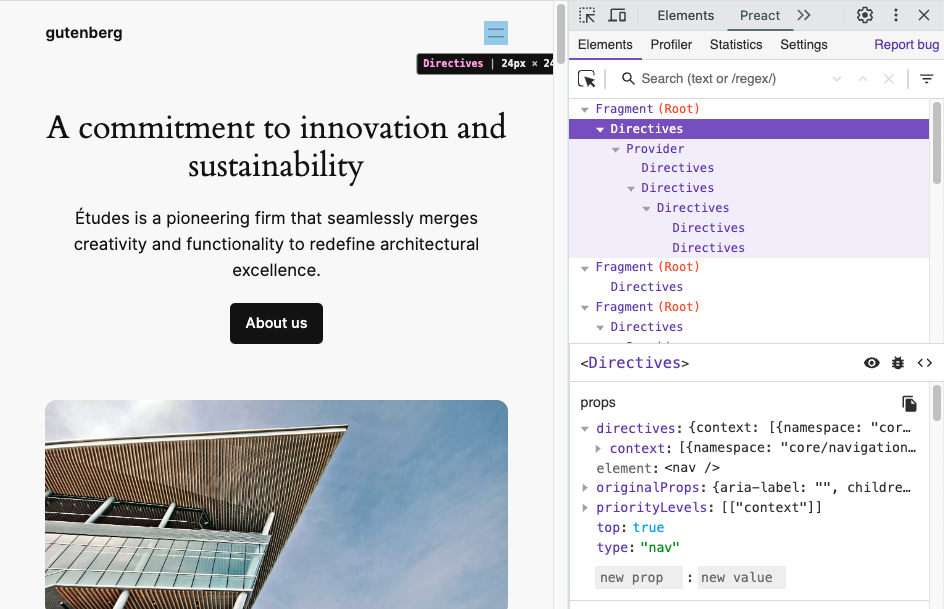
The Interactivity API runtime uses Preact internally to transform directives into components and manage all DOM updates. Since WordPress 6.6, developers can use Preact Devtools to inspect interactive blocks and check the component tree for all rendered directives.

To enable this feature, the SCRIPT_DEBUG constant must be enabled. This constant makes WordPress serve an extended version of the Interactivity API runtime thatโ€™s compatible with the Preact dev tools.

In the future, there are plans to improve the displayed information by including the names of the directives used in each of the elements, among other enhancements.

Read more about this new feature on the TRAC ticket #61171 and in the GitHub PR #60514

Interactivity API warnings in 6.6

In WordPress 6.6, both the server-side directives processing and the JavaScript runtime will warn developers when the directives, the namespace, or the markup cannot be evaluated.

To enable this feature, the SCRIPT_DEBUG constant must be enabled.

Warning messages will be shown for the following cases:

Unbalanced HTML tags

If the processed HTML contains any unbalanced tagtag A directory in Subversion. WordPress uses tags to store a single snapshot of a version (3.6, 3.6.1, etc.), the common convention of tags in version control systems. (Not to be confused with post tags.), the server processing will bail out. This causes the flash effect on page load. Now, developers will find which tag is missing within a warning message.

One example could be <span data-wp-text=โ€helloโ€ />

Unsupported HTML tags

Some tags, like SVG or MathML ones, are not yet supported by the HTML API, which is used internally by the Interactivity API. Directives inside them or in their inner tags wonโ€™t be server-side processed. Now, a warning will appear if any directives are found in those positions.

Non-parseable data inside data-wp-context

The context data provided to data-wp-context directives must be a valid JSONJSON JSON, or JavaScript Object Notation, is a minimal, readable format for structuring data. It is used primarily to transmit data between a server and web application, as an alternative to XML. stringified object.

Invalidinvalid A resolution on the bug tracker (and generally common in software development, sometimes also notabug) that indicates the ticket is not a bug, is a support request, or is generally invalid. namespace inside data-wp-interactive

The value passed to data-wp-interactive directive cannot be an empty object {}, an empty string, or a null value. Namespaces must be non-empty strings.

Props to @darerodz, @westonruter and @luisherranz for co-authoring this post
and to @fabiankaegy and @juanmaguitar for review

#6-6, #dev-notes, #dev-notes-6-6, #interactivity-api

Summary, Dev Chat, June 26, 2024

Startย of the meeting inย SlackSlack Slack is a Collaborative Group Chat Platform https://slack.com/. The WordPress community has its own Slack Channel at https://make.wordpress.org/chat/, facilitated by @joemcgill. ๐Ÿ”— Agenda post.

Announcements

  • WordPress 6.6 RC1ย was released on June 25. We are now in a hard string freeze. Note that theย dev-feedbackย andย dev-reviewedย workflow is required prior to committing to the 6.6 branchbranch A directory in Subversion. WordPress uses branches to store the latest development code for each major release (3.9, 4.0, etc.). Branches are then updated with code for any minor releases of that branch. Sometimes, a major version of WordPress and its minor versions are collectively referred to as a "branch", such as "the 4.0 branch". (handbook reference).
  • WordPress 6.5.5, a security release, was shipped on June 24.
  • Gutenberg 18.6.1ย was released on June 25.

Great work getting all of these milestones done this weekย :tada:

Forthcoming Releases

Nextย major releasemajor release A release, identified by the first two numbers (3.6), which is the focus of a full release cycle and feature development. WordPress uses decimaling count for major release versions, so 2.8, 2.9, 3.0, and 3.1 are sequential and comparable in scope.: 6.6

We are currently in theย WordPress 6.6 release cycle. The WordPress 6.6 RC2 release is scheduled for next Tuesday, July 2. Please reviewย this postย for an update about the Release Candidaterelease candidate One of the final stages in the version release cycle, this version signals the potential to be a final release to the public. Also see alpha (beta). Phase.

@meher brought up a discussion from the #6-6-release-leads channel about the string freeze in the release candidate stage. We discussed when the soft string freeze should happen and if it should exist, when the hard string should happen, how these two different freezes are different and if there are any exceptions.

@audrasjb highlighted the glossary items:

Hard freeze:
Seeย String freeze. A hard string freeze or a hard freeze is announced when all the strings of the upcoming release are frozen including the strings of the About page. A hard freeze is the final string freeze before a release.

Soft freeze
Seeย String freeze. A soft string freeze or โ€œsoft freezeโ€ is announced when all the strings of an upcoming WordPress release are frozen, except for the strings of the About page.

@desrosj suggested we decide on the course of action for this release (6.6) and then do the research suggested here to adjust the practice going forward.

@audrasjb also found an example of a string change after the hard string freezeย here.

@joemcgill summarised the next steps as follows:

  • Weโ€™re currently operating in a Hard Freeze for 6.6
  • @audrasjb is going to check with Polyglots to see if we can extend that date to RCrelease candidate One of the final stages in the version release cycle, this version signals the potential to be a final release to the public. Also see alpha (beta). 3
  • If we really do need Hard Freeze to start at RC1, we will update our docs for future releases

Weโ€™ll aim to have an update and share by next weekโ€™s Dev Chat.

Next maintenance release

No maintenance releases are currently being planned. However, we discussed follow-up tickets that were opened following the 6.5.5 release.

@audrasjb noted:

The most annoying post-6.5.5 ticketticket Created for both bug reports and feature development on the bug tracker. was #61488.
It was fixed in trunktrunk A directory in Subversion containing the latest development code in preparation for the next major release cycle. If you are running "trunk", then you are on the latest revision. and is waiting for potential backportbackport A port is when code from one branch (or trunk) is merged into another branch or trunk. Some changes in WordPress point releases are the result of backporting code from trunk to the release branch. to branch 6.5. Question is: do we need a 6.5.6 for this?

@jorbin noted that weโ€™re waiting to see how #61489 shakes out, and we should allow for a day or two if possible so that 6.5.7 does not need to follow quickly behind.

Next GutenbergGutenberg The Gutenberg project is the new Editor Interface for WordPress. The editor improves the process and experience of creating new content, making writing rich content much simpler. It uses โ€˜blocksโ€™ to add richness rather than shortcodes, custom HTML etc. https://wordpress.org/gutenberg/ release: 18.7

Gutenberg 18.7ย is scheduled for July 3 and will includeย these issues. This version will NOT be included in the WordPress 6.6 release.

Discussion

The main discussion was around 6.6 this week, so we moved straight onto the Open Floor section.

Open Floor

@grantmkin asked if we could discuss this issue to allow themes to side-load single block plugins, which could help seamlessly open up more creativity and options baked into blockBlock Block is the abstract term used to describe units of markup that, composed together, form the content or layout of a webpage using the WordPress editor. The idea combines concepts of what in the past may have achieved with shortcodes, custom HTML, and embed discovery into a single consistent API and user experience. themes:

As Iโ€™ve been looking into the idea of canonical block plugins, one point of feedback Iโ€™ve received from theme designers is a desire to use such blocks in theme templates and patterns. One example shared was the desire for a tabs block to use in a product page template. If youโ€™re releasing the theme for general use (rather than it being specific to an individual site) youโ€™re currently limited to using coreCore Core is the set of software required to run WordPress. The Core Development Team builds WordPress. blocks. And naturally, weโ€™re conservative about adding new blocks to core. So Iโ€™m curious about possibilities for making more blocks available for use in themes and patterns.

There were several comments and questions raised, including:

  • Sounds a lot like pluginPlugin A plugin is a piece of software containing a group of functions that can be added to a WordPress website. They can extend functionality or add new features to your WordPress websites. WordPress plugins are written in the PHP programming language and integrate seamlessly with WordPress. These can be free in the WordPress.org Plugin Directory https://wordpress.org/plugins/ or can be cost-based plugin from a third-party. dependencies for theme. โ€“ @afragen
  • So not just starter content for themes, but starter blocks?ย  Interesting, seems pretty reasonable desire for themes. โ€“ @jeffpaul
  • I wonder what a fallback would look like if a block was no longer available in the repo as well? Would it just no longer show, or would there be a way for the external block to fall back to core blocks? โ€“ @joemcgill
  • In principle the idea of blocks like this is good because keeps them outside theme.ย โ€“ @karmatosed

@poena highlightedย if the plugin that has that block is not installed, the user will be prompted to install it. If they donโ€™t install it, they can keep the block as is, or delete it. So what is the problem weโ€™re trying to solve with side-loading single block plugins?

@poena also noted that themes in theย wordpress.orgย theme directory are not allowed toย requireย plugins. That does not mean that those themes are not allowed toย recommendย and use block plugins.

@joemcgill encouraged folks to keep the convo going in theย GH issue.

@mmaattiiaass also raised a discussion about the WordPress Importer project:

I would like to discuss the current state ofย WordPress-importerย project. I think itโ€™s an important piece for production sites, and it seems to be unattended.
Example: the font assets can not be imported automatically because that functionality wasnโ€™t shipped to the users.ย Thereโ€™s a PR adding that functionalityย that has been sleeping for months without any review despite being flagged as a blockerblocker A bug which is so severe that it blocks a release. for the font library in the WordPress 6.5 release.

@jeffpaul noted that the Import component team is vacant:ย https://make.wordpress.org/core/components/import/.

@joemcgill offered to do some research to find some answers.

Finally, @azaozz asked for more reviews on #60835:

#360835ย is a fix for few bugs introduced in WP 6.5. Itโ€™s been ready for about two months now. Yes, there are some different opinions there but the best way to iron out any differences is to have more reviews, right?ย 

@joemcgill highlighted that as an aside, it seemed like one of the things that has stalled the refactoring efforts is that there was an expectation set that there would be a proposal posted on make/core outlining the plan for more top-level directories like theย /fontsย directory. Joe offered to follow up with any updates for this.

Note: Anyone reading this summary outside of the meeting, please drop a comment in the post summary, if you can/want to help with something.

Props to @joemcgill for proofreading.

#6-6, #core, #dev-chat, #summary

Performance Chat Summary: 25 June 2024

Meeting agenda here and the full chat log is available beginning here on Slack.

Announcements

  • Welcome to our new members ofย #core-performance
  • Early WordPress 6.6ย BetaBeta A pre-release of software that is given out to a large group of users to trial under real conditions. Beta versions have gone through alpha testing in-house and are generally fairly close in look, feel and function to the final product; however, design changes often occur as part of the process.ย 2 performance results [GitHub issue]

Priority Items

  • WordPress performance TracTrac An open source project by Edgewall Software that serves as a bug tracker and project management tool for WordPress. tickets
  • Performance Lab pluginPlugin A plugin is a piece of software containing a group of functions that can be added to a WordPress website. They can extend functionality or add new features to your WordPress websites. WordPress plugins are written in the PHP programming language and integrate seamlessly with WordPress. These can be free in the WordPress.org Plugin Directory https://wordpress.org/plugins/ or can be cost-based plugin from a third-party. (and other performance plugins)
    • Auto-Sizes for Lazy-Loaded Images
    • Embed Optimizer
    • Fetchpriority
    • Image Placeholders
    • Modern Image Formats
    • Optimization Detective
    • Performant Translations
    • Speculative Loading
  • Active priority projects

WordPress Performance Trac Tickets

  • Last 2 performance tickets for 6.6 #59595 (merged) and #59600 (punted)

Performance Lab Plugin (and other Performance Plugins)

  • @thelovekesh added testing steps onย https://github.com/WordPress/performance/pull/1247ย which is ongoing PR for adding Web Worker Offloading plugin. As per last discussion on merging it in trunktrunk A directory in Subversion containing the latest development code in preparation for the next major release cycle. If you are running "trunk", then you are on the latest revision., this PR is ready for that
  • @westonruter hopes to pick up Web Worker Offloading next week
  • @mukesh27 theย Extend coreโ€™s Autoloaded Options Site Health test if present (in WP 6.6)ย is merged
    @mukesh27 opened a couple issues related to Modern Images Formats and the implementation of the picture element. Those are up for grabs for anyone wanting to contribute
  • @westonruter Related to that, I found a downside to using the picture element in the first place, in that it is not currently possible to add fetchpriority=high preload links for picture elements since the link tagtag A directory in Subversion. WordPress uses tags to store a single snapshot of a version (3.6, 3.6.1, etc.), the common convention of tags in version control systems. (Not to be confused with post tags.) doesnโ€™t replicate all of the picture elementโ€™s sourcing features:ย https://github.com/WordPress/performance/issues/1312
    • @joemcgill Does addingย fetchpriorityย directly to the image not work in this case?
    • @westonruter Yes that does, but the problem occurs when there are varying LCP elements for different breakpoints. So Image Prioritizer will need to explicitly avoid adding a preload link when the LCP element is a picture.
    • @joemcgill I would think that picture would make that easier, because each source would have itโ€™s own media attribute
    • @westonruter Otherwise, it adds preload links for the LCP element in each breakpoint. The problem with the picture element is theย typeย not theย media.
      • Unless, would a browser skip requesting a preload link for an image when it has aย typeย that is not supported? I didnโ€™t think it did. But Iโ€™ll need to check that
  • @westonruter Related to Image Prioritizer, Iโ€™ve openedย several other issuesย for enhancementenhancement Enhancements are simple improvements to WordPress, such as the addition of a hook, a new feature, or an improvement to an existing feature. ideas on top of Optimization Detective.

Active Priority Projects

Improving the calculation of image size attributes

Optimized Autoloaded Options

  • The dev notedev note Each important change in WordPress Core is documented in a developers note, (usually called dev note). Good dev notes generally include a description of the change, the decision that led to this change, and a description of how developers are supposed to work with that change. Dev notes are published on Make/Core blog during the beta phase of WordPress release cycle. Publishing dev notes is particularly important when plugin/theme authors and WordPress developers need to be aware of those changes.In general, all dev notes are compiled into a Field Guide at the beginning of the release candidate phase. has now been psoted https://make.wordpress.org/core/2024/06/18/options-api-disabling-autoload-for-large-options/

Improved template loading

  • @thekt12 I am working on review from @joemcgill here โ€“
    https://github.com/WordPress/gutenberg/pull/62794/files
  • @joemcgill #59600 and #57789 have a lot of overlap and the former is mostly irrelevant at this point. We fixed the biggest problem #59600 with blockBlock Block is the abstract term used to describe units of markup that, composed together, form the content or layout of a webpage using the WordPress editor. The idea combines concepts of what in the past may have achieved with shortcodes, custom HTML, and embed discovery into a single consistent API and user experience. patterns, but still have some things we wanted to progress in 6.7 for the WP_Theme_JSON system. However, the maintenance of that system between the GB repo on the CoreCore Core is the set of software required to run WordPress. The Core Development Team builds WordPress. repo has made executing and testing changes reliably pretty challenging. I openedย this issueย to discuss how we can improve this process going forward. Iโ€™d be happy for folks here to give feedback.
    • In terms of ourย tracking issue, Iโ€™ll post an update in light of the final 6.6 changes we were able to make and update any remaining tasks we want to pursue.

Open Floor

  • @joemcgill FYI: thereโ€™s a new channel,ย #pluginreview-plugincheckย to have discussions related to maintaining the Plugin Check plugin that we helped build.
    • @thekt12 mentioned most PRs show errors
    • @joemcgill Iโ€™ve seen that on occasion as well, but not causing any merge checks to fail, and not consistently with the same message. Could be flaky e2e tests.ย 
  • @mukesh27 As the Performance Lab plugin has added support for WebP, AVIF, and Picture elements, what is the tentative WordPress version we are targeting for merging these features?
    • @joemcgill WP already supportsย uploadingย those versions, and gives site owners the ability to convert uploaded files to those formats using a filterFilter Filters are one of the two types of Hooks https://codex.wordpress.org/Plugin_API/Hooks. They provide a way for functions to modify data of other functions. They are the counterpart to Actions. Unlike Actions, filters are meant to work in an isolated manner, and should never have side effects such as affecting global variables and output., but there are currently no plans to make either the โ€œdefaultโ€ format that is used for the intermediate sizes that WP creates.
    • @westonruter And merging picture element support will require a lot of testing and there will certainly be many theme and plugin compatibility issues
    • @joemcgill #55443 is probably the best ticketticket Created for both bug reports and feature development on the bug tracker. to revisit for this

Our next chat will be held on Tuesday, July 2, 2024 at 15:00 UTC in the #core-performance channel in Slack.

#core-performance, #performance, #performance-chat, #summary

WordPress 6.6 Release Candidate Phase

Now that WordPress 6.6 has entered the Release Candidaterelease candidate One of the final stages in the version release cycle, this version signals the potential to be a final release to the public. Also see alpha (beta). (RCrelease candidate One of the final stages in the version release cycle, this version signals the potential to be a final release to the public. Also see alpha (beta).) phase, the following policies are in place.

These policies mainly cover how and when CoreCore Core is the set of software required to run WordPress. The Core Development Team builds WordPress. committers can commit. For non-committing contributors, this post may help explain why a Core committercommitter A developer with commit access. WordPress has five lead developers and four permanent core developers with commit access. Additionally, the project usually has a few guest or component committers - a developer receiving commit access, generally for a single release cycle (sometimes renewed) and/or for a specific component. makes a certain decision.

String Freeze

To allow the Polyglots teamPolyglots Team Polyglots Team is a group of multilingual translators who work on translating plugins, themes, documentation, and front-facing marketing copy. https://make.wordpress.org/polyglots/teams/ time to get their local languageโ€™s translationtranslation The process (or result) of changing text, words, and display formatting to support another language. Also see localization, internationalization. of WordPress ready, no new strings are permitted to be added to the release. Existing strings can be removed and/or duplicated if needed.

Seek guidance from the Polyglots team leadership for any strings reported as buggy. A buggy string is one that can not be translated to all languages in its current form.ย In such case, another RC may eventually be released to update the related strings. This will be done in a responsible and reasonable manner, only when necessary.

Tickets on the WordPress 6.6 milestone

For the remainder of the cycle, only two types of tickets may be placed on/remain on the 6.6 milestone:

  • Regressions: bugs that have been introduced during the WordPress 6.6 development cycle, either to existing or new features.
  • Test suite expansion: tests can be committed at any time without regard to code or string freezes. This can cover either new or existing features.

Trunktrunk A directory in Subversion containing the latest development code in preparation for the next major release cycle. If you are running "trunk", then you are on the latest revision. is now WordPress 6.7-alpha

WordPress 6.6 was recently forked to its own branchbranch A directory in Subversion. WordPress uses branches to store the latest development code for each major release (3.9, 4.0, etc.). Branches are then updated with code for any minor releases of that branch. Sometimes, a major version of WordPress and its minor versions are collectively referred to as a "branch", such as "the 4.0 branch"., trunk is now open for commits for the next version of the software.

Backporting to the 6.6 branch

Backporting commits of production code (that is, anything that ends up in the zip file) now requires double sign-off by two core committers. The dev-feedback keyword should be used to request a second committerโ€™s review, dev-reviewed should be added to indicate a second committer has reviewed and approved the commit to the 6.6 branch.

Commits to the test suite and docblockdocblock (phpdoc, xref, inline docs) changes do not require double sign-off.

Props to @peterwilsoncc for writing the initial post that inspired this one, and to @meher and @hellofromtonya for peer review.

#6-6

Agenda, Dev Chat, Wednesday June 26, 2024

The next WordPress Developers Chat will take place onย  Wednesday June 26, 2024 at 20:00 UTC in theย coreย channel onย Make WordPress Slack.

The live meeting will focus on the discussion for upcoming releases, and have an open floor section.

Additional items will be referred to in the various curated agenda sections, as below. If you haveย ticketticket Created for both bug reports and feature development on the bug tracker.ย requests for help, please do continue to post details in the comments section at the end of this agenda.

Announcements

WordPress 6.6 RC1 was released on June 25. We are now in a hard string freeze. Note that theย dev-feedbackย andย dev-reviewedย workflow is required prior to committing to the 6.6 branchbranch A directory in Subversion. WordPress uses branches to store the latest development code for each major release (3.9, 4.0, etc.). Branches are then updated with code for any minor releases of that branch. Sometimes, a major version of WordPress and its minor versions are collectively referred to as a "branch", such as "the 4.0 branch". (handbook reference).

WordPress 6.5.5, a security release, was shipped on June 24.

Gutenberg 18.6.1 was released on June 25.

Forthcoming releases

Next major releasemajor release A release, identified by the first two numbers (3.6), which is the focus of a full release cycle and feature development. WordPress uses decimaling count for major release versions, so 2.8, 2.9, 3.0, and 3.1 are sequential and comparable in scope.: 6.6

We are currently in the WordPress 6.6 release cycle. The WordPress 6.6 RC2 is scheduled for next Tuesday, July 2.

Next maintenance release

No maintenance releases are currently being planned. We will have take time to discuss any important follow-up tickets that were opened following the 6.5.5 release.

Next GutenbergGutenberg The Gutenberg project is the new Editor Interface for WordPress. The editor improves the process and experience of creating new content, making writing rich content much simpler. It uses โ€˜blocksโ€™ to add richness rather than shortcodes, custom HTML etc. https://wordpress.org/gutenberg/ release: 18.7

Gutenberg 18.7 is scheduled for July 3 and will includeย these issues. This version will NOT be included in the WordPress 6.6 release.

Discussions

As weโ€™re in the middle of the 6.6 release cycle, weโ€™ll prioritize any items for this release. Please review the Editor Updates section of this agenda for a list of updates on several key features related to this release.

Highlighted Posts

Editor updates

You can keep up to date with the major Editor features that are currently in progress for 6.6 by viewing these Iteration issues.

Props to @annezazu for putting together these updates.

Outside of 6.6:

  • Design tools:ย early design exploration aroundย contextual color controls and new panels for Background, and Elements. This is part of a continual look at how our tools work together, especially as they grow.
  • Phase 3: Data Views:ย experimental work continues withย WIP PR for bringing data views to Posts listย after some initial work to bootstrap the dashboard layout. (62409) and add a new experimental empty page for Posts (62406) in the last GB release.
  • Patterns:ย PR underway to considerย limiting pattern shuffling to theme and user patterns only.
  • Styles:ย a larger discussion is underway to step back, review the main issues, and simplify the mental model aroundย Global Styles and Theme.json: Next Steps.
  • Themes:ย a new issue was created toย allow themes to side-load single block plugins, which could help seamlessly open up more creativity and options baked into blockBlock Block is the abstract term used to describe units of markup that, composed together, form the content or layout of a webpage using the WordPress editor. The idea combines concepts of what in the past may have achieved with shortcodes, custom HTML, and embed discovery into a single consistent API and user experience. themes.
  • Unify publish flow:ย building off of the work in 6.6, thereโ€™s a new issue underway to complete someย technical refinementsย for this work.
  • Zoom out:ย a draft PR is underway toย try click to disengageย from zoom out view, an open question to solve with zoomed out view (how to disengage).

Tickets for assistance

Tickets for 6.6 will be prioritized.

Please include details of tickets / PRs and the links in the comments, and if you intend to be available during the meeting if there are any questions or you will be async.

Open floor

Items for this can be shared in the comments.

Props to @annezazu for reviewing.

#agenda, #core, #dev-chat

WordPress 6.6 Field Guide

This guide outlines major developer features and breaking changes in 6.6 and is published in the Release Candidaterelease candidate One of the final stages in the version release cycle, this version signals the potential to be a final release to the public. Also see alpha (beta). cycle to help inform WordPress extending developers, CoreCore Core is the set of software required to run WordPress. The Core Development Team builds WordPress. developers, and others.

There are almost 299 Core TRACTrac An open source project by Edgewall Software that serves as a bug tracker and project management tool for WordPress. tickets included in WordPress 6.6, 108 of which are enhancements and feature requests, 171 bug fixes, and 10 other blessed tasks. This time, 16 tickets focused on performance, 24 on accessibility, and 15 on modernizing code and applying coding standards. Changes in 6.6 are spread across 40 Core components.

This release includes 392 enhancements, 462 bugbug A bug is an error or unexpected result. Performance improvements, code optimization, and are considered enhancements, not defects. After feature freeze, only bugs are dealt with, with regressions (adverse changes from the previous version) being the highest priority. fixes, and 46 accessibilityAccessibility Accessibility (commonly shortened to a11y) refers to the design of products, devices, services, or environments for people with disabilities. The concept of accessible design ensures both โ€œdirect accessโ€ (i.e. unassisted) and โ€œindirect accessโ€ meaning compatibility with a personโ€™s assistive technology (for example, computer screen readers). (https://en.wikipedia.org/wiki/Accessibility) improvements for the Block Editor (a.k.a. gutenbergGutenberg The Gutenberg project is the new Editor Interface for WordPress. The editor improves the process and experience of creating new content, making writing rich content much simpler. It uses โ€˜blocksโ€™ to add richness rather than shortcodes, custom HTML etc. https://wordpress.org/gutenberg/).

Below is the breakdown of the most important developer-related changes included in WordPress 6.6.


Table of contents


BlockBlock Block is the abstract term used to describe units of markup that, composed together, form the content or layout of a webpage using the WordPress editor. The idea combines concepts of what in the past may have achieved with shortcodes, custom HTML, and embed discovery into a single consistent API and user experience. Editor

WordPress 6.6 brings 8 Gutenberg releases into core โ€“ 17.8, 17.9, 18.0, 18.1, 18.2, 18.3, 18.4, and 18.5. The Block Editor receives several improvements related to the ReactReact React is a JavaScript library that makes it easy to reason about, construct, and maintain stateless and stateful user interfaces. https://reactjs.org library, the Block APIAPI An API or Application Programming Interface is a software intermediary that allows programs to interact with each other and share data in limited, clearly defined ways., Themes, and more.

React

A new version of React and the new JSX transform is available in WordPress 6.6.

Block API

Some Block API improvements available in WordPress 6.6 include:

  • Unification of slots and extensibility APIs between the post and site editors
  • Improvements on isActive property of Block variations
  • Improvements on some core blocks
  • Block Bindings: Editing custom fields from connected blocks

Themes

WordPress 6.6 introduces several theme-related updates, including:

  • A new version 3 of theme.json
  • Uniform CSSCSS Cascading Style Sheets. specificity applied across core styles
  • Introduction of section styles to streamline the styling of blocks and their internal elements
  • Additional features for the grid layout type in blocks
  • Capabilitycapability Aย capabilityย is permission to perform one or more types of task. Checking if a user has a capability is performed by the current_user_can function. Each user of a WordPress site might have some permissions but not others, depending on theirย role. For example, users who have the Author role usually have permission to edit their own posts (the โ€œedit_postsโ€ capability), but not permission to edit other usersโ€™ posts (the โ€œedit_others_postsโ€ capability). to define site-wide background images in theme.json and the Site Editor

Miscellaneous Block Editor Changes

Some other updates to the Block Editor are also included in WordPress 6.6:

A table on design tools supported per block at WordPress 6.6 has been published as a reference.

Interactivity API

WordPress 6.6 includes updates for the Interactivity API, such as new async directives, support for derived state props from PHPPHP The web scripting language in which WordPress is primarily architected. WordPress requires PHP 7.4 or higher, integration with Preact Devtools, and new warning messages available when the SCRIPT_DEBUG configuration constant is enabled.

HTMLHTML HyperText Markup Language. The semantic scripting language primarily used for outputting content in web browsers. API

WordPress 6.6 includes a helpful maintenance release to theย HTMLย API. This work includes a few new features and a major improvement to the HTML Processorโ€™s usability. This continues the fast-paced development sinceย WordPress 6.5.

Thereโ€™s also a new data structure coming in WordPress 6.6 for the HTML API: theย WP_Token_Map.

Options API

Several changes have been made to the Options API to support an optimization for the autoloading behavior, and to create a way to apply further optimizations going forward.

PHPย Support

Support for PHP 7.0 and 7.1 is dropped in WordPress 6.6.

I18Ni18n Internationalization, or the act of writing and preparing code to be fully translatable into other languages. Also see localization. Often written with a lowercase i so it is not confused with a lowercase L or the numeral 1. Often an acquired skill.

Various internationalization (i18n) improvementsย are in WordPress 6.6, including:

Miscellaneous Developer Changes

Some other changes included in WordPress 6.6 are:

Other updates

One of the highlight features included in WordPress 6.6 is the automatic rollback of pluginPlugin A plugin is a piece of software containing a group of functions that can be added to a WordPress website. They can extend functionality or add new features to your WordPress websites. WordPress plugins are written in the PHP programming language and integrate seamlessly with WordPress. These can be free in the WordPress.org Plugin Directory https://wordpress.org/plugins/ or can be cost-based plugin from a third-party. auto-updates upon detecting PHP fatal errors.

New/Modified HooksHooks In WordPress theme and development, hooks are functions that can be applied to an action or a Filter in WordPress. Actions are functions performed when a certain event occurs in WordPress. Filters allow you to modify certain functions. Arguments used to hook both filters and actions look the same.

For a list of all new and updated Functions/Hooks/Classes/Methods in WP 6.6, please see this page on Developer Resources after the release: https://developer.wordpress.org/reference/since/6.6.0/.

Modified FilterFilter Filters are one of the two types of Hooks https://codex.wordpress.org/Plugin_API/Hooks. They provide a way for functions to modify data of other functions. They are the counterpart to Actions. Unlike Actions, filters are meant to work in an isolated manner, and should never have side effects such as affecting global variables and output. Hooks

New Filter Hooks

  • interactivity_process_directives [58234]
  • wp_theme_files_cache_ttl [58025]
  • wp_default_autoload_value [57920]
  • wp_max_autoloaded_option_size [57920]
  • wp_autoload_values_to_autoload [57920]
  • lang_dir_for_domain [58236]
  • activate_tinymce_for_media_description [58372]
  • site_status_autoloaded_options_action_to_perform [58332]
  • site_status_autoloaded_options_size_limit [58332]
  • site_status_autoloaded_options_limit_description [58332]

New Action Hooks

  • delete_post_{$post->post_type} [57853]
  • deleted_post_{$post->post_type} [57853]

Props to @sabernhardt, @milana_cap, @stevenlinx and @bph for review.

#6-6, #dev-notes, #field-guide

Recap Hallway Hangout: Theme Building with Playground, Create-block-theme plugin, and GitHub

On Wednesday, June 19, 2024, contributors attended the Hallway Hangout: Theme Building with Playground, Create-block-theme plugin (CBT), and GitHubย , to discuss an example of a no-code workflow for theme building, that also integrates with version controlversion control A version control system keeps track of the source code and revisions to the source code. WordPress uses Subversion (SVN) for version control, with Git mirrors for most repositories. on GitHubGitHub GitHub is a website that offers online implementation of git repositories that can easily be shared, copied and modified by other developers. Public repositories are free to host, private repositories require a paid subscription. GitHub introduced the concept of the โ€˜pull requestโ€™ where code changes done in branches by contributors can be reviewed and discussed before being merged by the repository owner. https://github.com/.ย 

At the beginning of the Hallway Hangout, @beafialho demonstrated how she updates a theme stored in a GitHub repo using WordPress Playground and the Create block theme plugin.

You can watch the video here with a detailed description of the workflow below.

The Workflow

Getting started: connecting to GitHub and install necessary plugins.ย 

Beatriz started Playground via https://playground.wordress.netย  and changed two settings:

  • Storage type to Browser and
  • enabled the Networknetwork (versus site, blog) access.

Then she selected from the Hamburger menu Import from GitHub. This requires a connection to GitHub. Then she pointed Playground to the GitHub URLURL A specific web address of a website or web page on the Internet, such as a websiteโ€™s URL www.wordpress.org of the repository. In the modal on screen, she selected Theme from the dropdown and identified the theme with the directory name. A click on Import button completed this step.

After the theme was successfully imported and activated, Beatriz manually installed the two plugins

and activated them, too.

Note: Utilizing a Playground blueprint would load the playground instance with plugins preinstalled.

Making changes via the Site editor

Now she was ready for making her changes: She went to the Site Editor > Templates. She can easily add padding to the theme headerHeader The header of your site is typically the first thing people will experience. The masthead or header art located across the top of your page is part of the look and feel of your website. It can influence a visitorโ€™s opinion about your content and you/ your organizationโ€™s brand. It may also look different on different screen sizes. by unchecking โ€œInner blocks use content widthโ€ in the layout settings.

Note: This was a very short part of the workflow demonstration, but thatโ€™s when the design process of themes takes place. ย 

Saving the UIUI User interface changes stored in the database and in theme files

The changes to the Template Part in the Site editor were saved in the site editor, and then Beatriz switched over to the CBT sidebarSidebar A sidebar in WordPress is referred to a widget-ready area used by WordPress themes to display information that is not a part of the main content. It is not always a vertical column on the side. It can be a horizontal rectangle below or above the content area, footer, header, or any where in the theme. and clicked on Save Changes to Theme. On the next screen, she added a check to the bottom three options as well:ย 

  • Localize Text โ€“ make strings in the resulting theme translatableย 
  • Localize Images โ€“ adds images uploaded to the media library from templates or template parts to the /assets folder of the theme.
  • Remove Navigation Refs โ€“ returns navigation to the default state so it can be reused on other sites.ย 

A click on Save Changes finished the update process.ย 

Create Pull Request via Playground

To create a Pull request for the GitHub repository, open the Hamburger menu, and select Export Pull Request to GitHub. Playground filled in all the information automatically.ย The only thing missing was the commit message, that was added in the comment box.

Beatriz also clicked the checkbox below the commit message to also Save the changes in zip file โ€œjust in caseโ€. A clock on Create Pull Request button automatically created a Pull request on the GitHub Repo. From the confirmation screen one can click on the link to open the particular pull request on the GitHub site. There Beatriz double-checked the file changes.

So far, the workflow.

Discussion and shared resources

It was noted that what is missing from the Create BlockBlock Block is the abstract term used to describe units of markup that, composed together, form the content or layout of a webpage using the WordPress editor. The idea combines concepts of what in the past may have achieved with shortcodes, custom HTML, and embed discovery into a single consistent API and user experience. theme pluginPlugin A plugin is a piece of software containing a group of functions that can be added to a WordPress website. They can extend functionality or add new features to your WordPress websites. WordPress plugins are written in the PHP programming language and integrate seamlessly with WordPress. These can be free in the WordPress.org Plugin Directory https://wordpress.org/plugins/ or can be cost-based plugin from a third-party. a wayย  for designers toย  add patterns created with the Site editor to be saved back to the theme files.ย 

Here are a few GitHub discussions about this topic:ย 

There was also a discussion on how more and more block themes grow their custom styles section in the theme.jsonJSON JSON, or JavaScript Object Notation, is a minimal, readable format for structuring data. It is used primarily to transmit data between a server and web application, as an alternative to XML., and it becomes a bit unwieldy, and how to handle this better.

There is the PR for users to change presets via UIย  Font size presets UIย 

Other resources shared:ย 

You can follow along the discussion with the below AI-generated transcript.

Props to @mikachan and @beafialho for review of the post.

Transcript

AI generated

0:00
All right, all right. So welcome to our hallway hangout talking about theme development using the site editor, using the create theme block, theme plugin and playground, and all comes together in GitHub as the version control so so we know how thatโ€™s all going to work. I asked Beatriz, who is a theme developer, Automattic how they are organizing the work, because there are multiple designers and multiple themes and how that goes. And she has provided a little video to demo the process, to want us thoughts. Hi. We also have Sarah, sorry, sorry. We have Pia, whoโ€™s a designer also did a lot of designs for wordpress.orgWordPress.org The community site where WordPress code is created and shared by the users. This is where you can download the source code for WordPress core, plugins and themes as well as the central location for community conversations and organization. https://wordpress.org/ and Sarah is also here to tell us more about the Create block or answer question about the Create theme, create block, theme plugin. We need a better name for that. I stumbled with it, but the floor is yours. Bea,

1:25
yeah, Sarah will probably answer the questions that I donโ€™t know how to answer because Iโ€™m a designer, not a developer, but yeah, I prepared a demo just to guarantee some fluidity in my explanations. And Iโ€™m sharing my screen. Let me know if audio is not good. Okay. Hi everyone. Today, Iโ€™m going to do a demo of how I usually update a theme thatโ€™s stored in a GitHub repo, and I do that with WordPress playground and the Create block theme plugin. This is the GitHub repo where my theme is located. As you can see here, itโ€™s called foam and and the design adjustment that I want to make is I want to add the side paddings to the header. It currently has some bugbug A bug is an error or unexpected result. Performance improvements, code optimization, and are considered enhancements, not defects. After feature freeze, only bugs are dealt with, with regressions (adverse changes from the previous version) being the highest priority. or something was not set up correctly, and I want to add some side paddings. Weโ€™re going to go to WordPress playground, and the first thing weโ€™re going to do is select a different storage type. We want to store our changes in the browser so that we donโ€™t lose any changes that we make. And we also want to select Network Access, because that allows us to install plugins. Weโ€™re going to go to the upper right corner and select Import from GitHub. We have to connect our GitHub account. And after weโ€™ve done that, we want to copy the link the URL of our GitHub repo, and we click Import. You can select, I am importing a theme, and then you write the name of your theme.

3:35
Click Import again. Okay, thatโ€™s done. Now we have our theme installed in the playground website, and now weโ€™re going to go and install our plugins. Itโ€™s good to install GutenbergGutenberg The Gutenberg project is the new Editor Interface for WordPress. The editor improves the process and experience of creating new content, making writing rich content much simpler. It uses โ€˜blocksโ€™ to add richness rather than shortcodes, custom HTML etc. https://wordpress.org/gutenberg/, because we never know this theme was built on it, and itโ€™s always best to have it as well, and weโ€™re going to install, create block theme.

4:10
Click Install and activate. Weโ€™re going to activate Gutenberg as well, and weโ€™re ready to go into the editor now. Okay, so weโ€™re going to make that change, and Iโ€™m going to go to my header, which is right here, and it should be very easy to add, or in this case, I think weโ€™ll just click a toggle and remove it out here. All right. Now thereโ€™s the padding. That was missing.

5:07
We want to save the changes that we made, all of them with create block theme.

5:21
All right. Now weโ€™re going to go to the hamburger menu again and export pull request to GitHub. Now all of these fields are automatically filled. The only thing that Iโ€™m going to add is what I changed add missing side padding to header, and Iโ€™m also going to click export the changes as a zip file, just in case, and Iโ€™m going to click Create pull request. This is going to automatically create the pull request in your GitHub repo.

6:01
Okay, now we can visit the pull request, and here it is our theme with the changes, we can see the files that have changed since I made this change. It is here, and this is how you can update the theme using WordPress playground and create block theme plugin.

6:39
Okay, stop sharing now.

6:53
Very cool. So am I understanding correctly that what youโ€™ve just shown thatโ€™s basically for working on the theme, templates, template parts, patterns, maybe whatever else is there to submit the pull request back in. So itโ€™s purely for the code at the moment, because the most common usage that we that we have, or that Iโ€™ve seen mentioned on social media and stuff, isnโ€™t just for covid, for for editing the themes in that way, but itโ€™s also for stuff thatโ€™s still in the database, so for managing client sites. And I know thatโ€™s a huge, a huge topic and very difficult to answer, but

7:39
let us back up a little bit. The reason Bayer used to create block theme plugin is because of exactly that. Yeah, that the change because she made changes to the template header and because it was through the user interface, it was actually only stored in the database, but with the Create block theme plugin X save feature, she was able to the to save that back into the HTMLHTML HyperText Markup Language. The semantic scripting language primarily used for outputting content in web browsers. file of the theme, so all the changes that are made through the site editor that are stored in database, if you use that plugin, will be saved into the theme files, and then from there the GitHub repo. The theme was pushed into the GitHub repo. So there are quite a few so create block theme is for saving the changes that are. So if she, if you change some of the color palette which is also in the database, yeah, and you save it through the Create block theme plugin, it will also update the same JSON file, yeah, so it will be a contained theme plugin. Theme, complain theme, or am I explaining that wrong?

9:07
No, that makes sense. I mean, thatโ€™s kind of what Iโ€™ve been using, what weโ€™ve been using, the Create block, the plugin for anyway, in that weโ€™ll do stuff, weโ€™ll change stuff on a staging server, will the client, will change everything, and then weโ€™ll save it back out to the theme and then, and then deal with it separately in a GitHub process. So I think that, I think, I think that itโ€™s kind of as manual control on our side as an agency, that we only do it at a set point we can say to the client, right, stop working. Now. We have to implement, implement your changes, and create, like a new version. And thatโ€™s then the new baseline. So the kind of the addition that is, I mean, I donโ€™t know, is that a new thing? Sarah put the link in, I think that itโ€™s a functionality which is in playground. Itโ€™s not in the plugin, whereby you can get stuff to go straight back into GitHub. And thatโ€™s kind of a missing bridge, because weโ€™re. WordPress, I think, has focused a lot on SVNSVN Subversion, the popular version control system (VCS) by the Apache project, used by WordPress to manage changes to its codebase., on subversion, until now. So having that ability to get stuff back into GitHub directly as a pull request, whether itโ€™s an automatic theme, whether itโ€™s our own GitHub setup, whatever, I think thatโ€™s going to be incredibly useful. The question would be, is that something that is staying in playground, or is that something thatโ€™s going to be feeding back into the Create block theme plugin?

10:29
I donโ€™t know for sure, but I would think itโ€™s going to stay in playground, definitely for, you know, a longish time. You know, Iโ€™m thinking months, if not years. Certainly no plans to move it to create what clean book, because playground provides that functionality. Yeah, okay.

10:46
I also think that the GitHub functionality and playground is actually more than themes. You could actually get in plugins as well. Yeah. So if you if thereโ€™s a mechanism to or a whole site, so you could have a sip file in, or have your site in GitHub, the whole site, and then grab, grab it from the link when playground updated, and then updated back into your GitHub repo. But thatโ€™s the whole theme. Yeah. So you could also do your plugins and custom development and custom post types and all that as well.

11:32
So did you see that question that Tammy raised in the chat?

11:35
Yeah? Just reading it. Yeah. So Tammy, right?

11:43
So I probably can answer to

11:45
Yeah, but can you? Can you read it also, so we have it in the recording, please.

11:50
Okay, Tammy is asking how this works for a pattern you might add to a theme or template part, and this would work like in the the example that I showed, I made a modification to an existing pattern. In this case, a template part. If you added a new one, it would work exactly the same. You would see it added after you saved it to your theme. You would see it in the code after youโ€™ve saved it with the Create block theme, does that answer the question? The issue I find, though, is how you unpick

12:31
Iโ€™m going to try and speak. So bear with me. Excited. Um, sometimes when you use the Create block theme on the export, it puts everything together. So if you want to use template parts, or you want to use patterns, and we want to have them separated, it you canโ€™t do that. Sarah is nodding. So Iโ€™m hoping Sarah gets what Iโ€™m saying, and Iโ€™m going to pass it to Sarah to explain,

13:04
yes, I think I know what you mean, and I think this is probably leading to hopefully upcoming pattern management and create block theme. So, yeah, currently, when you export a pattern thatโ€™s been that youโ€™re using in a theme template, itโ€™s all like, bundled into the template, and isnโ€™t separated into the pattern, like in the patterns, directly within the theme. And yet, that is currently expected, because itโ€™s not functionality that exists yet and is hopefully coming soon. And well, actually, let me post a link as well so you can follow along with the progress. But yeah, I know itโ€™s a itโ€™s often an often requested functionality as well for create block themes. So itโ€™s, itโ€™s certainly a priority, and, yeah, we recognize it as a priority. So

13:52
the moment that happens, I will be incredibly happy and so many people because it really, it allows you to have a lot safer, a lot cleaner code. So yeah, Iโ€™m very excited.

14:05
So if I understood that problem correctly, is that if I as a user create new patterns in the site editor, it does not add them to a template. Itโ€™s only in the template, but not in the pattern when itโ€™s saved down to the file. Okay, yeah, yeah, yeah, and thank you for the link. Sarah, thatโ€™s a great, great issue to follow along on that problem save so I saw in the Create block theme as well a functionality to save and Bayer had to link click on it separately. It wasnโ€™t a default option to to save localized text and localized images. What does exactly do so?

15:00
Yeah, so they, theyโ€™re the the options are separate, so you can pick and choose which options you want depending on what youโ€™re doing. The localized text wraps any text strings in a translationtranslation The process (or result) of changing text, words, and display formatting to support another language. Also see localization, internationalization. function, so that the WordPress translation functions, so that, so itโ€™s a itโ€™s a requirement for the.org the wordpress.org theme directory, that things are translatable, but obviously for different use cases, you might not want to translate everything, because you just might not need it, or maybe you donโ€™t think you need it, maybe you do need it, but yeah, itโ€™s there so you can turn it off if you donโ€™t need those functions. And then what was the other one? The localized images, images. So thatโ€™s for if youโ€™ve uploaded an image thatโ€™s part of a template. So say, any an image block, cover block, or youโ€™ve got, like a hero image in a template. When you export anything currently with the base export functionality, it wonโ€™t include assets, so things like images and fonts. But if youโ€™re using this create block theme function, it will include the image asset inside the theme assets directory, and it will reference the the image from that directory. So itโ€™s a relative link, like if youโ€™re used to building with things, and youโ€™ll probably know the kind of link, I mean. But normally this doesnโ€™t happen with the base x functionality. Weโ€™re WordPress, yeah, thatโ€™s the magic. Itโ€™s kind of like an automatic relative link. Okay,

16:31
so thatโ€™s for instance, if I have a background image that I attached to a group block, or if I have a sideway back background image, it would only land through playground in the media library of that site, but if I wanted in the theme, I need to kind of check that so it kind of come will be saved also in the assets folder of the Theme. Okay. Yeah. Okay, good. Um, any other questions? Yeah.

17:03
I wish there were. I guess sync. I guess sync patterns that have been created by one of the editors, one of the users, wouldnโ€™t be ignored in that process. Or would they also be included?

17:14
They will be ignored at the moment. So sync patterns currently donโ€™t work on theme export. Thatโ€™s kind of all whatโ€™s wrapped up in this, the pattern management, yeah, idea as well. But,

17:27
yeah, they currently thatโ€™s as a good thing, as a good thing, as you all want to I mean, well, I say itโ€™s a good thing. I mean, it will be helpful for agency clients like us who want to version the content as well as the as well as the tech behind it, but I think thatโ€™s, thatโ€™s a more complicated scope, and I donโ€™t think thatโ€™s necessarily part of WordPress coreCore Core is the set of software required to run WordPress. The Core Development Team builds WordPress. functionality. I think thatโ€™s something that we should be solving, not on an individual basis, but I donโ€™t think thatโ€™s something that should be part of the block theme, because it would start to get very complicated for users who are kind of, I mean, I say freelancers or individual users who are creating sites and using playground, for example, or using their own logic to define how to do this kind of stuff, because every agencyโ€™s case is different. You know, do you version the content? You version the patterns? Thereโ€™s so many different ways that it could be configured that I think adding that kind of thing into the into a standardized plugin might just mean that weโ€™ll all sync under all of the options, and nobody will understand how to get to where they need to be. Kind of too many features, if you

18:31
know, yeah, complex. Itโ€™s getting complex quickly, but I know there is so not in 6.6 but for 6.7 there is an issue on GitHub to actually have sync patterns for themes, so themes can put patterns into the pattern directory that also have block bindings to custom fields and those, if they change. I think that would be probably on the roadmap for create block theme plugin to actually also save those out. Or maybe it would be possible to save out the sync pattern from the users, the think pattern overrides from the users, and then have them into the file repository, as well as patterns. Iโ€™m not sure if thatโ€™s going to be really that might be straightforward because, yeah, I donโ€™t know. I think thatโ€™s one level too complex for me at the moment too, but itโ€™s certainly something to think about, because sink pattern overrides for themes is in the works. Somehow you want it, yeah, so Tammy also wrote that the big one sheโ€™s coming back to our shortcodes, which. Outside the scope of this. But itโ€™s, I think takes a poor, poor block to sink, and itโ€™s far simpler, yeah, I think so too. Yeah, Iโ€™m not quite sure. And then, so, when you have a custom value in the same JSON, so Iโ€™m just reading what dem is saying, one thing I do have, though, is when you went to custom value in a theme JSON, when not to I think many of us create block themes and have an ever growing custom section and theme JSON. What are thoughts on that from those creating themes? Yeah, thatโ€™s definitely a question for Bea and Carolina and Sarah. Yeah,

20:59
Iโ€™m not sure I understand the question, I

21:03
would try again and explain so to particularly values, to the custom values in theme. Jason, I find that Iโ€™m having an ever growing amount of those custom variables in theme. Jason, the simple block themes, 100% No, I donโ€™t need it, but I donโ€™t generally deal with simple themes. And once you go beyond that, you just need more. You maybe want different. Pod scales, line heights, is a good example all these ones, and it feels like with every block scene that people are making, that custom section is getting bigger. I know with the investor, we have more potential with same Jason three, for it to get smaller. But I just, I just wondered if whatever people are feeling, and Iโ€™ve looked at some of the recent themes, and also seeing that other peopleโ€™s theme, Jasonโ€™s have that custom section going as well.

22:10
Okay, yeah, I donโ€™t think, like, when Iโ€™m creating the theme, Iโ€™m not really thinking about if itโ€™s big, like, if itโ€™s growing too much, because, like, Oops, okay, thatโ€™s Iโ€™m basically, like changing the global styles in the editor, And like evaluating from a visual perspective. And I try not to add any extra CSSCSS Cascading Style Sheets. too much or anything like that. But sometimes I find itโ€™s itโ€™s needed to go there and theme JSON and change the values, like the the the fluid values, for example, those. I changed them a lot, and I havenโ€™t ventured too much on the spacings. I usually deal with the base theme that Iโ€™m working and use those, but sometimes itโ€™s a little frustrating because theyโ€™re not exactly how I would use them. But that the short answer is, the short answer is, I donโ€™t think too much about that. Iโ€™m not sure if that is, yeah, but thatโ€™s probably a more designery Question Answer.

23:37
I mean, I can speak from that, because itโ€™s something that weโ€™ve sort of been right through the whole process, right from 2018 right through to now, is trying all the different options, working out the best processes and stuff. And I agree that some projects, we will use custom values in the sheet theme. Jason, for example, if weโ€™ve got a fixed header bar that doesnโ€™t it remains fixed and doesnโ€™t scroll, we might need to dynamically know the height of that thing, or we need to define it by breakpoint, or whatever. Then thatโ€™s, can be okay, a use case for custom variables in theme, JSON,

24:12
correct. Iโ€™m not talking CSS variables, though. Thatโ€™s not what Iโ€™m talking about here. Custom CSS. What Iโ€™m talking about is things that donโ€™t. So actually having line height is a great example. So for finding those variables in there, itโ€™s something Ollie Foss, lots of other theme developers already have. Theyโ€™re not actually writing, sorry, custom CSS. Thatโ€™s not what Iโ€™m talking about, no,

24:41
no, no, no. But youโ€™re referring to setting the value of typography, line height, for example, to a custom value or no.

24:50
So youโ€™d write that line height, youโ€™d have a line height scale that you would use, and then youโ€™d be able to use that

24:56
throughout, yeah, those are the presets that you can get in the cage. Sonia and you feel that you have a need to kind of create, aside from the default presets, more and more presets for your sites. That not only is

25:14
where the gap exists where there isnโ€™t a predefined preset already that you can use in theme, Jason, and thatโ€™s where the gap is generally telling us where we need to do future presets. Yeah, yeah.

25:31
I mean, I think weโ€™re on the same page. I understand what you mean, yeah. I mean, the experience I have is basically to really take us take a step back and say, Is this Configure? Is this going to be used on more than one site? Is this going to be configurable? Can we change this down the line? Is it something we might need to adjust that scale in the future for the for this project or for this client? And if it mostly, if itโ€™s going to be reusable, like, Iโ€™ve got a multi site with, I donโ€™t know, 10 sites that are all using slightly different variations of the same block theme in the site editor. Then these values might be slightly different according to the font, for example. Then thatโ€™s something that will be I will put into theme. Jason, if it is a really custom value, then Iโ€™m, Iโ€™m General. I mean, if weโ€™re talking about CSS or PHPPHP The web scripting language in which WordPress is primarily architected. WordPress requires PHP 7.4 or higher, whatever, thatโ€™s something, then I tend to not put it into theme Jason, because I donโ€™t want it to be controlled by a configuration option. Rather, itโ€™s setting a value which canโ€™t be changed, which applies to that theme. Because I see theme Jason as something you would set up once, and then maybe as a project continues or progresses or develops, then maybe go and modify it. Or if itโ€™s on multiple sites, then itโ€™s different on each site. So my case is different to somebody whoโ€™s using it on a one off website. Itโ€™s different from something like Olli. Well, the Olli theme, for as an example, is going to be on installed on 1000s of websites, and every single website could be slightly different. So thatโ€™s the case for using theme JSON without having to touch any code.

27:06
So I tend to not use CSS anymore. I use theme Jason, even if I just do one site. So I think thatโ€™s the difference, because I use it as a design system approach. I create a theme as a design system there. Yeah.

27:20
I mean, weโ€™ve got, weโ€™ve weโ€™ve tried, weโ€™ve tried two projects where we said, No, weโ€™re just going to use theme Jason, and nothing else. And we ended up with several 100 lines of custom stuff in theme Jason, which was not real. Itโ€™s not doesnโ€™t make sense to us.

27:32
Well, so 3000 lines in CSS,

27:36
it is absolutely and thatโ€™s why weโ€™ve got the combination of the two. We use theme Jason up to the limit where it doesnโ€™t make sense anymore, and then anything else we say, Write this kind of stuff in itโ€™s not something we want people to change the configuration of. It has to be done like this, like a CSS reset, for example, to make certain stuff in Firefox happen correctly. Thatโ€™s not something thatโ€™s a configuration option. Thatโ€™s something thatโ€™s like, no, itโ€™s a fix. Itโ€™s something that has to always apply. But I do know that thatโ€™s quite an advanced use case. So it is not saying we use a theme Jason for the minimum and everything else we did my hand. Thatโ€™s not the case. We start with theme Jason, and we get to a point where we say thatโ€™s not achievable within Jason, then it probably never will, because itโ€™s too specific for our for our use case. So So

28:20
Sarah was so kind enough to share a link to an issue or a pull request, rather to add UI for users to change the funds presets for a site. So that is certainly something that will also then need to be kind of in that process that we are talking about. Need then to be also safe through create block theme and then feed out into the through the theme JSON, probably, but yeah, so if something is fixed, Iโ€™m kind of wondering why that wouldnโ€™t be in theme JSON, because if itโ€™s fixed in, in right out of the bat, then you donโ€™t have to do any other customization, and it you can make it that itโ€™s everything,

29:23
yeah. I mean, to me, I prefer to go to the engage in just one places. From the QA perspective, itโ€™s just easier. I think you can have an endless debate about it depends on what implementations youโ€™re doing. Yeah,

29:43
but yeah, Iโ€™m more so behind that, like one source of truth. So

29:50
it depends on what project you using, what libraries and what implementation. But it also for me, I kind of did that it. It is in. Up that. But itโ€™s also about maybe we should be surfacing more where weโ€™re using those question values, where weโ€™re having the really long amounts and saying, Hey, these things do need to have more visibility as well, and not just accepting that weโ€™re doing the custom phase,

30:20
probably not theme based, but the immediate thought that comes to mind is custom plots, where, to a certain extent, you can use the configuration in theme JSON to handle that, but some custom blocks are going to come with a very locked down set of code, CSS. Iโ€™ll take CSS as an easy example, where itโ€™s not configurable. Itโ€™s just it is how it is. And you donโ€™t want to try and offer that as a configuration option for a custom block. But again, thatโ€™s, you know, I mean, I know the general pushes towards core and commonality and everything following core as closely as possible. But there are, there is a very valid use case for custom blocks and for custom Absolutely. I call them custom patterns, but you canโ€™t even edit them in the block editor. You know, theyโ€™re absolutely locked down for better usability for users that they donโ€™t want to have to go and fight, fight their way through nested blocks and stuff like that. They just want to have a field where they can change the image and done but, but thatโ€™s not, again, thatโ€™s not thatโ€™s one of the things I feel quite strongly about is thatโ€™s not something that core should be solving. Thatโ€™s down to the individual developer to make it work well for the project and for the agency and for the client needs. So when weโ€™re talking about custom plots, thatโ€™s not something I donโ€™t think right now. I think the core focus should be on what makes sense for everybody, and not what makes sense for these 10% of people who are intent on doing it themselves, certainly not in the current state. Thereโ€™s too much to be worked on, yet too much to be improved. Before you start getting to into really outline non specific or very specific use cases that that link that you said shared, Sarah, to the to the editor, what kind I mean Iโ€™ve only just very, very quickly flick through it is, whatโ€™s the feedback there? Is it? Should we do it? Or how do we do it? What feedback is needed there?

32:08
So I think itโ€™s a yes, we should do it. It was more, I was wondering if it would help, if, if all these custom, potential, custom values had a UI that matched up, so it doesnโ€™t reduce the amount thatโ€™s in theme JSON, which I know is the initial complaint, but if thereโ€™s somewhere to, like, visually organize them, and maybe, if we got to that for all the presets, then maybe they could be exported as a separate json file as well. Oh, you know, there was the option to export them as a separate file to Maurice. So

32:42
an additional, an additional section, like custom book to call that I know, for example, presets, where these custom names, keys and values get applied, sounds like a really good idea. Yeah, definitely. What

32:53
it helps is it makes the invisible visible. And I think one of the problems I have at the moment is Iโ€™m craving a lot of invisibles, something that is meant to be encouraging visibles. And then that means I can benefit from the dream evenness in the most beautiful way when Iโ€™m rapidly creating. And one of these things, which will no matter what weโ€™re doing, whatever we create, and dictates and creates variables that we can use in blogs, whatever we use. So we need to also remember that no matter what we are creating there, we do have these variables created that we can call out as well. Yeah.

33:29
But side question on that, when we got when we create in custom colors in the Styles editor, when we save those out with create block theme, are they being added to the palette array and brought into the Yeah, okay, yeah.

33:43
So, Sarah, whatโ€™s next for the whatโ€™s on the rave map for the gray block theme plugin, in terms of whatโ€™s coming into WordPress six and further on?

33:59
Yeah? Well, the most recent changes, we feel that are in a good place, where weโ€™ve just kind of finished a big refactor from moving from the WP adminadmin (and super admin) page into the the editor UI, yeah. So we feel like thatโ€™s in a good place. Thereโ€™s probably more we can do. There always is, but weโ€™ve moved everything that exists currently in the WP admin into the editor, and then next was actually pattern management, which hopefully addresses the first thing we were talking about. But weโ€™re trying to, weโ€™re trying to work as closely as possible with the sync patterns discussion and work thatโ€™s going in to both 6.6 and 6.7 let me find another issue as well, a Gutenberg issue for 6.7 but, yeah, I think that the issue, the Create block theme issue that I faced before, about pattern management, I think weโ€™re coming to the idea that weโ€™re going to experiment with pattern management in that plugin and just work alongside whateverโ€™s happening in Gutenberg as well. And yeah, and hopefully just. Like proof of concepts and things out and see, see what lands. But, yeah, we know itโ€™s a big wanted feature to manage patterns in the editor.

35:14
Was that the one that you let her know, who is it? Justin, whoโ€™s done a block pattern manager? Somebody. I canโ€™t remember it was now, Iโ€™m sure I saw someone on GitHub, just

35:23
very Yeah, Justin was one. There was also a blockmeister kind of thing. JB orders had a plugin that lets you do pattern from but they were all kind of pattern management from the editor. That was that feature wasnโ€™t available in core back then, when the plugins were created, but now itโ€™s available in core. So those plugins are the only thing. What you canโ€™t do in core right now is create new categories, but that has also well couldnโ€™t do before, but now you can so that the whole part is kind of built into core now. And yeah, and now, thank you for sharing the sync pattern iteration for WordPress 6.7 that has the overrides for theme patterns and a few other things that are in there. Expand block support for sync patterns, because right now itโ€™s only available for four blocks the sync pattern overrides that certainly needs to be expanded a bit so it also covers other blocks

36:35
going going back to Sarahโ€™s comments about the UI for presets, one thing that would be very useful would be if we can have a way of changing the font sizes through UI that are predefined so large, instead of 18 pixels, is 19 pixels, and then saving that back out to theme Jason, because at the moment, thatโ€™s something that still requires a manual a manual change, which is something I As a very pernickety typo guy, I change the size of my fonts every, every few weeks, because itโ€™s like it needs to be a little bit smaller, a little bit bigger. So if thereโ€™s a way of actually implementing that into the process, so that that can be versioned as well through GitHub, in the way that weโ€™ve seen in playground, or even just that thereโ€™s an interface to say max for the fluid sizes, just for a little bit of fine tuning, maybe after a launch, or maybe the client has a change, but we donโ€™t have time to go into the code and change stuff that would be very useful, because the way that we manage most of our client sites is they tend to ask for changes, minor changes, two weeks after the project has gone live and we think weโ€™re finished, so we just say, weโ€™ll change it in the weโ€™ll change it in the site editor And or the sales editor. Leave it there for the time being, and weโ€™ll come back to it in another in the next iteration, and then use the plugin to save all those little itty bitty changes back out into the file. Yeah, I was just gonna say, is there already an issue for that? Or shall I put one?

38:01
I think itโ€™s probably the same issue. I think thatโ€™s the UI is for for editing those font size presets within the editor, so you donโ€™t go into the code and change them. Weโ€™re also starting with font sizes, but weโ€™re probably going to follow up pretty closely with spacing presets as well the spacing size presets and then others. But yeah, definitely those two to begin with.

38:25
Yeah, spacing sizes will be very handy, because thatโ€™s something where I have to go and remind myself of the of the preset slugs every time I do it, to go and actually adjust them and try and not use my own spacing unit, a spacing presets actually trying to support ones. So yeah,

38:40
be very handy. Sounds like we all need the same tool? Yeah, thatโ€™s yeah.

38:47
Is that something I mean, bear, Sarah, are you? Are you working on? Are you working on things for automatic directly or

38:55
so Iโ€™m primarily working on, like tools to support theme builders and anyone else the editor often theme builders. So, yeah, thatโ€™s where the that font size is, PR comes in.

39:06
Okay, how about you bear? Do you what are you working actively on the themes? Or,

39:11
yeah, Iโ€™m, Iโ€™m a designer. My background is a designer, but I recently started to build them in the editor and do all this. And I also released the themes in wordpress.org,

39:24
so thatโ€™s kind of these tools that weโ€™ve been talking about now are very much something that you can see as a, letโ€™s say, a theme creator for people, that hundreds or 1000s of people, people are going to be using it. Thatโ€™s these are use cases for that from that side of the target audience as well, cool, exactly.

39:41
Yeah, so when you were talking about clients, thatโ€™s kind of, I understand that, but yeah, probably the process is itโ€™s different, because your clients, they get into the websites and they want to change it themselves for out. Automatic themes. Itโ€™s like all these people that are going to use the theme, so yeah, but the tools are these tools are incredible, like the Create Blogblog (versus network, site) theme plugin and playground, they have been so useful for me in the process. Yeah,

40:17
yeah, for us who I mean, I mean, you say that about clients. Our clients our clients tend to be small and medium sized businesses, and honestly, they donโ€™t care. They donโ€™t want to, they donโ€™t want to know. They just want to write their content. They donโ€™t care what I mean, they care about how it looks, but they donโ€™t want to have to go into the site editor. They never, I mean, like 95% of my clients donโ€™t even know there is a site editor. And they donโ€™t care, and they donโ€™t want to know, but they come and say, Can we change the spacing, that font, that title needs to be a little bit bigger, all this kind of stuff. And thatโ€™s an iterative process, because theyโ€™re never happy with it. Theyโ€™re happy with it for a month, and then they want to change it again. So yeah, itโ€™s coming from it. Itโ€™s coming from the same problem from a slightly different angle. But itโ€™s great to find that there are solutions that are working or being worked on, I should say, and being provided for, for US agencies, and also for normal users, if we can put it that way. Well,

41:05
at the great block theme plugin as well as the playground. They are open sourceOpen Source Open Source denotes software for which the original source code is made freely available and may be redistributed and modified. Open Source **must be** delivered via a licensing model, see GPL.. They can be adopted to any other scenario of having themes in in GitHub version control. So I donโ€™t think itโ€™s a big client versus small client, or 15,000 users versus one site using a theme. I think it could also always be version control, and that probably is, and itโ€™s a fantastic workflow. I havenโ€™t seen anybody else yet using that workflow. Thatโ€™s why we kind of had, yeah, gee. Tammy raised her hand and said, Iโ€™m using it, yeah. So yeah, but I think we is there anything on

42:01
that for me, Iโ€™ve been using that workflow ever since the plugin came out, because it makes it makes no sense not using that workflow. To me, Iโ€™m having been using Iโ€™ve only recently been adding the playground to my workflow.

42:15
But to me,

42:18
create bot plugin, and doing that completely makes sense. It just hasnโ€™t made any sense to do it any other way, from small projects to large enterprise, agencies, food, whatever, it doesnโ€™t make any sense, even if you go down to the just starting to have a theme, and whatever you thought from, or whatever you create, whatever base you create from through to using it like dream leader, just to do the least. And thatโ€™s what, like the root of the plugin can do. Playground is an addition to it, and I think that depends on whether you have ddev or you have different environments as you kind of get into those different scales. Yeah. So

43:00
there are some things coming out of WordPress, point six, 6.6 that will change a little bit how you create themes or how you do Iโ€™m talking about the section styles. Bia. Have you been any testing or experience with that on how thatโ€™s going to work and how how you feel about what you feel about that, and how you use it?

43:30
Sorry, could you repeat the question? Because there was something in the audio. Okay,

43:35
so I was thinking that WordPress 6.6 comes with section styles. And have you done any experimentation or explorations about that? And is there anything that you would kind of share with us what your experience was?

43:52
In fact, I havenโ€™t experienced experimented with it, so I canโ€™t share anything useful, not yet.

44:01
All right, anybody else Carolina or Tammy or Sarah? Have you done any experimentation with that? All right, then I think thatโ€™s another, yeah, Carolina kind of put into hasnโ€™t had time yet for it, and I can understand that itโ€™s still three weeks out, so I think we have another developer hours or hallway hang out about that. I just so Iโ€™m thinking, if there arenโ€™t any other questions, I give everybody kind of 10 minutes back from their time. It was wonderful to have you here and have this discussion. Thank you for Bear. Bear to put this little video together, the demo together so we can all see how it goes from from first step to to then the pull request. And that was very, very helpful. And also for Sarah to have all the answers for the. These wonderful questions from Mark and Tammy and in our show, I want to just before you go, have for you the next hallway hangout is in November. November. Oh, I wish it were November 26 in June, 26 at 11 UTC and itโ€™s about grid layouts and how to use the functionality from 6.6 and whatโ€™s coming in 6.7 and then a day before, itโ€™s a developer hour on what theme, what comes whatโ€™s important for theme developers for 6.6 so, and thatโ€™s on June 25 1500 UTC Iโ€™m just going to throw that out so you can note it down or the thing, I think it shared it at the beginning, but maybe I need to share it again. So there is that. Thatโ€™s the Hangout announcement. And here is the developer hour for next week, so we all have it in our browsers. And with that, I thank everybody, and I see you.

46:15
Quick question, very quick question, the hallway Hangouts, are they going onto meetup.com?

46:20
No, theyโ€™re not going on meetup.com. On meetup.com but there will be a summary post on make core blog for the Yeah. So I shared the recording, and I share the links that we had, and also transcript and the separate video from Bayerโ€™s demonstration, so you donโ€™t have to watch a whole hour to just see that demonstration. All right, this, this is it, and thank you all for and see you next week. Bye, thanks

46:49
for your time, guys. Bye. Bye. You.

#hallway-hangout, #outreach, #summary

Performance Chat Agenda: 25 June 2024

Here is the agenda for this weekโ€™s performance team meeting scheduled for June 25, 2024 at 15:00 UTC.

  • Announcements
    • Welcome to our new members of #core-performance
    • Early WordPress 6.6 BetaBeta A pre-release of software that is given out to a large group of users to trial under real conditions. Beta versions have gone through alpha testing in-house and are generally fairly close in look, feel and function to the final product; however, design changes often occur as part of the process. 2 performance results [GitHub issue]
  • Priority items
    • WordPress performance TracTrac An open source project by Edgewall Software that serves as a bug tracker and project management tool for WordPress. tickets
    • Performance Lab pluginPlugin A plugin is a piece of software containing a group of functions that can be added to a WordPress website. They can extend functionality or add new features to your WordPress websites. WordPress plugins are written in the PHP programming language and integrate seamlessly with WordPress. These can be free in the WordPress.org Plugin Directory https://wordpress.org/plugins/ or can be cost-based plugin from a third-party. (and other performance plugins) including:
      • Auto-Sizes for Lazy-Loaded Images
      • Embed Optimizer
      • Fetchpriority
      • Image Placeholders
      • Modern Image Formats
      • Optimization Detective
      • Performant Translations
      • Speculative Loading
    • Active priority projects
  • Open floor

If you have any topics youโ€™d like to add to this agenda, please add them in the comments below.


This meeting happens in the #core-performance channel. To join the meeting, youโ€™ll need an account on the Make WordPress Slack.

#agenda, #meeting, #performance, #performance-chat