The WordPress coreCoreCore is the set of software required to run WordPress. The Core Development Team builds WordPress. development team builds WordPress! Follow this site for general updates, status reports, and the occasional code debate. There’s lots of ways to contribute:
Found a bugbugA bug is an error or unexpected result. Performance improvements, code optimization, and are considered enhancements, not defects. After feature freeze, only bugs are dealt with, with regressions (adverse changes from the previous version) being the highest priority.?Create a ticket in the bug tracker.
Happy new year, everyone! Here’s some aggregate data for 2023 about WordPress CoreCoreCore is the set of software required to run WordPress. The Core Development Team builds WordPress. contribution on TracTracAn open source project by Edgewall Software that serves as a bug tracker and project management tool for WordPress..
Please note:
These data only include code contributions to WordPress codebase, not contributions on GitHubGitHubGitHub is a website that offers online implementation of git repositories that can easily be shared, copied and modified by other developers. Public repositories are free to host, private repositories require a paid subscription. GitHub introduced the concept of the ‘pull request’ where code changes done in branches by contributors can be reviewed and discussed before being merged be the repository owner. https://github.com/ repositories such as GutenbergGutenbergThe Gutenberg project is the new Editor Interface for WordPress. The editor improves the process and experience of creating new content, making writing rich content much simpler. It uses ‘blocks’ to add richness rather than shortcodes, custom HTML etc. https://wordpress.org/gutenberg/.
The raw data for this post are available on this public spreadsheet. You might find that much easier to read if you have low vision or colorblindness; the graphics below are a snapshot pulled together to include as much information as possible in this blogpost, but they are hard to make accessible to everyone.
All the links for the graphics below open a new tab to display them in full size.
General Trac overview
In 2023, the WordPress Core team shipped 2211 commits (2597 in 2022). 2751 tickets were opened, 2545 tickets were closed, and 365 were reopened.
Also, 1079 people contributed to WordPress source code using Trac (988 in 2022), and 472 people made their very first contribution to WordPress Core ♥️ (398 in 2022).
January
February
March
April
May
June
July
August
September
October
November
December
Total
Commits
148
265
179
84
174
246
209
173
250
288
108
87
2211
Tickets closed
181
297
218
156
179
259
211
277
239
268
148
112
2545
Tickets reopened
25
36
36
19
25
40
42
29
35
40
28
10
365
Tickets created
185
234
208
188
208
255
256
310
250
270
212
175
2751
New contributors
18
91
23
18
25
74
51
31
75
46
12
8
472
Contributors
137
295
155
87
150
279
217
182
295
249
111
93
1079
This chart shows the number of commits per month in 2023, and the number of closed, reopened and created tickets per month. It also shows the number of contributors per month in 2023. It can be scrolled horizontally.
Check out the Trac timeline in the graphs below:
Here’s how many props and new contributors the Core project had per month. The most prolific months were February and September with 295 contributors each, followed by June and October. 42 of the new contributors received their first props on a commit related to the Twenty Twenty-Four theme.
Components activity
How did 2023’s commits break out by Core Component?
The most prolific components were:
Editor with 284 commits (12.8% of all listed commits)
Build/Test Tools with 265 commits (12% of all listed commits)
Docs with 188 commits (8.5% of all listed commits)
Coding Standards with 154 commits (7% of all listed commits)
Bundled Themes with 130 commits (5.9% of all listed commits)
Then came Media, Help/About, Code Modernization (which is not an official component), Themes, Administration, General, HTMLHTMLHyperText Markup Language. The semantic scripting language primarily used for outputting content in web browsers.APIAPIAn API or Application Programming Interface is a software intermediary that allows programs to interact with each other and share data in limited, clearly defined ways., Internationalization, REST APIREST APIThe REST API is an acronym for the RESTful Application Program Interface (API) that uses HTTP requests to GET, PUT, POST and DELETE data. It is how the front end of an application (think “phone app” or “website”) can communicate with the data store (think “database” or “file system”) https://developer.wordpress.org/rest-api/. and Upgrade/Install. The other components each had fewer than 30 commits this year.
Contributors data retrieved from WordPress.orgWordPress.orgThe community site where WordPress code is created and shared by the users. This is where you can download the source code for WordPress core, plugins and themes as well as the central location for community conversations and organization. https://wordpress.org/ profiles
The data below comes from matching contributors’ usernames, as mentioned in Trac props, with their profiles on WordPress.org.
One caveat: this ignores usernames that did not match a profile on dotorg, plus any that had blank or unusable country/company information (“The Universe” or “Unicorn land” are not known countries 🙂).
Contributions by country
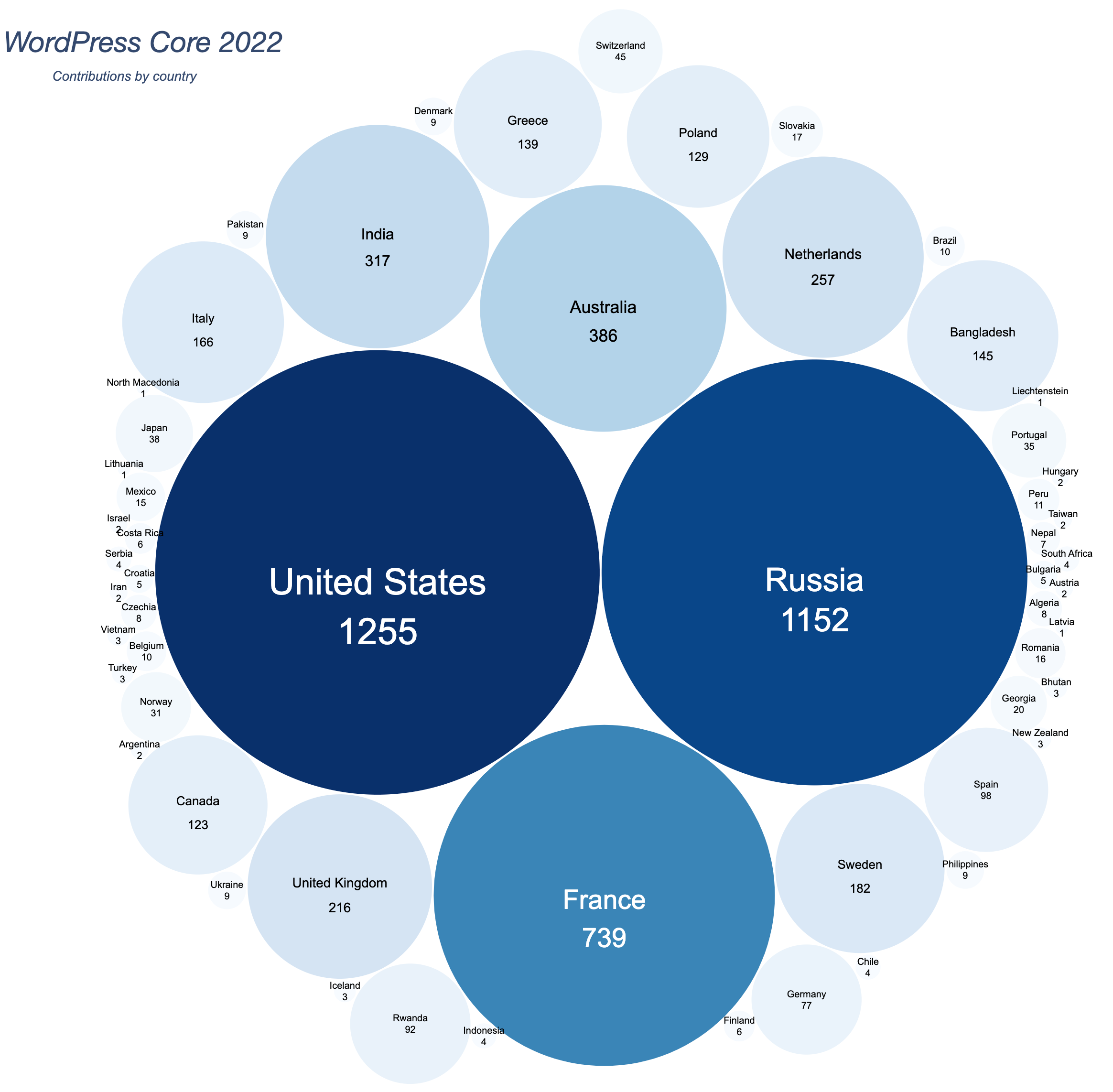
The next graph shows the number of props received by country. The top eight countries, based on the number of props received, are these:
United States with 2062 contributions (1255 in 2022)
Russiawith 795 contributions (1152 in 2022)
India with 683 contributions (317 in 2022)
France with 680 contributions (739 in 2022)
Australia with 611 contributions (386 in 2022)
United Kingdom with 471 contributions (216 in 2022)
Ireland with 403 contributions
Bangladesh with 340 contributions (145 in 2022)
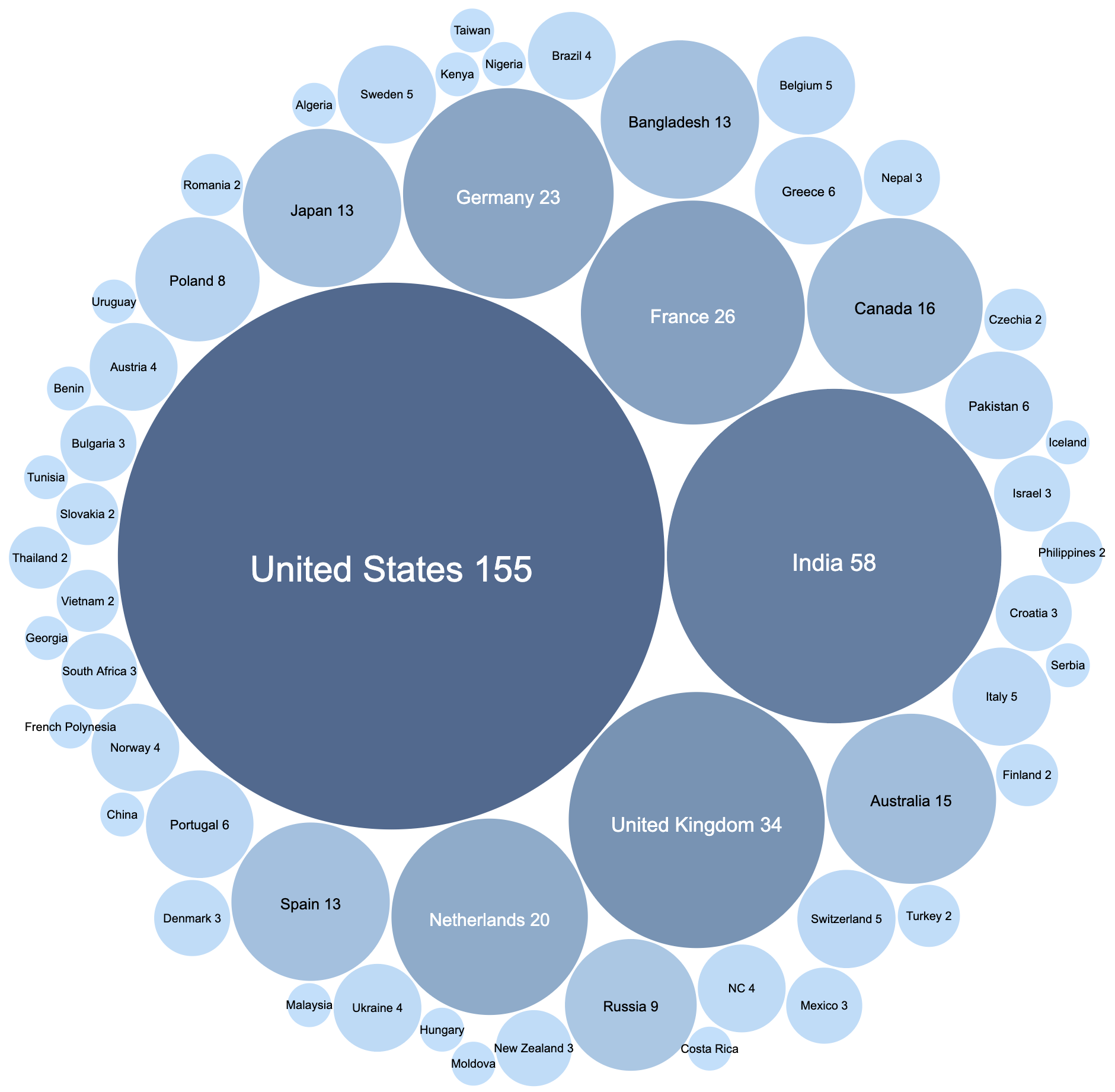
Contributors (people) by country
In 2023, people from at least 62 countries contributed to WordPress Core (57 countries in 2022).
Here are the top eight countries by number of contributors:
United States with 164 people (152 in 2022)
Bangladesh with 105 people (only 43 in 2022)
India with 93 people (77 in 2022)
United Kingdom with 31 people (38 in 2022)
France with 30 people (22 in 2022)
Canada with 25 people (17 in 2022)
Germany with 21 people (25 in 2022)
Netherlands with 21 people (23 in 2022)
Spain with 19 people (12 in 2022)
Contributions by company
In 2023, people from at least 286 companies contributed to WP Core.
These companies (well, their employees) each contributed to more than 100 commits:
Automattic with 1770 contributions (866 in 2022)
Yoast with 985 contributions (1452 in 2022)
10up with 904 contributions (501 in 2022)
Whodunit with 561 contributions (676 in 2022)
Google with 404 contributions (130 in 2022)
Bluehost with 238 contributions (226 in 2022)
XWP with 224 contributions (14 in 2022)
Human Made with 177 contributions (126 in 2022)
Advies en zo with 143 contributions (220 in 2022)
Dream Encode with 128 contributions (124 in 2022)
Emilia Capital with 123 contributions
Accessible WD with 120 contributions (53 in 2022)
GoDaddy with 111 contributions (42 in 2022)
Contributors (people) by company
A huge number of companies have only one contributor—or very few contributors. The exceptions are Automattic, with 108 core contributorsCore ContributorsCore contributors are those who have worked on a release of WordPress, by creating the functions or finding and patching bugs. These contributions are done through Trac. https://core.trac.wordpress.org. on Trac in 2023, WPDeveloper (39 contributors), 10up with 25 contributors, AuthLab (21 contributors), rtCamp (17 contributors), Awsm (12 contributors), Human Made (12 contributors), Multidots (12 contributors), and Yoast (10 contributors). Only these 9 companies had at least 10 people credited on Trac in 2023.
What did 2022 hold for Core Committers?
39 Core Committers committed code to the WordPress SVNSVNSubversion, the popular version control system (VCS) by the Apache project, used by WordPress to manage changes to its codebase. repository this year (32 in 2022):
Of the 2211 commits, 555 (25%) were made by people working at Yoast, 413 (19%) from people working at Whodunit, 399 (18%) from employees of Automattic, followed by Google (151 commits), Bluehost (148 commits) and 10up (123 commits).
Automattic is the only company with more than 10 active Core Committers, and 12 of them committed code in 2023. Google has 4 people allowed to commit code to WordPress, followed by 10up with 3 Core Committers.
Worth noting that 15 of the 39 active committers come from the US, which represents 38% of the Core Committers squad. Australia, Canada, Italy, Poland and United Kingdom each had 2 committers.
More than 30% of the commits were handled by committers located in the United States, 26% by committers located in Russia, and 19% by committers located in France.
Sponsorship
In 2023, 21.6% of the contributors and 23.1% of the committers indicated that a company sponsors their contributions.
Many thanks to @audrasjb for help collecting the 2023 data and for adding several graphics.
Happy new year everyone! Here’s some aggregate data for 2022 about WordPress CoreCoreCore is the set of software required to run WordPress. The Core Development Team builds WordPress. contribution on TracTracAn open source project by Edgewall Software that serves as a bug tracker and project management tool for WordPress..
Please note: these data only include code contributions to WordPress codebase, and it does not include contributions on GitHubGitHubGitHub is a website that offers online implementation of git repositories that can easily be shared, copied and modified by other developers. Public repositories are free to host, private repositories require a paid subscription. GitHub introduced the concept of the ‘pull request’ where code changes done in branches by contributors can be reviewed and discussed before being merged be the repository owner. https://github.com/ repositories like GutenbergGutenbergThe Gutenberg project is the new Editor Interface for WordPress. The editor improves the process and experience of creating new content, making writing rich content much simpler. It uses ‘blocks’ to add richness rather than shortcodes, custom HTML etc. https://wordpress.org/gutenberg/.
The raw data for this post are available on this public spreadsheet. You might find that much easier to read if you have low vision or colorblindness; the graphics below are a snapshot pulled together to include as much information as possible in this blogpost, but they are hard to make accessible to everyone.
Last note: all the graphics below link to to a new tab to display them in full size.
General Trac overview
In 2022, the WordPress Core team shipped 2597 commits (1852 in 2021). 2656 tickets were opened, 2413 tickets were closed, and 353 were reopened.
Also, 988 people contributed to WordPress source code using Trac (832 in 2021), and 398 people made their very first contribution to WordPress Core ♥️ (305 in 2021).
January
February
March
April
May
June
July
August
September
October
November
December
Total
Commits
229
156
230
279
133
172
183
235
320
374
182
104
2597
Tickets closed
214
217
187
190
194
146
220
148
269
278
240
110
2413
Tickets reopened
55
46
22
23
34
27
19
20
23
33
40
11
353
Tickets created
297
252
230
132
235
230
194
171
218
231
299
167
2656
New contributors
18
32
20
37
15
18
69
31
68
43
43
4
398
Contributors
115
122
168
200
110
105
196
211
327
237
162
56
988
This chart shows the number of commits per month in 2022, and the number of closed, reopened and created tickets per month. It also shows the number of contributors per month in 2022. It can be scrolled horizontally.
Check out the Trac timeline in the graph below:
Here’s how many props and new contributors the Core project had per month. The most prolific month was September, followed by October, August and July, during the WordPress 6.1 development cycle. March and April were also prolific months (WP 6.0 development cycle).
Components activity
How did 2022’s commits break out by Core Component?
The most prolific components were:
Build/Test Tools with 366 commits (17% of all listed commits)
Docs with 297 commits (14% of all listed commits)
Editor with 207 commits (10% of all listed commits)
Coding Standards with 145 commits (7% of all listed commits) and Code Modernization (which is not an official component) with 135 commits (6% of all listed commits)
Bundled Themes with 128 commits (6% of all listed commits)
Then comes Media, Administration, REST APIREST APIThe REST API is an acronym for the RESTful Application Program Interface (API) that uses HTTP requests to GET, PUT, POST and DELETE data. It is how the front end of an application (think “phone app” or “website”) can communicate with the data store (think “database” or “file system”) https://developer.wordpress.org/rest-api/., Themes, General, Upgrade/Install, Help/About, Internationalization, Posts/Post Types, Query and Users. The other components each had fewer than 30 commits this year.
Contributors data retrieved from WordPress.orgWordPress.orgThe community site where WordPress code is created and shared by the users. This is where you can download the source code for WordPress core, plugins and themes as well as the central location for community conversations and organization. https://wordpress.org/ profiles
The data below comes from matching contributors’ usernames, as mentioned in Trac props, with their profiles on WordPress.org.
One caveat: this ignores usernames that did not match a profile on dotorg, plus any that had blank or unusable country/company information (“The Universe” or “Unicorn land” are not known countries 🙂).
Contributions by country
The next graph shows the number of props received by country. The top eight countries, based on the number of props received, are these:
United States with 1255 contributions (1142 in 2021)
Russiawith 1152 contributions (227 in 2021)
France with 739 contributions (266 in 2021)
Australia with 386 contributions (211 in 2021)
India with 317 contributions (219 in 2021)
Netherlands with 225 contributions
United Kingdom with 216 contributions (112 in 2021)
Sweden with 182 contributions (102 in 2021)
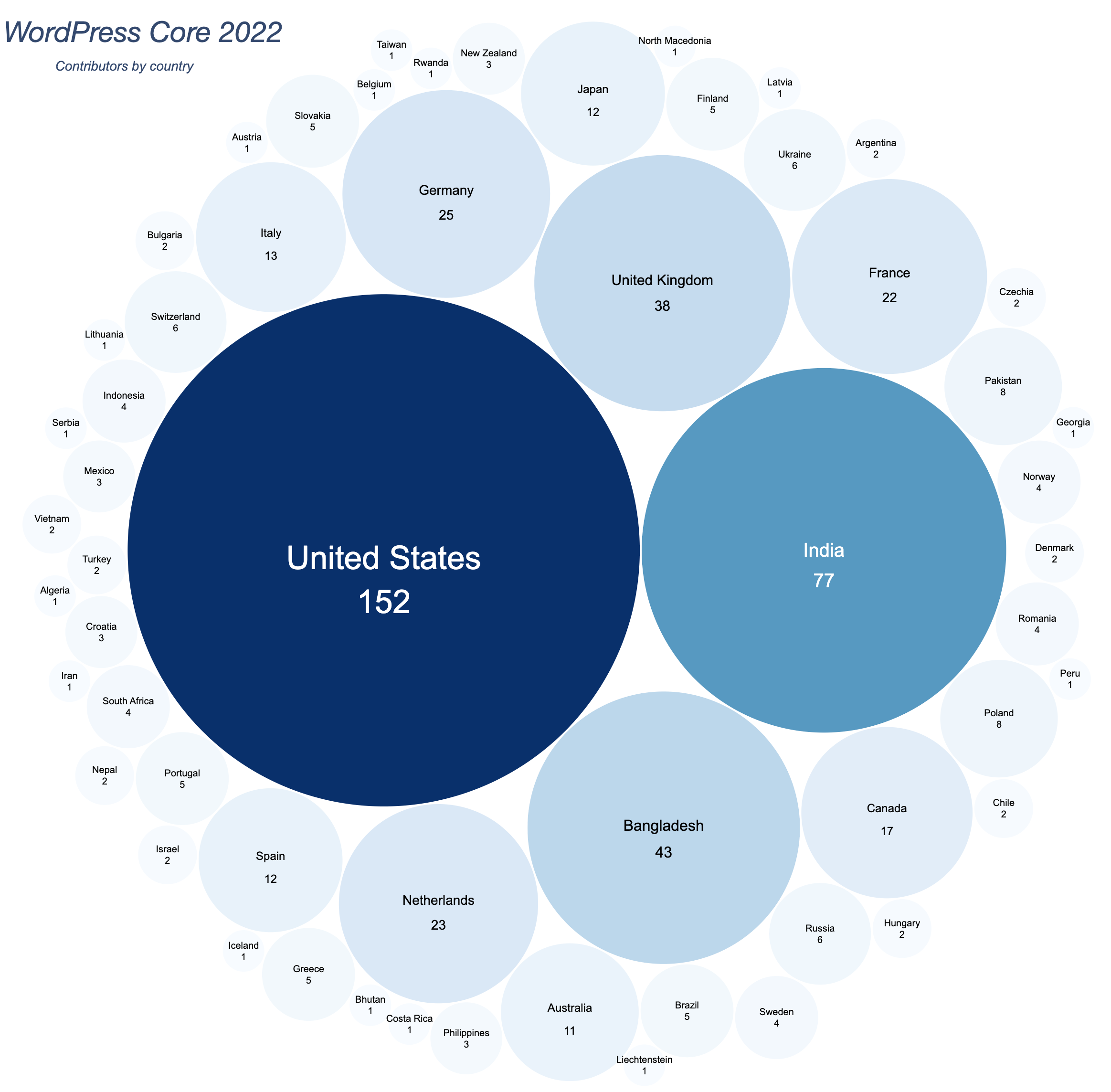
Contributors (people) by country
In 2022, people from at least 57 countries contributed to WordPress Core (56 countries in 2021).
Here is the top eight countries by number of contributors:
United States with 152 people (155 in 2021)
India with 77 people (58 in 2021)
Bangladesh with 43 people (only 13 in 2021)
United Kingdom with 38 people (34 in 2021)
Germany with 25 people (23 in 2021)
Netherlands with 23 people (20 in 2021)
France with 22 people (26 in 2021)
Canada with 17 people (16 in 2021)
Italy with 13 people (15 in 2021)
Contributions by company
In 2022, people from at least 229 companies contributed to WP Core.
These companies (well, their employees) each contributed to more than 100 commits:
Yoast with 1452 contributions (379 in 2021)
Automattic with 866 contributions (785 in 2021)
Whodunit with 676 contributions (215 in 2021)
10up with 501 contributions (30 in 2021)
Bluehost with 226 contributions (146 in 2021)
Advies en zo with 220 contributions (191 in 2021)
Spacedmonkey with 132 contributions (38 in 2021)
Google with 130 contributions (87 in 2021)
Dream Encode with 124 contributions (20 in 2021)
Human Made with 126 contributions (131 in 2021)
Awesome Motive with 122 contributions (29 in 2021)
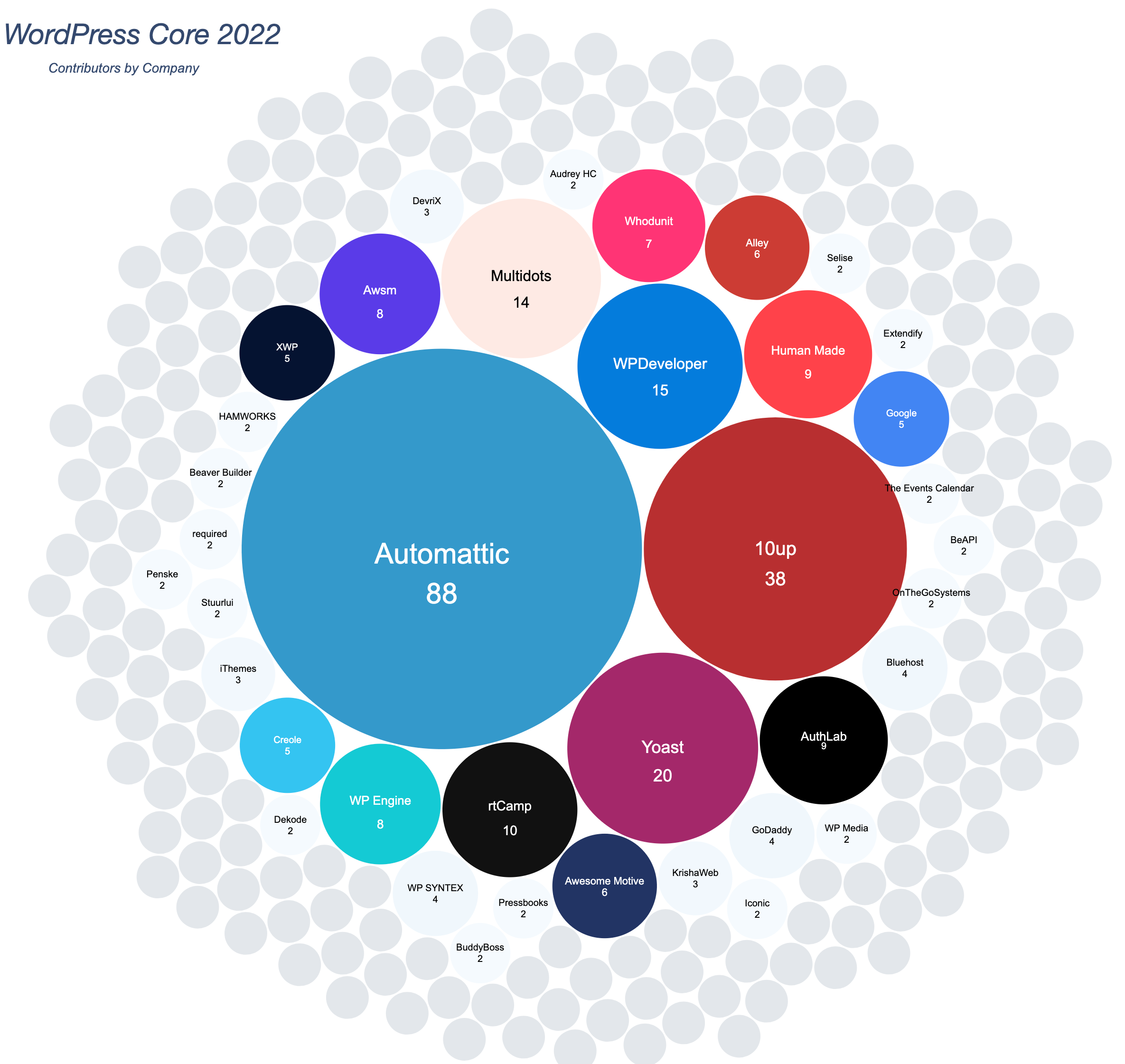
Contributors (people) by company
The graph below is also interesting, because it shows that a huge number of companies have only one contributor—or a very few contributors. The exceptions are Automattic, with 88 core contributorsCore ContributorsCore contributors are those who have worked on a release of WordPress, by creating the functions or finding and patching bugs. These contributions are done through Trac. https://core.trac.wordpress.org. on Trac in 2022, 10up with 38 contributors, Yoast (18 contributors), WPDeveloper (15 contributors), Multidots (14 contributors), and rtCamp (10 contributors). Only these 6 companies had more than 10 people credited on Trac in 2022.
What did 2022 hold for Core Committers?
32 Core Committers committed code to the WordPress SVNSVNSubversion, the popular version control system (VCS) by the Apache project, used by WordPress to manage changes to its codebase. repository this year (33 in 2021):
Of the 1901 commits, 755 (39%) were made by people working at Yoast, 414 (21%) from people working at Whodunit, 199 (10%) from employees of Automattic, followed by 10up (128 commits) and Bluehost (125 commits).
Automattic is the only company with more than 10 active Core Committers. Google has 4 people allowed to commit code to WordPress, followed by 10up and Human Made with 2 Core Committers.
Worth noting that 14 of the 32 active committers come from the US, which represents 43% of the Core Committers squad. Australia comes second with 3 committers and Portugal third with 2 committers.
More than 39% of the commits where handled by committers located in Russia, 21% by committers located in France, and 18% by committers located in the US.
Many thanks to @sabernhardt for his help to collect the 2022 data and to proofread this recap.
Here’s some aggregate data for 2021 about WordPress CoreCoreCore is the set of software required to run WordPress. The Core Development Team builds WordPress. contribution on TracTracAn open source project by Edgewall Software that serves as a bug tracker and project management tool for WordPress.. Please note: it only include code contributions and it does not include contributions on GitHubGitHubGitHub is a website that offers online implementation of git repositories that can easily be shared, copied and modified by other developers. Public repositories are free to host, private repositories require a paid subscription. GitHub introduced the concept of the ‘pull request’ where code changes done in branches by contributors can be reviewed and discussed before being merged be the repository owner. https://github.com/ repositories like GutenbergGutenbergThe Gutenberg project is the new Editor Interface for WordPress. The editor improves the process and experience of creating new content, making writing rich content much simpler. It uses ‘blocks’ to add richness rather than shortcodes, custom HTML etc. https://wordpress.org/gutenberg/.
The raw data for this post are on this public spreadsheet. You might find that easier to read if you have low vision or colorblindness; the graphics below are a snapshot pulled together to include as much information as possible in this blogpost.
General Trac overview
In 2021, the WordPress Core team shipped 1852 commits. 2797 tickets were opened, 2732 tickets were closed, and 408 were reopened.
Also, 2572 people contributed to WordPress source code using Trac, and 305 people made their very first contribution to WordPress Core ♥️
Jan
Feb
Mar
Apr
May
Jun
Jul
aug
Sep
Oct
Nov
Dec
Total
Commits
62
175
110
97
142
286
174
175
103
57
327
144
1852
Tickets closed
236
315
372
147
182
355
248
210
157
88
271
151
2732
Tickets reopened
26
33
45
21
25
37
77
36
22
19
31
36
408
Tickets created
200
280
371
177
197
320
288
297
161
126
190
190
2797
New contributors
14
43
14
22
35
37
15
12
18
14
71
10
305
Contributors
120
229
165
117
280
400
154
132
156
90
555
174
2572
This chart can be scrolled horizontally
Check out the Trac timeline in the graph below:
Here’s how many props and new contributors the Core project had per month. The most prolific month was November, in the WordPress 5.9 betaBetaA pre-release of software that is given out to a large group of users to trial under real conditions. Beta versions have gone through alpha testing in-house and are generally fairly close in look, feel and function to the final product; however, design changes often occur as part of the process. cycle, followed by June (WP 5.8 beta cycle).
Components activity
How did 2021’s commits break out by Core Component?
The most prolific components were:
Build/Test Tools with 310 commits (17% of all listed commits)
Docs with 198 commits (11% of all listed commits)
Editor with 188 commits (10.5% of all listed commits)
Bundled Themes with 144 commits (8% of all listed commits)
Coding Standards with 140 commits (8% of all listed commits)
Then comes Media, REST APIREST APIThe REST API is an acronym for the RESTful Application Program Interface (API) that uses HTTP requests to GET, PUT, POST and DELETE data. It is how the front end of an application (think “phone app” or “website”) can communicate with the data store (think “database” or “file system”) https://developer.wordpress.org/rest-api/., Code Modernization, External Librairies, Administration, Upgrade/Install, Site Health and Posts/Post Types. The other components each had fewer than 30 commits this year.
Data fetched from WordPress.orgWordPress.orgThe community site where WordPress code is created and shared by the users. This is where you can download the source code for WordPress core, plugins and themes as well as the central location for community conversations and organization. https://wordpress.org/ profiles
The data below comes from matching contributors’ usernames, as mentioned in Trac props, with their profiles on WordPress.org. One caveat: usernames that did not match a profile on dotorg, or that left blank their country/company information, filled in non-exploitable info got ignored. After all, “The Universe” or “The place to be” are not known countries 😆
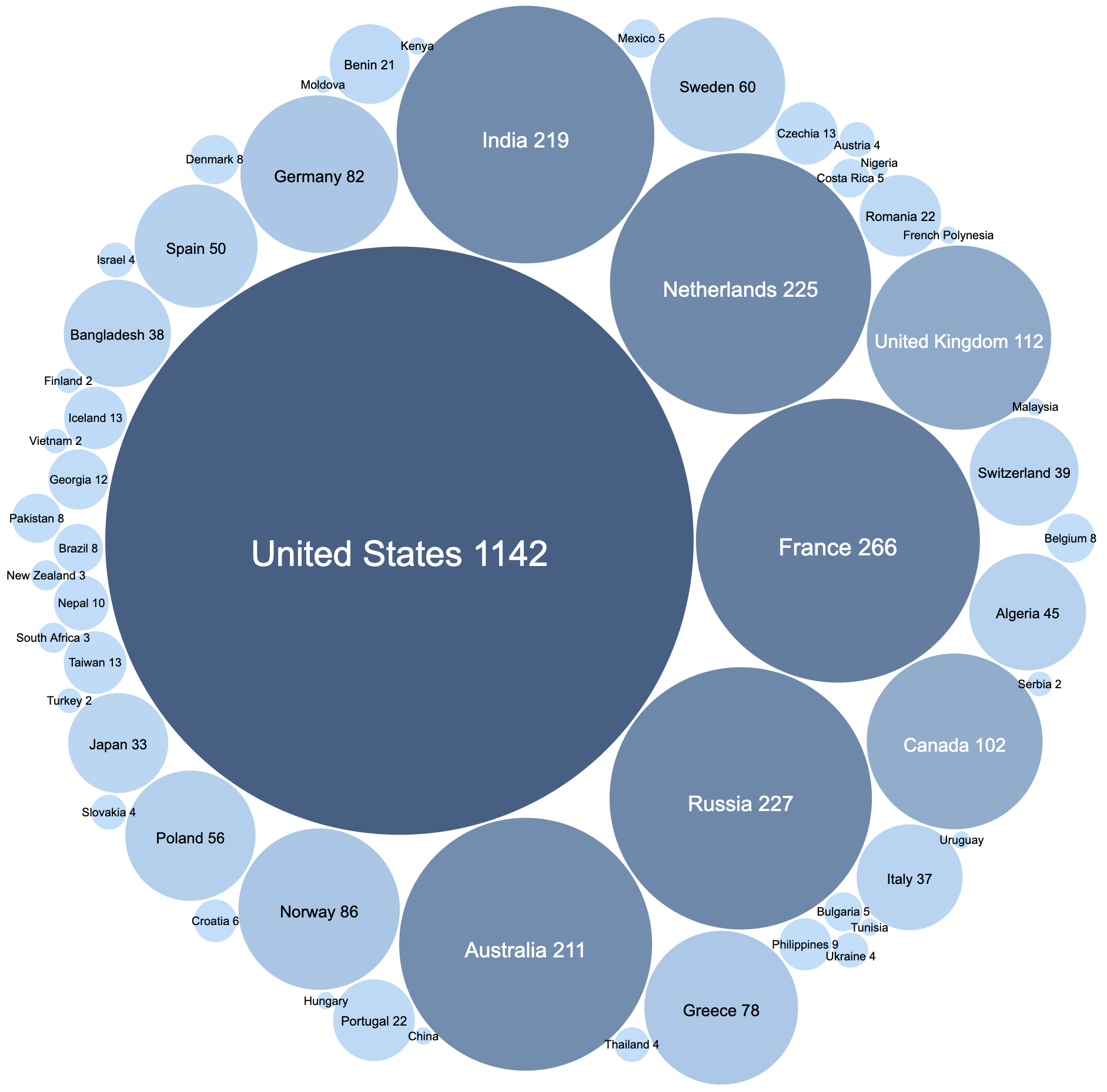
Contributions by country
The next graph shows the number of props received by country. The top eight countries, based on the number of props received, are these:
United States with 1142 contributions
France with 266 contributions
Russia with 227 contributions
The Netherlands with 225 contributions
India with 219 contributions
Australia with 211 contributions
United Kingdom with 112 contributions
Canada with 102 contributions
Contributors (people) by country
In 2021, people from more than 56 countries contributed to WordPress Core.
The top eight countries by contributions, expressed as the number of props received, are:
United States with 155 people
India with 58 people
United Kingdom with 34 people
France with 26 people
Germany with 23 people
The Netherlands with 20 people
Canada with 16 people
Australia with 15 people
Contributions by company
In 2021, people from at least 236 companies contributed to WP Core.
These companies each contributed (well, their people did) to more than 50 commits:
Automattic with 785 contributions
Yoast with 379 contributions
Whodunit with 215 contributions
Advies en zo with 191 contributions
Bluehost with 146 contributions
Human Made with 131 contributions
Google with 87 contributions
iThemes with 73 contributions
Dekode Interaktiv with 52 contributions
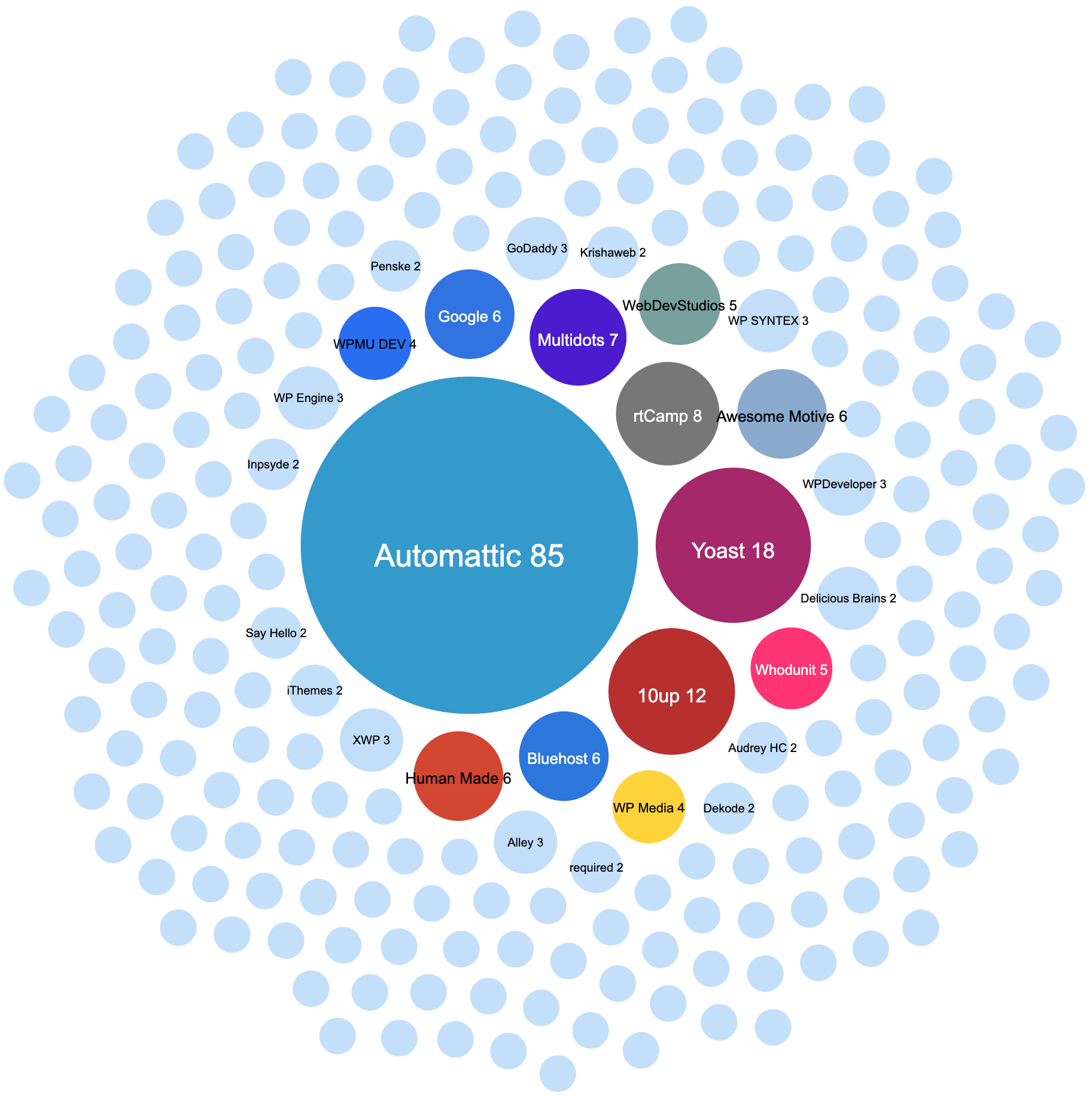
Contributors (people) by company
The graph below is also interesting, because it shows that a huge number of companies have only one contributor—or a very few contributors. The exceptions are Automattic, with 85 core contributorsCore ContributorsCore contributors are those who have worked on a release of WordPress, by creating the functions or finding and patching bugs. These contributions are done through Trac. https://core.trac.wordpress.org. on Trac in 2021, Yoast (18 contributors) and 10up. Only those three companies had more than ten people credited on Trac in 2021.
What did 2021 hold for Core Committers?
33 Core Committers committed code to the WordPress SVNSVNSubversion, the popular version control system (VCS) by the Apache project, used by WordPress to manage changes to its codebase. repository this year:
A month ago I posted an update post for WP Notify, in order to start planning for the next phase of this project.
This post includes a short review of the feedback from that post, as well as the outcomes/next steps.
Feedback
Generally the feedback on the post and the requirements document was good. It was also pleasing that more new contributors were made aware of the project, and left their comments on the document.
It was generally agreed that a GitHubGitHubGitHub is a website that offers online implementation of git repositories that can easily be shared, copied and modified by other developers. Public repositories are free to host, private repositories require a paid subscription. GitHub introduced the concept of the ‘pull request’ where code changes done in branches by contributors can be reviewed and discussed before being merged be the repository owner. https://github.com/ repository makes the most sense as a central location for all work to be done.
There was no general consensus around the weekly meetings.
We also need to start designing the user interfaces. There are already designs from @hedgefield on the original trac ticket, but those designs may need a refresh based on our current requirements document.
And finally, I’ll be resurrecting the weekly meetings in the #feature-notifications channel in SlackSlackSlack is a Collaborative Group Chat Platform https://slack.com/. The WordPress community has its own Slack Channel at https://make.wordpress.org/chat/.. These meetings will however switch to an office hours format, without an informal agenda. These office hours will take place on Mondays at 14:00 UTC. Due to time constraints on my side, the first open office hours will be on Monday, August 17, 2020, 14:00 UTC.
I invite all interested parties to join me in our first office hours on the 17th of August 2020, as we start implementing the project we’ve all been planning for the past year.
A priority of the REST APIREST APIThe REST API is an acronym for the RESTful Application Program Interface (API) that uses HTTP requests to GET, PUT, POST and DELETE data. It is how the front end of an application (think “phone app” or “website”) can communicate with the data store (think “database” or “file system”) https://developer.wordpress.org/rest-api/. team for the upcoming 5.0 release is to finally enhance WordPress metadata registration so that it can cover common APIAPIAn API or Application Programming Interface is a software intermediary that allows programs to interact with each other and share data in limited, clearly defined ways. use-cases. This will help with adaptation of the REST API by making management of custom metadata in existing content endpoints easier, which should in turn also benefit any metadata-related work in GutenbergGutenbergThe Gutenberg project is the new Editor Interface for WordPress. The editor improves the process and experience of creating new content, making writing rich content much simpler. It uses ‘blocks’ to add richness rather than shortcodes, custom HTML etc. https://wordpress.org/gutenberg/. This post provides some insight into the surrounding issues, shows the current progress of the improvements, and highlights what still needs to be discussed.
A little history on register_meta()
The register_meta() function has been around since 3.3, but did not attract much attention with developers until WordPress 4.6 introduced enhancements to permit metadata registration for use within the REST API. As with other metadata functions, an object type (by coreCoreCore is the set of software required to run WordPress. The Core Development Team builds WordPress. definitions either a “post”, “term”, “comment”, or “user”) needs to be passed to the function, alongside the metaMetaMeta is a term that refers to the inside workings of a group. For us, this is the team that works on internal WordPress sites like WordCamp Central and Make WordPress. key to register and the arguments for its behavior.
However, metadata in WordPress is often used only for a subset of one of the above four types. When dealing with post meta in a pluginPluginA plugin is a piece of software containing a group of functions that can be added to a WordPress website. They can extend functionality or add new features to your WordPress websites. WordPress plugins are written in the PHP programming language and integrate seamlessly with WordPress. These can be free in the WordPress.org Plugin Directory https://wordpress.org/plugins/ or can be cost-based plugin from a third-party for example, that post metadata commonly only applies to one or more specific post types – not to all posts of any post type. That is what currently makes register_meta( $object_type, $meta_key, $args ) unusable for the majority of REST API-related cases. Before the enhanced version was introduced in 4.6 many thoughts were put into this concern, with a subtype-aware implementation even being merged into core. That implementation was reverted before the release because it was unclear how to handle conflicts (more on that below). The ticketticketCreated for both bug reports and feature development on the bug tracker. where all those changes were discussed is #35658.
Misconceptions about register_meta()
The improvements and their documentation caused developers to listen up, but unfortunately since the concept of an object type is rarely exposed in high-level WordPress APIs, many people misunderstood the first parameter as requiring a post type because post meta is the most common kind of metadata used by plugin developers. Some developers started using the function to register post type-specific meta keys without that function actually supporting that, as shown in this example:
This does not do what you may think it does:
register_meta( 'book', 'isbn', array( ... ) );
The code above will not register an ISBN number meta key for a “book” post type. It will register that key for a custom object type “book”—which probably doesn’t exist, unless a whole custom meta database table, a custom object database table, and surrounding setup has been implemented.
Those function calls fortunately don’t cause any harm in most cases since WordPress only contains four object types that use metadata (ignoring multisite). It becomes problematic though if the function is used to register metadata for the “post” post type.
Since the “post” post type shares a name with the “post” object type, and since, again, the first parameter of register_meta() is for object type and not for a post type, register_meta() will register that meta key and arguments passed for all posts of any subtype (post type).
If you’re reading this and have used register_meta() in a way where you assumed it could register metadata for a single post type or taxonomy, at present we recommend you switch to using register_rest_field(), which is currently the only (however a little more involved) way to achieve this.
Adding subtype support for metadata behavior
A follow-up ticket #38323 aims to finally implement this missing functionality to register_meta() so that there’s an easy-to-use API to handle subtype-specific metadata in the REST API. It picks up the approach used before, where an additional object_subtype argument in the $args parameter can be used to specify the subtype the meta key should be registered with. Picking up the aforementioned example, you could register the ISBN for a “book” post type via the following code:
Implementing meta registration for subtypes and modifying existing behavior to account for it is rather straightforward, and there is a patch available to experiment with the current approach. There are a couple things that need to be discussed though:
How should we deal with or prevent conflicts between meta keys of the same name and object type? The method currently allows to register metadata for an entire object type of course, so we cannot simply change that now and prevent those calls entirely. It appears we have four alternatives here:
Allow meta keys of the same name and object type to be registered in any way. In case a meta key is registered for the current subtype, but also more generally for the object type, the behavior registered for the subtype takes precedence. Meta keys are internally stored nested under their object type and object subtype ($wp_meta_keys[ $object_type ][ $object_subtype ][ $meta_key ]). This is how the current patch on the ticket works, mainly because it is the most straightforward and flexible approach (it was also how the original code from #35658 worked). However it doesn’t deal with conflicts at all, so it is likely not preferable. An issue would be that on every update of a value, sanitization would happen for both behaviors, easily resulting in invalid data and unexpected errors. Throwing notices would be an option – but it would only help preventing conflicts, not actually prevent them.
Allow meta keys of the same name and object type to be registered either per subtype OR for the entire object type. It would be based on whoever comes first takes priority. Meta keys are internally stored nested under their object type and object subtype ($wp_meta_keys[ $object_type ][ $object_subtype ][ $meta_key ]). If someone registers a meta key for an object type after someone else already registered the same meta key for a subtype of that object type, the process should be rejected and fail. If someone registers a meta key for an entire object type without the same meta key already being registered for a subtype of that object type, afterwards all meta keys for a subtype of that object type would be rejected. This prevents all possible conflicts since meta keys will only exist once per object type/object subtype combination, but still provides the flexibility of having multiple meta keys of the same name for different object subtypes. The implementation to prevent the conflicts during meta registration would be a little more involved though.
Allow meta keys of the same name and object type to be registered only once in total. It would be based on whoever comes first takes priority. Meta keys are internally stored nested under their object type only, without an additional level for their object subtype ($wp_meta_keys[ $object_type ][ $meta_key ]). Whoever comes first, can register their meta key, every following request to add the same meta key for the same object type afterwards will be rejected. This prevents all possible conflicts since the data structure alone makes it impossible for two meta keys of the same name and object type to be registered. The approach generally appears to not be flexible enough: For example if two different post types were using a meta key of the same name, they wouldn’t be able to co-exist. However, based on the assumption that developers prefix all their metadata (which is probably not taught often enough), this option could very well work and be a straightforward solution.
Allow meta keys of the same name and object type to be registered in any way, but use the behavior registered for the entire object type as a fallback only. In other words, if the same meta key exists with a subtype, only run that logic – for all subtypes where there is no specific behavior available, fall back to the behavior registered on the entire object type. To be precise, the difference between this approach and the first one is that in the first one the behavior (like sanitization and auth) would be executed for both, while here it only happens for the object subtype or the object type when no subtype-specific handling is registered. This is a conflict-free approach that at the same time doesn’t require any restrictions where calls to register_meta() would need to be rejected. The idea of using meta keys registered for an entire object type as fallback is slightly different from the other variants, but it seems to work well. It should still be highlighted that meta keys should be prefixed, but if that is a given, this implementation would even allow an individual plugin to provide more flexible logic for its metadata that may be needed for all post types (general behavior as fallback, subtype-specific behavior where needed).
Should we introduce easy-to-use wrapper functions like register_post_meta( $post_type, $meta_key, $args ) and register_term_meta( $taxonomy, $meta_key, $args ) which wrap register_meta() appropriately? The reason those might be useful is that the concept of object types and object subtypes is not commonly exposed in core’s documentation & high-level APIs (think about *_post_meta(), *_term_meta(), *_comment_meta() and *_user_meta() all wrapping the respective lower-level *_metadata() function). By adding these methods we would then recommend to only use those, and never recommend the use of register_meta() itself (as registering metadata for an entire object type is probably not desired). The only downside would be that comments and users don’t really have subtypes, so those two functions would either have a redundant first parameter or not have that parameter at all (which wouldn’t be future-proof).
A more specific issue: Should a comment’s comment_type value be considered a subtype? While one could argue that they are subtypes, they are treated entirely differently and do not really define how that comment works or how it can be edited. There’s also no flexible API around it to register additional comment types, and in the REST API there are no individual controllers per comment type. Currently, the patch ignores comment types, but this is still open for discussion.
Upcoming Meeting
The above items will be discussed in next week’s upcoming REST API meeting which will take place at the regular meeting time, Thursday, May 3rd, 2018 at 17:00 UTC in the #core-restapi channel. If you’re interested, please attend this meeting so that we can move forward with this ticket, as it should be included in WordPress 5.0. Also feel free to review the latest patch on #38323 and leave a comment on the ticket. While it is unlikely that this is the final implementation, a lot of it would not need to be adjusted regardless of the outcome for the above questions.
Extra credit goes to @kadamwhite for proofreading and several improvements.
APIAPIAn API or Application Programming Interface is a software intermediary that allows programs to interact with each other and share data in limited, clearly defined ways. Team Update Sept. 27 2016
The API team met yesterday on slack for our weekly update, which this week was predominately focused on follow-up from last Thursday’s comprehensive GitHub issues scrub.
Since the previous API team update the group has been making steady progress through the gameplan outlined in that post. To give a quick update on a few key “quirky” issues that had been identified:
Password-Protected Posts
As noted in last week’s dev chat, password-protected posts will be included in collections with their content set to '', and the content can be viewed by passing ?password=XXXXX as a query or GET parameter when querying for a specific post. Query parameters are not an ideal solution: Authorization headers are out because you can’t have multiple authorization schemes in one request; cookies don’t afford enough control to browser clients, and custom headers aren’t respected by caches. See GH issue #2701 for more background, and check out the open pull request to review the specifics of the implementation.
Sticky Posts
After much debate there is now a path forward for handling sticky posts as well. Following this open pull request, sticky posts are included in the /wp/v2/posts collection, but are not given special treatment in terms of ordering—a sticky post will, by default, be displayed ordered by date or whatever orderby has been set for the request. The parameter ?sticky=true may be passed to return only sticky posts; ?sticky=false may be passed to exclude sticky posts from the response.
There is ongoing discussion around how the API could surface posts in the “normal loopLoopThe Loop is PHP code used by WordPress to display posts. Using The Loop, WordPress processes each post to be displayed on the current page, and formats it according to how it matches specified criteria within The Loop tags. Any HTML or PHP code in the Loop will be processed on each post. https://codex.wordpress.org/The_Loop. order,” with stickies on top, followed by non-sticky posts. @jorbin will propose a follow-up enhancementenhancementEnhancements are simple improvements to WordPress, such as the addition of a hook, a new feature, or an improvement to an existing feature. that could be added in to the API in a later cycle. See GH issue #2210 and associated slack discussion for more commentary.
MetaMetaMeta is a term that refers to the inside workings of a group. For us, this is the team that works on internal WordPress sites like WordCamp Central and Make WordPress. Support
A pull request is open on the API meta endpoints repository to add support for registering meta with the API using the main register_meta function. This PR includes a comprehensive readme explaining how meta handling works. Once merged & reviewed, this functionality will be PR’d against the primary REST APIREST APIThe REST API is an acronym for the RESTful Application Program Interface (API) that uses HTTP requests to GET, PUT, POST and DELETE data. It is how the front end of an application (think “phone app” or “website”) can communicate with the data store (think “database” or “file system”) https://developer.wordpress.org/rest-api/.pluginPluginA plugin is a piece of software containing a group of functions that can be added to a WordPress website. They can extend functionality or add new features to your WordPress websites. WordPress plugins are written in the PHP programming language and integrate seamlessly with WordPress. These can be free in the WordPress.org Plugin Directory https://wordpress.org/plugins/ or can be cost-based plugin from a third-party repository.
Site Settings (Options) Support
A pull request has merged into the API site endpoints repository which adds support for accessing and manipulating site settings through the API. These endpoints will be PR’d against the coreCoreCore is the set of software required to run WordPress. The Core Development Team builds WordPress. REST API plugin repository this week.
Discussion items for 9/28 dev chat
This project is not quite done yet, and in tomorrow’s dev chat the API team will be looking to the broader WordPress team for input on three priority issues that need a decision:
Please join us in #core-restapi on chat.wordpress.orgWordPress.orgThe community site where WordPress code is created and shared by the users. This is where you can download the source code for WordPress core, plugins and themes as well as the central location for community conversations and organization. https://wordpress.org/ for our next two group meetings:
Bug TriagetriageThe act of evaluating and sorting bug reports, in order to decide priority, severity, and other factors. & PR Scrub on September 29, 2016 14:00 UTC
Many of you will remember that a couple of years ago, @ericlewis and a group of us set out to start a project to make sense of all of the different APIs that arose from third party plugins and themes to build custom fieldCustom FieldCustom Field, also referred to as post meta, is a feature in WordPress. It allows users to add additional information when writing a post, eg contributors’ names, auth. WordPress stores this information as metadata. Users can display this meta data by using template tags in their WordPress themes. solutions on top of WordPress. That project was nicknamed “Metamorphosis” and subsequently went by the “Metadata UIUIUser interface/APIAPIAn API or Application Programming Interface is a software intermediary that allows programs to interact with each other and share data in limited, clearly defined ways.” project. As pluginPluginA plugin is a piece of software containing a group of functions that can be added to a WordPress website. They can extend functionality or add new features to your WordPress websites. WordPress plugins are written in the PHP programming language and integrate seamlessly with WordPress. These can be free in the WordPress.org Plugin Directory https://wordpress.org/plugins/ or can be cost-based plugin from a third-party authors dealing with and using custom fields and content types, we had been tackling the issues of developing for multiple object types in WordPress for years prior to getting together.
function fields_api_example_post_field_register( $wp_fields ) {

   // 1. Define a new section (meta box) for fields to appear in
   $wp_fields->add_section( 'post_type', 'my_cpt', 'my_meta_box',
      array(
         // Visible title of section
         'title'       => __( 'My Meta Box', 'mytheme' ),

         // Determines what order this appears in
         'priority'    => 'high',

         // Determines what order this appears in
         'context'     => 'side',

         // Capability needed to tweak
         'capability'  => 'my_custom_capability'
      )
   );

   // 2. Register new fields
   $wp_fields->add_field( 'post_type', 'my_cpt', 'my_custom_field',
      array(
         // Default field/value to save
         'default'    => 'All about that post',

         // Optional. Special permissions for accessing this field.
         'capability' => 'my_custom_capability',

         // Optional. Add an associated control (otherwise it won't show up in the UI)
         'control' => array(
            // Don't set 'id' and it will automatically be generated for you as
            'id' => 'mysite_my_custom_field',

            // Admin-visible name of the control
            'label'   => __( 'My Custom Field', 'mytheme' ),

            // ID of the section this control should render in (can be one of yours, or a WordPress default section)
            'section' => 'my_meta_box',

            // Control type
            'type'    => 'text'
         )
      )
   );

}
add_action( 'fields_register', 'fields_api_example_post_field_register' );
(Please note: The code above may not be the same as the final implementation, it will especially change over the next few weeks)
First of all, we split off the UI side of the project to focus solely on the API. This way, we’re not held up by anything as we move towards implementation inside of coreCoreCore is the set of software required to run WordPress. The Core Development Team builds WordPress.. We can tackle each UI separately and that helps us keep the project nimble and on track.
The goals of this new API proposal will be to be implemented across WordPress objects as an API to register fields and sections for. We aim to cover these objects (not necessarily in this order):
CustomizerCustomizerTool built into WordPress core that hooks into most modern themes. You can use it to preview and modify many of your site’s appearance settings. (retrofitting it beneath the existing Customizer API)
User profile screen
Post editor
Settings screens (retrofitting it beneath the existing Settings API)
And other areas in the future (Comment editor, Networknetwork(versus site, blog) Settings screens [see #15691], Media modals, etc)
This API offers a great deal of standardization across all of WordPress and code reusability. It’s paramount for third-party developers, who will be able to utilize these structures in their own plugins and themes, build apps and give access to other developers so they can contextually see what a site really contains. I see the biggest use-case being able to expose the entirety of WordPress to the REST APIREST APIThe REST API is an acronym for the RESTful Application Program Interface (API) that uses HTTP requests to GET, PUT, POST and DELETE data. It is how the front end of an application (think “phone app” or “website”) can communicate with the data store (think “database” or “file system”) https://developer.wordpress.org/rest-api/. and giving apps like the WordPress iOSiOSThe operating system used on iPhones and iPads. app access to metaMetaMeta is a term that refers to the inside workings of a group. For us, this is the team that works on internal WordPress sites like WordCamp Central and Make WordPress. boxes and custom fields to display real editor screens with field inputs based on the control types natively.
Areas we need help currently:
Examples and use cases for Customizer, User profile screen, Post editor, and Settings screens (submit issues in GitHubGitHubGitHub is a website that offers online implementation of git repositories that can easily be shared, copied and modified by other developers. Public repositories are free to host, private repositories require a paid subscription. GitHub introduced the concept of the ‘pull request’ where code changes done in branches by contributors can be reviewed and discussed before being merged be the repository owner. https://github.com/ with your ideas, coordinate with us to refine them if you want)
Unit tests for core
Testing Customizer implementation, you’ll find the core files to replace under the /implementations/ folder in the repo
Brainstorming implementation classes for other object types to implement in the UI, starting with User profile screen
If you’re interested in joining our merry crew which includes @helen and a few of us, hop into SlackSlackSlack is a Collaborative Group Chat Platform https://slack.com/. The WordPress community has its own Slack Channel at https://make.wordpress.org/chat/.#core-fields and join our weekly meetings every Monday (Monday 20:00 UTC 2015). You can check out the Fields API and submit PRs on GitHub, or pingPingThe act of sending a very small amount of data to an end point. Ping is used in computer science to illicit a response from a target server to test it’s connection. Ping is also a term used by Slack users to @ someone or send them a direct message (DM). Users might say something along the lines of “Ping me when the meeting starts.” us in #core-fields throughout the week with questions or concerns.
Display a simple lock/padlock icon next to locked posts within the post list screen, leaving the “Request Lock” button for the post edit screens.
When a post is locked, hide the Quick Edit link, and disable batch edit for the post
To unlock a post, the user will enter the post edit screen, then click a button to request a lock. Â This will trigger a request to appear for the user with the current lock, where they can decide whether or not to allow the new lock.
As far as development tasks go, @azaozz is planning on finishing a first run at the “Heartbeat” APIAPIAn API or Application Programming Interface is a software intermediary that allows programs to interact with each other and share data in limited, clearly defined ways. to be committed before the end of the week. I’ll begin working on the list table changes for post listings. We’re currently looking for volunteers to aid, as there’s plenty of room for help! Additional tasks will include the UIUIUser interface for handling post lock requests and auto-save to local storage.
We’ll certainly chat more about this tomorrow in dev chat, and are planning another meeting this Friday (2013–01–25), at 21:00 UTC (the same time as dev chat), unless this doesn’t work for many of you looking to help. Please post here, or come to the chats if you’re interested in helping with this project, and we’ll get in touch with you for further details!
In our second cycle, the primary focus was CRUDCRUDCreate, read, update and delete, the four basic functions of storing data. (More on Wikipedia.) methods for taxonomies. The work was tracked in #18438, and covers both the coreCoreCore is the set of software required to run WordPress. The Core Development Team builds WordPress. implementation and the unit tests.
We also spent more time refining the cycle 1 work (CRUD for all post types), tracked in #18429. This included fixing some date bugs (related to #15098), adding support for getting/setting post thumbnails (related to #15098), and writing unit tests.
After using the posts methods from cycle 1, it became clear that the post type information methods from #18436 were highly desirable. The old patches on that ticketticketCreated for both bug reports and feature development on the bug tracker. were updated and aligned with the rest of the XML-RPC work for this release.
westi was not available for much of this cycle, so Marko and I worked on our own; he is now reviewing our final patches and will comment or commit shortly. In the meantime, I’m finishing up work on XML-RPC documentation for the codex, which should be ready by betaBetaA pre-release of software that is given out to a large group of users to trial under real conditions. Beta versions have gone through alpha testing in-house and are generally fairly close in look, feel and function to the final product; however, design changes often occur as part of the process.. Marko and I will also continue to expand the XML-RPC unit tests suite (now around 75 tests).
@getsource and I did some in-person hacking at WordCampWordCampWordCamps are casual, locally-organized conferences covering everything related to WordPress. They're one of the places where the WordPress community comes together to teach one another what they’ve learned throughout the year and share the joy. Learn more. Phoenix over the weekend. New patchpatchA special text file that describes changes to code, by identifying the files and lines which are added, removed, and altered. It may also be referred to as a diff. A patch can be applied to a codebase for testing. on #19816 for multiple screenshots that seems good to go in as a first pass after a JSJSJavaScript, a web scripting language typically executed in the browser. Often used for advanced user interfaces and behaviors. sanity check and probably an update to using .data() instead of .attr() tomorrow before dev chat. Will definitely need some UIUIUser interface/UXUXUser experience once that’s in, and will also likely need a little update for whatever the .org APIAPIAn API or Application Programming Interface is a software intermediary that allows programs to interact with each other and share data in limited, clearly defined ways. response will be.
There is also a new patch on #19815 that adds a class member variable and removes a global (yay!) and passes data via JSONJSONJSON, or JavaScript Object Notation, is a minimal, readable format for structuring data. It is used primarily to transmit data between a server and web application, as an alternative to XML. instead of parseQuery. Eyes also welcome on that.








You must be logged in to post a comment.