The WordPress coreCoreCore is the set of software required to run WordPress. The Core Development Team builds WordPress. development team builds WordPress! Follow this site for general updates, status reports, and the occasional code debate. There’s lots of ways to contribute:
Found a bugbugA bug is an error or unexpected result. Performance improvements, code optimization, and are considered enhancements, not defects. After feature freeze, only bugs are dealt with, with regressions (adverse changes from the previous version) being the highest priority.?Create a ticket in the bug tracker.
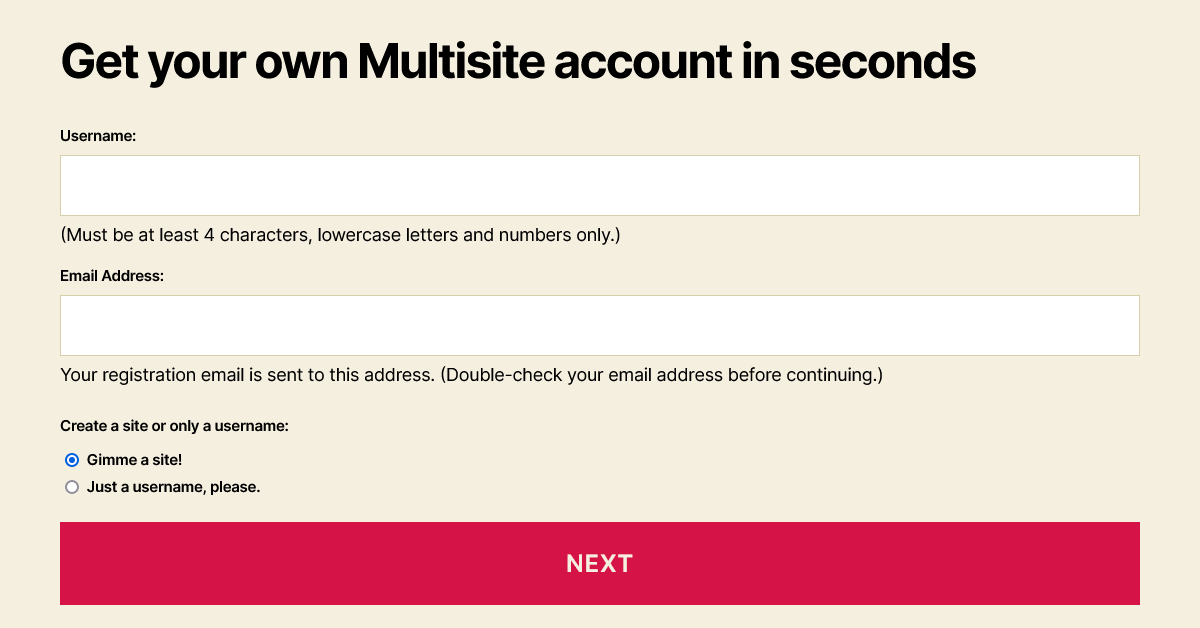
In WordPress 6.1, the forms for the wp-signup.php and wp-activate.php pages have several enhancements to both the markup and the styles.
AccessibilityAccessibilityAccessibility (commonly shortened to a11y) refers to the design of products, devices, services, or environments for people with disabilities. The concept of accessible design ensures both “direct access” (i.e. unassisted) and “indirect access” meaning compatibility with a person’s assistive technology (for example, computer screen readers). (https://en.wikipedia.org/wiki/Accessibility)-related improvements
Indicating relationships:
Fieldsets, with visible legend text, group the radio buttons.
Form field description information connects to its related field with aria-describedby.
When present, error messages also connect to their field with aria-describedby. The generic error has an ID in case custom fields should refer to that.
Preventing errors:
Required text fields have the required attribute.
The Site Name label indicates that users should enter the subdirectory only, and the Site Domain is only the desired subdomain.
The Username field’s description text now specifies that letters need to be lowercase.
Color contrast:
If the activation page has an error message, its default dark gray text color contrasts against the light background.
The default style for links within the registration page’s bordered message (.mu_alert) includes an underline and matches the text color of the rest of the message. For example, Twenty Twenty-One’s dark mode assigns a light link color, so the new style makes it readable and identifiable as a link. If a theme uses a bottom border or box-shadow on links, however, this underline could be inappropriate.
Links were sometimes difficult to see
Links match the surrounding text color, underlined, in 6.1
New elements and styles for the registration page form
The fieldset and legend elements reset margin, padding and border properties.
The legend styles are consistent with the default label font size, weight and margins.
Radio buttons are inside paragraphs without a top margin, following the legend.
Text input fields and the submit button, which were set to 100% width plus padding, are only as wide as their container now.
New account setup, step 1, allowing both sites and usernames
When people create an account:
Descriptive text for the Username and Email Address is inside paragraph tags. Because these immediately follow the input, the paragraphs do not have a top margin.
Options for creating a site and/or a username are grouped in a fieldset with a new, visible legend.
Elements with the “wp-signup-radio-button” class wrap these options’ radio buttons and their labels, and with “display: block” the options stack vertically.
Form fields for an administrator (logged in) to create a new site
When an administrator creates a new site:
A “wp-signup-blogname” container wraps the Site Name (or Site Domain) input with the domain, so themes could arrange them side-by-side.
For right-to-left languages, the domain and its input field remain in the left-to-right direction.
The “privacy-intro” fieldset uses paragraph tags inside it to retain most paragraph styles from the theme.
By wrapping “Privacy:” in a “label-heading” span, it appears above the rest of the legend. This text maintains the same default font size and weight given to the legend and label elements.
The “Yes” and “No” labels have moved next to the radio buttons, instead of inside them. Without the strong emphasis tags, these can match the default label font weight of 600. If any theme overrides the “.mu_register label.checkbox” selector to block display, that property will need updating to an inline style.
In this fieldset, “wp-signup-radio-button” containers remain next to each other, with a small margin between them.
Site activation page styles
The activation form’s container is centered, to match the signup page.
The input field and submit button cover the full width of the container, with box-sizing: border-box to prevent them from extending beyond 100%.
The form and .error selectors now include .wp-activate-container so that the styles do not affect elements in the headerHeaderThe header of your site is typically the first thing people will experience. The masthead or header art located across the top of your page is part of the look and feel of your website. It can influence a visitor’s opinion about your content and you/ your organization’s brand. It may also look different on different screen sizes. or footer.
BlockBlockBlock is the abstract term used to describe units of markup that, composed together, form the content or layout of a webpage using the WordPress editor. The idea combines concepts of what in the past may have achieved with shortcodes, custom HTML, and embed discovery into a single consistent API and user experience. themes
This is not new to 6.1, but block themes should continue to include header.php and footer.php template files for these pages. To make a header template more specific to the networknetwork(versus site, blog) pages, its filename can be header-wp-signup.php or header-wp-activate.php.
For more information about the HTMLHTMLHyperText Markup Language. The semantic scripting language primarily used for outputting content in web browsers. and CSSCSSCascading Style Sheets. changes, view tickets #40361 and #54344.
NOTE: Due to issues reported in #56845, this enhancementenhancementEnhancements are simple improvements to WordPress, such as the addition of a hook, a new feature, or an improvement to an existing feature. was reverted in r54637 and will not be included in the final 6.1 release. Work will continue in 6.2 and beyond. Please follow along in the original TracTracAn open source project by Edgewall Software that serves as a bug tracker and project management tool for WordPress.TicketticketCreated for both bug reports and feature development on the bug tracker. (#37181)
Using the metadata APIAPIAn API or Application Programming Interface is a software intermediary that allows programs to interact with each other and share data in limited, clearly defined ways. for networknetwork(versus site, blog) options
The way that network options are accessed is changing in WordPress 6.1. Network options have always been stored in a meta table called sitemeta. This name is confusing, as “site” in this context means “network,” not to be confused with blogblog(versus network, site)meta, used to store site metadata. Prior to WordPress 6.1, the functions get_network_option, add_network_option, update_network_options, and delete_network_option used custom database queries and caching. This resulted in some performance issues and lots of code to maintain.
In WordPress 6.1, the network options functions have been updated to use the more established metadata API, which is already used for metadata of other object types like posts, terms, and users. This effectively makes a function like get_network_option a wrapper around get_metadata. This has a number of advantages including:
Consistency with other metadata types
Support for register_meta functionality, such as default values
Improved cache priming
Fewer database queries, as all network options are primed in a single request
Along with these improvements, WP_Network_Query has a new parameter called update_network_meta_cache that allows for all networks in the query to prime the network options in a single query.
One side effect of this change is that newly updated network options using an integer value may result in a string being returned. When using values like this with an integer comparison, it is important to allow cast to an int. In the old implementation, the second page load of the option would have resulted in returning a string. This change can be considered a fix but it is different from the current behavior.
This change makes cache group site-options no longer in use and a candidate to be removed in future releases.
When a multisitemultisiteUsed to describe a WordPress installation with a network of multiple blogs, grouped by sites. This installation type has shared users tables, and creates separate database tables for each blog (wp_posts becomes wp_0_posts). See also network, blog, site is created in WordPress 6.1, the main site ID on the network is stored in network options. As the main site on the network does not change in most cases, this is a value that can be stored for future reference. This saves a call to WP_Site_Query to look up the main site by domain and path in the bootstrap process which makes This lookup wasteful and not needed. This change also helps setup multiple networks, as noted above, since network options are primed in a single request. This means that when looking up multiple networks, the main site ID is now primed in along with other network options, resulting in fewer database queries / cache lookups.
The introduction of Site metadata in WordPress 5.1 has opened up a lot of new possibilities for multisitemultisiteUsed to describe a WordPress installation with a network of multiple blogs, grouped by sites. This installation type has shared users tables, and creates separate database tables for each blog (wp_posts becomes wp_0_posts). See also network, blog, site.
Save database version and date updated in multisite site metaMetaMeta is a term that refers to the inside workings of a group. For us, this is the team that works on internal WordPress sites like WordCamp Central and Make WordPress.
In [46193], the database version and the updated dates are now stored in the blogmeta table.
If your setup of multisite requires the database version to be accessed from a global context, instead of looping around every site with an expensive switch_to_blog call to get_option( 'db_version' ), you maybe want to try a function like the following.
function get_site_versions() {
	global $wpdb;
	$query = $wpdb->prepare( "SELECT blog_id, meta_value FROM $wpdb->blogmeta WHERE meta_key = 'db_version' ORDER BY blog_id DESC");
	return $wpdb->get_results( $query );
}
Remove blog_versions table
Currently, there is a table in multisite called blog_versions. This table stores the database version as a number and the updated date. It was introduced in #11644 and has never been used in CoreCoreCore is the set of software required to run WordPress. The Core Development Team builds WordPress. since then.
With the database version and updated date now stored in theblogmeta table, blog_versionstable becomes redundant. In [46194], this table is removed from Core.
Changes to WP_MS_Sites_List_Table
WordPress 5.3 adds several enhancements to the WP_MS_Sites_List_Table class that allows pluginPluginA plugin is a piece of software containing a group of functions that can be added to a WordPress website. They can extend functionality or add new features to your WordPress websites. WordPress plugins are written in the PHP programming language and integrate seamlessly with WordPress. These can be free in the WordPress.org Plugin Directory https://wordpress.org/plugins/ or can be cost-based plugin from a third-party authors to take advantage of Site metadata to provide a richer experience for multisite administrators on the Networknetwork(versus site, blog)Adminadmin(and super admin) Sites screen.
These enhancements will be very familiar to those who have used and/or customized the All Posts screen.
Site Status Views
The Network Sites screen now displays a list of links with the counts of Sites by status (e.g., Public, Spam, etc.), similar to the post status links on the All Posts screen.
The status links can also be filtered with the new views_sites-networkfilterFilterFilters are one of the two types of Hooks https://codex.wordpress.org/Plugin_API/Hooks. They provide a way for functions to modify data of other functions. They are the counterpart to Actions. Unlike Actions, filters are meant to work in an isolated manner, and should never have side effects such as affecting global variables and output., introduced in TracTracAn open source project by Edgewall Software that serves as a bug tracker and project management tool for WordPress.ticketticketCreated for both bug reports and feature development on the bug tracker.#37392.
For example, imagine there is a multisite where the main site acts as a directory of local restaurants and each separate site is for an individual restaurant, and restaurant owners can purchase a “subscription” that would allow them to display more information about their restaurant listing: a basic subscription would allow them to add photographs of their restaurant and an advanced subscription would additionally allow them to include their menu.
The subscription level could then be stored in the blogmeta table and “status” links can be added for the different subscription levels as follows:
When a user clicks on one of the custom status links, the rows in the list table can be limited to those sites with that specific custom Status using the existing ms_sites_list_table_query_args as follows:
The posts displayed on the All Posts screen can be filtered by date and categoryCategoryThe 'category' taxonomy lets you group posts / content together that share a common bond. Categories are pre-defined and broad ranging.. Plugins can also add custom filter criteria with the restrict_manage_posts filter.
To continue with the above restaurant guide example, imagine the food served by each restaurant is also stored in the blogmeta table. We could then allow Network administrators to filter the Sites by the type of food by adding a dropdown of the various cuisines:
Dropdowns like this can now be added on the Network Sites screen with the new restrict_manage_sites action ( introduced in Trac ticket #45954), as follows:
When a user selects a food type and clicks the Filter button, the rows in the list table can be limited to just those Sites that serve that cuisine using the existing ms_sites_list_table_query_args filter, as follows:
As with other list tables, each row in the Sites list table can now have display states. By default, all Site statuses (other than Public) of each Site are included as display states. Additionally, the main Site for the Network also has the “Main” display state.
When a specific Site status view has been selected by the user, that status will not be among the display states (this is just like the All Posts screen).
Plugins can also modify the display states with the new display_site_states filter, introduced in Trac ticket #37684.
To further continue our restaurant guide example, we can add our custom statuses and the cuisine served at each restaurant as display states. This can be achieved as follows:
Fixing a bugbugA bug is an error or unexpected result. Performance improvements, code optimization, and are considered enhancements, not defects. After feature freeze, only bugs are dealt with, with regressions (adverse changes from the previous version) being the highest priority. created in the [44983] original patchpatchA special text file that describes changes to code, by identifying the files and lines which are added, removed, and altered. It may also be referred to as a diff. A patch can be applied to a codebase for testing., introduced pre query filters in multisite classes. This bug made short circuit act differently from other short circuits and as it still continues to execute. Now after the filter networks_pre_query and sites_pre_query run, the code will exit straight away. This allows developers to completely hot-wire the network and site query, to load from another source, such as a different cache or Elastic search.
Improved performance for site and network lookups by ID
In earlier versions of WordPress when running the code get_site( 12345 ) was run and no ID with that site exists, the result is not being cached. That means every subsequent lookup will still cause a DB query to be fired, which is unnecessary. In [45910] non-existent sites data is stored as -1 instead of false to save further database lookups.
WordPress 5.2 introduces new short circuit filters to WP_Site_Query and WP_Network_Query.
These two filters, sites_pre_query and network_pre_query, were introduced in [44983] and run before the database queries are executed. This enables short-circuiting the database query entirely to return custom results. Returning a non-null value from either filterFilterFilters are one of the two types of Hooks https://codex.wordpress.org/Plugin_API/Hooks. They provide a way for functions to modify data of other functions. They are the counterpart to Actions. Unlike Actions, filters are meant to work in an isolated manner, and should never have side effects such as affecting global variables and output. will bypass WordPress’s default networknetwork(versus site, blog) and sites queries respectively (similar to the users_pre_query filter introduced in #44373).
Sites Query Filter
Developers should note that filtering functions that require pagination information are encouraged to set the found_sites property of the WP_Site_Query object (which is passed to the filter by reference). If WP_Site_Query does not perform a database query, it will not have enough information to generate these values itself.
Using the Filter
Below is a rough example of how a pluginPluginA plugin is a piece of software containing a group of functions that can be added to a WordPress website. They can extend functionality or add new features to your WordPress websites. WordPress plugins are written in the PHP programming language and integrate seamlessly with WordPress. These can be free in the WordPress.org Plugin Directory https://wordpress.org/plugins/ or can be cost-based plugin from a third-party can use the filter to replace the default behavior of WP_Site_Query with a call to a remote data store.
Developers should note that filtering functions that require pagination information are encouraged to set the total_networks property of the WP_Network_Query object (which is passed to the filter by reference). If WP_Network_Query does not perform a database query, it will not have enough information to generate these values itself.
Using the Filter
Below is a rough example of how a plugin can use the filter to replace the default behavior of WP_Network_Query with a call to a remote data store.
A short circuit for WP_Term_Query with a plan to add a terms_pre_query filter (#41246).
Why Add These Filters?
These query pre-filters enable plugins to use an alternate database store for queries, for example returning results from an external service such as an Elasticsearch server. The process started with the main post query, and these are now being expanded that to other queries in WordPress.
WordPress multisitemultisiteUsed to describe a WordPress installation with a network of multiple blogs, grouped by sites. This installation type has shared users tables, and creates separate database tables for each blog (wp_posts becomes wp_0_posts). See also network, blog, site introduces a new database table to store metadata associated with sites. This allows for the storage of arbitrary site data relevant in a multisite / networknetwork(versus site, blog) context.
Site metadata provides an alternative to using options and can be retrieved from multiple sites in a more performant way—without calling switch_to_blog(). Sites can now also be queried by their metaMetaMeta is a term that refers to the inside workings of a group. For us, this is the team that works on internal WordPress sites like WordCamp Central and Make WordPress. with parameters supported by WP_Meta_Query.
The new wp_blogmeta table is a global table in WordPress and developers should be cautious not to overuse it. There is a trade-off between using site options and site metadata, so it is recommended to think about every piece of extra data associated with a site and how it should be stored.
Use options when the data concerns only the site itself. Using an option should continue to be the default approach for site data.
Use site metadata when the data also needs to be heavily used in the network context, especially when sites need to be queried by it.
A network update is required to install the new database table. The site meta APIAPIAn API or Application Programming Interface is a software intermediary that allows programs to interact with each other and share data in limited, clearly defined ways. includes a function is_site_meta_supported() to ensure no unexpected errors occur when that process has not run yet. As of WordPress 5.1, there is only a single use-case for the site meta in coreCoreCore is the set of software required to run WordPress. The Core Development Team builds WordPress. which regards the fatal error protection mechanism (see #44458).
All of these functions are only available in multisite, however they work similarly to other metadata wrapper functions, such as for posts, terms, comments and users. In addition to these functions, it is now possible to use the common meta query arguments when querying sites with WP_Site_Query or its wrapper get_sites().
Note that the database table for site metadata is called wp_blogmeta. This is because wp_sitemeta is already used for another database table, and furthermore the new name works consistently alongside the related wp_blogs table that stores the most essential site data. The API exposed and described here uses the correct term “site”.
For background information on these changes, see #37923 and #40229.
An additional under-the-hood change related to this is that the metadata API is now loaded earlier in the WordPress bootstrap process so that it is available as early as the multisite bootstrap code. See #40948 for more information.
As mentioned in #core-multisite last week, it’s been a while since the last organized multisitemultisiteUsed to describe a WordPress installation with a network of multiple blogs, grouped by sites. This installation type has shared users tables, and creates separate database tables for each blog (wp_posts becomes wp_0_posts). See also network, blog, site office hours. Let’s use this as an opportunity to regroup and determine what’s next in 2019. In particular, these topics will be covered:
Status of progress made in 2018. Nothing has shipped officially yet, but a full recap of all changes currently in trunktrunkA directory in Subversion containing the latest development code in preparation for the next major release cycle. If you are running "trunk", then you are on the latest revision. needs to be written so that the current state can be communicated.
Expectations for 2019. What reasonably matches (and doesn’t match) the overall WordPress project focus for the next year.
Office hours in 2019. What time, how frequently, who is leading them.
In addition to those general topics, @flixos90 would like to reserve 10-20 minutes to chat about the multisite integrations of WSOD protection in Servehappy. The coreCoreCore is the set of software required to run WordPress. The Core Development Team builds WordPress.ticketticketCreated for both bug reports and feature development on the bug tracker. is #44458 and patches are also applied as a pull request on GitHub.
Please join the chat if you’re interested in one of the topics. In case you cannot make the respective meeting, we will be working on publishing a recap post afterwards. If you have some thoughts beforehand or would like something related to be part of the agenda, feel free to share your ideas in the comments for this post. See you in the chat!
The agenda for this office hours meeting was to discuss adopting TrelloTrelloProject management system using the concepts of boards and cards to organize tasks in a sane way. This is what the make.wordpress.com/marketing team uses for example: https://trello.com/b/8UGHVBu8/wp-marketing. as a way to manage status, progress, and ownership on tasks, as well as progress on multisitemultisiteUsed to describe a WordPress installation with a network of multiple blogs, grouped by sites. This installation type has shared users tables, and creates separate database tables for each blog (wp_posts becomes wp_0_posts). See also network, blog, site roadmap with a target to publish an initial version before WCUS.
The full roadmap draft should be in place by November 21st, in order for the document to be published a week later, on November 28th, so that it is out before WordCampWordCampWordCamps are casual, locally-organized conferences covering everything related to WordPress. They're one of the places where the WordPress community comes together to teach one another what they’ve learned throughout the year and share the joy. Learn more. US. @flixos90 and @jeremyfelt will have another look to complete the remaining sections.
After discussing possible usage of Trello in a collaborative way, the conclusion was that what is missing the most is an easy-to-use UIUIUser interface to manage required tasks and assignees for tickets on TracTracAn open source project by Edgewall Software that serves as a bug tracker and project management tool for WordPress.. However most of the functionality is already in place and could be used through workarounds, so the decision was made not to use Trello for now. Instead the goal is to be more precise with defining tasks when assigning a ticketticketCreated for both bug reports and feature development on the bug tracker. and generally assign tickets around between the responsible parties for a part of it more deliberately, instead of having a single owner through most of a ticket’s lifecycle. In a perfect world, there would be more possibilities to choose from when assigning a ticket to somebody, such as “update patchpatchA special text file that describes changes to code, by identifying the files and lines which are added, removed, and altered. It may also be referred to as a diff. A patch can be applied to a codebase for testing.” or “write unit tests”, but for now these tasks can also be determined in regular comment text.
Next meeting
The next office hours will take place on November 21th, 2017, 17:00 UTC. Its agenda will be to review the roadmap draft and then discuss #42252.
If you were unable to attend one of these meetings but have feedback, please share your thoughts in the comments on this post. In case there’s a need for further discussion we will ensure to make time for it in one of next week’s chats. See you next week!
There was a loose discussion on the tickets that should be focused on at the beginning of the 5.0 cycle.
Caching in WP_Site_Query will be a big focus at first. Tickets #42252, #42280, #42251. There was a brief discussion on some approaches.
Implementing new install and update methods in #41333.
Using the metaMetaMeta is a term that refers to the inside workings of a group. For us, this is the team that works on internal WordPress sites like WordCamp Central and Make WordPress.APIAPIAn API or Application Programming Interface is a software intermediary that allows programs to interact with each other and share data in limited, clearly defined ways. for networknetwork(versus site, blog) options in #37181.
The new multisite roadmap is getting there and should be ready to publish before WordCampWordCampWordCamps are casual, locally-organized conferences covering everything related to WordPress. They're one of the places where the WordPress community comes together to teach one another what they’ve learned throughout the year and share the joy. Learn more. US.
Discuss adopting TrelloTrelloProject management system using the concepts of boards and cards to organize tasks in a sane way. This is what the make.wordpress.com/marketing team uses for example: https://trello.com/b/8UGHVBu8/wp-marketing. as a way to manage status, progress, and ownership on tasks.
Progress on multisitemultisiteUsed to describe a WordPress installation with a network of multiple blogs, grouped by sites. This installation type has shared users tables, and creates separate database tables for each blog (wp_posts becomes wp_0_posts). See also network, blog, site roadmap with a target to publish an initial version before WCUS.
Here’s an overview of the developer facing changes made in multisitemultisiteUsed to describe a WordPress installation with a network of multiple blogs, grouped by sites. This installation type has shared users tables, and creates separate database tables for each blog (wp_posts becomes wp_0_posts). See also network, blog, site for the 4.9 cycle. If you’re interested in more detail, checkout the full list of tickets.
Since 3.5, refresh_blog_details(), which accepts a site ID, has been a wrapper of the clean_blog_cache() function, which requires a site object.
In WordPress 4.9, clean_blog_cache() has been adjusted to also accept a site ID and to invalidate caches for a deleted site in the same way. From now on clean_blog_cache() should be used instead of refresh_blog_details() which will be deprecated in a future release.
More importantly, the refresh_blog_details action has been deprecated in favor of the clean_site_cache action. See #40201.
New function get_main_site_id()
The WP_Network class has historically contained a $blog_id property indicating the ID of the main site of that networknetwork(versus site, blog). However, since this property was never part of the wp_site database table, it is set manually in the multisite bootstrapping process. This results in it only being set for the current network. For any other network, code like get_network( $id )->blog_id would return 0.
The new get_main_site_id() function introduced in 4.9 provides the site ID of any network in an easy way. The function accepts an optional $network_id parameter, which defaults to the current network. Furthermore the magic property logic in WP_Network has been adjusted so that the $blog_id property (and its magic $site_id equivalent) is automatically set when requested. This ensures get_network( $id )->blog_id will always return a meaningful value. See #29684.
Refactored user capability and role switching
Switching the available roles and the current user’s capabilities no longer happens in switch_to_blog() and restore_current_blog(). Instead it has been moved to a new function, wp_switch_roles_and_user(), which is hooked into the site switching process. This provides a performance improvement by temporarily unhooking the function in cases where roles and capabilities do not need to be switched.
In addition, the available user roles are now correctly switched when switching sites, with refactored behavior in the WP_User and WP_Roles classes making this possible. These changes are more closely explained in the 4.9 post about role and capability improvements. For related tickets, see #36961 and #38645.
Site administrators can edit user roles through the REST APIREST APIThe REST API is an acronym for the RESTful Application Program Interface (API) that uses HTTP requests to GET, PUT, POST and DELETE data. It is how the front end of an application (think “phone app” or “website”) can communicate with the data store (think “database” or “file system”) https://developer.wordpress.org/rest-api/.
While site administrators cannot edit user details in multisite, they are able to modify a user’s roles. In WordPress 4.9 this can now be achieved through the REST API by making a request such as PUT wp/v2/users/<id> and passing only the roles argument in the request body. No other arguments must be given as those would require the current user to have network administrator capabilities. See #40263.
Other Notes
The new can_add_user_to_blogfilterFilterFilters are one of the two types of Hooks https://codex.wordpress.org/Plugin_API/Hooks. They provide a way for functions to modify data of other functions. They are the counterpart to Actions. Unlike Actions, filters are meant to work in an isolated manner, and should never have side effects such as affecting global variables and output. can be used to prevent a user from adding specific users to a site or with a specific role. See #41101.
The old site network adminadmin(and super admin) email address gets notified of a change to the address. See related security improvements for 4.9 and #39117.
The agenda for this office hours meeting was to review 4.9 bug and task tickets that still need to be finished and merged within BetaBetaA pre-release of software that is given out to a large group of users to trial under real conditions. Beta versions have gone through alpha testing in-house and are generally fairly close in look, feel and function to the final product; however, design changes often occur as part of the process., particularly continuing from where the ticketticketCreated for both bug reports and feature development on the bug tracker. scrub meeting stopped.
#41936: It was decided that the new filterFilterFilters are one of the two types of Hooks https://codex.wordpress.org/Plugin_API/Hooks. They provide a way for functions to modify data of other functions. They are the counterpart to Actions. Unlike Actions, filters are meant to work in an isolated manner, and should never have side effects such as affecting global variables and output.pre_get_main_site_id should not actually set the WP_Network::$blog_id property when used and only override the return value when accessing it, as it could otherwise have unexpected consequences if a hook set for it was (temporarily) removed. The latest patchpatchA special text file that describes changes to code, by identifying the files and lines which are added, removed, and altered. It may also be referred to as a diff. A patch can be applied to a codebase for testing. had one issue where a variable had not been correctly renamed after moving the code from the function to the class method. It was furthermore discussed how verbose and strict casting the value returned by a filter should be. It was decided to only return the filter value if 0 < (int) $value. Both issues have since been fixed in the latest patch.
#38570 and #41652: @sergey is taking care of these i18ni18nInternationalization, or the act of writing and preparing code to be fully translatable into other languages. Also see localization. Often written with a lowercase i so it is not confused with a lowercase L or the numeral 1. Often an acquired skill. tickets.
As there is now a 5.0 milestone on TracTracAn open source project by Edgewall Software that serves as a bug tracker and project management tool for WordPress., the priority tickets that were previously flagged with “Future Release” and “early” are now being moved into the actual milestone.
#40364: @flixos90 asked for feedback for this rather complex ticket, as it should preferably get ready early in the 5.0 cycle. That ticket should be discussed in detail in one of the next few weeks, once the multisitemultisiteUsed to describe a WordPress installation with a network of multiple blogs, grouped by sites. This installation type has shared users tables, and creates separate database tables for each blog (wp_posts becomes wp_0_posts). See also network, blog, site work for 4.9 has wrapped up.
Next meeting
The next office hours will take place on October 17th, 2017, 16:00 UTC. Its agenda will be to continue discussing 4.9 tickets and the dev-note for the Networks & Sites component.
Ticket Scrub Recap
The agenda for this ticket scrub was to review 4.9 bug and task tickets that still need to be finished and merged within Beta, similar to the office hours meeting agenda this week (see above).
#41936: It was decided that moving the logic that is currently in get_main_site_id() is okay to be moved to WP_Network:get_main_site_id(), since that data is very specific to each individual networknetwork(versus site, blog). It must furthermore be ensured that all values are properly typecast into the expected type (WP_Network::$blog_id is a string, WP_Network::$site_id is an integer and WP_Network::get_main_site_id() should always return an integer). Minor tweaks suggested were returning get_current_blog_id() instead of a hardcoded value of 1 in get_main_site_id() for non-multisite environments and using an internal variable for the cache key used. @spacedmonkey and @flixos90 will make sure this gets ready.
#42093: @jeremyfelt has been working on providing an easy way to run unit tests for a subdomain install. This ticket is currently a task scheduled for 4.9, but may as well be punted to 5.0 in case it does not get ready in time.
#39419: It was agreed on that the doc blockBlockBlock is the abstract term used to describe units of markup that, composed together, form the content or layout of a webpage using the WordPress editor. The idea combines concepts of what in the past may have achieved with shortcodes, custom HTML, and embed discovery into a single consistent API and user experience. for the globals should indicate replacements to use for those that are deprecated. @jeremyfelt has since updated the patch. It is still being considered whether globals such as $table_prefix, which are used there, but not actually set up there initially should be listed as well.
#41789: It was briefly discussed how to be most precise about the documentation of the get_sites() (and related WP_Site_Query method) return value, without making the description overly complex. @jeremyfelt added the final idea as a comment on the ticket and is now waiting for feedback. It was also mentioned that documentation for the other query classes should probably be changed in a similar way, however the ticket for now should only deal with sites and networks.
Next meeting
The next ticket scrub will take place on October 16th, 2017, 17:00 UTC. Its agenda will be to continue discussing 4.9 tickets, particularly the issue that came up with #40228.
If you were unable to attend one of these meetings but have feedback, please share your thoughts in the comments on this post. In case there’s a need for further discussion we will ensure to make time for it in one of next week’s chats. See you next week!




You must be logged in to post a comment.