The WordPress coreCoreCore is the set of software required to run WordPress. The Core Development Team builds WordPress. development team builds WordPress! Follow this site for general updates, status reports, and the occasional code debate. There’s lots of ways to contribute:
Found a bugbugA bug is an error or unexpected result. Performance improvements, code optimization, and are considered enhancements, not defects. After feature freeze, only bugs are dealt with, with regressions (adverse changes from the previous version) being the highest priority.?Create a ticket in the bug tracker.
This is a summary of a Hallway Hangout that was wrangled in the #accessibility channel after a prior hallway hangout on improving accessibilityAccessibilityAccessibility (commonly shortened to a11y) refers to the design of products, devices, services, or environments for people with disabilities. The concept of accessible design ensures both “direct access” (i.e. unassisted) and “indirect access” meaning compatibility with a person’s assistive technology (for example, computer screen readers). (https://en.wikipedia.org/wiki/Accessibility) in the Site Editor and took the new form of a concrete working session to address a specific problem. It was first announced on October 1st and was open to all.
To kick off, Joe asked Alex to talk through the current pain points and differences between modes. As Alex said, navigation mode is a hackedhacked together feature. The biggest problem we have, the navigation mode is a dynamically updating button. Everytime you press your arrow key or tab key when you’re in navigation mode, it dynamically re-renders. This is a challenging problem to handle with screen readers because it’ll ignore this. For Windows, there’s also a longstanding issue where the arrow keys don’t actually send the keyboard events through the browser so tab is the only viable key. Conversely, List View is much simpler in the way you can navigate with keys and it’s wrapped in a navigation role. You are able to expand rows, have control over what you’re looking at, etc. Another current problem with navigation mode, it’s not entirely clear when there are inner blocks. Alex started to work on this but stopped to focus on list view.
What are the consequences if we stripped out navigation mode and used list view as the primary way of browsing through blocks?
To date, there has been no modal, tips, etc for keyboard users in the editor. People who are used to this would have no idea it has changed and we need a way to communicate that change, perhaps using a similar approach to the change in template parts to the patterns section.
Andrea, who helped implement navigation mode, offered some historical context. He shared that if we are going to use navigation mode, we’re going to reintroduce a major issue that existed before introducing the two modes. Imagine that a post contains dozens of blocks. If you want to navigate these blocks in the post content area with the tab key, you are going to have to go through all of the dozens of blocks including the interface of each blockBlockBlock is the abstract term used to describe units of markup that, composed together, form the content or layout of a webpage using the WordPress editor. The idea combines concepts of what in the past may have achieved with shortcodes, custom HTML, and embed discovery into a single consistent API and user experience. (dozens of tab stops). Nav mode was originally meant to reduce the number of tab stops when navigating through the blocks in a way that each block was only one tab stop rather than multiple then pressing enter gives the ability to switch the block to edit mode where you can navigate inside the block. This was the original implementation and it made sense when there were no inner blocks.
Joe noted that List View works the same way where you can go block to block. When you use the tab key you are going through all of these elements. However, there are still a lot fewer elements than going through the blocks themselves. We should be willing to compromise to some degree. Arrow key navigation in List View also does work. It’s 100% accessibility and there are a total of three tabbable elements in list view: tab panel, close button, and list view area itself.
Alex would like to find a better way to manage focus between block editor and block sidebarSidebarA sidebar in WordPress is referred to a widget-ready area used by WordPress themes to display information that is not a part of the main content. It is not always a vertical column on the side. It can be a horizontal rectangle below or above the content area, footer, header, or any where in the theme. but that’s a broader discussion. Jerry and Alex have worked on this but it’s a long battle.
Trying List View + Focus Mode for container blocks as an experiment
Anne pitched trying getting rid of navigation mode and use list view + focus mode as an experiment in GutenbergGutenbergThe Gutenberg project is the new Editor Interface for WordPress. The editor improves the process and experience of creating new content, making writing rich content much simpler. It uses ‘blocks’ to add richness rather than shortcodes, custom HTML etc. https://wordpress.org/gutenberg/. We could then do a call for testing and get a sense of what the experience might be like more practically. Folks were very much onboard with trying this out, especially since in the long run this would reduce the number of mechanisms to maintain.
The question of how many people are used to using navigation mode came up though, especially since the feedback folks are worried about is more about non screen reader users. Anne is going to try to get some initial data from WordPress.comWordPress.comAn online implementation of WordPress code that lets you immediately access a new WordPress environment to publish your content. WordPress.com is a private company owned by Automattic that hosts the largest multisite in the world. This is arguably the best place to start blogging if you have never touched WordPress before. https://wordpress.com/.
Mobile concerns
Rich chimed in that the current primary use for that view is on mobile devices as this makes it easier to select child first nested blocks so it’s easy to tap onto. We never really got to the bottom of this on the call as we all pulled out our phones to investigate and couldn’t figure out how to even evoke the mode.
Locked blocks and inert
We discussed how to explain disabled blocks in List View which relates to a broader discussion on alternatives to inert. There’s no good way to explain to a blind user what a template looks like when editing a smaller portion like a page. Anne showed an option to toggle on/off a template preview when editing a page in the Site Editor and we discussed a few ways we could enhance that feature to save it as a preference/have it be persistent in some way.
Focus mode concerns
We discussed Focus Mode and adding it to Container Blocks. A big piece to figure out is how the back button works and ensuring it returns you to where you’d expect in the Site Editor experience.
Gutenberg as a framework concerns
Alex brought up an excellent point around Gutenberg being used as a framework, like with Blocks Everywhere, and how navigation mode is built into it as a package. We need to consider this in removing the navigation mode and it might be that it remains for third party usage.
To provide context, when navigation and edit mode were initially introduced in GutenbergGutenbergThe Gutenberg project is the new Editor Interface for WordPress. The editor improves the process and experience of creating new content, making writing rich content much simpler. It uses ‘blocks’ to add richness rather than shortcodes, custom HTML etc. https://wordpress.org/gutenberg/ 6.3, nested blocks and the Site Editor did not exist. We now face the challenge of finding a more efficient way to navigate between content.
If you’re interested in joining, the Hallway Hangout will happen on 2023-11-15 16:00. A Zoom link will be shared in the #accessibilitySlackSlackSlack is a Collaborative Group Chat Platform https://slack.com/. The WordPress community has its own Slack Channel at https://make.wordpress.org/chat/. channel before starting and all are welcome to join, whether to listen or participate, for as long or as little as you’d like.
Agenda
At a high level, we’ll start with some intros to get familiar with who has joined us on the call before diving into the topic in practical terms: How does everything work today? How might deprecation work? What accessibilityAccessibilityAccessibility (commonly shortened to a11y) refers to the design of products, devices, services, or environments for people with disabilities. The concept of accessible design ensures both “direct access” (i.e. unassisted) and “indirect access” meaning compatibility with a person’s assistive technology (for example, computer screen readers). (https://en.wikipedia.org/wiki/Accessibility) improvements or fixes are needed for this to be viable?
As a reminder, hallway hangouts are meant to be casual and collaborative so come prepared with a kind, curious mind. Because this will be more of a working session, we’ll be solely focused on the topic prepared so please keep that in mind when considering whether to join.
To ensure the Site Editor can be used by everyone, this hallway hangout aims to dive deep into the current accessibilityAccessibilityAccessibility (commonly shortened to a11y) refers to the design of products, devices, services, or environments for people with disabilities. The concept of accessible design ensures both “direct access” (i.e. unassisted) and “indirect access” meaning compatibility with a person’s assistive technology (for example, computer screen readers). (https://en.wikipedia.org/wiki/Accessibility) of this new experience with the aim to iterate and improve.
How to join
If you’re interested in joining, the Hallway Hangout will happen on 2023-09-14 15:00. A Zoom link will be shared in the #accessibilitySlackSlackSlack is a Collaborative Group Chat Platform https://slack.com/. The WordPress community has its own Slack Channel at https://make.wordpress.org/chat/. channel before starting and all are welcome to join, whether to listen or participate, for as long or as little as you’d like.
Agenda
At a high level, we’ll go through the following:
Quick intros.
Discussions around current concerns.
Demos of pain points from @alexstine and @joedolson.
Discussion about ways to resolve/address current, known issues.
As a reminder, hallway hangouts are meant to be casual and collaborative so come prepared with a kind, curious mind along with any questions or items you want to discuss around this important area of the project. Outside of the time for demos, we’ll intentionally have space for open discussion.
With WordPress 6.2 set to launch on March 28th, this post seeks to provide an overview of the many accessibilityAccessibilityAccessibility (commonly shortened to a11y) refers to the design of products, devices, services, or environments for people with disabilities. The concept of accessible design ensures both “direct access” (i.e. unassisted) and “indirect access” meaning compatibility with a person’s assistive technology (for example, computer screen readers). (https://en.wikipedia.org/wiki/Accessibility) improvements and fixes coming to the next major WordPress release. As always, there’s more work to be done with accessibility requiring an ongoing effort and commitment. Outside of the work mentioned below, there have been numerous moments of collaboration around accessibility as features were developed including with splitting tabs in block settings, introducing browse mode, and the additional option to edit the navigation block in the block settings.
If you’re interested in helping with these efforts, please join the #accessibility channel in Make SlackSlackSlack is a Collaborative Group Chat Platform https://slack.com/. The WordPress community has its own Slack Channel at https://make.wordpress.org/chat/. and check out how you can get involved. There are numerous ways to get involved in this important work including testing, giving accessibility feedback, and creating PRs to address feedback.
Navigation blockBlockBlock is the abstract term used to describe units of markup that, composed together, form the content or layout of a webpage using the WordPress editor. The idea combines concepts of what in the past may have achieved with shortcodes, custom HTML, and embed discovery into a single consistent API and user experience.
Announce when a block is inserted in the Navigation list view. (47034)
Fix various off canvas appender accessibility issues. (47047)
Better handling of loading states for navigation selector. (43904)
SidebarSidebarA sidebar in WordPress is referred to a widget-ready area used by WordPress themes to display information that is not a part of the main content. It is not always a vertical column on the side. It can be a horizontal rectangle below or above the content area, footer, header, or any where in the theme. Tabs: Set default tab to first available. (45998)
Make the inline toolbar navigable by arrow keys. (43645)
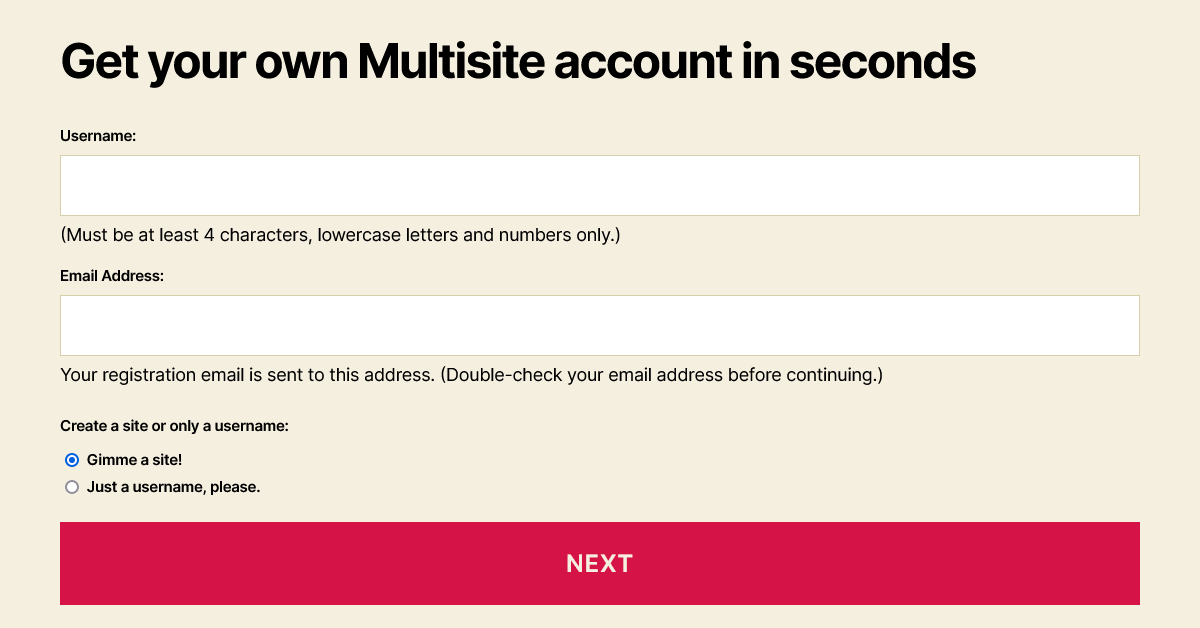
In WordPress 6.1, the forms for the wp-signup.php and wp-activate.php pages have several enhancements to both the markup and the styles.
AccessibilityAccessibilityAccessibility (commonly shortened to a11y) refers to the design of products, devices, services, or environments for people with disabilities. The concept of accessible design ensures both “direct access” (i.e. unassisted) and “indirect access” meaning compatibility with a person’s assistive technology (for example, computer screen readers). (https://en.wikipedia.org/wiki/Accessibility)-related improvements
Indicating relationships:
Fieldsets, with visible legend text, group the radio buttons.
Form field description information connects to its related field with aria-describedby.
When present, error messages also connect to their field with aria-describedby. The generic error has an ID in case custom fields should refer to that.
Preventing errors:
Required text fields have the required attribute.
The Site Name label indicates that users should enter the subdirectory only, and the Site Domain is only the desired subdomain.
The Username field’s description text now specifies that letters need to be lowercase.
Color contrast:
If the activation page has an error message, its default dark gray text color contrasts against the light background.
The default style for links within the registration page’s bordered message (.mu_alert) includes an underline and matches the text color of the rest of the message. For example, Twenty Twenty-One’s dark mode assigns a light link color, so the new style makes it readable and identifiable as a link. If a theme uses a bottom border or box-shadow on links, however, this underline could be inappropriate.
Links were sometimes difficult to see
Links match the surrounding text color, underlined, in 6.1
New elements and styles for the registration page form
The fieldset and legend elements reset margin, padding and border properties.
The legend styles are consistent with the default label font size, weight and margins.
Radio buttons are inside paragraphs without a top margin, following the legend.
Text input fields and the submit button, which were set to 100% width plus padding, are only as wide as their container now.
New account setup, step 1, allowing both sites and usernames
When people create an account:
Descriptive text for the Username and Email Address is inside paragraph tags. Because these immediately follow the input, the paragraphs do not have a top margin.
Options for creating a site and/or a username are grouped in a fieldset with a new, visible legend.
Elements with the “wp-signup-radio-button” class wrap these options’ radio buttons and their labels, and with “display: block” the options stack vertically.
Form fields for an administrator (logged in) to create a new site
When an administrator creates a new site:
A “wp-signup-blogname” container wraps the Site Name (or Site Domain) input with the domain, so themes could arrange them side-by-side.
For right-to-left languages, the domain and its input field remain in the left-to-right direction.
The “privacy-intro” fieldset uses paragraph tags inside it to retain most paragraph styles from the theme.
By wrapping “Privacy:” in a “label-heading” span, it appears above the rest of the legend. This text maintains the same default font size and weight given to the legend and label elements.
The “Yes” and “No” labels have moved next to the radio buttons, instead of inside them. Without the strong emphasis tags, these can match the default label font weight of 600. If any theme overrides the “.mu_register label.checkbox” selector to block display, that property will need updating to an inline style.
In this fieldset, “wp-signup-radio-button” containers remain next to each other, with a small margin between them.
Site activation page styles
The activation form’s container is centered, to match the signup page.
The input field and submit button cover the full width of the container, with box-sizing: border-box to prevent them from extending beyond 100%.
The form and .error selectors now include .wp-activate-container so that the styles do not affect elements in the headerHeaderThe header of your site is typically the first thing people will experience. The masthead or header art located across the top of your page is part of the look and feel of your website. It can influence a visitor’s opinion about your content and you/ your organization’s brand. It may also look different on different screen sizes. or footer.
BlockBlockBlock is the abstract term used to describe units of markup that, composed together, form the content or layout of a webpage using the WordPress editor. The idea combines concepts of what in the past may have achieved with shortcodes, custom HTML, and embed discovery into a single consistent API and user experience. themes
This is not new to 6.1, but block themes should continue to include header.php and footer.php template files for these pages. To make a header template more specific to the networknetwork(versus site, blog) pages, its filename can be header-wp-signup.php or header-wp-activate.php.
For more information about the HTMLHTMLHyperText Markup Language. The semantic scripting language primarily used for outputting content in web browsers. and CSSCSSCascading Style Sheets. changes, view tickets #40361 and #54344.
With WordPress 6.1 around the corner, this post brings together the many accessibilityAccessibilityAccessibility (commonly shortened to a11y) refers to the design of products, devices, services, or environments for people with disabilities. The concept of accessible design ensures both “direct access” (i.e. unassisted) and “indirect access” meaning compatibility with a person’s assistive technology (for example, computer screen readers). (https://en.wikipedia.org/wiki/Accessibility) improvements and fixes to look forward to that might be hard to discover amongst the details of 500+ bugs and enhancements. As always, there’s more work to be done with accessibility requiring an ongoing effort and commitment.
If you’re interested in helping with this work, please join the #accessibility channel in Make SlackSlackSlack is a Collaborative Group Chat Platform https://slack.com/. The WordPress community has its own Slack Channel at https://make.wordpress.org/chat/. (need a slack account to view) and check out how you can get involved. There are numerous ways to get involved in this important work including testing, giving accessibility feedback, and creating PRs to address feedback.
Themes
Most notably, 6.1 will see the introduction of both Twenty Twenty-Two and Twenty Twenty-Three marked as accessibility ready, making them both the first default blockBlockBlock is the abstract term used to describe units of markup that, composed together, form the content or layout of a webpage using the WordPress editor. The idea combines concepts of what in the past may have achieved with shortcodes, custom HTML, and embed discovery into a single consistent API and user experience. themes to do so (and only default block themes). This helps open up more folks to the world of block themes and broader site editing features.
Across the many screens in WP Admin, improvements abound. Changes range from improvements in color contrast on the pluginPluginA plugin is a piece of software containing a group of functions that can be added to a WordPress website. They can extend functionality or add new features to your WordPress websites. WordPress plugins are written in the PHP programming language and integrate seamlessly with WordPress. These can be free in the WordPress.org Plugin Directory https://wordpress.org/plugins/ or can be cost-based plugin from a third-party screen during recovery mode, to a switch from a text input to a textarea field in the media library, so users are better able to see the content of the field while editing.
To better call attention to the many improvements to this form, this section has been pulled out of the WP Admin Screen section. While this is a lesser used interface, the accessibility improvements are quite significant for this release, addressing many longstanding problems. This includes proper labels for required fields, explicitly associating errors with input fields so folks know what actions to take where, improved labels for radio buttons, and more.
Even though the Site and Template editors both use blocks, there are some specific accessibility challenges for these new interfaces in a site editing world. More work is needed and, if you’re keen to help, please join the FSE Outreach Program where you can go through calls for testing to provide feedback, find bugs, and more.
The navigation block continues to be a powerful and complex block, especially in the world of block themes. While there are fallbacks and an improved menu management experience to look forward to in this release, there is also a nice set of accessibility related fixes to make this necessary block usable for more people in more situations.
General Block Editor (other blocks, writing flow, components, etc)
This section covers a wide range of items including everything from improvements to additional blocks, like a focus loss fix for the Table block, and larger improvements to functionality like the Tools Panel. Specifically, the Tools Panel helps power part of the experience of using the numerous design toolspresent in more blocks for this release. It’s what you’d interact with to interact with more tools or reset changes. Improving the accessibility of this single tool has a cascading impact by improving the experience everywhere it’s used.
Comments now include proper contextual attributes for autocomplete fields, proper labels for the visible text describing required fields, and improved accessibility (and translatability) of the logged in as link.
Improving accessibilityAccessibilityAccessibility (commonly shortened to a11y) refers to the design of products, devices, services, or environments for people with disabilities. The concept of accessible design ensures both “direct access” (i.e. unassisted) and “indirect access” meaning compatibility with a person’s assistive technology (for example, computer screen readers). (https://en.wikipedia.org/wiki/Accessibility) requires ongoing effort and this post seeks to highlight some of the ways in which the project has taken action in this area of work for WordPress 6.0, set to release May 24th, 2022. If you’re interested in helping with this work, please join the #accessibility channel in Make SlackSlackSlack is a Collaborative Group Chat Platform https://slack.com/. The WordPress community has its own Slack Channel at https://make.wordpress.org/chat/. and check out how you can get involved. There’s plenty of important work to be done including testing, giving accessibility feedback, and creating PRs to address feedback.
General improvements
Some improvements didn’t fit nicely into a specific area and instead impacted the general experience of using WordPress. This includes everything from adding button text labels to the site editor to displaying the blockBlockBlock is the abstract term used to describe units of markup that, composed together, form the content or layout of a webpage using the WordPress editor. The idea combines concepts of what in the past may have achieved with shortcodes, custom HTML, and embed discovery into a single consistent API and user experience. title when removing a block:
Allow tabbing into block placeholder, allowing for actions like tabbing into a block that only contains a block inserter, such as an empty Group block.
List View continues to be an important tool, especially in a full site editing world, allowing folks to quickly navigate between complex content. In this release, tons of work was done to allow it to be more high impact for more people:
Expect various aspects of managing media to have updates from adding a “Copy URLURLA specific web address of a website or web page on the Internet, such as a website’s URL www.wordpress.org to clipboard” option to make it simpler to get the URL you need to ensuring the full permalink for an image is visible when on mobile devices.
The agenda followed in this week’s WordPress developer chat meeting.
Link to the start of the meeting on the CoreCoreCore is the set of software required to run WordPress. The Core Development Team builds WordPress. channel on the Make WordPress SlackSlackSlack is a Collaborative Group Chat Platform https://slack.com/. The WordPress community has its own Slack Channel at https://make.wordpress.org/chat/..
If you missed the WordPress 6.0 walkthrough, you can watch the video, read the transcript and the chat discussion all on the recap. This was a casual, guided walkthrough of many new features that are planned for WordPress 6.0,, and things that are likely to be released thereafter. Props to all involved.
3. Blogblog(versus network, site) posts for dev chat awareness
What’s new in Learn WordPress – find out all the resources that were published in March 2022, available freely to use
6.0 Project Board for GutenbergGutenbergThe Gutenberg project is the new Editor Interface for WordPress. The editor improves the process and experience of creating new content, making writing rich content much simpler. It uses ‘blocks’ to add richness rather than shortcodes, custom HTML etc. https://wordpress.org/gutenberg/
Give feedback on the latest call for testing on authoring an author template – call 13 (March 31, 2022). There’s also lots of useful information in this post on setting up a testing environment.
Thanks to everyone who has contributed and given their time to these posts and events.
4. Updates on the Releases
a) Next major releasemajor releaseA release, identified by the first two numbers (3.6), which is the focus of a full release cycle and feature development. WordPress uses decimaling count for major release versions, so 2.8, 2.9, 3.0, and 3.1 are sequential and comparable in scope.: 6.0
Bug Scrub schedule for 6.0 list, which is regularly updated. Help the components maintainers and all those involved in progressing tickets by joining them on a bugbugA bug is an error or unexpected result. Performance improvements, code optimization, and are considered enhancements, not defects. After feature freeze, only bugs are dealt with, with regressions (adverse changes from the previous version) being the highest priority. scrub. You can also volunteer to run a bug scrub on the specific tickets you care about!
Update from @annezazu for the release co-ordinators:
currently no known blocking issues for the release. Things are proceeding as expected.
all issues related to the walkthrough have been opened or confirmed already filed. There is work underway around how best to integrate it into the current process.
Gutenberg 13.0 RCrelease candidateOne of the final stages in the version release cycle, this version signals the potential to be a final release to the public. Also see alpha (beta). (the last Gutenberg release for inclusion in 6.0) was pushed by a few days to Friday, April 8 to allow for more time for PRs ahead of feature freeze/betaBetaA pre-release of software that is given out to a large group of users to trial under real conditions. Beta versions have gone through alpha testing in-house and are generally fairly close in look, feel and function to the final product; however, design changes often occur as part of the process. 1
the Core Editor Tech leads are feeling solid about coordinating backporting PHPPHPThe web scripting language in which WordPress is primarily architected. WordPress requires PHP 5.6.20 or higher changes and on the dev notesdev noteEach important change in WordPress Core is documented in a developers note, (usually called dev note). Good dev notes generally include a description of the change, the decision that led to this change, and a description of how developers are supposed to work with that change. Dev notes are published on Make/Core blog during the beta phase of WordPress release cycle. Publishing dev notes is particularly important when plugin/theme authors and WordPress developers need to be aware of those changes.In general, all dev notes are compiled into a Field Guide at the beginning of the release candidate phase. front
two new release squad members to help make this release a success: @ndiego stepped into the Core Editor TriagetriageThe act of evaluating and sorting bug reports, in order to decide priority, severity, and other factors. lead role and @ironprogrammer stepped into co-lead the Test role for the squad
a post is in progress/underway around specific features to help test in the lead up to 6.0. This will include items like comments loopLoopThe Loop is PHP code used by WordPress to display posts. Using The Loop, WordPress processes each post to be displayed on the current page, and formats it according to how it matches specified criteria within The Loop tags. Any HTML or PHP code in the Loop will be processed on each post. https://codex.wordpress.org/The_Loop., cover blockBlockBlock is the abstract term used to describe units of markup that, composed together, form the content or layout of a webpage using the WordPress editor. The idea combines concepts of what in the past may have achieved with shortcodes, custom HTML, and embed discovery into a single consistent API and user experience. as featured imageFeatured imageA featured image is the main image used on your blog archive page and is pulled when the post or page is shared on social media. The image can be used to display in widget areas on your site or in a summary list of posts. PR, webfonts APIAPIAn API or Application Programming Interface is a software intermediary that allows programs to interact with each other and share data in limited, clearly defined ways., and more
@afragen: needs feedback for the Plugin Dependencies feature project, aiming for 6.1. More design feedback requested, thanks to @paaljoachim for review so far.
Trac Ticket 55344 raised by @josklever. @adamsilverstein confirmed the issue, it needs a patchpatchA special text file that describes changes to code, by identifying the files and lines which are added, removed, and altered. It may also be referred to as a diff. A patch can be applied to a codebase for testing. to lazy load hidden widgets, and tests, in order to move forward.
@tylerwe: asked about potential options to integrate a text-to-speech into WordPress core for better #accessibility
Potential next steps in the discussion: (1) starting place with a pluginPluginA plugin is a piece of software containing a group of functions that can be added to a WordPress website. They can extend functionality or add new features to your WordPress websites. WordPress plugins are written in the PHP programming language and integrate seamlessly with WordPress. These can be free in the WordPress.org Plugin Directory https://wordpress.org/plugins/ or can be cost-based plugin from a third-party submission and check the Plugin Developer Handbook, (2) to aim for a WordPress core integration, it has to be entirely open-source and GPLGPLGNU General Public License. Also see copyright license. compatible, (3) bring discussion to an #accessibility meeting, (4) licensing questions, (5) provide more details on a Make post for feedback. Post dev chat: Tyler thanked @jeffpaul for further offline discussions about a potential plugin.
The Learn WordPress Social Learning MeetupMeetupAll local/regional gatherings that are officially a part of the WordPress world but are not WordCamps are organized through https://www.meetup.com/. A meetup is typically a chance for local WordPress users to get together and share new ideas and seek help from one another. Searching for ‘WordPress’ on meetup.com will help you find options in your area. has block theme discussions around different parts of theme.jsonJSONJSON, or JavaScript Object Notation, is a minimal, readable format for structuring data. It is used primarily to transmit data between a server and web application, as an alternative to XML.. @daisyo welcomed anyone interested to join.
@webcommsat: WordCamp Europe 2022 Contributor Day, June 2, 2022 – if anyone would be interesting in volunteering to help at the core tables, please contact the Core Team Reps @marybaum and @audrasjb. Is anyone already preparing items which could be used from any of the core areas? If so, please can you let them know. Previously core has had a significant presence at WCEU contributor days, broken up into its different areas.
Event confirmed post dev chat from @marybaum and @nalininonstopnewsuk: Bug scrubs for the Quick/ Bulk Edit component and the About / Help Page component will be on April 11 2022, at 20:00 UTC The scrub will include discussion on the messaging strategy for the 6.0 About Page. All welcome to join.
With 6.0 well underway, it’s time to schedule the 6.0 bugbugA bug is an error or unexpected result. Performance improvements, code optimization, and are considered enhancements, not defects. After feature freeze, only bugs are dealt with, with regressions (adverse changes from the previous version) being the highest priority. scrub sessions. These 6.0 specific ticketticketCreated for both bug reports and feature development on the bug tracker. scrubs will happen each week until the final release.
BetaBetaA pre-release of software that is given out to a large group of users to trial under real conditions. Beta versions have gone through alpha testing in-house and are generally fairly close in look, feel and function to the final product; however, design changes often occur as part of the process. Bug Scrubs Focus: issues reported from the previous beta.
Release Candidaterelease candidateOne of the final stages in the version release cycle, this version signals the potential to be a final release to the public. Also see alpha (beta). Bug Scrubs (if needed) Focus: issues reported from the previous RCrelease candidateOne of the final stages in the version release cycle, this version signals the potential to be a final release to the public. Also see alpha (beta)..
Check this schedule often, as it will change to reflect the latest information.
What about recurring component scrubs and triagetriageThe act of evaluating and sorting bug reports, in order to decide priority, severity, and other factors. sessions?
For your reference, here are some of the recurring sessions:
Design Scrub: Every Tuesday, 16:00 UTC, in the #design channel.
Have a recurring component scrub or triage session? PingPingThe act of sending a very small amount of data to an end point. Ping is used in computer science to illicit a response from a target server to test it’s connection. Ping is also a term used by Slack users to @ someone or send them a direct message (DM). Users might say something along the lines of “Ping me when the meeting starts.”@costdev or @chaion07 on SlackSlackSlack is a Collaborative Group Chat Platform https://slack.com/. The WordPress community has its own Slack Channel at https://make.wordpress.org/chat/. to have it added to this page.
Want to lead a bug scrub?
Did you know that anyone can lead a bug scrub at any time? Yes, you can!
How? Ping @costdev or @chaion07 on Slack with the day and time you’re considering as well as the report or tickets you want to scrub.
Planning one that’s 6.0-focused? Awesome! It can be added it to the schedule here. You’ll get well deserved props in Dev Chat, as well as in the #props Slack channel!
Use this list to focus on highest priority tickets first.
Use this list to focus on tickets that haven’t received love in a while.
Report 6 provides a list of open 6.0 tickets ordered by workflow.
Need a refresher on bug scrubs? Checkout Leading Bug Scrubs in the coreCoreCore is the set of software required to run WordPress. The Core Development Team builds WordPress. handbook.
Questions?
Have a question, concern, or suggestion? Want to lead a bug scrub? Please leave a comment or reach out directly to @costdev or @chaion07 on Slack.
Improving accessibilityAccessibilityAccessibility (commonly shortened to a11y) refers to the design of products, devices, services, or environments for people with disabilities. The concept of accessible design ensures both “direct access” (i.e. unassisted) and “indirect access” meaning compatibility with a person’s assistive technology (for example, computer screen readers). (https://en.wikipedia.org/wiki/Accessibility) requires ongoing effort and this post seeks to highlight some of the ways in which the project continues to make strides in this area. If you’re interested in helping with this work, please join the #accessibility channel in Make SlackSlackSlack is a Collaborative Group Chat Platform https://slack.com/. The WordPress community has its own Slack Channel at https://make.wordpress.org/chat/. and check out how you can get involved. There’s plenty of important work to be done including testing, giving accessibility feedback, and creating PRs to address feedback.
Ensuring accessibility from the start with the Navigation blockBlockBlock is the abstract term used to describe units of markup that, composed together, form the content or layout of a webpage using the WordPress editor. The idea combines concepts of what in the past may have achieved with shortcodes, custom HTML, and embed discovery into a single consistent API and user experience. [planned for 5.9]
The Navigation Block is a key milestone for the full site editing project that focuses on the experience of editing a site’s navigation menuNavigation MenuA theme feature introduced with Version 3.0. WordPress includes an easy to use mechanism for giving various control options to get users to click from one place to another on a site., both in terms of structure and design. This is a big effort that includes how to make it easy to add submenu items, how to create a responsive navigation experience, how to support multiple different inner blocks, and more. While work is underway to simplify the experience for all (ex: reducing the number of steps to add a page link), this section covers three big pieces of the work, thus far, that have had a particularly strong impact on accessibility:
The first is that when implementing submenus it was intentional that they would open on explicit click rather than focus, when navigating with a keyboard and/or screen reader. The changes made ensure that screen reader users are better informed when tabbing submenus, and can choose whether to enter them or not. Previously it was necessary to tab through every submenu item to get to the next parent item. For a deeper look into the behaviors of the navigation block and submenu items, check out these visualizations that provide more context but have not yet been fully implemented.
When building the responsive navigation feature in the navigation block, work was done to ensure the hamburger menu was built using proper modal behavior from the start. This means that when you open the responsive burger menu, the tab is kept inside the responsive menu experience until you press Escape. A quick demonstration is shown in the video displayed in this section.
Accessibility benefits with the Gallery Block Refactor [planned for 5.9]
Ahead of WordPress 5.9, an update to the Gallery Block was shipped that essentially allows you to have all of the tools you’re used to with an Image Block for each image in the Gallery Block. Thanks to this change, the Gallery Block now benefits from improved keyboard navigation and the ability to add alt text right within the block sidebarSidebarA sidebar in WordPress is referred to a widget-ready area used by WordPress themes to display information that is not a part of the main content. It is not always a vertical column on the side. It can be a horizontal rectangle below or above the content area, footer, header, or any where in the theme.. This will make it easier to both produce accessibility friendly content and for those navigating what you create when viewing your site. To learn more about the Gallery Block Refactor, you can check out this WordPress News post dedicated to it.
Other noteworthy updates/fixes [in the GutenbergGutenbergThe Gutenberg project is the new Editor Interface for WordPress. The editor improves the process and experience of creating new content, making writing rich content much simpler. It uses ‘blocks’ to add richness rather than shortcodes, custom HTML etc. https://wordpress.org/gutenberg/pluginPluginA plugin is a piece of software containing a group of functions that can be added to a WordPress website. They can extend functionality or add new features to your WordPress websites. WordPress plugins are written in the PHP programming language and integrate seamlessly with WordPress. These can be free in the WordPress.org Plugin Directory https://wordpress.org/plugins/ or can be cost-based plugin from a third-party today]
There’s a lot of high-impact changes that can be overlooked when not shown altogether. To help capture additional accessibility improvements, here are high impact changes in the editing experience:
Thank you to @joen who helped provide wonderful insights about the navigation block, including the featured video. Thank you to @kellychoffman@priethor@daisyo for the content review. Thank you to @javiarce for the lovely Gallery Block refactor screenshot.




You must be logged in to post a comment.