The WordPress coreCoreCore is the set of software required to run WordPress. The Core Development Team builds WordPress. development team builds WordPress! Follow this site for general updates, status reports, and the occasional code debate. There’s lots of ways to contribute:
Found a bugbugA bug is an error or unexpected result. Performance improvements, code optimization, and are considered enhancements, not defects. After feature freeze, only bugs are dealt with, with regressions (adverse changes from the previous version) being the highest priority.?Create a ticket in the bug tracker.
tl;dr: With the announcement of 60 hours of free usage per month per individual user, I’m looking to make wordpress/wordpress-develop usable in GitHubGitHubGitHub is a website that offers online implementation of git repositories that can easily be shared, copied and modified by other developers. Public repositories are free to host, private repositories require a paid subscription. GitHub introduced the concept of the ‘pull request’ where code changes done in branches by contributors can be reviewed and discussed before being merged be the repository owner. https://github.com/ Codespaces with an initial target audience of folks getting started with contributing to coreCoreCore is the set of software required to run WordPress. The Core Development Team builds WordPress. on a Contributor DayContributor DayContributor Days are standalone days, frequently held before or after WordCamps but they can also happen at any time. They are events where people get together to work on various areas of https://make.wordpress.org/ There are many teams that people can participate in, each with a different focus. https://2017.us.wordcamp.org/contributor-day/https://make.wordpress.org/support/handbook/getting-started/getting-started-at-a-contributor-day/.. This seems to mostly be a matter of making decisions about our container setup(s).
At the WCUS Contributor Day recently, I was one of those people who was not at all prepared with a local development environment and spent nearly the entire morning on very slow wifi waiting for various things to finish downloading and getting installed. I remembered that about a year ago a few of us had started taking a look at getting WordPress running on Codespaces and generally succeeded, but hadn’t come up with a long-term stable solution to scale to the size and needs of our community. This experience reminded me that as a project we should take a look at making it ever-easier to contribute to WordPress, and a remote development option is a good thing to have in our toolkit. This allows contributors to get started with minimal setup and without the requirement of a desktop/laptop – you could patchpatchA special text file that describes changes to code, by identifying the files and lines which are added, removed, and altered. It may also be referred to as a diff. A patch can be applied to a codebase for testing. and test WordPress from a tablet or your phone.
Disclaimer that I personally do work at GitHub today (not on the Codespaces product), and that there are other products out there as well (see this issue in the Gutenberg repo). I think we’d do well to have more than one option available, whether via adaptation or writing guides, but I’d like to start with targeting Codespaces for its integration with other parts of GitHub contributors can use as a part of their flow, such as pull requests and CI via Actions. Here is an old branch of mine that was testing out getting wordpress/wordpress-develop working as a reference.
I will be coordinating with some other WordPress maintainers as well as relevant GitHub folks, and would like to solicit the following by posting this:
Interest from anyone who’d like to help out, in particular if you have experience with remote dev environments and/or containers
Comments/questions/concerns about creating a paved path for contributors on remote dev environments
A fifth and final release candidaterelease candidateOne of the final stages in the version release cycle, this version signals the potential to be a final release to the public. Also see alpha (beta). for the WordPress 5.6 release has been packaged to mark the code freeze before release tomorrow, December 8. The following changes have been made since RCrelease candidateOne of the final stages in the version release cycle, this version signals the potential to be a final release to the public. Also see alpha (beta). 4:
Twenty Twenty One: Fix nesting of main element ([49760] for #51944)
Application Passwords: Ensure detection accounts for multisitemultisiteUsed to describe a WordPress installation with a network of multiple blogs, grouped by sites. This installation type has shared users tables, and creates separate database tables for each blog (wp_posts becomes wp_0_posts). See also network, blog, site ([49765] for #51939)
Bundled Themes: Bump all versions for release ([49766] for #51919)
You can download the package here or use the BetaBetaA pre-release of software that is given out to a large group of users to trial under real conditions. Beta versions have gone through alpha testing in-house and are generally fairly close in look, feel and function to the final product; however, design changes often occur as part of the process. Tester pluginPluginA plugin is a piece of software containing a group of functions that can be added to a WordPress website. They can extend functionality or add new features to your WordPress websites. WordPress plugins are written in the PHP programming language and integrate seamlessly with WordPress. These can be free in the WordPress.org Plugin Directory https://wordpress.org/plugins/ or can be cost-based plugin from a third-party to update your sites. Happy testing, and see you all tomorrow in #core for the WordPress 5.6 release party!
Hot on the heels of RCrelease candidateOne of the final stages in the version release cycle, this version signals the potential to be a final release to the public. Also see alpha (beta). 3, again in preparation for the final release of WordPress 5.6 on December 8, an RC 4 has been packaged and released to fix two late-discovered blocking issues:
A PHPPHPThe web scripting language in which WordPress is primarily architected. WordPress requires PHP 5.6.20 or higher 8 fatal error when cropping images ([49753] for #51937)
A conflictconflictA conflict occurs when a patch changes code that was modified after the patch was created. These patches are considered stale, and will require a refresh of the changes before it can be applied, or the conflicts will need to be resolved. between Application Passwords and HTTPHTTPHTTP is an acronym for Hyper Text Transfer Protocol. HTTP is the underlying protocol used by the World Wide Web and this protocol defines how messages are formatted and transmitted, and what actions Web servers and browsers should take in response to various commands. Basic Auth ([49754] for #51939)
A special thanks to the reporters of both issues for being able to test patches and confirm the fixes.
You can download the package here or use the BetaBetaA pre-release of software that is given out to a large group of users to trial under real conditions. Beta versions have gone through alpha testing in-house and are generally fairly close in look, feel and function to the final product; however, design changes often occur as part of the process. Tester pluginPluginA plugin is a piece of software containing a group of functions that can be added to a WordPress website. They can extend functionality or add new features to your WordPress websites. WordPress plugins are written in the PHP programming language and integrate seamlessly with WordPress. These can be free in the WordPress.org Plugin Directory https://wordpress.org/plugins/ or can be cost-based plugin from a third-party to update your sites. Happy testing, and here’s to a smooth final release!
In preparation for the final release of WordPress 5.6 on December 8, an RCrelease candidateOne of the final stages in the version release cycle, this version signals the potential to be a final release to the public. Also see alpha (beta). 3 has been packaged and released to update the editor packages and sodium_compat, along with fixes for application passwords, auto-updates, and PHPPHPThe web scripting language in which WordPress is primarily architected. WordPress requires PHP 5.6.20 or higher 8 compatibility in multisitemultisiteUsed to describe a WordPress installation with a network of multiple blogs, grouped by sites. This installation type has shared users tables, and creates separate database tables for each blog (wp_posts becomes wp_0_posts). See also network, blog, site. See all commits on Trac
You can download the package here or use the BetaBetaA pre-release of software that is given out to a large group of users to trial under real conditions. Beta versions have gone through alpha testing in-house and are generally fairly close in look, feel and function to the final product; however, design changes often occur as part of the process. Tester pluginPluginA plugin is a piece of software containing a group of functions that can be added to a WordPress website. They can extend functionality or add new features to your WordPress websites. WordPress plugins are written in the PHP programming language and integrate seamlessly with WordPress. These can be free in the WordPress.org Plugin Directory https://wordpress.org/plugins/ or can be cost-based plugin from a third-party to update your sites. Happy testing, and here’s to a smooth final release!
I will be running daily office hours for the rest of the 5.6 cycle in an effort to get more code reviewed and committed. These are to complement scheduled bug scrubs and are specifically meant to focus on reviewing and hopefully committing patches for the release cycle, not triagetriageThe act of evaluating and sorting bug reports, in order to decide priority, severity, and other factors. or future wishlist items. My hope is that by defining specific hours people who have more structured schedules will be able to carve out that time as needed, and that other committers will be able to plan to join as much as they can.
Here are the hours I have planned, noting that in the cases where they overlap with a scheduled bugbugA bug is an error or unexpected result. Performance improvements, code optimization, and are considered enhancements, not defects. After feature freeze, only bugs are dealt with, with regressions (adverse changes from the previous version) being the highest priority. scrub I will just stop early or start late.
Monday-Thursday from 16:30 UTC to 18:30 UTC
Fridays from 14:30 UTC to 16:00 UTC
Since the time shortcodeShortcodeA shortcode is a placeholder used within a WordPress post, page, or widget to insert a form or function generated by a plugin in a specific location on your site. doesn’t seem to manage just times without a date, here is when the next 5 are in your timezone (2 hours long Monday-Thursday, 1.5 hours on Friday):
I recognize that these times may not work very well for certain timezones, as I am but one person, and encourage committers in those time zones to see if there’s an opportunity there to band together and hold additional regularly scheduled code review/commit office hours.
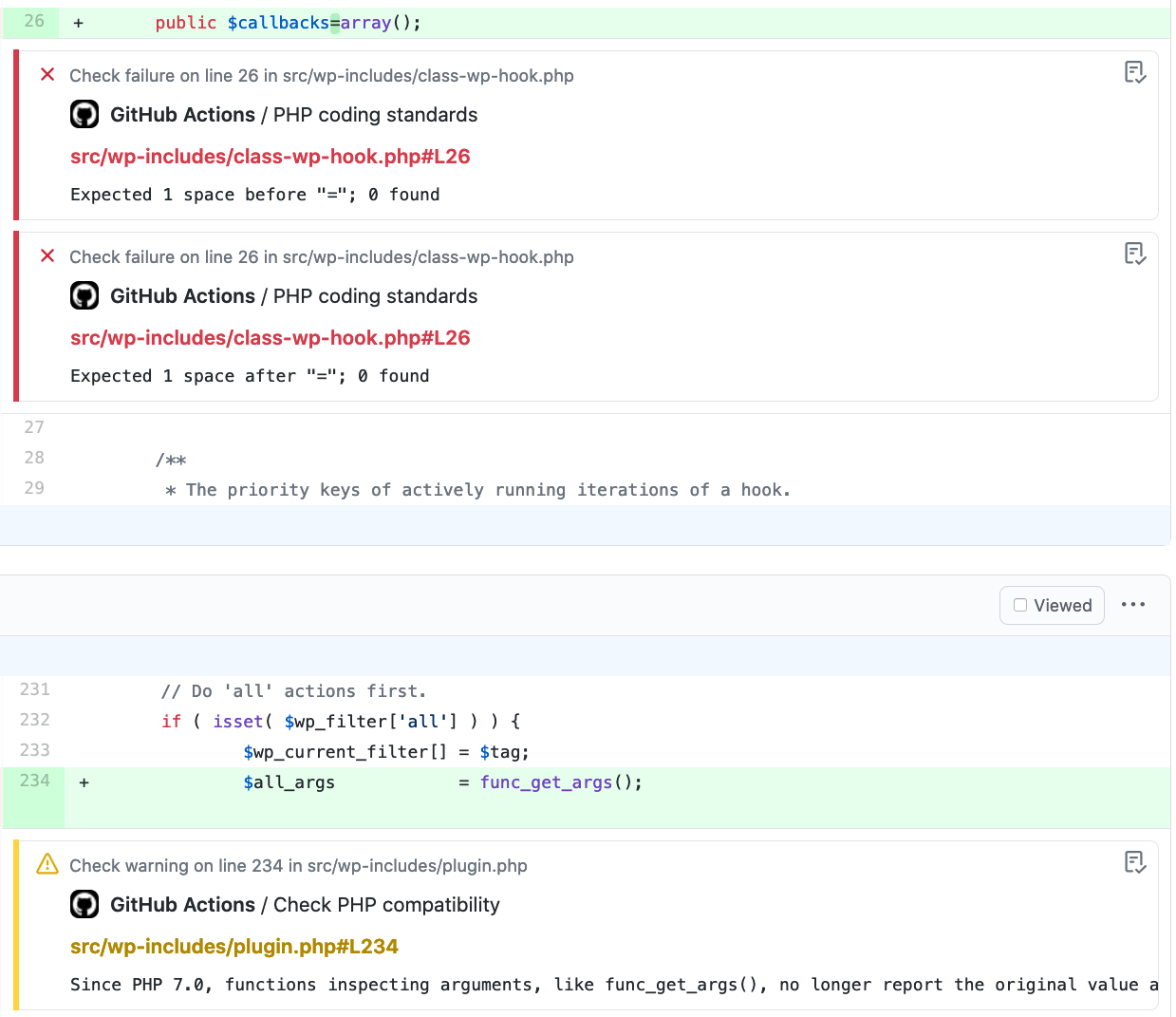
As of [49162], CoreCoreCore is the set of software required to run WordPress. The Core Development Team builds WordPress. is now running automated tests using GitHubGitHubGitHub is a website that offers online implementation of git repositories that can easily be shared, copied and modified by other developers. Public repositories are free to host, private repositories require a paid subscription. GitHub introduced the concept of the ‘pull request’ where code changes done in branches by contributors can be reviewed and discussed before being merged be the repository owner. https://github.com/ Actions as a runner, in addition to the existing Travis CI and Appveyor runs. This post is to publicize the change, document the reasoning, communicate next steps, and share how people contributing to WordPress Core will benefit.
GitHub Actions allows us to automate software workflows directly in GitHub, triggered by GitHub events. By switching, we are able to take advantage of a unified interface, inline annotations for linting issues in pull requests, the broader open sourceOpen SourceOpen Source denotes software for which the original source code is made freely available and may be redistributed and modified. Open Source **must be** delivered via a licensing model, see GPL. ecosystem building and using Actions including existing work in Gutenberg, and free availability for public repositories. Note that private repositories do use the monthly bucket of included minutes.
There is also an additional 7th workflow that is meant to leave a welcome message when it’s the contributor’s first pull request, letting them know how we use GitHub pull requests and how to link them to a TracTracAn open source project by Edgewall Software that serves as a bug tracker and project management tool for WordPress.ticketticketCreated for both bug reports and feature development on the bug tracker.. There appears to be an issue concerning permissioning when PRs are sent from forks, so this is pending.
Currently, Travis CI and Appveyor will continue to run for a transition period (ending TBD) to allow for any issues to be ironed out, and so that real-world usage data can be collected. So far, even in early testing, runs appear to be completing more quickly and with fewer/no false negatives, e.g. when Travis CI does not see the commit in the mirror yet. @desrosj will be collating run data in a spreadsheet, including but not limited to: overall build time, run time comparison (where 1:1 comparisons can be made), and frequency of false negatives.
Known next steps
Add and configure SlackSlackSlack is a Collaborative Group Chat Platform https://slack.com/. The WordPress community has its own Slack Channel at https://make.wordpress.org/chat/. notifications. In addition to sending the results of the whole build of a core commit into #core, we may also want to consider a firehose channel for PRs.
Move to GitHub badges for build status indicators – note that these are per-workflow, which is different from the single badge for the entire Travis build for a given commit. However, GitHub does report an overall status for a commit/PR, so we may be able to use that information as well.
Switch to ESLint from JSHint, as the latter does not appear to easily support inline annotations, and the former is in broader usage including in core for docs, GutenbergGutenbergThe Gutenberg project is the new Editor Interface for WordPress. The editor improves the process and experience of creating new content, making writing rich content much simpler. It uses ‘blocks’ to add richness rather than shortcodes, custom HTML etc. https://wordpress.org/gutenberg/ and many community projects. See #31823 for more – volunteers very much appreciated here.
BackportbackportA port is when code from one branch (or trunk) is merged into another branch or trunk. Some changes in WordPress point releases are the result of backporting code from trunk to the release branch. the workflow files to actively maintained older branches.
As always, please report any issues you are seeing with our GitHub Actions, as well as further ideas for use you may have. Major thanks to @desrosj for all the heavy lifting he’s done in just a couple of weeks, and to @ocean90 and @ayeshrajans for their help along the way.
Do you remember starter content? In 4.7, we continued on our quest to make it easier for users to make their sites look the way they envision, specifically by enabling themes to define a limited set of “starter content” to give users a way to quickly get set up with content that best showcases a given theme’s potential. This currently only happens in a fairly limited scenario: when live previewing a theme that includes starter content on a fresh install of WordPress. So if you’ve never noticed it, that’s completely understandable.
Starter content in 4.7 was always meant to be a step one, not the end goal or even the resting point it’s become. There are still two major things that need to be done: themes should have a unified way of showing users how best to put that theme to use in both the individual site and broader preview contexts, and sites with existing content should also be able to take advantage of these sort of “ideal content” definitions.
We are fast approaching the 5.6 beta deadline, so I don’t anticipate making a bunch of changes in coreCoreCore is the set of software required to run WordPress. The Core Development Team builds WordPress. right this moment. But, since we have a new default theme coming, we should consider what kind of starter content can both showcase the theme in a demo and also help new users get started with blockBlockBlock is the abstract term used to describe units of markup that, composed together, form the content or layout of a webpage using the WordPress editor. The idea combines concepts of what in the past may have achieved with shortcodes, custom HTML, and embed discovery into a single consistent API and user experience. patterns and other fun features – a walkthrough, if you will. Based on experience with starting content, we will want to strike a balance between showing users what they can do and adding too many individual pieces of content that have to be tracked down and removed if they don’t want it.
The theme demo part is not tied to the release schedule but does mean that I’d be looking for the WordPress.orgWordPress.orgThe community site where WordPress code is created and shared by the users. This is where you can download the source code for WordPress core, plugins and themes as well as the central location for community conversations and organization. https://wordpress.org/ theme previewer to start using starter content as a part of the content scaffolding, and that’s work that needs to be planned ASAP. This is the subject of ongoing discussion over on Meta Trac, and will likely need to be limited in scope initially to ensure that the theme review team isn’t burdened further.
For a future release, we should start exploring what it might look like to opt into importing starter content into existing sites, whether wholesale or piecewise. Many of us who work in the WordPress development/consulting space tend not to ever deal in switching between public themes on our sites, but let’s not forget that’s a significant portion of our user audience and we want to continue to enable them to not just publish but also publish in a way that matches their vision.
For the moment, a few points for discussion/clarity:
Does starter content in core need anything now to support Twenty Twenty-One features such as block patterns?
Have you implemented starter content in any of your themes?
What does it do well and what have you found yourself wishing it did?
Do you think starter content as a concept works well in the current landscape of themes that are more general purpose?
Can you believe it – we’ve made it through a State of the WordState of the WordThis is the annual report given by Matt Mullenweg, founder of WordPress at WordCamp US. It looks at what we’ve done, what we’re doing, and the future of WordPress. https://wordpress.tv/tag/state-of-the-word/. without anybody asking “when is WordPress moving to GitGitGit is a free and open source distributed version control system designed to handle everything from small to very large projects with speed and efficiency. Git is easy to learn and has a tiny footprint with lightning fast performance. Most modern plugin and theme development is being done with this version control system. https://git-scm.com/./GitHubGitHubGitHub is a website that offers online implementation of git repositories that can easily be shared, copied and modified by other developers. Public repositories are free to host, private repositories require a paid subscription. GitHub introduced the concept of the ‘pull request’ where code changes done in branches by contributors can be reviewed and discussed before being merged be the repository owner. https://github.com/?” You may, however, have caught a brief mention of issue trackers in relation to the TriagetriageThe act of evaluating and sorting bug reports, in order to decide priority, severity, and other factors. Team focus for 2019. While it’s very important to make the distinction between Git the version controlversion controlA version control system keeps track of the source code and revisions to the source code. WordPress uses Subversion (SVN) for version control, with Git mirrors for most repositories. system (VCS) and GitHub the service, as the answer usually goes, it’s understandably a continued area of interest. Manypartsof WordPress have been developed using GitHub as the central tool, along with countless plugins and themes and even the WordPress book.
Here’s the tl;dr (but you should definitely keep reading after this): Changing things up doesn’t just mean “let’s make the GitHub mirror at WordPress/wordpress-develop the canonical and migrate TracTracAn open source project by Edgewall Software that serves as a bug tracker and project management tool for WordPress. tickets over” – it means imagining what kind of change would be a net benefit to the coreCoreCore is the set of software required to run WordPress. The Core Development Team builds WordPress. development process and eventually the entire .org ecosystem, and then finding the right tools to do it.
To that end, there is a group of people including myself (@helen), @desrosj, and @omarreiss who have been and will continue to be doing more coordinated research and planning around tooling. There is no current planned timeline nor is this a priority on top of the projects already enumerated for 2019, but any potential tooling change is being evaluated as it potentially relates to those projects, especially if it can better support phase 2 of GutenbergGutenbergThe Gutenberg project is the new Editor Interface for WordPress. The editor improves the process and experience of creating new content, making writing rich content much simpler. It uses ‘blocks’ to add richness rather than shortcodes, custom HTML etc. https://wordpress.org/gutenberg/ development and the Triage Team.
This is not about chasing the latest and greatest or evangelizing a preference – it’s important to identify the goals we have for the project and what pain points we are experiencing. More specifically than “democratizing publishing”, in the core development process we should be aiming for diverse participation, a faster-but-steady pace of development, predictable and timely feedback cycles, and continuing to build user trust among users of all types. Recent pain points have been merges between branches (especially 5.0 back to trunktrunkA directory in Subversion containing the latest development code in preparation for the next major release cycle. If you are running "trunk", then you are on the latest revision.), JavaScriptJavaScriptJavaScript or JS is an object-oriented computer programming language commonly used to create interactive effects within web browsers. WordPress makes extensive use of JS for a better user experience. While PHP is executed on the server, JS executes within a user’s browser. https://www.javascript.com/. package updating, and continued participation when projects move from plugins and GitHub into core and Trac.
Roughly, here are some early thoughts on various moving pieces and potential future improvements.
Repositories and Workflows
SVNSVNSubversion, the popular version control system (VCS) by the Apache project, used by WordPress to manage changes to its codebase. repositories would need to remain, essentially flipping the mirroring process to go from Git -> SVN, making SVN (and Git) repos on .org read-only
Should the core build process continue to be handled as-is or should we move to something like Travis?
Integration of more automated testing – visual regressionregressionA software bug that breaks or degrades something that previously worked. Regressions are often treated as critical bugs or blockers. Recent regressions may be given higher priorities. A "3.6 regression" would be a bug in 3.6 that worked as intended in 3.5., end-to-end, accessibilityAccessibilityAccessibility (commonly shortened to a11y) refers to the design of products, devices, services, or environments for people with disabilities. The concept of accessible design ensures both “direct access” (i.e. unassisted) and “indirect access” meaning compatibility with a person’s assistive technology (for example, computer screen readers). (https://en.wikipedia.org/wiki/Accessibility), performance
Identification of the ideal lifecycle of an issue and process for a pull/merge request – design, docs, review, testing, etc.
Identification of contribution workflows (contributor documentation, Git branching methodology, etc.)
Security tracking and releasing
Issue Tracker
Critical for a Triage Team to review existing issues and to remain active going forward
Potential for the bulk triage process to include migrationMigrationMoving the code, database and media files for a website site from one server to another. Most typically done when changing hosting companies. from Trac to another tracker
Any issue migration should be determine on a case by case basis by the Triage Team in collaboration with component maintainers; the most automation that should happen is a tool that takes a list of Trac tickets and imports them elsewhere
Issue import process needs to take commenter attribution into account
Trac would remain in a read-only state
How are reports generated and used (i.e. is the built-in filtering capability enough in a given tool or will we need something more robust to support workflows)
Is the issue tracker still the best place for feature requests?
Implementation of issue templates
Identifying existing custom integrations and whether those problems still exist and still need to be solved after a move
Broader Ecosystem (later / bigger question mark)
Connectors from GitHub to .org pluginPluginA plugin is a piece of software containing a group of functions that can be added to a WordPress website. They can extend functionality or add new features to your WordPress websites. WordPress plugins are written in the PHP programming language and integrate seamlessly with WordPress. These can be free in the WordPress.org Plugin Directory https://wordpress.org/plugins/ or can be cost-based plugin from a third-party and theme repos (GitHub Actions-powered build+deployDeployLaunching code from a local development environment to the production web server, so that it's available to visitors.)
Automated testing – sniffers, Tide, unit tests, WP and PHPPHPThe web scripting language in which WordPress is primarily architected. WordPress requires PHP 5.6.20 or higher compat testing, Theme Check
With many new observers and contributors joining the WordPress coreCoreCore is the set of software required to run WordPress. The Core Development Team builds WordPress. project recently, let’s take a moment to review the comment guidelines for Make/Core, which can also be extended to apply to Make/Design, Make/Accessibility, and Core Trac. Overall, the majority of comments seen are positive and constructive, and it’s important to keep it that way to ensure the health of the project and its contributors.
Of particular note to editors is the comment moderation policy:
If a comment is disrespectful and/or unprofessional, it may be edited at the discretion of the core team.
Editing of a comment will be done with the approval of at least two blogblog(versus network, site) administrators. When a comment is edited, only the offending section will be edited with the intent of retaining as much of the expressed opinion. The administrators who edit the offending comment will add an editor’s note stating the reason for editing and the names of the administrators who took action. Additionally, the administrator doing the editing should retain a screenshot of the unedited comment, which can be uploaded to the Media Library on make/core, if necessary.
Comments will only be deleted when the offending comment is clearly spam that was not properly moderated.
Comments are generally approved by default, which means that email notifications are triggered immediately. Outright deletion of a comment that is anything except obvious spam will be noticed and fosters justified feelings of undue censorship and lack of consideration. Comments with issues such as information that should be privately sent to the security team, attacks on individuals, excessive use of profanity, or distractingly off-topic content should be edited with a note per the process outlined above. This serves multiple purposes: a record of what was changed and why; a visible stand by contributors that the cited behavior is not tolerated; and a public record of that particular commenter’s behavior for others to use as context.

You must be logged in to post a comment.