Autosave and Post Locking Update 2/2
A quick update on status!
Earlier this week, the initial run at the Heartbeat API went in. @azaozz is continuing to work on it, and flesh out the API further ( #23216 ).
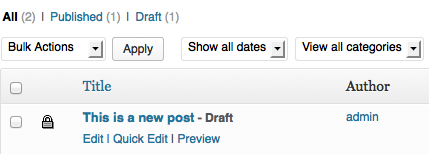
Tonight, the initial post lock view for the post listing was committed [23355] along with a temporary icon:

I took a look over an older version of the NYT plugin kindly contributed on #18515.
For discussion, I’m including a few examples of the UI/UX from the workflow included in it below.
We don’t necessarily think everything here is a good idea for core (for instance, the “get me out” buttons wouldn’t be necessary), and will likely go a different route for UI, but hoping to get a bit of discussion going regarding the UI/UX flow for the project.
Lock table:

Lock table user mouseover:

Popup for lock within Post Editor:

Ipstenu (Mika Epstein) 7:44 am on February 3, 2013 Permalink
The first icon goes better with the new icon sets that’ve been worked on. Don’t forget to loop back to that group
What user levels can break locks? Is it hierarchical so Admins can break anyone’s locks, but Editors can break admins and so on down the line?
The alert boxes greying out the screen behind is good, that reinforces ‘Hey! Someone’s in here!’ You could use that extra space to have something like …
Alex 8:13 am on February 3, 2013 Permalink
Why not open the edit screen as read-only directly? Greyed out with a warning on the top of the page which contains the “request” and “force” buttons. Content refreshes every 15 seconds and you directly see what the other is working on. Less buttons, less clutter.
Mike Schroder 6:44 pm on February 4, 2013 Permalink
Read-only on edit is what we’d initially chatted about, so I’m glad to see you agree! I really like the idea of having the warning within something similar to the current warnings, only with “request” buttons there. Do you think it’s important to be able to force immediately, or only allow that after you’ve requested, and don’t immediately get feedback?
Ipstenu (Mika Epstein) 7:19 pm on February 4, 2013 Permalink
I think… people don’t RTFM enough. A splash is annoying, but less likely to miss (never underestimate the ability of people to click on something without reading).
Alex 9:49 pm on February 4, 2013 Permalink
Grey everything out and set the input fields to read only. Then refresh them all 15 seconds with auto-save changes from the current editor.
@Mike Schroder: I think a button to force-get the right for editing would be necessary for people with a higher role. Still, the user currently editing would need to get a warning and a countdown for deciding to save or discard his work.
Alex 8:17 am on February 3, 2013 Permalink
And is it already planned to add a “x people are watching you editing this post” notification?
Andrew Ozz 6:25 pm on February 4, 2013 Permalink
Yes, we can use a modal to block access to the Edit Post screen when opening a locked post and show a “preview” of the latest content entered by the other user. In that modal we won’t need the “Read Only” button from the above screenshot and the “Get Me Out” would be “Return to [previous page]” or “Go to All Posts”.
The “Unlock” could be “Request to edit” or “Request the lock” which will pop up a notification on the other user’s screen letting them finish what they are doing and save or perhaps refuse to give up the lock.
Instead of a modal, this can also be a whole different screen. Then after the lock is transferred, the user will be able to load the post for editing. This way we will be loading everything fresh from the server.
Sam Parsons 5:04 pm on February 5, 2013 Permalink
I know this maybe off-topic, but the whole idea of the hearbeat API and even perhaps showing updates from a locked post to an editor who is about to acquire a lock makes me think about perhaps making it a full collaborative editor? Why not go that far? It seems we’re already getting close. It’s a matter of sending/receiving diffs on the long-polling method which was discussed earlier.